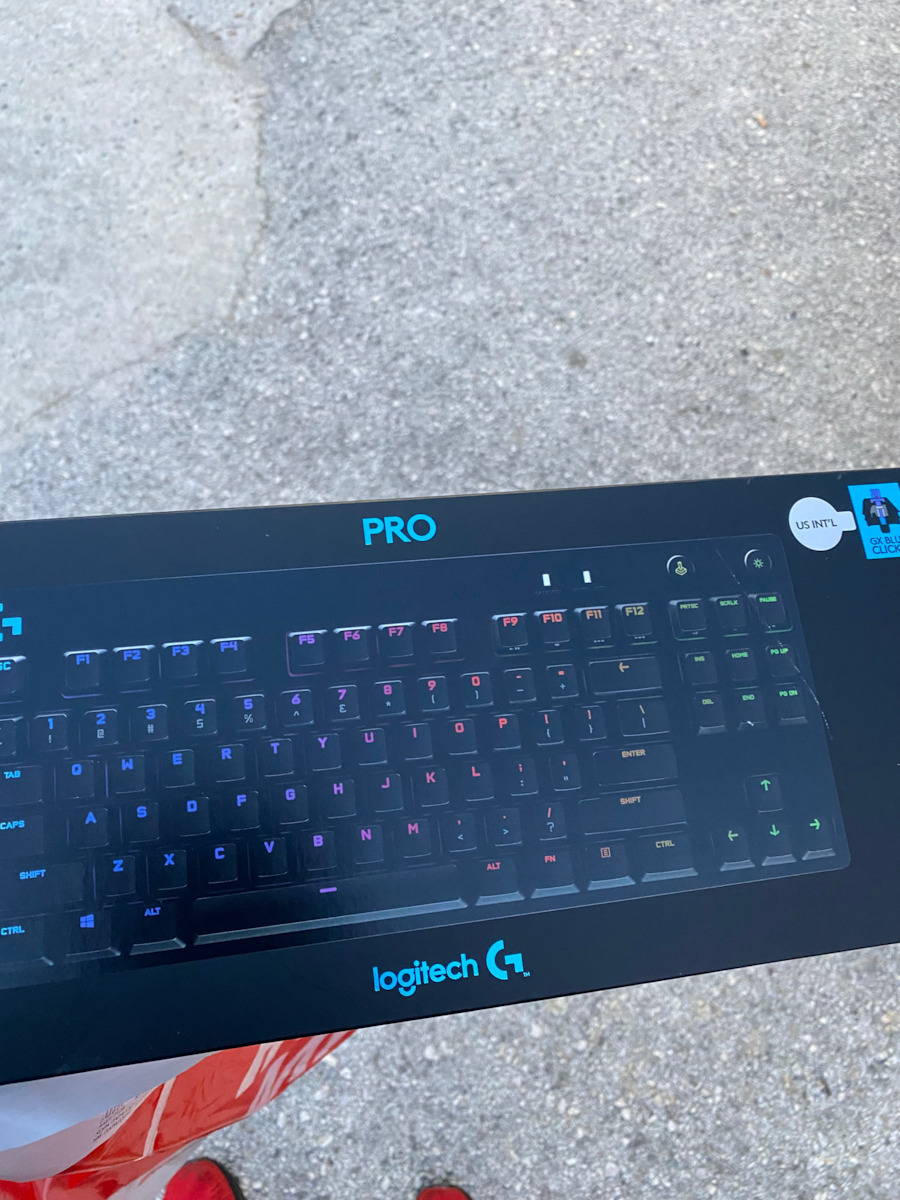
I will start with the basics: I am peculiar!
The main use of the keyboard is for typing texts.
I will begin with the negatives:
1. The keyboard has a metal plate at its base. This makes it heavy and sturdy. However, when you hit the keys and they reach their destination, in a quiet environment, you can hear a metallic noise coming from the plate, as if you were hitting a pot, which gradually fades away. Particularly annoying in tone.
2. The keys do not change color when pressed (except in a useless mode). There is no option.
You cannot, for example, use the Caps Lock key to set the key itself or any other key to change color. For me, this is a tremendous omission.
I want the keys to change color when I hold down the Shift key. It would be so convenient, but it DOES NOT happen!
I want the arrow keys to blink, while the rest have a steady color. It DOES NOT happen.
You press, for example, the accent key (";") and only the vowels light up. It DOES NOT happen.
It has one tone effect, but you cannot create something practical and substantial. A great negligence.
I emphasize: The color change must (is necessary) be possible with each key press and not just as a profile.
3. You cannot change the color of the keys when you are in a profile. For example, in the Word profile, when I press a combination of keys, the color of the keys should change... IT DOES NOT happen.
However, you can achieve it with tricks. You create 2 profiles for the same program and with a combination of keys, you cyclically change the profiles. Detailed instructions here:
https://www.youtube.com/watch?v=64rzuV7bjY8
I did it for Word and the letters have a different color in Greek and English (sometimes, due to speed, it loses the profile change). However, it would be great if it could be done in the same profile.
I hope for an upgrade.
4. The keys have slightly thick characters.
5. You cannot adjust the brightness of the backlight. The backlight is On / Off. However, it has a separate switch for this (top right corner).
6. The keys do not have Greek characters (maybe it's better that way).
7. The famous G-keys are only the F-keys, that is, F1 to F12.
Only in these keys can you assign macros and combinations.
Unacceptable!
8. Very expensive. I got it on sale for 100 € and I'm still thinking about it...
Positives:
1. It is a jewel! Beautiful with a matte finish. The plastic has a perfect finish.
2. The keys have strong backlighting. (Personally, I chose a color with reduced brightness because it tires me. I didn't choose green, but dark green, because as I mentioned above, you cannot reduce the brightness.)
3. The backlight does not spread between the keys.
Tremendous advantage!
You only focus on the letters.
(For some, this may be a disadvantage.)
4. The keys are soft, with a short travel distance.
They are almost silent with a plastic tone. That's why you can hear the unacceptable metallic noise coming from the base.
(I am thinking of opening it and adding pads so that the metal plate comes into contact with the plastic cover and reduces vibration.)
5. It is recommended for typing and is very pleasant.
It can only be compared to a very good laptop keyboard. Those that have a short travel distance and are very soft to the touch.
The removal of the numeric keypad is a great advantage because the mouse is close to the keys and the mouse-keyboard movement does not tire. I still wonder how they write with long keyboards and the mouse sitting on the other end of the desk. Besides, there are separate numeric keyboards for every possibility.
6. Each profile can run a script, which gives it great flexibility. However, this can only be done for the G-keys, that is, F1 to F12. It is unacceptable that you cannot assign any key as a G-key.
7. Heavy and sturdy, with non-slip pads and adjustable feet, with 2 options.
8. It has a separate switch and you can disable some keys from accidental presses. For example, you can disable the Win key and any other key you want when playing games.
So, is it worth it?
For €100, I am borderline saying NO.
The "frills and scents" with the colors are nice, but the essence of the matter is small and ultimately has limited capabilities.
It could, when inactive for a few minutes, automatically switch to one of the impressive effects it has. And as soon as you touch it, it returns to the profile it was on.
The "right" price for it is €80.
It would be worth €100 and more IF it could do what I describe in the negatives.
Θα ξεκινήσω από τα βασικά: Είμαι ιδιότροπος!
Η κύρια χρήση του πληκτρολογίου, είναι για να γράφω κείμενα.
Ξεκινώ από τα αρνητικά:
1. Το πληκτρολόγιο έχει στην βάση του μία μεταλλική πλάκα. Το κάνει βαρύ και στιβαρό. Όταν όμως χτυπάς τα πλήκτρα και τερματίζουν στην διαδρομή τους τότε, σε ήσυχο περιβάλλον, ακούγεται μεταλλικός θόρυβος από την πλάκα σαν να χτυπάς κατσαρόλα, ο οποίος σβήνει σταδιακά. Ιδιαίτερα ενοχλητικός σαν χροιά.
2. Τα πλήκτρα δεν αλλάζουν χώμα με το πάτημά τους (παρά μόνο σε ένα ανούσιο mode). Δεν υπάρχει επιλογή.
Δεν μπορείς με το πάτημα πχ του Caps Lock να ορίσεις να αλλάξει χρώμα το ίδιο το πλήκτρο ή και όποιο άλλο θέλεις. Για εμένα αυτό είναι τρομερή παράλειψη.
Θέλω όταν κρατώ πατημένο το Shift, τα πλήκτρα να αλλάζουν χρώμα. Τι το πιο βολικό και όμως, ΔΕΝ γίνεται!
Θέλω τα βελάκια να αναβοσβήνουν, και τα υπόλοιπα να έχουν σταθερό χρώμα. ΔΕΝ γίνεται.
Να πατάς πχ τον τόνο (πλήκτρο ";") και να φωτίζονται μόνο τα φωνήεντα. ΔΕΝ γίνεται.
Ένα τόνο εφέ έχει, αλλά κάτι πρακτικό και ουσιαστικό, δεν μπορείς να φτιάξεις. Μεγάλη αμέλεια.
Τονίζω: Η αλλαγή των χρωμάτων πρέπει (επιβάλλεται) να μπορεί να γίνει ανά πάτημα πλήκτρου και όχι μόνο σαν προφίλ.
3. Δεν μπορείς να αλλάξεις το χρώμα των πλήκτρων όταν είσαι σε ένα προφίλ. Πχ στο προφίλ Word όταν πατάω έναν συνδυασμό πλήκτρων, να μπορεί να αλλάζει το χρώμα των πλήκτρων... ΔΕΝ γίνεται.
Μπορείς όμως να το πετύχεις με αλχημείες. Φτιάχνεις 2 προφίλ για το ίδιο πρόγραμμα και με έναν συνδυασμό πλήκτρων, αλλάζεις κυκλικά τα προφίλ. Αναλυτικά εδώ:
https://www.youtube.com/watch?v=64rzuV7bjY8
Το έκανα για το Word και τα γράμματα έχουν άλλο χρώμα στα Ελληνικά και άλλο στα Αγγλικά (μερικές φορές, λόγο ταχύτητας, χάνει την αλλαγή του προφίλ) Θα ήταν όμως κορυφαίο, να γίνεται στο ίδιο προφίλ.
Ελπίζω σε αναβάθμιση.
4. Τα πλήκτρα έχουν, ολίγον, χοντροκομμένους χαρακτήρες.
5. Δεν μπορείς να αυξομειώσεις την ένταση του φωτισμού. Ο φωτισμός είναι On / Off. Έχει όμως ξεχωριστό διακόπτη για αυτό (πάνω δεξιά στην γωνία).
6. Δεν έχουν Ελληνικούς χαρακτήρες τα πλήκτρα (ίσως να είναι και καλύτερα)
7. Τα περίφημα G-keys είναι μόνο τα F-keys δηλαδή τα F1 έως F12.
Μόνο σε αυτά μπορείς να βάλεις μακροεντολές και συνδυασμούς.
Απαράδεκτο!
8. Πανάκριβο. Το πήρα προσφορά 100 € και ακόμα το σκέφτομαι...
Θετικά:
1. Είναι κόσμημα! Πανέμορφο με ματ επένδυση. Το πλαστικό τους έχει τέλειο φινίρισμα.
2. Τα πλήκτρα έχουν δυνατό φωτισμό. (προσωπικά διάλεξα χρώμα με μειωμένη φωτεινότητα γιατί με κουράζει. Δηλαδή δεν έβαλα πράσινο, αλλά σκούρο πράσινο, διότι όπως έγραψα παραπάνω δεν μπορείς να μειώσεις την φωτεινότητα.)
3. Ο φωτισμός δεν απλώνει ανάμεσα στα πλήκτρα.
Τρομερό προσόν!
Εστιάζεις μόνο στα γράμματα.
(Για μερικούς, ίσως να είναι και μειονέκτημα αυτό.)
4. Τα πλήκτρα είναι μαλακά, με μικρή διαδρομή.
Είναι σχεδόν αθόρυβα με πλαστική χροιά. Για αυτό και ακούγεται ο απαράδεκτος μεταλλικός θόρυβος, που προέρχεται από την βάση.
(Σκέφτομαι να το ανοίξω και να βάλω πατάκια, έτσι ώστε η μεταλλική πλάκα να έρχεται σε επαφή με το πλαστικό καπάκι και να μειώνει την ταλάντωση.)
5. Προτείνεται για πληκτρολόγηση και είναι πολύ ευχάριστο.
Συγκρίνεται μόνο με πολύ καλό πληκτρολόγιο από Laptop. Αυτά που έχουν μικρή διαδρομή και είναι πολύ μαλακά στην αίσθηση.
Η αφαίρεση του αριθμητικού πληκτρολογίου είναι φοβερό προσόν, διότι το ποντίκι είναι κοντά στα πλήκτρα και η κίνηση ποντίκι - πληκτρολόγιο δεν κουράζει. Ακόμα απορώ πως γράφουν με κάτι μακρουλά πληκτρολόγια και το ποντίκι να κάθεται στην άλλη άκρη του γραφείου. Άλλωστε υπάρχουν και ξεχωριστά αριθμητικά πληκτρολόγια για παν ενδεχόμενο.
6. Το κάθε προφίλ, μπορεί να τρέχει script, πράγμα που του δίνει πολύ μεγάλη ευελιξία. Και πάλι όμως, αυτό γίνεται μόνο για τα G-keys δηλαδή τα F1 έως F12. Απαράδεκτη παράλειψη το να μην μπορείς να ορίσεις οποιοδήποτε πλήκτρο ως G-key.
7. Βαρύ και στιβαρό, με πατάκια που δεν γλιστρούν και ποδαράκια που του αλλάζουν το ύψος, με 2 επιλογές.
8. Έχει ξεχωριστό διακόπτη και μπορείς να ακυρώσεις μερικά πλήκτρα από λάθος πάτημα. Πχ ακυρώνεις το πλήκτρο Win και όποιο άλλο θέλεις, όταν παίζεις παιχνίδια.
Αξίζει λοιπόν;
Για τα 100€ είμαι οριακά στο ΟΧΙ.
Ωραία τα "φρου - φρου και τα αρώματα" με τα χρώματα, αλλά η ουσία του πράγματος είναι μικρή και τελικά έχει περιορισμένες δυνατότητες.
Θα μπορούσε, όταν μένει ανενεργό για κάποια λεπτά, να γυρίζει μόνο του σε κάποιο εντυπωσιακό εφέ από τα δεκάδες που έχει. Και μόλις το αγγίξεις να επιστρέφει στο προφίλ που ήταν.
Η "σωστή" τιμή του, είναι στα 80€.
100 € και παραπάνω θα άξιζε, ΑΝ μπορούσε να κάνει αυτά που περιγράφω στα αρνητικά.