84
31
€
Delivery
by Mon, 02 Nov
14,00 €
shipping cost
Sent from Greece
From
ΝΕTCORE
Shipping costs and delivery speed are calculated based on the delivery location.


Key features:
Top specs
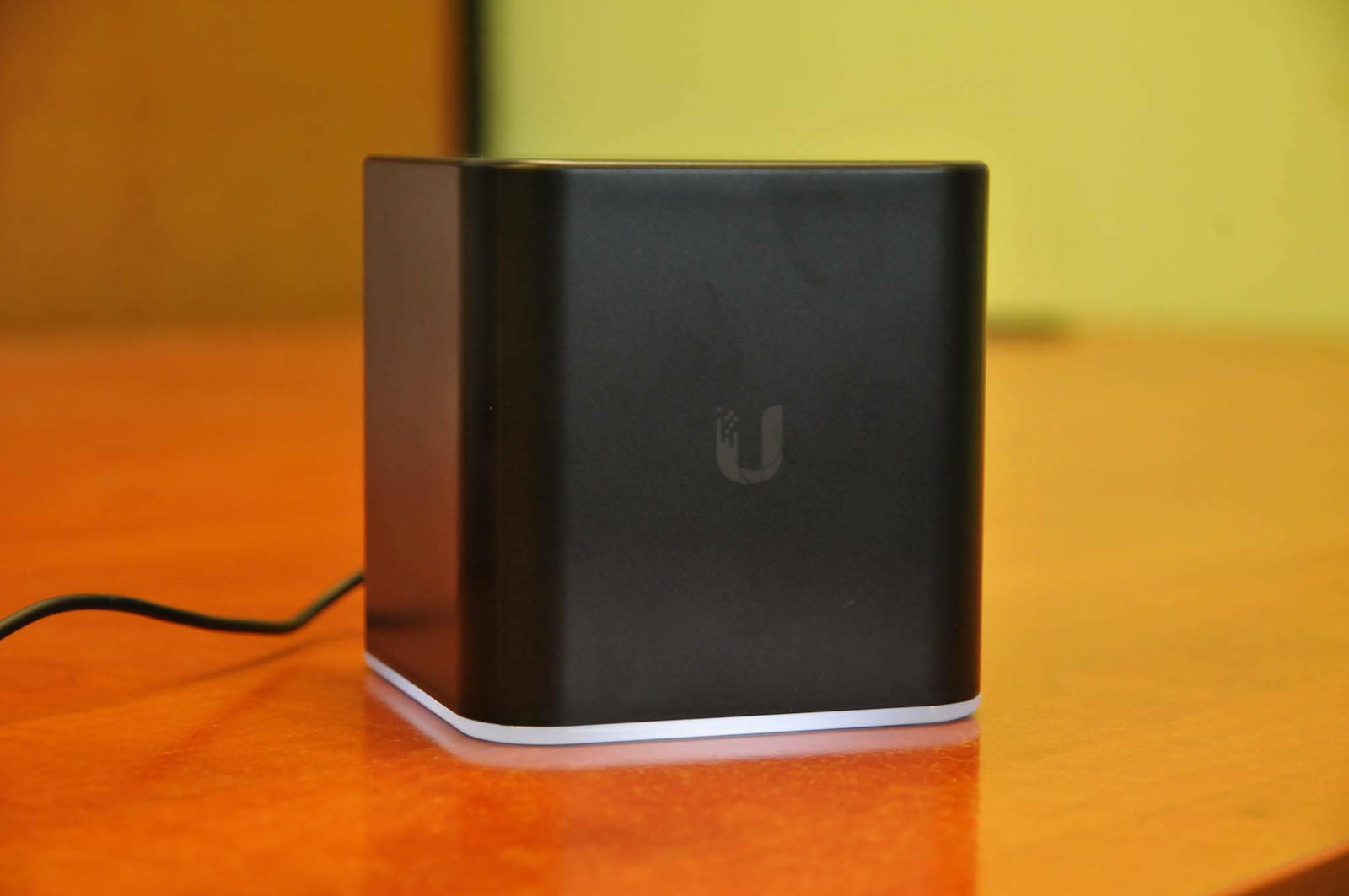
Το σημείο πρόσβασης Ubiquiti airCube AC παρέχει ασύρματη σύνδεση Wi‑Fi 5 διπλής ζώνης, με ταχύτητα έως 1200 Mbps. Έχει κεραία 2x2 MIMO ενσωματωμένη στο περίβλημα και υποστηρίζει διαβίβαση τροφοδοσίας 24 V PoE, ώστε η τροφοδοσία να μεταφέρεται μέσω καλωδίου Ethernet.
Έχει σχεδιαστεί για οικιακή χρήση και συνεργάζεται με συσκευές airMAX CPE. Η διαμόρφωση και η διαχείριση του δικτύου γίνονται μέσω UNMS, από πρόγραμμα περιήγησης ή από εφαρμογή για Android και iOS.
Specifications are collected from official manufacturer websites. Please verify the specifications before proceeding with your final purchase. If you notice any problem you can report it here.
Users generally appreciate the easy installation and setup, as well as the strong, stable range without frequent disconnections. It is considered suitable for home use, streaming, and online gaming. However, some feel it offers too few features for more demanding needs and is expensive for what it provides.

One of the best devices that have passed through my hands. Like all Access Points, it has a configuration process. We connect it with a network cable to a PC-Laptop, pay attention to the network icon - in the properties of the IPV4 option, make sure all options are set to automatic. We type the IP address of the AP in the browser and change the AP's Static IP if needed, or we can define the range of addresses - devices that are allowed to connect to the AP. Then we place it where we want and download the UISP App from Google Play or the App Store. The application is already set to find the Ubiquity device in the area. Then you simply play with the application.
I have set it to provide both 2.4Ghz and 5Ghz. It is fast, stable without disconnections.
It is also very elegant and compact without any unnecessary antennas. The WiFi range is exceptional, I have provided WiFi to the neighboring apartment easily and with excellent speed.
It also has a thin halo of white light at its base indicating that it is connected and operational. Honestly, you can't tell it's an AP. It looks more like an air freshener device.
I would buy it again with my eyes closed. After all, Ubiquity's quality is a guarantee in itself.
31/12/2021
The AirCube continues to provide excellent WiFi in the living room.
I also chose to perform all the firmware updates that I had deliberately skipped because I wanted to test its functionality and performance.
I went to https://www.ui.com/download/accessories/aircube, selected the AirCube dual band (AirCube AC), and downloaded all the firmware updates. These updates added a bunch of features and customization options to the AirCube without hindering its previously very good performance.
1.
Μία από τις καλύτερες συσκευές που έχουν περάσει από τα χέρια μου. Όπως όλα τα Access Points έχει μια διαδικασία στην παραμετροποίησή του. Το συνδέουμε με καλώδιο δικτύου σε ένα PC-Laptop, προσέχουμε στο εικονίδιο του δικτύου - στις ιδιότητες της επιλογής IPV4 όλες οι επιλογές να είναι στο αυτόματο. Πληκτρολογούμε την διεύθυνση IP του AP στον browser και αλλάζουμε την Static IP του AP αν χρειάζεται ή μπορούμε να ορίσουμε το εύρος των διευθύνσεων - συσκευών που δίνουμε άδεια να συνδεθούν στο AP. Μετά το βάζουμε στο σημείο που θέλουμε και κατεβάζουμε το UISP App από το Google Play ή το App Store. Η εφαρμογή είναι ήδη σεταρισμένη για να βρει την συσκευή της Ubiquity που βρίσκεται στον χώρο. Μετά απλά παίζεις με την εφαρμογή.
Το έχω ρυθμίσει να δίνει και σε 2.4Ghz και σε 5Ghz. Είναι γρήγορο, σταθερό χωρίς αποσυνδέσεις.
Είναι επίσης κομψότατο και μαζεμένο χωρίς να περισσεύουν κεραίες από πουθενά. Η εμβέλεια του WIfi εξαιρετική, έχω δώσει wifi και στο διπλανό διαμέρισμα εύκολα και με εξαιρετική ταχύτητα.
Έχει επίσης ένα λεπτο στεφάνι από λευκό φως στη βάση του που δηλώνει πως είναι συνδεδεμένο και σε λειτουργία. Ειλικρινά δεν καταλαβαίνεις πως είναι AP. Μοιάζει μάλλον για συσκευή αρώματος χώρου.
Θα το αγόραζα ξανά με κλειστά μάτια. Άλλωστε η ποιότητα της Ubiquity είναι από μόνη της εγγύηση.
31/12/2021
To AirCube εξακολουθεί να δίνει άψογο WiFi στο σαλόνι.
Επέλεξα επίσης να κάνω όλα τα updates στο Firmware τα οποία είχα παραλείψει επίτηδες, γιατί ήθελα να το δοκιμάσω στην λειτουργία του και τις επιδόσεις του.
Μπήκα στο https://www.ui.com/download/accessories/aircube , επέλεξα το AirCube dual band (AirCube AC) και κατέβασα όλα τα firmware updates. Τα εν λόγω updates πρόσθεσαν ένα σωρό λειτουργίες και δυνατότητες παραμετροποίησης στο AirCube, χωρίς να εμποδίσουν στο ελάχιστο την μέχρι τώρα πολύ καλή λειτουργία του.
In a few words: it is a premium product for a simple user. If it is intended for simple use without unnecessary and fancy features and a click above the budget for something more valuable, then it is also the right purchase. Easy installation, personally I set it up without any problem using the UNMS app (although the web interface is similarly easy), without disconnections, with its own power brick, minimal design. However, compared to other APs and the price range, what it offers is minimal. But for what it offers, it does its job flawlessly.
Με λίγα λόγια: είναι ένα premium προϊόν για έναν απλό χρήστη. Αν προορίζεται για απλή χρήση χωρίς περιττές και ψαγμένες λειτουργίες και ενα κλικ πιο πάνω στο budget για κάτι πιο αξιόλογο τότε είναι και η σωστή αγορά. Εύκολη εγκατάσταση, προσωπικά το ρύθμισα χωρίς πρόβλημα με το app της UNMS (αν και με το web interface παρόμοια ευκολία), χωρίς αποσυνδέσεις, με δικό του brick για τροφοδοσία, minimal design. Συγκριτικά ωστόσο με τα υπόλοιπα AP και το εύρος τιμής, αυτά που δίνει είναι ελάχιστα. Γι αυτά που δίνει δε, την δουλειά του την κάνει άψογα.
What it offers makes it excessively good, lightning-fast, and above all, consistently without annoying disconnections, etc.
However, I think it is expensive for what it offers.
For completely amateur use, it is excellent and has a very good range.
But when the demands increase even slightly, such as blacklisting/whitelisting, then you will inevitably have to look for another product and regret the money you spent on it.
Αυτά που προσφέρει τα κάνει υπερβολικά καλά, αστραπιαία και προπάντων σταθερά χωρίς ενοχλητικές αποσυνδέσεις κλπ.
Όμως για αυτά που προσφέρει νομίζω ότι είναι ακριβό.
Για εντελώς ερασιτεχνική χρήση, είναι εξαιρετικό και με πολύ καλή εμβέλεια.
Όταν όμως ανέβουν οι απαιτήσεις έστω και στο ελάχιστο, όπως πχ blacklist/whitelist τότε αναγκαστικά θα πρέπει να κοιτάξεις για κάποιο άλλο προϊόν και θα κλαις τα χρήματα που έδωσες για αυτό.
Excellent device, huge signal range, continuous updates directly from the online menu, easy installation and configuration. It's worth every euro someone will spend. Together with the Ubiquiti edgerouter x, bufferbloat disappeared and pings dropped dramatically, resulting in enjoying online gaming, Netflix, and the internet in general without any interruptions.
Εξαιρετική συσκευή,τεράστα εμβέλεια σήματος,συνεχείς αναβαθμίσεις απευθείας απο το μενού online,πανεύκολη εγκατάσταση και παραμετροποίηση.Αξίζει το κάθε ευρώ που θα δώσει κάποιος.Μαζί με το Ubiquiti edgerouter x ,εξαφανίστηκε το bufferbloat και τα pings κατέβηκαν δραματικά,με αποτέλεσμα να χαίρεσι το online gaming,netflix ,και γενικά το internet χωρίς κολλήματα.
From the best, if not the best, for home use. After many trials with various APs, I ended up with this one and I have settled down.
Από τα καλύτερα αν όχι το καλύτερο για home-use. Μετά από πολλές δοκιμές με διάφορα AP κατέληξα σε αυτό και έχω ησυχάσει.
The product is very fast in its installation. It is one of the easiest to connect in its category. Much easier than many products of the company. The range is fantastic as the company knows very well how to handle the surrounding Wi-Fi networks and adapt so as not to receive interference. The speeds I receive from the AirCube are very stable throughout almost the entire range. I would highly recommend it to anyone, but be careful! The product is not a modem. That is, it does not have DSL in.
P.S. Because the photos here do not show them. It has 4 Ethernet ports, two of which are regular, one is for input while the other supports PoE and is output. Now for more information, visit https://www.ubnt.com/accessories/aircube/
Το προιόν είναι ταχύτατο στην εγκατάστασή του. Είναι ένα από τα πιό εύκολα στη συνδεσή του στην κατηγορία του. Πολύ ευκολότερο από πολλά προιόντα της εταιρίας.Η εμβέλεια είναι φανταστική καθώς η εταιρία γνωρίζει πολύ καλά πώς να χειρείζεται τα γύρω Wi-Fi networks και να προσαρμόζεται ώστε να μην δέχεται παρεμβολές.Οι ταχύτητες που δέχομαι απο το AirCube είναι πολύ σταθερές σε όλη σχεδόν την εμβέλεια. Θα το συνηστούσα ανεπιφύλλακτα σε οποιονδήποτε όμως προσοχή! Το προιόν δέν είναι modem . Δηλαδή δεν έχει dsl in.
Υ.Γ. Επειδή οι φωτογραφίες εδώ δεν τα δείχνουν. Έχει 4 ethernet ports εκ των οποίων τα δύο είναι κανονικά , τον ένα είναι για input ενώ το άλλο υποστιρίζει PoE και είναι output. Τώρα για περισσότερες πληροφορίες https://www.ubnt.com/accessories/aircube/
The most useless thing circulating in access points. I will only say that it took me a whole day to manage to make it find an IP, when I should have just plugged it in and it should have worked. Don't be fooled by the design and waste your money on this, get something else!
Οτι πιο αχρηστο κυκλοφορει σε access point. Θα πω μονο οτι μου πηρε μια μερα καταφερω να το κανω να βρει ip, ενω θα επρεπε να το βαλω απλα στην πριζα και να δουλευει. Μην ξεγελαστειτε απ το design και πεταξετε τα λεφτα σας σ αυτο, παρτε οτιδηποτε αλλο!
Verified purchase
Verified purchase
One of the best devices that have passed through my hands. Like all Access Points, it has a configuration process. We connect it with a network cable to a PC-Laptop, pay attention to the network icon - in the properties of the IPV4 option, make sure all options are set to automatic. We type the IP address of the AP in the browser and change the AP's Static IP if needed, or we can define the range of addresses - devices that are allowed to connect to the AP. Then we place it where we want and download the UISP App from Google Play or the App Store. The application is already set to find the Ubiquity device in the area. Then you simply play with the application.
I have set it to provide both 2.4Ghz and 5Ghz. It is fast, stable without disconnections.
It is also very elegant and compact without any unnecessary antennas. The WiFi range is exceptional, I have provided WiFi to the neighboring apartment easily and with excellent speed.
It also has a thin halo of white light at its base indicating that it is connected and operational. Honestly, you can't tell it's an AP. It looks more like an air freshener device.
I would buy it again with my eyes closed. After all, Ubiquity's quality is a guarantee in itself.
31/12/2021
The AirCube continues to provide excellent WiFi in the living room.
I also chose to perform all the firmware updates that I had deliberately skipped because I wanted to test its functionality and performance.
I went to https://www.ui.com/download/accessories/aircube, selected the AirCube dual band (AirCube AC), and downloaded all the firmware updates. These updates added a bunch of features and customization options to the AirCube without hindering its previously very good performance.
1.
Μία από τις καλύτερες συσκευές που έχουν περάσει από τα χέρια μου. Όπως όλα τα Access Points έχει μια διαδικασία στην παραμετροποίησή του. Το συνδέουμε με καλώδιο δικτύου σε ένα PC-Laptop, προσέχουμε στο εικονίδιο του δικτύου - στις ιδιότητες της επιλογής IPV4 όλες οι επιλογές να είναι στο αυτόματο. Πληκτρολογούμε την διεύθυνση IP του AP στον browser και αλλάζουμε την Static IP του AP αν χρειάζεται ή μπορούμε να ορίσουμε το εύρος των διευθύνσεων - συσκευών που δίνουμε άδεια να συνδεθούν στο AP. Μετά το βάζουμε στο σημείο που θέλουμε και κατεβάζουμε το UISP App από το Google Play ή το App Store. Η εφαρμογή είναι ήδη σεταρισμένη για να βρει την συσκευή της Ubiquity που βρίσκεται στον χώρο. Μετά απλά παίζεις με την εφαρμογή.
Το έχω ρυθμίσει να δίνει και σε 2.4Ghz και σε 5Ghz. Είναι γρήγορο, σταθερό χωρίς αποσυνδέσεις.
Είναι επίσης κομψότατο και μαζεμένο χωρίς να περισσεύουν κεραίες από πουθενά. Η εμβέλεια του WIfi εξαιρετική, έχω δώσει wifi και στο διπλανό διαμέρισμα εύκολα και με εξαιρετική ταχύτητα.
Έχει επίσης ένα λεπτο στεφάνι από λευκό φως στη βάση του που δηλώνει πως είναι συνδεδεμένο και σε λειτουργία. Ειλικρινά δεν καταλαβαίνεις πως είναι AP. Μοιάζει μάλλον για συσκευή αρώματος χώρου.
Θα το αγόραζα ξανά με κλειστά μάτια. Άλλωστε η ποιότητα της Ubiquity είναι από μόνη της εγγύηση.
31/12/2021
To AirCube εξακολουθεί να δίνει άψογο WiFi στο σαλόνι.
Επέλεξα επίσης να κάνω όλα τα updates στο Firmware τα οποία είχα παραλείψει επίτηδες, γιατί ήθελα να το δοκιμάσω στην λειτουργία του και τις επιδόσεις του.
Μπήκα στο https://www.ui.com/download/accessories/aircube , επέλεξα το AirCube dual band (AirCube AC) και κατέβασα όλα τα firmware updates. Τα εν λόγω updates πρόσθεσαν ένα σωρό λειτουργίες και δυνατότητες παραμετροποίησης στο AirCube, χωρίς να εμποδίσουν στο ελάχιστο την μέχρι τώρα πολύ καλή λειτουργία του.
In a few words: it is a premium product for a simple user. If it is intended for simple use without unnecessary and fancy features and a click above the budget for something more valuable, then it is also the right purchase. Easy installation, personally I set it up without any problem using the UNMS app (although the web interface is similarly easy), without disconnections, with its own power brick, minimal design. However, compared to other APs and the price range, what it offers is minimal. But for what it offers, it does its job flawlessly.
Με λίγα λόγια: είναι ένα premium προϊόν για έναν απλό χρήστη. Αν προορίζεται για απλή χρήση χωρίς περιττές και ψαγμένες λειτουργίες και ενα κλικ πιο πάνω στο budget για κάτι πιο αξιόλογο τότε είναι και η σωστή αγορά. Εύκολη εγκατάσταση, προσωπικά το ρύθμισα χωρίς πρόβλημα με το app της UNMS (αν και με το web interface παρόμοια ευκολία), χωρίς αποσυνδέσεις, με δικό του brick για τροφοδοσία, minimal design. Συγκριτικά ωστόσο με τα υπόλοιπα AP και το εύρος τιμής, αυτά που δίνει είναι ελάχιστα. Γι αυτά που δίνει δε, την δουλειά του την κάνει άψογα.
What it offers makes it excessively good, lightning-fast, and above all, consistently without annoying disconnections, etc.
However, I think it is expensive for what it offers.
For completely amateur use, it is excellent and has a very good range.
But when the demands increase even slightly, such as blacklisting/whitelisting, then you will inevitably have to look for another product and regret the money you spent on it.
Αυτά που προσφέρει τα κάνει υπερβολικά καλά, αστραπιαία και προπάντων σταθερά χωρίς ενοχλητικές αποσυνδέσεις κλπ.
Όμως για αυτά που προσφέρει νομίζω ότι είναι ακριβό.
Για εντελώς ερασιτεχνική χρήση, είναι εξαιρετικό και με πολύ καλή εμβέλεια.
Όταν όμως ανέβουν οι απαιτήσεις έστω και στο ελάχιστο, όπως πχ blacklist/whitelist τότε αναγκαστικά θα πρέπει να κοιτάξεις για κάποιο άλλο προϊόν και θα κλαις τα χρήματα που έδωσες για αυτό.
Excellent device, huge signal range, continuous updates directly from the online menu, easy installation and configuration. It's worth every euro someone will spend. Together with the Ubiquiti edgerouter x, bufferbloat disappeared and pings dropped dramatically, resulting in enjoying online gaming, Netflix, and the internet in general without any interruptions.
Εξαιρετική συσκευή,τεράστα εμβέλεια σήματος,συνεχείς αναβαθμίσεις απευθείας απο το μενού online,πανεύκολη εγκατάσταση και παραμετροποίηση.Αξίζει το κάθε ευρώ που θα δώσει κάποιος.Μαζί με το Ubiquiti edgerouter x ,εξαφανίστηκε το bufferbloat και τα pings κατέβηκαν δραματικά,με αποτέλεσμα να χαίρεσι το online gaming,netflix ,και γενικά το internet χωρίς κολλήματα.
From the best, if not the best, for home use. After many trials with various APs, I ended up with this one and I have settled down.
Από τα καλύτερα αν όχι το καλύτερο για home-use. Μετά από πολλές δοκιμές με διάφορα AP κατέληξα σε αυτό και έχω ησυχάσει.
Το σημείο πρόσβασης Ubiquiti airCube AC παρέχει ασύρματη σύνδεση Wi‑Fi 5 διπλής ζώνης, με ταχύτητα έως 1200 Mbps. Έχει κεραία 2x2 MIMO ενσωματωμένη στο περίβλημα και υποστηρίζει διαβίβαση τροφοδοσίας 24 V PoE, ώστε η τροφοδοσία να μεταφέρεται μέσω καλωδίου Ethernet.
Έχει σχεδιαστεί για οικιακή χρήση και συνεργάζεται με συσκευές airMAX CPE. Η διαμόρφωση και η διαχείριση του δικτύου γίνονται μέσω UNMS, από πρόγραμμα περιήγησης ή από εφαρμογή για Android και iOS.
Specifications are collected from official manufacturer websites. Please verify the specifications before proceeding with your final purchase. If you notice any problem you can report it here.
Users generally appreciate the easy installation and setup, as well as the strong, stable range without frequent disconnections. It is considered suitable for home use, streaming, and online gaming. However, some feel it offers too few features for more demanding needs and is expensive for what it provides.
One of the best devices that have passed through my hands. Like all Access Points, it has a configuration process. We connect it with a network cable to a PC-Laptop, pay attention to the network icon - in the properties of the IPV4 option, make sure all options are set to automatic. We type the IP address of the AP in the browser and change the AP's Static IP if needed, or we can define the range of addresses - devices that are allowed to connect to the AP. Then we place it where we want and download the UISP App from Google Play or the App Store. The application is already set to find the Ubiquity device in the area. Then you simply play with the application.
I have set it to provide both 2.4Ghz and 5Ghz. It is fast, stable without disconnections.
It is also very elegant and compact without any unnecessary antennas. The WiFi range is exceptional, I have provided WiFi to the neighboring apartment easily and with excellent speed.
It also has a thin halo of white light at its base indicating that it is connected and operational. Honestly, you can't tell it's an AP. It looks more like an air freshener device.
I would buy it again with my eyes closed. After all, Ubiquity's quality is a guarantee in itself.
31/12/2021
The AirCube continues to provide excellent WiFi in the living room.
I also chose to perform all the firmware updates that I had deliberately skipped because I wanted to test its functionality and performance.
I went to https://www.ui.com/download/accessories/aircube, selected the AirCube dual band (AirCube AC), and downloaded all the firmware updates. These updates added a bunch of features and customization options to the AirCube without hindering its previously very good performance.
1.
Μία από τις καλύτερες συσκευές που έχουν περάσει από τα χέρια μου. Όπως όλα τα Access Points έχει μια διαδικασία στην παραμετροποίησή του. Το συνδέουμε με καλώδιο δικτύου σε ένα PC-Laptop, προσέχουμε στο εικονίδιο του δικτύου - στις ιδιότητες της επιλογής IPV4 όλες οι επιλογές να είναι στο αυτόματο. Πληκτρολογούμε την διεύθυνση IP του AP στον browser και αλλάζουμε την Static IP του AP αν χρειάζεται ή μπορούμε να ορίσουμε το εύρος των διευθύνσεων - συσκευών που δίνουμε άδεια να συνδεθούν στο AP. Μετά το βάζουμε στο σημείο που θέλουμε και κατεβάζουμε το UISP App από το Google Play ή το App Store. Η εφαρμογή είναι ήδη σεταρισμένη για να βρει την συσκευή της Ubiquity που βρίσκεται στον χώρο. Μετά απλά παίζεις με την εφαρμογή.
Το έχω ρυθμίσει να δίνει και σε 2.4Ghz και σε 5Ghz. Είναι γρήγορο, σταθερό χωρίς αποσυνδέσεις.
Είναι επίσης κομψότατο και μαζεμένο χωρίς να περισσεύουν κεραίες από πουθενά. Η εμβέλεια του WIfi εξαιρετική, έχω δώσει wifi και στο διπλανό διαμέρισμα εύκολα και με εξαιρετική ταχύτητα.
Έχει επίσης ένα λεπτο στεφάνι από λευκό φως στη βάση του που δηλώνει πως είναι συνδεδεμένο και σε λειτουργία. Ειλικρινά δεν καταλαβαίνεις πως είναι AP. Μοιάζει μάλλον για συσκευή αρώματος χώρου.
Θα το αγόραζα ξανά με κλειστά μάτια. Άλλωστε η ποιότητα της Ubiquity είναι από μόνη της εγγύηση.
31/12/2021
To AirCube εξακολουθεί να δίνει άψογο WiFi στο σαλόνι.
Επέλεξα επίσης να κάνω όλα τα updates στο Firmware τα οποία είχα παραλείψει επίτηδες, γιατί ήθελα να το δοκιμάσω στην λειτουργία του και τις επιδόσεις του.
Μπήκα στο https://www.ui.com/download/accessories/aircube , επέλεξα το AirCube dual band (AirCube AC) και κατέβασα όλα τα firmware updates. Τα εν λόγω updates πρόσθεσαν ένα σωρό λειτουργίες και δυνατότητες παραμετροποίησης στο AirCube, χωρίς να εμποδίσουν στο ελάχιστο την μέχρι τώρα πολύ καλή λειτουργία του.
In a few words: it is a premium product for a simple user. If it is intended for simple use without unnecessary and fancy features and a click above the budget for something more valuable, then it is also the right purchase. Easy installation, personally I set it up without any problem using the UNMS app (although the web interface is similarly easy), without disconnections, with its own power brick, minimal design. However, compared to other APs and the price range, what it offers is minimal. But for what it offers, it does its job flawlessly.
Με λίγα λόγια: είναι ένα premium προϊόν για έναν απλό χρήστη. Αν προορίζεται για απλή χρήση χωρίς περιττές και ψαγμένες λειτουργίες και ενα κλικ πιο πάνω στο budget για κάτι πιο αξιόλογο τότε είναι και η σωστή αγορά. Εύκολη εγκατάσταση, προσωπικά το ρύθμισα χωρίς πρόβλημα με το app της UNMS (αν και με το web interface παρόμοια ευκολία), χωρίς αποσυνδέσεις, με δικό του brick για τροφοδοσία, minimal design. Συγκριτικά ωστόσο με τα υπόλοιπα AP και το εύρος τιμής, αυτά που δίνει είναι ελάχιστα. Γι αυτά που δίνει δε, την δουλειά του την κάνει άψογα.
What it offers makes it excessively good, lightning-fast, and above all, consistently without annoying disconnections, etc.
However, I think it is expensive for what it offers.
For completely amateur use, it is excellent and has a very good range.
But when the demands increase even slightly, such as blacklisting/whitelisting, then you will inevitably have to look for another product and regret the money you spent on it.
Αυτά που προσφέρει τα κάνει υπερβολικά καλά, αστραπιαία και προπάντων σταθερά χωρίς ενοχλητικές αποσυνδέσεις κλπ.
Όμως για αυτά που προσφέρει νομίζω ότι είναι ακριβό.
Για εντελώς ερασιτεχνική χρήση, είναι εξαιρετικό και με πολύ καλή εμβέλεια.
Όταν όμως ανέβουν οι απαιτήσεις έστω και στο ελάχιστο, όπως πχ blacklist/whitelist τότε αναγκαστικά θα πρέπει να κοιτάξεις για κάποιο άλλο προϊόν και θα κλαις τα χρήματα που έδωσες για αυτό.
Excellent device, huge signal range, continuous updates directly from the online menu, easy installation and configuration. It's worth every euro someone will spend. Together with the Ubiquiti edgerouter x, bufferbloat disappeared and pings dropped dramatically, resulting in enjoying online gaming, Netflix, and the internet in general without any interruptions.
Εξαιρετική συσκευή,τεράστα εμβέλεια σήματος,συνεχείς αναβαθμίσεις απευθείας απο το μενού online,πανεύκολη εγκατάσταση και παραμετροποίηση.Αξίζει το κάθε ευρώ που θα δώσει κάποιος.Μαζί με το Ubiquiti edgerouter x ,εξαφανίστηκε το bufferbloat και τα pings κατέβηκαν δραματικά,με αποτέλεσμα να χαίρεσι το online gaming,netflix ,και γενικά το internet χωρίς κολλήματα.
From the best, if not the best, for home use. After many trials with various APs, I ended up with this one and I have settled down.
Από τα καλύτερα αν όχι το καλύτερο για home-use. Μετά από πολλές δοκιμές με διάφορα AP κατέληξα σε αυτό και έχω ησυχάσει.
The product is very fast in its installation. It is one of the easiest to connect in its category. Much easier than many products of the company. The range is fantastic as the company knows very well how to handle the surrounding Wi-Fi networks and adapt so as not to receive interference. The speeds I receive from the AirCube are very stable throughout almost the entire range. I would highly recommend it to anyone, but be careful! The product is not a modem. That is, it does not have DSL in.
P.S. Because the photos here do not show them. It has 4 Ethernet ports, two of which are regular, one is for input while the other supports PoE and is output. Now for more information, visit https://www.ubnt.com/accessories/aircube/
Το προιόν είναι ταχύτατο στην εγκατάστασή του. Είναι ένα από τα πιό εύκολα στη συνδεσή του στην κατηγορία του. Πολύ ευκολότερο από πολλά προιόντα της εταιρίας.Η εμβέλεια είναι φανταστική καθώς η εταιρία γνωρίζει πολύ καλά πώς να χειρείζεται τα γύρω Wi-Fi networks και να προσαρμόζεται ώστε να μην δέχεται παρεμβολές.Οι ταχύτητες που δέχομαι απο το AirCube είναι πολύ σταθερές σε όλη σχεδόν την εμβέλεια. Θα το συνηστούσα ανεπιφύλλακτα σε οποιονδήποτε όμως προσοχή! Το προιόν δέν είναι modem . Δηλαδή δεν έχει dsl in.
Υ.Γ. Επειδή οι φωτογραφίες εδώ δεν τα δείχνουν. Έχει 4 ethernet ports εκ των οποίων τα δύο είναι κανονικά , τον ένα είναι για input ενώ το άλλο υποστιρίζει PoE και είναι output. Τώρα για περισσότερες πληροφορίες https://www.ubnt.com/accessories/aircube/
The most useless thing circulating in access points. I will only say that it took me a whole day to manage to make it find an IP, when I should have just plugged it in and it should have worked. Don't be fooled by the design and waste your money on this, get something else!
Οτι πιο αχρηστο κυκλοφορει σε access point. Θα πω μονο οτι μου πηρε μια μερα καταφερω να το κανω να βρει ip, ενω θα επρεπε να το βαλω απλα στην πριζα και να δουλευει. Μην ξεγελαστειτε απ το design και πεταξετε τα λεφτα σας σ αυτο, παρτε οτιδηποτε αλλο!
Verified purchase
Verified purchase
One of the best devices that have passed through my hands. Like all Access Points, it has a configuration process. We connect it with a network cable to a PC-Laptop, pay attention to the network icon - in the properties of the IPV4 option, make sure all options are set to automatic. We type the IP address of the AP in the browser and change the AP's Static IP if needed, or we can define the range of addresses - devices that are allowed to connect to the AP. Then we place it where we want and download the UISP App from Google Play or the App Store. The application is already set to find the Ubiquity device in the area. Then you simply play with the application.
I have set it to provide both 2.4Ghz and 5Ghz. It is fast, stable without disconnections.
It is also very elegant and compact without any unnecessary antennas. The WiFi range is exceptional, I have provided WiFi to the neighboring apartment easily and with excellent speed.
It also has a thin halo of white light at its base indicating that it is connected and operational. Honestly, you can't tell it's an AP. It looks more like an air freshener device.
I would buy it again with my eyes closed. After all, Ubiquity's quality is a guarantee in itself.
31/12/2021
The AirCube continues to provide excellent WiFi in the living room.
I also chose to perform all the firmware updates that I had deliberately skipped because I wanted to test its functionality and performance.
I went to https://www.ui.com/download/accessories/aircube, selected the AirCube dual band (AirCube AC), and downloaded all the firmware updates. These updates added a bunch of features and customization options to the AirCube without hindering its previously very good performance.
1.
Μία από τις καλύτερες συσκευές που έχουν περάσει από τα χέρια μου. Όπως όλα τα Access Points έχει μια διαδικασία στην παραμετροποίησή του. Το συνδέουμε με καλώδιο δικτύου σε ένα PC-Laptop, προσέχουμε στο εικονίδιο του δικτύου - στις ιδιότητες της επιλογής IPV4 όλες οι επιλογές να είναι στο αυτόματο. Πληκτρολογούμε την διεύθυνση IP του AP στον browser και αλλάζουμε την Static IP του AP αν χρειάζεται ή μπορούμε να ορίσουμε το εύρος των διευθύνσεων - συσκευών που δίνουμε άδεια να συνδεθούν στο AP. Μετά το βάζουμε στο σημείο που θέλουμε και κατεβάζουμε το UISP App από το Google Play ή το App Store. Η εφαρμογή είναι ήδη σεταρισμένη για να βρει την συσκευή της Ubiquity που βρίσκεται στον χώρο. Μετά απλά παίζεις με την εφαρμογή.
Το έχω ρυθμίσει να δίνει και σε 2.4Ghz και σε 5Ghz. Είναι γρήγορο, σταθερό χωρίς αποσυνδέσεις.
Είναι επίσης κομψότατο και μαζεμένο χωρίς να περισσεύουν κεραίες από πουθενά. Η εμβέλεια του WIfi εξαιρετική, έχω δώσει wifi και στο διπλανό διαμέρισμα εύκολα και με εξαιρετική ταχύτητα.
Έχει επίσης ένα λεπτο στεφάνι από λευκό φως στη βάση του που δηλώνει πως είναι συνδεδεμένο και σε λειτουργία. Ειλικρινά δεν καταλαβαίνεις πως είναι AP. Μοιάζει μάλλον για συσκευή αρώματος χώρου.
Θα το αγόραζα ξανά με κλειστά μάτια. Άλλωστε η ποιότητα της Ubiquity είναι από μόνη της εγγύηση.
31/12/2021
To AirCube εξακολουθεί να δίνει άψογο WiFi στο σαλόνι.
Επέλεξα επίσης να κάνω όλα τα updates στο Firmware τα οποία είχα παραλείψει επίτηδες, γιατί ήθελα να το δοκιμάσω στην λειτουργία του και τις επιδόσεις του.
Μπήκα στο https://www.ui.com/download/accessories/aircube , επέλεξα το AirCube dual band (AirCube AC) και κατέβασα όλα τα firmware updates. Τα εν λόγω updates πρόσθεσαν ένα σωρό λειτουργίες και δυνατότητες παραμετροποίησης στο AirCube, χωρίς να εμποδίσουν στο ελάχιστο την μέχρι τώρα πολύ καλή λειτουργία του.
In a few words: it is a premium product for a simple user. If it is intended for simple use without unnecessary and fancy features and a click above the budget for something more valuable, then it is also the right purchase. Easy installation, personally I set it up without any problem using the UNMS app (although the web interface is similarly easy), without disconnections, with its own power brick, minimal design. However, compared to other APs and the price range, what it offers is minimal. But for what it offers, it does its job flawlessly.
Με λίγα λόγια: είναι ένα premium προϊόν για έναν απλό χρήστη. Αν προορίζεται για απλή χρήση χωρίς περιττές και ψαγμένες λειτουργίες και ενα κλικ πιο πάνω στο budget για κάτι πιο αξιόλογο τότε είναι και η σωστή αγορά. Εύκολη εγκατάσταση, προσωπικά το ρύθμισα χωρίς πρόβλημα με το app της UNMS (αν και με το web interface παρόμοια ευκολία), χωρίς αποσυνδέσεις, με δικό του brick για τροφοδοσία, minimal design. Συγκριτικά ωστόσο με τα υπόλοιπα AP και το εύρος τιμής, αυτά που δίνει είναι ελάχιστα. Γι αυτά που δίνει δε, την δουλειά του την κάνει άψογα.
What it offers makes it excessively good, lightning-fast, and above all, consistently without annoying disconnections, etc.
However, I think it is expensive for what it offers.
For completely amateur use, it is excellent and has a very good range.
But when the demands increase even slightly, such as blacklisting/whitelisting, then you will inevitably have to look for another product and regret the money you spent on it.
Αυτά που προσφέρει τα κάνει υπερβολικά καλά, αστραπιαία και προπάντων σταθερά χωρίς ενοχλητικές αποσυνδέσεις κλπ.
Όμως για αυτά που προσφέρει νομίζω ότι είναι ακριβό.
Για εντελώς ερασιτεχνική χρήση, είναι εξαιρετικό και με πολύ καλή εμβέλεια.
Όταν όμως ανέβουν οι απαιτήσεις έστω και στο ελάχιστο, όπως πχ blacklist/whitelist τότε αναγκαστικά θα πρέπει να κοιτάξεις για κάποιο άλλο προϊόν και θα κλαις τα χρήματα που έδωσες για αυτό.
Excellent device, huge signal range, continuous updates directly from the online menu, easy installation and configuration. It's worth every euro someone will spend. Together with the Ubiquiti edgerouter x, bufferbloat disappeared and pings dropped dramatically, resulting in enjoying online gaming, Netflix, and the internet in general without any interruptions.
Εξαιρετική συσκευή,τεράστα εμβέλεια σήματος,συνεχείς αναβαθμίσεις απευθείας απο το μενού online,πανεύκολη εγκατάσταση και παραμετροποίηση.Αξίζει το κάθε ευρώ που θα δώσει κάποιος.Μαζί με το Ubiquiti edgerouter x ,εξαφανίστηκε το bufferbloat και τα pings κατέβηκαν δραματικά,με αποτέλεσμα να χαίρεσι το online gaming,netflix ,και γενικά το internet χωρίς κολλήματα.
From the best, if not the best, for home use. After many trials with various APs, I ended up with this one and I have settled down.
Από τα καλύτερα αν όχι το καλύτερο για home-use. Μετά από πολλές δοκιμές με διάφορα AP κατέληξα σε αυτό και έχω ησυχάσει.