Tablets

Microsoft Surface Pro & Black Typecover 12.3Inches Tablet (4GB/128GB) Black

Screen: IPS, Fast Charging , Manufacturer:

The product is not available for shipping to the selected country.

Specifications

Specifications

Main Specifications

Operating System
Windows
Colour
Black
Weight
770 gr

Processor & Memory

Processor Cores
2
Main Processor Speed
2.6 GHz
RAM Memory
4 GB
Capacity
128 GB

Screen

Screen Size
12.3 Inches
Screen Resolution
2736 x 1824 pixels
Type
IPS
Resolution
QHD

Camera

Basic Camera Resolution
8 MP
Selfie Camera Resolution
1 MP

Networks & Connectivity

Connectivity
Bluetooth, Micro USB, 3.5mm Jack
Network
Wi-Fi

Battery

Fast Charging
Yes

Features & Functions

Features
2 in 1 Detachable, Card Reader
Type
-

AI Features

AI Photo Editing
-
AI Text Generation
-
AI Call/Speech Translation
-
AI Image Search
No

Dimensions

Length
-
Width
-
Thickness
-

Important information

Specifications are collected from official manufacturer websites. Please verify the specifications before proceeding with your final purchase. If you notice any problem you can report it here.

See all specifications

Reviews (1)

Reviews

  1. 1
  2. 4 stars
    0
  3. 3 stars
    0
  4. 2 stars
    0
  5. 1 star
    0
Review this product

Reviews photos

Reviews photos
Reviews photos
Reviews photos

Reviews by our members

  • The purchase was made in April 2018.

    SCREEN.
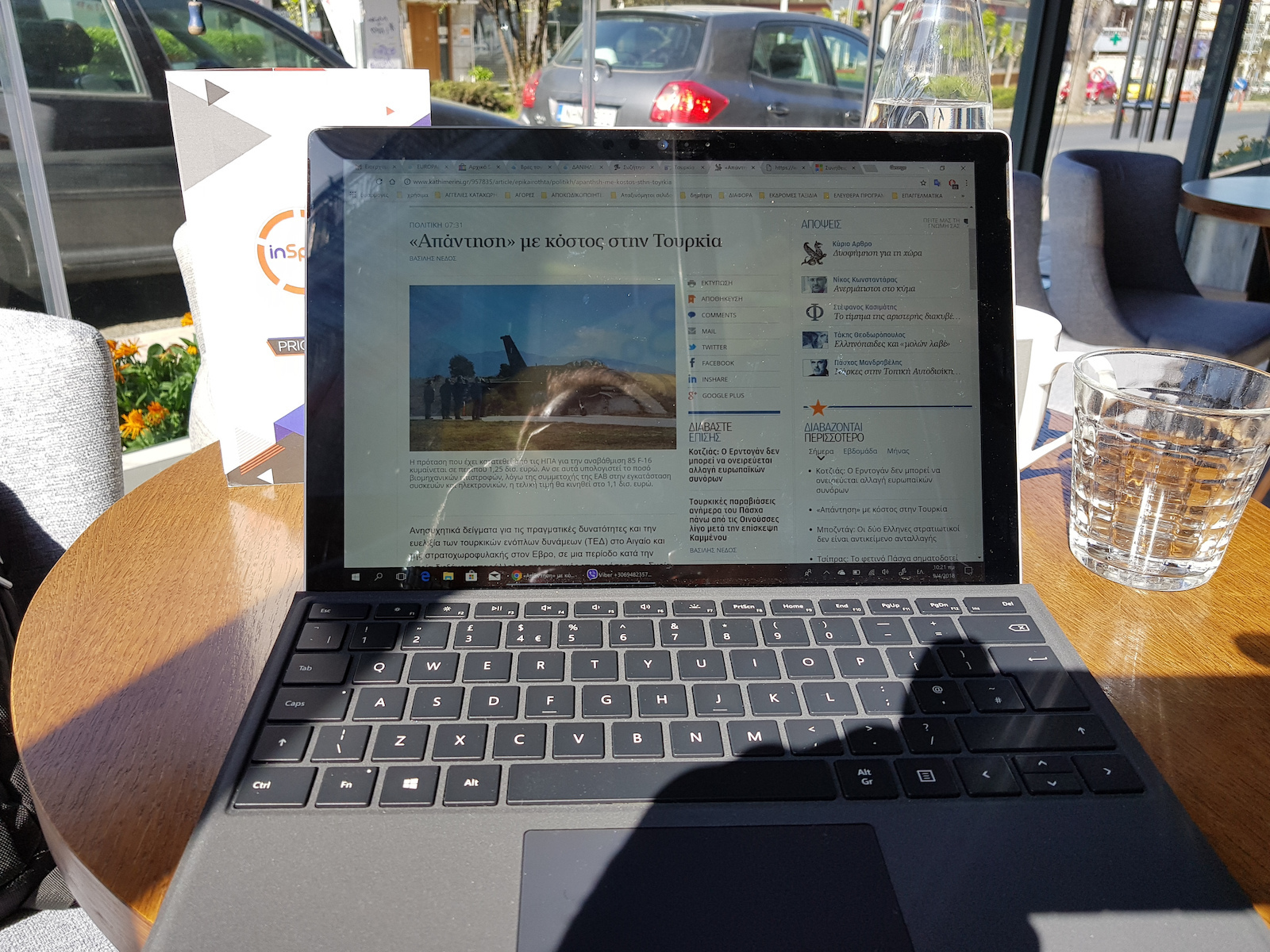
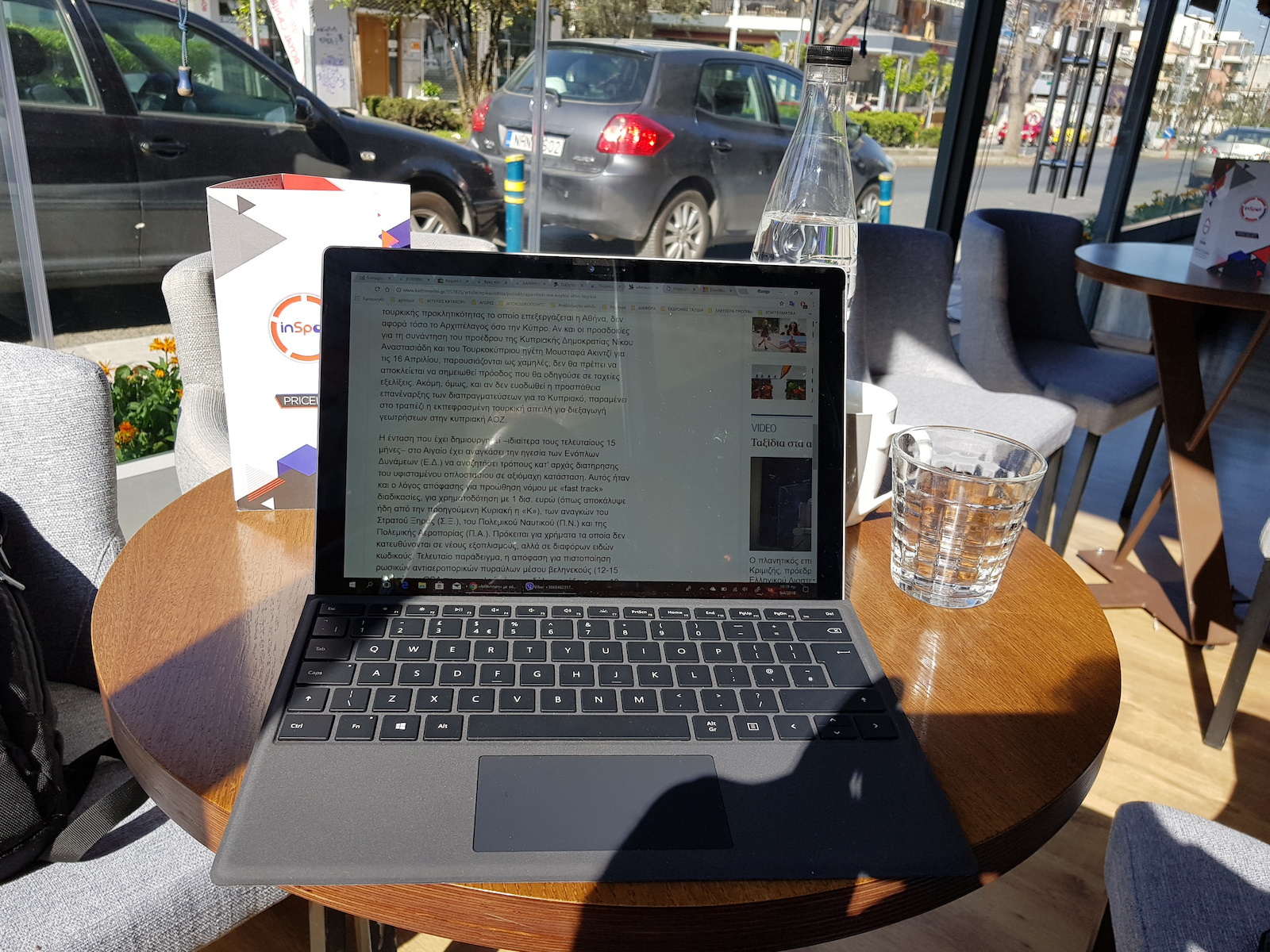
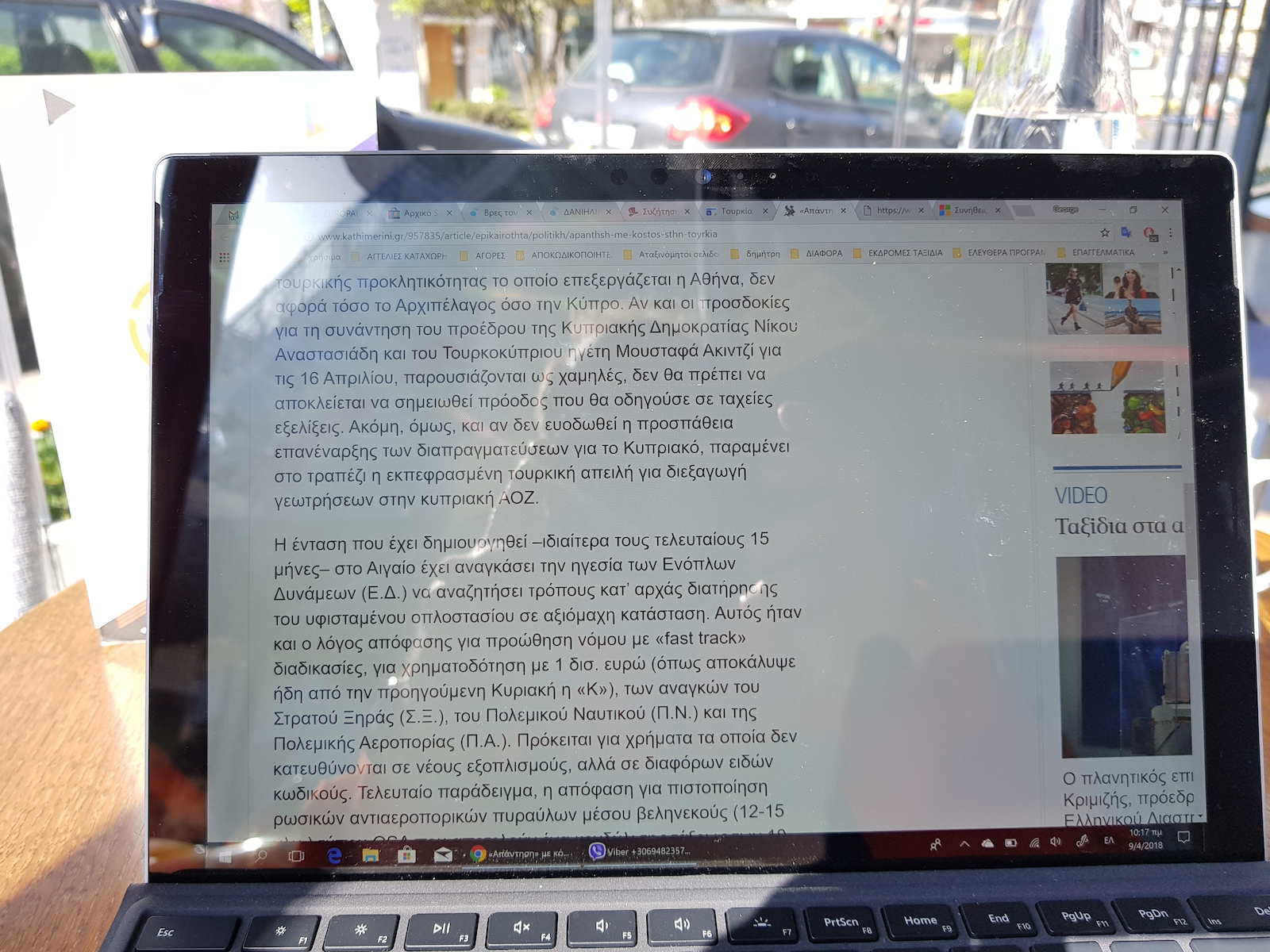
    The Surface Pro 12.3 screen is the best I have personally seen so far (it is the fourth tablet I have). It has a high resolution (2736 x 1824, with 267 pixels per inch) with a 3:2 aspect ratio, as well as high brightness. At 50% brightness, it covers most lighting situations, even in strong sunlight if you are in the shade. I conducted various tests to see how it looks from different angles, how it looks tilted from above or below. And of course, the best test for me was how it looks when there is sunlight, which was my problem with the previous tablet I had, constantly searching for shaded areas. I conducted the test with strong sunlight and direct sun rays hitting the screen, and I can comfortably see and read everything. This was actually the main reason why, after extensive research, I ended up with this tablet. Note that I not only did not try to hide the reflections and screen glare, but I tried to highlight them as best as possible.

    KEYBOARD.
    Very good! Especially for those like me who have large hands. I did not measure the dimensions of the keys, but I have the feeling that they are almost like those of a regular keyboard, just thinner in thickness, which does not pose a problem during typing. The Caps Lock and Fn keys have built-in LEDs that light up when active. The base is made of a metal alloy and is quite rigid and compact, so it does not have any elasticity or vibration issues during use, while also being lightweight. The keyboard also has a nice suede-like feel. Another thing I liked is the adjustable brightness of the keys in three levels, depending on each person's preference, as well as the automatic shutdown after 20 seconds to save battery. As soon as you touch a key, the letters, symbols, and keys light up. It also provides good protection for the screen during transportation. Finally, it weighs only 295 grams.

    BATTERY.
    Here, Microsoft has done a very good job. With internet browsing and watching a few videos, it consumes the battery at a rate of approximately 10 to 12% per hour, depending on the brightness setting. Charging is done at a rate of approximately 33% per hour. However, what annoys me and is unacceptable for a tablet of this price, quality, and reputation is that when it is closed, you cannot see how much longer it will take to reach 100% charge. There is no indication in percentages or any symbol, like other much cheaper tablets. You simply connect it to the power and estimate how much empty it is and how long it will take to fill up.

    QUALITY.
    I cannot say anything negative because simply there is nothing like that. The device is very well-made, and everything (buttons and ports) is in the right place. Any knowledgeable user can immediately tell, whether they have the tablet with or without the keyboard, that it is a quality construction without any creaking, movement, color difference point by point, or anything else.

    SOUND.
    The sound is loud and clear, and no matter how noisy the environment is, I can comfortably hear what the tablet is playing. Of course, I am not referring to exceptional cases, such as working next to a compressor or being in a bar with loud music.

    WEIGHT-SIZE.
    And these are the strong points of this tablet, with a weight of just 768 grams and an ideal size for someone who wants a satisfying-comfortable, high-resolution screen without the problem of weight and transportation, especially for someone who moves on foot or by motorcycle like me.

    WIRELESS CONNECTIONS.
    It supports Bluetooth 4.1 technology, which means automatic reconnection with connected devices, as well as wireless management via LTE. It also supports connection with multiple devices simultaneously.
    Of course, it also supports the dual protocol of wireless network WiFi 802.11ac.

    SENSORS.
    And as for sensors, it is, I would say, rich since it has ambient light sensors, an accelerometer, and a gyroscope.

    OTHER FEATURES.
    The solution that Microsoft provided for the support of the tablet with the adjustable setting in any desired position is also impeccable.
    The same goes for the solution with the magnets used to connect the tablet to the keyboard and the charging port. They are so strong!
    As soon as you bring the tablet close to the keyboard, before you even realize it, an invisible force securely attaches the two parts together.
    The same applies to the charging cable, which, I must say, has no right or wrong position, it connects however it wants and even has an indicator LED light.
    In the end, it is true that you get what you give. I mainly got it for its screen, but it is very good in all aspects and has changed my standards of expectations. I realize this when I rarely pick up my previous tablet anymore.
    9-6-2018
    Today I tried making a call via Viber for the first time, and it impressed me, not so much because of the sound I heard (it was expected to be good), but because of the microphone. I asked my conversation partner how they could hear me, and the answer was very good, just like they could hear me with the Galaxy S8.
    I mention this because with the previous tablets I had, whenever I made similar calls, there were always complaints about the sound.
    3-10-2020 it still works perfectly, except for the battery life, which has decreased to 4-5 hours depending on usage.
    21-09-2023
    The battery now needs to be replaced, and this is a serious problem.
    Wherever I went to have it replaced, they told me it is very difficult and I have to take responsibility in case the screen breaks.
    At Microsoft, the cost of replacement is 550 euros!!!!
    30-05-2024
    I have changed the battery, and it left a small flaw, a shadow on the screen when it is displaying a solid color. However, the shadow disappears when viewing images or videos and does not create any problem.
    The cost of changing the good battery was 70 euros, plus 40 euros for labor, totaling 110 euros.
    I am very satisfied because I have had this tablet for over 6 years and it works perfectly.
    The only downside is that it cannot upgrade to Windows 11.

    Translated from Greek ·
    • Speed
    • Screen resolution
    • Speaker quality
    • Photos
    • Durability
    • Weight
    • Value for money
    • Battery
    Did you find this review helpful?
  • The purchase was made in April 2018.

    SCREEN.
    The Surface Pro 12.3 screen is the best I have personally seen so far (it is the fourth tablet I have). It has a high resolution (2736 x 1824, with 267 pixels per inch) with a 3:2 aspect ratio, as well as high brightness. At 50% brightness, it covers most lighting situations, even in strong sunlight if you are in the shade. I conducted various tests to see how it looks from different angles, how it looks tilted from above or below. And of course, the best test for me was how it looks when there is sunlight, which was my problem with the previous tablet I had, constantly searching for shaded areas. I conducted the test with strong sunlight and direct sun rays hitting the screen, and I can comfortably see and read everything. This was actually the main reason why, after extensive research, I ended up with this tablet. Note that I not only did not try to hide the reflections and screen glare, but I tried to highlight them as best as possible.

    KEYBOARD.
    Very good! Especially for those like me who have large hands. I did not measure the dimensions of the keys, but I have the feeling that they are almost like those of a regular keyboard, just thinner in thickness, which does not pose a problem during typing. The Caps Lock and Fn keys have built-in LEDs that light up when active. The base is made of a metal alloy and is quite rigid and compact, so it does not have any elasticity or vibration issues during use, while also being lightweight. The keyboard also has a nice suede-like feel. Another thing I liked is the adjustable brightness of the keys in three levels, depending on each person's preference, as well as the automatic shutdown after 20 seconds to save battery. As soon as you touch a key, the letters, symbols, and keys light up. It also provides good protection for the screen during transportation. Finally, it weighs only 295 grams.

    BATTERY.
    Here, Microsoft has done a very good job. With internet browsing and watching a few videos, it consumes the battery at a rate of approximately 10 to 12% per hour, depending on the brightness setting. Charging is done at a rate of approximately 33% per hour. However, what annoys me and is unacceptable for a tablet of this price, quality, and reputation is that when it is closed, you cannot see how much longer it will take to reach 100% charge. There is no indication in percentages or any symbol, like other much cheaper tablets. You simply connect it to the power and estimate how much empty it is and how long it will take to fill up.

    QUALITY.
    I cannot say anything negative because simply there is nothing like that. The device is very well-made, and everything (buttons and ports) is in the right place. Any knowledgeable user can immediately tell, whether they have the tablet with or without the keyboard, that it is a quality construction without any creaking, movement, color difference point by point, or anything else.

    SOUND.
    The sound is loud and clear, and no matter how noisy the environment is, I can comfortably hear what the tablet is playing. Of course, I am not referring to exceptional cases, such as working next to a compressor or being in a bar with loud music.

    WEIGHT-SIZE.
    And these are the strong points of this tablet, with a weight of just 768 grams and an ideal size for someone who wants a satisfying-comfortable, high-resolution screen without the problem of weight and transportation, especially for someone who moves on foot or by motorcycle like me.

    WIRELESS CONNECTIONS.
    It supports Bluetooth 4.1 technology, which means automatic reconnection with connected devices, as well as wireless management via LTE. It also supports connection with multiple devices simultaneously.
    Of course, it also supports the dual protocol of wireless network WiFi 802.11ac.

    SENSORS.
    And as for sensors, it is, I would say, rich since it has ambient light sensors, an accelerometer, and a gyroscope.

    OTHER FEATURES.
    The solution that Microsoft provided for the support of the tablet with the adjustable setting in any desired position is also impeccable.
    The same goes for the solution with the magnets used to connect the tablet to the keyboard and the charging port. They are so strong!
    As soon as you bring the tablet close to the keyboard, before you even realize it, an invisible force securely attaches the two parts together.
    The same applies to the charging cable, which, I must say, has no right or wrong position, it connects however it wants and even has an indicator LED light.
    In the end, it is true that you get what you give. I mainly got it for its screen, but it is very good in all aspects and has changed my standards of expectations. I realize this when I rarely pick up my previous tablet anymore.
    9-6-2018
    Today I tried making a call via Viber for the first time, and it impressed me, not so much because of the sound I heard (it was expected to be good), but because of the microphone. I asked my conversation partner how they could hear me, and the answer was very good, just like they could hear me with the Galaxy S8.
    I mention this because with the previous tablets I had, whenever I made similar calls, there were always complaints about the sound.
    3-10-2020 it still works perfectly, except for the battery life, which has decreased to 4-5 hours depending on usage.
    21-09-2023
    The battery now needs to be replaced, and this is a serious problem.
    Wherever I went to have it replaced, they told me it is very difficult and I have to take responsibility in case the screen breaks.
    At Microsoft, the cost of replacement is 550 euros!!!!
    30-05-2024
    I have changed the battery, and it left a small flaw, a shadow on the screen when it is displaying a solid color. However, the shadow disappears when viewing images or videos and does not create any problem.
    The cost of changing the good battery was 70 euros, plus 40 euros for labor, totaling 110 euros.
    I am very satisfied because I have had this tablet for over 6 years and it works perfectly.
    The only downside is that it cannot upgrade to Windows 11.

    Translated from Greek ·
    0
  • See all

Specifications

Main Specifications

Operating System
Windows
Colour
Black
Weight
770 gr

Processor & Memory

Processor Cores
2
Main Processor Speed
2.6 GHz
RAM Memory
4 GB
Capacity
128 GB

Screen

Screen Size
12.3 Inches
Screen Resolution
2736 x 1824 pixels
Type
IPS
Resolution
QHD

Camera

Basic Camera Resolution
8 MP
Selfie Camera Resolution
1 MP

Networks & Connectivity

Connectivity
Bluetooth, Micro USB, 3.5mm Jack
Network
Wi-Fi

Battery

Fast Charging
Yes

Features & Functions

Features
2 in 1 Detachable, Card Reader
Type
-

AI Features

AI Photo Editing
-
AI Text Generation
-
AI Call/Speech Translation
-
AI Image Search
No

Dimensions

Length
-
Width
-
Thickness
-

Important information

Specifications are collected from official manufacturer websites. Please verify the specifications before proceeding with your final purchase. If you notice any problem you can report it here.

Reviews (1)

  1. 1
  2. 4 stars
    0
  3. 3 stars
    0
  4. 2 stars
    0
  5. 1 star
    0
Review this product

Reviews photos

Reviews photos
Reviews photos
Reviews photos

Reviews by our members

  • The purchase was made in April 2018.

    SCREEN.
    The Surface Pro 12.3 screen is the best I have personally seen so far (it is the fourth tablet I have). It has a high resolution (2736 x 1824, with 267 pixels per inch) with a 3:2 aspect ratio, as well as high brightness. At 50% brightness, it covers most lighting situations, even in strong sunlight if you are in the shade. I conducted various tests to see how it looks from different angles, how it looks tilted from above or below. And of course, the best test for me was how it looks when there is sunlight, which was my problem with the previous tablet I had, constantly searching for shaded areas. I conducted the test with strong sunlight and direct sun rays hitting the screen, and I can comfortably see and read everything. This was actually the main reason why, after extensive research, I ended up with this tablet. Note that I not only did not try to hide the reflections and screen glare, but I tried to highlight them as best as possible.

    KEYBOARD.
    Very good! Especially for those like me who have large hands. I did not measure the dimensions of the keys, but I have the feeling that they are almost like those of a regular keyboard, just thinner in thickness, which does not pose a problem during typing. The Caps Lock and Fn keys have built-in LEDs that light up when active. The base is made of a metal alloy and is quite rigid and compact, so it does not have any elasticity or vibration issues during use, while also being lightweight. The keyboard also has a nice suede-like feel. Another thing I liked is the adjustable brightness of the keys in three levels, depending on each person's preference, as well as the automatic shutdown after 20 seconds to save battery. As soon as you touch a key, the letters, symbols, and keys light up. It also provides good protection for the screen during transportation. Finally, it weighs only 295 grams.

    BATTERY.
    Here, Microsoft has done a very good job. With internet browsing and watching a few videos, it consumes the battery at a rate of approximately 10 to 12% per hour, depending on the brightness setting. Charging is done at a rate of approximately 33% per hour. However, what annoys me and is unacceptable for a tablet of this price, quality, and reputation is that when it is closed, you cannot see how much longer it will take to reach 100% charge. There is no indication in percentages or any symbol, like other much cheaper tablets. You simply connect it to the power and estimate how much empty it is and how long it will take to fill up.

    QUALITY.
    I cannot say anything negative because simply there is nothing like that. The device is very well-made, and everything (buttons and ports) is in the right place. Any knowledgeable user can immediately tell, whether they have the tablet with or without the keyboard, that it is a quality construction without any creaking, movement, color difference point by point, or anything else.

    SOUND.
    The sound is loud and clear, and no matter how noisy the environment is, I can comfortably hear what the tablet is playing. Of course, I am not referring to exceptional cases, such as working next to a compressor or being in a bar with loud music.

    WEIGHT-SIZE.
    And these are the strong points of this tablet, with a weight of just 768 grams and an ideal size for someone who wants a satisfying-comfortable, high-resolution screen without the problem of weight and transportation, especially for someone who moves on foot or by motorcycle like me.

    WIRELESS CONNECTIONS.
    It supports Bluetooth 4.1 technology, which means automatic reconnection with connected devices, as well as wireless management via LTE. It also supports connection with multiple devices simultaneously.
    Of course, it also supports the dual protocol of wireless network WiFi 802.11ac.

    SENSORS.
    And as for sensors, it is, I would say, rich since it has ambient light sensors, an accelerometer, and a gyroscope.

    OTHER FEATURES.
    The solution that Microsoft provided for the support of the tablet with the adjustable setting in any desired position is also impeccable.
    The same goes for the solution with the magnets used to connect the tablet to the keyboard and the charging port. They are so strong!
    As soon as you bring the tablet close to the keyboard, before you even realize it, an invisible force securely attaches the two parts together.
    The same applies to the charging cable, which, I must say, has no right or wrong position, it connects however it wants and even has an indicator LED light.
    In the end, it is true that you get what you give. I mainly got it for its screen, but it is very good in all aspects and has changed my standards of expectations. I realize this when I rarely pick up my previous tablet anymore.
    9-6-2018
    Today I tried making a call via Viber for the first time, and it impressed me, not so much because of the sound I heard (it was expected to be good), but because of the microphone. I asked my conversation partner how they could hear me, and the answer was very good, just like they could hear me with the Galaxy S8.
    I mention this because with the previous tablets I had, whenever I made similar calls, there were always complaints about the sound.
    3-10-2020 it still works perfectly, except for the battery life, which has decreased to 4-5 hours depending on usage.
    21-09-2023
    The battery now needs to be replaced, and this is a serious problem.
    Wherever I went to have it replaced, they told me it is very difficult and I have to take responsibility in case the screen breaks.
    At Microsoft, the cost of replacement is 550 euros!!!!
    30-05-2024
    I have changed the battery, and it left a small flaw, a shadow on the screen when it is displaying a solid color. However, the shadow disappears when viewing images or videos and does not create any problem.
    The cost of changing the good battery was 70 euros, plus 40 euros for labor, totaling 110 euros.
    I am very satisfied because I have had this tablet for over 6 years and it works perfectly.
    The only downside is that it cannot upgrade to Windows 11.

    Translated from Greek ·
    • Speed
    • Screen resolution
    • Speaker quality
    • Photos
    • Durability
    • Weight
    • Value for money
    • Battery
    Did you find this review helpful?
  • The purchase was made in April 2018.

    SCREEN.
    The Surface Pro 12.3 screen is the best I have personally seen so far (it is the fourth tablet I have). It has a high resolution (2736 x 1824, with 267 pixels per inch) with a 3:2 aspect ratio, as well as high brightness. At 50% brightness, it covers most lighting situations, even in strong sunlight if you are in the shade. I conducted various tests to see how it looks from different angles, how it looks tilted from above or below. And of course, the best test for me was how it looks when there is sunlight, which was my problem with the previous tablet I had, constantly searching for shaded areas. I conducted the test with strong sunlight and direct sun rays hitting the screen, and I can comfortably see and read everything. This was actually the main reason why, after extensive research, I ended up with this tablet. Note that I not only did not try to hide the reflections and screen glare, but I tried to highlight them as best as possible.

    KEYBOARD.
    Very good! Especially for those like me who have large hands. I did not measure the dimensions of the keys, but I have the feeling that they are almost like those of a regular keyboard, just thinner in thickness, which does not pose a problem during typing. The Caps Lock and Fn keys have built-in LEDs that light up when active. The base is made of a metal alloy and is quite rigid and compact, so it does not have any elasticity or vibration issues during use, while also being lightweight. The keyboard also has a nice suede-like feel. Another thing I liked is the adjustable brightness of the keys in three levels, depending on each person's preference, as well as the automatic shutdown after 20 seconds to save battery. As soon as you touch a key, the letters, symbols, and keys light up. It also provides good protection for the screen during transportation. Finally, it weighs only 295 grams.

    BATTERY.
    Here, Microsoft has done a very good job. With internet browsing and watching a few videos, it consumes the battery at a rate of approximately 10 to 12% per hour, depending on the brightness setting. Charging is done at a rate of approximately 33% per hour. However, what annoys me and is unacceptable for a tablet of this price, quality, and reputation is that when it is closed, you cannot see how much longer it will take to reach 100% charge. There is no indication in percentages or any symbol, like other much cheaper tablets. You simply connect it to the power and estimate how much empty it is and how long it will take to fill up.

    QUALITY.
    I cannot say anything negative because simply there is nothing like that. The device is very well-made, and everything (buttons and ports) is in the right place. Any knowledgeable user can immediately tell, whether they have the tablet with or without the keyboard, that it is a quality construction without any creaking, movement, color difference point by point, or anything else.

    SOUND.
    The sound is loud and clear, and no matter how noisy the environment is, I can comfortably hear what the tablet is playing. Of course, I am not referring to exceptional cases, such as working next to a compressor or being in a bar with loud music.

    WEIGHT-SIZE.
    And these are the strong points of this tablet, with a weight of just 768 grams and an ideal size for someone who wants a satisfying-comfortable, high-resolution screen without the problem of weight and transportation, especially for someone who moves on foot or by motorcycle like me.

    WIRELESS CONNECTIONS.
    It supports Bluetooth 4.1 technology, which means automatic reconnection with connected devices, as well as wireless management via LTE. It also supports connection with multiple devices simultaneously.
    Of course, it also supports the dual protocol of wireless network WiFi 802.11ac.

    SENSORS.
    And as for sensors, it is, I would say, rich since it has ambient light sensors, an accelerometer, and a gyroscope.

    OTHER FEATURES.
    The solution that Microsoft provided for the support of the tablet with the adjustable setting in any desired position is also impeccable.
    The same goes for the solution with the magnets used to connect the tablet to the keyboard and the charging port. They are so strong!
    As soon as you bring the tablet close to the keyboard, before you even realize it, an invisible force securely attaches the two parts together.
    The same applies to the charging cable, which, I must say, has no right or wrong position, it connects however it wants and even has an indicator LED light.
    In the end, it is true that you get what you give. I mainly got it for its screen, but it is very good in all aspects and has changed my standards of expectations. I realize this when I rarely pick up my previous tablet anymore.
    9-6-2018
    Today I tried making a call via Viber for the first time, and it impressed me, not so much because of the sound I heard (it was expected to be good), but because of the microphone. I asked my conversation partner how they could hear me, and the answer was very good, just like they could hear me with the Galaxy S8.
    I mention this because with the previous tablets I had, whenever I made similar calls, there were always complaints about the sound.
    3-10-2020 it still works perfectly, except for the battery life, which has decreased to 4-5 hours depending on usage.
    21-09-2023
    The battery now needs to be replaced, and this is a serious problem.
    Wherever I went to have it replaced, they told me it is very difficult and I have to take responsibility in case the screen breaks.
    At Microsoft, the cost of replacement is 550 euros!!!!
    30-05-2024
    I have changed the battery, and it left a small flaw, a shadow on the screen when it is displaying a solid color. However, the shadow disappears when viewing images or videos and does not create any problem.
    The cost of changing the good battery was 70 euros, plus 40 euros for labor, totaling 110 euros.
    I am very satisfied because I have had this tablet for over 6 years and it works perfectly.
    The only downside is that it cannot upgrade to Windows 11.

    Translated from Greek ·
    0
  • See all