Specifications are collected from official manufacturer websites. Please verify the specifications before proceeding with your final purchase. If you notice any problem you can report it here.
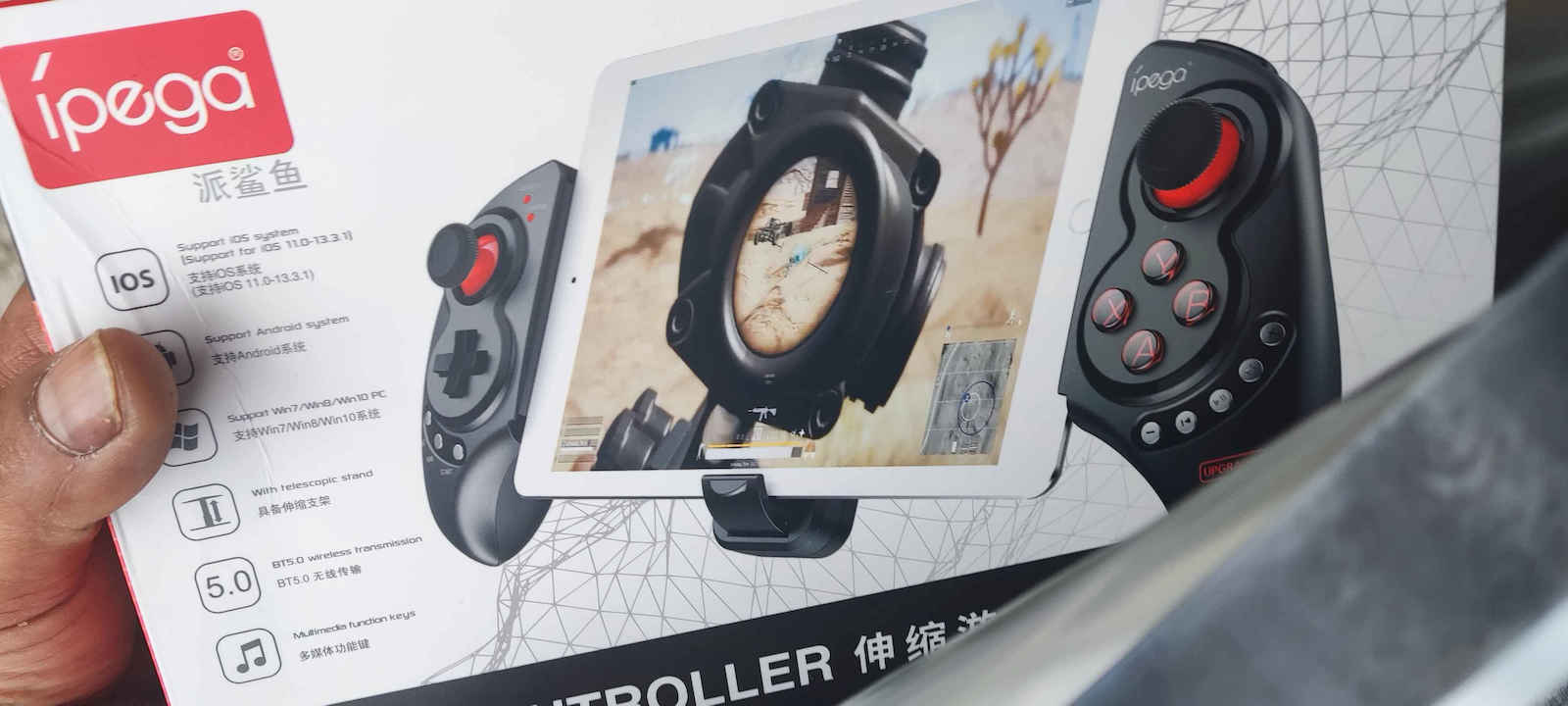
In one sentence, it is the ideal choice for converting a mobile phone or tablet into a portable gaming console/emulator (especially considering its price).
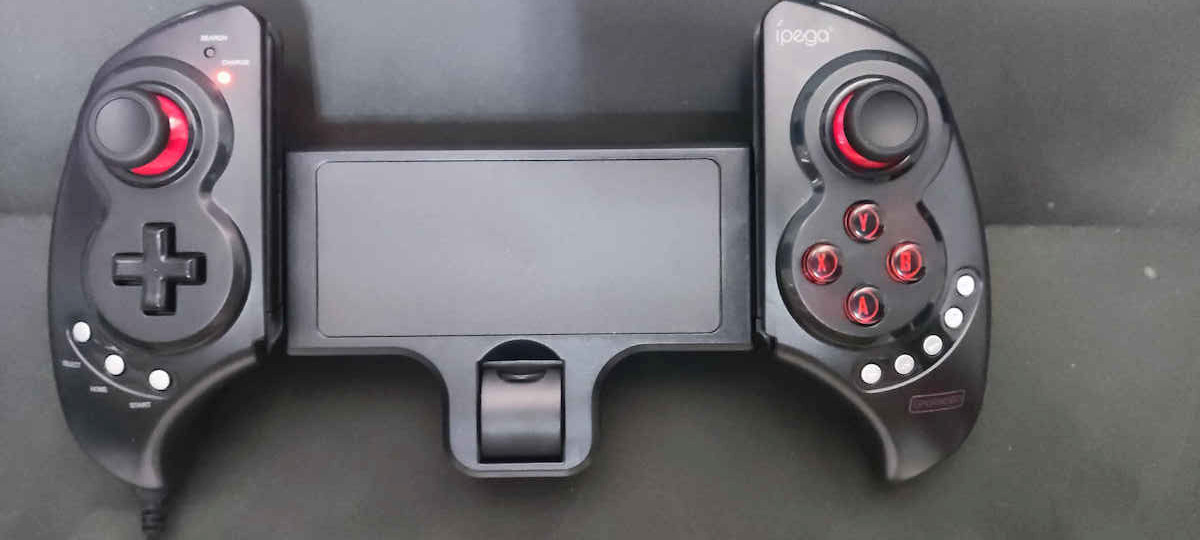
On the positive side, its plastic is of good quality, the response of the analog sticks is more than satisfactory, and mainly their position (due to the design of the grips which are outward, like any regular gamepad), as well as all the buttons and the D-pad are ideal since they are located just below the "arc" where the thumbs can move while holding the controller or the fingers for LB, LT, RB, RT. Also, the A, B, X, Y buttons as well as LB, LT, RB, RT are almost silent. The Select, Home, and Start buttons are located on the left side below the D-pad while on the right below the A, B, X, Y, there are two +/- buttons for adjusting the volume and three (previous, play/pause, next) for music applications. These are not silent but they won't be used often during gameplay. Although it’s not something special, I found them convenient for lowering or raising the sound without having to let go of the grips of the controller or even to stop a song that I had playing alongside the game.
On the negative side (just to mention something), the triggers are not analog, although I never intended to need them (serious simulators like racing games I won’t play on mobile...)
Important: Although I encountered no issues pairing with the Bluetooth of the mobile phone and tablet, I had to read the instructions to choose the correct type of connection. That is, simply pressing home connects it but does not respond correctly (it recognizes it as a mouse). To make the connection and respond correctly as an Android controller, the X must be pressed while pressing home and then pairing must be done. After that, no application was needed for button mapping. Everything needed was done through the emulator settings.
I don’t know if similarly more expensive controllers offer anything more, but at least for my needs, I see no reason to spend more money.
Σε μία πρόταση, είναι η ιδανική επιλογή για μετατροπή του κινητού ή του tablet σε φορητή παιχνιδομηχανη/emulator (ειδικά αν συνυπολογίσουμε και την τιμή του).
Στα θετικά του, το πλαστικό του είναι καλής ποιότητας, η ανταπόκριση των αναλογικών μοχλών είναι πάνω από ικανοποιητική και κυρίως η θέση τους (λόγω του σχεδιασμού των λαβών του που είναι προς τα έξω, όπως κάθε κανονικού gamepad), αλλά και όλων των κουμπιών και του σταυρού είναι ιδανικές αφού βρίσκονται ακριβώς κάτω από το "τόξο" που μπορούν να κινηθούν οι αντίχειρες κρατώντας το χειριστήριο ή τους δείκτες για τα LB, LT, RB, RT. Επίσης τα κουμπιά Α, Β, Χ, Υ όπως και τα LB, LT, RB, RT είναι σχεδόν αθόρυβα.
Τα Select, Home και Start βρίσκονται στην αριστερή μεριά κάτω από τον σταυρό ενώ στη δεξιά κάτω από τα A, B, X, Y, υπάρχουν δύο κουμπιά +/- αυξομείωσης της έντασης του ήχου και τρία (προηγούμενο, αναπαραγωγή/παύση, επόμενο) για εφαρμογές μουσικής. Αυτά δεν είναι αθόρυβα αλλά δεν θα χρησιμοποιηθούν και συχνά κατά τη διάρκεια του παιχνιδιού. Αν και δεν είναι κάτι το ιδιαίτερο, τα βρήκα βολικά για να χαμηλώνω ή να δυναμώνω τον ήχο χωρίς να χρειαστεί να αφήσω τις λαβές του χειριστηρίου ή ακόμα και για να σταματήσω κάποιο τραγούδι που είχα βάλει να παίζει παράλληλα με το παιχνίδι.
Στα αρνητικά του (έτσι για να βάλουμε κάτι), οι σκανδάλες δεν είναι αναλογικές, αν και ποτέ δεν σκόπευα να τις χρειαστώ (σοβαρούς εξομοιωτές πχ για racing δεν θα παίξω στο κινητό...)
Σημαντικό: Αν και στη σύζευξη με το Bluetooth του κινητού και του tablet δεν αντιμετώπισα κανένα πρόβλημα έπρεπε να διαβάσω τις οδηγίες για να επιλέξω τον σωστό τύπο σύνδεσης.
Δηλαδή, πατώντας απλά το home, συνδέεται μεν αλλά χωρίς να ανταποκρίνεται σωστά (το αναγνωρίζει σαν ποντίκι). Για να γίνει η σύνδεση και να ανταποκρίνεται σωστά ως android χειριστήριο, πρέπει να είναι πατημένο το Χ πατώντας το home και να γίνει μετά η σύζευξη. Μετά από αυτό δεν χρειάστηκε καμία εφαρμογή για την αντιστοίχιση των κουμπιών. Ό,τι χρειάστηκε έγινε από τις ρυθμίσεις των emulators.
Δεν ξέρω αν αντίστοιχα ακριβότερα χειριστήρια προσφέρουν κάτι παραπάνω αλλά τουλάχιστον για τις δικές μου ανάγκες δεν βρίσκω τον λόγο να δώσω περισσότερα χρήματα.
It's pretty good for its money. Obviously, it's not for competitive gaming and as convenient as a PS4/5 controller, but it does the job very well. Personally, I have it on my tablet to play PS4/PS5 and PC-Steam streaming and it's great for single player games. *** WARNING: IF YOU WANT IT FOR PS REMOTE IT IS NOT COMPATIBLE. THE APPLICATION ONLY WORKS WITH THE GENUINE CONTROLLER AND THIS PARTICULAR ONE CAN ONLY WORK WITH THE PSPlay APP, WHICH COSTS 7.49 EUROS AND WORKS PERFECTLY. ***
Είναι αρκετά καλό για τα λεφτά του. Προφανώς και δεν είναι για competitive και όσο βολικό όπως ένας μοχλός ps4/5 αλλά κάνεις την δουλειά σου πολύ καλά. Προσωπικά το έχω στο τάμπλετ για να παίζω ps4/ps5 και pc-steam στριμαροντας και είναι μια χαρά για single player games. *** ΠΡΟΣΟΧΗ ΟΠΟΙΟΣ ΤΟ ΘΕΛΕΙ ΓΙΑ ΤΟ PS REMOTE ΔΕΝ ΕΙΝΑΙ ΣΥΜΒΑΤΟ Η ΕΦΑΡΜΟΓΗ ΘΕΛΕΙ ΜΟΝΟ ΤΟ ΓΝΗΣΙΟ ΧΕΙΡΙΣΤΉΡΙΟ ΚΑΙ ΤΟ ΣΥΓΚΕΚΡΙΜΕΝΟ ΜΠΟΡΕΙ ΝΑ ΤΟ ΔΟΥΛΕΨΕΙ ΜΟΝΟ ΜΕ ΤΗΝ ΕΦΑΡΜΟΓΉ PSPlay ΕΙΝΑΙ ΜΕ ΑΓΟΡΑ 7.49 ΕΥΡΩ ΚΑΙ ΔΟΥΛΕΥΕΙ ΜΙΑ ΧΑΡΑ. ***
For first use, it seems good, after a lot of searching, I ended up with these because they have many positives.
1st They have buttons on both sides "see prices" (which seem durable, time will tell).
2nd The application it has, Shooting Plus V3, is incredible because you can play any game you want by placing the buttons wherever you want and saving them, otherwise it has game buttons for all the popular ones already!
3rd It works for both tablets and mobile phones (it is long, it even works for something longer than a tablet, imagine that!)
4th Besides being for mobile/tablet, it also works without it by connecting to a Bluetooth smart TV or a console and you can play as a regular controller.
Now time will tell how long it will last, but for its price, it is definitely worth it and more.
All of this is happening on a Poco F3 Android!
Για πρώτη χρήση φαίνεται καλό,μετά από πολύ κοίταγμα κατέληξα σε αυτά διότι έχουνε πολλά +
1ο Έχουνε κουμπιά και στης δύο μεριές"βλέπε τιμές"(τα οποία φαίνονται ανθεκτικά θα δείξει)
2ο Η εφαρμογή που έχει shooting plus v3 είναι απίστευτη γιατί μπορείς να παίξεις ότι παιχνίδι θέλεις, βάζοντας εσύ όπου θέλεις τα κουμπιά τα οποία τα αποθηκεύεις,αλλιώς έχει κουμπιά παιχνιδιών για όλα τα γνωστά ήδη έτοιμα!
3ο Κάνει και για τάμπλετ και για κινητό(είναι μακρύ κάνει και για κάτι μακρύτερο από ταμπλετ φαντάσου!
4ο Εκτός το ότι είναι για κινητό/τάμπλετ κάνει και χωρίς αυτό συνδέοντας με Bluetooth smart tv η κάποια κονσόλα και παίζεις σαν απλό χειριστήριο.
Τώρα θα δείξει ο χρόνος πόσο θα αντέξει, πάντως για τα λεφτά του αξίζει και με το παραπάνω
Όλα αυτά γίνονται σε poco f3 android!
Do not buy it for iPhone. It works only until iOS 13. As soon as you try to use it on an iPhone from 6s and onwards, which have updated to iOS 15, it doesn't work. It displays a message to report it to Apple to fix it.
Luckily, I also have Android devices, so maybe the money won't go completely to waste
Μην το πάρετε για iPhone . Δουλεύει μέχρι iOS 13. Μόλις πας να το χρησιμοποιήσεις σε iPhone από 6s και μετά που έχουν πάρει το iOS 15 δεν παίζει . Βγάζει μήνυμα να στείλουμε αναφορά στην apple να το διορθώσει
Ευτυχώς έχω και android συσκευές όποτε ίσως να μην πάνε τελείως τζάμπα τα λεφτά
In one sentence, it is the ideal choice for converting a mobile phone or tablet into a portable gaming console/emulator (especially considering its price).
On the positive side, its plastic is of good quality, the response of the analog sticks is more than satisfactory, and mainly their position (due to the design of the grips which are outward, like any regular gamepad), as well as all the buttons and the D-pad are ideal since they are located just below the "arc" where the thumbs can move while holding the controller or the fingers for LB, LT, RB, RT. Also, the A, B, X, Y buttons as well as LB, LT, RB, RT are almost silent. The Select, Home, and Start buttons are located on the left side below the D-pad while on the right below the A, B, X, Y, there are two +/- buttons for adjusting the volume and three (previous, play/pause, next) for music applications. These are not silent but they won't be used often during gameplay. Although it’s not something special, I found them convenient for lowering or raising the sound without having to let go of the grips of the controller or even to stop a song that I had playing alongside the game.
On the negative side (just to mention something), the triggers are not analog, although I never intended to need them (serious simulators like racing games I won’t play on mobile...)
Important: Although I encountered no issues pairing with the Bluetooth of the mobile phone and tablet, I had to read the instructions to choose the correct type of connection. That is, simply pressing home connects it but does not respond correctly (it recognizes it as a mouse). To make the connection and respond correctly as an Android controller, the X must be pressed while pressing home and then pairing must be done. After that, no application was needed for button mapping. Everything needed was done through the emulator settings.
I don’t know if similarly more expensive controllers offer anything more, but at least for my needs, I see no reason to spend more money.
Σε μία πρόταση, είναι η ιδανική επιλογή για μετατροπή του κινητού ή του tablet σε φορητή παιχνιδομηχανη/emulator (ειδικά αν συνυπολογίσουμε και την τιμή του).
Στα θετικά του, το πλαστικό του είναι καλής ποιότητας, η ανταπόκριση των αναλογικών μοχλών είναι πάνω από ικανοποιητική και κυρίως η θέση τους (λόγω του σχεδιασμού των λαβών του που είναι προς τα έξω, όπως κάθε κανονικού gamepad), αλλά και όλων των κουμπιών και του σταυρού είναι ιδανικές αφού βρίσκονται ακριβώς κάτω από το "τόξο" που μπορούν να κινηθούν οι αντίχειρες κρατώντας το χειριστήριο ή τους δείκτες για τα LB, LT, RB, RT. Επίσης τα κουμπιά Α, Β, Χ, Υ όπως και τα LB, LT, RB, RT είναι σχεδόν αθόρυβα.
Τα Select, Home και Start βρίσκονται στην αριστερή μεριά κάτω από τον σταυρό ενώ στη δεξιά κάτω από τα A, B, X, Y, υπάρχουν δύο κουμπιά +/- αυξομείωσης της έντασης του ήχου και τρία (προηγούμενο, αναπαραγωγή/παύση, επόμενο) για εφαρμογές μουσικής. Αυτά δεν είναι αθόρυβα αλλά δεν θα χρησιμοποιηθούν και συχνά κατά τη διάρκεια του παιχνιδιού. Αν και δεν είναι κάτι το ιδιαίτερο, τα βρήκα βολικά για να χαμηλώνω ή να δυναμώνω τον ήχο χωρίς να χρειαστεί να αφήσω τις λαβές του χειριστηρίου ή ακόμα και για να σταματήσω κάποιο τραγούδι που είχα βάλει να παίζει παράλληλα με το παιχνίδι.
Στα αρνητικά του (έτσι για να βάλουμε κάτι), οι σκανδάλες δεν είναι αναλογικές, αν και ποτέ δεν σκόπευα να τις χρειαστώ (σοβαρούς εξομοιωτές πχ για racing δεν θα παίξω στο κινητό...)
Σημαντικό: Αν και στη σύζευξη με το Bluetooth του κινητού και του tablet δεν αντιμετώπισα κανένα πρόβλημα έπρεπε να διαβάσω τις οδηγίες για να επιλέξω τον σωστό τύπο σύνδεσης.
Δηλαδή, πατώντας απλά το home, συνδέεται μεν αλλά χωρίς να ανταποκρίνεται σωστά (το αναγνωρίζει σαν ποντίκι). Για να γίνει η σύνδεση και να ανταποκρίνεται σωστά ως android χειριστήριο, πρέπει να είναι πατημένο το Χ πατώντας το home και να γίνει μετά η σύζευξη. Μετά από αυτό δεν χρειάστηκε καμία εφαρμογή για την αντιστοίχιση των κουμπιών. Ό,τι χρειάστηκε έγινε από τις ρυθμίσεις των emulators.
Δεν ξέρω αν αντίστοιχα ακριβότερα χειριστήρια προσφέρουν κάτι παραπάνω αλλά τουλάχιστον για τις δικές μου ανάγκες δεν βρίσκω τον λόγο να δώσω περισσότερα χρήματα.
It's pretty good for its money. Obviously, it's not for competitive gaming and as convenient as a PS4/5 controller, but it does the job very well. Personally, I have it on my tablet to play PS4/PS5 and PC-Steam streaming and it's great for single player games. *** WARNING: IF YOU WANT IT FOR PS REMOTE IT IS NOT COMPATIBLE. THE APPLICATION ONLY WORKS WITH THE GENUINE CONTROLLER AND THIS PARTICULAR ONE CAN ONLY WORK WITH THE PSPlay APP, WHICH COSTS 7.49 EUROS AND WORKS PERFECTLY. ***
Είναι αρκετά καλό για τα λεφτά του. Προφανώς και δεν είναι για competitive και όσο βολικό όπως ένας μοχλός ps4/5 αλλά κάνεις την δουλειά σου πολύ καλά. Προσωπικά το έχω στο τάμπλετ για να παίζω ps4/ps5 και pc-steam στριμαροντας και είναι μια χαρά για single player games. *** ΠΡΟΣΟΧΗ ΟΠΟΙΟΣ ΤΟ ΘΕΛΕΙ ΓΙΑ ΤΟ PS REMOTE ΔΕΝ ΕΙΝΑΙ ΣΥΜΒΑΤΟ Η ΕΦΑΡΜΟΓΗ ΘΕΛΕΙ ΜΟΝΟ ΤΟ ΓΝΗΣΙΟ ΧΕΙΡΙΣΤΉΡΙΟ ΚΑΙ ΤΟ ΣΥΓΚΕΚΡΙΜΕΝΟ ΜΠΟΡΕΙ ΝΑ ΤΟ ΔΟΥΛΕΨΕΙ ΜΟΝΟ ΜΕ ΤΗΝ ΕΦΑΡΜΟΓΉ PSPlay ΕΙΝΑΙ ΜΕ ΑΓΟΡΑ 7.49 ΕΥΡΩ ΚΑΙ ΔΟΥΛΕΥΕΙ ΜΙΑ ΧΑΡΑ. ***
For first use, it seems good, after a lot of searching, I ended up with these because they have many positives.
1st They have buttons on both sides "see prices" (which seem durable, time will tell).
2nd The application it has, Shooting Plus V3, is incredible because you can play any game you want by placing the buttons wherever you want and saving them, otherwise it has game buttons for all the popular ones already!
3rd It works for both tablets and mobile phones (it is long, it even works for something longer than a tablet, imagine that!)
4th Besides being for mobile/tablet, it also works without it by connecting to a Bluetooth smart TV or a console and you can play as a regular controller.
Now time will tell how long it will last, but for its price, it is definitely worth it and more.
All of this is happening on a Poco F3 Android!
Για πρώτη χρήση φαίνεται καλό,μετά από πολύ κοίταγμα κατέληξα σε αυτά διότι έχουνε πολλά +
1ο Έχουνε κουμπιά και στης δύο μεριές"βλέπε τιμές"(τα οποία φαίνονται ανθεκτικά θα δείξει)
2ο Η εφαρμογή που έχει shooting plus v3 είναι απίστευτη γιατί μπορείς να παίξεις ότι παιχνίδι θέλεις, βάζοντας εσύ όπου θέλεις τα κουμπιά τα οποία τα αποθηκεύεις,αλλιώς έχει κουμπιά παιχνιδιών για όλα τα γνωστά ήδη έτοιμα!
3ο Κάνει και για τάμπλετ και για κινητό(είναι μακρύ κάνει και για κάτι μακρύτερο από ταμπλετ φαντάσου!
4ο Εκτός το ότι είναι για κινητό/τάμπλετ κάνει και χωρίς αυτό συνδέοντας με Bluetooth smart tv η κάποια κονσόλα και παίζεις σαν απλό χειριστήριο.
Τώρα θα δείξει ο χρόνος πόσο θα αντέξει, πάντως για τα λεφτά του αξίζει και με το παραπάνω
Όλα αυτά γίνονται σε poco f3 android!
Do not buy it for iPhone. It works only until iOS 13. As soon as you try to use it on an iPhone from 6s and onwards, which have updated to iOS 15, it doesn't work. It displays a message to report it to Apple to fix it.
Luckily, I also have Android devices, so maybe the money won't go completely to waste
Μην το πάρετε για iPhone . Δουλεύει μέχρι iOS 13. Μόλις πας να το χρησιμοποιήσεις σε iPhone από 6s και μετά που έχουν πάρει το iOS 15 δεν παίζει . Βγάζει μήνυμα να στείλουμε αναφορά στην apple να το διορθώσει
Ευτυχώς έχω και android συσκευές όποτε ίσως να μην πάνε τελείως τζάμπα τα λεφτά
Specifications are collected from official manufacturer websites. Please verify the specifications before proceeding with your final purchase. If you notice any problem you can report it here.
In one sentence, it is the ideal choice for converting a mobile phone or tablet into a portable gaming console/emulator (especially considering its price).
On the positive side, its plastic is of good quality, the response of the analog sticks is more than satisfactory, and mainly their position (due to the design of the grips which are outward, like any regular gamepad), as well as all the buttons and the D-pad are ideal since they are located just below the "arc" where the thumbs can move while holding the controller or the fingers for LB, LT, RB, RT. Also, the A, B, X, Y buttons as well as LB, LT, RB, RT are almost silent. The Select, Home, and Start buttons are located on the left side below the D-pad while on the right below the A, B, X, Y, there are two +/- buttons for adjusting the volume and three (previous, play/pause, next) for music applications. These are not silent but they won't be used often during gameplay. Although it’s not something special, I found them convenient for lowering or raising the sound without having to let go of the grips of the controller or even to stop a song that I had playing alongside the game.
On the negative side (just to mention something), the triggers are not analog, although I never intended to need them (serious simulators like racing games I won’t play on mobile...)
Important: Although I encountered no issues pairing with the Bluetooth of the mobile phone and tablet, I had to read the instructions to choose the correct type of connection. That is, simply pressing home connects it but does not respond correctly (it recognizes it as a mouse). To make the connection and respond correctly as an Android controller, the X must be pressed while pressing home and then pairing must be done. After that, no application was needed for button mapping. Everything needed was done through the emulator settings.
I don’t know if similarly more expensive controllers offer anything more, but at least for my needs, I see no reason to spend more money.
Σε μία πρόταση, είναι η ιδανική επιλογή για μετατροπή του κινητού ή του tablet σε φορητή παιχνιδομηχανη/emulator (ειδικά αν συνυπολογίσουμε και την τιμή του).
Στα θετικά του, το πλαστικό του είναι καλής ποιότητας, η ανταπόκριση των αναλογικών μοχλών είναι πάνω από ικανοποιητική και κυρίως η θέση τους (λόγω του σχεδιασμού των λαβών του που είναι προς τα έξω, όπως κάθε κανονικού gamepad), αλλά και όλων των κουμπιών και του σταυρού είναι ιδανικές αφού βρίσκονται ακριβώς κάτω από το "τόξο" που μπορούν να κινηθούν οι αντίχειρες κρατώντας το χειριστήριο ή τους δείκτες για τα LB, LT, RB, RT. Επίσης τα κουμπιά Α, Β, Χ, Υ όπως και τα LB, LT, RB, RT είναι σχεδόν αθόρυβα.
Τα Select, Home και Start βρίσκονται στην αριστερή μεριά κάτω από τον σταυρό ενώ στη δεξιά κάτω από τα A, B, X, Y, υπάρχουν δύο κουμπιά +/- αυξομείωσης της έντασης του ήχου και τρία (προηγούμενο, αναπαραγωγή/παύση, επόμενο) για εφαρμογές μουσικής. Αυτά δεν είναι αθόρυβα αλλά δεν θα χρησιμοποιηθούν και συχνά κατά τη διάρκεια του παιχνιδιού. Αν και δεν είναι κάτι το ιδιαίτερο, τα βρήκα βολικά για να χαμηλώνω ή να δυναμώνω τον ήχο χωρίς να χρειαστεί να αφήσω τις λαβές του χειριστηρίου ή ακόμα και για να σταματήσω κάποιο τραγούδι που είχα βάλει να παίζει παράλληλα με το παιχνίδι.
Στα αρνητικά του (έτσι για να βάλουμε κάτι), οι σκανδάλες δεν είναι αναλογικές, αν και ποτέ δεν σκόπευα να τις χρειαστώ (σοβαρούς εξομοιωτές πχ για racing δεν θα παίξω στο κινητό...)
Σημαντικό: Αν και στη σύζευξη με το Bluetooth του κινητού και του tablet δεν αντιμετώπισα κανένα πρόβλημα έπρεπε να διαβάσω τις οδηγίες για να επιλέξω τον σωστό τύπο σύνδεσης.
Δηλαδή, πατώντας απλά το home, συνδέεται μεν αλλά χωρίς να ανταποκρίνεται σωστά (το αναγνωρίζει σαν ποντίκι). Για να γίνει η σύνδεση και να ανταποκρίνεται σωστά ως android χειριστήριο, πρέπει να είναι πατημένο το Χ πατώντας το home και να γίνει μετά η σύζευξη. Μετά από αυτό δεν χρειάστηκε καμία εφαρμογή για την αντιστοίχιση των κουμπιών. Ό,τι χρειάστηκε έγινε από τις ρυθμίσεις των emulators.
Δεν ξέρω αν αντίστοιχα ακριβότερα χειριστήρια προσφέρουν κάτι παραπάνω αλλά τουλάχιστον για τις δικές μου ανάγκες δεν βρίσκω τον λόγο να δώσω περισσότερα χρήματα.
It's pretty good for its money. Obviously, it's not for competitive gaming and as convenient as a PS4/5 controller, but it does the job very well. Personally, I have it on my tablet to play PS4/PS5 and PC-Steam streaming and it's great for single player games. *** WARNING: IF YOU WANT IT FOR PS REMOTE IT IS NOT COMPATIBLE. THE APPLICATION ONLY WORKS WITH THE GENUINE CONTROLLER AND THIS PARTICULAR ONE CAN ONLY WORK WITH THE PSPlay APP, WHICH COSTS 7.49 EUROS AND WORKS PERFECTLY. ***
Είναι αρκετά καλό για τα λεφτά του. Προφανώς και δεν είναι για competitive και όσο βολικό όπως ένας μοχλός ps4/5 αλλά κάνεις την δουλειά σου πολύ καλά. Προσωπικά το έχω στο τάμπλετ για να παίζω ps4/ps5 και pc-steam στριμαροντας και είναι μια χαρά για single player games. *** ΠΡΟΣΟΧΗ ΟΠΟΙΟΣ ΤΟ ΘΕΛΕΙ ΓΙΑ ΤΟ PS REMOTE ΔΕΝ ΕΙΝΑΙ ΣΥΜΒΑΤΟ Η ΕΦΑΡΜΟΓΗ ΘΕΛΕΙ ΜΟΝΟ ΤΟ ΓΝΗΣΙΟ ΧΕΙΡΙΣΤΉΡΙΟ ΚΑΙ ΤΟ ΣΥΓΚΕΚΡΙΜΕΝΟ ΜΠΟΡΕΙ ΝΑ ΤΟ ΔΟΥΛΕΨΕΙ ΜΟΝΟ ΜΕ ΤΗΝ ΕΦΑΡΜΟΓΉ PSPlay ΕΙΝΑΙ ΜΕ ΑΓΟΡΑ 7.49 ΕΥΡΩ ΚΑΙ ΔΟΥΛΕΥΕΙ ΜΙΑ ΧΑΡΑ. ***
For first use, it seems good, after a lot of searching, I ended up with these because they have many positives.
1st They have buttons on both sides "see prices" (which seem durable, time will tell).
2nd The application it has, Shooting Plus V3, is incredible because you can play any game you want by placing the buttons wherever you want and saving them, otherwise it has game buttons for all the popular ones already!
3rd It works for both tablets and mobile phones (it is long, it even works for something longer than a tablet, imagine that!)
4th Besides being for mobile/tablet, it also works without it by connecting to a Bluetooth smart TV or a console and you can play as a regular controller.
Now time will tell how long it will last, but for its price, it is definitely worth it and more.
All of this is happening on a Poco F3 Android!
Για πρώτη χρήση φαίνεται καλό,μετά από πολύ κοίταγμα κατέληξα σε αυτά διότι έχουνε πολλά +
1ο Έχουνε κουμπιά και στης δύο μεριές"βλέπε τιμές"(τα οποία φαίνονται ανθεκτικά θα δείξει)
2ο Η εφαρμογή που έχει shooting plus v3 είναι απίστευτη γιατί μπορείς να παίξεις ότι παιχνίδι θέλεις, βάζοντας εσύ όπου θέλεις τα κουμπιά τα οποία τα αποθηκεύεις,αλλιώς έχει κουμπιά παιχνιδιών για όλα τα γνωστά ήδη έτοιμα!
3ο Κάνει και για τάμπλετ και για κινητό(είναι μακρύ κάνει και για κάτι μακρύτερο από ταμπλετ φαντάσου!
4ο Εκτός το ότι είναι για κινητό/τάμπλετ κάνει και χωρίς αυτό συνδέοντας με Bluetooth smart tv η κάποια κονσόλα και παίζεις σαν απλό χειριστήριο.
Τώρα θα δείξει ο χρόνος πόσο θα αντέξει, πάντως για τα λεφτά του αξίζει και με το παραπάνω
Όλα αυτά γίνονται σε poco f3 android!
Do not buy it for iPhone. It works only until iOS 13. As soon as you try to use it on an iPhone from 6s and onwards, which have updated to iOS 15, it doesn't work. It displays a message to report it to Apple to fix it.
Luckily, I also have Android devices, so maybe the money won't go completely to waste
Μην το πάρετε για iPhone . Δουλεύει μέχρι iOS 13. Μόλις πας να το χρησιμοποιήσεις σε iPhone από 6s και μετά που έχουν πάρει το iOS 15 δεν παίζει . Βγάζει μήνυμα να στείλουμε αναφορά στην apple να το διορθώσει
Ευτυχώς έχω και android συσκευές όποτε ίσως να μην πάνε τελείως τζάμπα τα λεφτά
In one sentence, it is the ideal choice for converting a mobile phone or tablet into a portable gaming console/emulator (especially considering its price).
On the positive side, its plastic is of good quality, the response of the analog sticks is more than satisfactory, and mainly their position (due to the design of the grips which are outward, like any regular gamepad), as well as all the buttons and the D-pad are ideal since they are located just below the "arc" where the thumbs can move while holding the controller or the fingers for LB, LT, RB, RT. Also, the A, B, X, Y buttons as well as LB, LT, RB, RT are almost silent. The Select, Home, and Start buttons are located on the left side below the D-pad while on the right below the A, B, X, Y, there are two +/- buttons for adjusting the volume and three (previous, play/pause, next) for music applications. These are not silent but they won't be used often during gameplay. Although it’s not something special, I found them convenient for lowering or raising the sound without having to let go of the grips of the controller or even to stop a song that I had playing alongside the game.
On the negative side (just to mention something), the triggers are not analog, although I never intended to need them (serious simulators like racing games I won’t play on mobile...)
Important: Although I encountered no issues pairing with the Bluetooth of the mobile phone and tablet, I had to read the instructions to choose the correct type of connection. That is, simply pressing home connects it but does not respond correctly (it recognizes it as a mouse). To make the connection and respond correctly as an Android controller, the X must be pressed while pressing home and then pairing must be done. After that, no application was needed for button mapping. Everything needed was done through the emulator settings.
I don’t know if similarly more expensive controllers offer anything more, but at least for my needs, I see no reason to spend more money.
Σε μία πρόταση, είναι η ιδανική επιλογή για μετατροπή του κινητού ή του tablet σε φορητή παιχνιδομηχανη/emulator (ειδικά αν συνυπολογίσουμε και την τιμή του).
Στα θετικά του, το πλαστικό του είναι καλής ποιότητας, η ανταπόκριση των αναλογικών μοχλών είναι πάνω από ικανοποιητική και κυρίως η θέση τους (λόγω του σχεδιασμού των λαβών του που είναι προς τα έξω, όπως κάθε κανονικού gamepad), αλλά και όλων των κουμπιών και του σταυρού είναι ιδανικές αφού βρίσκονται ακριβώς κάτω από το "τόξο" που μπορούν να κινηθούν οι αντίχειρες κρατώντας το χειριστήριο ή τους δείκτες για τα LB, LT, RB, RT. Επίσης τα κουμπιά Α, Β, Χ, Υ όπως και τα LB, LT, RB, RT είναι σχεδόν αθόρυβα.
Τα Select, Home και Start βρίσκονται στην αριστερή μεριά κάτω από τον σταυρό ενώ στη δεξιά κάτω από τα A, B, X, Y, υπάρχουν δύο κουμπιά +/- αυξομείωσης της έντασης του ήχου και τρία (προηγούμενο, αναπαραγωγή/παύση, επόμενο) για εφαρμογές μουσικής. Αυτά δεν είναι αθόρυβα αλλά δεν θα χρησιμοποιηθούν και συχνά κατά τη διάρκεια του παιχνιδιού. Αν και δεν είναι κάτι το ιδιαίτερο, τα βρήκα βολικά για να χαμηλώνω ή να δυναμώνω τον ήχο χωρίς να χρειαστεί να αφήσω τις λαβές του χειριστηρίου ή ακόμα και για να σταματήσω κάποιο τραγούδι που είχα βάλει να παίζει παράλληλα με το παιχνίδι.
Στα αρνητικά του (έτσι για να βάλουμε κάτι), οι σκανδάλες δεν είναι αναλογικές, αν και ποτέ δεν σκόπευα να τις χρειαστώ (σοβαρούς εξομοιωτές πχ για racing δεν θα παίξω στο κινητό...)
Σημαντικό: Αν και στη σύζευξη με το Bluetooth του κινητού και του tablet δεν αντιμετώπισα κανένα πρόβλημα έπρεπε να διαβάσω τις οδηγίες για να επιλέξω τον σωστό τύπο σύνδεσης.
Δηλαδή, πατώντας απλά το home, συνδέεται μεν αλλά χωρίς να ανταποκρίνεται σωστά (το αναγνωρίζει σαν ποντίκι). Για να γίνει η σύνδεση και να ανταποκρίνεται σωστά ως android χειριστήριο, πρέπει να είναι πατημένο το Χ πατώντας το home και να γίνει μετά η σύζευξη. Μετά από αυτό δεν χρειάστηκε καμία εφαρμογή για την αντιστοίχιση των κουμπιών. Ό,τι χρειάστηκε έγινε από τις ρυθμίσεις των emulators.
Δεν ξέρω αν αντίστοιχα ακριβότερα χειριστήρια προσφέρουν κάτι παραπάνω αλλά τουλάχιστον για τις δικές μου ανάγκες δεν βρίσκω τον λόγο να δώσω περισσότερα χρήματα.
It's pretty good for its money. Obviously, it's not for competitive gaming and as convenient as a PS4/5 controller, but it does the job very well. Personally, I have it on my tablet to play PS4/PS5 and PC-Steam streaming and it's great for single player games. *** WARNING: IF YOU WANT IT FOR PS REMOTE IT IS NOT COMPATIBLE. THE APPLICATION ONLY WORKS WITH THE GENUINE CONTROLLER AND THIS PARTICULAR ONE CAN ONLY WORK WITH THE PSPlay APP, WHICH COSTS 7.49 EUROS AND WORKS PERFECTLY. ***
Είναι αρκετά καλό για τα λεφτά του. Προφανώς και δεν είναι για competitive και όσο βολικό όπως ένας μοχλός ps4/5 αλλά κάνεις την δουλειά σου πολύ καλά. Προσωπικά το έχω στο τάμπλετ για να παίζω ps4/ps5 και pc-steam στριμαροντας και είναι μια χαρά για single player games. *** ΠΡΟΣΟΧΗ ΟΠΟΙΟΣ ΤΟ ΘΕΛΕΙ ΓΙΑ ΤΟ PS REMOTE ΔΕΝ ΕΙΝΑΙ ΣΥΜΒΑΤΟ Η ΕΦΑΡΜΟΓΗ ΘΕΛΕΙ ΜΟΝΟ ΤΟ ΓΝΗΣΙΟ ΧΕΙΡΙΣΤΉΡΙΟ ΚΑΙ ΤΟ ΣΥΓΚΕΚΡΙΜΕΝΟ ΜΠΟΡΕΙ ΝΑ ΤΟ ΔΟΥΛΕΨΕΙ ΜΟΝΟ ΜΕ ΤΗΝ ΕΦΑΡΜΟΓΉ PSPlay ΕΙΝΑΙ ΜΕ ΑΓΟΡΑ 7.49 ΕΥΡΩ ΚΑΙ ΔΟΥΛΕΥΕΙ ΜΙΑ ΧΑΡΑ. ***
For first use, it seems good, after a lot of searching, I ended up with these because they have many positives.
1st They have buttons on both sides "see prices" (which seem durable, time will tell).
2nd The application it has, Shooting Plus V3, is incredible because you can play any game you want by placing the buttons wherever you want and saving them, otherwise it has game buttons for all the popular ones already!
3rd It works for both tablets and mobile phones (it is long, it even works for something longer than a tablet, imagine that!)
4th Besides being for mobile/tablet, it also works without it by connecting to a Bluetooth smart TV or a console and you can play as a regular controller.
Now time will tell how long it will last, but for its price, it is definitely worth it and more.
All of this is happening on a Poco F3 Android!
Για πρώτη χρήση φαίνεται καλό,μετά από πολύ κοίταγμα κατέληξα σε αυτά διότι έχουνε πολλά +
1ο Έχουνε κουμπιά και στης δύο μεριές"βλέπε τιμές"(τα οποία φαίνονται ανθεκτικά θα δείξει)
2ο Η εφαρμογή που έχει shooting plus v3 είναι απίστευτη γιατί μπορείς να παίξεις ότι παιχνίδι θέλεις, βάζοντας εσύ όπου θέλεις τα κουμπιά τα οποία τα αποθηκεύεις,αλλιώς έχει κουμπιά παιχνιδιών για όλα τα γνωστά ήδη έτοιμα!
3ο Κάνει και για τάμπλετ και για κινητό(είναι μακρύ κάνει και για κάτι μακρύτερο από ταμπλετ φαντάσου!
4ο Εκτός το ότι είναι για κινητό/τάμπλετ κάνει και χωρίς αυτό συνδέοντας με Bluetooth smart tv η κάποια κονσόλα και παίζεις σαν απλό χειριστήριο.
Τώρα θα δείξει ο χρόνος πόσο θα αντέξει, πάντως για τα λεφτά του αξίζει και με το παραπάνω
Όλα αυτά γίνονται σε poco f3 android!
Do not buy it for iPhone. It works only until iOS 13. As soon as you try to use it on an iPhone from 6s and onwards, which have updated to iOS 15, it doesn't work. It displays a message to report it to Apple to fix it.
Luckily, I also have Android devices, so maybe the money won't go completely to waste
Μην το πάρετε για iPhone . Δουλεύει μέχρι iOS 13. Μόλις πας να το χρησιμοποιήσεις σε iPhone από 6s και μετά που έχουν πάρει το iOS 15 δεν παίζει . Βγάζει μήνυμα να στείλουμε αναφορά στην apple να το διορθώσει
Ευτυχώς έχω και android συσκευές όποτε ίσως να μην πάνε τελείως τζάμπα τα λεφτά