Specifications are collected from official manufacturer websites. Please verify the specifications before proceeding with your final purchase. If you notice any problem you can report it here.
All good, I've been using it for 1 year now.
The only problem it showed is that it loses connection to the internet 3-4 times a week with 10 hours of use per day, I unplug the plug, plug it back in and everything is fine
Όλα καλά, το δουλεύω 1 χρόνο τώρα.
Το μόνο πρόβλημα που παρουσίασε είναι οτι χάνει τη σύνδεση με το internet 3-4 φορές την εβδομάδα με 10ωρη χρήση ανα μέρα, ξεκουμπώνω το μπριζάκι, το ξανακουμπώνω και όλα καλά
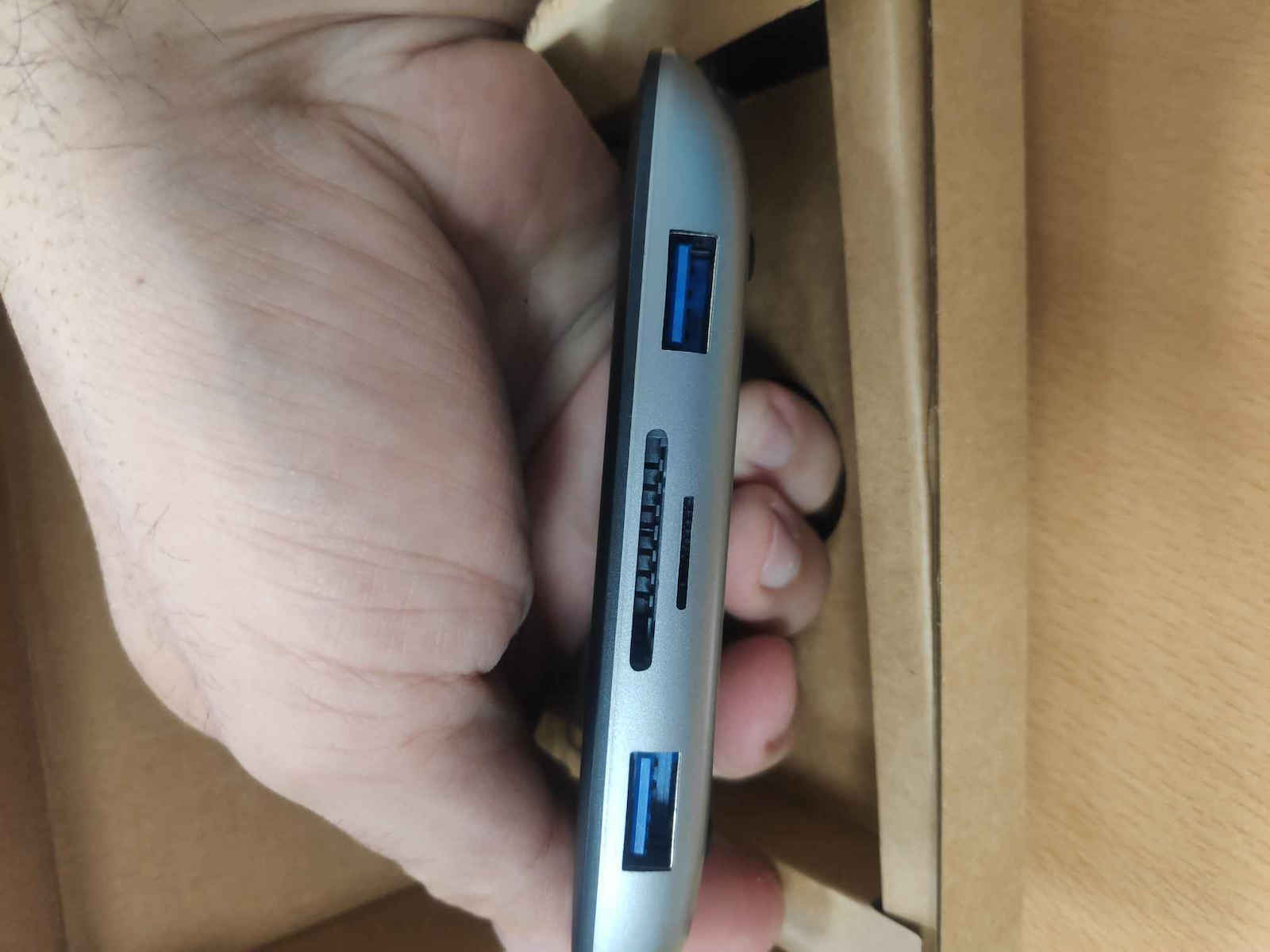
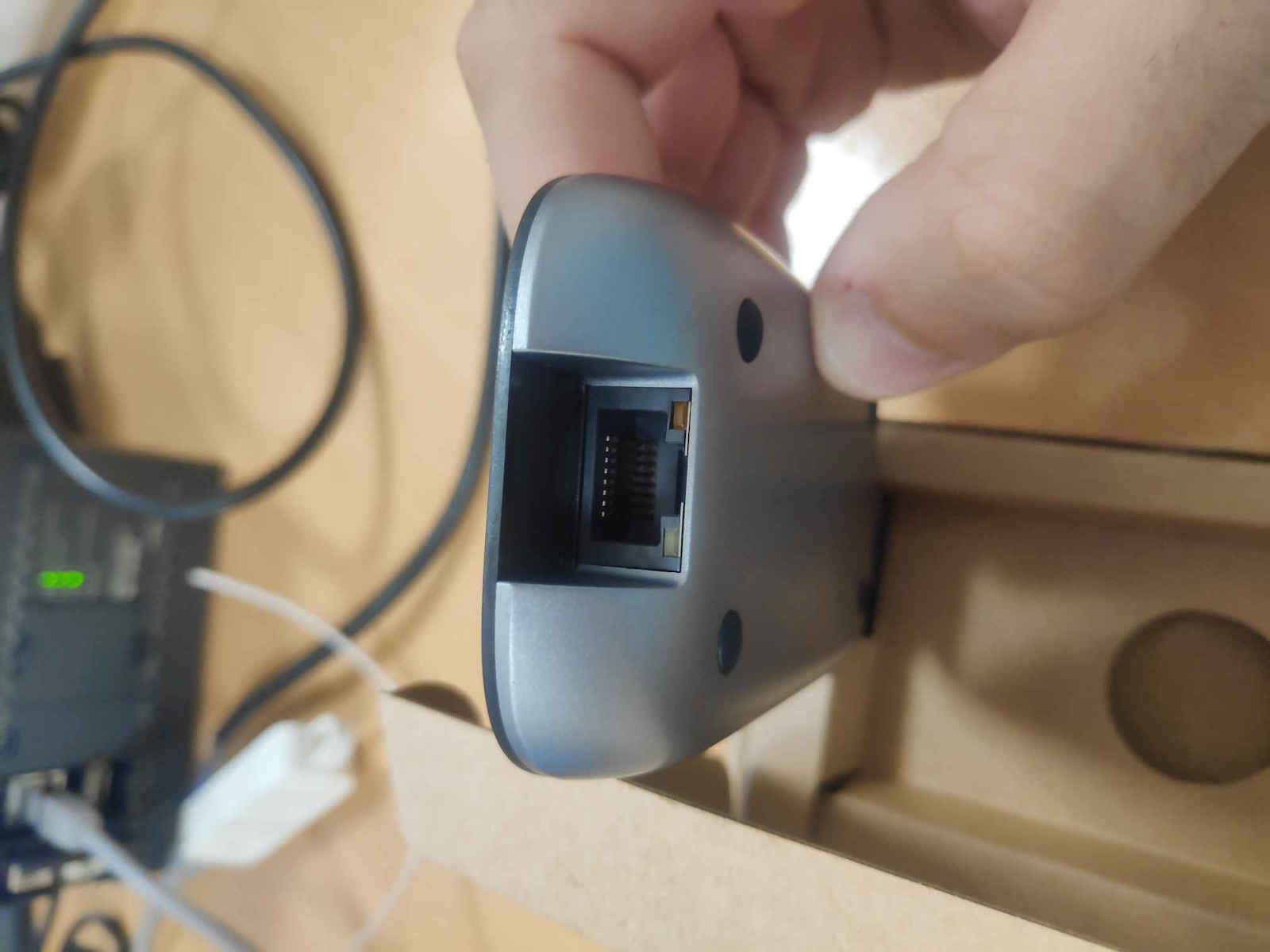
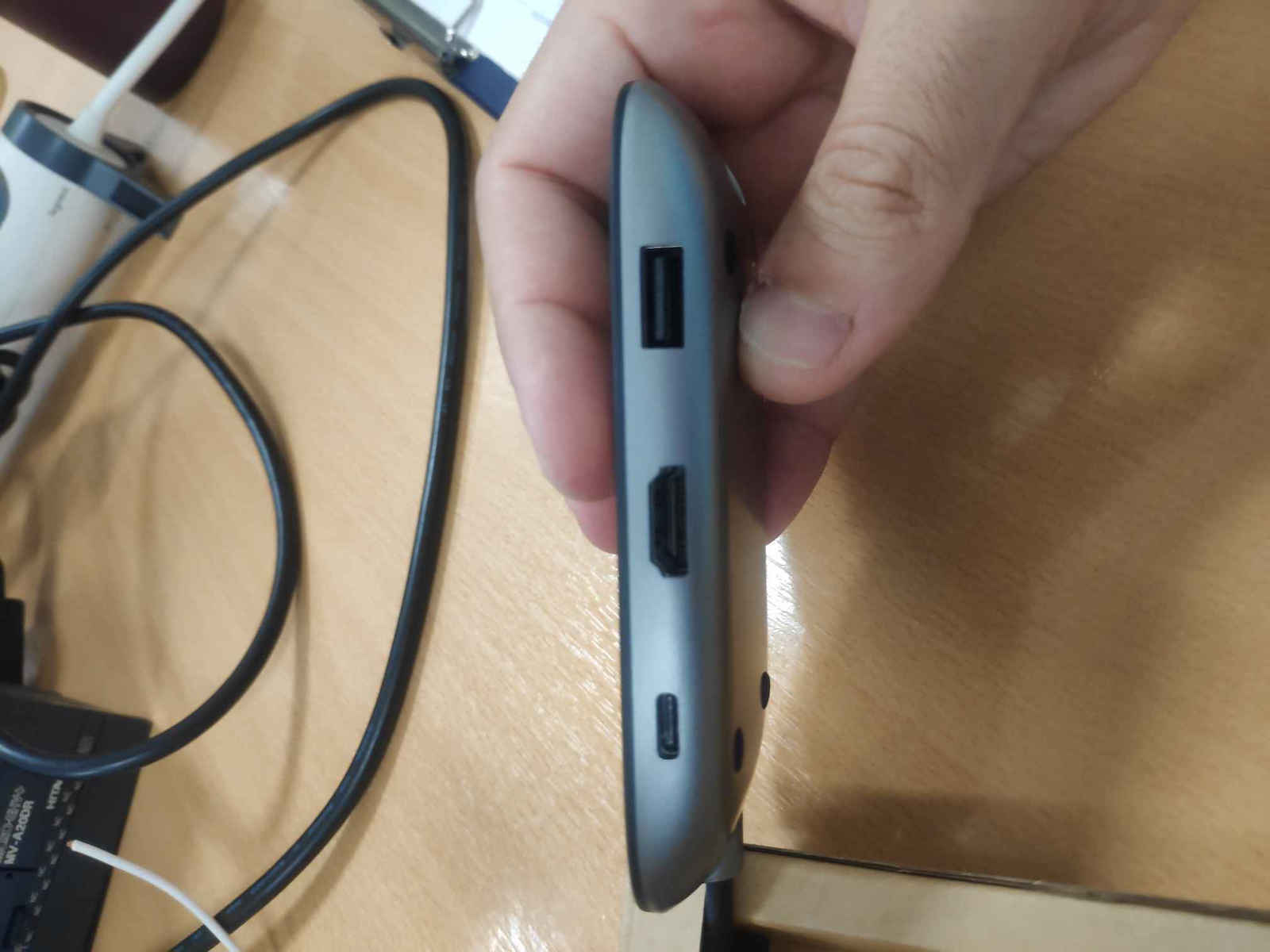
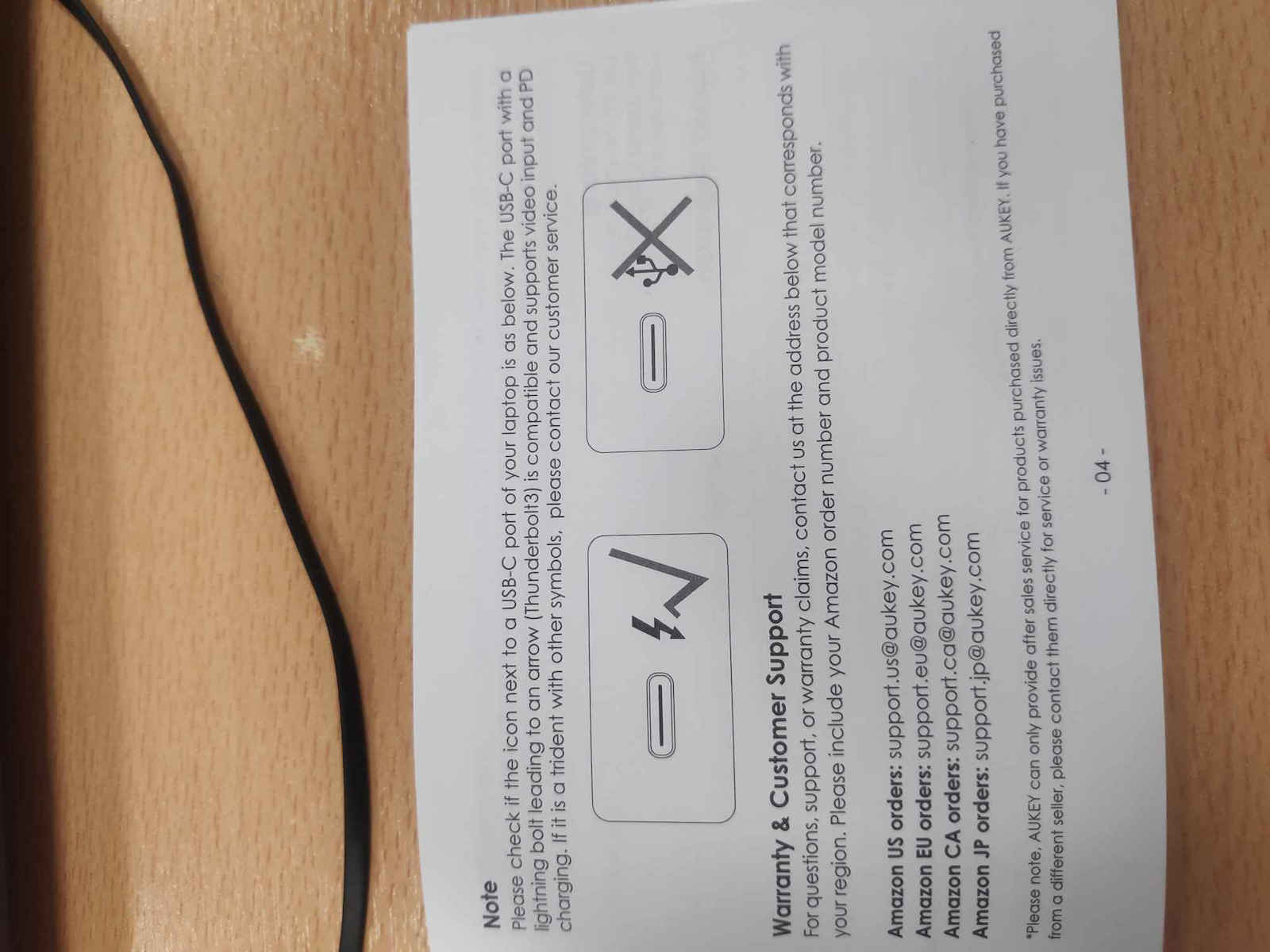
I have had it for a few years and it has been very convenient for me, connecting my MacBook Pro to an external monitor (HDMI), Ethernet, and peripherals without any issues. However, I noticed that the packaging leaflet contains some instructions that are not available elsewhere and are useful to know, so I am copying them here:
Product Care & Use
* Connect this hub to your host device first before connecting other devices to the hub
* Use your laptop's original power adapter to charge your laptop via the USB-C Power Delivery port on this hub
* When connecting an external hard drive or multiple devices to this hub, connect your laptop's power adapter to the USB-C Power Delivery port first because your host device may not deliver the required power
* Only one external hard drive can be connected to this hub
* When using the USB 3.1 Gen 1 data ports, the power demand of connected devices shouldn't exceed the total current output of 900mA. These ports are not recommended for charging due to lower output
* USB 3.1 Gen 1 ports may interfere with 2.4GHz wireless devices (like wireless mice and keyboards). Plug your 2.4GHz wireless receiver into a USB 2.0 port on your computer and position the hub away from the receiver
* SD and MicroSD card slots can't be used simultaneously. Your host device will recognize the card slot which is used first
Το εχω μερικά χρόνια και με έχει βολέψει πολύ, συνδεοντας macbook pro με εξωτερική οθόνη (hdmi), ethernet και περιφερειακά, χωρίς προβλήματα.
Είδα όμως οτι στο φυλλάδιο της συσκευασίας έχει κάποιες οδηγίες που δεν υπάρχουν αλλού και είναι χρήσιμες να γνωρίζει κανείς, οπότε τις αντιγράφω εδώ:
Product Care & Use
* Connect this hub to your host device first before connecting other devices to the hub
* Use your laptop's original power adapter to charge your laptop via the USB-C Power Delivery port on this hub
* When connecting an external hard drive or multiple devices to this hub, connect your laptop's power adapter to the USB-C Power Delivery port first because your host device may not deliver the required power
* Only one external hard drive can be connected to this hub
* When using the USB 3.1 Gen 1 data ports, the power demand of connected devices shouldn't exceed the total current output of 900mA. These ports are not recommended for charging due to lower output
* USB 3.1 Gen 1 ports may interfere with 2.4GHz wireless devices (like wireless mice and keyboards). Plug your 2.4GHz wireless receiver into a USB 2.0 port on your computer and position the hub away from the receiver
* SD and MicroSD card slots can't be used simultaneously. Your host device will recognize the card slot which is used first
The perfect solution for connecting the laptop to all its peripherals, quickly and easily, when frequently switching between home and office. For its price, it is ideal.
Η τέλεια λύση για να συνδέεις το laptop με όλα τα περιφερειακά του, γρήγορα και εύκολα, όταν εναλλάσσεις συχνά μεταξύ σπιτιού και γραφείου. Για την τιμή του είναι ιδανικό.
Does not PD to 100W tested on ROG ALLY (non Extreme 65W).I could not manage to get the TURBO 30W mode.
(edit: i found out recently that there is a bug on armory crate that shows 25W instead of 30W)
Does not PD to 100W tested on ROG ALLY (non Extreme 65W).I could not manage to get the TURBO 30W mode.
(edit: i found out recently that there is a bug on armory crate that shows 25W instead of 30W)
On a macbook pro silicon M1, on the first connection some of the ports do not work. After disconnecting and reconnecting the cables one by one, then (after several attempts) all of them work properly. I suspect it is not compatible with the usb hub I connect on top. Once it recognizes all the ports, this process is no longer necessary. However, this process often requires more than half an hour of experimentation. This has happened to me about five times in a span of two years. Every time I add or remove a device, I have to start from scratch.
Σε macbook pro silicon M1, στην πρώτη σύνδεση κάποιες από τις θύρες δεν λειτουργούν. Αφού βγάλω τα καλώδια και τα προσθέτω ένα-ένα, τότε (μετά από αρκετές προσπάθειες) λειτουργούν όλα κανονικά. Υποψιάζομαι πως δεν είναι συμβατό με το usb hub που συνδέω επάνω. Αφότου δει όλες τις θύρες, πλέον δεν χρειάζεται ξανά αυτή η διαδικασία. Όμως, η διαδικασία αυτή συχνά απαιτεί πάνω από μισή ώρα πειραματισμών. Αυτό μου έχει συμβεί περίπου πέντε φορές σε διάστημα δύο ετών. Κάθε φορά που προσθέτω ή αφαιρώ κάποια συσκευή, πρέπει να αρχίσω από την αρχή.
At least with the DELL XPS 13 I have, it does not allow charging through it (connecting to this charging cable). Additionally, it has many disconnects. It gets the job done, but if I had the choice again, I wouldn't get it and would look for something else
Τουλάχιστον με το DELL XPS 13 που έχω δεν επιτρέπει φόρτιση μέσα από αυτό (συνδέοντας σε αυτό το καλώδιο φόρτισης). Επιπλέον έχει πολλές αποσυνδέσεις. Κάνω την δουλειά μου αλλά αν είχα επιλογή ξανά δεν θα το έπαιρνα και θα έψαχνα κάτι άλλο
So far it works great. Usually I power it through my laptop (lenovo yoga 7) which requires a maximum of 65W, while also having an external monitor connected via hdmi and a wireless mouse receiver. I have also tested the ethernet ports and the card reader, and occasionally I connect an external storage device. USB mouse receivers often experience interference from USB 3.0 devices that you may have connected to the docking station, causing interruptions. This is a common problem and not exclusive to this specific docking station. Empirically, I have found that the problem is solved by removing the USB receiver from the docking station and therefore from the USB 3.0 devices, for example by using a simple USB 2.0 extension cable. I have this particular docking station permanently installed in my office at work and simply connect and disconnect my laptop through the USB-C cable. It is sleek, small, and functional.
Μέχρι στιγμής δουλεύει μια χαρά. Συνήθως τροφοδοτώ με ρεύμα μέσω αυτού το laptop μου (lenovo yoga 7) που απαιτεί 65W max, εχοντας ταυτόχρονα συνδεδεμένη εξωτερική οθόνη μέσω hdmi και δέκτη ασύρματου ποντικιού. Έχω δοκιμάσει και τις θύρες ethernet και το card reader και ενίοτε συνδέω κάποιο εξωτερικό μέσο αποθήκευσης. Οι δέκτες ποντικιών USB συχνά δέχονται παρεμβολές από συσκευές usb 3.0 που μπορεί να έχεις συνδεδεμένες πάνω στο docking station και κάνουν διακοπές. Αυτό είναι κοινό πρόβλημα και δεν συμβαίνει μόνο στο συγκεκριμένο docking station. Εμπειρικά έχω δει ότι το πρόβλημα λύνεται απομακρύνοντας τον usb δέκτη από το docking station και συνεπώς από τις usb 3.0 συσκευές, για παράδειγμα χρησιμοποιώντας ένα απλό καλώδιο επέκτασης usb 2.0 . Έχω το συγκεκριμένο docking station μόνιμα εγκατεστημένο στο γραφείο, στη δουλειά και απλά συνδέω και αποσυνδέω το laptop μου μέσω του usb c καλωδίου. Είναι κομψό, μικρό και λειτουργικό.
One fine. It works here for 1 year+ flawlessly with Dell G3, Lenovo Legion, and HP EliteBook. It should be noted that it heats up a little, but it does not affect its functionality.
Μια χαρά. Δουλεύει εδώ και 1 χρόνο+ άψογα με Dell G3, Lenovo legion και HP elitebook. Σημειώνεται ότι ζεσταίνεται λίγο, αλλά δεν επηρεάζεται η λειτουργία του.
Very good and sturdy construction in a compact size. Be careful that the port it will be connected to is for data transfer and not just for charging.
Πολύ καλή και στιβαρή κατασκευή σε compact μέγεθος. Προσοχή ώστε η θύρα στην οποία θα συνδεθεί να είναι για μεταφορά δεδομένων και όχι μόνο για φόρτιση.
Perfect! I use it with the Google Smart TV Stick Chromecast with Google TV 4K UHD and I have connected Ethernet, Bluetooth mouse/keyboard, USB stick, and of course the power supply of the Google TV.
άψογο! το δουλεύω με Google Smart TV Stick Chromecast with Google TV 4K UHD και έχω συνδέσει ethernet, ποντικι/πληκτρολόγιο Bluetooth, usb stick και φυσικά την τροφοδοσία του google tv.
All good, I've been using it for 1 year now.
The only problem it showed is that it loses connection to the internet 3-4 times a week with 10 hours of use per day, I unplug the plug, plug it back in and everything is fine
Όλα καλά, το δουλεύω 1 χρόνο τώρα.
Το μόνο πρόβλημα που παρουσίασε είναι οτι χάνει τη σύνδεση με το internet 3-4 φορές την εβδομάδα με 10ωρη χρήση ανα μέρα, ξεκουμπώνω το μπριζάκι, το ξανακουμπώνω και όλα καλά
I have had it for a few years and it has been very convenient for me, connecting my MacBook Pro to an external monitor (HDMI), Ethernet, and peripherals without any issues. However, I noticed that the packaging leaflet contains some instructions that are not available elsewhere and are useful to know, so I am copying them here:
Product Care & Use
* Connect this hub to your host device first before connecting other devices to the hub
* Use your laptop's original power adapter to charge your laptop via the USB-C Power Delivery port on this hub
* When connecting an external hard drive or multiple devices to this hub, connect your laptop's power adapter to the USB-C Power Delivery port first because your host device may not deliver the required power
* Only one external hard drive can be connected to this hub
* When using the USB 3.1 Gen 1 data ports, the power demand of connected devices shouldn't exceed the total current output of 900mA. These ports are not recommended for charging due to lower output
* USB 3.1 Gen 1 ports may interfere with 2.4GHz wireless devices (like wireless mice and keyboards). Plug your 2.4GHz wireless receiver into a USB 2.0 port on your computer and position the hub away from the receiver
* SD and MicroSD card slots can't be used simultaneously. Your host device will recognize the card slot which is used first
Το εχω μερικά χρόνια και με έχει βολέψει πολύ, συνδεοντας macbook pro με εξωτερική οθόνη (hdmi), ethernet και περιφερειακά, χωρίς προβλήματα.
Είδα όμως οτι στο φυλλάδιο της συσκευασίας έχει κάποιες οδηγίες που δεν υπάρχουν αλλού και είναι χρήσιμες να γνωρίζει κανείς, οπότε τις αντιγράφω εδώ:
Product Care & Use
* Connect this hub to your host device first before connecting other devices to the hub
* Use your laptop's original power adapter to charge your laptop via the USB-C Power Delivery port on this hub
* When connecting an external hard drive or multiple devices to this hub, connect your laptop's power adapter to the USB-C Power Delivery port first because your host device may not deliver the required power
* Only one external hard drive can be connected to this hub
* When using the USB 3.1 Gen 1 data ports, the power demand of connected devices shouldn't exceed the total current output of 900mA. These ports are not recommended for charging due to lower output
* USB 3.1 Gen 1 ports may interfere with 2.4GHz wireless devices (like wireless mice and keyboards). Plug your 2.4GHz wireless receiver into a USB 2.0 port on your computer and position the hub away from the receiver
* SD and MicroSD card slots can't be used simultaneously. Your host device will recognize the card slot which is used first
The perfect solution for connecting the laptop to all its peripherals, quickly and easily, when frequently switching between home and office. For its price, it is ideal.
Η τέλεια λύση για να συνδέεις το laptop με όλα τα περιφερειακά του, γρήγορα και εύκολα, όταν εναλλάσσεις συχνά μεταξύ σπιτιού και γραφείου. Για την τιμή του είναι ιδανικό.
Does not PD to 100W tested on ROG ALLY (non Extreme 65W).I could not manage to get the TURBO 30W mode.
(edit: i found out recently that there is a bug on armory crate that shows 25W instead of 30W)
Does not PD to 100W tested on ROG ALLY (non Extreme 65W).I could not manage to get the TURBO 30W mode.
(edit: i found out recently that there is a bug on armory crate that shows 25W instead of 30W)
Specifications are collected from official manufacturer websites. Please verify the specifications before proceeding with your final purchase. If you notice any problem you can report it here.
All good, I've been using it for 1 year now.
The only problem it showed is that it loses connection to the internet 3-4 times a week with 10 hours of use per day, I unplug the plug, plug it back in and everything is fine
Όλα καλά, το δουλεύω 1 χρόνο τώρα.
Το μόνο πρόβλημα που παρουσίασε είναι οτι χάνει τη σύνδεση με το internet 3-4 φορές την εβδομάδα με 10ωρη χρήση ανα μέρα, ξεκουμπώνω το μπριζάκι, το ξανακουμπώνω και όλα καλά
I have had it for a few years and it has been very convenient for me, connecting my MacBook Pro to an external monitor (HDMI), Ethernet, and peripherals without any issues. However, I noticed that the packaging leaflet contains some instructions that are not available elsewhere and are useful to know, so I am copying them here:
Product Care & Use
* Connect this hub to your host device first before connecting other devices to the hub
* Use your laptop's original power adapter to charge your laptop via the USB-C Power Delivery port on this hub
* When connecting an external hard drive or multiple devices to this hub, connect your laptop's power adapter to the USB-C Power Delivery port first because your host device may not deliver the required power
* Only one external hard drive can be connected to this hub
* When using the USB 3.1 Gen 1 data ports, the power demand of connected devices shouldn't exceed the total current output of 900mA. These ports are not recommended for charging due to lower output
* USB 3.1 Gen 1 ports may interfere with 2.4GHz wireless devices (like wireless mice and keyboards). Plug your 2.4GHz wireless receiver into a USB 2.0 port on your computer and position the hub away from the receiver
* SD and MicroSD card slots can't be used simultaneously. Your host device will recognize the card slot which is used first
Το εχω μερικά χρόνια και με έχει βολέψει πολύ, συνδεοντας macbook pro με εξωτερική οθόνη (hdmi), ethernet και περιφερειακά, χωρίς προβλήματα.
Είδα όμως οτι στο φυλλάδιο της συσκευασίας έχει κάποιες οδηγίες που δεν υπάρχουν αλλού και είναι χρήσιμες να γνωρίζει κανείς, οπότε τις αντιγράφω εδώ:
Product Care & Use
* Connect this hub to your host device first before connecting other devices to the hub
* Use your laptop's original power adapter to charge your laptop via the USB-C Power Delivery port on this hub
* When connecting an external hard drive or multiple devices to this hub, connect your laptop's power adapter to the USB-C Power Delivery port first because your host device may not deliver the required power
* Only one external hard drive can be connected to this hub
* When using the USB 3.1 Gen 1 data ports, the power demand of connected devices shouldn't exceed the total current output of 900mA. These ports are not recommended for charging due to lower output
* USB 3.1 Gen 1 ports may interfere with 2.4GHz wireless devices (like wireless mice and keyboards). Plug your 2.4GHz wireless receiver into a USB 2.0 port on your computer and position the hub away from the receiver
* SD and MicroSD card slots can't be used simultaneously. Your host device will recognize the card slot which is used first
The perfect solution for connecting the laptop to all its peripherals, quickly and easily, when frequently switching between home and office. For its price, it is ideal.
Η τέλεια λύση για να συνδέεις το laptop με όλα τα περιφερειακά του, γρήγορα και εύκολα, όταν εναλλάσσεις συχνά μεταξύ σπιτιού και γραφείου. Για την τιμή του είναι ιδανικό.
Does not PD to 100W tested on ROG ALLY (non Extreme 65W).I could not manage to get the TURBO 30W mode.
(edit: i found out recently that there is a bug on armory crate that shows 25W instead of 30W)
Does not PD to 100W tested on ROG ALLY (non Extreme 65W).I could not manage to get the TURBO 30W mode.
(edit: i found out recently that there is a bug on armory crate that shows 25W instead of 30W)
On a macbook pro silicon M1, on the first connection some of the ports do not work. After disconnecting and reconnecting the cables one by one, then (after several attempts) all of them work properly. I suspect it is not compatible with the usb hub I connect on top. Once it recognizes all the ports, this process is no longer necessary. However, this process often requires more than half an hour of experimentation. This has happened to me about five times in a span of two years. Every time I add or remove a device, I have to start from scratch.
Σε macbook pro silicon M1, στην πρώτη σύνδεση κάποιες από τις θύρες δεν λειτουργούν. Αφού βγάλω τα καλώδια και τα προσθέτω ένα-ένα, τότε (μετά από αρκετές προσπάθειες) λειτουργούν όλα κανονικά. Υποψιάζομαι πως δεν είναι συμβατό με το usb hub που συνδέω επάνω. Αφότου δει όλες τις θύρες, πλέον δεν χρειάζεται ξανά αυτή η διαδικασία. Όμως, η διαδικασία αυτή συχνά απαιτεί πάνω από μισή ώρα πειραματισμών. Αυτό μου έχει συμβεί περίπου πέντε φορές σε διάστημα δύο ετών. Κάθε φορά που προσθέτω ή αφαιρώ κάποια συσκευή, πρέπει να αρχίσω από την αρχή.
At least with the DELL XPS 13 I have, it does not allow charging through it (connecting to this charging cable). Additionally, it has many disconnects. It gets the job done, but if I had the choice again, I wouldn't get it and would look for something else
Τουλάχιστον με το DELL XPS 13 που έχω δεν επιτρέπει φόρτιση μέσα από αυτό (συνδέοντας σε αυτό το καλώδιο φόρτισης). Επιπλέον έχει πολλές αποσυνδέσεις. Κάνω την δουλειά μου αλλά αν είχα επιλογή ξανά δεν θα το έπαιρνα και θα έψαχνα κάτι άλλο
So far it works great. Usually I power it through my laptop (lenovo yoga 7) which requires a maximum of 65W, while also having an external monitor connected via hdmi and a wireless mouse receiver. I have also tested the ethernet ports and the card reader, and occasionally I connect an external storage device. USB mouse receivers often experience interference from USB 3.0 devices that you may have connected to the docking station, causing interruptions. This is a common problem and not exclusive to this specific docking station. Empirically, I have found that the problem is solved by removing the USB receiver from the docking station and therefore from the USB 3.0 devices, for example by using a simple USB 2.0 extension cable. I have this particular docking station permanently installed in my office at work and simply connect and disconnect my laptop through the USB-C cable. It is sleek, small, and functional.
Μέχρι στιγμής δουλεύει μια χαρά. Συνήθως τροφοδοτώ με ρεύμα μέσω αυτού το laptop μου (lenovo yoga 7) που απαιτεί 65W max, εχοντας ταυτόχρονα συνδεδεμένη εξωτερική οθόνη μέσω hdmi και δέκτη ασύρματου ποντικιού. Έχω δοκιμάσει και τις θύρες ethernet και το card reader και ενίοτε συνδέω κάποιο εξωτερικό μέσο αποθήκευσης. Οι δέκτες ποντικιών USB συχνά δέχονται παρεμβολές από συσκευές usb 3.0 που μπορεί να έχεις συνδεδεμένες πάνω στο docking station και κάνουν διακοπές. Αυτό είναι κοινό πρόβλημα και δεν συμβαίνει μόνο στο συγκεκριμένο docking station. Εμπειρικά έχω δει ότι το πρόβλημα λύνεται απομακρύνοντας τον usb δέκτη από το docking station και συνεπώς από τις usb 3.0 συσκευές, για παράδειγμα χρησιμοποιώντας ένα απλό καλώδιο επέκτασης usb 2.0 . Έχω το συγκεκριμένο docking station μόνιμα εγκατεστημένο στο γραφείο, στη δουλειά και απλά συνδέω και αποσυνδέω το laptop μου μέσω του usb c καλωδίου. Είναι κομψό, μικρό και λειτουργικό.
One fine. It works here for 1 year+ flawlessly with Dell G3, Lenovo Legion, and HP EliteBook. It should be noted that it heats up a little, but it does not affect its functionality.
Μια χαρά. Δουλεύει εδώ και 1 χρόνο+ άψογα με Dell G3, Lenovo legion και HP elitebook. Σημειώνεται ότι ζεσταίνεται λίγο, αλλά δεν επηρεάζεται η λειτουργία του.
Very good and sturdy construction in a compact size. Be careful that the port it will be connected to is for data transfer and not just for charging.
Πολύ καλή και στιβαρή κατασκευή σε compact μέγεθος. Προσοχή ώστε η θύρα στην οποία θα συνδεθεί να είναι για μεταφορά δεδομένων και όχι μόνο για φόρτιση.
Perfect! I use it with the Google Smart TV Stick Chromecast with Google TV 4K UHD and I have connected Ethernet, Bluetooth mouse/keyboard, USB stick, and of course the power supply of the Google TV.
άψογο! το δουλεύω με Google Smart TV Stick Chromecast with Google TV 4K UHD και έχω συνδέσει ethernet, ποντικι/πληκτρολόγιο Bluetooth, usb stick και φυσικά την τροφοδοσία του google tv.
All good, I've been using it for 1 year now.
The only problem it showed is that it loses connection to the internet 3-4 times a week with 10 hours of use per day, I unplug the plug, plug it back in and everything is fine
Όλα καλά, το δουλεύω 1 χρόνο τώρα.
Το μόνο πρόβλημα που παρουσίασε είναι οτι χάνει τη σύνδεση με το internet 3-4 φορές την εβδομάδα με 10ωρη χρήση ανα μέρα, ξεκουμπώνω το μπριζάκι, το ξανακουμπώνω και όλα καλά
I have had it for a few years and it has been very convenient for me, connecting my MacBook Pro to an external monitor (HDMI), Ethernet, and peripherals without any issues. However, I noticed that the packaging leaflet contains some instructions that are not available elsewhere and are useful to know, so I am copying them here:
Product Care & Use
* Connect this hub to your host device first before connecting other devices to the hub
* Use your laptop's original power adapter to charge your laptop via the USB-C Power Delivery port on this hub
* When connecting an external hard drive or multiple devices to this hub, connect your laptop's power adapter to the USB-C Power Delivery port first because your host device may not deliver the required power
* Only one external hard drive can be connected to this hub
* When using the USB 3.1 Gen 1 data ports, the power demand of connected devices shouldn't exceed the total current output of 900mA. These ports are not recommended for charging due to lower output
* USB 3.1 Gen 1 ports may interfere with 2.4GHz wireless devices (like wireless mice and keyboards). Plug your 2.4GHz wireless receiver into a USB 2.0 port on your computer and position the hub away from the receiver
* SD and MicroSD card slots can't be used simultaneously. Your host device will recognize the card slot which is used first
Το εχω μερικά χρόνια και με έχει βολέψει πολύ, συνδεοντας macbook pro με εξωτερική οθόνη (hdmi), ethernet και περιφερειακά, χωρίς προβλήματα.
Είδα όμως οτι στο φυλλάδιο της συσκευασίας έχει κάποιες οδηγίες που δεν υπάρχουν αλλού και είναι χρήσιμες να γνωρίζει κανείς, οπότε τις αντιγράφω εδώ:
Product Care & Use
* Connect this hub to your host device first before connecting other devices to the hub
* Use your laptop's original power adapter to charge your laptop via the USB-C Power Delivery port on this hub
* When connecting an external hard drive or multiple devices to this hub, connect your laptop's power adapter to the USB-C Power Delivery port first because your host device may not deliver the required power
* Only one external hard drive can be connected to this hub
* When using the USB 3.1 Gen 1 data ports, the power demand of connected devices shouldn't exceed the total current output of 900mA. These ports are not recommended for charging due to lower output
* USB 3.1 Gen 1 ports may interfere with 2.4GHz wireless devices (like wireless mice and keyboards). Plug your 2.4GHz wireless receiver into a USB 2.0 port on your computer and position the hub away from the receiver
* SD and MicroSD card slots can't be used simultaneously. Your host device will recognize the card slot which is used first
The perfect solution for connecting the laptop to all its peripherals, quickly and easily, when frequently switching between home and office. For its price, it is ideal.
Η τέλεια λύση για να συνδέεις το laptop με όλα τα περιφερειακά του, γρήγορα και εύκολα, όταν εναλλάσσεις συχνά μεταξύ σπιτιού και γραφείου. Για την τιμή του είναι ιδανικό.
Does not PD to 100W tested on ROG ALLY (non Extreme 65W).I could not manage to get the TURBO 30W mode.
(edit: i found out recently that there is a bug on armory crate that shows 25W instead of 30W)
Does not PD to 100W tested on ROG ALLY (non Extreme 65W).I could not manage to get the TURBO 30W mode.
(edit: i found out recently that there is a bug on armory crate that shows 25W instead of 30W)