It can register the scaling entry levels in the same motion depending on how deeply you press. This allows for a more measured and nuanced form of control.
For example, a half press will make your character walk, while a full press will make them run. This type of control is similar to how you can move your character using analog thumbsticks on a controller.
Specifications are collected from official manufacturer websites. Please verify the specifications before proceeding with your final purchase. If you notice any problem you can report it here.
Impressive with endless features, macros, and very convenient in hand but very, very expensive for its quality. Soon, some key will give out, and to replace it, it must go for repair at a shop with questionable results.
If they could easily replace the keys with new spare parts, it would be the ultimate tool.
It’s addictive ;) I have changed 3 so far
Εντυπωσιακό με άπειρες λειτουργίες, μεκροεντολές, και πολύ βολικό στο χέρι αλλά πολύ πολύ ακριβό για την ποιότητα του. Σύντομα κάποιο πλήκτρο θα παραδώσει πνεύμα και για να το αλλάξεις πρέπει να πάει για επισκευή σε κατάστημα με αμφίβολο αποτέλεσμα.
Αν μπορούσαν να αλλάξουν εύκολα τα πλήκτρα του με νέα ανταλλακτικά θα ήταν το απόλυτο εργαλείο.
Προκαλεί εξάρτηση ;) Έχω αλλάξει 3 μέχρι σήμερα
TLDR; The keypad has left me extremely satisfied. Very convenient, huge flexibility in customizing the keys (in general, not just for gaming), almost completely silent, no input lag. However, the price is a bit steep, definitely NOT worth so much money even though it is (in my opinion) the best keypad I could buy (in terms of my needs). Note that I used the keypad as a RIGHT-HANDER with my left hand and it worked perfectly for me. I don't know if it will suit someone in the opposite direction.
For those who use controllers; You can prioritize a controller through Windows so that the Tartarus does not "freeze" your controllers while playing a game (this only happened to me in FIFA, all other games did not have any problems).
Detailed review:
Keys: The keys are very enjoyable to use and press, quite sensitive, and without any issues with Inputs (input error, input lag, input repetition etc.). The same goes for the scroll wheel, as well as the directional tab it has on the edge. The keyboard design is easy to read, you won't see a button and wonder "what is this?". Finally, the keypad comes with optical switches, which are generally "better" (in a way) than mechanical switches for gaming.
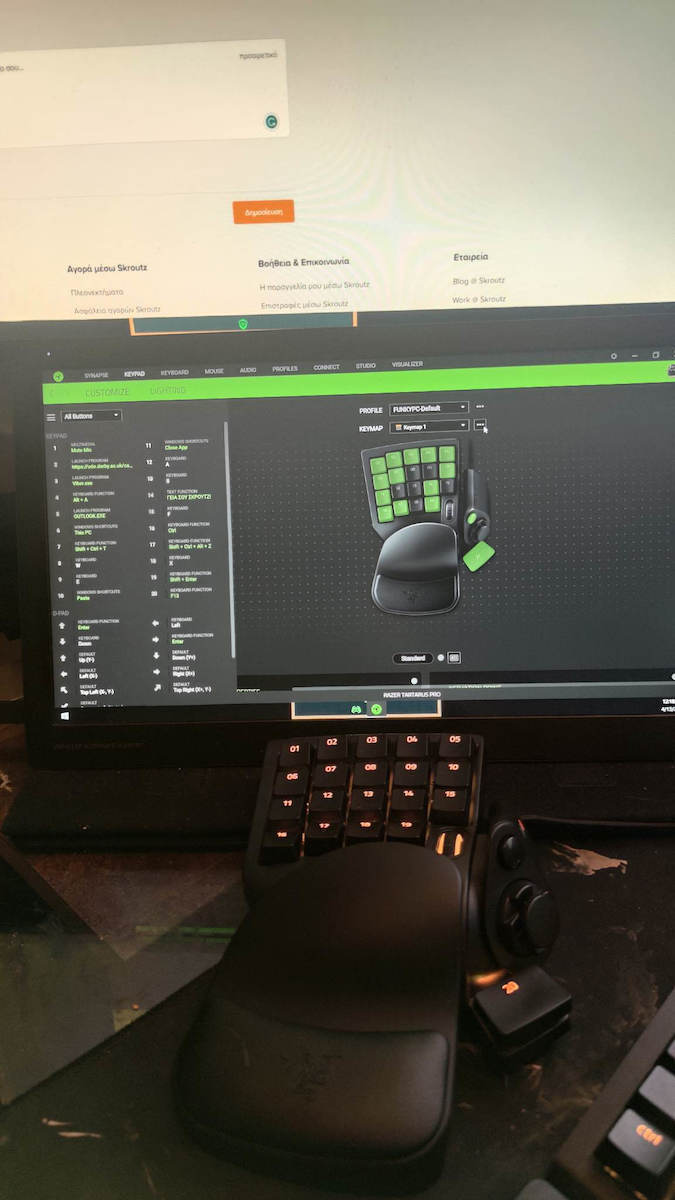
Size and construction: The size seemed okay to me, somewhat large, although I know that I generally have "small hands", which made me have to stretch my fingers to reach some buttons. After a while, I got used to it, and now using it is relatively fine. The construction is also very good, it is not heavy at all (you can lift it with your little finger) but you don't feel like it's "cheap plastic" or "Chinese". Finally, it comes with a USB cable of about 2 meters, which personally covers the distance from the floor to the desk to connect to the PC.
Comfort: What can I say about this area, really excellent. I have wrist rests for my hands on the normal keyboard as well as on my mouse, and they really don't compare to the Tartarus. Really very comfortable, as I think about leaving my hand there when watching a video. Note here that you can generally change the position of the wrist rest if it doesn't suit you, as it is detachable.
Keypad & Synapse: I generally don't have a good relationship with Razer's software. I dislike it because several devices I have actually "worsen" in functionality when Synapse is running. However, I have not encountered any problems at all, it seems to work normally, even with this "infamous" and unstable program.
Accessibility: The keypad comes with 3 default keymaps.
The 1st keymap replicates the classic functions of a keyboard, as you would need them in most MMORPG games (i.e. WASD, QWERT and numbers, among others).
The 2nd keymap comes as an Xbox controller, where the keypad buttons replicate the buttons on a controller.
The 3rd keymap comes as a joystick. Whatever applies to the controller, applies here as well.
None of the above removes the keys from the keyboard or controller, etc. Both will do exactly the same thing.
Overall, it is plug-n-play, but if you want to customize bindings on the buttons through the Razer application, which automatically downloads (but you can choose not to have it if you don't want it). You simply won't have the same level of customization of the buttons through other applications like reWASD, as far as I know).
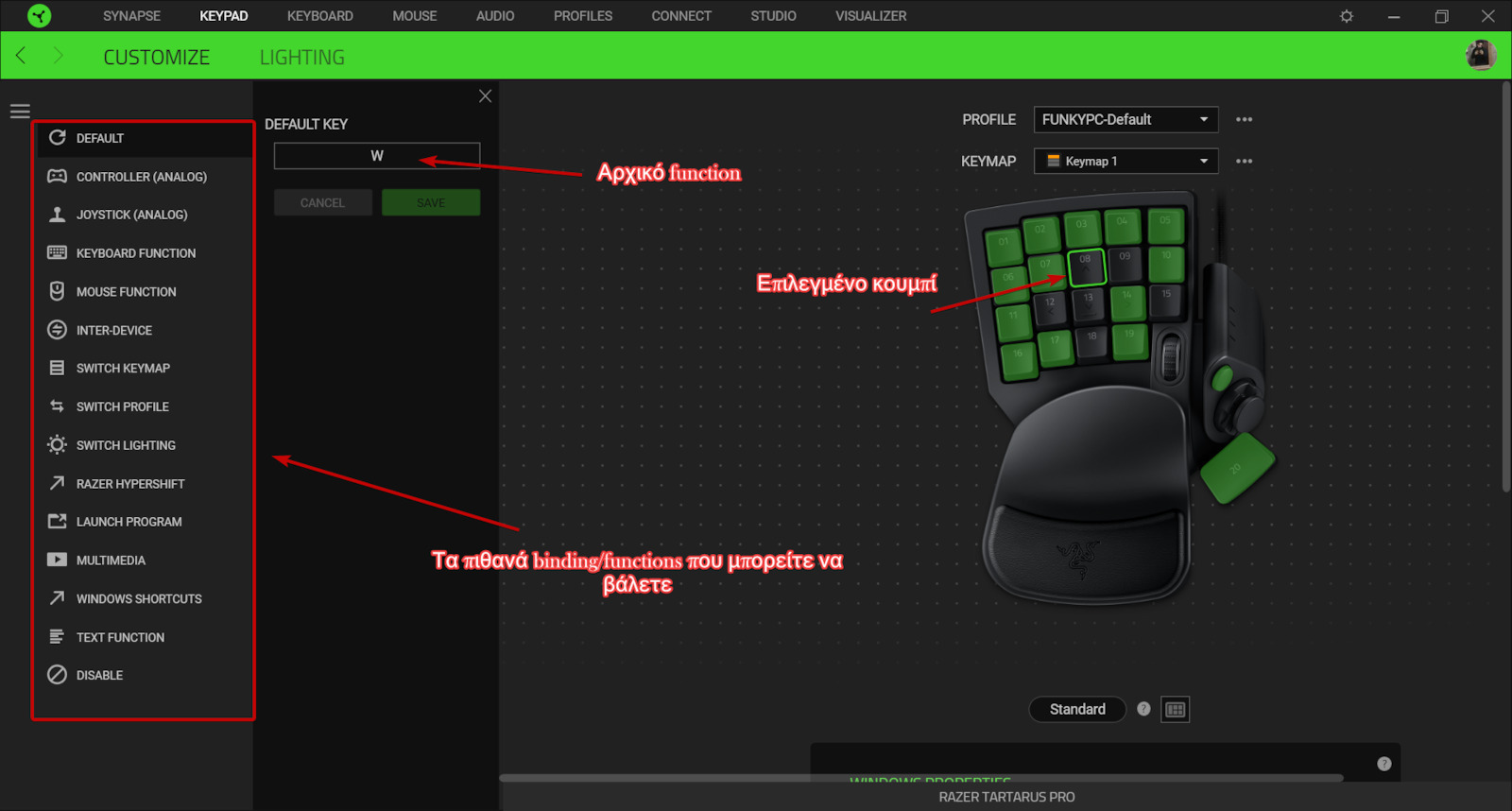
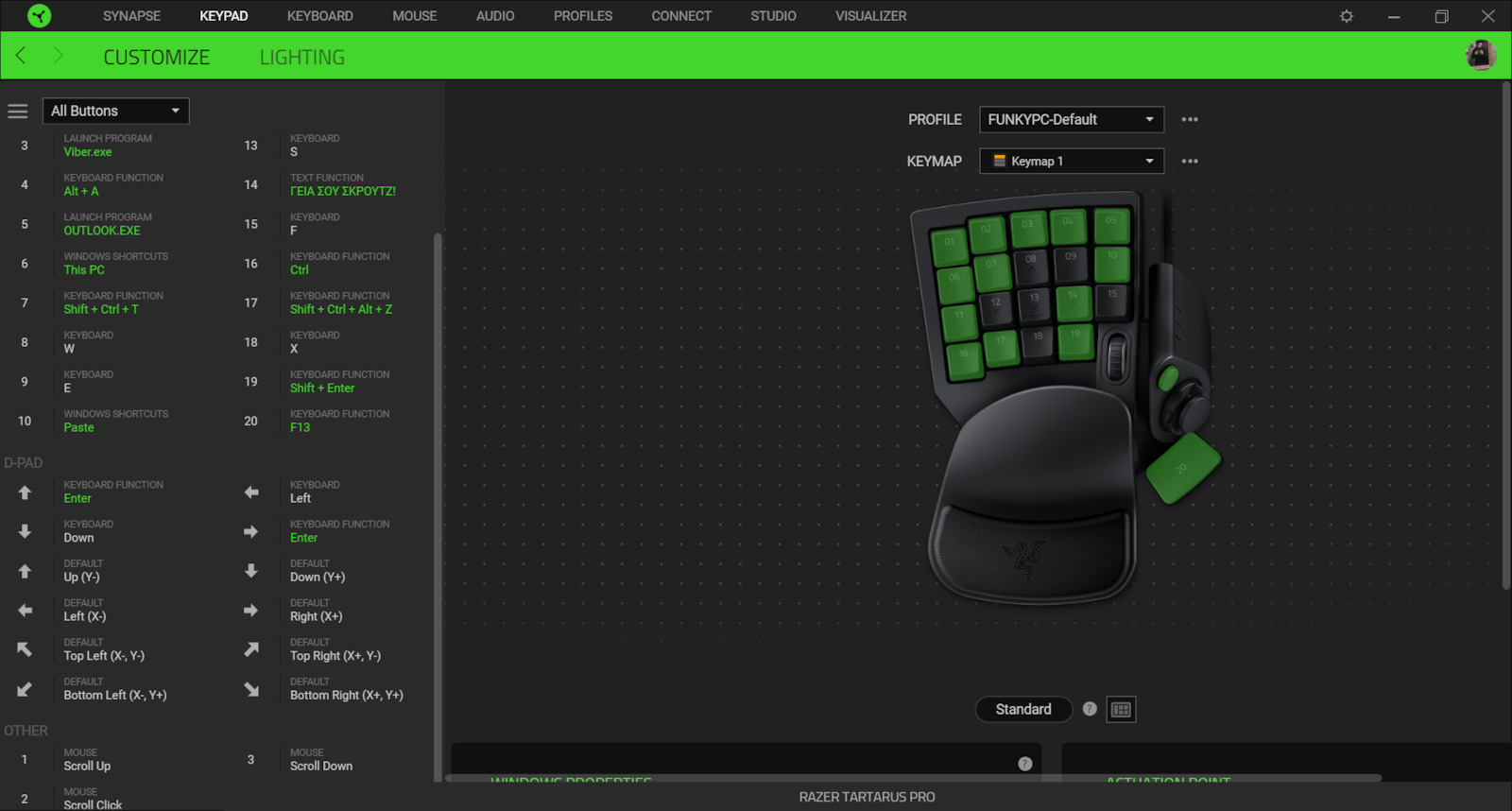
Adaptability: Here, the product is truly excellent. It comes with 20 analog buttons, and 32 total programmable "movements" per profile. You can load 8 profiles, which you can change very quickly by simply pressing a button on the edge of the product, which means that in reality you can have a huge range of custom buttons to use AS you want.
For example, in the first profile, I have loaded all the shortcuts I need to do tasks (as you can see in the photo I uploaded (https://i.imgur.com/ElkuHef.png) I have a button to open Viber, another for Outlook, another to do 4 functions together (Shift + Ctrl + Alt + Z). In the second one, I have put everything I need for the games I play, which is extremely convenient there as well. It really offers me great comfort, and it's like playing normally with my keyboard, but... better :D Finally, in the 3rd, and last, profile I have, I use it for shortcuts in various programs for school (e.g. photoshop, word, PowerPoint, SPSS, excel, etc). The quick and easy switching between profiles is really super useful and "solves" your hands.
Price: Despite all of the above, its price, as much as we try, is high. It is one of the most expensive in the -Greek- market, and Razer seems to take advantage of the fact that it monopolizes the market with so many high-quality keys. I don't think it will break soon, but if it does, it is difficult to replace, as 130+ euros is quite a bit.
I will probably return for a review next year, to talk about the product's longevity, and if it maintains its quality.
Usefulness: It is aimed at people who either work with software with many shortcuts (I fall into this category myself) or need an advantage in "competitive" gaming (don't ask me, I'm a noob, for advice in this area see other reviews). Beyond that, the product is certainly a comfort, and certainly not aimed at the "general/everyday" computer user or the "casual" gamer.
Conclusion: The truth is that at first I hesitated with the purchase - I thought maybe I made a foolish investment in something that is not very useful. I was wrong, not only does it greatly help me, but it helps me extremely in my productivity and the speed of my work. I did not regret my purchase, and I hope it will make me look good in the long run.
Review Update 15/05/2024: Nothing has changed from what I have said above, even with many hours of daily use. I have loaded it with 8 different profiles with different shortcuts, and it really doesn't notice anything, it does everything perfectly and as I expect it without any problems. I now use it even on my laptop for all kinds of uses, e.g. gaming & shortcuts. What really deserves to be praised again is the pad that remains divine in comfort without any signs of wear.
TLDR; Το keypad με έχει αφήσει υπέρ-ευχαριστημένο. Υπερ βολικό, τεράστια ευελιξία προσαρμογής των πλήκτρων (γενικά, όχι μόνο για gaming), σχεδόν εντελώς αθόρυβο, δεν έχει κάποιο input lag. Ωστόσο, τσιμπημένη τιμή, σίγουρα ΔΕΝ αξίζει τόσα χρήματα κι ας είναι (κατά την άποψή μου) το καλύτερο keypad που θα μπορούσα να αγοράσω (αναφορικά πάντα ως προς τις ανάγκες μου). Να σημειωθεί ότι το keypad το χρησιμοποίησα ως ΔΕΞΙΟΧΕΙΡΑΣ με το αριστερό μου χέρι και με καταβόλεψε. Δεν ξέρω αν θα βολεύει κάποιον στην αντίθετη κατεύθυνση.
Για όσους χρησιμοποιούν controllers; Μπορείτε να βάλετε κάποιο controller να έχει προτεραιότητα μέσω των Windows, έτσι ώστε το Tartarus να μην "παγώνει" τα controllers σας ενώ παίζετε κάποιο παιχνίδι (εμένα μου συνέβη αυτό μόνο στο FIFA, όλα τα άλλα games δεν εμφάνισαν κάποιο πρόβλημα).
Αναλυτικότερο review:
Πλήκτρα: Τα πλήκτρα είναι πολύ απολαυστικά στην χρήση και στο πάτημα, αρκετά ευαίσθητα, και χωρίς κάποιο πρόβλημα στα Inputs (input error, input lag, input repetition etc.). Το ίδιο ισχύει και για την ροδέλα του, όπως και για το directional tab που έχει στην άκρη. Ο σχεδιασμός του πληκτρολογίου είναι ευανάγνωστος, δεν πρόκειται να δεις κανά κουμπί και να σκεφτείς "τώρα αυτό τι είναι;". Τέλος, το keypad έρχεται με optical switches, που είναι γενικότερα "καλύτερα" (κατά κάποιον τρόπο) από τα mechanical switches όσον αφορά το gaming.
Μέγεθος και κατασκευή: Το μέγεθος του μου φάνηκε οκ, κάπως μεγάλο, αν και ξέρω ότι γενικά έχω "μικρά χέρια", πράγμα που έκανε μερικά κουμπιά να πρέπει να τεντώσω τα δάχτυλα για να τα φτάσω. Μετά από λίγο καιρό το συνήθισα, και τώρα η χρήση του με βολεύει -σχετικά- μια χαρά. Η κατασκευή του είναι επίσης πολύ καλή, δεν είναι καθόλου βαρύ (τύπου, μπορείς να το σηκώσεις με το μικρό σου δαχτυλάκι) αλλά παρόλα αυτά δεν το νιώθεις να είναι "πλαστικατζούρα" ή "κινεζιά". Τέλος, έρχεται με USB περίπου 2 μέτρων, που εμένα προσωπικά υπερκαλύβει την απόσταση πατώματος-γραφείου για να συνδεθεί στο PC.
Άνεση: Τι να πω για αυτόν τον τομέα, πραγματικά άριστο. Έχω μαξιλαράκια για τα χέρια και στο κανονικό πληκτρολόγιο όπως και στο ποντίκι μου, και πραγματικά δεν πιάνουν μια μπροστά σε αυτό του Tartarus. Πραγματικά πολύ μεγάλη άνεση, αφού σκέφτομαι όταν βλέπω κανά βίντεο να αφήνω το χέρι μου εκεί πάνω. Να σημειωθεί εδώ, ότι γενικά το μαξιλαράκι μπορείτε να το αλλάξετε θέση, αν δεν σας βολεύει, αφού είναι detachable.
Keypad & Synapse: Γενικά δεν έχω καλή σχέση με το λογισμικό της Razer. Το αντιπαθώ, διότι αρκετές συσκευές που έχω στην πραγματικότητα "χειροτερεύουν" στην λειτουργικότητά τους όταν τρέχει το Synapse. Ωστόσο, δεν έχω αντιμετωπίσει κανένα απολύτως πρόβλημα, φαίνεται να λειτουργεί κανονικά, ακόμα και με αυτό το "κακόφημο" και ασταθές πρόγραμμα.
Προσβασιμότητα: Το keypad έρχεται με 3 default keymaps.
Το 1ο keymap αντιγράφει τα κλασσικά functions ενός πληκτρολογίου, όπως θα τα χρειαζόσουν στα περισσότερα MMORPG games (δηλ. WASD, QWERT κι αριθμούς, μεταξύ άλλων)
Το 2ο keymap έρχεται ως Xbox controller, όπου τα κουμπιά του keypad αντιγράφουν όσα κουμπιά υπάρχουν πάνω σε ένα κοντρόλερ.
Το 3ο keymap έρχεται ως joystick. Ό,τι ισχύει στο κοντρόλερ, ισχύει κι εδώ.
Τίποτα από τα παραπάνω δεν αφαιρεί τα πλήκτρα από το πληκτρολόγιο ή το controller κτλ. Απλά και τα 2 θα κάνουν το ίδιο ακριβώς πράγμα.
Γενικά είναι plug-n-play, αλλά άμα θέλεις να κάνεις custom bindings στα κουμπιά μέσω της εφαρμογής της razer, η οποία κατεβαίνει αυτόματα (αλλά μπορείς να μην την έχεις, άμα δεν την θέλεις. Απλά δε θα έχεις τρόπο τόσο μεγάλης αναπροσαρμογής των κουμπιών μέσω άλλων εφαρμογών όπως του reWASD, απ'όσο ξέρω).
Ικανότητα προσαρμοστικότητας: Εδώ, πραγματικά, το προϊόν είναι άριστο. Έρχεται με 20 αναλογικά κουμπιά, και 32 συνολικές programmable "κινήσεις" ανά προφίλ. Μπορείς να του φορτώσεις 8 προφίλ, τα οποία μπορείς να τα αλλάζεις πολύ γρήγορα πατώντας απλά ένα κουμπί στην άκρη του προϊόντος, το οποίο σημαίνει ότι στην πραγματικότητα μπορείς να έχεις μια υπερτεράστια γκάμα custom κουμπιών για να τα χρησιμοποιήσεις ΌΠΩΣ θες.
Για παράδειγμα, στο πρώτο προφίλ, έχω φορτώσει όλα τα shortcuts που χρειάζομαι για να κάνω εργασίες (όπως βλέπετε στις φώτο που έχω ανεβάσει (https://i.imgur.com/ElkuHef.png) έχω βάλει ένα κουμπί να ανοίγει το Viber, ένα άλλο το Outlook, κάποιο άλλο να κάνει 4 functions μαζί (Shift + Ctrl + Alt + Z). Στο δεύτερο αντίστοιχα έχω βάλει ό,τι χρειάζομαι για τα παιχνίδια που παίζω, που κι εκεί, βολεύει εξαιρετικά. Πραγματικά μου προσφέρει τεράστια άνεση, και είναι σαν να παίζω κανονικά με το πληκτρολόγιο μου, αλλά... καλύτερα :D Τέλος, στο 3ο, και τελευταίο, προφίλ που έχω, το χρησιμοποιώ για shortcuts σε διάφορα προγράμματα για την σχολή (πχ. photoshop, word, PowerPoint, SPSS, excel κτλ). Η γρήγορη κι εύκολη εναλλαγή που σε αφήνει να κάνεις μεταξύ των προφίλ είναι πραγματικά υπερχρήσιμη και σου "λύνει" τα χέρια.
Τιμή: Παρά όλων όσων προαναφέρθηκα, η τιμή του, όπως και να το κάνουμε, είναι τσιμπημένη. Είναι από τα ακριβότερα της -ελληνικής- αγοράς, κι η Razer φαίνεται να εκμεταλλεύεται το γεγονός ότι μονοπωλεί την αγορά με τόσα πλήκτρα υψηλής ποιότητας. Δεν νομίζω να χαλάσει σύντομα, αλλά άμα το κάνει, είναι δύσκολη η αντικατάστασή του, καθώς 130+ ευρώ, είναι κάμποσα.
Θα επιστρέψω λογικά για ριβιου του χρόνου, για να μιλήσω και για την μακροζωΐα του προϊόντος, κι άμα διατηρεί την ποιότητά του.
Χρησιμότητα: Απευθύνεται για άτομα που είτε δουλεύουν λογισμικά με πολλά shortcuts (σε αυτήν την κατηγορία πέφτω κι ο ίδιος) είτε χρειάζονται ένα προβάδισμα σε "competitive" gaming (μη με ρωτάτε, νουμπάς είμαι, για συμβουλές σε αυτόν τον τομέα σε άλλα reviews). Από εκεί και πέρα, το προϊόν αποτελεί σίγουρα κομφόρ, και σίγουρα δεν απευθύνεται στον "γενικό/καθημερινό" χρήστη υπολογιστή ή στον "απλό" gamer.
Συμπέρασμα: Η αλήθεια είναι ότι στην αρχή δαγκωνόμουν με την αγορά - έλεγα μήπως έκανα βλακώδης επένδυση σε κάτι που δεν έχει δα και τόση χρησιμότητα. Έκανα λάθος, όχι μόνο με βολεύει άπειρα αλλά με βοηθάει εξαιρετικά πολύ στην παραγωγικότητά μου και στην ταχύτητα της δουλειάς μου. Δεν μετάνιωσα στην αγορά μου, κι ελπίζω να με βγάλει ασπροπρόσωπο σε βάθος χρόνου.
-------------------------------------------------------------------------------------------------------------------------------------------------------------
Ανανέωση Review 15/05/2024: Δεν έχει αλλάξει τίποτα από όσα έχω πει παραπάνω, ακόμα και με πολύωρη καθημερινή χρήση. Του έχω φορτώσει 8 διαφορετικά προφίλ με διαφορετικά shortcuts, και πραγματικά δεν χαμπαριάζει τίποτα, τα κάνει όλα άριστα κι όπως το περιμένω χωρίς κανένα πρόβλημα. Πλέον το χρησιμοποιώ ακόμα και στο laptop για κάθε είδους χρήση, π.χ. gaming & shortcuts. Αυτό που αξίζει πραγματικά να ξανά παινέψω είναι το μαξιλαράκι που παραμένει θεϊκό στην άνεση χωρίς κανένα ίχνος φθοράς.
Okay, I feel like I need to do this evaluation in order to save someone from wasting their money on the Tartarus Pro. Why am I saying this even though I gave it 4 stars? Read below.
First of all, as a keypad, it is excellent,
• solid construction
• wonderful keys (analog optical switches)
• dual functionality of keys
• adjustable key activation
• unlimited macros / 8 quick profiles.
Apart from all these good things, I encountered a "problem" which obviously is the fault of the Tartarus but not really. What do I mean? That's how it is factory-made.
The computer recognizes it as a controller, so when you try to play with a controller, it doesn't work at all. I tried it with an Xbox One controller and a PS4 controller. In short, the only solution to this issue is to connect the controller before turning on the PC and then connect the Tartarus. It's a matter of priority. For someone like me who constantly plays with a controller, this is a big drawback. However, if you don't play with a controller, I think it's worth experiencing what the Razer Tartarus Pro has to offer.
Ok νιώθω πως πρέπει να κάνω αυτή την αξιολόγηση μπας και σώσω κάποιον απο το να χαλάσει τα λεφτά του στο Tartarus Pro. Γιατί το λέω αυτό ενώ έχω βάλει 4 αστέρια; Διάβασε παρακάτω.
Αρχικά σαν keypad ειναι άριστο,
• solid κατασκευή
• υπέροχα πλήκτρα (analog optical switches)
• διπλή λειτουργικότητα πλήκτρων
• ρυθμιζόμενη ενεργοποίηση πλήκτρων
• απεριόριστα macros / 8 γρήγορα προφιλ.
Πέρα απο όλα αυτά τα καλά αντιμετώπισα ένα "πρόβλημα" το οποίο προφανώς φταίει το tartarus αλλά δεν φταίει. Τι εννοω; Πως έτσι είναι εργοστασιακά φτιαγμένο.
Ο υπολογιστής το αντιμετωπίζει και το αναγνωρίζει σαν controller με αποτέλεσμα όταν πας να παίξεις με controller να μην λειτουργεί καθόλου. Το δοκίμασα με xbox one controller και ps4. Εν ολίγης η μόνη λύση σε αυτό το θέμα είναι πριν ανοίξεις το PC να εχεις συνδέσει πρώτα το controller Και μετα να συνδέεις το tartarus. Είναι θέμα προτεραιότητας. Για έναν άνθρωπο σαν και εμένα που παίζει συνέχεια με controller αυτό είναι ένα μεγάλο μείον, αν όμως δεν παίζεις με controller νομίζω πως αξίζει να βιώσεις αυτό που έχει να σου προσφέρει το Razer Tartarus Pro.
I won't say much, whoever knows about Dow, Dota, and CoD knows what I mean.
Well, well, you don't even need a mouse. You have everything in one hand and the game goes smoothly. EVERYTHING IN 1! It helped me in every aspect of breaking and burning in every game. I have to say I didn't expect it to have such durability. It's STILL alive and reigning, making those fake players cry (due to the device's response with your fingers).
Guys, what else can I say? Although the price is a bit high (I bought it from Razer), it is VERY necessary for the most demanding players. We got rid of the keyboard because the Tartarus gives us the keys we need, plus the Naga Trinity mouse with its buttoned side panel, and in 2 hands, you have both a mouse and a keyboard at the same time.
1.
Δεν θα πω πολλα, οποιος ξερει καλα απο Dow, Dota και CoD, ξερει τι εννοω.
Καλα καλα ΔΕΝ χρειαζεσαι ΟΥΤΕ mouse. Τα εχεις ΟΛΑ σε ενα χερι και το game παει αερας. ΟΛΑ ΣΕ 1! Με βολεψε σε ολα κατα το σπασιδι και το καψιμο στο καθε game. Να πω πως δεν περιμενα να εχει τετοιες αντοχες. ΑΚΟΜΑ ζει και βασιλευει, κανοντας κατι δηθεν παιχτακια να κλαινε (λογω αποκρισης της συσκευης με τα δαχτυλα σου).
Παιδια, τι να πω αλλο? Αν και τσιμπαει η τιμη (εγω το αγορασα απο την Razer), ειναι ΠΟΛΥ απαραιτητο για τους τερμα απαιτητικους παικτες. Το πληκτρολογιο το καταργησαμε, γιατι το tartarus μας δινει τα πληκτρα που χρειαζομαστε, συν το naga trinity mouse με το buttoned side panel του και σε 2 χερια εχεις και mouse και keyboard ταυτοχρονα.
As most of us took it for fun and not for the main purpose of gaming. If you sit down and explore it, you will find it very easy and you will be able to play your games very well.
First impression: Bigger than I expected but I don't mind because it still fits perfectly. The combination of white with RGB is something I like. The cable is normal, neither too long nor too short.
Features: The keyboard consists of 19 keys and one ctrl key below. It also has the joystick next to it. With the installed Razer application, you can customize it as you like. Quite convenient and comfortable after hours. You can move it like a mouse to function as a mouse, but you can also use the joystick as a mouse through the application. You can combine it with a regular mouse or use it without one, it works as both a mouse and a keyboard. I recommend it for those who want a nice gift and are into gaming, but do not include it as a part of your PC setup.
Καθως λοιπον οι πιο πολλοι το πηραμε για το χαβαλε και οχι για κύριο σκοπό το gaming. Αν κατσεις και το
ψαξεις θα σου φανει πανευκολο και θα μπορεις να παιζεις πολυ καλα τα παιχνιδια σου.
Πρώτη εντύπωση: Πιο μεγαλο απο οτι περιμενα αλλα δεν με πειραζει γιατι παλι εφαρμοζει τελεια. Ο συνδυασμός άσπρο με rgb είναι κατι που μου αρεσει. το καλωδιο είναι κανονικο ουτε μεγαλο ουτε μικρο.
Λειτουργιες: Το πληκτρολογιο αποτελειται απο 19 πληκτρα και ενα το ctrl πιο κατω. Εχει και το joystick απο δίπλα. Με εγκατεστημενη εφαρμογη της razer μπορεις να το ρυθμισεις οπως θες. Αρκετα βολικο και ανετο μετα απο ωρες. Μπορεις να το κουνας σαν ποντικι για να λειτουργει σαν ποντικι αλλα μπορειτε να το κανετε ποντικι και το joystick μεσω της εφαρμογης. Μπορειτε να το συνδυασετε και με κανονικο ποντικι αλλα και χωρις δουλευει και σαν ποντικι και σαν πληκτρολογιο. Το συνιστω για αυτους που θελουν ενα ωραιο δωρο και ασχολιουνται με to gaming και μην το συμπεριλαμβανετε ως κομματι στο pc set up σας.
Owner of just one week, I had and still have the simple tartarus and the tartarus v2 since they are immortal and don't suffer as time passes, but I also bought this one since I have become a fan of this series. I use them for MMOs and specifically for WoW. Very good key feel and response, you can customize each key as you want, good razer synapse 3.0. Compared to previous models, it is superior in terms of key pressing, just like the v2 was compared to the old tartarus. Mechanical, with analog switches, simply top for me! If I judge from the old tartarus that I have for about 3-4 years and works perfectly, I assume that this one will endure a lot. If something happens though, I will come back, although I don't think so...
Κάτοχος μόλις μίας εβδομάδας, είχα και έχω ακόμη το απλό tartarus και το tartarus v2 αφού είναι αθάνατα και δεν παθαίνουν τπτ όσο περνάει ο καιρός, αγόρασα όμως και αυτό αφού πλέον έχω γίνει fan της σειράς αυτής. Τα χρησιμοποιώ για mmo και συγκεκριμένα για wow. Πολύ καλή αίσθηση πλήκτρων και απόκριση, ρυθμίζεις κάθε πλήκτρο όπως το θέλεις εσύ, καλό το razer synapse 3.0. Σε σχέση με τα προηγούμενα μοντέλα είναι ανώτερο σε ότι αφορά το πάτημα των πλήκτρων, όπως ήταν και το v2 σε σχέση με το παλιό tartarus. Μηχανικό, με τους analog διακόπτες, απλά κορυφαίο για μένα! Αν κρίνω από το παλιό tartarus που το έχω κανά 3-4 χρόνια και λειτουργεί άψογα, υποθέτω ότι και αυτό θα αντέξει πολύ. Αν πάθει κάτι όμως θα επανέλθω, αν και δεν το νομίζω...
Impressive with endless features, macros, and very convenient in hand but very, very expensive for its quality. Soon, some key will give out, and to replace it, it must go for repair at a shop with questionable results.
If they could easily replace the keys with new spare parts, it would be the ultimate tool.
It’s addictive ;) I have changed 3 so far
Εντυπωσιακό με άπειρες λειτουργίες, μεκροεντολές, και πολύ βολικό στο χέρι αλλά πολύ πολύ ακριβό για την ποιότητα του. Σύντομα κάποιο πλήκτρο θα παραδώσει πνεύμα και για να το αλλάξεις πρέπει να πάει για επισκευή σε κατάστημα με αμφίβολο αποτέλεσμα.
Αν μπορούσαν να αλλάξουν εύκολα τα πλήκτρα του με νέα ανταλλακτικά θα ήταν το απόλυτο εργαλείο.
Προκαλεί εξάρτηση ;) Έχω αλλάξει 3 μέχρι σήμερα
TLDR; The keypad has left me extremely satisfied. Very convenient, huge flexibility in customizing the keys (in general, not just for gaming), almost completely silent, no input lag. However, the price is a bit steep, definitely NOT worth so much money even though it is (in my opinion) the best keypad I could buy (in terms of my needs). Note that I used the keypad as a RIGHT-HANDER with my left hand and it worked perfectly for me. I don't know if it will suit someone in the opposite direction.
For those who use controllers; You can prioritize a controller through Windows so that the Tartarus does not "freeze" your controllers while playing a game (this only happened to me in FIFA, all other games did not have any problems).
Detailed review:
Keys: The keys are very enjoyable to use and press, quite sensitive, and without any issues with Inputs (input error, input lag, input repetition etc.). The same goes for the scroll wheel, as well as the directional tab it has on the edge. The keyboard design is easy to read, you won't see a button and wonder "what is this?". Finally, the keypad comes with optical switches, which are generally "better" (in a way) than mechanical switches for gaming.
Size and construction: The size seemed okay to me, somewhat large, although I know that I generally have "small hands", which made me have to stretch my fingers to reach some buttons. After a while, I got used to it, and now using it is relatively fine. The construction is also very good, it is not heavy at all (you can lift it with your little finger) but you don't feel like it's "cheap plastic" or "Chinese". Finally, it comes with a USB cable of about 2 meters, which personally covers the distance from the floor to the desk to connect to the PC.
Comfort: What can I say about this area, really excellent. I have wrist rests for my hands on the normal keyboard as well as on my mouse, and they really don't compare to the Tartarus. Really very comfortable, as I think about leaving my hand there when watching a video. Note here that you can generally change the position of the wrist rest if it doesn't suit you, as it is detachable.
Keypad & Synapse: I generally don't have a good relationship with Razer's software. I dislike it because several devices I have actually "worsen" in functionality when Synapse is running. However, I have not encountered any problems at all, it seems to work normally, even with this "infamous" and unstable program.
Accessibility: The keypad comes with 3 default keymaps.
The 1st keymap replicates the classic functions of a keyboard, as you would need them in most MMORPG games (i.e. WASD, QWERT and numbers, among others).
The 2nd keymap comes as an Xbox controller, where the keypad buttons replicate the buttons on a controller.
The 3rd keymap comes as a joystick. Whatever applies to the controller, applies here as well.
None of the above removes the keys from the keyboard or controller, etc. Both will do exactly the same thing.
Overall, it is plug-n-play, but if you want to customize bindings on the buttons through the Razer application, which automatically downloads (but you can choose not to have it if you don't want it). You simply won't have the same level of customization of the buttons through other applications like reWASD, as far as I know).
Adaptability: Here, the product is truly excellent. It comes with 20 analog buttons, and 32 total programmable "movements" per profile. You can load 8 profiles, which you can change very quickly by simply pressing a button on the edge of the product, which means that in reality you can have a huge range of custom buttons to use AS you want.
For example, in the first profile, I have loaded all the shortcuts I need to do tasks (as you can see in the photo I uploaded (https://i.imgur.com/ElkuHef.png) I have a button to open Viber, another for Outlook, another to do 4 functions together (Shift + Ctrl + Alt + Z). In the second one, I have put everything I need for the games I play, which is extremely convenient there as well. It really offers me great comfort, and it's like playing normally with my keyboard, but... better :D Finally, in the 3rd, and last, profile I have, I use it for shortcuts in various programs for school (e.g. photoshop, word, PowerPoint, SPSS, excel, etc). The quick and easy switching between profiles is really super useful and "solves" your hands.
Price: Despite all of the above, its price, as much as we try, is high. It is one of the most expensive in the -Greek- market, and Razer seems to take advantage of the fact that it monopolizes the market with so many high-quality keys. I don't think it will break soon, but if it does, it is difficult to replace, as 130+ euros is quite a bit.
I will probably return for a review next year, to talk about the product's longevity, and if it maintains its quality.
Usefulness: It is aimed at people who either work with software with many shortcuts (I fall into this category myself) or need an advantage in "competitive" gaming (don't ask me, I'm a noob, for advice in this area see other reviews). Beyond that, the product is certainly a comfort, and certainly not aimed at the "general/everyday" computer user or the "casual" gamer.
Conclusion: The truth is that at first I hesitated with the purchase - I thought maybe I made a foolish investment in something that is not very useful. I was wrong, not only does it greatly help me, but it helps me extremely in my productivity and the speed of my work. I did not regret my purchase, and I hope it will make me look good in the long run.
Review Update 15/05/2024: Nothing has changed from what I have said above, even with many hours of daily use. I have loaded it with 8 different profiles with different shortcuts, and it really doesn't notice anything, it does everything perfectly and as I expect it without any problems. I now use it even on my laptop for all kinds of uses, e.g. gaming & shortcuts. What really deserves to be praised again is the pad that remains divine in comfort without any signs of wear.
TLDR; Το keypad με έχει αφήσει υπέρ-ευχαριστημένο. Υπερ βολικό, τεράστια ευελιξία προσαρμογής των πλήκτρων (γενικά, όχι μόνο για gaming), σχεδόν εντελώς αθόρυβο, δεν έχει κάποιο input lag. Ωστόσο, τσιμπημένη τιμή, σίγουρα ΔΕΝ αξίζει τόσα χρήματα κι ας είναι (κατά την άποψή μου) το καλύτερο keypad που θα μπορούσα να αγοράσω (αναφορικά πάντα ως προς τις ανάγκες μου). Να σημειωθεί ότι το keypad το χρησιμοποίησα ως ΔΕΞΙΟΧΕΙΡΑΣ με το αριστερό μου χέρι και με καταβόλεψε. Δεν ξέρω αν θα βολεύει κάποιον στην αντίθετη κατεύθυνση.
Για όσους χρησιμοποιούν controllers; Μπορείτε να βάλετε κάποιο controller να έχει προτεραιότητα μέσω των Windows, έτσι ώστε το Tartarus να μην "παγώνει" τα controllers σας ενώ παίζετε κάποιο παιχνίδι (εμένα μου συνέβη αυτό μόνο στο FIFA, όλα τα άλλα games δεν εμφάνισαν κάποιο πρόβλημα).
Αναλυτικότερο review:
Πλήκτρα: Τα πλήκτρα είναι πολύ απολαυστικά στην χρήση και στο πάτημα, αρκετά ευαίσθητα, και χωρίς κάποιο πρόβλημα στα Inputs (input error, input lag, input repetition etc.). Το ίδιο ισχύει και για την ροδέλα του, όπως και για το directional tab που έχει στην άκρη. Ο σχεδιασμός του πληκτρολογίου είναι ευανάγνωστος, δεν πρόκειται να δεις κανά κουμπί και να σκεφτείς "τώρα αυτό τι είναι;". Τέλος, το keypad έρχεται με optical switches, που είναι γενικότερα "καλύτερα" (κατά κάποιον τρόπο) από τα mechanical switches όσον αφορά το gaming.
Μέγεθος και κατασκευή: Το μέγεθος του μου φάνηκε οκ, κάπως μεγάλο, αν και ξέρω ότι γενικά έχω "μικρά χέρια", πράγμα που έκανε μερικά κουμπιά να πρέπει να τεντώσω τα δάχτυλα για να τα φτάσω. Μετά από λίγο καιρό το συνήθισα, και τώρα η χρήση του με βολεύει -σχετικά- μια χαρά. Η κατασκευή του είναι επίσης πολύ καλή, δεν είναι καθόλου βαρύ (τύπου, μπορείς να το σηκώσεις με το μικρό σου δαχτυλάκι) αλλά παρόλα αυτά δεν το νιώθεις να είναι "πλαστικατζούρα" ή "κινεζιά". Τέλος, έρχεται με USB περίπου 2 μέτρων, που εμένα προσωπικά υπερκαλύβει την απόσταση πατώματος-γραφείου για να συνδεθεί στο PC.
Άνεση: Τι να πω για αυτόν τον τομέα, πραγματικά άριστο. Έχω μαξιλαράκια για τα χέρια και στο κανονικό πληκτρολόγιο όπως και στο ποντίκι μου, και πραγματικά δεν πιάνουν μια μπροστά σε αυτό του Tartarus. Πραγματικά πολύ μεγάλη άνεση, αφού σκέφτομαι όταν βλέπω κανά βίντεο να αφήνω το χέρι μου εκεί πάνω. Να σημειωθεί εδώ, ότι γενικά το μαξιλαράκι μπορείτε να το αλλάξετε θέση, αν δεν σας βολεύει, αφού είναι detachable.
Keypad & Synapse: Γενικά δεν έχω καλή σχέση με το λογισμικό της Razer. Το αντιπαθώ, διότι αρκετές συσκευές που έχω στην πραγματικότητα "χειροτερεύουν" στην λειτουργικότητά τους όταν τρέχει το Synapse. Ωστόσο, δεν έχω αντιμετωπίσει κανένα απολύτως πρόβλημα, φαίνεται να λειτουργεί κανονικά, ακόμα και με αυτό το "κακόφημο" και ασταθές πρόγραμμα.
Προσβασιμότητα: Το keypad έρχεται με 3 default keymaps.
Το 1ο keymap αντιγράφει τα κλασσικά functions ενός πληκτρολογίου, όπως θα τα χρειαζόσουν στα περισσότερα MMORPG games (δηλ. WASD, QWERT κι αριθμούς, μεταξύ άλλων)
Το 2ο keymap έρχεται ως Xbox controller, όπου τα κουμπιά του keypad αντιγράφουν όσα κουμπιά υπάρχουν πάνω σε ένα κοντρόλερ.
Το 3ο keymap έρχεται ως joystick. Ό,τι ισχύει στο κοντρόλερ, ισχύει κι εδώ.
Τίποτα από τα παραπάνω δεν αφαιρεί τα πλήκτρα από το πληκτρολόγιο ή το controller κτλ. Απλά και τα 2 θα κάνουν το ίδιο ακριβώς πράγμα.
Γενικά είναι plug-n-play, αλλά άμα θέλεις να κάνεις custom bindings στα κουμπιά μέσω της εφαρμογής της razer, η οποία κατεβαίνει αυτόματα (αλλά μπορείς να μην την έχεις, άμα δεν την θέλεις. Απλά δε θα έχεις τρόπο τόσο μεγάλης αναπροσαρμογής των κουμπιών μέσω άλλων εφαρμογών όπως του reWASD, απ'όσο ξέρω).
Ικανότητα προσαρμοστικότητας: Εδώ, πραγματικά, το προϊόν είναι άριστο. Έρχεται με 20 αναλογικά κουμπιά, και 32 συνολικές programmable "κινήσεις" ανά προφίλ. Μπορείς να του φορτώσεις 8 προφίλ, τα οποία μπορείς να τα αλλάζεις πολύ γρήγορα πατώντας απλά ένα κουμπί στην άκρη του προϊόντος, το οποίο σημαίνει ότι στην πραγματικότητα μπορείς να έχεις μια υπερτεράστια γκάμα custom κουμπιών για να τα χρησιμοποιήσεις ΌΠΩΣ θες.
Για παράδειγμα, στο πρώτο προφίλ, έχω φορτώσει όλα τα shortcuts που χρειάζομαι για να κάνω εργασίες (όπως βλέπετε στις φώτο που έχω ανεβάσει (https://i.imgur.com/ElkuHef.png) έχω βάλει ένα κουμπί να ανοίγει το Viber, ένα άλλο το Outlook, κάποιο άλλο να κάνει 4 functions μαζί (Shift + Ctrl + Alt + Z). Στο δεύτερο αντίστοιχα έχω βάλει ό,τι χρειάζομαι για τα παιχνίδια που παίζω, που κι εκεί, βολεύει εξαιρετικά. Πραγματικά μου προσφέρει τεράστια άνεση, και είναι σαν να παίζω κανονικά με το πληκτρολόγιο μου, αλλά... καλύτερα :D Τέλος, στο 3ο, και τελευταίο, προφίλ που έχω, το χρησιμοποιώ για shortcuts σε διάφορα προγράμματα για την σχολή (πχ. photoshop, word, PowerPoint, SPSS, excel κτλ). Η γρήγορη κι εύκολη εναλλαγή που σε αφήνει να κάνεις μεταξύ των προφίλ είναι πραγματικά υπερχρήσιμη και σου "λύνει" τα χέρια.
Τιμή: Παρά όλων όσων προαναφέρθηκα, η τιμή του, όπως και να το κάνουμε, είναι τσιμπημένη. Είναι από τα ακριβότερα της -ελληνικής- αγοράς, κι η Razer φαίνεται να εκμεταλλεύεται το γεγονός ότι μονοπωλεί την αγορά με τόσα πλήκτρα υψηλής ποιότητας. Δεν νομίζω να χαλάσει σύντομα, αλλά άμα το κάνει, είναι δύσκολη η αντικατάστασή του, καθώς 130+ ευρώ, είναι κάμποσα.
Θα επιστρέψω λογικά για ριβιου του χρόνου, για να μιλήσω και για την μακροζωΐα του προϊόντος, κι άμα διατηρεί την ποιότητά του.
Χρησιμότητα: Απευθύνεται για άτομα που είτε δουλεύουν λογισμικά με πολλά shortcuts (σε αυτήν την κατηγορία πέφτω κι ο ίδιος) είτε χρειάζονται ένα προβάδισμα σε "competitive" gaming (μη με ρωτάτε, νουμπάς είμαι, για συμβουλές σε αυτόν τον τομέα σε άλλα reviews). Από εκεί και πέρα, το προϊόν αποτελεί σίγουρα κομφόρ, και σίγουρα δεν απευθύνεται στον "γενικό/καθημερινό" χρήστη υπολογιστή ή στον "απλό" gamer.
Συμπέρασμα: Η αλήθεια είναι ότι στην αρχή δαγκωνόμουν με την αγορά - έλεγα μήπως έκανα βλακώδης επένδυση σε κάτι που δεν έχει δα και τόση χρησιμότητα. Έκανα λάθος, όχι μόνο με βολεύει άπειρα αλλά με βοηθάει εξαιρετικά πολύ στην παραγωγικότητά μου και στην ταχύτητα της δουλειάς μου. Δεν μετάνιωσα στην αγορά μου, κι ελπίζω να με βγάλει ασπροπρόσωπο σε βάθος χρόνου.
-------------------------------------------------------------------------------------------------------------------------------------------------------------
Ανανέωση Review 15/05/2024: Δεν έχει αλλάξει τίποτα από όσα έχω πει παραπάνω, ακόμα και με πολύωρη καθημερινή χρήση. Του έχω φορτώσει 8 διαφορετικά προφίλ με διαφορετικά shortcuts, και πραγματικά δεν χαμπαριάζει τίποτα, τα κάνει όλα άριστα κι όπως το περιμένω χωρίς κανένα πρόβλημα. Πλέον το χρησιμοποιώ ακόμα και στο laptop για κάθε είδους χρήση, π.χ. gaming & shortcuts. Αυτό που αξίζει πραγματικά να ξανά παινέψω είναι το μαξιλαράκι που παραμένει θεϊκό στην άνεση χωρίς κανένα ίχνος φθοράς.
Okay, I feel like I need to do this evaluation in order to save someone from wasting their money on the Tartarus Pro. Why am I saying this even though I gave it 4 stars? Read below.
First of all, as a keypad, it is excellent,
• solid construction
• wonderful keys (analog optical switches)
• dual functionality of keys
• adjustable key activation
• unlimited macros / 8 quick profiles.
Apart from all these good things, I encountered a "problem" which obviously is the fault of the Tartarus but not really. What do I mean? That's how it is factory-made.
The computer recognizes it as a controller, so when you try to play with a controller, it doesn't work at all. I tried it with an Xbox One controller and a PS4 controller. In short, the only solution to this issue is to connect the controller before turning on the PC and then connect the Tartarus. It's a matter of priority. For someone like me who constantly plays with a controller, this is a big drawback. However, if you don't play with a controller, I think it's worth experiencing what the Razer Tartarus Pro has to offer.
Ok νιώθω πως πρέπει να κάνω αυτή την αξιολόγηση μπας και σώσω κάποιον απο το να χαλάσει τα λεφτά του στο Tartarus Pro. Γιατί το λέω αυτό ενώ έχω βάλει 4 αστέρια; Διάβασε παρακάτω.
Αρχικά σαν keypad ειναι άριστο,
• solid κατασκευή
• υπέροχα πλήκτρα (analog optical switches)
• διπλή λειτουργικότητα πλήκτρων
• ρυθμιζόμενη ενεργοποίηση πλήκτρων
• απεριόριστα macros / 8 γρήγορα προφιλ.
Πέρα απο όλα αυτά τα καλά αντιμετώπισα ένα "πρόβλημα" το οποίο προφανώς φταίει το tartarus αλλά δεν φταίει. Τι εννοω; Πως έτσι είναι εργοστασιακά φτιαγμένο.
Ο υπολογιστής το αντιμετωπίζει και το αναγνωρίζει σαν controller με αποτέλεσμα όταν πας να παίξεις με controller να μην λειτουργεί καθόλου. Το δοκίμασα με xbox one controller και ps4. Εν ολίγης η μόνη λύση σε αυτό το θέμα είναι πριν ανοίξεις το PC να εχεις συνδέσει πρώτα το controller Και μετα να συνδέεις το tartarus. Είναι θέμα προτεραιότητας. Για έναν άνθρωπο σαν και εμένα που παίζει συνέχεια με controller αυτό είναι ένα μεγάλο μείον, αν όμως δεν παίζεις με controller νομίζω πως αξίζει να βιώσεις αυτό που έχει να σου προσφέρει το Razer Tartarus Pro.
I won't say much, whoever knows about Dow, Dota, and CoD knows what I mean.
Well, well, you don't even need a mouse. You have everything in one hand and the game goes smoothly. EVERYTHING IN 1! It helped me in every aspect of breaking and burning in every game. I have to say I didn't expect it to have such durability. It's STILL alive and reigning, making those fake players cry (due to the device's response with your fingers).
Guys, what else can I say? Although the price is a bit high (I bought it from Razer), it is VERY necessary for the most demanding players. We got rid of the keyboard because the Tartarus gives us the keys we need, plus the Naga Trinity mouse with its buttoned side panel, and in 2 hands, you have both a mouse and a keyboard at the same time.
1.
Δεν θα πω πολλα, οποιος ξερει καλα απο Dow, Dota και CoD, ξερει τι εννοω.
Καλα καλα ΔΕΝ χρειαζεσαι ΟΥΤΕ mouse. Τα εχεις ΟΛΑ σε ενα χερι και το game παει αερας. ΟΛΑ ΣΕ 1! Με βολεψε σε ολα κατα το σπασιδι και το καψιμο στο καθε game. Να πω πως δεν περιμενα να εχει τετοιες αντοχες. ΑΚΟΜΑ ζει και βασιλευει, κανοντας κατι δηθεν παιχτακια να κλαινε (λογω αποκρισης της συσκευης με τα δαχτυλα σου).
Παιδια, τι να πω αλλο? Αν και τσιμπαει η τιμη (εγω το αγορασα απο την Razer), ειναι ΠΟΛΥ απαραιτητο για τους τερμα απαιτητικους παικτες. Το πληκτρολογιο το καταργησαμε, γιατι το tartarus μας δινει τα πληκτρα που χρειαζομαστε, συν το naga trinity mouse με το buttoned side panel του και σε 2 χερια εχεις και mouse και keyboard ταυτοχρονα.
As most of us took it for fun and not for the main purpose of gaming. If you sit down and explore it, you will find it very easy and you will be able to play your games very well.
First impression: Bigger than I expected but I don't mind because it still fits perfectly. The combination of white with RGB is something I like. The cable is normal, neither too long nor too short.
Features: The keyboard consists of 19 keys and one ctrl key below. It also has the joystick next to it. With the installed Razer application, you can customize it as you like. Quite convenient and comfortable after hours. You can move it like a mouse to function as a mouse, but you can also use the joystick as a mouse through the application. You can combine it with a regular mouse or use it without one, it works as both a mouse and a keyboard. I recommend it for those who want a nice gift and are into gaming, but do not include it as a part of your PC setup.
Καθως λοιπον οι πιο πολλοι το πηραμε για το χαβαλε και οχι για κύριο σκοπό το gaming. Αν κατσεις και το
ψαξεις θα σου φανει πανευκολο και θα μπορεις να παιζεις πολυ καλα τα παιχνιδια σου.
Πρώτη εντύπωση: Πιο μεγαλο απο οτι περιμενα αλλα δεν με πειραζει γιατι παλι εφαρμοζει τελεια. Ο συνδυασμός άσπρο με rgb είναι κατι που μου αρεσει. το καλωδιο είναι κανονικο ουτε μεγαλο ουτε μικρο.
Λειτουργιες: Το πληκτρολογιο αποτελειται απο 19 πληκτρα και ενα το ctrl πιο κατω. Εχει και το joystick απο δίπλα. Με εγκατεστημενη εφαρμογη της razer μπορεις να το ρυθμισεις οπως θες. Αρκετα βολικο και ανετο μετα απο ωρες. Μπορεις να το κουνας σαν ποντικι για να λειτουργει σαν ποντικι αλλα μπορειτε να το κανετε ποντικι και το joystick μεσω της εφαρμογης. Μπορειτε να το συνδυασετε και με κανονικο ποντικι αλλα και χωρις δουλευει και σαν ποντικι και σαν πληκτρολογιο. Το συνιστω για αυτους που θελουν ενα ωραιο δωρο και ασχολιουνται με to gaming και μην το συμπεριλαμβανετε ως κομματι στο pc set up σας.
It can register the scaling entry levels in the same motion depending on how deeply you press. This allows for a more measured and nuanced form of control.
For example, a half press will make your character walk, while a full press will make them run. This type of control is similar to how you can move your character using analog thumbsticks on a controller.
Specifications are collected from official manufacturer websites. Please verify the specifications before proceeding with your final purchase. If you notice any problem you can report it here.
Impressive with endless features, macros, and very convenient in hand but very, very expensive for its quality. Soon, some key will give out, and to replace it, it must go for repair at a shop with questionable results.
If they could easily replace the keys with new spare parts, it would be the ultimate tool.
It’s addictive ;) I have changed 3 so far
Εντυπωσιακό με άπειρες λειτουργίες, μεκροεντολές, και πολύ βολικό στο χέρι αλλά πολύ πολύ ακριβό για την ποιότητα του. Σύντομα κάποιο πλήκτρο θα παραδώσει πνεύμα και για να το αλλάξεις πρέπει να πάει για επισκευή σε κατάστημα με αμφίβολο αποτέλεσμα.
Αν μπορούσαν να αλλάξουν εύκολα τα πλήκτρα του με νέα ανταλλακτικά θα ήταν το απόλυτο εργαλείο.
Προκαλεί εξάρτηση ;) Έχω αλλάξει 3 μέχρι σήμερα
TLDR; The keypad has left me extremely satisfied. Very convenient, huge flexibility in customizing the keys (in general, not just for gaming), almost completely silent, no input lag. However, the price is a bit steep, definitely NOT worth so much money even though it is (in my opinion) the best keypad I could buy (in terms of my needs). Note that I used the keypad as a RIGHT-HANDER with my left hand and it worked perfectly for me. I don't know if it will suit someone in the opposite direction.
For those who use controllers; You can prioritize a controller through Windows so that the Tartarus does not "freeze" your controllers while playing a game (this only happened to me in FIFA, all other games did not have any problems).
Detailed review:
Keys: The keys are very enjoyable to use and press, quite sensitive, and without any issues with Inputs (input error, input lag, input repetition etc.). The same goes for the scroll wheel, as well as the directional tab it has on the edge. The keyboard design is easy to read, you won't see a button and wonder "what is this?". Finally, the keypad comes with optical switches, which are generally "better" (in a way) than mechanical switches for gaming.
Size and construction: The size seemed okay to me, somewhat large, although I know that I generally have "small hands", which made me have to stretch my fingers to reach some buttons. After a while, I got used to it, and now using it is relatively fine. The construction is also very good, it is not heavy at all (you can lift it with your little finger) but you don't feel like it's "cheap plastic" or "Chinese". Finally, it comes with a USB cable of about 2 meters, which personally covers the distance from the floor to the desk to connect to the PC.
Comfort: What can I say about this area, really excellent. I have wrist rests for my hands on the normal keyboard as well as on my mouse, and they really don't compare to the Tartarus. Really very comfortable, as I think about leaving my hand there when watching a video. Note here that you can generally change the position of the wrist rest if it doesn't suit you, as it is detachable.
Keypad & Synapse: I generally don't have a good relationship with Razer's software. I dislike it because several devices I have actually "worsen" in functionality when Synapse is running. However, I have not encountered any problems at all, it seems to work normally, even with this "infamous" and unstable program.
Accessibility: The keypad comes with 3 default keymaps.
The 1st keymap replicates the classic functions of a keyboard, as you would need them in most MMORPG games (i.e. WASD, QWERT and numbers, among others).
The 2nd keymap comes as an Xbox controller, where the keypad buttons replicate the buttons on a controller.
The 3rd keymap comes as a joystick. Whatever applies to the controller, applies here as well.
None of the above removes the keys from the keyboard or controller, etc. Both will do exactly the same thing.
Overall, it is plug-n-play, but if you want to customize bindings on the buttons through the Razer application, which automatically downloads (but you can choose not to have it if you don't want it). You simply won't have the same level of customization of the buttons through other applications like reWASD, as far as I know).
Adaptability: Here, the product is truly excellent. It comes with 20 analog buttons, and 32 total programmable "movements" per profile. You can load 8 profiles, which you can change very quickly by simply pressing a button on the edge of the product, which means that in reality you can have a huge range of custom buttons to use AS you want.
For example, in the first profile, I have loaded all the shortcuts I need to do tasks (as you can see in the photo I uploaded (https://i.imgur.com/ElkuHef.png) I have a button to open Viber, another for Outlook, another to do 4 functions together (Shift + Ctrl + Alt + Z). In the second one, I have put everything I need for the games I play, which is extremely convenient there as well. It really offers me great comfort, and it's like playing normally with my keyboard, but... better :D Finally, in the 3rd, and last, profile I have, I use it for shortcuts in various programs for school (e.g. photoshop, word, PowerPoint, SPSS, excel, etc). The quick and easy switching between profiles is really super useful and "solves" your hands.
Price: Despite all of the above, its price, as much as we try, is high. It is one of the most expensive in the -Greek- market, and Razer seems to take advantage of the fact that it monopolizes the market with so many high-quality keys. I don't think it will break soon, but if it does, it is difficult to replace, as 130+ euros is quite a bit.
I will probably return for a review next year, to talk about the product's longevity, and if it maintains its quality.
Usefulness: It is aimed at people who either work with software with many shortcuts (I fall into this category myself) or need an advantage in "competitive" gaming (don't ask me, I'm a noob, for advice in this area see other reviews). Beyond that, the product is certainly a comfort, and certainly not aimed at the "general/everyday" computer user or the "casual" gamer.
Conclusion: The truth is that at first I hesitated with the purchase - I thought maybe I made a foolish investment in something that is not very useful. I was wrong, not only does it greatly help me, but it helps me extremely in my productivity and the speed of my work. I did not regret my purchase, and I hope it will make me look good in the long run.
Review Update 15/05/2024: Nothing has changed from what I have said above, even with many hours of daily use. I have loaded it with 8 different profiles with different shortcuts, and it really doesn't notice anything, it does everything perfectly and as I expect it without any problems. I now use it even on my laptop for all kinds of uses, e.g. gaming & shortcuts. What really deserves to be praised again is the pad that remains divine in comfort without any signs of wear.
TLDR; Το keypad με έχει αφήσει υπέρ-ευχαριστημένο. Υπερ βολικό, τεράστια ευελιξία προσαρμογής των πλήκτρων (γενικά, όχι μόνο για gaming), σχεδόν εντελώς αθόρυβο, δεν έχει κάποιο input lag. Ωστόσο, τσιμπημένη τιμή, σίγουρα ΔΕΝ αξίζει τόσα χρήματα κι ας είναι (κατά την άποψή μου) το καλύτερο keypad που θα μπορούσα να αγοράσω (αναφορικά πάντα ως προς τις ανάγκες μου). Να σημειωθεί ότι το keypad το χρησιμοποίησα ως ΔΕΞΙΟΧΕΙΡΑΣ με το αριστερό μου χέρι και με καταβόλεψε. Δεν ξέρω αν θα βολεύει κάποιον στην αντίθετη κατεύθυνση.
Για όσους χρησιμοποιούν controllers; Μπορείτε να βάλετε κάποιο controller να έχει προτεραιότητα μέσω των Windows, έτσι ώστε το Tartarus να μην "παγώνει" τα controllers σας ενώ παίζετε κάποιο παιχνίδι (εμένα μου συνέβη αυτό μόνο στο FIFA, όλα τα άλλα games δεν εμφάνισαν κάποιο πρόβλημα).
Αναλυτικότερο review:
Πλήκτρα: Τα πλήκτρα είναι πολύ απολαυστικά στην χρήση και στο πάτημα, αρκετά ευαίσθητα, και χωρίς κάποιο πρόβλημα στα Inputs (input error, input lag, input repetition etc.). Το ίδιο ισχύει και για την ροδέλα του, όπως και για το directional tab που έχει στην άκρη. Ο σχεδιασμός του πληκτρολογίου είναι ευανάγνωστος, δεν πρόκειται να δεις κανά κουμπί και να σκεφτείς "τώρα αυτό τι είναι;". Τέλος, το keypad έρχεται με optical switches, που είναι γενικότερα "καλύτερα" (κατά κάποιον τρόπο) από τα mechanical switches όσον αφορά το gaming.
Μέγεθος και κατασκευή: Το μέγεθος του μου φάνηκε οκ, κάπως μεγάλο, αν και ξέρω ότι γενικά έχω "μικρά χέρια", πράγμα που έκανε μερικά κουμπιά να πρέπει να τεντώσω τα δάχτυλα για να τα φτάσω. Μετά από λίγο καιρό το συνήθισα, και τώρα η χρήση του με βολεύει -σχετικά- μια χαρά. Η κατασκευή του είναι επίσης πολύ καλή, δεν είναι καθόλου βαρύ (τύπου, μπορείς να το σηκώσεις με το μικρό σου δαχτυλάκι) αλλά παρόλα αυτά δεν το νιώθεις να είναι "πλαστικατζούρα" ή "κινεζιά". Τέλος, έρχεται με USB περίπου 2 μέτρων, που εμένα προσωπικά υπερκαλύβει την απόσταση πατώματος-γραφείου για να συνδεθεί στο PC.
Άνεση: Τι να πω για αυτόν τον τομέα, πραγματικά άριστο. Έχω μαξιλαράκια για τα χέρια και στο κανονικό πληκτρολόγιο όπως και στο ποντίκι μου, και πραγματικά δεν πιάνουν μια μπροστά σε αυτό του Tartarus. Πραγματικά πολύ μεγάλη άνεση, αφού σκέφτομαι όταν βλέπω κανά βίντεο να αφήνω το χέρι μου εκεί πάνω. Να σημειωθεί εδώ, ότι γενικά το μαξιλαράκι μπορείτε να το αλλάξετε θέση, αν δεν σας βολεύει, αφού είναι detachable.
Keypad & Synapse: Γενικά δεν έχω καλή σχέση με το λογισμικό της Razer. Το αντιπαθώ, διότι αρκετές συσκευές που έχω στην πραγματικότητα "χειροτερεύουν" στην λειτουργικότητά τους όταν τρέχει το Synapse. Ωστόσο, δεν έχω αντιμετωπίσει κανένα απολύτως πρόβλημα, φαίνεται να λειτουργεί κανονικά, ακόμα και με αυτό το "κακόφημο" και ασταθές πρόγραμμα.
Προσβασιμότητα: Το keypad έρχεται με 3 default keymaps.
Το 1ο keymap αντιγράφει τα κλασσικά functions ενός πληκτρολογίου, όπως θα τα χρειαζόσουν στα περισσότερα MMORPG games (δηλ. WASD, QWERT κι αριθμούς, μεταξύ άλλων)
Το 2ο keymap έρχεται ως Xbox controller, όπου τα κουμπιά του keypad αντιγράφουν όσα κουμπιά υπάρχουν πάνω σε ένα κοντρόλερ.
Το 3ο keymap έρχεται ως joystick. Ό,τι ισχύει στο κοντρόλερ, ισχύει κι εδώ.
Τίποτα από τα παραπάνω δεν αφαιρεί τα πλήκτρα από το πληκτρολόγιο ή το controller κτλ. Απλά και τα 2 θα κάνουν το ίδιο ακριβώς πράγμα.
Γενικά είναι plug-n-play, αλλά άμα θέλεις να κάνεις custom bindings στα κουμπιά μέσω της εφαρμογής της razer, η οποία κατεβαίνει αυτόματα (αλλά μπορείς να μην την έχεις, άμα δεν την θέλεις. Απλά δε θα έχεις τρόπο τόσο μεγάλης αναπροσαρμογής των κουμπιών μέσω άλλων εφαρμογών όπως του reWASD, απ'όσο ξέρω).
Ικανότητα προσαρμοστικότητας: Εδώ, πραγματικά, το προϊόν είναι άριστο. Έρχεται με 20 αναλογικά κουμπιά, και 32 συνολικές programmable "κινήσεις" ανά προφίλ. Μπορείς να του φορτώσεις 8 προφίλ, τα οποία μπορείς να τα αλλάζεις πολύ γρήγορα πατώντας απλά ένα κουμπί στην άκρη του προϊόντος, το οποίο σημαίνει ότι στην πραγματικότητα μπορείς να έχεις μια υπερτεράστια γκάμα custom κουμπιών για να τα χρησιμοποιήσεις ΌΠΩΣ θες.
Για παράδειγμα, στο πρώτο προφίλ, έχω φορτώσει όλα τα shortcuts που χρειάζομαι για να κάνω εργασίες (όπως βλέπετε στις φώτο που έχω ανεβάσει (https://i.imgur.com/ElkuHef.png) έχω βάλει ένα κουμπί να ανοίγει το Viber, ένα άλλο το Outlook, κάποιο άλλο να κάνει 4 functions μαζί (Shift + Ctrl + Alt + Z). Στο δεύτερο αντίστοιχα έχω βάλει ό,τι χρειάζομαι για τα παιχνίδια που παίζω, που κι εκεί, βολεύει εξαιρετικά. Πραγματικά μου προσφέρει τεράστια άνεση, και είναι σαν να παίζω κανονικά με το πληκτρολόγιο μου, αλλά... καλύτερα :D Τέλος, στο 3ο, και τελευταίο, προφίλ που έχω, το χρησιμοποιώ για shortcuts σε διάφορα προγράμματα για την σχολή (πχ. photoshop, word, PowerPoint, SPSS, excel κτλ). Η γρήγορη κι εύκολη εναλλαγή που σε αφήνει να κάνεις μεταξύ των προφίλ είναι πραγματικά υπερχρήσιμη και σου "λύνει" τα χέρια.
Τιμή: Παρά όλων όσων προαναφέρθηκα, η τιμή του, όπως και να το κάνουμε, είναι τσιμπημένη. Είναι από τα ακριβότερα της -ελληνικής- αγοράς, κι η Razer φαίνεται να εκμεταλλεύεται το γεγονός ότι μονοπωλεί την αγορά με τόσα πλήκτρα υψηλής ποιότητας. Δεν νομίζω να χαλάσει σύντομα, αλλά άμα το κάνει, είναι δύσκολη η αντικατάστασή του, καθώς 130+ ευρώ, είναι κάμποσα.
Θα επιστρέψω λογικά για ριβιου του χρόνου, για να μιλήσω και για την μακροζωΐα του προϊόντος, κι άμα διατηρεί την ποιότητά του.
Χρησιμότητα: Απευθύνεται για άτομα που είτε δουλεύουν λογισμικά με πολλά shortcuts (σε αυτήν την κατηγορία πέφτω κι ο ίδιος) είτε χρειάζονται ένα προβάδισμα σε "competitive" gaming (μη με ρωτάτε, νουμπάς είμαι, για συμβουλές σε αυτόν τον τομέα σε άλλα reviews). Από εκεί και πέρα, το προϊόν αποτελεί σίγουρα κομφόρ, και σίγουρα δεν απευθύνεται στον "γενικό/καθημερινό" χρήστη υπολογιστή ή στον "απλό" gamer.
Συμπέρασμα: Η αλήθεια είναι ότι στην αρχή δαγκωνόμουν με την αγορά - έλεγα μήπως έκανα βλακώδης επένδυση σε κάτι που δεν έχει δα και τόση χρησιμότητα. Έκανα λάθος, όχι μόνο με βολεύει άπειρα αλλά με βοηθάει εξαιρετικά πολύ στην παραγωγικότητά μου και στην ταχύτητα της δουλειάς μου. Δεν μετάνιωσα στην αγορά μου, κι ελπίζω να με βγάλει ασπροπρόσωπο σε βάθος χρόνου.
-------------------------------------------------------------------------------------------------------------------------------------------------------------
Ανανέωση Review 15/05/2024: Δεν έχει αλλάξει τίποτα από όσα έχω πει παραπάνω, ακόμα και με πολύωρη καθημερινή χρήση. Του έχω φορτώσει 8 διαφορετικά προφίλ με διαφορετικά shortcuts, και πραγματικά δεν χαμπαριάζει τίποτα, τα κάνει όλα άριστα κι όπως το περιμένω χωρίς κανένα πρόβλημα. Πλέον το χρησιμοποιώ ακόμα και στο laptop για κάθε είδους χρήση, π.χ. gaming & shortcuts. Αυτό που αξίζει πραγματικά να ξανά παινέψω είναι το μαξιλαράκι που παραμένει θεϊκό στην άνεση χωρίς κανένα ίχνος φθοράς.
Okay, I feel like I need to do this evaluation in order to save someone from wasting their money on the Tartarus Pro. Why am I saying this even though I gave it 4 stars? Read below.
First of all, as a keypad, it is excellent,
• solid construction
• wonderful keys (analog optical switches)
• dual functionality of keys
• adjustable key activation
• unlimited macros / 8 quick profiles.
Apart from all these good things, I encountered a "problem" which obviously is the fault of the Tartarus but not really. What do I mean? That's how it is factory-made.
The computer recognizes it as a controller, so when you try to play with a controller, it doesn't work at all. I tried it with an Xbox One controller and a PS4 controller. In short, the only solution to this issue is to connect the controller before turning on the PC and then connect the Tartarus. It's a matter of priority. For someone like me who constantly plays with a controller, this is a big drawback. However, if you don't play with a controller, I think it's worth experiencing what the Razer Tartarus Pro has to offer.
Ok νιώθω πως πρέπει να κάνω αυτή την αξιολόγηση μπας και σώσω κάποιον απο το να χαλάσει τα λεφτά του στο Tartarus Pro. Γιατί το λέω αυτό ενώ έχω βάλει 4 αστέρια; Διάβασε παρακάτω.
Αρχικά σαν keypad ειναι άριστο,
• solid κατασκευή
• υπέροχα πλήκτρα (analog optical switches)
• διπλή λειτουργικότητα πλήκτρων
• ρυθμιζόμενη ενεργοποίηση πλήκτρων
• απεριόριστα macros / 8 γρήγορα προφιλ.
Πέρα απο όλα αυτά τα καλά αντιμετώπισα ένα "πρόβλημα" το οποίο προφανώς φταίει το tartarus αλλά δεν φταίει. Τι εννοω; Πως έτσι είναι εργοστασιακά φτιαγμένο.
Ο υπολογιστής το αντιμετωπίζει και το αναγνωρίζει σαν controller με αποτέλεσμα όταν πας να παίξεις με controller να μην λειτουργεί καθόλου. Το δοκίμασα με xbox one controller και ps4. Εν ολίγης η μόνη λύση σε αυτό το θέμα είναι πριν ανοίξεις το PC να εχεις συνδέσει πρώτα το controller Και μετα να συνδέεις το tartarus. Είναι θέμα προτεραιότητας. Για έναν άνθρωπο σαν και εμένα που παίζει συνέχεια με controller αυτό είναι ένα μεγάλο μείον, αν όμως δεν παίζεις με controller νομίζω πως αξίζει να βιώσεις αυτό που έχει να σου προσφέρει το Razer Tartarus Pro.
I won't say much, whoever knows about Dow, Dota, and CoD knows what I mean.
Well, well, you don't even need a mouse. You have everything in one hand and the game goes smoothly. EVERYTHING IN 1! It helped me in every aspect of breaking and burning in every game. I have to say I didn't expect it to have such durability. It's STILL alive and reigning, making those fake players cry (due to the device's response with your fingers).
Guys, what else can I say? Although the price is a bit high (I bought it from Razer), it is VERY necessary for the most demanding players. We got rid of the keyboard because the Tartarus gives us the keys we need, plus the Naga Trinity mouse with its buttoned side panel, and in 2 hands, you have both a mouse and a keyboard at the same time.
1.
Δεν θα πω πολλα, οποιος ξερει καλα απο Dow, Dota και CoD, ξερει τι εννοω.
Καλα καλα ΔΕΝ χρειαζεσαι ΟΥΤΕ mouse. Τα εχεις ΟΛΑ σε ενα χερι και το game παει αερας. ΟΛΑ ΣΕ 1! Με βολεψε σε ολα κατα το σπασιδι και το καψιμο στο καθε game. Να πω πως δεν περιμενα να εχει τετοιες αντοχες. ΑΚΟΜΑ ζει και βασιλευει, κανοντας κατι δηθεν παιχτακια να κλαινε (λογω αποκρισης της συσκευης με τα δαχτυλα σου).
Παιδια, τι να πω αλλο? Αν και τσιμπαει η τιμη (εγω το αγορασα απο την Razer), ειναι ΠΟΛΥ απαραιτητο για τους τερμα απαιτητικους παικτες. Το πληκτρολογιο το καταργησαμε, γιατι το tartarus μας δινει τα πληκτρα που χρειαζομαστε, συν το naga trinity mouse με το buttoned side panel του και σε 2 χερια εχεις και mouse και keyboard ταυτοχρονα.
As most of us took it for fun and not for the main purpose of gaming. If you sit down and explore it, you will find it very easy and you will be able to play your games very well.
First impression: Bigger than I expected but I don't mind because it still fits perfectly. The combination of white with RGB is something I like. The cable is normal, neither too long nor too short.
Features: The keyboard consists of 19 keys and one ctrl key below. It also has the joystick next to it. With the installed Razer application, you can customize it as you like. Quite convenient and comfortable after hours. You can move it like a mouse to function as a mouse, but you can also use the joystick as a mouse through the application. You can combine it with a regular mouse or use it without one, it works as both a mouse and a keyboard. I recommend it for those who want a nice gift and are into gaming, but do not include it as a part of your PC setup.
Καθως λοιπον οι πιο πολλοι το πηραμε για το χαβαλε και οχι για κύριο σκοπό το gaming. Αν κατσεις και το
ψαξεις θα σου φανει πανευκολο και θα μπορεις να παιζεις πολυ καλα τα παιχνιδια σου.
Πρώτη εντύπωση: Πιο μεγαλο απο οτι περιμενα αλλα δεν με πειραζει γιατι παλι εφαρμοζει τελεια. Ο συνδυασμός άσπρο με rgb είναι κατι που μου αρεσει. το καλωδιο είναι κανονικο ουτε μεγαλο ουτε μικρο.
Λειτουργιες: Το πληκτρολογιο αποτελειται απο 19 πληκτρα και ενα το ctrl πιο κατω. Εχει και το joystick απο δίπλα. Με εγκατεστημενη εφαρμογη της razer μπορεις να το ρυθμισεις οπως θες. Αρκετα βολικο και ανετο μετα απο ωρες. Μπορεις να το κουνας σαν ποντικι για να λειτουργει σαν ποντικι αλλα μπορειτε να το κανετε ποντικι και το joystick μεσω της εφαρμογης. Μπορειτε να το συνδυασετε και με κανονικο ποντικι αλλα και χωρις δουλευει και σαν ποντικι και σαν πληκτρολογιο. Το συνιστω για αυτους που θελουν ενα ωραιο δωρο και ασχολιουνται με to gaming και μην το συμπεριλαμβανετε ως κομματι στο pc set up σας.
Owner of just one week, I had and still have the simple tartarus and the tartarus v2 since they are immortal and don't suffer as time passes, but I also bought this one since I have become a fan of this series. I use them for MMOs and specifically for WoW. Very good key feel and response, you can customize each key as you want, good razer synapse 3.0. Compared to previous models, it is superior in terms of key pressing, just like the v2 was compared to the old tartarus. Mechanical, with analog switches, simply top for me! If I judge from the old tartarus that I have for about 3-4 years and works perfectly, I assume that this one will endure a lot. If something happens though, I will come back, although I don't think so...
Κάτοχος μόλις μίας εβδομάδας, είχα και έχω ακόμη το απλό tartarus και το tartarus v2 αφού είναι αθάνατα και δεν παθαίνουν τπτ όσο περνάει ο καιρός, αγόρασα όμως και αυτό αφού πλέον έχω γίνει fan της σειράς αυτής. Τα χρησιμοποιώ για mmo και συγκεκριμένα για wow. Πολύ καλή αίσθηση πλήκτρων και απόκριση, ρυθμίζεις κάθε πλήκτρο όπως το θέλεις εσύ, καλό το razer synapse 3.0. Σε σχέση με τα προηγούμενα μοντέλα είναι ανώτερο σε ότι αφορά το πάτημα των πλήκτρων, όπως ήταν και το v2 σε σχέση με το παλιό tartarus. Μηχανικό, με τους analog διακόπτες, απλά κορυφαίο για μένα! Αν κρίνω από το παλιό tartarus που το έχω κανά 3-4 χρόνια και λειτουργεί άψογα, υποθέτω ότι και αυτό θα αντέξει πολύ. Αν πάθει κάτι όμως θα επανέλθω, αν και δεν το νομίζω...
Impressive with endless features, macros, and very convenient in hand but very, very expensive for its quality. Soon, some key will give out, and to replace it, it must go for repair at a shop with questionable results.
If they could easily replace the keys with new spare parts, it would be the ultimate tool.
It’s addictive ;) I have changed 3 so far
Εντυπωσιακό με άπειρες λειτουργίες, μεκροεντολές, και πολύ βολικό στο χέρι αλλά πολύ πολύ ακριβό για την ποιότητα του. Σύντομα κάποιο πλήκτρο θα παραδώσει πνεύμα και για να το αλλάξεις πρέπει να πάει για επισκευή σε κατάστημα με αμφίβολο αποτέλεσμα.
Αν μπορούσαν να αλλάξουν εύκολα τα πλήκτρα του με νέα ανταλλακτικά θα ήταν το απόλυτο εργαλείο.
Προκαλεί εξάρτηση ;) Έχω αλλάξει 3 μέχρι σήμερα
TLDR; The keypad has left me extremely satisfied. Very convenient, huge flexibility in customizing the keys (in general, not just for gaming), almost completely silent, no input lag. However, the price is a bit steep, definitely NOT worth so much money even though it is (in my opinion) the best keypad I could buy (in terms of my needs). Note that I used the keypad as a RIGHT-HANDER with my left hand and it worked perfectly for me. I don't know if it will suit someone in the opposite direction.
For those who use controllers; You can prioritize a controller through Windows so that the Tartarus does not "freeze" your controllers while playing a game (this only happened to me in FIFA, all other games did not have any problems).
Detailed review:
Keys: The keys are very enjoyable to use and press, quite sensitive, and without any issues with Inputs (input error, input lag, input repetition etc.). The same goes for the scroll wheel, as well as the directional tab it has on the edge. The keyboard design is easy to read, you won't see a button and wonder "what is this?". Finally, the keypad comes with optical switches, which are generally "better" (in a way) than mechanical switches for gaming.
Size and construction: The size seemed okay to me, somewhat large, although I know that I generally have "small hands", which made me have to stretch my fingers to reach some buttons. After a while, I got used to it, and now using it is relatively fine. The construction is also very good, it is not heavy at all (you can lift it with your little finger) but you don't feel like it's "cheap plastic" or "Chinese". Finally, it comes with a USB cable of about 2 meters, which personally covers the distance from the floor to the desk to connect to the PC.
Comfort: What can I say about this area, really excellent. I have wrist rests for my hands on the normal keyboard as well as on my mouse, and they really don't compare to the Tartarus. Really very comfortable, as I think about leaving my hand there when watching a video. Note here that you can generally change the position of the wrist rest if it doesn't suit you, as it is detachable.
Keypad & Synapse: I generally don't have a good relationship with Razer's software. I dislike it because several devices I have actually "worsen" in functionality when Synapse is running. However, I have not encountered any problems at all, it seems to work normally, even with this "infamous" and unstable program.
Accessibility: The keypad comes with 3 default keymaps.
The 1st keymap replicates the classic functions of a keyboard, as you would need them in most MMORPG games (i.e. WASD, QWERT and numbers, among others).
The 2nd keymap comes as an Xbox controller, where the keypad buttons replicate the buttons on a controller.
The 3rd keymap comes as a joystick. Whatever applies to the controller, applies here as well.
None of the above removes the keys from the keyboard or controller, etc. Both will do exactly the same thing.
Overall, it is plug-n-play, but if you want to customize bindings on the buttons through the Razer application, which automatically downloads (but you can choose not to have it if you don't want it). You simply won't have the same level of customization of the buttons through other applications like reWASD, as far as I know).
Adaptability: Here, the product is truly excellent. It comes with 20 analog buttons, and 32 total programmable "movements" per profile. You can load 8 profiles, which you can change very quickly by simply pressing a button on the edge of the product, which means that in reality you can have a huge range of custom buttons to use AS you want.
For example, in the first profile, I have loaded all the shortcuts I need to do tasks (as you can see in the photo I uploaded (https://i.imgur.com/ElkuHef.png) I have a button to open Viber, another for Outlook, another to do 4 functions together (Shift + Ctrl + Alt + Z). In the second one, I have put everything I need for the games I play, which is extremely convenient there as well. It really offers me great comfort, and it's like playing normally with my keyboard, but... better :D Finally, in the 3rd, and last, profile I have, I use it for shortcuts in various programs for school (e.g. photoshop, word, PowerPoint, SPSS, excel, etc). The quick and easy switching between profiles is really super useful and "solves" your hands.
Price: Despite all of the above, its price, as much as we try, is high. It is one of the most expensive in the -Greek- market, and Razer seems to take advantage of the fact that it monopolizes the market with so many high-quality keys. I don't think it will break soon, but if it does, it is difficult to replace, as 130+ euros is quite a bit.
I will probably return for a review next year, to talk about the product's longevity, and if it maintains its quality.
Usefulness: It is aimed at people who either work with software with many shortcuts (I fall into this category myself) or need an advantage in "competitive" gaming (don't ask me, I'm a noob, for advice in this area see other reviews). Beyond that, the product is certainly a comfort, and certainly not aimed at the "general/everyday" computer user or the "casual" gamer.
Conclusion: The truth is that at first I hesitated with the purchase - I thought maybe I made a foolish investment in something that is not very useful. I was wrong, not only does it greatly help me, but it helps me extremely in my productivity and the speed of my work. I did not regret my purchase, and I hope it will make me look good in the long run.
Review Update 15/05/2024: Nothing has changed from what I have said above, even with many hours of daily use. I have loaded it with 8 different profiles with different shortcuts, and it really doesn't notice anything, it does everything perfectly and as I expect it without any problems. I now use it even on my laptop for all kinds of uses, e.g. gaming & shortcuts. What really deserves to be praised again is the pad that remains divine in comfort without any signs of wear.
TLDR; Το keypad με έχει αφήσει υπέρ-ευχαριστημένο. Υπερ βολικό, τεράστια ευελιξία προσαρμογής των πλήκτρων (γενικά, όχι μόνο για gaming), σχεδόν εντελώς αθόρυβο, δεν έχει κάποιο input lag. Ωστόσο, τσιμπημένη τιμή, σίγουρα ΔΕΝ αξίζει τόσα χρήματα κι ας είναι (κατά την άποψή μου) το καλύτερο keypad που θα μπορούσα να αγοράσω (αναφορικά πάντα ως προς τις ανάγκες μου). Να σημειωθεί ότι το keypad το χρησιμοποίησα ως ΔΕΞΙΟΧΕΙΡΑΣ με το αριστερό μου χέρι και με καταβόλεψε. Δεν ξέρω αν θα βολεύει κάποιον στην αντίθετη κατεύθυνση.
Για όσους χρησιμοποιούν controllers; Μπορείτε να βάλετε κάποιο controller να έχει προτεραιότητα μέσω των Windows, έτσι ώστε το Tartarus να μην "παγώνει" τα controllers σας ενώ παίζετε κάποιο παιχνίδι (εμένα μου συνέβη αυτό μόνο στο FIFA, όλα τα άλλα games δεν εμφάνισαν κάποιο πρόβλημα).
Αναλυτικότερο review:
Πλήκτρα: Τα πλήκτρα είναι πολύ απολαυστικά στην χρήση και στο πάτημα, αρκετά ευαίσθητα, και χωρίς κάποιο πρόβλημα στα Inputs (input error, input lag, input repetition etc.). Το ίδιο ισχύει και για την ροδέλα του, όπως και για το directional tab που έχει στην άκρη. Ο σχεδιασμός του πληκτρολογίου είναι ευανάγνωστος, δεν πρόκειται να δεις κανά κουμπί και να σκεφτείς "τώρα αυτό τι είναι;". Τέλος, το keypad έρχεται με optical switches, που είναι γενικότερα "καλύτερα" (κατά κάποιον τρόπο) από τα mechanical switches όσον αφορά το gaming.
Μέγεθος και κατασκευή: Το μέγεθος του μου φάνηκε οκ, κάπως μεγάλο, αν και ξέρω ότι γενικά έχω "μικρά χέρια", πράγμα που έκανε μερικά κουμπιά να πρέπει να τεντώσω τα δάχτυλα για να τα φτάσω. Μετά από λίγο καιρό το συνήθισα, και τώρα η χρήση του με βολεύει -σχετικά- μια χαρά. Η κατασκευή του είναι επίσης πολύ καλή, δεν είναι καθόλου βαρύ (τύπου, μπορείς να το σηκώσεις με το μικρό σου δαχτυλάκι) αλλά παρόλα αυτά δεν το νιώθεις να είναι "πλαστικατζούρα" ή "κινεζιά". Τέλος, έρχεται με USB περίπου 2 μέτρων, που εμένα προσωπικά υπερκαλύβει την απόσταση πατώματος-γραφείου για να συνδεθεί στο PC.
Άνεση: Τι να πω για αυτόν τον τομέα, πραγματικά άριστο. Έχω μαξιλαράκια για τα χέρια και στο κανονικό πληκτρολόγιο όπως και στο ποντίκι μου, και πραγματικά δεν πιάνουν μια μπροστά σε αυτό του Tartarus. Πραγματικά πολύ μεγάλη άνεση, αφού σκέφτομαι όταν βλέπω κανά βίντεο να αφήνω το χέρι μου εκεί πάνω. Να σημειωθεί εδώ, ότι γενικά το μαξιλαράκι μπορείτε να το αλλάξετε θέση, αν δεν σας βολεύει, αφού είναι detachable.
Keypad & Synapse: Γενικά δεν έχω καλή σχέση με το λογισμικό της Razer. Το αντιπαθώ, διότι αρκετές συσκευές που έχω στην πραγματικότητα "χειροτερεύουν" στην λειτουργικότητά τους όταν τρέχει το Synapse. Ωστόσο, δεν έχω αντιμετωπίσει κανένα απολύτως πρόβλημα, φαίνεται να λειτουργεί κανονικά, ακόμα και με αυτό το "κακόφημο" και ασταθές πρόγραμμα.
Προσβασιμότητα: Το keypad έρχεται με 3 default keymaps.
Το 1ο keymap αντιγράφει τα κλασσικά functions ενός πληκτρολογίου, όπως θα τα χρειαζόσουν στα περισσότερα MMORPG games (δηλ. WASD, QWERT κι αριθμούς, μεταξύ άλλων)
Το 2ο keymap έρχεται ως Xbox controller, όπου τα κουμπιά του keypad αντιγράφουν όσα κουμπιά υπάρχουν πάνω σε ένα κοντρόλερ.
Το 3ο keymap έρχεται ως joystick. Ό,τι ισχύει στο κοντρόλερ, ισχύει κι εδώ.
Τίποτα από τα παραπάνω δεν αφαιρεί τα πλήκτρα από το πληκτρολόγιο ή το controller κτλ. Απλά και τα 2 θα κάνουν το ίδιο ακριβώς πράγμα.
Γενικά είναι plug-n-play, αλλά άμα θέλεις να κάνεις custom bindings στα κουμπιά μέσω της εφαρμογής της razer, η οποία κατεβαίνει αυτόματα (αλλά μπορείς να μην την έχεις, άμα δεν την θέλεις. Απλά δε θα έχεις τρόπο τόσο μεγάλης αναπροσαρμογής των κουμπιών μέσω άλλων εφαρμογών όπως του reWASD, απ'όσο ξέρω).
Ικανότητα προσαρμοστικότητας: Εδώ, πραγματικά, το προϊόν είναι άριστο. Έρχεται με 20 αναλογικά κουμπιά, και 32 συνολικές programmable "κινήσεις" ανά προφίλ. Μπορείς να του φορτώσεις 8 προφίλ, τα οποία μπορείς να τα αλλάζεις πολύ γρήγορα πατώντας απλά ένα κουμπί στην άκρη του προϊόντος, το οποίο σημαίνει ότι στην πραγματικότητα μπορείς να έχεις μια υπερτεράστια γκάμα custom κουμπιών για να τα χρησιμοποιήσεις ΌΠΩΣ θες.
Για παράδειγμα, στο πρώτο προφίλ, έχω φορτώσει όλα τα shortcuts που χρειάζομαι για να κάνω εργασίες (όπως βλέπετε στις φώτο που έχω ανεβάσει (https://i.imgur.com/ElkuHef.png) έχω βάλει ένα κουμπί να ανοίγει το Viber, ένα άλλο το Outlook, κάποιο άλλο να κάνει 4 functions μαζί (Shift + Ctrl + Alt + Z). Στο δεύτερο αντίστοιχα έχω βάλει ό,τι χρειάζομαι για τα παιχνίδια που παίζω, που κι εκεί, βολεύει εξαιρετικά. Πραγματικά μου προσφέρει τεράστια άνεση, και είναι σαν να παίζω κανονικά με το πληκτρολόγιο μου, αλλά... καλύτερα :D Τέλος, στο 3ο, και τελευταίο, προφίλ που έχω, το χρησιμοποιώ για shortcuts σε διάφορα προγράμματα για την σχολή (πχ. photoshop, word, PowerPoint, SPSS, excel κτλ). Η γρήγορη κι εύκολη εναλλαγή που σε αφήνει να κάνεις μεταξύ των προφίλ είναι πραγματικά υπερχρήσιμη και σου "λύνει" τα χέρια.
Τιμή: Παρά όλων όσων προαναφέρθηκα, η τιμή του, όπως και να το κάνουμε, είναι τσιμπημένη. Είναι από τα ακριβότερα της -ελληνικής- αγοράς, κι η Razer φαίνεται να εκμεταλλεύεται το γεγονός ότι μονοπωλεί την αγορά με τόσα πλήκτρα υψηλής ποιότητας. Δεν νομίζω να χαλάσει σύντομα, αλλά άμα το κάνει, είναι δύσκολη η αντικατάστασή του, καθώς 130+ ευρώ, είναι κάμποσα.
Θα επιστρέψω λογικά για ριβιου του χρόνου, για να μιλήσω και για την μακροζωΐα του προϊόντος, κι άμα διατηρεί την ποιότητά του.
Χρησιμότητα: Απευθύνεται για άτομα που είτε δουλεύουν λογισμικά με πολλά shortcuts (σε αυτήν την κατηγορία πέφτω κι ο ίδιος) είτε χρειάζονται ένα προβάδισμα σε "competitive" gaming (μη με ρωτάτε, νουμπάς είμαι, για συμβουλές σε αυτόν τον τομέα σε άλλα reviews). Από εκεί και πέρα, το προϊόν αποτελεί σίγουρα κομφόρ, και σίγουρα δεν απευθύνεται στον "γενικό/καθημερινό" χρήστη υπολογιστή ή στον "απλό" gamer.
Συμπέρασμα: Η αλήθεια είναι ότι στην αρχή δαγκωνόμουν με την αγορά - έλεγα μήπως έκανα βλακώδης επένδυση σε κάτι που δεν έχει δα και τόση χρησιμότητα. Έκανα λάθος, όχι μόνο με βολεύει άπειρα αλλά με βοηθάει εξαιρετικά πολύ στην παραγωγικότητά μου και στην ταχύτητα της δουλειάς μου. Δεν μετάνιωσα στην αγορά μου, κι ελπίζω να με βγάλει ασπροπρόσωπο σε βάθος χρόνου.
-------------------------------------------------------------------------------------------------------------------------------------------------------------
Ανανέωση Review 15/05/2024: Δεν έχει αλλάξει τίποτα από όσα έχω πει παραπάνω, ακόμα και με πολύωρη καθημερινή χρήση. Του έχω φορτώσει 8 διαφορετικά προφίλ με διαφορετικά shortcuts, και πραγματικά δεν χαμπαριάζει τίποτα, τα κάνει όλα άριστα κι όπως το περιμένω χωρίς κανένα πρόβλημα. Πλέον το χρησιμοποιώ ακόμα και στο laptop για κάθε είδους χρήση, π.χ. gaming & shortcuts. Αυτό που αξίζει πραγματικά να ξανά παινέψω είναι το μαξιλαράκι που παραμένει θεϊκό στην άνεση χωρίς κανένα ίχνος φθοράς.
Okay, I feel like I need to do this evaluation in order to save someone from wasting their money on the Tartarus Pro. Why am I saying this even though I gave it 4 stars? Read below.
First of all, as a keypad, it is excellent,
• solid construction
• wonderful keys (analog optical switches)
• dual functionality of keys
• adjustable key activation
• unlimited macros / 8 quick profiles.
Apart from all these good things, I encountered a "problem" which obviously is the fault of the Tartarus but not really. What do I mean? That's how it is factory-made.
The computer recognizes it as a controller, so when you try to play with a controller, it doesn't work at all. I tried it with an Xbox One controller and a PS4 controller. In short, the only solution to this issue is to connect the controller before turning on the PC and then connect the Tartarus. It's a matter of priority. For someone like me who constantly plays with a controller, this is a big drawback. However, if you don't play with a controller, I think it's worth experiencing what the Razer Tartarus Pro has to offer.
Ok νιώθω πως πρέπει να κάνω αυτή την αξιολόγηση μπας και σώσω κάποιον απο το να χαλάσει τα λεφτά του στο Tartarus Pro. Γιατί το λέω αυτό ενώ έχω βάλει 4 αστέρια; Διάβασε παρακάτω.
Αρχικά σαν keypad ειναι άριστο,
• solid κατασκευή
• υπέροχα πλήκτρα (analog optical switches)
• διπλή λειτουργικότητα πλήκτρων
• ρυθμιζόμενη ενεργοποίηση πλήκτρων
• απεριόριστα macros / 8 γρήγορα προφιλ.
Πέρα απο όλα αυτά τα καλά αντιμετώπισα ένα "πρόβλημα" το οποίο προφανώς φταίει το tartarus αλλά δεν φταίει. Τι εννοω; Πως έτσι είναι εργοστασιακά φτιαγμένο.
Ο υπολογιστής το αντιμετωπίζει και το αναγνωρίζει σαν controller με αποτέλεσμα όταν πας να παίξεις με controller να μην λειτουργεί καθόλου. Το δοκίμασα με xbox one controller και ps4. Εν ολίγης η μόνη λύση σε αυτό το θέμα είναι πριν ανοίξεις το PC να εχεις συνδέσει πρώτα το controller Και μετα να συνδέεις το tartarus. Είναι θέμα προτεραιότητας. Για έναν άνθρωπο σαν και εμένα που παίζει συνέχεια με controller αυτό είναι ένα μεγάλο μείον, αν όμως δεν παίζεις με controller νομίζω πως αξίζει να βιώσεις αυτό που έχει να σου προσφέρει το Razer Tartarus Pro.
I won't say much, whoever knows about Dow, Dota, and CoD knows what I mean.
Well, well, you don't even need a mouse. You have everything in one hand and the game goes smoothly. EVERYTHING IN 1! It helped me in every aspect of breaking and burning in every game. I have to say I didn't expect it to have such durability. It's STILL alive and reigning, making those fake players cry (due to the device's response with your fingers).
Guys, what else can I say? Although the price is a bit high (I bought it from Razer), it is VERY necessary for the most demanding players. We got rid of the keyboard because the Tartarus gives us the keys we need, plus the Naga Trinity mouse with its buttoned side panel, and in 2 hands, you have both a mouse and a keyboard at the same time.
1.
Δεν θα πω πολλα, οποιος ξερει καλα απο Dow, Dota και CoD, ξερει τι εννοω.
Καλα καλα ΔΕΝ χρειαζεσαι ΟΥΤΕ mouse. Τα εχεις ΟΛΑ σε ενα χερι και το game παει αερας. ΟΛΑ ΣΕ 1! Με βολεψε σε ολα κατα το σπασιδι και το καψιμο στο καθε game. Να πω πως δεν περιμενα να εχει τετοιες αντοχες. ΑΚΟΜΑ ζει και βασιλευει, κανοντας κατι δηθεν παιχτακια να κλαινε (λογω αποκρισης της συσκευης με τα δαχτυλα σου).
Παιδια, τι να πω αλλο? Αν και τσιμπαει η τιμη (εγω το αγορασα απο την Razer), ειναι ΠΟΛΥ απαραιτητο για τους τερμα απαιτητικους παικτες. Το πληκτρολογιο το καταργησαμε, γιατι το tartarus μας δινει τα πληκτρα που χρειαζομαστε, συν το naga trinity mouse με το buttoned side panel του και σε 2 χερια εχεις και mouse και keyboard ταυτοχρονα.
As most of us took it for fun and not for the main purpose of gaming. If you sit down and explore it, you will find it very easy and you will be able to play your games very well.
First impression: Bigger than I expected but I don't mind because it still fits perfectly. The combination of white with RGB is something I like. The cable is normal, neither too long nor too short.
Features: The keyboard consists of 19 keys and one ctrl key below. It also has the joystick next to it. With the installed Razer application, you can customize it as you like. Quite convenient and comfortable after hours. You can move it like a mouse to function as a mouse, but you can also use the joystick as a mouse through the application. You can combine it with a regular mouse or use it without one, it works as both a mouse and a keyboard. I recommend it for those who want a nice gift and are into gaming, but do not include it as a part of your PC setup.
Καθως λοιπον οι πιο πολλοι το πηραμε για το χαβαλε και οχι για κύριο σκοπό το gaming. Αν κατσεις και το
ψαξεις θα σου φανει πανευκολο και θα μπορεις να παιζεις πολυ καλα τα παιχνιδια σου.
Πρώτη εντύπωση: Πιο μεγαλο απο οτι περιμενα αλλα δεν με πειραζει γιατι παλι εφαρμοζει τελεια. Ο συνδυασμός άσπρο με rgb είναι κατι που μου αρεσει. το καλωδιο είναι κανονικο ουτε μεγαλο ουτε μικρο.
Λειτουργιες: Το πληκτρολογιο αποτελειται απο 19 πληκτρα και ενα το ctrl πιο κατω. Εχει και το joystick απο δίπλα. Με εγκατεστημενη εφαρμογη της razer μπορεις να το ρυθμισεις οπως θες. Αρκετα βολικο και ανετο μετα απο ωρες. Μπορεις να το κουνας σαν ποντικι για να λειτουργει σαν ποντικι αλλα μπορειτε να το κανετε ποντικι και το joystick μεσω της εφαρμογης. Μπορειτε να το συνδυασετε και με κανονικο ποντικι αλλα και χωρις δουλευει και σαν ποντικι και σαν πληκτρολογιο. Το συνιστω για αυτους που θελουν ενα ωραιο δωρο και ασχολιουνται με to gaming και μην το συμπεριλαμβανετε ως κομματι στο pc set up σας.