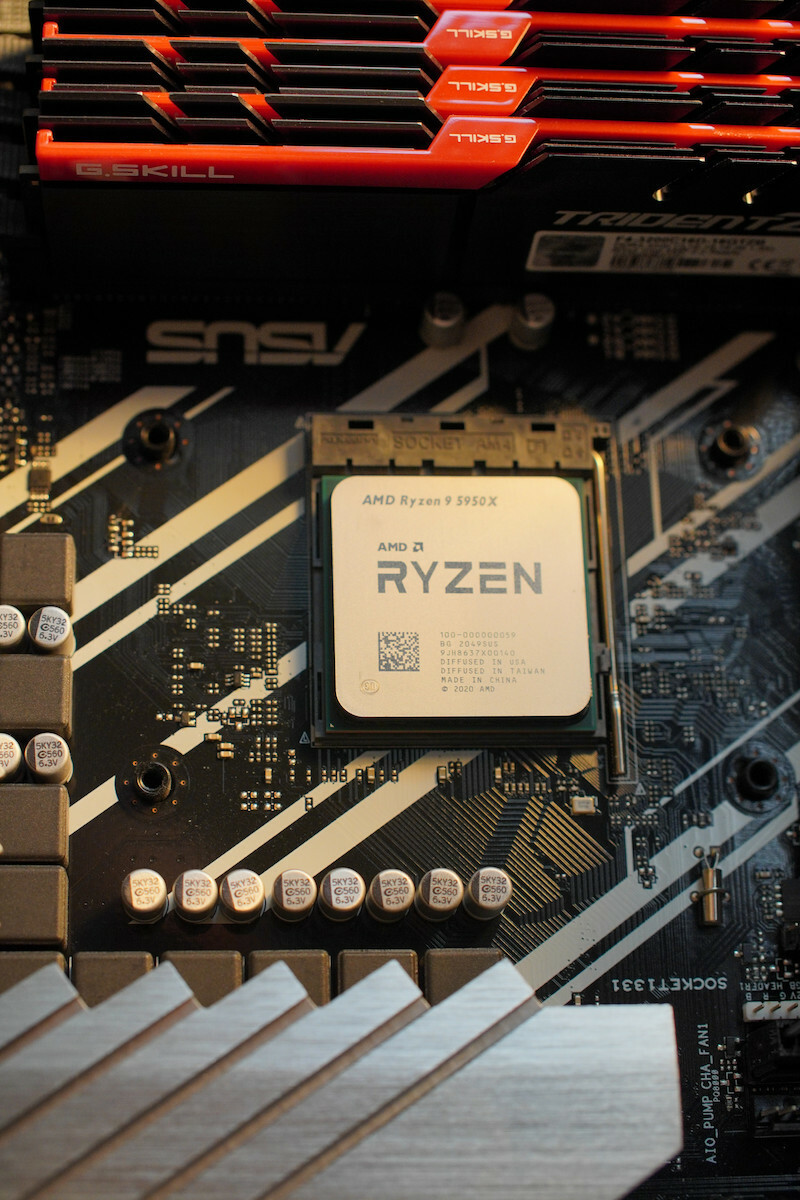
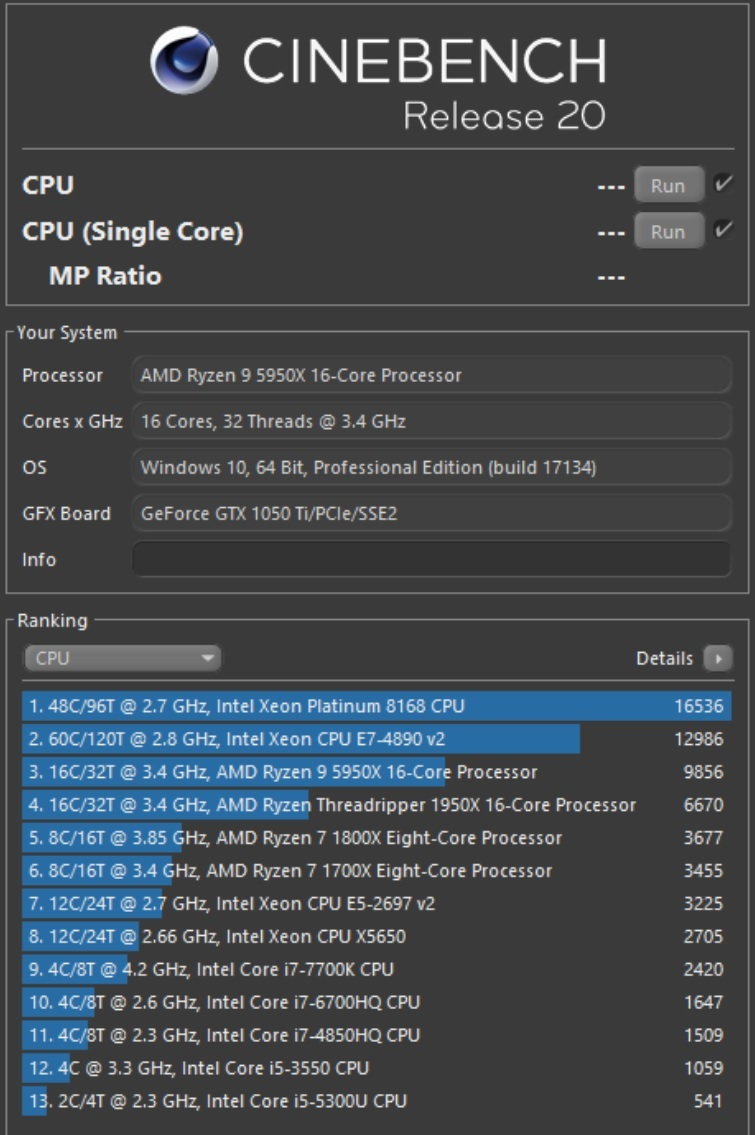
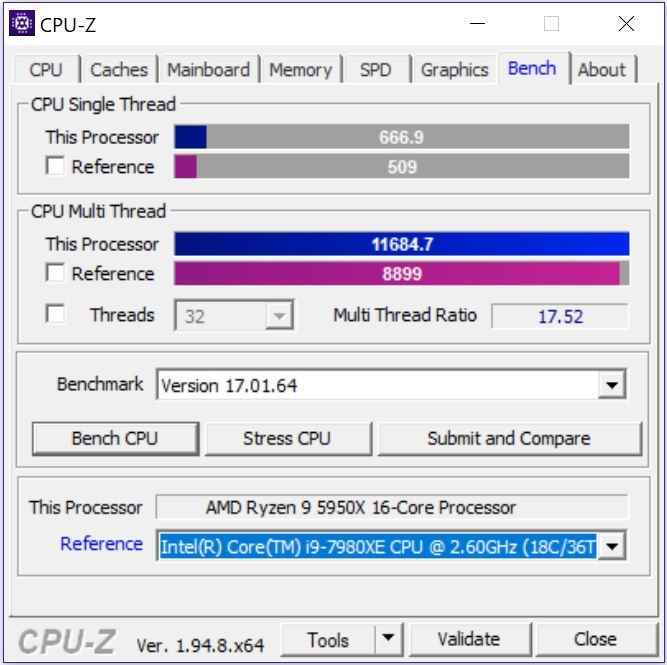
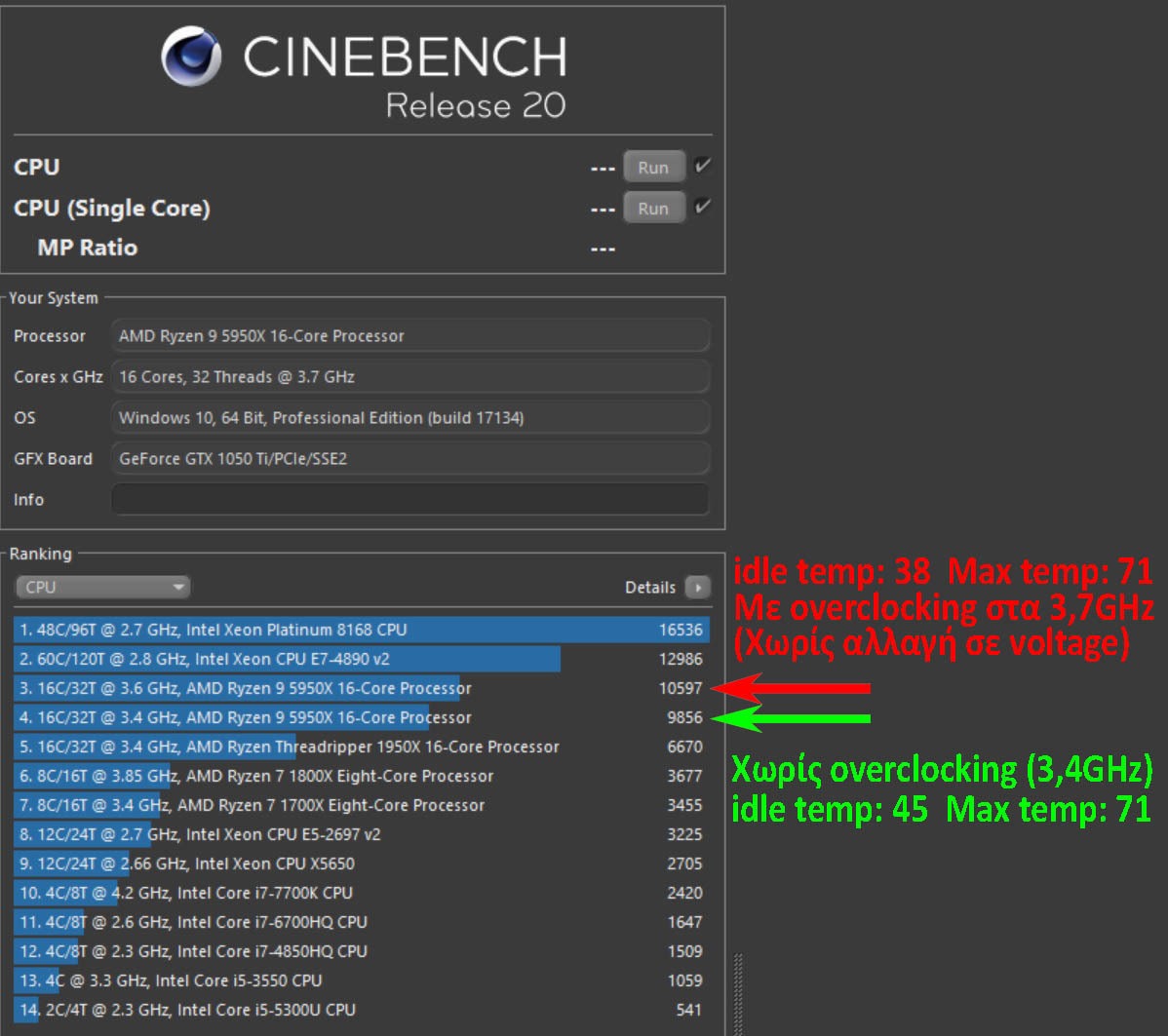
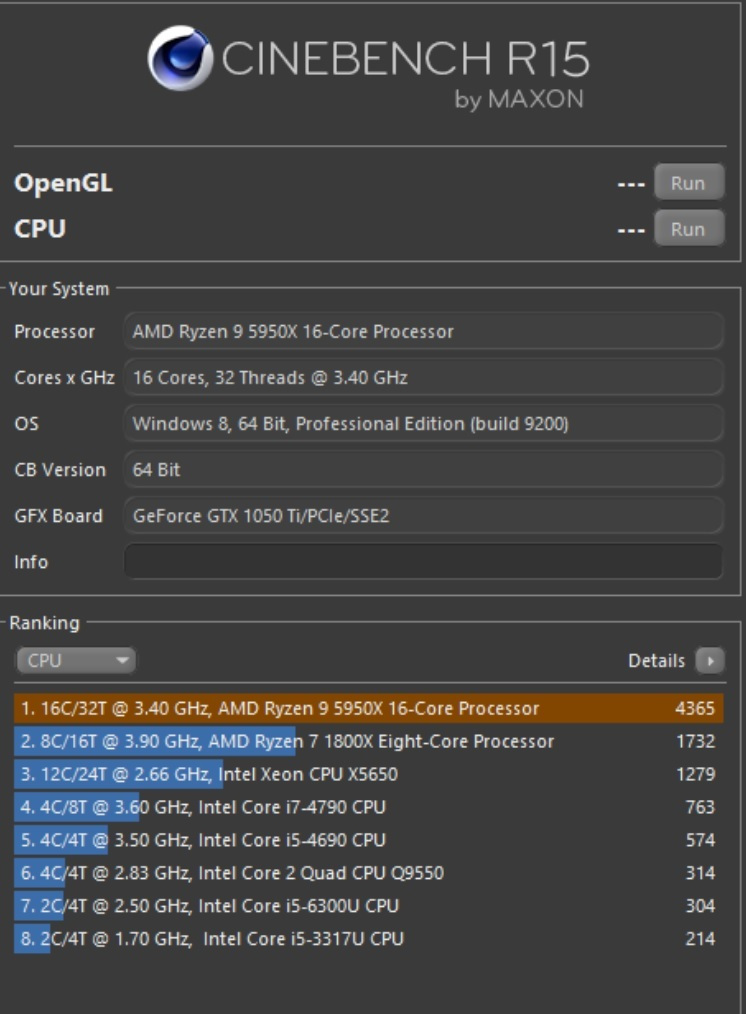
This processor is a case in point.
It came out in 2020 and yet even today it is an excellent choice.
It is the most powerful processor AMD has ever released for the AM4 platform.
So many years after the 5000 series, one would think that by 2026, AMD would have released 4-5 more series after that.
In reality, only the 7000 came out in '22 and the 9000 in '24, which is where we are today.
As if that wasn't enough, the 7000 and 9000 series had a relatively small increase in processing power (~13-15%) compared to previous Ryzen generations, where the jump was about +20%.
The generational leap from Zen 2 to Zen 3 (5000 series) was one of the biggest jumps in processing power AMD has ever made.
That's why the 5000 series was considered a Game-Changer.
They say that after the 5000, they focused on energy efficiency and architectural improvements in the next generations, rather than increasing power.
I just call it milking, like Intel used to do to us with the 14+++++ every year.
So today we have the 9950X being ~30-40% more powerful than the 5950X.
Not bad for a CPU that came out 6 years ago and costs half as much as the 9950X.
As for today.
RAMAGGEDON
If someone wants to extend their AM4 system or literally wants to build a VFM/Bang for the Buck PC, it is truly an amazing choice.
At 250-270 euros, it is a unique opportunity for a top-tier processor that was €900+ when it first came out and still holds up just fine and will continue to do so for the next few years, instead of going to AM5 and giving a kidney these days.
I don't know for how much longer, because prices are starting to go up everywhere.
It was installed in an ASUS Rog Strix B350 F-Gaming from 2017(!) and with BIOS 6232 it recognized it immediately without any problem.
MX-6 paste and Arctic Freezer 36 Black cooler.
Undervolted in the BIOS, setting All Cores -10, you gain about 5% in speed compared to Stock and the CPU temperature drops by 5-10 degrees, from what I observed.
Not bad at all for a setting that takes less than 10 seconds to do in the BIOS (if you get a good CPU).
Passed Stress Test with CoreCycler and Y-CRUNCHER, no errors, nothing.
BIG WARNING to those with B350 motherboards.
They are not designed for the power draw of the 5950X and with the huge and sudden loads it demands in heavy tasks like Rendering, you'll be frying Frankfurt sausages on the VRMs.
Either the motherboard will throttle and drop the processor to 500Mhz to cool down (the good scenario), or the motherboard will literally burn and be trashed.
How is it solved?
2 options:
1. Set Eco Mode in the BIOS (draws Max 88W instead of 142W) and you gain about -20°C and ~-100W power, losing ~20% in Performance and you're done.
2. Put a 140mm fan (a strong one) blowing directly onto the center of the vertical aluminum VRM heatsink and run at normal Stock speed without any problem.
It's a mod, but it works.
While for 2 weeks I was on Eco Mode for convenience, I finally got a Silent Wings 4 Pro, set it to Ultra-High on the switch it has, and placed it 15-20cm from the VRM heatsink.
Secured with zip ties to the case.
Works wonders.
Unfortunately, the Asus B350 F-Gaming does not have a sensor on the VRMs and you have no idea what's going on temperature-wise.
This is solved by getting a sensor (thermistor) and placing it inside the vertical VRM heatsink or on the back of the motherboard and securing it with electrical tape.
I put it in the vertical VRM heatsink.
The sensor plugs into the motherboard's T_SENSOR slot and you set the Fan Curve of the Silent Wings 4 Pro in the BIOS, based on the sensor inside the VRM (choose Source T_SENSOR, Manual and PWM) as follows.
40°C — 60% PWM
55°C — 80% PWM
70°C — 100% PWM
To be sure the sensor is properly installed and basically that it works, in the BIOS the temperature on T_Sensor should read around 37°.
If it's not touching well and is in the air, it will show ~25°C.
I did stress tests for hours, the VRM never went above 60 degrees and the 5950X never throttled at all, the whole time.
Problems start at 100-105 degrees on the VRM, for comparison.
I was also very impressed by the Silent Wings 4 Pro, which even at 100% doesn't hurt your ears, nor does it make any weird annoying/high-pitched noise.
I didn't measure it but empirically it shouldn't go above 35db at 100%, which is quite a feat for the amount of air it moves.
For anyone interested, you can find the sensor on Aliexpress, it costs about one and a half euros.
It's called "TZW NTC Ultra-Thin Temperature sensor Thin film thermistor probe B3950-10k Surface temperature measuring head with XH2.54 plug 5"
Last tip:
The 5950X absolutely needs 3600Mhz RAM.
With 3600Mhz it operates at a 1:1 ratio on the bus, thanks to Infinity Fabric. If you use other memory speeds, you lose from 5% up to OVER 25% in performance.
I had 2666Mhz before and I know this firsthand.
In general, the difference is night and day, as it becomes smoother and snappier, as they say in my village.
I installed 2 kits of G.Skill Trident Z F4-3600C16D-32 GTZNC, total 64GB, 4 sticks, which surprisingly run at 3600Mhz just fine on the Asus B350 F-Gaming.
This motherboard's specs say MAX RAM Speed 3200Mhz.
Tested with MEMTEST86, all 4 sticks passed all Passes with 0 errors after 8 and a half hours.
Just to be safe, even though I had no problems, I gave a "boost" of voltage (+0.175V to the SoC) so the memory controller gets 1.15V and filters any "noise" from the old motherboard (B350) with 4 RAM sticks and such crazy speeds for it. Similarly, the memories were set to 1.44V.
For those who feel confident, the process in the BIOS is: In Ai Tweaker go to VDDCR SOC Voltage, which is at 0.975V and on Auto, select Offset mode, in the lower field VDDCR SOC Offset Mode Sign choose + and in VDDCR SOC Offset Voltage below, which is on Auto, set 0.175 and press Enter. It becomes 0.17500. So 0.975V and 0.17500 gives us 1.15V.
Be very careful here, it should NEVER go above 1.20V, do the math, if you have other values you'll cause damage. Even exactly 1.20V causes damage in the long run. 1.20V is the point where AMD warns that gradual, permanent wear of the memory controller inside the processor begins. We don't want to injure the 5950X or have the Negative Scaling phenomenon. 1.15V is the MAX safe limit.
I hope I helped someone, because usually you have to search in 100 places to get such information.
Αυτός ο επεξεργαστής είναι περίπτωση.
Βγήκε το 2020 και όμως ακόμη και σήμερα είναι εξαιρετική επιλογή.
Είναι ο πιο ισχυρός επεξεργαστής που έβγαλε ποτέ η AMD για την πλατφόρμα AM4.
Τόσα χρόνια μετά την σειρά 5000, θα έλεγε κάποιος πως εν έτει 2026, η AMD θα είχε βγάλει 4-5 σειρές μετά από αυτή.
Στην πραγματικότητα έχει βγεί μόνο η 7000 το '22
και η 9000 το '24, που έχουμε σήμερα.
Σαν να μην έφτανε αυτό, οι σειρές 7000 και 9000 είχαν σχετικά μικρή αύξηση επεξεργαστικής ισχύος(~13-15%) σε σχέση με παλαιότερες γενιές Ryzen, που το άλμα ήταν της τάξης του +20%.
Tο άλμα γενιάς από Zen 2 σε Zen 3 (σειρά 5000) ήταν από τα μεγαλύτερα άλματα σε επεξεργαστική ισχύ που έχει κάνει η AMD.
Γι’ αυτό και η σειρά 5000 θεωρήθηκε Game-Changer.
Λένε πως μετά την 5000, επικεντρώθηκαν στην ενεργειακή απόδοση και στην βελτίωση της αρχιτεκτονικής στις επόμενες γενιές, παρά στην αύξηση ισχύος.
Εγώ το λέω απλά άρμεγμα, όπως μας έκανε η Intel παλιά με τα 14+++++ κάθε χρόνο.
Ετσι έχουμε τον 9950X σήμερα να είναι ~30-40% πιο δυνατός από τον 5950Χ.
Δεν το λες και άσχημα για ένα CPU που βγήκε πριν 6 χρόνια
και κάνει τα μισά λεφτά απ' ότι ο 9950Χ.
Στο σήμερα.
RAMAGGEDON
Aν κάποιος θέλει να κάνει μια παράταση στο AM4 σύστημα του
ή κυριολεκτικά θέλει να φτιάξει ένα VFM/Bang for the Buck PC
είναι πραγματικά τρομερή επιλογή.
Στα 250-270 ευρώ είναι μοναδική ευκαιρία για έναν κορυφαίο επεξεργαστή που είχε €900+ όταν πρωτοβγήκε και που κρατιέται μια χαρά ακόμα και θα κρατιέται μια χαρά για τα επόμενα χρόνια,
από το να πας σε AM5 και να δωσεις νεφρό αυτές τις μέρες.
Δεν ξέρω για πόσο ακόμη, γιατί οι τιμές αρχίζουν να ανεβαίνουν παντού.
Μπήκε σε μια ASUS Rog Strix B350 F-Gaming του 2017(!)
και με το BIΟS 6232 τον αναγνώρισε αμέσως χωρίς κανένα πρόβλημα.
Πάστα MX-6 και ψύκτρα Arctic Freezer 36 Black.
Έγινε Undervolt στο BIOS, βάζοντας All Cores -10, κερδίζεις σε ταχύτητα γύρω στο 5% σε σύγκριση με Stock και πέφτει η θερμοκρασία του επεξεργαστή 5-10 βαθμούς, απ΄ ότι παρατήρησα.
Καθόλου άσχημα για ρύθμιση που παίρνει ούτε 10 δευτερόλεπτα να την κάνεις μέσα στο BIOS (Αν πέσεις σε καλό CPU).
Πέρασε Stress Test με CoreCycler και Y-CRUNCHER,
ούτε errors, ούτε τίποτα.
ΜΕΓΑΛΗ ΠΡΟΣΟΧΗ σε όσους έχουν B350 μητρικές.
Δεν είναι σχεδιασμένες για τα ρεύματα του 5950Χ
και με τα τεράστια και απότομα φορτία που ζητάει σε βαριές εργασίες πχ. Rendering, στα VRMs θα ψήνεις λουκάνικα Φρανκφούρτης.
Είτε η μητρική θα κάνει throttling και θα ρίξει τον επεξεργαστή στα 500Mhz για να κρυώσει(το καλό σενάριο), είτε κυριολεκτικά θα καεί η μητρική και θα πάει για κάδο.
Πώς λύνεται;
2 επιλογές:
1. Bάζεις Eco Mode στο BIOS (τραβάει Max 88W αντί 142W) και κερδίζεις -20°C περίπου και ~-100W ρεύμα, χάνοντας ~20% σε Performance και ξεμπέρδεψες.
2. Bάζεις ένα 140mm fan (απ'τα δυνατά) να βαράει ακριβώς πάνω στο κέντρο της κάθετης αλουμινένιας ψύκτρας του VRM και τρέχεις σε κανονική Stock ταχύτητα χωρίς κανένα πρόβλημα.
Μοντιφιά μεν, αλλά λειτουργεί.
Ενώ για 2 βδομάδες ήμουν με Eco Mode λόγω ευκολίας, τελικά πήρα ένα Silent Wings 4 Pro, το ρύθμισα στο Ultra-High στον διακόπτη που έχει πάνω και το έβαλα 15-20cm από την ψύκτρα του VRM.
Στηρίχθηκε με zip ties πάνω στο κουτί.
Κάνει θαύματα.
Δυστυχώς η Αsus B350 F-Gaming δεν έχει αισθητήρα στα VRMs και δεν έχεις ιδέα τι γίνεται από θερμοκρασίες.
Λύνεται παίρνοντας αισθητήρα (thermistor) και βάζοντας τον μέσα στην κάθετη ψύκτρα του VRM ή στη πίσω μεριά της μητρικής και τον στερεώνεις με μονωτική ταινία.
Εγώ τον έβαλα στην κάθετη ψύκτρα του VRM.
Ο αισθητήρας κουμπώνει στο T_SENSOR slot της μητρικής και ρυθμίζεις το Fan Curve του Silent Wings 4 Pro στο BIOS, με βάση τον αισθητήρα μέσα στο VRM (διαλέγεις Source T_SENSOR, Μanual και PWM) στα εξής.
40°C — 60% PWM
55°C — 80% PWM
70°C — 100% PWM
Για σιγουριά, αν μπήκε καλά ο αισθητήρας και βασικά ότι λειτουργεί, στο BIOS η θερμοκρασία στο T_Sensor, θα πρέπει να λέει γύρω στους 37°.
Aν δεν ακουμπάει καλά και είναι στον αέρα θα δείχνει ~25°C.
Έκανα stress test ώρες, δεν πήγε πάνω από 60 βαθμούς το VRM
και δεν έκοψε ταχύτητα καθόλου ο 5950Χ, καθόλη τη διάρκεια.
Τα προβλήματα αρχίζουν στους 100-105 βαθμούς στο VRM, για μέτρο σύγκρισης.
Μεγάλη εντύπωση μου έκανε και το Silent Wings 4 Pro που ακόμα και στο 100% δεν σου παίρνει τα αυτιά, ούτε κάνει κανά περίεργο σπαστικό/τσιριχτό ήχο.
Δεν το μέτρησα αλλά εμπειρικά δεν πρέπει να πάει πάνω από 35db στο 100%, το οποίο το λες και άθλο για τον αέρα που βγάζει.
Για όποιον ενδιαφέρεται, τον αισθητήρα θα τον βρείτε στο Aliexpress, κάνει 1μιση ευρώ.
Λέγεται "TZW NTC Ultra-Thin Temperature sensor Thin film thermistor probe B3950-10k Surface temperature measuring head with XH2.54 plug 5"
Τελευταίο tip:
RAM θέλει 3600Mhz πάση θυσία ο 5950X.
Με 3600Mhz λειτουργεί σε αναλογία 1:1 ο δίαυλος, λόγω Infinity Fabric. Αν βάλεις άλλη ταχύτητα μνήμες, χάνεις απο 5% εως και ΠΑΝΩ από 25% σε απόδοση.
Είχα 2666Mhz πριν και το ξέρω από πρώτο χέρι.
Γενικά η διαφορά είναι μέρα με νύχτα, καθώς γίνεται πιο smooth και snappier, όπως λένε και στο χωριό μου.
Μπήκαν 2 κιτ G.Skill Trident Z F4-3600C16D-32 GTZNC, σύνολο 64GB, 4 Sticks, τα οποία παραδόξως τρέχουν στα 3600Μhz κανονικά πάνω στην Asus Β350 F-Gaming.
Η συγκεκριμένη μητρική στα specs, δίνει ΜAX RAM Speed 3200Mhz.
Tεσταρισμένο με MEMTEST86, τα 4 Sticks πέρασαν με 0 errors όλα τα Passes, μετά από 8μιση ώρες.
Για καλό και για κακό, αν και δεν αντιμετώπισα κανένα πρόβλημα, έδωσα μια "ένεση" ρεύματος (+0.175V στο SoC) ώστε ο ελεγκτής μνήμης να πάρει 1.15V και να φιλτράρει τον οποιοδήποτε "θόρυβο" της παλιάς μητρικής (B350) με τα 4 Sticks RAM επάνω και τις εξωφρενικές για αυτήν ταχύτητες. Στην ίδια λογική, οι μνήμες ρυθμίστηκαν στο 1.44V.
Οποιος αισθάνεται σίγουρος η διαδικασία είναι αυτή στο BIOS: Στο Ai Tweaker πας στο VDDCR SOC Voltage, που είναι στο 0.975V και στο Auto, επιλέγεις Offset mode, επιλέγεις στο κάτω πεδίο VDDCR SOC Offset Mode Sign το + και στο VDDCR SOC Offset Voltage που είναι από κάτω στο Auto, βάζεις 0.175 και πατάς Enter. Γίνεται 0.17500. Αρα 0.975V και 0.17500 μας κάνει 1.15V.
Μεγάλη προσοχή εδώ, δεν πρέπει ΠΟΤΕ να πάει πάνω από 1.20V, κάντε τα μαθηματικά, αν έχετε άλλες τιμές θα γίνει ζημιά. Ακόμα και ακριβώς 1.20V μακροπρόθεσμα κάνουν ζημιά. Το 1.20V είναι το σημείο όπου η AMD προειδοποιεί ότι ξεκινάει η σταδιακή, μόνιμη φθορά του ελεγκτή μνήμης μέσα στον επεξεργαστή. Δεν θέλουμε να τραυματίσουμε τον 5950X ή να έχουμε το φαινόμενο του Negative Scaling. 1.15V είναι το MΑX ασφαλές όριο.
Ελπίζω να βοήθησα κανέναν, γιατί συνήθως πρέπει να ψάξεις σε 100 μεριές για να πάρεις τέτοιες πληροφορίες.