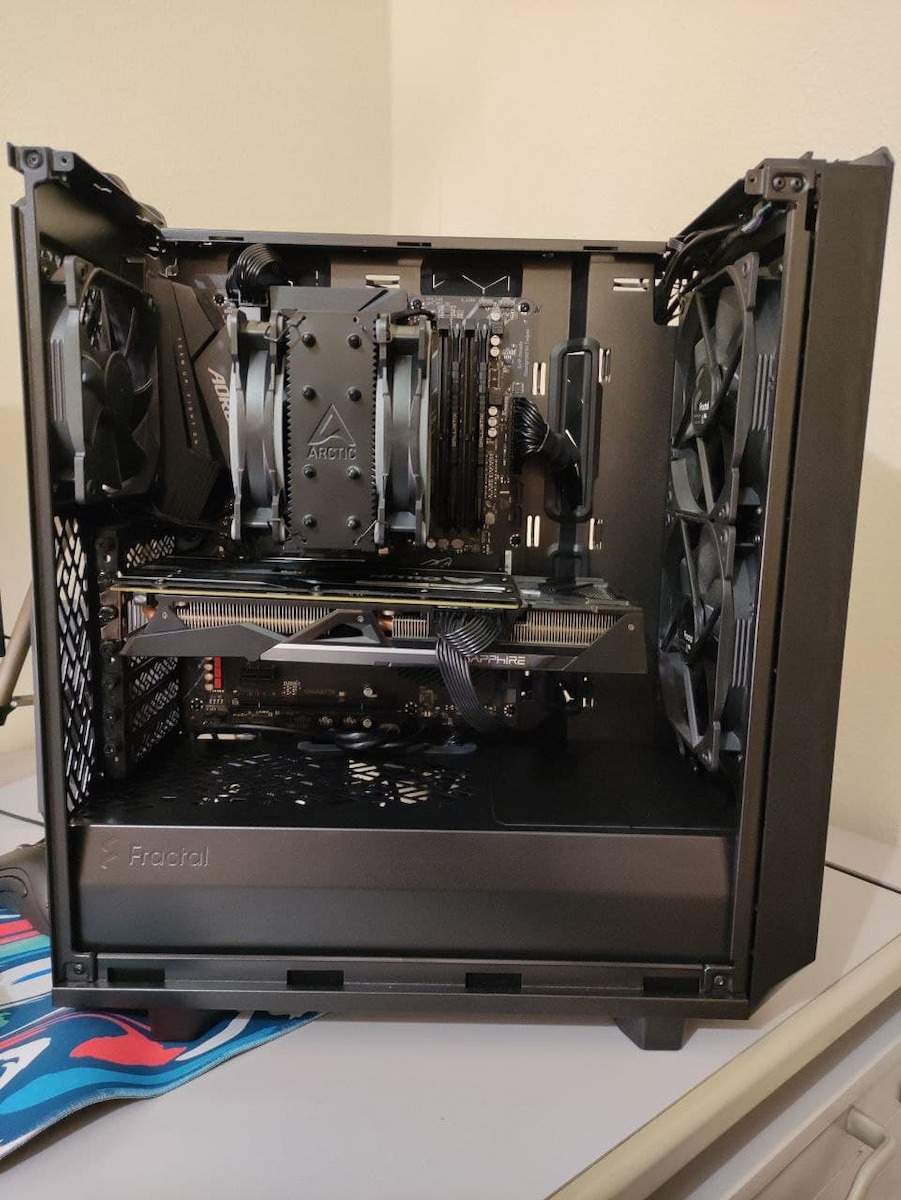
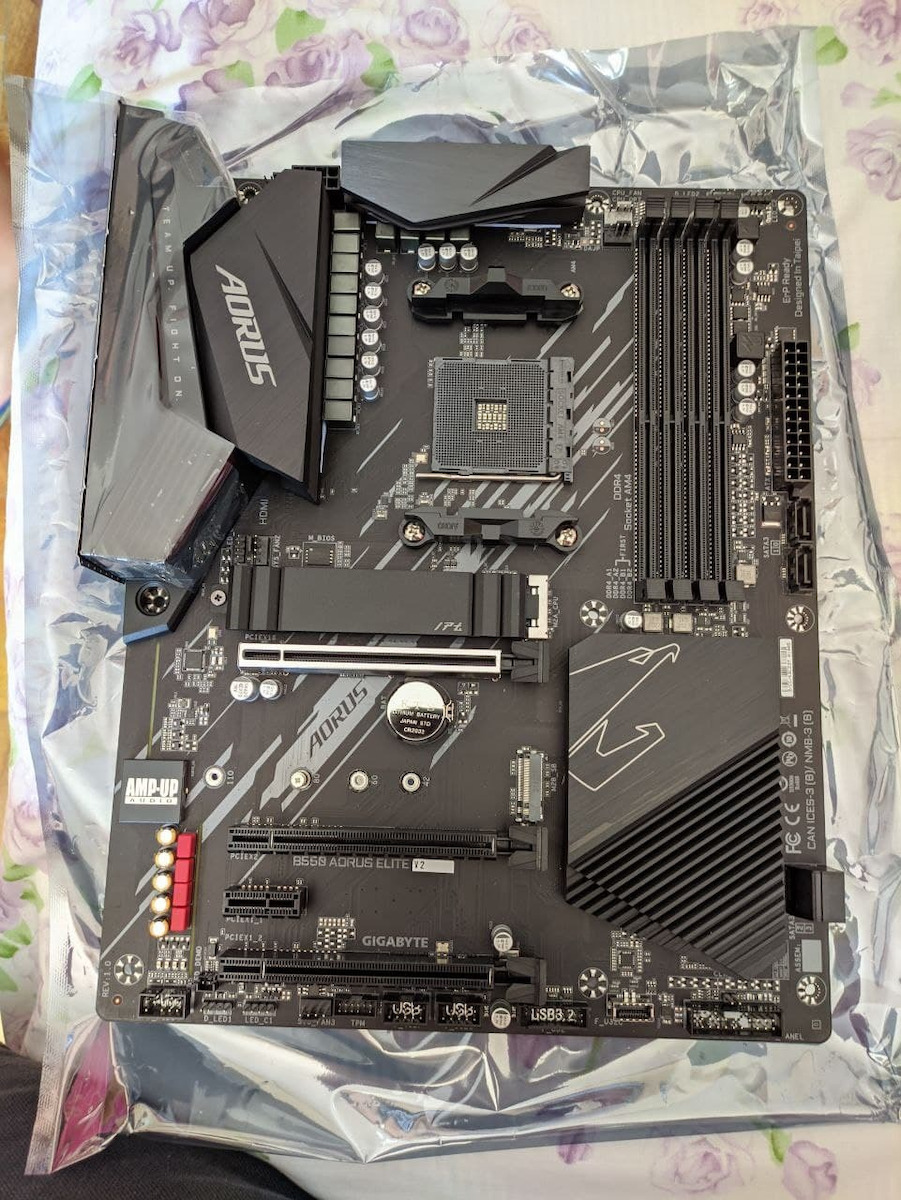
AMD B550 AORUS motherboard with dual 12+2 phase digital VRM, large surface heatsinks, PCIe 4.0 x16 slot, dual PCIe 4.0/3.0 x4 M.2 with one thermal guard, 2.5GbE LAN, RGB FUSION 2.0, and Q-Flash Plus.
The Gigabyte B550 Aorus Elite V2 (rev. 1.0) is a motherboard aimed at users who want to build a powerful computer for gaming or professional use. It supports AMD Ryzen 5000, 4000, 3000, and 2000 processors in combination with DDR4 memory.
Additionally, the motherboard offers high performance in data connection and exchange, with support for PCIe 4.0 and support for M.2 NVMe storage. Furthermore, it features Gigabit Ethernet support for wired connectivity.
Overall, the Gigabyte B550 Aorus Elite V2 (rev. 1.0) is suitable for users who demand high performance and reliability in a computer, such as gamers, professionals, and content creators.
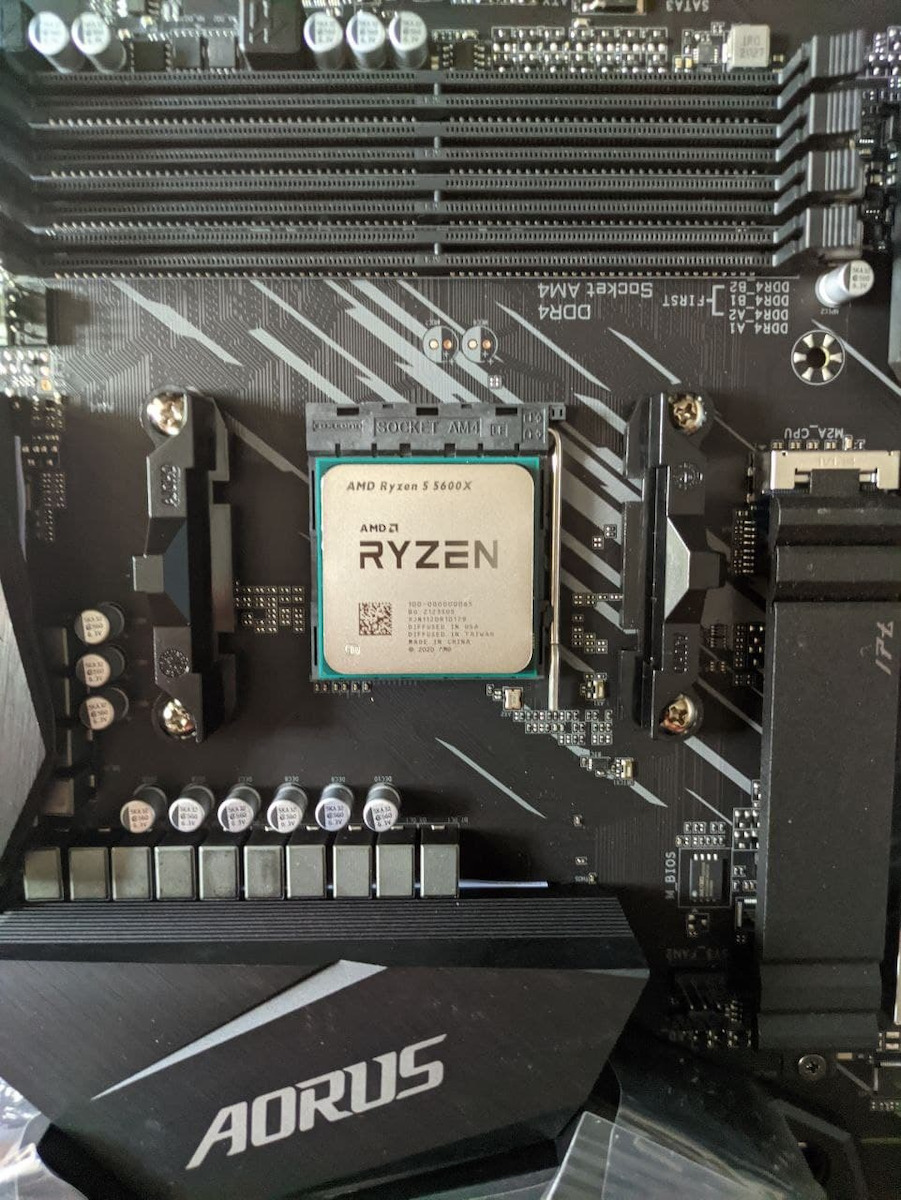
Supports AMD Ryzen 5000 Series, Ryzen 5000 G-Series, Ryzen 4000 G-Series, and Ryzen 3000 Series processors
The B550 series motherboards maximize your computer's capabilities with AMD StoreMI technology. StoreMI accelerates traditional storage devices to reduce boot times and improve the overall user experience.
This easy-to-use utility combines the speed of SSDs with the high capacity of hard drives into a single drive, enhances the device's read/write speeds to match those of SSDs, boosts data performance for incredible value, and transforms the everyday computer into a performance-based system.
The benefits of AMD StoreMI
Fast, smooth, and easy computer experience
Optimizes computer responsiveness from system startup to application launch
Offers SSD performance with HDD capacity at an affordable cost
Quick access to essential files with automatic learning of user computing behavior
Design of Ultimate Power
For full support of 3rd generation AMD Ryzen processors, B550 Aorus motherboards feature the ultimate power solution, which is balanced, digital, and multi-phase.
The B550 AORUS ELITE V2 motherboard uses a 12+2 phase Digital Twin Power Design that includes a PWM controller, DrMOS, and ferrite core as selected high-quality components. These 100% digital controllers offer incredible precision in power delivery to the most power-hungry and energy-sensitive components of the motherboard, allowing users to achieve the absolute maximum performance from 3rd generation AMD Ryzen processors.
Digital Power System
The digital PWM controller provides the appropriate voltage to the processor
With 12+2 phases 50A DrMOS, each power phase is connected to the processor and provides a more balanced and efficient power supply. Capable of handling up to 700 Amps in total
Fully solid capacitors to improve transient response and minimize current oscillations
Processor power connectors 24+8 pins
Performance
Gigabyte understands that the user will not stop chasing better computing performance. Therefore, it offers:
Protective and optimized memory trace enhances performance. Faster read and write speeds are essential for saving time and improving efficiency.
A plethora of M.2 storage spaces with thermal protectors ensure silent reading and writing.
Adoption of PCIe 4.0 ready components facilitates the upgrade of B550 motherboards.
Memory Layout
With the optimized daisy-chain routing, the B550 motherboard provides proven DDR4-4000MHz speed and beyond with high-density memory modules. The optimized daisy-chain routing eliminates the stub effect, pushing one DIMM per channel in dual-channel interleaving mode to achieve higher memory frequencies, providing professional gamers with a denser and faster system memory experience.
PCIe 4.0 Design
2 M.2 PCIe 4.0/3.0 Slots
Support for dual M.2 PCIe NVMe SSDs in RAID 0
The B550 AORUS motherboard offers the best industry compatibility in terms of NVMe storage for users who require high capacity and seek the best performance. The unique design of AORUS can be configured in RAID for record speeds of up to 6560 MB/s (sequential read), making AORUS the obvious choice for the ultimate computer.
Advanced Cooling Solutions
Uninterrupted performance is guaranteed by the advanced thermal solution that includes large heatsinks, high-quality thermal pads, and thermal guards. The B550 motherboard stays cool on MOSFET and M.2 SSD even under full load. It provides lower temperatures for casual users, overclockers, and professional gamers.
Thermal Solution
Extended surface heatsinks that increase the surface area to improve thermal performance with better airflow and heat exchange.
By using high thermal conductivity pads of 5 W/mK, it can transfer 2.7 times more heat compared to traditional thermal pads in the same time.
The built-in M.2 thermal protective heatsink helps the high speeds and large capacity of PCIe 4.0/3.0 SSDs to prevent overheating and performance throttling.
Cooling Solution
Smart Fan 5
With Smart Fan 5, users can ensure that their computer can maintain its performance while staying cool. Smart Fan 5 allows users to interchange fan headers to reflect different thermal sensors at different locations on the motherboard. Not only that, with Smart Fan 5, more hybrid fan headers that support both PWM and Voltage modes have been introduced to make the motherboard more liquid cooling friendly.
5 Fan / Water Pump Connectors
6 Temperature Sensors
All Hybrid Fan Headers
All Fan Pin Headers Upgraded to Hybrid Fan Headers
Interoperable Fans and Sensors
Intuitive UI for Fan Control
Next-Generation Connectivity
A high-spec product must be future-proof, so your system stays up-to-date with the latest technology. The B550 AORUS motherboards provide all the network and storage connectivity features.
2.5GbE LAN
2 times faster than ever
The adoption of LAN 2.5G provides network connectivity up to 2.5 GbE, with at least twice the transfer speeds compared to 1GbE. It is ideal for gamers and streamers for an absolute and smooth online experience. It is also compatible with Multi-Gig (10/100/1000/2500Mbps) RJ-45 Ethernet.
USB Type-C Front Panel Header
Equipped with next-generation connectivity, the Aorus Gaming motherboard already supports the cases of the future. The built-in USB Type-C header for USB 3.2 Gen1 makes access easy when connecting a USB 3.2 Gen1 device or charging your mobile phone.
HDMI 2.1
HDMI 2.1, which is backward compatible with HDMI 2.0/1.4 offering a bandwidth of 48 Gb/s, twice as much as the previous generation.
This unlocks the ability for users to transfer multiple video streams, as well as cinematic 21:9 aspect ratio (in which most movies are filmed), Full HDR, and HDCP 2.3 support, to provide the best visual experience for viewers.
Hi-Fi Sound System
For enthusiastic users, sound quality is equally important for the gaming experience. The B550 is equipped with high-quality audio components, such as Hi-Fi grade WIMA FKP2 capacitors and Nichicon Fine Gold capacitors, to provide an exceptional audio experience. The exclusive AORUS AMP-UP Audio technology is the ideal sound solution on the card for the most demanding users.
It features an audio noise guard that essentially separates the card's sensitive analog audio components from potential noise pollution at the board level.
The LED trace path is illuminated to show the separation of the board's layers.
RGB Fusion 2.0
With AORUS motherboards, RGB Fusion 2.0 is even better with digital LED lights. RGB Fusion 2.0 offers users the ability to control the built-in RGB and external RGBW / Digital LED strips for their computer.
AORUS Gaming motherboards support 5v or 12v lighting LED Strips and up to 300 LEDs. RGB Fusion 2.0 with digital LEDs comes with 9 new patterns and various speed settings with many more.
RGB Fusion App for Mobile
Don't just make your computer shine, turn it into a work of art that your friends will envy. With the Gigabyte RGB Fusion mobile app, users can watch as they control the lighting on their computer. This gives users easy access as they try to customize colors and speeds for different modes, all of which can be achieved away from their keyboard and computer screen.
Ultra Durable
Gigabyte is renowned for the durability of its products and the high standards of its manufacturing process. The best, high-quality components of the B550 motherboard are used, while the parts of the components are reinforced to be compact and durable.
PCIe Armor
The innovative stainless steel shielding design reinforces the PCIe slots to provide the extra durability required to support heavy graphics cards.
Solid Pin Power Connectors
It features ATX 24-pin and ATX 12V power connectors with solid pin design to provide stable power supply during CPU overclocking.
Larger contact area for electricity
More metal quantity to maintain higher power and generated heat
Extremely durable and longer lifespan
Q-Flash Plus
Update the BIOS easily
With Gigabyte Q-Flash Plus, you don't need to install the processor, memory, and graphics card or enter the BIOS menu. Simply download and save a new BIOS file to a USB drive, then press the dedicated Q-Flash Plus button and you're ready to go.
Software
Bios
New user interface, all new EASY MODE displays important hardware information on one page, such as CPU clock, Memory, Storage, Fan.
My Favorites, add frequently used items to the favorites menu for quick access.
Storage information, display all kinds of storage information, including SATA, PCIE, and M.2 interface.
Change log, record all changes before saving and exiting the bios. Quickly review the overall modification of settings.
Intuitive load line curve, clearly display each load line calibration setting in an intuitive curve graph.
APP Center
The Gigabyte APP Center is a useful portal for all Gigabyte MB utilities and drivers, allowing you to select any utility you want to install from the APP Center and stay updated with the latest version of utilities and drivers.
EasyTune
Gigabyte's EasyTune is a simple and user-friendly interface that allows users to adjust their system settings or tweak system and memory timings and voltages in a Windows environment. With Smart Quick Boost, one click is all it takes to automatically overclock your system, providing an extra performance boost when you need it most.
@Bios
The @Bios application from Gigabyte allows you to update your system's BIOS from within Windows using a simple and elegant graphical user interface.
@Bios can automatically download the latest version from Gigabyte's servers, or you can update your BIOS from a file on your computer.
It also allows you to save your current BIOS to a file, recover your previous BIOS, and back up your BIOS.
System Information Viewer
The Gigabyte System Information Viewer is a centralized location that gives you access to your system's current status. Monitor elements such as clock speeds and the processor, set your preferred fan speed profile, create alerts when temperatures are too high, or log your system's behavior.
Specifications are collected from official manufacturer websites. Please verify the specifications before proceeding with your final purchase. If you notice any problem you can report it here.
It works in default RAM profile....
But XMP profile1 enablement produces segmentations faults...
I've put 5 stars anyway, because I'm not sure, if its because MB or RAM sticks I have, which does not support XMP properly.
Over than that... Everything is fine.
It works in default RAM profile....
But XMP profile1 enablement produces segmentations faults...
I've put 5 stars anyway, because I'm not sure, if its because MB or RAM sticks I have, which does not support XMP properly.
Over than that... Everything is fine.
No complaints for a year now that I have it. I had a lot of connectivity issues, I was losing connection while playing and it was happening for a long time, no matter what game I played, and even though I checked everything, absolutely everything, in the end it needed a BIOS update. Very important, after the BIOS update do a CMOS clear. Remove the motherboard battery, leave it out for 10 minutes and then put it back in. Also, my motherboard is (rev 1.5), it's important to know this for the BIOS update, which version to download. It's written on the motherboard at the very bottom left. Everything works perfectly with 5600x, f4-3600c16d-32gtznc (3800oc with same timings)
κανένα παράπονο εδώ και ένα χρόνο που το έχω. είχα πολλά connectivity issues, έχανα την σύνδεση ενώ έπαιζα και γινόταν για πολύ καιρό, όποιο παιχνίδι και να έπαιζα και ενώ έψαξα τα πάντα, τα πάντα όμως, τελικα ήθελε bios update. Πάρα πολύ σημαντικό, μετά το bios update κάντε CMOS clear. Βγάλτε την μπαταρία της μητρικής, αφήστε το 10 λεπτά έξω και μετά κουμπωστε το. Επίσης η δική μου μητρική είναι (rev 1.5) είναι σημαντικό να το ξέρετε για το bios update ποια έκδοση να κατεβάσετε. αναγράφεται πάνω στην μητρική τέρμα κάτω αριστερά. όλα δουλεύουν άψογα με 5600x, f4-3600c16d-32gtznc (3800oc με ίδια timings)
Sometimes it doesn't read one of the RAM sticks and needs a BIOS reset; after 3 years I don't know of course if the RAM is to blame, otherwise a very good purchase
Κάμοια φορά δεν μου διαβάζει την μία ram και θέλει bios reset μετά από 3 χρόνια δεν ξέρω βέβαια αν φταίει η ram κατά τα άλλα πολύ καλή αγορά
Excellent and value for money at 110 euros where I bought it! For so many years with gigabyte I never had any issues and it seems that with this one I won't either! Well done gigabyte
Εξαιρετική και vfm στα 110 ευρώ που την αγόρασα εγώ!
Τόσα χρόνια με τις gigabyte δεν είχα κανένα θέμα και από ότι φαίνεται ότι με αυτήν θα έχω!
Well done gigabyte
I would like a debug screen but it doesn't offer one, and a speaker will do its job in case of any incompatibility or malfunction (knock on wood); otherwise, it's just fine with support for quite high RAM speeds
Θα ήθελα ένα dbug screen αλλά δεν το προσφέρει και ένα speaker θα κάνει την δουλειά του σε περίπτωση κάποιας ασυμβατότητας ή βλάβης(μακριά από εμάς) κατά τα λοιπά είναι μια χαρά με υποστήριξη για αρκετά υψηλές ταχύτητες ram
I've had it for about a month now, it seems to be very good, it responds very well to everything, overall it is very high quality externally. I would like the BIOS to be a bit more user-friendly. Personally, I preferred it for its great compatibility with other components and for the many endless options, which is very positive. I expected more light from the RGB; it's not that bright, but it has all the colors. Overall, I would describe it as the most VFM B550 motherboard. It has everything, nothing is missing. It also has its own very good software for overclocking.
Την εχω εδώ και ένα μήνα περίπου, φαίνεται να είναι πολύ καλη ανταποκρίνεται σε όλα πολυ καλα γενικότερα είναι πολυ ποιοτική εξωτερικά. Θα ήθελα το bios να ειναι λιγο πιο εύχρηστο . Προσωπικά την προτίμησα για την μεγάλη συμβατότη με άλλα κομμάτια και για τις πολλές που είναι ατελείωτες πολύ θετικό.. Απο τα rgb περίμενα παραπάνω φως δεν ειναι τοσο έντονα άλλα έχουν ολα τα χρώματα. Γενικότερα θα την χαρακτήριζα την πιο vfm b550 μητρική. Τα έχει όλα δεν της λείπει τίποτα. Επίσης έχει και λογισμικό δικο της πολύ καλό και για overclocking.
Good motherboard, but after a certain revision of the BIOS, compatibility with NVMe and suspend on Linux (and some Windows users) broke.
This is what I experienced right after buying and installing an NVMe SSD (it goes into suspend and immediately wakes up and gets stuck there with the fans and LEDs on, after which it needs to be unplugged).
More information:
https://www.reddit.com/r/gigabyte/comments/p5ewjn/b550i_pro_ax_f13_bios_sleep_issue_on_linux/
Καλή motherboard, αλλά από κάποιο revision του BIOS και μετά έσπασε η συμβατότητα με NVMe και suspend στα Linux (και κάποιους Windows χρήστες).
Αυτό βίωσα και εγώ αμέσως μετά από αγορά και εγκατάσταση NVMe SSD (μπαίνει suspend και αμέσως ξυπνάει και κολλάει εκεί με αναμμένα ανεμιστηράκια και leds, όπου μετά θέλει βγάλσιμο από την πρίζα).
Παραπάνω πληροφορίες:
https://www.reddit.com/r/gigabyte/comments/p5ewjn/b550i_pro_ax_f13_bios_sleep_issue_on_linux/
Very decent motherboard with plenty of ports. The construction seems quality and the BIOS is quite user-friendly.
I did not encounter any problems, neither in the installation of the other components of the PC, nor in its operation.
Temperature levels are also low and there are no compatibility issues with specific graphics cards, unlike similar B550 motherboards from other manufacturers.
Overall, at this price (125€) it is a very good choice.
Αξιοπρεπέστατη μητρική με αρκετές θύρες. Η κατασκευή της φαίνεται ποιοτική και το BIOS είναι αρκετά εύχρηστο.
Δεν αντιμετώπισα κανένα πρόβλημα, ούτε στην εγκατάσταση των υπολοίπων κομματιών του PC, αλλά ούτε και στην λειτουργία του.
Τα επίπεδα της θερμοκρασίας είναι επίσης χαμηλά και δεν υπάρχουν ζητήματα ασυμβατότητας με συγκεκριμένες κάρτες γραφικών, όπως με αντίστοιχες μητρικές Β550 άλλων κατασκευαστών.
Γενικά, σε αυτή την τιμή (125€) είναι πολύ καλή επιλογή.
Everything was fine until I changed my plan from 50Mbps to 5G 300Mbps. The speed stayed at 92. I changed the cables to 6e, same thing. I was forced to get a network card and everything was solved. Speed is steady at 320.
Όλα καλά μέχρι που άλλαξα προγρα.μμα από 50αρα πήγα σε 5G 300αρα. Η ταχύτητα έμενε στα 92 .Άλλαξα καλώδια σε 6e τα ιδια. Αναγκάστηκα και πήρα κάρτα δικτυου και λύθηκαν όλα. ταχύτητα σταθερα στα 320.
Bought last November for €120!
For me, after market research, it seemed like the most ideal choice. So far, it hasn't left me dissatisfied in anything. Very nice sturdy construction, with protective covers on the sensitive areas of the chipset, and very nice organization on it. Very user-friendly BIOS from Gigabyte, which is a big advantage. On it, I have the Ryzen 7 5700X, Radeon RX 6650XT, 1 Kingston KC3000 SSD 1TB M.2 NVMe & G.Skill Ripjaws V 32GB DDR4 RAM (2x16GB) and Speed 4000. Excellent choice for midrange gaming at 1080p (FHD)! I highly recommend it!
Αγορά τον περασμένο Νοέμβρη στα 120€!
Για μένα μετά από έρευνα αγοράς μου φάνηκα η πιο ιδανική. Μέχρι στιγμής δεν με άφησε ανικανοποίητο σε τίποτα. Πολύ ωραία στιβαρή κατασκευή, με καλύματα προστασίας στις ευαίσθητες περιοχές του chipset, και πολύ ωραία οργάνωση πάνω σε αυτό. Πολύ εύχρηστο bios από την Gigabyte που είναι μεγάλο πλεονέκτημα. Πάνω της έχω τον Ryzen 7 5700X , Radeon RX 6650XT, 1 Kingston KC3000 SSD 1TB M.2 NVMe & G.Skill Ripjaws V 32GB DDR4 RAM (2x16GB) και Ταχύτητα 4000. Άριστη επιλογή για midrange gaming στα 1080p (FHD)! Την προτείνω φουλ!
If you are one of the desperate buyers (like me) who search everywhere on the internet for your ethernet problem, read below.
By searching for b550 ethernet problems, you will see that quite often this specific chipset arrives DoA to the buyer.
After months of appointments with technicians, changing providers, cables, cable testers, bios updates, driver updates, and a lot of despair, just like I read on the internet, I decided to buy a new PCIe network card and my problems disappeared.
If you are also one of the unlucky ones whose ethernet does the following: 1) disconnects for 5-20 seconds every few hours/days 2) the Windows 10 troubleshooter tells you "default gateway not available" or "problems with DNS", gets fixed for a while and then the same issues occur again 3) your speeds suddenly drop to 1Mbps or less for 10-30 minutes.
Get a new network card to save yourself! It's not worth dealing with warranty because it will take weeks for the replacement and you will have to restart your PC again, so with a card that costs around €12, you solve the problem.
Apart from this unfortunate incident, the board is okay, I have no other complaints.
Αν είσαι από τους απεγνωσμένους αγοραστές (όπως εγώ) που ψάχνεις νέα παντού στο ίντερνετ για το πρόβλημα σου με το ethernet διάβασε παρακάτω.
Κάνοντας μια αναζήτηση για b550 ethernet problems, θα δείτε πως αρκετά συχνά το συγκεκριμένο chipset φτάνει DoA στον αγοραστή.
Μετά από μήνες με ραντεβού με τεχνικούς, αλλαγή παρόχου, καλωδίων, cable testers, bios updates, driver updates, και πολύ απόγνωση. όπως διάβασα στο ίντερνετ, έτσι και εγώ αποφάσισα να αγοράσω νέα PCIe κάρτα δικτύου και τα προβλήματα μου εξαφανίστηκαν.
Αν είσαι και εσύ από τους άτυχους όπου το ethernet σου κάνει τα εξής: 1) αποσυνδέσεις 5-20 δευτερόλεπτα κάθε μερικές ώρες/μέρες 2) το windows 10 troubleshooter σου λέει "default gateway not available" ή "problems with DNS", φτιάχνεται για λίγο και μετά ξανά τα ίδια 3) οι ταχύτητες σου ξαφνικά πέφτουν στο 1Mbps ή λιγότερο για 10-30 λεπτά.
Πάρε νέα κάρτα δικτύου για να σωθείς! Δεν αξίζει να ασχοληθώ με εγγύηση γιατί θα διαρκέσει βδομάδες η αντικατάσταση και θα θέλει ξανά χτύσιμο το pc, οπότε με μια κάρτα 12€ περίπου καθαρίζεις.
Πέρα από αυτή την ατυχία σαν board είναι οκ, δεν έχω κάποιο άλλο παράπονο.
Beautiful and high-quality construction, user-friendly BIOS from Gigabyte. The motherboard's VRMs can withstand high usage loads (see related stress tests like on Tom Hardware Unbox). Although I had reservations about switching to an AMD 4 socket in 2024, I do not regret it, and in combination with a Ryzen 5 5600G and 16GB DDR4 3600MHz memory, it runs everything decently! Happy shopping.
Όμορφη και ποιοτική κατασκευή, εύχρηστο bios από την gigabyte.Τα vrm της μητρικής αντέχουν υψηλά φορτία χρήσης(βλέπε σχετικά stress test όπως στο Tom hardware unbox). Αν και είχα επιφυλάξεις εν ετει 2024 να πάω σε amd 4 socket, δεν το μετανοιωσα και σε συνδυασμό με έναν ryzen 5 5600G και 16 GB μνήμες ddr4 3600mhz,τρεχει τα πάντα αξιοπρεπέστατα! Καλές αγορές.
I chose it because of the excellent experience from a previous motherboard of the same company! The upgrade was really smooth without any issues at all! I installed the AMD 5600G and 2 Corsair Vengeance aRGB 2x8GB RAM sticks! Everything worked perfectly! I updated the BIOS, not that it had any issues, just my own initiative! Excellent product! Stable and fast for whatever task you choose it for!
Την επελεξα λογω, αριστης εμπειριας απο προηγουμενη μητρικη της ιδιας εταιριας! Πραγματικα η αναβαθμιση εγινε χωρις κανενα απολυτως θεμα! Τοποθετησα τον Amd 5600G και 2 μνημες Corsair vengange aRGB 2x8GB! ολα λειτουργησαν ρολοι!Εκανα αναβαθμιση στο Bios, οχι οτι ειχε κανενα θεμα απλα απο δικη μου πρωτοβουλια! Εξαιρετικο προιον! σταθερο και ταχυτατο για οποια δουλεια το επιλεξετε!
Very good motherboard, installed a Ryzen 5 5600 without BIOS Update with 32GB RAM, with XMP directly at 3600 and an RTX 3050, as well as an NVMe with PCI Exp 3.0 from the previous motherboard. It is worth its money. I have the Rev 1.2
Παρα πολυ καλη μητρικη τοποθετιθηκε επανω ενας Ryzen 5 5600 χωρις BIOS Update με 32 ραμ, με xpm κατευθιαν 3600 και μια RTX 3050 καθως και NVMe με PCI Exp 3.0 απο προηγουμενη mobo αξιζει τα χρηματα της. Εγω εχω την Rev 1.2
It's good, very good I would say. The R5 5600x didn't require a BIOS update. With 16GB 3200GHz RAM and an RTX 3060 12GB, it runs very well. I've had it for a year and haven't seen anything negative. The Wi-Fi and Bluetooth also work well, no random disconnections. It can handle all games at maximum settings
Είναι καλή πολύ καλή θα έλεγα r5 5600x δεν χρειάστηκε να κάνω update bios 16gb 3200ghz ram rtx3060 12gb τρέχει πολύ καλά ένα χρόνο που την έχω δεν είδα κάτι αρνητικό Wi-Fi Bluetooth επίσης δουλεύουν καλά δεν κάνει αποσύνδεση στο άκυρο. Παιχνίδια ακόμα τα σηκώνει όλα στο φουλ
Very good, works perfectly with a Ryzen 5 5600G and 8GB RAM at 3200 MHz for now, but in the future, a separate graphics card will be added and another 8GB RAM at 3200 MHz as well. For gaming simple games, it is exactly what you need, it flies!
Πολύ καλή μαζί με έναν ryzen 5 5600G δουλεύει άψογα και 8gb ram στα 3200 Mhz προς το παρών αλλά στο μέλλον θα μπεί ξεχωριστή κάρτα γραφικών και άλλη μια οχτάρα μνήμη ram επίσης στα 3200Mhz. Για gaming απλών παιχνιδιών είναι ότι πρέπει πετάει!
Very good card, reliable, economical and very easy to set up. Where are the old times when you had to have a uncle in Silicon Valley and make a wish to Santa Claus the Microsofty to set up a new PC... With this one, I just plugged in the components and power on. After two years of use, it works like the first day and has good support. Purchased for 120€, its price seems to have also increased.
Πολύ καλή κάρτα, αξιόπιστη, οικονομική και πανεύκολη στο σετάρισμα. Που είναι οι παλιές εποχές που για να στήσεις καινούργιο PC, έπρεπε να έχεις μπάρμπα στη Silicon Valey και να κάνεις τάμα στον Αϊ Βασίλη τον Μικροσόφτιο... Μ' αυτήν απλά κούμπωσαν τα εξαρτήματα και power ON. Μετά από δύο χρόνια χρήσης δουλεύει όπως την πρώτη μέρα και έχει καλή υποστήριξη. Αγορασμένη στα 120€, η τιμή της απ' ότι βλέπω έχει ανέβει επίσης.
The motherboard seems to be very good so far, but unfortunately I encountered a compatibility issue with the RAM. While the website states that it supports high RAM speeds (4000+ if I remember correctly), the manual says it supports up to 3200. However, after reading that others had successfully installed 3600MHz RAM, specifically the Corsair LPX 3600 2X16GB, I decided to give it a try. However, I faced issues. I initially had no display, then struggled with installing Windows, and experienced a few BSODs. A technician who tested my RAM told me that they were not faulty, but he also found it strange what was happening. In the end, I bought the Kingston Fury Beast 32GB 2x16GB 3200 and everything is working smoothly.
Η μητρική μέχρι ώρας φαίνεται πολύ καλή, αλλά δυστυχώς αντιμετώπισα ένα θέμα συμβατότητας με τις RAM. Ενώ στο site αναφέρεται ότι υποστηρίζει υψηλές ταχύτητες ram (4000+ αν θυμάμαι καλά), στο εγχειρίδιο γράφει πως υποστηρίζει έως 3200. Παρόλα αυτά, και αφού διάβασα πως και άλλοι είχαν τοποθετήσει απροβλημάτιστα 3600άρες μνήμες και συγκεκριμένα τις Corsair LPX 3600 2X16GB. Τελικά όμως αντιμετώπισα θέματα. Δεν είχα αρχικά εικόνα, μετά δυσκολεύτηκα στην εγκατάσταση των windows ενώ ακολούθησαν και μερικά BSOD. Τεχνικός που δοκίμασε τις μνήμες μου είπε ότι δεν είναι προβληματικές, αλλά και ο ίδιος παραξενεύτηκε με αυτό που συνέβαινε. Τελικά αγόρασα τις Kingston Fury Beast 32GB 2x16GB 3200 και όλα δουλεύουν ρολόι.
B550 AORUS ELITE V2 (rev. 1.2) + AMD Ryzen 7 5800X3D as a budget option for performance.
Do not upgrade the bios if you don't have any issues, my own experience was with the latest bios version FEb, causing random crashes and failure to boot. Luckily, you can put the desired bios version on a USB flash drive and reflash it without having it open on the PC.
B550 AORUS ELITE V2 (rev. 1.2) + AMD Ryzen 7 5800X3D ως budget επιλογή για τις επιδόσεις του.
Μην κάνετε αναβάθμιση το bios, αν δεν έχετε προβλήματα, η δική μου εμπειρία ήταν με την τελευταία έκδοση bios FEb, το PC να crash random και να μην κάνει Boot. Ευτυχώς, μπορεί να βάλεις σε ένα usb flash drive σε μία θύρα και να περάσεις ξανά το bios που θες χωρίς να είναι ανοιχτό στο PC.
Quite a good price for its features. I would like more USB ports, SATA ports, and USB-C ports, but this reflects the cost. The only downside during installation is the only 3 fan headers and the extremely strange and inconvenient layout they are located in! One header is at the bottom, the other next to the CPU, and the third one is on the top left where the power for the CPU is connected, which is the worst position for any motherboard. I can't understand the reasoning behind it. Since I have 4 fans, I will get a small hub. And the SATA ports are not concentrated in the same place. Overall satisfied, I got it out of necessity due to cost and speed.
Αρκετά καλή τιμή για τα χαρακτηριστικά της. Θα ήθελα περισσότερες θύρες USB, SATA και USB-C αλλά αυτό αντικατοπτρίζει το κόστος. Το μόνο κακό της κατά την εγκατάσταση είναι τα μόνο 3 fan headers και η εξαιρετικά περίεργη και δύσχρηστη διάταξη που βρίσκονται! Το ένα header είναι στο κάτω μέρος, το άλλο δίπλα στο CPU και το τρίτο πάνω αριστερά εκεί που κουμπώνει το ρεύμα για το CPU, δηλαδή το χειρότερο σημείο κάθε μητρικής. Δεν μπορώ να καταλάβω το σκεπτικό. Επειδή έχω 4 ανεμιστήρες, θα πάρω ένα μικρό hub. Και οι θύρες SATA που δεν είναι συγκεντρωμένες στο ίδιο σημείο. Γενικά ευχαριστημένος, την πήρα από ανάγκη λογω κόστους και ταχύτητας.
Very good, I have it for a year now and I have combined it with the following:
So far I have:
MOA: Gigabyte B550 Aorus Elite V2
CPU: AMD Ryzen 7 5800X3D
GPU: RX 6600 XT (I will change it to RX 7800XT this year)
RAM: 32GB 3200MHz Patriot
Nvme: 1T western digital black sn850x with heatsink ssd 1tb m.2 nvme pci express 4.0
PSU: Be quiet 1000Watt
πάρα πολύ καλή την έχω εδώ και εναν χρόνο και την έχω συνδυάσει με τα εξής .
μέχρι στιγμής έχω :
MOA: Gigabyte B550 Aorus Elite V2
CPU: AMD Ryzen 7 5800X3D
GPU: RX 6600 XT (Φέτος θα την αλλάξω με RX 7800XT)
RAM: 32GB 3200MHz Patriot
Nvme: 1T western digital black sn850x with heatsink ssd 1tb m.2 nvme pci express 4.0
PSU: Be quiet 1000Watt
It works in default RAM profile....
But XMP profile1 enablement produces segmentations faults...
I've put 5 stars anyway, because I'm not sure, if its because MB or RAM sticks I have, which does not support XMP properly.
Over than that... Everything is fine.
It works in default RAM profile....
But XMP profile1 enablement produces segmentations faults...
I've put 5 stars anyway, because I'm not sure, if its because MB or RAM sticks I have, which does not support XMP properly.
Over than that... Everything is fine.
No complaints for a year now that I have it. I had a lot of connectivity issues, I was losing connection while playing and it was happening for a long time, no matter what game I played, and even though I checked everything, absolutely everything, in the end it needed a BIOS update. Very important, after the BIOS update do a CMOS clear. Remove the motherboard battery, leave it out for 10 minutes and then put it back in. Also, my motherboard is (rev 1.5), it's important to know this for the BIOS update, which version to download. It's written on the motherboard at the very bottom left. Everything works perfectly with 5600x, f4-3600c16d-32gtznc (3800oc with same timings)
κανένα παράπονο εδώ και ένα χρόνο που το έχω. είχα πολλά connectivity issues, έχανα την σύνδεση ενώ έπαιζα και γινόταν για πολύ καιρό, όποιο παιχνίδι και να έπαιζα και ενώ έψαξα τα πάντα, τα πάντα όμως, τελικα ήθελε bios update. Πάρα πολύ σημαντικό, μετά το bios update κάντε CMOS clear. Βγάλτε την μπαταρία της μητρικής, αφήστε το 10 λεπτά έξω και μετά κουμπωστε το. Επίσης η δική μου μητρική είναι (rev 1.5) είναι σημαντικό να το ξέρετε για το bios update ποια έκδοση να κατεβάσετε. αναγράφεται πάνω στην μητρική τέρμα κάτω αριστερά. όλα δουλεύουν άψογα με 5600x, f4-3600c16d-32gtznc (3800oc με ίδια timings)
Sometimes it doesn't read one of the RAM sticks and needs a BIOS reset; after 3 years I don't know of course if the RAM is to blame, otherwise a very good purchase
Κάμοια φορά δεν μου διαβάζει την μία ram και θέλει bios reset μετά από 3 χρόνια δεν ξέρω βέβαια αν φταίει η ram κατά τα άλλα πολύ καλή αγορά
Excellent and value for money at 110 euros where I bought it! For so many years with gigabyte I never had any issues and it seems that with this one I won't either! Well done gigabyte
Εξαιρετική και vfm στα 110 ευρώ που την αγόρασα εγώ!
Τόσα χρόνια με τις gigabyte δεν είχα κανένα θέμα και από ότι φαίνεται ότι με αυτήν θα έχω!
Well done gigabyte
Specifications are collected from official manufacturer websites. Please verify the specifications before proceeding with your final purchase. If you notice any problem you can report it here.
Description
AMD B550 AORUS motherboard with dual 12+2 phase digital VRM, large surface heatsinks, PCIe 4.0 x16 slot, dual PCIe 4.0/3.0 x4 M.2 with one thermal guard, 2.5GbE LAN, RGB FUSION 2.0, and Q-Flash Plus.
The Gigabyte B550 Aorus Elite V2 (rev. 1.0) is a motherboard aimed at users who want to build a powerful computer for gaming or professional use. It supports AMD Ryzen 5000, 4000, 3000, and 2000 processors in combination with DDR4 memory.
Additionally, the motherboard offers high performance in data connection and exchange, with support for PCIe 4.0 and support for M.2 NVMe storage. Furthermore, it features Gigabit Ethernet support for wired connectivity.
Overall, the Gigabyte B550 Aorus Elite V2 (rev. 1.0) is suitable for users who demand high performance and reliability in a computer, such as gamers, professionals, and content creators.
Supports AMD Ryzen 5000 Series, Ryzen 5000 G-Series, Ryzen 4000 G-Series, and Ryzen 3000 Series processors
The B550 series motherboards maximize your computer's capabilities with AMD StoreMI technology. StoreMI accelerates traditional storage devices to reduce boot times and improve the overall user experience.
This easy-to-use utility combines the speed of SSDs with the high capacity of hard drives into a single drive, enhances the device's read/write speeds to match those of SSDs, boosts data performance for incredible value, and transforms the everyday computer into a performance-based system.
The benefits of AMD StoreMI
Fast, smooth, and easy computer experience
Optimizes computer responsiveness from system startup to application launch
Offers SSD performance with HDD capacity at an affordable cost
Quick access to essential files with automatic learning of user computing behavior
Design of Ultimate Power
For full support of 3rd generation AMD Ryzen processors, B550 Aorus motherboards feature the ultimate power solution, which is balanced, digital, and multi-phase.
The B550 AORUS ELITE V2 motherboard uses a 12+2 phase Digital Twin Power Design that includes a PWM controller, DrMOS, and ferrite core as selected high-quality components. These 100% digital controllers offer incredible precision in power delivery to the most power-hungry and energy-sensitive components of the motherboard, allowing users to achieve the absolute maximum performance from 3rd generation AMD Ryzen processors.
Digital Power System
The digital PWM controller provides the appropriate voltage to the processor
With 12+2 phases 50A DrMOS, each power phase is connected to the processor and provides a more balanced and efficient power supply. Capable of handling up to 700 Amps in total
Fully solid capacitors to improve transient response and minimize current oscillations
Processor power connectors 24+8 pins
Performance
Gigabyte understands that the user will not stop chasing better computing performance. Therefore, it offers:
Protective and optimized memory trace enhances performance. Faster read and write speeds are essential for saving time and improving efficiency.
A plethora of M.2 storage spaces with thermal protectors ensure silent reading and writing.
Adoption of PCIe 4.0 ready components facilitates the upgrade of B550 motherboards.
Memory Layout
With the optimized daisy-chain routing, the B550 motherboard provides proven DDR4-4000MHz speed and beyond with high-density memory modules. The optimized daisy-chain routing eliminates the stub effect, pushing one DIMM per channel in dual-channel interleaving mode to achieve higher memory frequencies, providing professional gamers with a denser and faster system memory experience.
PCIe 4.0 Design
2 M.2 PCIe 4.0/3.0 Slots
Support for dual M.2 PCIe NVMe SSDs in RAID 0
The B550 AORUS motherboard offers the best industry compatibility in terms of NVMe storage for users who require high capacity and seek the best performance. The unique design of AORUS can be configured in RAID for record speeds of up to 6560 MB/s (sequential read), making AORUS the obvious choice for the ultimate computer.
Advanced Cooling Solutions
Uninterrupted performance is guaranteed by the advanced thermal solution that includes large heatsinks, high-quality thermal pads, and thermal guards. The B550 motherboard stays cool on MOSFET and M.2 SSD even under full load. It provides lower temperatures for casual users, overclockers, and professional gamers.
Thermal Solution
Extended surface heatsinks that increase the surface area to improve thermal performance with better airflow and heat exchange.
By using high thermal conductivity pads of 5 W/mK, it can transfer 2.7 times more heat compared to traditional thermal pads in the same time.
The built-in M.2 thermal protective heatsink helps the high speeds and large capacity of PCIe 4.0/3.0 SSDs to prevent overheating and performance throttling.
Cooling Solution
Smart Fan 5
With Smart Fan 5, users can ensure that their computer can maintain its performance while staying cool. Smart Fan 5 allows users to interchange fan headers to reflect different thermal sensors at different locations on the motherboard. Not only that, with Smart Fan 5, more hybrid fan headers that support both PWM and Voltage modes have been introduced to make the motherboard more liquid cooling friendly.
5 Fan / Water Pump Connectors
6 Temperature Sensors
All Hybrid Fan Headers
All Fan Pin Headers Upgraded to Hybrid Fan Headers
Interoperable Fans and Sensors
Intuitive UI for Fan Control
Next-Generation Connectivity
A high-spec product must be future-proof, so your system stays up-to-date with the latest technology. The B550 AORUS motherboards provide all the network and storage connectivity features.
2.5GbE LAN
2 times faster than ever
The adoption of LAN 2.5G provides network connectivity up to 2.5 GbE, with at least twice the transfer speeds compared to 1GbE. It is ideal for gamers and streamers for an absolute and smooth online experience. It is also compatible with Multi-Gig (10/100/1000/2500Mbps) RJ-45 Ethernet.
USB Type-C Front Panel Header
Equipped with next-generation connectivity, the Aorus Gaming motherboard already supports the cases of the future. The built-in USB Type-C header for USB 3.2 Gen1 makes access easy when connecting a USB 3.2 Gen1 device or charging your mobile phone.
HDMI 2.1
HDMI 2.1, which is backward compatible with HDMI 2.0/1.4 offering a bandwidth of 48 Gb/s, twice as much as the previous generation.
This unlocks the ability for users to transfer multiple video streams, as well as cinematic 21:9 aspect ratio (in which most movies are filmed), Full HDR, and HDCP 2.3 support, to provide the best visual experience for viewers.
Hi-Fi Sound System
For enthusiastic users, sound quality is equally important for the gaming experience. The B550 is equipped with high-quality audio components, such as Hi-Fi grade WIMA FKP2 capacitors and Nichicon Fine Gold capacitors, to provide an exceptional audio experience. The exclusive AORUS AMP-UP Audio technology is the ideal sound solution on the card for the most demanding users.
It features an audio noise guard that essentially separates the card's sensitive analog audio components from potential noise pollution at the board level.
The LED trace path is illuminated to show the separation of the board's layers.
RGB Fusion 2.0
With AORUS motherboards, RGB Fusion 2.0 is even better with digital LED lights. RGB Fusion 2.0 offers users the ability to control the built-in RGB and external RGBW / Digital LED strips for their computer.
AORUS Gaming motherboards support 5v or 12v lighting LED Strips and up to 300 LEDs. RGB Fusion 2.0 with digital LEDs comes with 9 new patterns and various speed settings with many more.
RGB Fusion App for Mobile
Don't just make your computer shine, turn it into a work of art that your friends will envy. With the Gigabyte RGB Fusion mobile app, users can watch as they control the lighting on their computer. This gives users easy access as they try to customize colors and speeds for different modes, all of which can be achieved away from their keyboard and computer screen.
Ultra Durable
Gigabyte is renowned for the durability of its products and the high standards of its manufacturing process. The best, high-quality components of the B550 motherboard are used, while the parts of the components are reinforced to be compact and durable.
PCIe Armor
The innovative stainless steel shielding design reinforces the PCIe slots to provide the extra durability required to support heavy graphics cards.
Solid Pin Power Connectors
It features ATX 24-pin and ATX 12V power connectors with solid pin design to provide stable power supply during CPU overclocking.
Larger contact area for electricity
More metal quantity to maintain higher power and generated heat
Extremely durable and longer lifespan
Q-Flash Plus
Update the BIOS easily
With Gigabyte Q-Flash Plus, you don't need to install the processor, memory, and graphics card or enter the BIOS menu. Simply download and save a new BIOS file to a USB drive, then press the dedicated Q-Flash Plus button and you're ready to go.
Software
Bios
New user interface, all new EASY MODE displays important hardware information on one page, such as CPU clock, Memory, Storage, Fan.
My Favorites, add frequently used items to the favorites menu for quick access.
Storage information, display all kinds of storage information, including SATA, PCIE, and M.2 interface.
Change log, record all changes before saving and exiting the bios. Quickly review the overall modification of settings.
Intuitive load line curve, clearly display each load line calibration setting in an intuitive curve graph.
APP Center
The Gigabyte APP Center is a useful portal for all Gigabyte MB utilities and drivers, allowing you to select any utility you want to install from the APP Center and stay updated with the latest version of utilities and drivers.
EasyTune
Gigabyte's EasyTune is a simple and user-friendly interface that allows users to adjust their system settings or tweak system and memory timings and voltages in a Windows environment. With Smart Quick Boost, one click is all it takes to automatically overclock your system, providing an extra performance boost when you need it most.
@Bios
The @Bios application from Gigabyte allows you to update your system's BIOS from within Windows using a simple and elegant graphical user interface.
@Bios can automatically download the latest version from Gigabyte's servers, or you can update your BIOS from a file on your computer.
It also allows you to save your current BIOS to a file, recover your previous BIOS, and back up your BIOS.
System Information Viewer
The Gigabyte System Information Viewer is a centralized location that gives you access to your system's current status. Monitor elements such as clock speeds and the processor, set your preferred fan speed profile, create alerts when temperatures are too high, or log your system's behavior.
It works in default RAM profile....
But XMP profile1 enablement produces segmentations faults...
I've put 5 stars anyway, because I'm not sure, if its because MB or RAM sticks I have, which does not support XMP properly.
Over than that... Everything is fine.
It works in default RAM profile....
But XMP profile1 enablement produces segmentations faults...
I've put 5 stars anyway, because I'm not sure, if its because MB or RAM sticks I have, which does not support XMP properly.
Over than that... Everything is fine.
No complaints for a year now that I have it. I had a lot of connectivity issues, I was losing connection while playing and it was happening for a long time, no matter what game I played, and even though I checked everything, absolutely everything, in the end it needed a BIOS update. Very important, after the BIOS update do a CMOS clear. Remove the motherboard battery, leave it out for 10 minutes and then put it back in. Also, my motherboard is (rev 1.5), it's important to know this for the BIOS update, which version to download. It's written on the motherboard at the very bottom left. Everything works perfectly with 5600x, f4-3600c16d-32gtznc (3800oc with same timings)
κανένα παράπονο εδώ και ένα χρόνο που το έχω. είχα πολλά connectivity issues, έχανα την σύνδεση ενώ έπαιζα και γινόταν για πολύ καιρό, όποιο παιχνίδι και να έπαιζα και ενώ έψαξα τα πάντα, τα πάντα όμως, τελικα ήθελε bios update. Πάρα πολύ σημαντικό, μετά το bios update κάντε CMOS clear. Βγάλτε την μπαταρία της μητρικής, αφήστε το 10 λεπτά έξω και μετά κουμπωστε το. Επίσης η δική μου μητρική είναι (rev 1.5) είναι σημαντικό να το ξέρετε για το bios update ποια έκδοση να κατεβάσετε. αναγράφεται πάνω στην μητρική τέρμα κάτω αριστερά. όλα δουλεύουν άψογα με 5600x, f4-3600c16d-32gtznc (3800oc με ίδια timings)
Sometimes it doesn't read one of the RAM sticks and needs a BIOS reset; after 3 years I don't know of course if the RAM is to blame, otherwise a very good purchase
Κάμοια φορά δεν μου διαβάζει την μία ram και θέλει bios reset μετά από 3 χρόνια δεν ξέρω βέβαια αν φταίει η ram κατά τα άλλα πολύ καλή αγορά
Excellent and value for money at 110 euros where I bought it! For so many years with gigabyte I never had any issues and it seems that with this one I won't either! Well done gigabyte
Εξαιρετική και vfm στα 110 ευρώ που την αγόρασα εγώ!
Τόσα χρόνια με τις gigabyte δεν είχα κανένα θέμα και από ότι φαίνεται ότι με αυτήν θα έχω!
Well done gigabyte
I would like a debug screen but it doesn't offer one, and a speaker will do its job in case of any incompatibility or malfunction (knock on wood); otherwise, it's just fine with support for quite high RAM speeds
Θα ήθελα ένα dbug screen αλλά δεν το προσφέρει και ένα speaker θα κάνει την δουλειά του σε περίπτωση κάποιας ασυμβατότητας ή βλάβης(μακριά από εμάς) κατά τα λοιπά είναι μια χαρά με υποστήριξη για αρκετά υψηλές ταχύτητες ram
I've had it for about a month now, it seems to be very good, it responds very well to everything, overall it is very high quality externally. I would like the BIOS to be a bit more user-friendly. Personally, I preferred it for its great compatibility with other components and for the many endless options, which is very positive. I expected more light from the RGB; it's not that bright, but it has all the colors. Overall, I would describe it as the most VFM B550 motherboard. It has everything, nothing is missing. It also has its own very good software for overclocking.
Την εχω εδώ και ένα μήνα περίπου, φαίνεται να είναι πολύ καλη ανταποκρίνεται σε όλα πολυ καλα γενικότερα είναι πολυ ποιοτική εξωτερικά. Θα ήθελα το bios να ειναι λιγο πιο εύχρηστο . Προσωπικά την προτίμησα για την μεγάλη συμβατότη με άλλα κομμάτια και για τις πολλές που είναι ατελείωτες πολύ θετικό.. Απο τα rgb περίμενα παραπάνω φως δεν ειναι τοσο έντονα άλλα έχουν ολα τα χρώματα. Γενικότερα θα την χαρακτήριζα την πιο vfm b550 μητρική. Τα έχει όλα δεν της λείπει τίποτα. Επίσης έχει και λογισμικό δικο της πολύ καλό και για overclocking.
Good motherboard, but after a certain revision of the BIOS, compatibility with NVMe and suspend on Linux (and some Windows users) broke.
This is what I experienced right after buying and installing an NVMe SSD (it goes into suspend and immediately wakes up and gets stuck there with the fans and LEDs on, after which it needs to be unplugged).
More information:
https://www.reddit.com/r/gigabyte/comments/p5ewjn/b550i_pro_ax_f13_bios_sleep_issue_on_linux/
Καλή motherboard, αλλά από κάποιο revision του BIOS και μετά έσπασε η συμβατότητα με NVMe και suspend στα Linux (και κάποιους Windows χρήστες).
Αυτό βίωσα και εγώ αμέσως μετά από αγορά και εγκατάσταση NVMe SSD (μπαίνει suspend και αμέσως ξυπνάει και κολλάει εκεί με αναμμένα ανεμιστηράκια και leds, όπου μετά θέλει βγάλσιμο από την πρίζα).
Παραπάνω πληροφορίες:
https://www.reddit.com/r/gigabyte/comments/p5ewjn/b550i_pro_ax_f13_bios_sleep_issue_on_linux/
Very decent motherboard with plenty of ports. The construction seems quality and the BIOS is quite user-friendly.
I did not encounter any problems, neither in the installation of the other components of the PC, nor in its operation.
Temperature levels are also low and there are no compatibility issues with specific graphics cards, unlike similar B550 motherboards from other manufacturers.
Overall, at this price (125€) it is a very good choice.
Αξιοπρεπέστατη μητρική με αρκετές θύρες. Η κατασκευή της φαίνεται ποιοτική και το BIOS είναι αρκετά εύχρηστο.
Δεν αντιμετώπισα κανένα πρόβλημα, ούτε στην εγκατάσταση των υπολοίπων κομματιών του PC, αλλά ούτε και στην λειτουργία του.
Τα επίπεδα της θερμοκρασίας είναι επίσης χαμηλά και δεν υπάρχουν ζητήματα ασυμβατότητας με συγκεκριμένες κάρτες γραφικών, όπως με αντίστοιχες μητρικές Β550 άλλων κατασκευαστών.
Γενικά, σε αυτή την τιμή (125€) είναι πολύ καλή επιλογή.
Everything was fine until I changed my plan from 50Mbps to 5G 300Mbps. The speed stayed at 92. I changed the cables to 6e, same thing. I was forced to get a network card and everything was solved. Speed is steady at 320.
Όλα καλά μέχρι που άλλαξα προγρα.μμα από 50αρα πήγα σε 5G 300αρα. Η ταχύτητα έμενε στα 92 .Άλλαξα καλώδια σε 6e τα ιδια. Αναγκάστηκα και πήρα κάρτα δικτυου και λύθηκαν όλα. ταχύτητα σταθερα στα 320.
Bought last November for €120!
For me, after market research, it seemed like the most ideal choice. So far, it hasn't left me dissatisfied in anything. Very nice sturdy construction, with protective covers on the sensitive areas of the chipset, and very nice organization on it. Very user-friendly BIOS from Gigabyte, which is a big advantage. On it, I have the Ryzen 7 5700X, Radeon RX 6650XT, 1 Kingston KC3000 SSD 1TB M.2 NVMe & G.Skill Ripjaws V 32GB DDR4 RAM (2x16GB) and Speed 4000. Excellent choice for midrange gaming at 1080p (FHD)! I highly recommend it!
Αγορά τον περασμένο Νοέμβρη στα 120€!
Για μένα μετά από έρευνα αγοράς μου φάνηκα η πιο ιδανική. Μέχρι στιγμής δεν με άφησε ανικανοποίητο σε τίποτα. Πολύ ωραία στιβαρή κατασκευή, με καλύματα προστασίας στις ευαίσθητες περιοχές του chipset, και πολύ ωραία οργάνωση πάνω σε αυτό. Πολύ εύχρηστο bios από την Gigabyte που είναι μεγάλο πλεονέκτημα. Πάνω της έχω τον Ryzen 7 5700X , Radeon RX 6650XT, 1 Kingston KC3000 SSD 1TB M.2 NVMe & G.Skill Ripjaws V 32GB DDR4 RAM (2x16GB) και Ταχύτητα 4000. Άριστη επιλογή για midrange gaming στα 1080p (FHD)! Την προτείνω φουλ!
If you are one of the desperate buyers (like me) who search everywhere on the internet for your ethernet problem, read below.
By searching for b550 ethernet problems, you will see that quite often this specific chipset arrives DoA to the buyer.
After months of appointments with technicians, changing providers, cables, cable testers, bios updates, driver updates, and a lot of despair, just like I read on the internet, I decided to buy a new PCIe network card and my problems disappeared.
If you are also one of the unlucky ones whose ethernet does the following: 1) disconnects for 5-20 seconds every few hours/days 2) the Windows 10 troubleshooter tells you "default gateway not available" or "problems with DNS", gets fixed for a while and then the same issues occur again 3) your speeds suddenly drop to 1Mbps or less for 10-30 minutes.
Get a new network card to save yourself! It's not worth dealing with warranty because it will take weeks for the replacement and you will have to restart your PC again, so with a card that costs around €12, you solve the problem.
Apart from this unfortunate incident, the board is okay, I have no other complaints.
Αν είσαι από τους απεγνωσμένους αγοραστές (όπως εγώ) που ψάχνεις νέα παντού στο ίντερνετ για το πρόβλημα σου με το ethernet διάβασε παρακάτω.
Κάνοντας μια αναζήτηση για b550 ethernet problems, θα δείτε πως αρκετά συχνά το συγκεκριμένο chipset φτάνει DoA στον αγοραστή.
Μετά από μήνες με ραντεβού με τεχνικούς, αλλαγή παρόχου, καλωδίων, cable testers, bios updates, driver updates, και πολύ απόγνωση. όπως διάβασα στο ίντερνετ, έτσι και εγώ αποφάσισα να αγοράσω νέα PCIe κάρτα δικτύου και τα προβλήματα μου εξαφανίστηκαν.
Αν είσαι και εσύ από τους άτυχους όπου το ethernet σου κάνει τα εξής: 1) αποσυνδέσεις 5-20 δευτερόλεπτα κάθε μερικές ώρες/μέρες 2) το windows 10 troubleshooter σου λέει "default gateway not available" ή "problems with DNS", φτιάχνεται για λίγο και μετά ξανά τα ίδια 3) οι ταχύτητες σου ξαφνικά πέφτουν στο 1Mbps ή λιγότερο για 10-30 λεπτά.
Πάρε νέα κάρτα δικτύου για να σωθείς! Δεν αξίζει να ασχοληθώ με εγγύηση γιατί θα διαρκέσει βδομάδες η αντικατάσταση και θα θέλει ξανά χτύσιμο το pc, οπότε με μια κάρτα 12€ περίπου καθαρίζεις.
Πέρα από αυτή την ατυχία σαν board είναι οκ, δεν έχω κάποιο άλλο παράπονο.
Beautiful and high-quality construction, user-friendly BIOS from Gigabyte. The motherboard's VRMs can withstand high usage loads (see related stress tests like on Tom Hardware Unbox). Although I had reservations about switching to an AMD 4 socket in 2024, I do not regret it, and in combination with a Ryzen 5 5600G and 16GB DDR4 3600MHz memory, it runs everything decently! Happy shopping.
Όμορφη και ποιοτική κατασκευή, εύχρηστο bios από την gigabyte.Τα vrm της μητρικής αντέχουν υψηλά φορτία χρήσης(βλέπε σχετικά stress test όπως στο Tom hardware unbox). Αν και είχα επιφυλάξεις εν ετει 2024 να πάω σε amd 4 socket, δεν το μετανοιωσα και σε συνδυασμό με έναν ryzen 5 5600G και 16 GB μνήμες ddr4 3600mhz,τρεχει τα πάντα αξιοπρεπέστατα! Καλές αγορές.
I chose it because of the excellent experience from a previous motherboard of the same company! The upgrade was really smooth without any issues at all! I installed the AMD 5600G and 2 Corsair Vengeance aRGB 2x8GB RAM sticks! Everything worked perfectly! I updated the BIOS, not that it had any issues, just my own initiative! Excellent product! Stable and fast for whatever task you choose it for!
Την επελεξα λογω, αριστης εμπειριας απο προηγουμενη μητρικη της ιδιας εταιριας! Πραγματικα η αναβαθμιση εγινε χωρις κανενα απολυτως θεμα! Τοποθετησα τον Amd 5600G και 2 μνημες Corsair vengange aRGB 2x8GB! ολα λειτουργησαν ρολοι!Εκανα αναβαθμιση στο Bios, οχι οτι ειχε κανενα θεμα απλα απο δικη μου πρωτοβουλια! Εξαιρετικο προιον! σταθερο και ταχυτατο για οποια δουλεια το επιλεξετε!
Very good motherboard, installed a Ryzen 5 5600 without BIOS Update with 32GB RAM, with XMP directly at 3600 and an RTX 3050, as well as an NVMe with PCI Exp 3.0 from the previous motherboard. It is worth its money. I have the Rev 1.2
Παρα πολυ καλη μητρικη τοποθετιθηκε επανω ενας Ryzen 5 5600 χωρις BIOS Update με 32 ραμ, με xpm κατευθιαν 3600 και μια RTX 3050 καθως και NVMe με PCI Exp 3.0 απο προηγουμενη mobo αξιζει τα χρηματα της. Εγω εχω την Rev 1.2
It's good, very good I would say. The R5 5600x didn't require a BIOS update. With 16GB 3200GHz RAM and an RTX 3060 12GB, it runs very well. I've had it for a year and haven't seen anything negative. The Wi-Fi and Bluetooth also work well, no random disconnections. It can handle all games at maximum settings
Είναι καλή πολύ καλή θα έλεγα r5 5600x δεν χρειάστηκε να κάνω update bios 16gb 3200ghz ram rtx3060 12gb τρέχει πολύ καλά ένα χρόνο που την έχω δεν είδα κάτι αρνητικό Wi-Fi Bluetooth επίσης δουλεύουν καλά δεν κάνει αποσύνδεση στο άκυρο. Παιχνίδια ακόμα τα σηκώνει όλα στο φουλ
Very good, works perfectly with a Ryzen 5 5600G and 8GB RAM at 3200 MHz for now, but in the future, a separate graphics card will be added and another 8GB RAM at 3200 MHz as well. For gaming simple games, it is exactly what you need, it flies!
Πολύ καλή μαζί με έναν ryzen 5 5600G δουλεύει άψογα και 8gb ram στα 3200 Mhz προς το παρών αλλά στο μέλλον θα μπεί ξεχωριστή κάρτα γραφικών και άλλη μια οχτάρα μνήμη ram επίσης στα 3200Mhz. Για gaming απλών παιχνιδιών είναι ότι πρέπει πετάει!
Very good card, reliable, economical and very easy to set up. Where are the old times when you had to have a uncle in Silicon Valley and make a wish to Santa Claus the Microsofty to set up a new PC... With this one, I just plugged in the components and power on. After two years of use, it works like the first day and has good support. Purchased for 120€, its price seems to have also increased.
Πολύ καλή κάρτα, αξιόπιστη, οικονομική και πανεύκολη στο σετάρισμα. Που είναι οι παλιές εποχές που για να στήσεις καινούργιο PC, έπρεπε να έχεις μπάρμπα στη Silicon Valey και να κάνεις τάμα στον Αϊ Βασίλη τον Μικροσόφτιο... Μ' αυτήν απλά κούμπωσαν τα εξαρτήματα και power ON. Μετά από δύο χρόνια χρήσης δουλεύει όπως την πρώτη μέρα και έχει καλή υποστήριξη. Αγορασμένη στα 120€, η τιμή της απ' ότι βλέπω έχει ανέβει επίσης.
The motherboard seems to be very good so far, but unfortunately I encountered a compatibility issue with the RAM. While the website states that it supports high RAM speeds (4000+ if I remember correctly), the manual says it supports up to 3200. However, after reading that others had successfully installed 3600MHz RAM, specifically the Corsair LPX 3600 2X16GB, I decided to give it a try. However, I faced issues. I initially had no display, then struggled with installing Windows, and experienced a few BSODs. A technician who tested my RAM told me that they were not faulty, but he also found it strange what was happening. In the end, I bought the Kingston Fury Beast 32GB 2x16GB 3200 and everything is working smoothly.
Η μητρική μέχρι ώρας φαίνεται πολύ καλή, αλλά δυστυχώς αντιμετώπισα ένα θέμα συμβατότητας με τις RAM. Ενώ στο site αναφέρεται ότι υποστηρίζει υψηλές ταχύτητες ram (4000+ αν θυμάμαι καλά), στο εγχειρίδιο γράφει πως υποστηρίζει έως 3200. Παρόλα αυτά, και αφού διάβασα πως και άλλοι είχαν τοποθετήσει απροβλημάτιστα 3600άρες μνήμες και συγκεκριμένα τις Corsair LPX 3600 2X16GB. Τελικά όμως αντιμετώπισα θέματα. Δεν είχα αρχικά εικόνα, μετά δυσκολεύτηκα στην εγκατάσταση των windows ενώ ακολούθησαν και μερικά BSOD. Τεχνικός που δοκίμασε τις μνήμες μου είπε ότι δεν είναι προβληματικές, αλλά και ο ίδιος παραξενεύτηκε με αυτό που συνέβαινε. Τελικά αγόρασα τις Kingston Fury Beast 32GB 2x16GB 3200 και όλα δουλεύουν ρολόι.
B550 AORUS ELITE V2 (rev. 1.2) + AMD Ryzen 7 5800X3D as a budget option for performance.
Do not upgrade the bios if you don't have any issues, my own experience was with the latest bios version FEb, causing random crashes and failure to boot. Luckily, you can put the desired bios version on a USB flash drive and reflash it without having it open on the PC.
B550 AORUS ELITE V2 (rev. 1.2) + AMD Ryzen 7 5800X3D ως budget επιλογή για τις επιδόσεις του.
Μην κάνετε αναβάθμιση το bios, αν δεν έχετε προβλήματα, η δική μου εμπειρία ήταν με την τελευταία έκδοση bios FEb, το PC να crash random και να μην κάνει Boot. Ευτυχώς, μπορεί να βάλεις σε ένα usb flash drive σε μία θύρα και να περάσεις ξανά το bios που θες χωρίς να είναι ανοιχτό στο PC.
Quite a good price for its features. I would like more USB ports, SATA ports, and USB-C ports, but this reflects the cost. The only downside during installation is the only 3 fan headers and the extremely strange and inconvenient layout they are located in! One header is at the bottom, the other next to the CPU, and the third one is on the top left where the power for the CPU is connected, which is the worst position for any motherboard. I can't understand the reasoning behind it. Since I have 4 fans, I will get a small hub. And the SATA ports are not concentrated in the same place. Overall satisfied, I got it out of necessity due to cost and speed.
Αρκετά καλή τιμή για τα χαρακτηριστικά της. Θα ήθελα περισσότερες θύρες USB, SATA και USB-C αλλά αυτό αντικατοπτρίζει το κόστος. Το μόνο κακό της κατά την εγκατάσταση είναι τα μόνο 3 fan headers και η εξαιρετικά περίεργη και δύσχρηστη διάταξη που βρίσκονται! Το ένα header είναι στο κάτω μέρος, το άλλο δίπλα στο CPU και το τρίτο πάνω αριστερά εκεί που κουμπώνει το ρεύμα για το CPU, δηλαδή το χειρότερο σημείο κάθε μητρικής. Δεν μπορώ να καταλάβω το σκεπτικό. Επειδή έχω 4 ανεμιστήρες, θα πάρω ένα μικρό hub. Και οι θύρες SATA που δεν είναι συγκεντρωμένες στο ίδιο σημείο. Γενικά ευχαριστημένος, την πήρα από ανάγκη λογω κόστους και ταχύτητας.
Very good, I have it for a year now and I have combined it with the following:
So far I have:
MOA: Gigabyte B550 Aorus Elite V2
CPU: AMD Ryzen 7 5800X3D
GPU: RX 6600 XT (I will change it to RX 7800XT this year)
RAM: 32GB 3200MHz Patriot
Nvme: 1T western digital black sn850x with heatsink ssd 1tb m.2 nvme pci express 4.0
PSU: Be quiet 1000Watt
πάρα πολύ καλή την έχω εδώ και εναν χρόνο και την έχω συνδυάσει με τα εξής .
μέχρι στιγμής έχω :
MOA: Gigabyte B550 Aorus Elite V2
CPU: AMD Ryzen 7 5800X3D
GPU: RX 6600 XT (Φέτος θα την αλλάξω με RX 7800XT)
RAM: 32GB 3200MHz Patriot
Nvme: 1T western digital black sn850x with heatsink ssd 1tb m.2 nvme pci express 4.0
PSU: Be quiet 1000Watt
It works in default RAM profile....
But XMP profile1 enablement produces segmentations faults...
I've put 5 stars anyway, because I'm not sure, if its because MB or RAM sticks I have, which does not support XMP properly.
Over than that... Everything is fine.
It works in default RAM profile....
But XMP profile1 enablement produces segmentations faults...
I've put 5 stars anyway, because I'm not sure, if its because MB or RAM sticks I have, which does not support XMP properly.
Over than that... Everything is fine.
No complaints for a year now that I have it. I had a lot of connectivity issues, I was losing connection while playing and it was happening for a long time, no matter what game I played, and even though I checked everything, absolutely everything, in the end it needed a BIOS update. Very important, after the BIOS update do a CMOS clear. Remove the motherboard battery, leave it out for 10 minutes and then put it back in. Also, my motherboard is (rev 1.5), it's important to know this for the BIOS update, which version to download. It's written on the motherboard at the very bottom left. Everything works perfectly with 5600x, f4-3600c16d-32gtznc (3800oc with same timings)
κανένα παράπονο εδώ και ένα χρόνο που το έχω. είχα πολλά connectivity issues, έχανα την σύνδεση ενώ έπαιζα και γινόταν για πολύ καιρό, όποιο παιχνίδι και να έπαιζα και ενώ έψαξα τα πάντα, τα πάντα όμως, τελικα ήθελε bios update. Πάρα πολύ σημαντικό, μετά το bios update κάντε CMOS clear. Βγάλτε την μπαταρία της μητρικής, αφήστε το 10 λεπτά έξω και μετά κουμπωστε το. Επίσης η δική μου μητρική είναι (rev 1.5) είναι σημαντικό να το ξέρετε για το bios update ποια έκδοση να κατεβάσετε. αναγράφεται πάνω στην μητρική τέρμα κάτω αριστερά. όλα δουλεύουν άψογα με 5600x, f4-3600c16d-32gtznc (3800oc με ίδια timings)
Sometimes it doesn't read one of the RAM sticks and needs a BIOS reset; after 3 years I don't know of course if the RAM is to blame, otherwise a very good purchase
Κάμοια φορά δεν μου διαβάζει την μία ram και θέλει bios reset μετά από 3 χρόνια δεν ξέρω βέβαια αν φταίει η ram κατά τα άλλα πολύ καλή αγορά
Excellent and value for money at 110 euros where I bought it! For so many years with gigabyte I never had any issues and it seems that with this one I won't either! Well done gigabyte
Εξαιρετική και vfm στα 110 ευρώ που την αγόρασα εγώ!
Τόσα χρόνια με τις gigabyte δεν είχα κανένα θέμα και από ότι φαίνεται ότι με αυτήν θα έχω!
Well done gigabyte