Hard Drive Cases

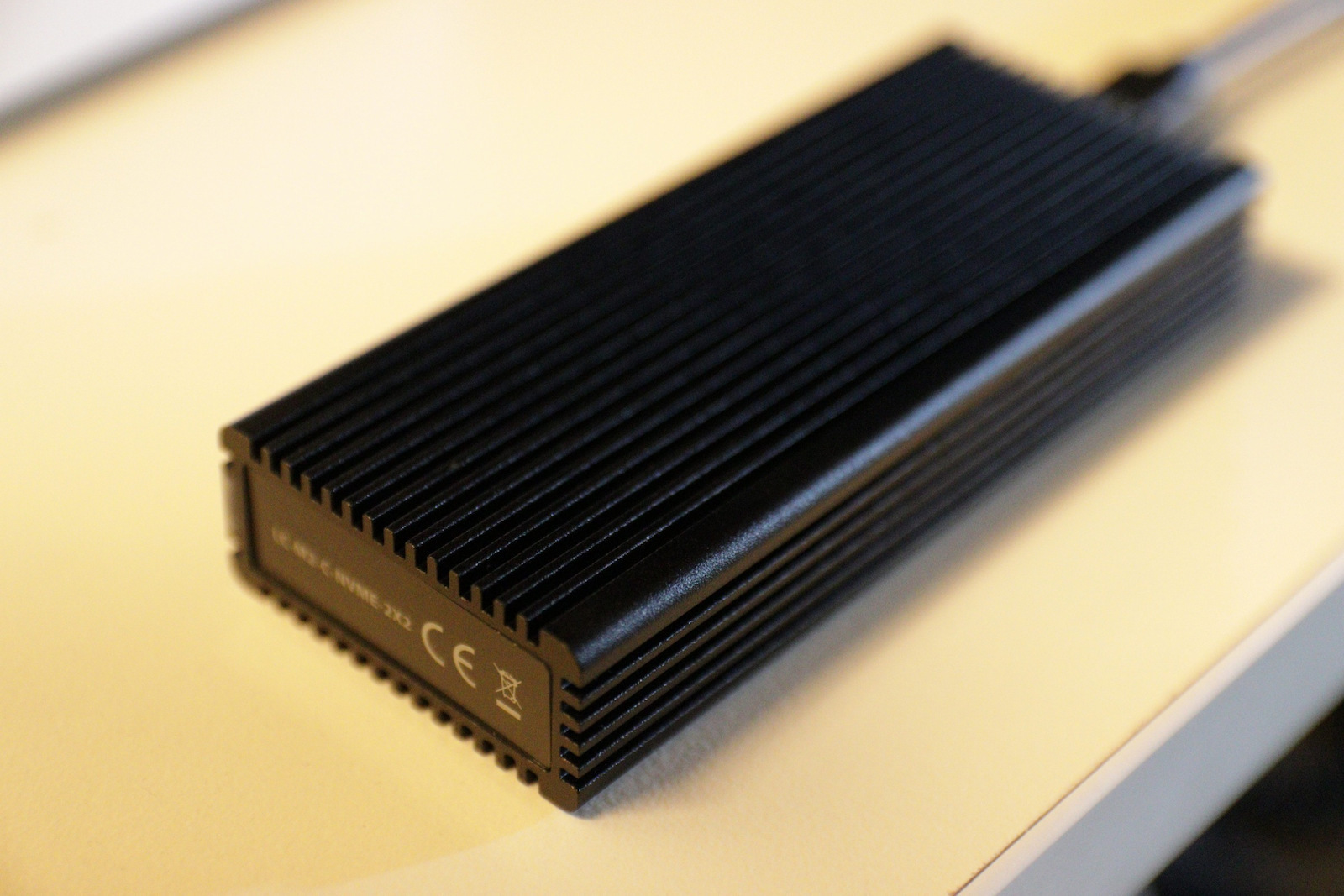
LC-Power M.2 PCI Express NVME Enclosure with Type-C Connection Code: LC-M2-C-NVME-2X2

Key features:

  • NVMe M.2 SSD - M-Key
  • NVMe M.2 SSD - B+M-Key
  • Plug 'n' Play
  • Dimensions: 111x46x20mm
  • Connectivity: USB-C
See full description
53 65 €
Delivery Wed, 25 Nov - Fri, 27 Nov
14,00 €   shipping cost
Sent from Greece
From Allaboutoffice Eshop 4.5 (14)

Learn more about invoicing

Description

Description

The LC-Power LC-M2-C-NVME-2X2 enclosure converts an internal M.2 hard drive with a PCI Express interface into an external drive. It connects to a computer via USB-C and operates without a power outlet.

  • Form factor: M.2
  • Hard drive bays: 1
  • Interface: PCI Express
  • Connectivity: USB-C
  • Power supply: Via USB-C
  • Color: Black

Manufacturer

See full description

Specifications

Specifications

Product Number
LC-M2-C-NVME-2X2

Main Specifications

Form Factor
M.2
Colour
Black

Internal Connections

Hard Drive Slots
1
Interface
PCI Express

External Connections

Connectivity
USB-C
AC Outlet
No

Important information

Specifications are collected from official manufacturer websites. Please verify the specifications before proceeding with your final purchase. If you notice any problem you can report it here.

See all specifications

Reviews (8)

Reviews

  1. 6
  2. 1
  3. 1
  4. 2 stars
    0
  5. 1 star
    0
Review this product
  • Easy disk installation
  • Construction quality
  • Disk application in the case
  • Performance stability
  • Value for money

What do users say? AI-generated summary

Users generally appreciate the enclosure’s high speed and easy installation. They also mention useful accessories, such as two cables and heat-dissipation components, as well as good temperature management. However, speeds may fall short of expectations or the SSD’s capabilities and depend on the connection.

Reviews by our members

  • Κούλης Τολιγκάς
    5
    8 out of 8 members found this review helpful

    Since I read various things here below and it seems there is difficulty in understanding the speeds of each connection, let's clarify a bit.

    This enclosure has the fastest USB connection, namely USB3.2 GEN 2x2, which means a max throughput of 20 Gbps or 2.5 GB/s.

    The SSDs it accepts are NVME PCIe x4 lanes, which means for PCIe 3.0 max throughput (for the SSD and also for the enclosure) 8 GT/s or 3.9 GB/s (most PCIe 3.0 x4 lane SSDs have a cap at 3 to 3.5 GB/s).
    For PCIe 4.0 max throughput (for the SSD again and also for the enclosure) 16 Gigatransfers/second or 7.88 GB/s (most PCIe 4.0 x4 lane SSDs have a cap of about 6.9 to 7.2 GB/s).

    So whether you use PCIe 3.0 x4 or PCIe 4.0 x4, a good brand that utilizes almost all the bandwidth will keep you within the USB3.2 2x2 speed of the enclosure. It won't give you the full 2.5 GB/s due to saturation and the simultaneous use of the resources of your computer's USB port, but you will be able to enjoy transfer speeds of 2 to 2.2 GB/s. And you will have good temperatures since whatever drive you put in will operate according to its capabilities at "idle".

    WARNING! The computer must have a USB 3.2 Gen 2x2 port (usually they are red, one Type A and one Type C) and you need to connect it there to achieve 20 Gbps or 2.5 GB/s.
    If you connect it to a USB 3.2 Gen 2 port, you will have a max of 10 Gbps or 1.2 GB/s max throughput (hence the complaints here in another review).
    If you connect it to a USB 3.2 Gen 1 port, you will have a max of 5 Gbps or 0.5 GB/s or something slightly less than 500 MB/s.

    I hope we clarified a bit. Note: this is the only enclosure I have seen here on Skroutz, from what I have searched, that is USB3.2 Gen2x2. The others, as I described, depend on your computer, what USB port versions it has, and to a lesser extent, the quality (i.e., speed) of the SSD you will put in. It should be above 2.5 GB/s read/write. If it is below, the USB will follow the decline. If it is above... Cap 2.5 GB/s according to USB 3.2 Gen 2x2.

    UPDATE:
    Let's clarify USB nomenclatures with technical specifications:

    USB 1.0 or USB 1.1 or Full speed USB = 12 Mbps = 1.5 MB/s
    USB 2.0 or Hi-Speed USB = 480 Mbps = 60 MB/s
    USB 3.0 or USB 3.1 Gen 1 or USB 3.2 Gen 1 = 5 Gbps = 625 MB/s
    USB 3.1 or USB 3.1 Gen 2 or USB 3.2 Gen 2 = 10 Gbps = 1.25 GB/s
    USB 3.2 Gen 2x2 = 20 Gbps = 2.5 GB/s
    USB 4 Gen 2x2 = 20 Gbps = 2.5 GB/s
    USB 4 Gen 3x2 = 40 Gbps = 5 GB/s

    Keep this little table in mind so you know what you are buying, because marketers, as you can see in this case, wrote comedy, not technical specifications.

    Translated from Greek ·
    Did you find this review helpful?
  • George_Tsokas5982
    3
    0 out of 1 members found this review helpful

    Verified purchase

    You should know that with this case you won't go beyond 1Gb read/write. Although the NVme I bought could reach up to 5GB, the case cannot handle those speeds. Other than that, it's fine. Convenient and with a bad price and easy to install.

    Translated from Greek ·
    • Easy disk installation
    • Construction quality
    • Disk application in the case
    • Performance stability
    Did you find this review helpful?
  • Zambi
    5
    2 out of 2 members found this review helpful

    One of the best, fastest, and most affordable SSD cases on the market. I highly recommend it

    Translated from Greek ·
    • Easy disk installation
    • Construction quality
    • Performance stability
    • Disk application in the case
    • Value for money
    Did you find this review helpful?
  • Nikdev
    5
    7 out of 7 members found this review helpful

    Verified purchase

    It includes an internal thermally conductive Pad for the Nvme, a copper piece for heat dissipation that is in direct contact with the Pad, screws, and a screwdriver for all the necessary tasks. It includes 2 USB-C to USB-C cables and a USB-C to USB-A cable, extremely useful for all motherboards.

    The performance is good and the contact with the external aluminum casing is efficient as shown in the temperatures. The temperature is low, below 40oC in a room with 22oC during the recording of 1.6TB of data. In idle, it is around 30oC. The Nvme was installed without adhesive.

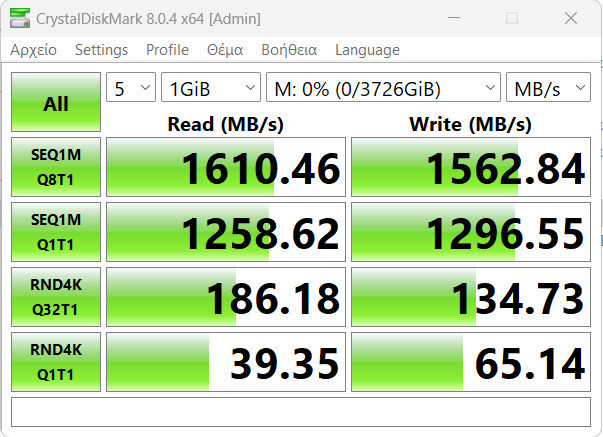
    With Kingston NV2 4TB, it reaches the speeds shown in Crystaldiskmark. With Firecuda 530, it reaches the protocol's limit at 20Gbps. It delivers on its promise of 20Gbps, compact construction, high quality, absolutely no disconnection, low idle/load temperature.

    Translated from Greek ·
    • Easy disk installation
    • Construction quality
    • Performance stability
    • Disk application in the case
    • Value for money
    Did you find this review helpful?
  • Vladimiros92
    5
    4 out of 4 members found this review helpful

    Verified purchase

    It does what it promises, I have installed an NVMe SSD M.2 inside and it reaches speeds close to 20Gbps. Recommended

    Translated from Greek ·
    • Easy disk installation
    • Construction quality
    • Performance stability
    • Disk application in the case
    • Value for money
    Did you find this review helpful?
  • Verified purchase

  • Verified purchase

  • Verified purchase

    • Easy disk installation
    • Construction quality
    • Performance stability
    • Disk application in the case
    • Value for money
  • Since I read various things here below and it seems there is difficulty in understanding the speeds of each connection, let's clarify a bit.

    This enclosure has the fastest USB connection, namely USB3.2 GEN 2x2, which means a max throughput of 20 Gbps or 2.5 GB/s.

    The SSDs it accepts are NVME PCIe x4 lanes, which means for PCIe 3.0 max throughput (for the SSD and also for the enclosure) 8 GT/s or 3.9 GB/s (most PCIe 3.0 x4 lane SSDs have a cap at 3 to 3.5 GB/s).
    For PCIe 4.0 max throughput (for the SSD again and also for the enclosure) 16 Gigatransfers/second or 7.88 GB/s (most PCIe 4.0 x4 lane SSDs have a cap of about 6.9 to 7.2 GB/s).

    So whether you use PCIe 3.0 x4 or PCIe 4.0 x4, a good brand that utilizes almost all the bandwidth will keep you within the USB3.2 2x2 speed of the enclosure. It won't give you the full 2.5 GB/s due to saturation and the simultaneous use of the resources of your computer's USB port, but you will be able to enjoy transfer speeds of 2 to 2.2 GB/s. And you will have good temperatures since whatever drive you put in will operate according to its capabilities at "idle".

    WARNING! The computer must have a USB 3.2 Gen 2x2 port (usually they are red, one Type A and one Type C) and you need to connect it there to achieve 20 Gbps or 2.5 GB/s.
    If you connect it to a USB 3.2 Gen 2 port, you will have a max of 10 Gbps or 1.2 GB/s max throughput (hence the complaints here in another review).
    If you connect it to a USB 3.2 Gen 1 port, you will have a max of 5 Gbps or 0.5 GB/s or something slightly less than 500 MB/s.

    I hope we clarified a bit. Note: this is the only enclosure I have seen here on Skroutz, from what I have searched, that is USB3.2 Gen2x2. The others, as I described, depend on your computer, what USB port versions it has, and to a lesser extent, the quality (i.e., speed) of the SSD you will put in. It should be above 2.5 GB/s read/write. If it is below, the USB will follow the decline. If it is above... Cap 2.5 GB/s according to USB 3.2 Gen 2x2.

    UPDATE:
    Let's clarify USB nomenclatures with technical specifications:

    USB 1.0 or USB 1.1 or Full speed USB = 12 Mbps = 1.5 MB/s
    USB 2.0 or Hi-Speed USB = 480 Mbps = 60 MB/s
    USB 3.0 or USB 3.1 Gen 1 or USB 3.2 Gen 1 = 5 Gbps = 625 MB/s
    USB 3.1 or USB 3.1 Gen 2 or USB 3.2 Gen 2 = 10 Gbps = 1.25 GB/s
    USB 3.2 Gen 2x2 = 20 Gbps = 2.5 GB/s
    USB 4 Gen 2x2 = 20 Gbps = 2.5 GB/s
    USB 4 Gen 3x2 = 40 Gbps = 5 GB/s

    Keep this little table in mind so you know what you are buying, because marketers, as you can see in this case, wrote comedy, not technical specifications.

    Translated from Greek ·
    8
  • You should know that with this case you won't go beyond 1Gb read/write. Although the NVme I bought could reach up to 5GB, the case cannot handle those speeds. Other than that, it's fine. Convenient and with a bad price and easy to install.

    Translated from Greek ·
    0
  • One of the best, fastest, and most affordable SSD cases on the market. I highly recommend it

    Translated from Greek ·
    2
  • It includes an internal thermally conductive Pad for the Nvme, a copper piece for heat dissipation that is in direct contact with the Pad, screws, and a screwdriver for all the necessary tasks. It includes 2 USB-C to USB-C cables and a USB-C to USB-A cable, extremely useful for all motherboards.

    The performance is good and the contact with the external aluminum casing is efficient as shown in the temperatures. The temperature is low, below 40oC in a room with 22oC during the recording of 1.6TB of data. In idle, it is around 30oC. The Nvme was installed without adhesive.

    With Kingston NV2 4TB, it reaches the speeds shown in Crystaldiskmark. With Firecuda 530, it reaches the protocol's limit at 20Gbps. It delivers on its promise of 20Gbps, compact construction, high quality, absolutely no disconnection, low idle/load temperature.

    Translated from Greek ·
    7
  • It does what it promises, I have installed an NVMe SSD M.2 inside and it reaches speeds close to 20Gbps. Recommended

    Translated from Greek ·
    4
  • See all

Description & Specifications

The LC-Power LC-M2-C-NVME-2X2 enclosure converts an internal M.2 hard drive with a PCI Express interface into an external drive. It connects to a computer via USB-C and operates without a power outlet.

  • Form factor: M.2
  • Hard drive bays: 1
  • Interface: PCI Express
  • Connectivity: USB-C
  • Power supply: Via USB-C
  • Color: Black

Manufacturer

Product Number
LC-M2-C-NVME-2X2

Main Specifications

Form Factor
M.2
Colour
Black

Internal Connections

Hard Drive Slots
1
Interface
PCI Express

External Connections

Connectivity
USB-C
AC Outlet
No

Important information

Specifications are collected from official manufacturer websites. Please verify the specifications before proceeding with your final purchase. If you notice any problem you can report it here.

Reviews (8)

  1. 6
  2. 1
  3. 1
  4. 2 stars
    0
  5. 1 star
    0
Review this product
  • Easy disk installation
  • Construction quality
  • Disk application in the case
  • Performance stability
  • Value for money

What do users say? AI-generated summary

Users generally appreciate the enclosure’s high speed and easy installation. They also mention useful accessories, such as two cables and heat-dissipation components, as well as good temperature management. However, speeds may fall short of expectations or the SSD’s capabilities and depend on the connection.

Reviews by our members

  • Κούλης Τολιγκάς
    5
    8 out of 8 members found this review helpful

    Since I read various things here below and it seems there is difficulty in understanding the speeds of each connection, let's clarify a bit.

    This enclosure has the fastest USB connection, namely USB3.2 GEN 2x2, which means a max throughput of 20 Gbps or 2.5 GB/s.

    The SSDs it accepts are NVME PCIe x4 lanes, which means for PCIe 3.0 max throughput (for the SSD and also for the enclosure) 8 GT/s or 3.9 GB/s (most PCIe 3.0 x4 lane SSDs have a cap at 3 to 3.5 GB/s).
    For PCIe 4.0 max throughput (for the SSD again and also for the enclosure) 16 Gigatransfers/second or 7.88 GB/s (most PCIe 4.0 x4 lane SSDs have a cap of about 6.9 to 7.2 GB/s).

    So whether you use PCIe 3.0 x4 or PCIe 4.0 x4, a good brand that utilizes almost all the bandwidth will keep you within the USB3.2 2x2 speed of the enclosure. It won't give you the full 2.5 GB/s due to saturation and the simultaneous use of the resources of your computer's USB port, but you will be able to enjoy transfer speeds of 2 to 2.2 GB/s. And you will have good temperatures since whatever drive you put in will operate according to its capabilities at "idle".

    WARNING! The computer must have a USB 3.2 Gen 2x2 port (usually they are red, one Type A and one Type C) and you need to connect it there to achieve 20 Gbps or 2.5 GB/s.
    If you connect it to a USB 3.2 Gen 2 port, you will have a max of 10 Gbps or 1.2 GB/s max throughput (hence the complaints here in another review).
    If you connect it to a USB 3.2 Gen 1 port, you will have a max of 5 Gbps or 0.5 GB/s or something slightly less than 500 MB/s.

    I hope we clarified a bit. Note: this is the only enclosure I have seen here on Skroutz, from what I have searched, that is USB3.2 Gen2x2. The others, as I described, depend on your computer, what USB port versions it has, and to a lesser extent, the quality (i.e., speed) of the SSD you will put in. It should be above 2.5 GB/s read/write. If it is below, the USB will follow the decline. If it is above... Cap 2.5 GB/s according to USB 3.2 Gen 2x2.

    UPDATE:
    Let's clarify USB nomenclatures with technical specifications:

    USB 1.0 or USB 1.1 or Full speed USB = 12 Mbps = 1.5 MB/s
    USB 2.0 or Hi-Speed USB = 480 Mbps = 60 MB/s
    USB 3.0 or USB 3.1 Gen 1 or USB 3.2 Gen 1 = 5 Gbps = 625 MB/s
    USB 3.1 or USB 3.1 Gen 2 or USB 3.2 Gen 2 = 10 Gbps = 1.25 GB/s
    USB 3.2 Gen 2x2 = 20 Gbps = 2.5 GB/s
    USB 4 Gen 2x2 = 20 Gbps = 2.5 GB/s
    USB 4 Gen 3x2 = 40 Gbps = 5 GB/s

    Keep this little table in mind so you know what you are buying, because marketers, as you can see in this case, wrote comedy, not technical specifications.

    Translated from Greek ·
    Did you find this review helpful?
  • George_Tsokas5982
    3
    0 out of 1 members found this review helpful

    Verified purchase

    You should know that with this case you won't go beyond 1Gb read/write. Although the NVme I bought could reach up to 5GB, the case cannot handle those speeds. Other than that, it's fine. Convenient and with a bad price and easy to install.

    Translated from Greek ·
    • Easy disk installation
    • Construction quality
    • Disk application in the case
    • Performance stability
    Did you find this review helpful?
  • Zambi
    5
    2 out of 2 members found this review helpful

    One of the best, fastest, and most affordable SSD cases on the market. I highly recommend it

    Translated from Greek ·
    • Easy disk installation
    • Construction quality
    • Performance stability
    • Disk application in the case
    • Value for money
    Did you find this review helpful?
  • Nikdev
    5
    7 out of 7 members found this review helpful

    Verified purchase

    It includes an internal thermally conductive Pad for the Nvme, a copper piece for heat dissipation that is in direct contact with the Pad, screws, and a screwdriver for all the necessary tasks. It includes 2 USB-C to USB-C cables and a USB-C to USB-A cable, extremely useful for all motherboards.

    The performance is good and the contact with the external aluminum casing is efficient as shown in the temperatures. The temperature is low, below 40oC in a room with 22oC during the recording of 1.6TB of data. In idle, it is around 30oC. The Nvme was installed without adhesive.

    With Kingston NV2 4TB, it reaches the speeds shown in Crystaldiskmark. With Firecuda 530, it reaches the protocol's limit at 20Gbps. It delivers on its promise of 20Gbps, compact construction, high quality, absolutely no disconnection, low idle/load temperature.

    Translated from Greek ·
    • Easy disk installation
    • Construction quality
    • Performance stability
    • Disk application in the case
    • Value for money
    Did you find this review helpful?
  • Vladimiros92
    5
    4 out of 4 members found this review helpful

    Verified purchase

    It does what it promises, I have installed an NVMe SSD M.2 inside and it reaches speeds close to 20Gbps. Recommended

    Translated from Greek ·
    • Easy disk installation
    • Construction quality
    • Performance stability
    • Disk application in the case
    • Value for money
    Did you find this review helpful?
  • Verified purchase

  • Verified purchase

  • Verified purchase

    • Easy disk installation
    • Construction quality
    • Performance stability
    • Disk application in the case
    • Value for money
  • Since I read various things here below and it seems there is difficulty in understanding the speeds of each connection, let's clarify a bit.

    This enclosure has the fastest USB connection, namely USB3.2 GEN 2x2, which means a max throughput of 20 Gbps or 2.5 GB/s.

    The SSDs it accepts are NVME PCIe x4 lanes, which means for PCIe 3.0 max throughput (for the SSD and also for the enclosure) 8 GT/s or 3.9 GB/s (most PCIe 3.0 x4 lane SSDs have a cap at 3 to 3.5 GB/s).
    For PCIe 4.0 max throughput (for the SSD again and also for the enclosure) 16 Gigatransfers/second or 7.88 GB/s (most PCIe 4.0 x4 lane SSDs have a cap of about 6.9 to 7.2 GB/s).

    So whether you use PCIe 3.0 x4 or PCIe 4.0 x4, a good brand that utilizes almost all the bandwidth will keep you within the USB3.2 2x2 speed of the enclosure. It won't give you the full 2.5 GB/s due to saturation and the simultaneous use of the resources of your computer's USB port, but you will be able to enjoy transfer speeds of 2 to 2.2 GB/s. And you will have good temperatures since whatever drive you put in will operate according to its capabilities at "idle".

    WARNING! The computer must have a USB 3.2 Gen 2x2 port (usually they are red, one Type A and one Type C) and you need to connect it there to achieve 20 Gbps or 2.5 GB/s.
    If you connect it to a USB 3.2 Gen 2 port, you will have a max of 10 Gbps or 1.2 GB/s max throughput (hence the complaints here in another review).
    If you connect it to a USB 3.2 Gen 1 port, you will have a max of 5 Gbps or 0.5 GB/s or something slightly less than 500 MB/s.

    I hope we clarified a bit. Note: this is the only enclosure I have seen here on Skroutz, from what I have searched, that is USB3.2 Gen2x2. The others, as I described, depend on your computer, what USB port versions it has, and to a lesser extent, the quality (i.e., speed) of the SSD you will put in. It should be above 2.5 GB/s read/write. If it is below, the USB will follow the decline. If it is above... Cap 2.5 GB/s according to USB 3.2 Gen 2x2.

    UPDATE:
    Let's clarify USB nomenclatures with technical specifications:

    USB 1.0 or USB 1.1 or Full speed USB = 12 Mbps = 1.5 MB/s
    USB 2.0 or Hi-Speed USB = 480 Mbps = 60 MB/s
    USB 3.0 or USB 3.1 Gen 1 or USB 3.2 Gen 1 = 5 Gbps = 625 MB/s
    USB 3.1 or USB 3.1 Gen 2 or USB 3.2 Gen 2 = 10 Gbps = 1.25 GB/s
    USB 3.2 Gen 2x2 = 20 Gbps = 2.5 GB/s
    USB 4 Gen 2x2 = 20 Gbps = 2.5 GB/s
    USB 4 Gen 3x2 = 40 Gbps = 5 GB/s

    Keep this little table in mind so you know what you are buying, because marketers, as you can see in this case, wrote comedy, not technical specifications.

    Translated from Greek ·
    8
  • You should know that with this case you won't go beyond 1Gb read/write. Although the NVme I bought could reach up to 5GB, the case cannot handle those speeds. Other than that, it's fine. Convenient and with a bad price and easy to install.

    Translated from Greek ·
    0
  • One of the best, fastest, and most affordable SSD cases on the market. I highly recommend it

    Translated from Greek ·
    2
  • It includes an internal thermally conductive Pad for the Nvme, a copper piece for heat dissipation that is in direct contact with the Pad, screws, and a screwdriver for all the necessary tasks. It includes 2 USB-C to USB-C cables and a USB-C to USB-A cable, extremely useful for all motherboards.

    The performance is good and the contact with the external aluminum casing is efficient as shown in the temperatures. The temperature is low, below 40oC in a room with 22oC during the recording of 1.6TB of data. In idle, it is around 30oC. The Nvme was installed without adhesive.

    With Kingston NV2 4TB, it reaches the speeds shown in Crystaldiskmark. With Firecuda 530, it reaches the protocol's limit at 20Gbps. It delivers on its promise of 20Gbps, compact construction, high quality, absolutely no disconnection, low idle/load temperature.

    Translated from Greek ·
    7
  • It does what it promises, I have installed an NVMe SSD M.2 inside and it reaches speeds close to 20Gbps. Recommended

    Translated from Greek ·
    4
  • See all
53,65 €
14,00 €   shipping cost