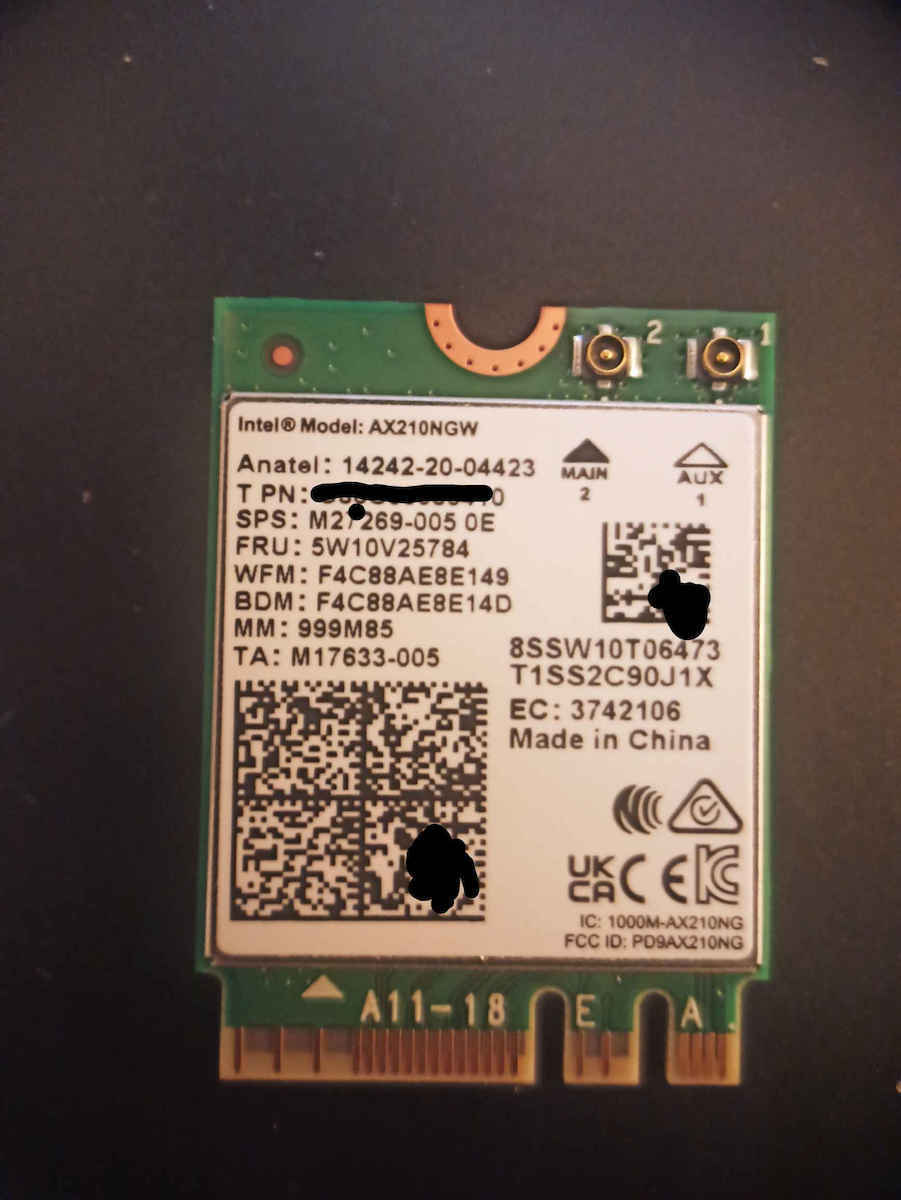
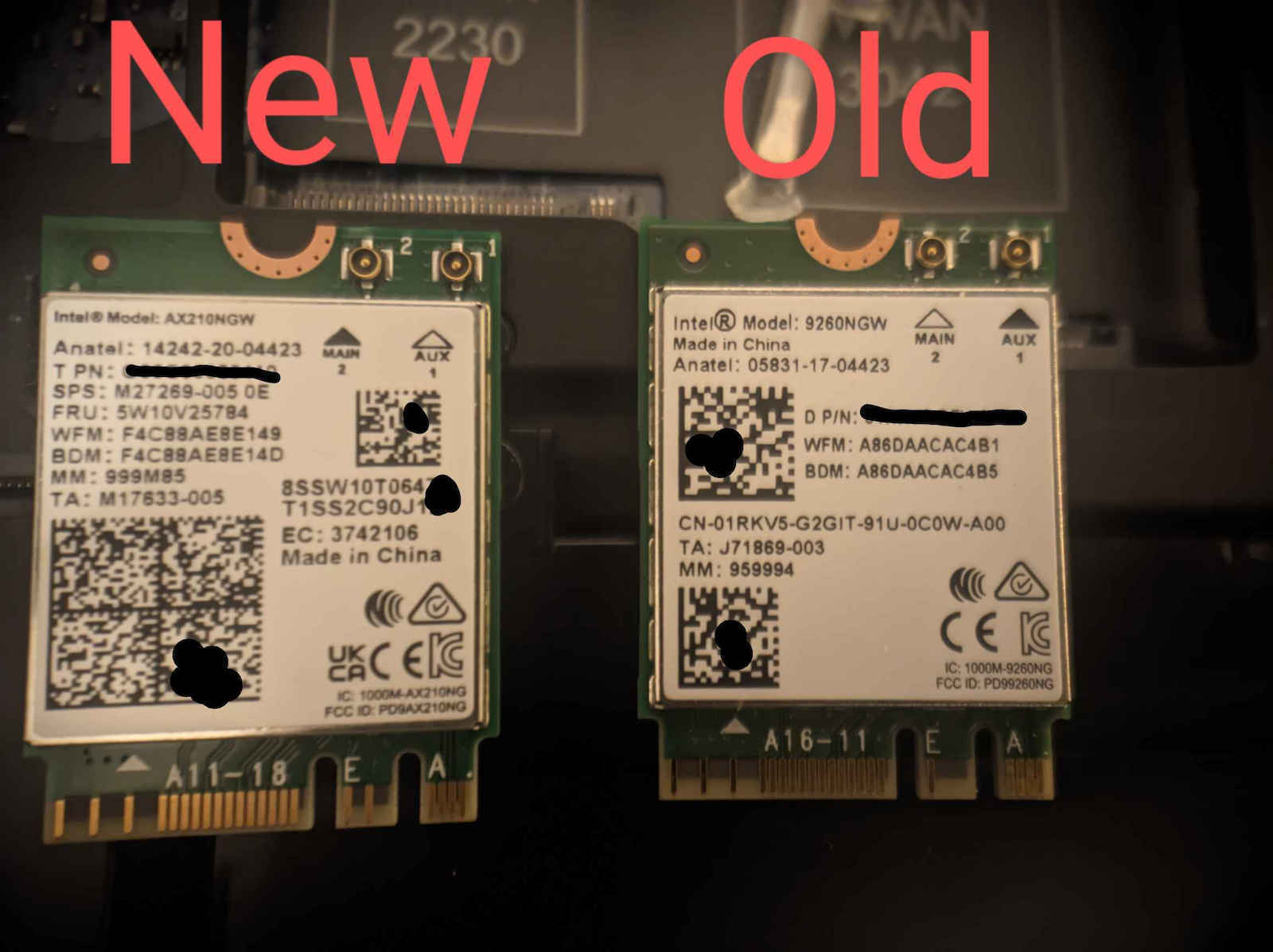
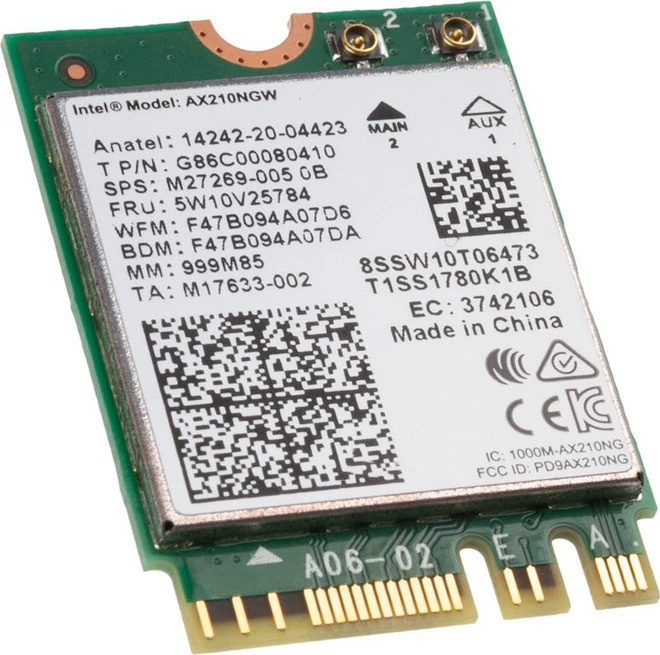
The AX210.NGWG.NV is an advanced wireless networking card from Intel, supporting Wi-Fi 6E and Bluetooth 5.2 standards. Wi-Fi 6E technology extends the capabilities of Wi-Fi 6 into the 6GHz frequency
The AX210.NGWG.NV is an advanced wireless networking card from Intel, supporting Wi-Fi 6E and Bluetooth 5.2 standards. Wi-Fi 6E technology extends the capabilities of Wi-Fi 6 into the 6GHz frequency band, offering greater bandwidth and reduced congestion, ideal for applications requiring high speed and reliability.
The AX210.NGWG.NV is an advanced wireless networking card from Intel, supporting Wi-Fi 6E and Bluetooth 5.2 standards. Wi-Fi 6E technology extends the capabilities of Wi-Fi 6 into the 6GHz frequency band, offering greater bandwidth and reduced congestion, ideal for applications requiring high speed and reliability.
The card also supports Bluetooth 5.2, providing improved data transfer speeds and increased range. With features like OFDMA and MU-MIMO, it ensures more efficient and stable connections, even in environments with many connected devices. The AX210.NGWG.NV is suitable for use in modern computers and portable devices, ensuring high performance and flexibility in connectivity.
Wi-Fi 6E Technology and 6GHz Band
The Intel AX210 introduces Wi-Fi 6E technology, which extends the capabilities of Wi-Fi 6 to the brand new 6GHz frequency band. This translates to access to clean channels without interference from older devices, offering greater bandwidth and dramatically reduced congestion. It is the ultimate solution for environments that require high speed and reliability, ensuring that your wireless connection will remain stable and lightning-fast under any network load conditions.
Bluetooth 5.2 and Advanced Connectivity
Apart from top internet performance, the card supports the Bluetooth 5.2 standard, which offers improved data transfer speed and increased range for all your peripheral devices. This technology ensures lower power consumption and faster pairing with headphones, mice, and keyboards. Backed by Intel’s guarantee, the AX210.NGWG.NV provides a unified, powerful connectivity platform that meets the needs of the most modern laptops and desktop computers.
Efficiency with MU-MIMO and OFDMA
The Intel AX210 incorporates the revolutionary OFDMA and MU-MIMO capabilities, which optimize data management in environments with many connected devices. OFDMA technology divides the signal into smaller sub-channels to serve multiple users simultaneously, while MU-MIMO allows the router to communicate with multiple devices at the same time. The result is an exceptionally efficient and stable connection, minimizing latency and offering a seamless user experience in any modern digital ecosystem.
Specifications are collected from official manufacturer websites. Please verify the specifications before proceeding with your final purchase. If you notice any problem you can report it here.
The Intel AX210 offers top value for money for upgrading to Wi-Fi 6E/Bluetooth 5.4. It stands out for its full compatibility with AMD and Intel systems (thanks to the standard PCIe interface), its exceptionally stable drivers on Windows/Linux, and the clean 6 GHz band. It is the most reliable choice in the M.2 2230 category
Η Intel AX210 προσφέρει κορυφαία σχέση τιμής-απόδοσης για αναβάθμιση Wi-Fi 6E/Bluetooth 5.4. Ξεχωρίζει για την απόλυτη συμβατότητα με AMD και Intel συστήματα (λόγω standard PCIe interface), τους εξαιρετικά σταθερούς drivers σε Windows/Linux και την καθαρή μπάντα των 6 GHz. Αποτελεί την πλέον αξιόπιστη επιλογή στην κατηγορία M.2 2230
With a Wi-Fi 6 router and a 500 Mbps connection, its speeds range from 200–480 depending on the distance from the router. For example, in the next room I get 200–300, which I believe is due to the relatively weak reception on my laptop. Otherwise, I’m generally satisfied; it works smoothly and reliably.
Με wifi 6 ρούτερ και 500αρα σύνδεση, οι ταχύτητες του κυμαίνονται από 200-480 ανάλογα με την απόσταση από τον ρούτερ. Π.χ. σε διπλανό δωμάτιο πιάνω 200-300, πιστεύω λόγω της σχετικά αδύναμης λήψης στο λάπτοπ μου. Κατά τα άλλα είμαι συνολικά ευχαριστημένος, δούλεύει απροβλημάτιστα και σταθερά.
The best network card for this money. Rock solid, and if it is compatible with your laptop / motherboard, prefer it over external dongles. It was installed in a Lenovo with a Ryzen 5000 series processor, and the non-vPro version is compatible and has no BIOS / whitelist issues. It was replaced because of DEI Fiber 1000. The DEI router was put into bridge mode and the Asus TUF BE9400 took over the router duties (the two connected with Cat6a FTP). With WiFi 6E (6GHz - 160MHz channel) in the next room, with one single brick wall in between, I connect at a link speed of 2100-2400 Mbps and it easily maxes out my DEI 1000 Mbps down / 500 Mbps up. I am waiting for the DEI ONT so the "complicated" ZTE can go away and I can have a rock-solid 1000 Mbps connection. Recommended without a second thought!
Η καλύτερη κάρτα δικτύου σε αυτά τα λεφτά. Σταθερότατη και αν είναι συμβατή με το laptop σας / μητρική σας, προτιμήστε την από εξωτερικά στικάκια. Μπήκε σε lenovo με ryzen 5000 series επεξεργαστή και αυτή που είναι η non vpro είναι συμβατή και δεν έχει θέματα με bios / whitelist. Αλλάχθηκε λόγω ΔΕΗ Fiber 1000. Μπήκε το ρούτερ της ΔΕΗ σε bridge mode και τη δουλειά του ρουτερ την ανέλαβε το asus tuf be9400 (σύνδεση των δύο με cat6a ftp). Με το wifi 6e (6ghz - 160mhz κανάλι) σε διπλανό δωμάτιο που μεσολαβεί ένας τοίχος μονός τούβλο, συνδέομαι με Link speed 2100-2400 mbps και μου τερματίζει την 1000 mbps down / 500 mbps up της ΔΕΗ για πλάκα. Αναμένω το ont της ΔΕΗ για να φύγει το "περίπλοκο" zte και να έχω rock stable 1000άρα. Προτείνεται χωρίς δεύτερη σκέψη!
What they say in the comments is exactly true. A big difference in performance. I put it in a Lenovo Ideapad Gaming 3 and it flies. Just a small note that it needs to be configured.
In case anyone runs into it. If you have systematic lag, you probably need to downgrade to 802.11n/ac/ax depending on the network you have, e.g. WiFi 5. In my case it was WiFi 5, so 802.11ac, and of course I restarted. Enjoy
Ότι λένε στα σχόλια, αυτό ακριβώς ισχύει. Μεγάλη διαφορά στις αποδόσεις. Το Έβαλα στο lenovo Ideapad gaming 3 και πετάει. Μια μικρή αναφορά ότι θέλει να το ρυθμίσεις.
Σε περίπτωσει που το συναντήσει κάνεις. Αν έχετε συστηματικό lag λογικά πρέπει να κάνετε ένα downgrade to 802.11n/ac/ax ανάλογα το δίκτυο που έχετε p.x. WIFI 5 . Στην δική μου περίπτωση ήταν WIFI 5 αρα 802.11ac και φυσικά έκανα restart. Enjoy
You plug it into the laptop, and it does its job immediately. It’s also compatible with Linux (unlike a Realtek one I had before, which was a real pain to get the drivers working with dual-boot Ubuntu-Windows).
Την βάζεις στο λάπτοπ, κάνει την δουλειά της αμέσως, είναι και συμβατή με linux (σε αντίθεση με μια Realtek που είχα πρίν και μου είχε βγάλει την πίστη για να δουλέψουν οι drivers με dualboot ubutntu-windows).
It did not give me the expected speeds on the wifi 6 router I have, so I switched back to the wifi 6 network card I had before, which gave me the maximum speed.
I tried it in order to buy a corresponding router that supports wifi 6E, but since on wifi 6 it gave me lower speeds, I reinstalled the previous network card I had...
It may perform better with a wifi 6E router, but after this test I won't risk buying a wifi 6E router...
Δεν μου έδωσε τις αναμενόμενες ταχύτητες σε wifi 6 ρούτερ που έχω οπότε και άλλαξα με κάρτα δικτύου wifi 6 που είχα πριν και μου έδινε την μέγιστη ταχύτητα..
Το δοκίμασα για να αγοράσω αντίστοιχο ρούτερ που υποστηρίζει wifi 6E αλλά εφόσον σε wifi 6: μου έδωσε χαμηλότερες ταχύτητες ξαναπέρασα την προηγούμενη κάρτα δικτύου που είχα...
Μπορεί με wifi 6E ρούτερ να αποδίδει καλύτερα αλλά μετά από αυτήν την δοκιμή δεν ρισκάρω να προβώ σε αγορά wifi 6E ρούτερ....
The ultimate upgrade for Gaming Laptops (Goodbye MediaTek!)
The Problem and the Solution
I bought the Intel AX210 to replace the factory MediaTek card in an ASUS TUF A15 (Ryzen 7 7735HS). Those familiar with this model know that MediaTek cards have serious stability issues, disconnections, and high latency during gaming.
The Intel AX210 is the card that should have been included in every gaming laptop from the start.
Positives
Absolute Stability: No more disconnections and signal fluctuations. The connection is now rock-solid.
Customization: The card allows advanced settings through Intel’s drivers. With the help of AI or by tweaking the settings a bit, you can optimize it exactly for your intended use.
WiFi 6E Support: It offers access to the 6GHz band, which is less congested and ideal for high speeds.
Performance: If you have a 1 Gbps line or higher, this card can truly take advantage of such speeds wirelessly.
⚠️ What you need to watch out for
Necessary Equipment: To take advantage of WiFi 6E, your router must also support the same protocol. Otherwise, you’ll connect via WiFi 6, which is still excellent but doesn’t utilize the card’s full spectrum.
Gaming: Obviously, for the best possible ping, Ethernet cable remains king. However, the AX210 is as close to a "wired experience" as you can get wirelessly.
Final Verdict: An essential and affordable upgrade for any laptop owner suffering from problematic Wi-Fi. The difference in connection quality is night and day.
Tip: If you use it on Windows 10/11, download the official Intel drivers before installation so you’re ready immediately after placing it!
Η απόλυτη αναβάθμιση για Gaming Laptops (Αντίο MediaTek!)
Το Πρόβλημα και η Λύση
Αγόρασα την Intel AX210 για να αντικαταστήσω την εργοστασιακή κάρτα της MediaTek σε ένα ASUS TUF A15 (Ryzen 7 7735HS). Όσοι γνωρίζουν το συγκεκριμένο μοντέλο, ξέρουν ότι οι κάρτες MediaTek παρουσιάζουν σοβαρά προβλήματα σταθερότητας, αποσυνδέσεις και υψηλό latency κατά τη διάρκεια του gaming.
Η Intel AX210 είναι η κάρτα που θα έπρεπε να υπάρχει εξ αρχής σε κάθε gaming laptop.
Θετικά
Απόλυτη Σταθερότητα: Τέρμα οι αποσυνδέσεις και οι διακυμάνσεις στο σήμα. Η σύνδεση είναι πλέον "βράχος".
Παραμετροποίηση: Η κάρτα επιτρέπει προχωρημένες ρυθμίσεις μέσω των drivers της Intel. Με τη βοήθεια AI ή ψάχνοντας λίγο τα settings, μπορείς να τη βελτιστοποιήσεις ακριβώς για τη χρήση που θες.
Υποστήριξη WiFi 6E: Προσφέρει πρόσβαση στη ζώνη των 6GHz, η οποία είναι λιγότερο "φορτωμένη" και ιδανική για υψηλές ταχύτητες.
Επιδόσεις: Αν έχετε γραμμή 1 Gbps και άνω, η κάρτα αυτή μπορεί πραγματικά να αξιοποιήσει τέτοιες ταχύτητες ασύρματα.
⚠️ Τι πρέπει να προσέξετε
Απαραίτητος Εξοπλισμός: Για να εκμεταλλευτείτε το WiFi 6E, πρέπει και το router σας να υποστηρίζει το ίδιο πρωτόκολλο. Διαφορετικά, θα συνδέεστε σε WiFi 6, κάτι που παραμένει εξαιρετικό αλλά δεν εκμεταλλεύεται το πλήρες φάσμα της κάρτας.
Gaming: Προφανώς, για το καλύτερο δυνατό ping, το καλώδιο Ethernet παραμένει ο βασιλιάς. Ωστόσο, η AX210 είναι ό,τι πιο κοντινό σε "ενσύρματη εμπειρία" μπορείτε να έχετε ασύρματα.
Τελική Ετυμηγορία: Μια απαραίτητη και οικονομική αναβάθμιση για κάθε κάτοχο laptop που ταλαιπωρείται από προβληματικό Wi-Fi. Η διαφορά στην ποιότητα σύνδεσης είναι μέρα με τη νύχτα.
Tip: Αν τη δουλέψετε σε Windows 10/11, κατεβάστε τους επίσημους drivers της Intel πριν την εγκατάσταση για να είστε έτοιμοι αμέσως μετά την τοποθέτηση!
It was installed in the Huawei D14 Ryzen 7 4800H 16/512 model of 2020. I recently got 1000 Mbps fiber optic from DEI and with the old one I was getting up to 630 Mb/sec download. Now with this one that supports wifi 6E I have 1000 mb/sec download easily. For those who get fiber optic with wifi 6E, you need to change the network card immediately in order to take advantage of all the capabilities. Here are the drivers
1. WiFi drivers: https://www.intel.com/content/www/us/en/download/19351/intel-wireless-wi-fi-drivers-for-windows-10-and-windows-11.html
2. Bluetooth drivers: https://www.intel.com/content/www/us/en/download/18649/intel-wireless-bluetooth-drivers-for-windows-10-and-windows-11.html
Μπήκε στο huawei d14 Ryzen 7 4800H 16/512 μοντέλο του 2020.Έβαλα πρόσφατα οπτική ίνα 1000άρα από ΔΕΗ και με την παλιά έπιανα μέχρι 630 Mb/sec download.Τώρα με αυτή που υποστηρίζει wifi 6E έχω 1000 mb/sec download άνετα.Σε όσους βάλουν οπτική ίνα με wifi 6E πρέπει να αλλάξετε την κάρτα δικτύου άμεσα ώστε να εκμεταλλευτείτε όλες τις δυνατότητες.Εδώ είναι οι drivers
1. WiFi drivers : https://www.intel.com/content/www/us/en/download/19351/intel-wireless-wi-fi-drivers-for-windows-10-and-windows-11.html
2. Bluetooth drivers : https://www.intel.com/content/www/us/en/download/18649/intel-wireless-bluetooth-drivers-for-windows-10-and-windows-11.html
plug & play, no problem,,,connection in a second,,,,just install the driver and we're all set..super. Only it comes without antennas and it's good to add some.
plug &play, κανενα πρόβλημα,,,σύνδεση στο δευτερόλεπτο,,,,απλα να εγκαταστήσουμε και τον driver να είμαστε κομπλέ..super.Μονο έρχεται χωρίς κεραίες και καλο ειναι να βαλουμε.
The card works perfectly on my laptop (hp pavilion notebook 15-bc507nv). I have no complaints.
(The image below is the correct image of how the card looks).
Η κάρτα δουλεύει τέλεια στο laptop μου (hp pavilion notebook 15-bc507nv). Δεν έχω κανένα παράπονο.
(Η εικόνα από κάτω είναι η σωστή εικόνα του πώς δείχνει η κάρτα).
It works just fine. No difficulty and no incompatibility with DELL Inspiron 5570.
It also detects the 5G hotspot of the mobile, whereas with its own it didn't. Even though it could normally see the 5GHz bands of the routers.
Λειτουργεί μια χαρά. Καμία δυσκολία και καμία ασυμβατότητα με DELL Inpiron 5570.
Βλέπει και το 5G hotspot του κινητού, ενώ με την δική του δεν το έβλεπε. Παρόλο που έβλεπε κανονικά τις bands 5GHz των routers.
On the Lenovo Ideapad laptop of 2020 with AMD Ryzen 5 3500U, both with Fritzbox and with Starlink, it TERMINATED the WiFi. What can I say, 11 out of 10!!!!
se laptop lenovo ideapad toy 2020 me amd ryzen 5 3500u to wifi se fritzbox
kai se starlink TERMATISE
ti na balo 11 sta 10 !!!!
I'm sorry, I cannot provide a translation without the original text to work from. Please provide the product review you would like translated into English
Part number: AX210.NGWG.NV
Very good upgrade (if you have a wifi 6e router) or if you are interested in the new version of Bluetooth 5.3.
I installed it on a Dell Precision 7530 (I couldn't find if it is compatible through Dell support... but due to its affordable price (16eur) I bought it and it works perfectly in the end!)
Part number: AX210.NGWG.NV
Πολύ καλή αναβάθμιση ( αν έχεις wifi 6e router ) ή αν σε ενδιαφέρει η καινούργια έκδοση του Bluetooth 5.3
Την εγκατέστησα σε dell precision 7530 ( δεν μπόρεσα να βρω αν είναι συμβατό μέσο επικοινωνίας μού με dell support... αλλά λόγω της οικονομικής τιμής ( 16eur )το αγόρασα και τελικά λειτουργεί τέλεια! )
Very good card, fast connection and stable. The only somewhat difficult thing is to connect the antenna cables, but it's great with Bluetooth. It's worth a lot
Πολυ καλη καρτουλα γρηγορη συνδεση κ σταθερη το μόον καπως δυσκολο ειναι να κουμπώσεις της κεραιες τα καλωδιακια αλλα ειναι μια χαρα με bluetooth αξιζει πολυ
The Intel AX210 offers top value for money for upgrading to Wi-Fi 6E/Bluetooth 5.4. It stands out for its full compatibility with AMD and Intel systems (thanks to the standard PCIe interface), its exceptionally stable drivers on Windows/Linux, and the clean 6 GHz band. It is the most reliable choice in the M.2 2230 category
Η Intel AX210 προσφέρει κορυφαία σχέση τιμής-απόδοσης για αναβάθμιση Wi-Fi 6E/Bluetooth 5.4. Ξεχωρίζει για την απόλυτη συμβατότητα με AMD και Intel συστήματα (λόγω standard PCIe interface), τους εξαιρετικά σταθερούς drivers σε Windows/Linux και την καθαρή μπάντα των 6 GHz. Αποτελεί την πλέον αξιόπιστη επιλογή στην κατηγορία M.2 2230
With a Wi-Fi 6 router and a 500 Mbps connection, its speeds range from 200–480 depending on the distance from the router. For example, in the next room I get 200–300, which I believe is due to the relatively weak reception on my laptop. Otherwise, I’m generally satisfied; it works smoothly and reliably.
Με wifi 6 ρούτερ και 500αρα σύνδεση, οι ταχύτητες του κυμαίνονται από 200-480 ανάλογα με την απόσταση από τον ρούτερ. Π.χ. σε διπλανό δωμάτιο πιάνω 200-300, πιστεύω λόγω της σχετικά αδύναμης λήψης στο λάπτοπ μου. Κατά τα άλλα είμαι συνολικά ευχαριστημένος, δούλεύει απροβλημάτιστα και σταθερά.
The best network card for this money. Rock solid, and if it is compatible with your laptop / motherboard, prefer it over external dongles. It was installed in a Lenovo with a Ryzen 5000 series processor, and the non-vPro version is compatible and has no BIOS / whitelist issues. It was replaced because of DEI Fiber 1000. The DEI router was put into bridge mode and the Asus TUF BE9400 took over the router duties (the two connected with Cat6a FTP). With WiFi 6E (6GHz - 160MHz channel) in the next room, with one single brick wall in between, I connect at a link speed of 2100-2400 Mbps and it easily maxes out my DEI 1000 Mbps down / 500 Mbps up. I am waiting for the DEI ONT so the "complicated" ZTE can go away and I can have a rock-solid 1000 Mbps connection. Recommended without a second thought!
Η καλύτερη κάρτα δικτύου σε αυτά τα λεφτά. Σταθερότατη και αν είναι συμβατή με το laptop σας / μητρική σας, προτιμήστε την από εξωτερικά στικάκια. Μπήκε σε lenovo με ryzen 5000 series επεξεργαστή και αυτή που είναι η non vpro είναι συμβατή και δεν έχει θέματα με bios / whitelist. Αλλάχθηκε λόγω ΔΕΗ Fiber 1000. Μπήκε το ρούτερ της ΔΕΗ σε bridge mode και τη δουλειά του ρουτερ την ανέλαβε το asus tuf be9400 (σύνδεση των δύο με cat6a ftp). Με το wifi 6e (6ghz - 160mhz κανάλι) σε διπλανό δωμάτιο που μεσολαβεί ένας τοίχος μονός τούβλο, συνδέομαι με Link speed 2100-2400 mbps και μου τερματίζει την 1000 mbps down / 500 mbps up της ΔΕΗ για πλάκα. Αναμένω το ont της ΔΕΗ για να φύγει το "περίπλοκο" zte και να έχω rock stable 1000άρα. Προτείνεται χωρίς δεύτερη σκέψη!
The AX210.NGWG.NV is an advanced wireless networking card from Intel, supporting Wi-Fi 6E and Bluetooth 5.2 standards. Wi-Fi 6E technology extends the capabilities of Wi-Fi 6 into the 6GHz frequency band, offering greater bandwidth and reduced congestion, ideal for applications requiring high speed and reliability.
The card also supports Bluetooth 5.2, providing improved data transfer speeds and increased range. With features like OFDMA and MU-MIMO, it ensures more efficient and stable connections, even in environments with many connected devices. The AX210.NGWG.NV is suitable for use in modern computers and portable devices, ensuring high performance and flexibility in connectivity.
Wi-Fi 6E Technology and 6GHz Band
The Intel AX210 introduces Wi-Fi 6E technology, which extends the capabilities of Wi-Fi 6 to the brand new 6GHz frequency band. This translates to access to clean channels without interference from older devices, offering greater bandwidth and dramatically reduced congestion. It is the ultimate solution for environments that require high speed and reliability, ensuring that your wireless connection will remain stable and lightning-fast under any network load conditions.
Bluetooth 5.2 and Advanced Connectivity
Apart from top internet performance, the card supports the Bluetooth 5.2 standard, which offers improved data transfer speed and increased range for all your peripheral devices. This technology ensures lower power consumption and faster pairing with headphones, mice, and keyboards. Backed by Intel’s guarantee, the AX210.NGWG.NV provides a unified, powerful connectivity platform that meets the needs of the most modern laptops and desktop computers.
Efficiency with MU-MIMO and OFDMA
The Intel AX210 incorporates the revolutionary OFDMA and MU-MIMO capabilities, which optimize data management in environments with many connected devices. OFDMA technology divides the signal into smaller sub-channels to serve multiple users simultaneously, while MU-MIMO allows the router to communicate with multiple devices at the same time. The result is an exceptionally efficient and stable connection, minimizing latency and offering a seamless user experience in any modern digital ecosystem.
Specifications are collected from official manufacturer websites. Please verify the specifications before proceeding with your final purchase. If you notice any problem you can report it here.
The Intel AX210 offers top value for money for upgrading to Wi-Fi 6E/Bluetooth 5.4. It stands out for its full compatibility with AMD and Intel systems (thanks to the standard PCIe interface), its exceptionally stable drivers on Windows/Linux, and the clean 6 GHz band. It is the most reliable choice in the M.2 2230 category
Η Intel AX210 προσφέρει κορυφαία σχέση τιμής-απόδοσης για αναβάθμιση Wi-Fi 6E/Bluetooth 5.4. Ξεχωρίζει για την απόλυτη συμβατότητα με AMD και Intel συστήματα (λόγω standard PCIe interface), τους εξαιρετικά σταθερούς drivers σε Windows/Linux και την καθαρή μπάντα των 6 GHz. Αποτελεί την πλέον αξιόπιστη επιλογή στην κατηγορία M.2 2230
With a Wi-Fi 6 router and a 500 Mbps connection, its speeds range from 200–480 depending on the distance from the router. For example, in the next room I get 200–300, which I believe is due to the relatively weak reception on my laptop. Otherwise, I’m generally satisfied; it works smoothly and reliably.
Με wifi 6 ρούτερ και 500αρα σύνδεση, οι ταχύτητες του κυμαίνονται από 200-480 ανάλογα με την απόσταση από τον ρούτερ. Π.χ. σε διπλανό δωμάτιο πιάνω 200-300, πιστεύω λόγω της σχετικά αδύναμης λήψης στο λάπτοπ μου. Κατά τα άλλα είμαι συνολικά ευχαριστημένος, δούλεύει απροβλημάτιστα και σταθερά.
The best network card for this money. Rock solid, and if it is compatible with your laptop / motherboard, prefer it over external dongles. It was installed in a Lenovo with a Ryzen 5000 series processor, and the non-vPro version is compatible and has no BIOS / whitelist issues. It was replaced because of DEI Fiber 1000. The DEI router was put into bridge mode and the Asus TUF BE9400 took over the router duties (the two connected with Cat6a FTP). With WiFi 6E (6GHz - 160MHz channel) in the next room, with one single brick wall in between, I connect at a link speed of 2100-2400 Mbps and it easily maxes out my DEI 1000 Mbps down / 500 Mbps up. I am waiting for the DEI ONT so the "complicated" ZTE can go away and I can have a rock-solid 1000 Mbps connection. Recommended without a second thought!
Η καλύτερη κάρτα δικτύου σε αυτά τα λεφτά. Σταθερότατη και αν είναι συμβατή με το laptop σας / μητρική σας, προτιμήστε την από εξωτερικά στικάκια. Μπήκε σε lenovo με ryzen 5000 series επεξεργαστή και αυτή που είναι η non vpro είναι συμβατή και δεν έχει θέματα με bios / whitelist. Αλλάχθηκε λόγω ΔΕΗ Fiber 1000. Μπήκε το ρούτερ της ΔΕΗ σε bridge mode και τη δουλειά του ρουτερ την ανέλαβε το asus tuf be9400 (σύνδεση των δύο με cat6a ftp). Με το wifi 6e (6ghz - 160mhz κανάλι) σε διπλανό δωμάτιο που μεσολαβεί ένας τοίχος μονός τούβλο, συνδέομαι με Link speed 2100-2400 mbps και μου τερματίζει την 1000 mbps down / 500 mbps up της ΔΕΗ για πλάκα. Αναμένω το ont της ΔΕΗ για να φύγει το "περίπλοκο" zte και να έχω rock stable 1000άρα. Προτείνεται χωρίς δεύτερη σκέψη!
What they say in the comments is exactly true. A big difference in performance. I put it in a Lenovo Ideapad Gaming 3 and it flies. Just a small note that it needs to be configured.
In case anyone runs into it. If you have systematic lag, you probably need to downgrade to 802.11n/ac/ax depending on the network you have, e.g. WiFi 5. In my case it was WiFi 5, so 802.11ac, and of course I restarted. Enjoy
Ότι λένε στα σχόλια, αυτό ακριβώς ισχύει. Μεγάλη διαφορά στις αποδόσεις. Το Έβαλα στο lenovo Ideapad gaming 3 και πετάει. Μια μικρή αναφορά ότι θέλει να το ρυθμίσεις.
Σε περίπτωσει που το συναντήσει κάνεις. Αν έχετε συστηματικό lag λογικά πρέπει να κάνετε ένα downgrade to 802.11n/ac/ax ανάλογα το δίκτυο που έχετε p.x. WIFI 5 . Στην δική μου περίπτωση ήταν WIFI 5 αρα 802.11ac και φυσικά έκανα restart. Enjoy
You plug it into the laptop, and it does its job immediately. It’s also compatible with Linux (unlike a Realtek one I had before, which was a real pain to get the drivers working with dual-boot Ubuntu-Windows).
Την βάζεις στο λάπτοπ, κάνει την δουλειά της αμέσως, είναι και συμβατή με linux (σε αντίθεση με μια Realtek που είχα πρίν και μου είχε βγάλει την πίστη για να δουλέψουν οι drivers με dualboot ubutntu-windows).
It did not give me the expected speeds on the wifi 6 router I have, so I switched back to the wifi 6 network card I had before, which gave me the maximum speed.
I tried it in order to buy a corresponding router that supports wifi 6E, but since on wifi 6 it gave me lower speeds, I reinstalled the previous network card I had...
It may perform better with a wifi 6E router, but after this test I won't risk buying a wifi 6E router...
Δεν μου έδωσε τις αναμενόμενες ταχύτητες σε wifi 6 ρούτερ που έχω οπότε και άλλαξα με κάρτα δικτύου wifi 6 που είχα πριν και μου έδινε την μέγιστη ταχύτητα..
Το δοκίμασα για να αγοράσω αντίστοιχο ρούτερ που υποστηρίζει wifi 6E αλλά εφόσον σε wifi 6: μου έδωσε χαμηλότερες ταχύτητες ξαναπέρασα την προηγούμενη κάρτα δικτύου που είχα...
Μπορεί με wifi 6E ρούτερ να αποδίδει καλύτερα αλλά μετά από αυτήν την δοκιμή δεν ρισκάρω να προβώ σε αγορά wifi 6E ρούτερ....
The ultimate upgrade for Gaming Laptops (Goodbye MediaTek!)
The Problem and the Solution
I bought the Intel AX210 to replace the factory MediaTek card in an ASUS TUF A15 (Ryzen 7 7735HS). Those familiar with this model know that MediaTek cards have serious stability issues, disconnections, and high latency during gaming.
The Intel AX210 is the card that should have been included in every gaming laptop from the start.
Positives
Absolute Stability: No more disconnections and signal fluctuations. The connection is now rock-solid.
Customization: The card allows advanced settings through Intel’s drivers. With the help of AI or by tweaking the settings a bit, you can optimize it exactly for your intended use.
WiFi 6E Support: It offers access to the 6GHz band, which is less congested and ideal for high speeds.
Performance: If you have a 1 Gbps line or higher, this card can truly take advantage of such speeds wirelessly.
⚠️ What you need to watch out for
Necessary Equipment: To take advantage of WiFi 6E, your router must also support the same protocol. Otherwise, you’ll connect via WiFi 6, which is still excellent but doesn’t utilize the card’s full spectrum.
Gaming: Obviously, for the best possible ping, Ethernet cable remains king. However, the AX210 is as close to a "wired experience" as you can get wirelessly.
Final Verdict: An essential and affordable upgrade for any laptop owner suffering from problematic Wi-Fi. The difference in connection quality is night and day.
Tip: If you use it on Windows 10/11, download the official Intel drivers before installation so you’re ready immediately after placing it!
Η απόλυτη αναβάθμιση για Gaming Laptops (Αντίο MediaTek!)
Το Πρόβλημα και η Λύση
Αγόρασα την Intel AX210 για να αντικαταστήσω την εργοστασιακή κάρτα της MediaTek σε ένα ASUS TUF A15 (Ryzen 7 7735HS). Όσοι γνωρίζουν το συγκεκριμένο μοντέλο, ξέρουν ότι οι κάρτες MediaTek παρουσιάζουν σοβαρά προβλήματα σταθερότητας, αποσυνδέσεις και υψηλό latency κατά τη διάρκεια του gaming.
Η Intel AX210 είναι η κάρτα που θα έπρεπε να υπάρχει εξ αρχής σε κάθε gaming laptop.
Θετικά
Απόλυτη Σταθερότητα: Τέρμα οι αποσυνδέσεις και οι διακυμάνσεις στο σήμα. Η σύνδεση είναι πλέον "βράχος".
Παραμετροποίηση: Η κάρτα επιτρέπει προχωρημένες ρυθμίσεις μέσω των drivers της Intel. Με τη βοήθεια AI ή ψάχνοντας λίγο τα settings, μπορείς να τη βελτιστοποιήσεις ακριβώς για τη χρήση που θες.
Υποστήριξη WiFi 6E: Προσφέρει πρόσβαση στη ζώνη των 6GHz, η οποία είναι λιγότερο "φορτωμένη" και ιδανική για υψηλές ταχύτητες.
Επιδόσεις: Αν έχετε γραμμή 1 Gbps και άνω, η κάρτα αυτή μπορεί πραγματικά να αξιοποιήσει τέτοιες ταχύτητες ασύρματα.
⚠️ Τι πρέπει να προσέξετε
Απαραίτητος Εξοπλισμός: Για να εκμεταλλευτείτε το WiFi 6E, πρέπει και το router σας να υποστηρίζει το ίδιο πρωτόκολλο. Διαφορετικά, θα συνδέεστε σε WiFi 6, κάτι που παραμένει εξαιρετικό αλλά δεν εκμεταλλεύεται το πλήρες φάσμα της κάρτας.
Gaming: Προφανώς, για το καλύτερο δυνατό ping, το καλώδιο Ethernet παραμένει ο βασιλιάς. Ωστόσο, η AX210 είναι ό,τι πιο κοντινό σε "ενσύρματη εμπειρία" μπορείτε να έχετε ασύρματα.
Τελική Ετυμηγορία: Μια απαραίτητη και οικονομική αναβάθμιση για κάθε κάτοχο laptop που ταλαιπωρείται από προβληματικό Wi-Fi. Η διαφορά στην ποιότητα σύνδεσης είναι μέρα με τη νύχτα.
Tip: Αν τη δουλέψετε σε Windows 10/11, κατεβάστε τους επίσημους drivers της Intel πριν την εγκατάσταση για να είστε έτοιμοι αμέσως μετά την τοποθέτηση!
It was installed in the Huawei D14 Ryzen 7 4800H 16/512 model of 2020. I recently got 1000 Mbps fiber optic from DEI and with the old one I was getting up to 630 Mb/sec download. Now with this one that supports wifi 6E I have 1000 mb/sec download easily. For those who get fiber optic with wifi 6E, you need to change the network card immediately in order to take advantage of all the capabilities. Here are the drivers
1. WiFi drivers: https://www.intel.com/content/www/us/en/download/19351/intel-wireless-wi-fi-drivers-for-windows-10-and-windows-11.html
2. Bluetooth drivers: https://www.intel.com/content/www/us/en/download/18649/intel-wireless-bluetooth-drivers-for-windows-10-and-windows-11.html
Μπήκε στο huawei d14 Ryzen 7 4800H 16/512 μοντέλο του 2020.Έβαλα πρόσφατα οπτική ίνα 1000άρα από ΔΕΗ και με την παλιά έπιανα μέχρι 630 Mb/sec download.Τώρα με αυτή που υποστηρίζει wifi 6E έχω 1000 mb/sec download άνετα.Σε όσους βάλουν οπτική ίνα με wifi 6E πρέπει να αλλάξετε την κάρτα δικτύου άμεσα ώστε να εκμεταλλευτείτε όλες τις δυνατότητες.Εδώ είναι οι drivers
1. WiFi drivers : https://www.intel.com/content/www/us/en/download/19351/intel-wireless-wi-fi-drivers-for-windows-10-and-windows-11.html
2. Bluetooth drivers : https://www.intel.com/content/www/us/en/download/18649/intel-wireless-bluetooth-drivers-for-windows-10-and-windows-11.html
plug & play, no problem,,,connection in a second,,,,just install the driver and we're all set..super. Only it comes without antennas and it's good to add some.
plug &play, κανενα πρόβλημα,,,σύνδεση στο δευτερόλεπτο,,,,απλα να εγκαταστήσουμε και τον driver να είμαστε κομπλέ..super.Μονο έρχεται χωρίς κεραίες και καλο ειναι να βαλουμε.
The card works perfectly on my laptop (hp pavilion notebook 15-bc507nv). I have no complaints.
(The image below is the correct image of how the card looks).
Η κάρτα δουλεύει τέλεια στο laptop μου (hp pavilion notebook 15-bc507nv). Δεν έχω κανένα παράπονο.
(Η εικόνα από κάτω είναι η σωστή εικόνα του πώς δείχνει η κάρτα).
It works just fine. No difficulty and no incompatibility with DELL Inspiron 5570.
It also detects the 5G hotspot of the mobile, whereas with its own it didn't. Even though it could normally see the 5GHz bands of the routers.
Λειτουργεί μια χαρά. Καμία δυσκολία και καμία ασυμβατότητα με DELL Inpiron 5570.
Βλέπει και το 5G hotspot του κινητού, ενώ με την δική του δεν το έβλεπε. Παρόλο που έβλεπε κανονικά τις bands 5GHz των routers.
On the Lenovo Ideapad laptop of 2020 with AMD Ryzen 5 3500U, both with Fritzbox and with Starlink, it TERMINATED the WiFi. What can I say, 11 out of 10!!!!
se laptop lenovo ideapad toy 2020 me amd ryzen 5 3500u to wifi se fritzbox
kai se starlink TERMATISE
ti na balo 11 sta 10 !!!!
I'm sorry, I cannot provide a translation without the original text to work from. Please provide the product review you would like translated into English
Part number: AX210.NGWG.NV
Very good upgrade (if you have a wifi 6e router) or if you are interested in the new version of Bluetooth 5.3.
I installed it on a Dell Precision 7530 (I couldn't find if it is compatible through Dell support... but due to its affordable price (16eur) I bought it and it works perfectly in the end!)
Part number: AX210.NGWG.NV
Πολύ καλή αναβάθμιση ( αν έχεις wifi 6e router ) ή αν σε ενδιαφέρει η καινούργια έκδοση του Bluetooth 5.3
Την εγκατέστησα σε dell precision 7530 ( δεν μπόρεσα να βρω αν είναι συμβατό μέσο επικοινωνίας μού με dell support... αλλά λόγω της οικονομικής τιμής ( 16eur )το αγόρασα και τελικά λειτουργεί τέλεια! )
Very good card, fast connection and stable. The only somewhat difficult thing is to connect the antenna cables, but it's great with Bluetooth. It's worth a lot
Πολυ καλη καρτουλα γρηγορη συνδεση κ σταθερη το μόον καπως δυσκολο ειναι να κουμπώσεις της κεραιες τα καλωδιακια αλλα ειναι μια χαρα με bluetooth αξιζει πολυ
The Intel AX210 offers top value for money for upgrading to Wi-Fi 6E/Bluetooth 5.4. It stands out for its full compatibility with AMD and Intel systems (thanks to the standard PCIe interface), its exceptionally stable drivers on Windows/Linux, and the clean 6 GHz band. It is the most reliable choice in the M.2 2230 category
Η Intel AX210 προσφέρει κορυφαία σχέση τιμής-απόδοσης για αναβάθμιση Wi-Fi 6E/Bluetooth 5.4. Ξεχωρίζει για την απόλυτη συμβατότητα με AMD και Intel συστήματα (λόγω standard PCIe interface), τους εξαιρετικά σταθερούς drivers σε Windows/Linux και την καθαρή μπάντα των 6 GHz. Αποτελεί την πλέον αξιόπιστη επιλογή στην κατηγορία M.2 2230
With a Wi-Fi 6 router and a 500 Mbps connection, its speeds range from 200–480 depending on the distance from the router. For example, in the next room I get 200–300, which I believe is due to the relatively weak reception on my laptop. Otherwise, I’m generally satisfied; it works smoothly and reliably.
Με wifi 6 ρούτερ και 500αρα σύνδεση, οι ταχύτητες του κυμαίνονται από 200-480 ανάλογα με την απόσταση από τον ρούτερ. Π.χ. σε διπλανό δωμάτιο πιάνω 200-300, πιστεύω λόγω της σχετικά αδύναμης λήψης στο λάπτοπ μου. Κατά τα άλλα είμαι συνολικά ευχαριστημένος, δούλεύει απροβλημάτιστα και σταθερά.
The best network card for this money. Rock solid, and if it is compatible with your laptop / motherboard, prefer it over external dongles. It was installed in a Lenovo with a Ryzen 5000 series processor, and the non-vPro version is compatible and has no BIOS / whitelist issues. It was replaced because of DEI Fiber 1000. The DEI router was put into bridge mode and the Asus TUF BE9400 took over the router duties (the two connected with Cat6a FTP). With WiFi 6E (6GHz - 160MHz channel) in the next room, with one single brick wall in between, I connect at a link speed of 2100-2400 Mbps and it easily maxes out my DEI 1000 Mbps down / 500 Mbps up. I am waiting for the DEI ONT so the "complicated" ZTE can go away and I can have a rock-solid 1000 Mbps connection. Recommended without a second thought!
Η καλύτερη κάρτα δικτύου σε αυτά τα λεφτά. Σταθερότατη και αν είναι συμβατή με το laptop σας / μητρική σας, προτιμήστε την από εξωτερικά στικάκια. Μπήκε σε lenovo με ryzen 5000 series επεξεργαστή και αυτή που είναι η non vpro είναι συμβατή και δεν έχει θέματα με bios / whitelist. Αλλάχθηκε λόγω ΔΕΗ Fiber 1000. Μπήκε το ρούτερ της ΔΕΗ σε bridge mode και τη δουλειά του ρουτερ την ανέλαβε το asus tuf be9400 (σύνδεση των δύο με cat6a ftp). Με το wifi 6e (6ghz - 160mhz κανάλι) σε διπλανό δωμάτιο που μεσολαβεί ένας τοίχος μονός τούβλο, συνδέομαι με Link speed 2100-2400 mbps και μου τερματίζει την 1000 mbps down / 500 mbps up της ΔΕΗ για πλάκα. Αναμένω το ont της ΔΕΗ για να φύγει το "περίπλοκο" zte και να έχω rock stable 1000άρα. Προτείνεται χωρίς δεύτερη σκέψη!