If you need extra space to store your data, one of the best solutions is to buy a larger drive or portable equipment that you can always have at your disposal. Thanks to technological advancement, you can now choose perfect products in the form of SSD drives that are not only much smaller but also significantly faster.
Specifications are collected from official manufacturer websites. Please verify the specifications before proceeding with your final purchase. If you notice any problem you can report it here.
I used it for cloning internal NVME without issues. I have no comments on the speed because I transferred 1TB of data mainly from gaming libraries like Steam, GOG, etc., which means many thousands of files. It took a little while, but my job was done.
το χρησιμοποιησα για κλωνοποιηση εσωτερικου NVME χωρις προβληματα. Για την ταχυτητα δεν εχω σχολια γιατι περασα 1tb δεδομενα κυριως απο gaming libraries steam, gog κτλ. που σημαινει πολλες χιλιαδες αρχεια. Αργησε λιγο αλλα η δουλεια μου εγινε.
It works normally so far but the case is poorly constructed, it has a very small plastic tooth that keeps it from opening and closing, resulting in it constantly coming out of place. Every time I open it I'm afraid I might break it and whenever I remove the cable the cover comes off as well.
Λειτουργει κανονικα ως τωρα αλλα η θηκη εχει κακη κατασκευή, εχει ενα πολυ μικρο πλαστικο δοντι που την κραταει απο το να ανοιγοκλεινει με αποτέλεσμα να βγαινει συνεχως από τη θεση του. Καθε φορα που το ανοιγω φοβαμαι μην το σπασω και οποτε βγαζω το καλωδιο βγαινει και το καπακι.
Didn't work properly in linux (rpi5). It advertises it supports both BOT and UAS mode, the kernel binds uas by default but that's the trap: bridge then throws uas_eh_device_reset failures, thousands of enumerate-fails, and wedges the bus. The NVMe SSD inside is irrelevant to the fault.
The only stable workaround is BOT mode which lowers the throughput significantly:
usb-storage.quirks=0bda:9210:u
Helpful information about the device which should be available online but it's not:
-----------------------------------------
Model: CM400
P/N: 10902
USB VID:PID = 0bda:9210
lsusb string = Realtek Semiconductor Corp. RTL9210 M.2 NVME Adapter
Bridge chip = Realtek RTL9210 / RTL9210B (USB→NVMe M.2 bridge)
USB Manufacturer string = Ugreen
USB Product string (iProduct) = Ugreen Storage Device
Device/firmware rev (bcdDevice) =20.01
Didn't work properly in linux (rpi5). It advertises it supports both BOT and UAS mode, the kernel binds uas by default but that's the trap: bridge then throws uas_eh_device_reset failures, thousands of enumerate-fails, and wedges the bus. The NVMe SSD inside is irrelevant to the fault.
The only stable workaround is BOT mode which lowers the throughput significantly:
usb-storage.quirks=0bda:9210:u
Helpful information about the device which should be available online but it's not:
-----------------------------------------
Model: CM400
P/N: 10902
USB VID:PID = 0bda:9210
lsusb string = Realtek Semiconductor Corp. RTL9210 M.2 NVME Adapter
Bridge chip = Realtek RTL9210 / RTL9210B (USB→NVMe M.2 bridge)
USB Manufacturer string = Ugreen
USB Product string (iProduct) = Ugreen Storage Device
Device/firmware rev (bcdDevice) =20.01
Very good for an external SSD. Be careful not to insert the tray upside down because it won't lock and will come out. If inserted correctly, it's just fine.
πολυ καλός για εξωτερικός ssd. Προσεξτε μην βάλετε την κασέτα ανάποδα γιατι δεν θα κλειδώνει και θα βγαίνει. Αν μπεί σωστα είναι μια χαρα.
Works as expected bought it worked with it for few days now. seems very good quality and works as expected with the speed that i would expect very good over all.
Works as expected bought it worked with it for few days now. seems very good quality and works as expected with the speed that i would expect very good over all.
Worth every penny for its ease of use, compatibility and speed.
Ease of use: completely toolless. You don't need any tool to open/close it or install the NVMe drive, not even a screwdriver. To open it, you just push the solid plastic top "not where the USB port is", and it opens with a click just like a pen, and the enclosure slides out of the casing.
Installing the NVMe drive: there's a rubber "screw" inside it with holes that allow multiple drive sizes to be installed. You attach that screw to the notch of the drive, insert the drive into its slot, then push the edge down and push the screw into the hole. No tools needed, just your fingers.
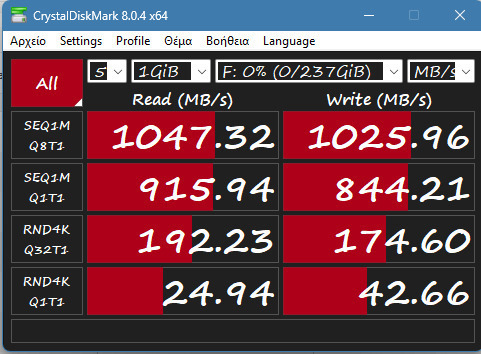
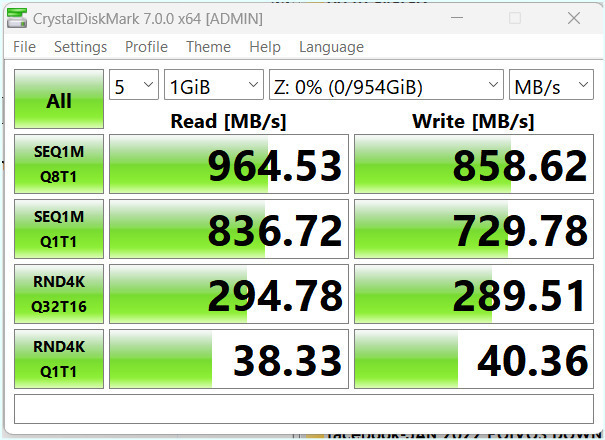
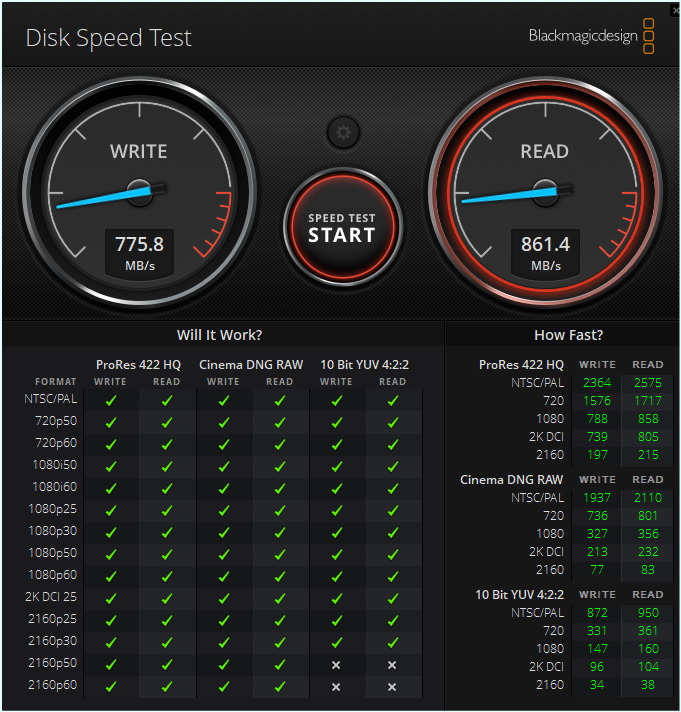
Speed: I installed my old M.2 NVMe drive in it "PCIe 3, 500 GB, Read/Write speeds around 2500 MB/s inside the PC" and plugged it into USB-C port "advertised speed in the motherboard manual 10 Gbps". The final Read/Write speed was 1100 MB/s.
Usage: I installed linux mint on it to use it externally rather than installing on the main NVMe inside my PC "Windows loves to trash any foreign boot loader with each update". The results are amazing, the boot time and overall performance is top.
Worth every penny for its ease of use, compatibility and speed.
Ease of use: completely toolless. You don't need any tool to open/close it or install the NVMe drive, not even a screwdriver. To open it, you just push the solid plastic top "not where the USB port is", and it opens with a click just like a pen, and the enclosure slides out of the casing.
Installing the NVMe drive: there's a rubber "screw" inside it with holes that allow multiple drive sizes to be installed. You attach that screw to the notch of the drive, insert the drive into its slot, then push the edge down and push the screw into the hole. No tools needed, just your fingers.
Speed: I installed my old M.2 NVMe drive in it "PCIe 3, 500 GB, Read/Write speeds around 2500 MB/s inside the PC" and plugged it into USB-C port "advertised speed in the motherboard manual 10 Gbps". The final Read/Write speed was 1100 MB/s.
Usage: I installed linux mint on it to use it externally rather than installing on the main NVMe inside my PC "Windows loves to trash any foreign boot loader with each update". The results are amazing, the boot time and overall performance is top.
I have had the product in my possession for only one day but I am absolutely satisfied so far. I connected my Kingston SA2000 and it was recognized without any problem, and the speeds I achieved in the disk's benchmark are exactly as advertised (For those who don't know, 1000 MB/s = 1000 * 1024^2 B/s = 8000 * 1024^2 bps = 8.39 Gbps, which is objectively the realistic maximum performance). I would recommend it at this price. If anything comes up in the future, I will mention it.
Το προιόν το έχω στην κατοχή μου μόνο μια μέρα αλλά έχω μείνει απόλυτα ικανοποιημένος προς το παρόν. Σύνδεσα τον Kingston SA2000 μου και τον αναγνώρισε χωρίς κανένα πρόβλημα και οι ταχύτητες που έπιασα σε benchmark το δίσκου είναι ακριβώς η διαφημιζόμενη ( Για όσους δεν ξέρουν, 1000 MB/s = 1000 * 1024^2 B/s = 8000 * 1024^2 bps = 8.39 Gbps που είναι αντικειμενικά το ρεαλιστικό μέγιστο της απόδοσης ). Θα το πρότεινα σε αυτή την τιμή. Αν προκύψει κάτι μελλοντικά θα το αναφέρω.
The case is good. The cable is useless. The drive was moving and I kept losing the connection. I was afraid that the case's port was faulty but I changed the cable and since then it works just fine. Very good data transfer speeds.
Η θήκη είναι καλή. Το καλώδιο για πέταμα. Κουνιόταν ο δίσκος και έχανα τη σύνδεση. Φοβήθηκα ότι έχει πρόβλημα η υποδοχή της θήκης αλλά άλλαξα ένα καλώδιο και από τότε τρέχει μια χαρά. Πολύ καλές ταχύτητες μεταφοράς δεδομένων.
It is not "plug & play" on all m2...
On some m2 it works normally on usb-c 40gbps
on others it works on usb 3.2 gen2
on others it works on usb 3.2 gen1
you need to do a bit of research
meh
Δεν ειανι "plug & play" σε ολους τους m2...
Σε καποιους m2 δουλευει κανονικα σε usb-c 40gbps
σε αλλους δουλευει σε usb 3.2 gen2
σε αλλους δουλευει σε usb 3.2 gen1
πρεπει να ψαχτεις λιγο
μεχ
I used it once for hard drive copying and it worked perfectly. I can't judge for long-term use because I only needed it for one time, but it did its job *Check out videos on YouTube to avoid making any mistakes.
Το χρησιμοποίησα μία φορά για αντιγραφή σκληρού και δούλεψε άψοξα. Δεν μπορώ να κρίνω για μακροχρόνια χρήση γιατί τον ήθελα για μόνο μια φορά, αλλά την δουλειά του την έκανε *Δείτε βίντεο στο youtube για να μην κάνετε κάποιο λάθος.
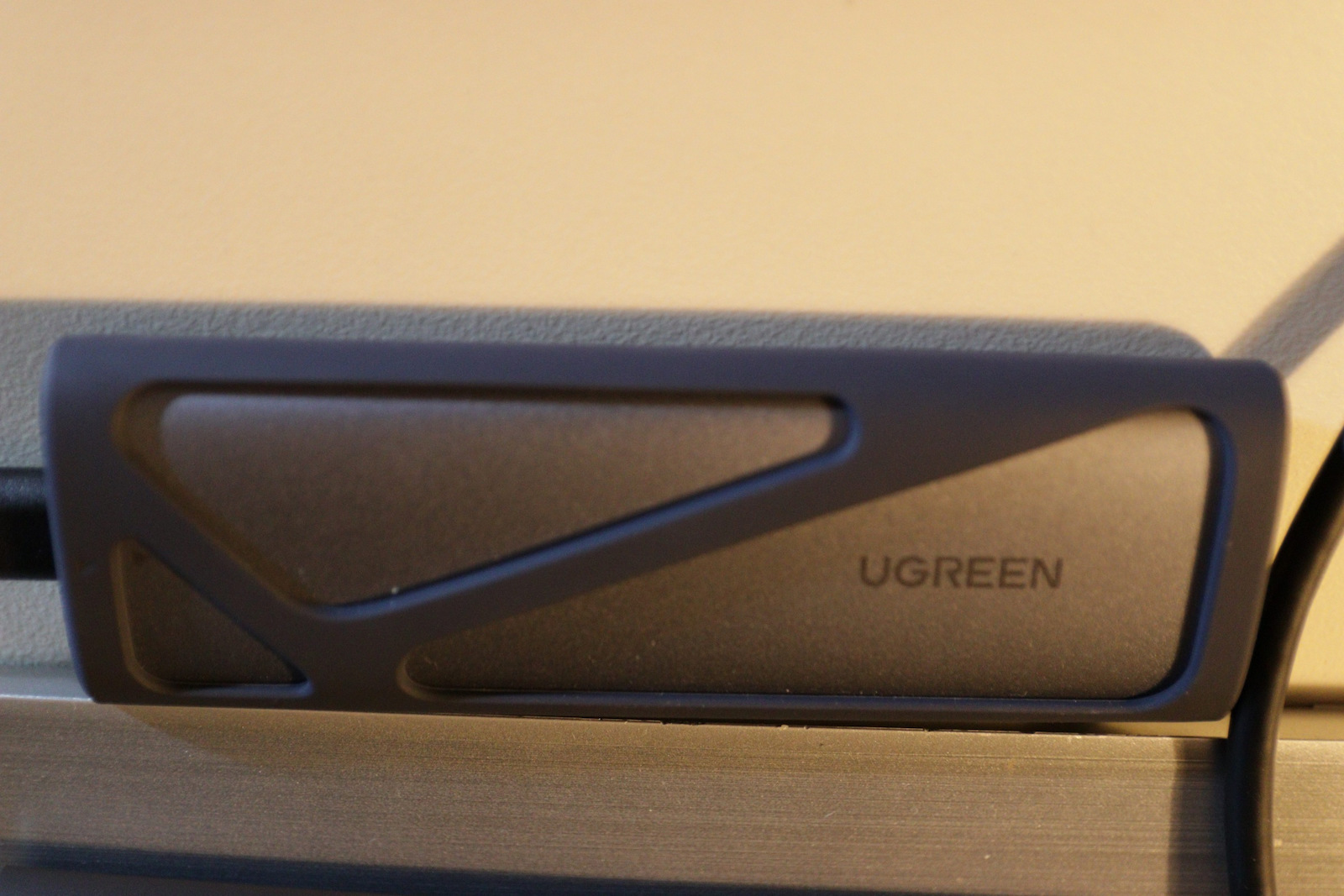
Convenient, does what it says, only downside is that the inner part can relatively easily be removed from the hard shell. On the plus side, it also comes with an extra "silicone case."
Βολικό, κάνει αυτό που λέει, μόνο μείον ότι μπορεί σχετικά εύκολα να αφαιρεθεί το εσωτερικό μέρος με τον σκληρό από το περίβλημα.
Στα + ότι έρχεται και με εξτρα "θήκη σιλικόνης.
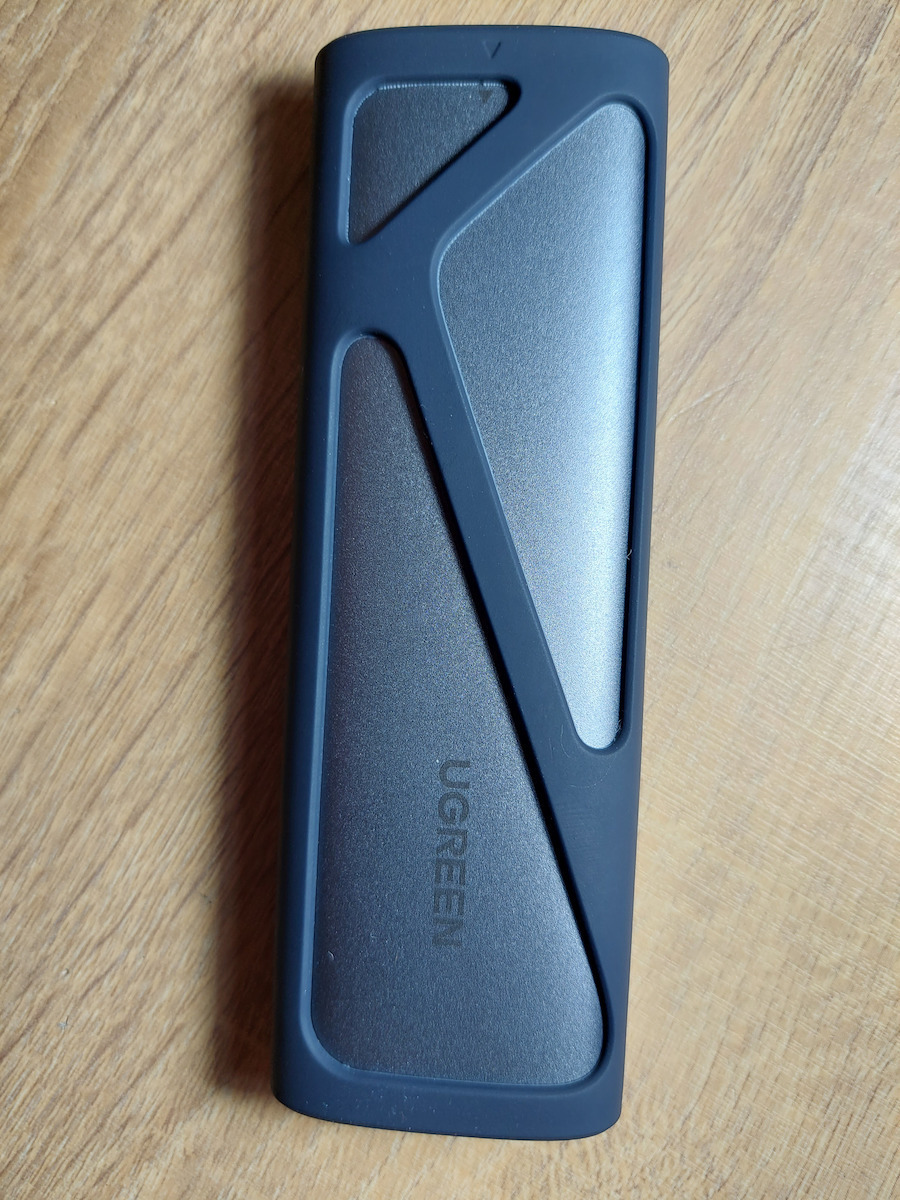
Very practical. Worked immediately with Samsung 980 Pro. It also includes a rubber protector for protection against drops as well as thermal pads for the SSD.
Παρα πολυ πρακτικό. Δουλεψε άμεσα με samsung 980 pro. Περιλαμβάνει και ενα λαστιχένιο προστατευτικό για προστασία απο πεσίματα αλλα και thermal pads για τον ssd.
I got it so I can use my old nvme as an external drive. The speeds are incredible (if the computer supports it, of course)! I didn't measure it normally, but as I remember it was around 500 MB/s! Of course, it was from nvme (internal) to nvme (external) via USB 3. The speeds to/from a "classic" spinning drive are lower.
Την πήρα για να μπορώ να χρησιμοποιώ τον παλιό μου nvme ως εξωτερικό δίσκο. Οι ταχύτητες είναι ασύλληπτες (αν το υποστηρίζει και ο υπολογιστής φυσικά)! Δεν το μέτρησα κανονικά αλλά απ' ότι θυμάμαι ήταν της τάξης των 500 ΜΒ / δευτ! Βέβαια, ήταν από nvme (εσωτερικό) σε nvme (εξωτερικό) μέσω USB 3. Οι ταχύτητες από/προς "κλασικό" περιστρεφόμενο δίσκο είναι πιο χαμηλές.
It doesn't work with all Nvme drives.
I got a Kingston 1TB and it didn't read it with its own cable. (On a desktop and on Mac) only with others but at a speed of 40mb/s.
I put the drive in the desktop and the Nvme was killing it with 4GB/S, I tried Samsung 990 in the enclosure and it worked!!!
So it's not for all drives.
Δεν δουλεύει με όλους τους δίσκους Nvme.
Πήρα έναν Kingston 1TB και δε το διάβαζε με το δικό του καλώδιο. (Σε έναν desktop και σε Mac ) παρά μόνο με άλλους αλλά με ταχύτητα 40mb/s
Έβαλα τον δίσκο στο desktop σκότωνε ο Nvme με 4GB/S , δοκιμάζω Samsung 990 στην θήκη και δούλεψε !!!
I give it 4/5 only because the case closure is not very reliable (e.g. with some screw) resulting in it possibly opening if you press it in the wrong spot
Βάζω 4/5 μόνο και μόνο επειδή το κλείσιμο της θήκης δεν είναι πολύ έμπιστο (πχ με κάποια βίδα) με αποτέλεσμα αν το πιέσεις σε λάθος σημείο μπορεί να σου ανοίξει
As soon as I opened it, I requested a return. The hard drive case comes out of the enclosure without me pressing the "push" button, resulting in the entire case coming out when I try to disconnect the usb-c cable. Unacceptable.
Με το που το άνοιξα έκανα αίτημα για επιστροφή.
Η θήκη του σκληρού δίσκου βγαίνει από το περίβλημα χωρίς να πατάω το κουμπί "push" με αποτέλεσμα όταν πάω να αποσυνδέσω το καλώδιο usb-c να βγαίνει όλη η θήκη. Απαράδεκτο.
It reaches the expected speeds and the build quality is quite good for its price. It was paired with the Kingston NV2 SSD 2TB M.2 NVMe PCI Express 4.0.
Πιάνει τις αναμενόμενες ταχύτητες και η ποιότητα κατασκευής είναι αρκετά καλή για την τιμή του. Συνδυάστικε με τον Kingston NV2 SSD 2TB M.2 NVMe PCI Express 4.0.
Very good case, for its price! It warms up, but that is logical with the speeds that M2 disks reach! Also, it has a nice plastic cover that provides some protection!
Πολύ καλή θήκη, για τα λεφτά της! Ζεσταίνεται, αλλά αυτό είναι λογικό με τις ταχύτητες που πιάνουν οι M2 δίσκοι! Επίσης, έχει και όμορφο πλαστικό περιτύλιγμα που παρέχει κάποια προστασία!
I will not go into details because the product is not for professional use. A cheap solution to have an m2 disk that you have left or broke or for any reason you want to see it on your computer with decent speeds. For buying an external disk from scratch you can find better ones
Δεν θα μπώ σε λεπτομέριες γιατί το προϊον δεν είναι για επαγγελματική χρήση.Μια φθηνή λύση για να έχεις έναν m2 δίσκο που σου έμεινε ή χάλασε ή για οποιονδήποτε λόγο θες να τον δείς στον υπολογιστή σου με αξιοπρεπέστατες ταχύτητες .Για αγορά εξωτερικου δίσκου από το μηδέν μπορείς να βρείς καλύτερους
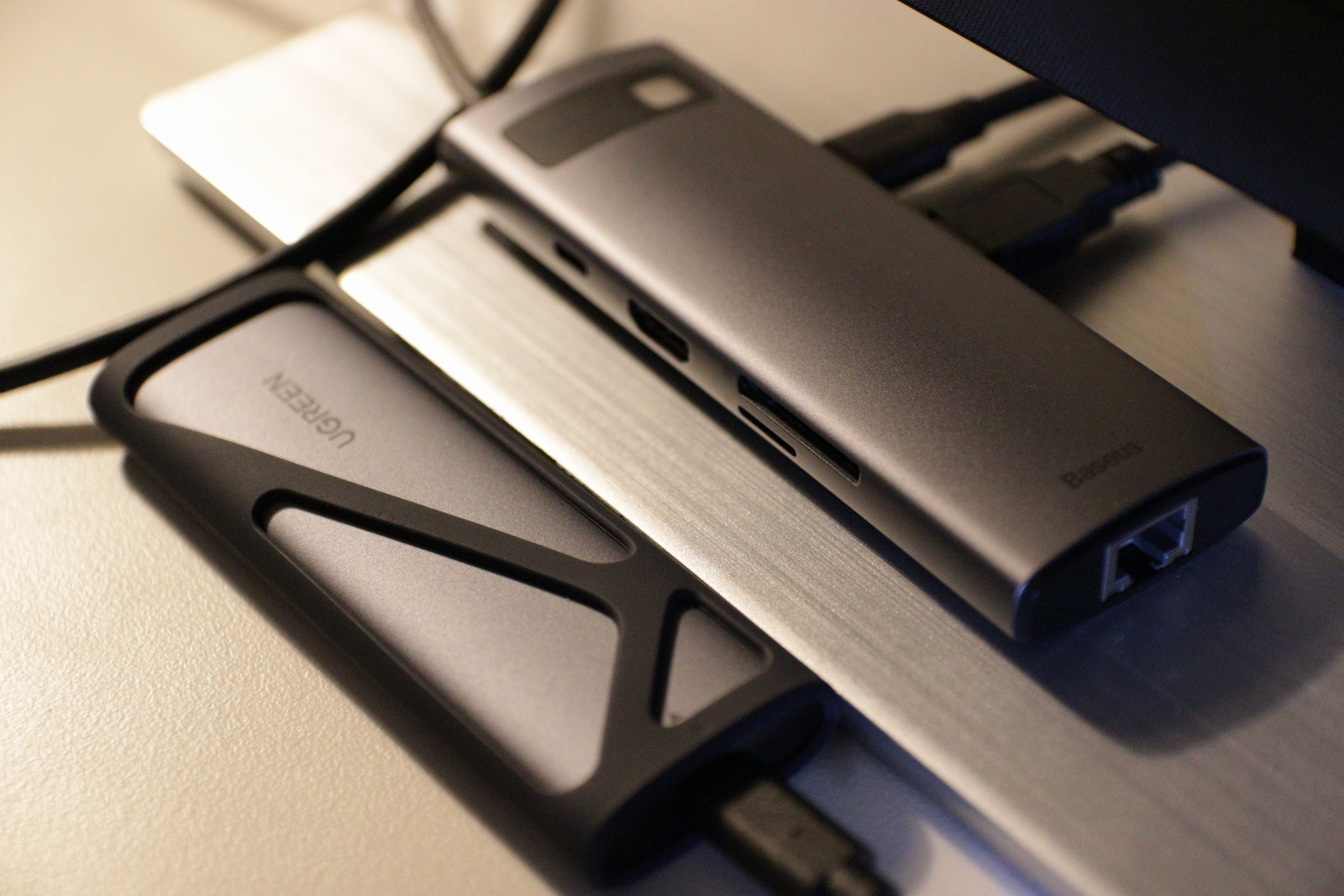
With a Samsung 970 pro disk and plugged into the Baseus 8-1 dock station, the case works great. However, it does generate more heat compared to a case like the "LC-Power M2-C-NVME-2X2," which is slightly less portable
Με δίσκο Samsung 970 pro και κουμπομένη στο dock station 8-1 της Baseus, η θηκη λειτουργει μια χαρα. Ανεβάζει αρκετή θερμοκρασία όμως σε σχέση με μια θηκη τυπου "LC-Power M2-C-NVME-2X2" η οποια όμως είναι λιγοτερο ¨φορητη¨
It does what it says and it's probably the first time I see this. Usually they promise a speed that you can't see in practice. I put in a Samsung 256GB M.2 that I took out of a laptop that burned out. I didn't buy it separately. This M.2 has a capacity of up to 3,333MB/s Read, but the enclosure and the type-c limit it to 1,000MB/s. As you can see in the pictures, it reaches 1,000MB/s in both the test and when copying a large file (13GB). When you have many small files, the speed naturally drops. Pay attention to how you put the rubber band instead of a screw during installation. Look at the instructions first that it has inside. In addition to the type-c to type-c cable, the box also has a second rubber band and a Thermal Pad. I tried it on 2 computers and on USB-A 3.1 Gen2 (I have a relevant cable) and the result is the same. In both PCs, the C: drive was also M.2 with speeds of 7,000MB/s and 3,000MB/s, respectively, because obviously this also plays a role.
Κάνει αυτό που λέει και μάλλον είναι η πρώτη φορά που το βλέπω αυτό. Συνήθως υπόσχονται μια ταχύτητα την οποία δεν μπορείς να τη δεις στη πράξη. Μέσα έβαλα ένα M.2 της Samsung 256GB που έβγαλα από ένα laptop που μου κάηκε. Δεν τον αγόρασα ξεχωριστά δλδ. Αυτός ο M2 έχει δυνατότητα μέχρι 3.333MB/s Read αλλά η θήκη και το type-c τον περιορίζουν στα 1.000MB/s. Όπως βλέπετε στις εικόνες φτάνει τα 1000MB/s και στο τεστ αλλά και σε copy ενός μεγάλου αρχείου (13GB). Όταν κάνεις πολλά μικρά αρχεία όπως είναι λογικό η ταχύτητα πέφτει. Στην εγκατάσταση προσέξτε πως βάζετε το λαστιχάκι που έχει αντί για βίδα. Δείτε τις οδηγίες πρώτα που έχει μέσα. Στο κουτί εκτός από το καλώδιο type-c σε type-c έχει και δεύτερο λαστιχάκι αλλά και Thermal Pad. Το δοκίμασα σε 2 υπολογιστές και σε USB-A 3.1 Gen2 (έχω σχετικό καλώδιο) και το αποτέλεσμα είναι το ίδιο. Και στα δύο PC ο δίσκος C: ήταν επίσης M.2 με ταχύτητες 7000MB/s το ένα και 3000ΜΒ/s το άλλο, γιατί προφανώς κι αυτό παίζει ρόλο.
Didn't work properly in linux (rpi5). It advertises it supports both BOT and UAS mode, the kernel binds uas by default but that's the trap: bridge then throws uas_eh_device_reset failures, thousands of enumerate-fails, and wedges the bus. The NVMe SSD inside is irrelevant to the fault.
The only stable workaround is BOT mode which lowers the throughput significantly:
usb-storage.quirks=0bda:9210:u
Helpful information about the device which should be available online but it's not:
-----------------------------------------
Model: CM400
P/N: 10902
USB VID:PID = 0bda:9210
lsusb string = Realtek Semiconductor Corp. RTL9210 M.2 NVME Adapter
Bridge chip = Realtek RTL9210 / RTL9210B (USB→NVMe M.2 bridge)
USB Manufacturer string = Ugreen
USB Product string (iProduct) = Ugreen Storage Device
Device/firmware rev (bcdDevice) =20.01
Didn't work properly in linux (rpi5). It advertises it supports both BOT and UAS mode, the kernel binds uas by default but that's the trap: bridge then throws uas_eh_device_reset failures, thousands of enumerate-fails, and wedges the bus. The NVMe SSD inside is irrelevant to the fault.
The only stable workaround is BOT mode which lowers the throughput significantly:
usb-storage.quirks=0bda:9210:u
Helpful information about the device which should be available online but it's not:
-----------------------------------------
Model: CM400
P/N: 10902
USB VID:PID = 0bda:9210
lsusb string = Realtek Semiconductor Corp. RTL9210 M.2 NVME Adapter
Bridge chip = Realtek RTL9210 / RTL9210B (USB→NVMe M.2 bridge)
USB Manufacturer string = Ugreen
USB Product string (iProduct) = Ugreen Storage Device
Device/firmware rev (bcdDevice) =20.01
Very good for an external SSD. Be careful not to insert the tray upside down because it won't lock and will come out. If inserted correctly, it's just fine.
πολυ καλός για εξωτερικός ssd. Προσεξτε μην βάλετε την κασέτα ανάποδα γιατι δεν θα κλειδώνει και θα βγαίνει. Αν μπεί σωστα είναι μια χαρα.
If you need extra space to store your data, one of the best solutions is to buy a larger drive or portable equipment that you can always have at your disposal. Thanks to technological advancement, you can now choose perfect products in the form of SSD drives that are not only much smaller but also significantly faster.
Specifications are collected from official manufacturer websites. Please verify the specifications before proceeding with your final purchase. If you notice any problem you can report it here.
I used it for cloning internal NVME without issues. I have no comments on the speed because I transferred 1TB of data mainly from gaming libraries like Steam, GOG, etc., which means many thousands of files. It took a little while, but my job was done.
το χρησιμοποιησα για κλωνοποιηση εσωτερικου NVME χωρις προβληματα. Για την ταχυτητα δεν εχω σχολια γιατι περασα 1tb δεδομενα κυριως απο gaming libraries steam, gog κτλ. που σημαινει πολλες χιλιαδες αρχεια. Αργησε λιγο αλλα η δουλεια μου εγινε.
It works normally so far but the case is poorly constructed, it has a very small plastic tooth that keeps it from opening and closing, resulting in it constantly coming out of place. Every time I open it I'm afraid I might break it and whenever I remove the cable the cover comes off as well.
Λειτουργει κανονικα ως τωρα αλλα η θηκη εχει κακη κατασκευή, εχει ενα πολυ μικρο πλαστικο δοντι που την κραταει απο το να ανοιγοκλεινει με αποτέλεσμα να βγαινει συνεχως από τη θεση του. Καθε φορα που το ανοιγω φοβαμαι μην το σπασω και οποτε βγαζω το καλωδιο βγαινει και το καπακι.
Didn't work properly in linux (rpi5). It advertises it supports both BOT and UAS mode, the kernel binds uas by default but that's the trap: bridge then throws uas_eh_device_reset failures, thousands of enumerate-fails, and wedges the bus. The NVMe SSD inside is irrelevant to the fault.
The only stable workaround is BOT mode which lowers the throughput significantly:
usb-storage.quirks=0bda:9210:u
Helpful information about the device which should be available online but it's not:
-----------------------------------------
Model: CM400
P/N: 10902
USB VID:PID = 0bda:9210
lsusb string = Realtek Semiconductor Corp. RTL9210 M.2 NVME Adapter
Bridge chip = Realtek RTL9210 / RTL9210B (USB→NVMe M.2 bridge)
USB Manufacturer string = Ugreen
USB Product string (iProduct) = Ugreen Storage Device
Device/firmware rev (bcdDevice) =20.01
Didn't work properly in linux (rpi5). It advertises it supports both BOT and UAS mode, the kernel binds uas by default but that's the trap: bridge then throws uas_eh_device_reset failures, thousands of enumerate-fails, and wedges the bus. The NVMe SSD inside is irrelevant to the fault.
The only stable workaround is BOT mode which lowers the throughput significantly:
usb-storage.quirks=0bda:9210:u
Helpful information about the device which should be available online but it's not:
-----------------------------------------
Model: CM400
P/N: 10902
USB VID:PID = 0bda:9210
lsusb string = Realtek Semiconductor Corp. RTL9210 M.2 NVME Adapter
Bridge chip = Realtek RTL9210 / RTL9210B (USB→NVMe M.2 bridge)
USB Manufacturer string = Ugreen
USB Product string (iProduct) = Ugreen Storage Device
Device/firmware rev (bcdDevice) =20.01
Very good for an external SSD. Be careful not to insert the tray upside down because it won't lock and will come out. If inserted correctly, it's just fine.
πολυ καλός για εξωτερικός ssd. Προσεξτε μην βάλετε την κασέτα ανάποδα γιατι δεν θα κλειδώνει και θα βγαίνει. Αν μπεί σωστα είναι μια χαρα.
Works as expected bought it worked with it for few days now. seems very good quality and works as expected with the speed that i would expect very good over all.
Works as expected bought it worked with it for few days now. seems very good quality and works as expected with the speed that i would expect very good over all.
Worth every penny for its ease of use, compatibility and speed.
Ease of use: completely toolless. You don't need any tool to open/close it or install the NVMe drive, not even a screwdriver. To open it, you just push the solid plastic top "not where the USB port is", and it opens with a click just like a pen, and the enclosure slides out of the casing.
Installing the NVMe drive: there's a rubber "screw" inside it with holes that allow multiple drive sizes to be installed. You attach that screw to the notch of the drive, insert the drive into its slot, then push the edge down and push the screw into the hole. No tools needed, just your fingers.
Speed: I installed my old M.2 NVMe drive in it "PCIe 3, 500 GB, Read/Write speeds around 2500 MB/s inside the PC" and plugged it into USB-C port "advertised speed in the motherboard manual 10 Gbps". The final Read/Write speed was 1100 MB/s.
Usage: I installed linux mint on it to use it externally rather than installing on the main NVMe inside my PC "Windows loves to trash any foreign boot loader with each update". The results are amazing, the boot time and overall performance is top.
Worth every penny for its ease of use, compatibility and speed.
Ease of use: completely toolless. You don't need any tool to open/close it or install the NVMe drive, not even a screwdriver. To open it, you just push the solid plastic top "not where the USB port is", and it opens with a click just like a pen, and the enclosure slides out of the casing.
Installing the NVMe drive: there's a rubber "screw" inside it with holes that allow multiple drive sizes to be installed. You attach that screw to the notch of the drive, insert the drive into its slot, then push the edge down and push the screw into the hole. No tools needed, just your fingers.
Speed: I installed my old M.2 NVMe drive in it "PCIe 3, 500 GB, Read/Write speeds around 2500 MB/s inside the PC" and plugged it into USB-C port "advertised speed in the motherboard manual 10 Gbps". The final Read/Write speed was 1100 MB/s.
Usage: I installed linux mint on it to use it externally rather than installing on the main NVMe inside my PC "Windows loves to trash any foreign boot loader with each update". The results are amazing, the boot time and overall performance is top.
I have had the product in my possession for only one day but I am absolutely satisfied so far. I connected my Kingston SA2000 and it was recognized without any problem, and the speeds I achieved in the disk's benchmark are exactly as advertised (For those who don't know, 1000 MB/s = 1000 * 1024^2 B/s = 8000 * 1024^2 bps = 8.39 Gbps, which is objectively the realistic maximum performance). I would recommend it at this price. If anything comes up in the future, I will mention it.
Το προιόν το έχω στην κατοχή μου μόνο μια μέρα αλλά έχω μείνει απόλυτα ικανοποιημένος προς το παρόν. Σύνδεσα τον Kingston SA2000 μου και τον αναγνώρισε χωρίς κανένα πρόβλημα και οι ταχύτητες που έπιασα σε benchmark το δίσκου είναι ακριβώς η διαφημιζόμενη ( Για όσους δεν ξέρουν, 1000 MB/s = 1000 * 1024^2 B/s = 8000 * 1024^2 bps = 8.39 Gbps που είναι αντικειμενικά το ρεαλιστικό μέγιστο της απόδοσης ). Θα το πρότεινα σε αυτή την τιμή. Αν προκύψει κάτι μελλοντικά θα το αναφέρω.
The case is good. The cable is useless. The drive was moving and I kept losing the connection. I was afraid that the case's port was faulty but I changed the cable and since then it works just fine. Very good data transfer speeds.
Η θήκη είναι καλή. Το καλώδιο για πέταμα. Κουνιόταν ο δίσκος και έχανα τη σύνδεση. Φοβήθηκα ότι έχει πρόβλημα η υποδοχή της θήκης αλλά άλλαξα ένα καλώδιο και από τότε τρέχει μια χαρά. Πολύ καλές ταχύτητες μεταφοράς δεδομένων.
It is not "plug & play" on all m2...
On some m2 it works normally on usb-c 40gbps
on others it works on usb 3.2 gen2
on others it works on usb 3.2 gen1
you need to do a bit of research
meh
Δεν ειανι "plug & play" σε ολους τους m2...
Σε καποιους m2 δουλευει κανονικα σε usb-c 40gbps
σε αλλους δουλευει σε usb 3.2 gen2
σε αλλους δουλευει σε usb 3.2 gen1
πρεπει να ψαχτεις λιγο
μεχ
I used it once for hard drive copying and it worked perfectly. I can't judge for long-term use because I only needed it for one time, but it did its job *Check out videos on YouTube to avoid making any mistakes.
Το χρησιμοποίησα μία φορά για αντιγραφή σκληρού και δούλεψε άψοξα. Δεν μπορώ να κρίνω για μακροχρόνια χρήση γιατί τον ήθελα για μόνο μια φορά, αλλά την δουλειά του την έκανε *Δείτε βίντεο στο youtube για να μην κάνετε κάποιο λάθος.
Convenient, does what it says, only downside is that the inner part can relatively easily be removed from the hard shell. On the plus side, it also comes with an extra "silicone case."
Βολικό, κάνει αυτό που λέει, μόνο μείον ότι μπορεί σχετικά εύκολα να αφαιρεθεί το εσωτερικό μέρος με τον σκληρό από το περίβλημα.
Στα + ότι έρχεται και με εξτρα "θήκη σιλικόνης.
Very practical. Worked immediately with Samsung 980 Pro. It also includes a rubber protector for protection against drops as well as thermal pads for the SSD.
Παρα πολυ πρακτικό. Δουλεψε άμεσα με samsung 980 pro. Περιλαμβάνει και ενα λαστιχένιο προστατευτικό για προστασία απο πεσίματα αλλα και thermal pads για τον ssd.
I got it so I can use my old nvme as an external drive. The speeds are incredible (if the computer supports it, of course)! I didn't measure it normally, but as I remember it was around 500 MB/s! Of course, it was from nvme (internal) to nvme (external) via USB 3. The speeds to/from a "classic" spinning drive are lower.
Την πήρα για να μπορώ να χρησιμοποιώ τον παλιό μου nvme ως εξωτερικό δίσκο. Οι ταχύτητες είναι ασύλληπτες (αν το υποστηρίζει και ο υπολογιστής φυσικά)! Δεν το μέτρησα κανονικά αλλά απ' ότι θυμάμαι ήταν της τάξης των 500 ΜΒ / δευτ! Βέβαια, ήταν από nvme (εσωτερικό) σε nvme (εξωτερικό) μέσω USB 3. Οι ταχύτητες από/προς "κλασικό" περιστρεφόμενο δίσκο είναι πιο χαμηλές.
It doesn't work with all Nvme drives.
I got a Kingston 1TB and it didn't read it with its own cable. (On a desktop and on Mac) only with others but at a speed of 40mb/s.
I put the drive in the desktop and the Nvme was killing it with 4GB/S, I tried Samsung 990 in the enclosure and it worked!!!
So it's not for all drives.
Δεν δουλεύει με όλους τους δίσκους Nvme.
Πήρα έναν Kingston 1TB και δε το διάβαζε με το δικό του καλώδιο. (Σε έναν desktop και σε Mac ) παρά μόνο με άλλους αλλά με ταχύτητα 40mb/s
Έβαλα τον δίσκο στο desktop σκότωνε ο Nvme με 4GB/S , δοκιμάζω Samsung 990 στην θήκη και δούλεψε !!!
I give it 4/5 only because the case closure is not very reliable (e.g. with some screw) resulting in it possibly opening if you press it in the wrong spot
Βάζω 4/5 μόνο και μόνο επειδή το κλείσιμο της θήκης δεν είναι πολύ έμπιστο (πχ με κάποια βίδα) με αποτέλεσμα αν το πιέσεις σε λάθος σημείο μπορεί να σου ανοίξει
As soon as I opened it, I requested a return. The hard drive case comes out of the enclosure without me pressing the "push" button, resulting in the entire case coming out when I try to disconnect the usb-c cable. Unacceptable.
Με το που το άνοιξα έκανα αίτημα για επιστροφή.
Η θήκη του σκληρού δίσκου βγαίνει από το περίβλημα χωρίς να πατάω το κουμπί "push" με αποτέλεσμα όταν πάω να αποσυνδέσω το καλώδιο usb-c να βγαίνει όλη η θήκη. Απαράδεκτο.
It reaches the expected speeds and the build quality is quite good for its price. It was paired with the Kingston NV2 SSD 2TB M.2 NVMe PCI Express 4.0.
Πιάνει τις αναμενόμενες ταχύτητες και η ποιότητα κατασκευής είναι αρκετά καλή για την τιμή του. Συνδυάστικε με τον Kingston NV2 SSD 2TB M.2 NVMe PCI Express 4.0.
Very good case, for its price! It warms up, but that is logical with the speeds that M2 disks reach! Also, it has a nice plastic cover that provides some protection!
Πολύ καλή θήκη, για τα λεφτά της! Ζεσταίνεται, αλλά αυτό είναι λογικό με τις ταχύτητες που πιάνουν οι M2 δίσκοι! Επίσης, έχει και όμορφο πλαστικό περιτύλιγμα που παρέχει κάποια προστασία!
I will not go into details because the product is not for professional use. A cheap solution to have an m2 disk that you have left or broke or for any reason you want to see it on your computer with decent speeds. For buying an external disk from scratch you can find better ones
Δεν θα μπώ σε λεπτομέριες γιατί το προϊον δεν είναι για επαγγελματική χρήση.Μια φθηνή λύση για να έχεις έναν m2 δίσκο που σου έμεινε ή χάλασε ή για οποιονδήποτε λόγο θες να τον δείς στον υπολογιστή σου με αξιοπρεπέστατες ταχύτητες .Για αγορά εξωτερικου δίσκου από το μηδέν μπορείς να βρείς καλύτερους
With a Samsung 970 pro disk and plugged into the Baseus 8-1 dock station, the case works great. However, it does generate more heat compared to a case like the "LC-Power M2-C-NVME-2X2," which is slightly less portable
Με δίσκο Samsung 970 pro και κουμπομένη στο dock station 8-1 της Baseus, η θηκη λειτουργει μια χαρα. Ανεβάζει αρκετή θερμοκρασία όμως σε σχέση με μια θηκη τυπου "LC-Power M2-C-NVME-2X2" η οποια όμως είναι λιγοτερο ¨φορητη¨
It does what it says and it's probably the first time I see this. Usually they promise a speed that you can't see in practice. I put in a Samsung 256GB M.2 that I took out of a laptop that burned out. I didn't buy it separately. This M.2 has a capacity of up to 3,333MB/s Read, but the enclosure and the type-c limit it to 1,000MB/s. As you can see in the pictures, it reaches 1,000MB/s in both the test and when copying a large file (13GB). When you have many small files, the speed naturally drops. Pay attention to how you put the rubber band instead of a screw during installation. Look at the instructions first that it has inside. In addition to the type-c to type-c cable, the box also has a second rubber band and a Thermal Pad. I tried it on 2 computers and on USB-A 3.1 Gen2 (I have a relevant cable) and the result is the same. In both PCs, the C: drive was also M.2 with speeds of 7,000MB/s and 3,000MB/s, respectively, because obviously this also plays a role.
Κάνει αυτό που λέει και μάλλον είναι η πρώτη φορά που το βλέπω αυτό. Συνήθως υπόσχονται μια ταχύτητα την οποία δεν μπορείς να τη δεις στη πράξη. Μέσα έβαλα ένα M.2 της Samsung 256GB που έβγαλα από ένα laptop που μου κάηκε. Δεν τον αγόρασα ξεχωριστά δλδ. Αυτός ο M2 έχει δυνατότητα μέχρι 3.333MB/s Read αλλά η θήκη και το type-c τον περιορίζουν στα 1.000MB/s. Όπως βλέπετε στις εικόνες φτάνει τα 1000MB/s και στο τεστ αλλά και σε copy ενός μεγάλου αρχείου (13GB). Όταν κάνεις πολλά μικρά αρχεία όπως είναι λογικό η ταχύτητα πέφτει. Στην εγκατάσταση προσέξτε πως βάζετε το λαστιχάκι που έχει αντί για βίδα. Δείτε τις οδηγίες πρώτα που έχει μέσα. Στο κουτί εκτός από το καλώδιο type-c σε type-c έχει και δεύτερο λαστιχάκι αλλά και Thermal Pad. Το δοκίμασα σε 2 υπολογιστές και σε USB-A 3.1 Gen2 (έχω σχετικό καλώδιο) και το αποτέλεσμα είναι το ίδιο. Και στα δύο PC ο δίσκος C: ήταν επίσης M.2 με ταχύτητες 7000MB/s το ένα και 3000ΜΒ/s το άλλο, γιατί προφανώς κι αυτό παίζει ρόλο.
Didn't work properly in linux (rpi5). It advertises it supports both BOT and UAS mode, the kernel binds uas by default but that's the trap: bridge then throws uas_eh_device_reset failures, thousands of enumerate-fails, and wedges the bus. The NVMe SSD inside is irrelevant to the fault.
The only stable workaround is BOT mode which lowers the throughput significantly:
usb-storage.quirks=0bda:9210:u
Helpful information about the device which should be available online but it's not:
-----------------------------------------
Model: CM400
P/N: 10902
USB VID:PID = 0bda:9210
lsusb string = Realtek Semiconductor Corp. RTL9210 M.2 NVME Adapter
Bridge chip = Realtek RTL9210 / RTL9210B (USB→NVMe M.2 bridge)
USB Manufacturer string = Ugreen
USB Product string (iProduct) = Ugreen Storage Device
Device/firmware rev (bcdDevice) =20.01
Didn't work properly in linux (rpi5). It advertises it supports both BOT and UAS mode, the kernel binds uas by default but that's the trap: bridge then throws uas_eh_device_reset failures, thousands of enumerate-fails, and wedges the bus. The NVMe SSD inside is irrelevant to the fault.
The only stable workaround is BOT mode which lowers the throughput significantly:
usb-storage.quirks=0bda:9210:u
Helpful information about the device which should be available online but it's not:
-----------------------------------------
Model: CM400
P/N: 10902
USB VID:PID = 0bda:9210
lsusb string = Realtek Semiconductor Corp. RTL9210 M.2 NVME Adapter
Bridge chip = Realtek RTL9210 / RTL9210B (USB→NVMe M.2 bridge)
USB Manufacturer string = Ugreen
USB Product string (iProduct) = Ugreen Storage Device
Device/firmware rev (bcdDevice) =20.01
Very good for an external SSD. Be careful not to insert the tray upside down because it won't lock and will come out. If inserted correctly, it's just fine.
πολυ καλός για εξωτερικός ssd. Προσεξτε μην βάλετε την κασέτα ανάποδα γιατι δεν θα κλειδώνει και θα βγαίνει. Αν μπεί σωστα είναι μια χαρα.