Graphics Cards

Asus GeForce RTX 3060 12GB GDDR6 TUF Gaming OC v2 Graphics Card Code: 90YV0GC0-M0NA10

Key features:

  • Memory 12GB GDDR6, 192bit
  • PCI Express x16 4.0
  • Maximum Resolution 7680x4320 pixels
  • Length 301 mm
  • ​3x DisplayPort 1.4a, 2x HDMI 2.1​
  • Minimum Power Supply 650 W
See full description
  • See all
This product does not exist at Skroutz anymore

Description

Description

The Nvidia GeForce RTX 3060 is the ultimate GeForce graphics card. Aimed at gamers, content creators and designers who want to get the best possible graphics and performance from their PCs, it supports HDR image and recording at resolutions up to 8K, 4 times more pixels than 4K and 16 times more than Full HD.

It brings a huge leap in performance, efficiency and graphics with artificial intelligence. Experience gaming with ultra-high performance, incredibly detailed virtual worlds, unprecedented productivity and new ways to create. Powered by Nvidia Ampere architecture and accompanied by 12 GB of GDDR6 memory to deliver the ultimate experience for gamers and creators.

Ampere Architecture

The GeForce® RTX 3060 is based on NVIDIA®'s advanced "Ampere" architecture and incorporates 3,584 CUDA Cores, 112 Tensor Cores and 28 RT Cores and is backed by 12GB of GDDR6 memory (192-bit memory interface).

The graphics card is ideal for endless hours of entertainment and fun. Play the latest game titles at 1440p resolutions with high quality graphics and run content creation applications with ease.

Ray Tracing

Ray tracing technology simulates the way light behaves in the real world to produce the most realistic and immersive graphics for gamers and creators. The GeForce RTX 30 series features 2nd generation RT cores for maximum performance.

The exclusive second-generation RT (ray-tracing) cores deliver twice the real-time ray-tracing performance and use AI technologies such as DLSS 2.0 to further enhance the gaming experience.

Nvidia DLSS 2.0

DLSS 2.0 runs on Nvidia's RTX cards and uses a new AI model and machine learning to upgrade the resolution of games. According to Nvidia, the new AI model present in DLSS 2.0 is twice as fast as the one in the previous version.

Nvidia Broadcast

Your home studio with artificial intelligence

The NVIDIA Broadcast app transforms any room into a home studio, taking your live streams, voice chats and video calls to the next level with powerful AI effects like noise and room sound removal, virtual backgrounds and more.

Nvidia Ansel

Nvidia Ansel is a powerful program that allows you to take professional-quality photos of your games.

Now, you can share your most brilliant gaming experiences with super-resolution, 360-degree photos as well as HDR.

Nvidia Reflex

Nvidia Reflex offers the ultimate competitive advantage. The lowest latency. The best response. Supported by the GeForce RTX 30 series and Nvidia G-SYNC gaming displays.

Acquire targets faster, react faster, and increase targeting accuracy through a revolutionary suite of technologies to measure and optimize system latency for competitive gaming.

Game Ready Drivers

GeForce Game Ready drivers deliver the best possible experience for your favorite games. They are fine-tuned in collaboration with developers and extensively tested on thousands of hardware configurations for maximum performance and reliability.

Nvidia Studio

Creativity with AI

Take your creative projects to the next level with Nvidia Studio. With new dedicated hardware, the RTX 30 series unlocks unparalleled performance in 3D rendering, video editing and graphic design. Enjoy feature-rich RTX accelerations in leading creative applications, world-class Nvidia Studio drivers designed to deliver maximum stability, and a suite of exclusive tools that harness the power of RTX for creative workflows with AI support.

Nvidia Encoder

Steal the show with incredible graphics and smooth, high quality, glitch-free live streaming. GeForce RTX GPUs feature advanced streaming capabilities thanks to the NVIDIA encoder (NVENC), which is designed to deliver stunning performance and image quality. Plus, exclusive optimizations in your favorite live streaming apps give your audience the best of you, every time.

Nvidia Omniverse

Connect your creative worlds with a universe of possibilities

Nvidia Omniverse acts as a hub for interfacing your existing 3D workflow, replacing linear pipelines with live-sync creation, allowing you to create like never before and at speeds you've never experienced before.

GeForce Experience

Capture and share videos, screenshots and live streams with your friends. Keep your drivers up to date and optimize your game settings. GeForce Experience lets you do it all. It's the essential companion to your GeForce graphics card.

Nvidia G-SYNC

This technology synchronizes the computer's refresh rate with the frame rate of the game, eliminating tearing, stuttering and other problems associated with out-of-sync graphics performance.

To use G-Sync, a compatible monitor that supports the technology is required.

Virtual Reality

Virtual reality offers some of the most immersive experiences in PC gaming. But getting VR right is tricky. With true 4K and increasing screen resolutions, minimum refresh rates of 90 Hz and high latency tolerances, virtual reality is one of the most demanding applications in the world.

NVIDIA's GeForce RTX GPUs give you the performance you need to power top titles on the latest VR units. Plus, they feature technology to crank up the settings for truly immersive, immersive gameplay.

Resizable Bar

Nvidia's Resizable BAR is an advanced PCI Express feature that allows the CPU to access the entire GPU buffer at once, improving performance in many games.

Built TUF

The TUF GAMING GeForce RTX™ 3060 has been stripped down and built back up to provide more robust power and cooling. A new all-metal shroud houses three powerful axial-tech fans that utilize durable dual ball fan bearings. Fan rotation has been optimized for reduced turbulence, and a stop mode brings all three fans to a halt at low temps. Beneath, a thick heatsink keeps thermals under tight control. Additional features, including TUF components, Auto-Extreme Technology, and a backplate vent make the TUF a proper powerhouse. For builders looking for a new “old faithful”, this card has your back.

Axial-Tech Upgrades

TUF Gaming cards leverage our tried-and-true Axial-tech fan design, with three fans working in tandem to satisfy the thermal demands of NVIDIA’s new high-octane design. The fans rely on dual ball fan bearings to ensure consistent performance and increased longevity compared to sleeve bearings and other bearing types.

New Directions

The two side fans spin counterclockwise to reduce turbulence. And to eliminate unnecessary noise, a stop mode halts all fans when the GPU temp falls below 50 degrees and power consumption is low.

Maxcontact

To get heat up off the die and into the heatsink array, we’ve engaged MaxContact technology to polish the surface of the heat spreader and improve smoothness at the microscopic level. The extra flatness allows for better contact with the die for enhanced thermal transfer.

2.7-Slot Design

The heat spreader draws heat up into heatpipes that carry it through a fin stack that fills most of the card’s large, 2.7-slot footprint.

TUF Components

Components are selected for TUF Gaming graphics cards based on their durability and performance. In addition to top-shelf chokes and MOSFETs, capacitors that meet military-grade certification make the TUF stand tall amongst the competition. The components are soldered to the PCB using our advanced Auto-Extreme automated manufacturing process. Smooth joints on the rear of the PCB and the elimination of human errors ensure each graphics card meets our rigorous specifications. Finally, to ensure flawless performance when it counts, the cards are subjected to a grueling 144-hour validation trial.

Fresh Shroud

An all-aluminum shroud adds robust protection to TUF Gaming graphics cards and a no-nonsense industrial design and grayscale colorway fits into any build with ease.

It’s Cooler out Back

The underside of the card reveals further improvements. Most of the rear is swathed in a protective metal backplate that prominently features a wide vent. The vent allows hot air to escape towards chassis exhaust fans instead of being recycled back into the cooler. Stainless steel is used for the I/O bracket to protect ports and provide a more secure mount. A conveniently placed Dual Bios switch allows customization of the card’s default performance profile without software.

Functional Front

The top-side RGB element can be customized to display a range of aesthetic and functional effects and also synced with other ASUS components to enable uniform lighting. An 8-pin connector fulfills the power demands of the GeForce RTX 3060, and onboard LEDs light up if the power connectors are not plugged in correctly.

GPU Tweak II

The ASUS GPU Tweak II utility takes graphics card tuning to the next level. It allows you to tweak critical parameters including GPU core clocks, memory frequency, and voltage settings, with the option to monitor everything in real-time through a customizable on-screen display. Advanced fan control is also included along with many more features to help you get the most out of your graphics card.

Manufacturer

See full description

Specifications

Specifications

Product Number
90YV0GC0-M0NA10

Main Specifications

Processor Manufacturer
Nvidia
Chipset Model
GeForce RTX 3060
Interface
PCI Express x16 4.0
Maximum Resolution
7680x4320 pixels
Parallel Processing Technology
Not Supported
Type
Middle Range
Cuda Cores
3584
Device Group
-
Colour
Black

Special Features

RGB Lighting
Yes
OverClock (OC)
Yes
Air-cooled
Yes
Low Profile
No
Passive Cooling
No
Water-cooled
No
External Graphics Card (eGPU)
No
LHR
No

Memory

Memory Capacity
12 GB
Memory type
GDDR6
Memory Speed
-
Memory bus
192 bit

Connectivity

HDMI
2
DisplayPort
3
Dual Link DVI
No

System Requirements

Minimum Power Supply
650 W
Power Connectors
8-pin

Dimensions

Length
301 mm
Height
143 mm
Thickness
54 mm

Top Specs

Memory
-
Connectivity
-

Important information

Specifications are collected from official manufacturer websites. Please verify the specifications before proceeding with your final purchase. If you notice any problem you can report it here.

See all specifications

Reviews (5)

Reviews

  1. 3
  2. 4 stars
    0
  3. 2
  4. 2 stars
    0
  5. 1 star
    0
Review this product
  • Size
  • Performance
  • Silent
  • Value for money
  • Temperature

Reviews by our members

  • PetrosKasa
    5
    1 out of 1 members found this review helpful

    Verified purchase

    I have it for a month now, it replaced a 1060 6gb. The card runs everything at 1080 and plays in 2K with crisp quality. For the same price, I could have bought the newer 4060, but I preferred this specific card because I play older games where it performs better

    Translated from Greek ·
    • Performance
    • Silent
    • Size
    • Temperature
    • Value for money
    Did you find this review helpful?
  • kontesisdimitris
    3
    1 out of 1 members found this review helpful

    Verified purchase

    After 2 weeks of use: 1) it performs very well, I have no complaints 2) today, suddenly the screen turned off and the graphics card fans started running at full speed. If I hadn't manually shut down the PC, it wouldn't have stopped. I searched the Internet to see what might be happening and it says it's a temperature issue. The PC has very good airflow, so I find it unacceptable for such a card to do this after just 2 weeks of use. I hope it only happened because of that particular day since the PC hadn't been turned off at all and was running since the morning. However, if it happens again after the card has "rested," it means I'm going for a graphics card replacement, which is a red flag for me for this card. I want to believe it won't happen again because it cost €410, which is not exactly cheap.

    Returning after 3 years, it turns out the issue was due to the tower system—a cable was getting in the way when I closed the glass panel and was coming loose, causing this problem. With the case open, there has never been any issue; the card is excellent, still runs everything perfectly, and I hope it lasts for many more years

    Translated from Greek ·
    • Performance
    • Moderate noise
    • Value for money
    • Temperature
    Did you find this review helpful?
  • thod_tsouanatos
    5
    5 out of 5 members found this review helpful

    It runs in a Kolink midi tower, which comfortably fits together with the MSI B550 Plus Gaming Motherboard, Ryzen 5600x, and Corsair 750w power supply (RMX series), and I am very satisfied with this purchase

    Translated from Greek ·
    • Performance
    • Silent
    • Size
    • Temperature
    • Value for money
    Did you find this review helpful?
  • HWinfo
    5
    28 out of 29 members found this review helpful

    Verified purchase

    The best implementation of the RTX 3060 that someone can buy. Flawless in every aspect... The temperatures and noise levels are at the bottom, the clocks are through the roof, aesthetically beautiful. (The fans do not operate when the GPU usage and temperatures are low, but you can change that by simply enabling the performance mode from the Nvidia control panel). Who is it for? For those who want NVIDIA, no doubt about it, mainstream gamers who play at 1080p/1440p and want the best implementation which, as mentioned before, guarantees the lowest temperatures, excellent build quality, and design. The 12GB RAM is also sufficient and will comfortably handle future games that will require more memory. It is an investment for the average gamer to cover the next 5 years with relatively low cost (a similar choice in 2017 was the GTX 1060, which until today managed to offer decent playable FPS in most triple-A titles).

    Now, the reasons to choose Nvidia over AMD are as follows: ray tracing, DLSS, the RTX 3000 series will work on PCIe 3.0 without losing performance, unlike the RX 6000 series which, if not connected to PCIe 4.0, lose from 10 to 35% performance depending on the situation.

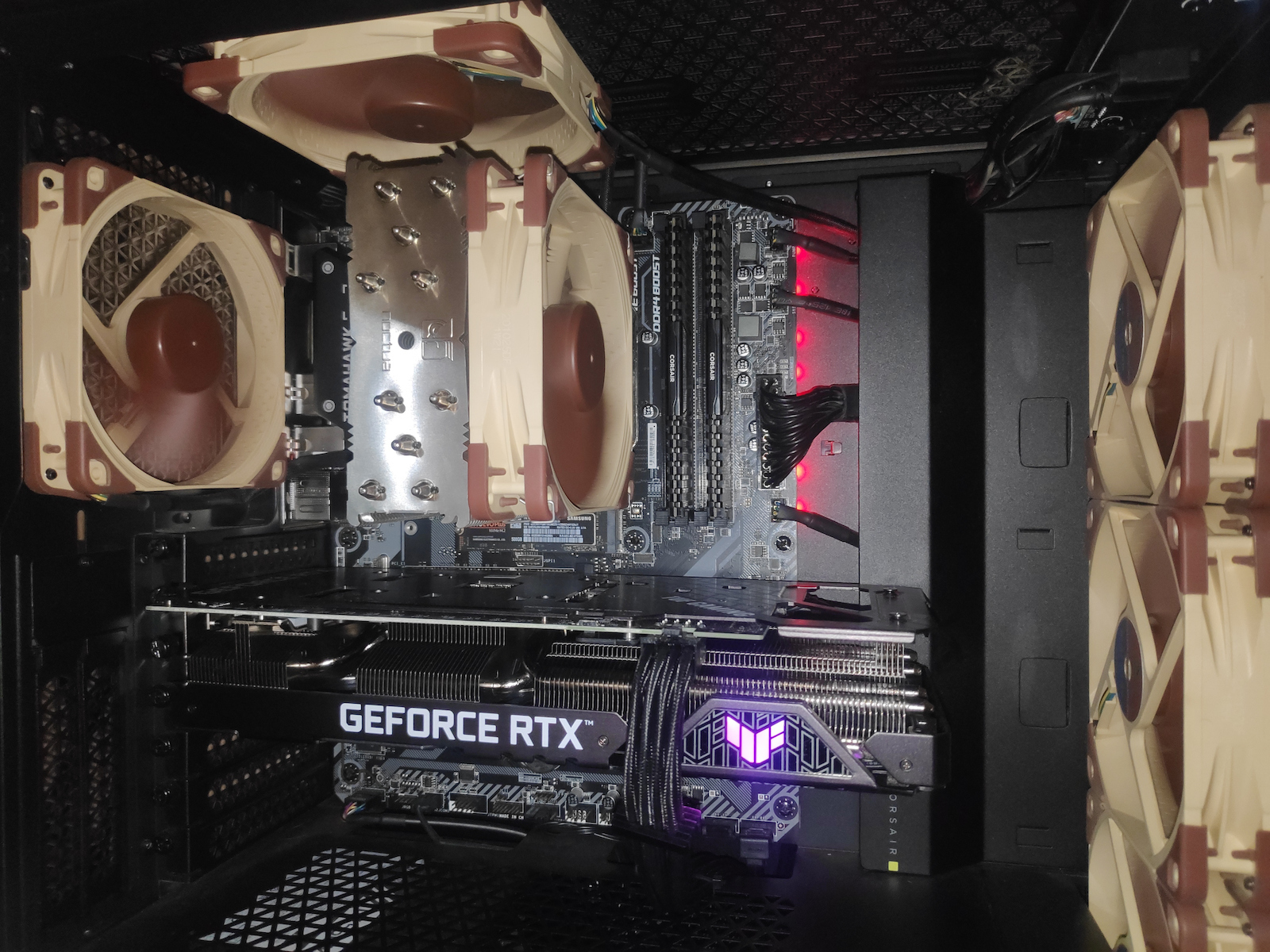
    Now back to the ASUS TUF RTX 3060... although its size is large, its cooler is entirely made of aluminum and is lightweight, so it doesn't have any sag, which means you won't need a GPU holder (see in the photo).

    Card temperatures (June): idle 30-35°C, medium load 40-50°C (CPU intensive games), heavy load 50-60°C (GPU intensive games).

    In terms of performance:
    1080p low/competitive settings: 240+ fps (Fortnite Chapter 3), 1440p: 180-240 fps.
    Just keep in mind that for low settings and high refresh rate, you need a CPU with good single-core performance to consistently achieve 240fps.
    1080p high/ultra settings SHADOW OF TOMB RAIDER DEFINITIVE EDITION plays at 140-200FPS, what else could you ask for...

    For demanding titles like Cyberpunk 2077, Far Cry 6, Metro Exodus, Forza Horizon 5, if you have a good 6-core processor (like Ryzen 5 3600), you will easily achieve a guaranteed 60fps on high/ultra/1080p, and maybe in future games, you may need to lower two or three insignificant settings to stay above 60Hz. Also, with DLSS technology, expect to have similar performance even at 1440p.

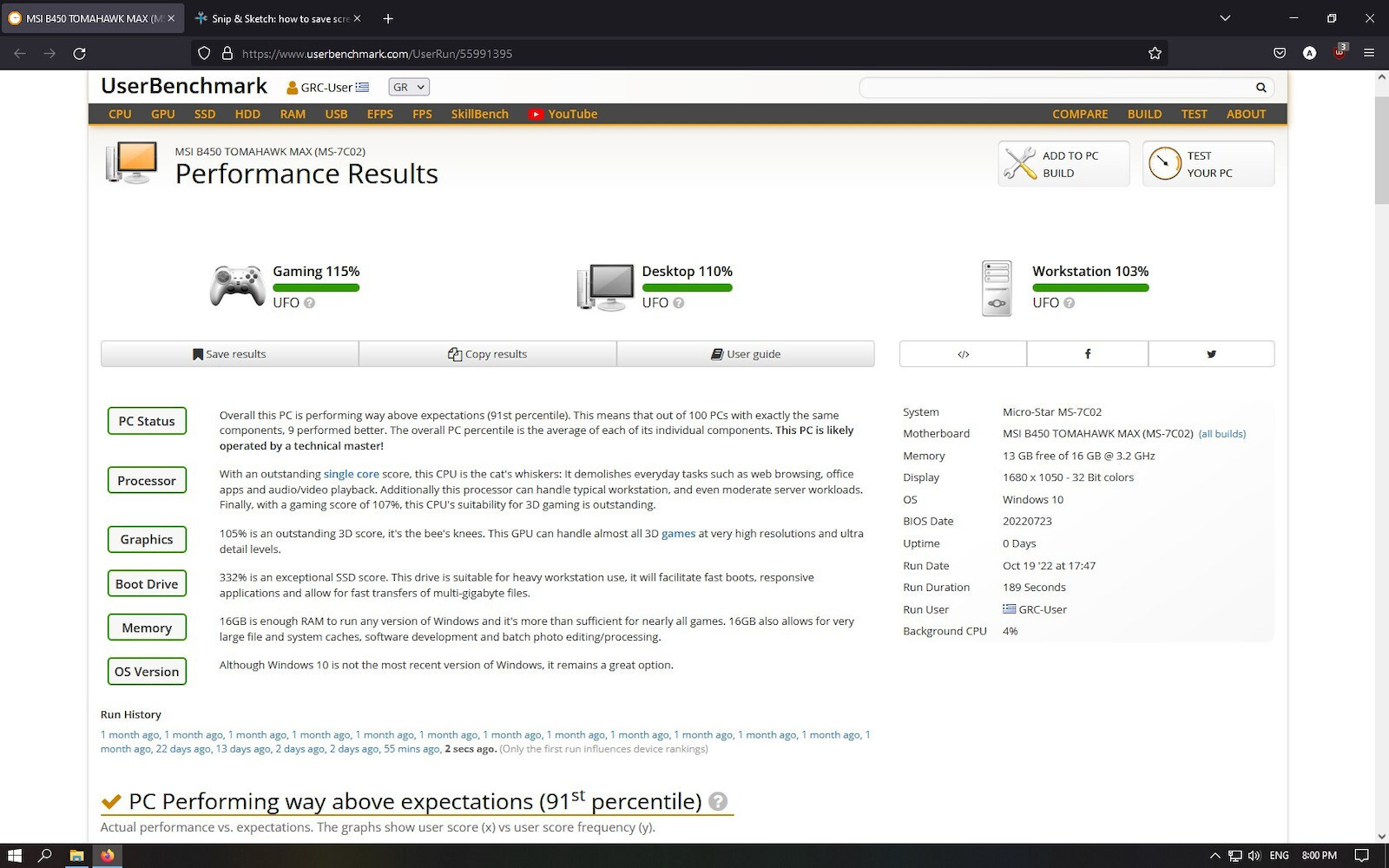
    Remaining system: MSI B450 Tomahawk max (BIOS 7C02v3E), Corsair DDR4-3200, Samsung SSD 970 EVO PLUS M.2 500GB, Ryzen 5 5600x, PC Case Corsair 4000D Airflow, PSU Corsair RM750X.

    Note: Choose a power supply of at least 650 watts because although it requires fewer watts, it needs good headroom because of energy-saving systems, which cause sudden spikes, and lower-powered and lower-quality power supplies are not capable of handling them with 100% success, resulting in random crashes or low FPS drops (especially if you have the OC version)

    Translated from Greek ·
    • Performance
    • Silent
    • Size
    • Temperature
    • Value for money
    Did you find this review helpful?
  • Verified purchase

    • Performance
    • Silent
    • Size
    • Value for money
    • Temperature
  • I have it for a month now, it replaced a 1060 6gb. The card runs everything at 1080 and plays in 2K with crisp quality. For the same price, I could have bought the newer 4060, but I preferred this specific card because I play older games where it performs better

    Translated from Greek ·
    1
  • After 2 weeks of use: 1) it performs very well, I have no complaints 2) today, suddenly the screen turned off and the graphics card fans started running at full speed. If I hadn't manually shut down the PC, it wouldn't have stopped. I searched the Internet to see what might be happening and it says it's a temperature issue. The PC has very good airflow, so I find it unacceptable for such a card to do this after just 2 weeks of use. I hope it only happened because of that particular day since the PC hadn't been turned off at all and was running since the morning. However, if it happens again after the card has "rested," it means I'm going for a graphics card replacement, which is a red flag for me for this card. I want to believe it won't happen again because it cost €410, which is not exactly cheap.

    Returning after 3 years, it turns out the issue was due to the tower system—a cable was getting in the way when I closed the glass panel and was coming loose, causing this problem. With the case open, there has never been any issue; the card is excellent, still runs everything perfectly, and I hope it lasts for many more years

    Translated from Greek ·
    1
  • It runs in a Kolink midi tower, which comfortably fits together with the MSI B550 Plus Gaming Motherboard, Ryzen 5600x, and Corsair 750w power supply (RMX series), and I am very satisfied with this purchase

    Translated from Greek ·
    5
  • The best implementation of the RTX 3060 that someone can buy. Flawless in every aspect... The temperatures and noise levels are at the bottom, the clocks are through the roof, aesthetically beautiful. (The fans do not operate when the GPU usage and temperatures are low, but you can change that by simply enabling the performance mode from the Nvidia control panel). Who is it for? For those who want NVIDIA, no doubt about it, mainstream gamers who play at 1080p/1440p and want the best implementation which, as mentioned before, guarantees the lowest temperatures, excellent build quality, and design. The 12GB RAM is also sufficient and will comfortably handle future games that will require more memory. It is an investment for the average gamer to cover the next 5 years with relatively low cost (a similar choice in 2017 was the GTX 1060, which until today managed to offer decent playable FPS in most triple-A titles).

    Now, the reasons to choose Nvidia over AMD are as follows: ray tracing, DLSS, the RTX 3000 series will work on PCIe 3.0 without losing performance, unlike the RX 6000 series which, if not connected to PCIe 4.0, lose from 10 to 35% performance depending on the situation.

    Now back to the ASUS TUF RTX 3060... although its size is large, its cooler is entirely made of aluminum and is lightweight, so it doesn't have any sag, which means you won't need a GPU holder (see in the photo).

    Card temperatures (June): idle 30-35°C, medium load 40-50°C (CPU intensive games), heavy load 50-60°C (GPU intensive games).

    In terms of performance:
    1080p low/competitive settings: 240+ fps (Fortnite Chapter 3), 1440p: 180-240 fps.
    Just keep in mind that for low settings and high refresh rate, you need a CPU with good single-core performance to consistently achieve 240fps.
    1080p high/ultra settings SHADOW OF TOMB RAIDER DEFINITIVE EDITION plays at 140-200FPS, what else could you ask for...

    For demanding titles like Cyberpunk 2077, Far Cry 6, Metro Exodus, Forza Horizon 5, if you have a good 6-core processor (like Ryzen 5 3600), you will easily achieve a guaranteed 60fps on high/ultra/1080p, and maybe in future games, you may need to lower two or three insignificant settings to stay above 60Hz. Also, with DLSS technology, expect to have similar performance even at 1440p.

    Remaining system: MSI B450 Tomahawk max (BIOS 7C02v3E), Corsair DDR4-3200, Samsung SSD 970 EVO PLUS M.2 500GB, Ryzen 5 5600x, PC Case Corsair 4000D Airflow, PSU Corsair RM750X.

    Note: Choose a power supply of at least 650 watts because although it requires fewer watts, it needs good headroom because of energy-saving systems, which cause sudden spikes, and lower-powered and lower-quality power supplies are not capable of handling them with 100% success, resulting in random crashes or low FPS drops (especially if you have the OC version)

    Translated from Greek ·
    28
  • 0
  • See all

Description & Specifications

Product Number
90YV0GC0-M0NA10

Main Specifications

Processor Manufacturer
Nvidia
Chipset Model
GeForce RTX 3060
Interface
PCI Express x16 4.0
Maximum Resolution
7680x4320 pixels
Parallel Processing Technology
Not Supported
Type
Middle Range
Cuda Cores
3584
Device Group
-
Colour
Black

Special Features

RGB Lighting
Yes
OverClock (OC)
Yes
Air-cooled
Yes
Low Profile
No
Passive Cooling
No
Water-cooled
No
External Graphics Card (eGPU)
No
LHR
No

Memory

Memory Capacity
12 GB
Memory type
GDDR6
Memory Speed
-
Memory bus
192 bit

Connectivity

HDMI
2
DisplayPort
3
Dual Link DVI
No

System Requirements

Minimum Power Supply
650 W
Power Connectors
8-pin

Dimensions

Length
301 mm
Height
143 mm
Thickness
54 mm

Top Specs

Memory
-
Connectivity
-

Important information

Specifications are collected from official manufacturer websites. Please verify the specifications before proceeding with your final purchase. If you notice any problem you can report it here.

Description

The Nvidia GeForce RTX 3060 is the ultimate GeForce graphics card. Aimed at gamers, content creators and designers who want to get the best possible graphics and performance from their PCs, it supports HDR image and recording at resolutions up to 8K, 4 times more pixels than 4K and 16 times more than Full HD.

It brings a huge leap in performance, efficiency and graphics with artificial intelligence. Experience gaming with ultra-high performance, incredibly detailed virtual worlds, unprecedented productivity and new ways to create. Powered by Nvidia Ampere architecture and accompanied by 12 GB of GDDR6 memory to deliver the ultimate experience for gamers and creators.

Ampere Architecture

The GeForce® RTX 3060 is based on NVIDIA®'s advanced "Ampere" architecture and incorporates 3,584 CUDA Cores, 112 Tensor Cores and 28 RT Cores and is backed by 12GB of GDDR6 memory (192-bit memory interface).

The graphics card is ideal for endless hours of entertainment and fun. Play the latest game titles at 1440p resolutions with high quality graphics and run content creation applications with ease.

Ray Tracing

Ray tracing technology simulates the way light behaves in the real world to produce the most realistic and immersive graphics for gamers and creators. The GeForce RTX 30 series features 2nd generation RT cores for maximum performance.

The exclusive second-generation RT (ray-tracing) cores deliver twice the real-time ray-tracing performance and use AI technologies such as DLSS 2.0 to further enhance the gaming experience.

Nvidia DLSS 2.0

DLSS 2.0 runs on Nvidia's RTX cards and uses a new AI model and machine learning to upgrade the resolution of games. According to Nvidia, the new AI model present in DLSS 2.0 is twice as fast as the one in the previous version.

Nvidia Broadcast

Your home studio with artificial intelligence

The NVIDIA Broadcast app transforms any room into a home studio, taking your live streams, voice chats and video calls to the next level with powerful AI effects like noise and room sound removal, virtual backgrounds and more.

Nvidia Ansel

Nvidia Ansel is a powerful program that allows you to take professional-quality photos of your games.

Now, you can share your most brilliant gaming experiences with super-resolution, 360-degree photos as well as HDR.

Nvidia Reflex

Nvidia Reflex offers the ultimate competitive advantage. The lowest latency. The best response. Supported by the GeForce RTX 30 series and Nvidia G-SYNC gaming displays.

Acquire targets faster, react faster, and increase targeting accuracy through a revolutionary suite of technologies to measure and optimize system latency for competitive gaming.

Game Ready Drivers

GeForce Game Ready drivers deliver the best possible experience for your favorite games. They are fine-tuned in collaboration with developers and extensively tested on thousands of hardware configurations for maximum performance and reliability.

Nvidia Studio

Creativity with AI

Take your creative projects to the next level with Nvidia Studio. With new dedicated hardware, the RTX 30 series unlocks unparalleled performance in 3D rendering, video editing and graphic design. Enjoy feature-rich RTX accelerations in leading creative applications, world-class Nvidia Studio drivers designed to deliver maximum stability, and a suite of exclusive tools that harness the power of RTX for creative workflows with AI support.

Nvidia Encoder

Steal the show with incredible graphics and smooth, high quality, glitch-free live streaming. GeForce RTX GPUs feature advanced streaming capabilities thanks to the NVIDIA encoder (NVENC), which is designed to deliver stunning performance and image quality. Plus, exclusive optimizations in your favorite live streaming apps give your audience the best of you, every time.

Nvidia Omniverse

Connect your creative worlds with a universe of possibilities

Nvidia Omniverse acts as a hub for interfacing your existing 3D workflow, replacing linear pipelines with live-sync creation, allowing you to create like never before and at speeds you've never experienced before.

GeForce Experience

Capture and share videos, screenshots and live streams with your friends. Keep your drivers up to date and optimize your game settings. GeForce Experience lets you do it all. It's the essential companion to your GeForce graphics card.

Nvidia G-SYNC

This technology synchronizes the computer's refresh rate with the frame rate of the game, eliminating tearing, stuttering and other problems associated with out-of-sync graphics performance.

To use G-Sync, a compatible monitor that supports the technology is required.

Virtual Reality

Virtual reality offers some of the most immersive experiences in PC gaming. But getting VR right is tricky. With true 4K and increasing screen resolutions, minimum refresh rates of 90 Hz and high latency tolerances, virtual reality is one of the most demanding applications in the world.

NVIDIA's GeForce RTX GPUs give you the performance you need to power top titles on the latest VR units. Plus, they feature technology to crank up the settings for truly immersive, immersive gameplay.

Resizable Bar

Nvidia's Resizable BAR is an advanced PCI Express feature that allows the CPU to access the entire GPU buffer at once, improving performance in many games.

Built TUF

The TUF GAMING GeForce RTX™ 3060 has been stripped down and built back up to provide more robust power and cooling. A new all-metal shroud houses three powerful axial-tech fans that utilize durable dual ball fan bearings. Fan rotation has been optimized for reduced turbulence, and a stop mode brings all three fans to a halt at low temps. Beneath, a thick heatsink keeps thermals under tight control. Additional features, including TUF components, Auto-Extreme Technology, and a backplate vent make the TUF a proper powerhouse. For builders looking for a new “old faithful”, this card has your back.

Axial-Tech Upgrades

TUF Gaming cards leverage our tried-and-true Axial-tech fan design, with three fans working in tandem to satisfy the thermal demands of NVIDIA’s new high-octane design. The fans rely on dual ball fan bearings to ensure consistent performance and increased longevity compared to sleeve bearings and other bearing types.

New Directions

The two side fans spin counterclockwise to reduce turbulence. And to eliminate unnecessary noise, a stop mode halts all fans when the GPU temp falls below 50 degrees and power consumption is low.

Maxcontact

To get heat up off the die and into the heatsink array, we’ve engaged MaxContact technology to polish the surface of the heat spreader and improve smoothness at the microscopic level. The extra flatness allows for better contact with the die for enhanced thermal transfer.

2.7-Slot Design

The heat spreader draws heat up into heatpipes that carry it through a fin stack that fills most of the card’s large, 2.7-slot footprint.

TUF Components

Components are selected for TUF Gaming graphics cards based on their durability and performance. In addition to top-shelf chokes and MOSFETs, capacitors that meet military-grade certification make the TUF stand tall amongst the competition. The components are soldered to the PCB using our advanced Auto-Extreme automated manufacturing process. Smooth joints on the rear of the PCB and the elimination of human errors ensure each graphics card meets our rigorous specifications. Finally, to ensure flawless performance when it counts, the cards are subjected to a grueling 144-hour validation trial.

Fresh Shroud

An all-aluminum shroud adds robust protection to TUF Gaming graphics cards and a no-nonsense industrial design and grayscale colorway fits into any build with ease.

It’s Cooler out Back

The underside of the card reveals further improvements. Most of the rear is swathed in a protective metal backplate that prominently features a wide vent. The vent allows hot air to escape towards chassis exhaust fans instead of being recycled back into the cooler. Stainless steel is used for the I/O bracket to protect ports and provide a more secure mount. A conveniently placed Dual Bios switch allows customization of the card’s default performance profile without software.

Functional Front

The top-side RGB element can be customized to display a range of aesthetic and functional effects and also synced with other ASUS components to enable uniform lighting. An 8-pin connector fulfills the power demands of the GeForce RTX 3060, and onboard LEDs light up if the power connectors are not plugged in correctly.

GPU Tweak II

The ASUS GPU Tweak II utility takes graphics card tuning to the next level. It allows you to tweak critical parameters including GPU core clocks, memory frequency, and voltage settings, with the option to monitor everything in real-time through a customizable on-screen display. Advanced fan control is also included along with many more features to help you get the most out of your graphics card.

Manufacturer

Reviews (5)

  1. 3
  2. 4 stars
    0
  3. 2
  4. 2 stars
    0
  5. 1 star
    0
Review this product
  • Size
  • Performance
  • Silent
  • Value for money
  • Temperature

Reviews by our members

  • PetrosKasa
    5
    1 out of 1 members found this review helpful

    Verified purchase

    I have it for a month now, it replaced a 1060 6gb. The card runs everything at 1080 and plays in 2K with crisp quality. For the same price, I could have bought the newer 4060, but I preferred this specific card because I play older games where it performs better

    Translated from Greek ·
    • Performance
    • Silent
    • Size
    • Temperature
    • Value for money
    Did you find this review helpful?
  • kontesisdimitris
    3
    1 out of 1 members found this review helpful

    Verified purchase

    After 2 weeks of use: 1) it performs very well, I have no complaints 2) today, suddenly the screen turned off and the graphics card fans started running at full speed. If I hadn't manually shut down the PC, it wouldn't have stopped. I searched the Internet to see what might be happening and it says it's a temperature issue. The PC has very good airflow, so I find it unacceptable for such a card to do this after just 2 weeks of use. I hope it only happened because of that particular day since the PC hadn't been turned off at all and was running since the morning. However, if it happens again after the card has "rested," it means I'm going for a graphics card replacement, which is a red flag for me for this card. I want to believe it won't happen again because it cost €410, which is not exactly cheap.

    Returning after 3 years, it turns out the issue was due to the tower system—a cable was getting in the way when I closed the glass panel and was coming loose, causing this problem. With the case open, there has never been any issue; the card is excellent, still runs everything perfectly, and I hope it lasts for many more years

    Translated from Greek ·
    • Performance
    • Moderate noise
    • Value for money
    • Temperature
    Did you find this review helpful?
  • thod_tsouanatos
    5
    5 out of 5 members found this review helpful

    It runs in a Kolink midi tower, which comfortably fits together with the MSI B550 Plus Gaming Motherboard, Ryzen 5600x, and Corsair 750w power supply (RMX series), and I am very satisfied with this purchase

    Translated from Greek ·
    • Performance
    • Silent
    • Size
    • Temperature
    • Value for money
    Did you find this review helpful?
  • HWinfo
    5
    28 out of 29 members found this review helpful

    Verified purchase

    The best implementation of the RTX 3060 that someone can buy. Flawless in every aspect... The temperatures and noise levels are at the bottom, the clocks are through the roof, aesthetically beautiful. (The fans do not operate when the GPU usage and temperatures are low, but you can change that by simply enabling the performance mode from the Nvidia control panel). Who is it for? For those who want NVIDIA, no doubt about it, mainstream gamers who play at 1080p/1440p and want the best implementation which, as mentioned before, guarantees the lowest temperatures, excellent build quality, and design. The 12GB RAM is also sufficient and will comfortably handle future games that will require more memory. It is an investment for the average gamer to cover the next 5 years with relatively low cost (a similar choice in 2017 was the GTX 1060, which until today managed to offer decent playable FPS in most triple-A titles).

    Now, the reasons to choose Nvidia over AMD are as follows: ray tracing, DLSS, the RTX 3000 series will work on PCIe 3.0 without losing performance, unlike the RX 6000 series which, if not connected to PCIe 4.0, lose from 10 to 35% performance depending on the situation.

    Now back to the ASUS TUF RTX 3060... although its size is large, its cooler is entirely made of aluminum and is lightweight, so it doesn't have any sag, which means you won't need a GPU holder (see in the photo).

    Card temperatures (June): idle 30-35°C, medium load 40-50°C (CPU intensive games), heavy load 50-60°C (GPU intensive games).

    In terms of performance:
    1080p low/competitive settings: 240+ fps (Fortnite Chapter 3), 1440p: 180-240 fps.
    Just keep in mind that for low settings and high refresh rate, you need a CPU with good single-core performance to consistently achieve 240fps.
    1080p high/ultra settings SHADOW OF TOMB RAIDER DEFINITIVE EDITION plays at 140-200FPS, what else could you ask for...

    For demanding titles like Cyberpunk 2077, Far Cry 6, Metro Exodus, Forza Horizon 5, if you have a good 6-core processor (like Ryzen 5 3600), you will easily achieve a guaranteed 60fps on high/ultra/1080p, and maybe in future games, you may need to lower two or three insignificant settings to stay above 60Hz. Also, with DLSS technology, expect to have similar performance even at 1440p.

    Remaining system: MSI B450 Tomahawk max (BIOS 7C02v3E), Corsair DDR4-3200, Samsung SSD 970 EVO PLUS M.2 500GB, Ryzen 5 5600x, PC Case Corsair 4000D Airflow, PSU Corsair RM750X.

    Note: Choose a power supply of at least 650 watts because although it requires fewer watts, it needs good headroom because of energy-saving systems, which cause sudden spikes, and lower-powered and lower-quality power supplies are not capable of handling them with 100% success, resulting in random crashes or low FPS drops (especially if you have the OC version)

    Translated from Greek ·
    • Performance
    • Silent
    • Size
    • Temperature
    • Value for money
    Did you find this review helpful?
  • Verified purchase

    • Performance
    • Silent
    • Size
    • Value for money
    • Temperature
  • I have it for a month now, it replaced a 1060 6gb. The card runs everything at 1080 and plays in 2K with crisp quality. For the same price, I could have bought the newer 4060, but I preferred this specific card because I play older games where it performs better

    Translated from Greek ·
    1
  • After 2 weeks of use: 1) it performs very well, I have no complaints 2) today, suddenly the screen turned off and the graphics card fans started running at full speed. If I hadn't manually shut down the PC, it wouldn't have stopped. I searched the Internet to see what might be happening and it says it's a temperature issue. The PC has very good airflow, so I find it unacceptable for such a card to do this after just 2 weeks of use. I hope it only happened because of that particular day since the PC hadn't been turned off at all and was running since the morning. However, if it happens again after the card has "rested," it means I'm going for a graphics card replacement, which is a red flag for me for this card. I want to believe it won't happen again because it cost €410, which is not exactly cheap.

    Returning after 3 years, it turns out the issue was due to the tower system—a cable was getting in the way when I closed the glass panel and was coming loose, causing this problem. With the case open, there has never been any issue; the card is excellent, still runs everything perfectly, and I hope it lasts for many more years

    Translated from Greek ·
    1
  • It runs in a Kolink midi tower, which comfortably fits together with the MSI B550 Plus Gaming Motherboard, Ryzen 5600x, and Corsair 750w power supply (RMX series), and I am very satisfied with this purchase

    Translated from Greek ·
    5
  • The best implementation of the RTX 3060 that someone can buy. Flawless in every aspect... The temperatures and noise levels are at the bottom, the clocks are through the roof, aesthetically beautiful. (The fans do not operate when the GPU usage and temperatures are low, but you can change that by simply enabling the performance mode from the Nvidia control panel). Who is it for? For those who want NVIDIA, no doubt about it, mainstream gamers who play at 1080p/1440p and want the best implementation which, as mentioned before, guarantees the lowest temperatures, excellent build quality, and design. The 12GB RAM is also sufficient and will comfortably handle future games that will require more memory. It is an investment for the average gamer to cover the next 5 years with relatively low cost (a similar choice in 2017 was the GTX 1060, which until today managed to offer decent playable FPS in most triple-A titles).

    Now, the reasons to choose Nvidia over AMD are as follows: ray tracing, DLSS, the RTX 3000 series will work on PCIe 3.0 without losing performance, unlike the RX 6000 series which, if not connected to PCIe 4.0, lose from 10 to 35% performance depending on the situation.

    Now back to the ASUS TUF RTX 3060... although its size is large, its cooler is entirely made of aluminum and is lightweight, so it doesn't have any sag, which means you won't need a GPU holder (see in the photo).

    Card temperatures (June): idle 30-35°C, medium load 40-50°C (CPU intensive games), heavy load 50-60°C (GPU intensive games).

    In terms of performance:
    1080p low/competitive settings: 240+ fps (Fortnite Chapter 3), 1440p: 180-240 fps.
    Just keep in mind that for low settings and high refresh rate, you need a CPU with good single-core performance to consistently achieve 240fps.
    1080p high/ultra settings SHADOW OF TOMB RAIDER DEFINITIVE EDITION plays at 140-200FPS, what else could you ask for...

    For demanding titles like Cyberpunk 2077, Far Cry 6, Metro Exodus, Forza Horizon 5, if you have a good 6-core processor (like Ryzen 5 3600), you will easily achieve a guaranteed 60fps on high/ultra/1080p, and maybe in future games, you may need to lower two or three insignificant settings to stay above 60Hz. Also, with DLSS technology, expect to have similar performance even at 1440p.

    Remaining system: MSI B450 Tomahawk max (BIOS 7C02v3E), Corsair DDR4-3200, Samsung SSD 970 EVO PLUS M.2 500GB, Ryzen 5 5600x, PC Case Corsair 4000D Airflow, PSU Corsair RM750X.

    Note: Choose a power supply of at least 650 watts because although it requires fewer watts, it needs good headroom because of energy-saving systems, which cause sudden spikes, and lower-powered and lower-quality power supplies are not capable of handling them with 100% success, resulting in random crashes or low FPS drops (especially if you have the OC version)

    Translated from Greek ·
    28
  • 0
  • See all