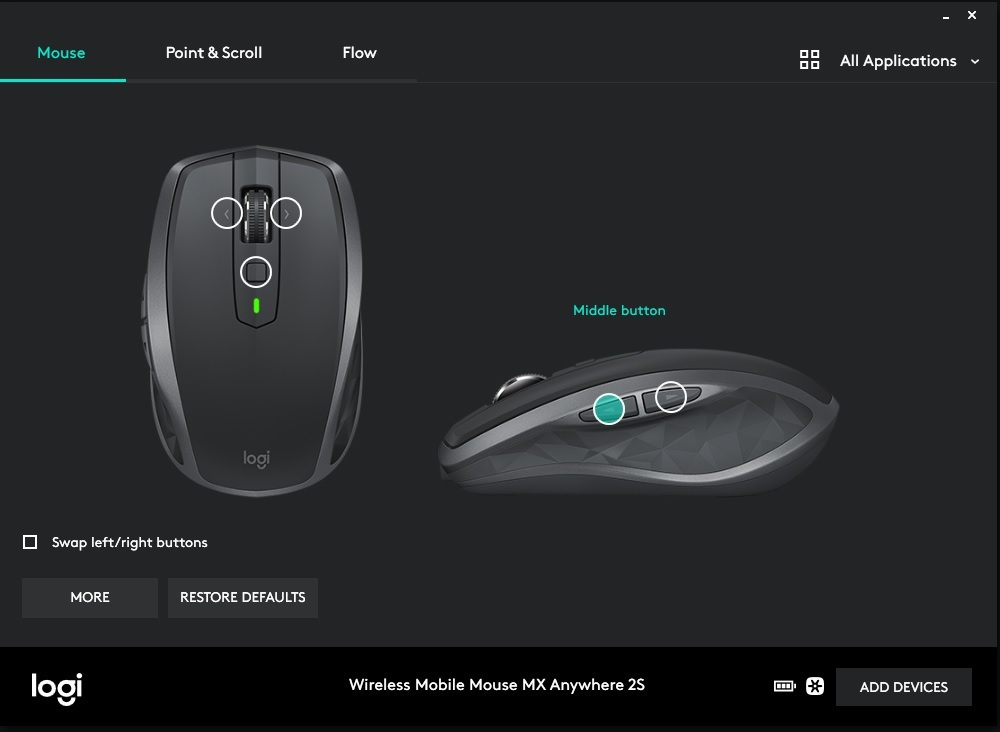
The Logitech MX Anywhere 2S is a wireless mouse that connects to your computer directly via Bluetooth. It features a Darkfield sensor that offers good accuracy, making it ideal for everyday use.
The Logitech MX Anywhere 2S is a wireless mouse that connects to your computer directly via Bluetooth. It features a Darkfield sensor that offers good accuracy, making it ideal for everyday use.
The Logitech MX Anywhere 2S is a wireless mouse that connects to your computer directly via Bluetooth. It features a Darkfield sensor that offers good accuracy, making it ideal for everyday use.
High-speed scrolling
Enjoy better scrolling and tracking and get more tasks done. The dual-mode scrolling allows you to switch between speed and precision, so you can browse long web pages or move line by line. Change mode with a click. The precision tracking offers superior cursor control at 4000 dpi. Scroll horizontally with the tilt wheel — ideal for large spreadsheets, big images, and web pages. Customize your experience with Logitech Flow™.
Up to 70 days battery life
The highly efficient construction, combined with the automatic power-saving suspension and the on/off switch, offers up to 70 days of battery life. You can work without stress and use it for up to 70 days with just one full charge.
Sculpted Shape
Designed to fit your hand, this comfortable portable mouse provides the control you need at home, at work, or on the go.
Specifications are collected from official manufacturer websites. Please verify the specifications before proceeding with your final purchase. If you notice any problem you can report it here.
Excellent mouse, the best Logitech one I have tried so far. Compact, precise, correct placement of side buttons, long battery life and (strangely for Logitech) proper feel of the wheel which – essential and absolutely necessary for me – has right/left tilt, so more buttons for programming. The negatives? It lacks the proper arch for a comfortable grip. Also – the paradox – the wheel switch (press/click) only works as a behavior change, i.e. continuous or stepped scrolling. The function has been moved to the small button above the wheel, so you have to lift your index finger to press it. However, both negatives do not play a major role, you quickly get used to it and in the end everything works fine. I am waiting to assess the reliability and will return.
Θαυμάσιο ποντίκι, το καλύτερο της logitech που έχω δοκιμάσει μέχρι σήμερα. Συμπαγές, ακριβές, σωστή θέση πλαϊνών πλήκτρων, μεγάλη διάρκεια μπαταρίας και (πράγμα παράξενο για logitech) σωστή αίσθηση της ροδέλας η οποία - ουσιώδες και εντελώς απαραίτητο για μένα - διαθέτει δεξιά/αριστερή κλίση, άρα περισσότερα πλήκτρα για προγραμματισμό. Τα αρνητικά; Του λείπει η σωστή καμάρα για αναπαυτικό πιάσιμο. Επίσης - το παράδοξο - ο διακόπτης (πάτημα/κλικ) ροδέλας λειτουργεί μόνο σαν αλλαγή συμπεριφοράς της, δηλ. συνεχής ή βαθμωτή κύλιση. Η λειτουργία έχει μεταφερθεί στο μικρό πλήκτρο πάνω απ' τη ροδέλα, άρα πρέπει να σηκώσεις τον δείκτη για να το πατήσεις. Και τα δυο όμως αρνητικά δεν παίζουν μεγάλο ρόλο, γρήγορα συνηθίζεις και τελικά όλα δουλεύουν σωστά. Περιμένω να αξιολογήσω την αξιοπιστία και θα επανέλθω.
excellent as long as the battery works. when the rechargeable battery runs out, it's very difficult to find a replacement in Greece. better to use a corresponding bluetooth mouse with a regular alkaline battery
εξαιρετικό όσο δουλεύει η μπαταρία. όταν εξαντληθεί η επαναφορτιζόμενη μπαταρία, πολύ δύσκολο να βρείς στην Ελλάδα αντικατάσταση της.
καλύτερα να χρησιμοποιούμε αντίστοιχο bluetooth ποντίκι με κανονική αλκαλική μπαταρία
One of the best mice I have ever used (and I have used many...). Small, precise, customizable. Purchased to accompany an older Workstation Laptop, for use with design programs and image editing. Connected via Bluetooth with good support from the accompanying software. All these good things, however, lasted only a short while. Even though it was not used much, its rechargeable battery—which has a long usage duration—did not last long, as it survived only a single charge. Unfortunately, it gave up the ghost just as the warranty expired (common with many electronics), and I got nowhere online with Logitech's support. I will replace its battery (when—and if—I manage to find a compatible one). Until then, I bought a new, identical one to "play" on the same system without changes. Recommended for... as long as it lasts. If you don't want the old-fashioned microUSB charging port it has, look towards its successor, the MX Anywhere 3S, which, although it looks similar, is not the same.
Ένα από τα καλύτερα ποντίκια που έχω χρησιμοποιήσει (και έχω χρησιμοποιήσει πολλά...). Μικρό, ακριβές, προσαρμόσιμο. Αγοράστηκε για να συνοδεύσει ένα παλαιότερο Workstation Laptop, για χρήση με σχεδιαστικά προγράμματα και επεξεργασία εικόνας. Συνδέθηκε με bluetooth έχοντας καλή υποστήριξη του συνοδευτικού software. Όλα αυτά τα καλά, κράτησαν λίγο. Αν και δεν χρησιμοποιήθηκε πολύ, η επαναφορτιζόμενη μπαταρία του - που έχει μεγάλη διάρκεια χρήσης, - δεν έχει πολύ ζωή, αφού άντεξε μία και μοναδική φόρτιση. Δυστυχώς, παρέδωσε πνεύμα μόλις έληξε η εγγύηση (σύνηθες σε πολλά ηλεκτρονικά) και άκρη δε βγήκε online με τη μαμά του Logitech. Θα του αλλάξω μπαταρία (όταν - δύσκολα - βρω συμβατή). Έως τότε αγόρασα ένα νέο, ίδιο για να "παίξει" στο ίδιο σύστημα χωρίς αλλαγές. Προτείνεται για... όσο κρατήσει. Αν δε θέλετε την παλιομοδίτικη θύρα φόρτισης microUSB που διαθέτει, κοιτάξτε προς το διάδοχό του, MX Anywhere 3S που αν και του μοιάζει, δεν είναι το ίδιο.
Excellent choice!!
It works perfectly on various surfaces (e.g. glass), it has great autonomy and its ergonomic design provides comfort in handling.
I highly recommend it.
Εξαιρετική επιλογή!!
Λειτουργεί άψογα σε διάφορες επιφάνειες ( π.χ. γυαλί), έχει μεγάλη αυτονομία ενώ ο εργονομικός του σχεδιασμός προσφέρει άνεση στον χειρισμό.
Το προτείνω ανεπιφύλακτα.
IT DOES NOT HAVE A MIDDLE CLICK.
For those who do not use the middle click, it is not a problem.
For those who use the middle click to close tabs or for use in design programs, the mouse is bad. You can assign the middle click to the small button, but you cannot make the scroll wheel be the middle click (like in all mice after the intellimouse 1, around 2002). We are talking about regression.
Also, in terms of size, I don't understand what has gotten into them lately and they release mice with special dimensions. The MX Anywhere 2s is OK in terms of materials, but in terms of overall volume, it is... small. It is "squishy". Like a meatball. And it's not like I have huge hands. But this is something that is common as long as your mouse is otherwise good.
Personally, I returned it and got the M650L, which they advertise as Large but is actually the regular size of a mouse.
ΔΕΝ ΕΧΕΙ ΜΕΣΑΙΟ ΚΛΙΚ.
Για όποιον δεν χρησιμοποιεί το μεσαίο κλικ δεν είναι πρόβλημα.
Για όποιον χρησιμοποιεί το μεσαίο κλικ για να κλείνει tabs ή για χρήση σε σχεδιαστικά προγράμματα το ποντίκι είναι κακό. Μπορείς να κάνεις assign στο μικρό κουμπάκι το μεσαίο κλικ, αλλά δεν μπορείς να κάνεις την ροδέλα να είναι το μεσαίο κλικ (όπως σε όλα τα ποντίκια μετά το intellimouse 1, δηλαδή κάπου στο 2002). Μιλάμε για οπισθοδρόμηση.
Επίσης από άποψη μεγέθους δεν καταλαβαίνω τι τους έχει πιάσει τώρα τελευταία και βγάζουν ποντίκια με ιδιαίτερες διαστάσεις. Το MX Anywhere 2s είναι από άποψη υλικών ΟΚ, αλλά στον όγκο του συνολικά κάθεται ... μικρό. Είναι "πλατσουκωτό". Σαν μπιφτέκι. Και δεν είναι δα να πεις πως έχω τεράστια χέρια. Αλλά αυτό είναι κάτι που συνηθίζεται εφόσον το ποντίκι σου κάθεται κατά τα λοιπά καλά.
Προσωπικά το επέστρεψα και πήρα το M650L , που το διαφημίζουν για Large αλλά είναι στην ουσία το κανονικό μέγεθος ποντικιού.
5 stars and they are few for this mouse. Seamless scrolling, either by feeling the wheel or continuous (if you press the wheel, the function alternates). An incomparable advantage is that it does not need the Bluetooth adapter to stay connected to a device: once you have paired it at least once, you can find it via Bluetooth and you don't need its USB anymore. Additionally, it can be connected to 3 devices simultaneously, the button below activates Bluetooth and while you use it on one PC, you can press the button at that moment and another computer can "see" it. Lightweight, as durable as it gets, very responsive. You will have to get used to the middle click with the button above the wheel only, although I think this might be adjustable through software.
5 αστέρια και είναι λίγα για αυτό το ποντίκι. Απροβλημάτιστο scrolling, είτε νιώθοντας τη ροδέλα, είτε συνεχόμενο (αν πατήσεις τη ροδέλα εναλλάσσεται η λειτουργία). Ασύγκριτο πλεονέκτημα το ότι δε χρειάζεται το ανταπτοράκι του bluetooth για να παραμείνει συνδεδεμένο σε μία συσκευή: εφόσον το έχεις κουμπώσει τουλάχιστον μία φορά, το βρίσκεις μέσω bluetooth και δεν ξαναχρειάζεσαι το usb του. Επίσης, μπορεί να συνδεθεί σε 3 συσκευές ταυτόχρονα, το button από κάτω ενεργοποιεί το bluetooth και ενώ το λειτουργείς σε ένα pc, μπορείς εκείνη τη στιγμή να πατήσεις το κουμπάκι και να το "δει" κι ένας άλλος υπολογιστής. Ελαφρύ, ανθεκτικό όσο δεν πάει, ταχύτατο σε απόκριση. Θα πρέπει να συνηθίσετε το μεσαίο κλικ με το κουμπάκι πάνω από τη ροδέλα μόνο, αν και νομίζω ότι αυτό ίσως και να μπορεί να προσαρμοστεί μέσω λογισμικού.
Good size, very comfortable in the hand with a nice feel. The keys are quite silent and respond very well. I use a rechargeable battery and it generally seems to last a long time. The Bluetooth worked great as I used it (a little). Overall, a very good purchase.
Καλό μέγεθος, πολύ άνετο στο χέρι με ωραία αίσθηση. Τα πλήκτρα αρκετά αθόρυβα και ανταποκρίνονται πολύ καλά. Μπαταρία χρησιμοποιώ επαναφορτιζόμενη και γενικά φαίνεται ότι κρατάει μεγάλο διάστημα. Το bluetooth όσο το έκανα χρήση (λίγο) ήταν μια χαρά. Γενικά πολύ καλή αγορά.
I have the Mx anywhere.. Daily desktop use. Good responsiveness. Works without a pad on a Formica desktop. Good battery-work ratio without a cable. Very poor durability of the L/R click button. The Left button broke quickly and started double-clicking where I didn't want it to.... From the first year, I had to use a knife to lift its plastic that had sagged, until I broke it (the Left click) and fixed it with tape. I've been using it like that for 2 years. The Side buttons and the Left-Right of the scroll wheel are helpful though. After 3 years of use, it came to an end. I mention it because for this price (around €60) the same quality is found in the Mx anywhere 2S. The USB plug on the mouse is loose now and the scroll wheel doesn't stop at the click you want even though it's set to click-roll and not free-roll. It's a shame about the darkfield sensor (amazing) and the lithium battery that has twice the lifespan
Έχω το Mx anywhere..Καθημερινή desktop χρήση. Καλή ανταπόκριση. Δουλεύει χωρίς Pad πάνω σε γραφείο επιφάνειας Φορμάικα. Καλή σχέση φόρισης μπαταρίας-εργασίας χωρίς καλώδιο. Πολύ κακή αντοχή L/R click button. Χάλασε πολύ γρήγορα το το Left και έκανε DoubleClick εκεί που δεν ήθελα....Από το 1ο χρόνο αναγκάστηκα με μαχαίρι να ανεβάζω το πλαστικό του που είχε πάθει καθίζηση, μέχρι που το' σπασα(το Left click) και τό' πιασα με ταινία.Το δουλεύω 2 χρόνια έτσι. Εξυπηρετικά πάντως τα Side buttons και το Left-Right της ροδέλας. Μετά από 3 χρόνια χρήσης ήρθε το τέλος του. Tο αναφέρω γιατί σ' αυτά τα χρήματα (60€ περίπου) ίδια ποιότητα είναι και το Mx anywhere 2S. Το usb plug στο ποντίκι χάσκει πλέον και η ροδέλα δεν σταματά στο click που θές παρόλο που είναι σε click-roll και όχι σε free-roll. Κρίμα to darkfield sensor (άπαιχτος) και την μπαταρία λιθίου που έχει άλλο τόσο χρόνο ζωής.-
The best mouse I've ever had. I have 2 of the same and two more of the older model.
In summary, the pros are:
+ The signal never cuts off.
+ It works fine on a glass surface.
+ The programmable buttons have solved my problems. You can program them to perform different tasks in any application. For example, I have the back button set to "copy" and the front button set to "paste," and the middle button set to "minimize." But in Word, I have programmed the middle button to scroll down one page. I have saved hours.
+ 5 buttons can be programmed.
+ Precise scroll wheel with free-scrolling or incremental adjustment.
+ Long battery life.
+ Fast charging (if you run out of battery with only 4-5 minutes left, it charges enough to finish your work).
+ You can program it for 3 different devices (as long as you have receivers for each device).
+ Very good build quality, nothing like the cheap plastic of other mice.
The cons are:
- It is designed for right-handed people, and I use it with my left hand, so it took some getting used to.
- Some may find it uncomfortable due to its small size.
The price may seem high, but it's worth it a thousand times.
το καλύτερο ποντίκι που είχα ποτέ. Έχω 2 ίδια και άλλα δυο το παλιότερο μοντέλο.
Επιγραμματικά τα +
+ δεν διακόπτετε το σήμα ποτέ
+ σε γυάλινη επιφάνεια δουλεύει κανονικά
+ τα προγραμματιζόμενα κουμπιά μου έχουν λύσει τα προβλήματα μου. Μπορείς σε κάθε εφαρμογή αν θέλεις να τα προγραμματίσεις να κάνουν διαφορετική εργασία. Π.χ. εγώ έχω το πίσω πλήκτρο "αντιγραφή" και το μπροστινό "επικόλληση" και το μεσαίο "ελαχιστοποίηση", αλλά στο word έχω κάνει το μεσαίο να κατεβαίνει μια σελίδα. Έχω γλυτώσει ώρες.
+ 5 κουμπιά προγραμματίζονται
+ ακριβής ροδέλα με ρύθμιση ελεύθερης κύλισης ή με διαβάθμιση
+ μεγάλη διάρκεια μπαταρίας
+ γρήγορη φόρτιση (αν μείνετε απο μπαταρία με μόνο 4-5 λεπτά φορτίζει αρκετά για να τελειώσεις την δουλειά σου
+ μπορείς να το προγραμματίσεις για 3 διαφορετικές συσκευές (αρκεί να έχεις δέκτες σε κάθε συσκευή)
+ πολύ καλή ποιότητα κατασκευής, καμία σχέση με τις ψευτο-πλαστικούρες που έχουν άλλα ποντίκια
Τα -
- είναι σχεδιασμένο για δεξιόχειρες και εγω το δουλεύω με το αριστερό, ήθελε συνήθεια
- μερικοί μπορεί να το βρουν άβολο λόγο μικρού μεγέθους
Η τιμή μπορεί να φαίνεται υψηλή αλλά τα αξίζει με χίλια.
Weight and size OK, connectivity also good, no issues with mac air. The most annoying thing, which has been mentioned by others here, is the noise of the keys. For now, it distracts me from my work... I hope I get used to it. I believe that with the same or slightly more money, you can find a much better mouse.
Βάρος και μέγεθος ΟΚ, συνδεσιμότητα επίσης καλή, με mac air κανένα θέμα. Το πιό εκνευριστικό, που έχει αναφερθεί και απο άλλους εδώ, είναι ο θόρυβος των πλήκτρων. Προς το παρόν δηλαδή με αποσπά απο τη δουλειά μου...ελπίζω να το συνηθίσω. Θεωρώ ότι με τα ίδια ή λιγα παραπάνω χρήματα βρίσκεις πολύ καλύτερο ποντίκι.
If I could marry it, I would.
To those who say it doesn't have a middle click:
Yes, it doesn't have a middle click, at least not in the way that all other mice have.
BUT!
It surprises me greatly that no one mentions that you can assign the middle click (even with some compromise) through the application, Logitech Options. In this application, you can map all the buttons (except for the scroll click, okay) to any function you want, including the middle click. For example, it has two buttons on the side, near the thumb. Their default settings are forwards and back. Okay, I understand and use the back button. However, I don't use the forwards button as much (how often do you go to a page and say "no, I'll go back" and then say "oh, actually, I'll go forward again"? because that's all it does...) So, I mapped the forwards button on the side to be the middle click. Result: I have the middle click in a position that is even more ergonomic than the "usual" position on the scroll wheel, as it is always under my thumb, so I don't need to move my index finger from the left click to the scroll wheel. So, in my opinion, it's a win-win. (There is also a button right behind the scroll wheel, so if you want the middle click to be in the middle, you can map it there, but it's not as ergonomic for me, at least it doesn't suit me.)
It really surprises me how many people write reviews (even on YouTube!!) without even installing the accompanying application and without spending an extra minute to see what it does...
Αν θα μπορούσα να το παντρευτώ, θα το έκανα.
Σε όσους λένε οτι δεν έχει μεσαίο click:
Ναι, δεν έχει μεσαίο κλίκ, τουλάχιστον με τον τρόπο που έχουν όλα τα άλλα ποντίκια.
ΑΛΛΑ!
Μου κάνει τεράστια εντύπωση που κανείς δεν λέει οτι μπορείς να του βάλεις το μεσαίο κλικ (έστω και με κάποιον συμβιβασμό) μέσω της εφαρμογής του, logitech options. Στην εφαρμογή αυτή μπορείς να mapάρεις όλα τα κουμπιά του (πλην όμως το κλικ της ροδέλας, οκ), σε ότι λειτουργεία θες, συμπεριλαμβάνοντας το μεσαίο κλικ. Π.χ, έχει δυο κουμπάκια στο πλάι, στον αντίχειρα. Οι default ρυθμίσεις τους είναι forwards και back. Το back οκ, το καταλαβαίνω και το χρησιμοποιώ. Το forwards όμως δεν το χρησιμοποιώ τόσο πολύ (΄πόσο συχνά πάτε σε μια σελίδα και λετε "όχι, θα πάω πίσω" και μετά λέτε "α, βασικά θα ξαναπάω μπροστά";; γιατί μόνο αυτό κάνει....) Οπότε mapαρα το μπροστά κουμπάκι του αντίχειρα ως μεσαίο κλικ. Αποτέλεσμα: το μεσαίο κλικ το έχω σε μια θέση που είναι ακόμα πιο εργονομική απο την "συνηθισμένη" θέση του στην ροδέλα, αφου είναι πάντα κάτω απο τον αντίχειρά μου, άρα δεν χρειάζεται να κουνίσω κάν τον δείκτη απο το αριστερό κλικ στην ροδέλα. Άρα ειναι win win κατα την γνώμη μου. (Υπάρχει και κουμπάκι ακριβώς πισω απο την ροδέλα, άρα αν θες σονι και καλά το μεσαίο κλικ να είναι στην μέση, μπορείς να το mapάρεις εκεί, απλά δεν είναι τοσο εργονομική θέση, τουάχιστον εμένα δεν με βολεύει.)
Μου κάνει πραγματικά εντύπωση το πόσοι άνθρωποι του γράφουνε κριτική (ακόμα και review στο youtube!!) χωρίς καν να βάλουν την εφαρμογή που έρχετε μαζί του, και χωρίς να το ασχοληθούνε 1 λεπτό παραπάνω να δουνε τι κάνει....
He works with a MacBook Pro ... From the moment you install the Logi operating system, it will work flawlessly, without any disconnections. It is comfortable to hold and easily fits in a small bag.
The negatives are that the scroll is not as smooth as the trackpad, and perhaps the worst part is that the buttons make a lot of noise... I have had it for about two weeks and it works well with no disconnections, good response, but the scroll and the loud sound of the keys are somewhat bothersome.
After about 3 months, one of the two keys would occasionally get stuck and the scroll wheel wouldn't click on the right side... I hope that with the replacement, the new one won't have the same issue.
I replaced it with the MX Master 2s and it's like night and day, it may seem big but you get used to it just fine
Δουλεύει με ενα macbook pro ...Απ την στιγμή που θα βάλεις το λειτουργικό της logi θα δουλέψει απροβλημάτιστα , χωρίς καμιά αποσύνδεση. Είναι άνετο στο χέρι , μπαίνει εύκολα σε τσάντα μικρή .
Τα αρνητικά είναι οτι το scroll δεν είναι τόσο smooth , όπως το trackpad και ίσως το χειρότερο είναι τα κουμπιά του ακούγονται απίστευτα πολύ...Το έχω περίπου και το δουλεύω αρκετά δυο βδομάδες ... καμιά αποσύνδεση πολύ καλή απόκριση αλλα το scroll και o δυνατός ήχος στα πλήκτρα είναι κάπως .....
μετά από 3 μήνες περίπου κολλούσε το ενα απ τα δύο πληκτρα μια στο τόσο και η ροδέλα δεν εκανε κλικ στα δεξιά .... Ελπίζω τώρα με την αντικατάσταση το καινούριο να μην έχει το ίδιο θέμα
Το αντικατέστησα με το mx master 2s μέρα με την νύχτα , μπορεί να φαίνεται μεγάλο αλλά μια χαρά το συνηθίζεις
Indeed, it has excellent response on any surface and remains connected without interruptions, at least with the Bluetooth that I use. My only problem is that I find it very uncomfortable. I read some reviews that said it is convenient even for people with large hands despite its size, so I, having average hands, did not worry and was convinced. However, its grip seems terrible to me and after a short period of use, my hand started to hurt a lot, resulting in me wanting to avoid using it.
In summary, in my opinion, it is a very high-quality but uncomfortable mouse, even for people with average-sized palms.
Πράγματι έχει εξαιρετική ανταπόκριση σε κάθε επιφάνεια και παραμένει συνδεδεμένο χωρίς διακοπές, με bluetooth τουλάχιστον που το χρησιμοποιώ εγώ. Το μόνο μου πρόβλημα είναι ότι το βρίσκω πολύ άβολο. Διάβασα κάποιες κριτικές που έλεγαν ότι είναι βολικό ακόμα και για ανθρώπους με μεγάλα χέρια παρά του μεγέθους του οπότε εγώ έχοντας μέτρια χέρια δεν ανησύχησα και πείστηκα. Το κράτημά του όμως μου φαίνεται κάκιστο και μετά από ένα σύντομο διάστημα χρήσεως άρχισε να με πονάει πολύ το χέρι μου με αποτέλεσμα να θέλω να αποφύγω να το χρησιμοποιώ.
Συνοπτικά, κατ'εμέ πρόκειται για ένα ποιοτικότατο αλλά άβολο ποντίκι ακόμα και για ανθρώπους με μετρίου μεγέθους παλάμες.
Excellent choice! Comfortable to hold (no matter what fingers you have), nice texture, fast scrolling without any lag, battery that you forget to charge (comfortable to use for 1 month). But the best part is that I can use it on many different surfaces without ANY problem. Glass, carpet, blanket, book. I've had it for 6 months and even though it has fallen from my desk several times, it hasn't suffered any damage or scratches. I highly recommend it without hesitation!
Εξαιρετική επιλογή! Άνετο στο κράτημα (ότι δάχτυλα και να έχεις), ωραία υφή, ροδέλα ταχύτατη χωρίς κολλήματα, μπαταρία που ξεχνάς να φορτίσεις (1 μήνα χρήση άνετα). Το καλύτερο όμως είναι ότι το χρησιμοποιώ σε πολλές διαφορετικές επιφάνειες χωρίς ΚΑΝΕΝΑ πρόβλημα. Γυαλί, χαλί, πάπλωμα, βιβλίο. Το έχω 6 μήνες και ενώ μου έχει πέσει από το γραφείο κάμποσες φορές, δεν έχει πάθει τίποτα και ούτε έχει γρατζουνιά. Το συνιστώ ανεπιφύλακτα!!!
In the category of portable mice, it is a champion. I have big hands and yet I am comfortable with it, I have had it for 6 months. It still holds up with the initial charge! The fact that it works with both the Unifying receiver and Bluetooth is a big advantage. Out of all the famous Bluetooth mice I have used, this is the only one that has NEVER given me connectivity issues. You get what you pay for.
Στην κατηγορία των φορητών ποντικιών είναι πρωταθλητής. Έχω μεγάλα χέρια και όμως είμαι άνετος μαζί του, το έχω εδώ και 6 μηνες. Ακόμη αντέχει με τη αρχική φόρτιση! Το γεγονός ότι δουλεύει με Unifying receiver αλλά και με Bluetooth είναι μεγάλο προτέρημα. Από όλα τα επώνυμα Bluetooth ποντίκια που έχω χρησιμοποιήσει αυτό είναι το μόνο που ΠΟΤΕ δεν μου έχει κάνει νερά στην συνδεσιμότητα. Ότι πληρώνεις παίρνεις.
I bought it for professional use 2 months ago and overall it is a good mouse with very good build quality. Ideal for those who are looking for use on more than 1 PC, whether it is MacOs, Windows, or Linux.
Pros:
1. It is small in size and does not strain the wrists.
2. It connects very quickly without any problems, either via Bluetooth or with an RF receiver on up to 3 PCs.
3. With Flow, you can copy & paste and switch between PCs very quickly and easily! They just need to be connected to the same network.
4. You can use it while it is charging.
5. It can be connected to MacOs, Windows, or Linux.
6. You can use it on almost any surface, even on glass as long as it is thicker than 3 millimeters!
7. It charges quite fast.
Cons:
1. It charges with a USB type B cable. One would expect it to have type C. Also, the MX Keys keyboard, which is from the same series, has type C!
2. It is noisy. The buttons sound like a regular mouse, which is not justified by its price.
3. Switching between PCs is done with a button on the bottom side, which is not convenient at all. Luckily, there is Flow.
Το αγόρασα για επαγγελματική χρήση 2 μήνες πριν και σε γενικές γραμμές είναι ένα κάλο ποντίκι με πολύ καλή ποιότητα κατασκευής. Ιδανικό γι' αυτούς που ψάχνουν για χρήση σε πάνω από 1 Η/Υ είτε είναι MacOs είτε Windows είτε Linux.
Τα θετικά:
1. Είναι μικρό σε μέγεθός και δεν καταπονεί τους καρπούς
2. Συνδέεται πολύ γρήγορα χωρίς προβλήματα είτε μέσω Bluetooth είτε με RF receiver σε μέχρι και 3 Η/Υ.
3. Με το Flow μπορείτε να κάνετε copy & paste και εναλλαγή μεταξύ των H/Y πολύ γρήγορα και εύκολα! Αρκεί να είναι συνδεδεμένοι στο ίδιο δίκτυο.
4. Μπορείς να κάνεις χρήση και όταν φορτίζει
5. Μπορεί να συνδεθεί σε MacOs είτε Windows είτε Linux
6. Μπορείτε να το χρησιμοποιήσετε σχεδόν σε όλες τις επιφάνειες, ακόμα και σε γυαλί αρκεί το πάχος του να είναι μεγαλύτερο από 3 χιλιοστά!
7. Φορτίζει αρκετά γρήγορα.
Στα αρνητικά:
1. Η φόρτιση γίνεται με καλώδιο usb type b. Θα περίμενες κανείς να έχει type c. Επίσης το πληκτρολόγιο MX Keys που είναι της ίδιας σειράς έχεις type c!
2. Είναι θορυβώδες. Τα πλήκτρα ακούγονται όπως σε ένα κανονικό ποντίκι κάτι που δεν δικαιολογεί η τιμή του.
3. Η εναλλαγή μεταξύ των H/Y γίνεται με πλήκτρο που είναι στην κάτω πλευρά και αυτό δεν είναι καθόλου βολικό. Ευτυχώς υπάρχει το flow.
Expensive but exceptional mouse. The Darkfield technology makes it literally work *everywhere*, while its battery lasts for months and charges quickly in a few hours, to offer you many more months. Its size is perfect for the hand, while its weight and build quality make you feel like you're holding something very premium, which is true.
Its connection with the USB adapter works flawlessly and seamlessly without any delay or interruptions, and the "Logitech Flow" is simply wonderful and comes in handy when using it with two devices.
Its only drawback for me is that it doesn't have a click on the scroll wheel (e.g. for opening links in a new tab, as the scroll wheel is pressed inward for Hyper Scrolling). Okay, a minor inconvenience, you get used to it.
Ακριβό μεν, αλλα εξαιρετικό ποντίκι. Η Darkfield τεχνολογία το κάνει να πιάνει κυριολεκτικά *παντού*, ενώ η μπαταρία του κρατάει μήνες και φορτίζει γρήγορα σε μερικές ώρες, για να σου προσφέρει άλλους τόσους μήνες. Το μέγεθός του ειναι τέλειο για το χέρι, ενώ το βάρος του καθώς και η ποιότητα κατασκευής του σε κάνουν να νιώθεις οτι κρατάς κάτι παρα πολύ premium, κάτι που ισχύει.
Η σύνδεση του με το ανταπτοράκι USB λειτουργεί άψογα και απροβλημάτιστα χωρίς delay ή διακοπές, και το "Logitech Flow" είναι απλά υπέροχο και λύνει τα χέρια όταν το χρησιμοποιείς με δυο συσκευές.
Το μόναδικό του μειονέκτημα για εμένα ειναι οτι δεν υπάρχει κλίκ στη ροδέλα (πχ για άνοιγμα links σε νέα καρτέλα, καθώς η ροδέλα πατιέται προς τα μέσα για Hyper Scrolling. Οκ, μικρό το κακό, συνηθίζεται.
I had the previous model "Logitech MX Anywhere," which I had for over 10+ years and was one of the best mice I've ever used. It was an excellent mouse in every aspect.
After 10+ years, I bought the next model "Logitech MX Anywhere 2S." It's a very good mouse, but unfortunately not better than its predecessor.
On the positive side, its Darkfield 4000 dpi sensor is exceptional. Incredibly precise and works literally on any surface. However, there are now other mice on the market with very good sensors. It also connects to up to 3 laptops (while its predecessor only connected to 1). But personally, this feature didn't interest me much.
On the negative side, the build quality is not comparable to its predecessor. Unfortunately, the "2S" is made of much cheaper plastic and overall gives you a "cheaper feel" when you hold it. It doesn't give you the "quality feel" you expect when you pay so much money for a mouse, which was clearly present in its predecessor.
It has an ON/OFF button like all the (cheaper) mice on the market. But it doesn't have the sliding cover for the sensor like the previous model, which also functioned as an ON/OFF button, but also protected the sensor from dust, scratches, etc.
The rechargeable battery is not removable, only in service (like new smartphones). It's not a rechargeable type AA or AAA, but it's "Logitech type." And you can't replace it when its performance drops, only if you pay at the service center.
Finally, it doesn't have a carrying case like the previous model (and even though you pay 60-80 Euros for the mouse... just add a case, for God's sake!!!). This, combined with the lack of a sliding sensor cover, makes it very sensitive to dust, dirt, scratches, etc., during transportation. I had to buy an unrelated carrying case (a case for, for example, an SSD hard drive, which perfectly fit this mouse).
CONCLUSION: It's a good mouse, but very expensive, and Logitech removed many good features it had in its predecessor. The effort to reduce manufacturing costs (while keeping the same price) is now evident. What a shame. This, combined with the cheaper build, the absence of the (excellent) sensor cover, the cheaper plastic, the non-easily replaceable internal battery, etc... THERE IS NO WAY it will last me 10+ years like its predecessor. But I bought it knowingly, for its very good sensor.
Είχα το προηγούμενο μοντέλο “Logitech MX Anywhere”, το οποίο το είχα για πάνω από 10+ χρόνια και ήταν από τα καλύτερα ποντίκια που έχω πιάσει. Ήταν ένα εξαιρετικό ποντίκι από κάθε άποψη.
Μετά από 10+ χρόνια, αγόρασα το επόμενο μοντέλο “Logitech MX Anywhere 2S”. Πολύ καλό ποντίκι, αλλά (δυστυχώς) όχι καλύτερο από τον προκάτοχό του.
Στα ΘΕΤΙΚΑ. Ο αισθητήρας του Darkfield 4000 dpi είναι εξαιρετικός. Απίστευτα ακριβής και δουλεύει κυριολεκτικά σε οποιαδήποτε επιφάνεια. Όμως σήμερα υπάρχουν στην αγορά και άλλα ποντίκια με πολύ καλούς αισθητήρες. Επίσης συνδέεται και με μέχρι 3 laptop (ενώ ο προκάτοχος του, μόνο με 1). Αλλά εμένα προσωπικά, αυτό το χαρακτηριστικό δεν με ενδιέφερε και πολύ.
Στα ΑΡΝΗΤΙΚΑ. Η ποιότητα κατασκευής δεν έχει καμιά σχέση με τον προκάτοχό του. Δυστυχώς το “2S” είναι φτιαγμένο από πολύ πιο φθηνό πλαστικό και γενικά σου δίνει μια “φθηνότερη αίσθηση” όταν το πιάνεις. Δεν σου δίνει την "ποιοτική αίσθηση" που περιμένεις όταν πληρώνεις τόσα λεφτά για ένα ποντίκι μόνο και που σαφώς υπήρχε στον προκάτοχό του.
Έχει ένα κουμπί ON/OFF σαν όλα τα (φθηνότερα) ποντίκια της αγοράς. Αλλά δεν έχει το συρόμενο κάλυμμα του αισθητήρα όπως υπήρχε στο προηγούμενο μοντέλο, το οποίο λειτουργούσε και σαν κουμπί ON/OFF, αλλά και προστάτευε τον αισθητήρα κατά την μεταφορά από σκόνες, γδαρσίματα, κλπ…
Η επαναφορτιζόμενη μπαταρία ΔΕΝ αφαιρείται, παρά μόνο στο service (σαν τα νέα smartphones). Δεν είναι επαναφορτιζόμενη τύπου ΑΑ ή ΑΑΑ, αλλά είναι "τύπου Logitech". Και δεν μπορείς να την αντικαταστήσεις όταν πέσει η απόδοσή της, παρά μόνο αν πληρώσεις στο service.
Τέλος, δεν έχει θήκη μεταφοράς, όπως είχε το προηγούμενο μοντέλο (και ενώ το πληρώνεις 60-80 Ευρώ, το ποντίκι ... βάλτε μια θηκούλα, βρε αθεόφοβοι!!!). Αυτό, σε συνδυασμό με το ότι δεν υπάρχει πλέον συρόμενο κάλυμμα του αισθητήρα, το κάνει πολύ ευαίσθητο σε σκόνες, βρώμες, γρατζουνίσματα, κλπ, κατά την μεταφορά. Εγώ αναγκάστηκα και αγόρασα μια άσχετη θήκη μεταφοράς (θήκη για ένα π.χ. σκληρό δίσκο SSD, που το μέγεθός της ταίριαζε απόλυτα στο ποντίκι αυτό).
ΣΥΜΠΕΡΑΣΜΑ: Καλό ποντίκι, αλλά πολύ ακριβό και η Logitech αφαίρεσε πολλά καλά στοιχεία που είχε στον προκάτοχό του. Η προσπάθεια μείωσης του κόστους κατασκευής (ενώ η τιμή παρέμεινε η ίδια), είναι πλέον εμφανής. Κρίμα. Αυτό σε συνδυασμό με την φθηνότερη κατασκευή, την μη ύπαρξη καλύμματος του (εξαιρετικού) αισθητήρα, την φθηνότερη “πλαστικούρα”, την εσωτερική μπαταρία που δεν αλλάζει εύκολα, κλπ … ΔΕΝ ΥΠΑΡΧΕΙ ΠΕΡΙΠΤΩΣΗ να μου κρατήσει 10+ χρόνια, όπως το προηγούμενο μοντέλο του. Το αγόρασα όμως εν γνώση μου, για τον πολύ καλό αισθητήρα του.
From the best I have used. Especially the option to connect it to up to 3 devices and copy and paste files between them or whatever you have saved on the clipboard is one of the most important features that makes it stand out. In terms of battery, it has been 3 months and I still haven't charged it.
Από καλύτερα που έχω χρησιμοποιήσει. Ειδικά η επιλογή να το συνδέσεις σε έως 3 συσκευές και να κανεις αντιγραφή και επικόλληση αρχεία μεταξύ τους ή ότι εχεις αποθηκευμένο στο clipboard είναι από τα πιο σημαντικά που το κάνει να ξεχωρίζει. Από θέμα μπαταρίας, έχουν περάσει 3 μήνες και ακόμη δεν το έχω φορτίσει.
It works on all surfaces, has a very long battery life. In the 1.5 years that I have been using it with Bluetooth, it has not disconnected even once. Excellent!
Δουλεύει σε όλες τις επιφάνειες, πολύ μεγάλη διάρκεια μπαταρίας. Σε σύνδεση με bluetooth σε 1.5 χρόνο που το έχω δεν έχει αποσυνδεθεί ούτε μία φορά. Εξαιρετικό!
Excellent mouse, the best Logitech one I have tried so far. Compact, precise, correct placement of side buttons, long battery life and (strangely for Logitech) proper feel of the wheel which – essential and absolutely necessary for me – has right/left tilt, so more buttons for programming. The negatives? It lacks the proper arch for a comfortable grip. Also – the paradox – the wheel switch (press/click) only works as a behavior change, i.e. continuous or stepped scrolling. The function has been moved to the small button above the wheel, so you have to lift your index finger to press it. However, both negatives do not play a major role, you quickly get used to it and in the end everything works fine. I am waiting to assess the reliability and will return.
Θαυμάσιο ποντίκι, το καλύτερο της logitech που έχω δοκιμάσει μέχρι σήμερα. Συμπαγές, ακριβές, σωστή θέση πλαϊνών πλήκτρων, μεγάλη διάρκεια μπαταρίας και (πράγμα παράξενο για logitech) σωστή αίσθηση της ροδέλας η οποία - ουσιώδες και εντελώς απαραίτητο για μένα - διαθέτει δεξιά/αριστερή κλίση, άρα περισσότερα πλήκτρα για προγραμματισμό. Τα αρνητικά; Του λείπει η σωστή καμάρα για αναπαυτικό πιάσιμο. Επίσης - το παράδοξο - ο διακόπτης (πάτημα/κλικ) ροδέλας λειτουργεί μόνο σαν αλλαγή συμπεριφοράς της, δηλ. συνεχής ή βαθμωτή κύλιση. Η λειτουργία έχει μεταφερθεί στο μικρό πλήκτρο πάνω απ' τη ροδέλα, άρα πρέπει να σηκώσεις τον δείκτη για να το πατήσεις. Και τα δυο όμως αρνητικά δεν παίζουν μεγάλο ρόλο, γρήγορα συνηθίζεις και τελικά όλα δουλεύουν σωστά. Περιμένω να αξιολογήσω την αξιοπιστία και θα επανέλθω.
excellent as long as the battery works. when the rechargeable battery runs out, it's very difficult to find a replacement in Greece. better to use a corresponding bluetooth mouse with a regular alkaline battery
εξαιρετικό όσο δουλεύει η μπαταρία. όταν εξαντληθεί η επαναφορτιζόμενη μπαταρία, πολύ δύσκολο να βρείς στην Ελλάδα αντικατάσταση της.
καλύτερα να χρησιμοποιούμε αντίστοιχο bluetooth ποντίκι με κανονική αλκαλική μπαταρία
One of the best mice I have ever used (and I have used many...). Small, precise, customizable. Purchased to accompany an older Workstation Laptop, for use with design programs and image editing. Connected via Bluetooth with good support from the accompanying software. All these good things, however, lasted only a short while. Even though it was not used much, its rechargeable battery—which has a long usage duration—did not last long, as it survived only a single charge. Unfortunately, it gave up the ghost just as the warranty expired (common with many electronics), and I got nowhere online with Logitech's support. I will replace its battery (when—and if—I manage to find a compatible one). Until then, I bought a new, identical one to "play" on the same system without changes. Recommended for... as long as it lasts. If you don't want the old-fashioned microUSB charging port it has, look towards its successor, the MX Anywhere 3S, which, although it looks similar, is not the same.
Ένα από τα καλύτερα ποντίκια που έχω χρησιμοποιήσει (και έχω χρησιμοποιήσει πολλά...). Μικρό, ακριβές, προσαρμόσιμο. Αγοράστηκε για να συνοδεύσει ένα παλαιότερο Workstation Laptop, για χρήση με σχεδιαστικά προγράμματα και επεξεργασία εικόνας. Συνδέθηκε με bluetooth έχοντας καλή υποστήριξη του συνοδευτικού software. Όλα αυτά τα καλά, κράτησαν λίγο. Αν και δεν χρησιμοποιήθηκε πολύ, η επαναφορτιζόμενη μπαταρία του - που έχει μεγάλη διάρκεια χρήσης, - δεν έχει πολύ ζωή, αφού άντεξε μία και μοναδική φόρτιση. Δυστυχώς, παρέδωσε πνεύμα μόλις έληξε η εγγύηση (σύνηθες σε πολλά ηλεκτρονικά) και άκρη δε βγήκε online με τη μαμά του Logitech. Θα του αλλάξω μπαταρία (όταν - δύσκολα - βρω συμβατή). Έως τότε αγόρασα ένα νέο, ίδιο για να "παίξει" στο ίδιο σύστημα χωρίς αλλαγές. Προτείνεται για... όσο κρατήσει. Αν δε θέλετε την παλιομοδίτικη θύρα φόρτισης microUSB που διαθέτει, κοιτάξτε προς το διάδοχό του, MX Anywhere 3S που αν και του μοιάζει, δεν είναι το ίδιο.
Excellent choice!!
It works perfectly on various surfaces (e.g. glass), it has great autonomy and its ergonomic design provides comfort in handling.
I highly recommend it.
Εξαιρετική επιλογή!!
Λειτουργεί άψογα σε διάφορες επιφάνειες ( π.χ. γυαλί), έχει μεγάλη αυτονομία ενώ ο εργονομικός του σχεδιασμός προσφέρει άνεση στον χειρισμό.
Το προτείνω ανεπιφύλακτα.
IT DOES NOT HAVE A MIDDLE CLICK.
For those who do not use the middle click, it is not a problem.
For those who use the middle click to close tabs or for use in design programs, the mouse is bad. You can assign the middle click to the small button, but you cannot make the scroll wheel be the middle click (like in all mice after the intellimouse 1, around 2002). We are talking about regression.
Also, in terms of size, I don't understand what has gotten into them lately and they release mice with special dimensions. The MX Anywhere 2s is OK in terms of materials, but in terms of overall volume, it is... small. It is "squishy". Like a meatball. And it's not like I have huge hands. But this is something that is common as long as your mouse is otherwise good.
Personally, I returned it and got the M650L, which they advertise as Large but is actually the regular size of a mouse.
ΔΕΝ ΕΧΕΙ ΜΕΣΑΙΟ ΚΛΙΚ.
Για όποιον δεν χρησιμοποιεί το μεσαίο κλικ δεν είναι πρόβλημα.
Για όποιον χρησιμοποιεί το μεσαίο κλικ για να κλείνει tabs ή για χρήση σε σχεδιαστικά προγράμματα το ποντίκι είναι κακό. Μπορείς να κάνεις assign στο μικρό κουμπάκι το μεσαίο κλικ, αλλά δεν μπορείς να κάνεις την ροδέλα να είναι το μεσαίο κλικ (όπως σε όλα τα ποντίκια μετά το intellimouse 1, δηλαδή κάπου στο 2002). Μιλάμε για οπισθοδρόμηση.
Επίσης από άποψη μεγέθους δεν καταλαβαίνω τι τους έχει πιάσει τώρα τελευταία και βγάζουν ποντίκια με ιδιαίτερες διαστάσεις. Το MX Anywhere 2s είναι από άποψη υλικών ΟΚ, αλλά στον όγκο του συνολικά κάθεται ... μικρό. Είναι "πλατσουκωτό". Σαν μπιφτέκι. Και δεν είναι δα να πεις πως έχω τεράστια χέρια. Αλλά αυτό είναι κάτι που συνηθίζεται εφόσον το ποντίκι σου κάθεται κατά τα λοιπά καλά.
Προσωπικά το επέστρεψα και πήρα το M650L , που το διαφημίζουν για Large αλλά είναι στην ουσία το κανονικό μέγεθος ποντικιού.
The Logitech MX Anywhere 2S is a wireless mouse that connects to your computer directly via Bluetooth. It features a Darkfield sensor that offers good accuracy, making it ideal for everyday use.
High-speed scrolling
Enjoy better scrolling and tracking and get more tasks done. The dual-mode scrolling allows you to switch between speed and precision, so you can browse long web pages or move line by line. Change mode with a click. The precision tracking offers superior cursor control at 4000 dpi. Scroll horizontally with the tilt wheel — ideal for large spreadsheets, big images, and web pages. Customize your experience with Logitech Flow™.
Up to 70 days battery life
The highly efficient construction, combined with the automatic power-saving suspension and the on/off switch, offers up to 70 days of battery life. You can work without stress and use it for up to 70 days with just one full charge.
Sculpted Shape
Designed to fit your hand, this comfortable portable mouse provides the control you need at home, at work, or on the go.
Specifications are collected from official manufacturer websites. Please verify the specifications before proceeding with your final purchase. If you notice any problem you can report it here.
Excellent mouse, the best Logitech one I have tried so far. Compact, precise, correct placement of side buttons, long battery life and (strangely for Logitech) proper feel of the wheel which – essential and absolutely necessary for me – has right/left tilt, so more buttons for programming. The negatives? It lacks the proper arch for a comfortable grip. Also – the paradox – the wheel switch (press/click) only works as a behavior change, i.e. continuous or stepped scrolling. The function has been moved to the small button above the wheel, so you have to lift your index finger to press it. However, both negatives do not play a major role, you quickly get used to it and in the end everything works fine. I am waiting to assess the reliability and will return.
Θαυμάσιο ποντίκι, το καλύτερο της logitech που έχω δοκιμάσει μέχρι σήμερα. Συμπαγές, ακριβές, σωστή θέση πλαϊνών πλήκτρων, μεγάλη διάρκεια μπαταρίας και (πράγμα παράξενο για logitech) σωστή αίσθηση της ροδέλας η οποία - ουσιώδες και εντελώς απαραίτητο για μένα - διαθέτει δεξιά/αριστερή κλίση, άρα περισσότερα πλήκτρα για προγραμματισμό. Τα αρνητικά; Του λείπει η σωστή καμάρα για αναπαυτικό πιάσιμο. Επίσης - το παράδοξο - ο διακόπτης (πάτημα/κλικ) ροδέλας λειτουργεί μόνο σαν αλλαγή συμπεριφοράς της, δηλ. συνεχής ή βαθμωτή κύλιση. Η λειτουργία έχει μεταφερθεί στο μικρό πλήκτρο πάνω απ' τη ροδέλα, άρα πρέπει να σηκώσεις τον δείκτη για να το πατήσεις. Και τα δυο όμως αρνητικά δεν παίζουν μεγάλο ρόλο, γρήγορα συνηθίζεις και τελικά όλα δουλεύουν σωστά. Περιμένω να αξιολογήσω την αξιοπιστία και θα επανέλθω.
excellent as long as the battery works. when the rechargeable battery runs out, it's very difficult to find a replacement in Greece. better to use a corresponding bluetooth mouse with a regular alkaline battery
εξαιρετικό όσο δουλεύει η μπαταρία. όταν εξαντληθεί η επαναφορτιζόμενη μπαταρία, πολύ δύσκολο να βρείς στην Ελλάδα αντικατάσταση της.
καλύτερα να χρησιμοποιούμε αντίστοιχο bluetooth ποντίκι με κανονική αλκαλική μπαταρία
One of the best mice I have ever used (and I have used many...). Small, precise, customizable. Purchased to accompany an older Workstation Laptop, for use with design programs and image editing. Connected via Bluetooth with good support from the accompanying software. All these good things, however, lasted only a short while. Even though it was not used much, its rechargeable battery—which has a long usage duration—did not last long, as it survived only a single charge. Unfortunately, it gave up the ghost just as the warranty expired (common with many electronics), and I got nowhere online with Logitech's support. I will replace its battery (when—and if—I manage to find a compatible one). Until then, I bought a new, identical one to "play" on the same system without changes. Recommended for... as long as it lasts. If you don't want the old-fashioned microUSB charging port it has, look towards its successor, the MX Anywhere 3S, which, although it looks similar, is not the same.
Ένα από τα καλύτερα ποντίκια που έχω χρησιμοποιήσει (και έχω χρησιμοποιήσει πολλά...). Μικρό, ακριβές, προσαρμόσιμο. Αγοράστηκε για να συνοδεύσει ένα παλαιότερο Workstation Laptop, για χρήση με σχεδιαστικά προγράμματα και επεξεργασία εικόνας. Συνδέθηκε με bluetooth έχοντας καλή υποστήριξη του συνοδευτικού software. Όλα αυτά τα καλά, κράτησαν λίγο. Αν και δεν χρησιμοποιήθηκε πολύ, η επαναφορτιζόμενη μπαταρία του - που έχει μεγάλη διάρκεια χρήσης, - δεν έχει πολύ ζωή, αφού άντεξε μία και μοναδική φόρτιση. Δυστυχώς, παρέδωσε πνεύμα μόλις έληξε η εγγύηση (σύνηθες σε πολλά ηλεκτρονικά) και άκρη δε βγήκε online με τη μαμά του Logitech. Θα του αλλάξω μπαταρία (όταν - δύσκολα - βρω συμβατή). Έως τότε αγόρασα ένα νέο, ίδιο για να "παίξει" στο ίδιο σύστημα χωρίς αλλαγές. Προτείνεται για... όσο κρατήσει. Αν δε θέλετε την παλιομοδίτικη θύρα φόρτισης microUSB που διαθέτει, κοιτάξτε προς το διάδοχό του, MX Anywhere 3S που αν και του μοιάζει, δεν είναι το ίδιο.
Excellent choice!!
It works perfectly on various surfaces (e.g. glass), it has great autonomy and its ergonomic design provides comfort in handling.
I highly recommend it.
Εξαιρετική επιλογή!!
Λειτουργεί άψογα σε διάφορες επιφάνειες ( π.χ. γυαλί), έχει μεγάλη αυτονομία ενώ ο εργονομικός του σχεδιασμός προσφέρει άνεση στον χειρισμό.
Το προτείνω ανεπιφύλακτα.
IT DOES NOT HAVE A MIDDLE CLICK.
For those who do not use the middle click, it is not a problem.
For those who use the middle click to close tabs or for use in design programs, the mouse is bad. You can assign the middle click to the small button, but you cannot make the scroll wheel be the middle click (like in all mice after the intellimouse 1, around 2002). We are talking about regression.
Also, in terms of size, I don't understand what has gotten into them lately and they release mice with special dimensions. The MX Anywhere 2s is OK in terms of materials, but in terms of overall volume, it is... small. It is "squishy". Like a meatball. And it's not like I have huge hands. But this is something that is common as long as your mouse is otherwise good.
Personally, I returned it and got the M650L, which they advertise as Large but is actually the regular size of a mouse.
ΔΕΝ ΕΧΕΙ ΜΕΣΑΙΟ ΚΛΙΚ.
Για όποιον δεν χρησιμοποιεί το μεσαίο κλικ δεν είναι πρόβλημα.
Για όποιον χρησιμοποιεί το μεσαίο κλικ για να κλείνει tabs ή για χρήση σε σχεδιαστικά προγράμματα το ποντίκι είναι κακό. Μπορείς να κάνεις assign στο μικρό κουμπάκι το μεσαίο κλικ, αλλά δεν μπορείς να κάνεις την ροδέλα να είναι το μεσαίο κλικ (όπως σε όλα τα ποντίκια μετά το intellimouse 1, δηλαδή κάπου στο 2002). Μιλάμε για οπισθοδρόμηση.
Επίσης από άποψη μεγέθους δεν καταλαβαίνω τι τους έχει πιάσει τώρα τελευταία και βγάζουν ποντίκια με ιδιαίτερες διαστάσεις. Το MX Anywhere 2s είναι από άποψη υλικών ΟΚ, αλλά στον όγκο του συνολικά κάθεται ... μικρό. Είναι "πλατσουκωτό". Σαν μπιφτέκι. Και δεν είναι δα να πεις πως έχω τεράστια χέρια. Αλλά αυτό είναι κάτι που συνηθίζεται εφόσον το ποντίκι σου κάθεται κατά τα λοιπά καλά.
Προσωπικά το επέστρεψα και πήρα το M650L , που το διαφημίζουν για Large αλλά είναι στην ουσία το κανονικό μέγεθος ποντικιού.
5 stars and they are few for this mouse. Seamless scrolling, either by feeling the wheel or continuous (if you press the wheel, the function alternates). An incomparable advantage is that it does not need the Bluetooth adapter to stay connected to a device: once you have paired it at least once, you can find it via Bluetooth and you don't need its USB anymore. Additionally, it can be connected to 3 devices simultaneously, the button below activates Bluetooth and while you use it on one PC, you can press the button at that moment and another computer can "see" it. Lightweight, as durable as it gets, very responsive. You will have to get used to the middle click with the button above the wheel only, although I think this might be adjustable through software.
5 αστέρια και είναι λίγα για αυτό το ποντίκι. Απροβλημάτιστο scrolling, είτε νιώθοντας τη ροδέλα, είτε συνεχόμενο (αν πατήσεις τη ροδέλα εναλλάσσεται η λειτουργία). Ασύγκριτο πλεονέκτημα το ότι δε χρειάζεται το ανταπτοράκι του bluetooth για να παραμείνει συνδεδεμένο σε μία συσκευή: εφόσον το έχεις κουμπώσει τουλάχιστον μία φορά, το βρίσκεις μέσω bluetooth και δεν ξαναχρειάζεσαι το usb του. Επίσης, μπορεί να συνδεθεί σε 3 συσκευές ταυτόχρονα, το button από κάτω ενεργοποιεί το bluetooth και ενώ το λειτουργείς σε ένα pc, μπορείς εκείνη τη στιγμή να πατήσεις το κουμπάκι και να το "δει" κι ένας άλλος υπολογιστής. Ελαφρύ, ανθεκτικό όσο δεν πάει, ταχύτατο σε απόκριση. Θα πρέπει να συνηθίσετε το μεσαίο κλικ με το κουμπάκι πάνω από τη ροδέλα μόνο, αν και νομίζω ότι αυτό ίσως και να μπορεί να προσαρμοστεί μέσω λογισμικού.
Good size, very comfortable in the hand with a nice feel. The keys are quite silent and respond very well. I use a rechargeable battery and it generally seems to last a long time. The Bluetooth worked great as I used it (a little). Overall, a very good purchase.
Καλό μέγεθος, πολύ άνετο στο χέρι με ωραία αίσθηση. Τα πλήκτρα αρκετά αθόρυβα και ανταποκρίνονται πολύ καλά. Μπαταρία χρησιμοποιώ επαναφορτιζόμενη και γενικά φαίνεται ότι κρατάει μεγάλο διάστημα. Το bluetooth όσο το έκανα χρήση (λίγο) ήταν μια χαρά. Γενικά πολύ καλή αγορά.
I have the Mx anywhere.. Daily desktop use. Good responsiveness. Works without a pad on a Formica desktop. Good battery-work ratio without a cable. Very poor durability of the L/R click button. The Left button broke quickly and started double-clicking where I didn't want it to.... From the first year, I had to use a knife to lift its plastic that had sagged, until I broke it (the Left click) and fixed it with tape. I've been using it like that for 2 years. The Side buttons and the Left-Right of the scroll wheel are helpful though. After 3 years of use, it came to an end. I mention it because for this price (around €60) the same quality is found in the Mx anywhere 2S. The USB plug on the mouse is loose now and the scroll wheel doesn't stop at the click you want even though it's set to click-roll and not free-roll. It's a shame about the darkfield sensor (amazing) and the lithium battery that has twice the lifespan
Έχω το Mx anywhere..Καθημερινή desktop χρήση. Καλή ανταπόκριση. Δουλεύει χωρίς Pad πάνω σε γραφείο επιφάνειας Φορμάικα. Καλή σχέση φόρισης μπαταρίας-εργασίας χωρίς καλώδιο. Πολύ κακή αντοχή L/R click button. Χάλασε πολύ γρήγορα το το Left και έκανε DoubleClick εκεί που δεν ήθελα....Από το 1ο χρόνο αναγκάστηκα με μαχαίρι να ανεβάζω το πλαστικό του που είχε πάθει καθίζηση, μέχρι που το' σπασα(το Left click) και τό' πιασα με ταινία.Το δουλεύω 2 χρόνια έτσι. Εξυπηρετικά πάντως τα Side buttons και το Left-Right της ροδέλας. Μετά από 3 χρόνια χρήσης ήρθε το τέλος του. Tο αναφέρω γιατί σ' αυτά τα χρήματα (60€ περίπου) ίδια ποιότητα είναι και το Mx anywhere 2S. Το usb plug στο ποντίκι χάσκει πλέον και η ροδέλα δεν σταματά στο click που θές παρόλο που είναι σε click-roll και όχι σε free-roll. Κρίμα to darkfield sensor (άπαιχτος) και την μπαταρία λιθίου που έχει άλλο τόσο χρόνο ζωής.-
The best mouse I've ever had. I have 2 of the same and two more of the older model.
In summary, the pros are:
+ The signal never cuts off.
+ It works fine on a glass surface.
+ The programmable buttons have solved my problems. You can program them to perform different tasks in any application. For example, I have the back button set to "copy" and the front button set to "paste," and the middle button set to "minimize." But in Word, I have programmed the middle button to scroll down one page. I have saved hours.
+ 5 buttons can be programmed.
+ Precise scroll wheel with free-scrolling or incremental adjustment.
+ Long battery life.
+ Fast charging (if you run out of battery with only 4-5 minutes left, it charges enough to finish your work).
+ You can program it for 3 different devices (as long as you have receivers for each device).
+ Very good build quality, nothing like the cheap plastic of other mice.
The cons are:
- It is designed for right-handed people, and I use it with my left hand, so it took some getting used to.
- Some may find it uncomfortable due to its small size.
The price may seem high, but it's worth it a thousand times.
το καλύτερο ποντίκι που είχα ποτέ. Έχω 2 ίδια και άλλα δυο το παλιότερο μοντέλο.
Επιγραμματικά τα +
+ δεν διακόπτετε το σήμα ποτέ
+ σε γυάλινη επιφάνεια δουλεύει κανονικά
+ τα προγραμματιζόμενα κουμπιά μου έχουν λύσει τα προβλήματα μου. Μπορείς σε κάθε εφαρμογή αν θέλεις να τα προγραμματίσεις να κάνουν διαφορετική εργασία. Π.χ. εγώ έχω το πίσω πλήκτρο "αντιγραφή" και το μπροστινό "επικόλληση" και το μεσαίο "ελαχιστοποίηση", αλλά στο word έχω κάνει το μεσαίο να κατεβαίνει μια σελίδα. Έχω γλυτώσει ώρες.
+ 5 κουμπιά προγραμματίζονται
+ ακριβής ροδέλα με ρύθμιση ελεύθερης κύλισης ή με διαβάθμιση
+ μεγάλη διάρκεια μπαταρίας
+ γρήγορη φόρτιση (αν μείνετε απο μπαταρία με μόνο 4-5 λεπτά φορτίζει αρκετά για να τελειώσεις την δουλειά σου
+ μπορείς να το προγραμματίσεις για 3 διαφορετικές συσκευές (αρκεί να έχεις δέκτες σε κάθε συσκευή)
+ πολύ καλή ποιότητα κατασκευής, καμία σχέση με τις ψευτο-πλαστικούρες που έχουν άλλα ποντίκια
Τα -
- είναι σχεδιασμένο για δεξιόχειρες και εγω το δουλεύω με το αριστερό, ήθελε συνήθεια
- μερικοί μπορεί να το βρουν άβολο λόγο μικρού μεγέθους
Η τιμή μπορεί να φαίνεται υψηλή αλλά τα αξίζει με χίλια.
Weight and size OK, connectivity also good, no issues with mac air. The most annoying thing, which has been mentioned by others here, is the noise of the keys. For now, it distracts me from my work... I hope I get used to it. I believe that with the same or slightly more money, you can find a much better mouse.
Βάρος και μέγεθος ΟΚ, συνδεσιμότητα επίσης καλή, με mac air κανένα θέμα. Το πιό εκνευριστικό, που έχει αναφερθεί και απο άλλους εδώ, είναι ο θόρυβος των πλήκτρων. Προς το παρόν δηλαδή με αποσπά απο τη δουλειά μου...ελπίζω να το συνηθίσω. Θεωρώ ότι με τα ίδια ή λιγα παραπάνω χρήματα βρίσκεις πολύ καλύτερο ποντίκι.
If I could marry it, I would.
To those who say it doesn't have a middle click:
Yes, it doesn't have a middle click, at least not in the way that all other mice have.
BUT!
It surprises me greatly that no one mentions that you can assign the middle click (even with some compromise) through the application, Logitech Options. In this application, you can map all the buttons (except for the scroll click, okay) to any function you want, including the middle click. For example, it has two buttons on the side, near the thumb. Their default settings are forwards and back. Okay, I understand and use the back button. However, I don't use the forwards button as much (how often do you go to a page and say "no, I'll go back" and then say "oh, actually, I'll go forward again"? because that's all it does...) So, I mapped the forwards button on the side to be the middle click. Result: I have the middle click in a position that is even more ergonomic than the "usual" position on the scroll wheel, as it is always under my thumb, so I don't need to move my index finger from the left click to the scroll wheel. So, in my opinion, it's a win-win. (There is also a button right behind the scroll wheel, so if you want the middle click to be in the middle, you can map it there, but it's not as ergonomic for me, at least it doesn't suit me.)
It really surprises me how many people write reviews (even on YouTube!!) without even installing the accompanying application and without spending an extra minute to see what it does...
Αν θα μπορούσα να το παντρευτώ, θα το έκανα.
Σε όσους λένε οτι δεν έχει μεσαίο click:
Ναι, δεν έχει μεσαίο κλίκ, τουλάχιστον με τον τρόπο που έχουν όλα τα άλλα ποντίκια.
ΑΛΛΑ!
Μου κάνει τεράστια εντύπωση που κανείς δεν λέει οτι μπορείς να του βάλεις το μεσαίο κλικ (έστω και με κάποιον συμβιβασμό) μέσω της εφαρμογής του, logitech options. Στην εφαρμογή αυτή μπορείς να mapάρεις όλα τα κουμπιά του (πλην όμως το κλικ της ροδέλας, οκ), σε ότι λειτουργεία θες, συμπεριλαμβάνοντας το μεσαίο κλικ. Π.χ, έχει δυο κουμπάκια στο πλάι, στον αντίχειρα. Οι default ρυθμίσεις τους είναι forwards και back. Το back οκ, το καταλαβαίνω και το χρησιμοποιώ. Το forwards όμως δεν το χρησιμοποιώ τόσο πολύ (΄πόσο συχνά πάτε σε μια σελίδα και λετε "όχι, θα πάω πίσω" και μετά λέτε "α, βασικά θα ξαναπάω μπροστά";; γιατί μόνο αυτό κάνει....) Οπότε mapαρα το μπροστά κουμπάκι του αντίχειρα ως μεσαίο κλικ. Αποτέλεσμα: το μεσαίο κλικ το έχω σε μια θέση που είναι ακόμα πιο εργονομική απο την "συνηθισμένη" θέση του στην ροδέλα, αφου είναι πάντα κάτω απο τον αντίχειρά μου, άρα δεν χρειάζεται να κουνίσω κάν τον δείκτη απο το αριστερό κλικ στην ροδέλα. Άρα ειναι win win κατα την γνώμη μου. (Υπάρχει και κουμπάκι ακριβώς πισω απο την ροδέλα, άρα αν θες σονι και καλά το μεσαίο κλικ να είναι στην μέση, μπορείς να το mapάρεις εκεί, απλά δεν είναι τοσο εργονομική θέση, τουάχιστον εμένα δεν με βολεύει.)
Μου κάνει πραγματικά εντύπωση το πόσοι άνθρωποι του γράφουνε κριτική (ακόμα και review στο youtube!!) χωρίς καν να βάλουν την εφαρμογή που έρχετε μαζί του, και χωρίς να το ασχοληθούνε 1 λεπτό παραπάνω να δουνε τι κάνει....
He works with a MacBook Pro ... From the moment you install the Logi operating system, it will work flawlessly, without any disconnections. It is comfortable to hold and easily fits in a small bag.
The negatives are that the scroll is not as smooth as the trackpad, and perhaps the worst part is that the buttons make a lot of noise... I have had it for about two weeks and it works well with no disconnections, good response, but the scroll and the loud sound of the keys are somewhat bothersome.
After about 3 months, one of the two keys would occasionally get stuck and the scroll wheel wouldn't click on the right side... I hope that with the replacement, the new one won't have the same issue.
I replaced it with the MX Master 2s and it's like night and day, it may seem big but you get used to it just fine
Δουλεύει με ενα macbook pro ...Απ την στιγμή που θα βάλεις το λειτουργικό της logi θα δουλέψει απροβλημάτιστα , χωρίς καμιά αποσύνδεση. Είναι άνετο στο χέρι , μπαίνει εύκολα σε τσάντα μικρή .
Τα αρνητικά είναι οτι το scroll δεν είναι τόσο smooth , όπως το trackpad και ίσως το χειρότερο είναι τα κουμπιά του ακούγονται απίστευτα πολύ...Το έχω περίπου και το δουλεύω αρκετά δυο βδομάδες ... καμιά αποσύνδεση πολύ καλή απόκριση αλλα το scroll και o δυνατός ήχος στα πλήκτρα είναι κάπως .....
μετά από 3 μήνες περίπου κολλούσε το ενα απ τα δύο πληκτρα μια στο τόσο και η ροδέλα δεν εκανε κλικ στα δεξιά .... Ελπίζω τώρα με την αντικατάσταση το καινούριο να μην έχει το ίδιο θέμα
Το αντικατέστησα με το mx master 2s μέρα με την νύχτα , μπορεί να φαίνεται μεγάλο αλλά μια χαρά το συνηθίζεις
Indeed, it has excellent response on any surface and remains connected without interruptions, at least with the Bluetooth that I use. My only problem is that I find it very uncomfortable. I read some reviews that said it is convenient even for people with large hands despite its size, so I, having average hands, did not worry and was convinced. However, its grip seems terrible to me and after a short period of use, my hand started to hurt a lot, resulting in me wanting to avoid using it.
In summary, in my opinion, it is a very high-quality but uncomfortable mouse, even for people with average-sized palms.
Πράγματι έχει εξαιρετική ανταπόκριση σε κάθε επιφάνεια και παραμένει συνδεδεμένο χωρίς διακοπές, με bluetooth τουλάχιστον που το χρησιμοποιώ εγώ. Το μόνο μου πρόβλημα είναι ότι το βρίσκω πολύ άβολο. Διάβασα κάποιες κριτικές που έλεγαν ότι είναι βολικό ακόμα και για ανθρώπους με μεγάλα χέρια παρά του μεγέθους του οπότε εγώ έχοντας μέτρια χέρια δεν ανησύχησα και πείστηκα. Το κράτημά του όμως μου φαίνεται κάκιστο και μετά από ένα σύντομο διάστημα χρήσεως άρχισε να με πονάει πολύ το χέρι μου με αποτέλεσμα να θέλω να αποφύγω να το χρησιμοποιώ.
Συνοπτικά, κατ'εμέ πρόκειται για ένα ποιοτικότατο αλλά άβολο ποντίκι ακόμα και για ανθρώπους με μετρίου μεγέθους παλάμες.
Excellent choice! Comfortable to hold (no matter what fingers you have), nice texture, fast scrolling without any lag, battery that you forget to charge (comfortable to use for 1 month). But the best part is that I can use it on many different surfaces without ANY problem. Glass, carpet, blanket, book. I've had it for 6 months and even though it has fallen from my desk several times, it hasn't suffered any damage or scratches. I highly recommend it without hesitation!
Εξαιρετική επιλογή! Άνετο στο κράτημα (ότι δάχτυλα και να έχεις), ωραία υφή, ροδέλα ταχύτατη χωρίς κολλήματα, μπαταρία που ξεχνάς να φορτίσεις (1 μήνα χρήση άνετα). Το καλύτερο όμως είναι ότι το χρησιμοποιώ σε πολλές διαφορετικές επιφάνειες χωρίς ΚΑΝΕΝΑ πρόβλημα. Γυαλί, χαλί, πάπλωμα, βιβλίο. Το έχω 6 μήνες και ενώ μου έχει πέσει από το γραφείο κάμποσες φορές, δεν έχει πάθει τίποτα και ούτε έχει γρατζουνιά. Το συνιστώ ανεπιφύλακτα!!!
In the category of portable mice, it is a champion. I have big hands and yet I am comfortable with it, I have had it for 6 months. It still holds up with the initial charge! The fact that it works with both the Unifying receiver and Bluetooth is a big advantage. Out of all the famous Bluetooth mice I have used, this is the only one that has NEVER given me connectivity issues. You get what you pay for.
Στην κατηγορία των φορητών ποντικιών είναι πρωταθλητής. Έχω μεγάλα χέρια και όμως είμαι άνετος μαζί του, το έχω εδώ και 6 μηνες. Ακόμη αντέχει με τη αρχική φόρτιση! Το γεγονός ότι δουλεύει με Unifying receiver αλλά και με Bluetooth είναι μεγάλο προτέρημα. Από όλα τα επώνυμα Bluetooth ποντίκια που έχω χρησιμοποιήσει αυτό είναι το μόνο που ΠΟΤΕ δεν μου έχει κάνει νερά στην συνδεσιμότητα. Ότι πληρώνεις παίρνεις.
I bought it for professional use 2 months ago and overall it is a good mouse with very good build quality. Ideal for those who are looking for use on more than 1 PC, whether it is MacOs, Windows, or Linux.
Pros:
1. It is small in size and does not strain the wrists.
2. It connects very quickly without any problems, either via Bluetooth or with an RF receiver on up to 3 PCs.
3. With Flow, you can copy & paste and switch between PCs very quickly and easily! They just need to be connected to the same network.
4. You can use it while it is charging.
5. It can be connected to MacOs, Windows, or Linux.
6. You can use it on almost any surface, even on glass as long as it is thicker than 3 millimeters!
7. It charges quite fast.
Cons:
1. It charges with a USB type B cable. One would expect it to have type C. Also, the MX Keys keyboard, which is from the same series, has type C!
2. It is noisy. The buttons sound like a regular mouse, which is not justified by its price.
3. Switching between PCs is done with a button on the bottom side, which is not convenient at all. Luckily, there is Flow.
Το αγόρασα για επαγγελματική χρήση 2 μήνες πριν και σε γενικές γραμμές είναι ένα κάλο ποντίκι με πολύ καλή ποιότητα κατασκευής. Ιδανικό γι' αυτούς που ψάχνουν για χρήση σε πάνω από 1 Η/Υ είτε είναι MacOs είτε Windows είτε Linux.
Τα θετικά:
1. Είναι μικρό σε μέγεθός και δεν καταπονεί τους καρπούς
2. Συνδέεται πολύ γρήγορα χωρίς προβλήματα είτε μέσω Bluetooth είτε με RF receiver σε μέχρι και 3 Η/Υ.
3. Με το Flow μπορείτε να κάνετε copy & paste και εναλλαγή μεταξύ των H/Y πολύ γρήγορα και εύκολα! Αρκεί να είναι συνδεδεμένοι στο ίδιο δίκτυο.
4. Μπορείς να κάνεις χρήση και όταν φορτίζει
5. Μπορεί να συνδεθεί σε MacOs είτε Windows είτε Linux
6. Μπορείτε να το χρησιμοποιήσετε σχεδόν σε όλες τις επιφάνειες, ακόμα και σε γυαλί αρκεί το πάχος του να είναι μεγαλύτερο από 3 χιλιοστά!
7. Φορτίζει αρκετά γρήγορα.
Στα αρνητικά:
1. Η φόρτιση γίνεται με καλώδιο usb type b. Θα περίμενες κανείς να έχει type c. Επίσης το πληκτρολόγιο MX Keys που είναι της ίδιας σειράς έχεις type c!
2. Είναι θορυβώδες. Τα πλήκτρα ακούγονται όπως σε ένα κανονικό ποντίκι κάτι που δεν δικαιολογεί η τιμή του.
3. Η εναλλαγή μεταξύ των H/Y γίνεται με πλήκτρο που είναι στην κάτω πλευρά και αυτό δεν είναι καθόλου βολικό. Ευτυχώς υπάρχει το flow.
Expensive but exceptional mouse. The Darkfield technology makes it literally work *everywhere*, while its battery lasts for months and charges quickly in a few hours, to offer you many more months. Its size is perfect for the hand, while its weight and build quality make you feel like you're holding something very premium, which is true.
Its connection with the USB adapter works flawlessly and seamlessly without any delay or interruptions, and the "Logitech Flow" is simply wonderful and comes in handy when using it with two devices.
Its only drawback for me is that it doesn't have a click on the scroll wheel (e.g. for opening links in a new tab, as the scroll wheel is pressed inward for Hyper Scrolling). Okay, a minor inconvenience, you get used to it.
Ακριβό μεν, αλλα εξαιρετικό ποντίκι. Η Darkfield τεχνολογία το κάνει να πιάνει κυριολεκτικά *παντού*, ενώ η μπαταρία του κρατάει μήνες και φορτίζει γρήγορα σε μερικές ώρες, για να σου προσφέρει άλλους τόσους μήνες. Το μέγεθός του ειναι τέλειο για το χέρι, ενώ το βάρος του καθώς και η ποιότητα κατασκευής του σε κάνουν να νιώθεις οτι κρατάς κάτι παρα πολύ premium, κάτι που ισχύει.
Η σύνδεση του με το ανταπτοράκι USB λειτουργεί άψογα και απροβλημάτιστα χωρίς delay ή διακοπές, και το "Logitech Flow" είναι απλά υπέροχο και λύνει τα χέρια όταν το χρησιμοποιείς με δυο συσκευές.
Το μόναδικό του μειονέκτημα για εμένα ειναι οτι δεν υπάρχει κλίκ στη ροδέλα (πχ για άνοιγμα links σε νέα καρτέλα, καθώς η ροδέλα πατιέται προς τα μέσα για Hyper Scrolling. Οκ, μικρό το κακό, συνηθίζεται.
I had the previous model "Logitech MX Anywhere," which I had for over 10+ years and was one of the best mice I've ever used. It was an excellent mouse in every aspect.
After 10+ years, I bought the next model "Logitech MX Anywhere 2S." It's a very good mouse, but unfortunately not better than its predecessor.
On the positive side, its Darkfield 4000 dpi sensor is exceptional. Incredibly precise and works literally on any surface. However, there are now other mice on the market with very good sensors. It also connects to up to 3 laptops (while its predecessor only connected to 1). But personally, this feature didn't interest me much.
On the negative side, the build quality is not comparable to its predecessor. Unfortunately, the "2S" is made of much cheaper plastic and overall gives you a "cheaper feel" when you hold it. It doesn't give you the "quality feel" you expect when you pay so much money for a mouse, which was clearly present in its predecessor.
It has an ON/OFF button like all the (cheaper) mice on the market. But it doesn't have the sliding cover for the sensor like the previous model, which also functioned as an ON/OFF button, but also protected the sensor from dust, scratches, etc.
The rechargeable battery is not removable, only in service (like new smartphones). It's not a rechargeable type AA or AAA, but it's "Logitech type." And you can't replace it when its performance drops, only if you pay at the service center.
Finally, it doesn't have a carrying case like the previous model (and even though you pay 60-80 Euros for the mouse... just add a case, for God's sake!!!). This, combined with the lack of a sliding sensor cover, makes it very sensitive to dust, dirt, scratches, etc., during transportation. I had to buy an unrelated carrying case (a case for, for example, an SSD hard drive, which perfectly fit this mouse).
CONCLUSION: It's a good mouse, but very expensive, and Logitech removed many good features it had in its predecessor. The effort to reduce manufacturing costs (while keeping the same price) is now evident. What a shame. This, combined with the cheaper build, the absence of the (excellent) sensor cover, the cheaper plastic, the non-easily replaceable internal battery, etc... THERE IS NO WAY it will last me 10+ years like its predecessor. But I bought it knowingly, for its very good sensor.
Είχα το προηγούμενο μοντέλο “Logitech MX Anywhere”, το οποίο το είχα για πάνω από 10+ χρόνια και ήταν από τα καλύτερα ποντίκια που έχω πιάσει. Ήταν ένα εξαιρετικό ποντίκι από κάθε άποψη.
Μετά από 10+ χρόνια, αγόρασα το επόμενο μοντέλο “Logitech MX Anywhere 2S”. Πολύ καλό ποντίκι, αλλά (δυστυχώς) όχι καλύτερο από τον προκάτοχό του.
Στα ΘΕΤΙΚΑ. Ο αισθητήρας του Darkfield 4000 dpi είναι εξαιρετικός. Απίστευτα ακριβής και δουλεύει κυριολεκτικά σε οποιαδήποτε επιφάνεια. Όμως σήμερα υπάρχουν στην αγορά και άλλα ποντίκια με πολύ καλούς αισθητήρες. Επίσης συνδέεται και με μέχρι 3 laptop (ενώ ο προκάτοχος του, μόνο με 1). Αλλά εμένα προσωπικά, αυτό το χαρακτηριστικό δεν με ενδιέφερε και πολύ.
Στα ΑΡΝΗΤΙΚΑ. Η ποιότητα κατασκευής δεν έχει καμιά σχέση με τον προκάτοχό του. Δυστυχώς το “2S” είναι φτιαγμένο από πολύ πιο φθηνό πλαστικό και γενικά σου δίνει μια “φθηνότερη αίσθηση” όταν το πιάνεις. Δεν σου δίνει την "ποιοτική αίσθηση" που περιμένεις όταν πληρώνεις τόσα λεφτά για ένα ποντίκι μόνο και που σαφώς υπήρχε στον προκάτοχό του.
Έχει ένα κουμπί ON/OFF σαν όλα τα (φθηνότερα) ποντίκια της αγοράς. Αλλά δεν έχει το συρόμενο κάλυμμα του αισθητήρα όπως υπήρχε στο προηγούμενο μοντέλο, το οποίο λειτουργούσε και σαν κουμπί ON/OFF, αλλά και προστάτευε τον αισθητήρα κατά την μεταφορά από σκόνες, γδαρσίματα, κλπ…
Η επαναφορτιζόμενη μπαταρία ΔΕΝ αφαιρείται, παρά μόνο στο service (σαν τα νέα smartphones). Δεν είναι επαναφορτιζόμενη τύπου ΑΑ ή ΑΑΑ, αλλά είναι "τύπου Logitech". Και δεν μπορείς να την αντικαταστήσεις όταν πέσει η απόδοσή της, παρά μόνο αν πληρώσεις στο service.
Τέλος, δεν έχει θήκη μεταφοράς, όπως είχε το προηγούμενο μοντέλο (και ενώ το πληρώνεις 60-80 Ευρώ, το ποντίκι ... βάλτε μια θηκούλα, βρε αθεόφοβοι!!!). Αυτό, σε συνδυασμό με το ότι δεν υπάρχει πλέον συρόμενο κάλυμμα του αισθητήρα, το κάνει πολύ ευαίσθητο σε σκόνες, βρώμες, γρατζουνίσματα, κλπ, κατά την μεταφορά. Εγώ αναγκάστηκα και αγόρασα μια άσχετη θήκη μεταφοράς (θήκη για ένα π.χ. σκληρό δίσκο SSD, που το μέγεθός της ταίριαζε απόλυτα στο ποντίκι αυτό).
ΣΥΜΠΕΡΑΣΜΑ: Καλό ποντίκι, αλλά πολύ ακριβό και η Logitech αφαίρεσε πολλά καλά στοιχεία που είχε στον προκάτοχό του. Η προσπάθεια μείωσης του κόστους κατασκευής (ενώ η τιμή παρέμεινε η ίδια), είναι πλέον εμφανής. Κρίμα. Αυτό σε συνδυασμό με την φθηνότερη κατασκευή, την μη ύπαρξη καλύμματος του (εξαιρετικού) αισθητήρα, την φθηνότερη “πλαστικούρα”, την εσωτερική μπαταρία που δεν αλλάζει εύκολα, κλπ … ΔΕΝ ΥΠΑΡΧΕΙ ΠΕΡΙΠΤΩΣΗ να μου κρατήσει 10+ χρόνια, όπως το προηγούμενο μοντέλο του. Το αγόρασα όμως εν γνώση μου, για τον πολύ καλό αισθητήρα του.
From the best I have used. Especially the option to connect it to up to 3 devices and copy and paste files between them or whatever you have saved on the clipboard is one of the most important features that makes it stand out. In terms of battery, it has been 3 months and I still haven't charged it.
Από καλύτερα που έχω χρησιμοποιήσει. Ειδικά η επιλογή να το συνδέσεις σε έως 3 συσκευές και να κανεις αντιγραφή και επικόλληση αρχεία μεταξύ τους ή ότι εχεις αποθηκευμένο στο clipboard είναι από τα πιο σημαντικά που το κάνει να ξεχωρίζει. Από θέμα μπαταρίας, έχουν περάσει 3 μήνες και ακόμη δεν το έχω φορτίσει.
It works on all surfaces, has a very long battery life. In the 1.5 years that I have been using it with Bluetooth, it has not disconnected even once. Excellent!
Δουλεύει σε όλες τις επιφάνειες, πολύ μεγάλη διάρκεια μπαταρίας. Σε σύνδεση με bluetooth σε 1.5 χρόνο που το έχω δεν έχει αποσυνδεθεί ούτε μία φορά. Εξαιρετικό!
Excellent mouse, the best Logitech one I have tried so far. Compact, precise, correct placement of side buttons, long battery life and (strangely for Logitech) proper feel of the wheel which – essential and absolutely necessary for me – has right/left tilt, so more buttons for programming. The negatives? It lacks the proper arch for a comfortable grip. Also – the paradox – the wheel switch (press/click) only works as a behavior change, i.e. continuous or stepped scrolling. The function has been moved to the small button above the wheel, so you have to lift your index finger to press it. However, both negatives do not play a major role, you quickly get used to it and in the end everything works fine. I am waiting to assess the reliability and will return.
Θαυμάσιο ποντίκι, το καλύτερο της logitech που έχω δοκιμάσει μέχρι σήμερα. Συμπαγές, ακριβές, σωστή θέση πλαϊνών πλήκτρων, μεγάλη διάρκεια μπαταρίας και (πράγμα παράξενο για logitech) σωστή αίσθηση της ροδέλας η οποία - ουσιώδες και εντελώς απαραίτητο για μένα - διαθέτει δεξιά/αριστερή κλίση, άρα περισσότερα πλήκτρα για προγραμματισμό. Τα αρνητικά; Του λείπει η σωστή καμάρα για αναπαυτικό πιάσιμο. Επίσης - το παράδοξο - ο διακόπτης (πάτημα/κλικ) ροδέλας λειτουργεί μόνο σαν αλλαγή συμπεριφοράς της, δηλ. συνεχής ή βαθμωτή κύλιση. Η λειτουργία έχει μεταφερθεί στο μικρό πλήκτρο πάνω απ' τη ροδέλα, άρα πρέπει να σηκώσεις τον δείκτη για να το πατήσεις. Και τα δυο όμως αρνητικά δεν παίζουν μεγάλο ρόλο, γρήγορα συνηθίζεις και τελικά όλα δουλεύουν σωστά. Περιμένω να αξιολογήσω την αξιοπιστία και θα επανέλθω.
excellent as long as the battery works. when the rechargeable battery runs out, it's very difficult to find a replacement in Greece. better to use a corresponding bluetooth mouse with a regular alkaline battery
εξαιρετικό όσο δουλεύει η μπαταρία. όταν εξαντληθεί η επαναφορτιζόμενη μπαταρία, πολύ δύσκολο να βρείς στην Ελλάδα αντικατάσταση της.
καλύτερα να χρησιμοποιούμε αντίστοιχο bluetooth ποντίκι με κανονική αλκαλική μπαταρία
One of the best mice I have ever used (and I have used many...). Small, precise, customizable. Purchased to accompany an older Workstation Laptop, for use with design programs and image editing. Connected via Bluetooth with good support from the accompanying software. All these good things, however, lasted only a short while. Even though it was not used much, its rechargeable battery—which has a long usage duration—did not last long, as it survived only a single charge. Unfortunately, it gave up the ghost just as the warranty expired (common with many electronics), and I got nowhere online with Logitech's support. I will replace its battery (when—and if—I manage to find a compatible one). Until then, I bought a new, identical one to "play" on the same system without changes. Recommended for... as long as it lasts. If you don't want the old-fashioned microUSB charging port it has, look towards its successor, the MX Anywhere 3S, which, although it looks similar, is not the same.
Ένα από τα καλύτερα ποντίκια που έχω χρησιμοποιήσει (και έχω χρησιμοποιήσει πολλά...). Μικρό, ακριβές, προσαρμόσιμο. Αγοράστηκε για να συνοδεύσει ένα παλαιότερο Workstation Laptop, για χρήση με σχεδιαστικά προγράμματα και επεξεργασία εικόνας. Συνδέθηκε με bluetooth έχοντας καλή υποστήριξη του συνοδευτικού software. Όλα αυτά τα καλά, κράτησαν λίγο. Αν και δεν χρησιμοποιήθηκε πολύ, η επαναφορτιζόμενη μπαταρία του - που έχει μεγάλη διάρκεια χρήσης, - δεν έχει πολύ ζωή, αφού άντεξε μία και μοναδική φόρτιση. Δυστυχώς, παρέδωσε πνεύμα μόλις έληξε η εγγύηση (σύνηθες σε πολλά ηλεκτρονικά) και άκρη δε βγήκε online με τη μαμά του Logitech. Θα του αλλάξω μπαταρία (όταν - δύσκολα - βρω συμβατή). Έως τότε αγόρασα ένα νέο, ίδιο για να "παίξει" στο ίδιο σύστημα χωρίς αλλαγές. Προτείνεται για... όσο κρατήσει. Αν δε θέλετε την παλιομοδίτικη θύρα φόρτισης microUSB που διαθέτει, κοιτάξτε προς το διάδοχό του, MX Anywhere 3S που αν και του μοιάζει, δεν είναι το ίδιο.
Excellent choice!!
It works perfectly on various surfaces (e.g. glass), it has great autonomy and its ergonomic design provides comfort in handling.
I highly recommend it.
Εξαιρετική επιλογή!!
Λειτουργεί άψογα σε διάφορες επιφάνειες ( π.χ. γυαλί), έχει μεγάλη αυτονομία ενώ ο εργονομικός του σχεδιασμός προσφέρει άνεση στον χειρισμό.
Το προτείνω ανεπιφύλακτα.
IT DOES NOT HAVE A MIDDLE CLICK.
For those who do not use the middle click, it is not a problem.
For those who use the middle click to close tabs or for use in design programs, the mouse is bad. You can assign the middle click to the small button, but you cannot make the scroll wheel be the middle click (like in all mice after the intellimouse 1, around 2002). We are talking about regression.
Also, in terms of size, I don't understand what has gotten into them lately and they release mice with special dimensions. The MX Anywhere 2s is OK in terms of materials, but in terms of overall volume, it is... small. It is "squishy". Like a meatball. And it's not like I have huge hands. But this is something that is common as long as your mouse is otherwise good.
Personally, I returned it and got the M650L, which they advertise as Large but is actually the regular size of a mouse.
ΔΕΝ ΕΧΕΙ ΜΕΣΑΙΟ ΚΛΙΚ.
Για όποιον δεν χρησιμοποιεί το μεσαίο κλικ δεν είναι πρόβλημα.
Για όποιον χρησιμοποιεί το μεσαίο κλικ για να κλείνει tabs ή για χρήση σε σχεδιαστικά προγράμματα το ποντίκι είναι κακό. Μπορείς να κάνεις assign στο μικρό κουμπάκι το μεσαίο κλικ, αλλά δεν μπορείς να κάνεις την ροδέλα να είναι το μεσαίο κλικ (όπως σε όλα τα ποντίκια μετά το intellimouse 1, δηλαδή κάπου στο 2002). Μιλάμε για οπισθοδρόμηση.
Επίσης από άποψη μεγέθους δεν καταλαβαίνω τι τους έχει πιάσει τώρα τελευταία και βγάζουν ποντίκια με ιδιαίτερες διαστάσεις. Το MX Anywhere 2s είναι από άποψη υλικών ΟΚ, αλλά στον όγκο του συνολικά κάθεται ... μικρό. Είναι "πλατσουκωτό". Σαν μπιφτέκι. Και δεν είναι δα να πεις πως έχω τεράστια χέρια. Αλλά αυτό είναι κάτι που συνηθίζεται εφόσον το ποντίκι σου κάθεται κατά τα λοιπά καλά.
Προσωπικά το επέστρεψα και πήρα το M650L , που το διαφημίζουν για Large αλλά είναι στην ουσία το κανονικό μέγεθος ποντικιού.