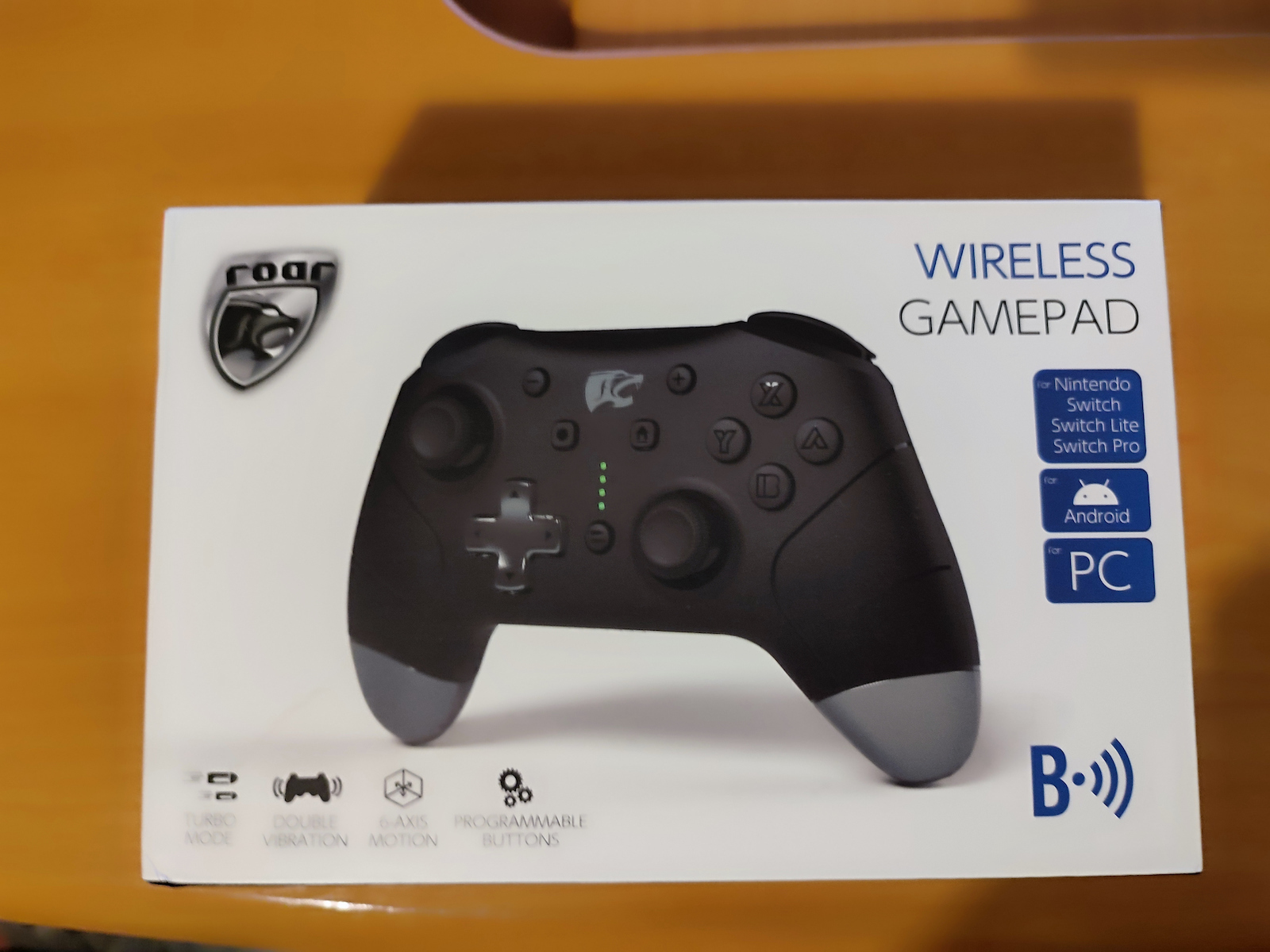
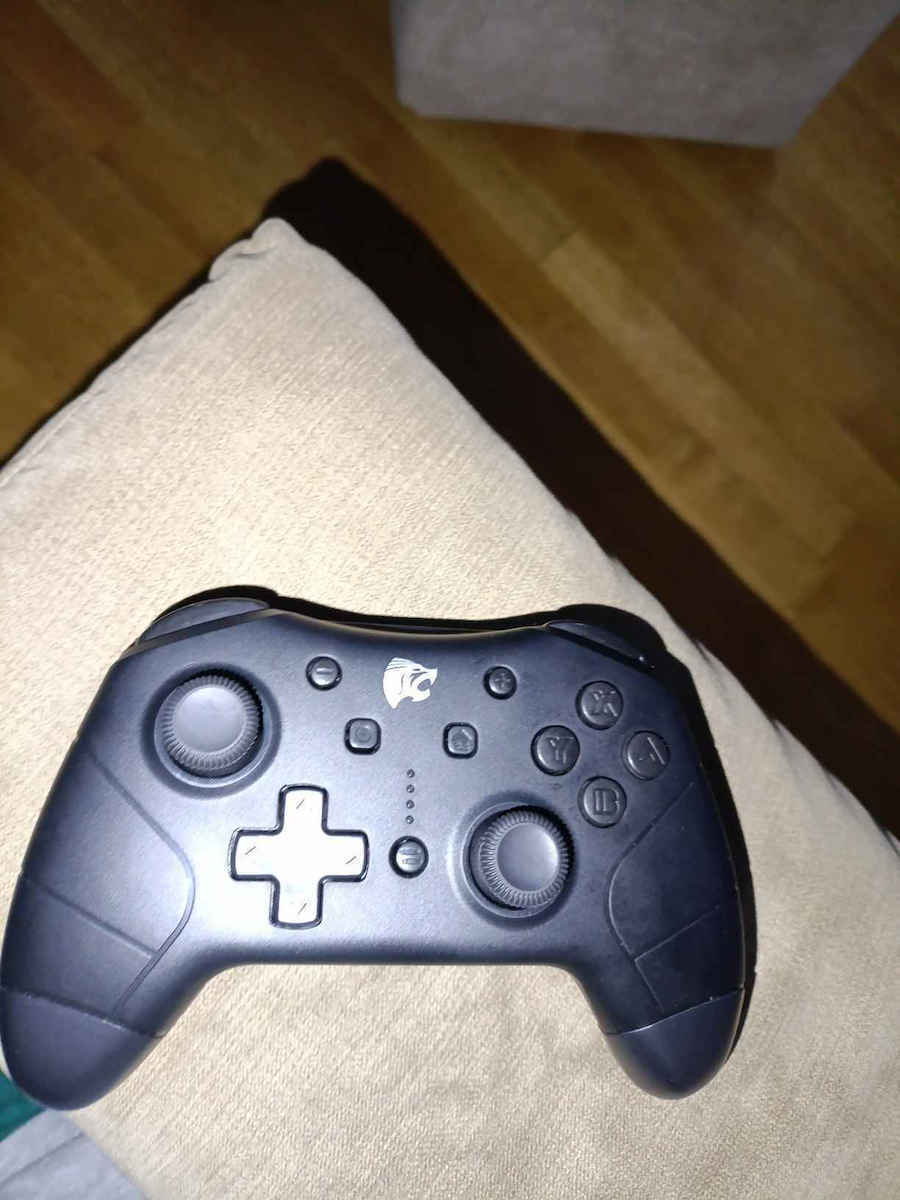
Wireless gamepad by Roar with dual adjustable vibration system, ergonomic design, and amazing anti-slip feeling for endless, comfortable gaming.
It features 4 indicator LEDs, 4 programmable buttons, a 6-axis motion sensor, and 2 high-precision joysticks. It supports Turbo and Macro functions while the rechargeable 600mAh battery provides long autonomy so that charging is not needed during gaming.
Specifications are collected from official manufacturer websites. Please verify the specifications before proceeding with your final purchase. If you notice any problem you can report it here.
I've had it for 3 years, one of the best purchases, the battery easily lasts 10 hours, maybe even more!! It's quite sturdy and comfortable in the hand. If it breaks, I would buy it again without hesitation.
To έχω 3 χρόνια από τις καλυτερες αγορές η μπαταρία κρατάει άνετα 10 ωρες μπορεί και παραπάνω!! Είναι αρκετά στιβαρό και άνετο στο χέρι. Αν μου χαλάσει θα το αγόραζα για πλάκα ξανά.
Not only the product itself, but also its representation in Greece is of "Trash" category. The remote control never worked, the representation is in Thessaloniki, I am in Thessaloniki and they tell me to send it to Athens, from the store where I bought it, so they can send it back to them in Thessaloniki. This costs 22 euros and now I have to pay an additional 10 euros to send it to Athens and circle the... square! Stay away.
Όχι μόνο το ιδιο το προιόν, αλλά και η αντιπροσωπεία του στην Ελλάδα είναι κατηγορίας <<Σκουπίδι>>.
Το χειριστήριο δεν δούλεψε ποτέ, η αντιπροσωπεία βρίσκεται θεσσαλονίκη, εγώ βρίσκομαι Θεσσαλονίκη και μου λένε να το στείλω στην Αθήνα, από το κατάστημα που το πήρα, για να το στείλουν εκείνοι σε αυτούς πάλι στη Θεσσαλονίκη.
Αυτό κοστίζει 22 ευρώ και τώρα πρέπει να πληρώσω επιπλέον 10 ευρω για να το στείλω Αθήνα και να κυκλώσω το … τετράγωνο !
Μακριά.
Very good for the money, it works wired without any issues, it has a problem with the controller charging and Bluetooth connection that I still couldn't identify
Πολύ καλό για τα λευτα του δουλεύει ενσύρματα χωρείς πρόβλημα, έχει πρόβλημα με την φόρτιση του χειριστήριου και σύνδεση με bluetooth που δεν μπόρεσα να προσδιορίσω ακόμα,
Everything is fantastic just like others say. The buttons, the battery even has back triggers! It's a bit heavy but come on, are you a wimp or something? Perfect
Φανταστικά όλα ότι και με λένε οι άλλοι. Τα κουμπιά, η μπαταρία έχει μέχρι και back triggers! Είναι λίγο βαρύ αλλά σιγά ρε τι είσαι φλορος ή κάτι; Τέλειο
I bought 2 for use in emulators and they work perfectly once set up. The Motion Control works just fine.
I use them wirelessly with a Bluetooth Adapter.
The first pairing in Windows 10 is done as described in the Manual for Switch:
1. Hold down "Home" and "Y" until the LEDs start to blink in sequence.
2. Add a new Bluetooth device in Windows. It is recognized as Pro Controller.
To activate it (if it turns off or if the connection is lost due to, for example, restarting the computer), just press "Home" for a moment. The LEDs will blink in sequence for a bit and then the gamepad will connect.
Then we follow the setup instructions according to the software (game, emulator, etc.)
If we have a second controller (like I do), the gamepads will get separate assignments (Player 1, Player 2, etc.) as soon as we open the emulator.
To turn it off, hold down "Home" until the LEDs turn off.
For the price, they seem very good.
Αγόρασα 2 για χρήση σε emulators και δουλεύουν άψογα μόλις ρυθμιστούν. Το Motion Control λειτουργεί μια χαρά.
Τα χρησιμοποιώ ασύρματα με Bluetooth Adapter.
Το πρώτο pairing σε Windows 10 γίνεται όπως γράφει το Manual για Switch:
1. Κράτάμε πατημένο το "Home" και το "Υ" μέχρι να αρχίσουν να αναβοσβήνουν με τη σειρά τα LEDs.
2. Προσθέτουμε νέα συσκευή Bluetooth στα Windows. Αναγνωρίζεται σαν Pro Controller.
Για να το ενεργοποιήσουμε (αν σβήσει ή αν χαθεί η σύνδεση λόγω πχ επανεκκίνησης υπολογιστή), απλώς πατάμε για λίγο το "Home". Τα LEDs θα αναβοσβήσουν με τη σειρά για λίγο και αμέσως μετά το gamepad θα συνδεθεί.
Στη συνέχεια ακολουθούμε τις οδηγίες ρύθμισης ανάλογα με το λογισμικό (παιχνίδι, emulator κλπ)
Αν έχουμε και δεύτερο χειριστήριο (όπως εγώ), τα gamepads θα πάρουν ξεχωριστά assignments (Player 1, Player 2 κλπ) μόλις ανοίξουμε το emulator.
Για να το απενεργοποιήσουμε, κρατάμε πατημένο το "Home" μέχρι να σβήσουν τα LEDs.
Initially, there is a huge problem with the connection, it does not connect via Bluetooth, the roar page is silent about the manual, the scandals are unacceptable for 2024, and it has quite a heavy weight.
The only positive thing is the quality of the materials, which is better than a gamesir T4 pro that I have
Αρχικά τεράστιο πρόβλημα με την σύνδεση, δεν συνδέετε μέσω Bluetooth, η σελιδα της roar αφαντη για το manual, οι σκανδάλες δεν είναι βηματικές απαράδεκτο για το 2024 και αρκετά μεγάλο βάρος.
Το μόνο θετικό είναι η ποιότητα υλικών που είναι καλύτερη απο ένα gamesir T4 pro που έχω
Very nice quality for it's price! I was worried that since it's so cheap, it'd feel very cheap too, but nope! It was way above my expectations! It feels weighty and much better to use than joycons! 100% recommend!
Very nice quality for it's price! I was worried that since it's so cheap, it'd feel very cheap too, but nope! It was way above my expectations! It feels weighty and much better to use than joycons! 100% recommend!
It has issues with connecting to android and PC, with the switch you connect instantly. It has buttons on the back that don't deactivate somehow so when you press them by accident it's annoying. Good battery, good construction, comfortable
έχει θέματα με την σύνδεση σε android και PC, με το switch συνδέετε επιτόπου. Έχει κουμπιά από πίσω που δεν απενεργοποιούνται κάπως οπότε όταν τα πατάς καταλάθος και είναι ενοχλητικό. Καλ΄ή μπαταρία, καλή κατασκευή, άνετο
As a first look, it seems good.
I am sturdy.
The buttons do not stick.
Negatives.
When syncing with nindeto, at first the left joystick did not work (up, down! Right worked. Left did not).
After some effort and without understanding exactly what I did, it was fixed.
As for the battery, I have no opinion.
Now, as for the vibration, it is very strong and the child cannot handle it. It has instructions for 100% 85% 50% 25% 0% but I cannot change the vibration, no matter how many attempts I made.
Σαν πρώτη όψη φαίνεται καλό.
Είμαι στιβαρό.
Τα κουμπιά δεν κολλάνε.
Αρνητικά.
Στον συγχρονισμό με nindeto στην αρχή δεν έπαιζε το αριστερό joystick (πανό, κάτι! Δεξιά έπαιζε. Αριστερά οχι) .
Μετά από κόπο και δίχως να καταλάβω τι ακριβός έκανα έφτιαξε.
Όσο για την μπαταρία δεν έχω άποψη.
Τώρα για τη. Δόνηση είναι πολύ δυνατή και το παιδί δεν την αντέχει. Έχει οδηγίες 100% 85% 50% 25% 0% αλλά δεν μπορώ να αλλάξω την δόνηση με όσες προσπάθειες και αν έκανα.
It's perfect, just delayed in connecting to PC. If you use a Bluetooth adapter/dongle to connect, it needs to be charged and you have to press the Home + Y buttons together for your adapter to read them. Otherwise, it's worth it 1000%! Note that if you haven't enabled "Switch Controllers" in the Steam settings for controllers, it won't recognize it, so just enable it in the Steam settings. Also, in Steam games, it behaves and has inputs like the Switch controller shows. I hope this review helps because I was looking for it too.
Είναι τέλειο απλά καθυστερημένο στην σύνδεση με PC. Εάν χρησιμοποιείται bluetooth adapter/dongle για να συνδεθει θέλει να είναι φορτισμένο και να πατήσετε μαζί τα κουμπιά Home + Y για να τα διαβάσει ο ανταπτοράς σας. Κατά τα άλλα αξίζει με 1000! Σημείωση, εάν δεν έχετε ενεργοποιήσει στο Steam στα settings for controllers να είναι ενεργοποιημένο και για Switch Controllers, δεν θα το αναγνωρίσει, οπότε απλά ενεργοποιήστε το από τα Steam Settings. Επίσης στα παιχνίδια του Steam συμπεριφέρεται και έχει inputs του Switch όπως τα δείχνει και το controller. Ελπίζω να βοηθήσει αυτή η κριτική γιατί και εγώ το έψαχνα.
I have used it on the Switch. Its connection was very easy following the instructions (which are in Greek). It has a sturdy construction.
The negatives are that it doesn't "wake up" the console when it is in the dock, so you have to manually open the switch every time. The programmable buttons on the back seem to stick slightly when pressed.
Overall, it is a good value for money choice for the switch
το εχω χρησιμοποιησει σε Switch. η συνδεση του ηταν πολυ ευκολη ακολουθωντας τις οδηγίες ( οι οποίες είναι στα
ελληνικά ). είναι στιβαρή κατασκευή.
Στα αρνητικά του είναι ότι δε " ξυπνάει" την κονσόλα όταν αυτή είναι στο dock, οπότε πρέπει καθε φορά να ανοίγεις χειροκίνητα το switch.
Τα προγραμματιζόμενα πλήκτρα πίσω φαίνεται να κολλάνε ελαφρά στο πάτημα.
σε γενικές γραμμές είναι αρκετά value for money επιλογή για switch
I bought it in order to play games on the XIAOMI Mi TV Box.
It claims compatibility with Android, which is the operating system of the TV Box.
It recognized it as a device and paired with Bluetooth.
However, it doesn't work with games. It's as if it doesn't exist.
Το αγόρασα προκειμένου να παίξω παιχνίδια στο XIAOMI Mi TV Box.
Αναφέρει συμβατότητα με Android που είναι το λειτουργικό σύστημα του TV Box.
Το είδε στις συσκευές και έκανε pair με Bluetooth .
Στα παιχνίδια όμως δεν λειτουργεί. Είναι σαν να μην υπάρχει.
Very good product, especially for its price. Personally, it has covered me quite well so far. It is beautiful and works great with the switch that I got. Also, make sure to read the instructions before evaluating it. It connects immediately with the switch as soon as you open it, charge it, and then go to the switch's settings, either grip or change controller, and hold down the home and "y" buttons to connect it
πολύ καλό προϊόν ειδικά για τα χρήματα του εμένα προσωπικά με έχει καλύψει αρκετά προς το παρών είναι όμορφο και για το switch που το πήρα εγώ είναι πολύ καλό!!!! Επίσης διαβάστε λίγο τις οδηγίες Πριν αξιολογήσετε συνδέθηκε αμέσως με το switch με το που το ανοίγεις το φορτίζεις και μετά πας στα settings του switch grip or change controller και πατάς παρατεταμένα το home και το "y" και συνδέεται
During the first month, I had reconnection issues on my PC. The betterjoyforcemu helped as much as it could with drivers and reducing excessive vibration intensity, and stabilizing the lost joysticks. Now it doesn't connect anywhere, not even on the Switch. It went to waste, so avoid it immediately
Τον πρώτο μήνα είχα προβλήματα επανασύνδεσης στο PC. Το betterjoyforcemu βοήθησε όσο μπορούσε σε drivers και να μειώσει την υπερβολική ένταση της δόνησης και να σταθεροποιήσει τους μοχλούς που έχαναν. Τώρα δεν συνδέεται πουθενά ούτε στο Switch. Στα σκουπίδια πήγε και να το αποφύγετε άμεσα
As a user who has tried many controllers, I have to say the following:
- Very good construction and sturdy lever (you can tell it's made of good material)
- Connects to the switch without any problem
- A very good controller for its price
- It has settings for vibration intensity, button programming, and the rate of button presses in turbo mode
- It comes with a user manual in Greek
Σαν χρήστης που έχει δοκιμάσει πάρα πολλά χειριστήρια έχω να πω τα εξής :
- Πολύ καλή κατασκευή και στιβαρός μοχλός(καταλαβαίνεις ότι είναι από καλό υλικό)
- Συνδέετε με το switch χωρίς κανένα πρόβλημα
- Πολύ καλό χειριστήριο για τα λεφτά του
- Έχει ρυθμίσεις για την ένταση της δόνησης, για τον προγραμματισμό τον κουμπιών, τον ρυθμό πατημάτων στο turbo mode
- Έχει εγχειρίδιο χρήσης στα ελληνικά
We have used it for a few days and so far it shows excellent performance. It has a very clear manual for connecting to all supported devices, adjusting the vibration intensity, and programming buttons. One small drawback is that if the controller is turned off, the settings are lost (as mentioned in the manual) and need to be reconfigured. It is used for Nintendo Switch!
Το έχουμε χρησιμοποιήσει λίγες μέρες και προς το παρόν δείχνει άριστο. Έχει πολύ ξεκάθαρο εγχειρίδιο, για σύνδεση με όλες τις υποστηριζόμενες συσκευές, για να ρυθμίσετε την ένταση της δόνησης καθώς και τα προγραμματιζόμενα κουμπιά. Ένα μικρό αρνητικό είναι ότι αν απενεργοποιηθεί το χειριστήριο η ρύθμιση χάνετε (το αναφέρει και στο εγχειρίδιο) και πρέπει να γίνει εκ νέου. Χρησιμοποιείται σε Nitendo Switch!
It does not connect wirelessly to Windows 11, for others I don't know... In Counter-Strike, which I tried, only the joystick moves very fast, and to move slowly you have to move it 0.5 millimeters... then suddenly it goes fast... meaning it is not smooth, it is not suitable for gaming... (with the cable because it does not connect wirelessly).
The instructions for wireless connection to a PC are... Connect it with the USB...
If you are going to get it, throw your money in the trash, at least you will have the experience of doing something foolish... With this controller, you will have nothing.
ΔΕΝ συνδέεται ασύρματα στα windows 11, για άλλα δεν ξέρω... στο counter strike που δοκίμασα μόνο ο μοχλός κινείται πολύ γρήγορα, και για να κινηθεί αργά πρέπει να το κουνήσεις 0,5 χιλιοστα.... μετά ξαφνικά πάει γρήγορα.... δλδ δεν είναι ομαλό δεν κάνει για παιχνίδι.... (με το καλώδιο γτ ασύρματα δεν συνδέεται.
Οι οδηγίες χρήσεις για την ασύρματη σύνδεση σε pc είναι.... Συνδέστε το με το usb...
Αν είναι να το πάρετε, πετάξτε τα λεφτά σας στα σκουπίδια, τουλάχιστον θα έχετε την εμπειρία πως είναι να κάνεις μια ανοησία.... Με το χειριστήριο αυτό δεν θα έχετε τπτ.
The only downside I can find in this controller is that the vibration has an excessively strong intensity to the point of being unbearable. I don't know if there is any software that allows you to adjust it, but it definitely makes handling uncomfortable in games that extensively use it. Other than that, it is a sturdy and high-quality construction with great value for money.
Το μόνο μείον που μπορώ να βρω στο χειριστήριο αυτό είναι ότι η δόνηση έχει υπερβολικά δυνατή ένταση σε σημείο να γίνεται αφόρητη. Δεν ξέρω αν υπάρχει κάποιο software με βάση το οποίο να μπορείς να τη ρυθμίσεις, κάνει πάντως άβολο το χειρισμό σε παιχνίδια που την χρησιμοποιούν εκτεταμένα. Κατά τα άλλα πρόκειται για στιβαρή και ποιοτική κατασκευή και πολύ καλό value for money.
Positives:
- Solid construction that doesn't give you a fake feeling.
- Quick recognition on Windows 10 with USB.
- Bluetooth connection to PC is possible as long as you use betterJoyForCemu or something similar to map the gamepad to a virtual one, otherwise it doesn't respond to any button. It doesn't create any problem, so it's a positive.
Negatives:
- The analog sticks need to be "warmed up" before use because at first the PC doesn't recognize all the points (360°).
- Both controllers, after a while, enter a mode where A becomes B, B becomes A, Y becomes X, and X becomes Y. The instructions say that to reset it, you press '-' for 7 seconds, but it doesn't work.
- The programmable buttons are positioned in a way that, at least for me, forces me to change the way I hold the controller to avoid pressing them accidentally.
- The programmable buttons, when assigning only one button, for example r1, are only pressed once and then released even though I keep it pressed. The solution I accidentally found is to program the adjacent button as well for the same function (r1) and then unprogram it. This results in only 2 out of the 4 buttons being useful to me.
Αγόρασα 2 χειριστήρια για παιχνίδι σε PC.
Θετικά:
- στιβαρή κατασκευή που δεν σου δίνει την αίσθηση του ψεύτικου.
- γρήγορη αναγνώριση σε windows 10 με usb.
- Η σύνδεση με Bluetooth σε PC είναι εφικτή αρκεί να χρησιμοποιήσετε το betterJoyForCemu ή κάτι παρόμοιο για αντιστοίχιση του gamepad με κάποιο virtual, αλλιώς δεν ανταποκρίνεται σε κανένα κουμπί. δεν δημιουργεί κάποιο πρόβλημα οπότε είναι στα θετικά.
Αρνητικά:
- Τα αναλογικά θέλουν 'ζέσταμα' πριν τη χρήση γιατί στην αρχή το PC δεν αναγνωρίζει όλα τα σημεία (360°).
- Και τα δύο χειριστήρια μετά από λίγη ώρα μπαίνουν σε μία λειτουργία που το το A γίνεται B, το B γίνεται A, το Y γίνεται X και το X γίνεται Y. Οι οδηγίες λένε πως για να επανέλθουν πιέζουμε το '-' για 7 δευτερόλεπτα, αλλά δεν δουλεύει.
- Τα προγραμματιζόμενα κουμπιά είναι σε σημείο που εμένα τουλάχιστον με αναγκάζουν να αλλάξω τον τρόπο που κρατάω το χειριστήριο για να μην τα ποέζω καταλάθος.
- Τα προγραμματιζόμενα πλήκτρα βάζοντας μόνο ένα πλήτρο π.χ. r1 , πιέζεται μόνο μία φορά και μετά αποδεσμεύεται παρόλο που το κρατάω πατημένο. Η λύση που βρήκα κατά τύχη είναι να προγραμματίζω και το διπλανό κουμπί για το ίδιο πλήκτρο (r1) και μετά να το ξεπρογραμματίζω. Αυτό έχει ως αποτέλεσμα να μου είναι χρήσιμα μόνο τα 2 από τα 4.
As a product, it is very high quality, the instruction book is in English and Greek, the features and characteristics are complete. Many buttons and capabilities, zoom, volume, turbo, vibration, good grip, nice feeling in the hand and in the game, with immediate response. It connects wirelessly via Bluetooth to the mobile (Xiaomi), but on the tablet for example (Lenovo Yoga), even though I connected it after a restart I did, it ultimately does not respond at all. It's like it doesn't exist. It works fine wired on the Xiaomi TV box, but it doesn't even see it wirelessly. I received the Mecool TV Box today (which is awesome by the way), and while it connected automatically and recognizes it, it also doesn't work wirelessly, only wired. Unfortunately, I don't know if I will find a solution. If I find something, I will update. If any friend knows what's going on, please inform me.
Σαν προϊόν είναι πολύ ποιοτικό, το βιβλίο οδηγιών στα Αγγλικά και τα Ελληνικά, οι δυνατότητες και τα χαρακτηριστικά πλήρη. Πολλά κουμπιά και δυνατότητες, zoom, volume, turbo, δόνηση, καλά πατήματα, ωραία αίσθηση στο χέρι και στο παιχνίδι, με άμεση ανταπόκριση. Συνδέεται ασύρματα με το Bluetooth στο κινητό (Xiaomi), αλλά στο τάμπλετ πχ (Lenovo Yoga), ενώ συνδέεται μετά από επανεκκίνηση που έκανα, τελικά δεν ανταποκρίνεται με τίποτα. Σαν να μην υπάρχει. Στο tv box της Xiaomi παίζει μια χαρά ενσύρματα, αλλά ασύρματα δεν το βλέπει καν. Παρέλαβα σήμερα και το Mecool TV Box (φοβερό παρεπιπτόντως), και ενώ συνδέθηκε αυτόματα και το βλέπει, επίσης δεν παίζει ασύρματα, παρά μόνο ενσύρματα. Δεν ξέρω αν θα βρω λύση δυστυχώς. Αν βρω κάτι θα ενημερώσω. Αν ξέρει κάποιος φίλος τι γίνεται, ας ενημερώσει.
Very nice controller. However, it does not have a headphone output. Sturdy construction. Smaller than the Xbox controller... It has a USB cable to type C without the adapter... It works perfectly with the switch! I bought a second one for double. It also has a user manual in Greek. I haven't bought an aftermarket controller in maybe 20 years. I'm amazed by the ROAR :D
πολυ ωραιο χειριστηριο.ομως δεν εχει εξοδο για ακουστικα.στιβαρη κατασκευη.μικροτερο απο το χειριστηριο του xbox...εχει καλωδιο usb σε type c χωρις ομως τον μετασχηματιστη....με το switch λειτουργει αψογα!πηρα και δευτερο για διπλο.Eχει και εγχειριδιο χρησης στα Ελληνικά.εχω να παρω χειριστηριο aftermarket μπορει και 20ετια.με το ROAR Εχω παθει πλακα ... :D
I just received it. Guys, the construction and durability of it are truly incredible. Tremendous quality for its price, I didn't expect it. The issue is that it doesn't connect to my computer at all. I searched for a solution on YouTube. In the instructions it has in Greek, the only way it says is simply to connect the cable to the computer and it will automatically recognize it. While it does recognize it, not with the name it tells me in the instructions, with its own random name, it doesn't work... I will try on my brother's computer to see if maybe I did something stupid. I hope to figure it out before returning it.
...........................
Finally, I found the problem, it was much simpler than I expected. My computer just needed a restart for some reason. It works perfectly. Both in Assassin's Creed Valhalla and Horizon Zero Dawn. It also has adjustable buttons on the back.
Μόλις το παρέλαβα. Παιδιά πραγματικά είναι απίστευτη η κατασκευή του και η στιβαρότητα του. Τρομερή ποιότητα για τα λεφτά του δεν το περίμενα. Το θέμα είναι πως τον υπολογιστή μου δεν συνδέεται με τίποτα. Έψαξα να βρω τρόπος στο YouTube. Στις οδηγίες που έχει στα ελληνικά ο μόνος τρόπος που λέει είναι απλά να συνδέσω το καλώδιο στον υπολογιστή και θα το αναγνωρίσει αυτόματα. Ενώ το αναγνωρίζει όχι βέβαια με το όνομα που μου λέει στις οδηγίες με ένα δικό του ξέμπαρκο, δεν δουλεύει... Θα προσπαθήσω και στον υπολογιστή του αδερφού μου να δω μήπως έχω κάνει εγώ κάποια βλακεία. Ελπίζω να βρω άκρη πριν το επιστρέψω.
...........................
Τελικά το βρήκα το πρόβλημα ήταν πολύ πιο απλά από ότι περίμενα. Απλά χρειάστηκε επανεκκίνηση ο υπολογιστής μου για κάποιο λόγο. Δουλεύει άψογα. Και στο assassin's creed valhalla και στο horizon zero dawn. Έχει και ρυθμιζόμενα πλήκτρα από την πίσω πλευρά.
I've had it for 3 years, one of the best purchases, the battery easily lasts 10 hours, maybe even more!! It's quite sturdy and comfortable in the hand. If it breaks, I would buy it again without hesitation.
To έχω 3 χρόνια από τις καλυτερες αγορές η μπαταρία κρατάει άνετα 10 ωρες μπορεί και παραπάνω!! Είναι αρκετά στιβαρό και άνετο στο χέρι. Αν μου χαλάσει θα το αγόραζα για πλάκα ξανά.
Not only the product itself, but also its representation in Greece is of "Trash" category. The remote control never worked, the representation is in Thessaloniki, I am in Thessaloniki and they tell me to send it to Athens, from the store where I bought it, so they can send it back to them in Thessaloniki. This costs 22 euros and now I have to pay an additional 10 euros to send it to Athens and circle the... square! Stay away.
Όχι μόνο το ιδιο το προιόν, αλλά και η αντιπροσωπεία του στην Ελλάδα είναι κατηγορίας <<Σκουπίδι>>.
Το χειριστήριο δεν δούλεψε ποτέ, η αντιπροσωπεία βρίσκεται θεσσαλονίκη, εγώ βρίσκομαι Θεσσαλονίκη και μου λένε να το στείλω στην Αθήνα, από το κατάστημα που το πήρα, για να το στείλουν εκείνοι σε αυτούς πάλι στη Θεσσαλονίκη.
Αυτό κοστίζει 22 ευρώ και τώρα πρέπει να πληρώσω επιπλέον 10 ευρω για να το στείλω Αθήνα και να κυκλώσω το … τετράγωνο !
Μακριά.
Very good for the money, it works wired without any issues, it has a problem with the controller charging and Bluetooth connection that I still couldn't identify
Πολύ καλό για τα λευτα του δουλεύει ενσύρματα χωρείς πρόβλημα, έχει πρόβλημα με την φόρτιση του χειριστήριου και σύνδεση με bluetooth που δεν μπόρεσα να προσδιορίσω ακόμα,
Everything is fantastic just like others say. The buttons, the battery even has back triggers! It's a bit heavy but come on, are you a wimp or something? Perfect
Φανταστικά όλα ότι και με λένε οι άλλοι. Τα κουμπιά, η μπαταρία έχει μέχρι και back triggers! Είναι λίγο βαρύ αλλά σιγά ρε τι είσαι φλορος ή κάτι; Τέλειο
I bought 2 for use in emulators and they work perfectly once set up. The Motion Control works just fine.
I use them wirelessly with a Bluetooth Adapter.
The first pairing in Windows 10 is done as described in the Manual for Switch:
1. Hold down "Home" and "Y" until the LEDs start to blink in sequence.
2. Add a new Bluetooth device in Windows. It is recognized as Pro Controller.
To activate it (if it turns off or if the connection is lost due to, for example, restarting the computer), just press "Home" for a moment. The LEDs will blink in sequence for a bit and then the gamepad will connect.
Then we follow the setup instructions according to the software (game, emulator, etc.)
If we have a second controller (like I do), the gamepads will get separate assignments (Player 1, Player 2, etc.) as soon as we open the emulator.
To turn it off, hold down "Home" until the LEDs turn off.
For the price, they seem very good.
Αγόρασα 2 για χρήση σε emulators και δουλεύουν άψογα μόλις ρυθμιστούν. Το Motion Control λειτουργεί μια χαρά.
Τα χρησιμοποιώ ασύρματα με Bluetooth Adapter.
Το πρώτο pairing σε Windows 10 γίνεται όπως γράφει το Manual για Switch:
1. Κράτάμε πατημένο το "Home" και το "Υ" μέχρι να αρχίσουν να αναβοσβήνουν με τη σειρά τα LEDs.
2. Προσθέτουμε νέα συσκευή Bluetooth στα Windows. Αναγνωρίζεται σαν Pro Controller.
Για να το ενεργοποιήσουμε (αν σβήσει ή αν χαθεί η σύνδεση λόγω πχ επανεκκίνησης υπολογιστή), απλώς πατάμε για λίγο το "Home". Τα LEDs θα αναβοσβήσουν με τη σειρά για λίγο και αμέσως μετά το gamepad θα συνδεθεί.
Στη συνέχεια ακολουθούμε τις οδηγίες ρύθμισης ανάλογα με το λογισμικό (παιχνίδι, emulator κλπ)
Αν έχουμε και δεύτερο χειριστήριο (όπως εγώ), τα gamepads θα πάρουν ξεχωριστά assignments (Player 1, Player 2 κλπ) μόλις ανοίξουμε το emulator.
Για να το απενεργοποιήσουμε, κρατάμε πατημένο το "Home" μέχρι να σβήσουν τα LEDs.
Wireless gamepad by Roar with dual adjustable vibration system, ergonomic design, and amazing anti-slip feeling for endless, comfortable gaming.
It features 4 indicator LEDs, 4 programmable buttons, a 6-axis motion sensor, and 2 high-precision joysticks. It supports Turbo and Macro functions while the rechargeable 600mAh battery provides long autonomy so that charging is not needed during gaming.
Specifications are collected from official manufacturer websites. Please verify the specifications before proceeding with your final purchase. If you notice any problem you can report it here.
I've had it for 3 years, one of the best purchases, the battery easily lasts 10 hours, maybe even more!! It's quite sturdy and comfortable in the hand. If it breaks, I would buy it again without hesitation.
To έχω 3 χρόνια από τις καλυτερες αγορές η μπαταρία κρατάει άνετα 10 ωρες μπορεί και παραπάνω!! Είναι αρκετά στιβαρό και άνετο στο χέρι. Αν μου χαλάσει θα το αγόραζα για πλάκα ξανά.
Not only the product itself, but also its representation in Greece is of "Trash" category. The remote control never worked, the representation is in Thessaloniki, I am in Thessaloniki and they tell me to send it to Athens, from the store where I bought it, so they can send it back to them in Thessaloniki. This costs 22 euros and now I have to pay an additional 10 euros to send it to Athens and circle the... square! Stay away.
Όχι μόνο το ιδιο το προιόν, αλλά και η αντιπροσωπεία του στην Ελλάδα είναι κατηγορίας <<Σκουπίδι>>.
Το χειριστήριο δεν δούλεψε ποτέ, η αντιπροσωπεία βρίσκεται θεσσαλονίκη, εγώ βρίσκομαι Θεσσαλονίκη και μου λένε να το στείλω στην Αθήνα, από το κατάστημα που το πήρα, για να το στείλουν εκείνοι σε αυτούς πάλι στη Θεσσαλονίκη.
Αυτό κοστίζει 22 ευρώ και τώρα πρέπει να πληρώσω επιπλέον 10 ευρω για να το στείλω Αθήνα και να κυκλώσω το … τετράγωνο !
Μακριά.
Very good for the money, it works wired without any issues, it has a problem with the controller charging and Bluetooth connection that I still couldn't identify
Πολύ καλό για τα λευτα του δουλεύει ενσύρματα χωρείς πρόβλημα, έχει πρόβλημα με την φόρτιση του χειριστήριου και σύνδεση με bluetooth που δεν μπόρεσα να προσδιορίσω ακόμα,
Everything is fantastic just like others say. The buttons, the battery even has back triggers! It's a bit heavy but come on, are you a wimp or something? Perfect
Φανταστικά όλα ότι και με λένε οι άλλοι. Τα κουμπιά, η μπαταρία έχει μέχρι και back triggers! Είναι λίγο βαρύ αλλά σιγά ρε τι είσαι φλορος ή κάτι; Τέλειο
I bought 2 for use in emulators and they work perfectly once set up. The Motion Control works just fine.
I use them wirelessly with a Bluetooth Adapter.
The first pairing in Windows 10 is done as described in the Manual for Switch:
1. Hold down "Home" and "Y" until the LEDs start to blink in sequence.
2. Add a new Bluetooth device in Windows. It is recognized as Pro Controller.
To activate it (if it turns off or if the connection is lost due to, for example, restarting the computer), just press "Home" for a moment. The LEDs will blink in sequence for a bit and then the gamepad will connect.
Then we follow the setup instructions according to the software (game, emulator, etc.)
If we have a second controller (like I do), the gamepads will get separate assignments (Player 1, Player 2, etc.) as soon as we open the emulator.
To turn it off, hold down "Home" until the LEDs turn off.
For the price, they seem very good.
Αγόρασα 2 για χρήση σε emulators και δουλεύουν άψογα μόλις ρυθμιστούν. Το Motion Control λειτουργεί μια χαρά.
Τα χρησιμοποιώ ασύρματα με Bluetooth Adapter.
Το πρώτο pairing σε Windows 10 γίνεται όπως γράφει το Manual για Switch:
1. Κράτάμε πατημένο το "Home" και το "Υ" μέχρι να αρχίσουν να αναβοσβήνουν με τη σειρά τα LEDs.
2. Προσθέτουμε νέα συσκευή Bluetooth στα Windows. Αναγνωρίζεται σαν Pro Controller.
Για να το ενεργοποιήσουμε (αν σβήσει ή αν χαθεί η σύνδεση λόγω πχ επανεκκίνησης υπολογιστή), απλώς πατάμε για λίγο το "Home". Τα LEDs θα αναβοσβήσουν με τη σειρά για λίγο και αμέσως μετά το gamepad θα συνδεθεί.
Στη συνέχεια ακολουθούμε τις οδηγίες ρύθμισης ανάλογα με το λογισμικό (παιχνίδι, emulator κλπ)
Αν έχουμε και δεύτερο χειριστήριο (όπως εγώ), τα gamepads θα πάρουν ξεχωριστά assignments (Player 1, Player 2 κλπ) μόλις ανοίξουμε το emulator.
Για να το απενεργοποιήσουμε, κρατάμε πατημένο το "Home" μέχρι να σβήσουν τα LEDs.
Initially, there is a huge problem with the connection, it does not connect via Bluetooth, the roar page is silent about the manual, the scandals are unacceptable for 2024, and it has quite a heavy weight.
The only positive thing is the quality of the materials, which is better than a gamesir T4 pro that I have
Αρχικά τεράστιο πρόβλημα με την σύνδεση, δεν συνδέετε μέσω Bluetooth, η σελιδα της roar αφαντη για το manual, οι σκανδάλες δεν είναι βηματικές απαράδεκτο για το 2024 και αρκετά μεγάλο βάρος.
Το μόνο θετικό είναι η ποιότητα υλικών που είναι καλύτερη απο ένα gamesir T4 pro που έχω
Very nice quality for it's price! I was worried that since it's so cheap, it'd feel very cheap too, but nope! It was way above my expectations! It feels weighty and much better to use than joycons! 100% recommend!
Very nice quality for it's price! I was worried that since it's so cheap, it'd feel very cheap too, but nope! It was way above my expectations! It feels weighty and much better to use than joycons! 100% recommend!
It has issues with connecting to android and PC, with the switch you connect instantly. It has buttons on the back that don't deactivate somehow so when you press them by accident it's annoying. Good battery, good construction, comfortable
έχει θέματα με την σύνδεση σε android και PC, με το switch συνδέετε επιτόπου. Έχει κουμπιά από πίσω που δεν απενεργοποιούνται κάπως οπότε όταν τα πατάς καταλάθος και είναι ενοχλητικό. Καλ΄ή μπαταρία, καλή κατασκευή, άνετο
As a first look, it seems good.
I am sturdy.
The buttons do not stick.
Negatives.
When syncing with nindeto, at first the left joystick did not work (up, down! Right worked. Left did not).
After some effort and without understanding exactly what I did, it was fixed.
As for the battery, I have no opinion.
Now, as for the vibration, it is very strong and the child cannot handle it. It has instructions for 100% 85% 50% 25% 0% but I cannot change the vibration, no matter how many attempts I made.
Σαν πρώτη όψη φαίνεται καλό.
Είμαι στιβαρό.
Τα κουμπιά δεν κολλάνε.
Αρνητικά.
Στον συγχρονισμό με nindeto στην αρχή δεν έπαιζε το αριστερό joystick (πανό, κάτι! Δεξιά έπαιζε. Αριστερά οχι) .
Μετά από κόπο και δίχως να καταλάβω τι ακριβός έκανα έφτιαξε.
Όσο για την μπαταρία δεν έχω άποψη.
Τώρα για τη. Δόνηση είναι πολύ δυνατή και το παιδί δεν την αντέχει. Έχει οδηγίες 100% 85% 50% 25% 0% αλλά δεν μπορώ να αλλάξω την δόνηση με όσες προσπάθειες και αν έκανα.
It's perfect, just delayed in connecting to PC. If you use a Bluetooth adapter/dongle to connect, it needs to be charged and you have to press the Home + Y buttons together for your adapter to read them. Otherwise, it's worth it 1000%! Note that if you haven't enabled "Switch Controllers" in the Steam settings for controllers, it won't recognize it, so just enable it in the Steam settings. Also, in Steam games, it behaves and has inputs like the Switch controller shows. I hope this review helps because I was looking for it too.
Είναι τέλειο απλά καθυστερημένο στην σύνδεση με PC. Εάν χρησιμοποιείται bluetooth adapter/dongle για να συνδεθει θέλει να είναι φορτισμένο και να πατήσετε μαζί τα κουμπιά Home + Y για να τα διαβάσει ο ανταπτοράς σας. Κατά τα άλλα αξίζει με 1000! Σημείωση, εάν δεν έχετε ενεργοποιήσει στο Steam στα settings for controllers να είναι ενεργοποιημένο και για Switch Controllers, δεν θα το αναγνωρίσει, οπότε απλά ενεργοποιήστε το από τα Steam Settings. Επίσης στα παιχνίδια του Steam συμπεριφέρεται και έχει inputs του Switch όπως τα δείχνει και το controller. Ελπίζω να βοηθήσει αυτή η κριτική γιατί και εγώ το έψαχνα.
I have used it on the Switch. Its connection was very easy following the instructions (which are in Greek). It has a sturdy construction.
The negatives are that it doesn't "wake up" the console when it is in the dock, so you have to manually open the switch every time. The programmable buttons on the back seem to stick slightly when pressed.
Overall, it is a good value for money choice for the switch
το εχω χρησιμοποιησει σε Switch. η συνδεση του ηταν πολυ ευκολη ακολουθωντας τις οδηγίες ( οι οποίες είναι στα
ελληνικά ). είναι στιβαρή κατασκευή.
Στα αρνητικά του είναι ότι δε " ξυπνάει" την κονσόλα όταν αυτή είναι στο dock, οπότε πρέπει καθε φορά να ανοίγεις χειροκίνητα το switch.
Τα προγραμματιζόμενα πλήκτρα πίσω φαίνεται να κολλάνε ελαφρά στο πάτημα.
σε γενικές γραμμές είναι αρκετά value for money επιλογή για switch
I bought it in order to play games on the XIAOMI Mi TV Box.
It claims compatibility with Android, which is the operating system of the TV Box.
It recognized it as a device and paired with Bluetooth.
However, it doesn't work with games. It's as if it doesn't exist.
Το αγόρασα προκειμένου να παίξω παιχνίδια στο XIAOMI Mi TV Box.
Αναφέρει συμβατότητα με Android που είναι το λειτουργικό σύστημα του TV Box.
Το είδε στις συσκευές και έκανε pair με Bluetooth .
Στα παιχνίδια όμως δεν λειτουργεί. Είναι σαν να μην υπάρχει.
Very good product, especially for its price. Personally, it has covered me quite well so far. It is beautiful and works great with the switch that I got. Also, make sure to read the instructions before evaluating it. It connects immediately with the switch as soon as you open it, charge it, and then go to the switch's settings, either grip or change controller, and hold down the home and "y" buttons to connect it
πολύ καλό προϊόν ειδικά για τα χρήματα του εμένα προσωπικά με έχει καλύψει αρκετά προς το παρών είναι όμορφο και για το switch που το πήρα εγώ είναι πολύ καλό!!!! Επίσης διαβάστε λίγο τις οδηγίες Πριν αξιολογήσετε συνδέθηκε αμέσως με το switch με το που το ανοίγεις το φορτίζεις και μετά πας στα settings του switch grip or change controller και πατάς παρατεταμένα το home και το "y" και συνδέεται
During the first month, I had reconnection issues on my PC. The betterjoyforcemu helped as much as it could with drivers and reducing excessive vibration intensity, and stabilizing the lost joysticks. Now it doesn't connect anywhere, not even on the Switch. It went to waste, so avoid it immediately
Τον πρώτο μήνα είχα προβλήματα επανασύνδεσης στο PC. Το betterjoyforcemu βοήθησε όσο μπορούσε σε drivers και να μειώσει την υπερβολική ένταση της δόνησης και να σταθεροποιήσει τους μοχλούς που έχαναν. Τώρα δεν συνδέεται πουθενά ούτε στο Switch. Στα σκουπίδια πήγε και να το αποφύγετε άμεσα
As a user who has tried many controllers, I have to say the following:
- Very good construction and sturdy lever (you can tell it's made of good material)
- Connects to the switch without any problem
- A very good controller for its price
- It has settings for vibration intensity, button programming, and the rate of button presses in turbo mode
- It comes with a user manual in Greek
Σαν χρήστης που έχει δοκιμάσει πάρα πολλά χειριστήρια έχω να πω τα εξής :
- Πολύ καλή κατασκευή και στιβαρός μοχλός(καταλαβαίνεις ότι είναι από καλό υλικό)
- Συνδέετε με το switch χωρίς κανένα πρόβλημα
- Πολύ καλό χειριστήριο για τα λεφτά του
- Έχει ρυθμίσεις για την ένταση της δόνησης, για τον προγραμματισμό τον κουμπιών, τον ρυθμό πατημάτων στο turbo mode
- Έχει εγχειρίδιο χρήσης στα ελληνικά
We have used it for a few days and so far it shows excellent performance. It has a very clear manual for connecting to all supported devices, adjusting the vibration intensity, and programming buttons. One small drawback is that if the controller is turned off, the settings are lost (as mentioned in the manual) and need to be reconfigured. It is used for Nintendo Switch!
Το έχουμε χρησιμοποιήσει λίγες μέρες και προς το παρόν δείχνει άριστο. Έχει πολύ ξεκάθαρο εγχειρίδιο, για σύνδεση με όλες τις υποστηριζόμενες συσκευές, για να ρυθμίσετε την ένταση της δόνησης καθώς και τα προγραμματιζόμενα κουμπιά. Ένα μικρό αρνητικό είναι ότι αν απενεργοποιηθεί το χειριστήριο η ρύθμιση χάνετε (το αναφέρει και στο εγχειρίδιο) και πρέπει να γίνει εκ νέου. Χρησιμοποιείται σε Nitendo Switch!
It does not connect wirelessly to Windows 11, for others I don't know... In Counter-Strike, which I tried, only the joystick moves very fast, and to move slowly you have to move it 0.5 millimeters... then suddenly it goes fast... meaning it is not smooth, it is not suitable for gaming... (with the cable because it does not connect wirelessly).
The instructions for wireless connection to a PC are... Connect it with the USB...
If you are going to get it, throw your money in the trash, at least you will have the experience of doing something foolish... With this controller, you will have nothing.
ΔΕΝ συνδέεται ασύρματα στα windows 11, για άλλα δεν ξέρω... στο counter strike που δοκίμασα μόνο ο μοχλός κινείται πολύ γρήγορα, και για να κινηθεί αργά πρέπει να το κουνήσεις 0,5 χιλιοστα.... μετά ξαφνικά πάει γρήγορα.... δλδ δεν είναι ομαλό δεν κάνει για παιχνίδι.... (με το καλώδιο γτ ασύρματα δεν συνδέεται.
Οι οδηγίες χρήσεις για την ασύρματη σύνδεση σε pc είναι.... Συνδέστε το με το usb...
Αν είναι να το πάρετε, πετάξτε τα λεφτά σας στα σκουπίδια, τουλάχιστον θα έχετε την εμπειρία πως είναι να κάνεις μια ανοησία.... Με το χειριστήριο αυτό δεν θα έχετε τπτ.
The only downside I can find in this controller is that the vibration has an excessively strong intensity to the point of being unbearable. I don't know if there is any software that allows you to adjust it, but it definitely makes handling uncomfortable in games that extensively use it. Other than that, it is a sturdy and high-quality construction with great value for money.
Το μόνο μείον που μπορώ να βρω στο χειριστήριο αυτό είναι ότι η δόνηση έχει υπερβολικά δυνατή ένταση σε σημείο να γίνεται αφόρητη. Δεν ξέρω αν υπάρχει κάποιο software με βάση το οποίο να μπορείς να τη ρυθμίσεις, κάνει πάντως άβολο το χειρισμό σε παιχνίδια που την χρησιμοποιούν εκτεταμένα. Κατά τα άλλα πρόκειται για στιβαρή και ποιοτική κατασκευή και πολύ καλό value for money.
Positives:
- Solid construction that doesn't give you a fake feeling.
- Quick recognition on Windows 10 with USB.
- Bluetooth connection to PC is possible as long as you use betterJoyForCemu or something similar to map the gamepad to a virtual one, otherwise it doesn't respond to any button. It doesn't create any problem, so it's a positive.
Negatives:
- The analog sticks need to be "warmed up" before use because at first the PC doesn't recognize all the points (360°).
- Both controllers, after a while, enter a mode where A becomes B, B becomes A, Y becomes X, and X becomes Y. The instructions say that to reset it, you press '-' for 7 seconds, but it doesn't work.
- The programmable buttons are positioned in a way that, at least for me, forces me to change the way I hold the controller to avoid pressing them accidentally.
- The programmable buttons, when assigning only one button, for example r1, are only pressed once and then released even though I keep it pressed. The solution I accidentally found is to program the adjacent button as well for the same function (r1) and then unprogram it. This results in only 2 out of the 4 buttons being useful to me.
Αγόρασα 2 χειριστήρια για παιχνίδι σε PC.
Θετικά:
- στιβαρή κατασκευή που δεν σου δίνει την αίσθηση του ψεύτικου.
- γρήγορη αναγνώριση σε windows 10 με usb.
- Η σύνδεση με Bluetooth σε PC είναι εφικτή αρκεί να χρησιμοποιήσετε το betterJoyForCemu ή κάτι παρόμοιο για αντιστοίχιση του gamepad με κάποιο virtual, αλλιώς δεν ανταποκρίνεται σε κανένα κουμπί. δεν δημιουργεί κάποιο πρόβλημα οπότε είναι στα θετικά.
Αρνητικά:
- Τα αναλογικά θέλουν 'ζέσταμα' πριν τη χρήση γιατί στην αρχή το PC δεν αναγνωρίζει όλα τα σημεία (360°).
- Και τα δύο χειριστήρια μετά από λίγη ώρα μπαίνουν σε μία λειτουργία που το το A γίνεται B, το B γίνεται A, το Y γίνεται X και το X γίνεται Y. Οι οδηγίες λένε πως για να επανέλθουν πιέζουμε το '-' για 7 δευτερόλεπτα, αλλά δεν δουλεύει.
- Τα προγραμματιζόμενα κουμπιά είναι σε σημείο που εμένα τουλάχιστον με αναγκάζουν να αλλάξω τον τρόπο που κρατάω το χειριστήριο για να μην τα ποέζω καταλάθος.
- Τα προγραμματιζόμενα πλήκτρα βάζοντας μόνο ένα πλήτρο π.χ. r1 , πιέζεται μόνο μία φορά και μετά αποδεσμεύεται παρόλο που το κρατάω πατημένο. Η λύση που βρήκα κατά τύχη είναι να προγραμματίζω και το διπλανό κουμπί για το ίδιο πλήκτρο (r1) και μετά να το ξεπρογραμματίζω. Αυτό έχει ως αποτέλεσμα να μου είναι χρήσιμα μόνο τα 2 από τα 4.
As a product, it is very high quality, the instruction book is in English and Greek, the features and characteristics are complete. Many buttons and capabilities, zoom, volume, turbo, vibration, good grip, nice feeling in the hand and in the game, with immediate response. It connects wirelessly via Bluetooth to the mobile (Xiaomi), but on the tablet for example (Lenovo Yoga), even though I connected it after a restart I did, it ultimately does not respond at all. It's like it doesn't exist. It works fine wired on the Xiaomi TV box, but it doesn't even see it wirelessly. I received the Mecool TV Box today (which is awesome by the way), and while it connected automatically and recognizes it, it also doesn't work wirelessly, only wired. Unfortunately, I don't know if I will find a solution. If I find something, I will update. If any friend knows what's going on, please inform me.
Σαν προϊόν είναι πολύ ποιοτικό, το βιβλίο οδηγιών στα Αγγλικά και τα Ελληνικά, οι δυνατότητες και τα χαρακτηριστικά πλήρη. Πολλά κουμπιά και δυνατότητες, zoom, volume, turbo, δόνηση, καλά πατήματα, ωραία αίσθηση στο χέρι και στο παιχνίδι, με άμεση ανταπόκριση. Συνδέεται ασύρματα με το Bluetooth στο κινητό (Xiaomi), αλλά στο τάμπλετ πχ (Lenovo Yoga), ενώ συνδέεται μετά από επανεκκίνηση που έκανα, τελικά δεν ανταποκρίνεται με τίποτα. Σαν να μην υπάρχει. Στο tv box της Xiaomi παίζει μια χαρά ενσύρματα, αλλά ασύρματα δεν το βλέπει καν. Παρέλαβα σήμερα και το Mecool TV Box (φοβερό παρεπιπτόντως), και ενώ συνδέθηκε αυτόματα και το βλέπει, επίσης δεν παίζει ασύρματα, παρά μόνο ενσύρματα. Δεν ξέρω αν θα βρω λύση δυστυχώς. Αν βρω κάτι θα ενημερώσω. Αν ξέρει κάποιος φίλος τι γίνεται, ας ενημερώσει.
Very nice controller. However, it does not have a headphone output. Sturdy construction. Smaller than the Xbox controller... It has a USB cable to type C without the adapter... It works perfectly with the switch! I bought a second one for double. It also has a user manual in Greek. I haven't bought an aftermarket controller in maybe 20 years. I'm amazed by the ROAR :D
πολυ ωραιο χειριστηριο.ομως δεν εχει εξοδο για ακουστικα.στιβαρη κατασκευη.μικροτερο απο το χειριστηριο του xbox...εχει καλωδιο usb σε type c χωρις ομως τον μετασχηματιστη....με το switch λειτουργει αψογα!πηρα και δευτερο για διπλο.Eχει και εγχειριδιο χρησης στα Ελληνικά.εχω να παρω χειριστηριο aftermarket μπορει και 20ετια.με το ROAR Εχω παθει πλακα ... :D
I just received it. Guys, the construction and durability of it are truly incredible. Tremendous quality for its price, I didn't expect it. The issue is that it doesn't connect to my computer at all. I searched for a solution on YouTube. In the instructions it has in Greek, the only way it says is simply to connect the cable to the computer and it will automatically recognize it. While it does recognize it, not with the name it tells me in the instructions, with its own random name, it doesn't work... I will try on my brother's computer to see if maybe I did something stupid. I hope to figure it out before returning it.
...........................
Finally, I found the problem, it was much simpler than I expected. My computer just needed a restart for some reason. It works perfectly. Both in Assassin's Creed Valhalla and Horizon Zero Dawn. It also has adjustable buttons on the back.
Μόλις το παρέλαβα. Παιδιά πραγματικά είναι απίστευτη η κατασκευή του και η στιβαρότητα του. Τρομερή ποιότητα για τα λεφτά του δεν το περίμενα. Το θέμα είναι πως τον υπολογιστή μου δεν συνδέεται με τίποτα. Έψαξα να βρω τρόπος στο YouTube. Στις οδηγίες που έχει στα ελληνικά ο μόνος τρόπος που λέει είναι απλά να συνδέσω το καλώδιο στον υπολογιστή και θα το αναγνωρίσει αυτόματα. Ενώ το αναγνωρίζει όχι βέβαια με το όνομα που μου λέει στις οδηγίες με ένα δικό του ξέμπαρκο, δεν δουλεύει... Θα προσπαθήσω και στον υπολογιστή του αδερφού μου να δω μήπως έχω κάνει εγώ κάποια βλακεία. Ελπίζω να βρω άκρη πριν το επιστρέψω.
...........................
Τελικά το βρήκα το πρόβλημα ήταν πολύ πιο απλά από ότι περίμενα. Απλά χρειάστηκε επανεκκίνηση ο υπολογιστής μου για κάποιο λόγο. Δουλεύει άψογα. Και στο assassin's creed valhalla και στο horizon zero dawn. Έχει και ρυθμιζόμενα πλήκτρα από την πίσω πλευρά.
I've had it for 3 years, one of the best purchases, the battery easily lasts 10 hours, maybe even more!! It's quite sturdy and comfortable in the hand. If it breaks, I would buy it again without hesitation.
To έχω 3 χρόνια από τις καλυτερες αγορές η μπαταρία κρατάει άνετα 10 ωρες μπορεί και παραπάνω!! Είναι αρκετά στιβαρό και άνετο στο χέρι. Αν μου χαλάσει θα το αγόραζα για πλάκα ξανά.
Not only the product itself, but also its representation in Greece is of "Trash" category. The remote control never worked, the representation is in Thessaloniki, I am in Thessaloniki and they tell me to send it to Athens, from the store where I bought it, so they can send it back to them in Thessaloniki. This costs 22 euros and now I have to pay an additional 10 euros to send it to Athens and circle the... square! Stay away.
Όχι μόνο το ιδιο το προιόν, αλλά και η αντιπροσωπεία του στην Ελλάδα είναι κατηγορίας <<Σκουπίδι>>.
Το χειριστήριο δεν δούλεψε ποτέ, η αντιπροσωπεία βρίσκεται θεσσαλονίκη, εγώ βρίσκομαι Θεσσαλονίκη και μου λένε να το στείλω στην Αθήνα, από το κατάστημα που το πήρα, για να το στείλουν εκείνοι σε αυτούς πάλι στη Θεσσαλονίκη.
Αυτό κοστίζει 22 ευρώ και τώρα πρέπει να πληρώσω επιπλέον 10 ευρω για να το στείλω Αθήνα και να κυκλώσω το … τετράγωνο !
Μακριά.
Very good for the money, it works wired without any issues, it has a problem with the controller charging and Bluetooth connection that I still couldn't identify
Πολύ καλό για τα λευτα του δουλεύει ενσύρματα χωρείς πρόβλημα, έχει πρόβλημα με την φόρτιση του χειριστήριου και σύνδεση με bluetooth που δεν μπόρεσα να προσδιορίσω ακόμα,
Everything is fantastic just like others say. The buttons, the battery even has back triggers! It's a bit heavy but come on, are you a wimp or something? Perfect
Φανταστικά όλα ότι και με λένε οι άλλοι. Τα κουμπιά, η μπαταρία έχει μέχρι και back triggers! Είναι λίγο βαρύ αλλά σιγά ρε τι είσαι φλορος ή κάτι; Τέλειο
I bought 2 for use in emulators and they work perfectly once set up. The Motion Control works just fine.
I use them wirelessly with a Bluetooth Adapter.
The first pairing in Windows 10 is done as described in the Manual for Switch:
1. Hold down "Home" and "Y" until the LEDs start to blink in sequence.
2. Add a new Bluetooth device in Windows. It is recognized as Pro Controller.
To activate it (if it turns off or if the connection is lost due to, for example, restarting the computer), just press "Home" for a moment. The LEDs will blink in sequence for a bit and then the gamepad will connect.
Then we follow the setup instructions according to the software (game, emulator, etc.)
If we have a second controller (like I do), the gamepads will get separate assignments (Player 1, Player 2, etc.) as soon as we open the emulator.
To turn it off, hold down "Home" until the LEDs turn off.
For the price, they seem very good.
Αγόρασα 2 για χρήση σε emulators και δουλεύουν άψογα μόλις ρυθμιστούν. Το Motion Control λειτουργεί μια χαρά.
Τα χρησιμοποιώ ασύρματα με Bluetooth Adapter.
Το πρώτο pairing σε Windows 10 γίνεται όπως γράφει το Manual για Switch:
1. Κράτάμε πατημένο το "Home" και το "Υ" μέχρι να αρχίσουν να αναβοσβήνουν με τη σειρά τα LEDs.
2. Προσθέτουμε νέα συσκευή Bluetooth στα Windows. Αναγνωρίζεται σαν Pro Controller.
Για να το ενεργοποιήσουμε (αν σβήσει ή αν χαθεί η σύνδεση λόγω πχ επανεκκίνησης υπολογιστή), απλώς πατάμε για λίγο το "Home". Τα LEDs θα αναβοσβήσουν με τη σειρά για λίγο και αμέσως μετά το gamepad θα συνδεθεί.
Στη συνέχεια ακολουθούμε τις οδηγίες ρύθμισης ανάλογα με το λογισμικό (παιχνίδι, emulator κλπ)
Αν έχουμε και δεύτερο χειριστήριο (όπως εγώ), τα gamepads θα πάρουν ξεχωριστά assignments (Player 1, Player 2 κλπ) μόλις ανοίξουμε το emulator.
Για να το απενεργοποιήσουμε, κρατάμε πατημένο το "Home" μέχρι να σβήσουν τα LEDs.