Misc Peripheral Parts

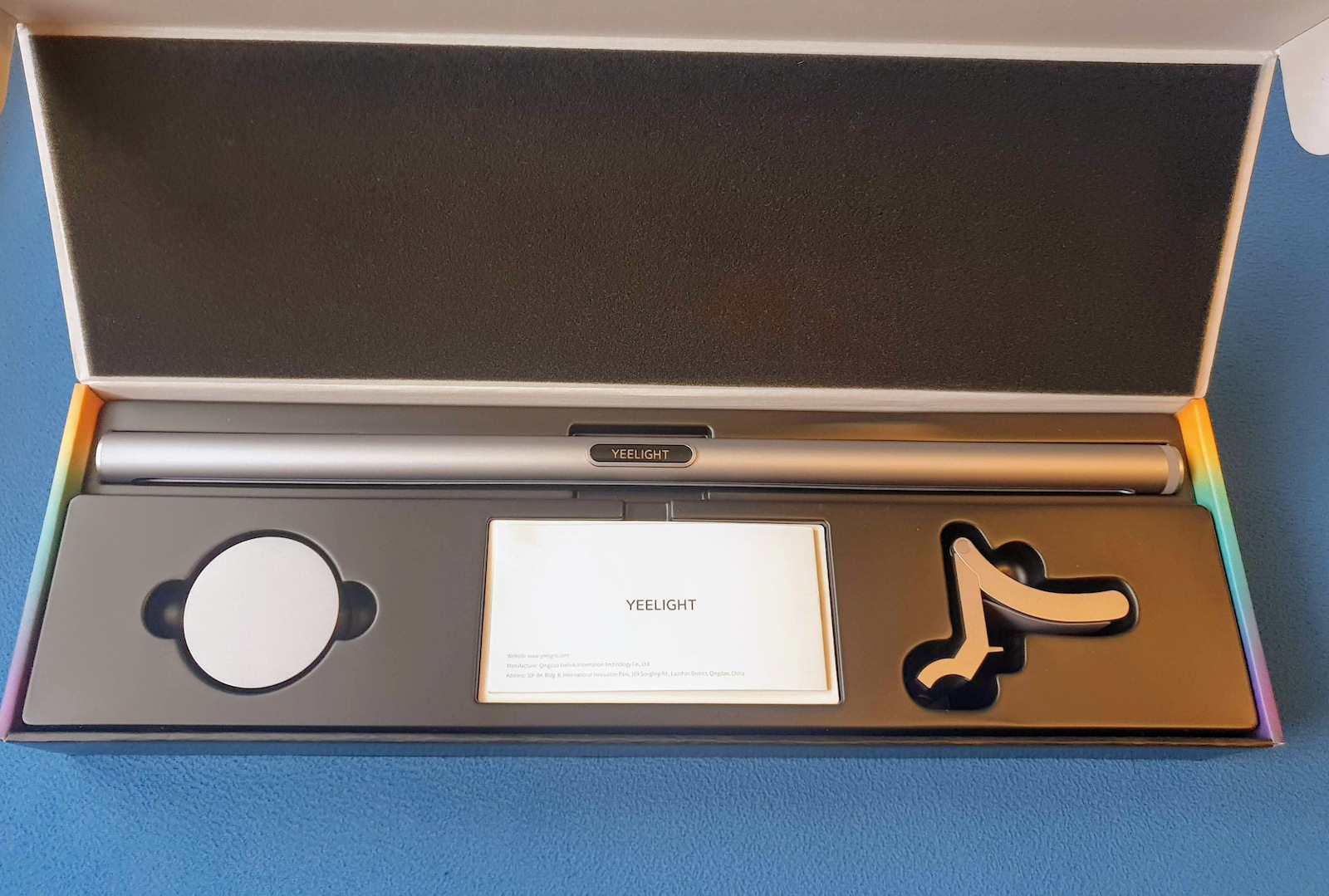
Yeelight YLTD003 Monitor Light Bar Silver

The Monitor Light Bar Pro allows you to celebrate your heroic actions with 16 million color backlighting, creating the perfect lighting effects for every move in your game. You can also set your...

The Monitor Light Bar Pro allows you to celebrate your heroic actions with 16 million color backlighting, creating the perfect lighting effects for every move in your game. You can also set your favorite light colors and monitor the effect functions in the Mi Home app.

See full description See full description

Description

Description

The Monitor Light Bar Pro allows you to celebrate your heroic actions with 16 million color backlighting, creating the perfect lighting effects for every move in your game. You can also set your favorite light colors and monitor the effect functions in the Mi Home app.

Manufacturer

See full description

Specifications

Specifications

Type
Monitor Light Bar
Switch Type
-
Light Bar Lighting Color
RGB
Monitor Dimension
-

Important information

Specifications are collected from official manufacturer websites. Please verify the specifications before proceeding with your final purchase. If you notice any problem you can report it here.

See all specifications

Reviews (10)

Reviews

  1. 7
  2. 1
  3. 1
  4. 1
  5. 1 star
    0
Review this product

Reviews photos

Reviews photos
Reviews photos
Reviews photos
Reviews photos
Reviews photos

Reviews by our members

  • xariskarabasidis
    3
    1 out of 1 members found this review helpful

    Verified purchase

    3/5 taking into account all the functions, and not just as a bar. I will focus on what I didn't like (because you can see the good things on the product page)

    The base:
    Beautiful and sturdy, with rubber pieces in the right places so it doesn't scratch, but a position lock would help because now it is held by gravity and the micro-adjustments I made to its position. If I move the desk, I feel like it will fall. The same goes for the magnetic "clasp" with the bar itself (power passes through pogo pins). The position of the bar does not lock, be careful.

    Power: A plug is provided with various heads for Europe, United Kingdom, etc. But why black? The whole device is white and silver in places. Fortunately, it plugs in from the back and is not bothersome. ATTENTION: if you use your own cable with your own adapter or a USB port on your computer, know that it needs at least 10W for both sides to work properly - if the power is not enough, the backlight will either flicker or not turn on at all.

    Xiaomi Home app: If you already have it with existing devices, you know the usual complaints. Constant questions about data collection, poorly translated English terms, etc. For pairing you have to plug and unplug the bar at least 5-6 times - then from the app, manually select the product from the product categories, the app will also tell you to do the plug-unplug, but if you have already done it just press "device Reset" and proceed to the wifi settings, etc. ATTENTION, you need to have an old type WIFI network (2.4GHz) but this is usually enabled by default from your router (even if it doesn't show). The first thing it will ask is to do a firmware update. Mine failed 3 times around 42%, while downloading (from 50% onwards the installation happens). Unfortunately, I only succeeded after I unplugged it, waited a minute (until I ordered souvlaki), and then plugged it back in and all was fine. After the update, I lost control of the back bar through the app - don't worry - enable office mode from the app, then once turn on/off from the BEAUTIFUL controller, and then control works perfectly. Discover the rest from the app itself - patience with Xiaomi Home.

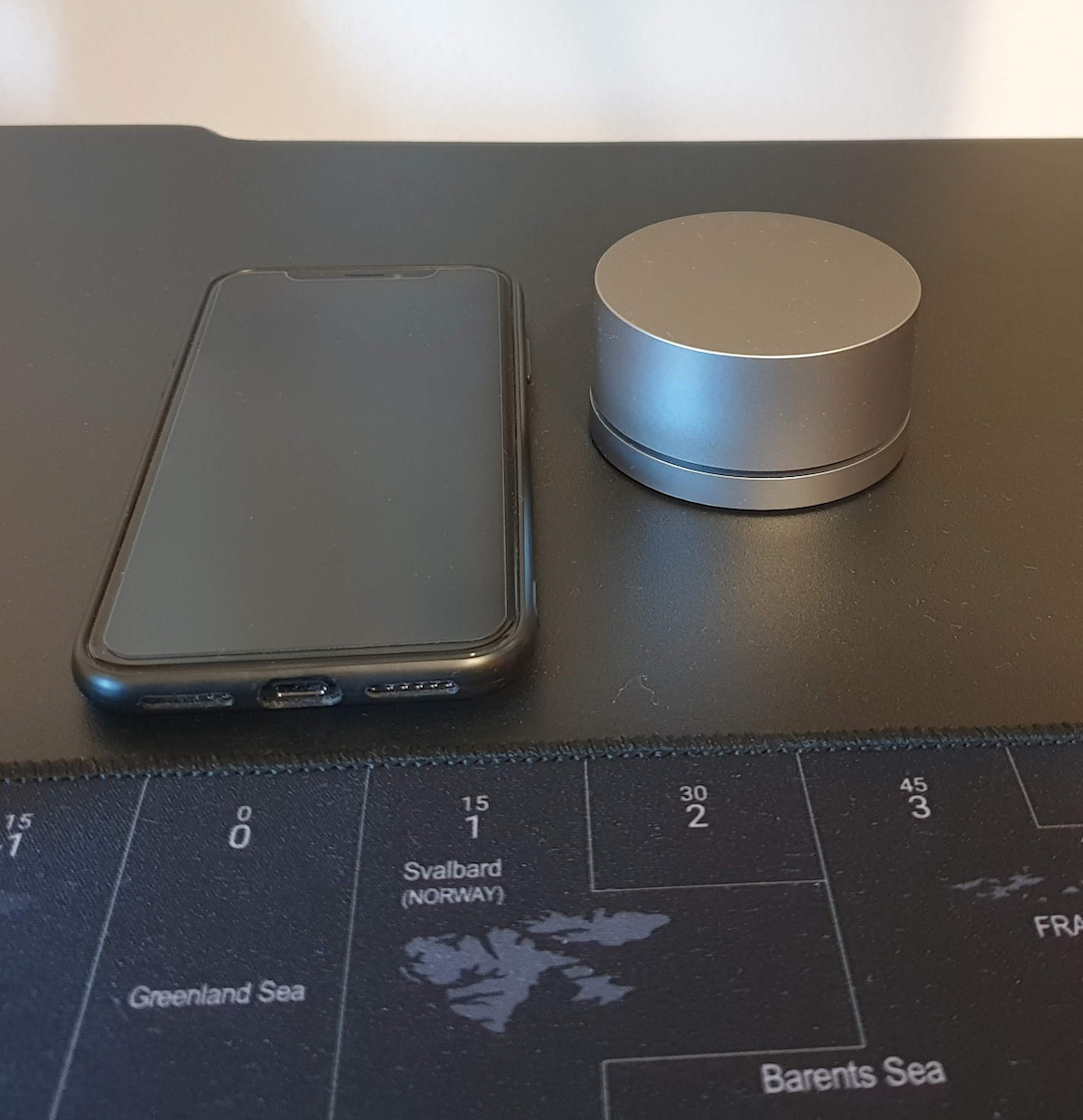
    The controller: Again, BEAUTIFUL, but...? The intensity settings are rotary. Unfortunately, there is no click and you feel that the top part is a bit loose and with the slightest movement you will mess up your setting. Fortunately, it has dead zones (gamers will understand) so it's not a disaster. The same with the ON/OFF functions, you feel the top part is floating when you press it. Aesthetically, for the third time "BEAUTIFUL", in the same color as the bar and with rubber points underneath to grip the desk.

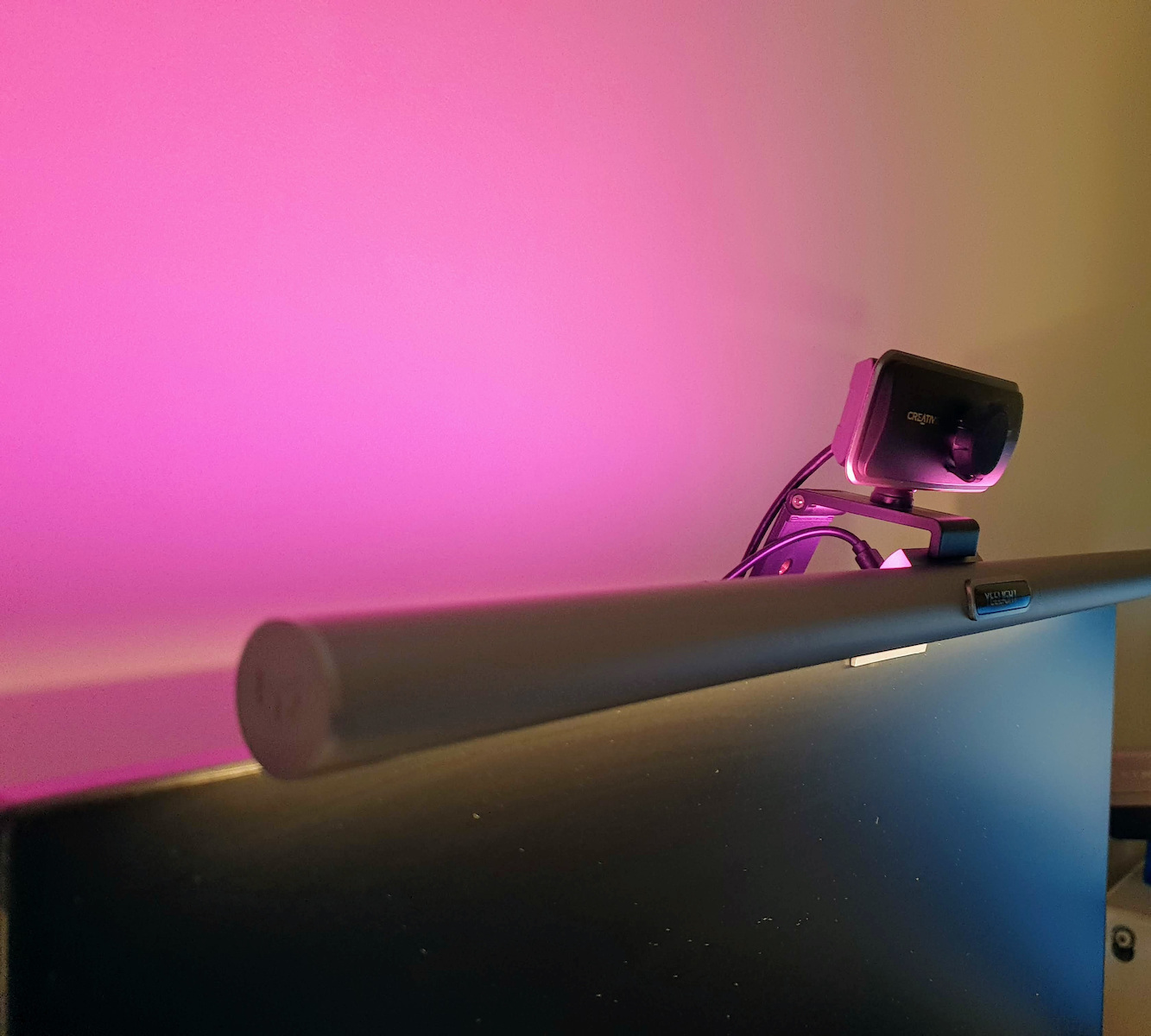
    The back (RGB) light: clearly a gimmick. I have left it permanently on at 100% brightness and as white as possible. It is quite close to a wall and you would expect it to reflect well, but it doesn't.

    Note 1: If you want to control it with another program/OS (e.g. Home Assistant OS) for smart devices (after first activating it with Xiaomi Home) you must enable Third Party Integration from the bar's settings. Then, depending, select the correct plugin (e.g. in Home Assistant you must select the Yeelight plugin if it doesn't detect it automatically).
    Note 2: Overall, it is a good product and worth the approximately 70€, it just has this Xiaomi-ness in the software and while its hardware is very good, it slightly lowers the experience. For the job you get it for (that is, to light up the desk) it does it with an excellent 10 out of 15.

    Translated from Greek ·
    Did you find this review helpful?
  • Wonderful! Worth its money! To make it restart and turn on its wifi (to connect to Xiaomi home), plug it in and unplug it from the power 5 times ;)

    Translated from Greek ·
    Did you find this review helpful?
  • Nionios.k

    Verified purchase

    It is a very nice product that provides strong lighting. 4 stars just because I can't connect it to the Xiaomi app no matter what. I've seen countless videos, I'm not a boomer or anything, but I've concluded that it just doesn't work with mine.

    Translated from Greek ·
    Did you find this review helpful?
  • jloizou

    Verified purchase

    Excellent product. Easy installation, beautiful design, and the ability to control it through the Xiami application. The backlight it has gives a very nice feeling to the space.

    Translated from Greek ·
    Did you find this review helpful?
  • karafillas.athan
    5
    27 out of 27 members found this review helpful

    Verified purchase

    First of all, let me start by saying that this is the first monitor light bar I have used, so I cannot compare it to any other, which is why I will only provide my personal comments and impressions.
    Positives
    + Impeccable and premium packaging
    + Sturdy construction (the screen clip is made of aluminum and the bar itself appears very solid without any flaws)
    + Very satisfactory light, with settings for both brightness and light temperature
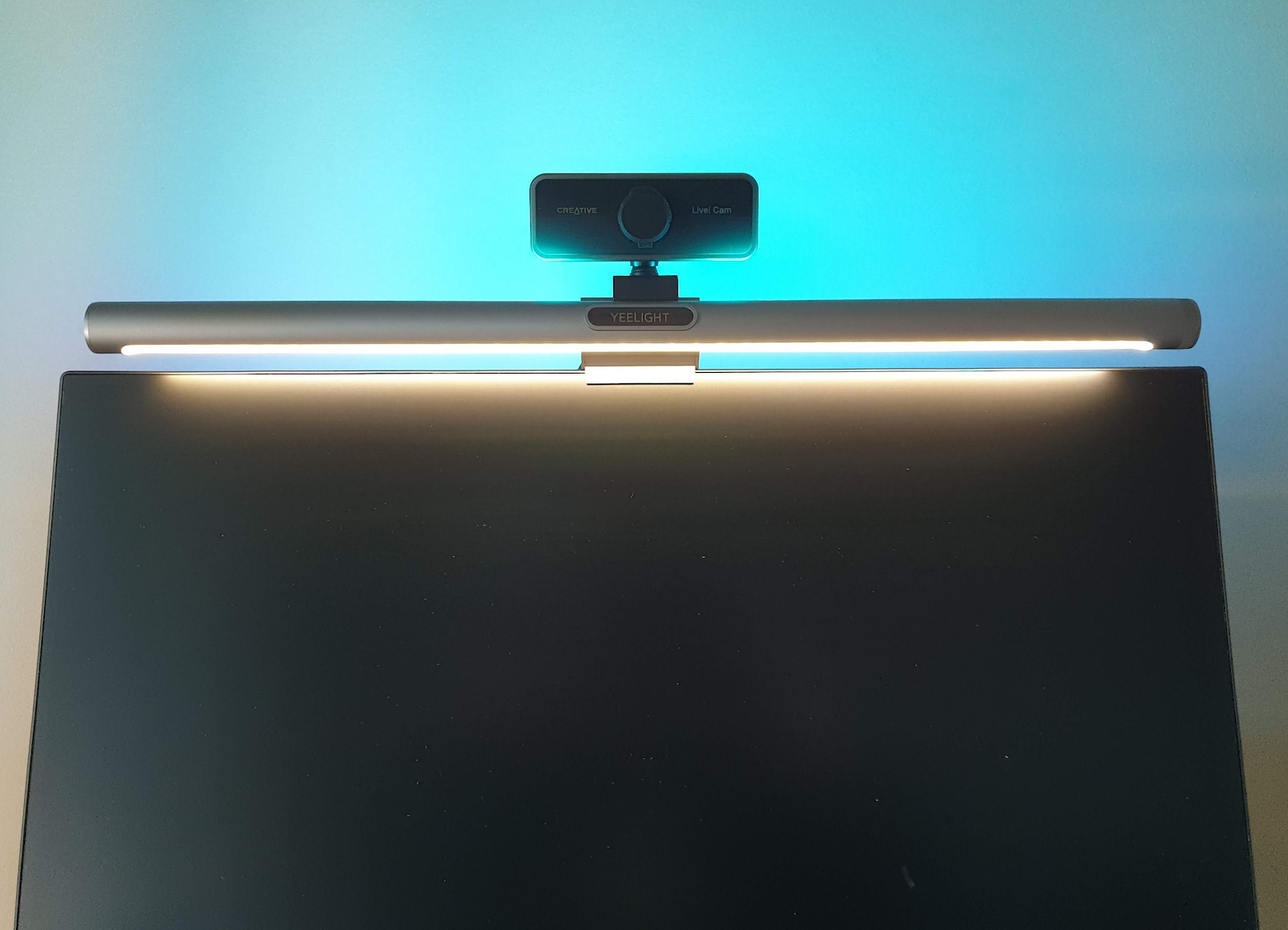
    + Beautiful back-lighting with some built-in pre-selected modes
    + Good back-light dispersion that creates a very nice effect
    + The remote puck is very user-friendly and is something I didn't know I needed.
    + Can work independently without using an app (brightness and temperature can be adjusted and you can choose between 4 backlight modes)
    + The cable in the packaging is long enough, making cable management easy
    Negatives
    - It only comes with the cable and requires external power (I used an old mobile charger)
    - The angle adjustment of the desk lamp is quite limited and may create glare on the screen or blind the user
    - The remote puck comes without batteries (2 AAA)
    Neutral
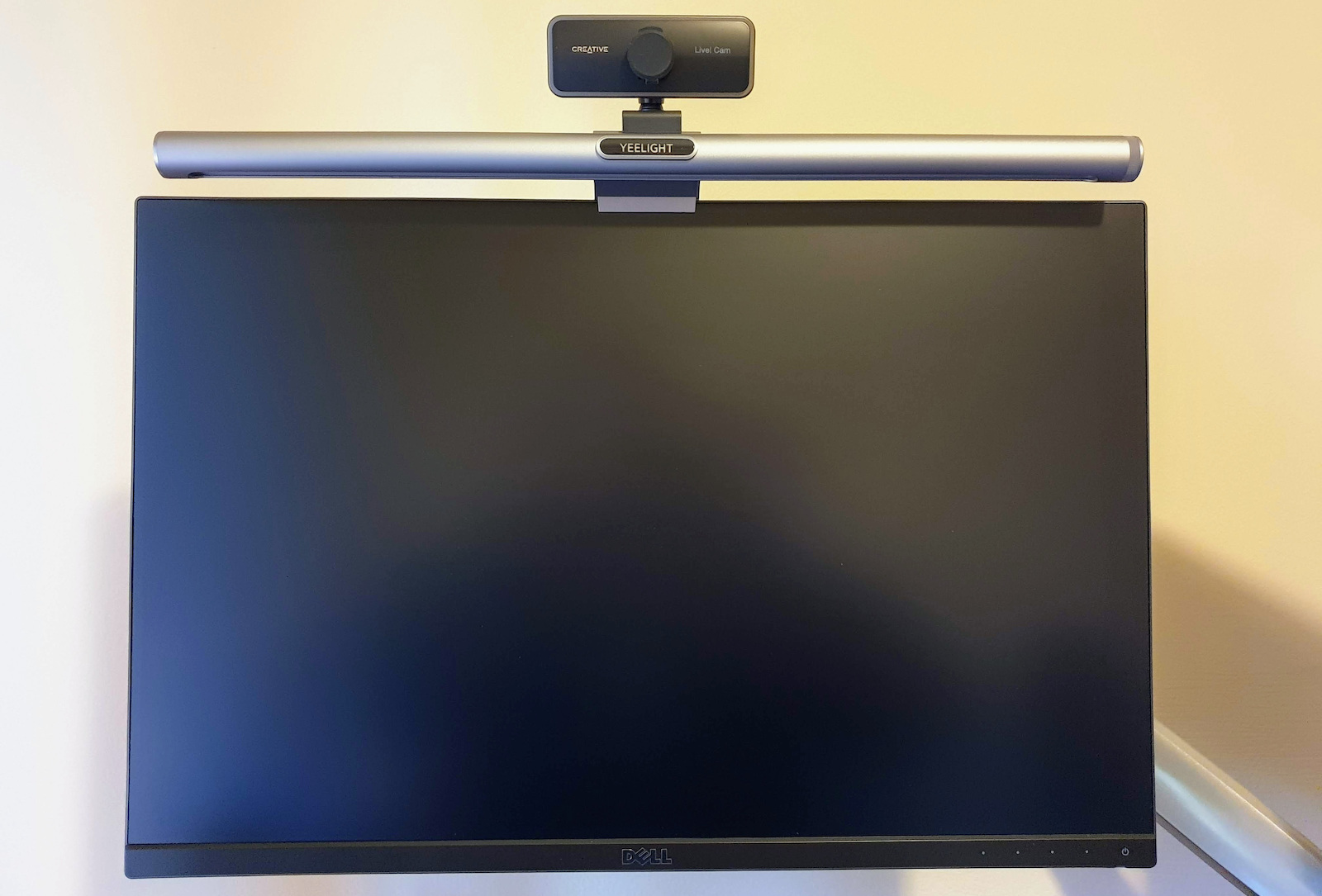
    * On screens with very thin bezels, it may slightly cut off the image
    * It covers the entire screen, so you need to find a solution for the webcam, as shown in the photos
    * The back-light only has 4 modes and requires an app for more control
    * The back-light alone is not strong enough for ambient lighting of a room without other light sources
    * It has a considerable weight, so if you use an arm, you may need to tighten it enough

    Translated from Greek ·
    Did you find this review helpful?
  • Verified purchase

  • 3/5 taking into account all the functions, and not just as a bar. I will focus on what I didn't like (because you can see the good things on the product page)

    The base:
    Beautiful and sturdy, with rubber pieces in the right places so it doesn't scratch, but a position lock would help because now it is held by gravity and the micro-adjustments I made to its position. If I move the desk, I feel like it will fall. The same goes for the magnetic "clasp" with the bar itself (power passes through pogo pins). The position of the bar does not lock, be careful.

    Power: A plug is provided with various heads for Europe, United Kingdom, etc. But why black? The whole device is white and silver in places. Fortunately, it plugs in from the back and is not bothersome. ATTENTION: if you use your own cable with your own adapter or a USB port on your computer, know that it needs at least 10W for both sides to work properly - if the power is not enough, the backlight will either flicker or not turn on at all.

    Xiaomi Home app: If you already have it with existing devices, you know the usual complaints. Constant questions about data collection, poorly translated English terms, etc. For pairing you have to plug and unplug the bar at least 5-6 times - then from the app, manually select the product from the product categories, the app will also tell you to do the plug-unplug, but if you have already done it just press "device Reset" and proceed to the wifi settings, etc. ATTENTION, you need to have an old type WIFI network (2.4GHz) but this is usually enabled by default from your router (even if it doesn't show). The first thing it will ask is to do a firmware update. Mine failed 3 times around 42%, while downloading (from 50% onwards the installation happens). Unfortunately, I only succeeded after I unplugged it, waited a minute (until I ordered souvlaki), and then plugged it back in and all was fine. After the update, I lost control of the back bar through the app - don't worry - enable office mode from the app, then once turn on/off from the BEAUTIFUL controller, and then control works perfectly. Discover the rest from the app itself - patience with Xiaomi Home.

    The controller: Again, BEAUTIFUL, but...? The intensity settings are rotary. Unfortunately, there is no click and you feel that the top part is a bit loose and with the slightest movement you will mess up your setting. Fortunately, it has dead zones (gamers will understand) so it's not a disaster. The same with the ON/OFF functions, you feel the top part is floating when you press it. Aesthetically, for the third time "BEAUTIFUL", in the same color as the bar and with rubber points underneath to grip the desk.

    The back (RGB) light: clearly a gimmick. I have left it permanently on at 100% brightness and as white as possible. It is quite close to a wall and you would expect it to reflect well, but it doesn't.

    Note 1: If you want to control it with another program/OS (e.g. Home Assistant OS) for smart devices (after first activating it with Xiaomi Home) you must enable Third Party Integration from the bar's settings. Then, depending, select the correct plugin (e.g. in Home Assistant you must select the Yeelight plugin if it doesn't detect it automatically).
    Note 2: Overall, it is a good product and worth the approximately 70€, it just has this Xiaomi-ness in the software and while its hardware is very good, it slightly lowers the experience. For the job you get it for (that is, to light up the desk) it does it with an excellent 10 out of 15.

    Translated from Greek ·
    1
  • Wonderful! Worth its money! To make it restart and turn on its wifi (to connect to Xiaomi home), plug it in and unplug it from the power 5 times ;)

    Translated from Greek ·
    0
  • It is a very nice product that provides strong lighting. 4 stars just because I can't connect it to the Xiaomi app no matter what. I've seen countless videos, I'm not a boomer or anything, but I've concluded that it just doesn't work with mine.

    Translated from Greek ·
    0
  • Excellent product. Easy installation, beautiful design, and the ability to control it through the Xiami application. The backlight it has gives a very nice feeling to the space.

    Translated from Greek ·
    0
  • First of all, let me start by saying that this is the first monitor light bar I have used, so I cannot compare it to any other, which is why I will only provide my personal comments and impressions.
    Positives
    + Impeccable and premium packaging
    + Sturdy construction (the screen clip is made of aluminum and the bar itself appears very solid without any flaws)
    + Very satisfactory light, with settings for both brightness and light temperature
    + Beautiful back-lighting with some built-in pre-selected modes
    + Good back-light dispersion that creates a very nice effect
    + The remote puck is very user-friendly and is something I didn't know I needed.
    + Can work independently without using an app (brightness and temperature can be adjusted and you can choose between 4 backlight modes)
    + The cable in the packaging is long enough, making cable management easy
    Negatives
    - It only comes with the cable and requires external power (I used an old mobile charger)
    - The angle adjustment of the desk lamp is quite limited and may create glare on the screen or blind the user
    - The remote puck comes without batteries (2 AAA)
    Neutral
    * On screens with very thin bezels, it may slightly cut off the image
    * It covers the entire screen, so you need to find a solution for the webcam, as shown in the photos
    * The back-light only has 4 modes and requires an app for more control
    * The back-light alone is not strong enough for ambient lighting of a room without other light sources
    * It has a considerable weight, so if you use an arm, you may need to tighten it enough

    Translated from Greek ·
    27
  • See all

Description & Specifications

The Monitor Light Bar Pro allows you to celebrate your heroic actions with 16 million color backlighting, creating the perfect lighting effects for every move in your game. You can also set your favorite light colors and monitor the effect functions in the Mi Home app.

Manufacturer

Type
Monitor Light Bar
Switch Type
-
Light Bar Lighting Color
RGB
Monitor Dimension
-

Important information

Specifications are collected from official manufacturer websites. Please verify the specifications before proceeding with your final purchase. If you notice any problem you can report it here.

Reviews (10)

  1. 7
  2. 1
  3. 1
  4. 1
  5. 1 star
    0
Review this product

Reviews photos

Reviews photos
Reviews photos
Reviews photos
Reviews photos
Reviews photos

Reviews by our members

  • xariskarabasidis
    3
    1 out of 1 members found this review helpful

    Verified purchase

    3/5 taking into account all the functions, and not just as a bar. I will focus on what I didn't like (because you can see the good things on the product page)

    The base:
    Beautiful and sturdy, with rubber pieces in the right places so it doesn't scratch, but a position lock would help because now it is held by gravity and the micro-adjustments I made to its position. If I move the desk, I feel like it will fall. The same goes for the magnetic "clasp" with the bar itself (power passes through pogo pins). The position of the bar does not lock, be careful.

    Power: A plug is provided with various heads for Europe, United Kingdom, etc. But why black? The whole device is white and silver in places. Fortunately, it plugs in from the back and is not bothersome. ATTENTION: if you use your own cable with your own adapter or a USB port on your computer, know that it needs at least 10W for both sides to work properly - if the power is not enough, the backlight will either flicker or not turn on at all.

    Xiaomi Home app: If you already have it with existing devices, you know the usual complaints. Constant questions about data collection, poorly translated English terms, etc. For pairing you have to plug and unplug the bar at least 5-6 times - then from the app, manually select the product from the product categories, the app will also tell you to do the plug-unplug, but if you have already done it just press "device Reset" and proceed to the wifi settings, etc. ATTENTION, you need to have an old type WIFI network (2.4GHz) but this is usually enabled by default from your router (even if it doesn't show). The first thing it will ask is to do a firmware update. Mine failed 3 times around 42%, while downloading (from 50% onwards the installation happens). Unfortunately, I only succeeded after I unplugged it, waited a minute (until I ordered souvlaki), and then plugged it back in and all was fine. After the update, I lost control of the back bar through the app - don't worry - enable office mode from the app, then once turn on/off from the BEAUTIFUL controller, and then control works perfectly. Discover the rest from the app itself - patience with Xiaomi Home.

    The controller: Again, BEAUTIFUL, but...? The intensity settings are rotary. Unfortunately, there is no click and you feel that the top part is a bit loose and with the slightest movement you will mess up your setting. Fortunately, it has dead zones (gamers will understand) so it's not a disaster. The same with the ON/OFF functions, you feel the top part is floating when you press it. Aesthetically, for the third time "BEAUTIFUL", in the same color as the bar and with rubber points underneath to grip the desk.

    The back (RGB) light: clearly a gimmick. I have left it permanently on at 100% brightness and as white as possible. It is quite close to a wall and you would expect it to reflect well, but it doesn't.

    Note 1: If you want to control it with another program/OS (e.g. Home Assistant OS) for smart devices (after first activating it with Xiaomi Home) you must enable Third Party Integration from the bar's settings. Then, depending, select the correct plugin (e.g. in Home Assistant you must select the Yeelight plugin if it doesn't detect it automatically).
    Note 2: Overall, it is a good product and worth the approximately 70€, it just has this Xiaomi-ness in the software and while its hardware is very good, it slightly lowers the experience. For the job you get it for (that is, to light up the desk) it does it with an excellent 10 out of 15.

    Translated from Greek ·
    Did you find this review helpful?
  • Wonderful! Worth its money! To make it restart and turn on its wifi (to connect to Xiaomi home), plug it in and unplug it from the power 5 times ;)

    Translated from Greek ·
    Did you find this review helpful?
  • Nionios.k

    Verified purchase

    It is a very nice product that provides strong lighting. 4 stars just because I can't connect it to the Xiaomi app no matter what. I've seen countless videos, I'm not a boomer or anything, but I've concluded that it just doesn't work with mine.

    Translated from Greek ·
    Did you find this review helpful?
  • jloizou

    Verified purchase

    Excellent product. Easy installation, beautiful design, and the ability to control it through the Xiami application. The backlight it has gives a very nice feeling to the space.

    Translated from Greek ·
    Did you find this review helpful?
  • karafillas.athan
    5
    27 out of 27 members found this review helpful

    Verified purchase

    First of all, let me start by saying that this is the first monitor light bar I have used, so I cannot compare it to any other, which is why I will only provide my personal comments and impressions.
    Positives
    + Impeccable and premium packaging
    + Sturdy construction (the screen clip is made of aluminum and the bar itself appears very solid without any flaws)
    + Very satisfactory light, with settings for both brightness and light temperature
    + Beautiful back-lighting with some built-in pre-selected modes
    + Good back-light dispersion that creates a very nice effect
    + The remote puck is very user-friendly and is something I didn't know I needed.
    + Can work independently without using an app (brightness and temperature can be adjusted and you can choose between 4 backlight modes)
    + The cable in the packaging is long enough, making cable management easy
    Negatives
    - It only comes with the cable and requires external power (I used an old mobile charger)
    - The angle adjustment of the desk lamp is quite limited and may create glare on the screen or blind the user
    - The remote puck comes without batteries (2 AAA)
    Neutral
    * On screens with very thin bezels, it may slightly cut off the image
    * It covers the entire screen, so you need to find a solution for the webcam, as shown in the photos
    * The back-light only has 4 modes and requires an app for more control
    * The back-light alone is not strong enough for ambient lighting of a room without other light sources
    * It has a considerable weight, so if you use an arm, you may need to tighten it enough

    Translated from Greek ·
    Did you find this review helpful?
  • Verified purchase

  • 3/5 taking into account all the functions, and not just as a bar. I will focus on what I didn't like (because you can see the good things on the product page)

    The base:
    Beautiful and sturdy, with rubber pieces in the right places so it doesn't scratch, but a position lock would help because now it is held by gravity and the micro-adjustments I made to its position. If I move the desk, I feel like it will fall. The same goes for the magnetic "clasp" with the bar itself (power passes through pogo pins). The position of the bar does not lock, be careful.

    Power: A plug is provided with various heads for Europe, United Kingdom, etc. But why black? The whole device is white and silver in places. Fortunately, it plugs in from the back and is not bothersome. ATTENTION: if you use your own cable with your own adapter or a USB port on your computer, know that it needs at least 10W for both sides to work properly - if the power is not enough, the backlight will either flicker or not turn on at all.

    Xiaomi Home app: If you already have it with existing devices, you know the usual complaints. Constant questions about data collection, poorly translated English terms, etc. For pairing you have to plug and unplug the bar at least 5-6 times - then from the app, manually select the product from the product categories, the app will also tell you to do the plug-unplug, but if you have already done it just press "device Reset" and proceed to the wifi settings, etc. ATTENTION, you need to have an old type WIFI network (2.4GHz) but this is usually enabled by default from your router (even if it doesn't show). The first thing it will ask is to do a firmware update. Mine failed 3 times around 42%, while downloading (from 50% onwards the installation happens). Unfortunately, I only succeeded after I unplugged it, waited a minute (until I ordered souvlaki), and then plugged it back in and all was fine. After the update, I lost control of the back bar through the app - don't worry - enable office mode from the app, then once turn on/off from the BEAUTIFUL controller, and then control works perfectly. Discover the rest from the app itself - patience with Xiaomi Home.

    The controller: Again, BEAUTIFUL, but...? The intensity settings are rotary. Unfortunately, there is no click and you feel that the top part is a bit loose and with the slightest movement you will mess up your setting. Fortunately, it has dead zones (gamers will understand) so it's not a disaster. The same with the ON/OFF functions, you feel the top part is floating when you press it. Aesthetically, for the third time "BEAUTIFUL", in the same color as the bar and with rubber points underneath to grip the desk.

    The back (RGB) light: clearly a gimmick. I have left it permanently on at 100% brightness and as white as possible. It is quite close to a wall and you would expect it to reflect well, but it doesn't.

    Note 1: If you want to control it with another program/OS (e.g. Home Assistant OS) for smart devices (after first activating it with Xiaomi Home) you must enable Third Party Integration from the bar's settings. Then, depending, select the correct plugin (e.g. in Home Assistant you must select the Yeelight plugin if it doesn't detect it automatically).
    Note 2: Overall, it is a good product and worth the approximately 70€, it just has this Xiaomi-ness in the software and while its hardware is very good, it slightly lowers the experience. For the job you get it for (that is, to light up the desk) it does it with an excellent 10 out of 15.

    Translated from Greek ·
    1
  • Wonderful! Worth its money! To make it restart and turn on its wifi (to connect to Xiaomi home), plug it in and unplug it from the power 5 times ;)

    Translated from Greek ·
    0
  • It is a very nice product that provides strong lighting. 4 stars just because I can't connect it to the Xiaomi app no matter what. I've seen countless videos, I'm not a boomer or anything, but I've concluded that it just doesn't work with mine.

    Translated from Greek ·
    0
  • Excellent product. Easy installation, beautiful design, and the ability to control it through the Xiami application. The backlight it has gives a very nice feeling to the space.

    Translated from Greek ·
    0
  • First of all, let me start by saying that this is the first monitor light bar I have used, so I cannot compare it to any other, which is why I will only provide my personal comments and impressions.
    Positives
    + Impeccable and premium packaging
    + Sturdy construction (the screen clip is made of aluminum and the bar itself appears very solid without any flaws)
    + Very satisfactory light, with settings for both brightness and light temperature
    + Beautiful back-lighting with some built-in pre-selected modes
    + Good back-light dispersion that creates a very nice effect
    + The remote puck is very user-friendly and is something I didn't know I needed.
    + Can work independently without using an app (brightness and temperature can be adjusted and you can choose between 4 backlight modes)
    + The cable in the packaging is long enough, making cable management easy
    Negatives
    - It only comes with the cable and requires external power (I used an old mobile charger)
    - The angle adjustment of the desk lamp is quite limited and may create glare on the screen or blind the user
    - The remote puck comes without batteries (2 AAA)
    Neutral
    * On screens with very thin bezels, it may slightly cut off the image
    * It covers the entire screen, so you need to find a solution for the webcam, as shown in the photos
    * The back-light only has 4 modes and requires an app for more control
    * The back-light alone is not strong enough for ambient lighting of a room without other light sources
    * It has a considerable weight, so if you use an arm, you may need to tighten it enough

    Translated from Greek ·
    27
  • See all
71,43 €
14,00 €   shipping cost