REVIEW / PRESENTATION / TIPS
Update: 14/12/2025 Firmware Version: 8.20
The schedule internet time per device feature has been integrated for a while now, meaning you can set what time the internet will turn on and off per device. Good if you want to set limits for your kids, etc., from the parental controls field by creating a new profile.
***Four stars for its bad WiFi, since it is AVM***
I had the same problem, and many of you probably do too, with the WiFi.
The same problem was faced and perhaps is still faced by Cosmote technicians.
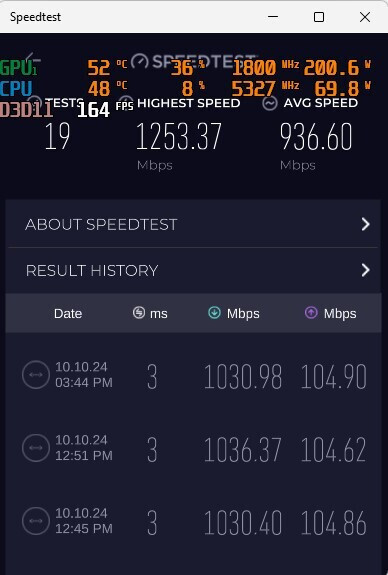
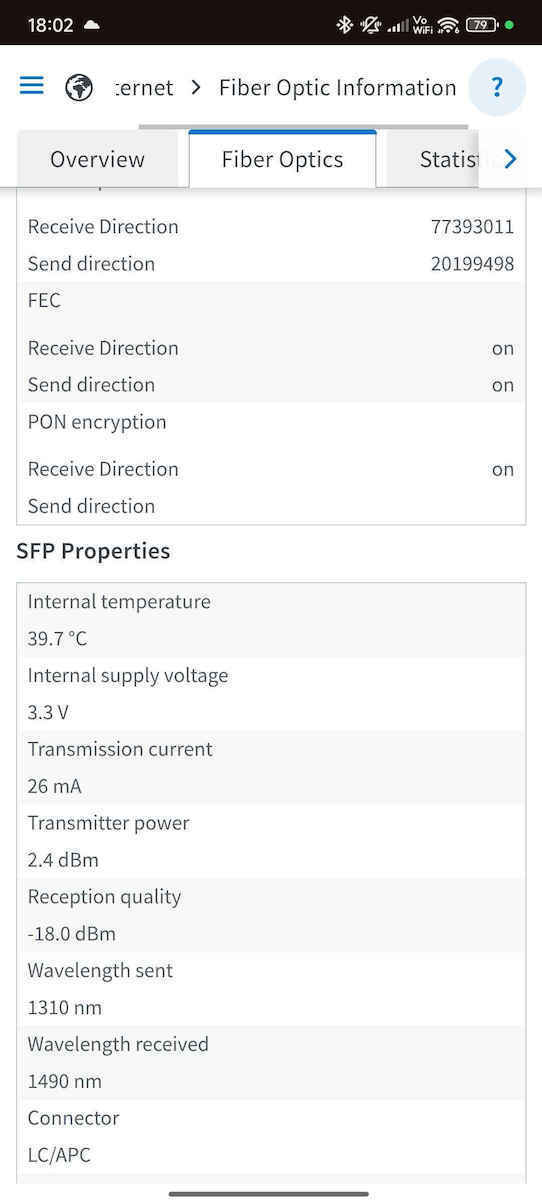
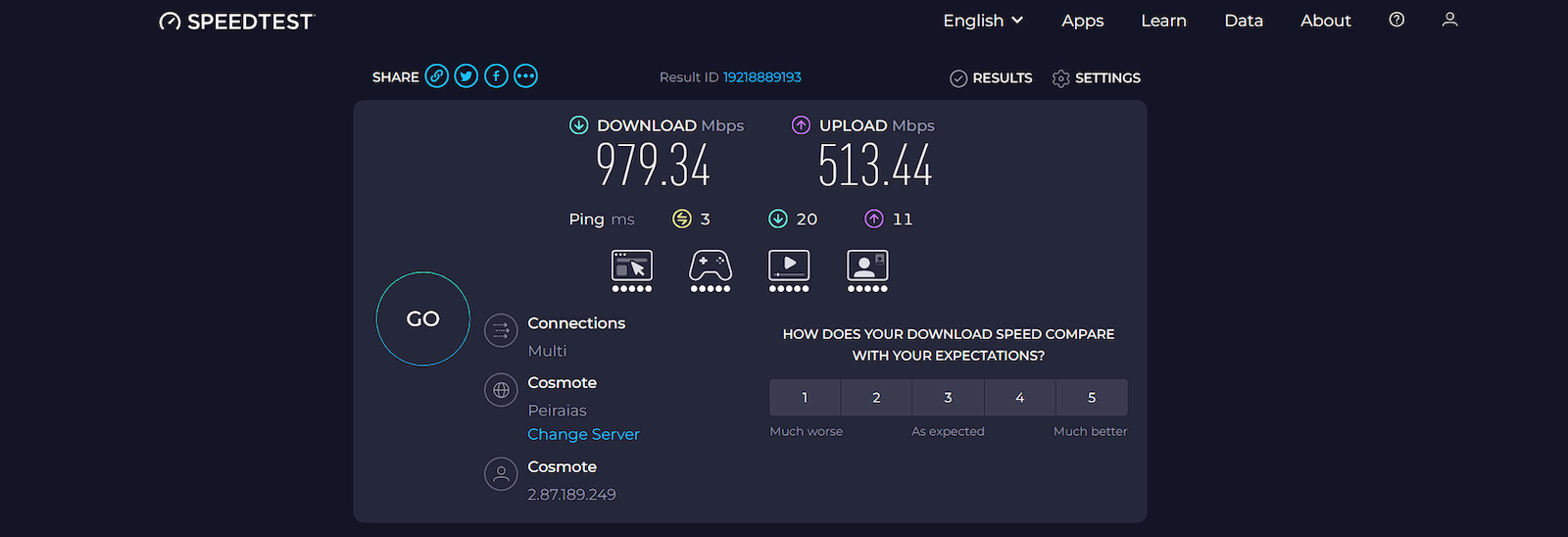
With an ethernet cable, I get 1068/544mbps max average, with -13.2dbm max line noise. Very good, due to the careful installation by the contractor.
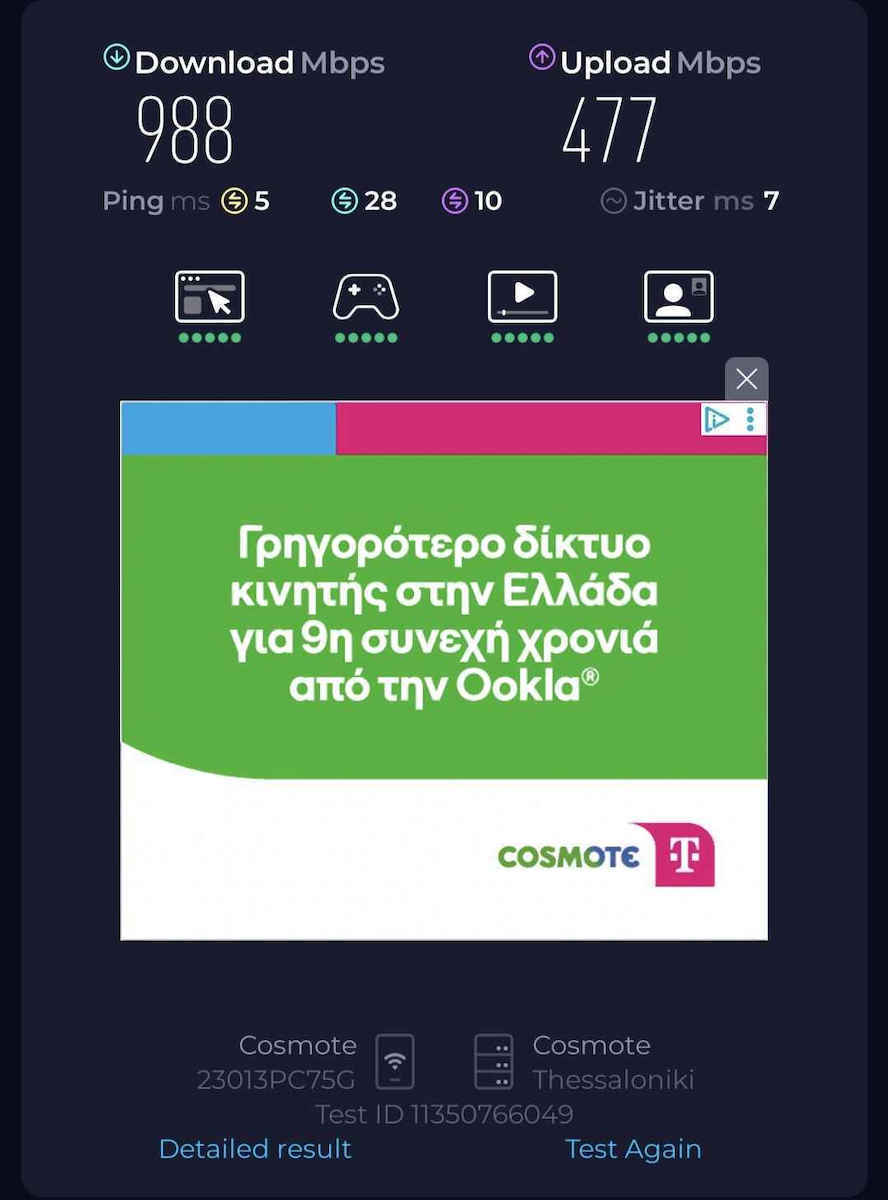
With WiFi6, I get 998/480mbps in the room where the router is (5Ghz) at a distance of 2 meters. Every meter you go back, it drops dramatically. At 4-5 meters without obstacles, it reaches 750mbps max and keeps dropping.
In the 2 farthest rooms where I have 2 other computers (about 15-18 meters from the router), with 2-3 walls as obstacles and closed doors, and with a Fritz! Repeater 1200AX, I get 580mbps up to 820mbps with correct channel selection (manual).
As a router, it has an incredible number of useful features, but its WiFi is bad for a Fritz! router. It must definitely be combined with a Fritz Repeater 1200AX Mesh or another Mesh Repeater on the market.
Apart from the WiFi issue, the router is flawless with Ethernet connection, good materials, settings. Temperature-wise, it’s OK due to its frame construction.
Basic mistakes.
Never use powerlines with fiber optic.
An excellent fiber optic connection ranges from -13 to -16dbm line noise.
This depends on the work done, the cabinet, and of course the provider.
Noise should not exceed -23dbm.
The latest router upgrade is version v8.20, you should definitely do it. If you also have the Repeater 1200AX, upgrade that too.
If the router does not upgrade automatically, download the files manually from AVM’s FTP address.
It’s positive that there will be more future upgrades - although the WiFi problem will not be fixed, and the reason is the 2 internal WiFi cables - I believe they run the wrong route over the board (version 2 - like the one Cosmote provides). There is a solution, and if you search on YouTube, you can change the route of the 2 cables or even better, attach 2 or even 4 external antennas to the board - it’s not difficult for someone who is into this.
If you want the ultimate, buy a decent 2 or 3-pack MESH repeater for greater wireless coverage.
Pilot at 2000mbps in March 2024 went excellently (photo) with a cat6 ethernet cable.
There are already 3000mbps in some areas and it will expand.
6 useful TIPS to improve your connection with this router.
1) Place the router in a central spot..."as much as you can" if possible, and not in a corner.
2) Same SSID name for 2.4Ghz and 5Ghz SOS!
3) "Never automatic" WiFi channel selection as AVM suggests. Find the ideal channels yourself from the router settings or other programs for 2.4 and 5Ghz.
I have uploaded photos here in the review for finding better channels as well as some important WiFi settings.
4) Purchase a Mesh Repeater "Definitely" - the Fritz! 1200AX from AVM is quite good (there are even better ones, of course).
The repeater must be connected very close to the router at first, i.e., in the same room SOS!
Once connected, remove it and place it where you want for greater coverage.
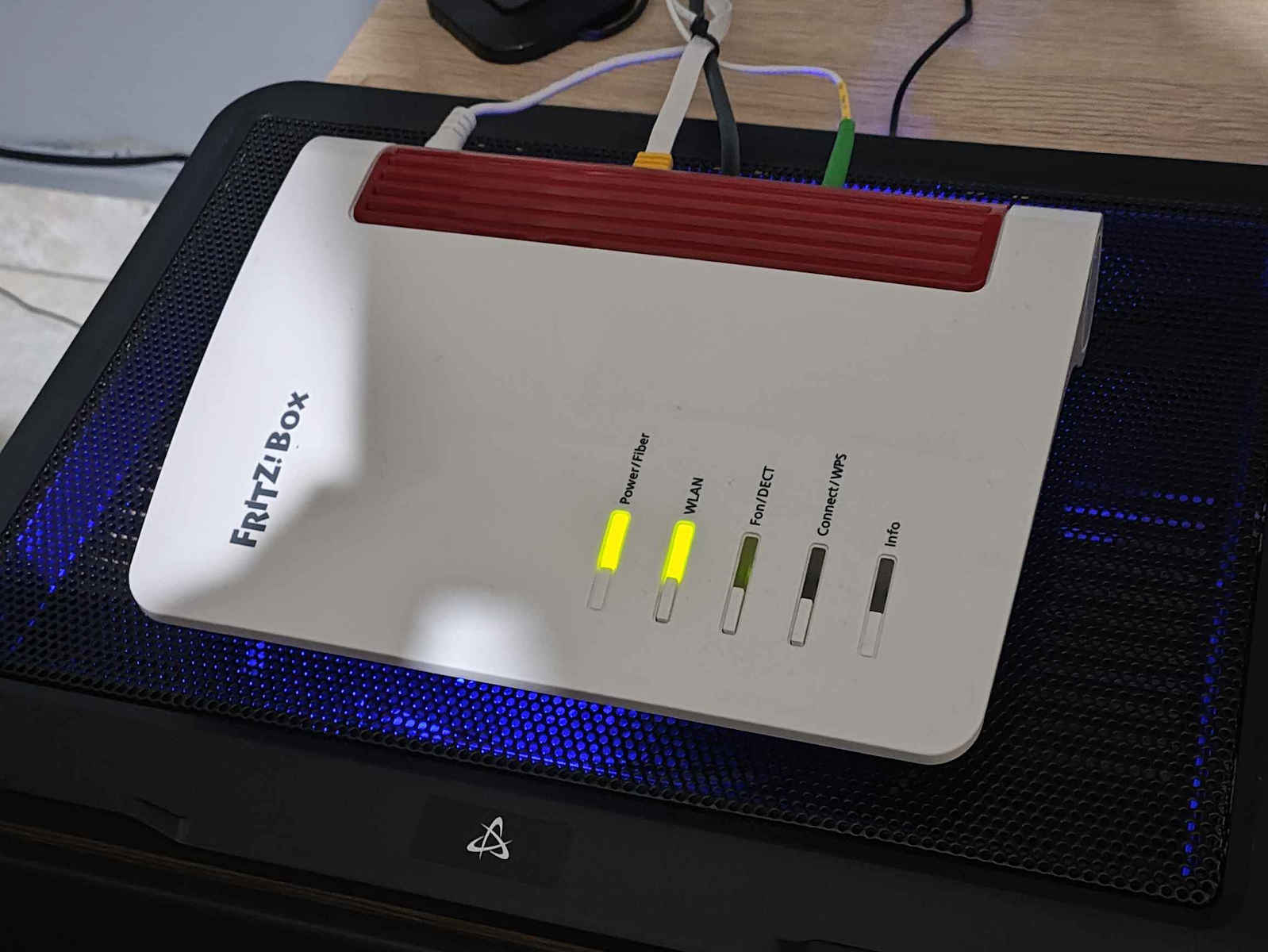
5) For better performance and to avoid disconnections due to temperatures, since the SFP Module reaches 75-77c without air conditioning in the summer - buy a Cooling Pad for laptops and place the router on top. It lowers the temperature by up to 20 degrees. You’ll reach 49c easily, having over 25 active connected devices at a cost of 10-12€.
Will you gain something from this? Definitely YES!
A flawless and honest cooling pad is the one from Powertech. I have also uploaded a video.
https://www.skroutz.gr/s/18464348/Powertech-Cooling-Pad-gia-Laptop-eos-15-6-me-2-Anemistires-kai-Fotismo-PT-738.html?product_id=45038908&sponsored=listing
6) Do the upgrade yourself or with the help of a specialist with 2 or even 4 reinforced external antennas; there are even antenna extensions from an independent German store that deals only with Fritz....google it and you’ll find it.
If you open it, of course, you lose the warranty.
Harris K.
MG: Epidemic Studios.
ΑΞΙΟΛΟΓΗΣΗ / ΠΑΡΟΥΣΙΑΣΗ / TIPS
Update: 14/12/2025 Firmware Version: 8.20
Ενσωματώθηκε εδώ και καιρό το schedule internet time per device δλδ ορίζεται εσείς τι ώρα θα ανοίγει και τι ώρα θα κλείνει το internet ανά συσκευή. Καλό εάν θέλετε να βάλετε όρια στα παιδιά σας κλπ από το πεδίο parental controls, δημιουργόντας νέο προφίλ.
***Τέσσερα αστέρια για το κακό WiFi του, μιας και είναι AVM***
Είχα το ίδιο πρόβλημα και πολλοί ενδεχομένως από εσάς με το WiFi.
Το ίδιο πρόβλημα αντιμετώπιζαν και ίσως αντιμετωπίζουν και οι τεχνικοί της Cosmote.
Με καλώδιο ethernet είμαι στα 1068/544mbps max average, με -13.2dbm max θόρυβο γραμμής. Πολύ καλό, λόγο της προσεκτικής εγκατάστασης από τον εργολάβο.
Mε WiFi6 στα 998/480mbps στο χώρο που είναι το router (5Ghz) σε απόσταση 2 μέτρων. Κάθε μέτρο που πας πίσω κατεβαίνει δραματικά. Στα 4-5 μέτρα χωρίς εμπόδια φτάνει 750mbps max και πάει λέγοντας.
Στα 2 πιο μακρινά δωμάτια που έχω άλλους 2 υπολογιστές (15-18) μέτρα περίπου από το router, με εμπόδια 2-3 τοίχους με κλειστές τις πόρτες και με Fritz! Repeater 1200AX φτάνω 580mbps έως 820mpbs με σωστή επιλογή καναλιών (manual).
Σαν router έχει απίστευτα πολλά και χρήσιμα features αλλά το WiFi του είναι κακό για ένα FritZ! router. Πρέπει να συνδιαστεί οπωσδήποτε με Fritz Repeater 1200AX Mesh ή άλλο Mesh Repeater τις αγοράς.
Πέρα από το θέμα με το WiFi, το router είναι άψογο με Ethernet σύνδεση, καλά υλικά, ρυθμίσεις. Από θερμοκρασίες είναι ΟΚ λόγο της κατασκευής του πλαισίου του.
Βασικά λάθη.
Δεν βάζουμε ποτέ powerlines σε οπτική ίνα.
Mια άριστη σύνδεση οπτικής ίνας ανέρχεται από -13 έως -16dbm θόρυβο γραμμής.
Σε αυτό παίζουν ρόλο οι εργασίες που έγιναν, η καμπίνα και φυσικά και ο πάροχος.
O θόρυβος δεν πρέπει να ξεπερνά τα -23dbm
To τελευταίο upgrade του router είναι η έκδοση v8.20, να το κάνετε οπωσδήποτε. Εάν έχετε και το Repeater 1200AX κάντε και σε αυτό αναβάθμιση.
Αν δεν σας κάνει αυτόματα upgrade το router, κατεβάστε τα αρχεία manual από την διεύθυνση FTP της AVM.
Θετικό το γεγονός πως θα υπάρξουν και άλλες μελλοντικές αναβαθμίσεις - αν και δεν θα διορθωθεί το πρόβλημα με το WiFi και ο λόγος είναι τα 2 εσωτερικά καλώδια του WiFi - πιστεύω πως περνούν από λάθος διαδρομή πάνω από την πλακέτα (version 2 - σαν αυτό που δίνει η Cosmote). Λύση υπάρχει και εάν το ψάξετε στο youtube μπορείτε να αλλάξετε την διαδρομή των 2 καλωδίων ή ακόμα καλύτερα να κουμπώσετε 2 ή και 4 εξωτερικές κεραίες πάνω στην πλακέτα - δεν είναι δύσκολο για κάποιον που ασχολείται.
Εάν θέλετε το απόλυτο, αγοράστε ένα αξιόλογο πακέτο 2πλου ή 3πλου MESH repeater για μεγαλύτερη ασύρματη κάλυψη.
Πιλοτικά στα 2000mbps τον Μάρτιο του 2024 τα πήγε περίφημα (φωτογραφία) με ethernet cat6 καλώδιο.
Υπάρχουν ήδη και 3000mpbs σε κάποιες περιοχές και θα επεκταθεί.
6 χρήσιμα TIPS για να βελτιώσετε την σύνδεση σας με το συγκεκριμένο router.
1) Κοιτάξτε το router να βρίσκετε σε κεντρικό σημείο......"όσο μπορείτε" αν και εφόσον γίνεται και όχι σε κάποια γωνία.
2) Ίδιο SSID όνομα για 2.4Ghz και 5Ghz SOS!
3) "Πότε αυτόματη" εύρεση καναλιού WiFi όπως προτείνει η AVM. Βρείτε τα ιδανικά κανάλια μόνοι σας από τις ρυθμίσεις του router ή από άλλα προγράμματα στα 2.4 και 5Ghz.
Σας έχω φωτογραφίες εδώ στην αξιολόγηση για την εύρεση καλύτερων καναλιών καθώς και κάποιες σημαντικές ρυθμίσεις για το WiFi.
4) Αγορά "Οπωσδήποτε" Mesh Repeater - το Fritz! 1200ΑΧ της AVM είναι αρκετά καλό (υπάρχουν και καλύτερα βέβαια).
Η σύνδεση του repeater πρέπει να γίνει σε πολύ κοντινή απόσταση με το router στην αρχή, δηλαδή στον ίδιο χώρο SOS!
Μόλις συνδεθεί το βγάζουμε και το τοποθετούμε στο σημείο που θέλουμε για μεγαλύτερη κάλυψη.
5) Για καλύτερη απόδοση και για αποφυγή αποσυνδέσεων λόγο θερμοκρασιών μιας και φτάνει το SFP Module τους 75-77c χωρίς κλιματιστικό την καλοκαιρινή περίοδο - αγοράστε ένα Cooling Pad για λάπτοπ και βάλτε το ρούτερ πάνω. Ρίχνει έως και 20 βαθμούς την θερμοκρασία. Θα το φτάσετε στους 49c χαλαρά, έχωντας πάνω από 25 active συνδεδεμένες συσκευές με κόστος 10-12€.
Θα κερδίσετε κάτι από αυτό; Σίγουρα ΝΑΙ!
Άψογο και τίμιο cooling pad είναι αυτό της Powertech. Έχω ανεβάσει και video.
https://www.skroutz.gr/s/18464348/Powertech-Cooling-Pad-gia-Laptop-eos-15-6-me-2-Anemistires-kai-Fotismo-PT-738.html?product_id=45038908&sponsored=listing
6) Κάντε το upgrade μόνοι σας ή με βοήθεια κάποιου ειδικού με 2 ή και 4 ενισχυμένες εξωτερικές κεραίες μέχρι και προέκταση των κεραιών υπάρχουν από ανεξάρτητο Γερμανικό κατάστημα που ασχολείτε μόνο με FritZ....googlαρετε και θα το βρείτε.
Αν ανοιχτεί βέβαια χάνετε και η εγγύηση.
Harris K.
MG: Epidemic Studios.