Monitors

LG DualUp Ergo 28MQ780-B IPS HDR Monitor 27.6" 2560x2880 with Response Time 5ms GTG

Key features:

  • Model 2022
  • Aspect ratio 16:18
  • Contrast 1000:1
  • HDR10, USB Hub
  • Low Blue Light
  • Connectivity: HDMI, USB-C
See full description

Top specs

  • See all
The product is not available for shipping to the selected country.

Description

Description

Double the screen, double the experience

The LG monitor is primarily aimed at professionals who need a high-resolution screen with color accuracy for their work, suitable for multitasking without taking up the space of a dual monitor setup. It has an SDQHD 2560x2880 resolution and, combined with DCI-P3 and HDR10 standards, provides excellent image quality and a comfortable viewing experience. With a 16:18 aspect ratio, it offers more information at a glance in the extended upper and lower space, while featuring extensive ergonomic adjustments, such as height adjustment, rotation, and tilt to easily adapt to the user's needs.

More space

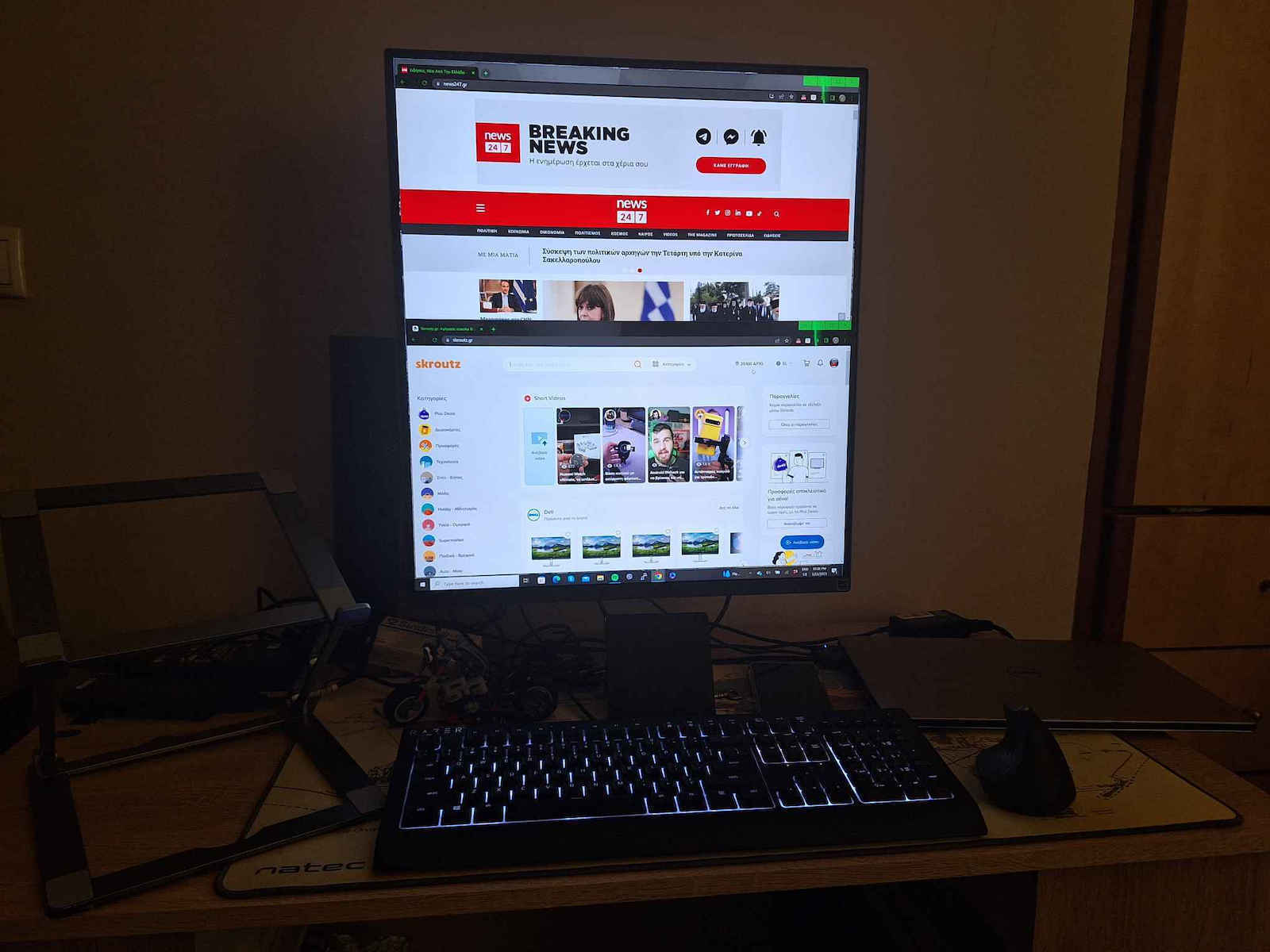
Free up desk space and perform multiple tasks more efficiently with a 16:18 aspect ratio that rotates, freeing up your desk without taking up the space of a dual monitor.

Increase efficiency with a new larger screen

The DualUp monitor displays two 21.5-inch (16:9) screens on one screen (16:18). This enhances productivity, work performance, and ergonomics.

SDQHD Nano IPS Monitor

Stunning image quality, suitable for your work

The 27.6-inch SDQHD Nano IPS monitor (2560 x 2880, 16:18 aspect ratio) supports a wide color gamut, 98% of the DCI-P3 color spectrum, and offers vibrant color reproduction with HDR10 support.

Live Color, Low Blue Light

Increased viewing comfort while maintaining color quality

LG's Live Color Low Blue Light technology with TÜV Rheinland Eyesafe certification helps better protect your eyes from blue light, combining RGB hardware and software while maintaining the quality of vibrant colors.

Ergonomics without limits

Screen movement with multiple options

The improved flexibility of the Ergo stand offers extensive ergonomic adjustments, such as extension, retraction, vertical axis rotation, horizontal axis rotation, height adjustment, and tilt, providing the screen with the perfect position for an even more comfortable user experience.

Automatic Brightness Sensor

Reduction of eye strain

The sensor reacts to light, making the screen brighter in bright spaces and less bright in the dark. It provides a comfortable working environment

Ideal monitor for creations, developing, and multitasking

The LG DualUp monitor has a new style and a 16:18 aspect ratio, contributing to enhanced efficiency and productivity. You can view more information at a glance with the extended upper and lower space.

For Developers

While coding, see code or text better on the dual screen without scrolling the mouse.

For Designers

The DualUp monitor is wide for multitasking and takes up less surface area for more workspace.

For office employees

The DualUp monitor contributes to more efficient work, as the vertical extension of the screen allows for multiple data sheet control.

For creators and streamers

While streaming the service on the DualUp screen, you watch conversations in real time.

USB Type-C

Easy control and connectivity

The USB Type-C port allows for capabilities from display and data transmission to charging connected devices (up to 90 W), while simultaneously providing support to your laptop with a single cable.

How to Make the Most of DualUp Monitor Settings

PBP and built-in KVM

The DualUp monitor allows multiple content control from two computers with picture-by-picture setup. Additionally, the built-in KVM capability helps manage content with a single keyboard and mouse.

One Source PBP

By connecting two cables, HDMI, DisplayPort, and USB Type-C, you achieve a dual monitor setup with the DualUp. It helps in easily controlling two monitors without the use of software or shortcut buttons.

Space-saving

Make the most of your desk

The ergonomic design of the DualUp monitor helps users have a more organized workspace. Additionally, the "One Click" stand combined with the "C-Clamp" support facilitates installation.

Unboxing and Setup

Package Contents:

  • Monitor
  • Ergo+ Stand
  • Power Cable
  • HDMI Cable
  • USB A to B Cable
  • USB-C Cable
  • Key

Manufacturer

See full description

Specifications

Specifications

Main Specifications

Panel
IPS
HDR
Yes
Curved
No
UltraWide
No
Diagonal
27.6 "
Resolution
2560x2880
Contrast
1000 :1
Response Time (GTG)
5 ms
Refresh Rate
60 Hz
Aspect Ratio
16:18

Ergonomics

Tilt Adjustment
Yes
Height Adjustment
Yes
Vertical Rotation
Yes
Horizontal Rotation
Yes
Wall Mountable (Vesa)
100 x 100 mm

Connectivity

Connection
HDMI, USB-C

Additional Specifications

Features & Functions
USB Hub
Speakers
Yes
Eye Comfort
Yes
Camera
No
Colour
Black

Important information

Specifications are collected from official manufacturer websites. Please verify the specifications before proceeding with your final purchase. If you notice any problem you can report it here.

See all specifications

Reviews (9)

Reviews

  1. 7
  2. 1
  3. 1
  4. 2 stars
    0
  5. 1 star
    0
Review this product
  • Comfort
  • Picture
  • Response time
  • Viewing angle
  • Value for money
  • Menu

Reviews by our members

  • Flickering appears periodically for a short time, then disappears. Most likely an electronic defect.

    Translated from Greek ·
    • Picture
    • Response time
    • Viewing angle
    • Menu
    • Value for money
    Did you find this review helpful?
  • ΔΗΗΗΜΗΤΡΙΟΣ
    3
    1 out of 7 members found this review helpful

    Verified purchase

    the screen resolution did not adjust to the requirements of the computer resulting in me not seeing the resolution described 2560 X 2880. I saw a thousand 1920 X 1080

    Translated from Greek ·
    Did you find this review helpful?
    • Comfort
    • Picture
    • Response time
    • Viewing angle
    • Menu
    • Value for money
  • 5
    0 out of 1 members found this review helpful

    Best monitor I've ever had! It puts you in work mode with crazy ease

    Translated from Greek ·
    Did you find this review helpful?
  • Verified purchase

    • Comfort
    • Picture
    • Response time
    • Viewing angle
    • Value for money
    • Menu
  • Verified purchase

    • Comfort
    • Picture
    • Response time
    • Viewing angle
    • Menu
    • Value for money
  • Verified purchase

    • Comfort
    • Picture
    • Response time
    • Viewing angle
    • Menu
    • Value for money

Description & Specifications

Double the screen, double the experience

The LG monitor is primarily aimed at professionals who need a high-resolution screen with color accuracy for their work, suitable for multitasking without taking up the space of a dual monitor setup. It has an SDQHD 2560x2880 resolution and, combined with DCI-P3 and HDR10 standards, provides excellent image quality and a comfortable viewing experience. With a 16:18 aspect ratio, it offers more information at a glance in the extended upper and lower space, while featuring extensive ergonomic adjustments, such as height adjustment, rotation, and tilt to easily adapt to the user's needs.

More space

Free up desk space and perform multiple tasks more efficiently with a 16:18 aspect ratio that rotates, freeing up your desk without taking up the space of a dual monitor.

Increase efficiency with a new larger screen

The DualUp monitor displays two 21.5-inch (16:9) screens on one screen (16:18). This enhances productivity, work performance, and ergonomics.
SDQHD Nano IPS Monitor

Stunning image quality, suitable for your work

The 27.6-inch SDQHD Nano IPS monitor (2560 x 2880, 16:18 aspect ratio) supports a wide color gamut, 98% of the DCI-P3 color spectrum, and offers vibrant color reproduction with HDR10 support.

Live Color, Low Blue Light

Increased viewing comfort while maintaining color quality

LG's Live Color Low Blue Light technology with TÜV Rheinland Eyesafe certification helps better protect your eyes from blue light, combining RGB hardware and software while maintaining the quality of vibrant colors.

Ergonomics without limits

Screen movement with multiple options

The improved flexibility of the Ergo stand offers extensive ergonomic adjustments, such as extension, retraction, vertical axis rotation, horizontal axis rotation, height adjustment, and tilt, providing the screen with the perfect position for an even more comfortable user experience.

Automatic Brightness Sensor

Reduction of eye strain

The sensor reacts to light, making the screen brighter in bright spaces and less bright in the dark. It provides a comfortable working environment

Ideal monitor for creations, developing, and multitasking

The LG DualUp monitor has a new style and a 16:18 aspect ratio, contributing to enhanced efficiency and productivity. You can view more information at a glance with the extended upper and lower space.

For Developers

While coding, see code or text better on the dual screen without scrolling the mouse.

For Designers

The DualUp monitor is wide for multitasking and takes up less surface area for more workspace.

For office employees

The DualUp monitor contributes to more efficient work, as the vertical extension of the screen allows for multiple data sheet control.

For creators and streamers

While streaming the service on the DualUp screen, you watch conversations in real time.

USB Type-C

Easy control and connectivity

The USB Type-C port allows for capabilities from display and data transmission to charging connected devices (up to 90 W), while simultaneously providing support to your laptop with a single cable.

How to Make the Most of DualUp Monitor Settings

PBP and built-in KVM

The DualUp monitor allows multiple content control from two computers with picture-by-picture setup. Additionally, the built-in KVM capability helps manage content with a single keyboard and mouse.

One Source PBP

By connecting two cables, HDMI, DisplayPort, and USB Type-C, you achieve a dual monitor setup with the DualUp. It helps in easily controlling two monitors without the use of software or shortcut buttons.

Space-saving

Make the most of your desk

The ergonomic design of the DualUp monitor helps users have a more organized workspace. Additionally, the "One Click" stand combined with the "C-Clamp" support facilitates installation.

Unboxing and Setup

Package Contents:

  • Monitor
  • Ergo+ Stand
  • Power Cable
  • HDMI Cable
  • USB A to B Cable
  • USB-C Cable
  • Key

Manufacturer

Main Specifications

Panel
IPS
HDR
Yes
Curved
No
UltraWide
No
Diagonal
27.6 "
Resolution
2560x2880
Contrast
1000 :1
Response Time (GTG)
5 ms
Refresh Rate
60 Hz
Aspect Ratio
16:18

Ergonomics

Tilt Adjustment
Yes
Height Adjustment
Yes
Vertical Rotation
Yes
Horizontal Rotation
Yes
Wall Mountable (Vesa)
100 x 100 mm

Connectivity

Connection
HDMI, USB-C

Additional Specifications

Features & Functions
USB Hub
Speakers
Yes
Eye Comfort
Yes
Camera
No
Colour
Black

Important information

Specifications are collected from official manufacturer websites. Please verify the specifications before proceeding with your final purchase. If you notice any problem you can report it here.

Reviews (9)

  1. 7
  2. 1
  3. 1
  4. 2 stars
    0
  5. 1 star
    0
Review this product
  • Comfort
  • Picture
  • Response time
  • Viewing angle
  • Value for money
  • Menu

Reviews by our members

  • Flickering appears periodically for a short time, then disappears. Most likely an electronic defect.

    Translated from Greek ·
    • Picture
    • Response time
    • Viewing angle
    • Menu
    • Value for money
    Did you find this review helpful?
  • ΔΗΗΗΜΗΤΡΙΟΣ
    3
    1 out of 7 members found this review helpful

    Verified purchase

    the screen resolution did not adjust to the requirements of the computer resulting in me not seeing the resolution described 2560 X 2880. I saw a thousand 1920 X 1080

    Translated from Greek ·
    Did you find this review helpful?
    • Comfort
    • Picture
    • Response time
    • Viewing angle
    • Menu
    • Value for money
  • 5
    0 out of 1 members found this review helpful

    Best monitor I've ever had! It puts you in work mode with crazy ease

    Translated from Greek ·
    Did you find this review helpful?
  • Verified purchase

    • Comfort
    • Picture
    • Response time
    • Viewing angle
    • Value for money
    • Menu
  • Verified purchase

    • Comfort
    • Picture
    • Response time
    • Viewing angle
    • Menu
    • Value for money
  • Verified purchase

    • Comfort
    • Picture
    • Response time
    • Viewing angle
    • Menu
    • Value for money