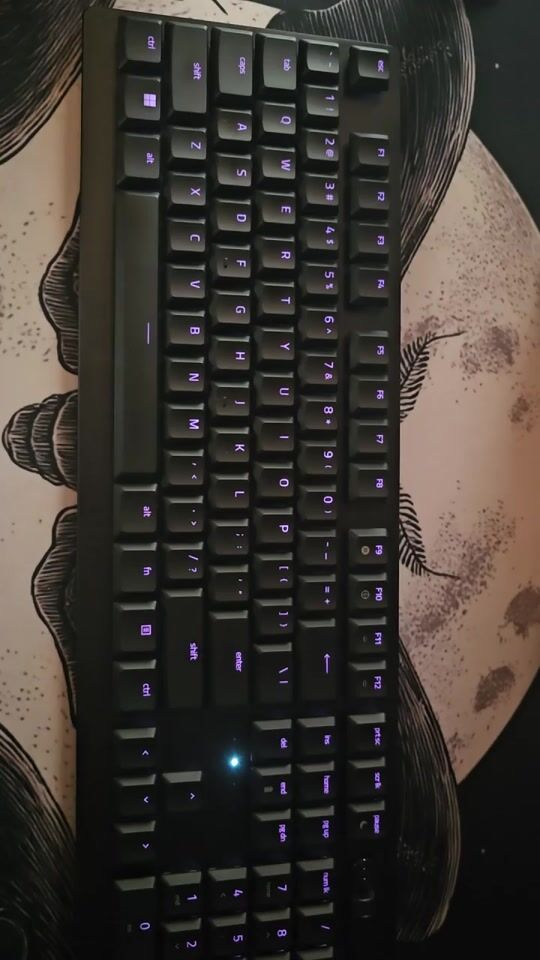
DO NOT install Razer Synapse 4, it messed up all my PC settings and even a video game’s settings regarding the keyboard itself and the Razer mouse I already have. I’ve been struggling for three days now to sort things out and make adjustments because the keyboard goes to "sleep" on its own. I will change my rating once and if a final solution is found and it is accepted that only the software is to blame and not the keyboard itself. Disgusting, wasted time for something that should be plug and play, shameful really.
UPDATE #1 (25/11/25): The settings I found to prevent the keyboard from going to sleep worked for 2 hours and then the same problems came back. And now the Razer mouse also goes to sleep. Also, all my wireless mice now have "weight" and do micro-skips, I can’t aim properly not just in hero shooters, I can’t even open folders correctly, it’s like the mouse has sleep paralysis. It takes 3-4 tries just to place the cursor correctly between two letters as I type this. I’ve done all the Updates, uninstalled and reinstalled drivers, devices, Bluetooth, etc. Nothing changes. Synapse crippled my system, now I’m talking to a technician, very likely I’ll return it as defective.
UPDATE #2 (03/12/25): After a week of hassle, I concluded that Synapse 4 was to blame, I installed it twice and both times it caused the same problems. Then I installed Synapse 3 and it works excellently, but sooner or later we’ll be forced to use Synapse 4, we’ll see what happens then. With Synapse 3 plus the settings I made from Device Manager so the computer doesn’t allow the USB ports to turn off for power saving, I managed to keep both the keyboard and mouse from going into sleep mode. The only time I need to press the keyboard to "wake it up" is right after I turn on the computer. I also had to download the firmware from Razer and install the optional keyboard updates from Windows, which seems to have specifically helped with the sleep mode. The micro-skips issue didn’t resolve automatically but gradually, and after a few days it seems to have stabilized.
I changed the rating as I promised because it’s not a keyboard problem but a Synapse 4 problem, but I’m keeping 1 star for the hassle and confusion I went through for a whole week. It stole all the joy from buying a gaming keyboard for the first time. On the positive side, the keyboard itself is excellent, its materials are sturdy and of quality, metal base, the keys and buttons feel and respond wonderfully, the sound and media switches are incredibly convenient. Silent, no heavy "click", the battery lasts 3 days but that’s because I’ve set it not to go into sleep mode, otherwise it would last a week from what I’ve read.
All the interventions I made:
1) Disabled power saving mode on all USB hubs
2) Disabled power saving mode on the keyboard
3) Disabled power saving mode on the mouse
4) Disabled power saving mode in power options from the control panel
5) Disabled power saving mode in Razer Synapse 3
6) Plugged the dongles into USB 2 ports (not USB 3)
7) Moved the keyboard dongle away from the computer using the extension that came with the keyboard
8) Downloaded optional updates from Windows Updates
9) Downloaded the firmware update from Razer
10) Uninstalled Synapse 4 and installed Synapse 3
UPDATE #3 (07-06-26): In the time since the previous updates, and with the forced transition to Synapse 4, not only did the "sleep mode" issue return and none of the above settings work anymore, but the problem of continuous and inexplicable keyboard disconnections was added – while my Razer Naga V2pro mouse has absolutely no problem and has never disconnected. Synapse 4 seems to randomly disconnect the keyboard for unknown reasons, even though I’ve changed all the USB ports on my PC and the official Razer dongle that came with the package, AND in the meantime it went from my old PC to a brand new one – and it has exactly the same problem. All software is official, all Windows and Razer updates installed. I followed ALL of Razer’s instructions, all the tools they had me install. Nothing works so far, the keyboard continues to disconnect at random times, whether I’m just browsing or playing online (the swearing I’ve heard in Marvel Rivals is unspeakable, because the keyboard DIES REPEATEDLY in the middle of a fight).
Right now I’m waiting again for a response from support. My rating went to 1 star AND IT WILL STAY THERE. And just as I learned my lesson with the Kraken headsets and never bought another set after my second, I will never again in my life buy any Razer product for any reason.
P.S.: To avoid any misunderstanding from the video I’m uploading, you’ll see that the keyboard tab in Synapse 4 closed immediately when I hovered the mouse pointer over it but that was purely coincidental – I did NOT click to close it, but even if I had, the keyboard would still appear online in the image below and the tab would not reopen by itself. As you can see, the keyboard went offline, the tab closed because of this, and reopened as soon as the keyboard reconnected.
ΜΗΝ εγκαταστησετε το Razer Synapse 4, μου εκανε μπαχαλο ολες τις ρυθμισεις του pc και ακομα και ενος video game σε οτι αφορα το ιδιο το πληκτρολογιο και το razer ποντικι που εχω ηδη. Παλευω τρεις μερες τωρα να βγαλω ακρη, και να κανω ρυθμισεις γιατι το πληκτρολογιο πηγαινει για "υπνο" απο μονο του. Θα αλλαξω τη βαθμολογια μολις και αν βρεθει τελικη λυση και αποδεχτει οτι φταιει μονο το λογισμικο και οχι και το πληκτρολογιο το ιδιο. Αηδια, χαμενος χρονος για κατι που θα επρεπε να ειναι plug and play, ντροπη δλδ.
UPDATE #1 (25/11/25): Οι ρυθμισεις που βρηκα να κανω για να μην πηγαινει για υπνο το πληκτρολογιο δουλεψαν για 2 ωρες και μετα ξανα τα ιδια. Και τωρα πηγαινει ΚΑΙ το razer ποντικι για υπνο. Επισης ολα τα ασυρματα ποντικια μου τωρα εχουν "weight" και κανουν micro-skips, δεν μπορω να στοχευσω σωστα οχι στο hero shooters, ουτε τους φακελους δεν μπορω να ανοιξω σωστα, ειναι σαν να εχει υπνικη παραλυση το ποντικι. Παιρνει 3-4 αποπειρες μονο για να βαλω τον δρομεα σωστα αναμεσα σε δυο γραμματα εδω που γραφω. Εχω κανει ολα τα Updates, εχω διαγραψει και ξαναβαλει drivers, συσκευες, bluetooth, κλπ κλπ. Δεν αλλαζει τιποτα. Μου σακατεψε το συστημα το Synapse, τωρα μιλαω με τεχνικο, πολυ πιθανο να το επιστρεψω για ελλατωματικο.
UPDATE #2 (03/12/25): Μετά από μία εβδομάδα ταλαιπωρίας, έφτασα στο συμπέρασμα ότι έφταιγε το Synapse 4, το εγκατέστησα δύο φορές και μου έκανε και τις δύο φορές τα ίδια προβλήματα. Έβαλα έπειτα το Synapse 3 και δουλεύει εξαιρετικά μόνο που αργά ή γρήγορα θα πρέπει αναγκαστικά να βάλουμε το Synapse 4, θα δούμε τι θα δούμε τότε. Με το Synapse 3 συν τις ρυθμίσεις που έκανα από το Device Manager ωστε να μην επιτρέπει ο υπολογιστής να κλείνουν οι θύρες usb για εξοικονόμιση ενέργειας, κατάφερα να κάνω και το πληκτρολόγιο και το ποντίκι να μη μπαίνουν σε sleep mode. Η μόνη φορά που χρειάζεται να πατήσω το πληκτρολόγιο για να "ξυπνήσει" είναι αμέσως μετά που θα ανοίξω τον υπολογιστή. Χρειάστηκε επίσης να κατεβάσω το firmware από τη Razer και να εγκαταστήσω τα optional keyboard updates των Windows, κάτι που φαίνεται να βοήθησε συγκεκριμένα με το sleep mode. Τα προβλήματα με το micro-skips δεν λύθηκε αυτόματα αλλά σταδικά και με το πέρασμα λίγων ημερών φαίνεται να ισορροπήστηκαν.
Άλλαξα την αξιολόγηση όπως είχα υποσχεθεί διότι δεν πρόκειται για πρόβλημα του πληκτρολογίου αλλά του Synapse 4, αλλά κρατάω 1 αστέρι για την ταλαιπωρία και την σύγχιση που πέρασα μια ολόκληρη εβδομάδα. Μου έκλεψε όλη τη χαρά που αγόρασα gaming πληκτρολόγιο για πρώτη φορά. Στα θετικά είναι ότι το ίδιο το πληκτρολόγιο είναι εξαιρετικό, τα υλικά του είναι στιβαρά και ποιότητας, μέταλλο στη βάση, τα πλήκτρα και τα κουμπιά έχουν υπέροχη αίσθηση και ανταπόκριση, οι διακόπτες για ήχο και αναπαραγωγή βίντεο άπειρα βολικά. Αθόρυβο, χωρις βαρύ "κλικ", η μπαταρία κρατάει 3 μέρες αλλά αυτό φυσικά φταίει πως το έχω κάνει να μη μπαίνει σε sleep mode, αλλιώς θα κρατούσε και βδομάδα από όσο διαβάζω.
Όλες οι επεμβάσεις που έκανα:
1) Απενεργοποίησα το power saving mode σε όλα τα usb hubs
2) Απενεργοποίησα το power saving mode στο πληκτρολόγιο
3) Απενεργοποίησα το power saving mode στο ποντίκι
4) Απενεργοποίησα το power saving mode στο power options από το control panel
5) Απενεργοποίησα το power saving mode στο Razer Synapse 3
6) Έβαλα τα dongles σε usb 2 θύρες (οχι usb 3)
7) Μετέφερα το dongle του πληκτρολογίου μακριά από τον υπολογιστή με την επέκταση που ήρθε μαζί με το πληκτρολόγιο
8) Κατέβασα τα optional updates από το Windows Updates
9) Κατέβασα το firmware update από τη Razer
10) Απεγκατέστησα το Synapse 4 και έβαλα το Synapse 3
UPDATE #3 (07-06-26): Στο διάστημα από τα προηγούμενα updates, και με την αναγκαστική μετάβαση στο Synapse 4, όχι μόνο το πρόβλημα του "sleep mode" επανήλθε και καμία από τις παραπάνω ρυθμίσεις δεν δουλεύει πια, προστέθηκε ΚΑΙ το πρόβλημα των συνεχόμενων και ακατανόητων αποσυνδέσεων του πληκτρολογιού - ενώ το razer Naga V2pro ποντίκι που έχω δεν έχει πλέον κανένα απολύτως πρόβλημα, ούτε έχει αποσυνδεθεί ποτέ. Το Synapse 4 φαίνεται να πετάει για άγνωστο λόγο το πληκρολόγιο παρόλο που έχω αλλάξει όλα τα usb ports στο pc μου και το επίσημο razer dongle που ήταν μαζί με τη συσκευασία, ΚΑΙ στο εντομεταξύ διάστημα πέρασε από το παλιό μου pc σε ολοκαίνουριο - και κάνει ακριβώς το ίδιο πρόβλημα. Όλα τα λογισμικά επίσημα, όλα τα updates και των Windows και της Razer εγκατεστημένα. Ακολούθησα ΟΛΕΣ τις οδηγίες της razer, όλα τα εργαλεία που με έβαλαν να εγκαταστίσω. Δεν δουλεύει τίποτα προς το παρόν, το πληκτρολόγιο συνεχίζει να αποσυνδέεται σε τυχαίες στιγμές, είτε κάτω απλά browsing είτε παίζω online (το βρίσιμο που έχω ακούσει στο Marvel Rivals δεν λέγεται, γιατί πεθαίνει το πληκτρολόγιο ΕΠΑΝΕΛΗΜΕΝΑ στη μέση της μαχης).
Αυτή τη στιγμή περιμένω ξανά απάντηση από το support. Η βαθμολογία μου πήγε στο 1 αστέρι ΚΑΙ ΘΑ ΜΕΙΝΕΙ ΕΚΕΙ. Και όπως ακριβώς έμαθα το μάθημα μου με τα Kraken headsets και δεν πήρα μετά το δεύτερο σετ μου ποτέ ξανά, δεν θα ξαναπάρω ποτέ ξανά στη ζωή μου και για κανένα λόγο razer προιον.
ΥΓ: Για να προλάβω τυχών παρεξήγηση από το βίντεο που ανεβάζω, θα δείτε ότι η καρτέλα του πληκτρολογίου στο Synapse 4 έκλεισε αμέσως μόλις έβαλα το δείκτη του ποντικιού πάνω της αλλά αυτό ήταν εντελώς τυχαίο - ΔΕΝ πάτησα για να κλείσει αλλά ακόμα και να το έκανα το πληκτρολόγιο στην εικόνα από κάτων θα φαινόταν ακόμα online και η καρτέλα δεν θα ξανάνοιγε μόνη της. Όπως βλέπετε το πληκτρολόγιο πήγε offline, η καρτέλα έκλεισε λόγω αυτού, και άνοιξε ξανά μόλις επανασυνδέθηκε το πληκτρολόγιο.