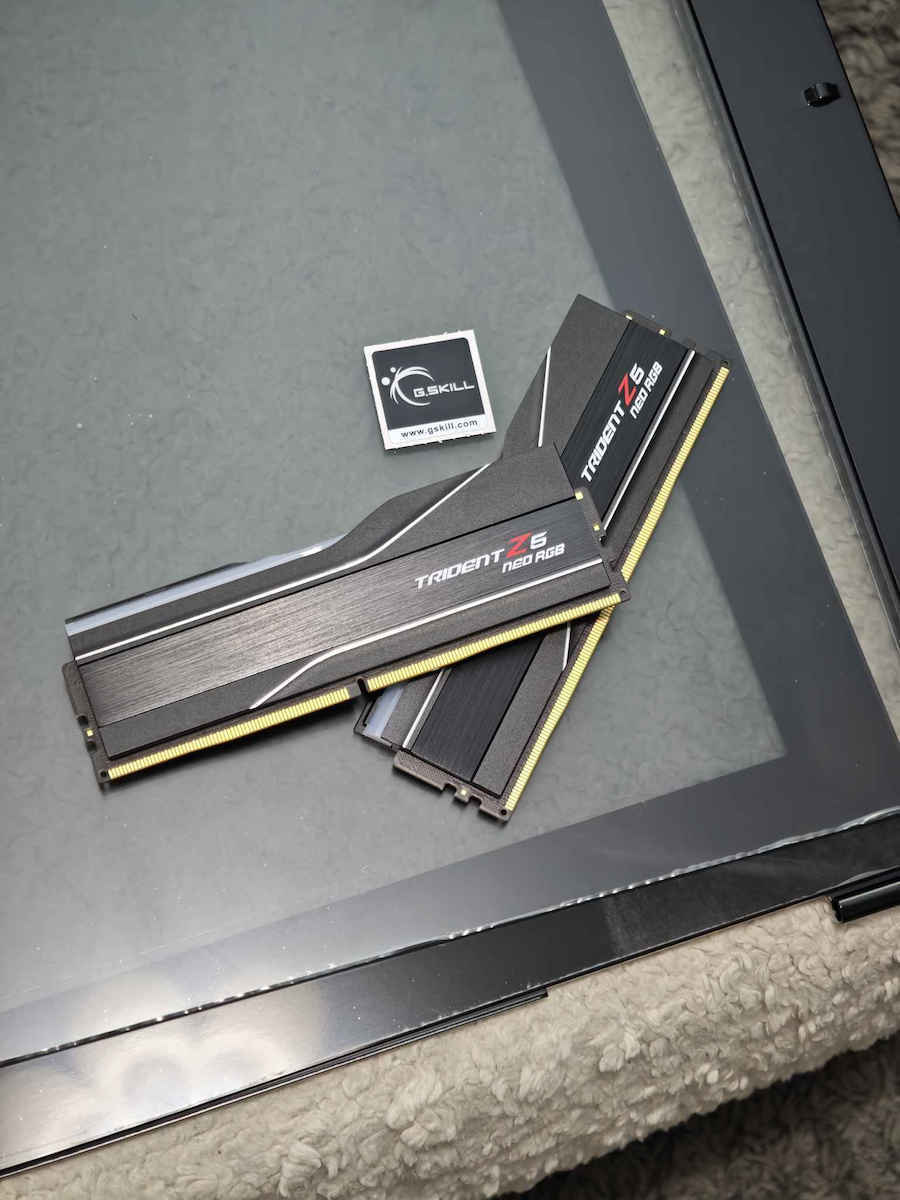
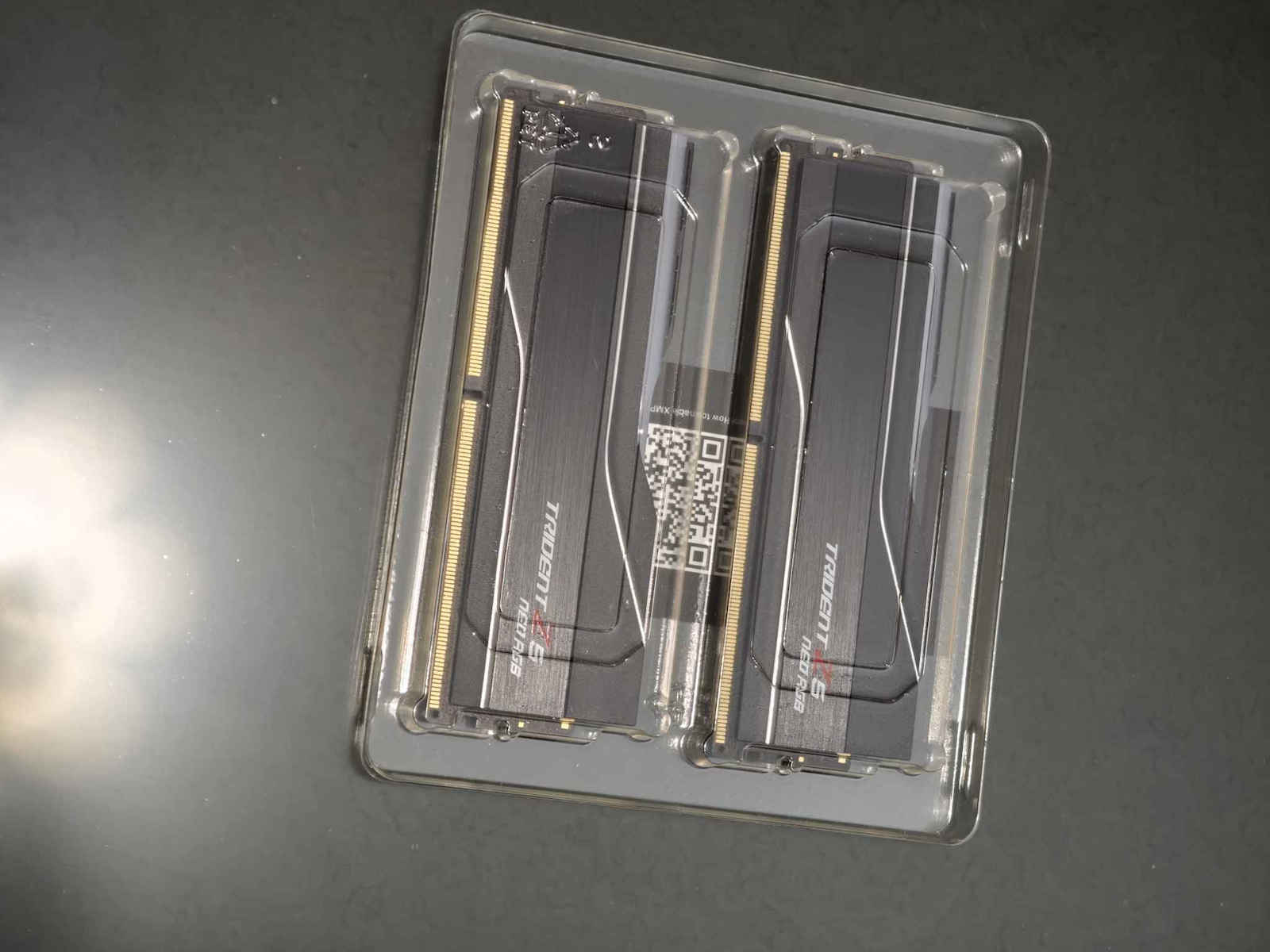
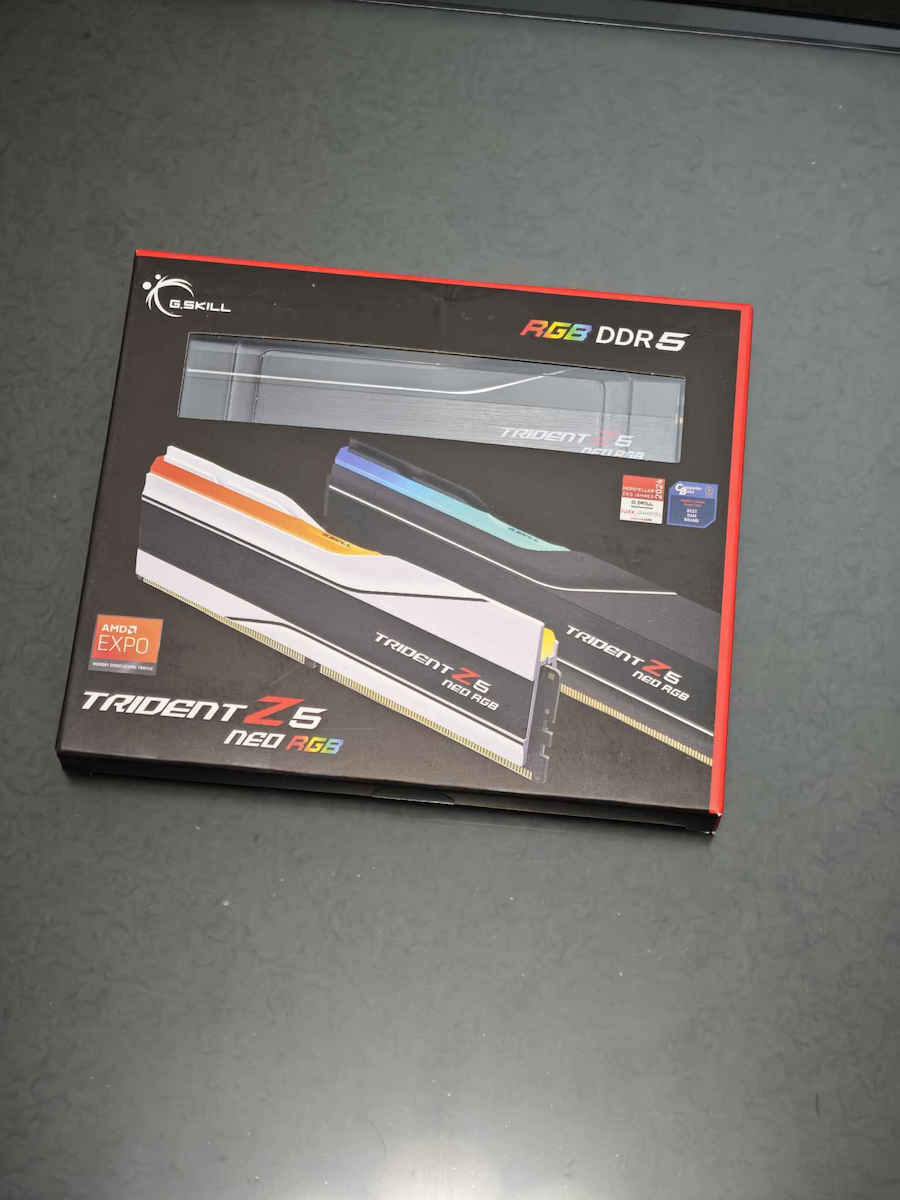
The DDR5 DRAM memory of the Trident Z5 Neo & Trident Z5 Neo RGB series is designed for the AMD AM5 platform with DDR5 capability, including the latest AMD Ryzen 7000 series processors and 600 series...
The DDR5 DRAM memory of the Trident Z5 Neo & Trident Z5 Neo RGB series is designed for the AMD AM5 platform with DDR5 capability, including the latest AMD Ryzen 7000 series processors and 600 series chipsets, with AMD EXPO memory overclocking profiles.
The DDR5 DRAM memory of the Trident Z5 Neo & Trident Z5 Neo RGB series is designed for the AMD AM5 platform with DDR5 capability, including the latest AMD Ryzen 7000 series processors and 600 series chipsets, with AMD EXPO memory overclocking profiles.
Specifications are collected from official manufacturer websites. Please verify the specifications before proceeding with your final purchase. If you notice any problem you can report it here.
The RAMs are awesome! FYI, if you're like me and DON'T want RGB, don't listen to those who say you need a BIOS setup! Just download the G.Skill software! It has an option for RGB OFF
Οι rams ειναι τουμπανες ! fyi αν εισαι σαν εμενα και ΔΕΝ θες RGB μην ακους αυτους που λενε οτι θελει bios setup ! απλα κατεβασε το software της gskill ! εχει option για RGB OFF
Excellent memories, purchased in the summer for €129. Installed on an MSI B650 Tomahawk WiFi mobo, Ryzen 7700 CPU OC 5GHz at 85W! with PBO2 CU -25 with absolute stability and no WHEA errors. In the BIOS, without EXPO, we set 6000 and timings in the order they appear in the Zen Timings utility: 30-38-38-38-61-99-8-12-32-7-24-48-170-510-277-225-x-x-x-x-5-17-28-15-14-4-1-8-8-1-7-6-0-40000-x-x-x-x-x at 1.36v, MCLK 3000 - FCLK 2000, source: https://docs.google.com/spreadsheets/d/1TfGAex1K0_Af9idWtcgic1-IMY1D8fWn3IudKAZo43c/edit - To test the stability of the memories, the TestMem5 utility is sufficient, link: https://github.com/CoolCmd/TestMem5. I hope I helped, see you again when prices drop below €150 in the coming years!
Άριστες μνήμες, αγορά το καλοκαίρι στα 129€. Τοποθετήθηκαν σε mobo msi b650 tomahawk wifi, cpu ryzen 7700 oc 5ghz στα 85w! με pbo2 cu -25 με απόλυτη σταθερότητα και χωρίς whea errors. Βάζουμε στο bios χωρίς EXPO τιμή 6000 και timings με τη σειρά που εμφανίζονται στο utility Zen Timings: 30-38-38-38-61-99-8-12-32-7-24-48-170-510-277-225-x-x-x-x-5-17-28-15-14-4-1-8-8-1-7-6-0-40000-x-x-x-x-x με 1.36v, MCLK 3000 - FCLK 2000, πηγή: https://docs.google.com/spreadsheets/d/1TfGAex1K0_Af9idWtcgic1-IMY1D8fWn3IudKAZo43c/edit - Για να τεστάρουμε τη σταθερότητα των μνημών αρκεί το utiility TestMem5, link: https://github.com/CoolCmd/TestMem5. Ελπίζω να βοήθησα, τα ξαναλέμε όταν οι τιμές πέσουν κάτω από τα 150€ στα επόμενα χρόνια!
Full compatibility with MSI x670e motherboard, with the press of a button they immediately synchronized at 6000. The RGB works perfectly with the motherboard.
Πλήρης συμβατότητα με motherboard MSI x670e , με το πάτημα ενός κουμπιού συγχρονιστηκαν κατευθείαν στα 6000. Τα RGB λειτουργούν ρολόι με την μητρική.
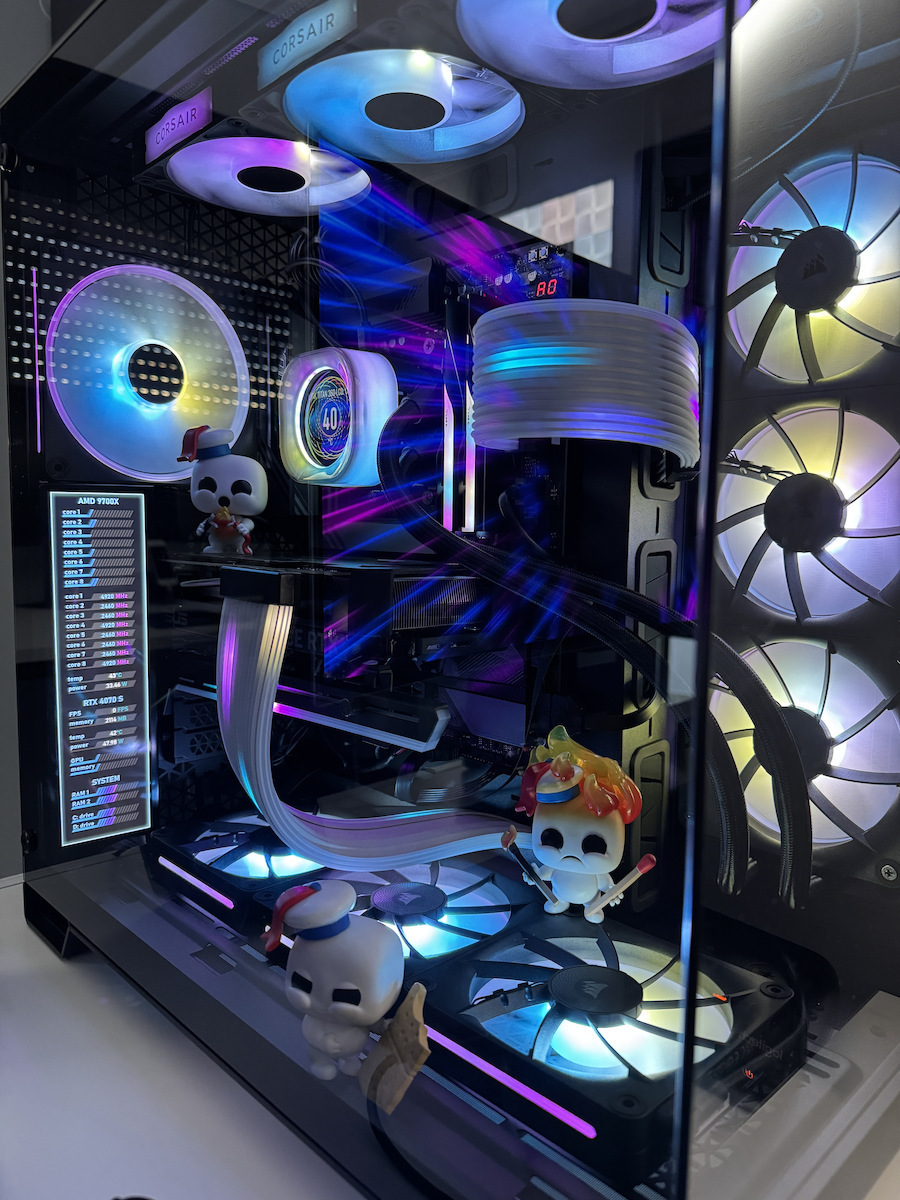
They were installed on an MSI Tomahawk X870 Wifi with an AMD Ryzen 9700X. I simply enabled the Expo 1 profile in the BIOS and had no problems since then. Full compatibility and everything works perfectly. Their RGB is the same as all previous Trident models.
Μπηκαν πανω σε μια Msi Tomahawk X870 Wifi με εναν Amd Rysen 9700X. Απλα ενεργοποιησα το Expo 1 profile στo bios και δεν ειχα κανενα προβλημα απο τοτε. Πληρης συμβατότητα και ολα δουλευουν ρολόι. Το Rgb τους ειναι ιδιο οπως ολες οι παλιοτερες Trident.
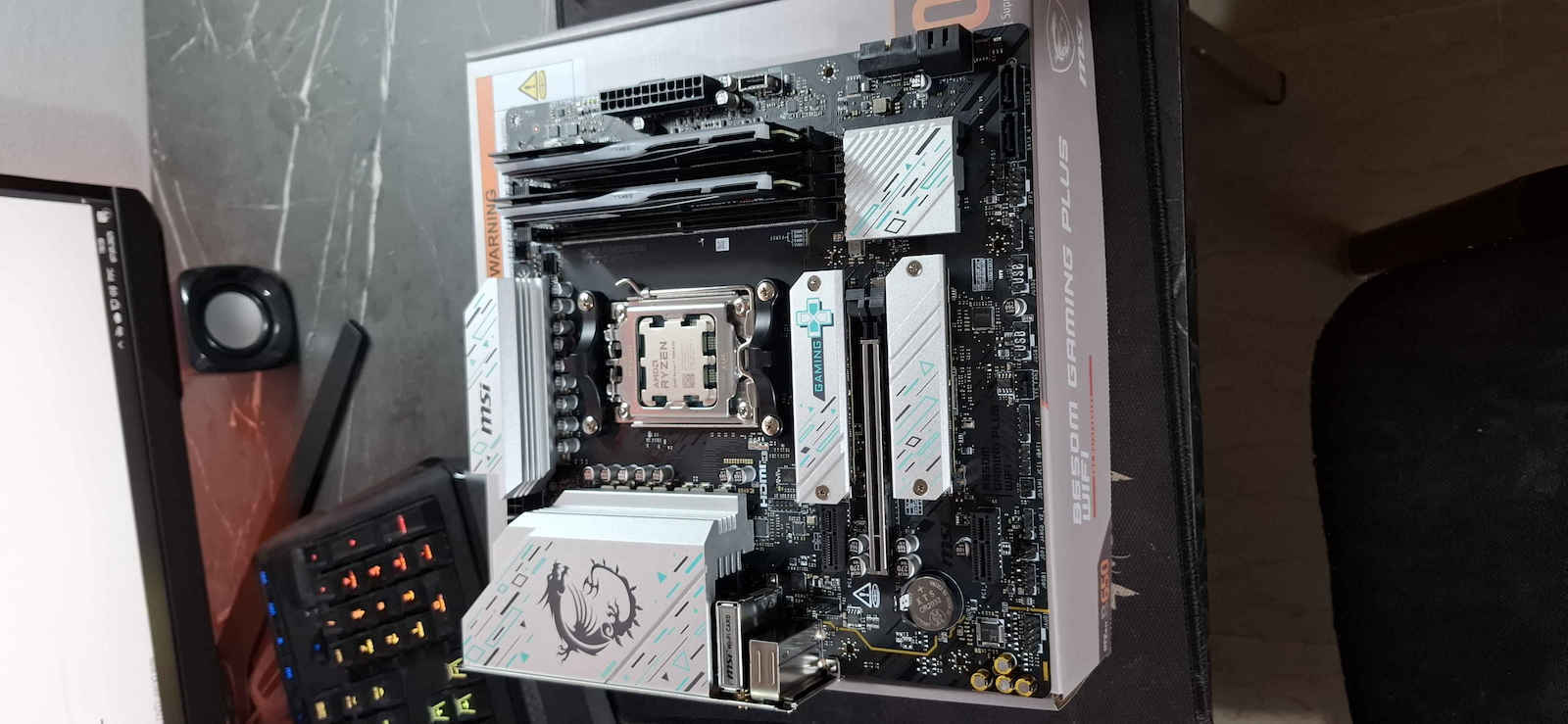
I got the kit and everything was complete, they were working normally. After a while, 1 to 2 months, one LED from the LED strip inside burned out, only that, the RAM was working fine. The product was returned, they checked it and sent me another one. It was installed in an MSI B850 Gaming Plus WiFi with a Ryzen 7 7700X CPU, it posted normally. Then in the BIOS, I opened AMD EXPO 6000 and CL30, everything was fine. I give it a 5 out of 5 because from what I see, no one else has had the same issue as mine, and I don't want to lower the rating because of the LED. I'll just say that I was unlucky and received a defective one
Πήρα τ κιτ ήταν όλα κομπλέ δούλευαν κανονικά μετά από λίγο καιρό 1 με 2 μήνες κάηκε από το ένα dimm ένα led από την ledoταινία που έχει μέσα μόνο αυτό οι ραμ δούλευαν κανονικά επιστράφηκε πίσω τ προϊόν το τσέκαραν και μου έστειλε άλλες το Σκρουτζ μπήκε σε msi b850 gaming plus WiFi με CPU Ryzen 7 7700x πόσταρε κανονικά μετά στο bios ανοίγω AMD EXPO 6000 και CL30 όλα καλά βαζω 5 στα 5 γιατί από ότι βλέπω δεν έχει τύχει σε κάποιον κάποιο ίδιο θέμα μ το δικό μου και δεν θέλω ν ρίξω την βαθμολογία λόγο του led θα το πω ότι απλά ειμουν άτυχος και μ ήρθε ελαττωματικό
Combined with ASRock b50 pro rs motherboard and Ryzen 7 9700x, it had no problem reaching 6000mhz after enabling the expo profile in the bios. Sleek design, nice colors, and proper performance
Συνδυάστηκε με motherboard ASRock b50 pro rs και Ryzen 7 9700x δεν είχε κανένα πρόβλημα να φτάσει τα 6000mhz αλμετα από ενεργοποίηση expo profile στο bios. Κομψός σχεδιασμός , ωραία χρώματα και σωστές επιδώσεις
With the asrock, you can't control the RGB of the RAM. You need to download the G.skill program or one of the others that recognize it. Also, if you want to have a specific color or have them turned off from the moment the computer starts, that's not possible. The program has to load first in Windows. At least I didn't find any way to do it directly from the motherboard. Other than that, they are considered good RAM. With one click, they run at 6000mhz without any problem.
Με την asrock δεν μπορείς να χειριστείς το RGB της Ram. Χρειάζεται να κατεβάσεις της G.skill το πρόγραμμα ή κάποιο από τα υπόλοιπα που το αναγνωρίζουν. Επίσης αν θες από την στιγμή που ανοίγει ο υπολογιστής να έχεις κάποιο συγκεκριμένο χρώμα ή να τα έχεις απενεργοποιημένα, δεν γίνεται. Πρέπει να φορτώσει πρώτα το πρόγραμμα στα windows. Δεν βρήκα εγώ τουλάχιστον κάποιο τρόπο κατευθείαν από την μητρική να το κάνω. Κατά τα άλλα θεωρούνται από τις καλές ram. Με ένα κλικ χωρίς κανένα πρόβλημα τρέχουν στα 6000mhz.
They were installed in a 2/4 pattern on an MSI x670e gaming plus wifi motherboard. They were recognized on the first BIOS post at 4800MHz with the yellow LED on the motherboard lit, which usually indicates functionality or compatibility issues with the memory. I immediately did a BIOS update, and the "problem" was resolved after the reboot. Then, through the BIOS and the XMP profile feature, they were set to the correct frequency of 6000MHz, and finally! Tuning of the A-RGB lighting via the MSI Control Center and the Mystic Light software.
Build/Specs:
1) MSI x670e gaming plus wifi
2) CPU: Ryzen 9 7900X
3) COOLER: Arctic Liquid Freezer III 360
4) STORAGE: Samsung 990 Pro 2TB
5) GPU: Gigabyte Radeon RX 7800XT 16GB GDDR6
6) PSU: Asus ROG THOR 1200W PLATINUM II
7) CASE: Asus ROG Strix Helios
And of course, the mentioned RAM.
Τοποθετήθηκαν σε μοτίβο 2/4 σε μητρική msi x670e gaming plus wifi.Αναγνωρίστηκαν στο πρώτο bios post στα 4800mhz και με αναμένο το κίτρινο led της μητρικής που συνήθως υποδηλώνει θέματα λειτουργικότητας ή και συμβατότητας των μνημών.Αμέσως έκανα bios update και το "πρόβλημα" μετά την επανεκκίνηση αποκαταστάθηκε. Στη συνέχεια μέσω του bios κ της λειτουργίας xmp profile μπήκαν στη σωστή frequency των 6000mhz και τέλος! Συντονισμός του a-rgb φωτισμού μέσω του msi control center και του mystic light software.
Build/Specs:
1)MSI x670e gaming plus wifi
2)CPU:Ryzen 9 7900X
3)COOLER:Arctic Liquid Freezer III 360
4)STORAGE:samsung 990 Pro 2tb
5)GPU:Gigabyte Radeon RX 7800XT 16GB GDDR6
6)PSU:Asus ROG THOR 1200W PLATINUM II
7)CASE:Asus ROG Strix Helios
Και οι εν λόγω Ram φυσικά.
They are very good!! Quality - price 5 stars!!
I want to help as much as I can those who don't know how to make them work at 6000mhz from 4800mhz for AMD and GIGABYTE mainboards and AMD EXPO memory..
(it would be good to do a BIOS UPDATE if available)
Let's go to the BIOS and:
1) we go from EASY MODE to ADVANCED MODE
2) select the TWEAKER tab
3) it will say XMP/EXPO, we click and select EXPO 1
4) Low Latency Support we set to ENABLE
5) XMP/EXPO High Bandwidth Support we set to ENABLE
6) UCLK DIV 1 MODE we select UCLK=MEMCLK
7) DDR_VDD Voltage we set FOR THESE SPECIFIC ONES to 1.35V
8) SAVE & EXIT
give a little time for the boot
Ειναι πολυ καλες!! Ποιοτητα - τιμη 5 αστερια!!
Θελω να βοηθησω οσο μπορω οσους δεν ξερουν να τις κανουν να δουλεψουν 6000mhz απο 4800mhz για AMD και GIGABYTE mainboard και AMD EXPO μνημες..
(καλο θα ειναι BIOS UPDATE αν υπαρχει να κανουμε)
Παμε στο BIOS και:
1)παμε απο EASY MODE σε ADVANCED MODE
2)επιλεγουμε καρτελα TWEAKER
3)θα μας λεει XMP/EXPO παταμε και επιλεγουμε EXPO 1
4)Low Latency Support το κανουμε ENABLE
5)XMP/EXPO High Bandwidth Support το κανουμε ENABLE
6)UCLK DIV 1 MODE επιλεγουμε UCLK=MEMCLK
7)DDR_VDD Voltage βαζουμε ΓΙΑ ΤΙΣ ΣΥΓΚΕΚΡΙΜΕΝΕΣ 1,35V
8)SAVE &EXIT
δωστε λιγο χρονο στο boot
CL30 and I was looking for them for about 2 weeks to find them available and at a reasonable price. They are paired with 7800X3D and the EXPO/XMP works without any problems at all.
CL30 και τις έψαχνα ~2 βδομάδες να τις βρώ διαθέσιμες και σε φυσιολογική τιμή. Είναι μαζί με 7800X3D και το EXPO/XMP παίζει χωρίς κανένα πρόβλημα απολύτως.
This RAM was one of my top choices for an AM5 system. The motherboard I used is the Tomahawk B650 and everything works flawlessly, even with the 7800x3d which had sensitivity issues with RAM, especially with timings & latency, but with this Z5 Neo CL30 RAM it runs perfectly.
I enabled EXPO in the BIOS, set the frequency to 6000MHz from the stock 4800 DDR5, and everything worked perfectly.
The AM5 platform does memory training on every PC boot, so the PC may take some time to open each time, needing up to 1.5 minutes of training before it starts booting into Windows. (With a memory context restore, however, you can skip this 1.5 minutes and boot in 20 seconds.)
The Z5 Neo version of this RAM kit is specifically designed for AMD EXPO systems, while the plain Z5 only supports XMP. It is likely that a simple Z5 will also work with an AMD processor via XMP, as AM5 motherboards support both EXPO and XMP.
XMP and EXPO are essentially the same system, with one being for Intel and the other for AMD, both aiming to increase frequencies with stability. But having an EXPO verified RAM kit, the manufacturer guarantees its proper operation with an AM5 platform and AMD processors.
Αυτη η RAM ηταν απο τις τοπ μου επιλογες για AM5 συστημα. Το Motherboard που χρησιμοποιησα ειναι το Tomahawk B650 και λειτουργουν ολα χωρις θεμα μεχρι και με τον 7800x3d που ειχε ενα θεμα ευαισθησιας στις RAM, ειδικα στα timings & latency, αλλα με αυτη τη Z5 Neo CL30 RAM τρεχει αψογα.
Ενεργοποιησα EXPO στη BIOS, εβαλα τη συχνοτητα στα 6000MHZ απο 4800 που ειναι οι stock DDR5, και λειτουργησαν ολα τελεια.
Η AM5 πλατφορμα κανει memory training σε καθε boot του PC, οποτε μπορει να αργει το PC καθε φορα να ανοιξει, θελοντας μεχρι και 1.5 λεπτο training μεχρι να αρχισει να boot-αρει στα Windows. (Με ενα memory context restore ομως γλυτωνεις και αυτο το 1.5 λεπτο, και boot-αρει μεσα σε 20 δευτερολεπτα.)
Η Z5 Neo εκδοση αυτου του RAM kit προσδιοριζεται συγκεκριμενα για AMD EXPO συστηματα, ενω η σκετη Z5, υποστυριζει μονο XMP. Κατα πασα πιθανοιτητα θα λειτουργησει και μια απλη Z5 μαζι με AMD επεξεργαστη μεσω XMP, καθως οι AM5 motherboard υποστηριζουν και τα δυο, EXPO και XMP.
Το XMP και το EXPO ειναι ουσιαστηκα το ιδιο συστημα απλα το ενα ειναι της Intel ενω το αλλο της AMD, στοχος του οποιου ειναι να ανεβασει τις συχνοτητες με σταθεροτητα.
Αλλα εχοντας ενα EXPO verified RAM kit, ο κατασκευαστης εγγυαται την σωστη λειτουργια του με AM5 πλατφορμα και AMD επεξεργαστες.
In my opinion it's one of the most beautiful ram kits ever, the kit is stable and runs at advertised speed on my AMD system. Please make sure you enable either EXPO I or EXPO II in the bios in order to take advantage of the full specifications.
In my opinion it's one of the most beautiful ram kits ever, the kit is stable and runs at advertised speed on my AMD system. Please make sure you enable either EXPO I or EXPO II in the bios in order to take advantage of the full specifications.
Beautiful memories with RGB (see F5-6000J3038F16GX2-TZ5N if you want without RGB) and excellent functionality! They were immediately recognized without any issues on a Gigabyte B650M Aorus Elite AX motherboard with a Ryzen 7700 processor, and they worked flawlessly at the EXPO with just one click. Highly recommended.
Πανέμορφες μνήμες με RGB (δείτε τις F5-6000J3038F16GX2-TZ5N αν θέλετε χωρίς RGB) και άριστες λειτουργικά! Αναγνωρίστηκαν άμεσα χωρίς θέματα σε μητρική Gigabyte B650M Aorus Elite AX με επεξεργαστή Ryzen 7700 και με ένα κλικ δούλεψαν στο EXPO χωρίς κανένα απολύτως θέμα. Προτείνονται ανεπιφύλακτα.
The RAMs are awesome! FYI, if you're like me and DON'T want RGB, don't listen to those who say you need a BIOS setup! Just download the G.Skill software! It has an option for RGB OFF
Οι rams ειναι τουμπανες ! fyi αν εισαι σαν εμενα και ΔΕΝ θες RGB μην ακους αυτους που λενε οτι θελει bios setup ! απλα κατεβασε το software της gskill ! εχει option για RGB OFF
Excellent memories, purchased in the summer for €129. Installed on an MSI B650 Tomahawk WiFi mobo, Ryzen 7700 CPU OC 5GHz at 85W! with PBO2 CU -25 with absolute stability and no WHEA errors. In the BIOS, without EXPO, we set 6000 and timings in the order they appear in the Zen Timings utility: 30-38-38-38-61-99-8-12-32-7-24-48-170-510-277-225-x-x-x-x-5-17-28-15-14-4-1-8-8-1-7-6-0-40000-x-x-x-x-x at 1.36v, MCLK 3000 - FCLK 2000, source: https://docs.google.com/spreadsheets/d/1TfGAex1K0_Af9idWtcgic1-IMY1D8fWn3IudKAZo43c/edit - To test the stability of the memories, the TestMem5 utility is sufficient, link: https://github.com/CoolCmd/TestMem5. I hope I helped, see you again when prices drop below €150 in the coming years!
Άριστες μνήμες, αγορά το καλοκαίρι στα 129€. Τοποθετήθηκαν σε mobo msi b650 tomahawk wifi, cpu ryzen 7700 oc 5ghz στα 85w! με pbo2 cu -25 με απόλυτη σταθερότητα και χωρίς whea errors. Βάζουμε στο bios χωρίς EXPO τιμή 6000 και timings με τη σειρά που εμφανίζονται στο utility Zen Timings: 30-38-38-38-61-99-8-12-32-7-24-48-170-510-277-225-x-x-x-x-5-17-28-15-14-4-1-8-8-1-7-6-0-40000-x-x-x-x-x με 1.36v, MCLK 3000 - FCLK 2000, πηγή: https://docs.google.com/spreadsheets/d/1TfGAex1K0_Af9idWtcgic1-IMY1D8fWn3IudKAZo43c/edit - Για να τεστάρουμε τη σταθερότητα των μνημών αρκεί το utiility TestMem5, link: https://github.com/CoolCmd/TestMem5. Ελπίζω να βοήθησα, τα ξαναλέμε όταν οι τιμές πέσουν κάτω από τα 150€ στα επόμενα χρόνια!
The DDR5 DRAM memory of the Trident Z5 Neo & Trident Z5 Neo RGB series is designed for the AMD AM5 platform with DDR5 capability, including the latest AMD Ryzen 7000 series processors and 600 series chipsets, with AMD EXPO memory overclocking profiles.
Specifications are collected from official manufacturer websites. Please verify the specifications before proceeding with your final purchase. If you notice any problem you can report it here.
The RAMs are awesome! FYI, if you're like me and DON'T want RGB, don't listen to those who say you need a BIOS setup! Just download the G.Skill software! It has an option for RGB OFF
Οι rams ειναι τουμπανες ! fyi αν εισαι σαν εμενα και ΔΕΝ θες RGB μην ακους αυτους που λενε οτι θελει bios setup ! απλα κατεβασε το software της gskill ! εχει option για RGB OFF
Excellent memories, purchased in the summer for €129. Installed on an MSI B650 Tomahawk WiFi mobo, Ryzen 7700 CPU OC 5GHz at 85W! with PBO2 CU -25 with absolute stability and no WHEA errors. In the BIOS, without EXPO, we set 6000 and timings in the order they appear in the Zen Timings utility: 30-38-38-38-61-99-8-12-32-7-24-48-170-510-277-225-x-x-x-x-5-17-28-15-14-4-1-8-8-1-7-6-0-40000-x-x-x-x-x at 1.36v, MCLK 3000 - FCLK 2000, source: https://docs.google.com/spreadsheets/d/1TfGAex1K0_Af9idWtcgic1-IMY1D8fWn3IudKAZo43c/edit - To test the stability of the memories, the TestMem5 utility is sufficient, link: https://github.com/CoolCmd/TestMem5. I hope I helped, see you again when prices drop below €150 in the coming years!
Άριστες μνήμες, αγορά το καλοκαίρι στα 129€. Τοποθετήθηκαν σε mobo msi b650 tomahawk wifi, cpu ryzen 7700 oc 5ghz στα 85w! με pbo2 cu -25 με απόλυτη σταθερότητα και χωρίς whea errors. Βάζουμε στο bios χωρίς EXPO τιμή 6000 και timings με τη σειρά που εμφανίζονται στο utility Zen Timings: 30-38-38-38-61-99-8-12-32-7-24-48-170-510-277-225-x-x-x-x-5-17-28-15-14-4-1-8-8-1-7-6-0-40000-x-x-x-x-x με 1.36v, MCLK 3000 - FCLK 2000, πηγή: https://docs.google.com/spreadsheets/d/1TfGAex1K0_Af9idWtcgic1-IMY1D8fWn3IudKAZo43c/edit - Για να τεστάρουμε τη σταθερότητα των μνημών αρκεί το utiility TestMem5, link: https://github.com/CoolCmd/TestMem5. Ελπίζω να βοήθησα, τα ξαναλέμε όταν οι τιμές πέσουν κάτω από τα 150€ στα επόμενα χρόνια!
Full compatibility with MSI x670e motherboard, with the press of a button they immediately synchronized at 6000. The RGB works perfectly with the motherboard.
Πλήρης συμβατότητα με motherboard MSI x670e , με το πάτημα ενός κουμπιού συγχρονιστηκαν κατευθείαν στα 6000. Τα RGB λειτουργούν ρολόι με την μητρική.
They were installed on an MSI Tomahawk X870 Wifi with an AMD Ryzen 9700X. I simply enabled the Expo 1 profile in the BIOS and had no problems since then. Full compatibility and everything works perfectly. Their RGB is the same as all previous Trident models.
Μπηκαν πανω σε μια Msi Tomahawk X870 Wifi με εναν Amd Rysen 9700X. Απλα ενεργοποιησα το Expo 1 profile στo bios και δεν ειχα κανενα προβλημα απο τοτε. Πληρης συμβατότητα και ολα δουλευουν ρολόι. Το Rgb τους ειναι ιδιο οπως ολες οι παλιοτερες Trident.
I got the kit and everything was complete, they were working normally. After a while, 1 to 2 months, one LED from the LED strip inside burned out, only that, the RAM was working fine. The product was returned, they checked it and sent me another one. It was installed in an MSI B850 Gaming Plus WiFi with a Ryzen 7 7700X CPU, it posted normally. Then in the BIOS, I opened AMD EXPO 6000 and CL30, everything was fine. I give it a 5 out of 5 because from what I see, no one else has had the same issue as mine, and I don't want to lower the rating because of the LED. I'll just say that I was unlucky and received a defective one
Πήρα τ κιτ ήταν όλα κομπλέ δούλευαν κανονικά μετά από λίγο καιρό 1 με 2 μήνες κάηκε από το ένα dimm ένα led από την ledoταινία που έχει μέσα μόνο αυτό οι ραμ δούλευαν κανονικά επιστράφηκε πίσω τ προϊόν το τσέκαραν και μου έστειλε άλλες το Σκρουτζ μπήκε σε msi b850 gaming plus WiFi με CPU Ryzen 7 7700x πόσταρε κανονικά μετά στο bios ανοίγω AMD EXPO 6000 και CL30 όλα καλά βαζω 5 στα 5 γιατί από ότι βλέπω δεν έχει τύχει σε κάποιον κάποιο ίδιο θέμα μ το δικό μου και δεν θέλω ν ρίξω την βαθμολογία λόγο του led θα το πω ότι απλά ειμουν άτυχος και μ ήρθε ελαττωματικό
Combined with ASRock b50 pro rs motherboard and Ryzen 7 9700x, it had no problem reaching 6000mhz after enabling the expo profile in the bios. Sleek design, nice colors, and proper performance
Συνδυάστηκε με motherboard ASRock b50 pro rs και Ryzen 7 9700x δεν είχε κανένα πρόβλημα να φτάσει τα 6000mhz αλμετα από ενεργοποίηση expo profile στο bios. Κομψός σχεδιασμός , ωραία χρώματα και σωστές επιδώσεις
With the asrock, you can't control the RGB of the RAM. You need to download the G.skill program or one of the others that recognize it. Also, if you want to have a specific color or have them turned off from the moment the computer starts, that's not possible. The program has to load first in Windows. At least I didn't find any way to do it directly from the motherboard. Other than that, they are considered good RAM. With one click, they run at 6000mhz without any problem.
Με την asrock δεν μπορείς να χειριστείς το RGB της Ram. Χρειάζεται να κατεβάσεις της G.skill το πρόγραμμα ή κάποιο από τα υπόλοιπα που το αναγνωρίζουν. Επίσης αν θες από την στιγμή που ανοίγει ο υπολογιστής να έχεις κάποιο συγκεκριμένο χρώμα ή να τα έχεις απενεργοποιημένα, δεν γίνεται. Πρέπει να φορτώσει πρώτα το πρόγραμμα στα windows. Δεν βρήκα εγώ τουλάχιστον κάποιο τρόπο κατευθείαν από την μητρική να το κάνω. Κατά τα άλλα θεωρούνται από τις καλές ram. Με ένα κλικ χωρίς κανένα πρόβλημα τρέχουν στα 6000mhz.
They were installed in a 2/4 pattern on an MSI x670e gaming plus wifi motherboard. They were recognized on the first BIOS post at 4800MHz with the yellow LED on the motherboard lit, which usually indicates functionality or compatibility issues with the memory. I immediately did a BIOS update, and the "problem" was resolved after the reboot. Then, through the BIOS and the XMP profile feature, they were set to the correct frequency of 6000MHz, and finally! Tuning of the A-RGB lighting via the MSI Control Center and the Mystic Light software.
Build/Specs:
1) MSI x670e gaming plus wifi
2) CPU: Ryzen 9 7900X
3) COOLER: Arctic Liquid Freezer III 360
4) STORAGE: Samsung 990 Pro 2TB
5) GPU: Gigabyte Radeon RX 7800XT 16GB GDDR6
6) PSU: Asus ROG THOR 1200W PLATINUM II
7) CASE: Asus ROG Strix Helios
And of course, the mentioned RAM.
Τοποθετήθηκαν σε μοτίβο 2/4 σε μητρική msi x670e gaming plus wifi.Αναγνωρίστηκαν στο πρώτο bios post στα 4800mhz και με αναμένο το κίτρινο led της μητρικής που συνήθως υποδηλώνει θέματα λειτουργικότητας ή και συμβατότητας των μνημών.Αμέσως έκανα bios update και το "πρόβλημα" μετά την επανεκκίνηση αποκαταστάθηκε. Στη συνέχεια μέσω του bios κ της λειτουργίας xmp profile μπήκαν στη σωστή frequency των 6000mhz και τέλος! Συντονισμός του a-rgb φωτισμού μέσω του msi control center και του mystic light software.
Build/Specs:
1)MSI x670e gaming plus wifi
2)CPU:Ryzen 9 7900X
3)COOLER:Arctic Liquid Freezer III 360
4)STORAGE:samsung 990 Pro 2tb
5)GPU:Gigabyte Radeon RX 7800XT 16GB GDDR6
6)PSU:Asus ROG THOR 1200W PLATINUM II
7)CASE:Asus ROG Strix Helios
Και οι εν λόγω Ram φυσικά.
They are very good!! Quality - price 5 stars!!
I want to help as much as I can those who don't know how to make them work at 6000mhz from 4800mhz for AMD and GIGABYTE mainboards and AMD EXPO memory..
(it would be good to do a BIOS UPDATE if available)
Let's go to the BIOS and:
1) we go from EASY MODE to ADVANCED MODE
2) select the TWEAKER tab
3) it will say XMP/EXPO, we click and select EXPO 1
4) Low Latency Support we set to ENABLE
5) XMP/EXPO High Bandwidth Support we set to ENABLE
6) UCLK DIV 1 MODE we select UCLK=MEMCLK
7) DDR_VDD Voltage we set FOR THESE SPECIFIC ONES to 1.35V
8) SAVE & EXIT
give a little time for the boot
Ειναι πολυ καλες!! Ποιοτητα - τιμη 5 αστερια!!
Θελω να βοηθησω οσο μπορω οσους δεν ξερουν να τις κανουν να δουλεψουν 6000mhz απο 4800mhz για AMD και GIGABYTE mainboard και AMD EXPO μνημες..
(καλο θα ειναι BIOS UPDATE αν υπαρχει να κανουμε)
Παμε στο BIOS και:
1)παμε απο EASY MODE σε ADVANCED MODE
2)επιλεγουμε καρτελα TWEAKER
3)θα μας λεει XMP/EXPO παταμε και επιλεγουμε EXPO 1
4)Low Latency Support το κανουμε ENABLE
5)XMP/EXPO High Bandwidth Support το κανουμε ENABLE
6)UCLK DIV 1 MODE επιλεγουμε UCLK=MEMCLK
7)DDR_VDD Voltage βαζουμε ΓΙΑ ΤΙΣ ΣΥΓΚΕΚΡΙΜΕΝΕΣ 1,35V
8)SAVE &EXIT
δωστε λιγο χρονο στο boot
CL30 and I was looking for them for about 2 weeks to find them available and at a reasonable price. They are paired with 7800X3D and the EXPO/XMP works without any problems at all.
CL30 και τις έψαχνα ~2 βδομάδες να τις βρώ διαθέσιμες και σε φυσιολογική τιμή. Είναι μαζί με 7800X3D και το EXPO/XMP παίζει χωρίς κανένα πρόβλημα απολύτως.
This RAM was one of my top choices for an AM5 system. The motherboard I used is the Tomahawk B650 and everything works flawlessly, even with the 7800x3d which had sensitivity issues with RAM, especially with timings & latency, but with this Z5 Neo CL30 RAM it runs perfectly.
I enabled EXPO in the BIOS, set the frequency to 6000MHz from the stock 4800 DDR5, and everything worked perfectly.
The AM5 platform does memory training on every PC boot, so the PC may take some time to open each time, needing up to 1.5 minutes of training before it starts booting into Windows. (With a memory context restore, however, you can skip this 1.5 minutes and boot in 20 seconds.)
The Z5 Neo version of this RAM kit is specifically designed for AMD EXPO systems, while the plain Z5 only supports XMP. It is likely that a simple Z5 will also work with an AMD processor via XMP, as AM5 motherboards support both EXPO and XMP.
XMP and EXPO are essentially the same system, with one being for Intel and the other for AMD, both aiming to increase frequencies with stability. But having an EXPO verified RAM kit, the manufacturer guarantees its proper operation with an AM5 platform and AMD processors.
Αυτη η RAM ηταν απο τις τοπ μου επιλογες για AM5 συστημα. Το Motherboard που χρησιμοποιησα ειναι το Tomahawk B650 και λειτουργουν ολα χωρις θεμα μεχρι και με τον 7800x3d που ειχε ενα θεμα ευαισθησιας στις RAM, ειδικα στα timings & latency, αλλα με αυτη τη Z5 Neo CL30 RAM τρεχει αψογα.
Ενεργοποιησα EXPO στη BIOS, εβαλα τη συχνοτητα στα 6000MHZ απο 4800 που ειναι οι stock DDR5, και λειτουργησαν ολα τελεια.
Η AM5 πλατφορμα κανει memory training σε καθε boot του PC, οποτε μπορει να αργει το PC καθε φορα να ανοιξει, θελοντας μεχρι και 1.5 λεπτο training μεχρι να αρχισει να boot-αρει στα Windows. (Με ενα memory context restore ομως γλυτωνεις και αυτο το 1.5 λεπτο, και boot-αρει μεσα σε 20 δευτερολεπτα.)
Η Z5 Neo εκδοση αυτου του RAM kit προσδιοριζεται συγκεκριμενα για AMD EXPO συστηματα, ενω η σκετη Z5, υποστυριζει μονο XMP. Κατα πασα πιθανοιτητα θα λειτουργησει και μια απλη Z5 μαζι με AMD επεξεργαστη μεσω XMP, καθως οι AM5 motherboard υποστηριζουν και τα δυο, EXPO και XMP.
Το XMP και το EXPO ειναι ουσιαστηκα το ιδιο συστημα απλα το ενα ειναι της Intel ενω το αλλο της AMD, στοχος του οποιου ειναι να ανεβασει τις συχνοτητες με σταθεροτητα.
Αλλα εχοντας ενα EXPO verified RAM kit, ο κατασκευαστης εγγυαται την σωστη λειτουργια του με AM5 πλατφορμα και AMD επεξεργαστες.
In my opinion it's one of the most beautiful ram kits ever, the kit is stable and runs at advertised speed on my AMD system. Please make sure you enable either EXPO I or EXPO II in the bios in order to take advantage of the full specifications.
In my opinion it's one of the most beautiful ram kits ever, the kit is stable and runs at advertised speed on my AMD system. Please make sure you enable either EXPO I or EXPO II in the bios in order to take advantage of the full specifications.
Beautiful memories with RGB (see F5-6000J3038F16GX2-TZ5N if you want without RGB) and excellent functionality! They were immediately recognized without any issues on a Gigabyte B650M Aorus Elite AX motherboard with a Ryzen 7700 processor, and they worked flawlessly at the EXPO with just one click. Highly recommended.
Πανέμορφες μνήμες με RGB (δείτε τις F5-6000J3038F16GX2-TZ5N αν θέλετε χωρίς RGB) και άριστες λειτουργικά! Αναγνωρίστηκαν άμεσα χωρίς θέματα σε μητρική Gigabyte B650M Aorus Elite AX με επεξεργαστή Ryzen 7700 και με ένα κλικ δούλεψαν στο EXPO χωρίς κανένα απολύτως θέμα. Προτείνονται ανεπιφύλακτα.
The RAMs are awesome! FYI, if you're like me and DON'T want RGB, don't listen to those who say you need a BIOS setup! Just download the G.Skill software! It has an option for RGB OFF
Οι rams ειναι τουμπανες ! fyi αν εισαι σαν εμενα και ΔΕΝ θες RGB μην ακους αυτους που λενε οτι θελει bios setup ! απλα κατεβασε το software της gskill ! εχει option για RGB OFF
Excellent memories, purchased in the summer for €129. Installed on an MSI B650 Tomahawk WiFi mobo, Ryzen 7700 CPU OC 5GHz at 85W! with PBO2 CU -25 with absolute stability and no WHEA errors. In the BIOS, without EXPO, we set 6000 and timings in the order they appear in the Zen Timings utility: 30-38-38-38-61-99-8-12-32-7-24-48-170-510-277-225-x-x-x-x-5-17-28-15-14-4-1-8-8-1-7-6-0-40000-x-x-x-x-x at 1.36v, MCLK 3000 - FCLK 2000, source: https://docs.google.com/spreadsheets/d/1TfGAex1K0_Af9idWtcgic1-IMY1D8fWn3IudKAZo43c/edit - To test the stability of the memories, the TestMem5 utility is sufficient, link: https://github.com/CoolCmd/TestMem5. I hope I helped, see you again when prices drop below €150 in the coming years!
Άριστες μνήμες, αγορά το καλοκαίρι στα 129€. Τοποθετήθηκαν σε mobo msi b650 tomahawk wifi, cpu ryzen 7700 oc 5ghz στα 85w! με pbo2 cu -25 με απόλυτη σταθερότητα και χωρίς whea errors. Βάζουμε στο bios χωρίς EXPO τιμή 6000 και timings με τη σειρά που εμφανίζονται στο utility Zen Timings: 30-38-38-38-61-99-8-12-32-7-24-48-170-510-277-225-x-x-x-x-5-17-28-15-14-4-1-8-8-1-7-6-0-40000-x-x-x-x-x με 1.36v, MCLK 3000 - FCLK 2000, πηγή: https://docs.google.com/spreadsheets/d/1TfGAex1K0_Af9idWtcgic1-IMY1D8fWn3IudKAZo43c/edit - Για να τεστάρουμε τη σταθερότητα των μνημών αρκεί το utiility TestMem5, link: https://github.com/CoolCmd/TestMem5. Ελπίζω να βοήθησα, τα ξαναλέμε όταν οι τιμές πέσουν κάτω από τα 150€ στα επόμενα χρόνια!