Whether you want to break benchmarks or tune your system for everyday driving, TUF GAMING offers unique tools that allow you to take advantage of the peculiarities of the latest Ryzen architecture.
- AI Overclocking
- Dynamic OC Switcher
- Core Flex
Shipping costs and delivery speed are calculated based on the delivery location.


Key features:
Top specs
The Asus TUF Gaming X670E-Plus motherboard is aimed at users who want to build an advanced high-performance system, especially for gaming. It offers advanced features and capabilities for demanding users who wish to leverage AMD Ryzen 7000 series processors and other next-generation processors, as well as enjoy the benefits of PCIe 5.0 for extremely high data transfer speeds.
The Asus TUF Gaming X670E-Plus motherboard also offers TUF durable construction for reliability and durability, support for advanced overclocking, advanced cooling functions for excellent thermal performance, rich connectivity options such as multiple USB, storage, and network ports, advanced high-quality audio, and power management capabilities, making it an ideal choice for demanding gamers and users seeking high performance and reliability from a motherboard.
It is suitable for use in advanced gaming systems, multimedia production, professional use, and other applications that require high performance and reliability from the system's motherboard.

Whether you want to break benchmarks or tune your system for everyday driving, TUF GAMING offers unique tools that allow you to take advantage of the peculiarities of the latest Ryzen architecture.
Balance the thermal and acoustic elements of any build with a single click. An exclusive ASUS algorithm reduces unnecessary noise while performing a quick stress test, and then monitors CPU temperatures to dynamically adjust fans to optimal speeds.
An intuitive advanced feature offered through UEFI allows you to take full control. An integrated search function makes finding options easier, and various advanced features let you make smart and detailed adjustments, so you can fine-tune performance exactly as you want.
The EZ mode displays vital settings and statistics and also offers guides, drag-and-drop functionality, and one-click application of important settings, all to help you get your rig up and running in no time.
The exclusive ASUS Armoury Crate brings together easy control of supported gaming products. A single intuitive interface allows you to customize RGB lighting for all compatible devices and link them with Aura Sync for unified lighting.
It also offers information and control for a selected and growing ecosystem of hardware, with input device settings, Fan Xpert 4, and Two-Way AI Noise Cancelation. Armoury Crate even features product registration and a news section to stay in touch with the gaming community.
The comprehensive memory tuning options are the cornerstone of TUF GAMING motherboards. With the TUF GAMING X670E-PLUS, you can harness the full potential of DDR5 modules, whether it's an extreme-speed kit or an entry-level set that would otherwise be locked.
For those looking to surpass standard DDR5 speeds, the TUF GAMING X670E-PLUS is primed and ready for high-grade kits thanks to the extensive support of AMD Extended Profiles for Overclocking (EXPO). Experienced users will be able to further fine-tune performance through the extensive range of settings in the UEFI.
The TUF Gaming X670E-PLUS also features a PCIe 5.0 M.2 slot for enjoying the fastest data transfers up to 128 Gbps, while all M.2 slots support NVMe and SATA RAID configurations to take advantage of the latest available speeds.
The TUF GAMING X670E-PLUS is equipped with an expanded 3X VRM, PCH, and three M.2 slots with heatsinks that provide the perfect balance of mass and surface area for heat dissipation.
It also features:
PCIe 5.0 is 2 times faster than PCIe 4.0, so the SMT manufacturing process was adapted for the faster SafeSlot Core+ to ensure higher data speeds.
SafeSlot Core+ is a reinforced metal housing added to a PCIe slot to keep a card firmly installed.
Additionally, the robust ASUS SafeDIMM slots support and protect memory modules on select ASUS motherboards, allowing you to install your modules with speed, precision, and confidence.
The built-in 2.5 Gb Ethernet elevates your local network connection to higher levels by improving bandwidth by up to 2.5X. Using the existing LAN cable, you can take advantage of this network upgrade to enjoy smoother lag-free gaming, instant high-resolution video streaming, and faster file transfers.
This powerful utility, available exclusively from ASUS, leverages a vast deep learning database to reduce background noise from the microphone and incoming audio while preserving voices.
Annoying keyboard noise, mouse clicks, and other ambient sounds are removed, so you can hear and be heard with absolute clarity during games or calls.
The TUF GAMING X670E series uses a unique audio codec designed in close collaboration with Realtek, the Realtek S1220A. It features an unprecedented signal-to-noise ratio (SNR) of 120 dB for the stereo line-out and 113 dB SNR for the line-in, providing excellent audio quality.
Additionally, an impedance sensing circuit automatically adjusts the gain to ensure the optimal volume range for your headphones.
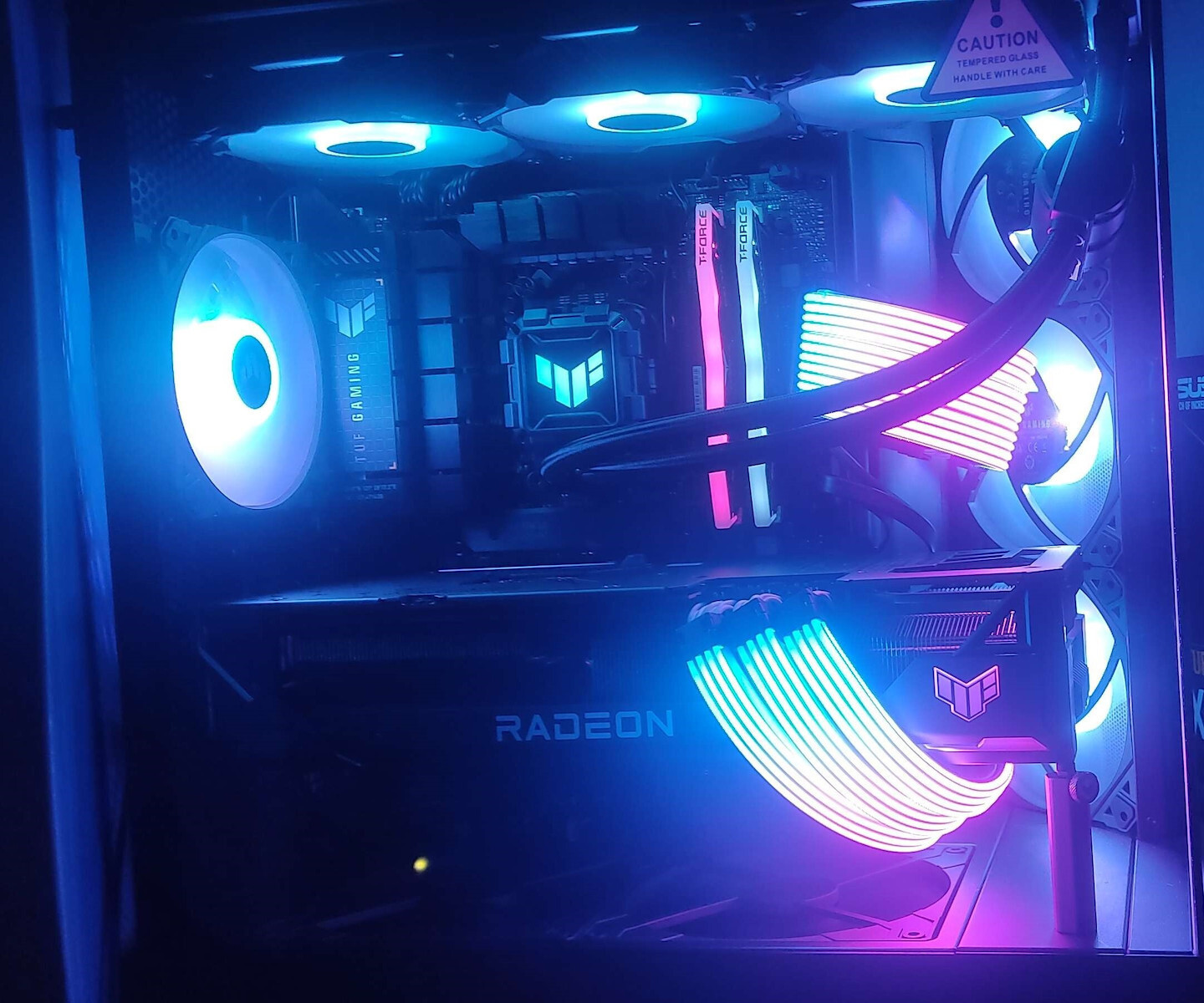
A well-tuned system deserves a corresponding aesthetic. The TUF GAMING X670E series features edge lighting to enhance its robust appearance, and ASUS Aura offers full RGB control with presets for built-in LED lights and third-party strips. All of this can be synchronized with an ever-growing portfolio of Aura-compatible hardware.
Three addressable Gen 2 RGB headers support up to 500 LEDs on Gen 2 RGB devices, enabling Aura Sync to automatically adjust lighting effects across your entire system. The new headers also offer full backward compatibility with existing Aura Sync equipment.
Specifications are collected from official manufacturer websites. Please verify the specifications before proceeding with your final purchase. If you notice any problem you can report it here.

Three stars because as a motherboard it has potential. Nevertheless, I am disappointed. The motherboard had issues, especially with the RAM in expo, which had been checked for compatibility. At some point, boot problems started, until the card stopped working, it wouldn't post and only the lights stayed on. Asus used to be a top company; we once knew that if we wanted good hardware, especially motherboards, it was a one-way street. In recent years, it has gone from bad to worse. From the burned x3D, the poor treatment (beta BIOS update that voided the warranty), and generally the free fall in reliability, plus the fact that you pay a premium for their products, leads us to seriously consider other options. Especially for a motherboard with military-grade materials, such a failure is problematic.
Τρία αστέρια γιατί σαν μητρική έχει προοπτικές. Παρόλα αυτά απογοητευμένος. Η μητρική έβγαζε προβλήματα, ειδικά με τις ram σε expo, οι οποίες μάλιστα είχαν ελεγχθεί για συμβατότητα. Κάποια στιγμή άρχισαν προβλήματα στο boot, μέχρι που η κάρτα σταμάτησε να δουλεύει δεν postαρε και έμενε μόνο με τα φώτα αναμμένα.
Η asus υπήρξε εταιρία κορυφή, κάποτε ξέραμε ότι αν θέλουμε καλό υλικό, ειδικά Motherboard ότι ήταν μονόδρομος. Τα τελευταία χρόνια πάει από το κακό στο χειρότερο. Από τους καμένους x3D, την κακιά αντιμετώπιση (beta bios update που έκανε void την εγγύηση) και γενικά την ελεύθερη πτώση σε αξιοπιστία, συν του ότι πληρώνεις πριμιουμ για τα προϊόντα της, μας οδηγεί στο να σκεφτόμαστε σοβαρά άλλες επιλογές.
Ειδικά για μια μητρική με military grade υλικό, τέτοια αστοχία είναι προβληματική.

Because I knew very well what I was buying and I knew very well how to make use of it, I also bought an Arctic Liquid Freezer II 240 that provides cooling with a special fan on the motherboard's VRM. From what I saw in a video from an experienced user on YouTube, it guarantees a drop of up to 7 degrees Celsius, which is quite significant. What I personally see in terms of temperature at that specific point is a drop of 4-5 degrees, which still serves me well, as no other cooler would provide me with such support.
The processor I am using is the 7700x, which is already very hot on its own, and in stock settings it keeps it at 39 degrees idle, but if I increase the fan speed, at the cost of noise, it reaches 32 degrees. Something I haven't done yet, because I don't think it will be that useful. The noise of the fans covers many sounds around us, and if you play with friends and headphones, it's annoying. I will simply add a few more for better airflow.
The most positive thing is that compared to previous TUF motherboards, they have changed the positions of many internal ports, making the installation of various hardware easier. If you do some research, you will see that in old TUF motherboards, the Watercool AIO ports are in inaccessible areas for the sake of not extending the power cable, while now they are located on the top right along with additional 4Pin ports and an ARGB port. Also, the space around there for installing cooling solutions is quite large, the heatsinks or VRM capacitors do not interfere, and you can easily install any cooler you purchased. You will find AI Cooling in Armour Crate quite useful, especially if you don't want to make tweaks and search for speeds and related settings on your own.
The RAM is in a very good position, providing the space comfort you desire in a motherboard for installing large coolers, and you will definitely have the convenience to work on your modifications. From my own experience, I can tell you that it supports Expo I and Expo II, and I recommend Expo I for learning purposes depending on how you work with your memory. I personally chose g.skill trident z5 neo because I wanted to prefer the brand, I wanted to get something that the motherboard datasheet confirms is compatible (in the past, am4 had issues with some RAM), and definitely a low cl, as much as possible, to stay within budget.
What I liked quite a bit was the number of ports for installing m.2. It is the first setup I have ever done in my life only with m.2 and all my HDDs are external for my important files. They provide coverage with heatsinks and thermal paste, so you don't need to do much for their cooling and housing on the motherboard. Also, you don't need the annoying small screw that other motherboards have, as this one has solved it with a rotating plastic pin that secures it from lifting. I found it clever. My Samsung Evo 980 (PCIe 4.0) is in PCIe 5.0 slot even though it doesn't have such connectivity, I placed it there. The second one I have, a Kingston A3000, I placed it in the 3.0 slot because it is of that standard, but also because it has coverage from above and cooling in that slot.
Another important reason why I chose this motherboard is the PCI port it has for installing a sound card in case the Realtek didn't satisfy me. I haven't found a reason to buy one yet, and it will show exactly what I will do. I have heard and read good things about the Realtek S1220A in relation to amplifiers. It provides good sound quality in 7.1, although it has some limitations in terms of settings for the high frequencies of the multichannel. You can see it before purchasing it, in the description of the official page to make sure.
It provides a variety of expansions for different types of cases, such as multiple ports in various locations for fans, a variety of USB ports on the front for all types, and the classic headphone ports. I don't like that in 2023, while the Gigabyte Z170X G1 Gaming 5 from 2016 provides a plastic piece that installs the operate, reset, and HDD LED buttons to pass them through it and then onto the slots, with this motherboard I have to do it one by one manually. Unfortunately, the Gigabyte plastic does not fit this motherboard. Also, a negative aspect is that even if I connect the speaker module, no motherboard has its own integrated one. If someone made a mistake during installation or something went wrong, you can't hear the sound that helps you find the issue. Trying and error is good, but sound is helpful.
Now, regarding the external ports, I found the material to be very rich. I should mention that it doesn't require a backplate installation, it is integrated. It has eight USB type A ports and two type C ports. Out of the 8, 3 are blue and 5 are teal. The teal ones are USB 3.2 gen 2 and the blue ones are 3.2 gen 1. While the type C ports are all 3.2 gen 2. It has a special port for flash BIOS without being in Windows and a special button below to activate it. It also has 7.1 audio support and unfortunately does not have an optical port. The 2.5Gb Ethernet port speed is good to have, you never know what will happen in the coming years.
The motherboard's LEDs turn on even after you shut down your computer. From the BIOS, you can go to the Aura settings by pressing F4, and choose Stealth Mode to turn them off.
Επειδή ήξερα πολύ καλά τι αγόραζα και ήξερα πολύ καλά πώς να το αξιοποιήσω, μαζί αγόρασα και μια Arctic Liquid Freezer II 240 που παρέχει ψύξη με ειδικό ανεμιστήρα στο VRM της μητρικής. Από όσο είδα σε βίντεο από έμπειρο χρήστη στο YouTube, εγγυάται ως και πτώση 7 βαθμούς κελσίου που είναι αρκετά σημαντικό. Αυτό που βλέπω εγώ ο ίδιος σε θερμοκρασία στο συγκεκριμένο σημείο είναι μια πτώση 4-5 βαθμούς που και πάλι με εξυπηρετεί, αφού καμία άλλη ψύχτρα δε θα μου παρείχε τέτοια υποστήριξη.
Ο επεξεργαστής που φοράω, είναι ο 7700x, ο οποίος είναι και από μόνος του πολύ θερμός και σε στοκ ρυθμίσεις μου τον κρατάει σε idle στους 39 βαθμούς, αλλά αν ανεβάσω στροφές τους ανεμιστήρες με κόστος το θόρυβο φτάνει τους 32 βαθμούς. Κάτι που δεν κάνω ακόμα, γιατί δε νομίζω ότι θα χρησιμεύσει κάπου τόσο πολύ. Ο θόρυβος των ανεμιστήρων καλύπτει πολλούς ήχους γύρω μας και αν παίζεις με παρέα και ακουστικά ενοχλείς 100%. Απλά θα προσθέσω μερικούς ακόμα για καλύτερη ροή αέρα.
Το θετικότερο είναι ότι συγκριτικά με προηγούμενες tuf μητρικές, έχουν αλλάξει θέσεις σε πολλές εσωτερικές θύρες και αυτό καθιστά την εγκατάσταση διαφόρων hardware πιο εύκολη. Αν κάνετε μια έρευνα θα δείτε ότι σε παλιές tuf μητρικές οι θύρες Watercool AIO είναι σε μη προσβάσιμα σημεία για χάρη μη επέκτασης του καλωδίου τροφοδοσίας της, ενώ τώρα είναι πάνω κεντροδεξιά μαζί με επιπλέον θύρες 4Pin και μία ARGB. Επίσης ο χώρος εκεί γύρω για εγκατάσταση λύσεων ψύξης είναι αρκετά μεγάλος, δεν ενοχλούν τα heatsink ούτε οι πυκνωτές του VRM και μπορείτε να εγκαταστήσετε εύκολα όποια ψύχτρα αγοράσατε. Θα βρείτε το AI Cooling στο Armour Crate αρκετά χρήσιμο, ειδικά αν δεν επιθυμείτε να κάνετε tweaks και ψάξιμο για ταχύτητες και διάφορα σχετικά από μόνοι σας.
Οι ραμ είναι σε πολύ καλή θέση, παρέχουν την άνεση χώρου που επιθυμείτε σε μια μητρική για την εγκατάσταση των μεγάλων ψυχτρών και σίγουρα θα έχετε την άνεση να δουλέψετε τις τροποποιήσεις σας. Από τη δική μου εμπειρία σας λέω ότι υποστηρίζει Expo I και Expo II και προτείνω την Expo I για τη χρήση εκμάθησης ανάλογα με το πώς δουλεύετε τις μνήμες σας. Εγώ προτίμησα g.skill trident z5 neo, γιατί ήθελα και τη φίρμα να προτιμήσω, ήθελα να πάρω κάτι που η μητρική σε datasheet βεβαιώνει ότι είναι συμβατό (παλιά οι am4 είχαν θέματα με κάποιες ραμ) και σίγουρα χαμηλό cl, όσο γινόταν, για να μην ξεφύγουμε από το μπάτζετ.
Αυτό που μου άρεσε αρκετά, ήταν το πλήθος θυρών για εγκατάσταση m.2. Είναι το πρώτο setup που κάνω στη ζωή μου μόνο με m.2 και όλους μου τους HDD ως εξωτερικούς για τα σημαντικά μου αρχεία. Παρέχουν κάλυψη με ψύχτρα και θερμοαγώγιμη αλοιφή, οπότε δε χρειάζεται να κάνεις πολλά για την ψύξη τους και την στέγαση στη μητρική. Επίσης, δε χρειάζεται το ενοχλητικό ψιλό βιδάκι που έχουν άλλες μητρικές, μιας και στην συγκεκριμένη το έχουν λύσει με περιστρεφόμενη πλαστική ακίδα που τον μαγκώνει για να μη σηκώνεται. Το βρήκα ευφυές. Ο Samsung Evo 980 (PCIe 4.0) μου είναι στη θύρα PCIe 5.0 ακόμα κι ας μην έχει τέτοια συνδεσιμότητα, εγώ τον έβαλα εκεί. Τον δεύτερο που έχω, έναν kingston A3000, τον έβαλα στη θύρα 3.0 και γιατί είναι αυτού του προτύπου, αλλά και γιατί σε αυτή τη θύρα έχει κάλυψη από πάνω και ψύξη.
Σημαντικός λόγος, επίσης, που διάλεξα αυτή τη μητρική είναι η θύρα pci που έχει για εγκατάσταση κάρτας ήχου σε περίπτωση που η realtek δε με ικανοποιούσε. Δεν έχω βρει λόγο να αγοράσω μία, ακόμα, και θα δείξει τι ακριβώς θα κάνω. Έχω ακούσει και διαβάσει καλά λόγια για τη Realtek S1220A σε σχέση με amplifiers. Δίνει καλή ποιότητα ήχου σε 7.1 αν και έχει μερικούς περιορισμούς ως προς τις ρυθμίσεις στις υψηλές συχνότητες του πολυκάναλου. Μπορείτε να το δείτε πριν την αγοράσετε, στην περιγραφή της επίσημης σελίδας για να βεβαιωθείτε.
Παρέχει πλήθος πολλών επεκτάσεων για τους διάφορους τύπους κουτιών, όπως για παράδειγμα πολλών θυρών σε διάφορα σημεία για ανεμιστήρες, πλήθος θυρών για usb μπροστά όλων των τύπων και κλασικά των ακουστικών. Δε μου αρέσει που εν έτει 2023, ενώ η Z170X G1 Gaming 5 της Gigabyte του 2016 παρέχει ένα πλαστικό που εγκαθιστά τα κουμπιά operate, reset και hdd led για να τα περάσει σε αυτό και με τη σειρά του πάνω στις υποδοχές, στη μητρική αυτή πρέπει να τα κάνω ένα προς ένα με το χέρι. Το πλαστικό της Gigabyte δεν ταιριάζει σε αυτή τη μητρική, δυστυχώς. Επίσης αρνητικό, ότι ακόμα βάζω το speaker module και καμία μητρική δεν έχει δικό της ενσωματωμένο. Αν κάποιος έχει κάνει γκάφα στην εγκατάσταση ή κάτι έχει αστοχήσει, δεν ακούς τον ήχο που βοηθάει να βρεις τι φταίει. Καλό το try and error, αλλά ο ήχος είναι βοήθεια.
Τώρα όσον αφορά τις εξωτερικές θύρες, βρήκα πάρα πολύ πλούσιο το υλικό. Να πω ότι δε χρειάζεται εγκατάσταση backplate, είναι ενσωματωμένο. Έχει οκτώ θύρες usb τύπου Α και δύο θύρες τύπου C. Από τις 8 οι 3 είναι γαλάζιες και οι 5 είναι μπλε. Οι γαλάζιες είναι οι usb 3.2 gen 2 και οι μπλε είναι 3.2 gen 1. Ενώ οι τύπου C είναι όλες 3.2 gen 2. Έχει ειδική θύρα για flash bios χωρίς να είσαι στα windows και ειδικό κουμπί από κάτω για τη ενεργοποίηση της λειτουργίας του. Επίσης έχει 7.1 υποστήριξη για ήχο και δυστυχώς δεν έχει οπτική θύρα. 2.5Gb ταχύτητα θήρας ethernet είναι καλό που υπάρχει, ποτέ δεν ξέρεις τι γίνεται στα επόμενα χρόνια.
Τα led της μητρικής ανάβουν και αφού κλείσετε τον υπολογιστή σας. Από το bios, μπορείτε στις ρυθμίσεις Aura, πατώντας F4, να διαλέξετε Stealth Mode και να σβήνουν.
Verified purchase
Very good and cheap but there are 1-2 things worth mentioning. The one m.2 slot (the one not covered by a heatsink), when in use, "blocks" 2 out of the 4 sata ports. In order for them to work together, you may have to lower the speed of the m.2 through a BIOS setting, which renders the purchase of a 4th m.2 instead of 2 other ssd/hd pointless. Also (a detail that can be solved with a screwdriver), it is difficult to find the clip that locks the PCI card due to the m.2 heatsink.
Finally, as unfortunately happens very often with motherboard manufacturers, the software is garbage. After setting it up, I suggest deleting it (and the 5 applications...) and disabling their automatic installation from the BIOS.
Πολύ καλή και φτηνή αλλά έχει 1-2 πράγματα που αξίζει να αναφερθούν. Η μία m.2 υποδοχή (αυτή που δεν καλύπτεται από heatsink), όταν βρίσκεται σε χρήση "κλείνει" 2 από τα 4 sata ports. Για να λειτουργήσουν μαζί, μπορεί να ρίξει την ταχύτητα της m.2 με ρύθμιση στο bios, κάτι που όμως καθιστά ανούσια την αγόρα 4ης m.2 αντί 2 άλλων ssd/hd. Επίσης (λεπτομέρεια που λύνεται με ένα κατσαβιδακι) είναι δύσκολο να βρεις το κλιπ που κλειδώνει την PCI κάρτα λόγω του m.2 heatsink.
Τέλος, όπως δυστυχώς συμβαίνει πολύ συχνά με κατασκευαστές mobo, το λογισμικό είναι σκουπίδι. Αφού το ρυθμίσετε, προτείνω να το διαγράψετε (και τις 5 εφαρμογές...) και να απενεργοποιήσετε την αυτόματη εγκατάσταση τους από το bios.
Verified purchase
Verified purchase
Three stars because as a motherboard it has potential. Nevertheless, I am disappointed. The motherboard had issues, especially with the RAM in expo, which had been checked for compatibility. At some point, boot problems started, until the card stopped working, it wouldn't post and only the lights stayed on. Asus used to be a top company; we once knew that if we wanted good hardware, especially motherboards, it was a one-way street. In recent years, it has gone from bad to worse. From the burned x3D, the poor treatment (beta BIOS update that voided the warranty), and generally the free fall in reliability, plus the fact that you pay a premium for their products, leads us to seriously consider other options. Especially for a motherboard with military-grade materials, such a failure is problematic.
Τρία αστέρια γιατί σαν μητρική έχει προοπτικές. Παρόλα αυτά απογοητευμένος. Η μητρική έβγαζε προβλήματα, ειδικά με τις ram σε expo, οι οποίες μάλιστα είχαν ελεγχθεί για συμβατότητα. Κάποια στιγμή άρχισαν προβλήματα στο boot, μέχρι που η κάρτα σταμάτησε να δουλεύει δεν postαρε και έμενε μόνο με τα φώτα αναμμένα.
Η asus υπήρξε εταιρία κορυφή, κάποτε ξέραμε ότι αν θέλουμε καλό υλικό, ειδικά Motherboard ότι ήταν μονόδρομος. Τα τελευταία χρόνια πάει από το κακό στο χειρότερο. Από τους καμένους x3D, την κακιά αντιμετώπιση (beta bios update που έκανε void την εγγύηση) και γενικά την ελεύθερη πτώση σε αξιοπιστία, συν του ότι πληρώνεις πριμιουμ για τα προϊόντα της, μας οδηγεί στο να σκεφτόμαστε σοβαρά άλλες επιλογές.
Ειδικά για μια μητρική με military grade υλικό, τέτοια αστοχία είναι προβληματική.
Because I knew very well what I was buying and I knew very well how to make use of it, I also bought an Arctic Liquid Freezer II 240 that provides cooling with a special fan on the motherboard's VRM. From what I saw in a video from an experienced user on YouTube, it guarantees a drop of up to 7 degrees Celsius, which is quite significant. What I personally see in terms of temperature at that specific point is a drop of 4-5 degrees, which still serves me well, as no other cooler would provide me with such support.
The processor I am using is the 7700x, which is already very hot on its own, and in stock settings it keeps it at 39 degrees idle, but if I increase the fan speed, at the cost of noise, it reaches 32 degrees. Something I haven't done yet, because I don't think it will be that useful. The noise of the fans covers many sounds around us, and if you play with friends and headphones, it's annoying. I will simply add a few more for better airflow.
The most positive thing is that compared to previous TUF motherboards, they have changed the positions of many internal ports, making the installation of various hardware easier. If you do some research, you will see that in old TUF motherboards, the Watercool AIO ports are in inaccessible areas for the sake of not extending the power cable, while now they are located on the top right along with additional 4Pin ports and an ARGB port. Also, the space around there for installing cooling solutions is quite large, the heatsinks or VRM capacitors do not interfere, and you can easily install any cooler you purchased. You will find AI Cooling in Armour Crate quite useful, especially if you don't want to make tweaks and search for speeds and related settings on your own.
The RAM is in a very good position, providing the space comfort you desire in a motherboard for installing large coolers, and you will definitely have the convenience to work on your modifications. From my own experience, I can tell you that it supports Expo I and Expo II, and I recommend Expo I for learning purposes depending on how you work with your memory. I personally chose g.skill trident z5 neo because I wanted to prefer the brand, I wanted to get something that the motherboard datasheet confirms is compatible (in the past, am4 had issues with some RAM), and definitely a low cl, as much as possible, to stay within budget.
What I liked quite a bit was the number of ports for installing m.2. It is the first setup I have ever done in my life only with m.2 and all my HDDs are external for my important files. They provide coverage with heatsinks and thermal paste, so you don't need to do much for their cooling and housing on the motherboard. Also, you don't need the annoying small screw that other motherboards have, as this one has solved it with a rotating plastic pin that secures it from lifting. I found it clever. My Samsung Evo 980 (PCIe 4.0) is in PCIe 5.0 slot even though it doesn't have such connectivity, I placed it there. The second one I have, a Kingston A3000, I placed it in the 3.0 slot because it is of that standard, but also because it has coverage from above and cooling in that slot.
Another important reason why I chose this motherboard is the PCI port it has for installing a sound card in case the Realtek didn't satisfy me. I haven't found a reason to buy one yet, and it will show exactly what I will do. I have heard and read good things about the Realtek S1220A in relation to amplifiers. It provides good sound quality in 7.1, although it has some limitations in terms of settings for the high frequencies of the multichannel. You can see it before purchasing it, in the description of the official page to make sure.
It provides a variety of expansions for different types of cases, such as multiple ports in various locations for fans, a variety of USB ports on the front for all types, and the classic headphone ports. I don't like that in 2023, while the Gigabyte Z170X G1 Gaming 5 from 2016 provides a plastic piece that installs the operate, reset, and HDD LED buttons to pass them through it and then onto the slots, with this motherboard I have to do it one by one manually. Unfortunately, the Gigabyte plastic does not fit this motherboard. Also, a negative aspect is that even if I connect the speaker module, no motherboard has its own integrated one. If someone made a mistake during installation or something went wrong, you can't hear the sound that helps you find the issue. Trying and error is good, but sound is helpful.
Now, regarding the external ports, I found the material to be very rich. I should mention that it doesn't require a backplate installation, it is integrated. It has eight USB type A ports and two type C ports. Out of the 8, 3 are blue and 5 are teal. The teal ones are USB 3.2 gen 2 and the blue ones are 3.2 gen 1. While the type C ports are all 3.2 gen 2. It has a special port for flash BIOS without being in Windows and a special button below to activate it. It also has 7.1 audio support and unfortunately does not have an optical port. The 2.5Gb Ethernet port speed is good to have, you never know what will happen in the coming years.
The motherboard's LEDs turn on even after you shut down your computer. From the BIOS, you can go to the Aura settings by pressing F4, and choose Stealth Mode to turn them off.
Επειδή ήξερα πολύ καλά τι αγόραζα και ήξερα πολύ καλά πώς να το αξιοποιήσω, μαζί αγόρασα και μια Arctic Liquid Freezer II 240 που παρέχει ψύξη με ειδικό ανεμιστήρα στο VRM της μητρικής. Από όσο είδα σε βίντεο από έμπειρο χρήστη στο YouTube, εγγυάται ως και πτώση 7 βαθμούς κελσίου που είναι αρκετά σημαντικό. Αυτό που βλέπω εγώ ο ίδιος σε θερμοκρασία στο συγκεκριμένο σημείο είναι μια πτώση 4-5 βαθμούς που και πάλι με εξυπηρετεί, αφού καμία άλλη ψύχτρα δε θα μου παρείχε τέτοια υποστήριξη.
Ο επεξεργαστής που φοράω, είναι ο 7700x, ο οποίος είναι και από μόνος του πολύ θερμός και σε στοκ ρυθμίσεις μου τον κρατάει σε idle στους 39 βαθμούς, αλλά αν ανεβάσω στροφές τους ανεμιστήρες με κόστος το θόρυβο φτάνει τους 32 βαθμούς. Κάτι που δεν κάνω ακόμα, γιατί δε νομίζω ότι θα χρησιμεύσει κάπου τόσο πολύ. Ο θόρυβος των ανεμιστήρων καλύπτει πολλούς ήχους γύρω μας και αν παίζεις με παρέα και ακουστικά ενοχλείς 100%. Απλά θα προσθέσω μερικούς ακόμα για καλύτερη ροή αέρα.
Το θετικότερο είναι ότι συγκριτικά με προηγούμενες tuf μητρικές, έχουν αλλάξει θέσεις σε πολλές εσωτερικές θύρες και αυτό καθιστά την εγκατάσταση διαφόρων hardware πιο εύκολη. Αν κάνετε μια έρευνα θα δείτε ότι σε παλιές tuf μητρικές οι θύρες Watercool AIO είναι σε μη προσβάσιμα σημεία για χάρη μη επέκτασης του καλωδίου τροφοδοσίας της, ενώ τώρα είναι πάνω κεντροδεξιά μαζί με επιπλέον θύρες 4Pin και μία ARGB. Επίσης ο χώρος εκεί γύρω για εγκατάσταση λύσεων ψύξης είναι αρκετά μεγάλος, δεν ενοχλούν τα heatsink ούτε οι πυκνωτές του VRM και μπορείτε να εγκαταστήσετε εύκολα όποια ψύχτρα αγοράσατε. Θα βρείτε το AI Cooling στο Armour Crate αρκετά χρήσιμο, ειδικά αν δεν επιθυμείτε να κάνετε tweaks και ψάξιμο για ταχύτητες και διάφορα σχετικά από μόνοι σας.
Οι ραμ είναι σε πολύ καλή θέση, παρέχουν την άνεση χώρου που επιθυμείτε σε μια μητρική για την εγκατάσταση των μεγάλων ψυχτρών και σίγουρα θα έχετε την άνεση να δουλέψετε τις τροποποιήσεις σας. Από τη δική μου εμπειρία σας λέω ότι υποστηρίζει Expo I και Expo II και προτείνω την Expo I για τη χρήση εκμάθησης ανάλογα με το πώς δουλεύετε τις μνήμες σας. Εγώ προτίμησα g.skill trident z5 neo, γιατί ήθελα και τη φίρμα να προτιμήσω, ήθελα να πάρω κάτι που η μητρική σε datasheet βεβαιώνει ότι είναι συμβατό (παλιά οι am4 είχαν θέματα με κάποιες ραμ) και σίγουρα χαμηλό cl, όσο γινόταν, για να μην ξεφύγουμε από το μπάτζετ.
Αυτό που μου άρεσε αρκετά, ήταν το πλήθος θυρών για εγκατάσταση m.2. Είναι το πρώτο setup που κάνω στη ζωή μου μόνο με m.2 και όλους μου τους HDD ως εξωτερικούς για τα σημαντικά μου αρχεία. Παρέχουν κάλυψη με ψύχτρα και θερμοαγώγιμη αλοιφή, οπότε δε χρειάζεται να κάνεις πολλά για την ψύξη τους και την στέγαση στη μητρική. Επίσης, δε χρειάζεται το ενοχλητικό ψιλό βιδάκι που έχουν άλλες μητρικές, μιας και στην συγκεκριμένη το έχουν λύσει με περιστρεφόμενη πλαστική ακίδα που τον μαγκώνει για να μη σηκώνεται. Το βρήκα ευφυές. Ο Samsung Evo 980 (PCIe 4.0) μου είναι στη θύρα PCIe 5.0 ακόμα κι ας μην έχει τέτοια συνδεσιμότητα, εγώ τον έβαλα εκεί. Τον δεύτερο που έχω, έναν kingston A3000, τον έβαλα στη θύρα 3.0 και γιατί είναι αυτού του προτύπου, αλλά και γιατί σε αυτή τη θύρα έχει κάλυψη από πάνω και ψύξη.
Σημαντικός λόγος, επίσης, που διάλεξα αυτή τη μητρική είναι η θύρα pci που έχει για εγκατάσταση κάρτας ήχου σε περίπτωση που η realtek δε με ικανοποιούσε. Δεν έχω βρει λόγο να αγοράσω μία, ακόμα, και θα δείξει τι ακριβώς θα κάνω. Έχω ακούσει και διαβάσει καλά λόγια για τη Realtek S1220A σε σχέση με amplifiers. Δίνει καλή ποιότητα ήχου σε 7.1 αν και έχει μερικούς περιορισμούς ως προς τις ρυθμίσεις στις υψηλές συχνότητες του πολυκάναλου. Μπορείτε να το δείτε πριν την αγοράσετε, στην περιγραφή της επίσημης σελίδας για να βεβαιωθείτε.
Παρέχει πλήθος πολλών επεκτάσεων για τους διάφορους τύπους κουτιών, όπως για παράδειγμα πολλών θυρών σε διάφορα σημεία για ανεμιστήρες, πλήθος θυρών για usb μπροστά όλων των τύπων και κλασικά των ακουστικών. Δε μου αρέσει που εν έτει 2023, ενώ η Z170X G1 Gaming 5 της Gigabyte του 2016 παρέχει ένα πλαστικό που εγκαθιστά τα κουμπιά operate, reset και hdd led για να τα περάσει σε αυτό και με τη σειρά του πάνω στις υποδοχές, στη μητρική αυτή πρέπει να τα κάνω ένα προς ένα με το χέρι. Το πλαστικό της Gigabyte δεν ταιριάζει σε αυτή τη μητρική, δυστυχώς. Επίσης αρνητικό, ότι ακόμα βάζω το speaker module και καμία μητρική δεν έχει δικό της ενσωματωμένο. Αν κάποιος έχει κάνει γκάφα στην εγκατάσταση ή κάτι έχει αστοχήσει, δεν ακούς τον ήχο που βοηθάει να βρεις τι φταίει. Καλό το try and error, αλλά ο ήχος είναι βοήθεια.
Τώρα όσον αφορά τις εξωτερικές θύρες, βρήκα πάρα πολύ πλούσιο το υλικό. Να πω ότι δε χρειάζεται εγκατάσταση backplate, είναι ενσωματωμένο. Έχει οκτώ θύρες usb τύπου Α και δύο θύρες τύπου C. Από τις 8 οι 3 είναι γαλάζιες και οι 5 είναι μπλε. Οι γαλάζιες είναι οι usb 3.2 gen 2 και οι μπλε είναι 3.2 gen 1. Ενώ οι τύπου C είναι όλες 3.2 gen 2. Έχει ειδική θύρα για flash bios χωρίς να είσαι στα windows και ειδικό κουμπί από κάτω για τη ενεργοποίηση της λειτουργίας του. Επίσης έχει 7.1 υποστήριξη για ήχο και δυστυχώς δεν έχει οπτική θύρα. 2.5Gb ταχύτητα θήρας ethernet είναι καλό που υπάρχει, ποτέ δεν ξέρεις τι γίνεται στα επόμενα χρόνια.
Τα led της μητρικής ανάβουν και αφού κλείσετε τον υπολογιστή σας. Από το bios, μπορείτε στις ρυθμίσεις Aura, πατώντας F4, να διαλέξετε Stealth Mode και να σβήνουν.
Very good and cheap but there are 1-2 things worth mentioning. The one m.2 slot (the one not covered by a heatsink), when in use, "blocks" 2 out of the 4 sata ports. In order for them to work together, you may have to lower the speed of the m.2 through a BIOS setting, which renders the purchase of a 4th m.2 instead of 2 other ssd/hd pointless. Also (a detail that can be solved with a screwdriver), it is difficult to find the clip that locks the PCI card due to the m.2 heatsink.
Finally, as unfortunately happens very often with motherboard manufacturers, the software is garbage. After setting it up, I suggest deleting it (and the 5 applications...) and disabling their automatic installation from the BIOS.
Πολύ καλή και φτηνή αλλά έχει 1-2 πράγματα που αξίζει να αναφερθούν. Η μία m.2 υποδοχή (αυτή που δεν καλύπτεται από heatsink), όταν βρίσκεται σε χρήση "κλείνει" 2 από τα 4 sata ports. Για να λειτουργήσουν μαζί, μπορεί να ρίξει την ταχύτητα της m.2 με ρύθμιση στο bios, κάτι που όμως καθιστά ανούσια την αγόρα 4ης m.2 αντί 2 άλλων ssd/hd. Επίσης (λεπτομέρεια που λύνεται με ένα κατσαβιδακι) είναι δύσκολο να βρεις το κλιπ που κλειδώνει την PCI κάρτα λόγω του m.2 heatsink.
Τέλος, όπως δυστυχώς συμβαίνει πολύ συχνά με κατασκευαστές mobo, το λογισμικό είναι σκουπίδι. Αφού το ρυθμίσετε, προτείνω να το διαγράψετε (και τις 5 εφαρμογές...) και να απενεργοποιήσετε την αυτόματη εγκατάσταση τους από το bios.
Specifications are collected from official manufacturer websites. Please verify the specifications before proceeding with your final purchase. If you notice any problem you can report it here.
The Asus TUF Gaming X670E-Plus motherboard is aimed at users who want to build an advanced high-performance system, especially for gaming. It offers advanced features and capabilities for demanding users who wish to leverage AMD Ryzen 7000 series processors and other next-generation processors, as well as enjoy the benefits of PCIe 5.0 for extremely high data transfer speeds.
The Asus TUF Gaming X670E-Plus motherboard also offers TUF durable construction for reliability and durability, support for advanced overclocking, advanced cooling functions for excellent thermal performance, rich connectivity options such as multiple USB, storage, and network ports, advanced high-quality audio, and power management capabilities, making it an ideal choice for demanding gamers and users seeking high performance and reliability from a motherboard.
It is suitable for use in advanced gaming systems, multimedia production, professional use, and other applications that require high performance and reliability from the system's motherboard.
Whether you want to break benchmarks or tune your system for everyday driving, TUF GAMING offers unique tools that allow you to take advantage of the peculiarities of the latest Ryzen architecture.
Balance the thermal and acoustic elements of any build with a single click. An exclusive ASUS algorithm reduces unnecessary noise while performing a quick stress test, and then monitors CPU temperatures to dynamically adjust fans to optimal speeds.
An intuitive advanced feature offered through UEFI allows you to take full control. An integrated search function makes finding options easier, and various advanced features let you make smart and detailed adjustments, so you can fine-tune performance exactly as you want.
The EZ mode displays vital settings and statistics and also offers guides, drag-and-drop functionality, and one-click application of important settings, all to help you get your rig up and running in no time.
The exclusive ASUS Armoury Crate brings together easy control of supported gaming products. A single intuitive interface allows you to customize RGB lighting for all compatible devices and link them with Aura Sync for unified lighting.
It also offers information and control for a selected and growing ecosystem of hardware, with input device settings, Fan Xpert 4, and Two-Way AI Noise Cancelation. Armoury Crate even features product registration and a news section to stay in touch with the gaming community.
The comprehensive memory tuning options are the cornerstone of TUF GAMING motherboards. With the TUF GAMING X670E-PLUS, you can harness the full potential of DDR5 modules, whether it's an extreme-speed kit or an entry-level set that would otherwise be locked.
For those looking to surpass standard DDR5 speeds, the TUF GAMING X670E-PLUS is primed and ready for high-grade kits thanks to the extensive support of AMD Extended Profiles for Overclocking (EXPO). Experienced users will be able to further fine-tune performance through the extensive range of settings in the UEFI.
The TUF Gaming X670E-PLUS also features a PCIe 5.0 M.2 slot for enjoying the fastest data transfers up to 128 Gbps, while all M.2 slots support NVMe and SATA RAID configurations to take advantage of the latest available speeds.
The TUF GAMING X670E-PLUS is equipped with an expanded 3X VRM, PCH, and three M.2 slots with heatsinks that provide the perfect balance of mass and surface area for heat dissipation.
It also features:
PCIe 5.0 is 2 times faster than PCIe 4.0, so the SMT manufacturing process was adapted for the faster SafeSlot Core+ to ensure higher data speeds.
SafeSlot Core+ is a reinforced metal housing added to a PCIe slot to keep a card firmly installed.
Additionally, the robust ASUS SafeDIMM slots support and protect memory modules on select ASUS motherboards, allowing you to install your modules with speed, precision, and confidence.
The built-in 2.5 Gb Ethernet elevates your local network connection to higher levels by improving bandwidth by up to 2.5X. Using the existing LAN cable, you can take advantage of this network upgrade to enjoy smoother lag-free gaming, instant high-resolution video streaming, and faster file transfers.
This powerful utility, available exclusively from ASUS, leverages a vast deep learning database to reduce background noise from the microphone and incoming audio while preserving voices.
Annoying keyboard noise, mouse clicks, and other ambient sounds are removed, so you can hear and be heard with absolute clarity during games or calls.
The TUF GAMING X670E series uses a unique audio codec designed in close collaboration with Realtek, the Realtek S1220A. It features an unprecedented signal-to-noise ratio (SNR) of 120 dB for the stereo line-out and 113 dB SNR for the line-in, providing excellent audio quality.
Additionally, an impedance sensing circuit automatically adjusts the gain to ensure the optimal volume range for your headphones.
A well-tuned system deserves a corresponding aesthetic. The TUF GAMING X670E series features edge lighting to enhance its robust appearance, and ASUS Aura offers full RGB control with presets for built-in LED lights and third-party strips. All of this can be synchronized with an ever-growing portfolio of Aura-compatible hardware.
Three addressable Gen 2 RGB headers support up to 500 LEDs on Gen 2 RGB devices, enabling Aura Sync to automatically adjust lighting effects across your entire system. The new headers also offer full backward compatibility with existing Aura Sync equipment.
Three stars because as a motherboard it has potential. Nevertheless, I am disappointed. The motherboard had issues, especially with the RAM in expo, which had been checked for compatibility. At some point, boot problems started, until the card stopped working, it wouldn't post and only the lights stayed on. Asus used to be a top company; we once knew that if we wanted good hardware, especially motherboards, it was a one-way street. In recent years, it has gone from bad to worse. From the burned x3D, the poor treatment (beta BIOS update that voided the warranty), and generally the free fall in reliability, plus the fact that you pay a premium for their products, leads us to seriously consider other options. Especially for a motherboard with military-grade materials, such a failure is problematic.
Τρία αστέρια γιατί σαν μητρική έχει προοπτικές. Παρόλα αυτά απογοητευμένος. Η μητρική έβγαζε προβλήματα, ειδικά με τις ram σε expo, οι οποίες μάλιστα είχαν ελεγχθεί για συμβατότητα. Κάποια στιγμή άρχισαν προβλήματα στο boot, μέχρι που η κάρτα σταμάτησε να δουλεύει δεν postαρε και έμενε μόνο με τα φώτα αναμμένα.
Η asus υπήρξε εταιρία κορυφή, κάποτε ξέραμε ότι αν θέλουμε καλό υλικό, ειδικά Motherboard ότι ήταν μονόδρομος. Τα τελευταία χρόνια πάει από το κακό στο χειρότερο. Από τους καμένους x3D, την κακιά αντιμετώπιση (beta bios update που έκανε void την εγγύηση) και γενικά την ελεύθερη πτώση σε αξιοπιστία, συν του ότι πληρώνεις πριμιουμ για τα προϊόντα της, μας οδηγεί στο να σκεφτόμαστε σοβαρά άλλες επιλογές.
Ειδικά για μια μητρική με military grade υλικό, τέτοια αστοχία είναι προβληματική.
Because I knew very well what I was buying and I knew very well how to make use of it, I also bought an Arctic Liquid Freezer II 240 that provides cooling with a special fan on the motherboard's VRM. From what I saw in a video from an experienced user on YouTube, it guarantees a drop of up to 7 degrees Celsius, which is quite significant. What I personally see in terms of temperature at that specific point is a drop of 4-5 degrees, which still serves me well, as no other cooler would provide me with such support.
The processor I am using is the 7700x, which is already very hot on its own, and in stock settings it keeps it at 39 degrees idle, but if I increase the fan speed, at the cost of noise, it reaches 32 degrees. Something I haven't done yet, because I don't think it will be that useful. The noise of the fans covers many sounds around us, and if you play with friends and headphones, it's annoying. I will simply add a few more for better airflow.
The most positive thing is that compared to previous TUF motherboards, they have changed the positions of many internal ports, making the installation of various hardware easier. If you do some research, you will see that in old TUF motherboards, the Watercool AIO ports are in inaccessible areas for the sake of not extending the power cable, while now they are located on the top right along with additional 4Pin ports and an ARGB port. Also, the space around there for installing cooling solutions is quite large, the heatsinks or VRM capacitors do not interfere, and you can easily install any cooler you purchased. You will find AI Cooling in Armour Crate quite useful, especially if you don't want to make tweaks and search for speeds and related settings on your own.
The RAM is in a very good position, providing the space comfort you desire in a motherboard for installing large coolers, and you will definitely have the convenience to work on your modifications. From my own experience, I can tell you that it supports Expo I and Expo II, and I recommend Expo I for learning purposes depending on how you work with your memory. I personally chose g.skill trident z5 neo because I wanted to prefer the brand, I wanted to get something that the motherboard datasheet confirms is compatible (in the past, am4 had issues with some RAM), and definitely a low cl, as much as possible, to stay within budget.
What I liked quite a bit was the number of ports for installing m.2. It is the first setup I have ever done in my life only with m.2 and all my HDDs are external for my important files. They provide coverage with heatsinks and thermal paste, so you don't need to do much for their cooling and housing on the motherboard. Also, you don't need the annoying small screw that other motherboards have, as this one has solved it with a rotating plastic pin that secures it from lifting. I found it clever. My Samsung Evo 980 (PCIe 4.0) is in PCIe 5.0 slot even though it doesn't have such connectivity, I placed it there. The second one I have, a Kingston A3000, I placed it in the 3.0 slot because it is of that standard, but also because it has coverage from above and cooling in that slot.
Another important reason why I chose this motherboard is the PCI port it has for installing a sound card in case the Realtek didn't satisfy me. I haven't found a reason to buy one yet, and it will show exactly what I will do. I have heard and read good things about the Realtek S1220A in relation to amplifiers. It provides good sound quality in 7.1, although it has some limitations in terms of settings for the high frequencies of the multichannel. You can see it before purchasing it, in the description of the official page to make sure.
It provides a variety of expansions for different types of cases, such as multiple ports in various locations for fans, a variety of USB ports on the front for all types, and the classic headphone ports. I don't like that in 2023, while the Gigabyte Z170X G1 Gaming 5 from 2016 provides a plastic piece that installs the operate, reset, and HDD LED buttons to pass them through it and then onto the slots, with this motherboard I have to do it one by one manually. Unfortunately, the Gigabyte plastic does not fit this motherboard. Also, a negative aspect is that even if I connect the speaker module, no motherboard has its own integrated one. If someone made a mistake during installation or something went wrong, you can't hear the sound that helps you find the issue. Trying and error is good, but sound is helpful.
Now, regarding the external ports, I found the material to be very rich. I should mention that it doesn't require a backplate installation, it is integrated. It has eight USB type A ports and two type C ports. Out of the 8, 3 are blue and 5 are teal. The teal ones are USB 3.2 gen 2 and the blue ones are 3.2 gen 1. While the type C ports are all 3.2 gen 2. It has a special port for flash BIOS without being in Windows and a special button below to activate it. It also has 7.1 audio support and unfortunately does not have an optical port. The 2.5Gb Ethernet port speed is good to have, you never know what will happen in the coming years.
The motherboard's LEDs turn on even after you shut down your computer. From the BIOS, you can go to the Aura settings by pressing F4, and choose Stealth Mode to turn them off.
Επειδή ήξερα πολύ καλά τι αγόραζα και ήξερα πολύ καλά πώς να το αξιοποιήσω, μαζί αγόρασα και μια Arctic Liquid Freezer II 240 που παρέχει ψύξη με ειδικό ανεμιστήρα στο VRM της μητρικής. Από όσο είδα σε βίντεο από έμπειρο χρήστη στο YouTube, εγγυάται ως και πτώση 7 βαθμούς κελσίου που είναι αρκετά σημαντικό. Αυτό που βλέπω εγώ ο ίδιος σε θερμοκρασία στο συγκεκριμένο σημείο είναι μια πτώση 4-5 βαθμούς που και πάλι με εξυπηρετεί, αφού καμία άλλη ψύχτρα δε θα μου παρείχε τέτοια υποστήριξη.
Ο επεξεργαστής που φοράω, είναι ο 7700x, ο οποίος είναι και από μόνος του πολύ θερμός και σε στοκ ρυθμίσεις μου τον κρατάει σε idle στους 39 βαθμούς, αλλά αν ανεβάσω στροφές τους ανεμιστήρες με κόστος το θόρυβο φτάνει τους 32 βαθμούς. Κάτι που δεν κάνω ακόμα, γιατί δε νομίζω ότι θα χρησιμεύσει κάπου τόσο πολύ. Ο θόρυβος των ανεμιστήρων καλύπτει πολλούς ήχους γύρω μας και αν παίζεις με παρέα και ακουστικά ενοχλείς 100%. Απλά θα προσθέσω μερικούς ακόμα για καλύτερη ροή αέρα.
Το θετικότερο είναι ότι συγκριτικά με προηγούμενες tuf μητρικές, έχουν αλλάξει θέσεις σε πολλές εσωτερικές θύρες και αυτό καθιστά την εγκατάσταση διαφόρων hardware πιο εύκολη. Αν κάνετε μια έρευνα θα δείτε ότι σε παλιές tuf μητρικές οι θύρες Watercool AIO είναι σε μη προσβάσιμα σημεία για χάρη μη επέκτασης του καλωδίου τροφοδοσίας της, ενώ τώρα είναι πάνω κεντροδεξιά μαζί με επιπλέον θύρες 4Pin και μία ARGB. Επίσης ο χώρος εκεί γύρω για εγκατάσταση λύσεων ψύξης είναι αρκετά μεγάλος, δεν ενοχλούν τα heatsink ούτε οι πυκνωτές του VRM και μπορείτε να εγκαταστήσετε εύκολα όποια ψύχτρα αγοράσατε. Θα βρείτε το AI Cooling στο Armour Crate αρκετά χρήσιμο, ειδικά αν δεν επιθυμείτε να κάνετε tweaks και ψάξιμο για ταχύτητες και διάφορα σχετικά από μόνοι σας.
Οι ραμ είναι σε πολύ καλή θέση, παρέχουν την άνεση χώρου που επιθυμείτε σε μια μητρική για την εγκατάσταση των μεγάλων ψυχτρών και σίγουρα θα έχετε την άνεση να δουλέψετε τις τροποποιήσεις σας. Από τη δική μου εμπειρία σας λέω ότι υποστηρίζει Expo I και Expo II και προτείνω την Expo I για τη χρήση εκμάθησης ανάλογα με το πώς δουλεύετε τις μνήμες σας. Εγώ προτίμησα g.skill trident z5 neo, γιατί ήθελα και τη φίρμα να προτιμήσω, ήθελα να πάρω κάτι που η μητρική σε datasheet βεβαιώνει ότι είναι συμβατό (παλιά οι am4 είχαν θέματα με κάποιες ραμ) και σίγουρα χαμηλό cl, όσο γινόταν, για να μην ξεφύγουμε από το μπάτζετ.
Αυτό που μου άρεσε αρκετά, ήταν το πλήθος θυρών για εγκατάσταση m.2. Είναι το πρώτο setup που κάνω στη ζωή μου μόνο με m.2 και όλους μου τους HDD ως εξωτερικούς για τα σημαντικά μου αρχεία. Παρέχουν κάλυψη με ψύχτρα και θερμοαγώγιμη αλοιφή, οπότε δε χρειάζεται να κάνεις πολλά για την ψύξη τους και την στέγαση στη μητρική. Επίσης, δε χρειάζεται το ενοχλητικό ψιλό βιδάκι που έχουν άλλες μητρικές, μιας και στην συγκεκριμένη το έχουν λύσει με περιστρεφόμενη πλαστική ακίδα που τον μαγκώνει για να μη σηκώνεται. Το βρήκα ευφυές. Ο Samsung Evo 980 (PCIe 4.0) μου είναι στη θύρα PCIe 5.0 ακόμα κι ας μην έχει τέτοια συνδεσιμότητα, εγώ τον έβαλα εκεί. Τον δεύτερο που έχω, έναν kingston A3000, τον έβαλα στη θύρα 3.0 και γιατί είναι αυτού του προτύπου, αλλά και γιατί σε αυτή τη θύρα έχει κάλυψη από πάνω και ψύξη.
Σημαντικός λόγος, επίσης, που διάλεξα αυτή τη μητρική είναι η θύρα pci που έχει για εγκατάσταση κάρτας ήχου σε περίπτωση που η realtek δε με ικανοποιούσε. Δεν έχω βρει λόγο να αγοράσω μία, ακόμα, και θα δείξει τι ακριβώς θα κάνω. Έχω ακούσει και διαβάσει καλά λόγια για τη Realtek S1220A σε σχέση με amplifiers. Δίνει καλή ποιότητα ήχου σε 7.1 αν και έχει μερικούς περιορισμούς ως προς τις ρυθμίσεις στις υψηλές συχνότητες του πολυκάναλου. Μπορείτε να το δείτε πριν την αγοράσετε, στην περιγραφή της επίσημης σελίδας για να βεβαιωθείτε.
Παρέχει πλήθος πολλών επεκτάσεων για τους διάφορους τύπους κουτιών, όπως για παράδειγμα πολλών θυρών σε διάφορα σημεία για ανεμιστήρες, πλήθος θυρών για usb μπροστά όλων των τύπων και κλασικά των ακουστικών. Δε μου αρέσει που εν έτει 2023, ενώ η Z170X G1 Gaming 5 της Gigabyte του 2016 παρέχει ένα πλαστικό που εγκαθιστά τα κουμπιά operate, reset και hdd led για να τα περάσει σε αυτό και με τη σειρά του πάνω στις υποδοχές, στη μητρική αυτή πρέπει να τα κάνω ένα προς ένα με το χέρι. Το πλαστικό της Gigabyte δεν ταιριάζει σε αυτή τη μητρική, δυστυχώς. Επίσης αρνητικό, ότι ακόμα βάζω το speaker module και καμία μητρική δεν έχει δικό της ενσωματωμένο. Αν κάποιος έχει κάνει γκάφα στην εγκατάσταση ή κάτι έχει αστοχήσει, δεν ακούς τον ήχο που βοηθάει να βρεις τι φταίει. Καλό το try and error, αλλά ο ήχος είναι βοήθεια.
Τώρα όσον αφορά τις εξωτερικές θύρες, βρήκα πάρα πολύ πλούσιο το υλικό. Να πω ότι δε χρειάζεται εγκατάσταση backplate, είναι ενσωματωμένο. Έχει οκτώ θύρες usb τύπου Α και δύο θύρες τύπου C. Από τις 8 οι 3 είναι γαλάζιες και οι 5 είναι μπλε. Οι γαλάζιες είναι οι usb 3.2 gen 2 και οι μπλε είναι 3.2 gen 1. Ενώ οι τύπου C είναι όλες 3.2 gen 2. Έχει ειδική θύρα για flash bios χωρίς να είσαι στα windows και ειδικό κουμπί από κάτω για τη ενεργοποίηση της λειτουργίας του. Επίσης έχει 7.1 υποστήριξη για ήχο και δυστυχώς δεν έχει οπτική θύρα. 2.5Gb ταχύτητα θήρας ethernet είναι καλό που υπάρχει, ποτέ δεν ξέρεις τι γίνεται στα επόμενα χρόνια.
Τα led της μητρικής ανάβουν και αφού κλείσετε τον υπολογιστή σας. Από το bios, μπορείτε στις ρυθμίσεις Aura, πατώντας F4, να διαλέξετε Stealth Mode και να σβήνουν.
Verified purchase
Very good and cheap but there are 1-2 things worth mentioning. The one m.2 slot (the one not covered by a heatsink), when in use, "blocks" 2 out of the 4 sata ports. In order for them to work together, you may have to lower the speed of the m.2 through a BIOS setting, which renders the purchase of a 4th m.2 instead of 2 other ssd/hd pointless. Also (a detail that can be solved with a screwdriver), it is difficult to find the clip that locks the PCI card due to the m.2 heatsink.
Finally, as unfortunately happens very often with motherboard manufacturers, the software is garbage. After setting it up, I suggest deleting it (and the 5 applications...) and disabling their automatic installation from the BIOS.
Πολύ καλή και φτηνή αλλά έχει 1-2 πράγματα που αξίζει να αναφερθούν. Η μία m.2 υποδοχή (αυτή που δεν καλύπτεται από heatsink), όταν βρίσκεται σε χρήση "κλείνει" 2 από τα 4 sata ports. Για να λειτουργήσουν μαζί, μπορεί να ρίξει την ταχύτητα της m.2 με ρύθμιση στο bios, κάτι που όμως καθιστά ανούσια την αγόρα 4ης m.2 αντί 2 άλλων ssd/hd. Επίσης (λεπτομέρεια που λύνεται με ένα κατσαβιδακι) είναι δύσκολο να βρεις το κλιπ που κλειδώνει την PCI κάρτα λόγω του m.2 heatsink.
Τέλος, όπως δυστυχώς συμβαίνει πολύ συχνά με κατασκευαστές mobo, το λογισμικό είναι σκουπίδι. Αφού το ρυθμίσετε, προτείνω να το διαγράψετε (και τις 5 εφαρμογές...) και να απενεργοποιήσετε την αυτόματη εγκατάσταση τους από το bios.
Verified purchase
Verified purchase
Three stars because as a motherboard it has potential. Nevertheless, I am disappointed. The motherboard had issues, especially with the RAM in expo, which had been checked for compatibility. At some point, boot problems started, until the card stopped working, it wouldn't post and only the lights stayed on. Asus used to be a top company; we once knew that if we wanted good hardware, especially motherboards, it was a one-way street. In recent years, it has gone from bad to worse. From the burned x3D, the poor treatment (beta BIOS update that voided the warranty), and generally the free fall in reliability, plus the fact that you pay a premium for their products, leads us to seriously consider other options. Especially for a motherboard with military-grade materials, such a failure is problematic.
Τρία αστέρια γιατί σαν μητρική έχει προοπτικές. Παρόλα αυτά απογοητευμένος. Η μητρική έβγαζε προβλήματα, ειδικά με τις ram σε expo, οι οποίες μάλιστα είχαν ελεγχθεί για συμβατότητα. Κάποια στιγμή άρχισαν προβλήματα στο boot, μέχρι που η κάρτα σταμάτησε να δουλεύει δεν postαρε και έμενε μόνο με τα φώτα αναμμένα.
Η asus υπήρξε εταιρία κορυφή, κάποτε ξέραμε ότι αν θέλουμε καλό υλικό, ειδικά Motherboard ότι ήταν μονόδρομος. Τα τελευταία χρόνια πάει από το κακό στο χειρότερο. Από τους καμένους x3D, την κακιά αντιμετώπιση (beta bios update που έκανε void την εγγύηση) και γενικά την ελεύθερη πτώση σε αξιοπιστία, συν του ότι πληρώνεις πριμιουμ για τα προϊόντα της, μας οδηγεί στο να σκεφτόμαστε σοβαρά άλλες επιλογές.
Ειδικά για μια μητρική με military grade υλικό, τέτοια αστοχία είναι προβληματική.
Because I knew very well what I was buying and I knew very well how to make use of it, I also bought an Arctic Liquid Freezer II 240 that provides cooling with a special fan on the motherboard's VRM. From what I saw in a video from an experienced user on YouTube, it guarantees a drop of up to 7 degrees Celsius, which is quite significant. What I personally see in terms of temperature at that specific point is a drop of 4-5 degrees, which still serves me well, as no other cooler would provide me with such support.
The processor I am using is the 7700x, which is already very hot on its own, and in stock settings it keeps it at 39 degrees idle, but if I increase the fan speed, at the cost of noise, it reaches 32 degrees. Something I haven't done yet, because I don't think it will be that useful. The noise of the fans covers many sounds around us, and if you play with friends and headphones, it's annoying. I will simply add a few more for better airflow.
The most positive thing is that compared to previous TUF motherboards, they have changed the positions of many internal ports, making the installation of various hardware easier. If you do some research, you will see that in old TUF motherboards, the Watercool AIO ports are in inaccessible areas for the sake of not extending the power cable, while now they are located on the top right along with additional 4Pin ports and an ARGB port. Also, the space around there for installing cooling solutions is quite large, the heatsinks or VRM capacitors do not interfere, and you can easily install any cooler you purchased. You will find AI Cooling in Armour Crate quite useful, especially if you don't want to make tweaks and search for speeds and related settings on your own.
The RAM is in a very good position, providing the space comfort you desire in a motherboard for installing large coolers, and you will definitely have the convenience to work on your modifications. From my own experience, I can tell you that it supports Expo I and Expo II, and I recommend Expo I for learning purposes depending on how you work with your memory. I personally chose g.skill trident z5 neo because I wanted to prefer the brand, I wanted to get something that the motherboard datasheet confirms is compatible (in the past, am4 had issues with some RAM), and definitely a low cl, as much as possible, to stay within budget.
What I liked quite a bit was the number of ports for installing m.2. It is the first setup I have ever done in my life only with m.2 and all my HDDs are external for my important files. They provide coverage with heatsinks and thermal paste, so you don't need to do much for their cooling and housing on the motherboard. Also, you don't need the annoying small screw that other motherboards have, as this one has solved it with a rotating plastic pin that secures it from lifting. I found it clever. My Samsung Evo 980 (PCIe 4.0) is in PCIe 5.0 slot even though it doesn't have such connectivity, I placed it there. The second one I have, a Kingston A3000, I placed it in the 3.0 slot because it is of that standard, but also because it has coverage from above and cooling in that slot.
Another important reason why I chose this motherboard is the PCI port it has for installing a sound card in case the Realtek didn't satisfy me. I haven't found a reason to buy one yet, and it will show exactly what I will do. I have heard and read good things about the Realtek S1220A in relation to amplifiers. It provides good sound quality in 7.1, although it has some limitations in terms of settings for the high frequencies of the multichannel. You can see it before purchasing it, in the description of the official page to make sure.
It provides a variety of expansions for different types of cases, such as multiple ports in various locations for fans, a variety of USB ports on the front for all types, and the classic headphone ports. I don't like that in 2023, while the Gigabyte Z170X G1 Gaming 5 from 2016 provides a plastic piece that installs the operate, reset, and HDD LED buttons to pass them through it and then onto the slots, with this motherboard I have to do it one by one manually. Unfortunately, the Gigabyte plastic does not fit this motherboard. Also, a negative aspect is that even if I connect the speaker module, no motherboard has its own integrated one. If someone made a mistake during installation or something went wrong, you can't hear the sound that helps you find the issue. Trying and error is good, but sound is helpful.
Now, regarding the external ports, I found the material to be very rich. I should mention that it doesn't require a backplate installation, it is integrated. It has eight USB type A ports and two type C ports. Out of the 8, 3 are blue and 5 are teal. The teal ones are USB 3.2 gen 2 and the blue ones are 3.2 gen 1. While the type C ports are all 3.2 gen 2. It has a special port for flash BIOS without being in Windows and a special button below to activate it. It also has 7.1 audio support and unfortunately does not have an optical port. The 2.5Gb Ethernet port speed is good to have, you never know what will happen in the coming years.
The motherboard's LEDs turn on even after you shut down your computer. From the BIOS, you can go to the Aura settings by pressing F4, and choose Stealth Mode to turn them off.
Επειδή ήξερα πολύ καλά τι αγόραζα και ήξερα πολύ καλά πώς να το αξιοποιήσω, μαζί αγόρασα και μια Arctic Liquid Freezer II 240 που παρέχει ψύξη με ειδικό ανεμιστήρα στο VRM της μητρικής. Από όσο είδα σε βίντεο από έμπειρο χρήστη στο YouTube, εγγυάται ως και πτώση 7 βαθμούς κελσίου που είναι αρκετά σημαντικό. Αυτό που βλέπω εγώ ο ίδιος σε θερμοκρασία στο συγκεκριμένο σημείο είναι μια πτώση 4-5 βαθμούς που και πάλι με εξυπηρετεί, αφού καμία άλλη ψύχτρα δε θα μου παρείχε τέτοια υποστήριξη.
Ο επεξεργαστής που φοράω, είναι ο 7700x, ο οποίος είναι και από μόνος του πολύ θερμός και σε στοκ ρυθμίσεις μου τον κρατάει σε idle στους 39 βαθμούς, αλλά αν ανεβάσω στροφές τους ανεμιστήρες με κόστος το θόρυβο φτάνει τους 32 βαθμούς. Κάτι που δεν κάνω ακόμα, γιατί δε νομίζω ότι θα χρησιμεύσει κάπου τόσο πολύ. Ο θόρυβος των ανεμιστήρων καλύπτει πολλούς ήχους γύρω μας και αν παίζεις με παρέα και ακουστικά ενοχλείς 100%. Απλά θα προσθέσω μερικούς ακόμα για καλύτερη ροή αέρα.
Το θετικότερο είναι ότι συγκριτικά με προηγούμενες tuf μητρικές, έχουν αλλάξει θέσεις σε πολλές εσωτερικές θύρες και αυτό καθιστά την εγκατάσταση διαφόρων hardware πιο εύκολη. Αν κάνετε μια έρευνα θα δείτε ότι σε παλιές tuf μητρικές οι θύρες Watercool AIO είναι σε μη προσβάσιμα σημεία για χάρη μη επέκτασης του καλωδίου τροφοδοσίας της, ενώ τώρα είναι πάνω κεντροδεξιά μαζί με επιπλέον θύρες 4Pin και μία ARGB. Επίσης ο χώρος εκεί γύρω για εγκατάσταση λύσεων ψύξης είναι αρκετά μεγάλος, δεν ενοχλούν τα heatsink ούτε οι πυκνωτές του VRM και μπορείτε να εγκαταστήσετε εύκολα όποια ψύχτρα αγοράσατε. Θα βρείτε το AI Cooling στο Armour Crate αρκετά χρήσιμο, ειδικά αν δεν επιθυμείτε να κάνετε tweaks και ψάξιμο για ταχύτητες και διάφορα σχετικά από μόνοι σας.
Οι ραμ είναι σε πολύ καλή θέση, παρέχουν την άνεση χώρου που επιθυμείτε σε μια μητρική για την εγκατάσταση των μεγάλων ψυχτρών και σίγουρα θα έχετε την άνεση να δουλέψετε τις τροποποιήσεις σας. Από τη δική μου εμπειρία σας λέω ότι υποστηρίζει Expo I και Expo II και προτείνω την Expo I για τη χρήση εκμάθησης ανάλογα με το πώς δουλεύετε τις μνήμες σας. Εγώ προτίμησα g.skill trident z5 neo, γιατί ήθελα και τη φίρμα να προτιμήσω, ήθελα να πάρω κάτι που η μητρική σε datasheet βεβαιώνει ότι είναι συμβατό (παλιά οι am4 είχαν θέματα με κάποιες ραμ) και σίγουρα χαμηλό cl, όσο γινόταν, για να μην ξεφύγουμε από το μπάτζετ.
Αυτό που μου άρεσε αρκετά, ήταν το πλήθος θυρών για εγκατάσταση m.2. Είναι το πρώτο setup που κάνω στη ζωή μου μόνο με m.2 και όλους μου τους HDD ως εξωτερικούς για τα σημαντικά μου αρχεία. Παρέχουν κάλυψη με ψύχτρα και θερμοαγώγιμη αλοιφή, οπότε δε χρειάζεται να κάνεις πολλά για την ψύξη τους και την στέγαση στη μητρική. Επίσης, δε χρειάζεται το ενοχλητικό ψιλό βιδάκι που έχουν άλλες μητρικές, μιας και στην συγκεκριμένη το έχουν λύσει με περιστρεφόμενη πλαστική ακίδα που τον μαγκώνει για να μη σηκώνεται. Το βρήκα ευφυές. Ο Samsung Evo 980 (PCIe 4.0) μου είναι στη θύρα PCIe 5.0 ακόμα κι ας μην έχει τέτοια συνδεσιμότητα, εγώ τον έβαλα εκεί. Τον δεύτερο που έχω, έναν kingston A3000, τον έβαλα στη θύρα 3.0 και γιατί είναι αυτού του προτύπου, αλλά και γιατί σε αυτή τη θύρα έχει κάλυψη από πάνω και ψύξη.
Σημαντικός λόγος, επίσης, που διάλεξα αυτή τη μητρική είναι η θύρα pci που έχει για εγκατάσταση κάρτας ήχου σε περίπτωση που η realtek δε με ικανοποιούσε. Δεν έχω βρει λόγο να αγοράσω μία, ακόμα, και θα δείξει τι ακριβώς θα κάνω. Έχω ακούσει και διαβάσει καλά λόγια για τη Realtek S1220A σε σχέση με amplifiers. Δίνει καλή ποιότητα ήχου σε 7.1 αν και έχει μερικούς περιορισμούς ως προς τις ρυθμίσεις στις υψηλές συχνότητες του πολυκάναλου. Μπορείτε να το δείτε πριν την αγοράσετε, στην περιγραφή της επίσημης σελίδας για να βεβαιωθείτε.
Παρέχει πλήθος πολλών επεκτάσεων για τους διάφορους τύπους κουτιών, όπως για παράδειγμα πολλών θυρών σε διάφορα σημεία για ανεμιστήρες, πλήθος θυρών για usb μπροστά όλων των τύπων και κλασικά των ακουστικών. Δε μου αρέσει που εν έτει 2023, ενώ η Z170X G1 Gaming 5 της Gigabyte του 2016 παρέχει ένα πλαστικό που εγκαθιστά τα κουμπιά operate, reset και hdd led για να τα περάσει σε αυτό και με τη σειρά του πάνω στις υποδοχές, στη μητρική αυτή πρέπει να τα κάνω ένα προς ένα με το χέρι. Το πλαστικό της Gigabyte δεν ταιριάζει σε αυτή τη μητρική, δυστυχώς. Επίσης αρνητικό, ότι ακόμα βάζω το speaker module και καμία μητρική δεν έχει δικό της ενσωματωμένο. Αν κάποιος έχει κάνει γκάφα στην εγκατάσταση ή κάτι έχει αστοχήσει, δεν ακούς τον ήχο που βοηθάει να βρεις τι φταίει. Καλό το try and error, αλλά ο ήχος είναι βοήθεια.
Τώρα όσον αφορά τις εξωτερικές θύρες, βρήκα πάρα πολύ πλούσιο το υλικό. Να πω ότι δε χρειάζεται εγκατάσταση backplate, είναι ενσωματωμένο. Έχει οκτώ θύρες usb τύπου Α και δύο θύρες τύπου C. Από τις 8 οι 3 είναι γαλάζιες και οι 5 είναι μπλε. Οι γαλάζιες είναι οι usb 3.2 gen 2 και οι μπλε είναι 3.2 gen 1. Ενώ οι τύπου C είναι όλες 3.2 gen 2. Έχει ειδική θύρα για flash bios χωρίς να είσαι στα windows και ειδικό κουμπί από κάτω για τη ενεργοποίηση της λειτουργίας του. Επίσης έχει 7.1 υποστήριξη για ήχο και δυστυχώς δεν έχει οπτική θύρα. 2.5Gb ταχύτητα θήρας ethernet είναι καλό που υπάρχει, ποτέ δεν ξέρεις τι γίνεται στα επόμενα χρόνια.
Τα led της μητρικής ανάβουν και αφού κλείσετε τον υπολογιστή σας. Από το bios, μπορείτε στις ρυθμίσεις Aura, πατώντας F4, να διαλέξετε Stealth Mode και να σβήνουν.
Very good and cheap but there are 1-2 things worth mentioning. The one m.2 slot (the one not covered by a heatsink), when in use, "blocks" 2 out of the 4 sata ports. In order for them to work together, you may have to lower the speed of the m.2 through a BIOS setting, which renders the purchase of a 4th m.2 instead of 2 other ssd/hd pointless. Also (a detail that can be solved with a screwdriver), it is difficult to find the clip that locks the PCI card due to the m.2 heatsink.
Finally, as unfortunately happens very often with motherboard manufacturers, the software is garbage. After setting it up, I suggest deleting it (and the 5 applications...) and disabling their automatic installation from the BIOS.
Πολύ καλή και φτηνή αλλά έχει 1-2 πράγματα που αξίζει να αναφερθούν. Η μία m.2 υποδοχή (αυτή που δεν καλύπτεται από heatsink), όταν βρίσκεται σε χρήση "κλείνει" 2 από τα 4 sata ports. Για να λειτουργήσουν μαζί, μπορεί να ρίξει την ταχύτητα της m.2 με ρύθμιση στο bios, κάτι που όμως καθιστά ανούσια την αγόρα 4ης m.2 αντί 2 άλλων ssd/hd. Επίσης (λεπτομέρεια που λύνεται με ένα κατσαβιδακι) είναι δύσκολο να βρεις το κλιπ που κλειδώνει την PCI κάρτα λόγω του m.2 heatsink.
Τέλος, όπως δυστυχώς συμβαίνει πολύ συχνά με κατασκευαστές mobo, το λογισμικό είναι σκουπίδι. Αφού το ρυθμίσετε, προτείνω να το διαγράψετε (και τις 5 εφαρμογές...) και να απενεργοποιήσετε την αυτόματη εγκατάσταση τους από το bios.