USB Network Adapters

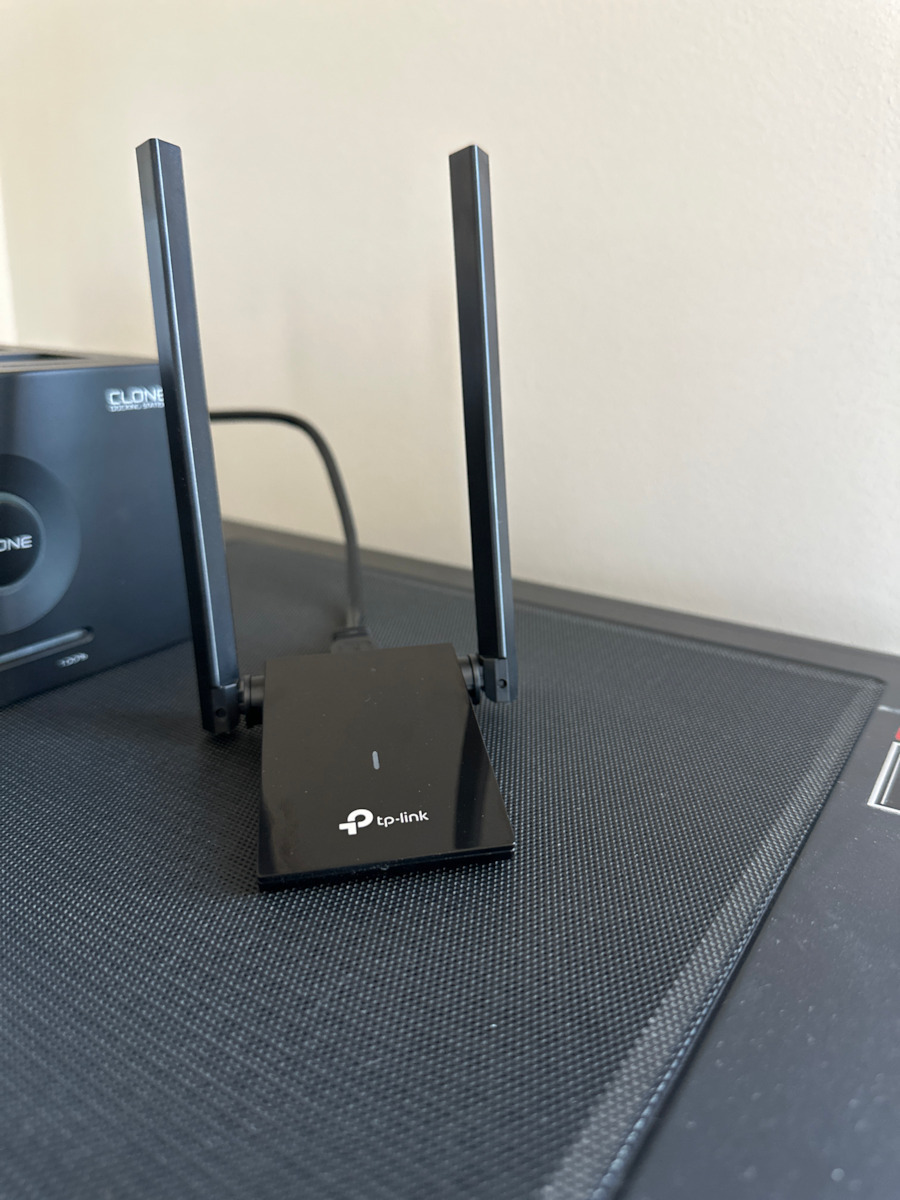
TP-LINK Archer T4U Plus USB Network Adapter with Wireless Wi-Fi Connection 1300Mbps v2

The Archer T4U Plus provides your computer with access to 802.11ac technology while receiving WiFi signals on two separate bands, increasing speeds up to 1.2 Gbps (up to 400 Mbps on 2.4 GHz and 867...

The Archer T4U Plus provides your computer with access to 802.11ac technology while receiving WiFi signals on two separate bands, increasing speeds up to 1.2 Gbps (up to 400 Mbps on 2.4 GHz and 867 Mbps on 5 GHz). This means a better networking experience for all your online needs. Choose the 2.4 GHz band for web browsing, email, and social media, or switch...

See full description See full description

Description

Description

The Archer T4U Plus provides your computer with access to 802.11ac technology while receiving WiFi signals on two separate bands, increasing speeds up to 1.2 Gbps (up to 400 Mbps on 2.4 GHz and 867 Mbps on 5 GHz). This means a better networking experience for all your online needs. Choose the 2.4 GHz band for web browsing, email, and social media, or switch to 5 GHz for gaming, HD streaming, and large file downloads.

Features

  • Ultra-Fast Wi-Fi - Wireless speeds of 1300Mbps (400Mbps on the 2.4GHz band and 867Mbps on the 5GHz band) with support for the next-generation Wi-Fi standard 802.11ac
  • Dual Band Wireless - 2.4GHz and 5GHz bands for flexible connectivity
  • High-Performance Dual Antennas - Improved range, signal quality, and transmission performance
  • MU-MIMO - Provides high-performance wireless connection
  • Super Speed USB 3.0 Port - Up to 10 times faster transfer speeds than USB 2.0
  • Adjustable, Multi-Directional Antenna - Enables flexible deployment for the best reception
  • Supports the Latest Operating Systems — Fully compatible with Windows 11/10/8.1/8/7/XP, Mac OS 10.15 and earlier versions

Dual high-performance antennas, wider coverage

Two powerful external high-performance 5 dBi antennas ensure stronger signal transmission and reception between your web devices and router even from further away or through multiple walls and floors. Enjoy stable wireless connections and faster speeds without WiFi drops and delays.

A wonderful product for higher speeds

Connect the latest hardware with USB 3.0. USB 3.0 is especially suitable for the WiFi 802.11ac protocol and uses its transfer rate for better connections. Take full advantage of USB 3.0 and 802.11ac WiFi for optimized network performance.

Adjustable Multi-Directional Antenna

Rotate and adjust the antenna 180° for optimal reception in different environments.

Flexible design, easy setup

The desktop-style design of the adapter and the 1.0 m USB cable help you find the best spot for network reception. Enjoy an easy and desktop-friendly installation for flexible deployment.

Manufacturer

See full description

Specifications

Specifications

Dimensions

Network Standards
IEEE 802.11 b/g/n, IEEE 802.11ac
Data Transfer Rate
1300 Mbps

Connectivity

Connection
Wireless
Antenna
Integrated
USB-C
No

Important information

Specifications are collected from official manufacturer websites. Please verify the specifications before proceeding with your final purchase. If you notice any problem you can report it here.

See all specifications

Reviews (24)

Reviews

  1. 16
  2. 2
  3. 2
  4. 3
  5. 1
Review this product
  • Ease of installation
  • Speed
  • Range
  • Does it disconnect/freeze?
  • Value for money

Reviews by our members

  • vagon1

    Verified purchase

    It replaced a Chinese Comfast antenna with which I had a blue screen 3-4 times a day. I have been using the TP-link antenna for 16 months now and it hasn't had a single freeze or disconnection. The distance from the router is about 9 meters (with a door and a corner in between). Until recently, I had it connected to the router on the 2.4GHz frequency and had 5/5 signal quality and 43Mbps download speed. Recently, I changed my Nova router (again Huawei) to a 100Mbps line, so I connected it to the 5GHz frequency. The signal quality dropped to 3/5 but the download speed is at 91Mbps.

    Translated from Greek ·
    Did you find this review helpful?
  • gloup81
    2
    4 out of 4 members found this review helpful

    Initially, it had continuous disconnections. That is, it would not hold the connection for more than 5 minutes and would search for a network without finding any (all phones connected normally). With an update released by the company after 2 months, the issue was resolved, and it has good speeds with excellent stability. However, suddenly it just died, the light does not turn on, no computer can detect it, so I'm going to buy another one. I do not recommend it.

    Translated from Greek ·
    • Range
    • Speed
    • Ease of installation
    • Does it disconnect/freeze often?
    • Value for money
    Did you find this review helpful?
  • Dragonborn
    5
    1 out of 1 members found this review helpful

    Verified purchase

    Amazing product, connected easily with the USB cable and Windows 11 immediately detected it. Distance between computer and modem router is about 12-13m. I have 75Mbps on the router, here it reaches 70Mbps download and 9.6Mbps upload. So far, very stable. Where the regular USB stick struggled, this one has a 5/5 signal. I will see its reliability over time.

    Translated from Greek ·
    • Ease of installation
    • Range
    • Speed
    • Does it disconnect/freeze?
    • Value for money
    Did you find this review helpful?
  • IOANNIS PORTOGLOUS
    5
    1 out of 1 members found this review helpful

    Verified purchase

    Very good and fast, connected very quickly to the 5G of the Router and in the speed test it reached the speed of the LAN cable that I have connected to my computer...
    It didn't disconnect me, I downloaded an 84GB file in no time... I have a 300 Mbps internet line from Vodafone.

    Translated from Greek ·
    • Ease of installation
    • Range
    • Speed
    • Does it disconnect/freeze?
    • Value for money
    Did you find this review helpful?
  • Verified purchase

    Works perfectly!

    Translated from Greek ·
    Did you find this review helpful?
  • Verified purchase

    Very good. Only one disconnection so far.

    Translated from Greek ·
    • Ease of installation
    • Range
    • Speed
    • Does it disconnect/freeze?
    • Value for money
    Did you find this review helpful?
  • 2
    1 out of 1 members found this review helpful

    It lasted for a year and then died

    Translated from Greek ·
    • Ease of installation
    • Range
    • Speed
    • Does it disconnect/freeze often?
    • Value for money
    Did you find this review helpful?
  • Verified purchase

  • Verified purchase

  • Verified purchase

    • Ease of installation
    • Range
    • Speed
    • Does it disconnect/freeze?
    • Value for money
  • Verified purchase

  • Verified purchase

    • Ease of installation
    • Range
    • Speed
    • Does it disconnect/freeze?
    • Value for money
  • Verified purchase

    • Ease of installation
    • Range
    • Speed
    • Does it disconnect/freeze?
    • Value for money
  • Verified purchase

    • Ease of installation
    • Range
    • Speed
    • Does it disconnect/freeze?
    • Value for money
    • Does it disconnect/freeze?
    • Ease of installation
    • Speed
    • Value for money
    • Range
  • Verified purchase

    • Ease of installation
    • Range
    • Speed
    • Does it disconnect/freeze?
    • Value for money
  • Verified purchase

    • Ease of installation
    • Range
    • Speed
    • Does it disconnect/freeze?
    • Value for money
  • Verified purchase

    • Ease of installation
    • Range
    • Speed
    • Does it disconnect/freeze?
    • Value for money
  • It replaced a Chinese Comfast antenna with which I had a blue screen 3-4 times a day. I have been using the TP-link antenna for 16 months now and it hasn't had a single freeze or disconnection. The distance from the router is about 9 meters (with a door and a corner in between). Until recently, I had it connected to the router on the 2.4GHz frequency and had 5/5 signal quality and 43Mbps download speed. Recently, I changed my Nova router (again Huawei) to a 100Mbps line, so I connected it to the 5GHz frequency. The signal quality dropped to 3/5 but the download speed is at 91Mbps.

    Translated from Greek ·
    0
  • Initially, it had continuous disconnections. That is, it would not hold the connection for more than 5 minutes and would search for a network without finding any (all phones connected normally). With an update released by the company after 2 months, the issue was resolved, and it has good speeds with excellent stability. However, suddenly it just died, the light does not turn on, no computer can detect it, so I'm going to buy another one. I do not recommend it.

    Translated from Greek ·
    4
  • Amazing product, connected easily with the USB cable and Windows 11 immediately detected it. Distance between computer and modem router is about 12-13m. I have 75Mbps on the router, here it reaches 70Mbps download and 9.6Mbps upload. So far, very stable. Where the regular USB stick struggled, this one has a 5/5 signal. I will see its reliability over time.

    Translated from Greek ·
    1
  • Very good and fast, connected very quickly to the 5G of the Router and in the speed test it reached the speed of the LAN cable that I have connected to my computer...
    It didn't disconnect me, I downloaded an 84GB file in no time... I have a 300 Mbps internet line from Vodafone.

    Translated from Greek ·
    1
  • Works perfectly!

    Translated from Greek ·
    0
  • See all

Description & Specifications

The Archer T4U Plus provides your computer with access to 802.11ac technology while receiving WiFi signals on two separate bands, increasing speeds up to 1.2 Gbps (up to 400 Mbps on 2.4 GHz and 867 Mbps on 5 GHz). This means a better networking experience for all your online needs. Choose the 2.4 GHz band for web browsing, email, and social media, or switch to 5 GHz for gaming, HD streaming, and large file downloads.

Features

  • Ultra-Fast Wi-Fi - Wireless speeds of 1300Mbps (400Mbps on the 2.4GHz band and 867Mbps on the 5GHz band) with support for the next-generation Wi-Fi standard 802.11ac
  • Dual Band Wireless - 2.4GHz and 5GHz bands for flexible connectivity
  • High-Performance Dual Antennas - Improved range, signal quality, and transmission performance
  • MU-MIMO - Provides high-performance wireless connection
  • Super Speed USB 3.0 Port - Up to 10 times faster transfer speeds than USB 2.0
  • Adjustable, Multi-Directional Antenna - Enables flexible deployment for the best reception
  • Supports the Latest Operating Systems — Fully compatible with Windows 11/10/8.1/8/7/XP, Mac OS 10.15 and earlier versions

Dual high-performance antennas, wider coverage

Two powerful external high-performance 5 dBi antennas ensure stronger signal transmission and reception between your web devices and router even from further away or through multiple walls and floors. Enjoy stable wireless connections and faster speeds without WiFi drops and delays.

A wonderful product for higher speeds

Connect the latest hardware with USB 3.0. USB 3.0 is especially suitable for the WiFi 802.11ac protocol and uses its transfer rate for better connections. Take full advantage of USB 3.0 and 802.11ac WiFi for optimized network performance.

Adjustable Multi-Directional Antenna

Rotate and adjust the antenna 180° for optimal reception in different environments.

Flexible design, easy setup

The desktop-style design of the adapter and the 1.0 m USB cable help you find the best spot for network reception. Enjoy an easy and desktop-friendly installation for flexible deployment.

Manufacturer

Dimensions

Network Standards
IEEE 802.11 b/g/n, IEEE 802.11ac
Data Transfer Rate
1300 Mbps

Connectivity

Connection
Wireless
Antenna
Integrated
USB-C
No

Important information

Specifications are collected from official manufacturer websites. Please verify the specifications before proceeding with your final purchase. If you notice any problem you can report it here.

Reviews (24)

  1. 16
  2. 2
  3. 2
  4. 3
  5. 1
Review this product
  • Ease of installation
  • Speed
  • Range
  • Does it disconnect/freeze?
  • Value for money

Reviews by our members

  • vagon1

    Verified purchase

    It replaced a Chinese Comfast antenna with which I had a blue screen 3-4 times a day. I have been using the TP-link antenna for 16 months now and it hasn't had a single freeze or disconnection. The distance from the router is about 9 meters (with a door and a corner in between). Until recently, I had it connected to the router on the 2.4GHz frequency and had 5/5 signal quality and 43Mbps download speed. Recently, I changed my Nova router (again Huawei) to a 100Mbps line, so I connected it to the 5GHz frequency. The signal quality dropped to 3/5 but the download speed is at 91Mbps.

    Translated from Greek ·
    Did you find this review helpful?
  • gloup81
    2
    4 out of 4 members found this review helpful

    Initially, it had continuous disconnections. That is, it would not hold the connection for more than 5 minutes and would search for a network without finding any (all phones connected normally). With an update released by the company after 2 months, the issue was resolved, and it has good speeds with excellent stability. However, suddenly it just died, the light does not turn on, no computer can detect it, so I'm going to buy another one. I do not recommend it.

    Translated from Greek ·
    • Range
    • Speed
    • Ease of installation
    • Does it disconnect/freeze often?
    • Value for money
    Did you find this review helpful?
  • Dragonborn
    5
    1 out of 1 members found this review helpful

    Verified purchase

    Amazing product, connected easily with the USB cable and Windows 11 immediately detected it. Distance between computer and modem router is about 12-13m. I have 75Mbps on the router, here it reaches 70Mbps download and 9.6Mbps upload. So far, very stable. Where the regular USB stick struggled, this one has a 5/5 signal. I will see its reliability over time.

    Translated from Greek ·
    • Ease of installation
    • Range
    • Speed
    • Does it disconnect/freeze?
    • Value for money
    Did you find this review helpful?
  • IOANNIS PORTOGLOUS
    5
    1 out of 1 members found this review helpful

    Verified purchase

    Very good and fast, connected very quickly to the 5G of the Router and in the speed test it reached the speed of the LAN cable that I have connected to my computer...
    It didn't disconnect me, I downloaded an 84GB file in no time... I have a 300 Mbps internet line from Vodafone.

    Translated from Greek ·
    • Ease of installation
    • Range
    • Speed
    • Does it disconnect/freeze?
    • Value for money
    Did you find this review helpful?
  • Verified purchase

    Works perfectly!

    Translated from Greek ·
    Did you find this review helpful?
  • Verified purchase

    Very good. Only one disconnection so far.

    Translated from Greek ·
    • Ease of installation
    • Range
    • Speed
    • Does it disconnect/freeze?
    • Value for money
    Did you find this review helpful?
  • 2
    1 out of 1 members found this review helpful

    It lasted for a year and then died

    Translated from Greek ·
    • Ease of installation
    • Range
    • Speed
    • Does it disconnect/freeze often?
    • Value for money
    Did you find this review helpful?
  • Verified purchase

  • Verified purchase

  • Verified purchase

    • Ease of installation
    • Range
    • Speed
    • Does it disconnect/freeze?
    • Value for money
  • Verified purchase

  • Verified purchase

    • Ease of installation
    • Range
    • Speed
    • Does it disconnect/freeze?
    • Value for money
  • Verified purchase

    • Ease of installation
    • Range
    • Speed
    • Does it disconnect/freeze?
    • Value for money
  • Verified purchase

    • Ease of installation
    • Range
    • Speed
    • Does it disconnect/freeze?
    • Value for money
    • Does it disconnect/freeze?
    • Ease of installation
    • Speed
    • Value for money
    • Range
  • Verified purchase

    • Ease of installation
    • Range
    • Speed
    • Does it disconnect/freeze?
    • Value for money
  • Verified purchase

    • Ease of installation
    • Range
    • Speed
    • Does it disconnect/freeze?
    • Value for money
  • Verified purchase

    • Ease of installation
    • Range
    • Speed
    • Does it disconnect/freeze?
    • Value for money
  • It replaced a Chinese Comfast antenna with which I had a blue screen 3-4 times a day. I have been using the TP-link antenna for 16 months now and it hasn't had a single freeze or disconnection. The distance from the router is about 9 meters (with a door and a corner in between). Until recently, I had it connected to the router on the 2.4GHz frequency and had 5/5 signal quality and 43Mbps download speed. Recently, I changed my Nova router (again Huawei) to a 100Mbps line, so I connected it to the 5GHz frequency. The signal quality dropped to 3/5 but the download speed is at 91Mbps.

    Translated from Greek ·
    0
  • Initially, it had continuous disconnections. That is, it would not hold the connection for more than 5 minutes and would search for a network without finding any (all phones connected normally). With an update released by the company after 2 months, the issue was resolved, and it has good speeds with excellent stability. However, suddenly it just died, the light does not turn on, no computer can detect it, so I'm going to buy another one. I do not recommend it.

    Translated from Greek ·
    4
  • Amazing product, connected easily with the USB cable and Windows 11 immediately detected it. Distance between computer and modem router is about 12-13m. I have 75Mbps on the router, here it reaches 70Mbps download and 9.6Mbps upload. So far, very stable. Where the regular USB stick struggled, this one has a 5/5 signal. I will see its reliability over time.

    Translated from Greek ·
    1
  • Very good and fast, connected very quickly to the 5G of the Router and in the speed test it reached the speed of the LAN cable that I have connected to my computer...
    It didn't disconnect me, I downloaded an 84GB file in no time... I have a 300 Mbps internet line from Vodafone.

    Translated from Greek ·
    1
  • Works perfectly!

    Translated from Greek ·
    0
  • See all
29,89 €
14,00 €   shipping cost