The Ugreen USB-C Docking Station is an advanced docking base that extends the functionality of your laptop or computer, allowing the connection of up to three monitors via HDMI and DisplayPort with a...
The Ugreen USB-C Docking Station is an advanced docking base that extends the functionality of your laptop or computer, allowing the connection of up to three monitors via HDMI and DisplayPort with a resolution of up to 4K. It features Power Delivery (PD) for fast charging, USB ports for peripherals, Ethernet for a stable wired network connection, as well as...
The Ugreen USB-C Docking Station is an advanced docking base that extends the functionality of your laptop or computer, allowing the connection of up to three monitors via HDMI and DisplayPort with a resolution of up to 4K. It features Power Delivery (PD) for fast charging, USB ports for peripherals, Ethernet for a stable wired network connection, as well as additional slots for increased connectivity. Ideal for professionals and users who require multiple monitors and flexible connection options.
Specifications are collected from official manufacturer websites. Please verify the specifications before proceeding with your final purchase. If you notice any problem you can report it here.
Quality construction but overheats excessively in winter and with only 2 4K monitors attached on an M2.
update
with 3 monitors the cursor lags incredibly and it is incredibly tiring.
Ποιοτική κατασκευή αλλά ζεσταίνεται υπερβολικά για χειμώνα και με μόνο 2 Χ 4Κ monitors attached πανω σε ένα M2.
update
με 3 monitor ο κερσορας λαγκαρει απιστευτα και ειναι απιστευτα κουραστικο.
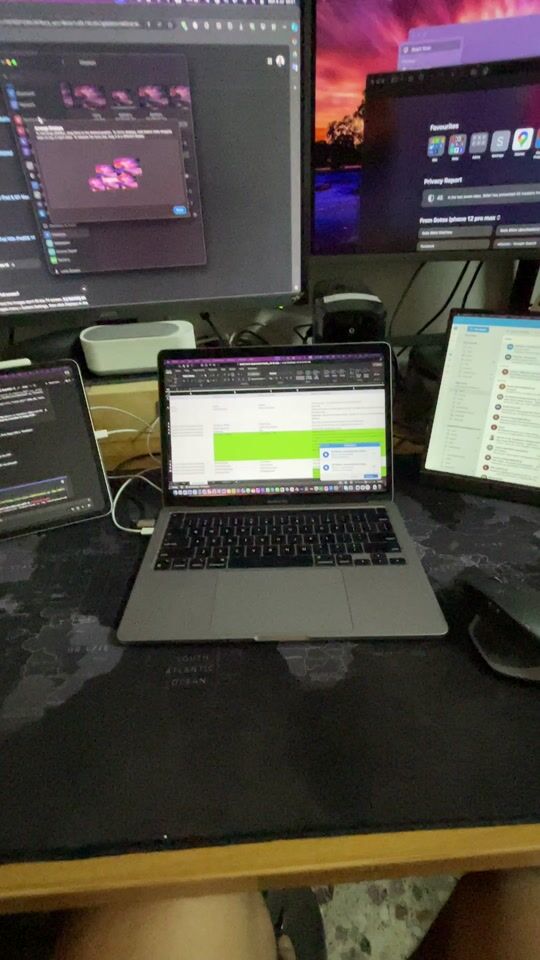
Watch the video I uploaded in which I have connected 4 screens! For those with a MacBook M1 who want to connect 2 or 3 screens with at least 4k resolution at 60hz, then this is the way to go.
I have the M1 Pro 2020 with Touch Bar and I tried the following:
HDMI - one 4k 60hz screen
Second HDMI ultra-wide screen 1440p at 100hz and all screens play perfectly in extend and mirror mode.
Well, the dock does not come with a charger. And it's not really needed. The 2 screens work without the dock even being charged. If you add disks etc. on top, yes, it needs power! And guess how simple it is.. just connect your Mac charger to the dock and you're ready.
Alternatively, one of my screens has a USB-C at 100w. So I connected HDMI and USB-C. So it charges and displays correctly (with HDMI).
Overall, it is a sturdy construction and besides the ports it has, the main thing for me is the support for at least 4k 60hz on two screens. Which it does perfectly.
Δείτε το βίντεο που ανέβασα στο οποίο έχω συνδέσει 4 οθόνες !
Για όσους έχουν MacBook m1 και θέλουν να συνδέσουν 2 ή 3 οθόνες με 4κ ανάλυση στα 60hz τουλάχιστον , τότε είναι μονόδρομος.
Έχω το M1 Pro 2020 με Touch Bar και δοκίμασα τα παρακάτω:
HDMI - μια 4κ 60hz
Δεύτερο hdmi ultra wide οθόνη 1440p στα 100hz και παίζουν όλες οι οθόνες τέλεια σε extend αλλά και σε mirror.
Λοιπόν το dock δεν έρχεται με φορτιστή. Και δεν χρειάζεται βασικά. Οι 2 οθόνες παίζουν χωρίς να είναι καν στην φόρτιση το dock.
Αν βάλεις δίσκους κτλπ πάνω , ναι , θέλει ρεύμα. !! Και μαντέψτε ποσό απλό είναι .. απλά συνδέεις τον φορτιστή του Mac πάνω στο dock και είσαι έτοιμος.
Εναλλακτικά, η μια μου οθόνη έχει usb c στα 100w. Όποτε σύνδεσα hdmi και usb c. Όποτε και φορτίζει αλλά και δείχνει σωστά (με hdmi)
Γενικά είναι στιβαρή κατασκευή και πέρα από τις θύρες που έχει, το βασικό για μένα είναι υποστήριξη τουλάχιστον 4κ 60hz σε δυο οθόνες. Πράγμα που κάνει άψογα.
Quality construction but overheats excessively in winter and with only 2 4K monitors attached on an M2.
update
with 3 monitors the cursor lags incredibly and it is incredibly tiring.
Ποιοτική κατασκευή αλλά ζεσταίνεται υπερβολικά για χειμώνα και με μόνο 2 Χ 4Κ monitors attached πανω σε ένα M2.
update
με 3 monitor ο κερσορας λαγκαρει απιστευτα και ειναι απιστευτα κουραστικο.
Watch the video I uploaded in which I have connected 4 screens! For those with a MacBook M1 who want to connect 2 or 3 screens with at least 4k resolution at 60hz, then this is the way to go.
I have the M1 Pro 2020 with Touch Bar and I tried the following:
HDMI - one 4k 60hz screen
Second HDMI ultra-wide screen 1440p at 100hz and all screens play perfectly in extend and mirror mode.
Well, the dock does not come with a charger. And it's not really needed. The 2 screens work without the dock even being charged. If you add disks etc. on top, yes, it needs power! And guess how simple it is.. just connect your Mac charger to the dock and you're ready.
Alternatively, one of my screens has a USB-C at 100w. So I connected HDMI and USB-C. So it charges and displays correctly (with HDMI).
Overall, it is a sturdy construction and besides the ports it has, the main thing for me is the support for at least 4k 60hz on two screens. Which it does perfectly.
Δείτε το βίντεο που ανέβασα στο οποίο έχω συνδέσει 4 οθόνες !
Για όσους έχουν MacBook m1 και θέλουν να συνδέσουν 2 ή 3 οθόνες με 4κ ανάλυση στα 60hz τουλάχιστον , τότε είναι μονόδρομος.
Έχω το M1 Pro 2020 με Touch Bar και δοκίμασα τα παρακάτω:
HDMI - μια 4κ 60hz
Δεύτερο hdmi ultra wide οθόνη 1440p στα 100hz και παίζουν όλες οι οθόνες τέλεια σε extend αλλά και σε mirror.
Λοιπόν το dock δεν έρχεται με φορτιστή. Και δεν χρειάζεται βασικά. Οι 2 οθόνες παίζουν χωρίς να είναι καν στην φόρτιση το dock.
Αν βάλεις δίσκους κτλπ πάνω , ναι , θέλει ρεύμα. !! Και μαντέψτε ποσό απλό είναι .. απλά συνδέεις τον φορτιστή του Mac πάνω στο dock και είσαι έτοιμος.
Εναλλακτικά, η μια μου οθόνη έχει usb c στα 100w. Όποτε σύνδεσα hdmi και usb c. Όποτε και φορτίζει αλλά και δείχνει σωστά (με hdmi)
Γενικά είναι στιβαρή κατασκευή και πέρα από τις θύρες που έχει, το βασικό για μένα είναι υποστήριξη τουλάχιστον 4κ 60hz σε δυο οθόνες. Πράγμα που κάνει άψογα.
The Ugreen USB-C Docking Station is an advanced docking base that extends the functionality of your laptop or computer, allowing the connection of up to three monitors via HDMI and DisplayPort with a resolution of up to 4K. It features Power Delivery (PD) for fast charging, USB ports for peripherals, Ethernet for a stable wired network connection, as well as additional slots for increased connectivity. Ideal for professionals and users who require multiple monitors and flexible connection options.
Specifications are collected from official manufacturer websites. Please verify the specifications before proceeding with your final purchase. If you notice any problem you can report it here.
Quality construction but overheats excessively in winter and with only 2 4K monitors attached on an M2.
update
with 3 monitors the cursor lags incredibly and it is incredibly tiring.
Ποιοτική κατασκευή αλλά ζεσταίνεται υπερβολικά για χειμώνα και με μόνο 2 Χ 4Κ monitors attached πανω σε ένα M2.
update
με 3 monitor ο κερσορας λαγκαρει απιστευτα και ειναι απιστευτα κουραστικο.
Watch the video I uploaded in which I have connected 4 screens! For those with a MacBook M1 who want to connect 2 or 3 screens with at least 4k resolution at 60hz, then this is the way to go.
I have the M1 Pro 2020 with Touch Bar and I tried the following:
HDMI - one 4k 60hz screen
Second HDMI ultra-wide screen 1440p at 100hz and all screens play perfectly in extend and mirror mode.
Well, the dock does not come with a charger. And it's not really needed. The 2 screens work without the dock even being charged. If you add disks etc. on top, yes, it needs power! And guess how simple it is.. just connect your Mac charger to the dock and you're ready.
Alternatively, one of my screens has a USB-C at 100w. So I connected HDMI and USB-C. So it charges and displays correctly (with HDMI).
Overall, it is a sturdy construction and besides the ports it has, the main thing for me is the support for at least 4k 60hz on two screens. Which it does perfectly.
Δείτε το βίντεο που ανέβασα στο οποίο έχω συνδέσει 4 οθόνες !
Για όσους έχουν MacBook m1 και θέλουν να συνδέσουν 2 ή 3 οθόνες με 4κ ανάλυση στα 60hz τουλάχιστον , τότε είναι μονόδρομος.
Έχω το M1 Pro 2020 με Touch Bar και δοκίμασα τα παρακάτω:
HDMI - μια 4κ 60hz
Δεύτερο hdmi ultra wide οθόνη 1440p στα 100hz και παίζουν όλες οι οθόνες τέλεια σε extend αλλά και σε mirror.
Λοιπόν το dock δεν έρχεται με φορτιστή. Και δεν χρειάζεται βασικά. Οι 2 οθόνες παίζουν χωρίς να είναι καν στην φόρτιση το dock.
Αν βάλεις δίσκους κτλπ πάνω , ναι , θέλει ρεύμα. !! Και μαντέψτε ποσό απλό είναι .. απλά συνδέεις τον φορτιστή του Mac πάνω στο dock και είσαι έτοιμος.
Εναλλακτικά, η μια μου οθόνη έχει usb c στα 100w. Όποτε σύνδεσα hdmi και usb c. Όποτε και φορτίζει αλλά και δείχνει σωστά (με hdmi)
Γενικά είναι στιβαρή κατασκευή και πέρα από τις θύρες που έχει, το βασικό για μένα είναι υποστήριξη τουλάχιστον 4κ 60hz σε δυο οθόνες. Πράγμα που κάνει άψογα.
Quality construction but overheats excessively in winter and with only 2 4K monitors attached on an M2.
update
with 3 monitors the cursor lags incredibly and it is incredibly tiring.
Ποιοτική κατασκευή αλλά ζεσταίνεται υπερβολικά για χειμώνα και με μόνο 2 Χ 4Κ monitors attached πανω σε ένα M2.
update
με 3 monitor ο κερσορας λαγκαρει απιστευτα και ειναι απιστευτα κουραστικο.
Watch the video I uploaded in which I have connected 4 screens! For those with a MacBook M1 who want to connect 2 or 3 screens with at least 4k resolution at 60hz, then this is the way to go.
I have the M1 Pro 2020 with Touch Bar and I tried the following:
HDMI - one 4k 60hz screen
Second HDMI ultra-wide screen 1440p at 100hz and all screens play perfectly in extend and mirror mode.
Well, the dock does not come with a charger. And it's not really needed. The 2 screens work without the dock even being charged. If you add disks etc. on top, yes, it needs power! And guess how simple it is.. just connect your Mac charger to the dock and you're ready.
Alternatively, one of my screens has a USB-C at 100w. So I connected HDMI and USB-C. So it charges and displays correctly (with HDMI).
Overall, it is a sturdy construction and besides the ports it has, the main thing for me is the support for at least 4k 60hz on two screens. Which it does perfectly.
Δείτε το βίντεο που ανέβασα στο οποίο έχω συνδέσει 4 οθόνες !
Για όσους έχουν MacBook m1 και θέλουν να συνδέσουν 2 ή 3 οθόνες με 4κ ανάλυση στα 60hz τουλάχιστον , τότε είναι μονόδρομος.
Έχω το M1 Pro 2020 με Touch Bar και δοκίμασα τα παρακάτω:
HDMI - μια 4κ 60hz
Δεύτερο hdmi ultra wide οθόνη 1440p στα 100hz και παίζουν όλες οι οθόνες τέλεια σε extend αλλά και σε mirror.
Λοιπόν το dock δεν έρχεται με φορτιστή. Και δεν χρειάζεται βασικά. Οι 2 οθόνες παίζουν χωρίς να είναι καν στην φόρτιση το dock.
Αν βάλεις δίσκους κτλπ πάνω , ναι , θέλει ρεύμα. !! Και μαντέψτε ποσό απλό είναι .. απλά συνδέεις τον φορτιστή του Mac πάνω στο dock και είσαι έτοιμος.
Εναλλακτικά, η μια μου οθόνη έχει usb c στα 100w. Όποτε σύνδεσα hdmi και usb c. Όποτε και φορτίζει αλλά και δείχνει σωστά (με hdmi)
Γενικά είναι στιβαρή κατασκευή και πέρα από τις θύρες που έχει, το βασικό για μένα είναι υποστήριξη τουλάχιστον 4κ 60hz σε δυο οθόνες. Πράγμα που κάνει άψογα.