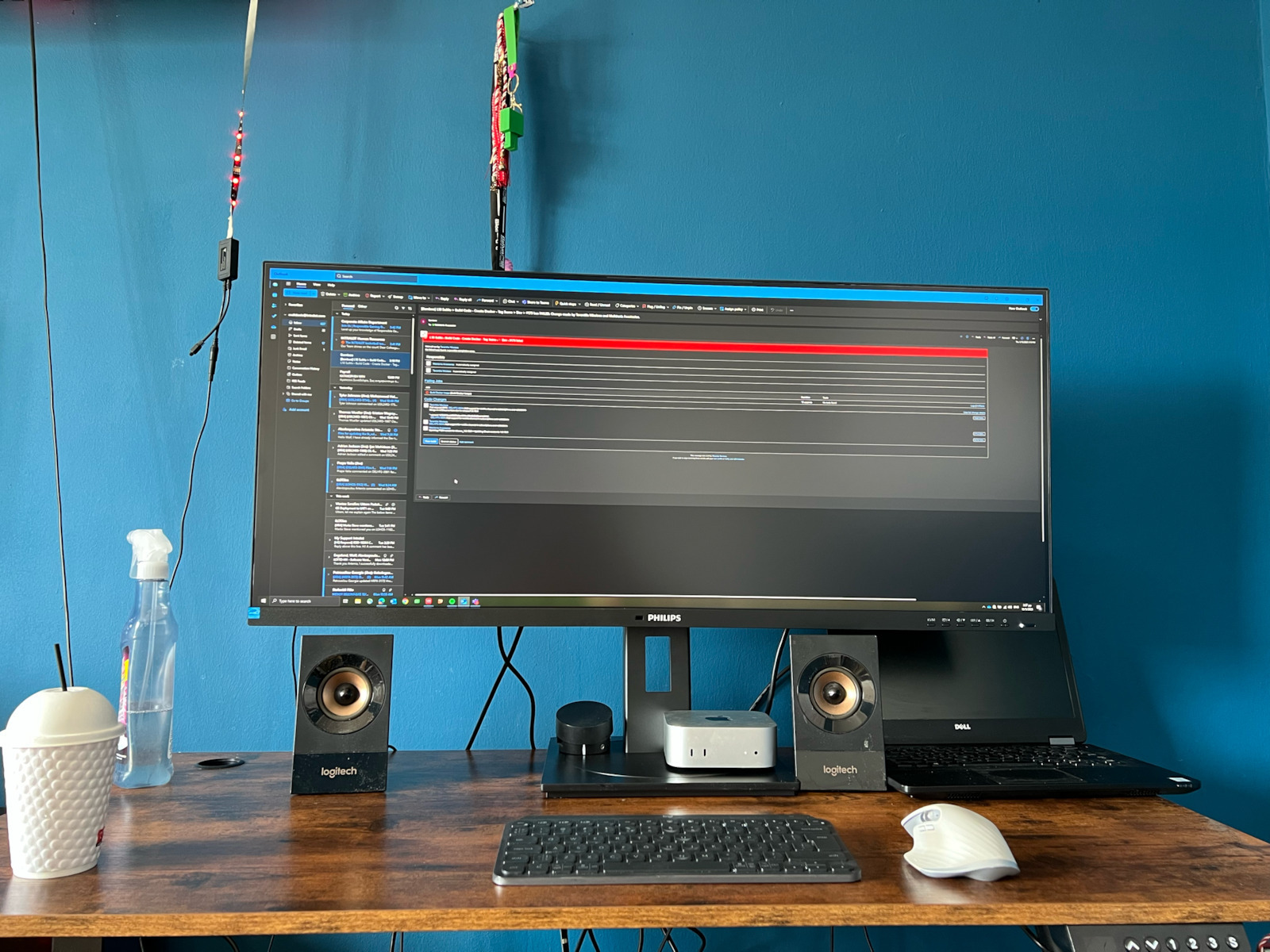
Monitors

Philips 40B1U5600 Ultrawide IPS HDR Monitor 39.53" QHD 3440x1440 with Response Time 4ms GTG

Key features:

  • Model 2022
  • Aspect ratio 21:9
  • Contrast 1200:1
  • HDR400, USB Hub
  • PowerSensor, LightSensor
  • Connection: DisplayPort, HDMI, USB-C
See full description
  • See all
648 22
Delivery Fri, 17 Jul - Thu, 23 Jul
56,00 €   shipping cost
Sent from Greece
From E-gate 4.9 (110)
Greece
8 pieces
See Computers on the page of E-gate
Available purchase options

Description

Description

See more. Do more.

The Philips monitor is aimed at those seeking a large screen for work. It is ideal for professionals who require a large screen for design, software development, or data management. The all-purpose USB-C, eye comfort features, and ergonomic stand design ensure optimal working conditions, while the headphone holder component takes cable management to the next level.

CrystalClear Images with UltraWide QHD 3440x1440 pixels

The Philips monitor delivers CrystalClear, UltraWide Quad HD 3440 x 1440 pixel resolution. Utilizing the high-performance panel with a multitude of high-density pixels, wide viewing angles of 178/178, it will bring your images and graphics to life. The UltraWide 21:9 aspect ratio allows for greater productivity with more space for side-by-side comparisons and the ability to view more columns of spreadsheets. Whether you need detailed information for professional CAD-CAM solutions or are working with large spreadsheets, the Philips monitor offers crystal clear images with CrystalClear clarity.

Wide LED screen with IPS technology

IPS monitors use advanced technology that gives you extremely wide viewing angles of 178/178 degrees, so you can view the screen from almost any angle. Unlike standard TN monitors, IPS monitors offer you exceptionally sharp images with vibrant colors. Thus, they are ideal not only for photos, movies, and web browsing, but also for professional applications that require color accuracy and consistent brightness at all times.

Built-in KVM switch for easy source switching

With the built-in KVM MultiClient switch, you can control two separate computers with one monitor-keyboard-mouse set. A convenient button allows you to quickly switch between sources. An ideal and user-friendly choice for setups that require dual computing power or the use of a large screen to view two different computers.

Built-in USB-C Docking Station

Features an integrated USB Type-C docking station with power delivery. The slim, reversible USB-C connector allows for easy connection with a single cable. Simplify your setup by connecting all your peripherals such as the keyboard, mouse, and RJ-45 Ethernet cable to the monitor's docking station. Just connect your notebook and this monitor with a single USB-C cable to watch high-resolution video and transfer data at high speeds, while simultaneously powering and recharging your notebook.

HDR 400 Monitor for More Realistic and Impressive Graphics

The DisplayHDR 400 monitor with VESA certification gives you an edge over regular SDR monitors. Unlike other monitors that are 'HDR compatible', the genuine HDR 400 monitor ensures impressive brightness, contrast, and colors. Thanks to the brightness adjustment system and the exceptionally high brightness intensity of up to 400 nits, images come to life with very bright highlights while black shades are deeper and more pronounced. It delivers a full palette of rich new colors, offering a visual experience that will captivate your senses.

PowerSensor reduces energy consumption by up to 75%

PowerSensor is an integrated "people sensor" that transmits and receives harmless infrared signals to determine if the user is present and automatically reduces brightness when the user steps away from their desk, reducing energy consumption costs by up to 75% and extending the screen's life.

Easy access to accessories

The unique design of the headphone hook on the side of the Philips monitor brings order and cable management of your desk to a new level. Thanks to the easy access, you can easily place your headphones on the edge, so you have all the accessories you need within close reach.

LightSensor for perfect brightness with minimal power

The LightSensor uses an intelligent sensor to adjust the image brightness to the room's lighting conditions, so you can enjoy the perfect picture with minimal energy consumption.

Tilt, swivel, and height adjustment for an ideal viewing position

The compact ergonomic stand is user-friendly and provides tilt, swivel, and height adjustment options for maximum visual comfort and efficiency.

Package Contents:

  • Monitor
  • Stand
  • HDMI Cable
  • DisplayPort Cable
  • USB-C to C/A Cable
  • Power Cable

Manufacturer

See full description

Specifications

Specifications

Main Specifications

Panel
IPS
HDR
Yes
Curved
No
UltraWide
Yes
Diagonal
39.53 "
Resolution
3440x1440
Contrast
1200 :1
Response Time (GTG)
4 ms
Refresh Rate
120 Hz
Aspect Ratio
21:9

Ergonomics

Tilt Adjustment
Yes
Height Adjustment
Yes
Vertical Rotation
Yes
Horizontal Rotation
Yes
Wall Mountable (Vesa)
100 x 100 mm

Connectivity

Connection
DisplayPort, HDMI, USB-C

Additional Specifications

Speakers
Yes
Features & Functions
USB Hub
Eye Comfort
Yes
Colour
Black
Camera
-

Energy Label

Energy Consumption
39 kWh/1000h
Energy Class
F

Important information

Specifications are collected from official manufacturer websites. Please verify the specifications before proceeding with your final purchase. If you notice any problem you can report it here.

See all specifications

Reviews (2)

Reviews

  1. 2
  2. 4 stars
    0
  3. 3 stars
    0
  4. 2 stars
    0
  5. 1 star
    0
Review this product

Reviews by our members

  • Purchased for office use (Web development) and gaming. In general, I was looking for a 40' ultrawide monitor that is IPS at 100hz+. I am very satisfied with the quality as well as the features it offers (KVM so that when you have a laptop/pc connected to the monitor you don't have to change peripherals, Low-blue for radiation, split-screen, etc.).
    The only complaint I could have is the stand, as it didn't fit me as I wanted. I highly recommend it with a mounting arm

    Translated from Greek ·
    Did you find this review helpful?
  • Tesio
    5
    5 out of 6 members found this review helpful

    Verified purchase

    Overall, I am very satisfied!
    Let's talk about the obvious, it's a big screen. At 40 inches, you have plenty of space if you want many windows. Some people may not find it convenient, which is understandable, but it's all a matter of habit. Personally, I went from a 34-inch 1080p ultra wide to a 40-inch 1440p and the transition is somewhat smoother, it's not a dramatic difference, but it is bigger. Both monitors are IPS but this one has even nicer colors. 120Hz is a very good bonus for me, you can feel that it's smoother. It has KVM which is AMAZING for anyone who switches devices on the same monitor! It has a brightness sensor and the monitor adjusts its brightness automatically depending on how much light is in the room! I never felt eye fatigue, VERY good feature. When you leave, it goes into power saving mode, so if you leave your PC on and just walk away, the monitor will turn off after a while. Of course, you can adjust whatever you want from the menu with the buttons on the front, where you can see what and where you are pressing.

    All these features make it an excellent daily monitor for work and for games! But let me also mention some things I would have liked!

    At this size, I believe it should be curved. As I said, it's big and a curve would help a bit with the corners of the screen. Not that the colors are ruined or anything like that—after all, it's IPS—it's just that it would be more practical. However, for a designer, I think a curve is impractical.

    It is indeed 1440p, but due to the size, the pixel density (ppi) drops. If you have code with a small font size, the letters are fine but there is a difference compared to a 34-inch 1440p. Not dramatic, but we're talking about the ideal. At 2160p, it would be PERFECT.

    Obviously, there are monitors with the two features I mentioned above, but we're talking at least double the price!!! So, for the money I paid for it (about €470), it is EXCELLENT

    Translated from Greek ·
    • Comfort
    • Picture
    • Response time
    • Viewing angle
    • Menu
    • Value for money
    Did you find this review helpful?
  • Purchased for office use (Web development) and gaming. In general, I was looking for a 40' ultrawide monitor that is IPS at 100hz+. I am very satisfied with the quality as well as the features it offers (KVM so that when you have a laptop/pc connected to the monitor you don't have to change peripherals, Low-blue for radiation, split-screen, etc.).
    The only complaint I could have is the stand, as it didn't fit me as I wanted. I highly recommend it with a mounting arm

    Translated from Greek ·
    0
  • Overall, I am very satisfied!
    Let's talk about the obvious, it's a big screen. At 40 inches, you have plenty of space if you want many windows. Some people may not find it convenient, which is understandable, but it's all a matter of habit. Personally, I went from a 34-inch 1080p ultra wide to a 40-inch 1440p and the transition is somewhat smoother, it's not a dramatic difference, but it is bigger. Both monitors are IPS but this one has even nicer colors. 120Hz is a very good bonus for me, you can feel that it's smoother. It has KVM which is AMAZING for anyone who switches devices on the same monitor! It has a brightness sensor and the monitor adjusts its brightness automatically depending on how much light is in the room! I never felt eye fatigue, VERY good feature. When you leave, it goes into power saving mode, so if you leave your PC on and just walk away, the monitor will turn off after a while. Of course, you can adjust whatever you want from the menu with the buttons on the front, where you can see what and where you are pressing.

    All these features make it an excellent daily monitor for work and for games! But let me also mention some things I would have liked!

    At this size, I believe it should be curved. As I said, it's big and a curve would help a bit with the corners of the screen. Not that the colors are ruined or anything like that—after all, it's IPS—it's just that it would be more practical. However, for a designer, I think a curve is impractical.

    It is indeed 1440p, but due to the size, the pixel density (ppi) drops. If you have code with a small font size, the letters are fine but there is a difference compared to a 34-inch 1440p. Not dramatic, but we're talking about the ideal. At 2160p, it would be PERFECT.

    Obviously, there are monitors with the two features I mentioned above, but we're talking at least double the price!!! So, for the money I paid for it (about €470), it is EXCELLENT

    Translated from Greek ·
    5
  • See all

Description & Specifications

See more. Do more.

The Philips monitor is aimed at those seeking a large screen for work. It is ideal for professionals who require a large screen for design, software development, or data management. The all-purpose USB-C, eye comfort features, and ergonomic stand design ensure optimal working conditions, while the headphone holder component takes cable management to the next level.

CrystalClear Images with UltraWide QHD 3440x1440 pixels

The Philips monitor delivers CrystalClear, UltraWide Quad HD 3440 x 1440 pixel resolution. Utilizing the high-performance panel with a multitude of high-density pixels, wide viewing angles of 178/178, it will bring your images and graphics to life. The UltraWide 21:9 aspect ratio allows for greater productivity with more space for side-by-side comparisons and the ability to view more columns of spreadsheets. Whether you need detailed information for professional CAD-CAM solutions or are working with large spreadsheets, the Philips monitor offers crystal clear images with CrystalClear clarity.

Wide LED screen with IPS technology

IPS monitors use advanced technology that gives you extremely wide viewing angles of 178/178 degrees, so you can view the screen from almost any angle. Unlike standard TN monitors, IPS monitors offer you exceptionally sharp images with vibrant colors. Thus, they are ideal not only for photos, movies, and web browsing, but also for professional applications that require color accuracy and consistent brightness at all times.

Built-in KVM switch for easy source switching

With the built-in KVM MultiClient switch, you can control two separate computers with one monitor-keyboard-mouse set. A convenient button allows you to quickly switch between sources. An ideal and user-friendly choice for setups that require dual computing power or the use of a large screen to view two different computers.

Built-in USB-C Docking Station

Features an integrated USB Type-C docking station with power delivery. The slim, reversible USB-C connector allows for easy connection with a single cable. Simplify your setup by connecting all your peripherals such as the keyboard, mouse, and RJ-45 Ethernet cable to the monitor's docking station. Just connect your notebook and this monitor with a single USB-C cable to watch high-resolution video and transfer data at high speeds, while simultaneously powering and recharging your notebook.

HDR 400 Monitor for More Realistic and Impressive Graphics

The DisplayHDR 400 monitor with VESA certification gives you an edge over regular SDR monitors. Unlike other monitors that are 'HDR compatible', the genuine HDR 400 monitor ensures impressive brightness, contrast, and colors. Thanks to the brightness adjustment system and the exceptionally high brightness intensity of up to 400 nits, images come to life with very bright highlights while black shades are deeper and more pronounced. It delivers a full palette of rich new colors, offering a visual experience that will captivate your senses.

PowerSensor reduces energy consumption by up to 75%

PowerSensor is an integrated "people sensor" that transmits and receives harmless infrared signals to determine if the user is present and automatically reduces brightness when the user steps away from their desk, reducing energy consumption costs by up to 75% and extending the screen's life.

Easy access to accessories

The unique design of the headphone hook on the side of the Philips monitor brings order and cable management of your desk to a new level. Thanks to the easy access, you can easily place your headphones on the edge, so you have all the accessories you need within close reach.

LightSensor for perfect brightness with minimal power

The LightSensor uses an intelligent sensor to adjust the image brightness to the room's lighting conditions, so you can enjoy the perfect picture with minimal energy consumption.

Tilt, swivel, and height adjustment for an ideal viewing position

The compact ergonomic stand is user-friendly and provides tilt, swivel, and height adjustment options for maximum visual comfort and efficiency.

Package Contents:

  • Monitor
  • Stand
  • HDMI Cable
  • DisplayPort Cable
  • USB-C to C/A Cable
  • Power Cable

Manufacturer

Main Specifications

Panel
IPS
HDR
Yes
Curved
No
UltraWide
Yes
Diagonal
39.53 "
Resolution
3440x1440
Contrast
1200 :1
Response Time (GTG)
4 ms
Refresh Rate
120 Hz
Aspect Ratio
21:9

Ergonomics

Tilt Adjustment
Yes
Height Adjustment
Yes
Vertical Rotation
Yes
Horizontal Rotation
Yes
Wall Mountable (Vesa)
100 x 100 mm

Connectivity

Connection
DisplayPort, HDMI, USB-C

Additional Specifications

Speakers
Yes
Features & Functions
USB Hub
Eye Comfort
Yes
Colour
Black
Camera
-

Energy Label

Energy Consumption
39 kWh/1000h
Energy Class
F

Important information

Specifications are collected from official manufacturer websites. Please verify the specifications before proceeding with your final purchase. If you notice any problem you can report it here.

Reviews (2)

  1. 2
  2. 4 stars
    0
  3. 3 stars
    0
  4. 2 stars
    0
  5. 1 star
    0
Review this product

Reviews by our members

  • Purchased for office use (Web development) and gaming. In general, I was looking for a 40' ultrawide monitor that is IPS at 100hz+. I am very satisfied with the quality as well as the features it offers (KVM so that when you have a laptop/pc connected to the monitor you don't have to change peripherals, Low-blue for radiation, split-screen, etc.).
    The only complaint I could have is the stand, as it didn't fit me as I wanted. I highly recommend it with a mounting arm

    Translated from Greek ·
    Did you find this review helpful?
  • Tesio
    5
    5 out of 6 members found this review helpful

    Verified purchase

    Overall, I am very satisfied!
    Let's talk about the obvious, it's a big screen. At 40 inches, you have plenty of space if you want many windows. Some people may not find it convenient, which is understandable, but it's all a matter of habit. Personally, I went from a 34-inch 1080p ultra wide to a 40-inch 1440p and the transition is somewhat smoother, it's not a dramatic difference, but it is bigger. Both monitors are IPS but this one has even nicer colors. 120Hz is a very good bonus for me, you can feel that it's smoother. It has KVM which is AMAZING for anyone who switches devices on the same monitor! It has a brightness sensor and the monitor adjusts its brightness automatically depending on how much light is in the room! I never felt eye fatigue, VERY good feature. When you leave, it goes into power saving mode, so if you leave your PC on and just walk away, the monitor will turn off after a while. Of course, you can adjust whatever you want from the menu with the buttons on the front, where you can see what and where you are pressing.

    All these features make it an excellent daily monitor for work and for games! But let me also mention some things I would have liked!

    At this size, I believe it should be curved. As I said, it's big and a curve would help a bit with the corners of the screen. Not that the colors are ruined or anything like that—after all, it's IPS—it's just that it would be more practical. However, for a designer, I think a curve is impractical.

    It is indeed 1440p, but due to the size, the pixel density (ppi) drops. If you have code with a small font size, the letters are fine but there is a difference compared to a 34-inch 1440p. Not dramatic, but we're talking about the ideal. At 2160p, it would be PERFECT.

    Obviously, there are monitors with the two features I mentioned above, but we're talking at least double the price!!! So, for the money I paid for it (about €470), it is EXCELLENT

    Translated from Greek ·
    • Comfort
    • Picture
    • Response time
    • Viewing angle
    • Menu
    • Value for money
    Did you find this review helpful?
  • Purchased for office use (Web development) and gaming. In general, I was looking for a 40' ultrawide monitor that is IPS at 100hz+. I am very satisfied with the quality as well as the features it offers (KVM so that when you have a laptop/pc connected to the monitor you don't have to change peripherals, Low-blue for radiation, split-screen, etc.).
    The only complaint I could have is the stand, as it didn't fit me as I wanted. I highly recommend it with a mounting arm

    Translated from Greek ·
    0
  • Overall, I am very satisfied!
    Let's talk about the obvious, it's a big screen. At 40 inches, you have plenty of space if you want many windows. Some people may not find it convenient, which is understandable, but it's all a matter of habit. Personally, I went from a 34-inch 1080p ultra wide to a 40-inch 1440p and the transition is somewhat smoother, it's not a dramatic difference, but it is bigger. Both monitors are IPS but this one has even nicer colors. 120Hz is a very good bonus for me, you can feel that it's smoother. It has KVM which is AMAZING for anyone who switches devices on the same monitor! It has a brightness sensor and the monitor adjusts its brightness automatically depending on how much light is in the room! I never felt eye fatigue, VERY good feature. When you leave, it goes into power saving mode, so if you leave your PC on and just walk away, the monitor will turn off after a while. Of course, you can adjust whatever you want from the menu with the buttons on the front, where you can see what and where you are pressing.

    All these features make it an excellent daily monitor for work and for games! But let me also mention some things I would have liked!

    At this size, I believe it should be curved. As I said, it's big and a curve would help a bit with the corners of the screen. Not that the colors are ruined or anything like that—after all, it's IPS—it's just that it would be more practical. However, for a designer, I think a curve is impractical.

    It is indeed 1440p, but due to the size, the pixel density (ppi) drops. If you have code with a small font size, the letters are fine but there is a difference compared to a 34-inch 1440p. Not dramatic, but we're talking about the ideal. At 2160p, it would be PERFECT.

    Obviously, there are monitors with the two features I mentioned above, but we're talking at least double the price!!! So, for the money I paid for it (about €470), it is EXCELLENT

    Translated from Greek ·
    5
  • See all
648,22 €
56,00 €   shipping cost