Whatever I write will not be enough!
Excellent 4G reception with Nano Sim, quite good WiFi coverage at 2.4GHz, but unbelievable coverage with crazy beamforming at 5GHz. Place it flat-upright on the wall at 1.80-1.90m with the top antennas (LTE) at a 45-degree angle and the side ones (WiFi) spread out to the right and left __\ /__ and you'll remember me. Just make sure there is open space in front of it where you install it so the beam can spread, meaning don't put it in a storage room or a tiny 2x2 room. It really kills, penetrates 2 and 3 walls with ease. With the router in the living room on the 5th floor facing outwards, I get satisfactory reception (about 30dB) on the 3rd floor. It supports mesh so maybe later I’ll get a Cudy WR1300 (30€) with 4+1 Gigabit LAN/WAN Ports - Dual Band with 4xBeamforming WiFi antennas - WPA3 security - Captive Portal - OpenWrt ready [update] +Cloud and many more, to set it up at 5GHz as a Wireless AP/Mesh or WISP mode at a good spot on the 3rd floor for coverage from the 2nd to the 5th floor, bypassing the 10/100 limitation of the LT500D ...if it ever downloads over 100Mbps with 4G/LTE where I am. With less than €100 total I cover 3+ floors of 80-100 sq.m.
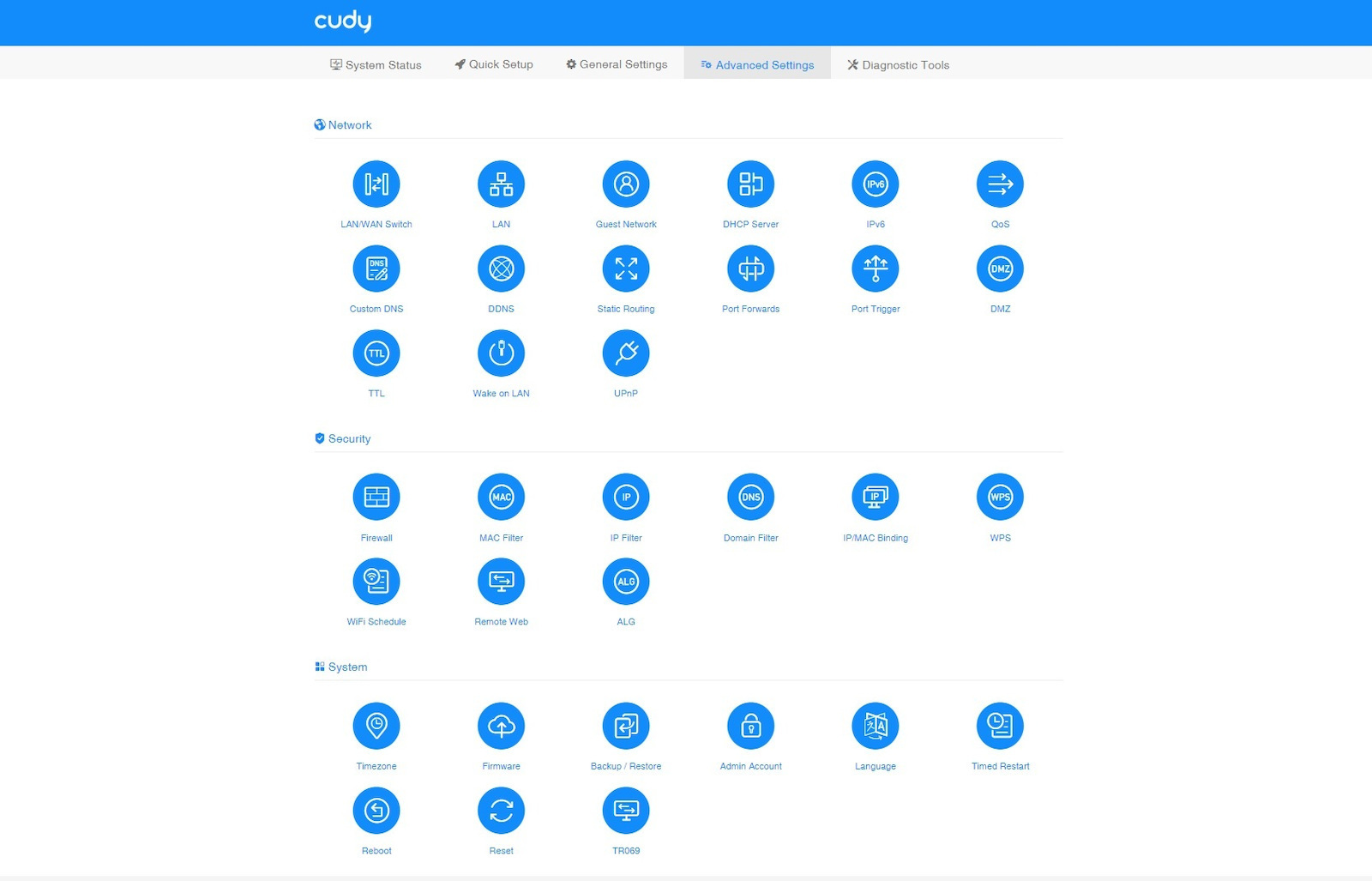
Super easy setup with a very user-friendly interface, it does almost everything by itself. It has 4 LAN 10/100 ports and one can be WAN/LAN selectable from the software. It comes pre-installed with about 10 VPN providers (WireGuard Client/Server, OpenVPN, IPSec among others) for those who want to "play" more privately... and there are on/off switches for internet and VPN for all connected devices, wired and wireless.
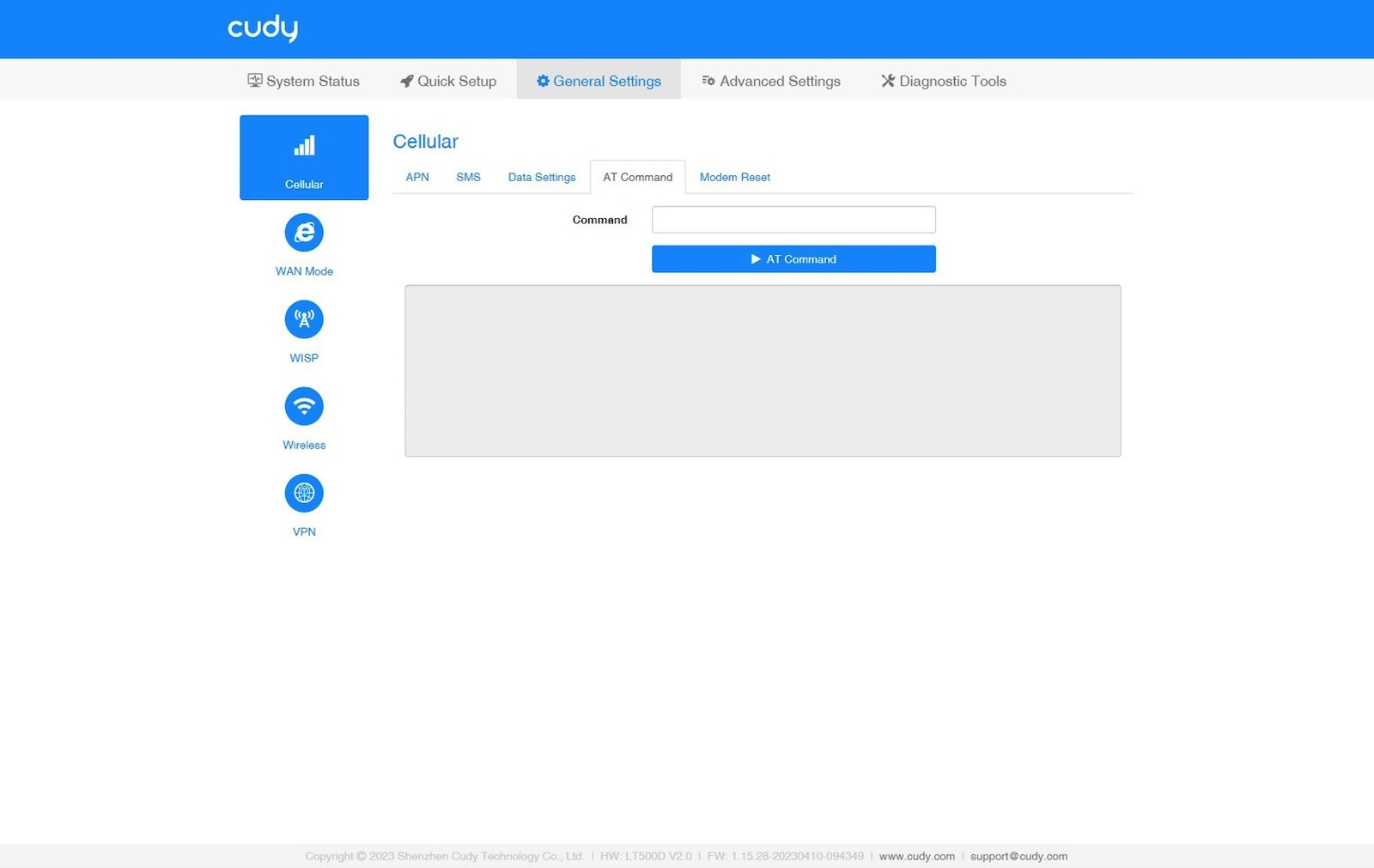
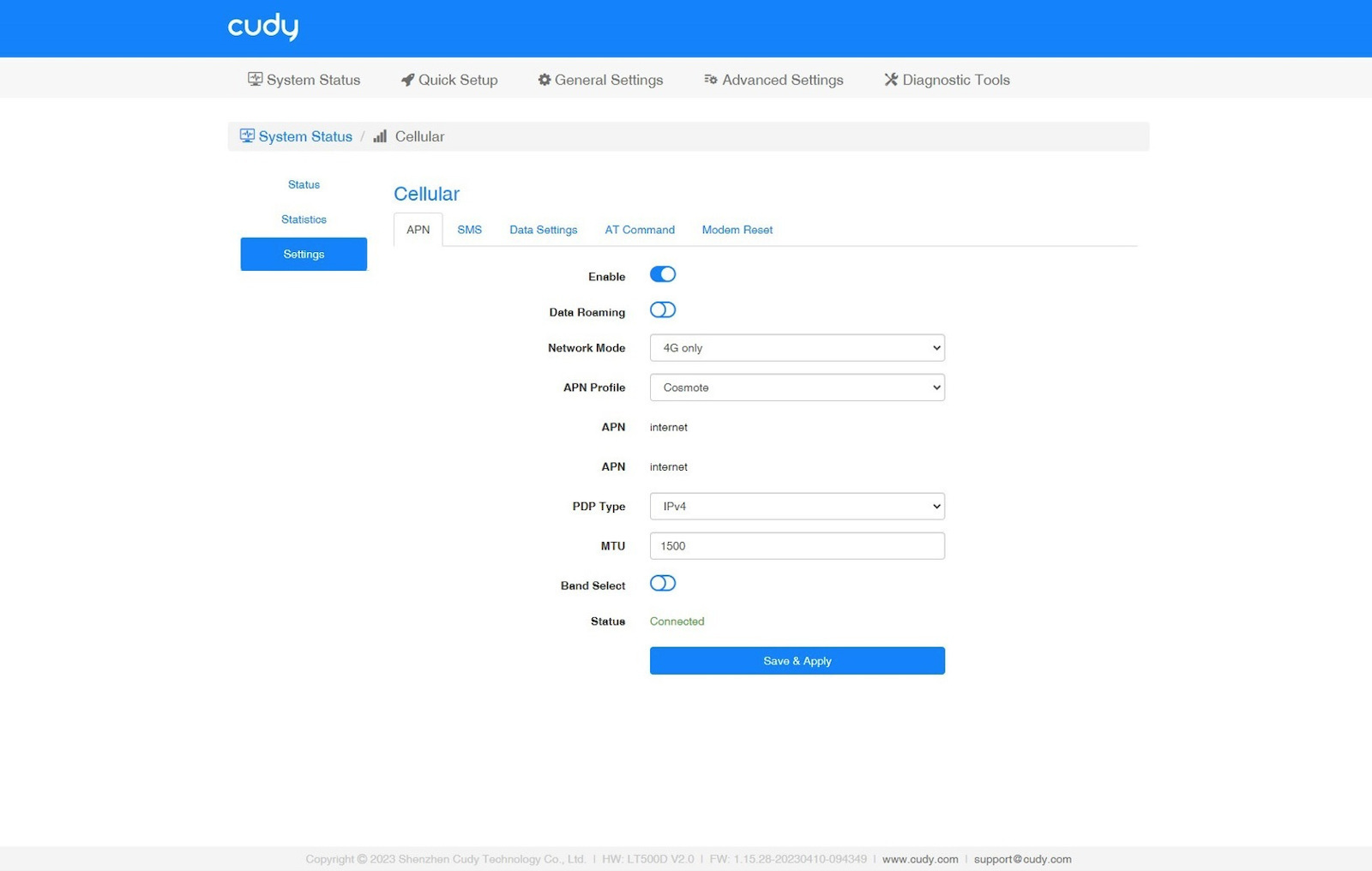
Attention: It is essential to disable the Sim Lock on a tablet or mobile phone before inserting the card into the LT500D slot, otherwise you will have unnecessary trouble. Then, just insert the card, enter the quick setup and it finds everything else on its own. If you have Cosmote and get confused like the friend above, or get lost in the 4G provider settings, with the Sim in the slot, enter: AT+CGDCONT= 1,"IP","internet","0.0.0.0",0,0 in the "AT Command" option, press Enter and in 5" you will be connected to Cosmote.
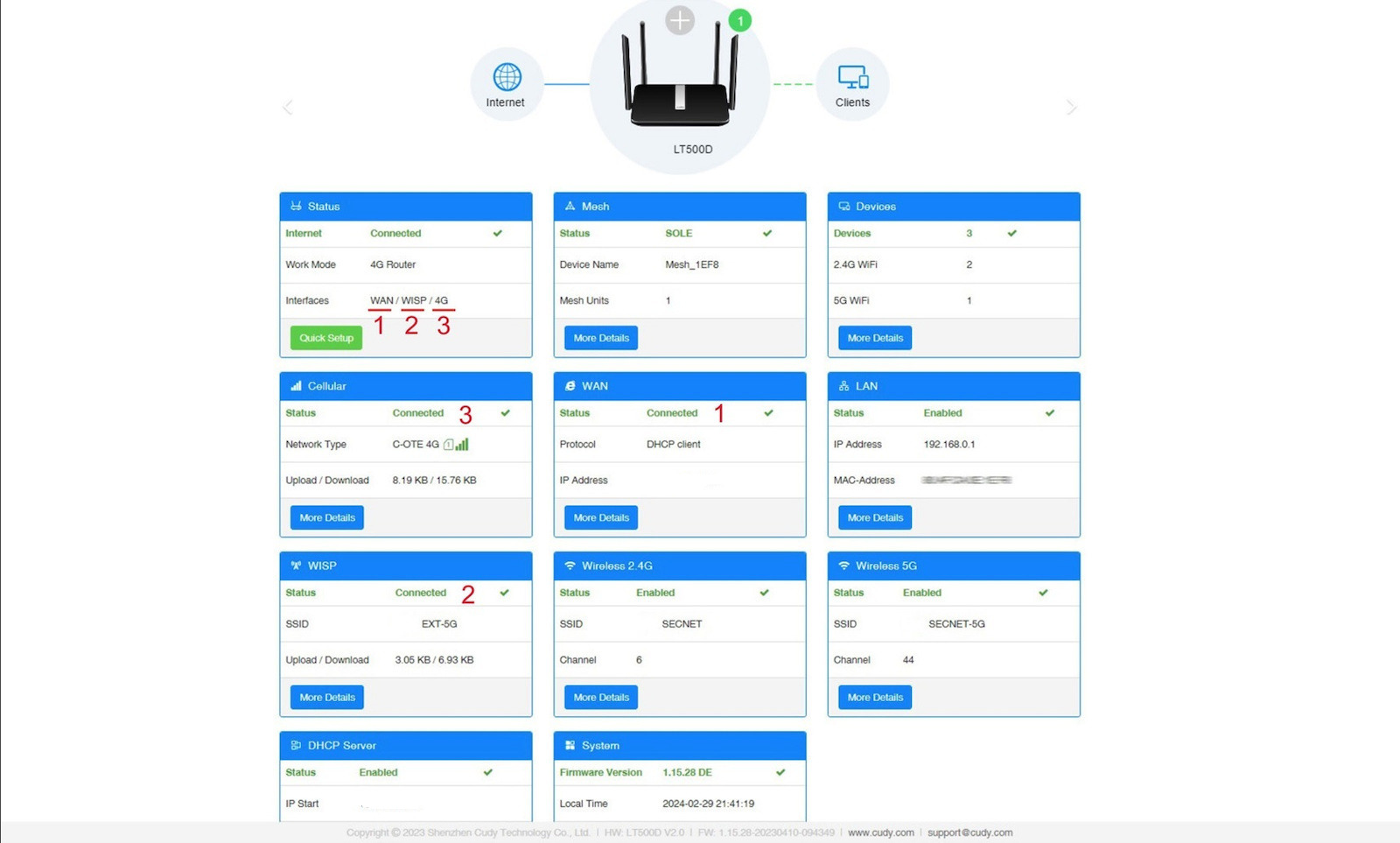
A very notable and useful feature is that it also accepts "wireless WAN" via WiFi which it calls WISP (Wireless ISP), so depending on what kind of internet connections you have available, it can operate in 3 modes WAN/WISP/4G where it automatically prioritizes the Internet input from the WAN port (e.g. from a modem/router/extender), if the WAN connection is interrupted it automatically switches to WISP mode (wireless internet via WiFi from a second router, or from a known Hotspot e.g. a mobile phone or a free Hotspot) and if those are interrupted, or if there are no WAN and WISP connections, then it switches to 4G connection, if WAN or WISP connection returns, it disconnects from 4G. The whole process happens without the slightest interruption, described as "4G Backup" by Cudy and works automatically when, apart from 4G, it finds other active internet connections on it.
Tip: If you use a WISP connection, select only the 5GHz band on the Router/Repeater/AP you want to connect to (if it is Dual Band) and completely ignore the 2.4GHz! This will give "Gigabit+" vitality to both WiFi bands that the LT500D will create and especially to the 5GHz!!
You can get a taste of the interface and configuration of the LT500/D V2 with Cudy's emulator here: https://support.cudy.com/emulator/LT500/cgi-bin/luci/ (Password=admin)
There is very good support at [email protected], so good that I made a mistake and installed (EU) firmware from Cudy's site... which was only for German ISPs and I lost the Greek ISPs for which there is no "ELL" firmware available online, so I couldn't connect anywhere with the Sim. I explained what happened to them and they sent me the next day by email the latest "ELL" version, newer than the one pre-installed on the router, so it turned out well for me.
There are 2 types of firmware, one visible for the hardware and one hidden for the ISPs which you access with this link from the router's web interface (LuCI): http://cudy.net/cgi-bin/luci/admin/network/gcom/upgrade and it only applies to LT500 V2 and LT500D V2. The EC200AELLAR01A05M16.bin firmware comes pre-installed on these models for the Greek market today.
The upgrade they sent me is the EC200AELLAR01A06M16.bin and for anyone (after checking which version is pre-installed) who wants to update the LT500 V2 and LT500D V2 with the latest configuration for Greek providers, I have it here: https://drive.google.com/file/d/1dz34YfpEM69MZDnADijtwcs14rck2BV6/view?usp=sharing
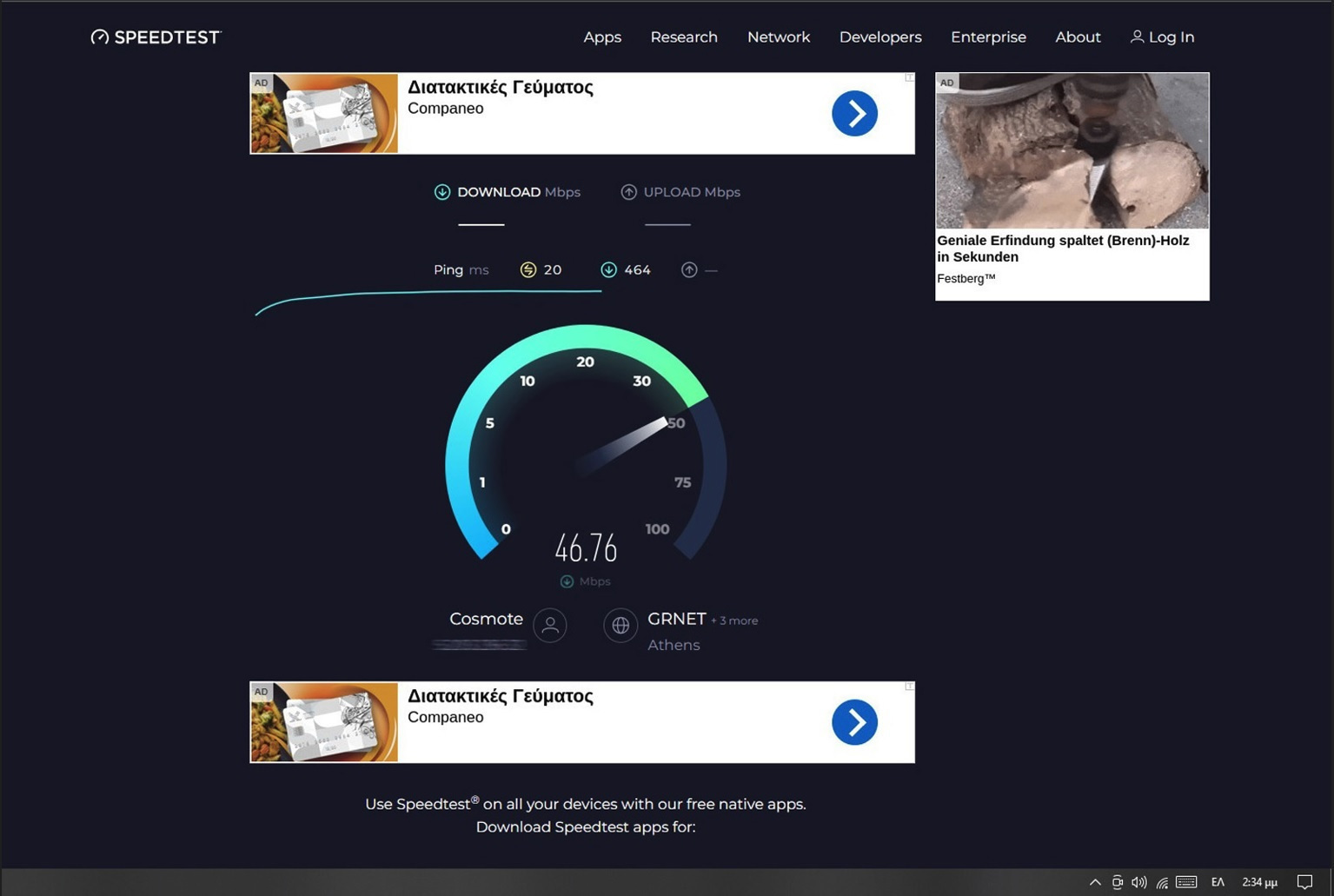
I chose this particular router because I always prefer them to have detachable mobile antennas, just in case I need to play with extensions and external antennas to boost the gain, but when I saw during the day 40 to 60+Mbps 4G Down/Up among apartment buildings with LTE bands on auto, I won't bother with tricks, not even as a joke.
I also have the TP-Link MR400 V3.0 (4G-10/100-2.4GHz/5GHz-detachable LTE antennas) and the TP-Link MR600 V3.0 (4G+/Gigabit/mesh/detachable LTE antennas/cloud) each in a different place, with the MR600 in a very difficult spot with 2 external antennas of €5 that improved the signal from 25% to 75%!
OK, the MR600 with 4G+ is top in the €100-150 category and can't be compared, but the LT500D (4G-10/100-mesh-2.4GHz/5GHz-detachable LTE antennas/external WiFi antennas [update] +Cloud) is much cheaper and classes above the MR400 in connectivity, with which it is directly comparable. Also, the LT500D has greater WiFi coverage at 5GHz than both the MR400 and the MR600, which have internal WiFi transmission antennas.
I admit that I did not expect it to be this good! I wrote a lot again, I hope I helped those who have it or are interested in getting it.
Update: Cloud (remote access-management) with Cudy Mobile app!
Ότι και να γράψω θα ειναι λίγο!
'Αριστη λήψη 4G με Nano Sim, αρκετά καλή κάλυψη WiFi στα 2.4GHz, αλλά απίστευτη κάλυψη με τρελό beamforming στα 5GHz. Βάλτε το πλάκα-όρθιο στον τοίχο στο 1.80-1.90 με τις πάνω κεραίες (LTE) στη θέση των 45 μοιρών και τις πλαϊνές (WiFi) σε έκταση δεξιά κι αριστερά __\ /__ και θα με θυμηθείτε. Αρκεί να έχει ανοιχτο χώρο μπροστά του εκεί που θα μπει για να απλώνει η δέσμη, δηλαδή μην το κλείσετε σε καμμια αποθήκη η σε ενα δωματιάκι 2x2. Πραγματικά σκοτώνει, διαπερνα 2 και 3 τοίχους με άνεση. Με το ρούτερ στο σαλόνι στον 5ο όροφο να "βλέπει" προς τα έξω, έχω ικανοποιητική λήψη (30dB περίπου) στον 3ο. Δέχεται mesh οπότε ίσως αργότερα παρω και ένα Cudy WR1300 (30€) με 4+1 Gigabit LAN/WAN Ports - Dual Band with 4xBeamforming WiFi antennas - WPA3 security - Captive Portal - OpenWrt ready [update] +Cloud και πολλά άλλα, να το βάλω στα 5GHz σαν Wireless AP/Mesh ή WISP mode σε ενα καλό σημείο στον 3ο για κάλυψη πλέον από 2ο ως 5ο όροφο, παρακάμπτωντας και τον περιορισμό 10/100 του LT500D ...αν ποτέ κατεβάσει πάνω απο 100Mbps με 4G/LTE εδώ που είμαι. Με λιγότερα από 100€ σύνολο καλύπτω 3+ ορόφους των 80-100τ.μ.
Πανεύκολο σετάρισμα με πολύ φιλικό interface τα κάνει σχεδόν όλα μόνο του. Έχει 4 LAN 10/100 ports και η μία είναι WAN/LAN κατ' επιλογήν απο το software. Έχει προεγκατεστημένους καμμια 10ρια VPN providers (WireGuard Client/Server, OpenVPN, IPSec μεταξύ άλλων) για όσους θέλουν να "παίξουν" πιό ιδιωτικά... και υπάρχουν διακόπτες on/off σε internet και σε VPN για όλες τις συνδεδεμένες συσκευές, ενσύρματες και ασύρματες.
Προσοχή: Είναι βασικό να απενεργοποιήσετε το Sim Lock σε ένα ταμπλετ ή σε ενα κινητό πριν βάλετε την κάρτα στην υποδοχή του LT500D, αλλιώς θα ταλαιπωρηθήτε χωρίς λόγο. Μετά, απλά βάζετε την κάρτα, μπαίνετε στο γρήγορο σετάρισμα και όλα τα υπόλοιπα τα βρίσκει μόνο του. Αν έχετε Cosmote και τα μπλέξετε όπως ο φίλος παραπάνω, ή χαθείτε στις ρυθμίσεις του 4G provider, με τη Sim στην υποδοχή, βάλτε: AT+CGDCONT= 1,"IP","internet","0.0.0.0",0,0 στην επιλογή "ΑΤ Command" πατήστε Enter και σε 5" θα έχετε συνδεθεί στην Cosmote.
Ένα πολύ αξιόλογο και χρήσιμο χαρακτηριστικό είναι οτι δέχεται και "ασύρματο WAN" μέσω WiFi που το ονομάζει WISP (Wireless ISP), επομένως αναλόγως με τι είδους συνδέσεις ιντερνετ έχετε διαθέσιμες, μπορεί να λειτουργήσει σε 3 modes WAN/WISP/4G όπου δίνει αυτόματα προτεραιότητα στην είσοδο Internet με καλώδιο από την WAN port (π.χ. από ενα modem/router/extender), αν διακοπει η σύνδεση WAN γυρίζει αυτόματα σε WISP mode (wireless internet μέσω WiFi από ένα δεύτερο ρούτερ, ή από ένα γνωστό Hotspot π.χ. ενός κινητού ή ενός free Hotspot) και αν διακοπούν, ή αν δεν υπάρχουν WAN και WISP συνδέσεις, τότε γυρίζει σε χρήση σύνδεσης 4G, αν επανέλθει WAN ή WISP σύνδεση, αποσυνδέεται απο τη 4G. H όλη διαδικασία γίνεται χωρίς την παραμικρή διακοπή, περιγράφεται ως "4G Backup" από την Cudy και λειτουργεί αυτόματα όταν εκτός απ' τη 4G βρεί κι άλλες ενεργές internet συνδέσεις πάνω του.
Συμβουλή: Αν χρησιμοποιήσετε σύνδεση WISP επιλέξτε μόνο την μπάντα των 5Ghz στο Router/Repeater/AP στο οποίο θέλετε να συνδεθείτε (αν είναι Dual Band) αγνοήστε εντελώς τα 2.4GHz! Αυτό θα δώσει "Gigabit+" ζωντάνια και στις 2 WiFi μπάντες που θα φτιάξει το LT500D και ειδικά στα 5Ghz!!
Μπορείτε να πάρετε μια γεύση απο το interface και την παραμετροποίηση του LT500/D V2 με τον emulator της Cudy εδώ: https://support.cudy.com/emulator/LT500/cgi-bin/luci/ (Password=admin)
Έχει πολύ καλή υποστηριξη στο [email protected], τόσο καλή που έκανα μια πατατα και πέρασα ένα (EU) firmware απο το σαιτ της Cudy ...που ήταν όμως μόνο για Γερμανικούς ISP και έχασα τους Ελληνικούς ISP για τους οποίους δεν υπάρχει "ELL" firmware διαθέσιμο στο διαδικτυο, οπότε δεν μπορούσα να συνδεθώ πουθενα με τη Sim, τους εξήγησα τι συνέβη και μου έστειλαν την επόμενη κιόλας μέρα με απάντηση στο email την τελευταία έκδοση "ELL", νεότερη από την προεγκατεστημένη στο ρούτερ, οπότε μου βγήκε σε καλό.
Έχει 2 ειδών firmware, ένα φανερό για το hardware και ένα κρυφό για τους ISP στο οποίο μπαινεις με αυτό το link από το web interface (LuCI) του ρούτερ: http://cudy.net/cgi-bin/luci/admin/network/gcom/upgrade και ισχύει μόνο για τα LT500 V2 και LT500D V2. Το EC200AELLAR01A05M16.bin firmware ερχεται προεγκατεστημένο στα συγκεκριμένα μοντέλα της Ελληνικής αγοράς σήμερα.
Η αναβάθμιση που μου έστειλαν είναι η EC200AELLAR01A06M16.bin και για όποιον (αφού πριν τσεκάρει ποια version έχει προεγκατεστημενη) θέλει να ενημερώσει τα LT500 V2 και LT500D V2 με το νεότερο configuration των Ελληνικών παρόχων την έχω εδώ: https://drive.google.com/file/d/1dz34YfpEM69MZDnADijtwcs14rck2BV6/view?usp=sharing
Επέλεξα το συγκεκριμένο ρουτερ γιατί πάντα προτιμώ να έχουν αποσπώμενες κεραίες κινητής, μήπως χρειαστεί να παιξω με προεκτασεις και εξωτερικές αντένες για ενίσχυση της απολαβής αλλά όταν είδα μέσα στην ημέρα 40 ως 60+Μbps 4G Down/Up ανάμεσα στις πολυκατοικίες με τις LTE μπάντες στο αυτόματο, δεν θα ασχοληθώ με πατέντες ούτε για αστείο.
Έχω και το TP-Link MR400 V3.0 (4G-10/100-2.4GHz/5GHz-detachable LTE antennas) και το TP-Link MR600 V3.0 (4G+/Gigabit/mesh/detachable LTE antennas/cloud) σε διαφορετικό χώρο το καθένα, με το MR600 σε πολύ δύσκολο σημείο με 2 εξωτερικές αντένες των 5€ που βελτιωσαν το σήμα από 25% σε 75%!
OK, τo MR600 με 4G+ είναι κορυφή στην κατηγορία των €100-150 και δεν μπορεί να συγκριθεί, αλλά το LT500D (4G-10/100-mesh-2.4GHz/5GHz-detachable LTE antennas/external WiFi antennas [update] +Cloud) είναι αρκετά φθηνότερο και κλάσεις ανώτερο σε συνδεσιμότητα από το MR400 με το οποίο είναι άμεσα συγκρίσιμο, επίσης το LT500D έχει μεγαλύτερη κάλυψη WiFi στα 5GHz και από το MR400 και από το MR600, που έχουν εσωτερικές κεραίες μετάδοσης WiFi.
Ομολογώ οτι δεν περίμενα να είναι τόσο καλό! Πολλά έγραψα πάλι, ελπίζω να βοήθησα όσους το έχουν ή ενδιαφέρονται να το αποκτήσουν.
Update: Cloud (απομακρυσμένη πρόσβαση-διαχείριση) με Cudy Mobile app!