The RX 7900 XTX graphics card from AMD is aimed at users seeking high performance in games and professional applications. It is a top-tier graphics card that provides an exceptionally high level of performance and power for demanding users who need to perform intensive tasks, such as video editing or 3D rendering.
The AMD Radeon RX 7900 XTX is built with AMD's RDNA 3 architecture, implementing chiplet technology. It offers next-generation performance and efficiency in 4K and beyond.
The AMD RDNA 3 architecture provides up to 54% greater performance per watt compared to the AMD RDNA 2 architecture and features the world's fastest chiplet interconnect, linking the graphics and memory chiplets at speeds of up to 5.3 TB/s. Additionally, it offers up to 96 new unified compute units and second-generation AMD Infinity Cache technology.
It also includes enhanced AI performance, delivering up to 2.7x higher AI performance, and redesigned compute units with second-generation raytracing technology, providing up to 1.8x higher raytracing performance in selected titles compared to the AMD RDNA 2 architecture.
Comparison with Previous Generation
The ever-evolving AMD RDNA architecture improves performance efficiency per watt from generation to generation, paving the way for better gaming. With AMD RDNA 3, users enjoy up to 50% greater performance per watt compared to the previous generation, AMD RDNA 2.
AMD Radeon RX 7000 Series graphics cards are designed to accelerate advanced artificial intelligence (AI) experiences. With over 2 times stronger AI performance compared to the previous generation. They are ideal for accelerating AI tasks, processing large machine learning data sets, and are designed to work with multiple machine learning frameworks.
AMD Software: Adrenalin Edition
Designed to provide you with a clean, modern, and user-friendly interaction where you can quickly access the latest software features, game stats, performance reports, driver updates, and more - all from one convenient location.
Take advantage of the ALT+R hotkey to open AMD Software: Adrenalin Edition directly in-game, making it even more convenient and easy to customize your favorite features and achieve a fantastic gaming experience.
Unlock the Potential of Your Graphics
Performance Tuning is AMD's innovative customization and overclocking tool that allows gamers to overclock or undervolt their GPU, controlling both engine and memory clocks, as well as adjusting fan speeds to desired settings.
Game Anywhere With Everyone
AMD Link, a free application that allows you to connect to your computer from your phone, tablet, or TV, is now available for Windows-based computers.
Optimized for better performance, you can now connect with your friends like never before using Link Game, a new feature that allows a friend to connect to your computer from their own machine and play local multiplayer games on your system.
AMD FidelityFX Super Resolution
AMD FidelityFX Super Resolution (FSR) uses cutting-edge upscaling technologies to boost frame rates in select titles and deliver high-quality, high-resolution gaming experiences without the need to upgrade to a new graphics card.
AMD Noise Suppression Technology
AMD Noise Suppression reduces ambient sound noise, providing greater clarity and improved focus whether you are concentrating on an important meeting or staying focused on a competitive game.
AMD Radeon Super Resolution
Boost performance in thousands of games
Radeon Super Resolution (RSR) is a driver-based upscaling feature that uses the same algorithm found in AMD FidelityFX Super Resolution (FSR) technology.
Gamers can take advantage of Radeon Super Resolution technology to unlock new levels of performance in any compatible game.
AMD Smart Access Memory
Get up to 15% more gaming performance with AMD's Smart Access Memory
In conventional Windows-based computer systems, processors can only access a fraction of the graphics memory (VRAM) at a time, limiting system performance.
With AMD Smart Access Memory, the data channel is expanded to fully utilize the potential of GPU memory, using the bandwidth of PCI Express® to remove bottlenecks and increase performance.
Enhanced Focus for Increased Privacy
Privacy View instantly displays any part of your screen using cutting-edge eye-tracking technology. Simply look at an area on your screen while other parts blur.
Share only what is necessary – Privacy View offers various options to blur areas outside your field of vision, keeping your personal content and information private as intended.
AMD Radeon Boost
AMD Radeon Boost dynamically reduces the resolution of the entire frame when fast character motion is detected on the screen through user input, allowing for higher FPS with minimal impact on quality.
With initial support for select DirectX 11 games, this feature now leverages variable rate shading hardware and supported DirectX 12 titles, providing additional performance and increased responsiveness while gaming.
AMD Radeon Anti-Lag
Game like a champion. Play to win.
Radeon Anti-Lag controls the CPU's workload rate to ensure it is not too far ahead of the GPU, reducing the amount of CPU work queued up. As a result, Radeon Anti-Lag can reduce input lag by almost a full frame, helping to restore responsiveness to your game.
AMD Software Radeon Image Sharpening
Stunning visuals. Almost no impact on performance.
AMD Software Radeon Image Sharpening uses a contrast-adaptive sharpening algorithm that restores clarity to game graphics that may have been affected by other effects, highlighting object details.
AMD Enhanced Sync Technology
Enable Liquid-Smooth Gameplay on Your Radeon Powered System
Enhanced Sync helps gamers minimize screen tearing while reducing latency and stutter compared to traditional V-sync.
Available for games based on DirectX 9, 11, 12, and Vulkan API, as well as all GPUs based on Polaris and newer screen combinations and/or AMD Eyefinity Technology 3. Now configurable per game and in-game from AMD software: Adrenalin Edition.
Windforce Cooling System
The WINDFORCE cooling system features three unique blade fans of 100 mm, which rotate alternately, 9 composite copper heat pipes, a large vapor chamber that directly touches the GPU, active 3D fans, and screen cooling, which together provide high heat dissipation performance.
Alternative Rotation
Reduces turbulence from adjacent fans and increases air flow pressure.
Unique Fan
The airflow is dispersed by the triangular edge of the fan and is smoothly guided through the 3D curved stripe on the fan surface.
Large Vapor Chamber & Heat Pipe
The large vapor chamber comes into direct contact with the GPU, combined with the composite heat pipes, which quickly transfer the heat from the GPU and VRAM to the heatsink.
The extended heatsink allows air to pass through, providing better heat dissipation.
Metal backplate
The metal backplate not only provides an aesthetic shape but also reinforces the structure of the graphics card to offer complete protection.
Dual BIOS
The default factory setting is OC mode, which provides users with the best performance. However, by switching to silent mode, you will enjoy a quieter experience.
Power Indicator
When any power supply anomaly occurs, the indicator will alert players with a flashing light.
Anti-Sag Bracket
The new anti-sag bracket is customized for each graphics card. It provides optimized reinforcement and better overall visual appearance.
Gigabyte Control Center
The Gigabyte Control Center (GCC) is a unified software for all products supported by Gigabyte. It provides an intuitive interface that allows users to adjust clock speed, voltage, fan mode, and power target in real-time.
Specifications are collected from official manufacturer websites. Please verify the specifications before proceeding with your final purchase. If you notice any problem you can report it here.
First day with the card coming from the RX6800XT Gigabyte Gaming OC 16GB.
Positives:
*I did not encounter coil whine and that is a good sign!
*It comes in the packaging with a GPU Bracket that screws onto the motherboard to hold it.
*There is an option on the card for anyone who wants to switch from OC Bios to Silent or vice versa.
*Quite good build quality from Gigabyte on this card, sturdy and beautiful I would say as a personal opinion.
*(Comparative text). The price is considered normal for current conditions in Europe as the 4th best card worldwide in 2024, which is why I included it in the positives as a personal opinion. Purchased for 986 Euros. (Purchased 6800xt March 2021 for 1250 Euros).
Difference in cards based on benchmark with 6800xt:
Effective Speed 50%
Average Score: 67%
Overclocked Score: 82%
Negatives:
*Gigabyte's software is not considered satisfactory, they have not focused much on the software.
*High temperatures (See below text if you do not customize the fans),
*Size: I would say compared to the 6800xt it is 5 inches longer. Be careful with the case.
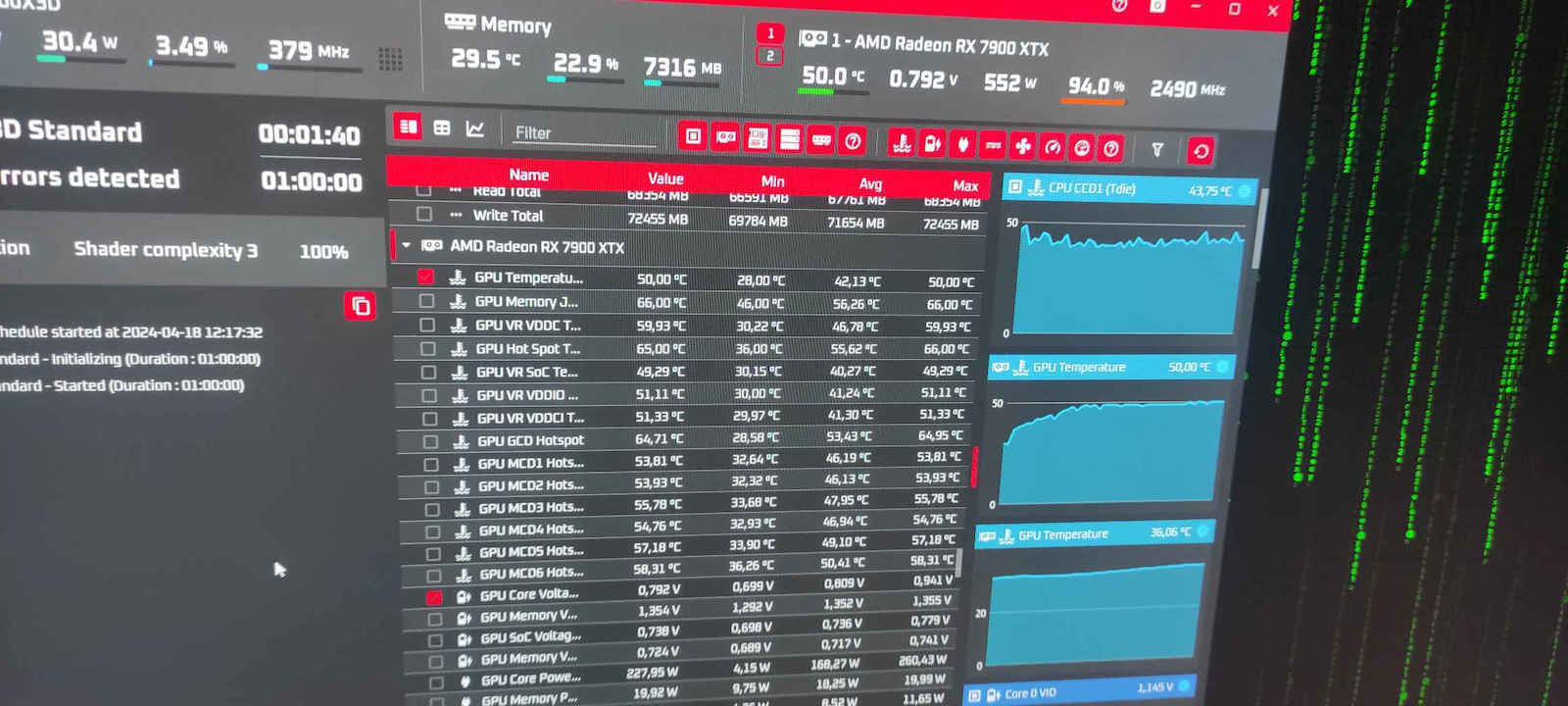
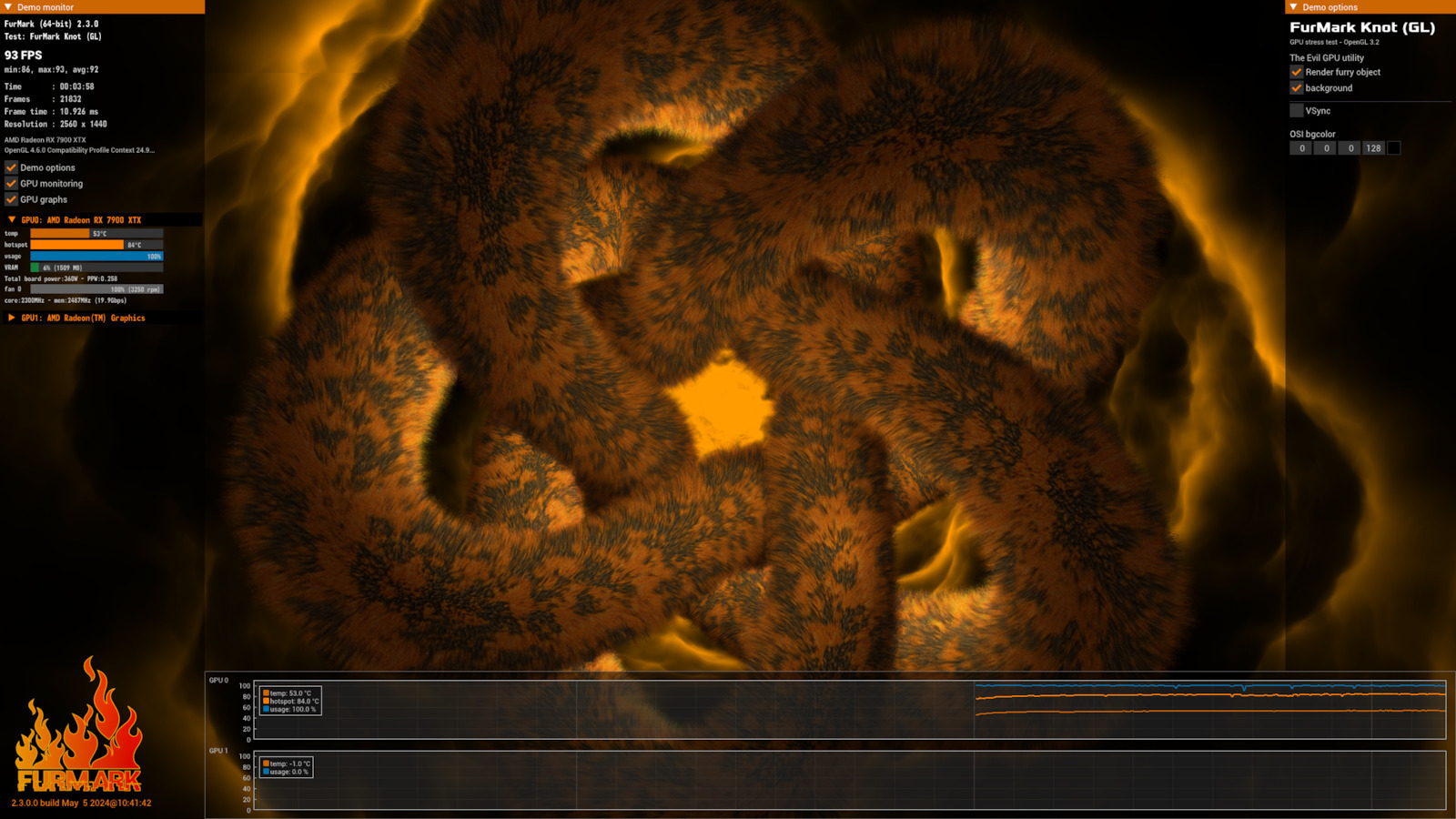
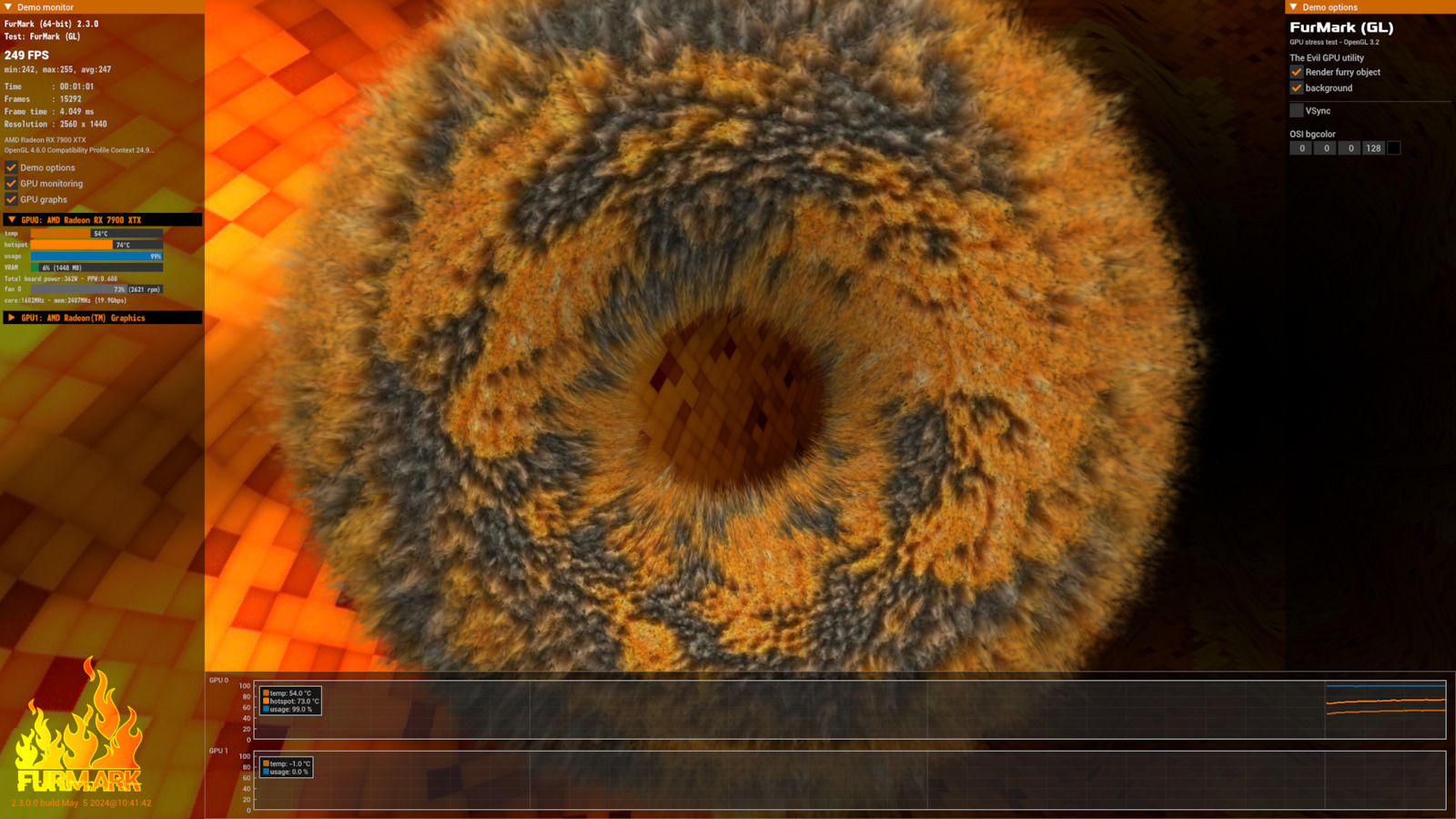
*Quite a power consumption of up to 360w. (See photos).
In conclusion:
I consider it a quite powerful card in many areas, from rendering to gaming, etc. I do not think the change from 6800xt to 7900xtx was necessary, not due to benchmark but due to coverage, I would not change the 6800xt at this specific time if it wasn't my "hobby" to work on PCs! I believe that a user can "do their job" with something cheaper and "inferior," not everyone is looking for something so powerful specifically for gaming at 1080p and 1440p resolutions. For example, in Warzone with max settings and with the 6800xt at 1440p (2k) it was hitting around 130 to 165 fps. And one last thing, just like with the 6800xt, I also downloaded the Aorus Engine to adjust the fans. I always have them on customize option and the noise does not bother me because I wear headphones. It has solved my problems and I can say that the Hotspot temp is around below 90c and the GPU temp is below 60c. After 3 years with this option, the 6800xt continued to work flawlessly and at low temperatures! Below you will see the Furmark that I "ran" for a bit at 100%.
Update 23/2/2025: Very good and powerful card BUT... the drivers are terrible.. AMD has a huge issue with driver stability in several games, in some games there are also many crashes!
Πρώτη μέρα με την κάρτα ερχόμενος από την RX6800XT Gigabyte Gaming OC 16GB.
Θετικά:
*Δεν συνάντησα coil whine και αυτό είναι καλό σημάδι!
*Έρχεται στην συσκευασία μαζί με GPU Bracket που βιδώνει πάνω στην μητρική ώστε να την κρατάει.
*Υπάρχει επιλογή πάνω στην κάρτα για όποιον θελήσει να κάνει εναλλαγή απο Bios OC σε Silent ή το αντίθετο.
*Αρκετά καλή κατασκευή από την Gigabyte στην συγκεκριμένη κάρτα, στιβαρή και όμορφη θα έλεγα ως προσωπική άποψη.
*(Συγκριτικό κείμενο). Η τιμή θεωρείται normal για τα σημερινά δεδομένα σε Ευρώπη ως 4η καλύτερη κάρτα παγκοσμίως 2024, για αυτό και το έβαλα στα θετικά ως προσωπική άποψη. Αγορά στα 986 Ευρώ. (Αγορά 6800xt 2021 Μάρτιος στα 1250 Ευρώ).
Διαφορά καρτών βάσει benchmark με 6800xt:
Effective Speed 50%
Average Score: 67%
Overclocked Score: 82%
Αρνητικά:
*Τα προγράμματα της Gigabyte δεν θεωρούνται ικανοποιητικά, δεν έχουν δώσει πολύ βάση στο software.
*Υψηλές θερμοκρασίες (Δες παρακάτω κείμενο εαν δεν κάνεις customize τα fans),
*Μέγεθος: Θα έλεγα συγκριτικά με την 6800xt πως είναι 5 πόντους μεγαλήτερη σε μήκος. Προσοχή στο κουτί.
*Αρκετή κατανάλωση εώς και 360w. (Δες φωτογραφίες).
Εν κατακλείδι:
Την θεωρώ αρκετά δυνατή κάρτα σε πολλούς τομείς, από rendering εως gaming κλπ. Δεν θεωρώ πως ήταν αναγκαία η αλλαγή από 6800xt σε 7900xtx, όχι λόγω benchmark αλλά λόγω κάλυψης, δεν θα άλλαζα την 6800xt την συγκεκριμένη χρονική στιγμή αν δεν ήταν το "χόμπι" μου τα pc! Πιστεύω πως κάποιος χρήστης μπορεί "να κάνει την δουλειά του" και με κάτι φθηνότερο και "κατώτερο", δεν ζητάνε όλοι κάτι τόσο δυνατό θεωρώ για gaming συγκεκριμένα σε αναλύσεις 1080p και 1440p. Π.χ. σε Warzone με max settings και με την 6800xt σε 1440p (2k) "βάραγε" 130 με 165 fps περίπου. Και κάτι τελευταίο, όπως και με την 6800xt έτσι και με αυτή κατέβασα το Aorus Engine ώστε να ρυθμίσω τα fans. Πάντα τα έχω σε customize επιλογή και δεν με ενοχλεί ο θόρυβος διότι φοράω ακουτικά. Μου έχει λύσει τα χέρια και μπορώ να πω ότι το Hotspot temp είναι περιπου κάτω από 90c και το Gpu temp στα κάτω από 60c. Έπειτα από 3 χρόνια με αυτή την επιλογή η 6800xt συνέχιζε και δούλευε απροβλημάτιστα και σε χαμηλές θερμοκρασίες!
Από κάτω θα δείτε το Furmark που την "έτρεξα" για λίγο στο 100%.
Update 23/2/2025: Πολύ καλή κάρτα και δυνατή ΑΛΛΑ.. οι drivers μαύρα χάλια.. Η AMD έχει τεράστιο θέμα με το stability των drivers σε αρκετά παιχνίδια, σε ορισμένα παιχνίδια υπάρχουν και πολλά crashes!
I got the card for machine learning that I do at work, the drivers are a bit tricky and require a lot of configuration, but it is quite fast and does the job I want.
I have also tried it for occasional gaming, mainly league of legends and some single player games like god of war, had no issues with everything maxed out in 4k.
I would give it more stars but due to the difficulty of the drivers and AMD tools for machine learning in configuration, I cut back a bit in general. I have no complaints for its price, it's a beast.
την κάρτα την πήρα για machine learning που κάνω στην δουλειά οι drivers είναι λίγο ότι νάνε και θέλει αρκετό configuration αλλά είναι αρκετά γρήγορη και κάνει την δουλειά που θέλω.
την έχω δοκιμάσει και σε περιστασιακό gaming κυρίως league of legends και κάνα single player όπως god of war δεν είχα θέμα όλα max σε 4κ.
θα έβαζα παραπάνω αστέρια αλλά λόγο της δυσκολίας που έχουν οι drivers και τα εργαλεία της amd για machine learning στο configuration έκοψα λίγο γενικά δεν έχω παράπονο για τα λεφτά της είναι τέρας.
Very good card! I had not noticed coil wine. However, after 10 days it spit them out, suddenly where I was playing the pc turned off and did not turn on. At first I thought it was the power supply but as soon as I removed the card the pc turned on normally! So it probably burned. Will be sent back for replacement.
Πολύ καλή κάρτα! Δεν είχα παρατηρήσει coil wine. Μετά από 10 μέρες όμως τα έφτυσε, ξαφνικά εκεί που έπαιζα έσβησε το pc και δεν άναβε. Στην αρχή νόμιζα ότι έφταιγε το τροφοδοτικό αλλά με το που έβγαλα την κάρτα το pc άνοιξε κανονικά! Άρα μάλλον κάηκε. Θα σταλεί πίσω για αντικατάσταση.
The card is top-notch. I'm lucky because I don't have any coil whine or high temperatures (unfortunately, these two are rare). In terms of performance and power, it reaches around 3300mhz with 360 watts. It's overkill for a 1080p monitor and essentially a 4k card. It also requires a powerful processor to not hold it back. It's worth its money and even without any crazy unreal engine, it easily lasts for five years.
So, after six months, I upgraded my CPU and motherboard, and somewhere around there, I probably experienced some pressure, and most likely suffered from pump out (Google it) because even though I was fine before the upgrade, suddenly I started experiencing higher temperatures on the hotspot. I opened the card, and indeed, almost all of it had come off from the die, and then after trying both the Noctua NH1 and the MX4, the die of the core is not even, so I couldn't find a solution. Luckily, some people I googled recommended the kryosheet 25*25. I bought it, installed it, had a bit of trouble because it doesn't sit well, but the results are unbelievable. Before, in OCCT, it would draw up to 400 watts, the fans at full speed, and it would constantly throttle due to thermal issues. Now, as seen in the picture, the power supply is almost maxed out, and there's quietness and safety, and the delta in temperatures doesn't go above twenty degrees.
P.S. I also bought liquid metal in case the kryosheet didn't work, but I think it will go to waste because it's really good
Η κάρτα είναι κορυφή. Είμαι τυχερός γιατί ούτε coil whine έχω ούτε είδα υψηλές θερμοκρασίες (δυστυχώς αυτά τα δύο είναι και λίγο λαχείο). Από απόδοση και ρεύματα πιάνει γύρω στα 3300mhz με 360 watt. Για 1080p monitor είναι overkill και είναι στην ουσία 4k καρτουλα. Επίσης θέλει πολύ δυνατό επεξεργαστή για να μην την κρατάει πίσω. Αξίζει τα χρήματα της και αν δεν βγάλουνε κανένα τρελό unreal engine άνετα βγάζεις πενταετία.
λοιπόν μετά από ένα εξάμηνο έκανα αναβάθμιση cpu mobo, και κάπου εκεί λογικά ασκήθηκε κάποια πίεση φαντάζομαι και λογικά έπαθα pump out(Google it) γιατί ενώ ήμουν οκ πριν το upgrade ξαφνικά ανεβάζω θερμοκρασίες στο hotspot. άνοιξα κάρτα, πράγματι είχε φύγει σχεδόν όλη από το die και μετά αφού δοκίμασα και την noctua nh1 και την mx4 απλά το die του πυρήνα δεν είναι ίσιο οπότε δεν έβρισκα άκρη. ευτυχώς κάποιοι που το γκουγκλαρα έβαζαν το kryosheet 25*25. πήρα έβαλα δυσκολευτηκα λίγο γιατί δεν κάθεται αλλά τα αποτελέσματα είναι ασύλληπτα. πρίν στο occt τραβούσε μέχρι 400 watt οι ανεμιστήρες στο φουλ και έπεφτε συνέχεια σε thermal throttling. τώρα όπως φαίνεται και στην εικόνα σχεδόν τερμάτισε το τροφοδοτικό και ησυχία και ασφάλεια και το δέλτα στις θερμοκρασίες δεν πάει πάνω από είκοσι βαθμούς.
ΥΓ έχω πάρει και liquid metal αν δεν λειτουργούσε το kryosheet αλλά νομίζω θα πάει χαμένο γιατί πραγματικά είναι πολύ καλό
First day with the card coming from the RX6800XT Gigabyte Gaming OC 16GB.
Positives:
*I did not encounter coil whine and that is a good sign!
*It comes in the packaging with a GPU Bracket that screws onto the motherboard to hold it.
*There is an option on the card for anyone who wants to switch from OC Bios to Silent or vice versa.
*Quite good build quality from Gigabyte on this card, sturdy and beautiful I would say as a personal opinion.
*(Comparative text). The price is considered normal for current conditions in Europe as the 4th best card worldwide in 2024, which is why I included it in the positives as a personal opinion. Purchased for 986 Euros. (Purchased 6800xt March 2021 for 1250 Euros).
Difference in cards based on benchmark with 6800xt:
Effective Speed 50%
Average Score: 67%
Overclocked Score: 82%
Negatives:
*Gigabyte's software is not considered satisfactory, they have not focused much on the software.
*High temperatures (See below text if you do not customize the fans),
*Size: I would say compared to the 6800xt it is 5 inches longer. Be careful with the case.
*Quite a power consumption of up to 360w. (See photos).
In conclusion:
I consider it a quite powerful card in many areas, from rendering to gaming, etc. I do not think the change from 6800xt to 7900xtx was necessary, not due to benchmark but due to coverage, I would not change the 6800xt at this specific time if it wasn't my "hobby" to work on PCs! I believe that a user can "do their job" with something cheaper and "inferior," not everyone is looking for something so powerful specifically for gaming at 1080p and 1440p resolutions. For example, in Warzone with max settings and with the 6800xt at 1440p (2k) it was hitting around 130 to 165 fps. And one last thing, just like with the 6800xt, I also downloaded the Aorus Engine to adjust the fans. I always have them on customize option and the noise does not bother me because I wear headphones. It has solved my problems and I can say that the Hotspot temp is around below 90c and the GPU temp is below 60c. After 3 years with this option, the 6800xt continued to work flawlessly and at low temperatures! Below you will see the Furmark that I "ran" for a bit at 100%.
Update 23/2/2025: Very good and powerful card BUT... the drivers are terrible.. AMD has a huge issue with driver stability in several games, in some games there are also many crashes!
Πρώτη μέρα με την κάρτα ερχόμενος από την RX6800XT Gigabyte Gaming OC 16GB.
Θετικά:
*Δεν συνάντησα coil whine και αυτό είναι καλό σημάδι!
*Έρχεται στην συσκευασία μαζί με GPU Bracket που βιδώνει πάνω στην μητρική ώστε να την κρατάει.
*Υπάρχει επιλογή πάνω στην κάρτα για όποιον θελήσει να κάνει εναλλαγή απο Bios OC σε Silent ή το αντίθετο.
*Αρκετά καλή κατασκευή από την Gigabyte στην συγκεκριμένη κάρτα, στιβαρή και όμορφη θα έλεγα ως προσωπική άποψη.
*(Συγκριτικό κείμενο). Η τιμή θεωρείται normal για τα σημερινά δεδομένα σε Ευρώπη ως 4η καλύτερη κάρτα παγκοσμίως 2024, για αυτό και το έβαλα στα θετικά ως προσωπική άποψη. Αγορά στα 986 Ευρώ. (Αγορά 6800xt 2021 Μάρτιος στα 1250 Ευρώ).
Διαφορά καρτών βάσει benchmark με 6800xt:
Effective Speed 50%
Average Score: 67%
Overclocked Score: 82%
Αρνητικά:
*Τα προγράμματα της Gigabyte δεν θεωρούνται ικανοποιητικά, δεν έχουν δώσει πολύ βάση στο software.
*Υψηλές θερμοκρασίες (Δες παρακάτω κείμενο εαν δεν κάνεις customize τα fans),
*Μέγεθος: Θα έλεγα συγκριτικά με την 6800xt πως είναι 5 πόντους μεγαλήτερη σε μήκος. Προσοχή στο κουτί.
*Αρκετή κατανάλωση εώς και 360w. (Δες φωτογραφίες).
Εν κατακλείδι:
Την θεωρώ αρκετά δυνατή κάρτα σε πολλούς τομείς, από rendering εως gaming κλπ. Δεν θεωρώ πως ήταν αναγκαία η αλλαγή από 6800xt σε 7900xtx, όχι λόγω benchmark αλλά λόγω κάλυψης, δεν θα άλλαζα την 6800xt την συγκεκριμένη χρονική στιγμή αν δεν ήταν το "χόμπι" μου τα pc! Πιστεύω πως κάποιος χρήστης μπορεί "να κάνει την δουλειά του" και με κάτι φθηνότερο και "κατώτερο", δεν ζητάνε όλοι κάτι τόσο δυνατό θεωρώ για gaming συγκεκριμένα σε αναλύσεις 1080p και 1440p. Π.χ. σε Warzone με max settings και με την 6800xt σε 1440p (2k) "βάραγε" 130 με 165 fps περίπου. Και κάτι τελευταίο, όπως και με την 6800xt έτσι και με αυτή κατέβασα το Aorus Engine ώστε να ρυθμίσω τα fans. Πάντα τα έχω σε customize επιλογή και δεν με ενοχλεί ο θόρυβος διότι φοράω ακουτικά. Μου έχει λύσει τα χέρια και μπορώ να πω ότι το Hotspot temp είναι περιπου κάτω από 90c και το Gpu temp στα κάτω από 60c. Έπειτα από 3 χρόνια με αυτή την επιλογή η 6800xt συνέχιζε και δούλευε απροβλημάτιστα και σε χαμηλές θερμοκρασίες!
Από κάτω θα δείτε το Furmark που την "έτρεξα" για λίγο στο 100%.
Update 23/2/2025: Πολύ καλή κάρτα και δυνατή ΑΛΛΑ.. οι drivers μαύρα χάλια.. Η AMD έχει τεράστιο θέμα με το stability των drivers σε αρκετά παιχνίδια, σε ορισμένα παιχνίδια υπάρχουν και πολλά crashes!
I got the card for machine learning that I do at work, the drivers are a bit tricky and require a lot of configuration, but it is quite fast and does the job I want.
I have also tried it for occasional gaming, mainly league of legends and some single player games like god of war, had no issues with everything maxed out in 4k.
I would give it more stars but due to the difficulty of the drivers and AMD tools for machine learning in configuration, I cut back a bit in general. I have no complaints for its price, it's a beast.
την κάρτα την πήρα για machine learning που κάνω στην δουλειά οι drivers είναι λίγο ότι νάνε και θέλει αρκετό configuration αλλά είναι αρκετά γρήγορη και κάνει την δουλειά που θέλω.
την έχω δοκιμάσει και σε περιστασιακό gaming κυρίως league of legends και κάνα single player όπως god of war δεν είχα θέμα όλα max σε 4κ.
θα έβαζα παραπάνω αστέρια αλλά λόγο της δυσκολίας που έχουν οι drivers και τα εργαλεία της amd για machine learning στο configuration έκοψα λίγο γενικά δεν έχω παράπονο για τα λεφτά της είναι τέρας.
Very good card! I had not noticed coil wine. However, after 10 days it spit them out, suddenly where I was playing the pc turned off and did not turn on. At first I thought it was the power supply but as soon as I removed the card the pc turned on normally! So it probably burned. Will be sent back for replacement.
Πολύ καλή κάρτα! Δεν είχα παρατηρήσει coil wine. Μετά από 10 μέρες όμως τα έφτυσε, ξαφνικά εκεί που έπαιζα έσβησε το pc και δεν άναβε. Στην αρχή νόμιζα ότι έφταιγε το τροφοδοτικό αλλά με το που έβγαλα την κάρτα το pc άνοιξε κανονικά! Άρα μάλλον κάηκε. Θα σταλεί πίσω για αντικατάσταση.
The card is top-notch. I'm lucky because I don't have any coil whine or high temperatures (unfortunately, these two are rare). In terms of performance and power, it reaches around 3300mhz with 360 watts. It's overkill for a 1080p monitor and essentially a 4k card. It also requires a powerful processor to not hold it back. It's worth its money and even without any crazy unreal engine, it easily lasts for five years.
So, after six months, I upgraded my CPU and motherboard, and somewhere around there, I probably experienced some pressure, and most likely suffered from pump out (Google it) because even though I was fine before the upgrade, suddenly I started experiencing higher temperatures on the hotspot. I opened the card, and indeed, almost all of it had come off from the die, and then after trying both the Noctua NH1 and the MX4, the die of the core is not even, so I couldn't find a solution. Luckily, some people I googled recommended the kryosheet 25*25. I bought it, installed it, had a bit of trouble because it doesn't sit well, but the results are unbelievable. Before, in OCCT, it would draw up to 400 watts, the fans at full speed, and it would constantly throttle due to thermal issues. Now, as seen in the picture, the power supply is almost maxed out, and there's quietness and safety, and the delta in temperatures doesn't go above twenty degrees.
P.S. I also bought liquid metal in case the kryosheet didn't work, but I think it will go to waste because it's really good
Η κάρτα είναι κορυφή. Είμαι τυχερός γιατί ούτε coil whine έχω ούτε είδα υψηλές θερμοκρασίες (δυστυχώς αυτά τα δύο είναι και λίγο λαχείο). Από απόδοση και ρεύματα πιάνει γύρω στα 3300mhz με 360 watt. Για 1080p monitor είναι overkill και είναι στην ουσία 4k καρτουλα. Επίσης θέλει πολύ δυνατό επεξεργαστή για να μην την κρατάει πίσω. Αξίζει τα χρήματα της και αν δεν βγάλουνε κανένα τρελό unreal engine άνετα βγάζεις πενταετία.
λοιπόν μετά από ένα εξάμηνο έκανα αναβάθμιση cpu mobo, και κάπου εκεί λογικά ασκήθηκε κάποια πίεση φαντάζομαι και λογικά έπαθα pump out(Google it) γιατί ενώ ήμουν οκ πριν το upgrade ξαφνικά ανεβάζω θερμοκρασίες στο hotspot. άνοιξα κάρτα, πράγματι είχε φύγει σχεδόν όλη από το die και μετά αφού δοκίμασα και την noctua nh1 και την mx4 απλά το die του πυρήνα δεν είναι ίσιο οπότε δεν έβρισκα άκρη. ευτυχώς κάποιοι που το γκουγκλαρα έβαζαν το kryosheet 25*25. πήρα έβαλα δυσκολευτηκα λίγο γιατί δεν κάθεται αλλά τα αποτελέσματα είναι ασύλληπτα. πρίν στο occt τραβούσε μέχρι 400 watt οι ανεμιστήρες στο φουλ και έπεφτε συνέχεια σε thermal throttling. τώρα όπως φαίνεται και στην εικόνα σχεδόν τερμάτισε το τροφοδοτικό και ησυχία και ασφάλεια και το δέλτα στις θερμοκρασίες δεν πάει πάνω από είκοσι βαθμούς.
ΥΓ έχω πάρει και liquid metal αν δεν λειτουργούσε το kryosheet αλλά νομίζω θα πάει χαμένο γιατί πραγματικά είναι πολύ καλό
Specifications are collected from official manufacturer websites. Please verify the specifications before proceeding with your final purchase. If you notice any problem you can report it here.
Description
The RX 7900 XTX graphics card from AMD is aimed at users seeking high performance in games and professional applications. It is a top-tier graphics card that provides an exceptionally high level of performance and power for demanding users who need to perform intensive tasks, such as video editing or 3D rendering.
The AMD Radeon RX 7900 XTX is built with AMD's RDNA 3 architecture, implementing chiplet technology. It offers next-generation performance and efficiency in 4K and beyond.
The AMD RDNA 3 architecture provides up to 54% greater performance per watt compared to the AMD RDNA 2 architecture and features the world's fastest chiplet interconnect, linking the graphics and memory chiplets at speeds of up to 5.3 TB/s. Additionally, it offers up to 96 new unified compute units and second-generation AMD Infinity Cache technology.
It also includes enhanced AI performance, delivering up to 2.7x higher AI performance, and redesigned compute units with second-generation raytracing technology, providing up to 1.8x higher raytracing performance in selected titles compared to the AMD RDNA 2 architecture.
Comparison with Previous Generation
The ever-evolving AMD RDNA architecture improves performance efficiency per watt from generation to generation, paving the way for better gaming. With AMD RDNA 3, users enjoy up to 50% greater performance per watt compared to the previous generation, AMD RDNA 2.
AMD Radeon RX 7000 Series graphics cards are designed to accelerate advanced artificial intelligence (AI) experiences. With over 2 times stronger AI performance compared to the previous generation. They are ideal for accelerating AI tasks, processing large machine learning data sets, and are designed to work with multiple machine learning frameworks.
AMD Software: Adrenalin Edition
Designed to provide you with a clean, modern, and user-friendly interaction where you can quickly access the latest software features, game stats, performance reports, driver updates, and more - all from one convenient location.
Take advantage of the ALT+R hotkey to open AMD Software: Adrenalin Edition directly in-game, making it even more convenient and easy to customize your favorite features and achieve a fantastic gaming experience.
Unlock the Potential of Your Graphics
Performance Tuning is AMD's innovative customization and overclocking tool that allows gamers to overclock or undervolt their GPU, controlling both engine and memory clocks, as well as adjusting fan speeds to desired settings.
Game Anywhere With Everyone
AMD Link, a free application that allows you to connect to your computer from your phone, tablet, or TV, is now available for Windows-based computers.
Optimized for better performance, you can now connect with your friends like never before using Link Game, a new feature that allows a friend to connect to your computer from their own machine and play local multiplayer games on your system.
AMD FidelityFX Super Resolution
AMD FidelityFX Super Resolution (FSR) uses cutting-edge upscaling technologies to boost frame rates in select titles and deliver high-quality, high-resolution gaming experiences without the need to upgrade to a new graphics card.
AMD Noise Suppression Technology
AMD Noise Suppression reduces ambient sound noise, providing greater clarity and improved focus whether you are concentrating on an important meeting or staying focused on a competitive game.
AMD Radeon Super Resolution
Boost performance in thousands of games
Radeon Super Resolution (RSR) is a driver-based upscaling feature that uses the same algorithm found in AMD FidelityFX Super Resolution (FSR) technology.
Gamers can take advantage of Radeon Super Resolution technology to unlock new levels of performance in any compatible game.
AMD Smart Access Memory
Get up to 15% more gaming performance with AMD's Smart Access Memory
In conventional Windows-based computer systems, processors can only access a fraction of the graphics memory (VRAM) at a time, limiting system performance.
With AMD Smart Access Memory, the data channel is expanded to fully utilize the potential of GPU memory, using the bandwidth of PCI Express® to remove bottlenecks and increase performance.
Enhanced Focus for Increased Privacy
Privacy View instantly displays any part of your screen using cutting-edge eye-tracking technology. Simply look at an area on your screen while other parts blur.
Share only what is necessary – Privacy View offers various options to blur areas outside your field of vision, keeping your personal content and information private as intended.
AMD Radeon Boost
AMD Radeon Boost dynamically reduces the resolution of the entire frame when fast character motion is detected on the screen through user input, allowing for higher FPS with minimal impact on quality.
With initial support for select DirectX 11 games, this feature now leverages variable rate shading hardware and supported DirectX 12 titles, providing additional performance and increased responsiveness while gaming.
AMD Radeon Anti-Lag
Game like a champion. Play to win.
Radeon Anti-Lag controls the CPU's workload rate to ensure it is not too far ahead of the GPU, reducing the amount of CPU work queued up. As a result, Radeon Anti-Lag can reduce input lag by almost a full frame, helping to restore responsiveness to your game.
AMD Software Radeon Image Sharpening
Stunning visuals. Almost no impact on performance.
AMD Software Radeon Image Sharpening uses a contrast-adaptive sharpening algorithm that restores clarity to game graphics that may have been affected by other effects, highlighting object details.
AMD Enhanced Sync Technology
Enable Liquid-Smooth Gameplay on Your Radeon Powered System
Enhanced Sync helps gamers minimize screen tearing while reducing latency and stutter compared to traditional V-sync.
Available for games based on DirectX 9, 11, 12, and Vulkan API, as well as all GPUs based on Polaris and newer screen combinations and/or AMD Eyefinity Technology 3. Now configurable per game and in-game from AMD software: Adrenalin Edition.
Windforce Cooling System
The WINDFORCE cooling system features three unique blade fans of 100 mm, which rotate alternately, 9 composite copper heat pipes, a large vapor chamber that directly touches the GPU, active 3D fans, and screen cooling, which together provide high heat dissipation performance.
Alternative Rotation
Reduces turbulence from adjacent fans and increases air flow pressure.
Unique Fan
The airflow is dispersed by the triangular edge of the fan and is smoothly guided through the 3D curved stripe on the fan surface.
Large Vapor Chamber & Heat Pipe
The large vapor chamber comes into direct contact with the GPU, combined with the composite heat pipes, which quickly transfer the heat from the GPU and VRAM to the heatsink.
The extended heatsink allows air to pass through, providing better heat dissipation.
Metal backplate
The metal backplate not only provides an aesthetic shape but also reinforces the structure of the graphics card to offer complete protection.
Dual BIOS
The default factory setting is OC mode, which provides users with the best performance. However, by switching to silent mode, you will enjoy a quieter experience.
Power Indicator
When any power supply anomaly occurs, the indicator will alert players with a flashing light.
Anti-Sag Bracket
The new anti-sag bracket is customized for each graphics card. It provides optimized reinforcement and better overall visual appearance.
Gigabyte Control Center
The Gigabyte Control Center (GCC) is a unified software for all products supported by Gigabyte. It provides an intuitive interface that allows users to adjust clock speed, voltage, fan mode, and power target in real-time.
First day with the card coming from the RX6800XT Gigabyte Gaming OC 16GB.
Positives:
*I did not encounter coil whine and that is a good sign!
*It comes in the packaging with a GPU Bracket that screws onto the motherboard to hold it.
*There is an option on the card for anyone who wants to switch from OC Bios to Silent or vice versa.
*Quite good build quality from Gigabyte on this card, sturdy and beautiful I would say as a personal opinion.
*(Comparative text). The price is considered normal for current conditions in Europe as the 4th best card worldwide in 2024, which is why I included it in the positives as a personal opinion. Purchased for 986 Euros. (Purchased 6800xt March 2021 for 1250 Euros).
Difference in cards based on benchmark with 6800xt:
Effective Speed 50%
Average Score: 67%
Overclocked Score: 82%
Negatives:
*Gigabyte's software is not considered satisfactory, they have not focused much on the software.
*High temperatures (See below text if you do not customize the fans),
*Size: I would say compared to the 6800xt it is 5 inches longer. Be careful with the case.
*Quite a power consumption of up to 360w. (See photos).
In conclusion:
I consider it a quite powerful card in many areas, from rendering to gaming, etc. I do not think the change from 6800xt to 7900xtx was necessary, not due to benchmark but due to coverage, I would not change the 6800xt at this specific time if it wasn't my "hobby" to work on PCs! I believe that a user can "do their job" with something cheaper and "inferior," not everyone is looking for something so powerful specifically for gaming at 1080p and 1440p resolutions. For example, in Warzone with max settings and with the 6800xt at 1440p (2k) it was hitting around 130 to 165 fps. And one last thing, just like with the 6800xt, I also downloaded the Aorus Engine to adjust the fans. I always have them on customize option and the noise does not bother me because I wear headphones. It has solved my problems and I can say that the Hotspot temp is around below 90c and the GPU temp is below 60c. After 3 years with this option, the 6800xt continued to work flawlessly and at low temperatures! Below you will see the Furmark that I "ran" for a bit at 100%.
Update 23/2/2025: Very good and powerful card BUT... the drivers are terrible.. AMD has a huge issue with driver stability in several games, in some games there are also many crashes!
Πρώτη μέρα με την κάρτα ερχόμενος από την RX6800XT Gigabyte Gaming OC 16GB.
Θετικά:
*Δεν συνάντησα coil whine και αυτό είναι καλό σημάδι!
*Έρχεται στην συσκευασία μαζί με GPU Bracket που βιδώνει πάνω στην μητρική ώστε να την κρατάει.
*Υπάρχει επιλογή πάνω στην κάρτα για όποιον θελήσει να κάνει εναλλαγή απο Bios OC σε Silent ή το αντίθετο.
*Αρκετά καλή κατασκευή από την Gigabyte στην συγκεκριμένη κάρτα, στιβαρή και όμορφη θα έλεγα ως προσωπική άποψη.
*(Συγκριτικό κείμενο). Η τιμή θεωρείται normal για τα σημερινά δεδομένα σε Ευρώπη ως 4η καλύτερη κάρτα παγκοσμίως 2024, για αυτό και το έβαλα στα θετικά ως προσωπική άποψη. Αγορά στα 986 Ευρώ. (Αγορά 6800xt 2021 Μάρτιος στα 1250 Ευρώ).
Διαφορά καρτών βάσει benchmark με 6800xt:
Effective Speed 50%
Average Score: 67%
Overclocked Score: 82%
Αρνητικά:
*Τα προγράμματα της Gigabyte δεν θεωρούνται ικανοποιητικά, δεν έχουν δώσει πολύ βάση στο software.
*Υψηλές θερμοκρασίες (Δες παρακάτω κείμενο εαν δεν κάνεις customize τα fans),
*Μέγεθος: Θα έλεγα συγκριτικά με την 6800xt πως είναι 5 πόντους μεγαλήτερη σε μήκος. Προσοχή στο κουτί.
*Αρκετή κατανάλωση εώς και 360w. (Δες φωτογραφίες).
Εν κατακλείδι:
Την θεωρώ αρκετά δυνατή κάρτα σε πολλούς τομείς, από rendering εως gaming κλπ. Δεν θεωρώ πως ήταν αναγκαία η αλλαγή από 6800xt σε 7900xtx, όχι λόγω benchmark αλλά λόγω κάλυψης, δεν θα άλλαζα την 6800xt την συγκεκριμένη χρονική στιγμή αν δεν ήταν το "χόμπι" μου τα pc! Πιστεύω πως κάποιος χρήστης μπορεί "να κάνει την δουλειά του" και με κάτι φθηνότερο και "κατώτερο", δεν ζητάνε όλοι κάτι τόσο δυνατό θεωρώ για gaming συγκεκριμένα σε αναλύσεις 1080p και 1440p. Π.χ. σε Warzone με max settings και με την 6800xt σε 1440p (2k) "βάραγε" 130 με 165 fps περίπου. Και κάτι τελευταίο, όπως και με την 6800xt έτσι και με αυτή κατέβασα το Aorus Engine ώστε να ρυθμίσω τα fans. Πάντα τα έχω σε customize επιλογή και δεν με ενοχλεί ο θόρυβος διότι φοράω ακουτικά. Μου έχει λύσει τα χέρια και μπορώ να πω ότι το Hotspot temp είναι περιπου κάτω από 90c και το Gpu temp στα κάτω από 60c. Έπειτα από 3 χρόνια με αυτή την επιλογή η 6800xt συνέχιζε και δούλευε απροβλημάτιστα και σε χαμηλές θερμοκρασίες!
Από κάτω θα δείτε το Furmark που την "έτρεξα" για λίγο στο 100%.
Update 23/2/2025: Πολύ καλή κάρτα και δυνατή ΑΛΛΑ.. οι drivers μαύρα χάλια.. Η AMD έχει τεράστιο θέμα με το stability των drivers σε αρκετά παιχνίδια, σε ορισμένα παιχνίδια υπάρχουν και πολλά crashes!
I got the card for machine learning that I do at work, the drivers are a bit tricky and require a lot of configuration, but it is quite fast and does the job I want.
I have also tried it for occasional gaming, mainly league of legends and some single player games like god of war, had no issues with everything maxed out in 4k.
I would give it more stars but due to the difficulty of the drivers and AMD tools for machine learning in configuration, I cut back a bit in general. I have no complaints for its price, it's a beast.
την κάρτα την πήρα για machine learning που κάνω στην δουλειά οι drivers είναι λίγο ότι νάνε και θέλει αρκετό configuration αλλά είναι αρκετά γρήγορη και κάνει την δουλειά που θέλω.
την έχω δοκιμάσει και σε περιστασιακό gaming κυρίως league of legends και κάνα single player όπως god of war δεν είχα θέμα όλα max σε 4κ.
θα έβαζα παραπάνω αστέρια αλλά λόγο της δυσκολίας που έχουν οι drivers και τα εργαλεία της amd για machine learning στο configuration έκοψα λίγο γενικά δεν έχω παράπονο για τα λεφτά της είναι τέρας.
Very good card! I had not noticed coil wine. However, after 10 days it spit them out, suddenly where I was playing the pc turned off and did not turn on. At first I thought it was the power supply but as soon as I removed the card the pc turned on normally! So it probably burned. Will be sent back for replacement.
Πολύ καλή κάρτα! Δεν είχα παρατηρήσει coil wine. Μετά από 10 μέρες όμως τα έφτυσε, ξαφνικά εκεί που έπαιζα έσβησε το pc και δεν άναβε. Στην αρχή νόμιζα ότι έφταιγε το τροφοδοτικό αλλά με το που έβγαλα την κάρτα το pc άνοιξε κανονικά! Άρα μάλλον κάηκε. Θα σταλεί πίσω για αντικατάσταση.
The card is top-notch. I'm lucky because I don't have any coil whine or high temperatures (unfortunately, these two are rare). In terms of performance and power, it reaches around 3300mhz with 360 watts. It's overkill for a 1080p monitor and essentially a 4k card. It also requires a powerful processor to not hold it back. It's worth its money and even without any crazy unreal engine, it easily lasts for five years.
So, after six months, I upgraded my CPU and motherboard, and somewhere around there, I probably experienced some pressure, and most likely suffered from pump out (Google it) because even though I was fine before the upgrade, suddenly I started experiencing higher temperatures on the hotspot. I opened the card, and indeed, almost all of it had come off from the die, and then after trying both the Noctua NH1 and the MX4, the die of the core is not even, so I couldn't find a solution. Luckily, some people I googled recommended the kryosheet 25*25. I bought it, installed it, had a bit of trouble because it doesn't sit well, but the results are unbelievable. Before, in OCCT, it would draw up to 400 watts, the fans at full speed, and it would constantly throttle due to thermal issues. Now, as seen in the picture, the power supply is almost maxed out, and there's quietness and safety, and the delta in temperatures doesn't go above twenty degrees.
P.S. I also bought liquid metal in case the kryosheet didn't work, but I think it will go to waste because it's really good
Η κάρτα είναι κορυφή. Είμαι τυχερός γιατί ούτε coil whine έχω ούτε είδα υψηλές θερμοκρασίες (δυστυχώς αυτά τα δύο είναι και λίγο λαχείο). Από απόδοση και ρεύματα πιάνει γύρω στα 3300mhz με 360 watt. Για 1080p monitor είναι overkill και είναι στην ουσία 4k καρτουλα. Επίσης θέλει πολύ δυνατό επεξεργαστή για να μην την κρατάει πίσω. Αξίζει τα χρήματα της και αν δεν βγάλουνε κανένα τρελό unreal engine άνετα βγάζεις πενταετία.
λοιπόν μετά από ένα εξάμηνο έκανα αναβάθμιση cpu mobo, και κάπου εκεί λογικά ασκήθηκε κάποια πίεση φαντάζομαι και λογικά έπαθα pump out(Google it) γιατί ενώ ήμουν οκ πριν το upgrade ξαφνικά ανεβάζω θερμοκρασίες στο hotspot. άνοιξα κάρτα, πράγματι είχε φύγει σχεδόν όλη από το die και μετά αφού δοκίμασα και την noctua nh1 και την mx4 απλά το die του πυρήνα δεν είναι ίσιο οπότε δεν έβρισκα άκρη. ευτυχώς κάποιοι που το γκουγκλαρα έβαζαν το kryosheet 25*25. πήρα έβαλα δυσκολευτηκα λίγο γιατί δεν κάθεται αλλά τα αποτελέσματα είναι ασύλληπτα. πρίν στο occt τραβούσε μέχρι 400 watt οι ανεμιστήρες στο φουλ και έπεφτε συνέχεια σε thermal throttling. τώρα όπως φαίνεται και στην εικόνα σχεδόν τερμάτισε το τροφοδοτικό και ησυχία και ασφάλεια και το δέλτα στις θερμοκρασίες δεν πάει πάνω από είκοσι βαθμούς.
ΥΓ έχω πάρει και liquid metal αν δεν λειτουργούσε το kryosheet αλλά νομίζω θα πάει χαμένο γιατί πραγματικά είναι πολύ καλό
First day with the card coming from the RX6800XT Gigabyte Gaming OC 16GB.
Positives:
*I did not encounter coil whine and that is a good sign!
*It comes in the packaging with a GPU Bracket that screws onto the motherboard to hold it.
*There is an option on the card for anyone who wants to switch from OC Bios to Silent or vice versa.
*Quite good build quality from Gigabyte on this card, sturdy and beautiful I would say as a personal opinion.
*(Comparative text). The price is considered normal for current conditions in Europe as the 4th best card worldwide in 2024, which is why I included it in the positives as a personal opinion. Purchased for 986 Euros. (Purchased 6800xt March 2021 for 1250 Euros).
Difference in cards based on benchmark with 6800xt:
Effective Speed 50%
Average Score: 67%
Overclocked Score: 82%
Negatives:
*Gigabyte's software is not considered satisfactory, they have not focused much on the software.
*High temperatures (See below text if you do not customize the fans),
*Size: I would say compared to the 6800xt it is 5 inches longer. Be careful with the case.
*Quite a power consumption of up to 360w. (See photos).
In conclusion:
I consider it a quite powerful card in many areas, from rendering to gaming, etc. I do not think the change from 6800xt to 7900xtx was necessary, not due to benchmark but due to coverage, I would not change the 6800xt at this specific time if it wasn't my "hobby" to work on PCs! I believe that a user can "do their job" with something cheaper and "inferior," not everyone is looking for something so powerful specifically for gaming at 1080p and 1440p resolutions. For example, in Warzone with max settings and with the 6800xt at 1440p (2k) it was hitting around 130 to 165 fps. And one last thing, just like with the 6800xt, I also downloaded the Aorus Engine to adjust the fans. I always have them on customize option and the noise does not bother me because I wear headphones. It has solved my problems and I can say that the Hotspot temp is around below 90c and the GPU temp is below 60c. After 3 years with this option, the 6800xt continued to work flawlessly and at low temperatures! Below you will see the Furmark that I "ran" for a bit at 100%.
Update 23/2/2025: Very good and powerful card BUT... the drivers are terrible.. AMD has a huge issue with driver stability in several games, in some games there are also many crashes!
Πρώτη μέρα με την κάρτα ερχόμενος από την RX6800XT Gigabyte Gaming OC 16GB.
Θετικά:
*Δεν συνάντησα coil whine και αυτό είναι καλό σημάδι!
*Έρχεται στην συσκευασία μαζί με GPU Bracket που βιδώνει πάνω στην μητρική ώστε να την κρατάει.
*Υπάρχει επιλογή πάνω στην κάρτα για όποιον θελήσει να κάνει εναλλαγή απο Bios OC σε Silent ή το αντίθετο.
*Αρκετά καλή κατασκευή από την Gigabyte στην συγκεκριμένη κάρτα, στιβαρή και όμορφη θα έλεγα ως προσωπική άποψη.
*(Συγκριτικό κείμενο). Η τιμή θεωρείται normal για τα σημερινά δεδομένα σε Ευρώπη ως 4η καλύτερη κάρτα παγκοσμίως 2024, για αυτό και το έβαλα στα θετικά ως προσωπική άποψη. Αγορά στα 986 Ευρώ. (Αγορά 6800xt 2021 Μάρτιος στα 1250 Ευρώ).
Διαφορά καρτών βάσει benchmark με 6800xt:
Effective Speed 50%
Average Score: 67%
Overclocked Score: 82%
Αρνητικά:
*Τα προγράμματα της Gigabyte δεν θεωρούνται ικανοποιητικά, δεν έχουν δώσει πολύ βάση στο software.
*Υψηλές θερμοκρασίες (Δες παρακάτω κείμενο εαν δεν κάνεις customize τα fans),
*Μέγεθος: Θα έλεγα συγκριτικά με την 6800xt πως είναι 5 πόντους μεγαλήτερη σε μήκος. Προσοχή στο κουτί.
*Αρκετή κατανάλωση εώς και 360w. (Δες φωτογραφίες).
Εν κατακλείδι:
Την θεωρώ αρκετά δυνατή κάρτα σε πολλούς τομείς, από rendering εως gaming κλπ. Δεν θεωρώ πως ήταν αναγκαία η αλλαγή από 6800xt σε 7900xtx, όχι λόγω benchmark αλλά λόγω κάλυψης, δεν θα άλλαζα την 6800xt την συγκεκριμένη χρονική στιγμή αν δεν ήταν το "χόμπι" μου τα pc! Πιστεύω πως κάποιος χρήστης μπορεί "να κάνει την δουλειά του" και με κάτι φθηνότερο και "κατώτερο", δεν ζητάνε όλοι κάτι τόσο δυνατό θεωρώ για gaming συγκεκριμένα σε αναλύσεις 1080p και 1440p. Π.χ. σε Warzone με max settings και με την 6800xt σε 1440p (2k) "βάραγε" 130 με 165 fps περίπου. Και κάτι τελευταίο, όπως και με την 6800xt έτσι και με αυτή κατέβασα το Aorus Engine ώστε να ρυθμίσω τα fans. Πάντα τα έχω σε customize επιλογή και δεν με ενοχλεί ο θόρυβος διότι φοράω ακουτικά. Μου έχει λύσει τα χέρια και μπορώ να πω ότι το Hotspot temp είναι περιπου κάτω από 90c και το Gpu temp στα κάτω από 60c. Έπειτα από 3 χρόνια με αυτή την επιλογή η 6800xt συνέχιζε και δούλευε απροβλημάτιστα και σε χαμηλές θερμοκρασίες!
Από κάτω θα δείτε το Furmark που την "έτρεξα" για λίγο στο 100%.
Update 23/2/2025: Πολύ καλή κάρτα και δυνατή ΑΛΛΑ.. οι drivers μαύρα χάλια.. Η AMD έχει τεράστιο θέμα με το stability των drivers σε αρκετά παιχνίδια, σε ορισμένα παιχνίδια υπάρχουν και πολλά crashes!
I got the card for machine learning that I do at work, the drivers are a bit tricky and require a lot of configuration, but it is quite fast and does the job I want.
I have also tried it for occasional gaming, mainly league of legends and some single player games like god of war, had no issues with everything maxed out in 4k.
I would give it more stars but due to the difficulty of the drivers and AMD tools for machine learning in configuration, I cut back a bit in general. I have no complaints for its price, it's a beast.
την κάρτα την πήρα για machine learning που κάνω στην δουλειά οι drivers είναι λίγο ότι νάνε και θέλει αρκετό configuration αλλά είναι αρκετά γρήγορη και κάνει την δουλειά που θέλω.
την έχω δοκιμάσει και σε περιστασιακό gaming κυρίως league of legends και κάνα single player όπως god of war δεν είχα θέμα όλα max σε 4κ.
θα έβαζα παραπάνω αστέρια αλλά λόγο της δυσκολίας που έχουν οι drivers και τα εργαλεία της amd για machine learning στο configuration έκοψα λίγο γενικά δεν έχω παράπονο για τα λεφτά της είναι τέρας.
Very good card! I had not noticed coil wine. However, after 10 days it spit them out, suddenly where I was playing the pc turned off and did not turn on. At first I thought it was the power supply but as soon as I removed the card the pc turned on normally! So it probably burned. Will be sent back for replacement.
Πολύ καλή κάρτα! Δεν είχα παρατηρήσει coil wine. Μετά από 10 μέρες όμως τα έφτυσε, ξαφνικά εκεί που έπαιζα έσβησε το pc και δεν άναβε. Στην αρχή νόμιζα ότι έφταιγε το τροφοδοτικό αλλά με το που έβγαλα την κάρτα το pc άνοιξε κανονικά! Άρα μάλλον κάηκε. Θα σταλεί πίσω για αντικατάσταση.
The card is top-notch. I'm lucky because I don't have any coil whine or high temperatures (unfortunately, these two are rare). In terms of performance and power, it reaches around 3300mhz with 360 watts. It's overkill for a 1080p monitor and essentially a 4k card. It also requires a powerful processor to not hold it back. It's worth its money and even without any crazy unreal engine, it easily lasts for five years.
So, after six months, I upgraded my CPU and motherboard, and somewhere around there, I probably experienced some pressure, and most likely suffered from pump out (Google it) because even though I was fine before the upgrade, suddenly I started experiencing higher temperatures on the hotspot. I opened the card, and indeed, almost all of it had come off from the die, and then after trying both the Noctua NH1 and the MX4, the die of the core is not even, so I couldn't find a solution. Luckily, some people I googled recommended the kryosheet 25*25. I bought it, installed it, had a bit of trouble because it doesn't sit well, but the results are unbelievable. Before, in OCCT, it would draw up to 400 watts, the fans at full speed, and it would constantly throttle due to thermal issues. Now, as seen in the picture, the power supply is almost maxed out, and there's quietness and safety, and the delta in temperatures doesn't go above twenty degrees.
P.S. I also bought liquid metal in case the kryosheet didn't work, but I think it will go to waste because it's really good
Η κάρτα είναι κορυφή. Είμαι τυχερός γιατί ούτε coil whine έχω ούτε είδα υψηλές θερμοκρασίες (δυστυχώς αυτά τα δύο είναι και λίγο λαχείο). Από απόδοση και ρεύματα πιάνει γύρω στα 3300mhz με 360 watt. Για 1080p monitor είναι overkill και είναι στην ουσία 4k καρτουλα. Επίσης θέλει πολύ δυνατό επεξεργαστή για να μην την κρατάει πίσω. Αξίζει τα χρήματα της και αν δεν βγάλουνε κανένα τρελό unreal engine άνετα βγάζεις πενταετία.
λοιπόν μετά από ένα εξάμηνο έκανα αναβάθμιση cpu mobo, και κάπου εκεί λογικά ασκήθηκε κάποια πίεση φαντάζομαι και λογικά έπαθα pump out(Google it) γιατί ενώ ήμουν οκ πριν το upgrade ξαφνικά ανεβάζω θερμοκρασίες στο hotspot. άνοιξα κάρτα, πράγματι είχε φύγει σχεδόν όλη από το die και μετά αφού δοκίμασα και την noctua nh1 και την mx4 απλά το die του πυρήνα δεν είναι ίσιο οπότε δεν έβρισκα άκρη. ευτυχώς κάποιοι που το γκουγκλαρα έβαζαν το kryosheet 25*25. πήρα έβαλα δυσκολευτηκα λίγο γιατί δεν κάθεται αλλά τα αποτελέσματα είναι ασύλληπτα. πρίν στο occt τραβούσε μέχρι 400 watt οι ανεμιστήρες στο φουλ και έπεφτε συνέχεια σε thermal throttling. τώρα όπως φαίνεται και στην εικόνα σχεδόν τερμάτισε το τροφοδοτικό και ησυχία και ασφάλεια και το δέλτα στις θερμοκρασίες δεν πάει πάνω από είκοσι βαθμούς.
ΥΓ έχω πάρει και liquid metal αν δεν λειτουργούσε το kryosheet αλλά νομίζω θα πάει χαμένο γιατί πραγματικά είναι πολύ καλό