Specifications are collected from official manufacturer websites. Please verify the specifications before proceeding with your final purchase. If you notice any problem you can report it here.
I don't know but I think they run out very quickly. I use them for home use. 2 packs of paper per year and most of the pages are used up by my daughters with their crafts.
δεν ξέρω αλλά νομίζω τελειώνουν πολύ γρήγορα. οικιακή χρήση κάνω. 2 πακετα χαρτί το χρόνο κ τις περισσότερες σελίδες τις καταναλώνουν οι κόρες με τις χειροτεχνίες τους.
Very good result. They work in the printer even after the software upgrade, you just have to select that you wish to use non-original inks.
Πολύ καλό αποτέλεσμα. Λειτουργούν στον εκτυπωτή ακόμα και μετά την αναβάθμιση λογισμικού απλά πρέπει να επιλέξεις ότι επιθυμείς την χρήση μη γνήσιων μελανιών.
Value for money. Just uninstall and reinstall the drivers and block the updates... And of course, frequent head cleaning and printing to prevent the inks from drying out!
The Epson XP-3150, like most Epson models, has two “levels” of updates:
Driver / Epson Software Updater (on the PC)
Firmware Updates (directly on the printer)
To stop the updates, you need to block them in both places:
On the Computer
Uninstall / disable the Epson Software Updater
On Windows: Go to Control Panel > Programs & Features and uninstall the Epson Software Updater.
If you don’t want to delete it, open the program, go to Settings and remove the tick from the option “Update firmware/software automatically.”
Disable Epson Event Manager from startup (optional):
Usually, the XP-3150 displays notifications for firmware updates.
From the printer menu (on the LCD screen):
Go to Setup → Firmware Update → and disable the option Update via Internet / Notifications.
If you can’t find the option: leave the printer disconnected from Wi-Fi when you don’t need it or block the update address in the parental controls of the router (more advanced).
Why do this
Epson sends firmware updates that often block compatible (non-original) inks. That’s why most users disable them.
Value for money. Απλά απεγκατέστησε και ξαναεγκατέστησε τους drivers και μπλόκαρε τα updates... Και φυσικά συχνός καθαρισμός κεφαλής και εκτύπωση για να μην ξεραθούν τα μελάνια!
Ο Epson XP-3150, όπως και τα περισσότερα μοντέλα Epson, έχει δύο “επίπεδα” ενημερώσεων:
Driver / Epson Software Updater (στο PC)
Firmware Updates (απευθείας στον εκτυπωτή)
Για να σταματήσεις τα updates, πρέπει να τα μπλοκάρεις και στα δύο:
Στον Υπολογιστή
Απεγκατάσταση / απενεργοποίηση του Epson Software Updater
Στα Windows: Πήγαινε Πίνακας Ελέγχου > Προγράμματα & δυνατότητες και κάνε απεγκατάσταση το Epson Software Updater.
Αν δεν θέλεις να τον διαγράψεις, άνοιξε το πρόγραμμα, πήγαινε Ρυθμίσεις και αφαίρεσε το τικ από την επιλογή “Ενημέρωση firmware / software αυτόματα”.
Απενεργοποίηση Epson Event Manager από την εκκίνηση (προαιρετικό):
Συνήθως ο XP-3150 εμφανίζει ειδοποιήσεις για firmware updates.
Από το μενού του εκτυπωτή (στην οθόνη LCD):
Πήγαινε Setup (Ρυθμίσεις) → Firmware Update → και απενεργοποίησε την επιλογή Ενημέρωση μέσω Internet / Notifications.
Αν δεν βρίσκεις την επιλογή: άφησε τον εκτυπωτή χωρίς σύνδεση Wi-Fi όταν δεν τον χρειάζεσαι ή μπλόκαρε τη διεύθυνση update στους γονικούς ελέγχους του router (πιο προχωρημένο).
Γιατί να το κάνεις
Η Epson στέλνει firmware updates που συχνά μπλοκάρουν συμβατά (μη γνήσια) μελάνια. Για αυτό οι περισσότεροι χρήστες τα απενεργοποιούν.
Very bad experience! The product did not have all 4 colors, but only 3 and 2 black ones. As soon as I installed them, the printer recognized them as fake and, although it gave me the option to proceed with them, it did not print anything. Since then, the printer has essentially completely blocked. Honestly, this is an unacceptable purchase. Do not choose it!!!
Πολύ κακή εμπειρία! Το προϊόν δεν είχε και τα 4 χρώματα, αλλά μόνο 3 και 2 μαύρα. Μόλις τα τοποθέτησα, ο εκτυπωτής τα αναγνώρισε ως fake και, παρ’ όλο που μου έδωσε την επιλογή να προχωρήσω με αυτά, δεν εκτύπωσε τίποτα. Από τότε ο εκτυπωτής έχει ουσιαστικά μπλοκάρει εντελώς. Ειλικρινά, πρόκειται για απαράδεκτη αγορά. Μην το προτιμήσετε!!!
Affordable inks with good print quality. Fast shipping, good and secure packaging. The printer, when installing, says that they are not genuine but you continue and print.
Οικονομικά μελάνια με καλή ποιότητα εκτύπωσης. Γρήγορη αποστολή καλή και ασφαλής συσκευασία. Ο εκτυπωτής κατά την τοποθέτηση γράφει ότι δεν είναι γνήσια αλλά συνεχίζεις και εκτυπώνεις.
The best choice in relation to its price, the only thing the printer does is give you a message that the inks you are using are not genuine, but it works normally.
Η καλύτερη επιλογή σε σχέση με την τιμή του, το μόνο που σου κάνει ο εκτυπωτής ότι σου βγάζει ένα μύνημα ότι τα μελάνια που χρησιμοποιείς δεν είναι αυθεντικά αλλά δουλεύει κανονικά.
First time I bought these inks, the only thing I have to say is that the package was slightly damaged and crooked, and that the printer did not recognize the magenta. I contacted the company and the next day I received a replacement of the product (Thessaloniki-Athens). Mistakes can certainly happen and it is to the store's credit for their immediate response.
Πρωτη φορα πηρα αυτα τα μελανια ,το μονο που εχω να πω ηταν οτι το πακετο ηταν ελαφρως τσαλακωμενο και στραβο και οτι δε μου αναγνωριζε το magenta ο εκτυπωτης. Επικοινωνησα με την εταιρεια και την επομενη μερα παρελαβα την αντικατασταση του προιοντος (Θεσσαλονικη-Αθηνα). Αστοχιες σαφως μπορουν να συμβουν και ειναι προς τιμην του καταστηματος η αμεση ανταποκριση τους.
If you make the latest update on your printer, it will recognize them as non-original and it will not print for you.. I have been tricked, I am trying to save someone
Αν κάνετε την τελευταία ενημέρωση στον εκτυπωτή σας θα αναγνωρίζονται σαν μη ορίτζιναλ και δεν θα σας εκτυπώνει.. Την έχω πατήσει, προσπαθώ να σώσω κάποιον
The ink cartridges work perfectly. The printer does recognize that they are not the originals, but you just press 'continue' and it's fine. At half the price of the authentic ones, it's a huge yes from me
Τα μελάνια λειτουργούν άψογα. Αναγνωρίζει βέβαια ο εκτυπωτής ότι δεν είναι τα original αλλά πατάς 'συνέχεια' και μια χαρά. Με μισή τιμή από τα αυθεντικά είναι ένα τεράστιο ναι από εμένα
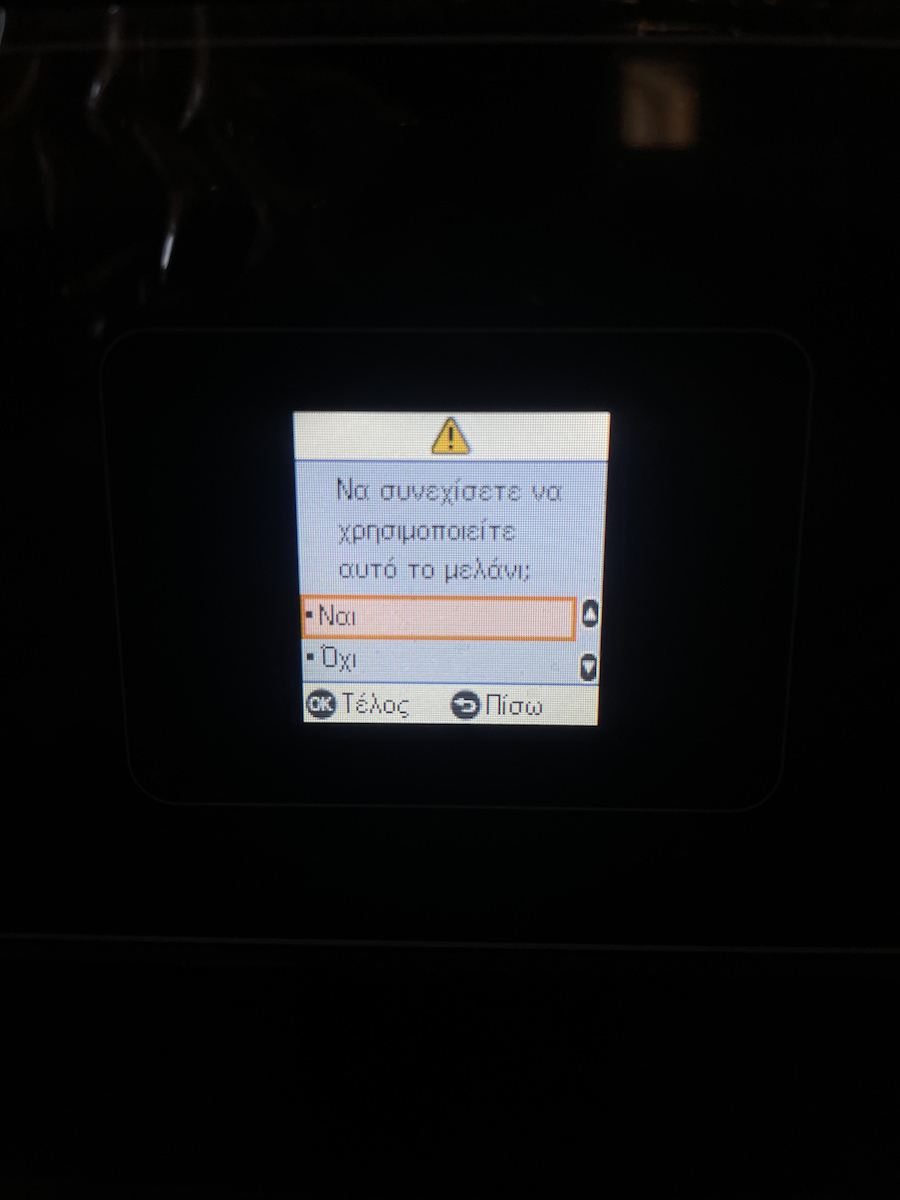
The ink cartridges work without any issues. The printer recognizes that they are compatible and not original. It asks you if you want to continue, you press ok and start printing. My printer is the Epson XP-3150.
Τα μελάνια λειτουργούν χωρίς πρόβλημα. Ο εκτυπωτής αναγνωρίζει ότι είναι συμβατά και όχι original. Σε ρωτά αν θέλεις να συνεχίσεις, πατάς ok και ξεκινάς την εκτύπωση. Ο εκτυπωτής μου είναι ο epson XP-3150.
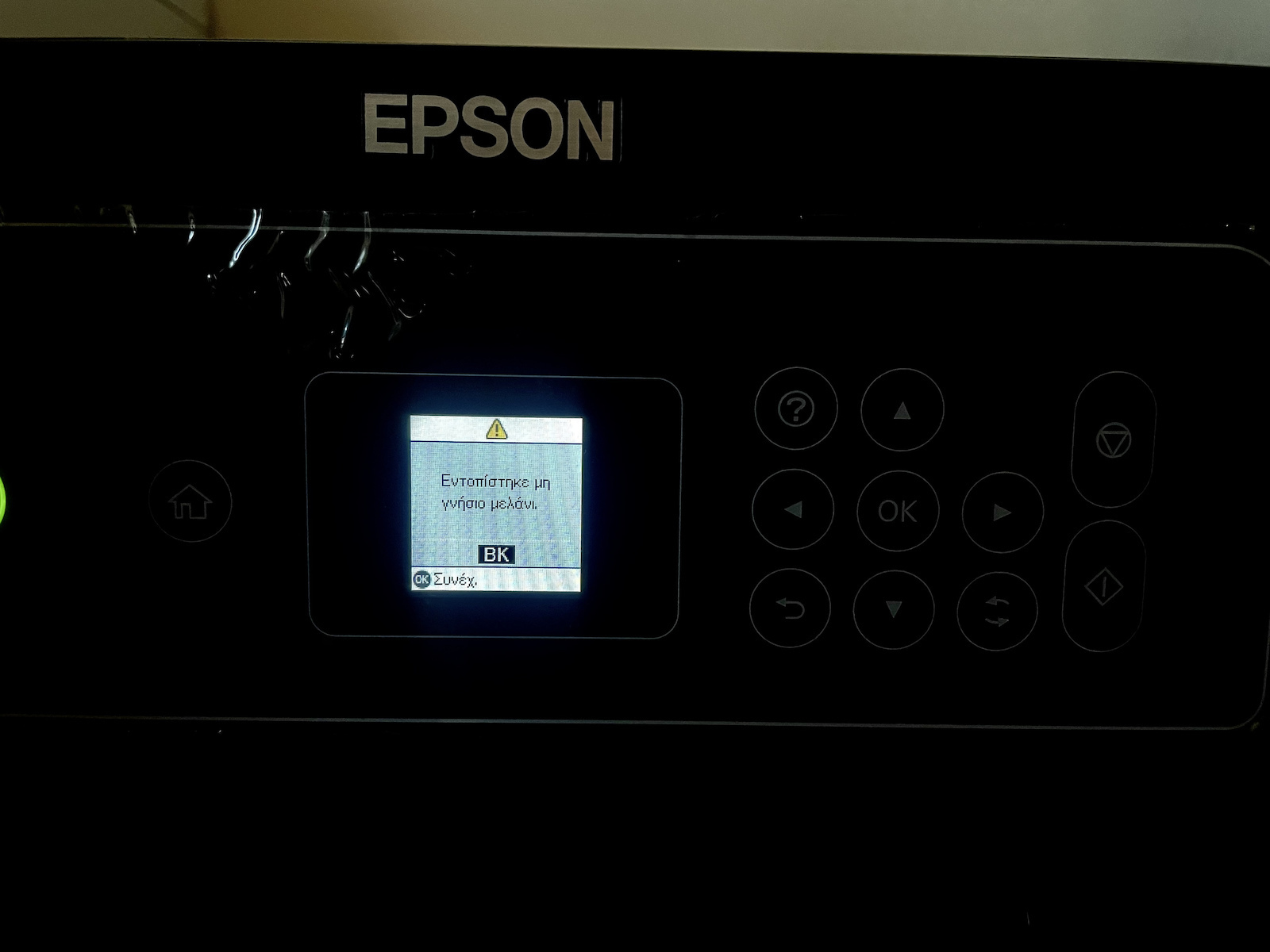
I bought today this ink pack. I only installed the black one that was missing in my EPSON XP-3150 printer. It gave me a notification that a non-genuine ink was detected, but it doesn't create any problem. You just press continue and it prints normally. The quality is very good. I would buy them again
Αγόρασα σήμερα αυτό το πακέτο των μελανιών
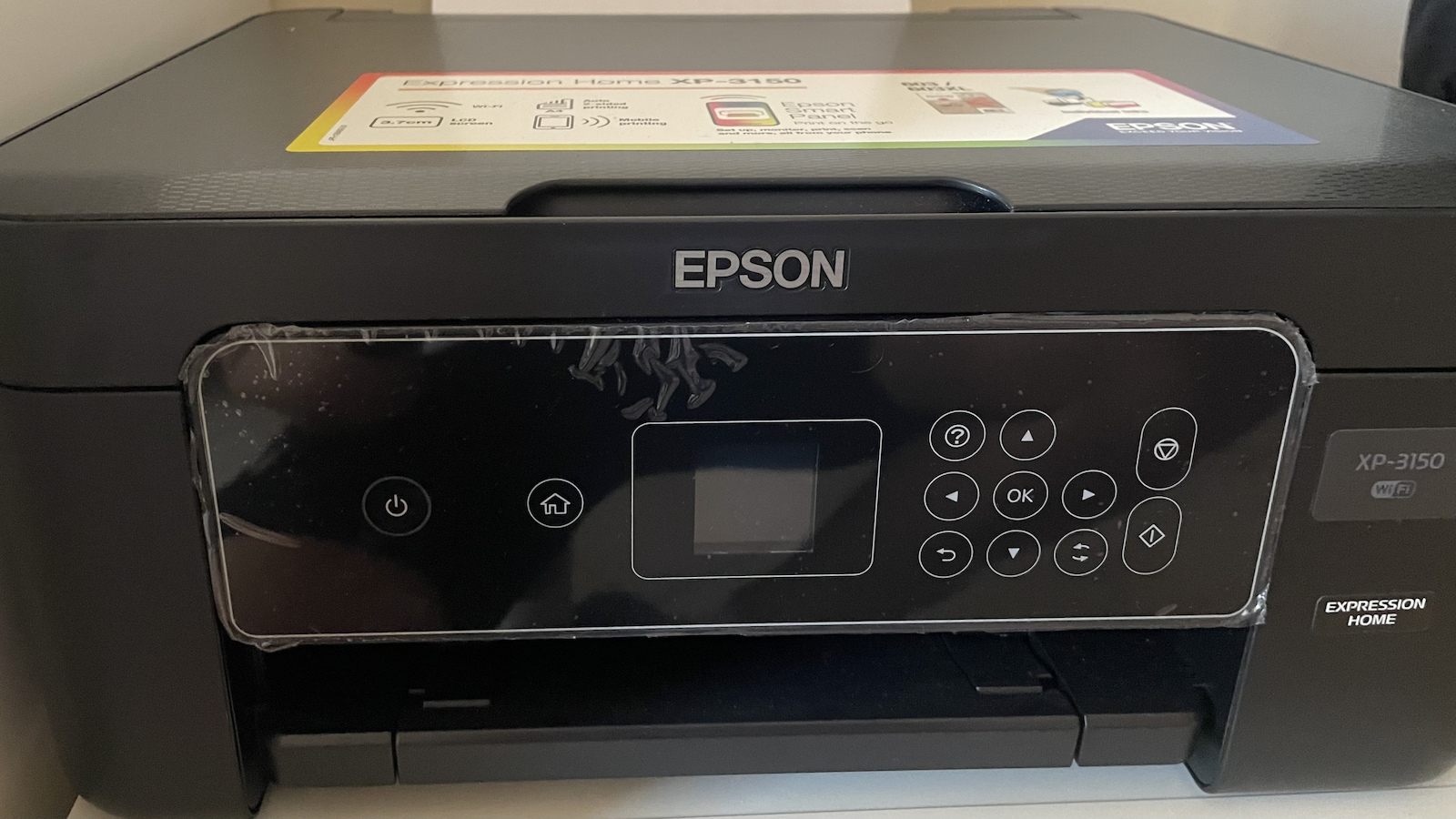
Τοποθέτησα μόνο το μαυρο που μου έλλειπε στον εικονιζόμενο εκτυπωτή EPSON XP-3150 μου έβγαλε ειδοποίηση ότι εντοπίστηκε μη γνήσιο μελάνι αλλα δεν δημιουργεί κάποιο πρόβλημα πατάς συνέχεια και εκτυπώνεις κανονικά
Σαν ποιότητα πολυ καλή
Θα τα αγόραζα ξανα
The product is good value for money... it does its job!!! The printer produces ink that is not genuine but... we press on and everything is fine!!
Το προϊόν για τα λεφτά του μια χαρά είναι ... την δουλειά του την κάνει!!! Ο εκτυπωτής βγάζει ότι το μελάνι δεν είναι γνήσιο αλλά ... πατάμε συνέχεια και όλα καλά!!
With the installation of the ink, it is recognized that the ink is not genuine. We press "Continue" and everything works normally, just like with genuine Epson products. I highly recommend them.
Με την εγκατάσταση του μελανιού αναγνωρίζεται ότι το μελάνι δεν είναι γνήσιο. Πατάμε "Συνέχεια" και όλα δουλεύουν κανονικά όπως και στα γνήσια της Epson. Τα προτείνω ανεπιφύλακτα.
.
I don't know but I think they run out very quickly. I use them for home use. 2 packs of paper per year and most of the pages are used up by my daughters with their crafts.
δεν ξέρω αλλά νομίζω τελειώνουν πολύ γρήγορα. οικιακή χρήση κάνω. 2 πακετα χαρτί το χρόνο κ τις περισσότερες σελίδες τις καταναλώνουν οι κόρες με τις χειροτεχνίες τους.
Very good result. They work in the printer even after the software upgrade, you just have to select that you wish to use non-original inks.
Πολύ καλό αποτέλεσμα. Λειτουργούν στον εκτυπωτή ακόμα και μετά την αναβάθμιση λογισμικού απλά πρέπει να επιλέξεις ότι επιθυμείς την χρήση μη γνήσιων μελανιών.
Value for money. Just uninstall and reinstall the drivers and block the updates... And of course, frequent head cleaning and printing to prevent the inks from drying out!
The Epson XP-3150, like most Epson models, has two “levels” of updates:
Driver / Epson Software Updater (on the PC)
Firmware Updates (directly on the printer)
To stop the updates, you need to block them in both places:
On the Computer
Uninstall / disable the Epson Software Updater
On Windows: Go to Control Panel > Programs & Features and uninstall the Epson Software Updater.
If you don’t want to delete it, open the program, go to Settings and remove the tick from the option “Update firmware/software automatically.”
Disable Epson Event Manager from startup (optional):
Usually, the XP-3150 displays notifications for firmware updates.
From the printer menu (on the LCD screen):
Go to Setup → Firmware Update → and disable the option Update via Internet / Notifications.
If you can’t find the option: leave the printer disconnected from Wi-Fi when you don’t need it or block the update address in the parental controls of the router (more advanced).
Why do this
Epson sends firmware updates that often block compatible (non-original) inks. That’s why most users disable them.
Value for money. Απλά απεγκατέστησε και ξαναεγκατέστησε τους drivers και μπλόκαρε τα updates... Και φυσικά συχνός καθαρισμός κεφαλής και εκτύπωση για να μην ξεραθούν τα μελάνια!
Ο Epson XP-3150, όπως και τα περισσότερα μοντέλα Epson, έχει δύο “επίπεδα” ενημερώσεων:
Driver / Epson Software Updater (στο PC)
Firmware Updates (απευθείας στον εκτυπωτή)
Για να σταματήσεις τα updates, πρέπει να τα μπλοκάρεις και στα δύο:
Στον Υπολογιστή
Απεγκατάσταση / απενεργοποίηση του Epson Software Updater
Στα Windows: Πήγαινε Πίνακας Ελέγχου > Προγράμματα & δυνατότητες και κάνε απεγκατάσταση το Epson Software Updater.
Αν δεν θέλεις να τον διαγράψεις, άνοιξε το πρόγραμμα, πήγαινε Ρυθμίσεις και αφαίρεσε το τικ από την επιλογή “Ενημέρωση firmware / software αυτόματα”.
Απενεργοποίηση Epson Event Manager από την εκκίνηση (προαιρετικό):
Συνήθως ο XP-3150 εμφανίζει ειδοποιήσεις για firmware updates.
Από το μενού του εκτυπωτή (στην οθόνη LCD):
Πήγαινε Setup (Ρυθμίσεις) → Firmware Update → και απενεργοποίησε την επιλογή Ενημέρωση μέσω Internet / Notifications.
Αν δεν βρίσκεις την επιλογή: άφησε τον εκτυπωτή χωρίς σύνδεση Wi-Fi όταν δεν τον χρειάζεσαι ή μπλόκαρε τη διεύθυνση update στους γονικούς ελέγχους του router (πιο προχωρημένο).
Γιατί να το κάνεις
Η Epson στέλνει firmware updates που συχνά μπλοκάρουν συμβατά (μη γνήσια) μελάνια. Για αυτό οι περισσότεροι χρήστες τα απενεργοποιούν.
Very bad experience! The product did not have all 4 colors, but only 3 and 2 black ones. As soon as I installed them, the printer recognized them as fake and, although it gave me the option to proceed with them, it did not print anything. Since then, the printer has essentially completely blocked. Honestly, this is an unacceptable purchase. Do not choose it!!!
Πολύ κακή εμπειρία! Το προϊόν δεν είχε και τα 4 χρώματα, αλλά μόνο 3 και 2 μαύρα. Μόλις τα τοποθέτησα, ο εκτυπωτής τα αναγνώρισε ως fake και, παρ’ όλο που μου έδωσε την επιλογή να προχωρήσω με αυτά, δεν εκτύπωσε τίποτα. Από τότε ο εκτυπωτής έχει ουσιαστικά μπλοκάρει εντελώς. Ειλικρινά, πρόκειται για απαράδεκτη αγορά. Μην το προτιμήσετε!!!
Affordable inks with good print quality. Fast shipping, good and secure packaging. The printer, when installing, says that they are not genuine but you continue and print.
Οικονομικά μελάνια με καλή ποιότητα εκτύπωσης. Γρήγορη αποστολή καλή και ασφαλής συσκευασία. Ο εκτυπωτής κατά την τοποθέτηση γράφει ότι δεν είναι γνήσια αλλά συνεχίζεις και εκτυπώνεις.
Specifications are collected from official manufacturer websites. Please verify the specifications before proceeding with your final purchase. If you notice any problem you can report it here.
I don't know but I think they run out very quickly. I use them for home use. 2 packs of paper per year and most of the pages are used up by my daughters with their crafts.
δεν ξέρω αλλά νομίζω τελειώνουν πολύ γρήγορα. οικιακή χρήση κάνω. 2 πακετα χαρτί το χρόνο κ τις περισσότερες σελίδες τις καταναλώνουν οι κόρες με τις χειροτεχνίες τους.
Very good result. They work in the printer even after the software upgrade, you just have to select that you wish to use non-original inks.
Πολύ καλό αποτέλεσμα. Λειτουργούν στον εκτυπωτή ακόμα και μετά την αναβάθμιση λογισμικού απλά πρέπει να επιλέξεις ότι επιθυμείς την χρήση μη γνήσιων μελανιών.
Value for money. Just uninstall and reinstall the drivers and block the updates... And of course, frequent head cleaning and printing to prevent the inks from drying out!
The Epson XP-3150, like most Epson models, has two “levels” of updates:
Driver / Epson Software Updater (on the PC)
Firmware Updates (directly on the printer)
To stop the updates, you need to block them in both places:
On the Computer
Uninstall / disable the Epson Software Updater
On Windows: Go to Control Panel > Programs & Features and uninstall the Epson Software Updater.
If you don’t want to delete it, open the program, go to Settings and remove the tick from the option “Update firmware/software automatically.”
Disable Epson Event Manager from startup (optional):
Usually, the XP-3150 displays notifications for firmware updates.
From the printer menu (on the LCD screen):
Go to Setup → Firmware Update → and disable the option Update via Internet / Notifications.
If you can’t find the option: leave the printer disconnected from Wi-Fi when you don’t need it or block the update address in the parental controls of the router (more advanced).
Why do this
Epson sends firmware updates that often block compatible (non-original) inks. That’s why most users disable them.
Value for money. Απλά απεγκατέστησε και ξαναεγκατέστησε τους drivers και μπλόκαρε τα updates... Και φυσικά συχνός καθαρισμός κεφαλής και εκτύπωση για να μην ξεραθούν τα μελάνια!
Ο Epson XP-3150, όπως και τα περισσότερα μοντέλα Epson, έχει δύο “επίπεδα” ενημερώσεων:
Driver / Epson Software Updater (στο PC)
Firmware Updates (απευθείας στον εκτυπωτή)
Για να σταματήσεις τα updates, πρέπει να τα μπλοκάρεις και στα δύο:
Στον Υπολογιστή
Απεγκατάσταση / απενεργοποίηση του Epson Software Updater
Στα Windows: Πήγαινε Πίνακας Ελέγχου > Προγράμματα & δυνατότητες και κάνε απεγκατάσταση το Epson Software Updater.
Αν δεν θέλεις να τον διαγράψεις, άνοιξε το πρόγραμμα, πήγαινε Ρυθμίσεις και αφαίρεσε το τικ από την επιλογή “Ενημέρωση firmware / software αυτόματα”.
Απενεργοποίηση Epson Event Manager από την εκκίνηση (προαιρετικό):
Συνήθως ο XP-3150 εμφανίζει ειδοποιήσεις για firmware updates.
Από το μενού του εκτυπωτή (στην οθόνη LCD):
Πήγαινε Setup (Ρυθμίσεις) → Firmware Update → και απενεργοποίησε την επιλογή Ενημέρωση μέσω Internet / Notifications.
Αν δεν βρίσκεις την επιλογή: άφησε τον εκτυπωτή χωρίς σύνδεση Wi-Fi όταν δεν τον χρειάζεσαι ή μπλόκαρε τη διεύθυνση update στους γονικούς ελέγχους του router (πιο προχωρημένο).
Γιατί να το κάνεις
Η Epson στέλνει firmware updates που συχνά μπλοκάρουν συμβατά (μη γνήσια) μελάνια. Για αυτό οι περισσότεροι χρήστες τα απενεργοποιούν.
Very bad experience! The product did not have all 4 colors, but only 3 and 2 black ones. As soon as I installed them, the printer recognized them as fake and, although it gave me the option to proceed with them, it did not print anything. Since then, the printer has essentially completely blocked. Honestly, this is an unacceptable purchase. Do not choose it!!!
Πολύ κακή εμπειρία! Το προϊόν δεν είχε και τα 4 χρώματα, αλλά μόνο 3 και 2 μαύρα. Μόλις τα τοποθέτησα, ο εκτυπωτής τα αναγνώρισε ως fake και, παρ’ όλο που μου έδωσε την επιλογή να προχωρήσω με αυτά, δεν εκτύπωσε τίποτα. Από τότε ο εκτυπωτής έχει ουσιαστικά μπλοκάρει εντελώς. Ειλικρινά, πρόκειται για απαράδεκτη αγορά. Μην το προτιμήσετε!!!
Affordable inks with good print quality. Fast shipping, good and secure packaging. The printer, when installing, says that they are not genuine but you continue and print.
Οικονομικά μελάνια με καλή ποιότητα εκτύπωσης. Γρήγορη αποστολή καλή και ασφαλής συσκευασία. Ο εκτυπωτής κατά την τοποθέτηση γράφει ότι δεν είναι γνήσια αλλά συνεχίζεις και εκτυπώνεις.
The best choice in relation to its price, the only thing the printer does is give you a message that the inks you are using are not genuine, but it works normally.
Η καλύτερη επιλογή σε σχέση με την τιμή του, το μόνο που σου κάνει ο εκτυπωτής ότι σου βγάζει ένα μύνημα ότι τα μελάνια που χρησιμοποιείς δεν είναι αυθεντικά αλλά δουλεύει κανονικά.
First time I bought these inks, the only thing I have to say is that the package was slightly damaged and crooked, and that the printer did not recognize the magenta. I contacted the company and the next day I received a replacement of the product (Thessaloniki-Athens). Mistakes can certainly happen and it is to the store's credit for their immediate response.
Πρωτη φορα πηρα αυτα τα μελανια ,το μονο που εχω να πω ηταν οτι το πακετο ηταν ελαφρως τσαλακωμενο και στραβο και οτι δε μου αναγνωριζε το magenta ο εκτυπωτης. Επικοινωνησα με την εταιρεια και την επομενη μερα παρελαβα την αντικατασταση του προιοντος (Θεσσαλονικη-Αθηνα). Αστοχιες σαφως μπορουν να συμβουν και ειναι προς τιμην του καταστηματος η αμεση ανταποκριση τους.
If you make the latest update on your printer, it will recognize them as non-original and it will not print for you.. I have been tricked, I am trying to save someone
Αν κάνετε την τελευταία ενημέρωση στον εκτυπωτή σας θα αναγνωρίζονται σαν μη ορίτζιναλ και δεν θα σας εκτυπώνει.. Την έχω πατήσει, προσπαθώ να σώσω κάποιον
The ink cartridges work perfectly. The printer does recognize that they are not the originals, but you just press 'continue' and it's fine. At half the price of the authentic ones, it's a huge yes from me
Τα μελάνια λειτουργούν άψογα. Αναγνωρίζει βέβαια ο εκτυπωτής ότι δεν είναι τα original αλλά πατάς 'συνέχεια' και μια χαρά. Με μισή τιμή από τα αυθεντικά είναι ένα τεράστιο ναι από εμένα
The ink cartridges work without any issues. The printer recognizes that they are compatible and not original. It asks you if you want to continue, you press ok and start printing. My printer is the Epson XP-3150.
Τα μελάνια λειτουργούν χωρίς πρόβλημα. Ο εκτυπωτής αναγνωρίζει ότι είναι συμβατά και όχι original. Σε ρωτά αν θέλεις να συνεχίσεις, πατάς ok και ξεκινάς την εκτύπωση. Ο εκτυπωτής μου είναι ο epson XP-3150.
I bought today this ink pack. I only installed the black one that was missing in my EPSON XP-3150 printer. It gave me a notification that a non-genuine ink was detected, but it doesn't create any problem. You just press continue and it prints normally. The quality is very good. I would buy them again
Αγόρασα σήμερα αυτό το πακέτο των μελανιών
Τοποθέτησα μόνο το μαυρο που μου έλλειπε στον εικονιζόμενο εκτυπωτή EPSON XP-3150 μου έβγαλε ειδοποίηση ότι εντοπίστηκε μη γνήσιο μελάνι αλλα δεν δημιουργεί κάποιο πρόβλημα πατάς συνέχεια και εκτυπώνεις κανονικά
Σαν ποιότητα πολυ καλή
Θα τα αγόραζα ξανα
The product is good value for money... it does its job!!! The printer produces ink that is not genuine but... we press on and everything is fine!!
Το προϊόν για τα λεφτά του μια χαρά είναι ... την δουλειά του την κάνει!!! Ο εκτυπωτής βγάζει ότι το μελάνι δεν είναι γνήσιο αλλά ... πατάμε συνέχεια και όλα καλά!!
With the installation of the ink, it is recognized that the ink is not genuine. We press "Continue" and everything works normally, just like with genuine Epson products. I highly recommend them.
Με την εγκατάσταση του μελανιού αναγνωρίζεται ότι το μελάνι δεν είναι γνήσιο. Πατάμε "Συνέχεια" και όλα δουλεύουν κανονικά όπως και στα γνήσια της Epson. Τα προτείνω ανεπιφύλακτα.
.
I don't know but I think they run out very quickly. I use them for home use. 2 packs of paper per year and most of the pages are used up by my daughters with their crafts.
δεν ξέρω αλλά νομίζω τελειώνουν πολύ γρήγορα. οικιακή χρήση κάνω. 2 πακετα χαρτί το χρόνο κ τις περισσότερες σελίδες τις καταναλώνουν οι κόρες με τις χειροτεχνίες τους.
Very good result. They work in the printer even after the software upgrade, you just have to select that you wish to use non-original inks.
Πολύ καλό αποτέλεσμα. Λειτουργούν στον εκτυπωτή ακόμα και μετά την αναβάθμιση λογισμικού απλά πρέπει να επιλέξεις ότι επιθυμείς την χρήση μη γνήσιων μελανιών.
Value for money. Just uninstall and reinstall the drivers and block the updates... And of course, frequent head cleaning and printing to prevent the inks from drying out!
The Epson XP-3150, like most Epson models, has two “levels” of updates:
Driver / Epson Software Updater (on the PC)
Firmware Updates (directly on the printer)
To stop the updates, you need to block them in both places:
On the Computer
Uninstall / disable the Epson Software Updater
On Windows: Go to Control Panel > Programs & Features and uninstall the Epson Software Updater.
If you don’t want to delete it, open the program, go to Settings and remove the tick from the option “Update firmware/software automatically.”
Disable Epson Event Manager from startup (optional):
Usually, the XP-3150 displays notifications for firmware updates.
From the printer menu (on the LCD screen):
Go to Setup → Firmware Update → and disable the option Update via Internet / Notifications.
If you can’t find the option: leave the printer disconnected from Wi-Fi when you don’t need it or block the update address in the parental controls of the router (more advanced).
Why do this
Epson sends firmware updates that often block compatible (non-original) inks. That’s why most users disable them.
Value for money. Απλά απεγκατέστησε και ξαναεγκατέστησε τους drivers και μπλόκαρε τα updates... Και φυσικά συχνός καθαρισμός κεφαλής και εκτύπωση για να μην ξεραθούν τα μελάνια!
Ο Epson XP-3150, όπως και τα περισσότερα μοντέλα Epson, έχει δύο “επίπεδα” ενημερώσεων:
Driver / Epson Software Updater (στο PC)
Firmware Updates (απευθείας στον εκτυπωτή)
Για να σταματήσεις τα updates, πρέπει να τα μπλοκάρεις και στα δύο:
Στον Υπολογιστή
Απεγκατάσταση / απενεργοποίηση του Epson Software Updater
Στα Windows: Πήγαινε Πίνακας Ελέγχου > Προγράμματα & δυνατότητες και κάνε απεγκατάσταση το Epson Software Updater.
Αν δεν θέλεις να τον διαγράψεις, άνοιξε το πρόγραμμα, πήγαινε Ρυθμίσεις και αφαίρεσε το τικ από την επιλογή “Ενημέρωση firmware / software αυτόματα”.
Απενεργοποίηση Epson Event Manager από την εκκίνηση (προαιρετικό):
Συνήθως ο XP-3150 εμφανίζει ειδοποιήσεις για firmware updates.
Από το μενού του εκτυπωτή (στην οθόνη LCD):
Πήγαινε Setup (Ρυθμίσεις) → Firmware Update → και απενεργοποίησε την επιλογή Ενημέρωση μέσω Internet / Notifications.
Αν δεν βρίσκεις την επιλογή: άφησε τον εκτυπωτή χωρίς σύνδεση Wi-Fi όταν δεν τον χρειάζεσαι ή μπλόκαρε τη διεύθυνση update στους γονικούς ελέγχους του router (πιο προχωρημένο).
Γιατί να το κάνεις
Η Epson στέλνει firmware updates που συχνά μπλοκάρουν συμβατά (μη γνήσια) μελάνια. Για αυτό οι περισσότεροι χρήστες τα απενεργοποιούν.
Very bad experience! The product did not have all 4 colors, but only 3 and 2 black ones. As soon as I installed them, the printer recognized them as fake and, although it gave me the option to proceed with them, it did not print anything. Since then, the printer has essentially completely blocked. Honestly, this is an unacceptable purchase. Do not choose it!!!
Πολύ κακή εμπειρία! Το προϊόν δεν είχε και τα 4 χρώματα, αλλά μόνο 3 και 2 μαύρα. Μόλις τα τοποθέτησα, ο εκτυπωτής τα αναγνώρισε ως fake και, παρ’ όλο που μου έδωσε την επιλογή να προχωρήσω με αυτά, δεν εκτύπωσε τίποτα. Από τότε ο εκτυπωτής έχει ουσιαστικά μπλοκάρει εντελώς. Ειλικρινά, πρόκειται για απαράδεκτη αγορά. Μην το προτιμήσετε!!!
Affordable inks with good print quality. Fast shipping, good and secure packaging. The printer, when installing, says that they are not genuine but you continue and print.
Οικονομικά μελάνια με καλή ποιότητα εκτύπωσης. Γρήγορη αποστολή καλή και ασφαλής συσκευασία. Ο εκτυπωτής κατά την τοποθέτηση γράφει ότι δεν είναι γνήσια αλλά συνεχίζεις και εκτυπώνεις.