Laptop Docking Stations

Baseus EliteJoy Gen2 USB-C Docking Station with HDMI/DisplayPort 4K PD Ethernet and Support for 2 Monitors Gray

Docking Station by Baseus that connects to a Laptop via a USB-C port. It is equipped with connections for peripheral devices such as 1 USB-C 3.2 port, 1 USB-C PD port, 3 USB-A 3.0 ports and connects...

Docking Station by Baseus that connects to a Laptop via a USB-C port. It is equipped with connections for peripheral devices such as 1 USB-C 3.2 port, 1 USB-C PD port, 3 USB-A 3.0 ports and connects to a monitor as it features 1 DisplayPort 1.4 port, 2 HDMI 1.4 ports. It incorporates an Ethernet port for internet connection, a Card Reader for memory cards,...

See full description See full description

Description

Description

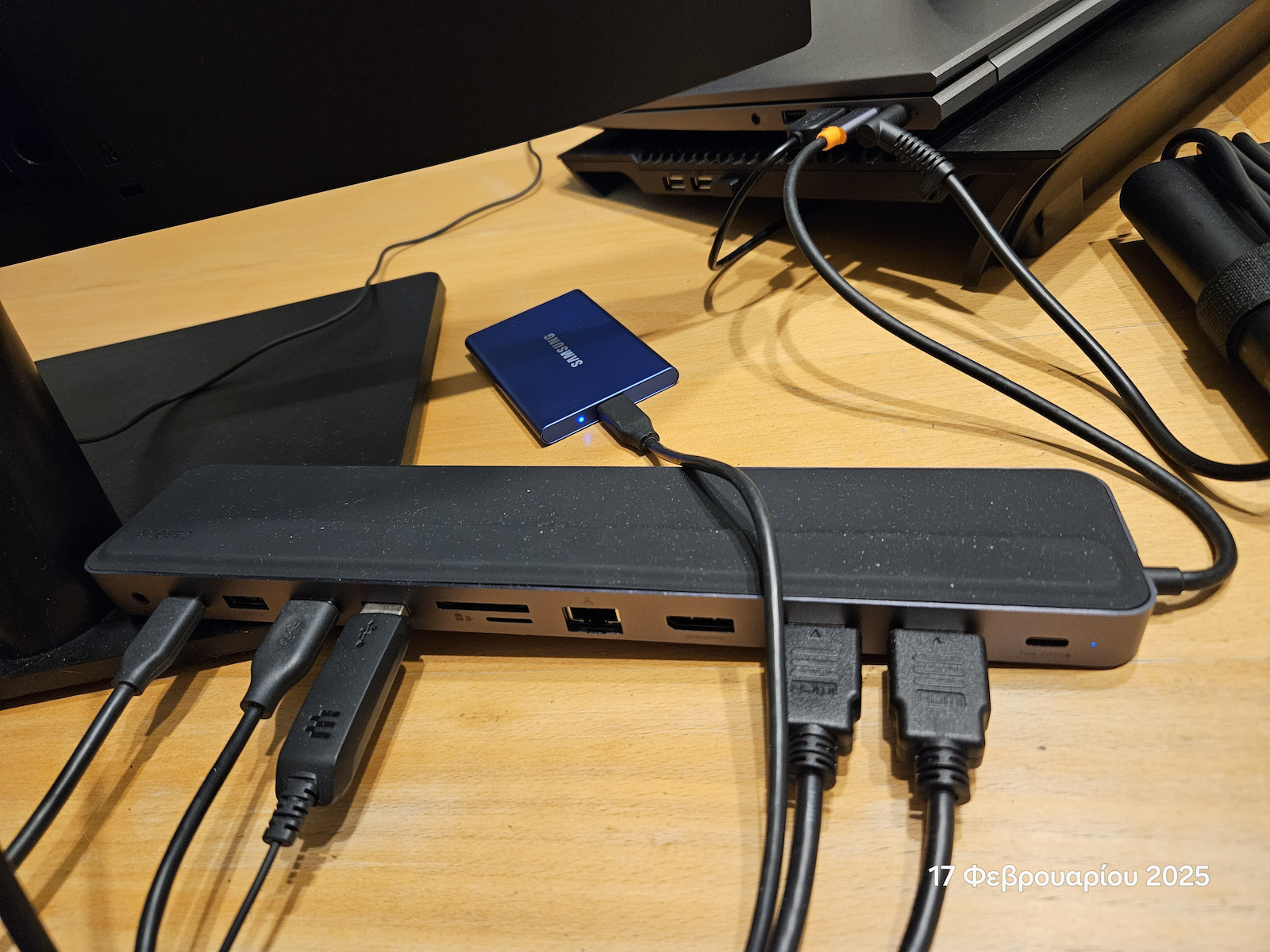
Docking Station by Baseus that connects to a Laptop via a USB-C port. It is equipped with connections for peripheral devices such as 1 USB-C 3.2 port, 1 USB-C PD port, 3 USB-A 3.0 ports and connects to a monitor as it features 1 DisplayPort 1.4 port, 2 HDMI 1.4 ports. It incorporates an Ethernet port for internet connection, a Card Reader for memory cards, and a 3.5" audio jack for connecting headphones, speakers, etc.

Characterized by features such as connecting to an external monitor displaying content in resolutions up to 4K, fast charging for Smartphones and Tablets as it has a Power Delivery port, and compatibility with Apple devices.
Powered by the Laptop itself via USB and does not require an external power supply. Finally, it can extend the Laptop screen to up to 2 external monitors.

If there is a need for additional functions that a laptop does not provide, then you will need a Docking Station. It provides extra expansion ports that the laptop may not have and can be particularly helpful if the laptop is used for work and needs to be transported to the office, thus providing a desktop computer experience.

Also, with many devices connected, a Docking Station reduces the number of cables needed, creating a tidy desk.

  • USB Ports: 1 USB-C 3.2 port, 1 USB-C PD port, 3 USB-A 3.0 ports
  • Display Connections: 1 DisplayPort 1.4 port, 2 HDMI 1.4 ports
  • PowerDelivery (PD) Support
  • 4K Support
  • Ethernet
  • Power Supply: USB Power Supply
  • Simultaneous use of screens: 2 Screens
  • Audio I/O
  • Card Reader
  • Apple Support

Manufacturer

See full description

Specifications

Specifications

Connection
USB-C
USB
1 USB-C 3.2 Port, 1 USB-C PD Port, 3 USB-A 3.0 Ports
Screen Connections
1 DisplayPort 1.4 Port, 2 HDMI 1.4 Ports
PowerDelivery (PD)
Yes
4K support
Yes
Ethernet
Yes
Power
USB Power Supply
Parallel use of monitors
2 Monitors
Audio I/O
Yes
Card Reader
Yes
Apple support
Yes
Colour
Grey

Important information

Specifications are collected from official manufacturer websites. Please verify the specifications before proceeding with your final purchase. If you notice any problem you can report it here.

See all specifications

Reviews (3)

Reviews

  1. 2
  2. 1
  3. 3 stars
    0
  4. 2 stars
    0
  5. 1 star
    0
Review this product
  • Stability
  • Construction quality
  • Expected size
  • Value for money

Reviews by our members

  • Yes yes and again yes.
    I managed, on an Asus laptop with a dedicated graphics card and only through the type C port, to connect 3 external monitors and the laptop's own screen, all independent (extend and not duplicate). It provides the necessary power for the laptop (90w). Overall, a big yes.

    Translated from Greek ·
    Did you find this review helpful?
  • THRASER
    5
    1 out of 1 members found this review helpful

    Very good and quality Docking Station for its price (I bought it for about €65) three months ago. I use it with 2 24'' 2K monitors at 75Hz with HDMI connection (it supports 4K at 60Hz). To "hit" the max speeds on an SSD drive, it requires an external 100W power supply on the type-C PD port it has. Even with external power, it doesn't overheat excessively. The only downside for me is that its connection "fits" better with laptops that have the Thunderbolt 4 port on the left side, while mine (HP Zbook G9) has it on the right side. It replaced the HP Docking Station G5 (price ~€150) which turned out to be a dud. The first one I bought broke before it was a year old, they replaced it with a new one which broke in 6 months!!!

    Translated from Greek ·
    Did you find this review helpful?
  • mental
    4
    3 out of 3 members found this review helpful

    First of all, I have to say that I bought it from an international store for about 50 euros, and I take this price into consideration in my evaluation.

    I have it connected to a Dell laptop via USB Thunderbolt 4, and I have two Dell monitors connected to it: a Dell P2419H 24" 1920x1080 60Hz monitor with HDMI, and a Dell S2721DGF 2560x1440 60Hz monitor with HDMI. Normally, the second monitor should be able to reach 144Hz through HDMI, so it seems that it doesn't have enough bandwidth.
    I also have a camera, microphone, headphones, and sometimes a keyboard and mouse connected to it.

    I don't connect the USB-C for charging because it's only 100w and my laptop has a 165w charger, so I plug it directly into another port. Nevertheless, I have connected it and it charges normally, I just don't know if it will get hotter when charging (probably yes).

    Overall, I'm very happy with it, it works flawlessly and for simple use, I don't think you will have any issues. BUT, if you want more than 60Hz or a combination of high resolution-refresh rate, or if you want to connect an external high-speed SSD, I'm almost certain that it won't achieve high speeds (I think max 5Gbps). Nevertheless, for 50 euros, it's a very good value.

    Translated from Greek ·
    • Stability
    • Construction quality
    • Expected size
    • Value for money
    Did you find this review helpful?
  • Yes yes and again yes.
    I managed, on an Asus laptop with a dedicated graphics card and only through the type C port, to connect 3 external monitors and the laptop's own screen, all independent (extend and not duplicate). It provides the necessary power for the laptop (90w). Overall, a big yes.

    Translated from Greek ·
    0
  • Very good and quality Docking Station for its price (I bought it for about €65) three months ago. I use it with 2 24'' 2K monitors at 75Hz with HDMI connection (it supports 4K at 60Hz). To "hit" the max speeds on an SSD drive, it requires an external 100W power supply on the type-C PD port it has. Even with external power, it doesn't overheat excessively. The only downside for me is that its connection "fits" better with laptops that have the Thunderbolt 4 port on the left side, while mine (HP Zbook G9) has it on the right side. It replaced the HP Docking Station G5 (price ~€150) which turned out to be a dud. The first one I bought broke before it was a year old, they replaced it with a new one which broke in 6 months!!!

    Translated from Greek ·
    1
  • First of all, I have to say that I bought it from an international store for about 50 euros, and I take this price into consideration in my evaluation.

    I have it connected to a Dell laptop via USB Thunderbolt 4, and I have two Dell monitors connected to it: a Dell P2419H 24" 1920x1080 60Hz monitor with HDMI, and a Dell S2721DGF 2560x1440 60Hz monitor with HDMI. Normally, the second monitor should be able to reach 144Hz through HDMI, so it seems that it doesn't have enough bandwidth.
    I also have a camera, microphone, headphones, and sometimes a keyboard and mouse connected to it.

    I don't connect the USB-C for charging because it's only 100w and my laptop has a 165w charger, so I plug it directly into another port. Nevertheless, I have connected it and it charges normally, I just don't know if it will get hotter when charging (probably yes).

    Overall, I'm very happy with it, it works flawlessly and for simple use, I don't think you will have any issues. BUT, if you want more than 60Hz or a combination of high resolution-refresh rate, or if you want to connect an external high-speed SSD, I'm almost certain that it won't achieve high speeds (I think max 5Gbps). Nevertheless, for 50 euros, it's a very good value.

    Translated from Greek ·
    3
  • See all

Description & Specifications

Docking Station by Baseus that connects to a Laptop via a USB-C port. It is equipped with connections for peripheral devices such as 1 USB-C 3.2 port, 1 USB-C PD port, 3 USB-A 3.0 ports and connects to a monitor as it features 1 DisplayPort 1.4 port, 2 HDMI 1.4 ports. It incorporates an Ethernet port for internet connection, a Card Reader for memory cards, and a 3.5" audio jack for connecting headphones, speakers, etc.

Characterized by features such as connecting to an external monitor displaying content in resolutions up to 4K, fast charging for Smartphones and Tablets as it has a Power Delivery port, and compatibility with Apple devices.
Powered by the Laptop itself via USB and does not require an external power supply. Finally, it can extend the Laptop screen to up to 2 external monitors.

If there is a need for additional functions that a laptop does not provide, then you will need a Docking Station. It provides extra expansion ports that the laptop may not have and can be particularly helpful if the laptop is used for work and needs to be transported to the office, thus providing a desktop computer experience.

Also, with many devices connected, a Docking Station reduces the number of cables needed, creating a tidy desk.

  • USB Ports: 1 USB-C 3.2 port, 1 USB-C PD port, 3 USB-A 3.0 ports
  • Display Connections: 1 DisplayPort 1.4 port, 2 HDMI 1.4 ports
  • PowerDelivery (PD) Support
  • 4K Support
  • Ethernet
  • Power Supply: USB Power Supply
  • Simultaneous use of screens: 2 Screens
  • Audio I/O
  • Card Reader
  • Apple Support

Manufacturer

Connection
USB-C
USB
1 USB-C 3.2 Port, 1 USB-C PD Port, 3 USB-A 3.0 Ports
Screen Connections
1 DisplayPort 1.4 Port, 2 HDMI 1.4 Ports
PowerDelivery (PD)
Yes
4K support
Yes
Ethernet
Yes
Power
USB Power Supply
Parallel use of monitors
2 Monitors
Audio I/O
Yes
Card Reader
Yes
Apple support
Yes
Colour
Grey

Important information

Specifications are collected from official manufacturer websites. Please verify the specifications before proceeding with your final purchase. If you notice any problem you can report it here.

Reviews (3)

  1. 2
  2. 1
  3. 3 stars
    0
  4. 2 stars
    0
  5. 1 star
    0
Review this product
  • Stability
  • Construction quality
  • Expected size
  • Value for money

Reviews by our members

  • Yes yes and again yes.
    I managed, on an Asus laptop with a dedicated graphics card and only through the type C port, to connect 3 external monitors and the laptop's own screen, all independent (extend and not duplicate). It provides the necessary power for the laptop (90w). Overall, a big yes.

    Translated from Greek ·
    Did you find this review helpful?
  • THRASER
    5
    1 out of 1 members found this review helpful

    Very good and quality Docking Station for its price (I bought it for about €65) three months ago. I use it with 2 24'' 2K monitors at 75Hz with HDMI connection (it supports 4K at 60Hz). To "hit" the max speeds on an SSD drive, it requires an external 100W power supply on the type-C PD port it has. Even with external power, it doesn't overheat excessively. The only downside for me is that its connection "fits" better with laptops that have the Thunderbolt 4 port on the left side, while mine (HP Zbook G9) has it on the right side. It replaced the HP Docking Station G5 (price ~€150) which turned out to be a dud. The first one I bought broke before it was a year old, they replaced it with a new one which broke in 6 months!!!

    Translated from Greek ·
    Did you find this review helpful?
  • mental
    4
    3 out of 3 members found this review helpful

    First of all, I have to say that I bought it from an international store for about 50 euros, and I take this price into consideration in my evaluation.

    I have it connected to a Dell laptop via USB Thunderbolt 4, and I have two Dell monitors connected to it: a Dell P2419H 24" 1920x1080 60Hz monitor with HDMI, and a Dell S2721DGF 2560x1440 60Hz monitor with HDMI. Normally, the second monitor should be able to reach 144Hz through HDMI, so it seems that it doesn't have enough bandwidth.
    I also have a camera, microphone, headphones, and sometimes a keyboard and mouse connected to it.

    I don't connect the USB-C for charging because it's only 100w and my laptop has a 165w charger, so I plug it directly into another port. Nevertheless, I have connected it and it charges normally, I just don't know if it will get hotter when charging (probably yes).

    Overall, I'm very happy with it, it works flawlessly and for simple use, I don't think you will have any issues. BUT, if you want more than 60Hz or a combination of high resolution-refresh rate, or if you want to connect an external high-speed SSD, I'm almost certain that it won't achieve high speeds (I think max 5Gbps). Nevertheless, for 50 euros, it's a very good value.

    Translated from Greek ·
    • Stability
    • Construction quality
    • Expected size
    • Value for money
    Did you find this review helpful?
  • Yes yes and again yes.
    I managed, on an Asus laptop with a dedicated graphics card and only through the type C port, to connect 3 external monitors and the laptop's own screen, all independent (extend and not duplicate). It provides the necessary power for the laptop (90w). Overall, a big yes.

    Translated from Greek ·
    0
  • Very good and quality Docking Station for its price (I bought it for about €65) three months ago. I use it with 2 24'' 2K monitors at 75Hz with HDMI connection (it supports 4K at 60Hz). To "hit" the max speeds on an SSD drive, it requires an external 100W power supply on the type-C PD port it has. Even with external power, it doesn't overheat excessively. The only downside for me is that its connection "fits" better with laptops that have the Thunderbolt 4 port on the left side, while mine (HP Zbook G9) has it on the right side. It replaced the HP Docking Station G5 (price ~€150) which turned out to be a dud. The first one I bought broke before it was a year old, they replaced it with a new one which broke in 6 months!!!

    Translated from Greek ·
    1
  • First of all, I have to say that I bought it from an international store for about 50 euros, and I take this price into consideration in my evaluation.

    I have it connected to a Dell laptop via USB Thunderbolt 4, and I have two Dell monitors connected to it: a Dell P2419H 24" 1920x1080 60Hz monitor with HDMI, and a Dell S2721DGF 2560x1440 60Hz monitor with HDMI. Normally, the second monitor should be able to reach 144Hz through HDMI, so it seems that it doesn't have enough bandwidth.
    I also have a camera, microphone, headphones, and sometimes a keyboard and mouse connected to it.

    I don't connect the USB-C for charging because it's only 100w and my laptop has a 165w charger, so I plug it directly into another port. Nevertheless, I have connected it and it charges normally, I just don't know if it will get hotter when charging (probably yes).

    Overall, I'm very happy with it, it works flawlessly and for simple use, I don't think you will have any issues. BUT, if you want more than 60Hz or a combination of high resolution-refresh rate, or if you want to connect an external high-speed SSD, I'm almost certain that it won't achieve high speeds (I think max 5Gbps). Nevertheless, for 50 euros, it's a very good value.

    Translated from Greek ·
    3
  • See all
111,66 €
14,00 €   shipping cost