***Update 01.04.2026 - Final Conclusions***
[Review - Performance - Temperatures - UV/OC Profiles - Custom Fans Curve - Measurements and Benchmarks - Useful Tips]
Purchased at 565 euros.
Used extensively with Ryzen 5800X and 5800X3D (UnderVolt PBO2 per core).
With a 650W power supply, you are borderline with this GPU and you need UV.
A better suggestion is a quality 750W due to random spikes since it aggressively reaches even 550W instantly, even during browsing, YouTube, etc., resulting in freezes, random reboots if you leave the clocks at stock. Even better, an 850W PSU for a future system upgrade and more headroom.
I have now installed a 1000W PSU (Corsair HX1000i Platinum) in my main setup and I have not had the slightest problem.
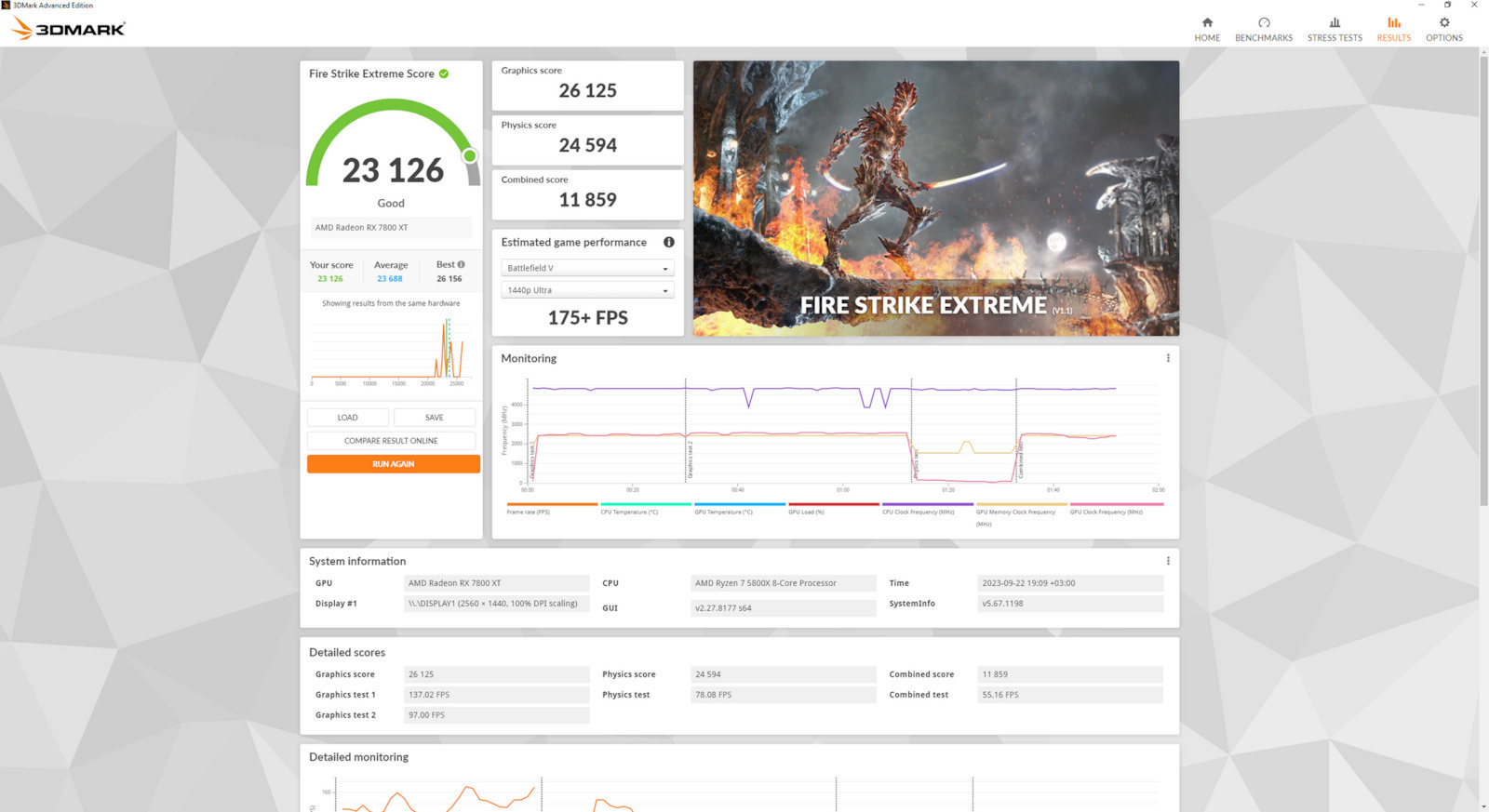
For 1080p it is more than enough!! - The card is recommended for 2K.
It performs excellently at Very High/Ultra settings with good performance and incredible core temperatures, at least for me.
In games with RayTracing, it doesn't do as well but you can play if you lower some graphics settings and with FSR support you are OK!.
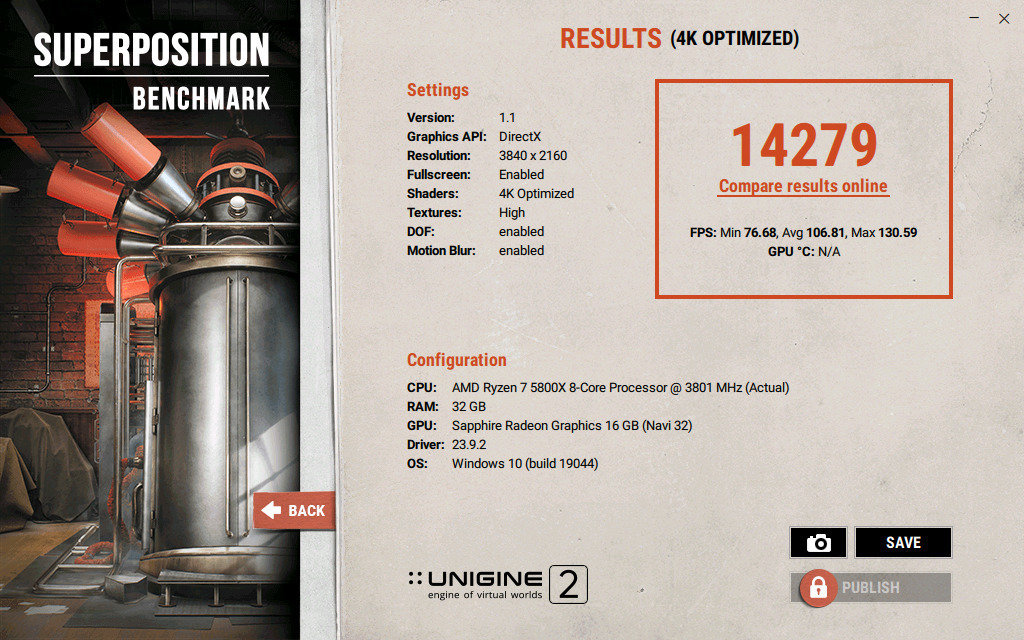
At 4K with some compromises it reaches 60-85 FPS and with VSync enabled.
FSR3.1 is satisfactory but in several titles Nvidia's DLSS remains superior.
Keep the drivers that give you no problems because sometimes some updates present "issues" for some users, unless you need to update for a new game or a serious fix, always "uninstall" the old ones with DDU Uninstaller in Safe Mode.
Adrenalin has now become better than the new NVIDIA app, more stable and lighter!
It does not exceed 58c at stock settings in a high room temperature above 30c.
HotSpot 83c max (normal) but what scared me were the memory (VRAM) temperatures reaching up to 92c as soon as the card operates for the first time.
I sent a ticket and got a response from Sapphire in 2 days. They replied that the temperatures in the logs I sent from FurMark V2 (30mins stress test and 10mins idle) are normal and told me I am "OK" and that the memories can tolerate up to 110c.
We know this - but the temperatures are high and traditionally, with the knowledge we have, it would be better for the memories not to exceed 90c. So to lower the temperatures reaching a max of 83c, reduce consumption and significantly lower the HotSpot, I did UV and OC, getting better performance than stock, much better temperatures, lower consumption, and quieter.
Although in essence, the temperature reduction, especially in the memories, was helped by my manual fans curve.
The factory fan speed settings are very low. The same happens with all corresponding 9060 XT - 9070 XT cards in all their implementations.
Coming from decades with NVIDIA, I have never encountered such VRAM temperatures, especially with Hynix, which are considered better.
In my opinion, the card should be UnderVolted with any power supply.
Below I will give you my OC/UV profile as well as my fans curve.
Finally, I never experienced Coil Whine.
[Adrenalin version: 26.3.1]
OC/UV with 750+ Watt power supply.
Min: 500mHz - Max: 2600mHz @1080mV -0%PL.
Zero RPM: DISABLE (below I will mention why disable)*
(7-10% better performance than stock)
Some people with OC reach 3000mHz with PL +10% and OC on the memories.
I would not recommend it. Higher consumption, unnecessary wear, increased temperatures and noise for 7-8 more FPS in only some games, with the risk of the system crashing at some point. It's really not worth it.
VRAM Stock: (Default).
You don't gain anything significant with a memory boost if you want it to be stable. So do not OC the memories, leave them Default.
VRAM OC: Up to 2600mhz (2614mV) it works fine but again I would not recommend it due to increased memory temperatures. Here we want to lower the temperatures!
Do not select Fast Timing, the card will not be stable in some scenarios.
Fans Curve*
Zero RPM: DISABLE - The fans are made for many thousands of hours of operation. In fact, stopping and starting causes more wear.
An excellent fans curve, very efficient with sweet temperatures and very quiet is as follows:
45c - 15%
55c - 33% SOS!
65c - 38%
80c - 43% SOS!
85c - 100%
Up to 1650RPM (40%-42%) it is silent and even without headphones, having the computer next to you, the fan speed does not bother you.
Final temperatures with OC/UV in demanding AAA games.
MAX GPU TEMP: 53-54c
MAX VRAM TEMP: 82-83c.
MAX HOTSPOT TEMP: 75-76c (also depends on the case airflow).
MAX WATT: 268W max.
Tips:
1) Do not disable PSS from your motherboard's BIOS (leave it Enabled) and also leave C-State Control on Auto.
2) If you use MSI Afterburner, disable "Synchronize settings for similar graphics processors" from its settings because it will not keep the custom fans curve set by Adrenalin, it creates a conflict and resets to stock settings.
3) RGB Tip:
For those who do not want to connect the 5pin cable for RGB lighting for practical or aesthetic reasons, download TRIXX from Sapphire's site:
www.sapphiretech.com/en/software.
Change the colors and effects from Glow.
Do not change anything else in TRIXX, then close the program. This application will never run in the background and obviously does not consume resources (0%). It simply keeps the last setting even after a format since the settings are saved in the card's BIOS. Well done Sapphire!
4) As soon as the warranty ends, open and CHANGE the "pads" with higher quality ones (I recommend Gelid) and thermal paste is mandatory.
An economical and good proposal for thermal paste: Arctic MX7 or Thermal Grizzle due to conductivity and higher thermal load tolerance. On the memories and HotSpot, which is the main issue, you will see immediate differences.
Finally, I should mention that all NITRO implementations from Sapphire are TOP due to factory boost clock compared to others, excellent and large cooling system, build quality, robust, very high-quality fans, good support, and most importantly "huge tolerance in OC and UV".
Next choices for 7800XT in the order I write:
PowerColor, XFX, AsRock, Asus, Palit, and last choice Gigabyte.
If you want an upgrade and want to stay with AMD, the 9070XT is the only way after the 7800XT. If you are considering Nvidia for better performance, 5070/5070Ti by digging deeper into your pocket.
⭐⭐⭐⭐⭐5 stars
***Update 01.04.2026 - Τελικά Συμπεράσματα***
[Αξιολόγηση - Επιδόσεις - Θερμοκρασίες - UV/OC Profiles - Custom Fans Curve - Μετρήσεις και Benchmarks - Χρήσιμα Tips]
Αγορά στα 565 ευρώ.
Xρησιμοποιήμενο αρκετά με Ryzen 5800X και 5800Χ3D (UnderVolt PΒΟ2 per core).
Με 650W τροφοδοτικό είσαι οριακά με αυτήν την GPU και χρειάζεσαι UV.
Καλύτερη πρόταση ένα ποιοτικό 750W λόγο random spikes αφού φτάνει επιθετικά και τα 550W στιγμιαία ακόμα και στο browsing, YouTube κλπ με αποτέλεσμα freeze, random reboots αν και εφόσον αφήσεις stock τα clocks. Aκόμα καλύτερα 850W PSU για μια μελλοντική αναβάθμιση συστήματος και για μεγαλύτερο headroom.
Εγώ πλέον έβαλα στο main setup μου 1000W PSU (Corsair HX1000i Platinum) και δεν έχω το παραμικρό πρόβλημα.
Για 1080p είναι υπεραρκετή!! - Η κάρτα συνιστάται για 2Κ.
Τα πάει περίφημα σε Very High/Ultra settings με καλή απόδοση και απίστευτες θερμοκρασίες στον πυρήνα της GPU, τουλάχιστον σε εμένα.
Σε παιχνίδια με RayTracing δεν τα πάει και τόσο καλά αλλά μπορείς να τα παίξεις εάν χαμηλώσεις κάποια settings στα γραφικά και με υποστήριξη FSR είσαι ΟΚ!.
Σε 4Κ με κάποιες υποχωρήσεις φτάνει 60-85 FPS και με ενεργοποιημένο το VSynch.
Το FSR3.1 ικανοποιητικό αλλά σε αρκετούς τίτλους το DLSS της Nvidia παραμένει ανώτερο.
Κρατήστε τους drivers που δεν έχετε προβλήματα διότι κατά περιόδους κάποια updates παρουσιάζουν "θέματα" σε κάποιους, εκτός αν πρέπει λόγο κάποιου νέου παιχνιδιού ή κάποιας σοβαρής διόρθωσης να βάλετε νεώτερους Drivers, πάντα "ξηλώνοντας" τους παλιούς με DDU Uninstaller σε Safe Mode.
Το Adrenalin έχει γίνει πλέον καλύτερο από το νέο NVIDIA app, πιο σταθερό και πιο ελαφρύ!
Δεν ξεπερνά σε stock ρυθμίσεις τους 58c σε υψηλή θερμοκρασία δωματίου άνω των 30c.
HotSpot 83c max (φυσιολογικό) αλλά αυτό που με τρόμαξε ήταν οι θερμοκρασίες στις μνήμες (VRAM) που φτάνουν μέχρι 92c με το που θα λειτουργήσει η κάρτα για πρώτη φορά.
Έστειλα ticket και πήρα απάντηση από Sapphire σε 2 ημέρες. Mου απάντησαν πως είναι κανονικές οι θερμοκρασίες στα logs που έστειλα από FurMark V2 (30mins stress test και 10mins idle) και μου ανάφεραν πως είμαι "ΟΚ" και πως μπορούν οι μνήμες να έχουν ανοχή και τους 110c.
Αυτό το γνωρίζουμε - αλλά είναι υψηλές οι θερμοκρασίες και παραδοσιακά με τις γνώσεις που έχουμε, καλό θα ήταν οι μνήμες να μην υπερβαίνουν τους 90c. Oπότε για να ρίξω θερμοκρασίες φτάνοντας max τους 83c, να κατεβάσω την κατανάλωση και να ρίξω σημαντικά το HotSpot, έκανα UV και ΟC πέρνωντας καλύτερες επιδόσεις από stock, πολύ καλύτερες θερμοκρασίες, μικρότερη κατανάλωση και πιο ήσυχη.
Άν και στην ουσία η μείωση θερμοκρασιών ειδικά στις μνήμες βοήθησε το manual fans curve μου.
Οι εργοστασιακές ρυθμίσεις στις στροφές των fans είναι πολύ χαμηλές. Το ίδιο συμβαίνει και με όλες τις αντίστοιχες 9060 ΧΤ - 9070 XT σε όλες τις υλοποιήσεις καρτών της.
Προερχόμενος εδώ και δεκαετίες από NVIDIA δεν έχω ξανασυναντήσει τέτοιες θερμοκρασίες σε VRAM και μάλιστα Hynix που θεωρούνται καλύτερες.
Η κάρτα πρέπει κατά την γνώμη μου να γίνει UnderVolt με οποιοδήποτε τροφοδοτικό.
Παρακάτω θα σας δώσω το OC/UV profile μου καθώς και το fans curve μου.
Τέλος, ποτέ δεν εμφάνισε σε εμένα Coil Whine.
[Adrenalin version: 26.3.1]
OC/UV με τροφοδοτικό 750+ Watt.
Min: 500mHz - Max: 2600mHz @1080mV -0%PL.
Zero RPM: DISABLE (πιο κάτω θα σας αναφέρω, γιατί disable)*
(7-10% καλύτερο performance από stock)
Κάποιοι με OC την φτάνουν και 3000mHz με PL +10% και OC στις μνήμες.
Δεν θα το πρότεινα. Μεγαλύτερη κατανάλωση, άσκοπη φθορά, αύξηση θερμοκρασιών και θορύβου για 7-8 FPS παραπάνω σε ορισμένα μόνο παιχνίδια, με κίνδυνο να crashαρει κάποια στιγμή το σύστημα. Πραγματικά δεν αξίζει.
VRAM Stock: (Default).
Δεν κερδίζεις τίποτα σημαντικό με boost στις μνήμες αν θες να είναι stable. Μην κάνετε λοιπόν OC στις μνήμες, αφήστε την Default.
VRAM ΟC: Μέχρι τα 2600mhz (2614mV) λειτουργεί μια χαρά αλλά και πάλι δεν θα το πρότεινα έχοντας αύξηση θερμοκρασίας στις μνήμες. Εδώ θέλουμε να ρίξουμε τις θερμοκρασίες!
Μην επιλέξετε Fast Timing, η κάρτα δεν θα είναι σταθερή σε κάποια σενάρια.
Fans Curve*
Zero RPM: DISABLE - Τα fans είναι κατασκευασμένa για πάρα πολλές χιλιάδες ώρες λειτουργίας. Ίσα ίσα το να σταματούν και να ξεκινούν δημιουργούν μεγαλύτερη φθορά.
Ένα εξαιρετικό fans curve, πολύ αποδοτικό με sweet θερμοκρασίες και πολύ ήσηχο είναι το εξής:
45c - 15%
55c - 33% SOS!
65c - 38%
80c - 43% SOS!
85c - 100%
Μέχρι 1650RPM (40%-42%) είναι αθόρυβη και χωρίς να φοράς ακουστικά έχοντας τον υπολογιστή δίπλα σου δεν σε ενοχλούν οι στροφές.
Tελικές θερμοκρασίες με OC/UV σε απαιτητικά games AAA.
MAX GPU TEMP: 53-54c
MAX VRAM TEMP: 82-83c.
MAX HOTSPOT TEMP: 75-76c (έχει να κάνει και με το Airflow του κουτιού).
ΜΑΧ WATT: 268W max.
Tips:
1) Μην κλείσετε το PSS από το BIOS της μητρικής σας (αφήστε το Εnable) αλλά και το C-State Control αφήστε το στο Auto.
2) Εάν χρησιμοποιήτε το MSI Afterburner απενεργοποιήστε από τα settings του το "Synchronize settings for similar graphics processors" διότι δεν θα σας κρατά το custom fans curve που ορίζεται από το Adrenalin, δημιουργεί conflict και το επαναφέρει στις stock ρυθμίσεις.
3) RGB Tip:
Για όσους δεν θέλουν να βάλουν το 5pin καλώδιο για το RGB φωτισμό για λόγους πρακτικούς ή αισθητικής κατεβάστε το TRIXX από το site της Sapphire:
www.sapphiretech.com/en/software.
Aλλάξτε από αυτό τα χρώματα και τα εφέ από το Glow.
Μην πειράξετε τίποτα άλλο στο TRIXX, μετά κλείστε το πρόγραμμα. Η συγκεκριμένη εφαρμογή δεν θα τρέξει ποτέ στο παρασκήνιο και εννοείτε δεν καταναλώνει πόρους (0%). Απλά κρατάει την τελευταία ρύθμιση ακόμα και μετά από format μιας και αποθηκεύονται οι ρυθμίσεις στο BIOS της κάρτας, Εύγε Sapphire!
4) Mόλις τελειώσει η εγγύηση, άνοιγμα και ΑΛΛΑΓΗ στα "pads" με πιο ποιοτικά (Gelid προτείνω) και πάστας υποχρεωτικά.
Οικονομική και καλή πρόταση για thermalpaste: Arctic MX7 ή Thermal Grizzle λόγο αγωγιμότητας και ανοχής μεγαλύτερου θερμικού φορτίου. Στις μνήμες και σε HotSpot όπου είναι και το φλέγον θέμα θα δείτε άμεσα διαφορές.
Τέλος να αναφέρω πως όλες οι υλοποιήσεις NITRO από Sapphire είναι TOP λόγο εργοστασιακού boost clock σε σχέση άλλες, άριστο και μεγάλο σύστημα ψύξης, ποιότητας κατασκευής, στιβαρές, ποιοτικότατα fans, καλό support και το πιο σημαντικό "τεράστια ανοχή σε OC και UV".
Επόμενες επιλογές σε 7800XT με την σειρά που σας γράφω:
PowerColor, XFX, AsRock, Asus, Palit και τελευταία επιλογή Gigabyte.
Αν θέλετε αναβάθμιση και θέλετε να παραμείνεται στην AMD, η 9070ΧΤ είναι μονόδρομος μετά από την 7800ΧΤ. Αν σκέφτεστε Nvidia για καλύτερες επιδόσεις 5070/5070Ti βάζοντας πιο βαθιά το χέρι στην τσέπη.
⭐⭐⭐⭐⭐5 αστέρια