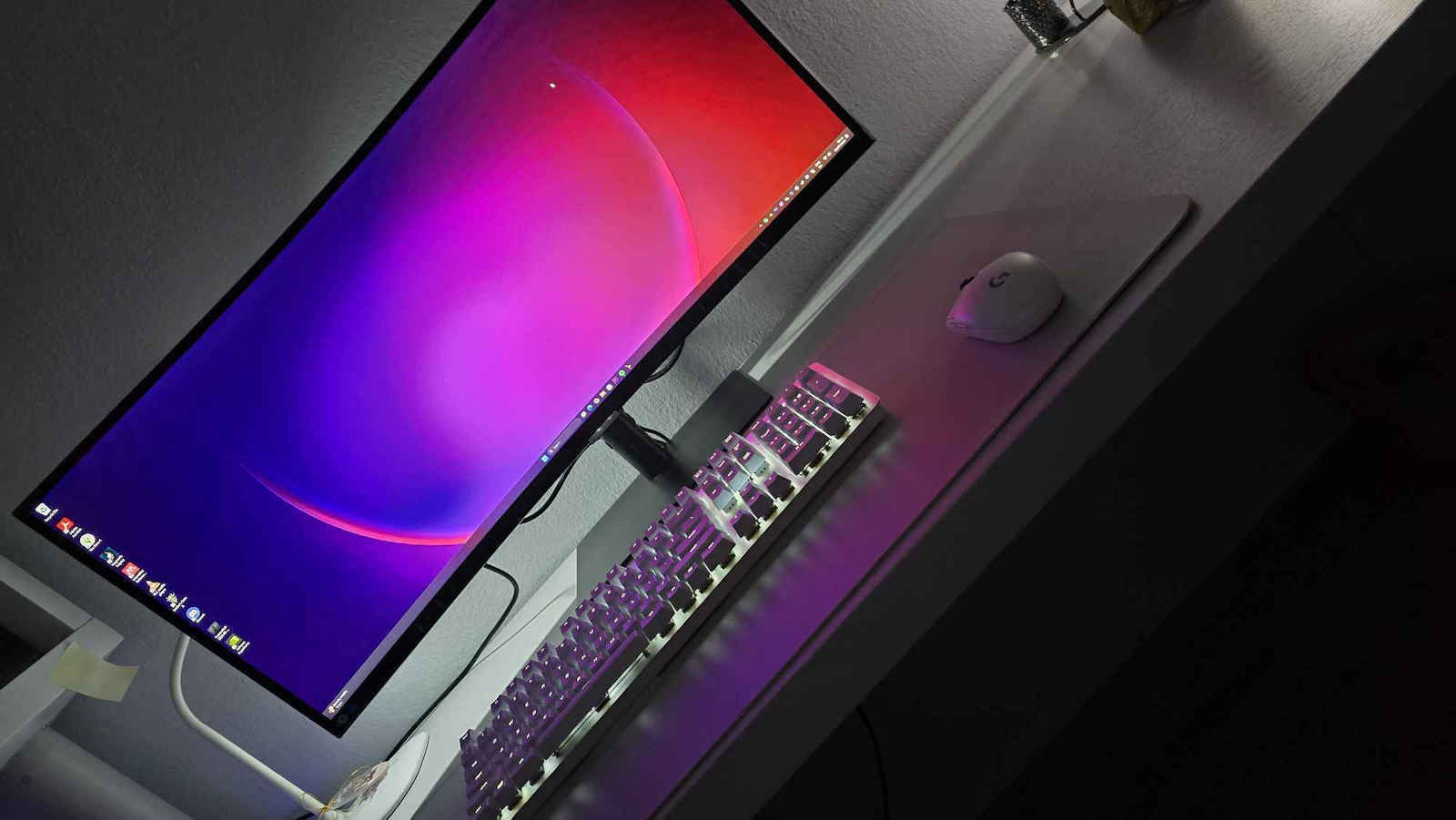
Monitors

Samsung ViewFinity S34C652VAU Ultrawide VA HDR Curved Monitor 34" QHD 3440x1440 with Response Time 5ms GTG

Key features:

  • Model 2023
  • 1000R Curvature
  • Contrast 3000:1
  • AMD FreeSync, HDR10
  • Web Camera, USB Hub, Eye Care
  • Connection: DisplayPort, HDMI, USB-C
See full description
  • See all
Available purchase options

Description

Description

High Resolution and Performance Monitor

The Samsung monitor is ideal for those seeking a high-resolution and high-performance Ultrawide monitor for work or entertainment. It has a QHD resolution, offering exceptionally detailed and clear images. It is equipped with advanced imaging technology and is compatible with HDR10, providing vibrant colors and high contrast.

Ultra WQHD with 1000R curvature

Immerse yourself in games, movies, or design projects. A 1000R curved screen surrounds you with a 21:9 aspect ratio. The curvature almost matches the human field of vision, allowing you to increase your screen area and boost your productivity to a high level with minimal eye strain.

A billion colors for stunning images

One billion colors with HDR 10

Enjoy content full of colors and details. With almost countless colors and shades as well as HDR10, dark colors can appear dark and colors very bright, so your content is showcased in the best possible way.

Pop-up Camera

Built-in camera and Windows Hello

Stay connected when making video calls or streaming without additional devices. When you don't need the camera, you can fold it into the screen for a sleek design. Windows Hello uses the camera and biometric data to log you into multiple devices, applications, or websites with Windows 11 securely and without a password.

A lot of desk space

Built-in speakers

Work, learn, and play without additional peripherals. The built-in speakers provide ample desk space, minimizing the number of required ports, creating an efficient working environment.

Built-in USB Type-C Port

The built-in USB Type-C port quickly charges your laptop and transfers data with a single cable. Additionally, the monitor features a LAN port, allowing you to connect a laptop without a LAN port to the monitor for easy access to an Ethernet connection. 

Clean cable management combined with the adjustable design of the monitor ensures a pleasant working environment.

KVM Switch

Thanks to the built-in KVM, you can control two devices connected to your monitor with a single keyboard and mouse. The choice is yours: screen splitting, picture-in-picture (PIP), or picture-by-picture (PBP) is possible.

Smooth gameplay

100 Hz & AMD FreeSync

The 100 Hz refresh rate and AMD FreeSync can reduce lag and blur. This can ensure smooth images when watching videos, working on your projects, or wanting to take your gaming to the next level.

Eye Care

Keep your eyes fresh and strain-free. For nighttime work, brightness and color temperature automatically adjust to optimize in any environment. With TUV certification for smart eye care, Samsung protects eyes from excessive blue light with the Eye Saver mode and flicker-free technology.

Package Contents:

  • Monitor
  • Stand
  • Power cable 1.5m
  • HDMI cable
  • DisplayPort cable
  • USB-C cable
  • USB cable

Manufacturer

See full description

Specifications

Specifications

Main Specifications

Panel
VA
HDR
Yes
Curved
Yes
Curvature Rate
1000R
UltraWide
Yes
Diagonal
34 "
Resolution
3440x1440
Contrast
3000 :1
Response Time (GTG)
5 ms
Refresh Rate
100 Hz
Aspect Ratio
21:9

Ergonomics

Tilt Adjustment
Yes
Height Adjustment
Yes
Vertical Rotation
No
Horizontal Rotation
Yes
Wall Mountable (Vesa)
100 x 100 mm

Connectivity

Connection
DisplayPort, HDMI, USB-C

Additional Specifications

Speakers
Yes
Features & Functions
FreeSync, USB Hub
Eye Comfort
Yes
Colour
Black
Camera
Yes

Energy Label

Energy Consumption
32 kWh/1000h
Energy Class
G

Important information

Specifications are collected from official manufacturer websites. Please verify the specifications before proceeding with your final purchase. If you notice any problem you can report it here.

See all specifications

Reviews (6)

Reviews

  1. 6
  2. 4 stars
    0
  3. 3 stars
    0
  4. 2 stars
    0
  5. 1 star
    0
Review this product
  • Comfort
  • Picture
  • Viewing angle
  • Value for money
  • Response time
  • Menu

Reviews by our members

  • ΧΡΗΣΤΟΣ ΜΠ.
    5
    1 out of 1 members found this review helpful

    Verified purchase

    I've had it for about 2 months.

    Pros: the huge curve, it's convenient for space management on the desk. I have it almost in the corner and because of the curve it doesn't touch the wall, leaving more space on the 1.28m desk surface.

    Sturdy support base, in my opinion you don't need an arm.

    The 90w charging and the built-in camera are incredibly useful, I always keep my PC off!

    I'm not a gamer, I bought it mainly for work and I'm very satisfied, I can fit two browsers side by side and Slack on the side.

    I would say that at €400 it's excellent value for money.

    Translated from Greek ·
    Did you find this review helpful?
  • Christos Hadj
    5
    5 out of 5 members found this review helpful

    Verified purchase

    I needed a monitor for home so that I could do my job (Software Engineer). I wanted to be able to connect my MacBook only with Type C and have it receive power, internet, and have all peripherals connected to the monitor. I bought this specific monitor for 429. It's an amazing monitor, with a lot of features, and I am very satisfied with this purchase.

    At first, I was skeptical about whether I should get a curved one or not. In the end, I don't regret it at all. The curve is not excessive but just enough to be comfortable for someone using it. Since it's 34 inches, I think if it were flat, it would be a bit more difficult to use.

    I also considered getting two 27-inch monitors instead of one ultrawide. In the end, I don't regret it because I would have placed one vertically and the other horizontally. Thinking about this setup, the vertical 27-inch seems excessive and uncomfortable to use. If I ever want to upgrade, I will get a 24-inch for vertical use.

    Some must-have features that it has and I needed:
    - good resolution
    - Type C
    - USB hub
    - a stand that can move up and down, and tilt left and right

    Some extra features that it has and I now consider a very serious addition:
    - Popup Camera
    - KVM Switch and thus PIP & PBP (for anyone with 2 laptops, 1 laptop & 1 PC, etc. - this feature is a game changer)
    - Speakers!! (not the best, but decent)

    ------------------------------------------------------------------------------------------------
    !!IMPORTANT NOTICE!!
    Anyone thinking of getting a light bar should know that the one from Xiaomi does NOT sit well, so you need to mod it (I did it using this: https://www.reddit.com/r/Xiaomi/comments/okr8ja/mi_computer_monitor_light_bar_modding_cant_gripfix/
    ------------------------------------------------------------------------------------------------

    Overall, this purchase should be considered a STEAL!! VALUE FOR MONEY, the best I've used in this price range.

    Translated from Greek ·
    Did you find this review helpful?
    • Comfort
    • Picture
    • Response time
    • Menu
    • Value for money
  • Verified purchase

  • Verified purchase

    • Comfort
    • Picture
    • Viewing angle
    • Value for money
    • Response time
    • Menu
  • I've had it for about 2 months.

    Pros: the huge curve, it's convenient for space management on the desk. I have it almost in the corner and because of the curve it doesn't touch the wall, leaving more space on the 1.28m desk surface.

    Sturdy support base, in my opinion you don't need an arm.

    The 90w charging and the built-in camera are incredibly useful, I always keep my PC off!

    I'm not a gamer, I bought it mainly for work and I'm very satisfied, I can fit two browsers side by side and Slack on the side.

    I would say that at €400 it's excellent value for money.

    Translated from Greek ·
    1
  • I needed a monitor for home so that I could do my job (Software Engineer). I wanted to be able to connect my MacBook only with Type C and have it receive power, internet, and have all peripherals connected to the monitor. I bought this specific monitor for 429. It's an amazing monitor, with a lot of features, and I am very satisfied with this purchase.

    At first, I was skeptical about whether I should get a curved one or not. In the end, I don't regret it at all. The curve is not excessive but just enough to be comfortable for someone using it. Since it's 34 inches, I think if it were flat, it would be a bit more difficult to use.

    I also considered getting two 27-inch monitors instead of one ultrawide. In the end, I don't regret it because I would have placed one vertically and the other horizontally. Thinking about this setup, the vertical 27-inch seems excessive and uncomfortable to use. If I ever want to upgrade, I will get a 24-inch for vertical use.

    Some must-have features that it has and I needed:
    - good resolution
    - Type C
    - USB hub
    - a stand that can move up and down, and tilt left and right

    Some extra features that it has and I now consider a very serious addition:
    - Popup Camera
    - KVM Switch and thus PIP & PBP (for anyone with 2 laptops, 1 laptop & 1 PC, etc. - this feature is a game changer)
    - Speakers!! (not the best, but decent)

    ------------------------------------------------------------------------------------------------
    !!IMPORTANT NOTICE!!
    Anyone thinking of getting a light bar should know that the one from Xiaomi does NOT sit well, so you need to mod it (I did it using this: https://www.reddit.com/r/Xiaomi/comments/okr8ja/mi_computer_monitor_light_bar_modding_cant_gripfix/
    ------------------------------------------------------------------------------------------------

    Overall, this purchase should be considered a STEAL!! VALUE FOR MONEY, the best I've used in this price range.

    Translated from Greek ·
    5
  • 0
  • 0
  • 0
  • See all

Description & Specifications

High Resolution and Performance Monitor

The Samsung monitor is ideal for those seeking a high-resolution and high-performance Ultrawide monitor for work or entertainment. It has a QHD resolution, offering exceptionally detailed and clear images. It is equipped with advanced imaging technology and is compatible with HDR10, providing vibrant colors and high contrast.

Ultra WQHD with 1000R curvature

Immerse yourself in games, movies, or design projects. A 1000R curved screen surrounds you with a 21:9 aspect ratio. The curvature almost matches the human field of vision, allowing you to increase your screen area and boost your productivity to a high level with minimal eye strain.

A billion colors for stunning images

One billion colors with HDR 10

Enjoy content full of colors and details. With almost countless colors and shades as well as HDR10, dark colors can appear dark and colors very bright, so your content is showcased in the best possible way.

Pop-up Camera

Built-in camera and Windows Hello

Stay connected when making video calls or streaming without additional devices. When you don't need the camera, you can fold it into the screen for a sleek design. Windows Hello uses the camera and biometric data to log you into multiple devices, applications, or websites with Windows 11 securely and without a password.

A lot of desk space

Built-in speakers

Work, learn, and play without additional peripherals. The built-in speakers provide ample desk space, minimizing the number of required ports, creating an efficient working environment.

Built-in USB Type-C Port

The built-in USB Type-C port quickly charges your laptop and transfers data with a single cable. Additionally, the monitor features a LAN port, allowing you to connect a laptop without a LAN port to the monitor for easy access to an Ethernet connection. 

Clean cable management combined with the adjustable design of the monitor ensures a pleasant working environment.

KVM Switch

Thanks to the built-in KVM, you can control two devices connected to your monitor with a single keyboard and mouse. The choice is yours: screen splitting, picture-in-picture (PIP), or picture-by-picture (PBP) is possible.

Smooth gameplay

100 Hz & AMD FreeSync

The 100 Hz refresh rate and AMD FreeSync can reduce lag and blur. This can ensure smooth images when watching videos, working on your projects, or wanting to take your gaming to the next level.

Eye Care

Keep your eyes fresh and strain-free. For nighttime work, brightness and color temperature automatically adjust to optimize in any environment. With TUV certification for smart eye care, Samsung protects eyes from excessive blue light with the Eye Saver mode and flicker-free technology.

Package Contents:

  • Monitor
  • Stand
  • Power cable 1.5m
  • HDMI cable
  • DisplayPort cable
  • USB-C cable
  • USB cable

Manufacturer

Main Specifications

Panel
VA
HDR
Yes
Curved
Yes
Curvature Rate
1000R
UltraWide
Yes
Diagonal
34 "
Resolution
3440x1440
Contrast
3000 :1
Response Time (GTG)
5 ms
Refresh Rate
100 Hz
Aspect Ratio
21:9

Ergonomics

Tilt Adjustment
Yes
Height Adjustment
Yes
Vertical Rotation
No
Horizontal Rotation
Yes
Wall Mountable (Vesa)
100 x 100 mm

Connectivity

Connection
DisplayPort, HDMI, USB-C

Additional Specifications

Speakers
Yes
Features & Functions
FreeSync, USB Hub
Eye Comfort
Yes
Colour
Black
Camera
Yes

Energy Label

Energy Consumption
32 kWh/1000h
Energy Class
G

Important information

Specifications are collected from official manufacturer websites. Please verify the specifications before proceeding with your final purchase. If you notice any problem you can report it here.

Reviews (6)

  1. 6
  2. 4 stars
    0
  3. 3 stars
    0
  4. 2 stars
    0
  5. 1 star
    0
Review this product
  • Comfort
  • Picture
  • Viewing angle
  • Value for money
  • Response time
  • Menu

Reviews by our members

  • ΧΡΗΣΤΟΣ ΜΠ.
    5
    1 out of 1 members found this review helpful

    Verified purchase

    I've had it for about 2 months.

    Pros: the huge curve, it's convenient for space management on the desk. I have it almost in the corner and because of the curve it doesn't touch the wall, leaving more space on the 1.28m desk surface.

    Sturdy support base, in my opinion you don't need an arm.

    The 90w charging and the built-in camera are incredibly useful, I always keep my PC off!

    I'm not a gamer, I bought it mainly for work and I'm very satisfied, I can fit two browsers side by side and Slack on the side.

    I would say that at €400 it's excellent value for money.

    Translated from Greek ·
    Did you find this review helpful?
  • Christos Hadj
    5
    5 out of 5 members found this review helpful

    Verified purchase

    I needed a monitor for home so that I could do my job (Software Engineer). I wanted to be able to connect my MacBook only with Type C and have it receive power, internet, and have all peripherals connected to the monitor. I bought this specific monitor for 429. It's an amazing monitor, with a lot of features, and I am very satisfied with this purchase.

    At first, I was skeptical about whether I should get a curved one or not. In the end, I don't regret it at all. The curve is not excessive but just enough to be comfortable for someone using it. Since it's 34 inches, I think if it were flat, it would be a bit more difficult to use.

    I also considered getting two 27-inch monitors instead of one ultrawide. In the end, I don't regret it because I would have placed one vertically and the other horizontally. Thinking about this setup, the vertical 27-inch seems excessive and uncomfortable to use. If I ever want to upgrade, I will get a 24-inch for vertical use.

    Some must-have features that it has and I needed:
    - good resolution
    - Type C
    - USB hub
    - a stand that can move up and down, and tilt left and right

    Some extra features that it has and I now consider a very serious addition:
    - Popup Camera
    - KVM Switch and thus PIP & PBP (for anyone with 2 laptops, 1 laptop & 1 PC, etc. - this feature is a game changer)
    - Speakers!! (not the best, but decent)

    ------------------------------------------------------------------------------------------------
    !!IMPORTANT NOTICE!!
    Anyone thinking of getting a light bar should know that the one from Xiaomi does NOT sit well, so you need to mod it (I did it using this: https://www.reddit.com/r/Xiaomi/comments/okr8ja/mi_computer_monitor_light_bar_modding_cant_gripfix/
    ------------------------------------------------------------------------------------------------

    Overall, this purchase should be considered a STEAL!! VALUE FOR MONEY, the best I've used in this price range.

    Translated from Greek ·
    Did you find this review helpful?
    • Comfort
    • Picture
    • Response time
    • Menu
    • Value for money
  • Verified purchase

  • Verified purchase

    • Comfort
    • Picture
    • Viewing angle
    • Value for money
    • Response time
    • Menu
  • I've had it for about 2 months.

    Pros: the huge curve, it's convenient for space management on the desk. I have it almost in the corner and because of the curve it doesn't touch the wall, leaving more space on the 1.28m desk surface.

    Sturdy support base, in my opinion you don't need an arm.

    The 90w charging and the built-in camera are incredibly useful, I always keep my PC off!

    I'm not a gamer, I bought it mainly for work and I'm very satisfied, I can fit two browsers side by side and Slack on the side.

    I would say that at €400 it's excellent value for money.

    Translated from Greek ·
    1
  • I needed a monitor for home so that I could do my job (Software Engineer). I wanted to be able to connect my MacBook only with Type C and have it receive power, internet, and have all peripherals connected to the monitor. I bought this specific monitor for 429. It's an amazing monitor, with a lot of features, and I am very satisfied with this purchase.

    At first, I was skeptical about whether I should get a curved one or not. In the end, I don't regret it at all. The curve is not excessive but just enough to be comfortable for someone using it. Since it's 34 inches, I think if it were flat, it would be a bit more difficult to use.

    I also considered getting two 27-inch monitors instead of one ultrawide. In the end, I don't regret it because I would have placed one vertically and the other horizontally. Thinking about this setup, the vertical 27-inch seems excessive and uncomfortable to use. If I ever want to upgrade, I will get a 24-inch for vertical use.

    Some must-have features that it has and I needed:
    - good resolution
    - Type C
    - USB hub
    - a stand that can move up and down, and tilt left and right

    Some extra features that it has and I now consider a very serious addition:
    - Popup Camera
    - KVM Switch and thus PIP & PBP (for anyone with 2 laptops, 1 laptop & 1 PC, etc. - this feature is a game changer)
    - Speakers!! (not the best, but decent)

    ------------------------------------------------------------------------------------------------
    !!IMPORTANT NOTICE!!
    Anyone thinking of getting a light bar should know that the one from Xiaomi does NOT sit well, so you need to mod it (I did it using this: https://www.reddit.com/r/Xiaomi/comments/okr8ja/mi_computer_monitor_light_bar_modding_cant_gripfix/
    ------------------------------------------------------------------------------------------------

    Overall, this purchase should be considered a STEAL!! VALUE FOR MONEY, the best I've used in this price range.

    Translated from Greek ·
    5
  • 0
  • 0
  • 0
  • See all
394,85 €
59,00 €   shipping cost