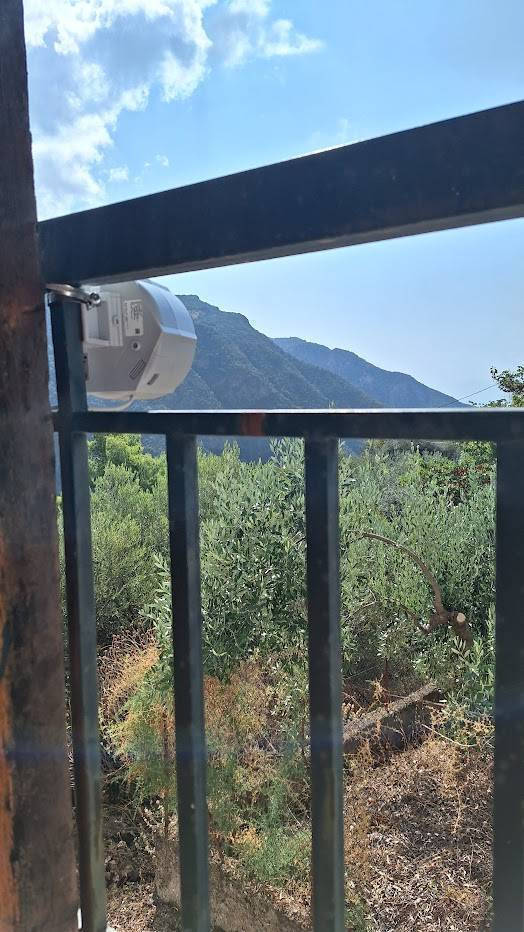
The SXT LTE6 kit is an upgrade of our timeless device for remote locations within cellular network coverage. It features the same modern category 6 LTE chip you might have seen in our latest devices -...
The SXT LTE6 kit is an upgrade of our timeless device for remote locations within cellular network coverage. It features the same modern category 6 LTE chip you might have seen in our latest devices - like the popular Chateau LTE6! Not only can this LTE chip provide reliable Internet connectivity for your building even where mobile phones fail, but it also...
The SXT LTE6 kit is an upgrade of our timeless device for remote locations within cellular network coverage. It features the same modern category 6 LTE chip you might have seen in our latest devices - like the popular Chateau LTE6! Not only can this LTE chip provide reliable Internet connectivity for your building even where mobile phones fail, but it also allowed us to significantly reduce the price of this kit. Place an SXT outside your home - and stay connected at all times!
You get the classic, fundamental design that has stood the test of time. Waterproof. Unobtrusive. Snow-resistant. With a modern LTE6 card for uninterrupted cellular connectivity. And a price about 30% lower than the original SXT LTE6 kit. Additionally, we offer significant project discounts and custom branding options for bulk orders.
Specifications are collected from official manufacturer websites. Please verify the specifications before proceeding with your final purchase. If you notice any problem you can report it here.
For its price, it is good and customizable according to Router OS 7.x. Of course, I got it to use as a client in an OpenVPN network, and it works perfectly in that.
Για τα λεφτά του είναι καλό και παραμετροποιήσιμο κατά Router OS 7.x. Εννοείται το πήρα για να το βάλω client σε OpenVPN δίκτυο και στο οποίο δουλεύει άψογα.
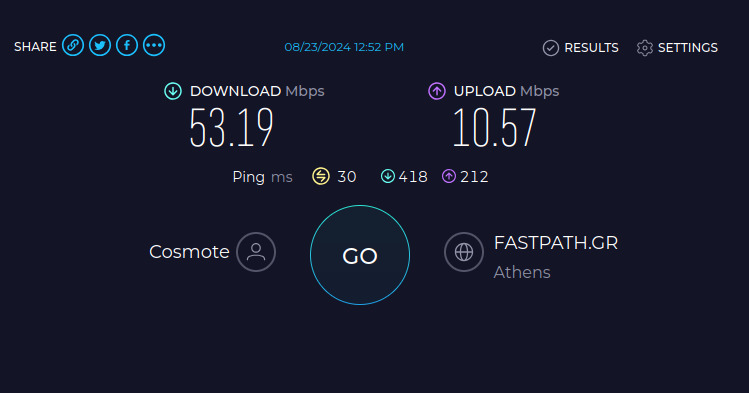
Western Karditsa at the foot of a mountain, the house with a view of the plain, at 2.5km with visual contact, a relatively low mobile antenna mast, easily 100/50 latency about 30msec (half or less than the starlink already present). Super easy setup (just need to pay a little attention to correctly set the APN), by far the best for its money. The only thing left to see is how long it will last as a construction over time.
Δυτική Καρδίτσα στους πρόποδες βουνού το σπίτι με θέα τον κάμπο, στα 2.5km με οπτική επαφή σχετικά χαμηλός ιστός κεραίας κινητής, χαλαρά 100/50 latency περίπου 30msec (το μισό και λιγότερο απο το starlink που ήδη υπάρχει). Πανεύκολο setup (θέλει μόνο λίγη προσοχή το APN να δηλωθεί σωστά), για τα χρήματά της μακράν κορυφαία. Το μόνο που μένει να φανεί πόσο θ αντέξει σαν κατασκευή στο χρόνο.
Purchase for use in a mountain village, where the nearest antenna is 30 kilometers away (thankfully with a line of sight). It works excellently! Previously, we used our mobile phones as hotspots, and we had frequent disconnections and speeds around 10/1mbps. Now, we consistently get 30/15mbps, which is the worst-case scenario, and several times we see speeds close to 50, or even 70 mbps.
Additionally, a pleasant surprise was the latency. It is quite stable, and we managed to play Rocket League with 80ms ping on European servers, with minimal fluctuations (for 1-2 seconds every 15 minutes of gameplay). I never expected to play online games in my village where I barely had internet.
Another note worth mentioning is that while the distance to the antenna is 30 kilometers, most of that distance is over the sea, which I have heard helps maintain the signal.
- Some tips that might help -
1) After you do the first firmware update of the device, the new version has a feature that automatically activates called "get network apn." This essentially asks the network to provide the apn name; however (at least Cosmote), it did not provide the correct one, resulting in the internet stopping working. It took me hours to figure out that this was the issue because I was correctly declaring the "internet" apn in the settings, which was being overwritten by this new feature. Just uncheck it, and set the apn manually, and it will work.
2) Play with the available bands of the LTE interface. For example, I found that on the antenna I connect to, if I only use band 7, I get around 50 mbps, while if I use band 1, I get at most 10mbps. Take this information with caution, as I am not an expert and may not know what I am doing, and the results may have been random.
In conclusion, I highly recommend it. It does its job exactly as described.
Αγορά για χρήση σε ορεινό χωριό, όπου η κοντινότερη κεραία βρίσκεται 30 χιλιόμετρα μακριά (με οπτική επαφή ευτυχώς). Δουλεύει εξαιρετικά! Πριν, βάζαμε τα κινητά μας για hotspot, και είχαμε συχνές αποσυνδέσεις και ταχύτητες γύρω στα 10/1mbps. Πλέον, πιάνουμε σταθερά 30/15mbps, όπου είναι το worst case scenario, και αρκετές φορές βλέπεις ταχύτητες κοντά στα 50, ή και στα 70 mbps.
Επιπλέον, μία ευχάριστη έκπληξη ήταν το latency. Είναι αρκετά σταθερό, και καταφέραμε να παίξουμε rocket league με 80ms ping σε ευρωπαικούς servers, με ελάχιστα σκαμπανεβάσματα (για 1-2 δευτερόλεπτα ανά 15 λεπτά παιχνιδιού). Το ότι θα έπαιζα στο χωριό μου online games όπου με το ζόρι είχα ιντερνετ, δεν το περίμενα ποτέ.
Μία ακόμη σημείωση που αξίζει να αναφερθεί είναι ότι ενώ η απόσταση της κεραίας είναι 30 χιλιόμετρα, το μεγαλύτερο μέρος αυτής της απόστασης είναι πάνω από θάλασσα, το οποίο έχω ακούσει ότι βοηθάει στη διατήρηση του σήματος.
- Μερικά tips που ίσως βοηθήσουν -
1) Αφού κάνετε το πρώτο firmware update της συσκευής, η νέα έκδοση έχει μία λειτουργία που ενεργοποιείται αυτόματα και λέγεται "get network apn". Αυτό ουσιαστικά ζητάει από το δίκτυο να δώσει το apn όνομα, ωστόσο (η cosmote τουλάχιστον), δεν έδινε το σωστό, με αποτέλεσμα να σταματήσει να δουλεύει το internet. Μου πήρε ώρες να καταλάβω ότι αυτό φταίει, γιατί εγώ δήλωνα κανονικά το "internet" apn στις ρυθμήσεις, το οποίο γινόταν overwrite από αυτό το νέο feature. Απλά το ξετσεκάρετε, και ορίζετε το apn χειροκίνητα και θα δουλέψει.
2) Παίξτε με τα διαθέσιμα bands του lte interface. Π.χ., διαπίστωσα ότι στην κεραία που συνδέομαι, αν βάλω μόνο το band 7, έχω κοντά στα 50 mbps, ενώ αν βάλω το 1, έχω το πολύ 10mbps. Κρατήστε αυτή την πληροφορία με επιφύλαξη, γιατί δεν είμαι ειδικός και μπορεί να μην ξέρω τι κάνω και να ήταν τυχαία τα αποτελέσματα.
Εν κατακλείδι, συστήνεται ανεπιφύλακτα. Κάνει τη δουλειά του όπως ακριβώς την περιγράφει.
14 7 2024: It worked steadily for 8 months with speeds of 80 and mbps but for a week now it doesn't recognize the sim card, sometimes it does, sometimes it doesn't, either from the heat or from the rain, the contacts are not clean. From what I read on the internet, if I solve the problem, I will write it down.... It is quite high and I have to bring down the whole column...
14 7 2024 : Δούλευε 8 και μήνες σταθερά με ταχύτητες 80και mbps αλλά εδώ και μια εβδομάδα δεν βλέπει την sim μια την βλέπει μια όχι ή από την ζέστη η από τις βροχές οι επαφές δεν είναι καθαρές από ότι διάβασα στο ίντερνετ αν το λύσω το πρόβλημα θα το γράψω....
Είναι αρκετά ψηλά και πρέπει να κατεβάσω όλη την κολόνα...
For its price, it is good and customizable according to Router OS 7.x. Of course, I got it to use as a client in an OpenVPN network, and it works perfectly in that.
Για τα λεφτά του είναι καλό και παραμετροποιήσιμο κατά Router OS 7.x. Εννοείται το πήρα για να το βάλω client σε OpenVPN δίκτυο και στο οποίο δουλεύει άψογα.
Western Karditsa at the foot of a mountain, the house with a view of the plain, at 2.5km with visual contact, a relatively low mobile antenna mast, easily 100/50 latency about 30msec (half or less than the starlink already present). Super easy setup (just need to pay a little attention to correctly set the APN), by far the best for its money. The only thing left to see is how long it will last as a construction over time.
Δυτική Καρδίτσα στους πρόποδες βουνού το σπίτι με θέα τον κάμπο, στα 2.5km με οπτική επαφή σχετικά χαμηλός ιστός κεραίας κινητής, χαλαρά 100/50 latency περίπου 30msec (το μισό και λιγότερο απο το starlink που ήδη υπάρχει). Πανεύκολο setup (θέλει μόνο λίγη προσοχή το APN να δηλωθεί σωστά), για τα χρήματά της μακράν κορυφαία. Το μόνο που μένει να φανεί πόσο θ αντέξει σαν κατασκευή στο χρόνο.
Purchase for use in a mountain village, where the nearest antenna is 30 kilometers away (thankfully with a line of sight). It works excellently! Previously, we used our mobile phones as hotspots, and we had frequent disconnections and speeds around 10/1mbps. Now, we consistently get 30/15mbps, which is the worst-case scenario, and several times we see speeds close to 50, or even 70 mbps.
Additionally, a pleasant surprise was the latency. It is quite stable, and we managed to play Rocket League with 80ms ping on European servers, with minimal fluctuations (for 1-2 seconds every 15 minutes of gameplay). I never expected to play online games in my village where I barely had internet.
Another note worth mentioning is that while the distance to the antenna is 30 kilometers, most of that distance is over the sea, which I have heard helps maintain the signal.
- Some tips that might help -
1) After you do the first firmware update of the device, the new version has a feature that automatically activates called "get network apn." This essentially asks the network to provide the apn name; however (at least Cosmote), it did not provide the correct one, resulting in the internet stopping working. It took me hours to figure out that this was the issue because I was correctly declaring the "internet" apn in the settings, which was being overwritten by this new feature. Just uncheck it, and set the apn manually, and it will work.
2) Play with the available bands of the LTE interface. For example, I found that on the antenna I connect to, if I only use band 7, I get around 50 mbps, while if I use band 1, I get at most 10mbps. Take this information with caution, as I am not an expert and may not know what I am doing, and the results may have been random.
In conclusion, I highly recommend it. It does its job exactly as described.
Αγορά για χρήση σε ορεινό χωριό, όπου η κοντινότερη κεραία βρίσκεται 30 χιλιόμετρα μακριά (με οπτική επαφή ευτυχώς). Δουλεύει εξαιρετικά! Πριν, βάζαμε τα κινητά μας για hotspot, και είχαμε συχνές αποσυνδέσεις και ταχύτητες γύρω στα 10/1mbps. Πλέον, πιάνουμε σταθερά 30/15mbps, όπου είναι το worst case scenario, και αρκετές φορές βλέπεις ταχύτητες κοντά στα 50, ή και στα 70 mbps.
Επιπλέον, μία ευχάριστη έκπληξη ήταν το latency. Είναι αρκετά σταθερό, και καταφέραμε να παίξουμε rocket league με 80ms ping σε ευρωπαικούς servers, με ελάχιστα σκαμπανεβάσματα (για 1-2 δευτερόλεπτα ανά 15 λεπτά παιχνιδιού). Το ότι θα έπαιζα στο χωριό μου online games όπου με το ζόρι είχα ιντερνετ, δεν το περίμενα ποτέ.
Μία ακόμη σημείωση που αξίζει να αναφερθεί είναι ότι ενώ η απόσταση της κεραίας είναι 30 χιλιόμετρα, το μεγαλύτερο μέρος αυτής της απόστασης είναι πάνω από θάλασσα, το οποίο έχω ακούσει ότι βοηθάει στη διατήρηση του σήματος.
- Μερικά tips που ίσως βοηθήσουν -
1) Αφού κάνετε το πρώτο firmware update της συσκευής, η νέα έκδοση έχει μία λειτουργία που ενεργοποιείται αυτόματα και λέγεται "get network apn". Αυτό ουσιαστικά ζητάει από το δίκτυο να δώσει το apn όνομα, ωστόσο (η cosmote τουλάχιστον), δεν έδινε το σωστό, με αποτέλεσμα να σταματήσει να δουλεύει το internet. Μου πήρε ώρες να καταλάβω ότι αυτό φταίει, γιατί εγώ δήλωνα κανονικά το "internet" apn στις ρυθμήσεις, το οποίο γινόταν overwrite από αυτό το νέο feature. Απλά το ξετσεκάρετε, και ορίζετε το apn χειροκίνητα και θα δουλέψει.
2) Παίξτε με τα διαθέσιμα bands του lte interface. Π.χ., διαπίστωσα ότι στην κεραία που συνδέομαι, αν βάλω μόνο το band 7, έχω κοντά στα 50 mbps, ενώ αν βάλω το 1, έχω το πολύ 10mbps. Κρατήστε αυτή την πληροφορία με επιφύλαξη, γιατί δεν είμαι ειδικός και μπορεί να μην ξέρω τι κάνω και να ήταν τυχαία τα αποτελέσματα.
Εν κατακλείδι, συστήνεται ανεπιφύλακτα. Κάνει τη δουλειά του όπως ακριβώς την περιγράφει.
14 7 2024: It worked steadily for 8 months with speeds of 80 and mbps but for a week now it doesn't recognize the sim card, sometimes it does, sometimes it doesn't, either from the heat or from the rain, the contacts are not clean. From what I read on the internet, if I solve the problem, I will write it down.... It is quite high and I have to bring down the whole column...
14 7 2024 : Δούλευε 8 και μήνες σταθερά με ταχύτητες 80και mbps αλλά εδώ και μια εβδομάδα δεν βλέπει την sim μια την βλέπει μια όχι ή από την ζέστη η από τις βροχές οι επαφές δεν είναι καθαρές από ότι διάβασα στο ίντερνετ αν το λύσω το πρόβλημα θα το γράψω....
Είναι αρκετά ψηλά και πρέπει να κατεβάσω όλη την κολόνα...
The SXT LTE6 kit is an upgrade of our timeless device for remote locations within cellular network coverage. It features the same modern category 6 LTE chip you might have seen in our latest devices - like the popular Chateau LTE6! Not only can this LTE chip provide reliable Internet connectivity for your building even where mobile phones fail, but it also allowed us to significantly reduce the price of this kit. Place an SXT outside your home - and stay connected at all times!
You get the classic, fundamental design that has stood the test of time. Waterproof. Unobtrusive. Snow-resistant. With a modern LTE6 card for uninterrupted cellular connectivity. And a price about 30% lower than the original SXT LTE6 kit. Additionally, we offer significant project discounts and custom branding options for bulk orders.
Specifications are collected from official manufacturer websites. Please verify the specifications before proceeding with your final purchase. If you notice any problem you can report it here.
For its price, it is good and customizable according to Router OS 7.x. Of course, I got it to use as a client in an OpenVPN network, and it works perfectly in that.
Για τα λεφτά του είναι καλό και παραμετροποιήσιμο κατά Router OS 7.x. Εννοείται το πήρα για να το βάλω client σε OpenVPN δίκτυο και στο οποίο δουλεύει άψογα.
Western Karditsa at the foot of a mountain, the house with a view of the plain, at 2.5km with visual contact, a relatively low mobile antenna mast, easily 100/50 latency about 30msec (half or less than the starlink already present). Super easy setup (just need to pay a little attention to correctly set the APN), by far the best for its money. The only thing left to see is how long it will last as a construction over time.
Δυτική Καρδίτσα στους πρόποδες βουνού το σπίτι με θέα τον κάμπο, στα 2.5km με οπτική επαφή σχετικά χαμηλός ιστός κεραίας κινητής, χαλαρά 100/50 latency περίπου 30msec (το μισό και λιγότερο απο το starlink που ήδη υπάρχει). Πανεύκολο setup (θέλει μόνο λίγη προσοχή το APN να δηλωθεί σωστά), για τα χρήματά της μακράν κορυφαία. Το μόνο που μένει να φανεί πόσο θ αντέξει σαν κατασκευή στο χρόνο.
Purchase for use in a mountain village, where the nearest antenna is 30 kilometers away (thankfully with a line of sight). It works excellently! Previously, we used our mobile phones as hotspots, and we had frequent disconnections and speeds around 10/1mbps. Now, we consistently get 30/15mbps, which is the worst-case scenario, and several times we see speeds close to 50, or even 70 mbps.
Additionally, a pleasant surprise was the latency. It is quite stable, and we managed to play Rocket League with 80ms ping on European servers, with minimal fluctuations (for 1-2 seconds every 15 minutes of gameplay). I never expected to play online games in my village where I barely had internet.
Another note worth mentioning is that while the distance to the antenna is 30 kilometers, most of that distance is over the sea, which I have heard helps maintain the signal.
- Some tips that might help -
1) After you do the first firmware update of the device, the new version has a feature that automatically activates called "get network apn." This essentially asks the network to provide the apn name; however (at least Cosmote), it did not provide the correct one, resulting in the internet stopping working. It took me hours to figure out that this was the issue because I was correctly declaring the "internet" apn in the settings, which was being overwritten by this new feature. Just uncheck it, and set the apn manually, and it will work.
2) Play with the available bands of the LTE interface. For example, I found that on the antenna I connect to, if I only use band 7, I get around 50 mbps, while if I use band 1, I get at most 10mbps. Take this information with caution, as I am not an expert and may not know what I am doing, and the results may have been random.
In conclusion, I highly recommend it. It does its job exactly as described.
Αγορά για χρήση σε ορεινό χωριό, όπου η κοντινότερη κεραία βρίσκεται 30 χιλιόμετρα μακριά (με οπτική επαφή ευτυχώς). Δουλεύει εξαιρετικά! Πριν, βάζαμε τα κινητά μας για hotspot, και είχαμε συχνές αποσυνδέσεις και ταχύτητες γύρω στα 10/1mbps. Πλέον, πιάνουμε σταθερά 30/15mbps, όπου είναι το worst case scenario, και αρκετές φορές βλέπεις ταχύτητες κοντά στα 50, ή και στα 70 mbps.
Επιπλέον, μία ευχάριστη έκπληξη ήταν το latency. Είναι αρκετά σταθερό, και καταφέραμε να παίξουμε rocket league με 80ms ping σε ευρωπαικούς servers, με ελάχιστα σκαμπανεβάσματα (για 1-2 δευτερόλεπτα ανά 15 λεπτά παιχνιδιού). Το ότι θα έπαιζα στο χωριό μου online games όπου με το ζόρι είχα ιντερνετ, δεν το περίμενα ποτέ.
Μία ακόμη σημείωση που αξίζει να αναφερθεί είναι ότι ενώ η απόσταση της κεραίας είναι 30 χιλιόμετρα, το μεγαλύτερο μέρος αυτής της απόστασης είναι πάνω από θάλασσα, το οποίο έχω ακούσει ότι βοηθάει στη διατήρηση του σήματος.
- Μερικά tips που ίσως βοηθήσουν -
1) Αφού κάνετε το πρώτο firmware update της συσκευής, η νέα έκδοση έχει μία λειτουργία που ενεργοποιείται αυτόματα και λέγεται "get network apn". Αυτό ουσιαστικά ζητάει από το δίκτυο να δώσει το apn όνομα, ωστόσο (η cosmote τουλάχιστον), δεν έδινε το σωστό, με αποτέλεσμα να σταματήσει να δουλεύει το internet. Μου πήρε ώρες να καταλάβω ότι αυτό φταίει, γιατί εγώ δήλωνα κανονικά το "internet" apn στις ρυθμήσεις, το οποίο γινόταν overwrite από αυτό το νέο feature. Απλά το ξετσεκάρετε, και ορίζετε το apn χειροκίνητα και θα δουλέψει.
2) Παίξτε με τα διαθέσιμα bands του lte interface. Π.χ., διαπίστωσα ότι στην κεραία που συνδέομαι, αν βάλω μόνο το band 7, έχω κοντά στα 50 mbps, ενώ αν βάλω το 1, έχω το πολύ 10mbps. Κρατήστε αυτή την πληροφορία με επιφύλαξη, γιατί δεν είμαι ειδικός και μπορεί να μην ξέρω τι κάνω και να ήταν τυχαία τα αποτελέσματα.
Εν κατακλείδι, συστήνεται ανεπιφύλακτα. Κάνει τη δουλειά του όπως ακριβώς την περιγράφει.
14 7 2024: It worked steadily for 8 months with speeds of 80 and mbps but for a week now it doesn't recognize the sim card, sometimes it does, sometimes it doesn't, either from the heat or from the rain, the contacts are not clean. From what I read on the internet, if I solve the problem, I will write it down.... It is quite high and I have to bring down the whole column...
14 7 2024 : Δούλευε 8 και μήνες σταθερά με ταχύτητες 80και mbps αλλά εδώ και μια εβδομάδα δεν βλέπει την sim μια την βλέπει μια όχι ή από την ζέστη η από τις βροχές οι επαφές δεν είναι καθαρές από ότι διάβασα στο ίντερνετ αν το λύσω το πρόβλημα θα το γράψω....
Είναι αρκετά ψηλά και πρέπει να κατεβάσω όλη την κολόνα...
For its price, it is good and customizable according to Router OS 7.x. Of course, I got it to use as a client in an OpenVPN network, and it works perfectly in that.
Για τα λεφτά του είναι καλό και παραμετροποιήσιμο κατά Router OS 7.x. Εννοείται το πήρα για να το βάλω client σε OpenVPN δίκτυο και στο οποίο δουλεύει άψογα.
Western Karditsa at the foot of a mountain, the house with a view of the plain, at 2.5km with visual contact, a relatively low mobile antenna mast, easily 100/50 latency about 30msec (half or less than the starlink already present). Super easy setup (just need to pay a little attention to correctly set the APN), by far the best for its money. The only thing left to see is how long it will last as a construction over time.
Δυτική Καρδίτσα στους πρόποδες βουνού το σπίτι με θέα τον κάμπο, στα 2.5km με οπτική επαφή σχετικά χαμηλός ιστός κεραίας κινητής, χαλαρά 100/50 latency περίπου 30msec (το μισό και λιγότερο απο το starlink που ήδη υπάρχει). Πανεύκολο setup (θέλει μόνο λίγη προσοχή το APN να δηλωθεί σωστά), για τα χρήματά της μακράν κορυφαία. Το μόνο που μένει να φανεί πόσο θ αντέξει σαν κατασκευή στο χρόνο.
Purchase for use in a mountain village, where the nearest antenna is 30 kilometers away (thankfully with a line of sight). It works excellently! Previously, we used our mobile phones as hotspots, and we had frequent disconnections and speeds around 10/1mbps. Now, we consistently get 30/15mbps, which is the worst-case scenario, and several times we see speeds close to 50, or even 70 mbps.
Additionally, a pleasant surprise was the latency. It is quite stable, and we managed to play Rocket League with 80ms ping on European servers, with minimal fluctuations (for 1-2 seconds every 15 minutes of gameplay). I never expected to play online games in my village where I barely had internet.
Another note worth mentioning is that while the distance to the antenna is 30 kilometers, most of that distance is over the sea, which I have heard helps maintain the signal.
- Some tips that might help -
1) After you do the first firmware update of the device, the new version has a feature that automatically activates called "get network apn." This essentially asks the network to provide the apn name; however (at least Cosmote), it did not provide the correct one, resulting in the internet stopping working. It took me hours to figure out that this was the issue because I was correctly declaring the "internet" apn in the settings, which was being overwritten by this new feature. Just uncheck it, and set the apn manually, and it will work.
2) Play with the available bands of the LTE interface. For example, I found that on the antenna I connect to, if I only use band 7, I get around 50 mbps, while if I use band 1, I get at most 10mbps. Take this information with caution, as I am not an expert and may not know what I am doing, and the results may have been random.
In conclusion, I highly recommend it. It does its job exactly as described.
Αγορά για χρήση σε ορεινό χωριό, όπου η κοντινότερη κεραία βρίσκεται 30 χιλιόμετρα μακριά (με οπτική επαφή ευτυχώς). Δουλεύει εξαιρετικά! Πριν, βάζαμε τα κινητά μας για hotspot, και είχαμε συχνές αποσυνδέσεις και ταχύτητες γύρω στα 10/1mbps. Πλέον, πιάνουμε σταθερά 30/15mbps, όπου είναι το worst case scenario, και αρκετές φορές βλέπεις ταχύτητες κοντά στα 50, ή και στα 70 mbps.
Επιπλέον, μία ευχάριστη έκπληξη ήταν το latency. Είναι αρκετά σταθερό, και καταφέραμε να παίξουμε rocket league με 80ms ping σε ευρωπαικούς servers, με ελάχιστα σκαμπανεβάσματα (για 1-2 δευτερόλεπτα ανά 15 λεπτά παιχνιδιού). Το ότι θα έπαιζα στο χωριό μου online games όπου με το ζόρι είχα ιντερνετ, δεν το περίμενα ποτέ.
Μία ακόμη σημείωση που αξίζει να αναφερθεί είναι ότι ενώ η απόσταση της κεραίας είναι 30 χιλιόμετρα, το μεγαλύτερο μέρος αυτής της απόστασης είναι πάνω από θάλασσα, το οποίο έχω ακούσει ότι βοηθάει στη διατήρηση του σήματος.
- Μερικά tips που ίσως βοηθήσουν -
1) Αφού κάνετε το πρώτο firmware update της συσκευής, η νέα έκδοση έχει μία λειτουργία που ενεργοποιείται αυτόματα και λέγεται "get network apn". Αυτό ουσιαστικά ζητάει από το δίκτυο να δώσει το apn όνομα, ωστόσο (η cosmote τουλάχιστον), δεν έδινε το σωστό, με αποτέλεσμα να σταματήσει να δουλεύει το internet. Μου πήρε ώρες να καταλάβω ότι αυτό φταίει, γιατί εγώ δήλωνα κανονικά το "internet" apn στις ρυθμήσεις, το οποίο γινόταν overwrite από αυτό το νέο feature. Απλά το ξετσεκάρετε, και ορίζετε το apn χειροκίνητα και θα δουλέψει.
2) Παίξτε με τα διαθέσιμα bands του lte interface. Π.χ., διαπίστωσα ότι στην κεραία που συνδέομαι, αν βάλω μόνο το band 7, έχω κοντά στα 50 mbps, ενώ αν βάλω το 1, έχω το πολύ 10mbps. Κρατήστε αυτή την πληροφορία με επιφύλαξη, γιατί δεν είμαι ειδικός και μπορεί να μην ξέρω τι κάνω και να ήταν τυχαία τα αποτελέσματα.
Εν κατακλείδι, συστήνεται ανεπιφύλακτα. Κάνει τη δουλειά του όπως ακριβώς την περιγράφει.
14 7 2024: It worked steadily for 8 months with speeds of 80 and mbps but for a week now it doesn't recognize the sim card, sometimes it does, sometimes it doesn't, either from the heat or from the rain, the contacts are not clean. From what I read on the internet, if I solve the problem, I will write it down.... It is quite high and I have to bring down the whole column...
14 7 2024 : Δούλευε 8 και μήνες σταθερά με ταχύτητες 80και mbps αλλά εδώ και μια εβδομάδα δεν βλέπει την sim μια την βλέπει μια όχι ή από την ζέστη η από τις βροχές οι επαφές δεν είναι καθαρές από ότι διάβασα στο ίντερνετ αν το λύσω το πρόβλημα θα το γράψω....
Είναι αρκετά ψηλά και πρέπει να κατεβάσω όλη την κολόνα...