Power Strips & Wall Plug Adapters

Meross Smart Single Socket Code: MSS210EU

Smart WiFi socket with remote control capability via the Meross app. It is made of flame-retardant PC material and is compatible with smart ecosystems Amazon Alexa, Google Assistant, SmartThings, and

Smart WiFi socket with remote control capability via the Meross app. It is made of flame-retardant PC material and is compatible with smart ecosystems Amazon Alexa, Google Assistant, SmartThings, and Apple Home Kit.

See full description See full description

Top specs

  • Number of Sockets 1
  • Connectivity Wi-Fi
  • See all
The product is not available for shipping to the selected country.

Description

Description

Smart WiFi socket with remote control capability via the Meross app. It is made of flame-retardant PC material and is compatible with smart ecosystems Amazon Alexa, Google Assistant, SmartThings, and Apple Home Kit.

Features:

  • Remote control capability via app and voice commands
  • Ability to create scenarios for automatic activation and deactivation of connected devices
  • Compatible app: Meross App
  • Compatible ecosystems: Amazon Alexa, Google Assistant, SmartThings, and Apple Home Kit
  • Dimensions: 6.7x6.7x6.7cm
  • Connectivity: Wi-Fi 2.4GHz

Manufacturer

See full description

Specifications

Specifications

Product Number
MSS210EU

Dimensions

Type
Single Socket
Number of Sockets
1
USB-C
No
USB-A
No
Colour
White

Features & Functions

Switch
No
TV Protection
No
Phone Protection
No
Kids Protection
No
Audio
No
with Remote Control
No

Smart Features

Connectivity
Wi-Fi
Smart Ecosystem
Alexa, Google Home, IFTTT

Important information

Specifications are collected from official manufacturer websites. Please verify the specifications before proceeding with your final purchase. If you notice any problem you can report it here.

See all specifications

Reviews (7)

Reviews

  1. 5
  2. 4 stars
    0
  3. 3 stars
    0
  4. 1
  5. 1
Review this product

Reviews by our members

  • n_ele

    Verified purchase

    3 sockets broke in less than 6 months with minimal use. It flashes on its own, tries to start and shuts off again, when there is a connected device it keeps turning on and off and on the power supply as well. While it works, it is excellent.

    Translated from Greek ·
    Did you find this review helpful?
  • giorgos_ziarkas
    2
    1 out of 1 members found this review helpful

    Verified purchase

    easy installation of the app, very convenient for choosing the time you want to supply power (e.g. turning on the lights)
    update July 8 26... in April it started losing wi fi, frequent disconnections until I uninstalled and reinstalled it. the problem was fixed until the relay (?) it has started acting up, as if flashing, the app doesn't see it since it doesn't connect as much to the voltage and therefore to the router..

    Translated from Greek ·
    Did you find this review helpful?
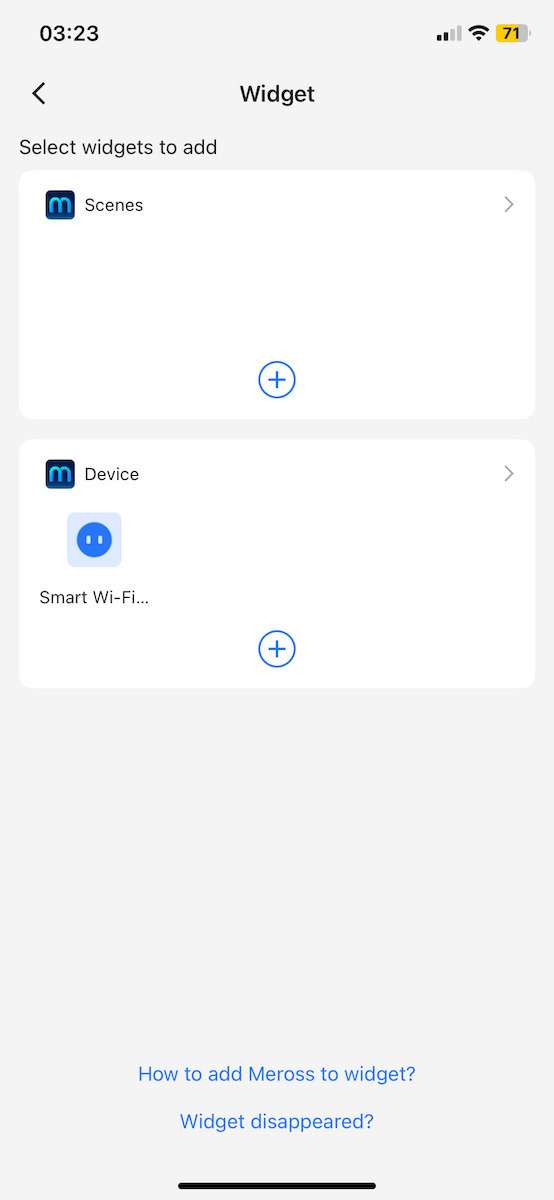
  • Works perfectly with iPhone; I have the 11 and have set it up with automation to stop charging once it goes above 80%. You just need to add the Smart plug to a widget so that it can be seen as a device in the automation. It took me a little time to figure it out, but it works perfectly.

    Translated from Greek ·
    Did you find this review helpful?
  • Simply perfect Wifi timer

    Translated from Greek ·
    Did you find this review helpful?
  • Verified purchase

  • Verified purchase

  • 3 sockets broke in less than 6 months with minimal use. It flashes on its own, tries to start and shuts off again, when there is a connected device it keeps turning on and off and on the power supply as well. While it works, it is excellent.

    Translated from Greek ·
    0
  • easy installation of the app, very convenient for choosing the time you want to supply power (e.g. turning on the lights)
    update July 8 26... in April it started losing wi fi, frequent disconnections until I uninstalled and reinstalled it. the problem was fixed until the relay (?) it has started acting up, as if flashing, the app doesn't see it since it doesn't connect as much to the voltage and therefore to the router..

    Translated from Greek ·
    1
  • Works perfectly with iPhone; I have the 11 and have set it up with automation to stop charging once it goes above 80%. You just need to add the Smart plug to a widget so that it can be seen as a device in the automation. It took me a little time to figure it out, but it works perfectly.

    Translated from Greek ·
    0
  • Simply perfect Wifi timer

    Translated from Greek ·
    0
  • 0
  • See all

Description & Specifications

Smart WiFi socket with remote control capability via the Meross app. It is made of flame-retardant PC material and is compatible with smart ecosystems Amazon Alexa, Google Assistant, SmartThings, and Apple Home Kit.

Features:

  • Remote control capability via app and voice commands
  • Ability to create scenarios for automatic activation and deactivation of connected devices
  • Compatible app: Meross App
  • Compatible ecosystems: Amazon Alexa, Google Assistant, SmartThings, and Apple Home Kit
  • Dimensions: 6.7x6.7x6.7cm
  • Connectivity: Wi-Fi 2.4GHz

Manufacturer

Product Number
MSS210EU

Dimensions

Type
Single Socket
Number of Sockets
1
USB-C
No
USB-A
No
Colour
White

Features & Functions

Switch
No
TV Protection
No
Phone Protection
No
Kids Protection
No
Audio
No
with Remote Control
No

Smart Features

Connectivity
Wi-Fi
Smart Ecosystem
Alexa, Google Home, IFTTT

Important information

Specifications are collected from official manufacturer websites. Please verify the specifications before proceeding with your final purchase. If you notice any problem you can report it here.

Reviews (7)

  1. 5
  2. 4 stars
    0
  3. 3 stars
    0
  4. 1
  5. 1
Review this product

Reviews by our members

  • n_ele

    Verified purchase

    3 sockets broke in less than 6 months with minimal use. It flashes on its own, tries to start and shuts off again, when there is a connected device it keeps turning on and off and on the power supply as well. While it works, it is excellent.

    Translated from Greek ·
    Did you find this review helpful?
  • giorgos_ziarkas
    2
    1 out of 1 members found this review helpful

    Verified purchase

    easy installation of the app, very convenient for choosing the time you want to supply power (e.g. turning on the lights)
    update July 8 26... in April it started losing wi fi, frequent disconnections until I uninstalled and reinstalled it. the problem was fixed until the relay (?) it has started acting up, as if flashing, the app doesn't see it since it doesn't connect as much to the voltage and therefore to the router..

    Translated from Greek ·
    Did you find this review helpful?
  • Works perfectly with iPhone; I have the 11 and have set it up with automation to stop charging once it goes above 80%. You just need to add the Smart plug to a widget so that it can be seen as a device in the automation. It took me a little time to figure it out, but it works perfectly.

    Translated from Greek ·
    Did you find this review helpful?
  • Simply perfect Wifi timer

    Translated from Greek ·
    Did you find this review helpful?
  • Verified purchase

  • Verified purchase

  • 3 sockets broke in less than 6 months with minimal use. It flashes on its own, tries to start and shuts off again, when there is a connected device it keeps turning on and off and on the power supply as well. While it works, it is excellent.

    Translated from Greek ·
    0
  • easy installation of the app, very convenient for choosing the time you want to supply power (e.g. turning on the lights)
    update July 8 26... in April it started losing wi fi, frequent disconnections until I uninstalled and reinstalled it. the problem was fixed until the relay (?) it has started acting up, as if flashing, the app doesn't see it since it doesn't connect as much to the voltage and therefore to the router..

    Translated from Greek ·
    1
  • Works perfectly with iPhone; I have the 11 and have set it up with automation to stop charging once it goes above 80%. You just need to add the Smart plug to a widget so that it can be seen as a device in the automation. It took me a little time to figure it out, but it works perfectly.

    Translated from Greek ·
    0
  • Simply perfect Wifi timer

    Translated from Greek ·
    0
  • 0
  • See all