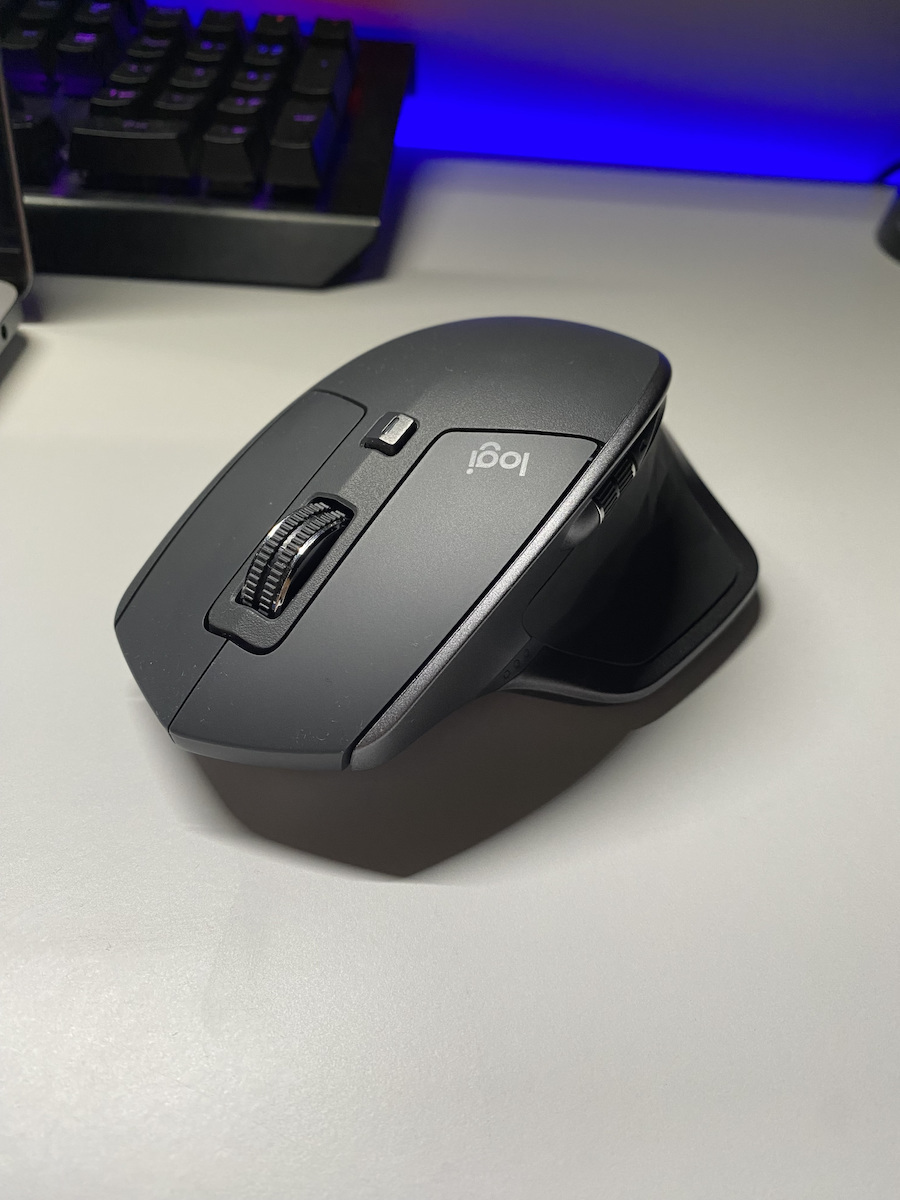
The top-tier mouse from Logitech is designed for advanced users and professionals who want to achieve more with greater efficiency. The MX Master 2S creates an irresistible package with Logitech Flow, allowing you to seamlessly control two computers with one mouse and copy/paste content between them. Combining advanced features and an impressive design, it offers exceptional comfort, control, precision, and customization capabilities.
Specifications are collected from official manufacturer websites. Please verify the specifications before proceeding with your final purchase. If you notice any problem you can report it here.
Without any exaggeration, this might be the best mouse currently available in the world for professional use. I have been dealing with computers for over 30 years and have tried many mice. My previous (and favorite) one was a black Microsoft mouse (the Wireless IntelliMouse Explorer with Tilt Wheel), which was purchased in 2000 and retired in 2019 (it still works) to be replaced by the Logitech. I hesitated a bit to switch to Logitech, but from the moment I held it in my hands and rolled it on the mouse pad, I knew it would be my next favorite mouse for the next decades.
When you hold it in your palm, you feel like you're in the cockpit of a fighter aircraft, controlling everything with one hand. Its buttons have a light, clear, and sweet touch and execute commands without any hesitation. The mouse wheel is incredibly user-friendly, with two modes of operation (clicky, which brakes, and free-rolling, which rolls freely). The second mode (free-rolling), combined with the heavy wheel, allows you to scroll through huge texts and web pages with a single motion (you just spin it abruptly and quickly, and it continues to spin on its own for several seconds). It also has an automatic transition mechanism from one mode to another (slow scrolling is clicky, and if you spin it quickly, it automatically switches to free-rolling, and when it slows down, it returns to clicky).
There is also another smaller wheel in the thumb area for scrolling left and right, which is also very convenient. Of course, there are the other familiar forward/back buttons, as well as a "hidden" button that is activated when you press the thumb downwards. All buttons are programmable through the very beautiful and user-friendly software, and you can have different button settings for each application (app profiles).
The wireless connection to the PC is reliable (I only used the small USB receiver, not Bluetooth), and so far, I haven't noticed any missed commands. The optical beam it uses for motion detection is not in the visible spectrum (it doesn't illuminate with red light like most mice), maybe it's infrared, but it's not visible to the naked eye.
I bought two Logitech MX Master 2S for my two workstations, and after 15 days of use, the batteries in both are at 2/3 of their charge, which is clearly and beautifully displayed through 3 small LEDs at the edge of the thumb every time you "wake up" the mouse. I estimate that each charge will last me for sure over a month, maybe even 2 months.
Overall, the purchase of the Logitech MX Master 2S is one of those purchases that leave you completely satisfied, and you feel like every cent of your money was well spent. Honestly, I have nothing negative to say. I highly recommend it for those who work professionally with PCs (programmers, developers, content creators, etc.). I'm not an expert to say how suitable it is for gaming. Perhaps it's better to use a wired mouse there to minimize lag (which I don't perceive, but I'm not a hardcore gamer).
Note for the latest-and-greatest freaks: the Logitech MX Master 3 will be released on the market very soon. If you're not in a hurry, have a little patience to see what goodies it will have compared to the 2S. If you're in a hurry, go ahead and confidently purchase the 2S.
Update (11/18/2019) --- Everything is fine with the mouse, I confirm what I have written above, for me it continues to be the king of mice for professional use. I want to mention a small disadvantage/bug that I have noticed, which has to do with the way the mouse "wakes up" the PC when it is in sleep mode. For some reason, the mouse sends a wake-up signal to the PC exactly 10 minutes after you stop using it. That is, if you have set the PC to enter sleep mode after, for example, 30 minutes, with the Logitech connected, the PC will enter sleep mode after 40 minutes. For some reason, in the first 10 minutes of calmness, the mouse sends a signal to the PC that it is active, so all the times you have set in Windows for screen and PC standby start 10 minutes later. Also, if you want, for example, to leave the house and manually put the PC in sleep mode, it will "wake up" on its own after 10 minutes (the mouse itself will "wake it up" even if it doesn't move). I don't know if it's a hardware or driver issue, but it's the only flaw I have found so far. I have tested it on a second PC with a different version of the operating system and it behaves exactly the same. Maybe they will fix it in a future firmware or driver update. It has been mentioned in the international community, in forums, etc. What I did to deal with it is to choose monitor and PC standby times longer than 10 minutes and to keep in mind that the actual times are the ones I set +10 minutes. It's a minor issue, but it still surprises me how such a bug escaped from Logitech... I mention the problem so that you are aware of it and don't get annoyed when you see the PC not "sleeping" when it should or waking up on its own.
Χωρίς καμία δόση υπερβολής, ίσως πρόκειται για το καλύτερο ποντίκι που υπάρχει αυτή τη στιγμή στον κόσμο για επαγγελματική χρήση. Ασχολούμαι πάνω από 30 χρόνια με υπολογιστές και έχω δοκιμάσει πολλά ποντίκια. Το προηγούμενο (και αγαπημένο) μου ήταν ένα σκυλί μαύρο της Microsoft (το Wireless IntelliMouse Explorer με Tilt Wheel), το οποίο αγοράστηκε το 2000 και αποσύρθηκε το 2019 (δουλεύει ακόμα) για να αντικατασταθεί από το Logitech. Δίστασα λίγο να πάω στο Logitech, αλλά από την πρώτη στιγμή που το έπιασα στα χέρια μου και το ρολάρισα στο mouse pad κατάλαβα ότι θα είναι το επόμενο αγαπημένο μου ποντίκι για τις επόμενες δεκαετίες.
Όταν το αγκαλιάζεις με την παλάμη σου νιώθεις ότι είσαι σε cockpit μαχητικού αεροσκάφους και ελέγχεις τα πάντα με ένα χέρι. Τα πλήκτρα του είναι αέρινα σε αίσθηση, σαφή και γλυκά στο πάτημα και εκτελούν χωρίς κανέναν δισταγμό τις εντολές που δέχονται. Το mouse wheel είναι απίστευτα εύχρηστο, με δύο καταστάσεις λειτουργίας (clicky που φρενάρει και free-rolling που κυλά ελεύθερα). Η δεύτερη (free-rolling), σε συνδυασμό με το βαρύ ροδάκι, επιτρέπει να σκρολάρεις τεράστια κείμενα και ιστοσελίδες με μία κίνηση (απλά το γυρίζεις απότομα και γρήγορα και αυτό συνεχίζει να γυρίζει μόνο του για αρκετά δευτερόλεπτα). Επίσης, διαθέτει μηχανισμό αυτόματης μετάβασης από τη μία κατάσταση στην άλλη (η αργή κύλιση είναι clicky και αν το γυρίσεις απότομα μεταβαίνει αυτόματα σε free-rolling και όταν επιβραδύνει επιστρέφει σε clicky).
Υπάρχει και άλλη μικρότερη ροδούλα στην περιοχή του αντίχειρα για κύλιση δεξιά-αριστερά, που είναι επίσης πολύ βολική. Φυσικά υπάρχουν και τα υπόλοιπα γνωστά πλήκτρα forward/back, καθώς επίσης και ένα "κρυφό" πλήκτρο που ενεργοποιείται όταν πιέσεις τον αντίχειρα προς τα κάτω. Όλα τα πλήκτρα είναι προγραμματιζόμενα από το πολύ όμορφο και εύχρηστο s/w και μπορείς να έχεις διαφορετικές ρυθμίσεις πλήκτρων ανά εφαρμογή (app profiles).
Η ασύρματη σύνδεση με το PC είναι αξιόπιστη (χρησιμοποίησα μόνο το μικρό USB receiver, όχι μέσω Bluetooth) και μέχρι στιγμής δεν έχω αντιληφθεί ότι έχασε κάποια από τις εντολές μου. Η οπτική ακτίνα που χρησιμοποιεί για την ανίχνευση της κίνησης δεν είναι στο ορατό φάσμα (δεν φωτίζει με κόκκινο φως όπως στα περισσότερα ποντίκια), ίσως είναι υπέρυθρο, πάντως δεν φαίνεται με το μάτι.
Αγόρασα δύο Logitech MX Master 2S για τα δύο μου workstations και μετά από 15 μέρες χρήσης οι μπαταρίες και στα δύο είναι στα 2/3 της φόρτισης, η οποία φαίνεται πολύ όμορφα και με σαφήνεια μέσω 3 μικρών LED στην άκρη του αντίχειρα κάθε φορά που "ξυπνάς" το ποντίκι. Εκτιμώ πως η κάθε φόρτιση θα με βγάζει σίγουρα πάνω από μήνα, ίσως και 2 μήνες.
Γενικά η αγορά του Logitech MX Master 2S είναι μια από αυτές τις αγορές που σε αφήνουν απόλυτα ικανοποιημένο και νιώθεις ότι κάθε cent των χρημάτων σου έπιασε τόπο. Ειλικρινά δεν έχω κάτι αρνητικό να πω. Το προτείνω ανεπιφύλακτα για όσους ασχολούνται επαγγελματικά με το PC (προγραμματιστές, developers, content creators κ.α.). Για το κατά πόσο είναι κατάλληλο για παιχνίδια δεν είμαι ειδικός για να το πω. Ίσως εκεί είναι καλύτερα να χρησιμοποιηθεί ένα ενσύρματο ποντίκι για την ελαχιστοποίηση του lag (το οποίο εγώ δεν καταλαβαίνω ότι υπάρχει, αλλά δεν είμαι hardcore gamer).
Σημείωση για τους latest-and-greatest freaks: πολύ σύντομα θα έρθει στην αγορά το Logitech MX Master 3. Αν δεν βιάζεστε, κάντε λίγο υπομονή να δείτε τι καλούδια θα έχει σε σχέση με το 2S. Αν πάλι βιάζεστε, προχωρήστε άφοβα με την αγορά του 2S.
Ενημέρωση (18/11/2019) --- Όλα καλά με το ποντίκι, επιβεβαιώνω όσα έχω γράψει παραπάνω, για μένα συνεχίζει να είναι ο βασιλιάς των ποντικιών για επαγγελματική χρήση. Θέλω να αναφέρω ένα μικρό μειονέκτημα/bug που εντόπισα, το οποίο έχει να κάνει με τον τρόπο που το ποντίκι "ξυπνάει" το PC όταν αυτό βρίσκεται σε κατάσταση αναμονής (sleep mode). Για κάποιον λόγο το ποντίκι στέλνει ένα σήμα αφύπνισης στο PC ακριβώς 10 λεπτά από τη στιγμή που θα σταματήσεις να το χρησιμοποιείς. Δηλαδή αν έχεις βάλει το PC να μπαίνει σε sleep mode π.χ. μετά από 30 λεπτά, με το Logitech συνδεμένο το PC θα μπει σε sleep mode σε 40 λεπτά. Για κάποιον λόγο στα πρώτα 10 λεπτά ηρεμίας το ποντίκι στέλνει ένα σήμα στο PC ότι είναι ενεργό, οπότε όλοι οι χρόνοι που έχεις θέσει στα Windows για αναμονή της οθόνης και του PC ξεκινούν 10 λεπτά αργότερα. Επίσης, αν θέλεις π.χ. να φύγεις απ' το σπίτι και θέσεις εσύ χειροκίνητα το PC σε sleep mode, αυτό θα "ξυπνήσει" μόνο του μετά από 10 λεπτά (θα το "ξυπνήσει" το ίδιο το ποντίκι κι ας μην κινείται). Δεν ξέρω αν είναι θέμα h/w ή driver, αλλά είναι το μόνο ψεγάδι που έχω βρει μέχρι στιγμής. Το έχω δοκιμάσει και σε δεύτερο PC με άλλη έκδοση λειτουργικού και συμπεριφέρεται ακριβώς το ίδιο. Ίσως σε μελλοντικό f/w ή driver update να το διορθώσουν. Έχει αναφερθεί και στη διεθνή κοινότητα, σε forums κτλ. Αυτό που έκανα για να το αντιμετωπίσω είναι να επιλέξω χρόνους αναμονής monitor και PC μεγαλύτερους από 10 λεπτά και να έχω υπόψη μου ότι οι πραγματικοί χρόνοι είναι αυτοί που έθεσα +10 λεπτά. Μικρό το κακό, αλλά πάλι μου κάνει εντύπωση πώς ξέφυγε από τη Logitech ένα τέτοιο bug... Αναφέρω το πρόβλημα για το έχετε υπόψη σας και να μην παραξενευτείτε και σας σπάσουν τα νεύρα όταν βλέπετε το PC να μην "κοιμάται" όταν πρέπει ή να "ξυπνάει" μόνο του.
One might say that I am exaggerating, but after about 2 years, the thumb button on my mouse got stuck and kept clicking on its own until I disabled it from the computer program. I expected to see such issues after many years, not now, especially since I paid 70 euros for it. A Microsoft mouse that I bought for 5 euros has been working for 15 years without any issues.
3/5 stars
Edit: After researching it, the mouse does indeed have issues with the side button!!! Even though I never pressed it!!! It has now completely stopped responding, while before I could get it to work somewhat. Unacceptable for its cost. I would not buy it again. I will see if I can fix it myself by opening it and will come back with a new review.
2/5 stars
Edit 2: By ordering special screwdrivers online, I was able to open it and fix the button a little. Enough to unstick it and allow the computer to function and for me to disable it completely. Such a good product, it's a shame that such an issue can make it practically useless if you don't know what to do.
1 star.
Ίσως πει κανείς ότι είμαι υπερβολικός αλλά μετά από κανα 2 χρόνια που το χω έφαγε σκάλωμα το πλήκτρο του αντίχειρα και πατιόταν μόνο του συνέχεια μέχρι να το απενεργοποιήσω απ' το προγραμμα του υπολογιστή. Έχοντας δώσει 70 ευρώ περίμενα να δω τέτοια μετά από πολλά χρόνια όχι τώρα. Ποντίκι της microsoft που είχα πάρει με 5 ευρώ έχει βγάλει 15 χρόνια χωρίς κανένα θέμα.
3/5 αστεράκια
Edit: Αφού το έψαξα το ποντίκι όντως βγάζει θέμα σε πολλούς στο πλαινό πλήκτρο!!! Χωρίς να το έχω πατήσει ποτέ!!! Πλέον σταμάτησε τελείως να αποκρίνεται ενώ πριν το έβγαζα το έβαζα και κάπως έπιανε. Απαράδεκτο για το κόστος του. Δεν θα το ξαναγόραζα. Θα δω αν ανοίγοντας το μπορώ να το φτιάξω μόνος μου και θα επανέλθω με νέα κριτική.
2/5 αστεράκια
Edit 2: Παραγγέλνοντας ειδικά κατσαβίδια απ' το ίντερνετ μπόρεσα να το ανοίξω και να φτιάξω το κουμπί λίγο. Τόσο ώστε να ξεκολλήσει και να μπορέσει να λειτουργήσει ο υπολογιστής και να το απενεργοποιήσω τελείως. Τόσο καλό προιόν κρίμα για ένα τέτοιο θέμα να μπορεί στην κυριολεξία να γίνει άχρηστο αν δεν ξέρεις τι να κάνεις.
4 years of daily office use, I don't want to use any other mouse. If the size suits someone, they will just pay for it once and enjoy it every day for years.
Now I have 2, one at home and one at the office.
4 Χρόνια καθημερινη χρήση γραφείου δεν θέλω να πάρω πιάσω άλλο ποντικι. Αν καποιον το βολεύει το μεγεθος απλα θα το πληρωσει μια φορα και θα το χαιρεται κάθε μερα για χρόνια.
Πλεον εχω 2 ενα σπιτι ενα γραφείο.
3 stars because I bought it to switch from one laptop to another (they are on different networks) and the only way is an inconvenient button on the bottom of the mouse without the ability to transfer the function to something easier.
Additionally, the software often freezes and until you restart, you are stuck with the default settings until you set it up again
3 αστέρια γιατί το πήρα ώστε να αλλάζω από το ένα λάπτοπ στο άλλο (βρίσκονται σε διαφορετικά δίκτυα) και ο μόνος τρόπος είναι ένα άβολο κουμπί στη κάτω μέρος του ποντικιού δίχως δυνατότητα μεταφοράς της λειτουργίας σε κάποιο πιο εύκολο.
Επιπλέον το λογισμικό συχνά κολλάει και μέχρι να κάνεις restart μένεις με τις default ρυθμίσεις μέχρι να το ξανασεταρεις
Very good mouse, but it has a short lifespan especially for the price I bought it.
After about 2 years, the thumb button started sticking and I can't use it. Then the laser (or whatever it's called underneath) broke and the mouse doesn't move.
The problem with the thumb button can be "solved" but you have to lift the plastic button up a bit almost every time you press it.
Πολύ καλό ποντίκι, άλλα έχει μικρή διάρκεια ζωής ειδικά για την τιμή που το αγόρασα.
Μετά από 2 χρόνια περίπου άρχισε να κολλάει το κουμπί στον αντίχειρα και δεν μπορώ να το χρησιμοποιήσω. Έπειτα χάλασε και το laser (ή όπως το λένε αυτό που έχει απο κάτω) και δεν κουνάει το ποντίκι.
Το πρόβλημα με το κουμπί του αντίχειρα "λύνεται" αλλά πρέπει να σηκώνεις το πλαστικό κουμπί λίγο προς το πάνω, σχεδόν κάθε φορά που το πατάς.
Yes, it has many buttons and is convenient, but as a feel it is very heavy and not suitable for many hours. The back/forward button is useless where they placed it. I wonder why there is so much fuss about this mouse..
Ναι έχει πολλά κουμπιά και εξυπηρετεί αλλά σαν αίσθηση είναι πολύ βαρύ και δεν είναι για πολλές ώρες. Το back/forward κουμπί είναι άχρηστο εκεί που το τοποθέτησαν. Απορώ τόσος ντόρος για αυτό το ποντίκι..
Expensive but it feels very nice in the hand and if it lasts—as long as the first MX I had—for ten years, it will be worth the money.
Also, the ability to program the buttons per application helps a lot
Ακριβό αλλά είναι πολύ ωραίο στο χέρι και αν κρατήσει -όσο το πρώτο ΜΧ που είχα- για δέκα χρόνια θα βγάλει τα λεφτά του.
Επίσης η δυνατότητα προγραμματισμού των πλήκτρων ανά πρόγραμμα βοηθάει αρκετά
Incredible tool, especially if you work on 2 different PCs simultaneously or even asynchronously. Its battery has a very large capacity, and you forget when you last charged it. The side scroll wheel is extremely helpful in Excel and in any programs where you need to move left and right. It works on all surfaces with incredible precision. The only downside it has, which isn't exactly a downside, is that it doesn't have a c-type USB port for charging.
Απίστευτο εργαλείο, ειδικά αν δουλεύεις σε 2 διαφορετικά PC ταυτόχρονα ή και εταιροχρονισμένα. Η μπαταρία του έχει πάρα πολύ μεγάλη χωρητικότητα και ξεχνάς πότε το φόρτισες. Το πλαϊνό ρολάκι είναι εξαιρετικά διευκολυντικό στο excel και σε όσα προγράμματα πρέπει να κινήσαι δεξιά-αριστερά. Δουλεύει σε όλες τις επιφάνειες με απίστευτη ακρίβεια. Το μόνο μείον που έχει, που δεν είναι ακριβώς μείον, είναι ότι δεν έχει c-type USB θύρα για την φόρτησή του.
Good mouse overall, comfortable, ergonomic, user-friendly especially for professional use. Its functions are amazing and the buttons are very good but quite noisy for such a mouse. A negative for me is the scroll wheel. It sometimes gets stuck, as if it's coming off its base. This happened from the first week of use while it seems quite cheap and its construction.
Καλο mouse σε γενικες γραμμες ξεκουραστο, εργονομικο, ευχρηστο ιδιαιτερα για επαγγελματικη χρηση. Οι λειτουργιες του φοβερες και τα πληκτρα του πολυ καλα αλλα θορυβωδες αρκετα για ενα τετοιο ποντικι, Αρνητικο για εμενα ειναι η ροδελα. Μου σκαλωνει καποιες φορες, σαν να φευγει απο την βαση της. Αυτο απο την πρωτη βδομαδα χρησης ενω φαινεται αρκετα φτηνη και η κατασκευη της.
I've had it for 2 years. When I got it, the next model had already come out, but this one was on a good offer for around €60, so I grabbed it. I work many hours a day on the PC and for years I suffered from tendonitis in my right hand. However, since I got it, I haven't felt the slightest discomfort. Honestly, you hold it and enjoy working. Once you get used to it, you can't use another mouse. And besides the ergonomics, it has amazing features: fully customizable buttons through the software, a wheel that changes mode and spins very quickly for scrolling through large documents, Excel, etc., very nice build with great materials that fit in the hand, and a battery that lasts for weeks.
If you try it, you won't want to part with it.
The only downside is the micro USB charging port, which is outdated. The next models obviously have type C, but if you find this one on a good offer, get it without hesitation; it hardly differs from the newer ones.
Το έχω εδώ και 2 χρόνια. Όταν το πήρα είχε βγει και το επόμενο αλλά αυτό ήταν σε καλή προσφορά γύρω στα 60€ και το τσίμπησα. Δουλεύω πολλές ώρες την ημέρα στο pc και για χρόνια ταλαιπωρούμουν με τενοντίτιδες στο δεξί χέρι. Από τότε που το πήρα όμως δεν έχω ξανανιώσει το παραμικρό. Ειλικρινά το κρατάς και χαίρεσαι να δουλεύεις. Μόλις το συνηθίσεις δεν μπορείς να χρησιμοποιήσεις άλλο ποντίκι. Και εκτός από την εργονομία έχει και φοβερά χαρακτηριστικά: πλήρως προσαρμόσιμα πλήκτρα μέσω του λογισμικού, ροδέλα που αλλάζει mode και γυρίζει πολύ γρηγορα για να σκρολάρεις μεγάλα έγγραφα, excel κλπ, πολύ ωραία κατασκευή με ωραία υλικά που εφαρμόζουν στο χέρι, μπαταρία που κρατάει βδομάδες.
Άμα το δοκιμάσεις δεν θα θες να το αποχωριστείς.
Το μόνο κακό η micro usb θύρα φόρτισης που είναι ξεπερασμένη. Τα επόμενα μοντέλα προφανώς έχουν type c αλλά αν το συγκεκριμένο το πετύχετε σε καμιά καλή προσφορά πάρτε το άφοβα δεν διαφέρει σχεδόν καθόλου από τα επόμενα.
I bought it 3 years ago. Average use, 8-9 hours a day, desktop (not gaming, etc.). In the first year, it stopped responding. I searched as much as I could and had no trouble finding out what had happened since the problem is design-related and the internet is filled with videos about fixes, etc. It was the classic problem with the thumb button that gets stuck and requires opening the entire shell to loosen the screws. However, to unscrew it, you need to remove some adhesive plastics on the underside that cover the screws, which are single-use, so if you take them off, you have to replace them as well. The new ones cost 10 euros from a Chinese site. After 1 year, the same problem again. Another 10 euros for adhesive plastics. In the 3rd year, with not heavy use, the plastic shell above this button broke as it is quite soft and is pressed by that awful button underneath it. It was only a matter of time before it happened. I had to buy a whole new shell for the mouse, 30 euros from a Chinese site. So in 3 years, due to the design problem with the thumb button, the cost has risen to 70 euros (purchase), plus 10 (screw plastics the first time), plus 10 (screw plastics the second time), plus 30 euros (upper shell), totaling 120 euros. No matter how good it is in other aspects, when you pay 70 euros for a supposedly premium mouse, the expectation is that it should function flawlessly and, of course, not incur costs afterward. This has cost me almost double in spare parts due to a design flaw. The Chinese have caught on that they keep breaking, and for this reason, they have filled their sites with spare parts which they sell at exorbitant prices like hotcakes. It is not worth it at all: with the money I have spent on this, I could buy 3-4 very good and more durable mice. Once I decide to get rid of it, I won't buy Logitech again, and I certainly do not recommend this specific mouse to anyone. I give it a second star only because it is good as long as it works flawlessly and without wear.
Το αγόρασα πριν 3 χρόνια. Χρήση κατά μέσο όρο, 8-9 ώρες την ημέρα, desktop (όχι gaming κλπ). Στον πρώτο χρόνο σταμάτησε να ανταποκρίνεται. Το έψαξα όσο μπορούσα και δεν δυσκολεύτηκα να βρω τι είχε γίνει αφού το πρόβλημα είναι σχεδιαστικό κι έχει γεμίσει το ιντερνετ με βιντεάκια απο fixes κλπ. Ηταν το κλασσικό πρόβλημα με το κουμπί του αντίχειρα που κολλάει και θέλει άνοιγμα όλο το κέλυφος για να χαλαρώσεις τις βίδες του. Για να το ξεβιδώσεις όμως πρέπει να βγάλεις κάτι αυτοκόλλητα πλαστικά που έχει στην κάτω πλευρά και καλύπουν τις βίδες, τα οποία είναι μιας χρήσης, συνεπώς εάν τα βγάλεις πρέπει να τα αντικαταστήσεις κιόλας. Απο κινεζοσάιτ τα καινούργια κόστισαν 10 ευρώ. Μετά απο 1 χρόνο, ξανά το ίδιο πρόβλημα. Ακόμα 10 ευ΄ρω για πλαστικά αυτοκόλλητα. Στον 3ο χρόνο, με όχι σκληρη χρήση, έσπασε το πλαστικό κέλυφος πάνω από αυτό το κουμπί καθώς είναι αρκετά μαλακό και πιέζεται απο το άθλιο αυτό κουμπί που βρίσκεται απο κάτω του. Ήταν θέμα χρόνου να συμβεί. Χρειάστηκε να αγοράσω ολόκληρο νέο κέλυφος για το ποντίκι, 30 ευρώ απο κινεζοσάιτ. Άρα μέσα σε 3 χρόνια, λόγω του σχεδιαστικού προβλήματος στο κουμπί του αντίχειρα, το κόστος έχει ανέλθει σε 70 ευρω (αγορά), συν 10 (πλαστικά βιδών πρώτη φορά), συν 10 (πλαστικά βιδών δεύτερη φορά), συν 30 ευρώ (άνω κέλυφος), σύνολο 120 ευρω. Όσο καλό κι αν είναι στα υπόλοιπα, όταν δίνεις 70 ευρώ για αγορά υποτίθεται premium ποντικιού, η απαίτηση είναι να είναι απροβλημάτιστο στη λειτουργία του και βεβαίως να μην έχει κόστος στη συνέχεια. Αυτό, μου έχει βγει σχεδόν τα διπλά λεφτά σε ανταλλακτικά επειδή έχει σχεδιαστικό πρόβλημα. Οι δε κινέζοι έχουν πάρει μυρωδιά ότι χαλάνε συνεχώς και για αυτό το λόγο έχουν γεμίσει ανταλλακτικά τα σάιτ τους τα οποία τα πουλάνε πανάκριβα σαν ζεστά ψωμάκια. Δεν τα αξίζει με τίποτα: με όσα λεφτά έχω δώσει για αυτό θα αγόραζα 3-4 πολύ καλά και πιο ανθεκτικά ποντίκια. Μόλις αποφασίσω να το σουτάρω δεν ξαναγοράζω logitech και γενικά το συγκεκριμένο ποντίκι δεν το προτείνω σε κανέναν. Bάζω 2ο αστεράκι μόνο και μόνο επειδή είναι καλό όσο λειτουργεί απροβλημάτιστα και χωρίς φθορές.
The best mouse on the market. It's amazing. I've had it for 2 weeks and 4 days and the battery is at 85% with continuous use (8-10 hours a day). The customizability is extreme. It works with Mac and Windows simultaneously without any issues, and for Mac, it's even better than the first-party mice/trackpads. It's lighter than it looks. 100% comfortable and ergonomic. 10/10 you must get it
Το καλύτερο ποντίκι στην αγορά. Είναι υπέροχο. Το έχω 2 εβδομάδες και 4 μέρες η μπαταρία είναι στο 85% με ακατάπαυστη χρήση ( 8 - 10 ώρες την μέρα ). Το customisability ειναι ακραίο. Επικοινωνεί με Mac και Windows ταυτόχρονα δίχως θέμα, για τα Mac είναι καλύτερο και από τα first party ποντίκια/trackpads. Ειναι πιο ελαφρύ απο οτι φαίνεται. 100% άνετο και εργονομικό. 10/10 πρέπει να το πάρετε
Purchase date 12.12.2018
Since then, I have had the chance to try almost ten other mice from various companies.
None, I mean NONE, even comes close to the level of this TOOL's atmosphere.
Is it DURABLE, you ask?
Did you see the purchase date I mentioned at the beginning?
Even today, I don't feel any noticeable difference in its performance,
compared to the first day.
Only a "small" visual difference due to "natural wear and tear" (yes, well... Natural Wear and Tear my BackSide it is... let's be honest, I have mistreated it quite a bit... it has even survived a few dives from my desk height).
Is it ERGONOMIC, you ask?
I have adjusted it so that I don't need bookmarks.
With various memorized and relatively simple movements of my wrist and a few clicks,
I open my most frequently used websites, folders, and applications.
Does it have a convenient DESIGN, you ask?
Undoubtedly the best designed in its category for the most painless and comfortable extended use.
With ideal curves that fit smoothly in my palm and almost perfect dimensions (about 98.5%... because I would prefer them a tiny bit larger).
And with a great pursuit of the golden ratio in terms of weight, because it is exactly what it should be.
Not too light, but not annoyingly heavy either.
How about its AUTONOMY... you ask...?
In short, I forget when I charge it, so it's difficult for me to say exactly how often I do it.
But, it gives me the feeling that it needs to be charged about once every three to four months.
Are the keys perhaps SILENT...?
...some of you insatiable ones ask...
Well, here I will disappoint you... ¨)
Personally, not only am I not bothered by it, but I also prefer to hear the discreet
and pleasant sound of all the keys during my work.
Wait a minute... Do you mean there isn't a single negative aspect???
Hmmm... maybe the cost... which is completely justified based on what you get.
And, for some particularly demanding people, the fact that it has the old charging port.
I believe it's called Micro USB.
Only when (or if) it breaks, I would consider buying the next generation,
namely the MX Master 3S.
That's it... in a nutshell!!!
You draw your own conclusions ¨)
06.12.23 _ Edit
I remembered some small details that I also wanted to mention, but I had forgotten yesterday.
One definitely positive aspect, which deserves and must be mentioned, is the immediate response time of all the buttons, as well as their accuracy.
On the other hand, a "slightly negative" aspect, which may be considered relatively significant by some (definitely not a "deal breaker" in my eyes), is that the side buttons behind the vertical scroll wheel (the one directly next to the thumb, that is) are somewhat awkward where they are located, and their configuration, in general terms, is somewhat "strange".
Always in comparison to the immediately next model in the same series, namely the MX Master 3s,
where this curiosity is completely eliminated.
Although I am absolutely, I mean 98.8% :) satisfied with the product,
below I would like to highlight the reasons why TODAY
I would buy the next model (MX Master 3s), even if it is slightly,
to be precise, €24 and 24% more expensive (€99 vs €75),
1. The Color :)
I consider the color Pale Gray to be much more dazzling and captivating (cooler, in the language of the Yankees) compared to the Blue of the old model I have. I know, I know... it's a somewhat silly reason, but when you hold something in your hands for hours... on a daily basis... for several years... well, you can't completely ignore the optics.
2. Side Buttons
That's what I mentioned above, namely.
3. Silent Buttons
Although I have my concerns about this, because a silent mouse I have at home sometimes gives me the feeling that it's not working properly due to the very low noise of its buttons.
4. USB C Port
And again, it's definitely not a deal breaker element! But still, when you have the choice between the two, the wiser choice should be Type C instead of Micro USB.
P.S.
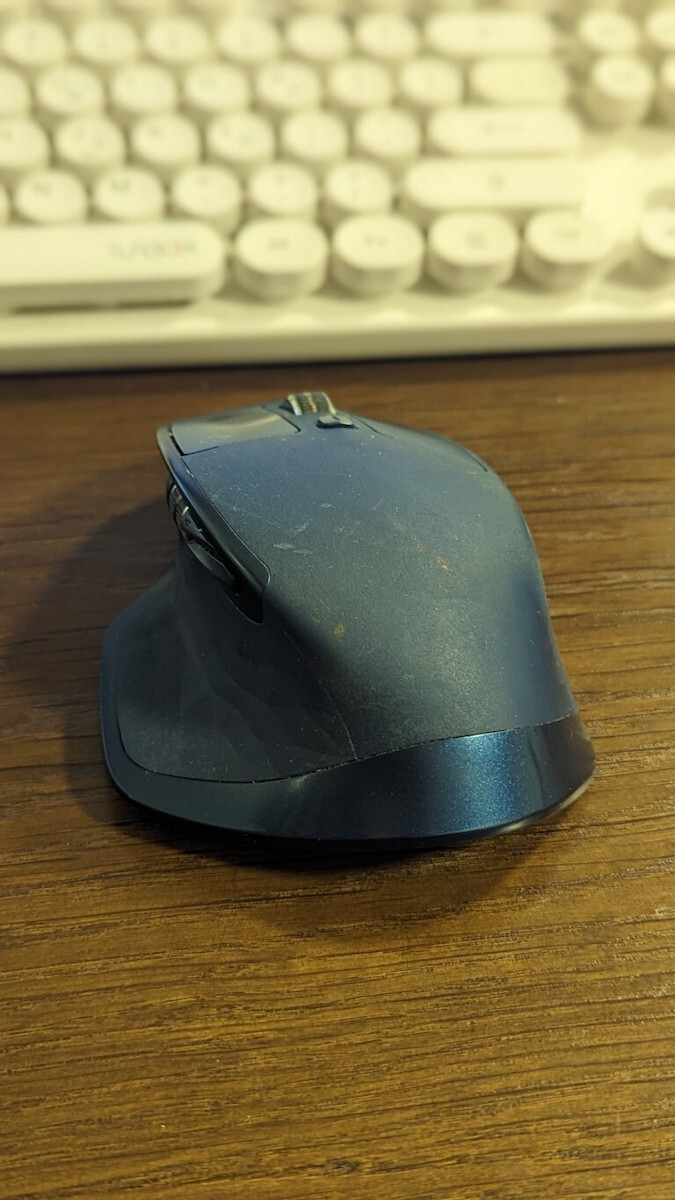
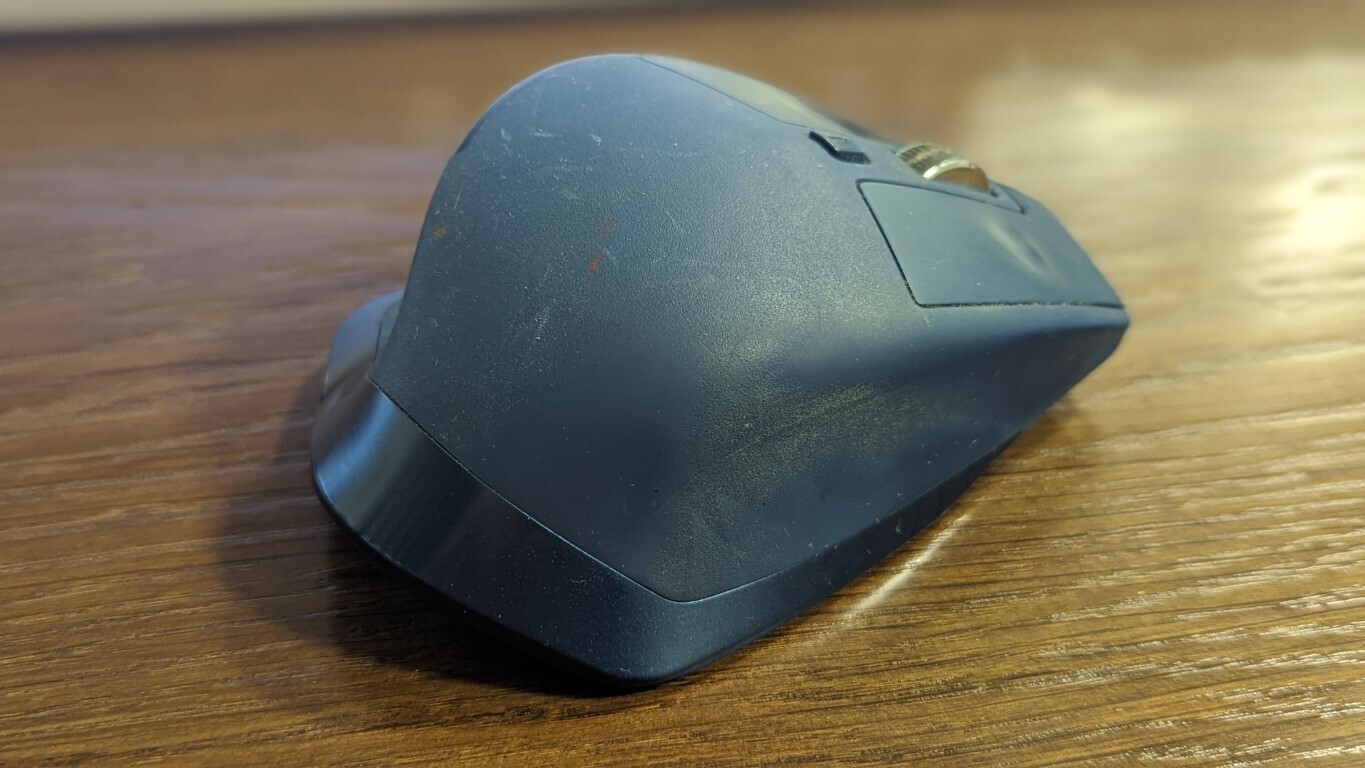
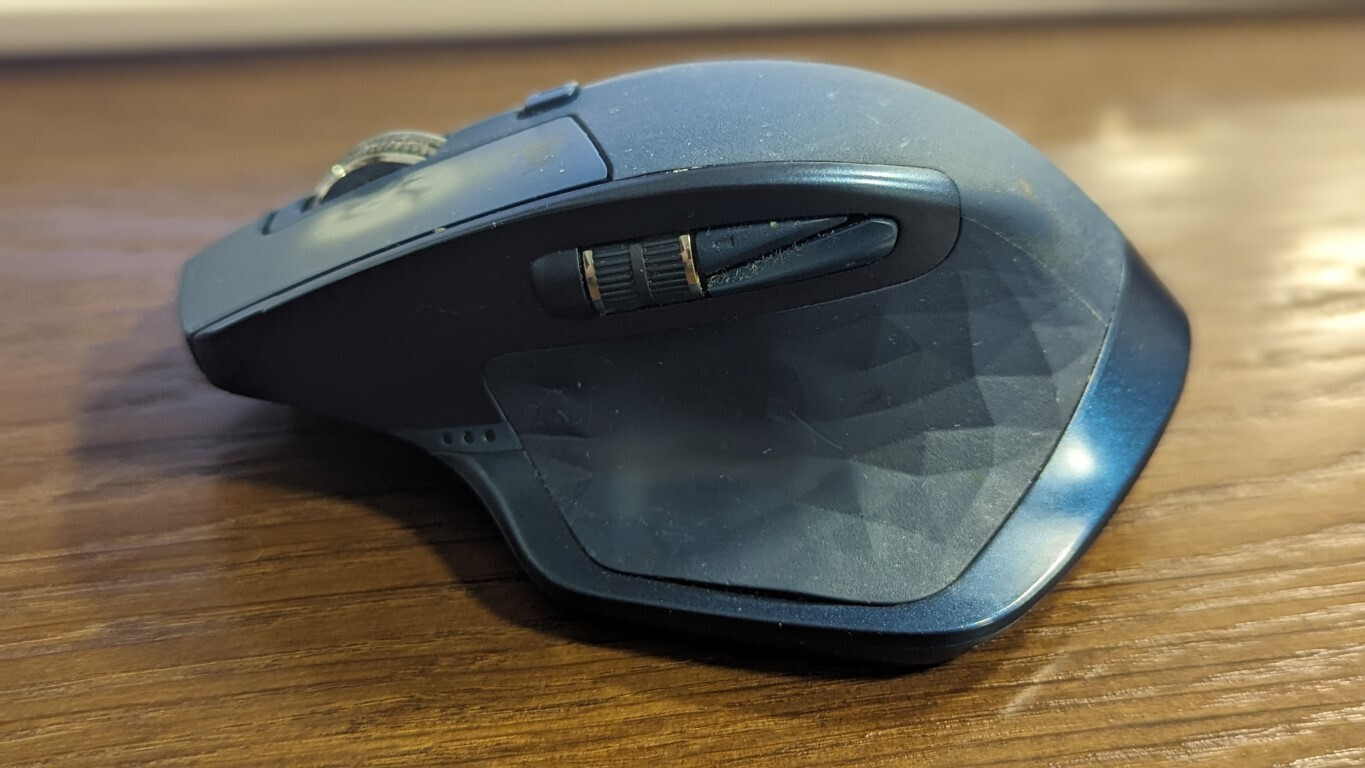
I'm adding some photos, avoiding showing the scroll wheel too much, because I'm embarrassed about how it has ended up ;;;)))
Ημερομηνία αγοράς 12.12.2018
Από τότε έως και σήμερα έχει τύχει να δοκιμάσω κοντά στα δέκα άλλα ποντίκια από διάφορες εταιρείες.
Κανένα, ΜΑ ΚΑΝΈΝΑ, δεν πλησιάζει καν ούτε στο πιο εξωτερικό στρώμα ατμόσφαιρας το επίπεδο αυτού του ΠΟΛΥ ΕΡΓΑΛΕΊΟΥ.
Αν είναι ΑΝΘΕΚΤΙΚΌ λέει ?
Είδατε την ημερομηνία αγοράς που αναφέρω στην αρχή ?
Ακόμη και σήμερα δε νιώθω κάποια αισθητή διαφορά στον τρόπο λειτουργίας του,
σε σύγκριση με την πρώτη μέρα.
Μονάχα μία "μικρή" οπτική διαφορά λόγο "φυσικής φθοράς" (ναι καλά ... Natural Wear and Tear my BackSide it is ... ας είμαστε ειλικρινής, το κακομεταχειρίστηκα αρκετά έως πολύ ... μέχρι και δυό τρεις βουτιές έχει φάει από το ύψος του γραφείου μου).
Αν είναι ΕΡΓΟΝΟΜΙΚΌ λέει ?
Το έχω ρυθμίσει έτσι που δε χρειάζομαι καν σελιδοδείκτες, AKA bookmarks.
Με διάφορες απομνημονευμένες και σχετικά απλές κινήσεις του καρπού μου και κάμποσα κλικ,
ανοίγω τις πιο συχνο χρησιμοποιούμενες ιστοσελίδες, φακέλους και εφαρμογές μου.
Αν έχει βολικό ΣΧΕΔΙΑΣΜΌ λέει ?
Αδιαμφισβήτητα ότι καλύτερο έχει σχεδιαστεί στο είδος του για την πιο ανώδυνη και ξεκούραστη πολύωρη χρήση.
Με Ιδανικές καμπύλες που εφαρμόζουν απρόσκοπτα στην παλάμη μου και σχεδόν απόλυτα ιδανικές διαστάσεις (κατά 98,5% ... διότι θα τις προτιμούσα μια σπιθαμή μεγαλύτερες).
Και με φοβερή επιδίωξη της χρυσής τομής στο θέμα βάρους, διότι είναι ακριβώς αυτό που θα έπρεπε.
Ούτε πολύ ελαφρύ, αλλά ούτε και ενοχλητικά βαρύ.
Από ΑΥΤΟΝΟΜΊΑ πως τα πάει ... λέει ... ???
Εν συντομίας, ξεχνάω πότε το φορτίζω, οπότε δυσκολεύομαι να πω με ακρίβεια, πόσο συχνά το κάνω.
Αλλά, μου δίνει την αίσθηση ότι πρέπει να είναι περίπου μία φόρτιση ανά τρίμηνο με τετράμηνο.
Είναι μήπως και ΑΘΌΡΥΒΑ τα πλήκτρα του ???
... ρωτάνε και κάποιοι ΑΧΌΡΤΑΓΟΙ ...
Εμ, εδώ θα σας δυσαρεστήσω εσάς τους ιδιαίτερα απαιτητικούς ... ΄)
Εγώ προσωπικά όχι μόνο δε χαλιέμαι με αυτό, αλλά και προτιμάω να ακούω τον διακριτικό
και ευχάριστο ήχο όλων των πλήκτρων κατά τη διάρκεια των εργασιών μου.
Όπα-Όπα φίλε ... Θες να πεις δεν έχει ούτε ένα αρνητικό στοιχείο ???
Χμμμ... ίσως το κόστος ... το οποίο όμως απόλυτα δικαιολογημένο βάση του τι παίρνεις.
Και, για κάποιους ιδιαίτερα απαιτητικούς πάλι, το ότι έχει την παλιά θύρα φόρτισης.
Πιστεύω λέγεται Micro USB.
Μόνο όταν (ή εάν) χαλάσει, θα προχωρούσα στην αγορά της επόμενης γενιάς,
δηλαδή του MX Master 3S.
Αυτά ... εν ολίγης !!!
Βγάζετε μόνοι σας ότι συμπεράσματα θέλετε ¨)
06.12.23 _ Edit
Θυμήθηκα κάτι μικρές λεπτομέρειες που ήθελα επίσης να αναφέρω, αλλά μου είχανε ξεφύγει εχθές.
Ένα σίγουρα θετικό στοιχείο, που αξίζει και επιβάλλεται να αναφερθεί, είναι ο άμεσος χρόνος ανταπόκρισης όλων των κουμπιών, όπως και η ακρίβειά τους.
Από την άλλη όμως, ένα "ολίγον αρνητικό" στοιχείο, το οποίο πιθανόν να θεωρηθεί σχετικά σπουδαίο από κάποιους (σίγουρα όχι "a deal breaker" στα δικά μου μάτια) είναι, ότι τα πλαϊνά κουμπιά πίσω από την κάθετη ροδέλα (αυτή που κάθεται άμεσα δίπλα στον αντίχειρα, δηλαδή) είναι κάπως άβολα εκεί που βρίσκονται, αλλά και η διαμόρφωσή τους, σε γενικά πλαίσια, είναι κάπως "περίεργη".
Πάντοτε σε σύγκριση με το αμέσως επόμενο μοντέλο της ίδιας σειράς, δηλαδή, το MX Master 3s,
όπου εξαλείφεται παντελώς αυτή η περιέργεια.
Αν και Απόλυτα, δηλαδή κατά 98,8% :), ευχαριστημένος με το προϊόν,
παρακάτω θα ήθελα να επισημάνω τους λόγους για τους οποίους ΣΉΜΕΡΑ
θα αγόραζα το επόμενο μοντέλο (MX Master 3s), και ας είναι και ολίγον,
για την ακρίβεια, κατά 24€ και 24% ακριβότερο (99€ Vs 75€),
1. Το Χρώμα :)
Θεωρώ πολύ πιο εκθαμβωτικό και σαγηνευτικό (πιο cool, στη λαϊκή των Γιάνκις) το χρώμα Pale Gray,
σε σύγκριση με το Μπλέ του παλιού μοντέλου στην κατοχή μου.
Ξέρω, ξέρω ... κάπως ανόητος λόγος, αλλά, όταν κρατάς κάτι για ώρες στα χέρια σου...
... σε καθημερινή βάση ... επί αρκετά χρόνια ... εμ, δεν μπορείς και να αγνοήσεις
απόλυτα τα "optics".
2. Πλαϊνά Πλήκτρα
Αυτό που αναφέρω και παραπάνω, δηλαδή.
3. Αθόρυβα Πλήκτρα
Αν και έχω τους ενδοιασμούς μου γι'αυτό, διότι ένα αθόρυβο ποντίκι που έχω σπίτι
μου δίνει ώρες ώρες την αίσθηση ότι δε λειτουργεί ακριβώς λόγο του πολύ χαμηλού
θορύβου των πλήκτρων του.
4. Θύρα USB C
Και ξανά, σίγουρα δεν είναι κανένα Deal Breaker στοιχείο !
Αλλά και πάλι, όταν έχετε την επιλογή ανάμεσα στα δύο,
ο πιο σώας τας φρένας θα πρέπει να καταλήξει σε Type C,
αντί για Micro USB.
P.S.
Προσθέτω και μερικές φώτο, αποφεύγοντας να δείξω ιδιαίτερα τη ροδέλα, διότι ντρέπομαι για το πως την έχω καταντήσει ;;;)))
Unfortunately, after 3 years it broke and doesn't work. When you spend so much money, you expect it to work properly. The usage was not daily and it was for a few hours. It is the first mouse that broke on its own. Unfortunately, I will not choose Logitech mouse again
Δυστυχώς μετά από 3 χρόνια χάλασε δεν δουλεύει. Όταν δίνεις τόσα λεφτά περιμένεις να δουλεύει σωστά. Η χρήση δεν ήταν καθημερινή και ήταν για λίγες ώρες. Είναι το πρώτο ποντίκι που μου χαλάει από μόνο του. Δυστυχώς δεν θα ξαναπροτιμησω Logitech ποντίκι
Generally, I burn out machines, the mouse works more than a slave in a cornfield, I've worn it out. Very positive that it doesn't easily catch dirt, and its plastic doesn't stick after about 2 years that I have it. Its personalized program for its buttons is very good and worth someone's time to set it up, essentially that's what you pay for, that's where your money goes. Also, the mouse instantly takes settings on its buttons and in games, but it's not for gaming, it's heavy. The Bluetooth is excellent and easily connects with other machines, allowing you to control 2 PCs/devices with one mouse, which is very convenient for pairing a TV-PC or desktop with a laptop. Generally, it has low sensitivity which can be tiring in design programs, although the side scroll wheel helps with horizontal and vertical scrolling. While if you make settings on vector points and vertices from the program it serves quite well, generally when you set it up and dedicate time it's a lifesaver, it's not just a mouse. Very good behavior on tables as it allows you to scroll fast and also with the scroll wheel, the same applies to editing videos, even music. The battery drains quickly, I only have it with a cable, but that's how it is with all demanding mice, okay, it lasts about 10 hours. What really annoyed me though is the button on the thumb which has worn out, its click doesn't work as well anymore and it's not like I constantly press it... that's why I gave it 3 stars. One day it got stuck and I have settings so that by pressing the thumb button and moving the mouse in right, left, up, down direction, various actions are performed, for example, it can open Chrome, create a new folder, minimize whatever each person likes. You understand if it gets stuck and you move the mouse, the computer goes crazy. Really Logitech is tragic... Now on the subject, if you think what I wrote is enough and you thought, "Wow, this guy has done everything for this mouse," I answer, it's not for you, give 20 euros and get a mouse to do your job, anyway mice, headphones always break... The negative is that this particular mouse makes you a company junkie because after so much use I can't comfortably work with another mouse, and I'm afraid I'll end up like those who buy iPhones and Macs, and soon if it's not a Mac, they won't even drink water. So soon, within the next 2 years, I will go for the new model of Logitech mouse. Overall, if you work with a PC for hours, even office work like email, Word, payroll, proof editing, design, but also more demanding tasks as mentioned above, it's worth the money... But it's a katana, you need to make it a Master to make it worth it, you need 4 to 5 days for your clicks!
Γενικά τα μηχανήματα τα λιώνω, το ποντίκι δουλεύει όλη μέρα ποιο πολύ και από σκλάβο σε φυτεία καλαμποκιού, το έχω ξεζουμίσει. Πολύ θετικό ότι δεν πιάνει εύκολα βρώμα, και τα πλαστικά του δεν κολάν μετά από 2 περίπου χρόνια που το έχω. Το εξατομικευμένο πρόγραμμα του για τα κουμπιά του είναι πάρα πολύ καλό και αξίζει κάποιος να αφιερώσει χρόνο για να το μοντάρει, στην ουσία αυτό πληρώνεις, εκεί πάνε τα λεφτά σου. Επίσης το ποντίκι παίρνει με την μια ρυθμίσεις στα κουμπιά του και σε παιχνίδια, αλλά δεν είναι για gaming, είναι βαρύ. Το Bluetooth εξαιρετικό και κουμπώνει εύκολα με άλλα μηχανήματα με αποτέλεσμα να χειρίζεσαι 2 pc/devices με ένα ποντίκι βολεύει πολύ σε pairing τηλεόρασης-PC, ή desktop Με laptop. Γενικά έχει χαμηλό sensitivity που στα σχεδιαστικά προγράμματα κουράζει λίγο, βέβαια η πλαϊνή ροδέλα βοηθάει σε παράλληλες και κάθετες στοιχίσεις. Ενώ αν κάνεις ρυθμίσεις σε vector Points και vertex από το πρόγραμμα μέσα εξυπηρετεί αρκετά, γενικά όταν το μοντάρεις και αφιερώσεις χρόνο είναι περίστροφο δεν είναι ποντίκι. Πολύ καλή συμπεριφορά σε πίνακες καθώς σε αφήνει να κάνεις scroll fast αλλά και σε σημεία με την ροδέλα, τα ίδια ισχύουν και για το editing σε video, ακόμα και σε μουσική. Η μπαταρία τα φτύνει εγώ το έχω μόνο με καλώδιο αλλά έτσι είναι με όλα τα ποντίκια απαιτήσεων, εντάξει ένα 10ωρο κρατάει στο νερό. Εκείνο που με τρέλανε όμως είναι το κουμπί στο αντίχειρα το οποίο έχει χαλάσει το κλίκ του δεν πιάνει τόσο καλά πλέον και δεν είναι ότι το πατάω συνέχεια… πραγματικά για αυτό έβαλα 3 αστέρια. Μία μέρα σκάλωσε και έχω ρυθμίσεις ώστε πατώντας το κουμπί του αντίχειρα και κινώντας το ποντίκι σε δεξιά, αριστερά, πάνω, κάτω κατεύθυνση γίνονται διάφορες ενέργειες για π.χ. μπορεί να ανοίγει chrome, Να κάνει νέο φάκελό, minimize ότι γουστάρει ο καθένας. Καταλαβαίνεται αν κολλήσει-μαγκώσει και κουνάς το ποντίκι ο υπολογιστής τρελαίνετε. Πραγματικά Logitech τραγικό… Τώρα επί του θέματος αν θεωρείς ότι αυτά που έγραψα είναι αρκετά και σκέφτηκες αμάν και αυτός ο τύπος έχει κάνει τα πάντα για αυτό το ποντίκι σου απαντάω, δεν κάνει για εσένα, δώσε 20 euro και πάρε ένα ποντίκι να κάνεις την δουλειά σου, έτσι και αλλιώς ποντίκια, ακουστικά χαλάνε πάντα… Το αρνητικό είναι ότι το συγκεκριμένο ποντίκι σε κάνει company-junkie γιατί πραγματικά μετά από τόση χρήση δεν μπορώ να δουλέψω άνετα με άλλο ποντίκι, και φοβάμαι μην καταντήσω σαν αυτούς που αγοράζουν iphone και mac, και σε λίγο καιρό αν δεν είναι Mac το ποτήρι του δεν θα πίνουν ούτε νερό. Όποτε soon μέσα στο επόμενο 2αρι χρόνια θα πάω για το νέο μοντέλο Logitech mouse. Overall αν δουλεύεις με Pc ώρες ακόμα και δουλειά γραφείου email, word, μισθοδοσίες, proof editing, design αλλά και ποιο απαιτητικά όπως ανέφερα παραπάνω τα αξίζει τα λεφτά του… Αλλά είναι katana, θέλει να το κάνεις Master για να τα βγάλει, θέλεις 4 με 5 μέρες για τα πατήματα σου !
After 4 years and 2 months of occasional to zero daily use, the thumb button of the MX Master mouse gave up, as it usually happens, resulting in the device getting stuck altogether. Obviously, I can open the mouse by following the instructions of the numerous tutorials available online for partial troubleshooting of the problem. However, while this may make the mouse work again, the said button will have to be disabled, removing from the device's multiple functionalities for which it is advertised and sold at a high price. Logitech is unacceptable, therefore, as it clearly includes its products in the strategy of planned obsolescence, as this particular problem dates back to the 1st generation of MX Master and has not yet been corrected.
Μετά από 4 χρόνια και 2 μήνες ολιγόωρης ως μηδενικής καθημερινής χρήσης, παρέδωσε πνεύμα το κουμπί του αντίχειρα, όπως συμβαίνει συνήθως στα ποντίκια της σειράς MX Master, έχοντας ως αποτέλεσμα να κολλάει και συνολικά η συσκευή. Προφανώς μπορώ να ανοίξω το ποντίκι ακολουθώντας τις οδηγίες των πολυάριθμων tutorials που κυκλοφορούν διαδικτυακά για τη μερική αντιμετώπιση του προβλήματος. Ωστόσο, μπορεί μεν με αυτό τον τρόπο να ξαναλειτουργήσει το ποντίκι, αλλά θα πρέπει να απενεργοποιηθεί το εν λόγω κουμπί, αφαιρώντας από την πολλαπλή λειτουργικότητα της συσκευής για την οποία άλλωστε διαφημίζεται και πωλείται ακριβά το συγκεκριμένο ποντίκι. Απαράδεκτη, συνεπώς, η Logitech η οποία εμφανώς εντάσσει τα προϊόντα της στη στρατηγική της προσχεδιασμένης απαρχαίωσης, αφού το συγκεκριμένο πρόβλημα ανάγεται στην 1η γενιά του MX Master και δεν έχει διορθωθεί ακόμη.
It was purchased for 68€ and has been used daily for graphic designing work for the past year. It will be your ultimate assistant in staying productive every day, as it is extremely durable with a battery life of approximately 2.5 months (in an 8-hour workday). Its biggest plus for me is its weight, which helps it fit better in a large hand.
Είχε αγοραστεί στα 68€ και εδώ και 1 χρόνο γίνεται καθημερινή χρήση σε δουλειές graphic designing. Θα είναι ο απόλυτος βοηθός σας για να είστε productive καθημερινά μιας και είναι απόλυτα ανθεκτικό με μπαταρία που κρατάει γύρω στους 2.5 μήνες περίπου (σε 8ωρη καθημερινή εργασία). Το μεγαλύτερο του συν για εμένα είναι το βάρος του, το οποίο το βοηθάει να εφαρμόζει καλύτερα σε ένα μεγάλο χέρι.
After 3 years of use, even though it wasn't heavily used since it was only for home and not office, meaning maximum 2-3 hours of use per day, the laser said goodbye and stopped working. All the buttons are pressed, but the mouse doesn't move.
2. Money wasted.
Obviously, I won't be getting the 3S again because I lost trust in Logitech.
Μετά από 3 χρόνια χρήσης, μάλιστα ούτε καν έντονης αφού ήταν για το σπίτι μόνο και όχι γραφείο δηλαδή με το ζόρι 2-3 ώρες χρήση τη μέρα maximun, αποχαιρέτησε το laser και χάλασε. Πατιούνται τα κουμπιά δηλαδή όλα, αλλά το mouse δεν κάνει καμία κίνηση.
Πεταμένα λεφτά.
Προφανώς δεν ξαναπαίρνω ούτε καν το 3S γιατί έχασα την εμπιστοσύνη στη Logitech.
I mainly work with design programs and classic office programs. No matter how many upgrades I've tried or settings I've adjusted, the scroll wheel automatically zooms in and out making it impossible to design. It's a real pain. However, the keyboard is comfortable and has nice lighting.
Δουλεύω σχεδιαστικά προγράμματα κυρίως και τα κλασσικά προγράμματα του office. Οσες αναβαθμίσεις και αν δοκίμασα, όσες ρυθμίσεις και εάν έκανα, η ρόδελα κανει μονη της γρηγορο zoom in και zoom out και ετσι είναι αδύνατον να σχεδιάσεις. Είναι πραγματικά χρήματα στον ΚΟΥΒΑ. Το πληκτρολόγιο του είναι άνετο και με όμορφο φωτισμό.
Extremely convenient, comfortable to hold, reliable, and accurate. Purchased as a replacement for the previous model, which simply wore out from extended use (although it still works). Ideal for design, Photoshop, and long hours of daily use due to its shape and programmable buttons.
My only complaint is that when using it with Bluetooth connection instead of the accompanying USB dongle, the accuracy and smoothness of the pointer flow (macOS) is noticeably reduced, offering a subpar user experience.
Εξαιρετικά βολικό, άνετο στο κράτημα, αξιόπιστο και ακριβές. Αγοράστηκε ως αντικαταστάτης του προηγούμενου μοντέλου, το οποίο απλά μου τρύπησε στο σημείο επαφής με τον αντίχειρα από την εκτεταμένη χρήση (λειτουργεί όμως ακόμη). Ιδανικό για design, photoshop αλλά και πολύωρη καθημερινή χρήση λόγω σχήματος και προγραμματιζόμενων πλήκτρων.
Μόνο μου παράπονο ότι αν το χρησιμοποιήσω με Bluetooth σύνδεση και όχι με το συνοδευτικό usb dongle, μειώνεται αισθητά η ακρίβεια και η ομαλότητα στη ροή του δείκτη (macOS) προσφέροντας υποδεέστερη εμπειρία χρήσης.
Extremely heavy and to place your thumb in the position means that you will move the mouse with your wrist, which I found extremely difficult. A month later, it didn't suit me at all, my wrist hurts constantly. Maybe I have small hands, of course, because it is generally a bulky mouse and I was used to smaller ones. I didn't see the extra features, I've been told they're great, but since it tires me, I left it aside.
Υπερβολικά βαρύ και για να βάλεις το χέρι στη θέση με τον αντίχειρα σημαίνει ότι θα κουνάς το ποντίκι με τον καρπό κάτι που βρήκα εξαιρετικά δύσκολο. Ένα μήνα μετά δεν με βόλεψε καθόλου πονάει ο καρπός μου συνέχεια. Ίσως έχω μικρό χέρι βέβαια γιατί γενικά είναι ογκώδες ποντίκι και ειχα συνηθίσει σε μικρότερα. Τις έξτρα λειτουργίες δεν τις είδα μου έχουν πει τα καλύτερα αλλά αφού με κουράζει το άφησα στην άκρη.
The cheap thumb gesture button sticks and the mouse goes crazy or doesn't respond at all to movements. I disconnected it from the PCB and didn't bother with it again.
Every generation of MX Master has an issue, they can't make something that doesn't cause damage. Unfortunately, Logitech has declined in quality.
Το πάνχαζο thumb gesture button κολλάει και το ποντίκι τρελένεται ή δεν αποκρίνεται καν στις κινήσεις. Το αποσύνδεσα από το pcb και δεν ξανασχολήθηκα.
Κάθε γενιά MX Master έχει και ένα θέμα, δεν γίνεται να φτιάξουν κάτι που να μην βγάζει ζημιά. Έχει πάρει τον κατήφορο η Logitech στη ποιότητα δυστυχώς.
In exactly 2.5 years, from what I read, everyone said goodbye to it after about 2 years, so we're talking about a product with an expiration date, ergonomically and functionally very good.. but if you're going to spend 80 euros and it only lasts you 2 years..
Στα 2.5 χρόνια ακριβώς , Απ' ότι διαβάζω στα 2 χρόνια περίπου όλοι το αποχαιρέτησαν, άρα μιλάμε για ένα προϊόν με ημερομηνία λήξεως, εργονομικά και λειτουργικά πολύ καλό.. άλλα άμα είναι να δίνεις 80ευρω και να σου κρατάει 2 χρόνια..
Excellent especially for prolonged use (it doesn't tire at all), the battery lasts long enough until it needs to be recharged with the cable, the software that comes with it for customization offers endless options, probably the best mouse I've had so far. The downside is the size for those who want something with a smaller volume that doesn't take up space in their laptop bag.
Εξαιρετικό ιδίως σε πολύωρη χρήση (δεν κουράζει καθόλου), η μπαταρία κρατάει αρκετά μέχρι να χρειαστεί επαναφόρτιση με το καλώδιο, το software με το οποίο έρχεται για customization προσφέρει άπειρες επιλογές, μάλλον το καλύτερο ποντίκι που είχα μέχρι σήμερα. Μειονέκτημα το μέγεθος για όποιον θέλει κάτι με μικρότερο όγκο που να μην πιάνει χώρο στην τσάντα του λάπτοπ του.
I think this is one of the best options for professionals, for heavy use. Overall, this series has not disappointed at all. The battery is very good compared to everything in the same price range. The sound of the keys is loud but I don't think it's such a big problem. It works simultaneously with other devices without needing a second one.
After about a year, the gesture button stopped working, and probably blocked the scroll wheel. Unfortunately, it's out of warranty and even though there are many videos on how to fix it, a 90 euro mouse shouldn't crash over time. Of course, it's the most advertised mouse for all content creators...
Νομίζω απ τις καλύτερες επιλογές για επαγγελματίες , για σκληρή χρήση . Γενικά αυτή η σειρά δεν έχει απογοητεύσει καθόλου . Η μπαταρία του πολύ καλή σε σχέση όλα αυτά που είναι στο ίδιο price range. Ο ήχος των πλήκτρων είναι έντονος αλλά νομίζω δεν είναι τόσο μεγάλο πρόβλημα. Δουλεύει ταυτόχρονα και με άλλες συσκευές χωρίς να χρειαστεί να έχεις δεύτερο .
Μετά από ένα χρόνο περίπου το gesture button σταμάτησε να δουλεύει , και μάλλον μπλόκαρε και την ροδέλα. Δυστηχώς είναι εκτός εγγύησης και παρόλο που υπάρχουν πολλά βίντεο πως να το διορθώσεις, δεν επιτρέπεται 90 ευρώ ποντίκι να κρασάρει στον χρόνο. Βέβαια είναι το πιο διαφημισμένο ποντίκι για όλους τους content creators ...
I have been using the Logitech MX Master for years and I wouldn't change it for anything, so when I wanted a second one just like it (that was still available on the market)... the choice was clear!
Έχω για χρόνια το Logitech MX Master, και δεν το αλλάζω με τίποτα, οπότε όταν ήθελα ένα δεύτερο ίδιο (που να κυκλοφορεί στην αγορά όμως)... η επιλογή ήταν μονόδρομος!
4 years of daily office use, I don't want to use any other mouse. If the size suits someone, they will just pay for it once and enjoy it every day for years.
Now I have 2, one at home and one at the office.
4 Χρόνια καθημερινη χρήση γραφείου δεν θέλω να πάρω πιάσω άλλο ποντικι. Αν καποιον το βολεύει το μεγεθος απλα θα το πληρωσει μια φορα και θα το χαιρεται κάθε μερα για χρόνια.
Πλεον εχω 2 ενα σπιτι ενα γραφείο.
3 stars because I bought it to switch from one laptop to another (they are on different networks) and the only way is an inconvenient button on the bottom of the mouse without the ability to transfer the function to something easier.
Additionally, the software often freezes and until you restart, you are stuck with the default settings until you set it up again
3 αστέρια γιατί το πήρα ώστε να αλλάζω από το ένα λάπτοπ στο άλλο (βρίσκονται σε διαφορετικά δίκτυα) και ο μόνος τρόπος είναι ένα άβολο κουμπί στη κάτω μέρος του ποντικιού δίχως δυνατότητα μεταφοράς της λειτουργίας σε κάποιο πιο εύκολο.
Επιπλέον το λογισμικό συχνά κολλάει και μέχρι να κάνεις restart μένεις με τις default ρυθμίσεις μέχρι να το ξανασεταρεις
Very good mouse, but it has a short lifespan especially for the price I bought it.
After about 2 years, the thumb button started sticking and I can't use it. Then the laser (or whatever it's called underneath) broke and the mouse doesn't move.
The problem with the thumb button can be "solved" but you have to lift the plastic button up a bit almost every time you press it.
Πολύ καλό ποντίκι, άλλα έχει μικρή διάρκεια ζωής ειδικά για την τιμή που το αγόρασα.
Μετά από 2 χρόνια περίπου άρχισε να κολλάει το κουμπί στον αντίχειρα και δεν μπορώ να το χρησιμοποιήσω. Έπειτα χάλασε και το laser (ή όπως το λένε αυτό που έχει απο κάτω) και δεν κουνάει το ποντίκι.
Το πρόβλημα με το κουμπί του αντίχειρα "λύνεται" αλλά πρέπει να σηκώνεις το πλαστικό κουμπί λίγο προς το πάνω, σχεδόν κάθε φορά που το πατάς.
Yes, it has many buttons and is convenient, but as a feel it is very heavy and not suitable for many hours. The back/forward button is useless where they placed it. I wonder why there is so much fuss about this mouse..
Ναι έχει πολλά κουμπιά και εξυπηρετεί αλλά σαν αίσθηση είναι πολύ βαρύ και δεν είναι για πολλές ώρες. Το back/forward κουμπί είναι άχρηστο εκεί που το τοποθέτησαν. Απορώ τόσος ντόρος για αυτό το ποντίκι..
Expensive but it feels very nice in the hand and if it lasts—as long as the first MX I had—for ten years, it will be worth the money.
Also, the ability to program the buttons per application helps a lot
Ακριβό αλλά είναι πολύ ωραίο στο χέρι και αν κρατήσει -όσο το πρώτο ΜΧ που είχα- για δέκα χρόνια θα βγάλει τα λεφτά του.
Επίσης η δυνατότητα προγραμματισμού των πλήκτρων ανά πρόγραμμα βοηθάει αρκετά
The top-tier mouse from Logitech is designed for advanced users and professionals who want to achieve more with greater efficiency. The MX Master 2S creates an irresistible package with Logitech Flow, allowing you to seamlessly control two computers with one mouse and copy/paste content between them. Combining advanced features and an impressive design, it offers exceptional comfort, control, precision, and customization capabilities.
Specifications are collected from official manufacturer websites. Please verify the specifications before proceeding with your final purchase. If you notice any problem you can report it here.
Without any exaggeration, this might be the best mouse currently available in the world for professional use. I have been dealing with computers for over 30 years and have tried many mice. My previous (and favorite) one was a black Microsoft mouse (the Wireless IntelliMouse Explorer with Tilt Wheel), which was purchased in 2000 and retired in 2019 (it still works) to be replaced by the Logitech. I hesitated a bit to switch to Logitech, but from the moment I held it in my hands and rolled it on the mouse pad, I knew it would be my next favorite mouse for the next decades.
When you hold it in your palm, you feel like you're in the cockpit of a fighter aircraft, controlling everything with one hand. Its buttons have a light, clear, and sweet touch and execute commands without any hesitation. The mouse wheel is incredibly user-friendly, with two modes of operation (clicky, which brakes, and free-rolling, which rolls freely). The second mode (free-rolling), combined with the heavy wheel, allows you to scroll through huge texts and web pages with a single motion (you just spin it abruptly and quickly, and it continues to spin on its own for several seconds). It also has an automatic transition mechanism from one mode to another (slow scrolling is clicky, and if you spin it quickly, it automatically switches to free-rolling, and when it slows down, it returns to clicky).
There is also another smaller wheel in the thumb area for scrolling left and right, which is also very convenient. Of course, there are the other familiar forward/back buttons, as well as a "hidden" button that is activated when you press the thumb downwards. All buttons are programmable through the very beautiful and user-friendly software, and you can have different button settings for each application (app profiles).
The wireless connection to the PC is reliable (I only used the small USB receiver, not Bluetooth), and so far, I haven't noticed any missed commands. The optical beam it uses for motion detection is not in the visible spectrum (it doesn't illuminate with red light like most mice), maybe it's infrared, but it's not visible to the naked eye.
I bought two Logitech MX Master 2S for my two workstations, and after 15 days of use, the batteries in both are at 2/3 of their charge, which is clearly and beautifully displayed through 3 small LEDs at the edge of the thumb every time you "wake up" the mouse. I estimate that each charge will last me for sure over a month, maybe even 2 months.
Overall, the purchase of the Logitech MX Master 2S is one of those purchases that leave you completely satisfied, and you feel like every cent of your money was well spent. Honestly, I have nothing negative to say. I highly recommend it for those who work professionally with PCs (programmers, developers, content creators, etc.). I'm not an expert to say how suitable it is for gaming. Perhaps it's better to use a wired mouse there to minimize lag (which I don't perceive, but I'm not a hardcore gamer).
Note for the latest-and-greatest freaks: the Logitech MX Master 3 will be released on the market very soon. If you're not in a hurry, have a little patience to see what goodies it will have compared to the 2S. If you're in a hurry, go ahead and confidently purchase the 2S.
Update (11/18/2019) --- Everything is fine with the mouse, I confirm what I have written above, for me it continues to be the king of mice for professional use. I want to mention a small disadvantage/bug that I have noticed, which has to do with the way the mouse "wakes up" the PC when it is in sleep mode. For some reason, the mouse sends a wake-up signal to the PC exactly 10 minutes after you stop using it. That is, if you have set the PC to enter sleep mode after, for example, 30 minutes, with the Logitech connected, the PC will enter sleep mode after 40 minutes. For some reason, in the first 10 minutes of calmness, the mouse sends a signal to the PC that it is active, so all the times you have set in Windows for screen and PC standby start 10 minutes later. Also, if you want, for example, to leave the house and manually put the PC in sleep mode, it will "wake up" on its own after 10 minutes (the mouse itself will "wake it up" even if it doesn't move). I don't know if it's a hardware or driver issue, but it's the only flaw I have found so far. I have tested it on a second PC with a different version of the operating system and it behaves exactly the same. Maybe they will fix it in a future firmware or driver update. It has been mentioned in the international community, in forums, etc. What I did to deal with it is to choose monitor and PC standby times longer than 10 minutes and to keep in mind that the actual times are the ones I set +10 minutes. It's a minor issue, but it still surprises me how such a bug escaped from Logitech... I mention the problem so that you are aware of it and don't get annoyed when you see the PC not "sleeping" when it should or waking up on its own.
Χωρίς καμία δόση υπερβολής, ίσως πρόκειται για το καλύτερο ποντίκι που υπάρχει αυτή τη στιγμή στον κόσμο για επαγγελματική χρήση. Ασχολούμαι πάνω από 30 χρόνια με υπολογιστές και έχω δοκιμάσει πολλά ποντίκια. Το προηγούμενο (και αγαπημένο) μου ήταν ένα σκυλί μαύρο της Microsoft (το Wireless IntelliMouse Explorer με Tilt Wheel), το οποίο αγοράστηκε το 2000 και αποσύρθηκε το 2019 (δουλεύει ακόμα) για να αντικατασταθεί από το Logitech. Δίστασα λίγο να πάω στο Logitech, αλλά από την πρώτη στιγμή που το έπιασα στα χέρια μου και το ρολάρισα στο mouse pad κατάλαβα ότι θα είναι το επόμενο αγαπημένο μου ποντίκι για τις επόμενες δεκαετίες.
Όταν το αγκαλιάζεις με την παλάμη σου νιώθεις ότι είσαι σε cockpit μαχητικού αεροσκάφους και ελέγχεις τα πάντα με ένα χέρι. Τα πλήκτρα του είναι αέρινα σε αίσθηση, σαφή και γλυκά στο πάτημα και εκτελούν χωρίς κανέναν δισταγμό τις εντολές που δέχονται. Το mouse wheel είναι απίστευτα εύχρηστο, με δύο καταστάσεις λειτουργίας (clicky που φρενάρει και free-rolling που κυλά ελεύθερα). Η δεύτερη (free-rolling), σε συνδυασμό με το βαρύ ροδάκι, επιτρέπει να σκρολάρεις τεράστια κείμενα και ιστοσελίδες με μία κίνηση (απλά το γυρίζεις απότομα και γρήγορα και αυτό συνεχίζει να γυρίζει μόνο του για αρκετά δευτερόλεπτα). Επίσης, διαθέτει μηχανισμό αυτόματης μετάβασης από τη μία κατάσταση στην άλλη (η αργή κύλιση είναι clicky και αν το γυρίσεις απότομα μεταβαίνει αυτόματα σε free-rolling και όταν επιβραδύνει επιστρέφει σε clicky).
Υπάρχει και άλλη μικρότερη ροδούλα στην περιοχή του αντίχειρα για κύλιση δεξιά-αριστερά, που είναι επίσης πολύ βολική. Φυσικά υπάρχουν και τα υπόλοιπα γνωστά πλήκτρα forward/back, καθώς επίσης και ένα "κρυφό" πλήκτρο που ενεργοποιείται όταν πιέσεις τον αντίχειρα προς τα κάτω. Όλα τα πλήκτρα είναι προγραμματιζόμενα από το πολύ όμορφο και εύχρηστο s/w και μπορείς να έχεις διαφορετικές ρυθμίσεις πλήκτρων ανά εφαρμογή (app profiles).
Η ασύρματη σύνδεση με το PC είναι αξιόπιστη (χρησιμοποίησα μόνο το μικρό USB receiver, όχι μέσω Bluetooth) και μέχρι στιγμής δεν έχω αντιληφθεί ότι έχασε κάποια από τις εντολές μου. Η οπτική ακτίνα που χρησιμοποιεί για την ανίχνευση της κίνησης δεν είναι στο ορατό φάσμα (δεν φωτίζει με κόκκινο φως όπως στα περισσότερα ποντίκια), ίσως είναι υπέρυθρο, πάντως δεν φαίνεται με το μάτι.
Αγόρασα δύο Logitech MX Master 2S για τα δύο μου workstations και μετά από 15 μέρες χρήσης οι μπαταρίες και στα δύο είναι στα 2/3 της φόρτισης, η οποία φαίνεται πολύ όμορφα και με σαφήνεια μέσω 3 μικρών LED στην άκρη του αντίχειρα κάθε φορά που "ξυπνάς" το ποντίκι. Εκτιμώ πως η κάθε φόρτιση θα με βγάζει σίγουρα πάνω από μήνα, ίσως και 2 μήνες.
Γενικά η αγορά του Logitech MX Master 2S είναι μια από αυτές τις αγορές που σε αφήνουν απόλυτα ικανοποιημένο και νιώθεις ότι κάθε cent των χρημάτων σου έπιασε τόπο. Ειλικρινά δεν έχω κάτι αρνητικό να πω. Το προτείνω ανεπιφύλακτα για όσους ασχολούνται επαγγελματικά με το PC (προγραμματιστές, developers, content creators κ.α.). Για το κατά πόσο είναι κατάλληλο για παιχνίδια δεν είμαι ειδικός για να το πω. Ίσως εκεί είναι καλύτερα να χρησιμοποιηθεί ένα ενσύρματο ποντίκι για την ελαχιστοποίηση του lag (το οποίο εγώ δεν καταλαβαίνω ότι υπάρχει, αλλά δεν είμαι hardcore gamer).
Σημείωση για τους latest-and-greatest freaks: πολύ σύντομα θα έρθει στην αγορά το Logitech MX Master 3. Αν δεν βιάζεστε, κάντε λίγο υπομονή να δείτε τι καλούδια θα έχει σε σχέση με το 2S. Αν πάλι βιάζεστε, προχωρήστε άφοβα με την αγορά του 2S.
Ενημέρωση (18/11/2019) --- Όλα καλά με το ποντίκι, επιβεβαιώνω όσα έχω γράψει παραπάνω, για μένα συνεχίζει να είναι ο βασιλιάς των ποντικιών για επαγγελματική χρήση. Θέλω να αναφέρω ένα μικρό μειονέκτημα/bug που εντόπισα, το οποίο έχει να κάνει με τον τρόπο που το ποντίκι "ξυπνάει" το PC όταν αυτό βρίσκεται σε κατάσταση αναμονής (sleep mode). Για κάποιον λόγο το ποντίκι στέλνει ένα σήμα αφύπνισης στο PC ακριβώς 10 λεπτά από τη στιγμή που θα σταματήσεις να το χρησιμοποιείς. Δηλαδή αν έχεις βάλει το PC να μπαίνει σε sleep mode π.χ. μετά από 30 λεπτά, με το Logitech συνδεμένο το PC θα μπει σε sleep mode σε 40 λεπτά. Για κάποιον λόγο στα πρώτα 10 λεπτά ηρεμίας το ποντίκι στέλνει ένα σήμα στο PC ότι είναι ενεργό, οπότε όλοι οι χρόνοι που έχεις θέσει στα Windows για αναμονή της οθόνης και του PC ξεκινούν 10 λεπτά αργότερα. Επίσης, αν θέλεις π.χ. να φύγεις απ' το σπίτι και θέσεις εσύ χειροκίνητα το PC σε sleep mode, αυτό θα "ξυπνήσει" μόνο του μετά από 10 λεπτά (θα το "ξυπνήσει" το ίδιο το ποντίκι κι ας μην κινείται). Δεν ξέρω αν είναι θέμα h/w ή driver, αλλά είναι το μόνο ψεγάδι που έχω βρει μέχρι στιγμής. Το έχω δοκιμάσει και σε δεύτερο PC με άλλη έκδοση λειτουργικού και συμπεριφέρεται ακριβώς το ίδιο. Ίσως σε μελλοντικό f/w ή driver update να το διορθώσουν. Έχει αναφερθεί και στη διεθνή κοινότητα, σε forums κτλ. Αυτό που έκανα για να το αντιμετωπίσω είναι να επιλέξω χρόνους αναμονής monitor και PC μεγαλύτερους από 10 λεπτά και να έχω υπόψη μου ότι οι πραγματικοί χρόνοι είναι αυτοί που έθεσα +10 λεπτά. Μικρό το κακό, αλλά πάλι μου κάνει εντύπωση πώς ξέφυγε από τη Logitech ένα τέτοιο bug... Αναφέρω το πρόβλημα για το έχετε υπόψη σας και να μην παραξενευτείτε και σας σπάσουν τα νεύρα όταν βλέπετε το PC να μην "κοιμάται" όταν πρέπει ή να "ξυπνάει" μόνο του.
One might say that I am exaggerating, but after about 2 years, the thumb button on my mouse got stuck and kept clicking on its own until I disabled it from the computer program. I expected to see such issues after many years, not now, especially since I paid 70 euros for it. A Microsoft mouse that I bought for 5 euros has been working for 15 years without any issues.
3/5 stars
Edit: After researching it, the mouse does indeed have issues with the side button!!! Even though I never pressed it!!! It has now completely stopped responding, while before I could get it to work somewhat. Unacceptable for its cost. I would not buy it again. I will see if I can fix it myself by opening it and will come back with a new review.
2/5 stars
Edit 2: By ordering special screwdrivers online, I was able to open it and fix the button a little. Enough to unstick it and allow the computer to function and for me to disable it completely. Such a good product, it's a shame that such an issue can make it practically useless if you don't know what to do.
1 star.
Ίσως πει κανείς ότι είμαι υπερβολικός αλλά μετά από κανα 2 χρόνια που το χω έφαγε σκάλωμα το πλήκτρο του αντίχειρα και πατιόταν μόνο του συνέχεια μέχρι να το απενεργοποιήσω απ' το προγραμμα του υπολογιστή. Έχοντας δώσει 70 ευρώ περίμενα να δω τέτοια μετά από πολλά χρόνια όχι τώρα. Ποντίκι της microsoft που είχα πάρει με 5 ευρώ έχει βγάλει 15 χρόνια χωρίς κανένα θέμα.
3/5 αστεράκια
Edit: Αφού το έψαξα το ποντίκι όντως βγάζει θέμα σε πολλούς στο πλαινό πλήκτρο!!! Χωρίς να το έχω πατήσει ποτέ!!! Πλέον σταμάτησε τελείως να αποκρίνεται ενώ πριν το έβγαζα το έβαζα και κάπως έπιανε. Απαράδεκτο για το κόστος του. Δεν θα το ξαναγόραζα. Θα δω αν ανοίγοντας το μπορώ να το φτιάξω μόνος μου και θα επανέλθω με νέα κριτική.
2/5 αστεράκια
Edit 2: Παραγγέλνοντας ειδικά κατσαβίδια απ' το ίντερνετ μπόρεσα να το ανοίξω και να φτιάξω το κουμπί λίγο. Τόσο ώστε να ξεκολλήσει και να μπορέσει να λειτουργήσει ο υπολογιστής και να το απενεργοποιήσω τελείως. Τόσο καλό προιόν κρίμα για ένα τέτοιο θέμα να μπορεί στην κυριολεξία να γίνει άχρηστο αν δεν ξέρεις τι να κάνεις.
4 years of daily office use, I don't want to use any other mouse. If the size suits someone, they will just pay for it once and enjoy it every day for years.
Now I have 2, one at home and one at the office.
4 Χρόνια καθημερινη χρήση γραφείου δεν θέλω να πάρω πιάσω άλλο ποντικι. Αν καποιον το βολεύει το μεγεθος απλα θα το πληρωσει μια φορα και θα το χαιρεται κάθε μερα για χρόνια.
Πλεον εχω 2 ενα σπιτι ενα γραφείο.
3 stars because I bought it to switch from one laptop to another (they are on different networks) and the only way is an inconvenient button on the bottom of the mouse without the ability to transfer the function to something easier.
Additionally, the software often freezes and until you restart, you are stuck with the default settings until you set it up again
3 αστέρια γιατί το πήρα ώστε να αλλάζω από το ένα λάπτοπ στο άλλο (βρίσκονται σε διαφορετικά δίκτυα) και ο μόνος τρόπος είναι ένα άβολο κουμπί στη κάτω μέρος του ποντικιού δίχως δυνατότητα μεταφοράς της λειτουργίας σε κάποιο πιο εύκολο.
Επιπλέον το λογισμικό συχνά κολλάει και μέχρι να κάνεις restart μένεις με τις default ρυθμίσεις μέχρι να το ξανασεταρεις
Very good mouse, but it has a short lifespan especially for the price I bought it.
After about 2 years, the thumb button started sticking and I can't use it. Then the laser (or whatever it's called underneath) broke and the mouse doesn't move.
The problem with the thumb button can be "solved" but you have to lift the plastic button up a bit almost every time you press it.
Πολύ καλό ποντίκι, άλλα έχει μικρή διάρκεια ζωής ειδικά για την τιμή που το αγόρασα.
Μετά από 2 χρόνια περίπου άρχισε να κολλάει το κουμπί στον αντίχειρα και δεν μπορώ να το χρησιμοποιήσω. Έπειτα χάλασε και το laser (ή όπως το λένε αυτό που έχει απο κάτω) και δεν κουνάει το ποντίκι.
Το πρόβλημα με το κουμπί του αντίχειρα "λύνεται" αλλά πρέπει να σηκώνεις το πλαστικό κουμπί λίγο προς το πάνω, σχεδόν κάθε φορά που το πατάς.
Yes, it has many buttons and is convenient, but as a feel it is very heavy and not suitable for many hours. The back/forward button is useless where they placed it. I wonder why there is so much fuss about this mouse..
Ναι έχει πολλά κουμπιά και εξυπηρετεί αλλά σαν αίσθηση είναι πολύ βαρύ και δεν είναι για πολλές ώρες. Το back/forward κουμπί είναι άχρηστο εκεί που το τοποθέτησαν. Απορώ τόσος ντόρος για αυτό το ποντίκι..
Expensive but it feels very nice in the hand and if it lasts—as long as the first MX I had—for ten years, it will be worth the money.
Also, the ability to program the buttons per application helps a lot
Ακριβό αλλά είναι πολύ ωραίο στο χέρι και αν κρατήσει -όσο το πρώτο ΜΧ που είχα- για δέκα χρόνια θα βγάλει τα λεφτά του.
Επίσης η δυνατότητα προγραμματισμού των πλήκτρων ανά πρόγραμμα βοηθάει αρκετά
Incredible tool, especially if you work on 2 different PCs simultaneously or even asynchronously. Its battery has a very large capacity, and you forget when you last charged it. The side scroll wheel is extremely helpful in Excel and in any programs where you need to move left and right. It works on all surfaces with incredible precision. The only downside it has, which isn't exactly a downside, is that it doesn't have a c-type USB port for charging.
Απίστευτο εργαλείο, ειδικά αν δουλεύεις σε 2 διαφορετικά PC ταυτόχρονα ή και εταιροχρονισμένα. Η μπαταρία του έχει πάρα πολύ μεγάλη χωρητικότητα και ξεχνάς πότε το φόρτισες. Το πλαϊνό ρολάκι είναι εξαιρετικά διευκολυντικό στο excel και σε όσα προγράμματα πρέπει να κινήσαι δεξιά-αριστερά. Δουλεύει σε όλες τις επιφάνειες με απίστευτη ακρίβεια. Το μόνο μείον που έχει, που δεν είναι ακριβώς μείον, είναι ότι δεν έχει c-type USB θύρα για την φόρτησή του.
Good mouse overall, comfortable, ergonomic, user-friendly especially for professional use. Its functions are amazing and the buttons are very good but quite noisy for such a mouse. A negative for me is the scroll wheel. It sometimes gets stuck, as if it's coming off its base. This happened from the first week of use while it seems quite cheap and its construction.
Καλο mouse σε γενικες γραμμες ξεκουραστο, εργονομικο, ευχρηστο ιδιαιτερα για επαγγελματικη χρηση. Οι λειτουργιες του φοβερες και τα πληκτρα του πολυ καλα αλλα θορυβωδες αρκετα για ενα τετοιο ποντικι, Αρνητικο για εμενα ειναι η ροδελα. Μου σκαλωνει καποιες φορες, σαν να φευγει απο την βαση της. Αυτο απο την πρωτη βδομαδα χρησης ενω φαινεται αρκετα φτηνη και η κατασκευη της.
I've had it for 2 years. When I got it, the next model had already come out, but this one was on a good offer for around €60, so I grabbed it. I work many hours a day on the PC and for years I suffered from tendonitis in my right hand. However, since I got it, I haven't felt the slightest discomfort. Honestly, you hold it and enjoy working. Once you get used to it, you can't use another mouse. And besides the ergonomics, it has amazing features: fully customizable buttons through the software, a wheel that changes mode and spins very quickly for scrolling through large documents, Excel, etc., very nice build with great materials that fit in the hand, and a battery that lasts for weeks.
If you try it, you won't want to part with it.
The only downside is the micro USB charging port, which is outdated. The next models obviously have type C, but if you find this one on a good offer, get it without hesitation; it hardly differs from the newer ones.
Το έχω εδώ και 2 χρόνια. Όταν το πήρα είχε βγει και το επόμενο αλλά αυτό ήταν σε καλή προσφορά γύρω στα 60€ και το τσίμπησα. Δουλεύω πολλές ώρες την ημέρα στο pc και για χρόνια ταλαιπωρούμουν με τενοντίτιδες στο δεξί χέρι. Από τότε που το πήρα όμως δεν έχω ξανανιώσει το παραμικρό. Ειλικρινά το κρατάς και χαίρεσαι να δουλεύεις. Μόλις το συνηθίσεις δεν μπορείς να χρησιμοποιήσεις άλλο ποντίκι. Και εκτός από την εργονομία έχει και φοβερά χαρακτηριστικά: πλήρως προσαρμόσιμα πλήκτρα μέσω του λογισμικού, ροδέλα που αλλάζει mode και γυρίζει πολύ γρηγορα για να σκρολάρεις μεγάλα έγγραφα, excel κλπ, πολύ ωραία κατασκευή με ωραία υλικά που εφαρμόζουν στο χέρι, μπαταρία που κρατάει βδομάδες.
Άμα το δοκιμάσεις δεν θα θες να το αποχωριστείς.
Το μόνο κακό η micro usb θύρα φόρτισης που είναι ξεπερασμένη. Τα επόμενα μοντέλα προφανώς έχουν type c αλλά αν το συγκεκριμένο το πετύχετε σε καμιά καλή προσφορά πάρτε το άφοβα δεν διαφέρει σχεδόν καθόλου από τα επόμενα.
I bought it 3 years ago. Average use, 8-9 hours a day, desktop (not gaming, etc.). In the first year, it stopped responding. I searched as much as I could and had no trouble finding out what had happened since the problem is design-related and the internet is filled with videos about fixes, etc. It was the classic problem with the thumb button that gets stuck and requires opening the entire shell to loosen the screws. However, to unscrew it, you need to remove some adhesive plastics on the underside that cover the screws, which are single-use, so if you take them off, you have to replace them as well. The new ones cost 10 euros from a Chinese site. After 1 year, the same problem again. Another 10 euros for adhesive plastics. In the 3rd year, with not heavy use, the plastic shell above this button broke as it is quite soft and is pressed by that awful button underneath it. It was only a matter of time before it happened. I had to buy a whole new shell for the mouse, 30 euros from a Chinese site. So in 3 years, due to the design problem with the thumb button, the cost has risen to 70 euros (purchase), plus 10 (screw plastics the first time), plus 10 (screw plastics the second time), plus 30 euros (upper shell), totaling 120 euros. No matter how good it is in other aspects, when you pay 70 euros for a supposedly premium mouse, the expectation is that it should function flawlessly and, of course, not incur costs afterward. This has cost me almost double in spare parts due to a design flaw. The Chinese have caught on that they keep breaking, and for this reason, they have filled their sites with spare parts which they sell at exorbitant prices like hotcakes. It is not worth it at all: with the money I have spent on this, I could buy 3-4 very good and more durable mice. Once I decide to get rid of it, I won't buy Logitech again, and I certainly do not recommend this specific mouse to anyone. I give it a second star only because it is good as long as it works flawlessly and without wear.
Το αγόρασα πριν 3 χρόνια. Χρήση κατά μέσο όρο, 8-9 ώρες την ημέρα, desktop (όχι gaming κλπ). Στον πρώτο χρόνο σταμάτησε να ανταποκρίνεται. Το έψαξα όσο μπορούσα και δεν δυσκολεύτηκα να βρω τι είχε γίνει αφού το πρόβλημα είναι σχεδιαστικό κι έχει γεμίσει το ιντερνετ με βιντεάκια απο fixes κλπ. Ηταν το κλασσικό πρόβλημα με το κουμπί του αντίχειρα που κολλάει και θέλει άνοιγμα όλο το κέλυφος για να χαλαρώσεις τις βίδες του. Για να το ξεβιδώσεις όμως πρέπει να βγάλεις κάτι αυτοκόλλητα πλαστικά που έχει στην κάτω πλευρά και καλύπουν τις βίδες, τα οποία είναι μιας χρήσης, συνεπώς εάν τα βγάλεις πρέπει να τα αντικαταστήσεις κιόλας. Απο κινεζοσάιτ τα καινούργια κόστισαν 10 ευρώ. Μετά απο 1 χρόνο, ξανά το ίδιο πρόβλημα. Ακόμα 10 ευ΄ρω για πλαστικά αυτοκόλλητα. Στον 3ο χρόνο, με όχι σκληρη χρήση, έσπασε το πλαστικό κέλυφος πάνω από αυτό το κουμπί καθώς είναι αρκετά μαλακό και πιέζεται απο το άθλιο αυτό κουμπί που βρίσκεται απο κάτω του. Ήταν θέμα χρόνου να συμβεί. Χρειάστηκε να αγοράσω ολόκληρο νέο κέλυφος για το ποντίκι, 30 ευρώ απο κινεζοσάιτ. Άρα μέσα σε 3 χρόνια, λόγω του σχεδιαστικού προβλήματος στο κουμπί του αντίχειρα, το κόστος έχει ανέλθει σε 70 ευρω (αγορά), συν 10 (πλαστικά βιδών πρώτη φορά), συν 10 (πλαστικά βιδών δεύτερη φορά), συν 30 ευρώ (άνω κέλυφος), σύνολο 120 ευρω. Όσο καλό κι αν είναι στα υπόλοιπα, όταν δίνεις 70 ευρώ για αγορά υποτίθεται premium ποντικιού, η απαίτηση είναι να είναι απροβλημάτιστο στη λειτουργία του και βεβαίως να μην έχει κόστος στη συνέχεια. Αυτό, μου έχει βγει σχεδόν τα διπλά λεφτά σε ανταλλακτικά επειδή έχει σχεδιαστικό πρόβλημα. Οι δε κινέζοι έχουν πάρει μυρωδιά ότι χαλάνε συνεχώς και για αυτό το λόγο έχουν γεμίσει ανταλλακτικά τα σάιτ τους τα οποία τα πουλάνε πανάκριβα σαν ζεστά ψωμάκια. Δεν τα αξίζει με τίποτα: με όσα λεφτά έχω δώσει για αυτό θα αγόραζα 3-4 πολύ καλά και πιο ανθεκτικά ποντίκια. Μόλις αποφασίσω να το σουτάρω δεν ξαναγοράζω logitech και γενικά το συγκεκριμένο ποντίκι δεν το προτείνω σε κανέναν. Bάζω 2ο αστεράκι μόνο και μόνο επειδή είναι καλό όσο λειτουργεί απροβλημάτιστα και χωρίς φθορές.
The best mouse on the market. It's amazing. I've had it for 2 weeks and 4 days and the battery is at 85% with continuous use (8-10 hours a day). The customizability is extreme. It works with Mac and Windows simultaneously without any issues, and for Mac, it's even better than the first-party mice/trackpads. It's lighter than it looks. 100% comfortable and ergonomic. 10/10 you must get it
Το καλύτερο ποντίκι στην αγορά. Είναι υπέροχο. Το έχω 2 εβδομάδες και 4 μέρες η μπαταρία είναι στο 85% με ακατάπαυστη χρήση ( 8 - 10 ώρες την μέρα ). Το customisability ειναι ακραίο. Επικοινωνεί με Mac και Windows ταυτόχρονα δίχως θέμα, για τα Mac είναι καλύτερο και από τα first party ποντίκια/trackpads. Ειναι πιο ελαφρύ απο οτι φαίνεται. 100% άνετο και εργονομικό. 10/10 πρέπει να το πάρετε
Purchase date 12.12.2018
Since then, I have had the chance to try almost ten other mice from various companies.
None, I mean NONE, even comes close to the level of this TOOL's atmosphere.
Is it DURABLE, you ask?
Did you see the purchase date I mentioned at the beginning?
Even today, I don't feel any noticeable difference in its performance,
compared to the first day.
Only a "small" visual difference due to "natural wear and tear" (yes, well... Natural Wear and Tear my BackSide it is... let's be honest, I have mistreated it quite a bit... it has even survived a few dives from my desk height).
Is it ERGONOMIC, you ask?
I have adjusted it so that I don't need bookmarks.
With various memorized and relatively simple movements of my wrist and a few clicks,
I open my most frequently used websites, folders, and applications.
Does it have a convenient DESIGN, you ask?
Undoubtedly the best designed in its category for the most painless and comfortable extended use.
With ideal curves that fit smoothly in my palm and almost perfect dimensions (about 98.5%... because I would prefer them a tiny bit larger).
And with a great pursuit of the golden ratio in terms of weight, because it is exactly what it should be.
Not too light, but not annoyingly heavy either.
How about its AUTONOMY... you ask...?
In short, I forget when I charge it, so it's difficult for me to say exactly how often I do it.
But, it gives me the feeling that it needs to be charged about once every three to four months.
Are the keys perhaps SILENT...?
...some of you insatiable ones ask...
Well, here I will disappoint you... ¨)
Personally, not only am I not bothered by it, but I also prefer to hear the discreet
and pleasant sound of all the keys during my work.
Wait a minute... Do you mean there isn't a single negative aspect???
Hmmm... maybe the cost... which is completely justified based on what you get.
And, for some particularly demanding people, the fact that it has the old charging port.
I believe it's called Micro USB.
Only when (or if) it breaks, I would consider buying the next generation,
namely the MX Master 3S.
That's it... in a nutshell!!!
You draw your own conclusions ¨)
06.12.23 _ Edit
I remembered some small details that I also wanted to mention, but I had forgotten yesterday.
One definitely positive aspect, which deserves and must be mentioned, is the immediate response time of all the buttons, as well as their accuracy.
On the other hand, a "slightly negative" aspect, which may be considered relatively significant by some (definitely not a "deal breaker" in my eyes), is that the side buttons behind the vertical scroll wheel (the one directly next to the thumb, that is) are somewhat awkward where they are located, and their configuration, in general terms, is somewhat "strange".
Always in comparison to the immediately next model in the same series, namely the MX Master 3s,
where this curiosity is completely eliminated.
Although I am absolutely, I mean 98.8% :) satisfied with the product,
below I would like to highlight the reasons why TODAY
I would buy the next model (MX Master 3s), even if it is slightly,
to be precise, €24 and 24% more expensive (€99 vs €75),
1. The Color :)
I consider the color Pale Gray to be much more dazzling and captivating (cooler, in the language of the Yankees) compared to the Blue of the old model I have. I know, I know... it's a somewhat silly reason, but when you hold something in your hands for hours... on a daily basis... for several years... well, you can't completely ignore the optics.
2. Side Buttons
That's what I mentioned above, namely.
3. Silent Buttons
Although I have my concerns about this, because a silent mouse I have at home sometimes gives me the feeling that it's not working properly due to the very low noise of its buttons.
4. USB C Port
And again, it's definitely not a deal breaker element! But still, when you have the choice between the two, the wiser choice should be Type C instead of Micro USB.
P.S.
I'm adding some photos, avoiding showing the scroll wheel too much, because I'm embarrassed about how it has ended up ;;;)))
Ημερομηνία αγοράς 12.12.2018
Από τότε έως και σήμερα έχει τύχει να δοκιμάσω κοντά στα δέκα άλλα ποντίκια από διάφορες εταιρείες.
Κανένα, ΜΑ ΚΑΝΈΝΑ, δεν πλησιάζει καν ούτε στο πιο εξωτερικό στρώμα ατμόσφαιρας το επίπεδο αυτού του ΠΟΛΥ ΕΡΓΑΛΕΊΟΥ.
Αν είναι ΑΝΘΕΚΤΙΚΌ λέει ?
Είδατε την ημερομηνία αγοράς που αναφέρω στην αρχή ?
Ακόμη και σήμερα δε νιώθω κάποια αισθητή διαφορά στον τρόπο λειτουργίας του,
σε σύγκριση με την πρώτη μέρα.
Μονάχα μία "μικρή" οπτική διαφορά λόγο "φυσικής φθοράς" (ναι καλά ... Natural Wear and Tear my BackSide it is ... ας είμαστε ειλικρινής, το κακομεταχειρίστηκα αρκετά έως πολύ ... μέχρι και δυό τρεις βουτιές έχει φάει από το ύψος του γραφείου μου).
Αν είναι ΕΡΓΟΝΟΜΙΚΌ λέει ?
Το έχω ρυθμίσει έτσι που δε χρειάζομαι καν σελιδοδείκτες, AKA bookmarks.
Με διάφορες απομνημονευμένες και σχετικά απλές κινήσεις του καρπού μου και κάμποσα κλικ,
ανοίγω τις πιο συχνο χρησιμοποιούμενες ιστοσελίδες, φακέλους και εφαρμογές μου.
Αν έχει βολικό ΣΧΕΔΙΑΣΜΌ λέει ?
Αδιαμφισβήτητα ότι καλύτερο έχει σχεδιαστεί στο είδος του για την πιο ανώδυνη και ξεκούραστη πολύωρη χρήση.
Με Ιδανικές καμπύλες που εφαρμόζουν απρόσκοπτα στην παλάμη μου και σχεδόν απόλυτα ιδανικές διαστάσεις (κατά 98,5% ... διότι θα τις προτιμούσα μια σπιθαμή μεγαλύτερες).
Και με φοβερή επιδίωξη της χρυσής τομής στο θέμα βάρους, διότι είναι ακριβώς αυτό που θα έπρεπε.
Ούτε πολύ ελαφρύ, αλλά ούτε και ενοχλητικά βαρύ.
Από ΑΥΤΟΝΟΜΊΑ πως τα πάει ... λέει ... ???
Εν συντομίας, ξεχνάω πότε το φορτίζω, οπότε δυσκολεύομαι να πω με ακρίβεια, πόσο συχνά το κάνω.
Αλλά, μου δίνει την αίσθηση ότι πρέπει να είναι περίπου μία φόρτιση ανά τρίμηνο με τετράμηνο.
Είναι μήπως και ΑΘΌΡΥΒΑ τα πλήκτρα του ???
... ρωτάνε και κάποιοι ΑΧΌΡΤΑΓΟΙ ...
Εμ, εδώ θα σας δυσαρεστήσω εσάς τους ιδιαίτερα απαιτητικούς ... ΄)
Εγώ προσωπικά όχι μόνο δε χαλιέμαι με αυτό, αλλά και προτιμάω να ακούω τον διακριτικό
και ευχάριστο ήχο όλων των πλήκτρων κατά τη διάρκεια των εργασιών μου.
Όπα-Όπα φίλε ... Θες να πεις δεν έχει ούτε ένα αρνητικό στοιχείο ???
Χμμμ... ίσως το κόστος ... το οποίο όμως απόλυτα δικαιολογημένο βάση του τι παίρνεις.
Και, για κάποιους ιδιαίτερα απαιτητικούς πάλι, το ότι έχει την παλιά θύρα φόρτισης.
Πιστεύω λέγεται Micro USB.
Μόνο όταν (ή εάν) χαλάσει, θα προχωρούσα στην αγορά της επόμενης γενιάς,
δηλαδή του MX Master 3S.
Αυτά ... εν ολίγης !!!
Βγάζετε μόνοι σας ότι συμπεράσματα θέλετε ¨)
06.12.23 _ Edit
Θυμήθηκα κάτι μικρές λεπτομέρειες που ήθελα επίσης να αναφέρω, αλλά μου είχανε ξεφύγει εχθές.
Ένα σίγουρα θετικό στοιχείο, που αξίζει και επιβάλλεται να αναφερθεί, είναι ο άμεσος χρόνος ανταπόκρισης όλων των κουμπιών, όπως και η ακρίβειά τους.
Από την άλλη όμως, ένα "ολίγον αρνητικό" στοιχείο, το οποίο πιθανόν να θεωρηθεί σχετικά σπουδαίο από κάποιους (σίγουρα όχι "a deal breaker" στα δικά μου μάτια) είναι, ότι τα πλαϊνά κουμπιά πίσω από την κάθετη ροδέλα (αυτή που κάθεται άμεσα δίπλα στον αντίχειρα, δηλαδή) είναι κάπως άβολα εκεί που βρίσκονται, αλλά και η διαμόρφωσή τους, σε γενικά πλαίσια, είναι κάπως "περίεργη".
Πάντοτε σε σύγκριση με το αμέσως επόμενο μοντέλο της ίδιας σειράς, δηλαδή, το MX Master 3s,
όπου εξαλείφεται παντελώς αυτή η περιέργεια.
Αν και Απόλυτα, δηλαδή κατά 98,8% :), ευχαριστημένος με το προϊόν,
παρακάτω θα ήθελα να επισημάνω τους λόγους για τους οποίους ΣΉΜΕΡΑ
θα αγόραζα το επόμενο μοντέλο (MX Master 3s), και ας είναι και ολίγον,
για την ακρίβεια, κατά 24€ και 24% ακριβότερο (99€ Vs 75€),
1. Το Χρώμα :)
Θεωρώ πολύ πιο εκθαμβωτικό και σαγηνευτικό (πιο cool, στη λαϊκή των Γιάνκις) το χρώμα Pale Gray,
σε σύγκριση με το Μπλέ του παλιού μοντέλου στην κατοχή μου.
Ξέρω, ξέρω ... κάπως ανόητος λόγος, αλλά, όταν κρατάς κάτι για ώρες στα χέρια σου...
... σε καθημερινή βάση ... επί αρκετά χρόνια ... εμ, δεν μπορείς και να αγνοήσεις
απόλυτα τα "optics".
2. Πλαϊνά Πλήκτρα
Αυτό που αναφέρω και παραπάνω, δηλαδή.
3. Αθόρυβα Πλήκτρα
Αν και έχω τους ενδοιασμούς μου γι'αυτό, διότι ένα αθόρυβο ποντίκι που έχω σπίτι
μου δίνει ώρες ώρες την αίσθηση ότι δε λειτουργεί ακριβώς λόγο του πολύ χαμηλού
θορύβου των πλήκτρων του.
4. Θύρα USB C
Και ξανά, σίγουρα δεν είναι κανένα Deal Breaker στοιχείο !
Αλλά και πάλι, όταν έχετε την επιλογή ανάμεσα στα δύο,
ο πιο σώας τας φρένας θα πρέπει να καταλήξει σε Type C,
αντί για Micro USB.
P.S.
Προσθέτω και μερικές φώτο, αποφεύγοντας να δείξω ιδιαίτερα τη ροδέλα, διότι ντρέπομαι για το πως την έχω καταντήσει ;;;)))
Unfortunately, after 3 years it broke and doesn't work. When you spend so much money, you expect it to work properly. The usage was not daily and it was for a few hours. It is the first mouse that broke on its own. Unfortunately, I will not choose Logitech mouse again
Δυστυχώς μετά από 3 χρόνια χάλασε δεν δουλεύει. Όταν δίνεις τόσα λεφτά περιμένεις να δουλεύει σωστά. Η χρήση δεν ήταν καθημερινή και ήταν για λίγες ώρες. Είναι το πρώτο ποντίκι που μου χαλάει από μόνο του. Δυστυχώς δεν θα ξαναπροτιμησω Logitech ποντίκι
Generally, I burn out machines, the mouse works more than a slave in a cornfield, I've worn it out. Very positive that it doesn't easily catch dirt, and its plastic doesn't stick after about 2 years that I have it. Its personalized program for its buttons is very good and worth someone's time to set it up, essentially that's what you pay for, that's where your money goes. Also, the mouse instantly takes settings on its buttons and in games, but it's not for gaming, it's heavy. The Bluetooth is excellent and easily connects with other machines, allowing you to control 2 PCs/devices with one mouse, which is very convenient for pairing a TV-PC or desktop with a laptop. Generally, it has low sensitivity which can be tiring in design programs, although the side scroll wheel helps with horizontal and vertical scrolling. While if you make settings on vector points and vertices from the program it serves quite well, generally when you set it up and dedicate time it's a lifesaver, it's not just a mouse. Very good behavior on tables as it allows you to scroll fast and also with the scroll wheel, the same applies to editing videos, even music. The battery drains quickly, I only have it with a cable, but that's how it is with all demanding mice, okay, it lasts about 10 hours. What really annoyed me though is the button on the thumb which has worn out, its click doesn't work as well anymore and it's not like I constantly press it... that's why I gave it 3 stars. One day it got stuck and I have settings so that by pressing the thumb button and moving the mouse in right, left, up, down direction, various actions are performed, for example, it can open Chrome, create a new folder, minimize whatever each person likes. You understand if it gets stuck and you move the mouse, the computer goes crazy. Really Logitech is tragic... Now on the subject, if you think what I wrote is enough and you thought, "Wow, this guy has done everything for this mouse," I answer, it's not for you, give 20 euros and get a mouse to do your job, anyway mice, headphones always break... The negative is that this particular mouse makes you a company junkie because after so much use I can't comfortably work with another mouse, and I'm afraid I'll end up like those who buy iPhones and Macs, and soon if it's not a Mac, they won't even drink water. So soon, within the next 2 years, I will go for the new model of Logitech mouse. Overall, if you work with a PC for hours, even office work like email, Word, payroll, proof editing, design, but also more demanding tasks as mentioned above, it's worth the money... But it's a katana, you need to make it a Master to make it worth it, you need 4 to 5 days for your clicks!
Γενικά τα μηχανήματα τα λιώνω, το ποντίκι δουλεύει όλη μέρα ποιο πολύ και από σκλάβο σε φυτεία καλαμποκιού, το έχω ξεζουμίσει. Πολύ θετικό ότι δεν πιάνει εύκολα βρώμα, και τα πλαστικά του δεν κολάν μετά από 2 περίπου χρόνια που το έχω. Το εξατομικευμένο πρόγραμμα του για τα κουμπιά του είναι πάρα πολύ καλό και αξίζει κάποιος να αφιερώσει χρόνο για να το μοντάρει, στην ουσία αυτό πληρώνεις, εκεί πάνε τα λεφτά σου. Επίσης το ποντίκι παίρνει με την μια ρυθμίσεις στα κουμπιά του και σε παιχνίδια, αλλά δεν είναι για gaming, είναι βαρύ. Το Bluetooth εξαιρετικό και κουμπώνει εύκολα με άλλα μηχανήματα με αποτέλεσμα να χειρίζεσαι 2 pc/devices με ένα ποντίκι βολεύει πολύ σε pairing τηλεόρασης-PC, ή desktop Με laptop. Γενικά έχει χαμηλό sensitivity που στα σχεδιαστικά προγράμματα κουράζει λίγο, βέβαια η πλαϊνή ροδέλα βοηθάει σε παράλληλες και κάθετες στοιχίσεις. Ενώ αν κάνεις ρυθμίσεις σε vector Points και vertex από το πρόγραμμα μέσα εξυπηρετεί αρκετά, γενικά όταν το μοντάρεις και αφιερώσεις χρόνο είναι περίστροφο δεν είναι ποντίκι. Πολύ καλή συμπεριφορά σε πίνακες καθώς σε αφήνει να κάνεις scroll fast αλλά και σε σημεία με την ροδέλα, τα ίδια ισχύουν και για το editing σε video, ακόμα και σε μουσική. Η μπαταρία τα φτύνει εγώ το έχω μόνο με καλώδιο αλλά έτσι είναι με όλα τα ποντίκια απαιτήσεων, εντάξει ένα 10ωρο κρατάει στο νερό. Εκείνο που με τρέλανε όμως είναι το κουμπί στο αντίχειρα το οποίο έχει χαλάσει το κλίκ του δεν πιάνει τόσο καλά πλέον και δεν είναι ότι το πατάω συνέχεια… πραγματικά για αυτό έβαλα 3 αστέρια. Μία μέρα σκάλωσε και έχω ρυθμίσεις ώστε πατώντας το κουμπί του αντίχειρα και κινώντας το ποντίκι σε δεξιά, αριστερά, πάνω, κάτω κατεύθυνση γίνονται διάφορες ενέργειες για π.χ. μπορεί να ανοίγει chrome, Να κάνει νέο φάκελό, minimize ότι γουστάρει ο καθένας. Καταλαβαίνεται αν κολλήσει-μαγκώσει και κουνάς το ποντίκι ο υπολογιστής τρελαίνετε. Πραγματικά Logitech τραγικό… Τώρα επί του θέματος αν θεωρείς ότι αυτά που έγραψα είναι αρκετά και σκέφτηκες αμάν και αυτός ο τύπος έχει κάνει τα πάντα για αυτό το ποντίκι σου απαντάω, δεν κάνει για εσένα, δώσε 20 euro και πάρε ένα ποντίκι να κάνεις την δουλειά σου, έτσι και αλλιώς ποντίκια, ακουστικά χαλάνε πάντα… Το αρνητικό είναι ότι το συγκεκριμένο ποντίκι σε κάνει company-junkie γιατί πραγματικά μετά από τόση χρήση δεν μπορώ να δουλέψω άνετα με άλλο ποντίκι, και φοβάμαι μην καταντήσω σαν αυτούς που αγοράζουν iphone και mac, και σε λίγο καιρό αν δεν είναι Mac το ποτήρι του δεν θα πίνουν ούτε νερό. Όποτε soon μέσα στο επόμενο 2αρι χρόνια θα πάω για το νέο μοντέλο Logitech mouse. Overall αν δουλεύεις με Pc ώρες ακόμα και δουλειά γραφείου email, word, μισθοδοσίες, proof editing, design αλλά και ποιο απαιτητικά όπως ανέφερα παραπάνω τα αξίζει τα λεφτά του… Αλλά είναι katana, θέλει να το κάνεις Master για να τα βγάλει, θέλεις 4 με 5 μέρες για τα πατήματα σου !
After 4 years and 2 months of occasional to zero daily use, the thumb button of the MX Master mouse gave up, as it usually happens, resulting in the device getting stuck altogether. Obviously, I can open the mouse by following the instructions of the numerous tutorials available online for partial troubleshooting of the problem. However, while this may make the mouse work again, the said button will have to be disabled, removing from the device's multiple functionalities for which it is advertised and sold at a high price. Logitech is unacceptable, therefore, as it clearly includes its products in the strategy of planned obsolescence, as this particular problem dates back to the 1st generation of MX Master and has not yet been corrected.
Μετά από 4 χρόνια και 2 μήνες ολιγόωρης ως μηδενικής καθημερινής χρήσης, παρέδωσε πνεύμα το κουμπί του αντίχειρα, όπως συμβαίνει συνήθως στα ποντίκια της σειράς MX Master, έχοντας ως αποτέλεσμα να κολλάει και συνολικά η συσκευή. Προφανώς μπορώ να ανοίξω το ποντίκι ακολουθώντας τις οδηγίες των πολυάριθμων tutorials που κυκλοφορούν διαδικτυακά για τη μερική αντιμετώπιση του προβλήματος. Ωστόσο, μπορεί μεν με αυτό τον τρόπο να ξαναλειτουργήσει το ποντίκι, αλλά θα πρέπει να απενεργοποιηθεί το εν λόγω κουμπί, αφαιρώντας από την πολλαπλή λειτουργικότητα της συσκευής για την οποία άλλωστε διαφημίζεται και πωλείται ακριβά το συγκεκριμένο ποντίκι. Απαράδεκτη, συνεπώς, η Logitech η οποία εμφανώς εντάσσει τα προϊόντα της στη στρατηγική της προσχεδιασμένης απαρχαίωσης, αφού το συγκεκριμένο πρόβλημα ανάγεται στην 1η γενιά του MX Master και δεν έχει διορθωθεί ακόμη.
It was purchased for 68€ and has been used daily for graphic designing work for the past year. It will be your ultimate assistant in staying productive every day, as it is extremely durable with a battery life of approximately 2.5 months (in an 8-hour workday). Its biggest plus for me is its weight, which helps it fit better in a large hand.
Είχε αγοραστεί στα 68€ και εδώ και 1 χρόνο γίνεται καθημερινή χρήση σε δουλειές graphic designing. Θα είναι ο απόλυτος βοηθός σας για να είστε productive καθημερινά μιας και είναι απόλυτα ανθεκτικό με μπαταρία που κρατάει γύρω στους 2.5 μήνες περίπου (σε 8ωρη καθημερινή εργασία). Το μεγαλύτερο του συν για εμένα είναι το βάρος του, το οποίο το βοηθάει να εφαρμόζει καλύτερα σε ένα μεγάλο χέρι.
After 3 years of use, even though it wasn't heavily used since it was only for home and not office, meaning maximum 2-3 hours of use per day, the laser said goodbye and stopped working. All the buttons are pressed, but the mouse doesn't move.
2. Money wasted.
Obviously, I won't be getting the 3S again because I lost trust in Logitech.
Μετά από 3 χρόνια χρήσης, μάλιστα ούτε καν έντονης αφού ήταν για το σπίτι μόνο και όχι γραφείο δηλαδή με το ζόρι 2-3 ώρες χρήση τη μέρα maximun, αποχαιρέτησε το laser και χάλασε. Πατιούνται τα κουμπιά δηλαδή όλα, αλλά το mouse δεν κάνει καμία κίνηση.
Πεταμένα λεφτά.
Προφανώς δεν ξαναπαίρνω ούτε καν το 3S γιατί έχασα την εμπιστοσύνη στη Logitech.
I mainly work with design programs and classic office programs. No matter how many upgrades I've tried or settings I've adjusted, the scroll wheel automatically zooms in and out making it impossible to design. It's a real pain. However, the keyboard is comfortable and has nice lighting.
Δουλεύω σχεδιαστικά προγράμματα κυρίως και τα κλασσικά προγράμματα του office. Οσες αναβαθμίσεις και αν δοκίμασα, όσες ρυθμίσεις και εάν έκανα, η ρόδελα κανει μονη της γρηγορο zoom in και zoom out και ετσι είναι αδύνατον να σχεδιάσεις. Είναι πραγματικά χρήματα στον ΚΟΥΒΑ. Το πληκτρολόγιο του είναι άνετο και με όμορφο φωτισμό.
Extremely convenient, comfortable to hold, reliable, and accurate. Purchased as a replacement for the previous model, which simply wore out from extended use (although it still works). Ideal for design, Photoshop, and long hours of daily use due to its shape and programmable buttons.
My only complaint is that when using it with Bluetooth connection instead of the accompanying USB dongle, the accuracy and smoothness of the pointer flow (macOS) is noticeably reduced, offering a subpar user experience.
Εξαιρετικά βολικό, άνετο στο κράτημα, αξιόπιστο και ακριβές. Αγοράστηκε ως αντικαταστάτης του προηγούμενου μοντέλου, το οποίο απλά μου τρύπησε στο σημείο επαφής με τον αντίχειρα από την εκτεταμένη χρήση (λειτουργεί όμως ακόμη). Ιδανικό για design, photoshop αλλά και πολύωρη καθημερινή χρήση λόγω σχήματος και προγραμματιζόμενων πλήκτρων.
Μόνο μου παράπονο ότι αν το χρησιμοποιήσω με Bluetooth σύνδεση και όχι με το συνοδευτικό usb dongle, μειώνεται αισθητά η ακρίβεια και η ομαλότητα στη ροή του δείκτη (macOS) προσφέροντας υποδεέστερη εμπειρία χρήσης.
Extremely heavy and to place your thumb in the position means that you will move the mouse with your wrist, which I found extremely difficult. A month later, it didn't suit me at all, my wrist hurts constantly. Maybe I have small hands, of course, because it is generally a bulky mouse and I was used to smaller ones. I didn't see the extra features, I've been told they're great, but since it tires me, I left it aside.
Υπερβολικά βαρύ και για να βάλεις το χέρι στη θέση με τον αντίχειρα σημαίνει ότι θα κουνάς το ποντίκι με τον καρπό κάτι που βρήκα εξαιρετικά δύσκολο. Ένα μήνα μετά δεν με βόλεψε καθόλου πονάει ο καρπός μου συνέχεια. Ίσως έχω μικρό χέρι βέβαια γιατί γενικά είναι ογκώδες ποντίκι και ειχα συνηθίσει σε μικρότερα. Τις έξτρα λειτουργίες δεν τις είδα μου έχουν πει τα καλύτερα αλλά αφού με κουράζει το άφησα στην άκρη.
The cheap thumb gesture button sticks and the mouse goes crazy or doesn't respond at all to movements. I disconnected it from the PCB and didn't bother with it again.
Every generation of MX Master has an issue, they can't make something that doesn't cause damage. Unfortunately, Logitech has declined in quality.
Το πάνχαζο thumb gesture button κολλάει και το ποντίκι τρελένεται ή δεν αποκρίνεται καν στις κινήσεις. Το αποσύνδεσα από το pcb και δεν ξανασχολήθηκα.
Κάθε γενιά MX Master έχει και ένα θέμα, δεν γίνεται να φτιάξουν κάτι που να μην βγάζει ζημιά. Έχει πάρει τον κατήφορο η Logitech στη ποιότητα δυστυχώς.
In exactly 2.5 years, from what I read, everyone said goodbye to it after about 2 years, so we're talking about a product with an expiration date, ergonomically and functionally very good.. but if you're going to spend 80 euros and it only lasts you 2 years..
Στα 2.5 χρόνια ακριβώς , Απ' ότι διαβάζω στα 2 χρόνια περίπου όλοι το αποχαιρέτησαν, άρα μιλάμε για ένα προϊόν με ημερομηνία λήξεως, εργονομικά και λειτουργικά πολύ καλό.. άλλα άμα είναι να δίνεις 80ευρω και να σου κρατάει 2 χρόνια..
Excellent especially for prolonged use (it doesn't tire at all), the battery lasts long enough until it needs to be recharged with the cable, the software that comes with it for customization offers endless options, probably the best mouse I've had so far. The downside is the size for those who want something with a smaller volume that doesn't take up space in their laptop bag.
Εξαιρετικό ιδίως σε πολύωρη χρήση (δεν κουράζει καθόλου), η μπαταρία κρατάει αρκετά μέχρι να χρειαστεί επαναφόρτιση με το καλώδιο, το software με το οποίο έρχεται για customization προσφέρει άπειρες επιλογές, μάλλον το καλύτερο ποντίκι που είχα μέχρι σήμερα. Μειονέκτημα το μέγεθος για όποιον θέλει κάτι με μικρότερο όγκο που να μην πιάνει χώρο στην τσάντα του λάπτοπ του.
I think this is one of the best options for professionals, for heavy use. Overall, this series has not disappointed at all. The battery is very good compared to everything in the same price range. The sound of the keys is loud but I don't think it's such a big problem. It works simultaneously with other devices without needing a second one.
After about a year, the gesture button stopped working, and probably blocked the scroll wheel. Unfortunately, it's out of warranty and even though there are many videos on how to fix it, a 90 euro mouse shouldn't crash over time. Of course, it's the most advertised mouse for all content creators...
Νομίζω απ τις καλύτερες επιλογές για επαγγελματίες , για σκληρή χρήση . Γενικά αυτή η σειρά δεν έχει απογοητεύσει καθόλου . Η μπαταρία του πολύ καλή σε σχέση όλα αυτά που είναι στο ίδιο price range. Ο ήχος των πλήκτρων είναι έντονος αλλά νομίζω δεν είναι τόσο μεγάλο πρόβλημα. Δουλεύει ταυτόχρονα και με άλλες συσκευές χωρίς να χρειαστεί να έχεις δεύτερο .
Μετά από ένα χρόνο περίπου το gesture button σταμάτησε να δουλεύει , και μάλλον μπλόκαρε και την ροδέλα. Δυστηχώς είναι εκτός εγγύησης και παρόλο που υπάρχουν πολλά βίντεο πως να το διορθώσεις, δεν επιτρέπεται 90 ευρώ ποντίκι να κρασάρει στον χρόνο. Βέβαια είναι το πιο διαφημισμένο ποντίκι για όλους τους content creators ...
I have been using the Logitech MX Master for years and I wouldn't change it for anything, so when I wanted a second one just like it (that was still available on the market)... the choice was clear!
Έχω για χρόνια το Logitech MX Master, και δεν το αλλάζω με τίποτα, οπότε όταν ήθελα ένα δεύτερο ίδιο (που να κυκλοφορεί στην αγορά όμως)... η επιλογή ήταν μονόδρομος!
4 years of daily office use, I don't want to use any other mouse. If the size suits someone, they will just pay for it once and enjoy it every day for years.
Now I have 2, one at home and one at the office.
4 Χρόνια καθημερινη χρήση γραφείου δεν θέλω να πάρω πιάσω άλλο ποντικι. Αν καποιον το βολεύει το μεγεθος απλα θα το πληρωσει μια φορα και θα το χαιρεται κάθε μερα για χρόνια.
Πλεον εχω 2 ενα σπιτι ενα γραφείο.
3 stars because I bought it to switch from one laptop to another (they are on different networks) and the only way is an inconvenient button on the bottom of the mouse without the ability to transfer the function to something easier.
Additionally, the software often freezes and until you restart, you are stuck with the default settings until you set it up again
3 αστέρια γιατί το πήρα ώστε να αλλάζω από το ένα λάπτοπ στο άλλο (βρίσκονται σε διαφορετικά δίκτυα) και ο μόνος τρόπος είναι ένα άβολο κουμπί στη κάτω μέρος του ποντικιού δίχως δυνατότητα μεταφοράς της λειτουργίας σε κάποιο πιο εύκολο.
Επιπλέον το λογισμικό συχνά κολλάει και μέχρι να κάνεις restart μένεις με τις default ρυθμίσεις μέχρι να το ξανασεταρεις
Very good mouse, but it has a short lifespan especially for the price I bought it.
After about 2 years, the thumb button started sticking and I can't use it. Then the laser (or whatever it's called underneath) broke and the mouse doesn't move.
The problem with the thumb button can be "solved" but you have to lift the plastic button up a bit almost every time you press it.
Πολύ καλό ποντίκι, άλλα έχει μικρή διάρκεια ζωής ειδικά για την τιμή που το αγόρασα.
Μετά από 2 χρόνια περίπου άρχισε να κολλάει το κουμπί στον αντίχειρα και δεν μπορώ να το χρησιμοποιήσω. Έπειτα χάλασε και το laser (ή όπως το λένε αυτό που έχει απο κάτω) και δεν κουνάει το ποντίκι.
Το πρόβλημα με το κουμπί του αντίχειρα "λύνεται" αλλά πρέπει να σηκώνεις το πλαστικό κουμπί λίγο προς το πάνω, σχεδόν κάθε φορά που το πατάς.
Yes, it has many buttons and is convenient, but as a feel it is very heavy and not suitable for many hours. The back/forward button is useless where they placed it. I wonder why there is so much fuss about this mouse..
Ναι έχει πολλά κουμπιά και εξυπηρετεί αλλά σαν αίσθηση είναι πολύ βαρύ και δεν είναι για πολλές ώρες. Το back/forward κουμπί είναι άχρηστο εκεί που το τοποθέτησαν. Απορώ τόσος ντόρος για αυτό το ποντίκι..
Expensive but it feels very nice in the hand and if it lasts—as long as the first MX I had—for ten years, it will be worth the money.
Also, the ability to program the buttons per application helps a lot
Ακριβό αλλά είναι πολύ ωραίο στο χέρι και αν κρατήσει -όσο το πρώτο ΜΧ που είχα- για δέκα χρόνια θα βγάλει τα λεφτά του.
Επίσης η δυνατότητα προγραμματισμού των πλήκτρων ανά πρόγραμμα βοηθάει αρκετά