This is an E-Ink display module, 1.54 inches, with a resolution of 200x200, featuring an integrated controller that communicates via SPI. It supports the display of three colors: red, black, and...
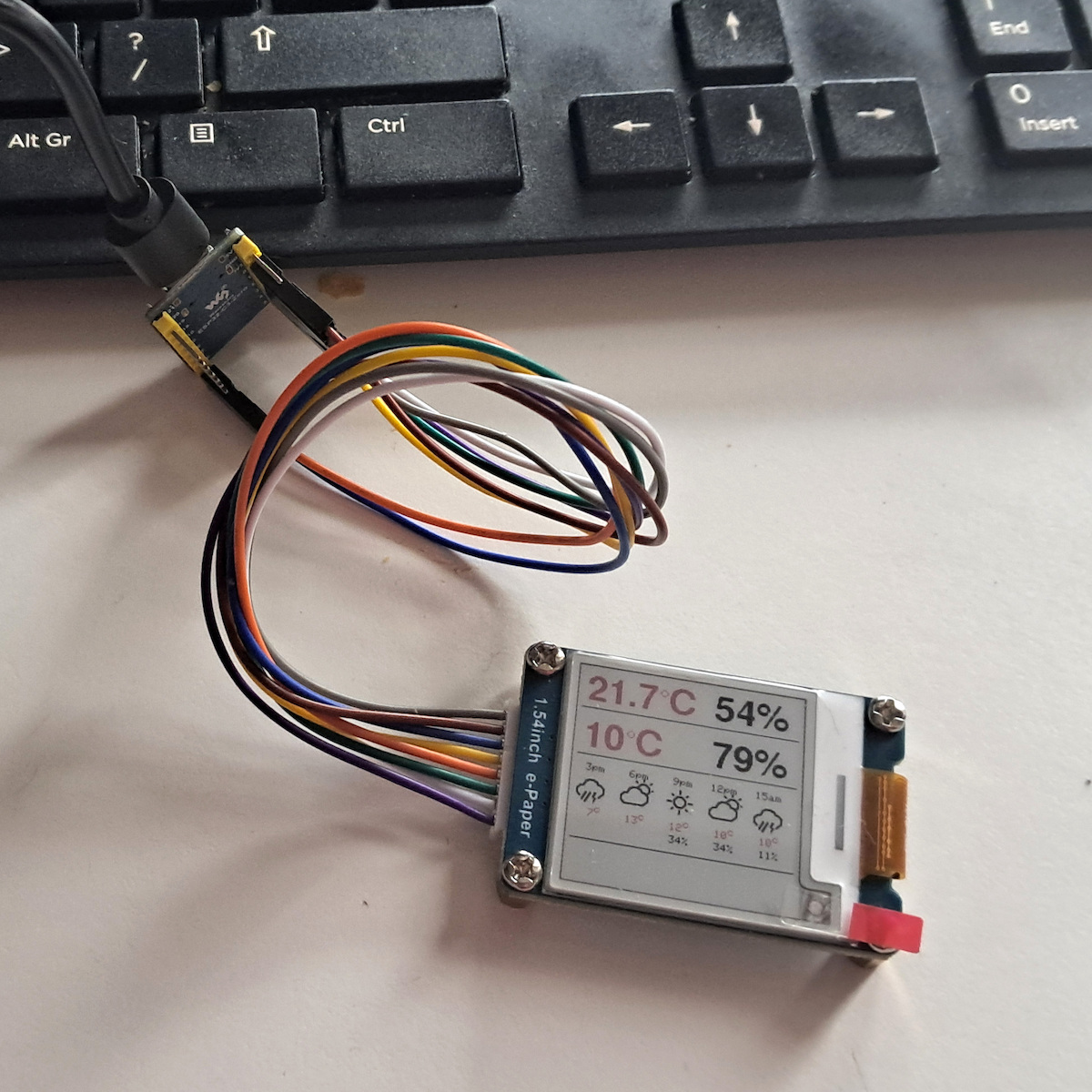
This is an E-Ink display module, 1.54 inches, with a resolution of 200x200, featuring an integrated controller that communicates via SPI. It supports the display of three colors: red, black, and white.
Due to its advantages, such as ultra-low power consumption, wide viewing angle, and excellent performance in sunlight, it is an ideal choice for applications...
This is an E-Ink display module, 1.54 inches, with a resolution of 200x200, featuring an integrated controller that communicates via SPI. It supports the display of three colors: red, black, and white.
Due to its advantages, such as ultra-low power consumption, wide viewing angle, and excellent performance in sunlight, it is an ideal choice for applications requiring reliable and efficient display.
Specifications are collected from official manufacturer websites. Please verify the specifications before proceeding with your final purchase. If you notice any problem you can report it here.
I struggled quite a bit to make it work with the "small" ESP32-C3 zero from Waveshare. All the AI recommend instructions that work for larger ESPs but not for the C3-zero, so I'm letting you know:
Connect CS, DC, RST, BUSY, SCK, MOSI(=DIN) to GPIO 7,2,1,3,4,6 and set MOSI=-1 (because it's not needed). Only with these can you have both WiFi and serial at the same time.
Use the GxEPD2 library with the GxEPD2_154_Z90ca display after you FIRST set up SPI with SPI.begin(SCK, MISO, MOSI, CS);
The display stabilizes after 4-5 seconds and requires multiple print loops. It is small, but very readable.
Παιδεύτηκα αρκετά να το κάνω να λειτουργήσει με "μικρό" ESP32-C3 zero της Waveshare. Όλα τα ΑΙ, προτείνουν οδηγίες που κάνουν για μεγαλύτερους ESP αλλά δεν κάνουν για τον C3-zero, οπότε σας αναφέρω:
Συνδέστε CS, DC, RST, BUSY, SCK, MOSI(=DIN) στα GPIO 7,2,1,3,4,6 και θέστε MOSI=-1 (γιατί δεν χρειάζεται). Μόνο με αυτά μπορείτε να έχετε παράλληλα WiFi και σειριακή.
Χρησιμοποιείστε την βιβλιοθήκη GxEPD2 με οθόνη GxEPD2_154_Z90ca αφού ΠΡΙΝ εσείς ρυθμίσετε το SPI με SPI.begin(SCK, MISO, MOSI, CS);
Η οθόνη σταθεροποιείται μετά από 4-5sec και θέλει πολλαπλό loop εκτύπωσης. Είναι μικρή, αλλά πολύ ευανάγνωστη.
I struggled quite a bit to make it work with the "small" ESP32-C3 zero from Waveshare. All the AI recommend instructions that work for larger ESPs but not for the C3-zero, so I'm letting you know:
Connect CS, DC, RST, BUSY, SCK, MOSI(=DIN) to GPIO 7,2,1,3,4,6 and set MOSI=-1 (because it's not needed). Only with these can you have both WiFi and serial at the same time.
Use the GxEPD2 library with the GxEPD2_154_Z90ca display after you FIRST set up SPI with SPI.begin(SCK, MISO, MOSI, CS);
The display stabilizes after 4-5 seconds and requires multiple print loops. It is small, but very readable.
Παιδεύτηκα αρκετά να το κάνω να λειτουργήσει με "μικρό" ESP32-C3 zero της Waveshare. Όλα τα ΑΙ, προτείνουν οδηγίες που κάνουν για μεγαλύτερους ESP αλλά δεν κάνουν για τον C3-zero, οπότε σας αναφέρω:
Συνδέστε CS, DC, RST, BUSY, SCK, MOSI(=DIN) στα GPIO 7,2,1,3,4,6 και θέστε MOSI=-1 (γιατί δεν χρειάζεται). Μόνο με αυτά μπορείτε να έχετε παράλληλα WiFi και σειριακή.
Χρησιμοποιείστε την βιβλιοθήκη GxEPD2 με οθόνη GxEPD2_154_Z90ca αφού ΠΡΙΝ εσείς ρυθμίσετε το SPI με SPI.begin(SCK, MISO, MOSI, CS);
Η οθόνη σταθεροποιείται μετά από 4-5sec και θέλει πολλαπλό loop εκτύπωσης. Είναι μικρή, αλλά πολύ ευανάγνωστη.
This is an E-Ink display module, 1.54 inches, with a resolution of 200x200, featuring an integrated controller that communicates via SPI. It supports the display of three colors: red, black, and white.
Due to its advantages, such as ultra-low power consumption, wide viewing angle, and excellent performance in sunlight, it is an ideal choice for applications requiring reliable and efficient display.
Specifications are collected from official manufacturer websites. Please verify the specifications before proceeding with your final purchase. If you notice any problem you can report it here.
I struggled quite a bit to make it work with the "small" ESP32-C3 zero from Waveshare. All the AI recommend instructions that work for larger ESPs but not for the C3-zero, so I'm letting you know:
Connect CS, DC, RST, BUSY, SCK, MOSI(=DIN) to GPIO 7,2,1,3,4,6 and set MOSI=-1 (because it's not needed). Only with these can you have both WiFi and serial at the same time.
Use the GxEPD2 library with the GxEPD2_154_Z90ca display after you FIRST set up SPI with SPI.begin(SCK, MISO, MOSI, CS);
The display stabilizes after 4-5 seconds and requires multiple print loops. It is small, but very readable.
Παιδεύτηκα αρκετά να το κάνω να λειτουργήσει με "μικρό" ESP32-C3 zero της Waveshare. Όλα τα ΑΙ, προτείνουν οδηγίες που κάνουν για μεγαλύτερους ESP αλλά δεν κάνουν για τον C3-zero, οπότε σας αναφέρω:
Συνδέστε CS, DC, RST, BUSY, SCK, MOSI(=DIN) στα GPIO 7,2,1,3,4,6 και θέστε MOSI=-1 (γιατί δεν χρειάζεται). Μόνο με αυτά μπορείτε να έχετε παράλληλα WiFi και σειριακή.
Χρησιμοποιείστε την βιβλιοθήκη GxEPD2 με οθόνη GxEPD2_154_Z90ca αφού ΠΡΙΝ εσείς ρυθμίσετε το SPI με SPI.begin(SCK, MISO, MOSI, CS);
Η οθόνη σταθεροποιείται μετά από 4-5sec και θέλει πολλαπλό loop εκτύπωσης. Είναι μικρή, αλλά πολύ ευανάγνωστη.
I struggled quite a bit to make it work with the "small" ESP32-C3 zero from Waveshare. All the AI recommend instructions that work for larger ESPs but not for the C3-zero, so I'm letting you know:
Connect CS, DC, RST, BUSY, SCK, MOSI(=DIN) to GPIO 7,2,1,3,4,6 and set MOSI=-1 (because it's not needed). Only with these can you have both WiFi and serial at the same time.
Use the GxEPD2 library with the GxEPD2_154_Z90ca display after you FIRST set up SPI with SPI.begin(SCK, MISO, MOSI, CS);
The display stabilizes after 4-5 seconds and requires multiple print loops. It is small, but very readable.
Παιδεύτηκα αρκετά να το κάνω να λειτουργήσει με "μικρό" ESP32-C3 zero της Waveshare. Όλα τα ΑΙ, προτείνουν οδηγίες που κάνουν για μεγαλύτερους ESP αλλά δεν κάνουν για τον C3-zero, οπότε σας αναφέρω:
Συνδέστε CS, DC, RST, BUSY, SCK, MOSI(=DIN) στα GPIO 7,2,1,3,4,6 και θέστε MOSI=-1 (γιατί δεν χρειάζεται). Μόνο με αυτά μπορείτε να έχετε παράλληλα WiFi και σειριακή.
Χρησιμοποιείστε την βιβλιοθήκη GxEPD2 με οθόνη GxEPD2_154_Z90ca αφού ΠΡΙΝ εσείς ρυθμίσετε το SPI με SPI.begin(SCK, MISO, MOSI, CS);
Η οθόνη σταθεροποιείται μετά από 4-5sec και θέλει πολλαπλό loop εκτύπωσης. Είναι μικρή, αλλά πολύ ευανάγνωστη.