63
52
€
Delivery
by Fri, 16 Oct
14,00 €
shipping cost
Sent from Greece
Shipping costs and delivery speed are calculated based on the delivery location.


Top specs
Bought two of them at €13.72 each, a very good price in 2026 for this capacity, since when I ordered 2 and then saw on Skroutz the price had gone up to €35, it was probably the last pieces due to the memory crisis.
It looks very high quality; it has a metal construction, sliding, with a large hole for keys, which is quite convenient. If you have a new-generation laptop with Type C or a phone with limited space, or you want to make a backup, it is perfect.
Excellent, with good read speeds for its size; it comes formatted in FAT32 for absolute compatibility, but you should format it to NTFS or exFAT to store large files.
Prefer NTFS, it offers greater security than exFAT and is fully compatible not only with Windows but also with newer Linux distributions; for me it works normally on an LG TV.
Prefer exFAT for Mac computers and immediate compatibility with Windows. exFAT was made for universal compatibility with everything, but in practice many, almost all TVs, Linux computers, and other devices do not recognize it, and it is the bridge for Mac and Windows and for writing on modern Android phones ONLY. NTFS, due to its age, is very widespread and secure, and it has also become recognizable by Linux and devices that previously did not work with it; now it not only reads but you can also write on LinuxOS.
If you use it on a phone for writing and reading data, prefer exFAT and format it from a computer, because if it is NTFS there is no way to format it to exFAT from a phone (tested on Galaxy S25); it will work only as read-only on anything that has the USB in it.
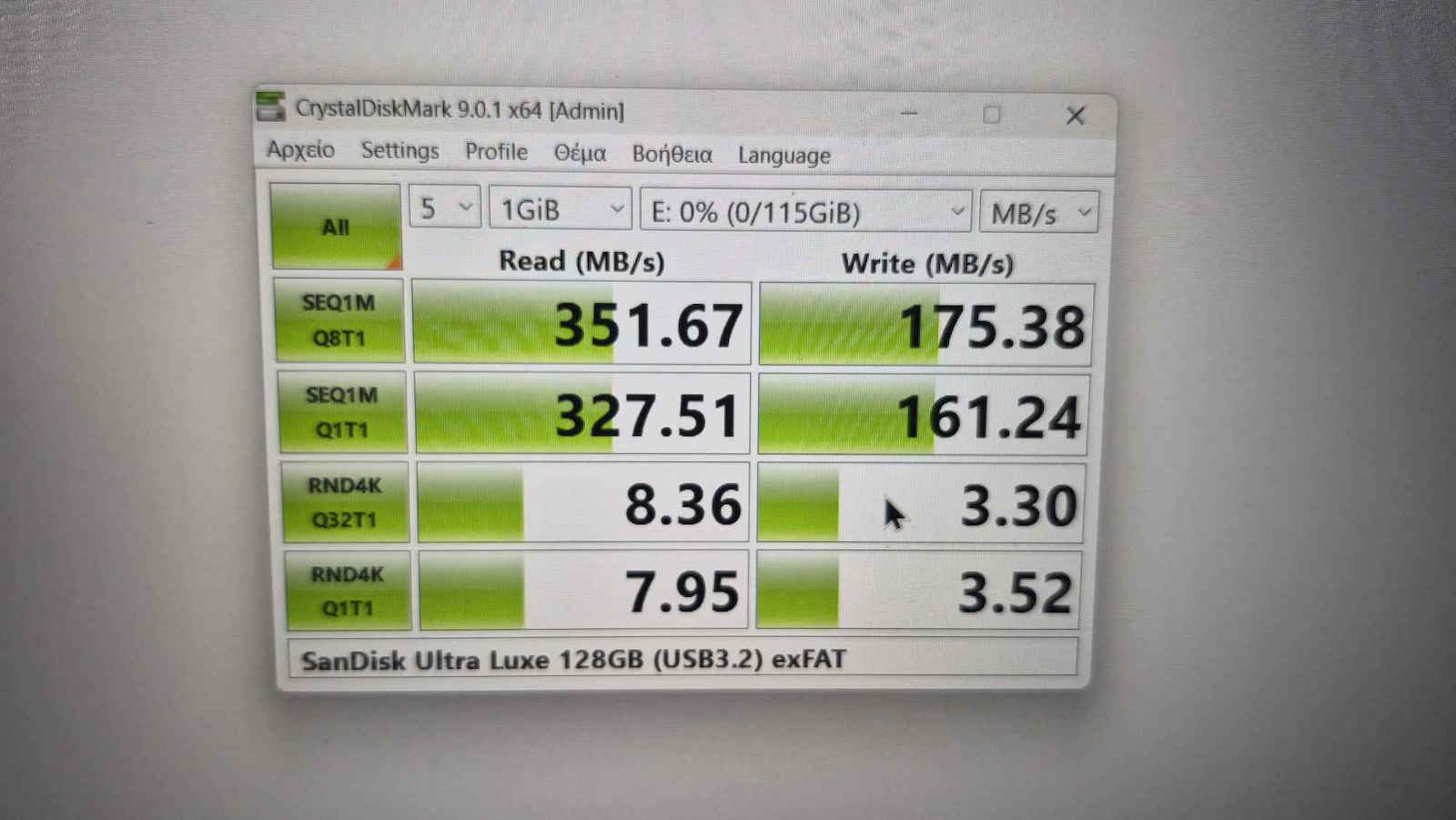
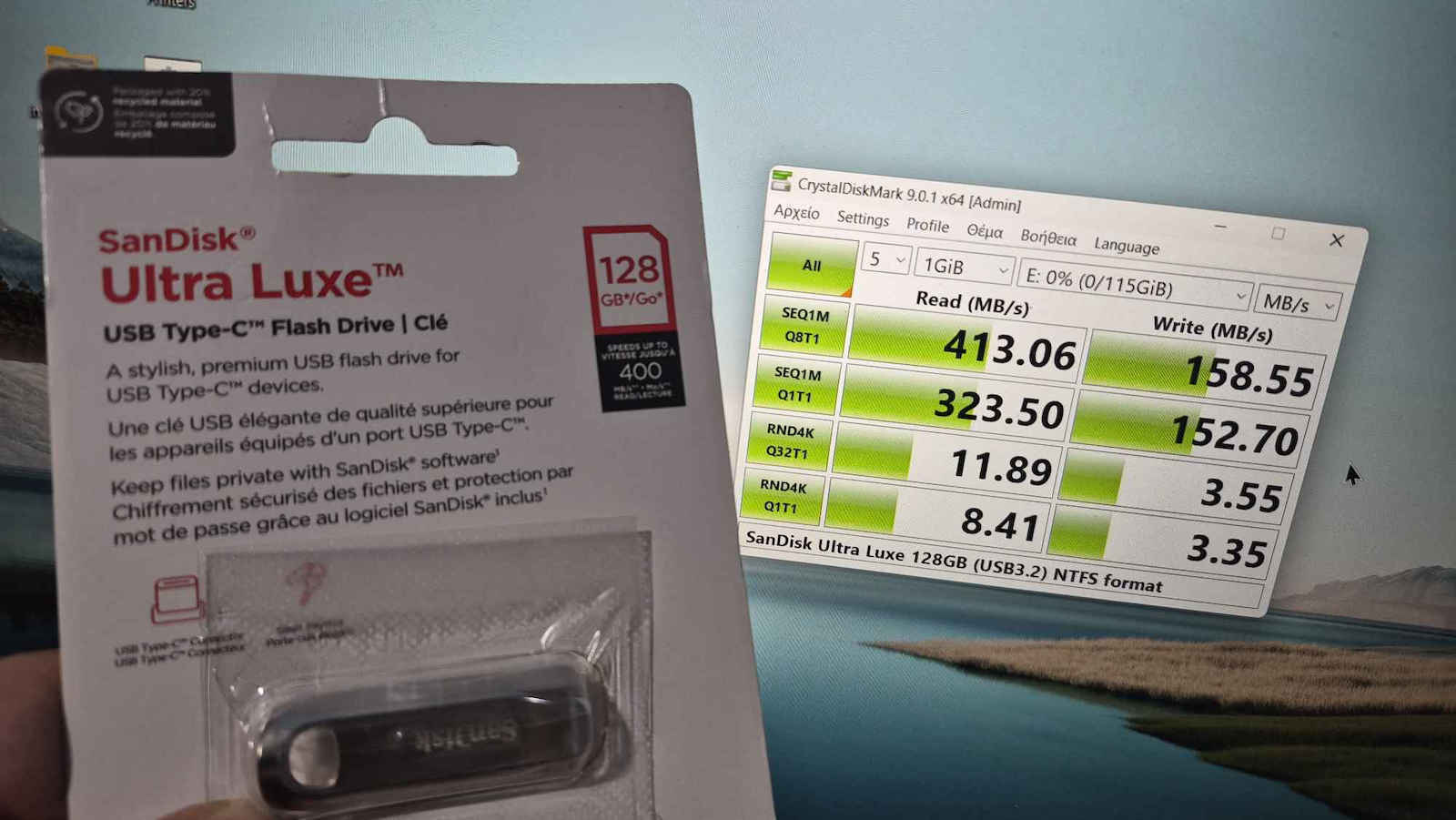
Below in the images you can see the corresponding benchmarks for both NTFS and exFAT respectively.
Αγοράστηκαν δυο το καθένα 13,72Ε μια πολυ καλη τιμή εν ετη 2026 σε αυτη την χωρητικότητα μιας και οταν παράγγειλα 2 και μετα ειδα στο skroutz η τιμη ανεβηκε στα 35Ε λογικα θα ηταν τελευταία κομμάτια λογω της κρισης με τις μνήμες.
Φαίνεται πολύ ποιοτικό ειναι μεταλλική κατασκευή συρόμενο με μεγάλη τρύπα για τα κλειδιά βολεύει αρκετά. Αν έχετε laptop νέας γενιάς με Type C ή κινητό με περιορισμένο χωρο ή θελετε να πάρετε backup ειναι τέλειο.
Εξαιρετικό, με καλές ταχύτητες read για το μέγεθος του έρχεται διαμορφωμένο σε FAT32 για απόλυτη συμβατότητα αλλα πρέπει να το διαμορφώσετε σε ntfs ή exfat για να αποθηκεύετε μεγάλα αρχεία.
Προτιμήστε το NTFS προσφέρει μεγαλύτερη ασφάλεια απο το exFAT και ειναι πληρως συμβατό περα απο τα Windows και σε καινουργιες διανομες Linux, σε μένα παίζει κανονικά σε LG τηλεόραση.
Προτιμήστε το exFAT για Mac υπολογιστές και αμεση συμβατότητα με Windows. Το exFAT εγινε για καθολική συμβατότητα σε ολα αλλα πρακτικά πολλες σχεδον ολες οι τηλεοράσεις, Linux υπολογιστές και αλλες συσκευές δεν το αναγνωρίζουν και είναι η γέφυρα για Mac και Windows και για write σε συγχρονα Android κινητα ΜΟΝΟ. Το NTFS λογω της παλαιότητας του ειναι πολυ διαδεδομένο και ασφαλές, και εχει γίνει και αναγνωρίσιμο απο Linux και συσκευές που παλιά δεν έπαιζε, τωρα οχι απλα διαβάζει αλλα και μπορείς να γράψεις σε LinuxOS.
Αν το χρησιμοποιείτε σε κινητό για εγγραφή και για ανάγνωση δεδομένων προτιμήσετε exFAT και διαμορφώστε από υπολογιστή γιατί αν είναι NTFS δεν γίνεται με τίποτα να το διαμορφώσετε σε exFAT από κινητό (δοκιμασμένο σε galaxy s25) θα λειτουργεί μόνο ως ανάγνωση σε ότι έχει το USB μέσα.
Παρακάτω στις εικονες φαίνονται τα αντίστοιχα benchmarks και στα δυο NTFS και exFAT αντίστοιχα.
Bought two of them at €13.72 each, a very good price in 2026 for this capacity, since when I ordered 2 and then saw on Skroutz the price had gone up to €35, it was probably the last pieces due to the memory crisis.
It looks very high quality; it has a metal construction, sliding, with a large hole for keys, which is quite convenient. If you have a new-generation laptop with Type C or a phone with limited space, or you want to make a backup, it is perfect.
Excellent, with good read speeds for its size; it comes formatted in FAT32 for absolute compatibility, but you should format it to NTFS or exFAT to store large files.
Prefer NTFS, it offers greater security than exFAT and is fully compatible not only with Windows but also with newer Linux distributions; for me it works normally on an LG TV.
Prefer exFAT for Mac computers and immediate compatibility with Windows. exFAT was made for universal compatibility with everything, but in practice many, almost all TVs, Linux computers, and other devices do not recognize it, and it is the bridge for Mac and Windows and for writing on modern Android phones ONLY. NTFS, due to its age, is very widespread and secure, and it has also become recognizable by Linux and devices that previously did not work with it; now it not only reads but you can also write on LinuxOS.
If you use it on a phone for writing and reading data, prefer exFAT and format it from a computer, because if it is NTFS there is no way to format it to exFAT from a phone (tested on Galaxy S25); it will work only as read-only on anything that has the USB in it.
Below in the images you can see the corresponding benchmarks for both NTFS and exFAT respectively.
Αγοράστηκαν δυο το καθένα 13,72Ε μια πολυ καλη τιμή εν ετη 2026 σε αυτη την χωρητικότητα μιας και οταν παράγγειλα 2 και μετα ειδα στο skroutz η τιμη ανεβηκε στα 35Ε λογικα θα ηταν τελευταία κομμάτια λογω της κρισης με τις μνήμες.
Φαίνεται πολύ ποιοτικό ειναι μεταλλική κατασκευή συρόμενο με μεγάλη τρύπα για τα κλειδιά βολεύει αρκετά. Αν έχετε laptop νέας γενιάς με Type C ή κινητό με περιορισμένο χωρο ή θελετε να πάρετε backup ειναι τέλειο.
Εξαιρετικό, με καλές ταχύτητες read για το μέγεθος του έρχεται διαμορφωμένο σε FAT32 για απόλυτη συμβατότητα αλλα πρέπει να το διαμορφώσετε σε ntfs ή exfat για να αποθηκεύετε μεγάλα αρχεία.
Προτιμήστε το NTFS προσφέρει μεγαλύτερη ασφάλεια απο το exFAT και ειναι πληρως συμβατό περα απο τα Windows και σε καινουργιες διανομες Linux, σε μένα παίζει κανονικά σε LG τηλεόραση.
Προτιμήστε το exFAT για Mac υπολογιστές και αμεση συμβατότητα με Windows. Το exFAT εγινε για καθολική συμβατότητα σε ολα αλλα πρακτικά πολλες σχεδον ολες οι τηλεοράσεις, Linux υπολογιστές και αλλες συσκευές δεν το αναγνωρίζουν και είναι η γέφυρα για Mac και Windows και για write σε συγχρονα Android κινητα ΜΟΝΟ. Το NTFS λογω της παλαιότητας του ειναι πολυ διαδεδομένο και ασφαλές, και εχει γίνει και αναγνωρίσιμο απο Linux και συσκευές που παλιά δεν έπαιζε, τωρα οχι απλα διαβάζει αλλα και μπορείς να γράψεις σε LinuxOS.
Αν το χρησιμοποιείτε σε κινητό για εγγραφή και για ανάγνωση δεδομένων προτιμήσετε exFAT και διαμορφώστε από υπολογιστή γιατί αν είναι NTFS δεν γίνεται με τίποτα να το διαμορφώσετε σε exFAT από κινητό (δοκιμασμένο σε galaxy s25) θα λειτουργεί μόνο ως ανάγνωση σε ότι έχει το USB μέσα.
Παρακάτω στις εικονες φαίνονται τα αντίστοιχα benchmarks και στα δυο NTFS και exFAT αντίστοιχα.


