DSL Modems / Routers

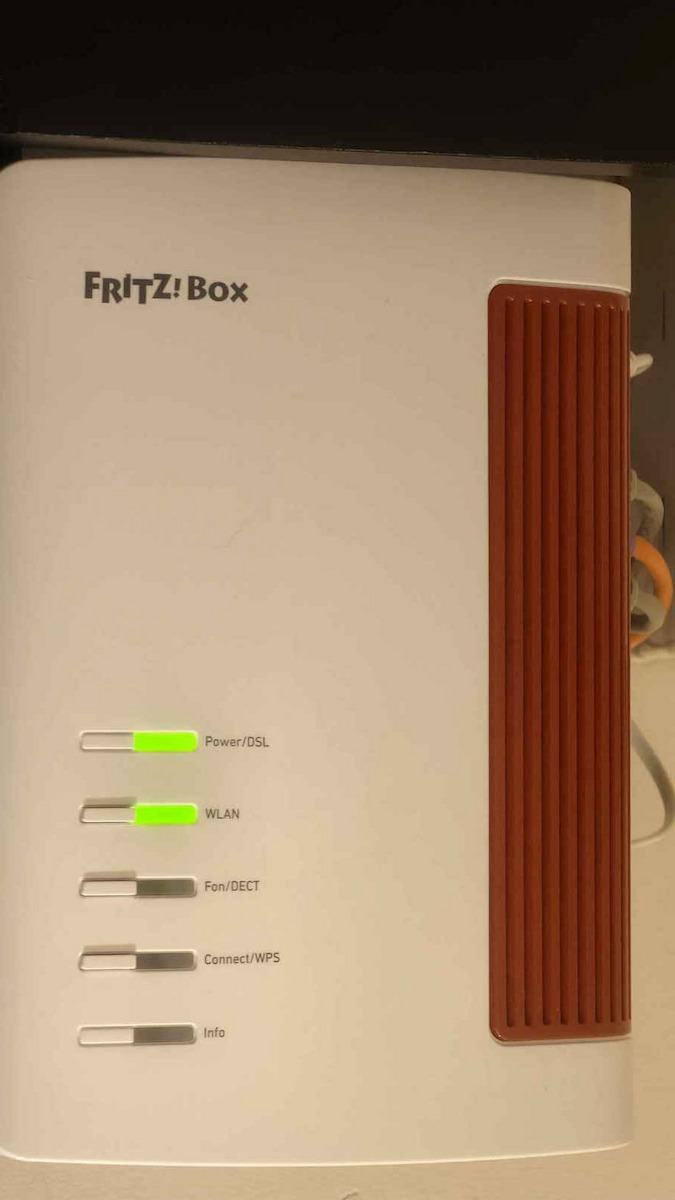
AVM FRITZ!Box 7690 v1 Wireless VDSL2 Modem Router with 3 2.5 Gigabit Ports

Key features:

  • VDSL2 Technology
  • Maximum LAN Speed 2500 Mbps
  • Wi‑Fi 7
  • Dual Band (2.4 & 5GHz)
See full description
  • See all
246 90
Delivery by Thu, 25 Jun
14,00 €   shipping cost
Sent from Greece
From CleverMall 4.6 (37)
Greece
2 pieces
See Networking on the page of CleverMall

Description

Description

Extremely fast browsing, streaming, and gaming - with the FRITZ!Box 7690, everything is possible. Wi-Fi 7 ensures top Wi-Fi speeds. Supervectoring for DSL up to 300 MBit/s and a WAN 2.5 Gigabit for use with the fiber optic modem leave no room for compromise. A wide range of functions for your home network and Smart Home, as well as a complete telephone system with a DECT base station, complement the key features.

Wi-Fi 7 - the new generation of Wi-Fi with multi-gigabit!

Wi-Fi 7 brings top Wi-Fi speeds and offers even more powerful connections for multiple devices. Therefore, it is ideal for real-time applications such as gaming, virtual reality, or video calls. Wi-Fi 7 integrates perfectly into the FRITZ! ecosystem - all wireless devices work optimally in the Mesh Wi-Fi, providing you with top speeds.

The seventh generation of Wi-Fi has a few tricks up its sleeve to help you perfect your Wi-Fi experience: The multi-link operation (MLO) feature means that Wi-Fi 7 devices can transmit data on multiple frequency bands simultaneously. With the punctured mode feature, your Wi-Fi can bypass interference. Your FRITZ!Box automatically ensures that you have the best possible connection.

The new Wi-Fi 7 standard adapts to your current environment and also works seamlessly with all older wireless devices.

Mesh Wi-Fi with FRITZ!

The FRITZ!Box 7690 Fiber supports Mesh Wi-Fi, which means that your videos, music, and photos reach every corner of your home, apartment, or office seamlessly. The FRITZ!Repeater, FRITZ!Powerline, or other FRITZ!Box models adopt the FRITZ!Box settings for internet connection, and all devices are always optimally connected - automatically and reliably.

With Mesh, you enjoy high speeds while browsing, streaming, or gaming. Instead of waiting for stunning 4k streaming and your favorite music, your media will be waiting for you.

Manufacturer

See full description

Specifications

Specifications

Network Specifications

Type
ADSL/VDSL Modem Router
DSL technology
VDSL2
Maximum LAN Speed
2500 Mbps
Portable Hotspot
No
Network Standards
IEEE 802.11a, IEEE 802.11 b/g/n, IEEE 802.11ac, IEEE 802.11ax, IEEE 802.11be

Connectivity

Wireless network
Yes
Ethernet LAN connections
3
USB 2.0 connections
1
USB 3.0 connections
-
ISDN Connection
No
SIM slot
No

Security

Firewall
NAT
Encryption Protocols
WPA2
MAC Address Filtering
Yes

Extras

Virtual Private Network (VPN)
Yes
VoIP
Yes
Mesh
Yes

Important information

Specifications are collected from official manufacturer websites. Please verify the specifications before proceeding with your final purchase. If you notice any problem you can report it here.

See all specifications

Reviews (6)

Reviews

  1. 5
  2. 4 stars
    0
  3. 3 stars
    0
  4. 2 stars
    0
  5. 1
Review this product

Reviews photos

Reviews photos
Reviews photos
Reviews photos

Reviews by our members

  • G_P_7
    5
    2 out of 2 members found this review helpful

    Verified purchase

    Router for experts and user enthusiasts.

    Honestly, I don’t know where to start. I’ll try to cover everything so please be patient, a long post follows.

    This particular router is aimed at people who want to throw away the rotten, locked-down router from their provider with its crippled firmware and want

    ONE DEVICE FOR EVERYTHING INCLUDING TELEPHONY.

    It is the successor to the 7590 ax v2.
    Here we have the 7690 v1, clearly better, more powerful, and infinitely cheaper.

    Ax 7590 ax v2 --> 289 euro
    7690 v1 --> 214 euro.

    1. Hardware – Processor & RAM
    The FRITZ!Box 7690 features a dual-core processor and 512MB RAM, according to technical reports.
    What does this mean in practice?
    - It can handle very high throughput, even 2.5Gbps WAN/LAN, without “choking”.
    - It withstands many simultaneous sessions, VPN, NAS, VoIP, smart home, without lag.
    - It is suitable for future upgrades (e.g. FTTH 2.5G).

    2. Ports & Connectivity
    The 7690 features:
    - 1× 2.5G WAN/LAN
    - 1× 2.5G LAN
    - 2× 1G LAN
    - Wi‑Fi 7 up to 7136 Mbps
    - DECT base for up to 6 cordless phones
    - 2× RJ11 for analog devices
    - USB 2.0
    - Zigbee for smart home.

    3. Performance on VDSL & FTTH

    * On VDSL (up to 300 Mbps Supervectoring)
    The 7690 fully supports VDSL 35b up to 300 Mbps.
    Advantages:
    - Better sync stability.
    - Better SNR handling.
    - More stable Wi‑Fi and latency.

    * On FTTH 1Gbps
    The 7690 works behind ONT (GPON/XPON).
    With a 2.5G WAN/LAN port, it fully utilizes 1Gbps without bottleneck.

    * On FTTH 2.5Gbps
    The 7690 is one of the few routers in Greece that can utilize 2.5Gbps, thanks to its two 2.5G ports and powerful CPU/RAM.
    Ideal for:
    - Multi-gig LAN
    - NAS
    - Gaming + streaming + downloads simultaneously.

    Now, regarding the settings with Cosmote that I have, it was simply a piece of cake. For someone who knows how to set it up but also for a beginner, it won’t be difficult. If you follow the setup that guides you step by step, you won’t have a problem.

    Now, regarding telephony, which I read about from a friend below who had a problem, I don’t know why he got so tangled up and I don’t understand the reason.
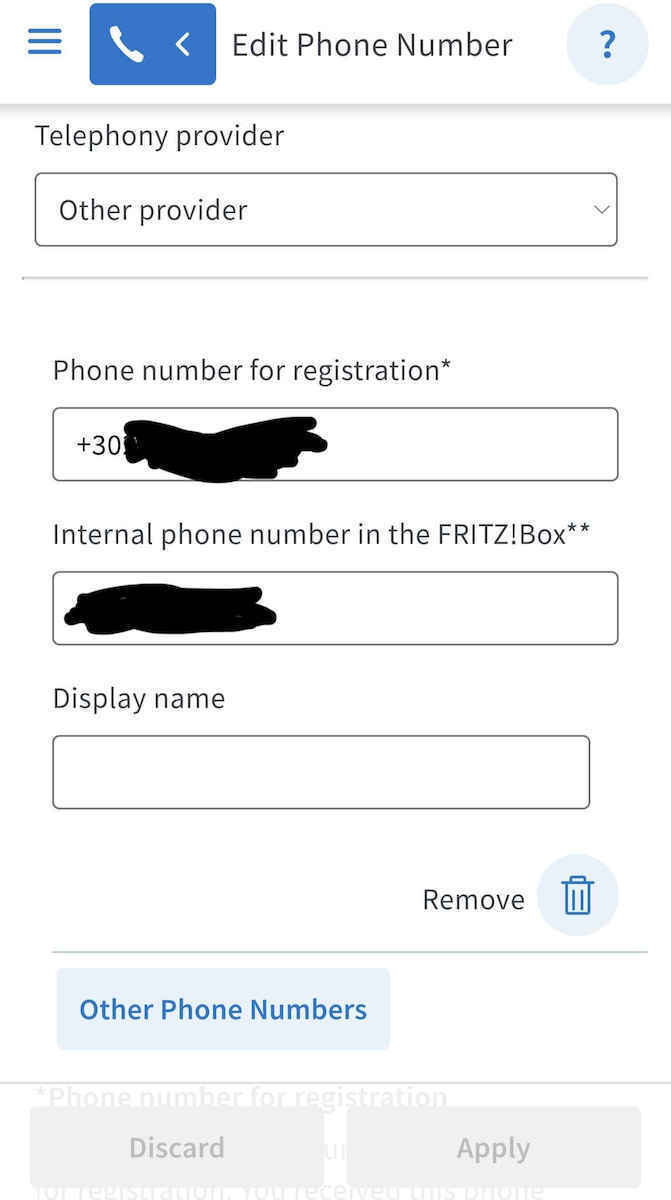
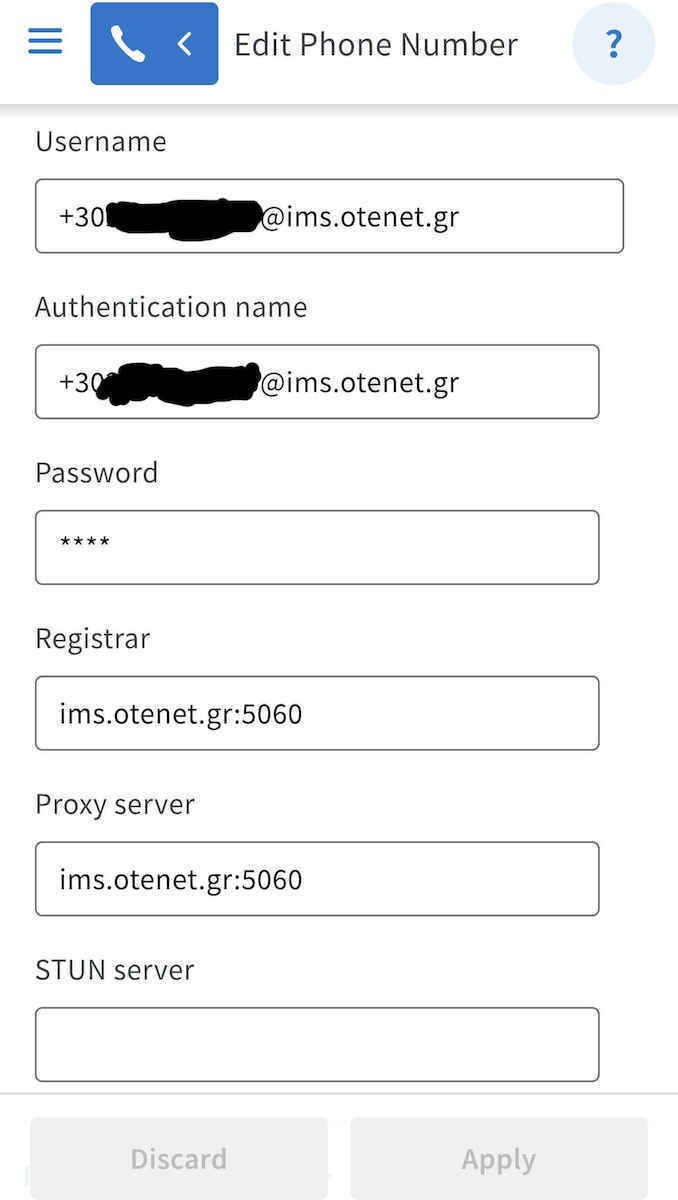
    The telephony setup is simple as long as you have received your line’s SIP credentials from your provider.
    Once you receive the provider’s email with the necessary settings and the password they give you, you enter them and it works immediately. All those settings the friend I read about before made are both wrong and unnecessary for it to work. Unless he has set up some strange setup…

    ***For help, see the photos I have uploaded and wherever it is blacked out, you enter your number and the password your provider gives you (if you have OTE) and you’re ready. Telephony will turn green.***

    If you connect the router directly to the line and don’t put it in any bridge mode etc., since that’s the reason someone gets this router, then you won’t have any issues.

    For someone who wants to get rid of their provider’s router and have telephony working immediately, the 7690 is the solution.

    You buy it once, for example if you have VDSL like me, and even if you get 1Gbps FTTH later, you keep it and it’s awesome because it can handle even more.

    I emphasize. It’s not the best router on the planet, just for someone who wants a single device and not to have both the provider’s router and another one of their own and play with bridge mode, which the OTE router for example doesn’t even support exactly, and get tangled up with double NAT, etc., THIS is the solution.

    I hope I helped.

    Translated from Greek ·
    Did you find this review helpful?
  • EncryptedTales
    5
    4 out of 4 members found this review helpful

    Verified purchase

    Very good, with excellent range and an extremely large number of functions. It has all the expected options such as VPN, DNS, WPA3, etc.

    I have it connected to a Cosmote VDSL connection at 50Mbps. With the Cosmote Speedport Plus I had, I was getting around 36Mbps, and now with the FRITZ!Box I get 47Mbps, always with Ethernet.

    The biggest problem I had was with configuring the wired landline phone, as it was a real struggle to set it up to work.

    Cosmote told me that the problem was because I didn’t buy it from Germanos or Cosmote itself, as FRITZ!Boxes from the market cannot be configured with their network, and that if I had bought it from them I wouldn’t have had a problem.

    In the end, I found the solution myself, as the setting that was wrong was that I had to enable "VLAN required for internet telephony" in the Connection Settings for DSL/WAN, and set 837 in the VLAN-ID and 5 in Pbit. I also had to enable "Keep port sharing of the internet router enabled for telephony" at 30 seconds, because otherwise the phone connection would drop after a few minutes, despite a successful connection.

    Since then I have had absolutely no problems, and I am completely satisfied. I recommend it to anyone who wants a futureproof modem+router with endless options and settings, where basically only your imagination is the limit.

    Translated from Greek ·
    Did you find this review helpful?
  • billys.thessaloniki
    1
    3 out of 43 members found this review helpful

    Verified purchase

    We reached 2025 and they haven't released a Router compatible with our fiber optic because it is not a gpon Router to connect directly. The only thing you can do is connect it to your existing Router and have both connected.

    Translated from Greek ·
    Did you find this review helpful?
  • 5
    1 out of 1 members found this review helpful

    Amazing! It was set up easily on Vodafone fiber and the wifi is killer!!!

    Translated from Greek ·
    Did you find this review helpful?
  • Router for experts and user enthusiasts.

    Honestly, I don’t know where to start. I’ll try to cover everything so please be patient, a long post follows.

    This particular router is aimed at people who want to throw away the rotten, locked-down router from their provider with its crippled firmware and want

    ONE DEVICE FOR EVERYTHING INCLUDING TELEPHONY.

    It is the successor to the 7590 ax v2.
    Here we have the 7690 v1, clearly better, more powerful, and infinitely cheaper.

    Ax 7590 ax v2 --> 289 euro
    7690 v1 --> 214 euro.

    1. Hardware – Processor & RAM
    The FRITZ!Box 7690 features a dual-core processor and 512MB RAM, according to technical reports.
    What does this mean in practice?
    - It can handle very high throughput, even 2.5Gbps WAN/LAN, without “choking”.
    - It withstands many simultaneous sessions, VPN, NAS, VoIP, smart home, without lag.
    - It is suitable for future upgrades (e.g. FTTH 2.5G).

    2. Ports & Connectivity
    The 7690 features:
    - 1× 2.5G WAN/LAN
    - 1× 2.5G LAN
    - 2× 1G LAN
    - Wi‑Fi 7 up to 7136 Mbps
    - DECT base for up to 6 cordless phones
    - 2× RJ11 for analog devices
    - USB 2.0
    - Zigbee for smart home.

    3. Performance on VDSL & FTTH

    * On VDSL (up to 300 Mbps Supervectoring)
    The 7690 fully supports VDSL 35b up to 300 Mbps.
    Advantages:
    - Better sync stability.
    - Better SNR handling.
    - More stable Wi‑Fi and latency.

    * On FTTH 1Gbps
    The 7690 works behind ONT (GPON/XPON).
    With a 2.5G WAN/LAN port, it fully utilizes 1Gbps without bottleneck.

    * On FTTH 2.5Gbps
    The 7690 is one of the few routers in Greece that can utilize 2.5Gbps, thanks to its two 2.5G ports and powerful CPU/RAM.
    Ideal for:
    - Multi-gig LAN
    - NAS
    - Gaming + streaming + downloads simultaneously.

    Now, regarding the settings with Cosmote that I have, it was simply a piece of cake. For someone who knows how to set it up but also for a beginner, it won’t be difficult. If you follow the setup that guides you step by step, you won’t have a problem.

    Now, regarding telephony, which I read about from a friend below who had a problem, I don’t know why he got so tangled up and I don’t understand the reason.
    The telephony setup is simple as long as you have received your line’s SIP credentials from your provider.
    Once you receive the provider’s email with the necessary settings and the password they give you, you enter them and it works immediately. All those settings the friend I read about before made are both wrong and unnecessary for it to work. Unless he has set up some strange setup…

    ***For help, see the photos I have uploaded and wherever it is blacked out, you enter your number and the password your provider gives you (if you have OTE) and you’re ready. Telephony will turn green.***

    If you connect the router directly to the line and don’t put it in any bridge mode etc., since that’s the reason someone gets this router, then you won’t have any issues.

    For someone who wants to get rid of their provider’s router and have telephony working immediately, the 7690 is the solution.

    You buy it once, for example if you have VDSL like me, and even if you get 1Gbps FTTH later, you keep it and it’s awesome because it can handle even more.

    I emphasize. It’s not the best router on the planet, just for someone who wants a single device and not to have both the provider’s router and another one of their own and play with bridge mode, which the OTE router for example doesn’t even support exactly, and get tangled up with double NAT, etc., THIS is the solution.

    I hope I helped.

    Translated from Greek ·
    2
  • Very good, with excellent range and an extremely large number of functions. It has all the expected options such as VPN, DNS, WPA3, etc.

    I have it connected to a Cosmote VDSL connection at 50Mbps. With the Cosmote Speedport Plus I had, I was getting around 36Mbps, and now with the FRITZ!Box I get 47Mbps, always with Ethernet.

    The biggest problem I had was with configuring the wired landline phone, as it was a real struggle to set it up to work.

    Cosmote told me that the problem was because I didn’t buy it from Germanos or Cosmote itself, as FRITZ!Boxes from the market cannot be configured with their network, and that if I had bought it from them I wouldn’t have had a problem.

    In the end, I found the solution myself, as the setting that was wrong was that I had to enable "VLAN required for internet telephony" in the Connection Settings for DSL/WAN, and set 837 in the VLAN-ID and 5 in Pbit. I also had to enable "Keep port sharing of the internet router enabled for telephony" at 30 seconds, because otherwise the phone connection would drop after a few minutes, despite a successful connection.

    Since then I have had absolutely no problems, and I am completely satisfied. I recommend it to anyone who wants a futureproof modem+router with endless options and settings, where basically only your imagination is the limit.

    Translated from Greek ·
    4
  • We reached 2025 and they haven't released a Router compatible with our fiber optic because it is not a gpon Router to connect directly. The only thing you can do is connect it to your existing Router and have both connected.

    Translated from Greek ·
    3
  • Amazing! It was set up easily on Vodafone fiber and the wifi is killer!!!

    Translated from Greek ·
    1
  • 0
  • See all

Description & Specifications

Extremely fast browsing, streaming, and gaming - with the FRITZ!Box 7690, everything is possible. Wi-Fi 7 ensures top Wi-Fi speeds. Supervectoring for DSL up to 300 MBit/s and a WAN 2.5 Gigabit for use with the fiber optic modem leave no room for compromise. A wide range of functions for your home network and Smart Home, as well as a complete telephone system with a DECT base station, complement the key features.

Wi-Fi 7 - the new generation of Wi-Fi with multi-gigabit!

Wi-Fi 7 brings top Wi-Fi speeds and offers even more powerful connections for multiple devices. Therefore, it is ideal for real-time applications such as gaming, virtual reality, or video calls. Wi-Fi 7 integrates perfectly into the FRITZ! ecosystem - all wireless devices work optimally in the Mesh Wi-Fi, providing you with top speeds.

The seventh generation of Wi-Fi has a few tricks up its sleeve to help you perfect your Wi-Fi experience: The multi-link operation (MLO) feature means that Wi-Fi 7 devices can transmit data on multiple frequency bands simultaneously. With the punctured mode feature, your Wi-Fi can bypass interference. Your FRITZ!Box automatically ensures that you have the best possible connection.

The new Wi-Fi 7 standard adapts to your current environment and also works seamlessly with all older wireless devices.

Mesh Wi-Fi with FRITZ!

The FRITZ!Box 7690 Fiber supports Mesh Wi-Fi, which means that your videos, music, and photos reach every corner of your home, apartment, or office seamlessly. The FRITZ!Repeater, FRITZ!Powerline, or other FRITZ!Box models adopt the FRITZ!Box settings for internet connection, and all devices are always optimally connected - automatically and reliably.

With Mesh, you enjoy high speeds while browsing, streaming, or gaming. Instead of waiting for stunning 4k streaming and your favorite music, your media will be waiting for you.

Manufacturer

Network Specifications

Type
ADSL/VDSL Modem Router
DSL technology
VDSL2
Maximum LAN Speed
2500 Mbps
Portable Hotspot
No
Network Standards
IEEE 802.11a, IEEE 802.11 b/g/n, IEEE 802.11ac, IEEE 802.11ax, IEEE 802.11be

Connectivity

Wireless network
Yes
Ethernet LAN connections
3
USB 2.0 connections
1
USB 3.0 connections
-
ISDN Connection
No
SIM slot
No

Security

Firewall
NAT
Encryption Protocols
WPA2
MAC Address Filtering
Yes

Extras

Virtual Private Network (VPN)
Yes
VoIP
Yes
Mesh
Yes

Important information

Specifications are collected from official manufacturer websites. Please verify the specifications before proceeding with your final purchase. If you notice any problem you can report it here.

Reviews (6)

  1. 5
  2. 4 stars
    0
  3. 3 stars
    0
  4. 2 stars
    0
  5. 1
Review this product

Reviews photos

Reviews photos
Reviews photos
Reviews photos

Reviews by our members

  • G_P_7
    5
    2 out of 2 members found this review helpful

    Verified purchase

    Router for experts and user enthusiasts.

    Honestly, I don’t know where to start. I’ll try to cover everything so please be patient, a long post follows.

    This particular router is aimed at people who want to throw away the rotten, locked-down router from their provider with its crippled firmware and want

    ONE DEVICE FOR EVERYTHING INCLUDING TELEPHONY.

    It is the successor to the 7590 ax v2.
    Here we have the 7690 v1, clearly better, more powerful, and infinitely cheaper.

    Ax 7590 ax v2 --> 289 euro
    7690 v1 --> 214 euro.

    1. Hardware – Processor & RAM
    The FRITZ!Box 7690 features a dual-core processor and 512MB RAM, according to technical reports.
    What does this mean in practice?
    - It can handle very high throughput, even 2.5Gbps WAN/LAN, without “choking”.
    - It withstands many simultaneous sessions, VPN, NAS, VoIP, smart home, without lag.
    - It is suitable for future upgrades (e.g. FTTH 2.5G).

    2. Ports & Connectivity
    The 7690 features:
    - 1× 2.5G WAN/LAN
    - 1× 2.5G LAN
    - 2× 1G LAN
    - Wi‑Fi 7 up to 7136 Mbps
    - DECT base for up to 6 cordless phones
    - 2× RJ11 for analog devices
    - USB 2.0
    - Zigbee for smart home.

    3. Performance on VDSL & FTTH

    * On VDSL (up to 300 Mbps Supervectoring)
    The 7690 fully supports VDSL 35b up to 300 Mbps.
    Advantages:
    - Better sync stability.
    - Better SNR handling.
    - More stable Wi‑Fi and latency.

    * On FTTH 1Gbps
    The 7690 works behind ONT (GPON/XPON).
    With a 2.5G WAN/LAN port, it fully utilizes 1Gbps without bottleneck.

    * On FTTH 2.5Gbps
    The 7690 is one of the few routers in Greece that can utilize 2.5Gbps, thanks to its two 2.5G ports and powerful CPU/RAM.
    Ideal for:
    - Multi-gig LAN
    - NAS
    - Gaming + streaming + downloads simultaneously.

    Now, regarding the settings with Cosmote that I have, it was simply a piece of cake. For someone who knows how to set it up but also for a beginner, it won’t be difficult. If you follow the setup that guides you step by step, you won’t have a problem.

    Now, regarding telephony, which I read about from a friend below who had a problem, I don’t know why he got so tangled up and I don’t understand the reason.
    The telephony setup is simple as long as you have received your line’s SIP credentials from your provider.
    Once you receive the provider’s email with the necessary settings and the password they give you, you enter them and it works immediately. All those settings the friend I read about before made are both wrong and unnecessary for it to work. Unless he has set up some strange setup…

    ***For help, see the photos I have uploaded and wherever it is blacked out, you enter your number and the password your provider gives you (if you have OTE) and you’re ready. Telephony will turn green.***

    If you connect the router directly to the line and don’t put it in any bridge mode etc., since that’s the reason someone gets this router, then you won’t have any issues.

    For someone who wants to get rid of their provider’s router and have telephony working immediately, the 7690 is the solution.

    You buy it once, for example if you have VDSL like me, and even if you get 1Gbps FTTH later, you keep it and it’s awesome because it can handle even more.

    I emphasize. It’s not the best router on the planet, just for someone who wants a single device and not to have both the provider’s router and another one of their own and play with bridge mode, which the OTE router for example doesn’t even support exactly, and get tangled up with double NAT, etc., THIS is the solution.

    I hope I helped.

    Translated from Greek ·
    Did you find this review helpful?
  • EncryptedTales
    5
    4 out of 4 members found this review helpful

    Verified purchase

    Very good, with excellent range and an extremely large number of functions. It has all the expected options such as VPN, DNS, WPA3, etc.

    I have it connected to a Cosmote VDSL connection at 50Mbps. With the Cosmote Speedport Plus I had, I was getting around 36Mbps, and now with the FRITZ!Box I get 47Mbps, always with Ethernet.

    The biggest problem I had was with configuring the wired landline phone, as it was a real struggle to set it up to work.

    Cosmote told me that the problem was because I didn’t buy it from Germanos or Cosmote itself, as FRITZ!Boxes from the market cannot be configured with their network, and that if I had bought it from them I wouldn’t have had a problem.

    In the end, I found the solution myself, as the setting that was wrong was that I had to enable "VLAN required for internet telephony" in the Connection Settings for DSL/WAN, and set 837 in the VLAN-ID and 5 in Pbit. I also had to enable "Keep port sharing of the internet router enabled for telephony" at 30 seconds, because otherwise the phone connection would drop after a few minutes, despite a successful connection.

    Since then I have had absolutely no problems, and I am completely satisfied. I recommend it to anyone who wants a futureproof modem+router with endless options and settings, where basically only your imagination is the limit.

    Translated from Greek ·
    Did you find this review helpful?
  • billys.thessaloniki
    1
    3 out of 43 members found this review helpful

    Verified purchase

    We reached 2025 and they haven't released a Router compatible with our fiber optic because it is not a gpon Router to connect directly. The only thing you can do is connect it to your existing Router and have both connected.

    Translated from Greek ·
    Did you find this review helpful?
  • 5
    1 out of 1 members found this review helpful

    Amazing! It was set up easily on Vodafone fiber and the wifi is killer!!!

    Translated from Greek ·
    Did you find this review helpful?
  • Router for experts and user enthusiasts.

    Honestly, I don’t know where to start. I’ll try to cover everything so please be patient, a long post follows.

    This particular router is aimed at people who want to throw away the rotten, locked-down router from their provider with its crippled firmware and want

    ONE DEVICE FOR EVERYTHING INCLUDING TELEPHONY.

    It is the successor to the 7590 ax v2.
    Here we have the 7690 v1, clearly better, more powerful, and infinitely cheaper.

    Ax 7590 ax v2 --> 289 euro
    7690 v1 --> 214 euro.

    1. Hardware – Processor & RAM
    The FRITZ!Box 7690 features a dual-core processor and 512MB RAM, according to technical reports.
    What does this mean in practice?
    - It can handle very high throughput, even 2.5Gbps WAN/LAN, without “choking”.
    - It withstands many simultaneous sessions, VPN, NAS, VoIP, smart home, without lag.
    - It is suitable for future upgrades (e.g. FTTH 2.5G).

    2. Ports & Connectivity
    The 7690 features:
    - 1× 2.5G WAN/LAN
    - 1× 2.5G LAN
    - 2× 1G LAN
    - Wi‑Fi 7 up to 7136 Mbps
    - DECT base for up to 6 cordless phones
    - 2× RJ11 for analog devices
    - USB 2.0
    - Zigbee for smart home.

    3. Performance on VDSL & FTTH

    * On VDSL (up to 300 Mbps Supervectoring)
    The 7690 fully supports VDSL 35b up to 300 Mbps.
    Advantages:
    - Better sync stability.
    - Better SNR handling.
    - More stable Wi‑Fi and latency.

    * On FTTH 1Gbps
    The 7690 works behind ONT (GPON/XPON).
    With a 2.5G WAN/LAN port, it fully utilizes 1Gbps without bottleneck.

    * On FTTH 2.5Gbps
    The 7690 is one of the few routers in Greece that can utilize 2.5Gbps, thanks to its two 2.5G ports and powerful CPU/RAM.
    Ideal for:
    - Multi-gig LAN
    - NAS
    - Gaming + streaming + downloads simultaneously.

    Now, regarding the settings with Cosmote that I have, it was simply a piece of cake. For someone who knows how to set it up but also for a beginner, it won’t be difficult. If you follow the setup that guides you step by step, you won’t have a problem.

    Now, regarding telephony, which I read about from a friend below who had a problem, I don’t know why he got so tangled up and I don’t understand the reason.
    The telephony setup is simple as long as you have received your line’s SIP credentials from your provider.
    Once you receive the provider’s email with the necessary settings and the password they give you, you enter them and it works immediately. All those settings the friend I read about before made are both wrong and unnecessary for it to work. Unless he has set up some strange setup…

    ***For help, see the photos I have uploaded and wherever it is blacked out, you enter your number and the password your provider gives you (if you have OTE) and you’re ready. Telephony will turn green.***

    If you connect the router directly to the line and don’t put it in any bridge mode etc., since that’s the reason someone gets this router, then you won’t have any issues.

    For someone who wants to get rid of their provider’s router and have telephony working immediately, the 7690 is the solution.

    You buy it once, for example if you have VDSL like me, and even if you get 1Gbps FTTH later, you keep it and it’s awesome because it can handle even more.

    I emphasize. It’s not the best router on the planet, just for someone who wants a single device and not to have both the provider’s router and another one of their own and play with bridge mode, which the OTE router for example doesn’t even support exactly, and get tangled up with double NAT, etc., THIS is the solution.

    I hope I helped.

    Translated from Greek ·
    2
  • Very good, with excellent range and an extremely large number of functions. It has all the expected options such as VPN, DNS, WPA3, etc.

    I have it connected to a Cosmote VDSL connection at 50Mbps. With the Cosmote Speedport Plus I had, I was getting around 36Mbps, and now with the FRITZ!Box I get 47Mbps, always with Ethernet.

    The biggest problem I had was with configuring the wired landline phone, as it was a real struggle to set it up to work.

    Cosmote told me that the problem was because I didn’t buy it from Germanos or Cosmote itself, as FRITZ!Boxes from the market cannot be configured with their network, and that if I had bought it from them I wouldn’t have had a problem.

    In the end, I found the solution myself, as the setting that was wrong was that I had to enable "VLAN required for internet telephony" in the Connection Settings for DSL/WAN, and set 837 in the VLAN-ID and 5 in Pbit. I also had to enable "Keep port sharing of the internet router enabled for telephony" at 30 seconds, because otherwise the phone connection would drop after a few minutes, despite a successful connection.

    Since then I have had absolutely no problems, and I am completely satisfied. I recommend it to anyone who wants a futureproof modem+router with endless options and settings, where basically only your imagination is the limit.

    Translated from Greek ·
    4
  • We reached 2025 and they haven't released a Router compatible with our fiber optic because it is not a gpon Router to connect directly. The only thing you can do is connect it to your existing Router and have both connected.

    Translated from Greek ·
    3
  • Amazing! It was set up easily on Vodafone fiber and the wifi is killer!!!

    Translated from Greek ·
    1
  • 0
  • See all
246,90 €
14,00 €   shipping cost