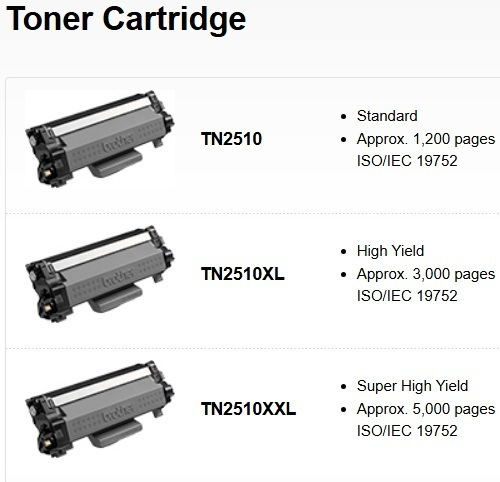
Designed for optimal performance with Brother machines. The Brother TN-2510XXL standard yield toner cartridge delivers high-quality results from the first to the last page. Print yield of up to 5,000...
Designed for optimal performance with Brother machines. The Brother TN-2510XXL standard yield toner cartridge delivers high-quality results from the first to the last page. Print yield of up to 5,000 pages.
Designed for optimal performance with Brother machines. The Brother TN-2510XXL standard yield toner cartridge delivers high-quality results from the first to the last page. Print yield of up to 5,000 pages.
Specifications are collected from official manufacturer websites. Please verify the specifications before proceeding with your final purchase. If you notice any problem you can report it here.
ATTENTION! IT CAN BE USED BY ALL THOSE WHO USE 2510 AND 2510xl!!! On the MFC-L2800DW it is OK!!
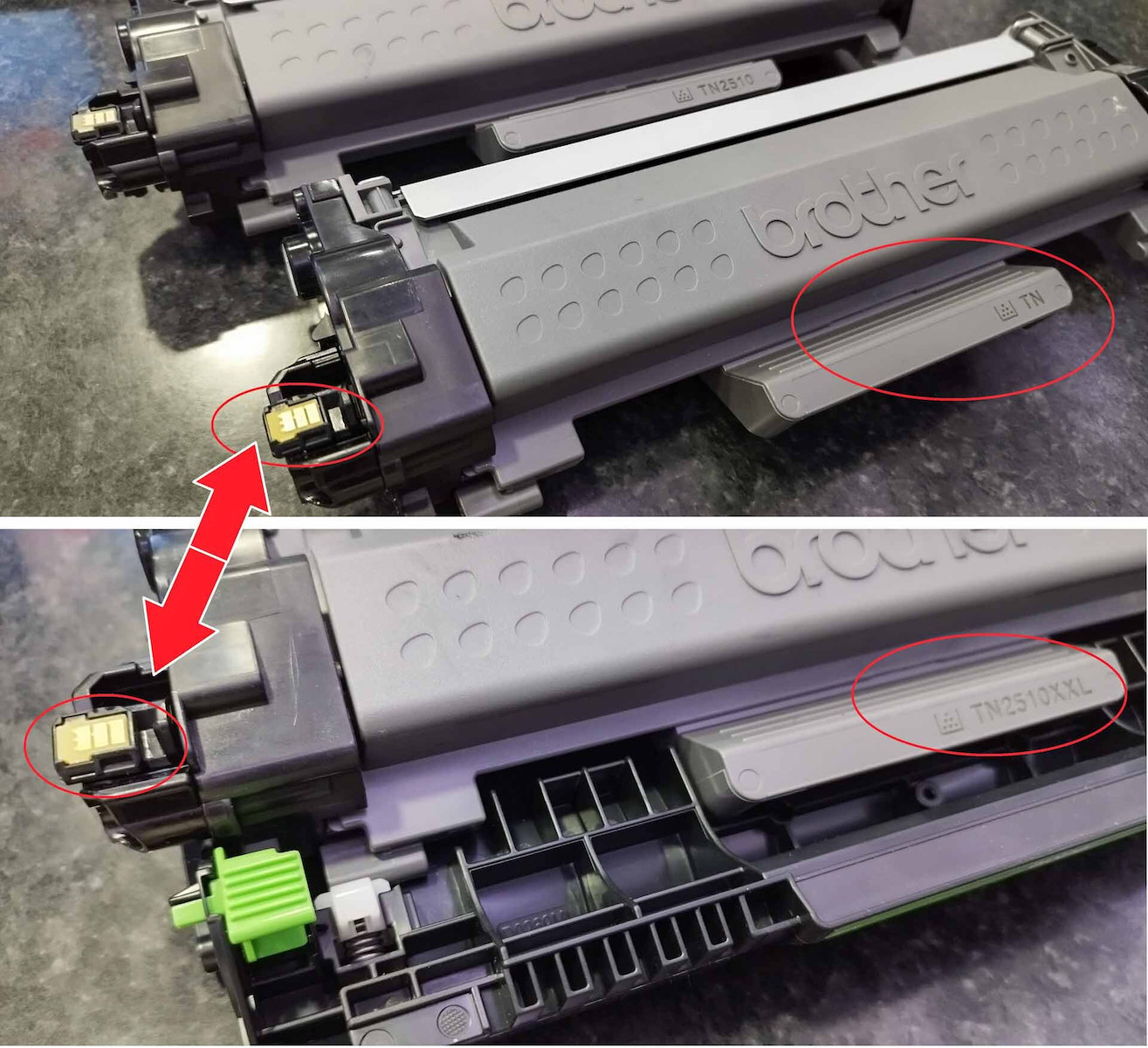
It even works with the factory "TN" cartridge, I used its chip, but even with TN2510 or TN2510xl, you can change the chip, it doesn't matter - the toners are 100% the same, the difference is the amount of ink!
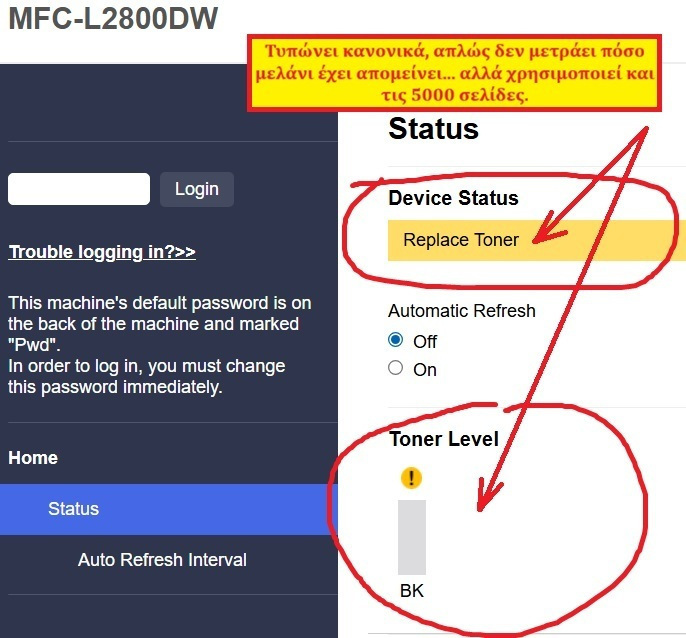
It prints normally, it just doesn't count how much ink is left... But it uses all 5000 pages. It just says "Replace toner" and shows empty ink!!
To do this, just unscrew the chip from the side of the old one and replace it with the new one. Then, on the printer, go to the "Menu" button and select:
General Setup → OK.
↓ Replace Toner option → OK.
↓ Continue or Stop → OK.
↓ Stop/Exit
I hope this information was helpful to you. I didn't know when I ordered the XXL that it wouldn't work, and I decided to try it! 134 euros for 5000 pages is extremely good!!
ΠΡΟΣΟΧΗ! ΕΙΝΑΙ ΔΥΝΑΤΟΝ ΝΑ ΧΡΗΣΙΜΟΠΟΙΗΘΕΙ ΣΕ ΟΛΟΥΣ ΟΣΟΥΣ ΧΡΗΣΙΜΟΠΟΙΟΥΝ 2510 ΚΑΙ 2510xl !!! ΣΤΟ MFC-L2800DW ειναι ΟΚ!!
Λειτουργεί ακόμη και με την εργοστασιακή κασέτα "TN", εγω χρησιμοποίησα το τσιπ της, αλλά ακόμα και με TN2510 ή TN2510xl, μπορείτε να αλλάξετε το τσιπ, δεν έχει σημασία - τα τόνερ είναι 100% ίδια, η διαφορά είναι η ποσότητα μελανιού!
Τυπώνει κανονικά, απλώς δεν μετράει πόσο μελάνι έχει απομείνει... Aλλά χρησιμοποιεί και τις 5000 σελίδες. Λέει απλώς "Αντικατάσταση τόνερ" και δείχνει άδειο μελάνι!!
Για να το κάνετε αυτό, απλώς ξεβιδώστε το τσιπ από την πλευρά του παλιού και αντικαταστήστε το με το νέο. Στη συνέχεια, στον εκτυπωτή, μεταβείτε στο κουμπί "Μενού" και επιλέξτε:
General Setup → OK.
↓ Replace Toner option → OK.
↓ Continue or Stop → OK.
↓ Stop/Exit
Ελπίζω αυτές οι πληροφορίες να σας φάνηκαν χρήσιμες. Δεν ήξερα όταν παρήγγειλα το XXL ότι δεν λειτουργει, και αποφάσισα να το δοκιμάσω! 134 ευρώ για 5000 σελίδες είναι εξαιρετικά καλά!!
ATTENTION! IT CAN BE USED BY ALL THOSE WHO USE 2510 AND 2510xl!!! On the MFC-L2800DW it is OK!!
It even works with the factory "TN" cartridge, I used its chip, but even with TN2510 or TN2510xl, you can change the chip, it doesn't matter - the toners are 100% the same, the difference is the amount of ink!
It prints normally, it just doesn't count how much ink is left... But it uses all 5000 pages. It just says "Replace toner" and shows empty ink!!
To do this, just unscrew the chip from the side of the old one and replace it with the new one. Then, on the printer, go to the "Menu" button and select:
General Setup → OK.
↓ Replace Toner option → OK.
↓ Continue or Stop → OK.
↓ Stop/Exit
I hope this information was helpful to you. I didn't know when I ordered the XXL that it wouldn't work, and I decided to try it! 134 euros for 5000 pages is extremely good!!
ΠΡΟΣΟΧΗ! ΕΙΝΑΙ ΔΥΝΑΤΟΝ ΝΑ ΧΡΗΣΙΜΟΠΟΙΗΘΕΙ ΣΕ ΟΛΟΥΣ ΟΣΟΥΣ ΧΡΗΣΙΜΟΠΟΙΟΥΝ 2510 ΚΑΙ 2510xl !!! ΣΤΟ MFC-L2800DW ειναι ΟΚ!!
Λειτουργεί ακόμη και με την εργοστασιακή κασέτα "TN", εγω χρησιμοποίησα το τσιπ της, αλλά ακόμα και με TN2510 ή TN2510xl, μπορείτε να αλλάξετε το τσιπ, δεν έχει σημασία - τα τόνερ είναι 100% ίδια, η διαφορά είναι η ποσότητα μελανιού!
Τυπώνει κανονικά, απλώς δεν μετράει πόσο μελάνι έχει απομείνει... Aλλά χρησιμοποιεί και τις 5000 σελίδες. Λέει απλώς "Αντικατάσταση τόνερ" και δείχνει άδειο μελάνι!!
Για να το κάνετε αυτό, απλώς ξεβιδώστε το τσιπ από την πλευρά του παλιού και αντικαταστήστε το με το νέο. Στη συνέχεια, στον εκτυπωτή, μεταβείτε στο κουμπί "Μενού" και επιλέξτε:
General Setup → OK.
↓ Replace Toner option → OK.
↓ Continue or Stop → OK.
↓ Stop/Exit
Ελπίζω αυτές οι πληροφορίες να σας φάνηκαν χρήσιμες. Δεν ήξερα όταν παρήγγειλα το XXL ότι δεν λειτουργει, και αποφάσισα να το δοκιμάσω! 134 ευρώ για 5000 σελίδες είναι εξαιρετικά καλά!!
Designed for optimal performance with Brother machines. The Brother TN-2510XXL standard yield toner cartridge delivers high-quality results from the first to the last page. Print yield of up to 5,000 pages.
Specifications are collected from official manufacturer websites. Please verify the specifications before proceeding with your final purchase. If you notice any problem you can report it here.
ATTENTION! IT CAN BE USED BY ALL THOSE WHO USE 2510 AND 2510xl!!! On the MFC-L2800DW it is OK!!
It even works with the factory "TN" cartridge, I used its chip, but even with TN2510 or TN2510xl, you can change the chip, it doesn't matter - the toners are 100% the same, the difference is the amount of ink!
It prints normally, it just doesn't count how much ink is left... But it uses all 5000 pages. It just says "Replace toner" and shows empty ink!!
To do this, just unscrew the chip from the side of the old one and replace it with the new one. Then, on the printer, go to the "Menu" button and select:
General Setup → OK.
↓ Replace Toner option → OK.
↓ Continue or Stop → OK.
↓ Stop/Exit
I hope this information was helpful to you. I didn't know when I ordered the XXL that it wouldn't work, and I decided to try it! 134 euros for 5000 pages is extremely good!!
ΠΡΟΣΟΧΗ! ΕΙΝΑΙ ΔΥΝΑΤΟΝ ΝΑ ΧΡΗΣΙΜΟΠΟΙΗΘΕΙ ΣΕ ΟΛΟΥΣ ΟΣΟΥΣ ΧΡΗΣΙΜΟΠΟΙΟΥΝ 2510 ΚΑΙ 2510xl !!! ΣΤΟ MFC-L2800DW ειναι ΟΚ!!
Λειτουργεί ακόμη και με την εργοστασιακή κασέτα "TN", εγω χρησιμοποίησα το τσιπ της, αλλά ακόμα και με TN2510 ή TN2510xl, μπορείτε να αλλάξετε το τσιπ, δεν έχει σημασία - τα τόνερ είναι 100% ίδια, η διαφορά είναι η ποσότητα μελανιού!
Τυπώνει κανονικά, απλώς δεν μετράει πόσο μελάνι έχει απομείνει... Aλλά χρησιμοποιεί και τις 5000 σελίδες. Λέει απλώς "Αντικατάσταση τόνερ" και δείχνει άδειο μελάνι!!
Για να το κάνετε αυτό, απλώς ξεβιδώστε το τσιπ από την πλευρά του παλιού και αντικαταστήστε το με το νέο. Στη συνέχεια, στον εκτυπωτή, μεταβείτε στο κουμπί "Μενού" και επιλέξτε:
General Setup → OK.
↓ Replace Toner option → OK.
↓ Continue or Stop → OK.
↓ Stop/Exit
Ελπίζω αυτές οι πληροφορίες να σας φάνηκαν χρήσιμες. Δεν ήξερα όταν παρήγγειλα το XXL ότι δεν λειτουργει, και αποφάσισα να το δοκιμάσω! 134 ευρώ για 5000 σελίδες είναι εξαιρετικά καλά!!
ATTENTION! IT CAN BE USED BY ALL THOSE WHO USE 2510 AND 2510xl!!! On the MFC-L2800DW it is OK!!
It even works with the factory "TN" cartridge, I used its chip, but even with TN2510 or TN2510xl, you can change the chip, it doesn't matter - the toners are 100% the same, the difference is the amount of ink!
It prints normally, it just doesn't count how much ink is left... But it uses all 5000 pages. It just says "Replace toner" and shows empty ink!!
To do this, just unscrew the chip from the side of the old one and replace it with the new one. Then, on the printer, go to the "Menu" button and select:
General Setup → OK.
↓ Replace Toner option → OK.
↓ Continue or Stop → OK.
↓ Stop/Exit
I hope this information was helpful to you. I didn't know when I ordered the XXL that it wouldn't work, and I decided to try it! 134 euros for 5000 pages is extremely good!!
ΠΡΟΣΟΧΗ! ΕΙΝΑΙ ΔΥΝΑΤΟΝ ΝΑ ΧΡΗΣΙΜΟΠΟΙΗΘΕΙ ΣΕ ΟΛΟΥΣ ΟΣΟΥΣ ΧΡΗΣΙΜΟΠΟΙΟΥΝ 2510 ΚΑΙ 2510xl !!! ΣΤΟ MFC-L2800DW ειναι ΟΚ!!
Λειτουργεί ακόμη και με την εργοστασιακή κασέτα "TN", εγω χρησιμοποίησα το τσιπ της, αλλά ακόμα και με TN2510 ή TN2510xl, μπορείτε να αλλάξετε το τσιπ, δεν έχει σημασία - τα τόνερ είναι 100% ίδια, η διαφορά είναι η ποσότητα μελανιού!
Τυπώνει κανονικά, απλώς δεν μετράει πόσο μελάνι έχει απομείνει... Aλλά χρησιμοποιεί και τις 5000 σελίδες. Λέει απλώς "Αντικατάσταση τόνερ" και δείχνει άδειο μελάνι!!
Για να το κάνετε αυτό, απλώς ξεβιδώστε το τσιπ από την πλευρά του παλιού και αντικαταστήστε το με το νέο. Στη συνέχεια, στον εκτυπωτή, μεταβείτε στο κουμπί "Μενού" και επιλέξτε:
General Setup → OK.
↓ Replace Toner option → OK.
↓ Continue or Stop → OK.
↓ Stop/Exit
Ελπίζω αυτές οι πληροφορίες να σας φάνηκαν χρήσιμες. Δεν ήξερα όταν παρήγγειλα το XXL ότι δεν λειτουργει, και αποφάσισα να το δοκιμάσω! 134 ευρώ για 5000 σελίδες είναι εξαιρετικά καλά!!