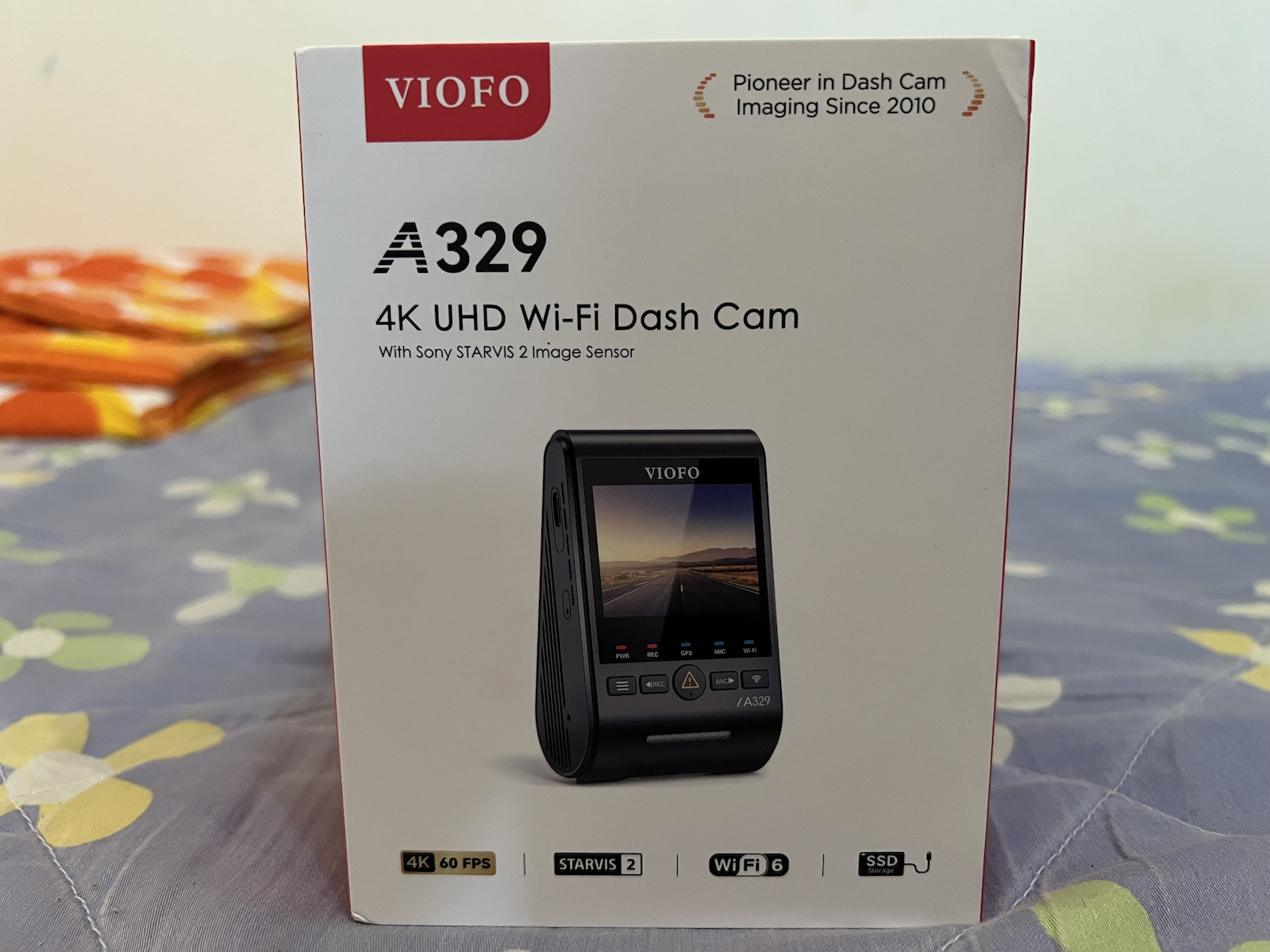
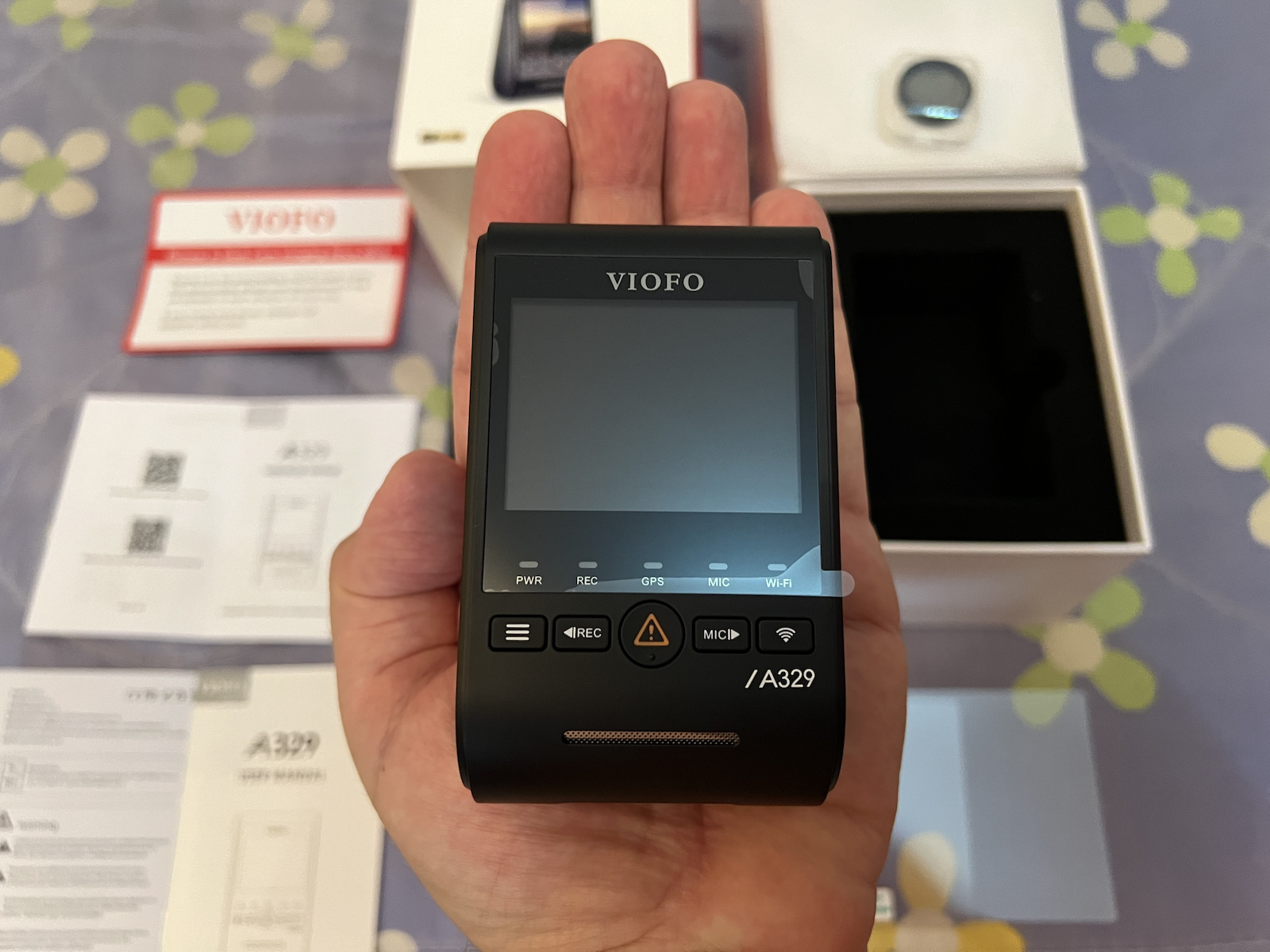
Car camera VIOFO A329 1CH 4K 60FPS with top recording and safety on the road.
4K 60FPS Recording: Capture every detail with exceptional clarity and smooth image flow.
Sony STARVIS 2 Sensor: Improved performance in low light conditions and reduced image noise.
HDR & License Plate Reading: Balances bright and dark areas for clear license plates.
Wi-Fi 6 & USB 3.0: Fast data transfer and wireless connection via the VIOFO app.
SSD Support up to 4TB: Record videos for weeks without storage worries.
Smart Control with Voice Commands: Operate the camera simply and without distractions while driving.
Built-in GPS: Location, speed, and route history tracking.
G-Sensor & Loop Recording: Automatic file locking in case of collision.
The VIOFO A329 car camera offers unparalleled video quality with 4K resolution at 60 frames per second, recordings in dynamic driving conditions, and accurate location and speed information.
Specifications are collected from official manufacturer websites. Please verify the specifications before proceeding with your final purchase. If you notice any problem you can report it here.
Monday, September 8, 2025
Early in the morning I received my new 4K Dash Cam for the car I drive...
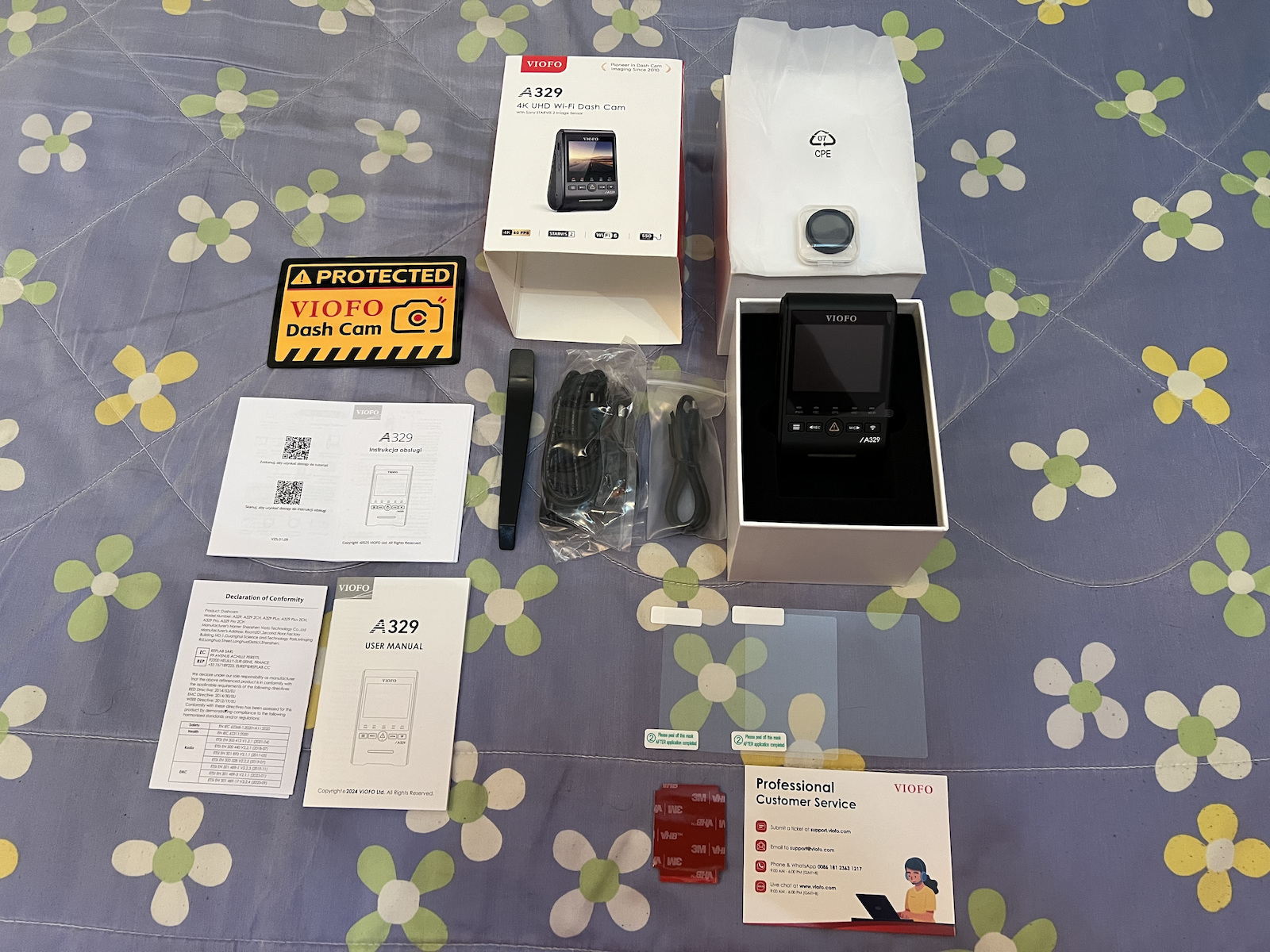
Very good packaging. In high-quality packaging (box). With all the accessories inside the package.
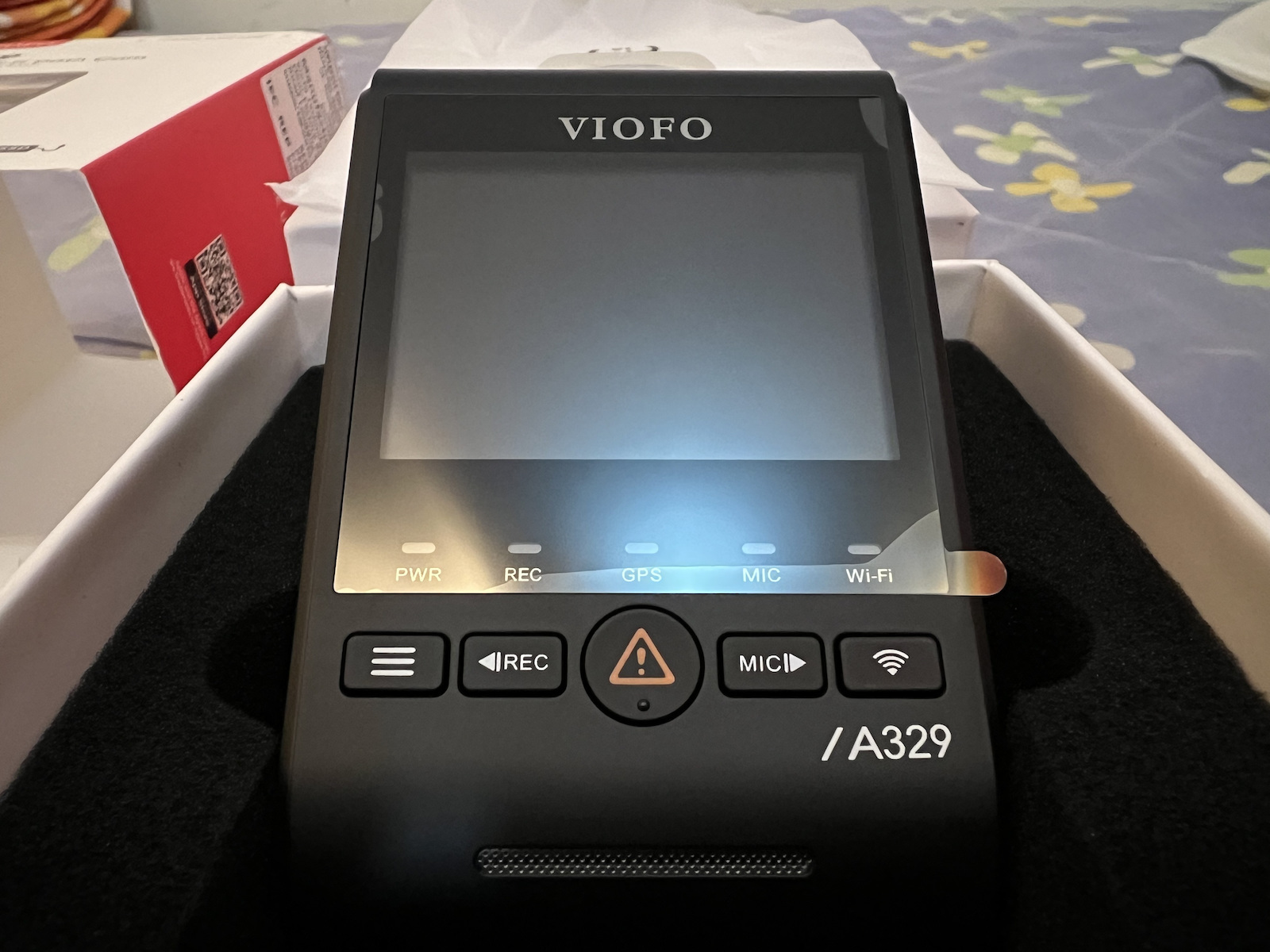
The camera is very good. With an easy menu.
As soon as you turn it on, e.g. via the car lighter, or via a Power Bank in your room (e.g. for menu settings), it starts recording video automatically.
The connection cable via the lighter is very satisfactory in length.
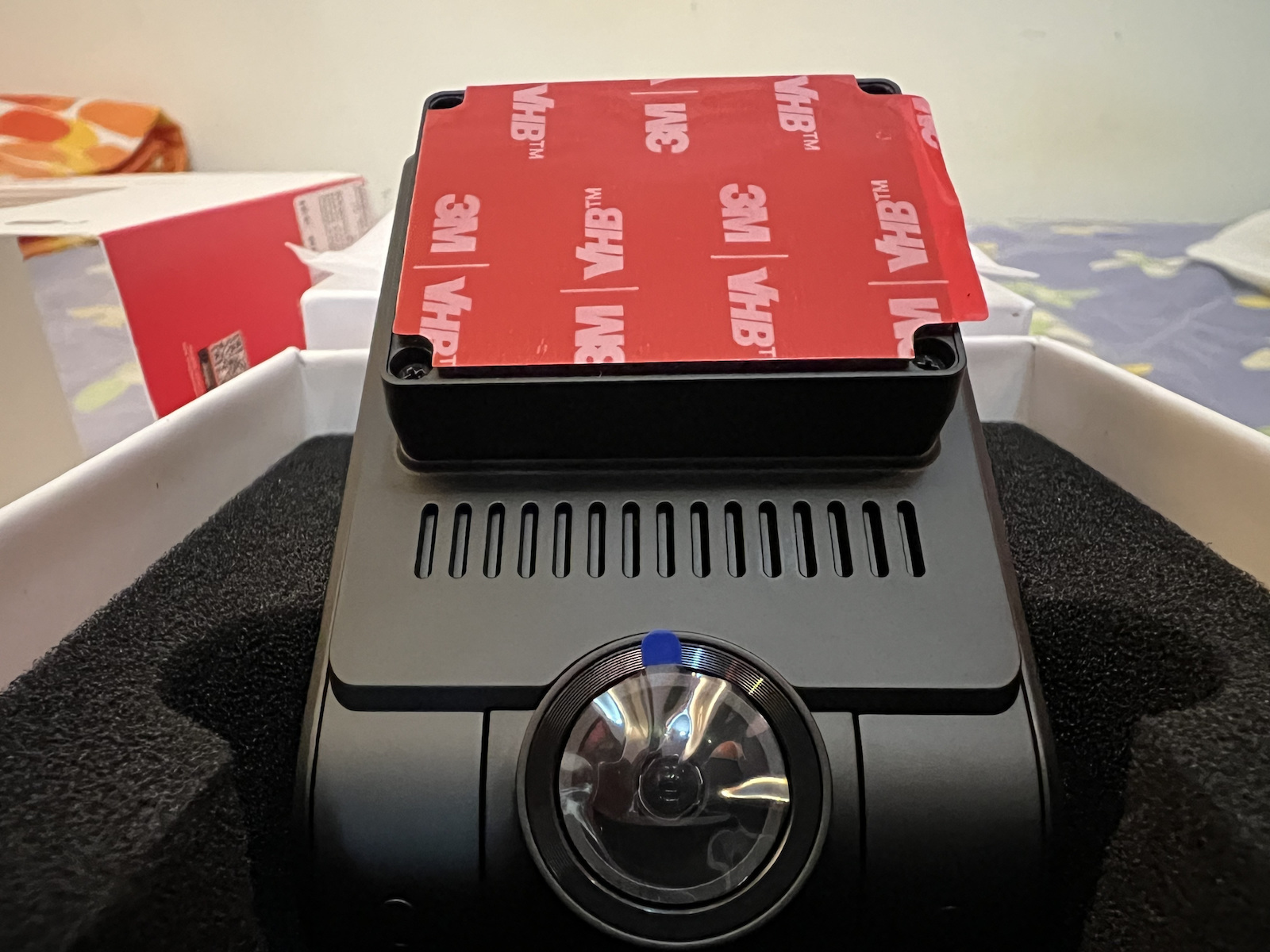
You can easily place the camera, e.g. on the dashboard somewhere in the middle of the windshield (under the central cabin mirror) and by bringing the cable all around (via the sun visor) to the car lighter, the cable just reaches, maybe you have a few centimeters of cable left (which you wrap with a rubber band or cable clip).
-
This particular camera is chosen by many worldwide as the "Best 4K Dash Cam" for car, truck, or even lorry, and it is also chosen by many YouTubers abroad.
That's why I chose it for purchase, spending so much money...
(while I could have chosen another much smaller and thinner 4K Dash Cam).
But I wanted only the best!
-
So if you have the money (because it's not enough just to have it), I would recommend it to anyone for purchase...
(at least until we reach the era of 8K Dash Cams in the near future - which is still far away).
-
Finally, for the best protection of the camera, because it's still hot, and especially at noon when it's scorching, and the front windshield is hot (the glass), I don't turn it on, because if the glass is hot, the camera heats up in 4K operation, and I don't risk damaging it (pushing it to the limit for recordings).
I wouldn't recommend it to you either. You never know what can happen with the heat...
It's different if it's cloudy and the outside temperatures are, say, up to 25-28°C.
-
NEGATIVES:
The only negative I could mention is that it does NOT have a Disable option for "Loop Recording."
That is, if I want to record a route, even if the file is, say, 1 hour long... it can't record it.
⚠️On the contrary, what does it do?
The camera continuously records video, one file at a time in "segments"
(1, 2, 3, 5, or even 10 minutes per file - whatever you select in the settings).
When the memory card is full, it doesn't stop; it just starts deleting the oldest files to record new ones.
So you've recorded 12 files and the memory card is full?
It deletes file No1 and records No13.
Then it deletes file No2 and records No14.
And so on... It's a cycle.
So you always have the most recent cycle of recordings.
⚠️ Important:
Anything marked as "Protected"
(e.g. by the G-sensor if it detects a crash or if you manually lock it), is not deleted by the loop.
As long as you have the G-sensor enabled and set, either to LOW sensitivity or HIGH sensitivity.
So you don't risk losing footage from an accident.
In simple terms:
"Loop Recording" ensures that the DashCam records continuously without ever filling up the card – it always keeps the last X minutes/hours.
⚠️ Exception:
Any files marked as "Protected"
(either you pressed it or the G-sensor locked it automatically in a crash), are not touched by Loop Recording.
They remain permanently until you delete them manually.
In short:
The dashcam is like having a movie that is constantly being overwritten, always keeping the most recent 10-minute segments.
Δευτερα 8 Σεπτεμβριου 2025
Πρωι-Πρωι παρελαβα την Νεα μου 4Κ Dash Cam για το αυτοκινητο που οδηγαω...
Παρα πολυ καλη συσκευασια. Σε υψηλης ποιοτητας συσκευασία (κουτί). Με ολα τα παρελκόμενα εντός της συσκευασίας.
Η Καμερα παρα πολυ καλη. Με ευκολο μενου.
Απλά μολις την Ενεργοποιεις πχ μεσω Αναπτηρα αυτοκινητου, ή μεσω πχ Power Bank στο δωματιο σου (πχ για ρυθμισεις του μενου), αυτη ξεκιναει να τραβαει βιντεο αυτοματα.
Το καλωδιο συνδεσης μεσω του Αναπτηρα, ειναι παρα πολυ ικανοποιητικο σε μηκος.
Ανετα τοποθετεις την καμερα πχ στο ταμπλό καπου στην μεση του παρμπρίζ (κατω απο τον μεσσαιο καθρεφτη της καμπινας) και φερνοντας το καλωδιο γυρω-γυρω (μεσω σκίαστρου ηλιοπροστασιας) μεχρι τον αναπτηρα αυτοκινητου, φτανει το καλωδιο ίσα-ίσα, αντε να'χεις και μερικα εκατοστα περίσσευμα καλωδιου (το οποιο τυλιγεις με ενα πχ λαστιχακι ή κλίπ καλωδίων.
-
Η Συγκεκριμενη καμερα επιλεγεται απο παρα πολλους παγκοσμίως, ως η πιο "Καλυτερη Dash Cam 4K" για αυτοκινητο ή φορτηγο ή και Νταλίκα, την οποια καμερα επιλεγουν και πολλοι Youtubers του εξωτερικου.
Γι'αυτο και την επελεξα για αγορα, δίνοντας τόσα λεφτά...
(ενω θα μπορουσα να επιλεξω σε 4Κ Dash Cam μια αλλη πολυ μικροτερη σε διαστάσεις και πιο λεπτότερη γενικά).
Αλλά ήθελα την καλύτερη και μόνο!
-
Έτσι εαν διαθέτετε τα χρήματα (γιατι δεν αρκει μόνο να τα έχετε), θα την πρότεινα στον οποιονδήποτε προς αγορά...
(τουλαχιστον μεχρι να φτασουμε στην εποχή των Dash Cam 8K στο προσεχές μέλλον - το οποίο αργεί ακόμα).
-
Τέλος, για την καλύτερη προστασία της καμερας, επειδη κανει ακόμα ζέστες, και ειδικά τα μεσημέρια σκάει και ο τζίτζικας που λέμε, και το παρμπρίζ μπροστά είναι ζεστό (το τζάμι), δεν την ενεργοποιώ, γιατι ζεστό το τζάμι, ζεσταίνεται και η κάμερα σε λειτουργια στα 4Κ, έ δεν ρισκάρω να της προκαλέσω ζημιά (να την φτάσω στα άκρα για λήψεις).
Όπως και δεν θα σας το πρότεινα. Ποτέ δεν ξέρεις με τις ζέστες τι γίνεται...
Άλλο αν εχει συννεφα η μέρα και ειναι οι θερμοκρασίες εξω στο περιβαλλον, στα πχ εως 25-28°C.
-
ΑΡΝΗΤΙΚΑ:
Ένα μόνο αρνητικό που θα μπορούσα να αναφερω, ειναι οτι ΔΕΝ εχει Απενεργοποίηση στο "Loop Recording".
Δηλαδη αν θελω να τραβηξω πχ μια διαδρομη, ακομα κι αν ειναι το αρχειο πχ 1 ωρας... δεν μπορει να τραβηξει.
⚠️Αντιθετως τι κανει;
Η κάμερα γράφει συνεχώς βίντεο ένα-ένα αρχειο σε “κομμάτια”
(1, 2, 3, 5, ή και 10 λεπτών το καθε αρχείο - οτι επιλεξεις απο την ρυθμιση).
Όταν γεμίσει η κάρτα μνήμης, δεν σταματάει· απλά αρχίζει μετα και σβήνει τα πιο παλιά αρχεία για να γράψει καινούρια.
Δηλαδη εχεις γραψει 12 αρχεια και πχ γεμισε η καρτα μνημης;
Διαγραφει το Νο1 αρχειο, και εγγράφει το Νο13.
Μετα διαγράφει το Νο2 αρχειο και γραφει το Νο14.
κλπ... κλπ... Κυκλος δηλαδη.
Έτσι έχεις πάντα τον πιο πρόσφατο κύκλο καταγραφών.
⚠️ Σημαντικό:
Ό,τι έχει σημανθεί σαν “Protected”
(π.χ. από G-sensor αν δει τρακάρισμα ή αν το κλειδώσεις χειροκίνητα), δεν σβήνεται από το loop.
Αρκει το G-sensor να το εχεις Ενεργοποιήσει-ρυθμίσει, ειτε σε LOW ευαισθησία, είτε σε HIGH ευαισθησία.
Άρα δεν κινδυνεύεις να χάσεις υλικό από ατύχημα.
Με απλά λόγια:
Το "Loop Recording" εξασφαλίζει ότι η DashCam γράφει ασταμάτητα χωρίς να γεμίσει ποτέ η κάρτα – κρατάει πάντα τα τελευταία X λεπτά/ώρες.
⚠️ Εξαίρεση:
Ό,τι αρχεία έχουν χαρακτηριστεί “Ρrotected”
(είτε τα πάτησες εσύ, είτε τα κλείδωσε αυτόματα ο G-sensor σε τρακάρισμα), δεν τα αγγίζει το Loop Recording.
Αυτά μένουν μόνιμα μέχρι να τα σβήσεις με το χέρι.
Με λίγα λόγια:
H dashcam είναι σαν να έχεις μια ταινία που ξαναγράφεται συνεχώς, κρατώντας πάντα τα πιο πρόσφατα 10λεπτα κομμάτια.
Monday, September 8, 2025
Early in the morning I received my new 4K Dash Cam for the car I drive...
Very good packaging. In high-quality packaging (box). With all the accessories inside the package.
The camera is very good. With an easy menu.
As soon as you turn it on, e.g. via the car lighter, or via a Power Bank in your room (e.g. for menu settings), it starts recording video automatically.
The connection cable via the lighter is very satisfactory in length.
You can easily place the camera, e.g. on the dashboard somewhere in the middle of the windshield (under the central cabin mirror) and by bringing the cable all around (via the sun visor) to the car lighter, the cable just reaches, maybe you have a few centimeters of cable left (which you wrap with a rubber band or cable clip).
-
This particular camera is chosen by many worldwide as the "Best 4K Dash Cam" for car, truck, or even lorry, and it is also chosen by many YouTubers abroad.
That's why I chose it for purchase, spending so much money...
(while I could have chosen another much smaller and thinner 4K Dash Cam).
But I wanted only the best!
-
So if you have the money (because it's not enough just to have it), I would recommend it to anyone for purchase...
(at least until we reach the era of 8K Dash Cams in the near future - which is still far away).
-
Finally, for the best protection of the camera, because it's still hot, and especially at noon when it's scorching, and the front windshield is hot (the glass), I don't turn it on, because if the glass is hot, the camera heats up in 4K operation, and I don't risk damaging it (pushing it to the limit for recordings).
I wouldn't recommend it to you either. You never know what can happen with the heat...
It's different if it's cloudy and the outside temperatures are, say, up to 25-28°C.
-
NEGATIVES:
The only negative I could mention is that it does NOT have a Disable option for "Loop Recording."
That is, if I want to record a route, even if the file is, say, 1 hour long... it can't record it.
⚠️On the contrary, what does it do?
The camera continuously records video, one file at a time in "segments"
(1, 2, 3, 5, or even 10 minutes per file - whatever you select in the settings).
When the memory card is full, it doesn't stop; it just starts deleting the oldest files to record new ones.
So you've recorded 12 files and the memory card is full?
It deletes file No1 and records No13.
Then it deletes file No2 and records No14.
And so on... It's a cycle.
So you always have the most recent cycle of recordings.
⚠️ Important:
Anything marked as "Protected"
(e.g. by the G-sensor if it detects a crash or if you manually lock it), is not deleted by the loop.
As long as you have the G-sensor enabled and set, either to LOW sensitivity or HIGH sensitivity.
So you don't risk losing footage from an accident.
In simple terms:
"Loop Recording" ensures that the DashCam records continuously without ever filling up the card – it always keeps the last X minutes/hours.
⚠️ Exception:
Any files marked as "Protected"
(either you pressed it or the G-sensor locked it automatically in a crash), are not touched by Loop Recording.
They remain permanently until you delete them manually.
In short:
The dashcam is like having a movie that is constantly being overwritten, always keeping the most recent 10-minute segments.
Δευτερα 8 Σεπτεμβριου 2025
Πρωι-Πρωι παρελαβα την Νεα μου 4Κ Dash Cam για το αυτοκινητο που οδηγαω...
Παρα πολυ καλη συσκευασια. Σε υψηλης ποιοτητας συσκευασία (κουτί). Με ολα τα παρελκόμενα εντός της συσκευασίας.
Η Καμερα παρα πολυ καλη. Με ευκολο μενου.
Απλά μολις την Ενεργοποιεις πχ μεσω Αναπτηρα αυτοκινητου, ή μεσω πχ Power Bank στο δωματιο σου (πχ για ρυθμισεις του μενου), αυτη ξεκιναει να τραβαει βιντεο αυτοματα.
Το καλωδιο συνδεσης μεσω του Αναπτηρα, ειναι παρα πολυ ικανοποιητικο σε μηκος.
Ανετα τοποθετεις την καμερα πχ στο ταμπλό καπου στην μεση του παρμπρίζ (κατω απο τον μεσσαιο καθρεφτη της καμπινας) και φερνοντας το καλωδιο γυρω-γυρω (μεσω σκίαστρου ηλιοπροστασιας) μεχρι τον αναπτηρα αυτοκινητου, φτανει το καλωδιο ίσα-ίσα, αντε να'χεις και μερικα εκατοστα περίσσευμα καλωδιου (το οποιο τυλιγεις με ενα πχ λαστιχακι ή κλίπ καλωδίων.
-
Η Συγκεκριμενη καμερα επιλεγεται απο παρα πολλους παγκοσμίως, ως η πιο "Καλυτερη Dash Cam 4K" για αυτοκινητο ή φορτηγο ή και Νταλίκα, την οποια καμερα επιλεγουν και πολλοι Youtubers του εξωτερικου.
Γι'αυτο και την επελεξα για αγορα, δίνοντας τόσα λεφτά...
(ενω θα μπορουσα να επιλεξω σε 4Κ Dash Cam μια αλλη πολυ μικροτερη σε διαστάσεις και πιο λεπτότερη γενικά).
Αλλά ήθελα την καλύτερη και μόνο!
-
Έτσι εαν διαθέτετε τα χρήματα (γιατι δεν αρκει μόνο να τα έχετε), θα την πρότεινα στον οποιονδήποτε προς αγορά...
(τουλαχιστον μεχρι να φτασουμε στην εποχή των Dash Cam 8K στο προσεχές μέλλον - το οποίο αργεί ακόμα).
-
Τέλος, για την καλύτερη προστασία της καμερας, επειδη κανει ακόμα ζέστες, και ειδικά τα μεσημέρια σκάει και ο τζίτζικας που λέμε, και το παρμπρίζ μπροστά είναι ζεστό (το τζάμι), δεν την ενεργοποιώ, γιατι ζεστό το τζάμι, ζεσταίνεται και η κάμερα σε λειτουργια στα 4Κ, έ δεν ρισκάρω να της προκαλέσω ζημιά (να την φτάσω στα άκρα για λήψεις).
Όπως και δεν θα σας το πρότεινα. Ποτέ δεν ξέρεις με τις ζέστες τι γίνεται...
Άλλο αν εχει συννεφα η μέρα και ειναι οι θερμοκρασίες εξω στο περιβαλλον, στα πχ εως 25-28°C.
-
ΑΡΝΗΤΙΚΑ:
Ένα μόνο αρνητικό που θα μπορούσα να αναφερω, ειναι οτι ΔΕΝ εχει Απενεργοποίηση στο "Loop Recording".
Δηλαδη αν θελω να τραβηξω πχ μια διαδρομη, ακομα κι αν ειναι το αρχειο πχ 1 ωρας... δεν μπορει να τραβηξει.
⚠️Αντιθετως τι κανει;
Η κάμερα γράφει συνεχώς βίντεο ένα-ένα αρχειο σε “κομμάτια”
(1, 2, 3, 5, ή και 10 λεπτών το καθε αρχείο - οτι επιλεξεις απο την ρυθμιση).
Όταν γεμίσει η κάρτα μνήμης, δεν σταματάει· απλά αρχίζει μετα και σβήνει τα πιο παλιά αρχεία για να γράψει καινούρια.
Δηλαδη εχεις γραψει 12 αρχεια και πχ γεμισε η καρτα μνημης;
Διαγραφει το Νο1 αρχειο, και εγγράφει το Νο13.
Μετα διαγράφει το Νο2 αρχειο και γραφει το Νο14.
κλπ... κλπ... Κυκλος δηλαδη.
Έτσι έχεις πάντα τον πιο πρόσφατο κύκλο καταγραφών.
⚠️ Σημαντικό:
Ό,τι έχει σημανθεί σαν “Protected”
(π.χ. από G-sensor αν δει τρακάρισμα ή αν το κλειδώσεις χειροκίνητα), δεν σβήνεται από το loop.
Αρκει το G-sensor να το εχεις Ενεργοποιήσει-ρυθμίσει, ειτε σε LOW ευαισθησία, είτε σε HIGH ευαισθησία.
Άρα δεν κινδυνεύεις να χάσεις υλικό από ατύχημα.
Με απλά λόγια:
Το "Loop Recording" εξασφαλίζει ότι η DashCam γράφει ασταμάτητα χωρίς να γεμίσει ποτέ η κάρτα – κρατάει πάντα τα τελευταία X λεπτά/ώρες.
⚠️ Εξαίρεση:
Ό,τι αρχεία έχουν χαρακτηριστεί “Ρrotected”
(είτε τα πάτησες εσύ, είτε τα κλείδωσε αυτόματα ο G-sensor σε τρακάρισμα), δεν τα αγγίζει το Loop Recording.
Αυτά μένουν μόνιμα μέχρι να τα σβήσεις με το χέρι.
Με λίγα λόγια:
H dashcam είναι σαν να έχεις μια ταινία που ξαναγράφεται συνεχώς, κρατώντας πάντα τα πιο πρόσφατα 10λεπτα κομμάτια.
Car camera VIOFO A329 1CH 4K 60FPS with top recording and safety on the road.
4K 60FPS Recording: Capture every detail with exceptional clarity and smooth image flow.
Sony STARVIS 2 Sensor: Improved performance in low light conditions and reduced image noise.
HDR & License Plate Reading: Balances bright and dark areas for clear license plates.
Wi-Fi 6 & USB 3.0: Fast data transfer and wireless connection via the VIOFO app.
SSD Support up to 4TB: Record videos for weeks without storage worries.
Smart Control with Voice Commands: Operate the camera simply and without distractions while driving.
Built-in GPS: Location, speed, and route history tracking.
G-Sensor & Loop Recording: Automatic file locking in case of collision.
The VIOFO A329 car camera offers unparalleled video quality with 4K resolution at 60 frames per second, recordings in dynamic driving conditions, and accurate location and speed information.
Specifications are collected from official manufacturer websites. Please verify the specifications before proceeding with your final purchase. If you notice any problem you can report it here.
Monday, September 8, 2025
Early in the morning I received my new 4K Dash Cam for the car I drive...
Very good packaging. In high-quality packaging (box). With all the accessories inside the package.
The camera is very good. With an easy menu.
As soon as you turn it on, e.g. via the car lighter, or via a Power Bank in your room (e.g. for menu settings), it starts recording video automatically.
The connection cable via the lighter is very satisfactory in length.
You can easily place the camera, e.g. on the dashboard somewhere in the middle of the windshield (under the central cabin mirror) and by bringing the cable all around (via the sun visor) to the car lighter, the cable just reaches, maybe you have a few centimeters of cable left (which you wrap with a rubber band or cable clip).
-
This particular camera is chosen by many worldwide as the "Best 4K Dash Cam" for car, truck, or even lorry, and it is also chosen by many YouTubers abroad.
That's why I chose it for purchase, spending so much money...
(while I could have chosen another much smaller and thinner 4K Dash Cam).
But I wanted only the best!
-
So if you have the money (because it's not enough just to have it), I would recommend it to anyone for purchase...
(at least until we reach the era of 8K Dash Cams in the near future - which is still far away).
-
Finally, for the best protection of the camera, because it's still hot, and especially at noon when it's scorching, and the front windshield is hot (the glass), I don't turn it on, because if the glass is hot, the camera heats up in 4K operation, and I don't risk damaging it (pushing it to the limit for recordings).
I wouldn't recommend it to you either. You never know what can happen with the heat...
It's different if it's cloudy and the outside temperatures are, say, up to 25-28°C.
-
NEGATIVES:
The only negative I could mention is that it does NOT have a Disable option for "Loop Recording."
That is, if I want to record a route, even if the file is, say, 1 hour long... it can't record it.
⚠️On the contrary, what does it do?
The camera continuously records video, one file at a time in "segments"
(1, 2, 3, 5, or even 10 minutes per file - whatever you select in the settings).
When the memory card is full, it doesn't stop; it just starts deleting the oldest files to record new ones.
So you've recorded 12 files and the memory card is full?
It deletes file No1 and records No13.
Then it deletes file No2 and records No14.
And so on... It's a cycle.
So you always have the most recent cycle of recordings.
⚠️ Important:
Anything marked as "Protected"
(e.g. by the G-sensor if it detects a crash or if you manually lock it), is not deleted by the loop.
As long as you have the G-sensor enabled and set, either to LOW sensitivity or HIGH sensitivity.
So you don't risk losing footage from an accident.
In simple terms:
"Loop Recording" ensures that the DashCam records continuously without ever filling up the card – it always keeps the last X minutes/hours.
⚠️ Exception:
Any files marked as "Protected"
(either you pressed it or the G-sensor locked it automatically in a crash), are not touched by Loop Recording.
They remain permanently until you delete them manually.
In short:
The dashcam is like having a movie that is constantly being overwritten, always keeping the most recent 10-minute segments.
Δευτερα 8 Σεπτεμβριου 2025
Πρωι-Πρωι παρελαβα την Νεα μου 4Κ Dash Cam για το αυτοκινητο που οδηγαω...
Παρα πολυ καλη συσκευασια. Σε υψηλης ποιοτητας συσκευασία (κουτί). Με ολα τα παρελκόμενα εντός της συσκευασίας.
Η Καμερα παρα πολυ καλη. Με ευκολο μενου.
Απλά μολις την Ενεργοποιεις πχ μεσω Αναπτηρα αυτοκινητου, ή μεσω πχ Power Bank στο δωματιο σου (πχ για ρυθμισεις του μενου), αυτη ξεκιναει να τραβαει βιντεο αυτοματα.
Το καλωδιο συνδεσης μεσω του Αναπτηρα, ειναι παρα πολυ ικανοποιητικο σε μηκος.
Ανετα τοποθετεις την καμερα πχ στο ταμπλό καπου στην μεση του παρμπρίζ (κατω απο τον μεσσαιο καθρεφτη της καμπινας) και φερνοντας το καλωδιο γυρω-γυρω (μεσω σκίαστρου ηλιοπροστασιας) μεχρι τον αναπτηρα αυτοκινητου, φτανει το καλωδιο ίσα-ίσα, αντε να'χεις και μερικα εκατοστα περίσσευμα καλωδιου (το οποιο τυλιγεις με ενα πχ λαστιχακι ή κλίπ καλωδίων.
-
Η Συγκεκριμενη καμερα επιλεγεται απο παρα πολλους παγκοσμίως, ως η πιο "Καλυτερη Dash Cam 4K" για αυτοκινητο ή φορτηγο ή και Νταλίκα, την οποια καμερα επιλεγουν και πολλοι Youtubers του εξωτερικου.
Γι'αυτο και την επελεξα για αγορα, δίνοντας τόσα λεφτά...
(ενω θα μπορουσα να επιλεξω σε 4Κ Dash Cam μια αλλη πολυ μικροτερη σε διαστάσεις και πιο λεπτότερη γενικά).
Αλλά ήθελα την καλύτερη και μόνο!
-
Έτσι εαν διαθέτετε τα χρήματα (γιατι δεν αρκει μόνο να τα έχετε), θα την πρότεινα στον οποιονδήποτε προς αγορά...
(τουλαχιστον μεχρι να φτασουμε στην εποχή των Dash Cam 8K στο προσεχές μέλλον - το οποίο αργεί ακόμα).
-
Τέλος, για την καλύτερη προστασία της καμερας, επειδη κανει ακόμα ζέστες, και ειδικά τα μεσημέρια σκάει και ο τζίτζικας που λέμε, και το παρμπρίζ μπροστά είναι ζεστό (το τζάμι), δεν την ενεργοποιώ, γιατι ζεστό το τζάμι, ζεσταίνεται και η κάμερα σε λειτουργια στα 4Κ, έ δεν ρισκάρω να της προκαλέσω ζημιά (να την φτάσω στα άκρα για λήψεις).
Όπως και δεν θα σας το πρότεινα. Ποτέ δεν ξέρεις με τις ζέστες τι γίνεται...
Άλλο αν εχει συννεφα η μέρα και ειναι οι θερμοκρασίες εξω στο περιβαλλον, στα πχ εως 25-28°C.
-
ΑΡΝΗΤΙΚΑ:
Ένα μόνο αρνητικό που θα μπορούσα να αναφερω, ειναι οτι ΔΕΝ εχει Απενεργοποίηση στο "Loop Recording".
Δηλαδη αν θελω να τραβηξω πχ μια διαδρομη, ακομα κι αν ειναι το αρχειο πχ 1 ωρας... δεν μπορει να τραβηξει.
⚠️Αντιθετως τι κανει;
Η κάμερα γράφει συνεχώς βίντεο ένα-ένα αρχειο σε “κομμάτια”
(1, 2, 3, 5, ή και 10 λεπτών το καθε αρχείο - οτι επιλεξεις απο την ρυθμιση).
Όταν γεμίσει η κάρτα μνήμης, δεν σταματάει· απλά αρχίζει μετα και σβήνει τα πιο παλιά αρχεία για να γράψει καινούρια.
Δηλαδη εχεις γραψει 12 αρχεια και πχ γεμισε η καρτα μνημης;
Διαγραφει το Νο1 αρχειο, και εγγράφει το Νο13.
Μετα διαγράφει το Νο2 αρχειο και γραφει το Νο14.
κλπ... κλπ... Κυκλος δηλαδη.
Έτσι έχεις πάντα τον πιο πρόσφατο κύκλο καταγραφών.
⚠️ Σημαντικό:
Ό,τι έχει σημανθεί σαν “Protected”
(π.χ. από G-sensor αν δει τρακάρισμα ή αν το κλειδώσεις χειροκίνητα), δεν σβήνεται από το loop.
Αρκει το G-sensor να το εχεις Ενεργοποιήσει-ρυθμίσει, ειτε σε LOW ευαισθησία, είτε σε HIGH ευαισθησία.
Άρα δεν κινδυνεύεις να χάσεις υλικό από ατύχημα.
Με απλά λόγια:
Το "Loop Recording" εξασφαλίζει ότι η DashCam γράφει ασταμάτητα χωρίς να γεμίσει ποτέ η κάρτα – κρατάει πάντα τα τελευταία X λεπτά/ώρες.
⚠️ Εξαίρεση:
Ό,τι αρχεία έχουν χαρακτηριστεί “Ρrotected”
(είτε τα πάτησες εσύ, είτε τα κλείδωσε αυτόματα ο G-sensor σε τρακάρισμα), δεν τα αγγίζει το Loop Recording.
Αυτά μένουν μόνιμα μέχρι να τα σβήσεις με το χέρι.
Με λίγα λόγια:
H dashcam είναι σαν να έχεις μια ταινία που ξαναγράφεται συνεχώς, κρατώντας πάντα τα πιο πρόσφατα 10λεπτα κομμάτια.
Monday, September 8, 2025
Early in the morning I received my new 4K Dash Cam for the car I drive...
Very good packaging. In high-quality packaging (box). With all the accessories inside the package.
The camera is very good. With an easy menu.
As soon as you turn it on, e.g. via the car lighter, or via a Power Bank in your room (e.g. for menu settings), it starts recording video automatically.
The connection cable via the lighter is very satisfactory in length.
You can easily place the camera, e.g. on the dashboard somewhere in the middle of the windshield (under the central cabin mirror) and by bringing the cable all around (via the sun visor) to the car lighter, the cable just reaches, maybe you have a few centimeters of cable left (which you wrap with a rubber band or cable clip).
-
This particular camera is chosen by many worldwide as the "Best 4K Dash Cam" for car, truck, or even lorry, and it is also chosen by many YouTubers abroad.
That's why I chose it for purchase, spending so much money...
(while I could have chosen another much smaller and thinner 4K Dash Cam).
But I wanted only the best!
-
So if you have the money (because it's not enough just to have it), I would recommend it to anyone for purchase...
(at least until we reach the era of 8K Dash Cams in the near future - which is still far away).
-
Finally, for the best protection of the camera, because it's still hot, and especially at noon when it's scorching, and the front windshield is hot (the glass), I don't turn it on, because if the glass is hot, the camera heats up in 4K operation, and I don't risk damaging it (pushing it to the limit for recordings).
I wouldn't recommend it to you either. You never know what can happen with the heat...
It's different if it's cloudy and the outside temperatures are, say, up to 25-28°C.
-
NEGATIVES:
The only negative I could mention is that it does NOT have a Disable option for "Loop Recording."
That is, if I want to record a route, even if the file is, say, 1 hour long... it can't record it.
⚠️On the contrary, what does it do?
The camera continuously records video, one file at a time in "segments"
(1, 2, 3, 5, or even 10 minutes per file - whatever you select in the settings).
When the memory card is full, it doesn't stop; it just starts deleting the oldest files to record new ones.
So you've recorded 12 files and the memory card is full?
It deletes file No1 and records No13.
Then it deletes file No2 and records No14.
And so on... It's a cycle.
So you always have the most recent cycle of recordings.
⚠️ Important:
Anything marked as "Protected"
(e.g. by the G-sensor if it detects a crash or if you manually lock it), is not deleted by the loop.
As long as you have the G-sensor enabled and set, either to LOW sensitivity or HIGH sensitivity.
So you don't risk losing footage from an accident.
In simple terms:
"Loop Recording" ensures that the DashCam records continuously without ever filling up the card – it always keeps the last X minutes/hours.
⚠️ Exception:
Any files marked as "Protected"
(either you pressed it or the G-sensor locked it automatically in a crash), are not touched by Loop Recording.
They remain permanently until you delete them manually.
In short:
The dashcam is like having a movie that is constantly being overwritten, always keeping the most recent 10-minute segments.
Δευτερα 8 Σεπτεμβριου 2025
Πρωι-Πρωι παρελαβα την Νεα μου 4Κ Dash Cam για το αυτοκινητο που οδηγαω...
Παρα πολυ καλη συσκευασια. Σε υψηλης ποιοτητας συσκευασία (κουτί). Με ολα τα παρελκόμενα εντός της συσκευασίας.
Η Καμερα παρα πολυ καλη. Με ευκολο μενου.
Απλά μολις την Ενεργοποιεις πχ μεσω Αναπτηρα αυτοκινητου, ή μεσω πχ Power Bank στο δωματιο σου (πχ για ρυθμισεις του μενου), αυτη ξεκιναει να τραβαει βιντεο αυτοματα.
Το καλωδιο συνδεσης μεσω του Αναπτηρα, ειναι παρα πολυ ικανοποιητικο σε μηκος.
Ανετα τοποθετεις την καμερα πχ στο ταμπλό καπου στην μεση του παρμπρίζ (κατω απο τον μεσσαιο καθρεφτη της καμπινας) και φερνοντας το καλωδιο γυρω-γυρω (μεσω σκίαστρου ηλιοπροστασιας) μεχρι τον αναπτηρα αυτοκινητου, φτανει το καλωδιο ίσα-ίσα, αντε να'χεις και μερικα εκατοστα περίσσευμα καλωδιου (το οποιο τυλιγεις με ενα πχ λαστιχακι ή κλίπ καλωδίων.
-
Η Συγκεκριμενη καμερα επιλεγεται απο παρα πολλους παγκοσμίως, ως η πιο "Καλυτερη Dash Cam 4K" για αυτοκινητο ή φορτηγο ή και Νταλίκα, την οποια καμερα επιλεγουν και πολλοι Youtubers του εξωτερικου.
Γι'αυτο και την επελεξα για αγορα, δίνοντας τόσα λεφτά...
(ενω θα μπορουσα να επιλεξω σε 4Κ Dash Cam μια αλλη πολυ μικροτερη σε διαστάσεις και πιο λεπτότερη γενικά).
Αλλά ήθελα την καλύτερη και μόνο!
-
Έτσι εαν διαθέτετε τα χρήματα (γιατι δεν αρκει μόνο να τα έχετε), θα την πρότεινα στον οποιονδήποτε προς αγορά...
(τουλαχιστον μεχρι να φτασουμε στην εποχή των Dash Cam 8K στο προσεχές μέλλον - το οποίο αργεί ακόμα).
-
Τέλος, για την καλύτερη προστασία της καμερας, επειδη κανει ακόμα ζέστες, και ειδικά τα μεσημέρια σκάει και ο τζίτζικας που λέμε, και το παρμπρίζ μπροστά είναι ζεστό (το τζάμι), δεν την ενεργοποιώ, γιατι ζεστό το τζάμι, ζεσταίνεται και η κάμερα σε λειτουργια στα 4Κ, έ δεν ρισκάρω να της προκαλέσω ζημιά (να την φτάσω στα άκρα για λήψεις).
Όπως και δεν θα σας το πρότεινα. Ποτέ δεν ξέρεις με τις ζέστες τι γίνεται...
Άλλο αν εχει συννεφα η μέρα και ειναι οι θερμοκρασίες εξω στο περιβαλλον, στα πχ εως 25-28°C.
-
ΑΡΝΗΤΙΚΑ:
Ένα μόνο αρνητικό που θα μπορούσα να αναφερω, ειναι οτι ΔΕΝ εχει Απενεργοποίηση στο "Loop Recording".
Δηλαδη αν θελω να τραβηξω πχ μια διαδρομη, ακομα κι αν ειναι το αρχειο πχ 1 ωρας... δεν μπορει να τραβηξει.
⚠️Αντιθετως τι κανει;
Η κάμερα γράφει συνεχώς βίντεο ένα-ένα αρχειο σε “κομμάτια”
(1, 2, 3, 5, ή και 10 λεπτών το καθε αρχείο - οτι επιλεξεις απο την ρυθμιση).
Όταν γεμίσει η κάρτα μνήμης, δεν σταματάει· απλά αρχίζει μετα και σβήνει τα πιο παλιά αρχεία για να γράψει καινούρια.
Δηλαδη εχεις γραψει 12 αρχεια και πχ γεμισε η καρτα μνημης;
Διαγραφει το Νο1 αρχειο, και εγγράφει το Νο13.
Μετα διαγράφει το Νο2 αρχειο και γραφει το Νο14.
κλπ... κλπ... Κυκλος δηλαδη.
Έτσι έχεις πάντα τον πιο πρόσφατο κύκλο καταγραφών.
⚠️ Σημαντικό:
Ό,τι έχει σημανθεί σαν “Protected”
(π.χ. από G-sensor αν δει τρακάρισμα ή αν το κλειδώσεις χειροκίνητα), δεν σβήνεται από το loop.
Αρκει το G-sensor να το εχεις Ενεργοποιήσει-ρυθμίσει, ειτε σε LOW ευαισθησία, είτε σε HIGH ευαισθησία.
Άρα δεν κινδυνεύεις να χάσεις υλικό από ατύχημα.
Με απλά λόγια:
Το "Loop Recording" εξασφαλίζει ότι η DashCam γράφει ασταμάτητα χωρίς να γεμίσει ποτέ η κάρτα – κρατάει πάντα τα τελευταία X λεπτά/ώρες.
⚠️ Εξαίρεση:
Ό,τι αρχεία έχουν χαρακτηριστεί “Ρrotected”
(είτε τα πάτησες εσύ, είτε τα κλείδωσε αυτόματα ο G-sensor σε τρακάρισμα), δεν τα αγγίζει το Loop Recording.
Αυτά μένουν μόνιμα μέχρι να τα σβήσεις με το χέρι.
Με λίγα λόγια:
H dashcam είναι σαν να έχεις μια ταινία που ξαναγράφεται συνεχώς, κρατώντας πάντα τα πιο πρόσφατα 10λεπτα κομμάτια.