USB Network Adapters

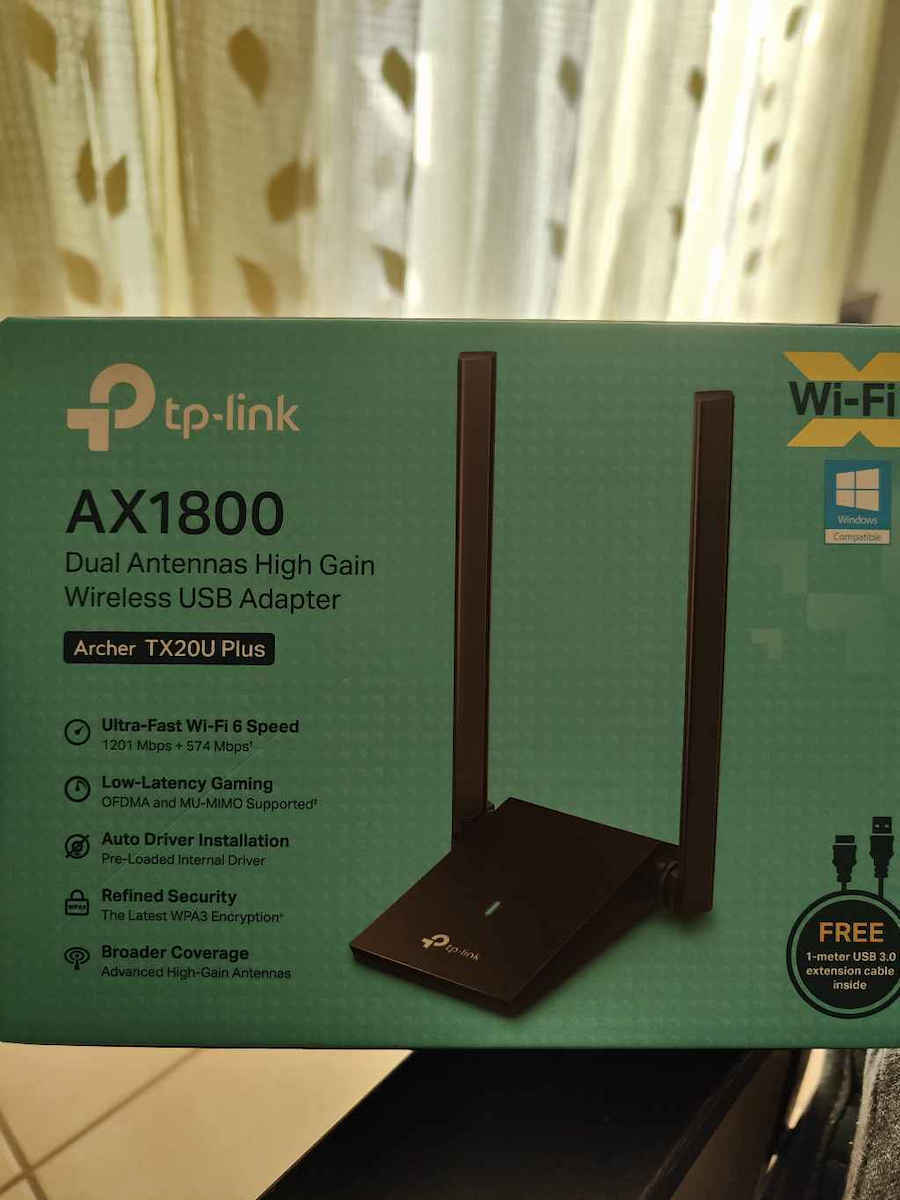
TP-LINK Archer TX20U USB Network Adapter with Wireless Wi-Fi Connection 1800Mbps and Detachable Antenna

The USB network adapter from TP-LINK connects to a USB port on your computer or laptop and allows you to connect to a wireless network with speeds of up to 1775Mbps. It is useful for computers that do...

The USB network adapter from TP-LINK connects to a USB port on your computer or laptop and allows you to connect to a wireless network with speeds of up to 1775Mbps. It is useful for computers that do not have wireless internet capability, giving you the ability to move to any point in your home or office and work without interruptions. It features a...

See full description See full description

Description

Description

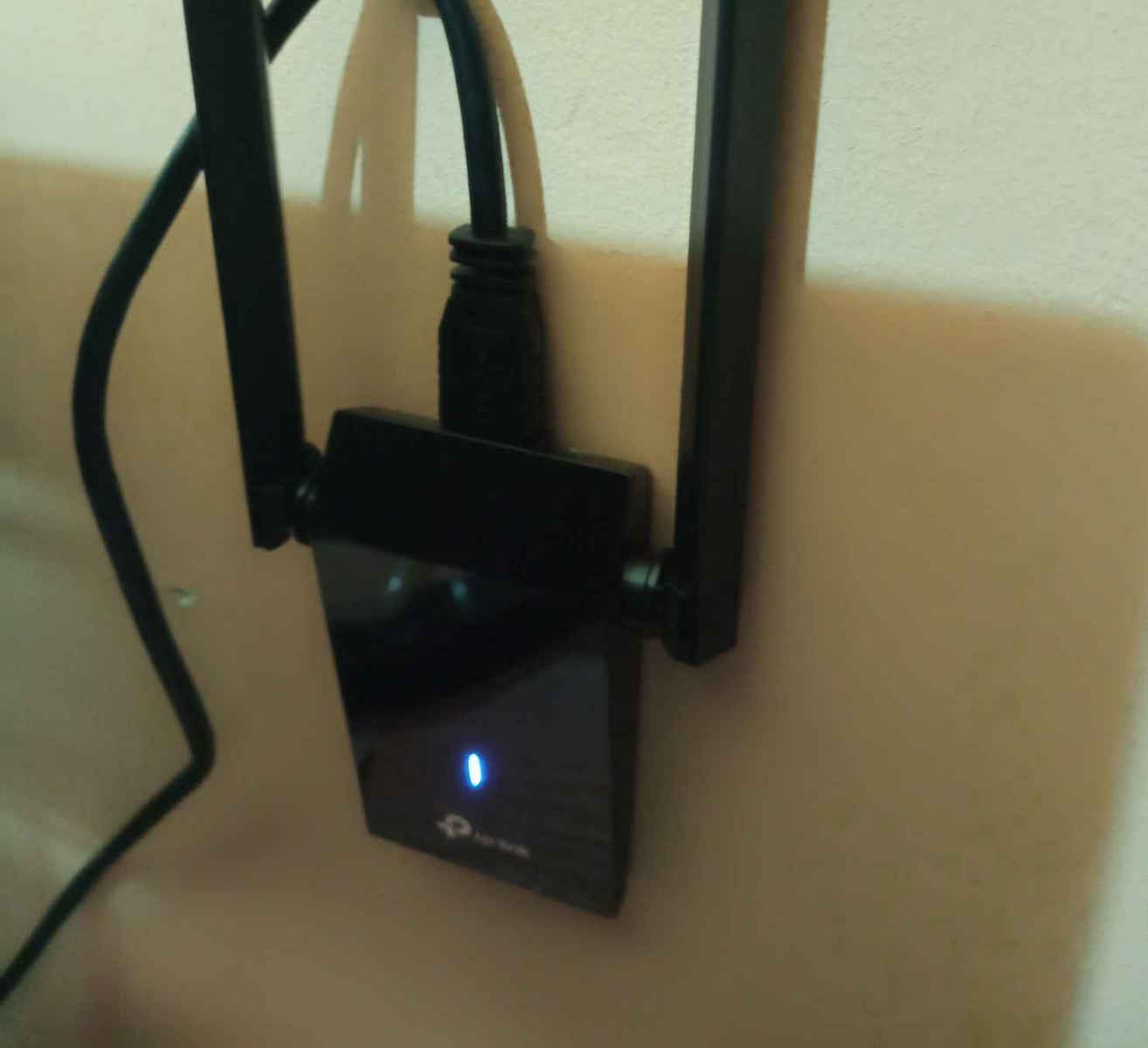
The USB network adapter from TP-LINK connects to a USB port on your computer or laptop and allows you to connect to a wireless network with speeds of up to 1775Mbps. It is useful for computers that do not have wireless internet capability, giving you the ability to move to any point in your home or office and work without interruptions. It features a detachable antenna that can be rotated and adjusted according to needs to fit various operating environments.

  • Networking Standards: IEEE 802.11 b/g/n, IEEE 802.11ac, IEEE 802.11ax
  • Data Transfer Rate: 1775Mbps

Manufacturer

See full description

Specifications

Specifications

Dimensions

Network Standards
IEEE 802.11 b/g/n, IEEE 802.11ac, IEEE 802.11ax
Data Transfer Rate
1800 Mbps

Connectivity

Connection
Wireless
Antenna
Detachable
USB-C
No

Important information

Specifications are collected from official manufacturer websites. Please verify the specifications before proceeding with your final purchase. If you notice any problem you can report it here.

See all specifications

Reviews (129)

Reviews

  1. 84
  2. 21
  3. 8
  4. 6
  5. 10
Review this product
  • Ease of installation
  • Range
  • Speed
  • Value for money
  • Does it disconnect/freeze?

Reviews photos

Reviews photos
Reviews photos
Reviews photos
Reviews photos

Reviews by our members

m.xaral
5
7 out of 8 members found this review helpful

Verified purchase

I chose this specific antenna to install it on my desktop PC, as I had previously experienced significant speed losses with powerline on a 300Mbps line.

As soon as I received the antenna, I connected it to my PC through a USB 3 port, as recommended to fully exploit its capabilities (simple plug & play - Windows automatically detects the drivers, but you can also manually download them from the TP Link website if needed), and I connected to my network.

Note: The antenna supports 5GHz and Wi-Fi 6 (IEEE 802.11ax) protocols without any issues. The only suggestion I would make is to split your network into two different frequencies and manually choose which one to connect to.

I say this because, in my case, due to the distance from the router, before splitting the frequencies into two different SSIDs, the antenna would automatically choose to work on the 2.4GHz frequency, as the range is better on that frequency.

To summarize, it is an excellent choice - very good range - stable performance - no disconnections.

Translated from Greek ·
  • Ease of installation
  • Range
  • Speed
  • Does it disconnect/freeze?
  • Value for money
Did you find this review helpful?

Γιώργος Δημ
1
13 out of 16 members found this review helpful

Verified purchase

I come after about 2 years that I have this disappointing card. It never played correctly.
Nor does the USB cable that comes with it make good contact. With others that do somewhat better, you may be able to download a file of 2-3MB max. Unfortunately, it is not the card you can rely on for streaming, gaming, video conferencing, Windows update, or syncing with OneDrive, and it is expensive!!
If you don't believe me, buy it, and then come back and like me, unless you don't have requirements. Unfortunately, I want the quality to be a PCI express card or cable, otherwise it's rubbish.
Thank you for listening to me.

Translated from Greek ·
  • Range
  • Speed
  • Does it disconnect/freeze often?
  • Value for money
Did you find this review helpful?
  • sackis31
    5
    1 out of 2 members found this review helpful

    Verified purchase

    This review is about a variation of the product

    Very good product, definitely worth it. You need to install the drivers and connect it to a USB 3 port. With this setup, on a 1 Gbps line, I get 750 Mbps and I am satisfied. To get the full speed, you need to connect your router and your computer with an ethernet cable. That's all from me. I saw that many people write about disconnections; if it happens, you should change the USB port and put it in a USB 3 port. In the USB 3 port, I haven't had a single disconnection. For those who don't know, the USB 3 port is the blue one

    Translated from Greek ·
    Did you find this review helpful?
  • konstadi73

    Verified purchase

    This review is about a variation of the product

    Strong wifi connection. On Windows 10 and Linux Ubuntu it works just fine, without me having to do anything except download the driver for Windows 10 and set Ubuntu to use proprietary software for devices it detects on the system. Unfortunately, on KDE Neon, although it is based on Ubuntu repositories, I couldn't get it to work, but that's a minor issue since I also have an Ethernet connection which is rock solid. I mostly use wifi for streaming to my TV via Chromecast.

    Translated from Greek ·
    Did you find this review helpful?
  • xpirednot
    4
    2 out of 2 members found this review helpful

    Verified purchase

    This review is about a variation of the product

    Because I am on a different floor from the router, I was getting half the speed, 250 which is quite ok but in games it was lagging. Someone here in the reviews posted this link (https://www.tp-link.com/no/support/download/archer-tx20u-plus/) and since then it works as it should. In CS, which I play, I have 50ms. I was ready to throw it away and it saved me

    Translated from Greek ·
    Did you find this review helpful?
  • dxflw
    1
    0 out of 4 members found this review helpful

    Verified purchase

    This review is about a variation of the product

    Terrible. It keeps disconnecting all the time. The speed is okay. I got myself into trouble... wasted 27€... I believe a plug 'n play from Temu would be better

    Translated from Greek ·
    Did you find this review helpful?
  • sxindas
    5
    1 out of 1 members found this review helpful

    Verified purchase

    This review is about a variation of the product

    It is a very good device and improved the speed on a desktop computer that is far from the router. Until I bought it, I made various attempts with the small sticks costing 10-12€, essentially throwing money away. Now I paid a bit more and got a stable and fast receiver. Very good purchase. (Installation and connection are a piece of cake)

    Translated from Greek ·
    Did you find this review helpful?
  • This review is about a variation of the product

    the adapter is better than what some people say am in the living room and reach around 125mbps speed and the router is far from me but make sure you install the drivers they can be found in a new drive in file explorer and the only time it disconnects is only when I have my pc on for days on a time a simple restart would fix everything and i would highly recommend it.

    Translated from Greek ·
    Did you find this review helpful?
  • This review is about a variation of the product

    I got triple the speed and 5G, my laptop only allowed 2.4. 2 rooms away from the router, I get what I pay for, very good

    Translated from Greek ·
    Did you find this review helpful?
  • EricTheodore Cartman
    5
    4 out of 4 members found this review helpful

    Verified purchase

    This review is about a variation of the product

    Very satisfied with the product. 3 rooms away and it gets 5/5 signal and no disconnection at all (I play online games). Ping at 5-7ms and speed at ~275Mbps. Compared to the Devolo I had (through the powerline network), it's a whole different story, many classes superior

    Translated from Greek ·
    Did you find this review helpful?
  • George Batzopoulos
    1
    1 out of 4 members found this review helpful
    This review is about a variation of the product

    Nothing, stay away... disconnections with both old and new drivers... whatever settings I try (and I changed them all) it never works steadily... always disconnections. What a pity

    Translated from Greek ·
    • Ease of installation
    • Range
    • Speed
    • Does it disconnect/freeze often?
    • Value for money
    Did you find this review helpful?
  • Michael_Georgopoulos5218
    1
    1 out of 6 members found this review helpful

    Verified purchase

    This review is about a variation of the product

    Terrible, it didn't work at all and it doesn't even catch the hotspot from my phone, I took it straight to the trash, and its cable is stiff and always stays in a specific position without you being able to put it how and where you want

    Translated from Greek ·
    Did you find this review helpful?
  • Κ_Κ

    Verified purchase

    This review is about a variation of the product

    I had it for years and it was very good until it started having interruptions, probably due to drivers, especially when I was streaming.

    Translated from Greek ·
    Did you find this review helpful?
  • wolfgr
    3
    4 out of 4 members found this review helpful
    This review is about a variation of the product

    UPDATE 11/7/26: Unfortunately, 1.5 years later, everything freezes. In games and in meetings. But especially when I open YouTube, it completely kicks me off Wi-Fi, as unbelievable as it may sound, it’s true. I see on forums that others have the same problem with other TP-Link adapters too. I deleted and reinstalled the drivers, set it to USB 2.0 only, and it’s still the same...

    (old message ↓)

    I replaced an old USB adapter with this one, which often disconnected. At first, my computer didn’t even know what device this was, so I had to plug the old adapter back in to download the TP-Link driver. Don’t install the one from the Greek website; it’s older (from 2023)... If there’s a problem, I’ll come back later. For now, it seems like a good product.

    https://www.tp-link.com/no/support/download/archer-tx20u-plus/

    Translated from Greek ·
    Did you find this review helpful?
  • GiorgosVellios
    5
    2 out of 2 members found this review helpful

    Verified purchase

    This review is about a variation of the product

    excellent for what it does, but you have to go to your laptop to disable (not uninstall) the default network adapter you have so that this one works. and don't forget to install the software that goes in the download folder when you connect it for the first time

    Translated from Greek ·
    Did you find this review helpful?
  • Tasos_Konstantellos
    5
    2 out of 3 members found this review helpful

    Verified purchase

    This review is about a variation of the product

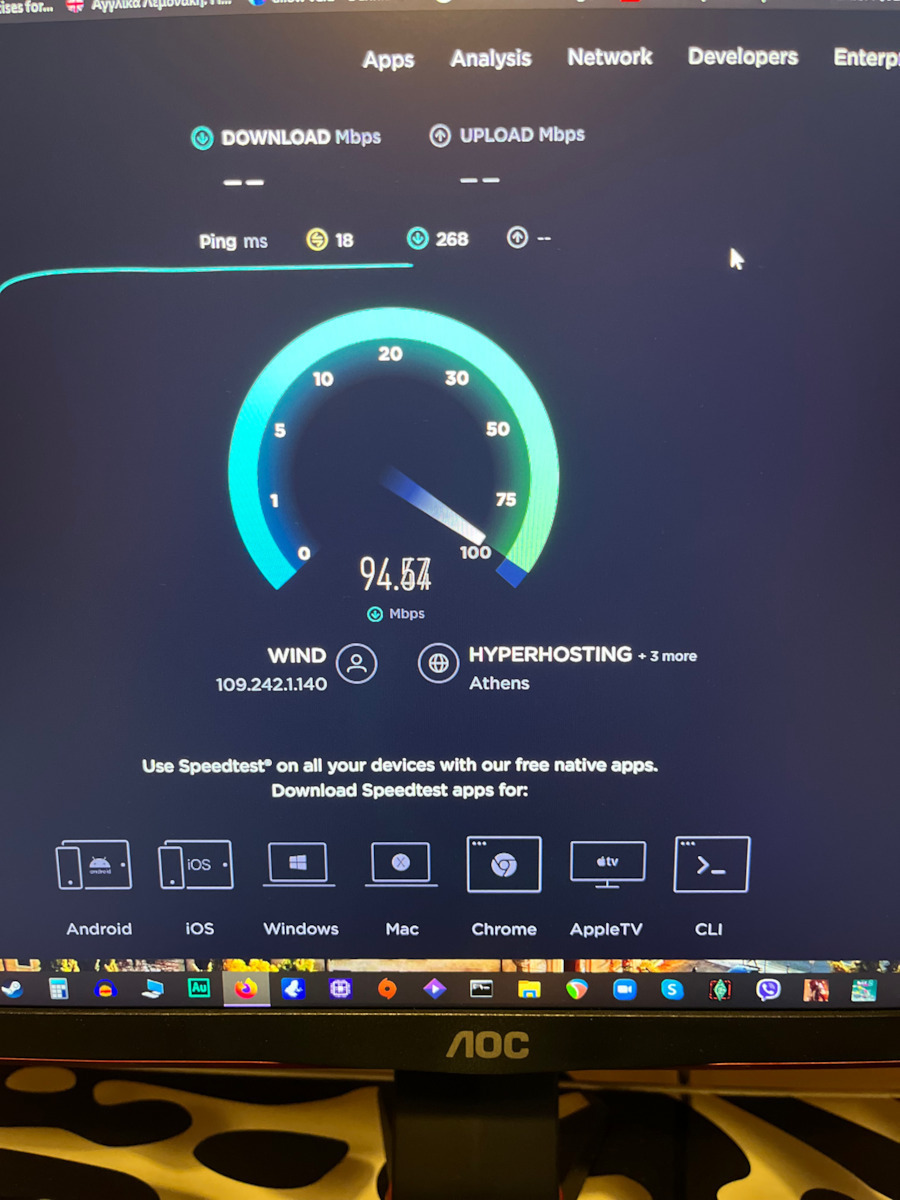
    It does exactly what it promises. Stable and strong reception signal (I max out the router at 102/10.5) at a distance of 5m. I also max out my network indoors. What more could anyone want?

    Translated from Greek ·
    Did you find this review helpful?
  • zogev
    4
    3 out of 3 members found this review helpful

    Verified purchase

    This review is about a variation of the product

    Before the TX20U, I had a d-link dwa-140 quite old and with wifi 4 but it did the job for me, comfortably without any issues. I decided to get a new one and from what I saw on skroutz/reddit/google it is reliable. For gaming, wifi is not the best solution (ethernet is always better) but I didn't have the option. I have no problems so far, very small weird spikes in csgo but generally quite stable with 1% packet loss in cmd, speedtest/fast.com quite good results reaching the max of my line. Good purchase in my opinion.

    Translated from Greek ·
    Did you find this review helpful?
  • giorgos1520
    3
    0 out of 1 members found this review helpful
    This review is about a variation of the product

    For some reason every time I want to connect to a wifi it disconnects 2-3 times first before connecting. Also the biggest flaw it has is that it doesn't prefer to connect to 5ghz but to 2.4ghz. Unfortunately, my router operates as a wifi ssid that supports both 2.4ghz and 5ghz and always connects to 2.4ghz. The signal is very good and it should connect to 5ghz but nothing. The result of this is that I cannot fully utilize my speed and I only reach a maximum of 60mbps

    Translated from Greek ·
    Did you find this review helpful?
  • Kostas_Markou67
    2
    5 out of 5 members found this review helpful
    This review is about a variation of the product

    I used it very little because it does not catch the mobile hotspot on 5G, which is on channel 160. It supports, if I'm not mistaken, up to 140, but it connected normally to my home WiFi (5G on a lower channel) with a few glitches and disconnections through two walls, but at a close distance. I do not recommend it because at some point you may not be able to connect to the network you want.

    Translated from Greek ·
    • Ease of installation
    • Range
    • Speed
    • Does it disconnect/freeze sometimes?
    • Value for money
    Did you find this review helpful?
  • spirogero

    Verified purchase

    This review is about a variation of the product

    The installation application is included in it. As soon as you plug it into the computer, it recognizes it as a USB stick from which you can run the installation directly.

    Translated from Greek ·
    • Ease of installation
    • Range
    • Speed
    • Does it disconnect/freeze?
    • Value for money
    Did you find this review helpful?
  • MeDuSA ツ

    Verified purchase

    This review is about a variation of the product

    It's great for its price, the only negative thing I noticed, which I believe many USB wifi adapters do, is that sometimes it disconnects on its own!

    Translated from Greek ·
    • Ease of installation
    • Range
    • Speed
    • Value for money
    • Does it disconnect/freeze sometimes?
    Did you find this review helpful?
  • V. Papas
    5
    1 out of 1 members found this review helpful

    Verified purchase

    This review is about a variation of the product

    I have tried several Adapters but this one is very good.
    It definitely does not replace Ethernet.
    Easy installation (almost plug n play), 0 disconnections so far, satisfactory range, small size.
    One of the few negatives is that the cable seems to come out easily.

    Translated from Greek ·
    • Ease of installation
    • Range
    • Speed
    • Does it disconnect/freeze?
    • Value for money
    Did you find this review helpful?
  • John chour
    5
    2 out of 2 members found this review helpful
    This review is about a variation of the product

    With a 100MB connection, it reaches 103MB with no loss, easy to install, connects immediately. I will come back if needed for disconnection

    Translated from Greek ·
    • Ease of installation
    • Range
    • Speed
    • Value for money
    Did you find this review helpful?
  • Michail_Daskalakis___Giontis
    1
    1 out of 11 members found this review helpful

    Verified purchase

    This review is about a variation of the product

    I got it. I tried to install it. It was never completed. It doesn't work. Simply. We spent hours trying to fix it. The product is garbage.

    Translated from Greek ·
    • Ease of installation
    • Value for money
    Did you find this review helpful?
  • Mr_perfect .
    4
    2 out of 2 members found this review helpful

    Verified purchase

    This review is about a variation of the product

    Well, it is a very good machine but I give it four stars because it is not compatible with Windows 11 for me. It caused some disconnections on my Windows 10, I don't know if it has happened to other users as well. However, it is very powerful, of course, this also depends on everyone's network connection.

    Translated from Greek ·
    • Ease of installation
    • Range
    • Speed
    • Does it disconnect/freeze?
    • Value for money
    Did you find this review helpful?
  • Ioannis Pin
    4
    0 out of 2 members found this review helpful

    Verified purchase

    This review is about a variation of the product

    Good product, but it cannot replace the cable. At first, I had problems with its installation, but the company helped me overcome them. Also, I have noticed that despite the high speeds it reaches, sometimes there is a momentary drop in speed.

    Translated from Greek ·
    • Range
    • Does it disconnect/freeze?
    • Value for money
    • Ease of installation
    • Speed
    Did you find this review helpful?
  • antonis.starras
    4
    2 out of 3 members found this review helpful
    This review is about a variation of the product

    I have been using it for a week as a replacement for the TP-LINK TL-WN822N v5. Their comparison is chaotic. For example, on a 100 Mbps line, with two intermediate walls, it gets 92 Mbps (5g), while next to the modem it gets 98 Mbps (5g). The speed I had with the previous adapter (2.4g) was up to 50 Mbps.
    No disconnections at all.
    No signal drop whatsoever.
    Highly recommended.

    update: after a year and three months, it suddenly stopped working. It was immediately replaced by the store where I purchased it with a new one due to the 3-year warranty.

    Translated from Greek ·
    • Ease of installation
    • Range
    • Speed
    • Does it disconnect/freeze?
    • Value for money
    Did you find this review helpful?
  • Antonis.ant
    5
    2 out of 2 members found this review helpful
    This review is about a variation of the product

    Excellent product, stable signal, no disconnections. I have a 50 Mbps line and I am getting speeds from 46 to 51 with this one, unlike the previous one where I could barely reach 27-28.

    Translated from Greek ·
    • Ease of installation
    • Range
    • Speed
    • Value for money
    Did you find this review helpful?
  • faithnomore
    5
    2 out of 2 members found this review helpful

    Verified purchase

    This review is about a variation of the product

    I comfortably fit the 200 inside the house.

    The only negative thing is that the USB port comes out easily and sometimes it can come out by mistake. Overall, though, it's worth it.

    Translated from Greek ·
    • Ease of installation
    • Range
    • Speed
    • Does it disconnect/freeze?
    • Value for money
    Did you find this review helpful?
  • perastikos_perastikos
    5
    0 out of 1 members found this review helpful
    This review is about a variation of the product

    For years I had the powerline system on my desktop computer until we changed routers and they stopped working. With this magical device, it seems like I have permanently solved the internet and desktop computer issue. The installation is almost automatic as soon as you connect it. A simple execution of the file and that's it. Impressive product.

    Translated from Greek ·
    • Ease of installation
    • Range
    • Speed
    • Does it disconnect/freeze?
    • Value for money
    Did you find this review helpful?
  • Very good product, definitely worth it. You need to install the drivers and connect it to a USB 3 port. With this setup, on a 1 Gbps line, I get 750 Mbps and I am satisfied. To get the full speed, you need to connect your router and your computer with an ethernet cable. That's all from me. I saw that many people write about disconnections; if it happens, you should change the USB port and put it in a USB 3 port. In the USB 3 port, I haven't had a single disconnection. For those who don't know, the USB 3 port is the blue one

    Translated from Greek ·
    1
  • Strong wifi connection. On Windows 10 and Linux Ubuntu it works just fine, without me having to do anything except download the driver for Windows 10 and set Ubuntu to use proprietary software for devices it detects on the system. Unfortunately, on KDE Neon, although it is based on Ubuntu repositories, I couldn't get it to work, but that's a minor issue since I also have an Ethernet connection which is rock solid. I mostly use wifi for streaming to my TV via Chromecast.

    Translated from Greek ·
    0
  • Because I am on a different floor from the router, I was getting half the speed, 250 which is quite ok but in games it was lagging. Someone here in the reviews posted this link (https://www.tp-link.com/no/support/download/archer-tx20u-plus/) and since then it works as it should. In CS, which I play, I have 50ms. I was ready to throw it away and it saved me

    Translated from Greek ·
    2
  • Terrible. It keeps disconnecting all the time. The speed is okay. I got myself into trouble... wasted 27€... I believe a plug 'n play from Temu would be better

    Translated from Greek ·
    0
  • It is a very good device and improved the speed on a desktop computer that is far from the router. Until I bought it, I made various attempts with the small sticks costing 10-12€, essentially throwing money away. Now I paid a bit more and got a stable and fast receiver. Very good purchase. (Installation and connection are a piece of cake)

    Translated from Greek ·
    1
  • See all

Description & Specifications

The USB network adapter from TP-LINK connects to a USB port on your computer or laptop and allows you to connect to a wireless network with speeds of up to 1775Mbps. It is useful for computers that do not have wireless internet capability, giving you the ability to move to any point in your home or office and work without interruptions. It features a detachable antenna that can be rotated and adjusted according to needs to fit various operating environments.

  • Networking Standards: IEEE 802.11 b/g/n, IEEE 802.11ac, IEEE 802.11ax
  • Data Transfer Rate: 1775Mbps

Manufacturer

Dimensions

Network Standards
IEEE 802.11 b/g/n, IEEE 802.11ac, IEEE 802.11ax
Data Transfer Rate
1800 Mbps

Connectivity

Connection
Wireless
Antenna
Detachable
USB-C
No

Important information

Specifications are collected from official manufacturer websites. Please verify the specifications before proceeding with your final purchase. If you notice any problem you can report it here.

Reviews (129)

  1. 84
  2. 21
  3. 8
  4. 6
  5. 10
Review this product
  • Ease of installation
  • Range
  • Speed
  • Value for money
  • Does it disconnect/freeze?

Reviews photos

Reviews photos
Reviews photos
Reviews photos
Reviews photos

Reviews by our members

m.xaral
5
7 out of 8 members found this review helpful

Verified purchase

I chose this specific antenna to install it on my desktop PC, as I had previously experienced significant speed losses with powerline on a 300Mbps line.

As soon as I received the antenna, I connected it to my PC through a USB 3 port, as recommended to fully exploit its capabilities (simple plug & play - Windows automatically detects the drivers, but you can also manually download them from the TP Link website if needed), and I connected to my network.

Note: The antenna supports 5GHz and Wi-Fi 6 (IEEE 802.11ax) protocols without any issues. The only suggestion I would make is to split your network into two different frequencies and manually choose which one to connect to.

I say this because, in my case, due to the distance from the router, before splitting the frequencies into two different SSIDs, the antenna would automatically choose to work on the 2.4GHz frequency, as the range is better on that frequency.

To summarize, it is an excellent choice - very good range - stable performance - no disconnections.

Translated from Greek ·
  • Ease of installation
  • Range
  • Speed
  • Does it disconnect/freeze?
  • Value for money
Did you find this review helpful?

Γιώργος Δημ
1
13 out of 16 members found this review helpful

Verified purchase

I come after about 2 years that I have this disappointing card. It never played correctly.
Nor does the USB cable that comes with it make good contact. With others that do somewhat better, you may be able to download a file of 2-3MB max. Unfortunately, it is not the card you can rely on for streaming, gaming, video conferencing, Windows update, or syncing with OneDrive, and it is expensive!!
If you don't believe me, buy it, and then come back and like me, unless you don't have requirements. Unfortunately, I want the quality to be a PCI express card or cable, otherwise it's rubbish.
Thank you for listening to me.

Translated from Greek ·
  • Range
  • Speed
  • Does it disconnect/freeze often?
  • Value for money
Did you find this review helpful?
  • sackis31
    5
    1 out of 2 members found this review helpful

    Verified purchase

    This review is about a variation of the product

    Very good product, definitely worth it. You need to install the drivers and connect it to a USB 3 port. With this setup, on a 1 Gbps line, I get 750 Mbps and I am satisfied. To get the full speed, you need to connect your router and your computer with an ethernet cable. That's all from me. I saw that many people write about disconnections; if it happens, you should change the USB port and put it in a USB 3 port. In the USB 3 port, I haven't had a single disconnection. For those who don't know, the USB 3 port is the blue one

    Translated from Greek ·
    Did you find this review helpful?
  • konstadi73

    Verified purchase

    This review is about a variation of the product

    Strong wifi connection. On Windows 10 and Linux Ubuntu it works just fine, without me having to do anything except download the driver for Windows 10 and set Ubuntu to use proprietary software for devices it detects on the system. Unfortunately, on KDE Neon, although it is based on Ubuntu repositories, I couldn't get it to work, but that's a minor issue since I also have an Ethernet connection which is rock solid. I mostly use wifi for streaming to my TV via Chromecast.

    Translated from Greek ·
    Did you find this review helpful?
  • xpirednot
    4
    2 out of 2 members found this review helpful

    Verified purchase

    This review is about a variation of the product

    Because I am on a different floor from the router, I was getting half the speed, 250 which is quite ok but in games it was lagging. Someone here in the reviews posted this link (https://www.tp-link.com/no/support/download/archer-tx20u-plus/) and since then it works as it should. In CS, which I play, I have 50ms. I was ready to throw it away and it saved me

    Translated from Greek ·
    Did you find this review helpful?
  • dxflw
    1
    0 out of 4 members found this review helpful

    Verified purchase

    This review is about a variation of the product

    Terrible. It keeps disconnecting all the time. The speed is okay. I got myself into trouble... wasted 27€... I believe a plug 'n play from Temu would be better

    Translated from Greek ·
    Did you find this review helpful?
  • sxindas
    5
    1 out of 1 members found this review helpful

    Verified purchase

    This review is about a variation of the product

    It is a very good device and improved the speed on a desktop computer that is far from the router. Until I bought it, I made various attempts with the small sticks costing 10-12€, essentially throwing money away. Now I paid a bit more and got a stable and fast receiver. Very good purchase. (Installation and connection are a piece of cake)

    Translated from Greek ·
    Did you find this review helpful?
  • This review is about a variation of the product

    the adapter is better than what some people say am in the living room and reach around 125mbps speed and the router is far from me but make sure you install the drivers they can be found in a new drive in file explorer and the only time it disconnects is only when I have my pc on for days on a time a simple restart would fix everything and i would highly recommend it.

    Translated from Greek ·
    Did you find this review helpful?
  • This review is about a variation of the product

    I got triple the speed and 5G, my laptop only allowed 2.4. 2 rooms away from the router, I get what I pay for, very good

    Translated from Greek ·
    Did you find this review helpful?
  • EricTheodore Cartman
    5
    4 out of 4 members found this review helpful

    Verified purchase

    This review is about a variation of the product

    Very satisfied with the product. 3 rooms away and it gets 5/5 signal and no disconnection at all (I play online games). Ping at 5-7ms and speed at ~275Mbps. Compared to the Devolo I had (through the powerline network), it's a whole different story, many classes superior

    Translated from Greek ·
    Did you find this review helpful?
  • George Batzopoulos
    1
    1 out of 4 members found this review helpful
    This review is about a variation of the product

    Nothing, stay away... disconnections with both old and new drivers... whatever settings I try (and I changed them all) it never works steadily... always disconnections. What a pity

    Translated from Greek ·
    • Ease of installation
    • Range
    • Speed
    • Does it disconnect/freeze often?
    • Value for money
    Did you find this review helpful?
  • Michael_Georgopoulos5218
    1
    1 out of 6 members found this review helpful

    Verified purchase

    This review is about a variation of the product

    Terrible, it didn't work at all and it doesn't even catch the hotspot from my phone, I took it straight to the trash, and its cable is stiff and always stays in a specific position without you being able to put it how and where you want

    Translated from Greek ·
    Did you find this review helpful?
  • Κ_Κ

    Verified purchase

    This review is about a variation of the product

    I had it for years and it was very good until it started having interruptions, probably due to drivers, especially when I was streaming.

    Translated from Greek ·
    Did you find this review helpful?
  • wolfgr
    3
    4 out of 4 members found this review helpful
    This review is about a variation of the product

    UPDATE 11/7/26: Unfortunately, 1.5 years later, everything freezes. In games and in meetings. But especially when I open YouTube, it completely kicks me off Wi-Fi, as unbelievable as it may sound, it’s true. I see on forums that others have the same problem with other TP-Link adapters too. I deleted and reinstalled the drivers, set it to USB 2.0 only, and it’s still the same...

    (old message ↓)

    I replaced an old USB adapter with this one, which often disconnected. At first, my computer didn’t even know what device this was, so I had to plug the old adapter back in to download the TP-Link driver. Don’t install the one from the Greek website; it’s older (from 2023)... If there’s a problem, I’ll come back later. For now, it seems like a good product.

    https://www.tp-link.com/no/support/download/archer-tx20u-plus/

    Translated from Greek ·
    Did you find this review helpful?
  • GiorgosVellios
    5
    2 out of 2 members found this review helpful

    Verified purchase

    This review is about a variation of the product

    excellent for what it does, but you have to go to your laptop to disable (not uninstall) the default network adapter you have so that this one works. and don't forget to install the software that goes in the download folder when you connect it for the first time

    Translated from Greek ·
    Did you find this review helpful?
  • Tasos_Konstantellos
    5
    2 out of 3 members found this review helpful

    Verified purchase

    This review is about a variation of the product

    It does exactly what it promises. Stable and strong reception signal (I max out the router at 102/10.5) at a distance of 5m. I also max out my network indoors. What more could anyone want?

    Translated from Greek ·
    Did you find this review helpful?
  • zogev
    4
    3 out of 3 members found this review helpful

    Verified purchase

    This review is about a variation of the product

    Before the TX20U, I had a d-link dwa-140 quite old and with wifi 4 but it did the job for me, comfortably without any issues. I decided to get a new one and from what I saw on skroutz/reddit/google it is reliable. For gaming, wifi is not the best solution (ethernet is always better) but I didn't have the option. I have no problems so far, very small weird spikes in csgo but generally quite stable with 1% packet loss in cmd, speedtest/fast.com quite good results reaching the max of my line. Good purchase in my opinion.

    Translated from Greek ·
    Did you find this review helpful?
  • giorgos1520
    3
    0 out of 1 members found this review helpful
    This review is about a variation of the product

    For some reason every time I want to connect to a wifi it disconnects 2-3 times first before connecting. Also the biggest flaw it has is that it doesn't prefer to connect to 5ghz but to 2.4ghz. Unfortunately, my router operates as a wifi ssid that supports both 2.4ghz and 5ghz and always connects to 2.4ghz. The signal is very good and it should connect to 5ghz but nothing. The result of this is that I cannot fully utilize my speed and I only reach a maximum of 60mbps

    Translated from Greek ·
    Did you find this review helpful?
  • Kostas_Markou67
    2
    5 out of 5 members found this review helpful
    This review is about a variation of the product

    I used it very little because it does not catch the mobile hotspot on 5G, which is on channel 160. It supports, if I'm not mistaken, up to 140, but it connected normally to my home WiFi (5G on a lower channel) with a few glitches and disconnections through two walls, but at a close distance. I do not recommend it because at some point you may not be able to connect to the network you want.

    Translated from Greek ·
    • Ease of installation
    • Range
    • Speed
    • Does it disconnect/freeze sometimes?
    • Value for money
    Did you find this review helpful?
  • spirogero

    Verified purchase

    This review is about a variation of the product

    The installation application is included in it. As soon as you plug it into the computer, it recognizes it as a USB stick from which you can run the installation directly.

    Translated from Greek ·
    • Ease of installation
    • Range
    • Speed
    • Does it disconnect/freeze?
    • Value for money
    Did you find this review helpful?
  • MeDuSA ツ

    Verified purchase

    This review is about a variation of the product

    It's great for its price, the only negative thing I noticed, which I believe many USB wifi adapters do, is that sometimes it disconnects on its own!

    Translated from Greek ·
    • Ease of installation
    • Range
    • Speed
    • Value for money
    • Does it disconnect/freeze sometimes?
    Did you find this review helpful?
  • V. Papas
    5
    1 out of 1 members found this review helpful

    Verified purchase

    This review is about a variation of the product

    I have tried several Adapters but this one is very good.
    It definitely does not replace Ethernet.
    Easy installation (almost plug n play), 0 disconnections so far, satisfactory range, small size.
    One of the few negatives is that the cable seems to come out easily.

    Translated from Greek ·
    • Ease of installation
    • Range
    • Speed
    • Does it disconnect/freeze?
    • Value for money
    Did you find this review helpful?
  • John chour
    5
    2 out of 2 members found this review helpful
    This review is about a variation of the product

    With a 100MB connection, it reaches 103MB with no loss, easy to install, connects immediately. I will come back if needed for disconnection

    Translated from Greek ·
    • Ease of installation
    • Range
    • Speed
    • Value for money
    Did you find this review helpful?
  • Michail_Daskalakis___Giontis
    1
    1 out of 11 members found this review helpful

    Verified purchase

    This review is about a variation of the product

    I got it. I tried to install it. It was never completed. It doesn't work. Simply. We spent hours trying to fix it. The product is garbage.

    Translated from Greek ·
    • Ease of installation
    • Value for money
    Did you find this review helpful?
  • Mr_perfect .
    4
    2 out of 2 members found this review helpful

    Verified purchase

    This review is about a variation of the product

    Well, it is a very good machine but I give it four stars because it is not compatible with Windows 11 for me. It caused some disconnections on my Windows 10, I don't know if it has happened to other users as well. However, it is very powerful, of course, this also depends on everyone's network connection.

    Translated from Greek ·
    • Ease of installation
    • Range
    • Speed
    • Does it disconnect/freeze?
    • Value for money
    Did you find this review helpful?
  • Ioannis Pin
    4
    0 out of 2 members found this review helpful

    Verified purchase

    This review is about a variation of the product

    Good product, but it cannot replace the cable. At first, I had problems with its installation, but the company helped me overcome them. Also, I have noticed that despite the high speeds it reaches, sometimes there is a momentary drop in speed.

    Translated from Greek ·
    • Range
    • Does it disconnect/freeze?
    • Value for money
    • Ease of installation
    • Speed
    Did you find this review helpful?
  • antonis.starras
    4
    2 out of 3 members found this review helpful
    This review is about a variation of the product

    I have been using it for a week as a replacement for the TP-LINK TL-WN822N v5. Their comparison is chaotic. For example, on a 100 Mbps line, with two intermediate walls, it gets 92 Mbps (5g), while next to the modem it gets 98 Mbps (5g). The speed I had with the previous adapter (2.4g) was up to 50 Mbps.
    No disconnections at all.
    No signal drop whatsoever.
    Highly recommended.

    update: after a year and three months, it suddenly stopped working. It was immediately replaced by the store where I purchased it with a new one due to the 3-year warranty.

    Translated from Greek ·
    • Ease of installation
    • Range
    • Speed
    • Does it disconnect/freeze?
    • Value for money
    Did you find this review helpful?
  • Antonis.ant
    5
    2 out of 2 members found this review helpful
    This review is about a variation of the product

    Excellent product, stable signal, no disconnections. I have a 50 Mbps line and I am getting speeds from 46 to 51 with this one, unlike the previous one where I could barely reach 27-28.

    Translated from Greek ·
    • Ease of installation
    • Range
    • Speed
    • Value for money
    Did you find this review helpful?
  • faithnomore
    5
    2 out of 2 members found this review helpful

    Verified purchase

    This review is about a variation of the product

    I comfortably fit the 200 inside the house.

    The only negative thing is that the USB port comes out easily and sometimes it can come out by mistake. Overall, though, it's worth it.

    Translated from Greek ·
    • Ease of installation
    • Range
    • Speed
    • Does it disconnect/freeze?
    • Value for money
    Did you find this review helpful?
  • perastikos_perastikos
    5
    0 out of 1 members found this review helpful
    This review is about a variation of the product

    For years I had the powerline system on my desktop computer until we changed routers and they stopped working. With this magical device, it seems like I have permanently solved the internet and desktop computer issue. The installation is almost automatic as soon as you connect it. A simple execution of the file and that's it. Impressive product.

    Translated from Greek ·
    • Ease of installation
    • Range
    • Speed
    • Does it disconnect/freeze?
    • Value for money
    Did you find this review helpful?
  • Very good product, definitely worth it. You need to install the drivers and connect it to a USB 3 port. With this setup, on a 1 Gbps line, I get 750 Mbps and I am satisfied. To get the full speed, you need to connect your router and your computer with an ethernet cable. That's all from me. I saw that many people write about disconnections; if it happens, you should change the USB port and put it in a USB 3 port. In the USB 3 port, I haven't had a single disconnection. For those who don't know, the USB 3 port is the blue one

    Translated from Greek ·
    1
  • Strong wifi connection. On Windows 10 and Linux Ubuntu it works just fine, without me having to do anything except download the driver for Windows 10 and set Ubuntu to use proprietary software for devices it detects on the system. Unfortunately, on KDE Neon, although it is based on Ubuntu repositories, I couldn't get it to work, but that's a minor issue since I also have an Ethernet connection which is rock solid. I mostly use wifi for streaming to my TV via Chromecast.

    Translated from Greek ·
    0
  • Because I am on a different floor from the router, I was getting half the speed, 250 which is quite ok but in games it was lagging. Someone here in the reviews posted this link (https://www.tp-link.com/no/support/download/archer-tx20u-plus/) and since then it works as it should. In CS, which I play, I have 50ms. I was ready to throw it away and it saved me

    Translated from Greek ·
    2
  • Terrible. It keeps disconnecting all the time. The speed is okay. I got myself into trouble... wasted 27€... I believe a plug 'n play from Temu would be better

    Translated from Greek ·
    0
  • It is a very good device and improved the speed on a desktop computer that is far from the router. Until I bought it, I made various attempts with the small sticks costing 10-12€, essentially throwing money away. Now I paid a bit more and got a stable and fast receiver. Very good purchase. (Installation and connection are a piece of cake)

    Translated from Greek ·
    1
  • See all
40,82 €
14,00 €   shipping cost