File Servers / NAS

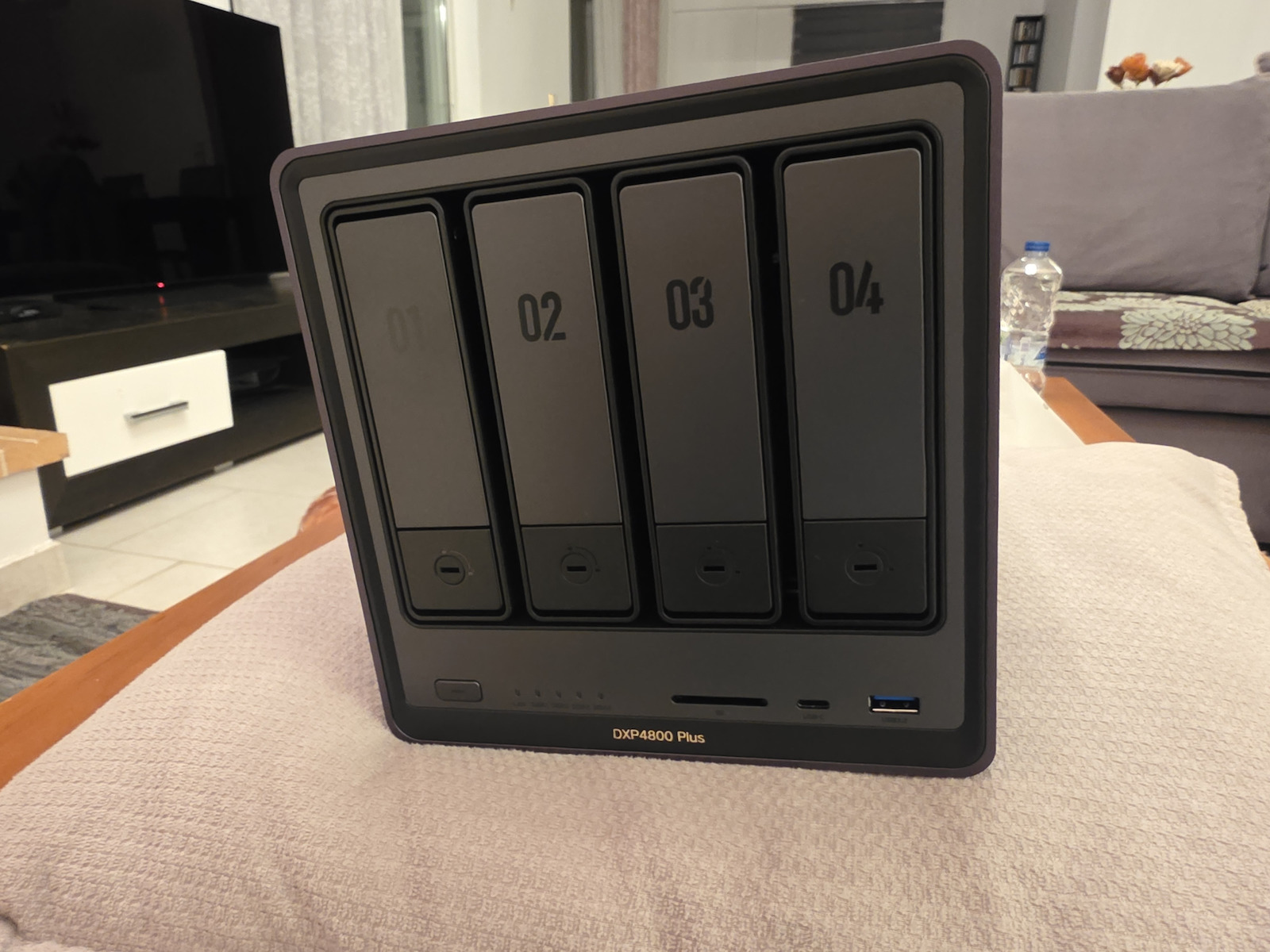
Ugreen DXP4800 Plus NAS Tower with 4 slots for HDD/SSD and 2 Ethernet ports


NAS of the company Ugreen. It is of type Tower and is mainly intended for home use. NAS devices are devices that host hard drives, greatly assisting in secure data storage and are directly connected to the Router. They create a personal cloud and make files accessible from any device you have without worrying about the storage space of each device....
See full description

629 00
Delivery by Thu, 25 Jun
26,00 €   shipping cost
Sent from Greece
From Gaming Parts 4.9 (1.9K Skroutz Hub reviews)

Description

Description


NAS of the company Ugreen. It is of type Tower and is mainly intended for home use. NAS devices are devices that host hard drives, greatly assisting in secure data storage and are directly connected to the Router. They create a personal cloud and make files accessible from any device you have without worrying about the storage space of each device. They emphasize on creating backups, which is done automatically through settings, and on entertainment as they can reproduce content on any device that has access to them and from anywhere.

This model consists of the Intel Pentium Gold 8505 processor. with 8GB RAM DDR5. It incorporates additional ports such as USB to connect devices such as printers, USB sticks, etc., and HDMI for direct connection to a monitor or TV. It also includes 2 Ethernet ports. The additional Ethernet ports are mainly used for higher transfer speed or simple backup. It does not have built-in hard drives, which means you will need to add your own. It supports up to 4 disk units HDD, SSD.

It supports Raid 0, 1, 10, 5, 6, JBOD capability. RAID 0 is used only for speed purposes as the speed of all disks is added, and not for backup. If even one disk is destroyed, all data is lost. RAID 1 is the replication of one disk to another. Whatever is written on one disk is automatically written on the other. Also, if one disk is destroyed, the system will continue to function normally, but you will need to add a new disk to start the process of copying the healthy disk to the new one. JBOD refers to Apple systems. If 2 or more disks are used, the formatted space will be added. If one disk fails, it is possible to recover the remaining data from the other disks. RAID 5 requires at least 3 disks to be created. If one of the 3 fails, the same will not happen to your data. RAID 6 requires at least 4 disks and the system will continue to operate even if 2 disks are destroyed.

Manufacturer

See full description

Specifications

Specifications

Main Specifications

Form Factor
Tower

Dimensions

Height
257 mm
Width
178 mm
Length
178 mm

Processor

Manufacturer
Intel
Model
Pentium Gold 8505
Frequency
4.4 GHz

RAM Memory

Size
8 GB
Type
DDR5

Storage

Hard Drive Slots
4 Bays
Supported Drives
HDD, SSD
Communication Protocol
SATA III (6 Gbit/s)
Raid
0, 1, 10, 5, 6, JBOD
Extras
File Server
Hot Swapping
-

Additional Features

Connections
HDMI, USB 2.0, USB 3.2
Ethernet Ports
2 Port
Link Aggregation
-

Important information

Specifications are collected from official manufacturer websites. Please verify the specifications before proceeding with your final purchase. If you notice any problem you can report it here.

See all specifications

Reviews (4)

Reviews

  1. 4
  2. 4 stars
    0
  3. 3 stars
    0
  4. 2 stars
    0
  5. 1 star
    0
Review this product

Reviews photos

Reviews photos
Reviews photos
Reviews photos
Reviews photos
Reviews photos

Reviews by our members

  • vaggelhs4
    5
    5 out of 5 members found this review helpful

    I bought it from abroad before it came to Greece. I use it with 2*16TB Toshiba drives in RAID 1 + 2 NVMe SSDs for storage/cache.

    From the day I got it, I needed a week to set it up properly. Why a week? Because the RAID took 2 days to build and the files I had were so many that it took time at these speeds.

    I got it because Synology wants only Synology disks and I didn't like the UI of Qnap. The problems described as a new platform don't affect me and I don't care about all those Synology apps. I'm a photographer, I just want to store files, that's it.

    A lot of connectivity. It's like a PC. SD cards, USB, HDMI, Ethernet 2.5 and 10 gigabit, wonderful.

    To enjoy it at full speed, both your PC and the switch (which I urge you to have) must be of corresponding specs. For HDDs it's not an issue, but if you put SSDs in the NAS, the 10 gigabit card in the PC will hurt a bit to take advantage of the speeds.

    Its setup is very easy. The menu is wonderful.

    Let's get to the technical stuff, and here's the juice:

    - Set it with a static IP on your router so you don't have to look for it.
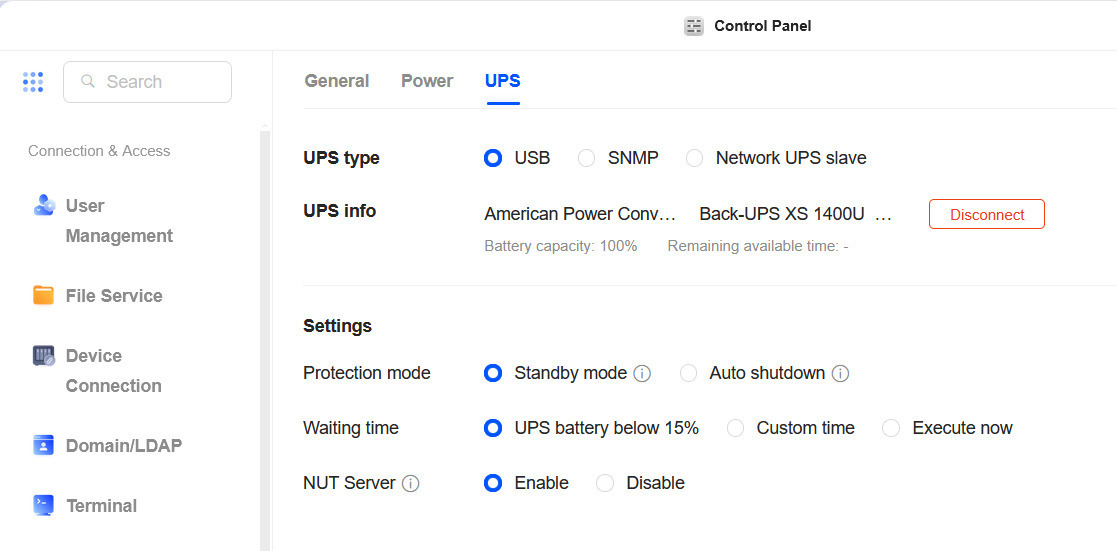
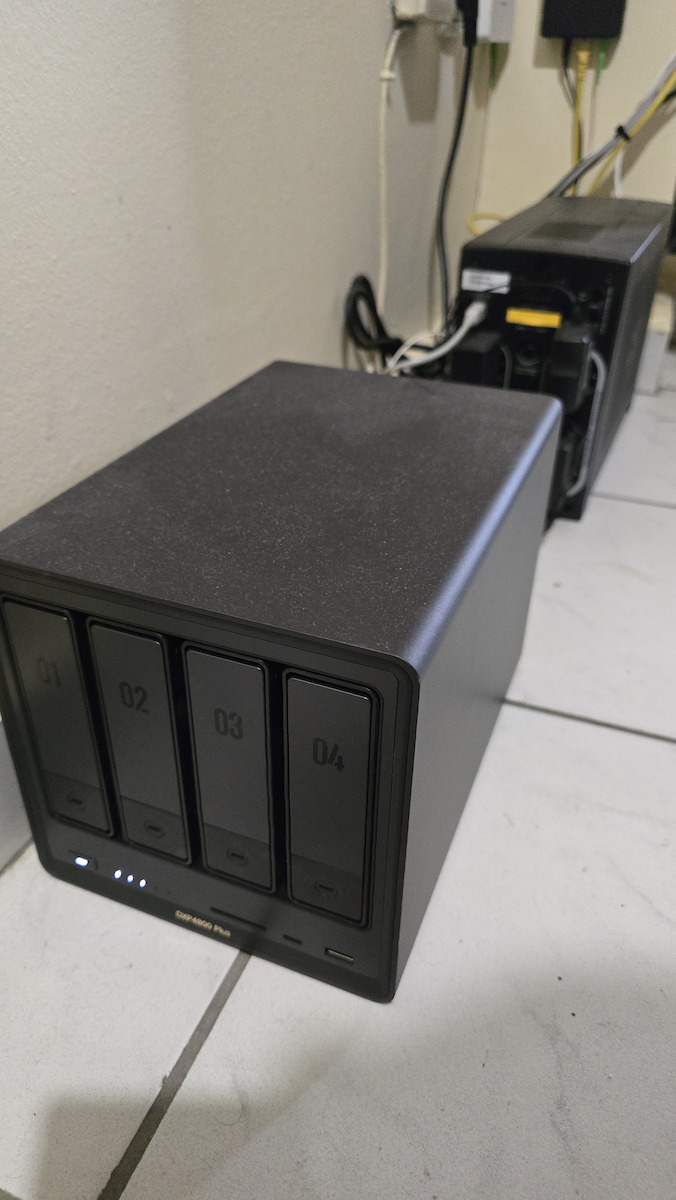
    - As you'll see in the photo, I have it connected to an APC 1400VA UPS. It recognizes it immediately if you connect it via USB and controls when it shuts down due to power outages. Very useful.
    - You can make it visible over the internet with DDNS and manage it from anywhere. You can send files to it from anywhere.
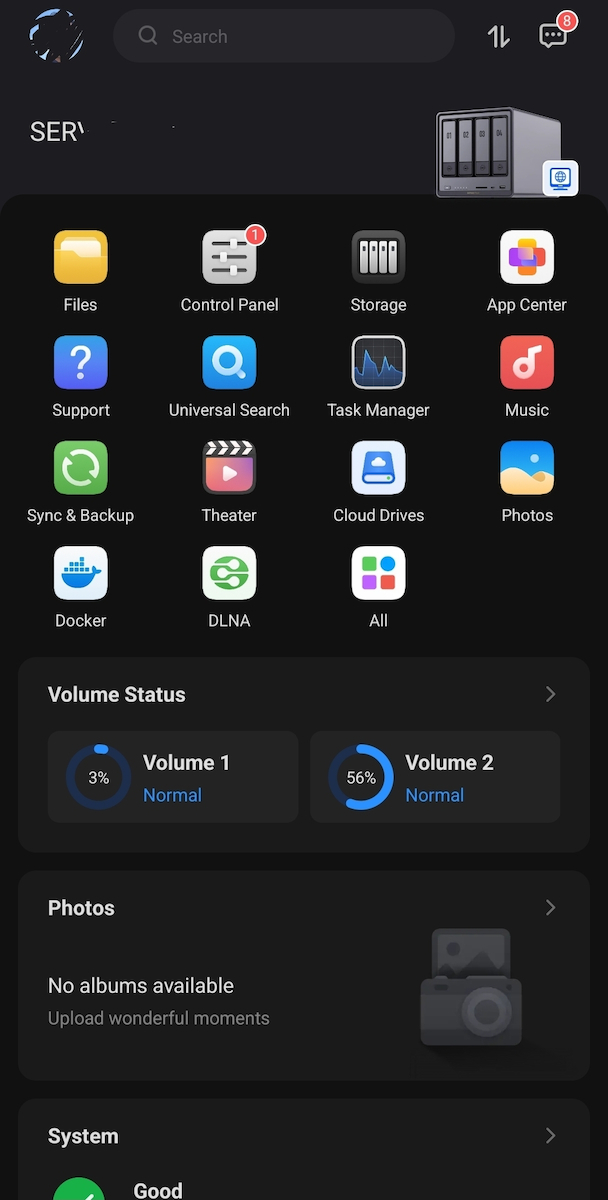
    - The app on the mobile is EXTREMELY good. It automatically backs up the phone's files.
    - You can sync different Ugreen NAS units with each other. It is gradually starting to work with cloud services like Google Drive and gets better every day.

    A purchase you won't regret.

    Translated from Greek ·
    Did you find this review helpful?
  • dimdin
    5
    10 out of 10 members found this review helpful

    Verified purchase

    Very good construction. Replaced a previous QNAP NAS. It's like a regular PC, it even runs Windows :-).

    I replaced its operating system with Debian using a USB stick with the Debian Trixie setup image. I set the disks in mirror/raid1 with btrfs. It runs samba & jellyfin and the CPU stays idle.
    Useful keys:
    - [Ctrl-F2] Firmware/BIOS Setup
    - [Ctrl-F12] Boot Menu
    - [Ctrl-F1] inside the BIOS it reveals hidden options.

    Translated from Greek ·
    Did you find this review helpful?
  • Chris_Kartalidis
    5
    2 out of 2 members found this review helpful

    Very powerful processor and performance for its category.
    Excellent build quality and quite silent.

    The software is user-friendly, fast, and absolutely stable.
    Since its first release, many features and security safeguards have been added.

    What a prospective buyer should not expect are Ugreen's pre-installed apps.
    If, for example, you want Plex, Jellyfin, etc., you will have to do some things manually yourself.
    If you don't know, don't want to, or can't, go for Synology.

    Translated from Greek ·
    Did you find this review helpful?
  • Verified purchase

  • I bought it from abroad before it came to Greece. I use it with 2*16TB Toshiba drives in RAID 1 + 2 NVMe SSDs for storage/cache.

    From the day I got it, I needed a week to set it up properly. Why a week? Because the RAID took 2 days to build and the files I had were so many that it took time at these speeds.

    I got it because Synology wants only Synology disks and I didn't like the UI of Qnap. The problems described as a new platform don't affect me and I don't care about all those Synology apps. I'm a photographer, I just want to store files, that's it.

    A lot of connectivity. It's like a PC. SD cards, USB, HDMI, Ethernet 2.5 and 10 gigabit, wonderful.

    To enjoy it at full speed, both your PC and the switch (which I urge you to have) must be of corresponding specs. For HDDs it's not an issue, but if you put SSDs in the NAS, the 10 gigabit card in the PC will hurt a bit to take advantage of the speeds.

    Its setup is very easy. The menu is wonderful.

    Let's get to the technical stuff, and here's the juice:

    - Set it with a static IP on your router so you don't have to look for it.
    - As you'll see in the photo, I have it connected to an APC 1400VA UPS. It recognizes it immediately if you connect it via USB and controls when it shuts down due to power outages. Very useful.
    - You can make it visible over the internet with DDNS and manage it from anywhere. You can send files to it from anywhere.
    - The app on the mobile is EXTREMELY good. It automatically backs up the phone's files.
    - You can sync different Ugreen NAS units with each other. It is gradually starting to work with cloud services like Google Drive and gets better every day.

    A purchase you won't regret.

    Translated from Greek ·
    5
  • Very good construction. Replaced a previous QNAP NAS. It's like a regular PC, it even runs Windows :-).

    I replaced its operating system with Debian using a USB stick with the Debian Trixie setup image. I set the disks in mirror/raid1 with btrfs. It runs samba & jellyfin and the CPU stays idle.
    Useful keys:
    - [Ctrl-F2] Firmware/BIOS Setup
    - [Ctrl-F12] Boot Menu
    - [Ctrl-F1] inside the BIOS it reveals hidden options.

    Translated from Greek ·
    10
  • Very powerful processor and performance for its category.
    Excellent build quality and quite silent.

    The software is user-friendly, fast, and absolutely stable.
    Since its first release, many features and security safeguards have been added.

    What a prospective buyer should not expect are Ugreen's pre-installed apps.
    If, for example, you want Plex, Jellyfin, etc., you will have to do some things manually yourself.
    If you don't know, don't want to, or can't, go for Synology.

    Translated from Greek ·
    2
  • 0
  • See all

Description & Specifications


NAS of the company Ugreen. It is of type Tower and is mainly intended for home use. NAS devices are devices that host hard drives, greatly assisting in secure data storage and are directly connected to the Router. They create a personal cloud and make files accessible from any device you have without worrying about the storage space of each device. They emphasize on creating backups, which is done automatically through settings, and on entertainment as they can reproduce content on any device that has access to them and from anywhere.

This model consists of the Intel Pentium Gold 8505 processor. with 8GB RAM DDR5. It incorporates additional ports such as USB to connect devices such as printers, USB sticks, etc., and HDMI for direct connection to a monitor or TV. It also includes 2 Ethernet ports. The additional Ethernet ports are mainly used for higher transfer speed or simple backup. It does not have built-in hard drives, which means you will need to add your own. It supports up to 4 disk units HDD, SSD.

It supports Raid 0, 1, 10, 5, 6, JBOD capability. RAID 0 is used only for speed purposes as the speed of all disks is added, and not for backup. If even one disk is destroyed, all data is lost. RAID 1 is the replication of one disk to another. Whatever is written on one disk is automatically written on the other. Also, if one disk is destroyed, the system will continue to function normally, but you will need to add a new disk to start the process of copying the healthy disk to the new one. JBOD refers to Apple systems. If 2 or more disks are used, the formatted space will be added. If one disk fails, it is possible to recover the remaining data from the other disks. RAID 5 requires at least 3 disks to be created. If one of the 3 fails, the same will not happen to your data. RAID 6 requires at least 4 disks and the system will continue to operate even if 2 disks are destroyed.

Manufacturer

Main Specifications

Form Factor
Tower

Dimensions

Height
257 mm
Width
178 mm
Length
178 mm

Processor

Manufacturer
Intel
Model
Pentium Gold 8505
Frequency
4.4 GHz

RAM Memory

Size
8 GB
Type
DDR5

Storage

Hard Drive Slots
4 Bays
Supported Drives
HDD, SSD
Communication Protocol
SATA III (6 Gbit/s)
Raid
0, 1, 10, 5, 6, JBOD
Extras
File Server
Hot Swapping
-

Additional Features

Connections
HDMI, USB 2.0, USB 3.2
Ethernet Ports
2 Port
Link Aggregation
-

Important information

Specifications are collected from official manufacturer websites. Please verify the specifications before proceeding with your final purchase. If you notice any problem you can report it here.

Reviews (4)

  1. 4
  2. 4 stars
    0
  3. 3 stars
    0
  4. 2 stars
    0
  5. 1 star
    0
Review this product

Reviews photos

Reviews photos
Reviews photos
Reviews photos
Reviews photos
Reviews photos

Reviews by our members

  • vaggelhs4
    5
    5 out of 5 members found this review helpful

    I bought it from abroad before it came to Greece. I use it with 2*16TB Toshiba drives in RAID 1 + 2 NVMe SSDs for storage/cache.

    From the day I got it, I needed a week to set it up properly. Why a week? Because the RAID took 2 days to build and the files I had were so many that it took time at these speeds.

    I got it because Synology wants only Synology disks and I didn't like the UI of Qnap. The problems described as a new platform don't affect me and I don't care about all those Synology apps. I'm a photographer, I just want to store files, that's it.

    A lot of connectivity. It's like a PC. SD cards, USB, HDMI, Ethernet 2.5 and 10 gigabit, wonderful.

    To enjoy it at full speed, both your PC and the switch (which I urge you to have) must be of corresponding specs. For HDDs it's not an issue, but if you put SSDs in the NAS, the 10 gigabit card in the PC will hurt a bit to take advantage of the speeds.

    Its setup is very easy. The menu is wonderful.

    Let's get to the technical stuff, and here's the juice:

    - Set it with a static IP on your router so you don't have to look for it.
    - As you'll see in the photo, I have it connected to an APC 1400VA UPS. It recognizes it immediately if you connect it via USB and controls when it shuts down due to power outages. Very useful.
    - You can make it visible over the internet with DDNS and manage it from anywhere. You can send files to it from anywhere.
    - The app on the mobile is EXTREMELY good. It automatically backs up the phone's files.
    - You can sync different Ugreen NAS units with each other. It is gradually starting to work with cloud services like Google Drive and gets better every day.

    A purchase you won't regret.

    Translated from Greek ·
    Did you find this review helpful?
  • dimdin
    5
    10 out of 10 members found this review helpful

    Verified purchase

    Very good construction. Replaced a previous QNAP NAS. It's like a regular PC, it even runs Windows :-).

    I replaced its operating system with Debian using a USB stick with the Debian Trixie setup image. I set the disks in mirror/raid1 with btrfs. It runs samba & jellyfin and the CPU stays idle.
    Useful keys:
    - [Ctrl-F2] Firmware/BIOS Setup
    - [Ctrl-F12] Boot Menu
    - [Ctrl-F1] inside the BIOS it reveals hidden options.

    Translated from Greek ·
    Did you find this review helpful?
  • Chris_Kartalidis
    5
    2 out of 2 members found this review helpful

    Very powerful processor and performance for its category.
    Excellent build quality and quite silent.

    The software is user-friendly, fast, and absolutely stable.
    Since its first release, many features and security safeguards have been added.

    What a prospective buyer should not expect are Ugreen's pre-installed apps.
    If, for example, you want Plex, Jellyfin, etc., you will have to do some things manually yourself.
    If you don't know, don't want to, or can't, go for Synology.

    Translated from Greek ·
    Did you find this review helpful?
  • Verified purchase

  • I bought it from abroad before it came to Greece. I use it with 2*16TB Toshiba drives in RAID 1 + 2 NVMe SSDs for storage/cache.

    From the day I got it, I needed a week to set it up properly. Why a week? Because the RAID took 2 days to build and the files I had were so many that it took time at these speeds.

    I got it because Synology wants only Synology disks and I didn't like the UI of Qnap. The problems described as a new platform don't affect me and I don't care about all those Synology apps. I'm a photographer, I just want to store files, that's it.

    A lot of connectivity. It's like a PC. SD cards, USB, HDMI, Ethernet 2.5 and 10 gigabit, wonderful.

    To enjoy it at full speed, both your PC and the switch (which I urge you to have) must be of corresponding specs. For HDDs it's not an issue, but if you put SSDs in the NAS, the 10 gigabit card in the PC will hurt a bit to take advantage of the speeds.

    Its setup is very easy. The menu is wonderful.

    Let's get to the technical stuff, and here's the juice:

    - Set it with a static IP on your router so you don't have to look for it.
    - As you'll see in the photo, I have it connected to an APC 1400VA UPS. It recognizes it immediately if you connect it via USB and controls when it shuts down due to power outages. Very useful.
    - You can make it visible over the internet with DDNS and manage it from anywhere. You can send files to it from anywhere.
    - The app on the mobile is EXTREMELY good. It automatically backs up the phone's files.
    - You can sync different Ugreen NAS units with each other. It is gradually starting to work with cloud services like Google Drive and gets better every day.

    A purchase you won't regret.

    Translated from Greek ·
    5
  • Very good construction. Replaced a previous QNAP NAS. It's like a regular PC, it even runs Windows :-).

    I replaced its operating system with Debian using a USB stick with the Debian Trixie setup image. I set the disks in mirror/raid1 with btrfs. It runs samba & jellyfin and the CPU stays idle.
    Useful keys:
    - [Ctrl-F2] Firmware/BIOS Setup
    - [Ctrl-F12] Boot Menu
    - [Ctrl-F1] inside the BIOS it reveals hidden options.

    Translated from Greek ·
    10
  • Very powerful processor and performance for its category.
    Excellent build quality and quite silent.

    The software is user-friendly, fast, and absolutely stable.
    Since its first release, many features and security safeguards have been added.

    What a prospective buyer should not expect are Ugreen's pre-installed apps.
    If, for example, you want Plex, Jellyfin, etc., you will have to do some things manually yourself.
    If you don't know, don't want to, or can't, go for Synology.

    Translated from Greek ·
    2
  • 0
  • See all
629,00 €
26,00 €   shipping cost