DSL Modems / Routers

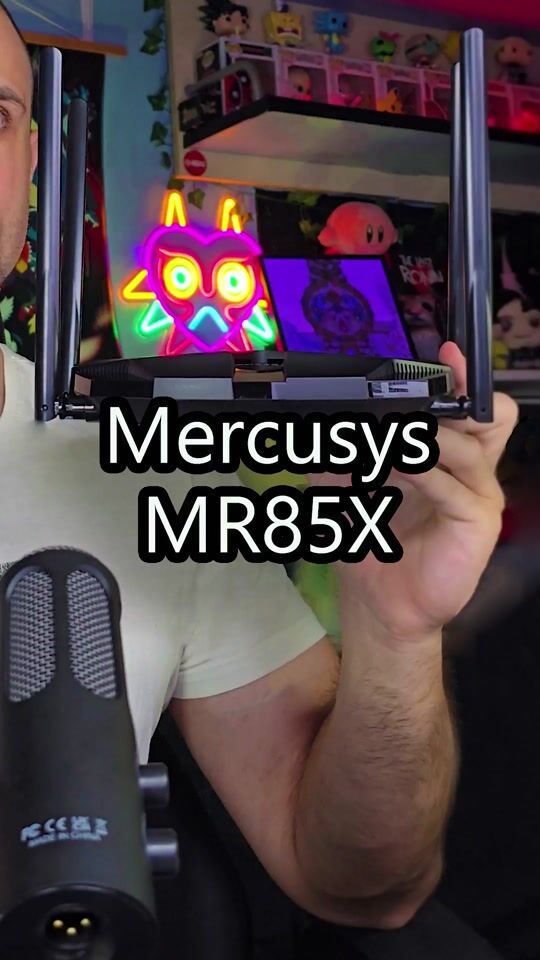
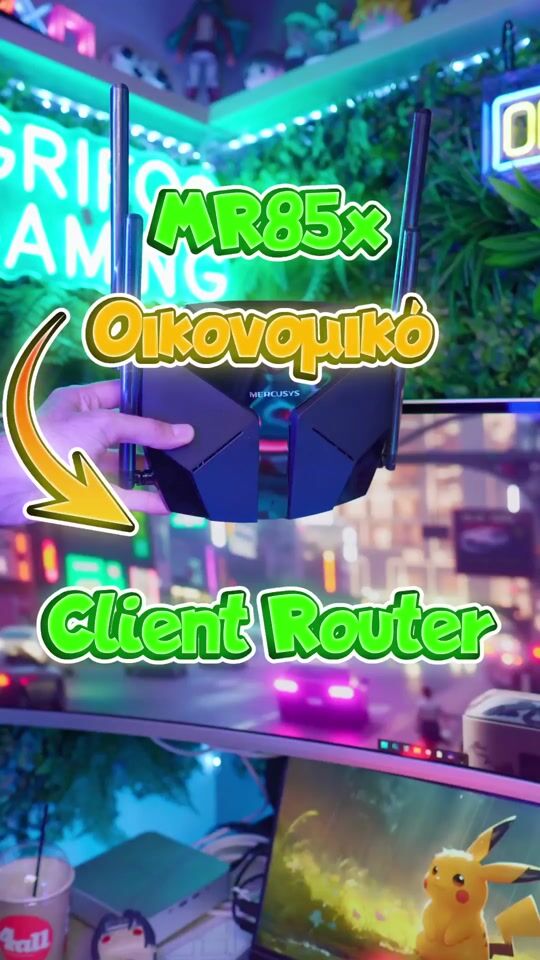
MR85X AX3000 Wireless Router

Key features:

  • For Gaming & Streaming
  • Wi-Fi 6 speeds up to 3 Gbps
  • Three Gigabit LAN ports
  • One Gigabit WAN port
  • Advanced WPA3 security
  • MU-MIMO and OFDMA technologies
See full description
53 00 €
Delivery by Tue, 17 Nov
14,00 €   shipping cost
Sent from Greece
From Jotronic
Greece
5 pieces
See Networking on the page of Jotronic

Learn more about invoicing

Description

Description

The Mercusys MR85X wireless router uses dual-band Wi-Fi 6, with a combined speed of up to 3 Gbps. OFDMA and MU-MIMO technologies support multiple devices connecting simultaneously, while BSS Coloring helps reduce interference from nearby wireless networks. Target Wake Time reduces power consumption on mobile and IoT devices during data transmission.

The four high-gain external antennas have built-in signal amplifiers, while Beamforming directs the wireless signal toward connected devices. The 2.5 Gbps WAN port and three Gigabit Ethernet LAN ports support wired connections. EasyMesh lets you create a unified Wi-Fi network with compatible devices, while Access Point mode extends a wired network wirelessly. The MERCUSYS app supports network management, parental controls, QoS, and a guest network.

  • Type: Wireless router
  • Wi-Fi standard: Wi-Fi 6 (802.11ax), compatible with 802.11ac/a/b/g/n
  • Frequencies: 2.4 GHz and 5 GHz
  • Wi-Fi speed: Up to 3 Gbps (2,402 Mbps at 5 GHz and 574 Mbps at 2.4 GHz)
  • Antennas: 4 fixed 5 dBi omnidirectional external antennas
  • Wireless technologies: OFDMA, MU-MIMO, Beamforming, BSS Coloring, Target Wake Time, Smart Connect
  • Mesh: EasyMesh
  • WAN ports: 1 x 2.5 Gbps
  • LAN ports: 3 x Ethernet 10/100/1000 Mbps
  • Modes: Router, Access Point
  • Wi-Fi security: WPA/WPA2-Personal, WPA2/WPA3-Personal
  • VPN: Supports OpenVPN, PPTP, L2TP, and IPSec
  • Management: MERCUSYS app for iOS and Android, local and remote management
  • Parental controls: User profiles, access time limits, and website blocking
  • QoS: Prioritization of selected devices
  • Guest network: 2.4 GHz and 5 GHz
  • Protocols: IPv4, IPv6
  • WAN: Static IP, Dynamic IP, PPPoE, PPTP, L2TP
  • NAT features: Port Forwarding, Port Triggering, UPnP, DMZ
  • Network security: SPI Firewall, IP and MAC address binding
  • Buttons: WPS/Reset
  • Indicator light: Status
  • Dimensions: 209 x 171.7 x 42.4 mm
  • Input power: 100–240 V, 50–60 Hz
  • Operating temperature: 0–40 °C
  • Operating humidity: 10%–90% non-condensing
  • Storage humidity: 5%–90% non-condensing
  • Certifications: CE, RoHS
  • Package contents: Power adapter, RJ45 Ethernet cable, quick installation guide

Manufacturer

See full description

Specifications

Specifications

Network Specifications

Type
Router
Portable Hotspot
No

Connectivity

Wireless network
Yes
ISDN Connection
No
SIM slot
No
WAN Port
Yes
GPON Port (Direct Fiber)
-

Security

MAC Address Filtering
Yes

Extras

Virtual Private Network (VPN)
Yes
VoIP
No
Mesh
No

Important information

Specifications are collected from official manufacturer websites. Please verify the specifications before proceeding with your final purchase. If you notice any problem you can report it here.

See all specifications

Reviews (7)

Reviews

  1. 5
  2. 1
  3. 3 stars
    0
  4. 1
  5. 1 star
    0
Review this product
  • Operational stability
  • Speed
  • Value for money
  • Ease of installation

Reviews by our members

  • 2 out of 5 because it lags (spike lags) when I play, while the 20€ Xiaomi didn't lag at all and gave up to 100mbs. I have set up the settings, it gives full speed but what's the point when you have spike lags even with QoS on, Google says to turn it off so it doesn't happen. Choose something else, don't waste your money here.

    Translated from Greek ·
    Did you find this review helpful?
  • loyxten
    4
    5 out of 5 members found this review helpful

    Verified purchase

    Survival guide for MR85X + VPN

    After hours of torment, burnt coffee, and endless screen time, I finally made it work. Yes, my friends, the MR85X is not for the faint of heart.

    What did I do? I almost did voodoo networking, invoked ancient spirits and the Twelve Olympians — Athena, Hermes, even Poseidon joined the game to shed some light for me. ️

    The solution, then, is simple and works with any VPN client (Surfshark, NordVPN, ProtonVPN, or others):

    Download the configuration file of the server you want.

    Fill in the necessary fields (PrivateKey / PublicKey / Address).

    AND THE IMPORTANT PART: set static DNS (e.g. 1.1.1.1, 9.9.9.9) and not automatic, otherwise your router will cast you into the darkness of the internet.

    With this, the devices that go through the VPN don’t die, the internet works normally, and we can sleep peacefully, knowing that the magic of our settings didn’t go to waste.

    Translated from Greek ·
    • Operational stability
    • Speed
    • Value for money
    • Ease of installation
    Did you find this review helpful?
  • VagosTech
    5
    2 out of 3 members found this review helpful

    I consider it to be one of the most VFM WiFi 6 Routers currently on the market. Also, check out the video I have uploaded as I talk more in detail about the product.

    Translated from Greek ·
    • Operational stability
    • Ease of installation
    • Speed
    • Value for money
    Did you find this review helpful?
  • Verified purchase

  • Verified purchase

    • Operational stability
    • Speed
    • Value for money
    • Ease of installation
    • Operational stability
    • Ease of installation
    • Speed
    • Value for money
  • 2 out of 5 because it lags (spike lags) when I play, while the 20€ Xiaomi didn't lag at all and gave up to 100mbs. I have set up the settings, it gives full speed but what's the point when you have spike lags even with QoS on, Google says to turn it off so it doesn't happen. Choose something else, don't waste your money here.

    Translated from Greek ·
    0
  • Survival guide for MR85X + VPN

    After hours of torment, burnt coffee, and endless screen time, I finally made it work. Yes, my friends, the MR85X is not for the faint of heart.

    What did I do? I almost did voodoo networking, invoked ancient spirits and the Twelve Olympians — Athena, Hermes, even Poseidon joined the game to shed some light for me. ️

    The solution, then, is simple and works with any VPN client (Surfshark, NordVPN, ProtonVPN, or others):

    Download the configuration file of the server you want.

    Fill in the necessary fields (PrivateKey / PublicKey / Address).

    AND THE IMPORTANT PART: set static DNS (e.g. 1.1.1.1, 9.9.9.9) and not automatic, otherwise your router will cast you into the darkness of the internet.

    With this, the devices that go through the VPN don’t die, the internet works normally, and we can sleep peacefully, knowing that the magic of our settings didn’t go to waste.

    Translated from Greek ·
    5
  • I consider it to be one of the most VFM WiFi 6 Routers currently on the market. Also, check out the video I have uploaded as I talk more in detail about the product.

    Translated from Greek ·
    2
  • 0
  • 0
  • See all

Description & Specifications

The Mercusys MR85X wireless router uses dual-band Wi-Fi 6, with a combined speed of up to 3 Gbps. OFDMA and MU-MIMO technologies support multiple devices connecting simultaneously, while BSS Coloring helps reduce interference from nearby wireless networks. Target Wake Time reduces power consumption on mobile and IoT devices during data transmission.

The four high-gain external antennas have built-in signal amplifiers, while Beamforming directs the wireless signal toward connected devices. The 2.5 Gbps WAN port and three Gigabit Ethernet LAN ports support wired connections. EasyMesh lets you create a unified Wi-Fi network with compatible devices, while Access Point mode extends a wired network wirelessly. The MERCUSYS app supports network management, parental controls, QoS, and a guest network.

  • Type: Wireless router
  • Wi-Fi standard: Wi-Fi 6 (802.11ax), compatible with 802.11ac/a/b/g/n
  • Frequencies: 2.4 GHz and 5 GHz
  • Wi-Fi speed: Up to 3 Gbps (2,402 Mbps at 5 GHz and 574 Mbps at 2.4 GHz)
  • Antennas: 4 fixed 5 dBi omnidirectional external antennas
  • Wireless technologies: OFDMA, MU-MIMO, Beamforming, BSS Coloring, Target Wake Time, Smart Connect
  • Mesh: EasyMesh
  • WAN ports: 1 x 2.5 Gbps
  • LAN ports: 3 x Ethernet 10/100/1000 Mbps
  • Modes: Router, Access Point
  • Wi-Fi security: WPA/WPA2-Personal, WPA2/WPA3-Personal
  • VPN: Supports OpenVPN, PPTP, L2TP, and IPSec
  • Management: MERCUSYS app for iOS and Android, local and remote management
  • Parental controls: User profiles, access time limits, and website blocking
  • QoS: Prioritization of selected devices
  • Guest network: 2.4 GHz and 5 GHz
  • Protocols: IPv4, IPv6
  • WAN: Static IP, Dynamic IP, PPPoE, PPTP, L2TP
  • NAT features: Port Forwarding, Port Triggering, UPnP, DMZ
  • Network security: SPI Firewall, IP and MAC address binding
  • Buttons: WPS/Reset
  • Indicator light: Status
  • Dimensions: 209 x 171.7 x 42.4 mm
  • Input power: 100–240 V, 50–60 Hz
  • Operating temperature: 0–40 °C
  • Operating humidity: 10%–90% non-condensing
  • Storage humidity: 5%–90% non-condensing
  • Certifications: CE, RoHS
  • Package contents: Power adapter, RJ45 Ethernet cable, quick installation guide

Manufacturer

Network Specifications

Type
Router
Portable Hotspot
No

Connectivity

Wireless network
Yes
ISDN Connection
No
SIM slot
No
WAN Port
Yes
GPON Port (Direct Fiber)
-

Security

MAC Address Filtering
Yes

Extras

Virtual Private Network (VPN)
Yes
VoIP
No
Mesh
No

Important information

Specifications are collected from official manufacturer websites. Please verify the specifications before proceeding with your final purchase. If you notice any problem you can report it here.

Reviews (7)

  1. 5
  2. 1
  3. 3 stars
    0
  4. 1
  5. 1 star
    0
Review this product
  • Operational stability
  • Speed
  • Value for money
  • Ease of installation

Reviews by our members

  • 2 out of 5 because it lags (spike lags) when I play, while the 20€ Xiaomi didn't lag at all and gave up to 100mbs. I have set up the settings, it gives full speed but what's the point when you have spike lags even with QoS on, Google says to turn it off so it doesn't happen. Choose something else, don't waste your money here.

    Translated from Greek ·
    Did you find this review helpful?
  • loyxten
    4
    5 out of 5 members found this review helpful

    Verified purchase

    Survival guide for MR85X + VPN

    After hours of torment, burnt coffee, and endless screen time, I finally made it work. Yes, my friends, the MR85X is not for the faint of heart.

    What did I do? I almost did voodoo networking, invoked ancient spirits and the Twelve Olympians — Athena, Hermes, even Poseidon joined the game to shed some light for me. ️

    The solution, then, is simple and works with any VPN client (Surfshark, NordVPN, ProtonVPN, or others):

    Download the configuration file of the server you want.

    Fill in the necessary fields (PrivateKey / PublicKey / Address).

    AND THE IMPORTANT PART: set static DNS (e.g. 1.1.1.1, 9.9.9.9) and not automatic, otherwise your router will cast you into the darkness of the internet.

    With this, the devices that go through the VPN don’t die, the internet works normally, and we can sleep peacefully, knowing that the magic of our settings didn’t go to waste.

    Translated from Greek ·
    • Operational stability
    • Speed
    • Value for money
    • Ease of installation
    Did you find this review helpful?
  • VagosTech
    5
    2 out of 3 members found this review helpful

    I consider it to be one of the most VFM WiFi 6 Routers currently on the market. Also, check out the video I have uploaded as I talk more in detail about the product.

    Translated from Greek ·
    • Operational stability
    • Ease of installation
    • Speed
    • Value for money
    Did you find this review helpful?
  • Verified purchase

  • Verified purchase

    • Operational stability
    • Speed
    • Value for money
    • Ease of installation
    • Operational stability
    • Ease of installation
    • Speed
    • Value for money
  • 2 out of 5 because it lags (spike lags) when I play, while the 20€ Xiaomi didn't lag at all and gave up to 100mbs. I have set up the settings, it gives full speed but what's the point when you have spike lags even with QoS on, Google says to turn it off so it doesn't happen. Choose something else, don't waste your money here.

    Translated from Greek ·
    0
  • Survival guide for MR85X + VPN

    After hours of torment, burnt coffee, and endless screen time, I finally made it work. Yes, my friends, the MR85X is not for the faint of heart.

    What did I do? I almost did voodoo networking, invoked ancient spirits and the Twelve Olympians — Athena, Hermes, even Poseidon joined the game to shed some light for me. ️

    The solution, then, is simple and works with any VPN client (Surfshark, NordVPN, ProtonVPN, or others):

    Download the configuration file of the server you want.

    Fill in the necessary fields (PrivateKey / PublicKey / Address).

    AND THE IMPORTANT PART: set static DNS (e.g. 1.1.1.1, 9.9.9.9) and not automatic, otherwise your router will cast you into the darkness of the internet.

    With this, the devices that go through the VPN don’t die, the internet works normally, and we can sleep peacefully, knowing that the magic of our settings didn’t go to waste.

    Translated from Greek ·
    5
  • I consider it to be one of the most VFM WiFi 6 Routers currently on the market. Also, check out the video I have uploaded as I talk more in detail about the product.

    Translated from Greek ·
    2
  • 0
  • 0
  • See all
53,00 €
14,00 €   shipping cost