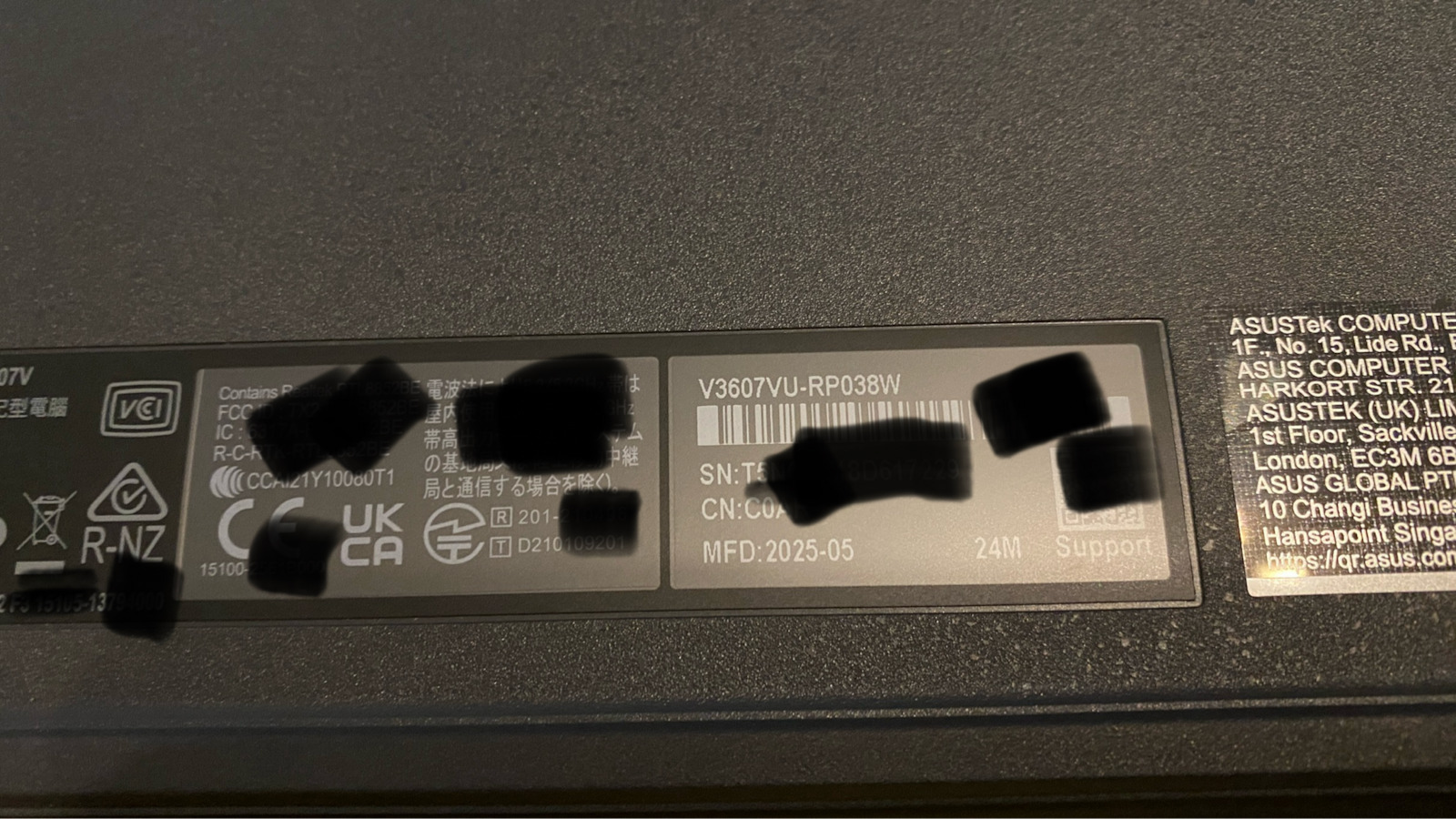
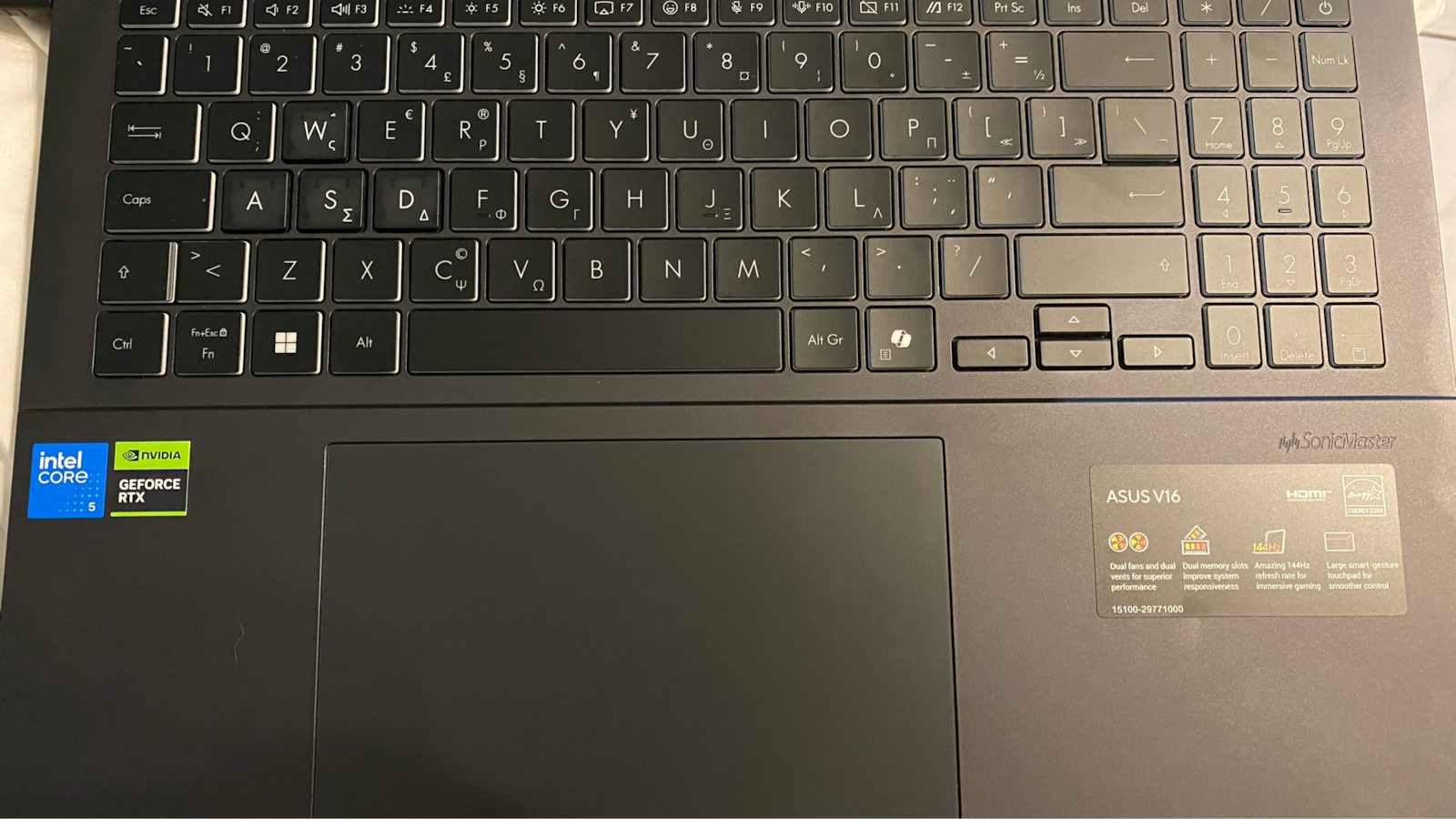
Purchased on October 8, 2025 from a well-known chain with an offer from €999 to €879.
I was between this and the MacBook Air M2 16GB/256GB at €999 but chose this because I already own the older but still capable MacBook Air with M1, which I use for external, simple use due to its great battery life.
If you want great battery life for professional use like email, office, video calls, social media, and light on-the-go photo and video editing, the MacBook Air is the only way to go—there’s no competitor.
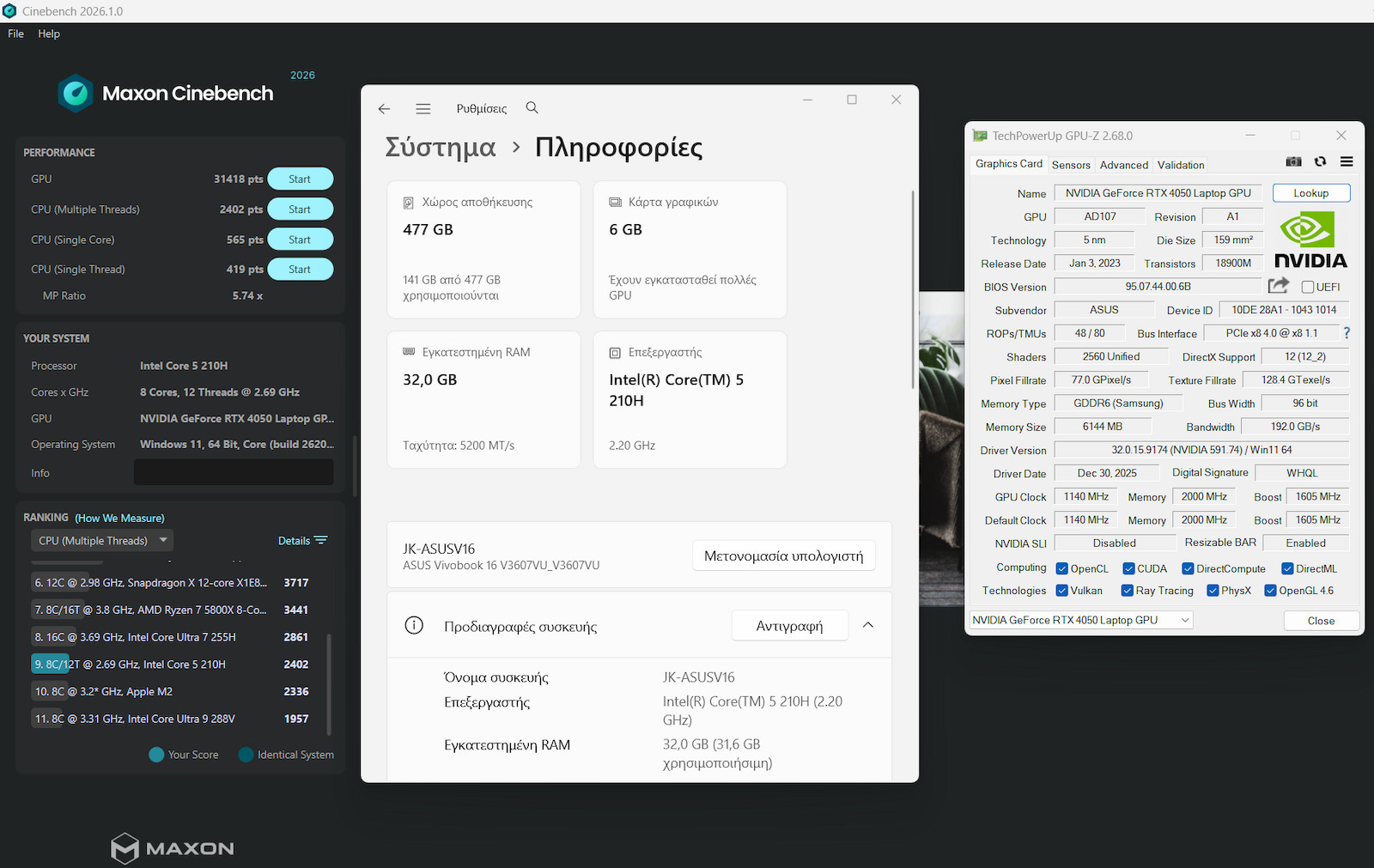
But if you want a powerful portable system based on Intel/AMD (CISC x86-x64 technology) that will run x86_x64 applications and games on Windows and you don’t care much about battery life, the Asus Vivobook V3607VU-RP038W Laptop 16’’ has cutting-edge features: the Intel Core 5 210H at 10nm, two DDR5 5600MHz slots (one occupied with 16GB, one free for upgrade to 32GB), the powerful nVidia RTX 4050 6GB laptop edition graphics card with a 65W TDP (which approaches the performance of a desktop AMD RX 6600 graphics card), the 512GB PCIe gen 4 NVME from Western Digital, and a Type C port (which also supports charging from 45-100W Power Delivery from a Type C charger), the backlit keyboard, a screen with average colors but 144Hz refresh rate, and good build quality—even though it’s plastic, it’s sturdy and relatively light for a gaming laptop. It will leave you completely satisfied for editing and gaming at 1080p in this price category for laptops.
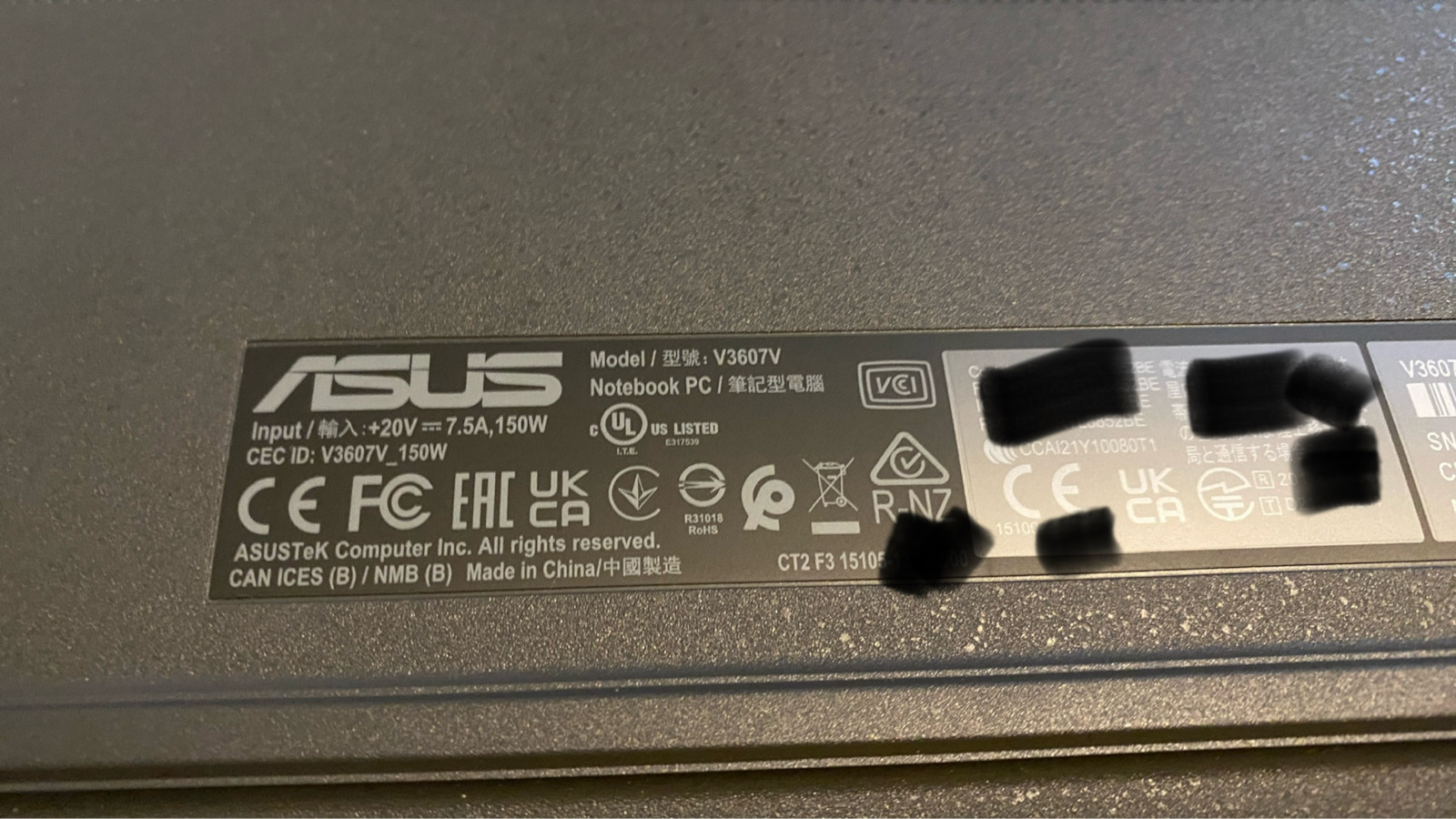
It comes with a large power supply/charger at 20V/150W, but it’s not Type C—it’s a weird charging plug.
Other positives are the impressively large trackpad and the gestures it supports, the thin bezels, the cover-switch on the Web Camera, the factory encryption of the Hard Drive (Windows BitLocker is enabled), the MyASUS app activated the 2-year warranty, and it received a BIOS Update notification.
Note: The Intel Core 5 210H is almost the same as the i5 13420H but is a newer processor—in some benchmarks, the 210H is slightly better, and the RTX 4050 supports 194 AI TOPS. Since the laptop also has the AI Copilot key on its keyboard, it may support AI in the future—not important to me, but good to have.
-NEGATIVES.
We have a WD SN5000S SDEQNSJ-512GB NVME drive, which, although very fast PCIe gen 4 for 512GB, uses Kioxia’s 3D QLC technology, not even TLC, so it has a theoretical write/erase limit of only 150TBW. Also, it lacks DRAM Cache and only has a 64MB SLC pseudo cache—they could have put something more reliable in such a machine. Of course, I’m used to Samsung MLC drives in my desktops.
Negative is also the lack of an Ethernet port for a gaming laptop, but this can be fixed with a Type C to Ethernet adapter.
I would have liked two more Type C ports, as that’s the future.
A BIG NEGATIVE, not of the laptop but of Windows 11, is the mandatory connection to Outlook and so many updates that made the machine, with such powerful specs, freeze and take over an hour to reach the desktop on first power on.
I am a certified computer and network technician and dared to reset everything clean from the beginning. I have worked on Macs and all operating systems, using each for different purposes.
Generally, the machine freezes a lot during Windows Updates, and the processor, though powerful, constantly runs at 20~25% with 230 processes, even at idle, to the point that I did a clean format of Windows 11 Home 25H2 and the problem was fixed. The machine now runs fast and smoothly, Windows updates work normally, and Windows activation was automatic from the motherboard ID—everything is fine.
However, formatting had difficulties—it can’t be done the usual way. You need to download and extract the VMD driver to the Windows installation USB because Windows setup doesn’t recognize the drive or the trackpad. You must use a wired mouse and have the Wi-Fi card driver on a USB to run it with Win+E, as Windows 11 requires internet to set up Outlook (I didn’t bypass with Rufus because I want the original setup to be intact, as the machine supports 11 without bypasses and came out of the box clean. If you don’t care, disable everything with Rufus for peace of mind, but you may lose some future updates that use TPM or have update/security/BitLocker encryption issues).
The end result after all this: the machine at idle runs at 1% CPU, silent, and everything is smooth with the latest Windows and graphics card updates.
MyASUS was reinstalled for the account where the warranty is registered. If MacBooks are considered expensive, think that they’re worth it IF you WON’T run Windows programs and games that only run on x86_x64 processors and if you can afford it, switch to Mac with Apple Silicon RISC ARM technology and you’ll see how much their price reflects not just hardware quality but also great battery life and software quality (iOS and MacOS), ease and immediacy of use (they make you love them). On the other hand, Windows 11 is truly the worst thing Microsoft has released—a chaotic mess, but a necessary evil for the specific uses I mentioned.
Of course, I’ll add a 16GB RAM stick for a total of 32GB RAM because 16GB is now for basic use; a machine like this needs 32GB. Luckily, I got the 16GB RAM for €40 because now it’s over €180. AI has caused a crisis in all memory and SSD prices….
We’ll see what else comes up—good purchase, but it was a hassle.
Update January 30, 2026.
After intensive use for photo and video editing and conversions (1080p @ 60 fps / 2K @ 30fps, AVC, HVEC) in demanding programs (Premiere, PowerDirector, Handbrake) with many filters and effects, the laptop combines CPU+iGPU+dGPU running together by default without me changing anything, with excellent performance. With 32GB RAM, we have a relatively fast portable system for demanding projects. Also, performance drops a bit when running on battery, as expected, but it’s not a problem.
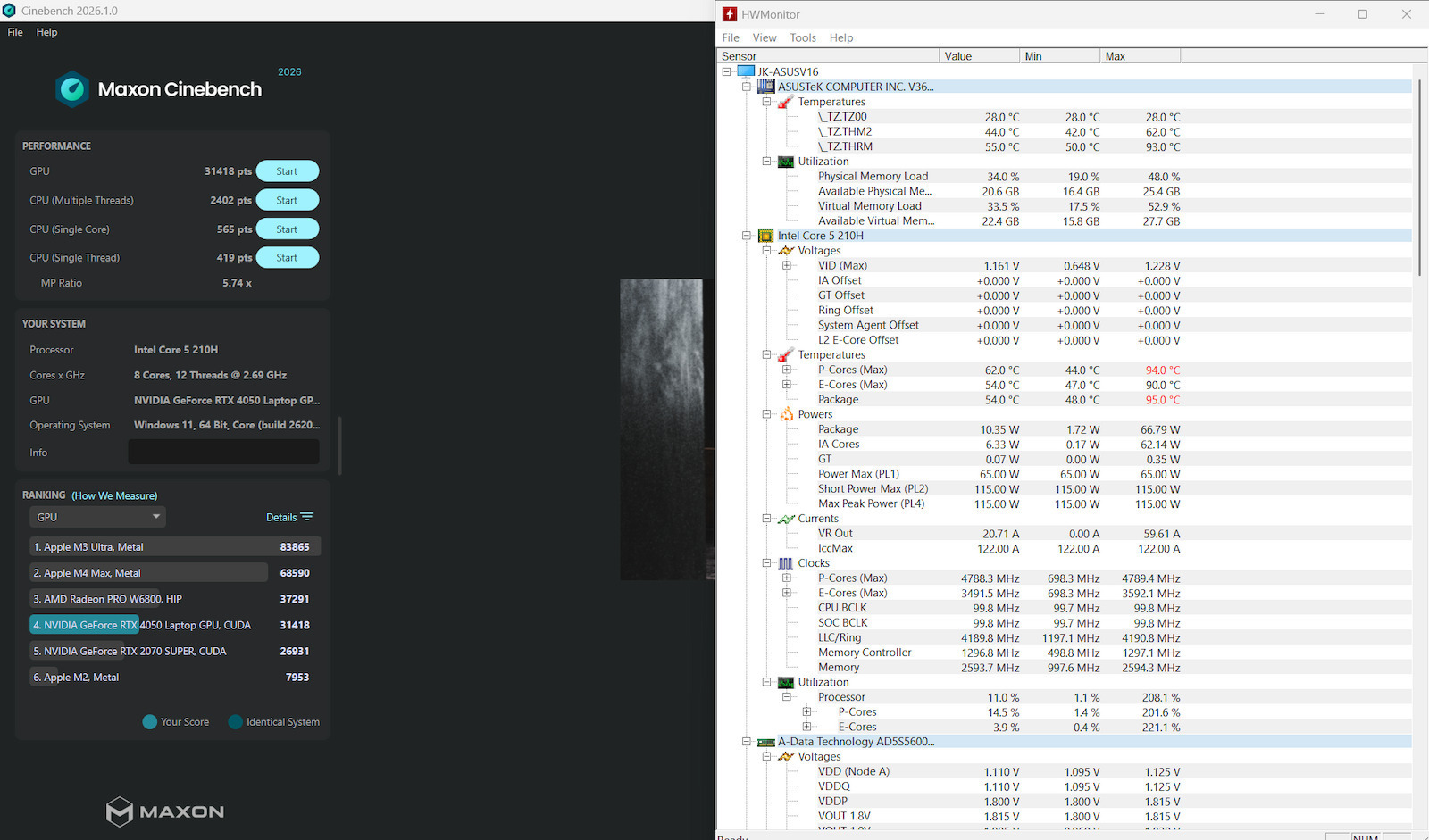
In Cinebench 2026, which I consider heavy, it scored 4 times higher than the Apple M2’s integrated graphics.
The NVME drive has some lags as I mentioned above—it’s the weak link, but in the future (when prices drop or I find something), it can be replaced with a 2TB, and I’ll make it external for fast backups. I haven’t tested it in games yet since I play from desktop, but its time will come.
Αγορασμένο 8 Οκτωβρίου 2025 από γνωστή αλυσίδα με προσφορά από 999Ε σε 879Ε.
Ήμουν ανάμεσα σε αυτό και σε MacBook Air M2 16GB/256GB στα 999Ε αλλα διάλεξα αυτό λογω κατοχής του παλιότερου και ακόμα ικανού MacBook Air με M1 όμως το οποίο το έχω για εξωτερική, απλή χρήση λόγω της μεγάλης αυτονομίας του.
Αν θέλετε μεγάλη αυτονομία για επαγγελματική χρήση email , office, video calls, social media και ελαφρύ on the go photo video edit το MacBook Air είναι μονόδρομος δεν υπάρχει ανταγωνιστής.
Αλλά αν θέλετε ένα ισχυρό φορητό σύστημα βασισμένο σε Intel/AMD . (τεχνολογίας CISC x86-x64 ) που θα τρέχει τις εφαρμογές και παιχνίδια x86_x64 σε Windows και δεν σας νοιάζει πολύ η αυτονομία Το Asus Vivobook V3607VU-RP038W Laptop 16’’ έχει χαρακτηριστικά αιχμής ο Intel Core 5 210H στα 10nm, τα δύο slots DDR5 5600MHz που έχει το ένα κατειλημμένο με 16GB και περισσεύει άλλο ένα όποτε παίρνει αναβάθμιση σε 32GB, την ισχυρή κάρτα γραφικών nVidia RTX 4050 6GB laptop edition με TDP στα 65W (που φτάνει κοντά σε επιδόσεις desktop κάρτα γραφικών AMD RX 6600 ) , ο 512GB PCIe gen 4 NVME της Western Digital και η μια Type C θύρα (που δέχεται και φόρτιση από 45-100W Power Delivery από TypeC φορτιστή, το φωτιζόμενο πληκτρολόγιο, μέτρια οθόνη στα χρώματα αλλά είναι στα 144Hz και η καλή ποιότητα κατασκευής παρόλο που είναι από πλαστικό είναι στιβαρό και σχετικά ελαφρύ για gaming laptop, θα σας αφήσει απόλυτα ικανοποιημένους για edit και gaming στα 1080p σε αυτή την κατηγορία τιμής για λάπτοπ.
Συνοδεύεται με ένα μεγάλο τροφοδοτικό/ φορτιστή στα 20V /150W αλλά δεν είναι Type C είναι ένα περίεργο βύσμα φόρτισης.
Aλλα θετικά είναι το θεαματικά μεγάλο trackpad και τα gestures που υποστηρίζει , τα λεπτά bezels, το κάλυμμα σαν διακόπτης στην Web Camera, η εργοστασιακή κρυπτογράφηση του Σκληρού Δίσκου είναι ενεργοποιημένο το BitLocker των Windows, η εφαρμογή MyASUS ενεργοποίησε την 2ετη εγγύηση καθώς και ενημέρωση για BIOS Update πήρε.
Υποσημείωση ο Intel Core 5 210H είναι σχεδόν ίδιος με τον i5 13420H αλλά είναι νεότερος επεξεργαστής σε μερικά benchmarks o 210H είναι κατά λίγο καλύτερος και η rtx 4050 υποστηρίζει 194 AI TOPS εφόσον το λάπτοπ έχει και το AI Copilot πλήκτρο στο πληκτρολόγιο του, μπορεί να υποστηρίζει AI στο μέλλον αδιάφορο για μένα αλλά καλό να υπάρχει.
-ΑΡΝΗΤΙΚΑ.
Έχουμε έναν NVME δίσκο WD SN5000S SDEQNSJ-512GB ο οποίος αν και ταχύτατος pcie gen 4 για 512GB είναι τεχνολογίας 3D QLC της Kioxia, ούτε καν TLC γι’ αυτό και έχει όριο σβήσε γράψε θεωρητικά μόνο 150TBW, όπως επίσης δεν διαθέτει DRAM Cache αλλά ένα SLC pseudo cache στα 64MB θα μπορούσαν σε τέτοιο μηχανήμα να βάλουν κάτι πιο αξιόπιστο από δίσκο. Βέβαια έχω συνηθίσει με MLC δίσκους Samsung που έχω στα Desktop.
Αρνητικό ή έλλειψη Ethernet port για gaming laptop, αλλά διορθώνεται με έναν αντάπτορα από type c σε Ethernet.
Θα ήθελα άλλες δύο Type C θύρες μιας και είναι το μέλλον.
ΑΡΝΗΤΙΚΟ ΜΕΓΑΛΟ επίσης όχι του λάπτοπ αλλά των Windows 11 η υποχρεωτική σύνδεση στο outlook και οι τόσες πολλές ενημερώσεις έκαναν το μηχάνημα με τέτοια δυνατά specs να κολλήσει και να κάνει πάνω από μια ώρα για να ανοίξει στην επιφάνεια εργασίας στο πρώτο power on.
Είμαι διπλωματούχος τεχνικός υπολογιστών και δικτύων και τόλμημα να μπω στην διαδικασία να κάνω reset clean όλα από την αρχή. Έχω δουλέψει σε Mac και όλα τα λειτουργικά συστήματα καθώς και τα χρησιμοποιώ το κάθε ένα για διαφορετική χρήση.
Γενικά κολλάει πολύ το μηχάνημα όταν πρόκειται για Windows Updates καθώς και ο επεξεργαστής που είναι δυνατός συνέχεια δουλεύει στο 20~25% και 230 διεργασίες, ακόμα και σε κατάσταση ηρεμίας σε σημείο που έκανα clean format τα Windows 11 Home 25H2 και το πρόβλημα διορθώθηκε το μηχάνημα πάει γρήγορα και και ομαλά τα Windows updates γίνονται κανονικά επίσης πήρε αυτόματα την ενεργοποίηση των Windows απο το αναγνωριστικό της μητρικής και όλα εντάξει.
Το Format όμως είχε δυσκολίες δεν γίνεται με το συνηθισμένο τρόπο , πρέπει να κατεβάσετε και να κάνετε extract στο USB εγκαταστασης των Windows τον driver VMD γιατί δεν αναγνωρίζει τον δίσκο το setup των Windows και ούτε το trackpad πρέπει να βάλετε ενσύρματο ποντίκι και να έχετε κατεβάσει τον driver της κάρτας Wi-Fi σε ένα USB για να το τρέξετε με την συντόμευση Win+E , όταν τα windows 11 ζητάνε υποχρεωτικά internet για να βάλεις outlook (δεν έκανα παράκαμψη με το rufus γιατί θέλω να είναι τυπικά ακέραιο το original setup μιας και το μηχάνημα σηκώνει τα 11 χωρίς παρακάμψεις και ήρθε από το κουτί χωρίς παρακάμψεις τυπικά και όμορφα, αν δεν σας νοιάζει κλείστε τα πάντα από το rufus να ησυχάσετε αλλά μπορεί να χάσετε κάποια μελλοντικά updates που εκμεταλλεύονται το TPM ή πρόβληματα στα updates, και γενικά την ασφάλεια της συσκευής και την κρυπτογράφηση bitlocker).
Το τελικό αποτέλεσμα μετά από τόση διαδικασία το μηχάνημα σε κατάσταση ηρεμίας τρέχει στο 1% ο επεξεργαστής αθόρυβο , και όλα πάνε smooth με τα τελευταία updates στα Windows και στην κάρτα γραφικών.
Περάστηκε ξανά το MyASUS για το account που είναι δηλωμένη η εγγύηση του μηχανήματος. Αν τα MacBook θεωρούνται ακριβά σκεφτείτε ότι αξίζουν αν και εφόσον ΔΕΝ θα τρέχετε προγράμματα και παιχνίδια των Windows που τρέχουν μόνο σε x86_x64 επεξεργαστές και έχετε την οικονομική δυνατότητα μεταβείτε σε Mac με τους Apple Silicon τεχνολογίας RISC ARM και θα δείτε, και πόσο μετράει στην τιμή τους πέρα από την ποιότητα του hardware , η μεγάλη αυτονομία και η ποιότητα του Software (του iOS και του MacOS) η ευκολία και η άμεση χρήση τους (σε κάνει να τα αγαπήσεις). Αντίθετα τα Windows 11 είναι πραγματικά ότι χειρότερο έχει βγάλει η Microsoft , ενα χάος ανοργάνωτο αλλά είναι αναγκαίο κακό για συγκεκριμένες χρήσεις που προανάφερα.
Εννοείτα ιότι θα μπει ένα 16gb dimaki ram για να έχουμε ένα σύνολο με 32GB RAM γιατί τα 16gb είναι πλέον για βασική χρήση, ένα τέτοιο μηχάνημα σαν αυτό θέλει 32GB. Ευτυχώς που πρόλαβα την 16αρα RAM με 40Ε γιατί τωρα εχει παει 180Ε+. Το AI εφερε κρίση σε όλες τις μνήμες και τους ssd....
Θα δούμε τι άλλο θα προκύψει, καλή αγορά αλλά είχε ταλαιπωρία.
Update 30 Ιανουαρίου 2026.
Mετά από εντονη χρήση photo video editing αλλά και μετατροπές (1080p @ 60 fps / 2K @ 30fps , AVC, HVEC) σε απαιτητικά προγράμματα (Premiere, PowerDirector, Handbrake) με αρκετά φίλτρα και εφε το laptop συνδυάζει CPU+iGPU+dGPU να τρέχουν μαζί by default χωρίς να πειράξω κάτι με ένα εξαιρετικό αποτέλεσμα επιδόσεων συν τα 32GB RAM έχουμε ενα σχετικά γρήγορο φορητό σύστημα για απαιτητικά projects. Επίσης οι επιδόσεις μειώνονται κάπως όταν λειτουργεί μόνο με μπαταρία, όπως είναι φυσιολογικό αλλά δεν δημιουργείται πρόβλημα.
Σε Cinebench 2026 που το θεωρώ βαρύ βγήκε 4 φορές δυνατότερο από τα ενσωματωμένα γραφικά του Apple M2.
Ο NVME δίσκος έχει κάποια lags όπως είπα και πάνω είναι ο αδύναμος κρίκος, αλλά στο μέλλον (όταν πέσουν οι τιμές ή βρούμε κάτι ) μπορεί να αντικατασταθεί με 2TB, και θα τον κάνω external για γρήγορα backups. Σε games δεν το έχω δοκιμάσει ακόμα μιας και πάιζω από desktop, αλλά θα έρθει η ώρα του.