Memory Cards

Silicon Power microSDXC 512GB Class 10

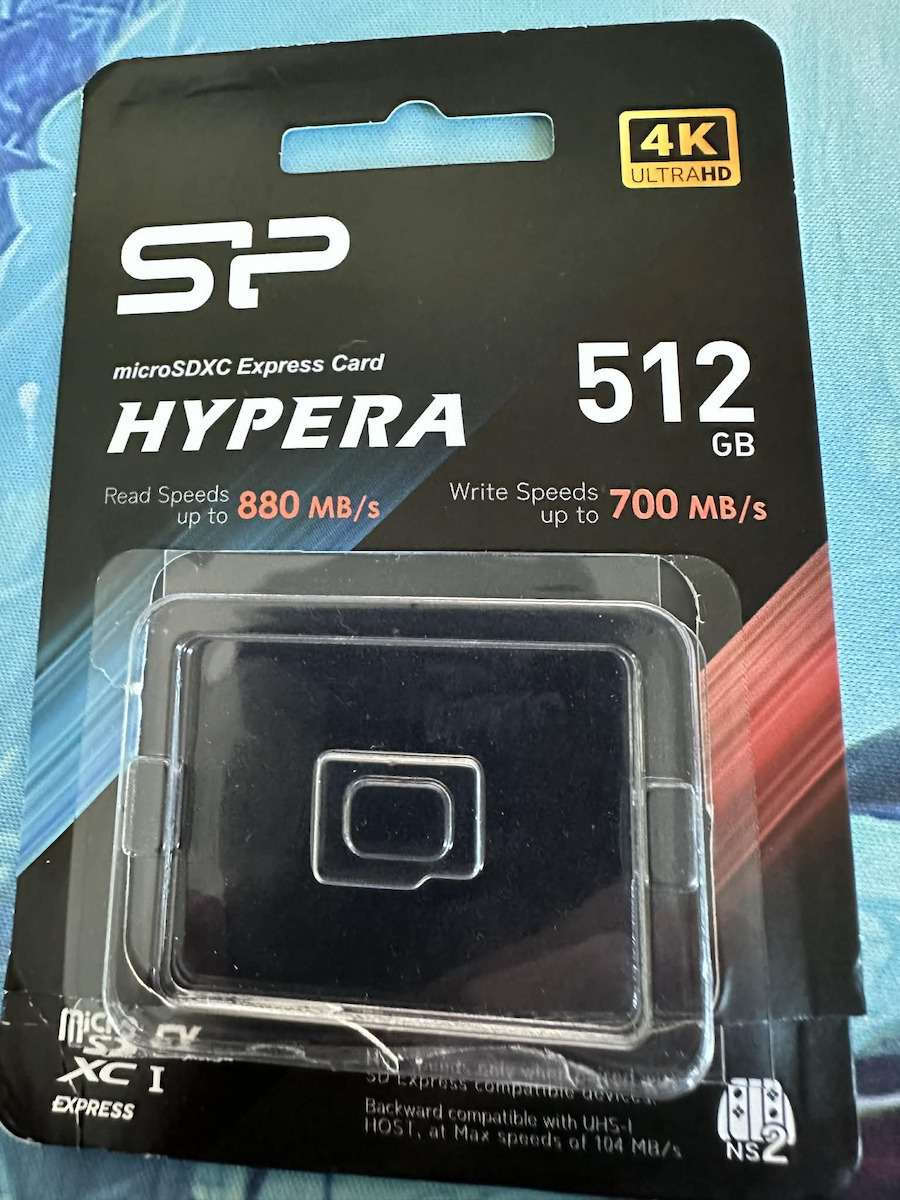
The Silicon Power Hypera microSDXC Express memory card with a capacity of 512GB incorporates the PCIe Gen 3x1 protocol for top read speeds of 880MB/s and write speeds of 700MB/s. It features 3D TLC...

The Silicon Power Hypera microSDXC Express memory card with a capacity of 512GB incorporates the PCIe Gen 3x1 protocol for top read speeds of 880MB/s and write speeds of 700MB/s. It features 3D TLC NAND memory and is certified Class 10, UHS-I U3, and V30 for 4K UHD video recording. Comes with A1 specification for applications and a durable construction.

See full description See full description
  • See all
165 60
Delivery Fri, 26 Jun - Tue, 30 Jun
14,00 €   shipping cost
Sent from Greece
From Shop404
Greece
2 pieces
See Storage on the page of Shop404

Description

Description

The Silicon Power Hypera microSDXC Express memory card with a capacity of 512GB incorporates the PCIe Gen 3x1 protocol for top read speeds of 880MB/s and write speeds of 700MB/s. It features 3D TLC NAND memory and is certified Class 10, UHS-I U3, and V30 for 4K UHD video recording. Comes with A1 specification for applications and a durable construction.

PCIe Gen 3x1 Interface & 3D TLC NAND

The Hypera series utilizes the advanced PCIe Gen 3x1 interface protocol, offering significantly increased bandwidth compared to traditional microSD cards. Equipped with 3D TLC NAND memory technology, the card achieves impressive maximum speeds, with read speeds reaching up to 880MB/s and write speeds up to 700MB/s. This architecture enables rapid data loading in demanding environments, such as modern gaming consoles. At the same time, compatibility with the UHS-I standard is maintained, ensuring the card operates in older devices by adjusting performance to the limits of each host interface.

Speed Standards V30 & 4K Support

The card meets the strict specifications of Video Speed Class 30 (V30) and UHS Speed Class 3 (U3). These certifications guarantee a minimum sustained write speed of 30MB/s, making it ideal for uninterrupted recording of high-resolution 4K UHD video. The stability in data flow prevents frame drops during capture, meeting the needs of devices such as drones and action cameras. The large capacity of 512GB provides ample space for storing extensive high-definition material without the need for frequent clearing.

Application Class A1 & Durability

The Application Performance Class 1 (A1) certification optimizes the management of random writes and reads (IOPS), allowing for faster execution of applications and games directly from the memory card. In terms of physical durability, the unit is designed to operate within a temperature range from 0°C to 70°C and with an operating voltage of 2.7V to 3.6V. Its construction offers protection against environmental hazards such as moisture, vibrations, and exposure to X-rays, ensuring the integrity of stored data under adverse usage conditions.

Manufacturer

See full description

Specifications

Specifications

Main Specifications

Capacity
512 GB
Type
microSDXC
Extra
-

Performance

Speed Class
10
Reading Speed
880 MB/s
Write Speed
880 MB/s

Important information

Specifications are collected from official manufacturer websites. Please verify the specifications before proceeding with your final purchase. If you notice any problem you can report it here.

See all specifications

Reviews (3)

Reviews

  1. 1
  2. 2
  3. 3 stars
    0
  4. 2 stars
    0
  5. 1 star
    0
Review this product

Reviews by our members

  • n_rx
    4
    0 out of 1 members found this review helpful

    So, the delivery from the store was immediate, while the price for one day cost half a kidney and not two! Since I also wanted to use it on the Nintendo Switch 2, let me say the following:
    1) For proper installation on the Switch, you must first turn it off and not just leave it in sleep mode. I mention this because several videos say you can insert the card like that, while on Nintendo’s official website it says that before inserting the card, the device should be powered off.
    2) So, you insert it until it clicks, with the label facing you (you have turned the Switch screen the other way and are looking at its back) and the card’s teeth facing the device.
    3) Turn on the device and press a button 3 times (unless you have disabled this), and then you will immediately be given instructions for formatting the card.
    4) The card’s packaging, as shown in the photos, has the card in the middle, in a plastic holder. I cut it from the right edge, removed the cardboard from the bottom of the plastic, took out the little plastic case, and opened it very easily as if opening a small door.
    5) In the features on Skroutz, it says in bold that the write speed is 880, while it is 700 (it is correct in the description though).
    6) It loses one star because if you do the math, while the card is 512 GB, in the end, only 463 GB are available on the device.
    7) On the back of the packaging, there is a QR code, which leads to the warranty. Just in case, keep the receipt, hopefully you won’t need it. Also keep the little case, because it’s so small that every square millimeter costs as much as a gold bar!

    Translated from Greek ·
    Did you find this review helpful?
  • jowltnt
    4
    1 out of 1 members found this review helpful

    Works on Switch 2 but...
    When transferring 200GB from the internal storage, somewhere in the middle it showed corrupt!
    Afterwards, it wouldn't let me format it from the Switch 2 and doing it from the PC didn't work either, it gave the same error and you couldn't use it. I realized that the Switch keeps things as a link for the card to work, so I set up the console as new, managed to format it properly and reinstalled all my games one by one. I think it's a console problem because I see the issue on Reddit with various brands, even branded ones. I haven't had any problems since then... we'll see.

    Translated from Greek ·
    Did you find this review helpful?
  • Dragonborn
    5
    1 out of 1 members found this review helpful

    Verified purchase

    I bought it for the Nintendo Switch 2, Yes it works perfectly, it is an express SD card, it also has the Nintendo Switch 2 logo on the bottom right of its box. You just insert it, the console does a small update and it's ready.

    Translated from Greek ·
    Did you find this review helpful?
  • So, the delivery from the store was immediate, while the price for one day cost half a kidney and not two! Since I also wanted to use it on the Nintendo Switch 2, let me say the following:
    1) For proper installation on the Switch, you must first turn it off and not just leave it in sleep mode. I mention this because several videos say you can insert the card like that, while on Nintendo’s official website it says that before inserting the card, the device should be powered off.
    2) So, you insert it until it clicks, with the label facing you (you have turned the Switch screen the other way and are looking at its back) and the card’s teeth facing the device.
    3) Turn on the device and press a button 3 times (unless you have disabled this), and then you will immediately be given instructions for formatting the card.
    4) The card’s packaging, as shown in the photos, has the card in the middle, in a plastic holder. I cut it from the right edge, removed the cardboard from the bottom of the plastic, took out the little plastic case, and opened it very easily as if opening a small door.
    5) In the features on Skroutz, it says in bold that the write speed is 880, while it is 700 (it is correct in the description though).
    6) It loses one star because if you do the math, while the card is 512 GB, in the end, only 463 GB are available on the device.
    7) On the back of the packaging, there is a QR code, which leads to the warranty. Just in case, keep the receipt, hopefully you won’t need it. Also keep the little case, because it’s so small that every square millimeter costs as much as a gold bar!

    Translated from Greek ·
    0
  • Works on Switch 2 but...
    When transferring 200GB from the internal storage, somewhere in the middle it showed corrupt!
    Afterwards, it wouldn't let me format it from the Switch 2 and doing it from the PC didn't work either, it gave the same error and you couldn't use it. I realized that the Switch keeps things as a link for the card to work, so I set up the console as new, managed to format it properly and reinstalled all my games one by one. I think it's a console problem because I see the issue on Reddit with various brands, even branded ones. I haven't had any problems since then... we'll see.

    Translated from Greek ·
    1
  • I bought it for the Nintendo Switch 2, Yes it works perfectly, it is an express SD card, it also has the Nintendo Switch 2 logo on the bottom right of its box. You just insert it, the console does a small update and it's ready.

    Translated from Greek ·
    1
  • See all

Description & Specifications

The Silicon Power Hypera microSDXC Express memory card with a capacity of 512GB incorporates the PCIe Gen 3x1 protocol for top read speeds of 880MB/s and write speeds of 700MB/s. It features 3D TLC NAND memory and is certified Class 10, UHS-I U3, and V30 for 4K UHD video recording. Comes with A1 specification for applications and a durable construction.

PCIe Gen 3x1 Interface & 3D TLC NAND

The Hypera series utilizes the advanced PCIe Gen 3x1 interface protocol, offering significantly increased bandwidth compared to traditional microSD cards. Equipped with 3D TLC NAND memory technology, the card achieves impressive maximum speeds, with read speeds reaching up to 880MB/s and write speeds up to 700MB/s. This architecture enables rapid data loading in demanding environments, such as modern gaming consoles. At the same time, compatibility with the UHS-I standard is maintained, ensuring the card operates in older devices by adjusting performance to the limits of each host interface.

Speed Standards V30 & 4K Support

The card meets the strict specifications of Video Speed Class 30 (V30) and UHS Speed Class 3 (U3). These certifications guarantee a minimum sustained write speed of 30MB/s, making it ideal for uninterrupted recording of high-resolution 4K UHD video. The stability in data flow prevents frame drops during capture, meeting the needs of devices such as drones and action cameras. The large capacity of 512GB provides ample space for storing extensive high-definition material without the need for frequent clearing.

Application Class A1 & Durability

The Application Performance Class 1 (A1) certification optimizes the management of random writes and reads (IOPS), allowing for faster execution of applications and games directly from the memory card. In terms of physical durability, the unit is designed to operate within a temperature range from 0°C to 70°C and with an operating voltage of 2.7V to 3.6V. Its construction offers protection against environmental hazards such as moisture, vibrations, and exposure to X-rays, ensuring the integrity of stored data under adverse usage conditions.

Manufacturer

Main Specifications

Capacity
512 GB
Type
microSDXC
Extra
-

Performance

Speed Class
10
Reading Speed
880 MB/s
Write Speed
880 MB/s

Important information

Specifications are collected from official manufacturer websites. Please verify the specifications before proceeding with your final purchase. If you notice any problem you can report it here.

Reviews (3)

  1. 1
  2. 2
  3. 3 stars
    0
  4. 2 stars
    0
  5. 1 star
    0
Review this product

Reviews by our members

  • n_rx
    4
    0 out of 1 members found this review helpful

    So, the delivery from the store was immediate, while the price for one day cost half a kidney and not two! Since I also wanted to use it on the Nintendo Switch 2, let me say the following:
    1) For proper installation on the Switch, you must first turn it off and not just leave it in sleep mode. I mention this because several videos say you can insert the card like that, while on Nintendo’s official website it says that before inserting the card, the device should be powered off.
    2) So, you insert it until it clicks, with the label facing you (you have turned the Switch screen the other way and are looking at its back) and the card’s teeth facing the device.
    3) Turn on the device and press a button 3 times (unless you have disabled this), and then you will immediately be given instructions for formatting the card.
    4) The card’s packaging, as shown in the photos, has the card in the middle, in a plastic holder. I cut it from the right edge, removed the cardboard from the bottom of the plastic, took out the little plastic case, and opened it very easily as if opening a small door.
    5) In the features on Skroutz, it says in bold that the write speed is 880, while it is 700 (it is correct in the description though).
    6) It loses one star because if you do the math, while the card is 512 GB, in the end, only 463 GB are available on the device.
    7) On the back of the packaging, there is a QR code, which leads to the warranty. Just in case, keep the receipt, hopefully you won’t need it. Also keep the little case, because it’s so small that every square millimeter costs as much as a gold bar!

    Translated from Greek ·
    Did you find this review helpful?
  • jowltnt
    4
    1 out of 1 members found this review helpful

    Works on Switch 2 but...
    When transferring 200GB from the internal storage, somewhere in the middle it showed corrupt!
    Afterwards, it wouldn't let me format it from the Switch 2 and doing it from the PC didn't work either, it gave the same error and you couldn't use it. I realized that the Switch keeps things as a link for the card to work, so I set up the console as new, managed to format it properly and reinstalled all my games one by one. I think it's a console problem because I see the issue on Reddit with various brands, even branded ones. I haven't had any problems since then... we'll see.

    Translated from Greek ·
    Did you find this review helpful?
  • Dragonborn
    5
    1 out of 1 members found this review helpful

    Verified purchase

    I bought it for the Nintendo Switch 2, Yes it works perfectly, it is an express SD card, it also has the Nintendo Switch 2 logo on the bottom right of its box. You just insert it, the console does a small update and it's ready.

    Translated from Greek ·
    Did you find this review helpful?
  • So, the delivery from the store was immediate, while the price for one day cost half a kidney and not two! Since I also wanted to use it on the Nintendo Switch 2, let me say the following:
    1) For proper installation on the Switch, you must first turn it off and not just leave it in sleep mode. I mention this because several videos say you can insert the card like that, while on Nintendo’s official website it says that before inserting the card, the device should be powered off.
    2) So, you insert it until it clicks, with the label facing you (you have turned the Switch screen the other way and are looking at its back) and the card’s teeth facing the device.
    3) Turn on the device and press a button 3 times (unless you have disabled this), and then you will immediately be given instructions for formatting the card.
    4) The card’s packaging, as shown in the photos, has the card in the middle, in a plastic holder. I cut it from the right edge, removed the cardboard from the bottom of the plastic, took out the little plastic case, and opened it very easily as if opening a small door.
    5) In the features on Skroutz, it says in bold that the write speed is 880, while it is 700 (it is correct in the description though).
    6) It loses one star because if you do the math, while the card is 512 GB, in the end, only 463 GB are available on the device.
    7) On the back of the packaging, there is a QR code, which leads to the warranty. Just in case, keep the receipt, hopefully you won’t need it. Also keep the little case, because it’s so small that every square millimeter costs as much as a gold bar!

    Translated from Greek ·
    0
  • Works on Switch 2 but...
    When transferring 200GB from the internal storage, somewhere in the middle it showed corrupt!
    Afterwards, it wouldn't let me format it from the Switch 2 and doing it from the PC didn't work either, it gave the same error and you couldn't use it. I realized that the Switch keeps things as a link for the card to work, so I set up the console as new, managed to format it properly and reinstalled all my games one by one. I think it's a console problem because I see the issue on Reddit with various brands, even branded ones. I haven't had any problems since then... we'll see.

    Translated from Greek ·
    1
  • I bought it for the Nintendo Switch 2, Yes it works perfectly, it is an express SD card, it also has the Nintendo Switch 2 logo on the bottom right of its box. You just insert it, the console does a small update and it's ready.

    Translated from Greek ·
    1
  • See all
165,60 €
14,00 €   shipping cost