CPU Cooling Fans

Monarch Gear Eurus CPU Cooling Fan for AM4/AM5/1200/115x/1700 Socket

The Monarch Gear Eurus air CPU cooler in white is an excellent cooling solution, designed to keep your processor temperatures low with high reliability. It is a high-performance active cooler that...

The Monarch Gear Eurus air CPU cooler in white is an excellent cooling solution, designed to keep your processor temperatures low with high reliability. It is a high-performance active cooler that uses a powerful fan for direct and efficient heat dissipation. It stands out for its broad compatibility, as it supports a vast range of Intel and AMD sockets,...

See full description See full description
29 00
Delivery by Wed, 23 Sep
14,00 €   shipping cost
Sent from Greece
From Monarch Gear 4.9 (1.9K Skroutz Hub reviews)

Learn more about invoicing

Description

Description

The Monarch Gear Eurus air CPU cooler in white is an excellent cooling solution, designed to keep your processor temperatures low with high reliability. It is a high-performance active cooler that uses a powerful fan for direct and efficient heat dissipation. It stands out for its broad compatibility, as it supports a vast range of Intel and AMD sockets, including the newer LGA 1700 and AM5. With a compact width of just 115mm, it ensures easy installation without obstructing RAM modules or other components, while fitting perfectly into most modern computer cases. Its clean, elegant white aesthetic makes it the ideal choice for users who want to upgrade their system’s cooling while creating an impressive white-themed PC build.

High-Efficiency Active Cooling

Monarch Gear Eurus is an active CPU cooler (active air cooler), designed to provide immediate and continuous heat dissipation from your processor. It uses a high-quality fan that delivers strong airflow through the cooler fins, keeping temperatures at safe levels even during demanding tasks or gaming. Its reliable operation ensures system stability and protects the CPU from overheating.

Wide Compatibility with Intel & AMD Sockets

One of the greatest advantages of the Monarch Gear Eurus is the universal compatibility it offers with the most popular sockets on the market. It fully supports Intel sockets 1150, 1151, 1155, 1156, 1200, as well as the newer LGA 1700. At the same time, it is fully compatible with the AMD platform, covering AM4 and AM5 sockets. This broad flexibility makes it an ideal choice whether for upgrading an existing computer or building a brand-new system.

Compact 115mm Width & Elegant White Aesthetic

Designed with ease of installation in mind, the cooler features a compact width of 115 mm, allowing it to fit comfortably in most computer cases on the market without clearance issues. At the same time, its clean white finish (White Color) offers a modern and premium aesthetic that enhances the interior of your PC. It is the perfect choice for those who want to build a stylish, white-themed system with high cooling performance.

Manufacturer

See full description

Specifications

Specifications

Main Specifications

Type
Active
Socket
1150/1151/1155/1156, 1200, 1700, AM4, AM5
Dual Fan
No
Colour
Black

Technical Specifications

Thermal Design Power (TDP)
-

Dimensions

Width
115 mm

Important information

Specifications are collected from official manufacturer websites. Please verify the specifications before proceeding with your final purchase. If you notice any problem you can report it here.

See all specifications

Reviews (3)

Reviews

  1. 2
  2. 4 stars
    0
  3. 1
  4. 2 stars
    0
  5. 1 star
    0
Review this product

Reviews by our members

  • BillysSt96

    Verified purchase

    Normal design, good quality, but there is no software to control the RGB, neither for the fan nor for the "console". There is only one "software" provided by Monarch, purely so you can see the CPU package temperature on the console, but even that keeps rotating continuously between Fahrenheit, Celsius, and CPU fan RPM %, without giving the option to keep it fixed on one setting.

    I would put an Arctic MX-7 paste and not the stock one that comes with the cooler; it will definitely give you a boost of 3-4 degrees lower, but if there is no such option, you won't have any issue.

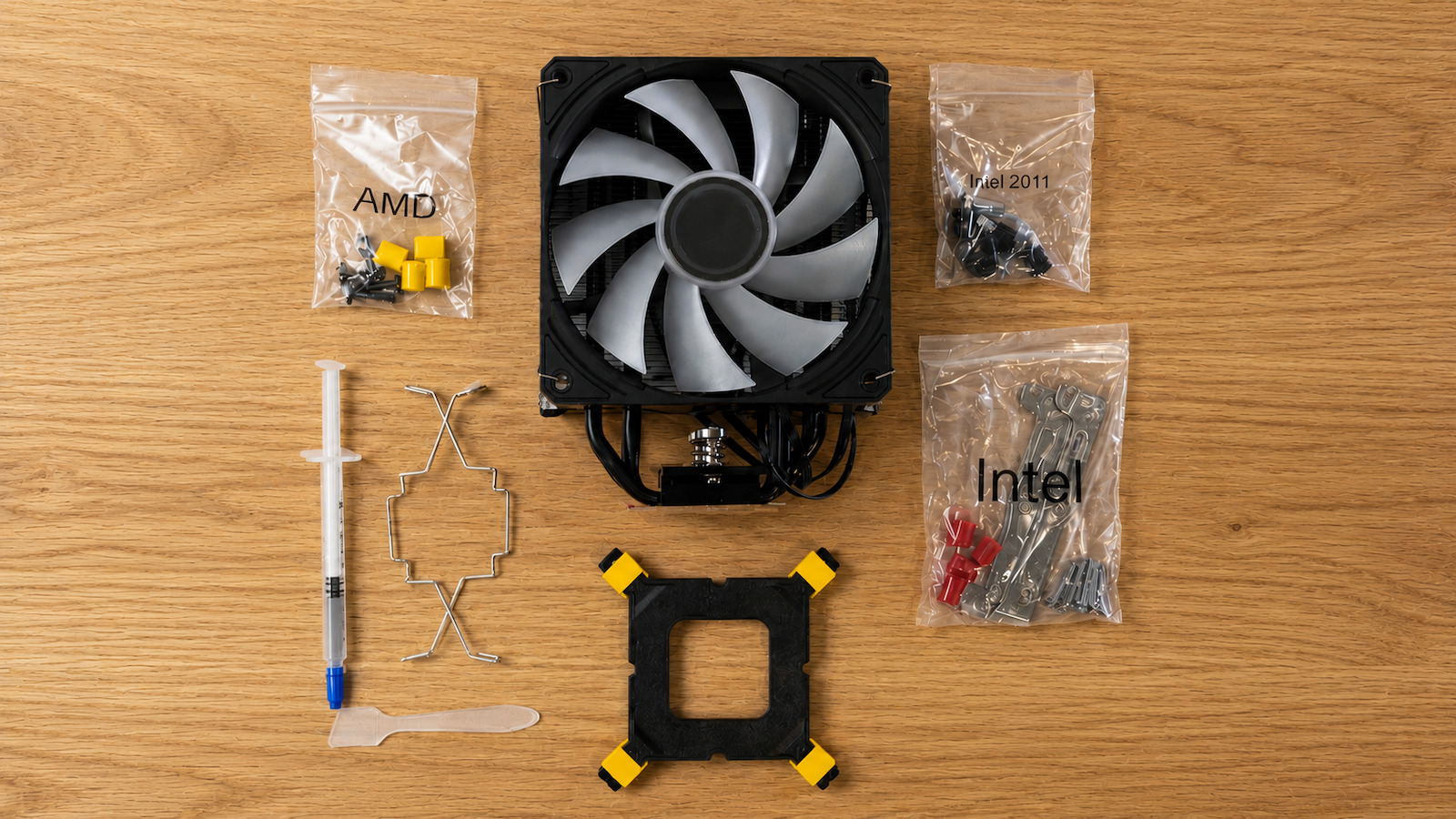
    The brackets found under the large package inside the cooler that is labeled for INTEL also work for AMD. Don't look for metal brackets in the AM5 package. There you will find the backplate, which on AM5 you will not use because the motherboards have a metal bracket on the back that you will not remove, and the 4 yellow plastic bases in this case that go into the positions where the bracket was on the front of the motherboard, which you will remove in order to install the metal ones that come with the cooler, as well as the screws you will use for the brackets in the AMD package.

    In terms of temperatures, at max load the CPU Package stays at 76-86 degrees depending on the case, and in the middle of summer the CPU itself is at 62-70 degrees, but with the important note that all this happens inside a Lian Li O11 Dynamic Mini V2 with an AMD Ryzen 7 9700X at 65W, not overclocked and not at 105W load, and with a 9-fan layout in the case (3 bottom, 2 side intake, 3 top, and 1 rear exhaust).

    It is not a bad purchase for something cheap, along with the added aesthetics on the console and fan, but I would change the paste and replace the cooler fan with a better high-pressure fan with an ARGB cable so there is also the option for custom lighting and not the alternating lighting in all the modes and colors that it does by default.

    Translated from Greek ·
    Did you find this review helpful?
  • A very good air cooler for its price. It has a display that shows the CPU temperature. To work, it needs drivers from the company's website. Some basic features:
    12 Heatpipes
    TDP : 220W
    Noise Level : 14~16±10%DBA
    Fan Speed : 800~1800±10%RPM

    Translated from Greek ·
    Did you find this review helpful?
  • Normal design, good quality, but there is no software to control the RGB, neither for the fan nor for the "console". There is only one "software" provided by Monarch, purely so you can see the CPU package temperature on the console, but even that keeps rotating continuously between Fahrenheit, Celsius, and CPU fan RPM %, without giving the option to keep it fixed on one setting.

    I would put an Arctic MX-7 paste and not the stock one that comes with the cooler; it will definitely give you a boost of 3-4 degrees lower, but if there is no such option, you won't have any issue.

    The brackets found under the large package inside the cooler that is labeled for INTEL also work for AMD. Don't look for metal brackets in the AM5 package. There you will find the backplate, which on AM5 you will not use because the motherboards have a metal bracket on the back that you will not remove, and the 4 yellow plastic bases in this case that go into the positions where the bracket was on the front of the motherboard, which you will remove in order to install the metal ones that come with the cooler, as well as the screws you will use for the brackets in the AMD package.

    In terms of temperatures, at max load the CPU Package stays at 76-86 degrees depending on the case, and in the middle of summer the CPU itself is at 62-70 degrees, but with the important note that all this happens inside a Lian Li O11 Dynamic Mini V2 with an AMD Ryzen 7 9700X at 65W, not overclocked and not at 105W load, and with a 9-fan layout in the case (3 bottom, 2 side intake, 3 top, and 1 rear exhaust).

    It is not a bad purchase for something cheap, along with the added aesthetics on the console and fan, but I would change the paste and replace the cooler fan with a better high-pressure fan with an ARGB cable so there is also the option for custom lighting and not the alternating lighting in all the modes and colors that it does by default.

    Translated from Greek ·
    0
  • A very good air cooler for its price. It has a display that shows the CPU temperature. To work, it needs drivers from the company's website. Some basic features:
    12 Heatpipes
    TDP : 220W
    Noise Level : 14~16±10%DBA
    Fan Speed : 800~1800±10%RPM

    Translated from Greek ·
    0
  • 0
  • See all

Description & Specifications

The Monarch Gear Eurus air CPU cooler in white is an excellent cooling solution, designed to keep your processor temperatures low with high reliability. It is a high-performance active cooler that uses a powerful fan for direct and efficient heat dissipation. It stands out for its broad compatibility, as it supports a vast range of Intel and AMD sockets, including the newer LGA 1700 and AM5. With a compact width of just 115mm, it ensures easy installation without obstructing RAM modules or other components, while fitting perfectly into most modern computer cases. Its clean, elegant white aesthetic makes it the ideal choice for users who want to upgrade their system’s cooling while creating an impressive white-themed PC build.

High-Efficiency Active Cooling

Monarch Gear Eurus is an active CPU cooler (active air cooler), designed to provide immediate and continuous heat dissipation from your processor. It uses a high-quality fan that delivers strong airflow through the cooler fins, keeping temperatures at safe levels even during demanding tasks or gaming. Its reliable operation ensures system stability and protects the CPU from overheating.

Wide Compatibility with Intel & AMD Sockets

One of the greatest advantages of the Monarch Gear Eurus is the universal compatibility it offers with the most popular sockets on the market. It fully supports Intel sockets 1150, 1151, 1155, 1156, 1200, as well as the newer LGA 1700. At the same time, it is fully compatible with the AMD platform, covering AM4 and AM5 sockets. This broad flexibility makes it an ideal choice whether for upgrading an existing computer or building a brand-new system.

Compact 115mm Width & Elegant White Aesthetic

Designed with ease of installation in mind, the cooler features a compact width of 115 mm, allowing it to fit comfortably in most computer cases on the market without clearance issues. At the same time, its clean white finish (White Color) offers a modern and premium aesthetic that enhances the interior of your PC. It is the perfect choice for those who want to build a stylish, white-themed system with high cooling performance.

Manufacturer

Main Specifications

Type
Active
Socket
1150/1151/1155/1156, 1200, 1700, AM4, AM5
Dual Fan
No
Colour
Black

Technical Specifications

Thermal Design Power (TDP)
-

Dimensions

Width
115 mm

Important information

Specifications are collected from official manufacturer websites. Please verify the specifications before proceeding with your final purchase. If you notice any problem you can report it here.

Reviews (3)

  1. 2
  2. 4 stars
    0
  3. 1
  4. 2 stars
    0
  5. 1 star
    0
Review this product

Reviews by our members

  • BillysSt96

    Verified purchase

    Normal design, good quality, but there is no software to control the RGB, neither for the fan nor for the "console". There is only one "software" provided by Monarch, purely so you can see the CPU package temperature on the console, but even that keeps rotating continuously between Fahrenheit, Celsius, and CPU fan RPM %, without giving the option to keep it fixed on one setting.

    I would put an Arctic MX-7 paste and not the stock one that comes with the cooler; it will definitely give you a boost of 3-4 degrees lower, but if there is no such option, you won't have any issue.

    The brackets found under the large package inside the cooler that is labeled for INTEL also work for AMD. Don't look for metal brackets in the AM5 package. There you will find the backplate, which on AM5 you will not use because the motherboards have a metal bracket on the back that you will not remove, and the 4 yellow plastic bases in this case that go into the positions where the bracket was on the front of the motherboard, which you will remove in order to install the metal ones that come with the cooler, as well as the screws you will use for the brackets in the AMD package.

    In terms of temperatures, at max load the CPU Package stays at 76-86 degrees depending on the case, and in the middle of summer the CPU itself is at 62-70 degrees, but with the important note that all this happens inside a Lian Li O11 Dynamic Mini V2 with an AMD Ryzen 7 9700X at 65W, not overclocked and not at 105W load, and with a 9-fan layout in the case (3 bottom, 2 side intake, 3 top, and 1 rear exhaust).

    It is not a bad purchase for something cheap, along with the added aesthetics on the console and fan, but I would change the paste and replace the cooler fan with a better high-pressure fan with an ARGB cable so there is also the option for custom lighting and not the alternating lighting in all the modes and colors that it does by default.

    Translated from Greek ·
    Did you find this review helpful?
  • A very good air cooler for its price. It has a display that shows the CPU temperature. To work, it needs drivers from the company's website. Some basic features:
    12 Heatpipes
    TDP : 220W
    Noise Level : 14~16±10%DBA
    Fan Speed : 800~1800±10%RPM

    Translated from Greek ·
    Did you find this review helpful?
  • Normal design, good quality, but there is no software to control the RGB, neither for the fan nor for the "console". There is only one "software" provided by Monarch, purely so you can see the CPU package temperature on the console, but even that keeps rotating continuously between Fahrenheit, Celsius, and CPU fan RPM %, without giving the option to keep it fixed on one setting.

    I would put an Arctic MX-7 paste and not the stock one that comes with the cooler; it will definitely give you a boost of 3-4 degrees lower, but if there is no such option, you won't have any issue.

    The brackets found under the large package inside the cooler that is labeled for INTEL also work for AMD. Don't look for metal brackets in the AM5 package. There you will find the backplate, which on AM5 you will not use because the motherboards have a metal bracket on the back that you will not remove, and the 4 yellow plastic bases in this case that go into the positions where the bracket was on the front of the motherboard, which you will remove in order to install the metal ones that come with the cooler, as well as the screws you will use for the brackets in the AMD package.

    In terms of temperatures, at max load the CPU Package stays at 76-86 degrees depending on the case, and in the middle of summer the CPU itself is at 62-70 degrees, but with the important note that all this happens inside a Lian Li O11 Dynamic Mini V2 with an AMD Ryzen 7 9700X at 65W, not overclocked and not at 105W load, and with a 9-fan layout in the case (3 bottom, 2 side intake, 3 top, and 1 rear exhaust).

    It is not a bad purchase for something cheap, along with the added aesthetics on the console and fan, but I would change the paste and replace the cooler fan with a better high-pressure fan with an ARGB cable so there is also the option for custom lighting and not the alternating lighting in all the modes and colors that it does by default.

    Translated from Greek ·
    0
  • A very good air cooler for its price. It has a display that shows the CPU temperature. To work, it needs drivers from the company's website. Some basic features:
    12 Heatpipes
    TDP : 220W
    Noise Level : 14~16±10%DBA
    Fan Speed : 800~1800±10%RPM

    Translated from Greek ·
    0
  • 0
  • See all
29,00 €
14,00 €   shipping cost