Printers

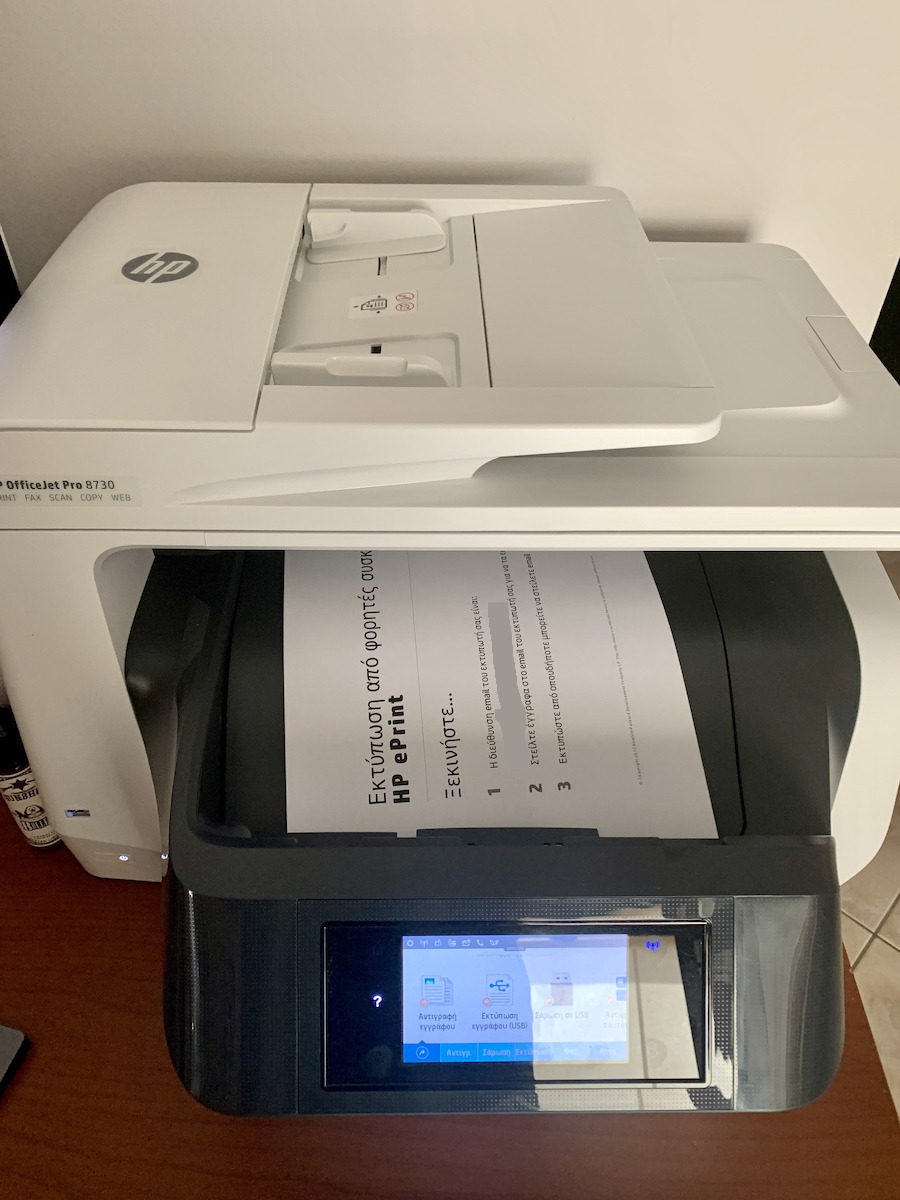
HP OfficeJet Pro 8730 All-in-One Colour All In One Inkjet Printer with WiFi and Mobile Printing

Key features:

  • Print, copy, scan & fax
  • Print speed: 24 / 20 ppm
  • Print resolution: 2400x1200 DPI
  • Connections: Ethernet, USB, Wi-Fi
See full description
  • Print Color Colored
  • Consumable Inkjet
  • See all

User Manual

The product is not available at Skroutz Last updated: 5 months ago

Description

Description


The Officejet HP 8730 multifunction printer is the complete office solution for printing, scanning, copying, and faxing. With advanced connectivity technologies such as Wi-Fi, HP ePrint, and HP AirPrint, it allows you to print from anywhere without complex connection processes. 

All your tasks are now faster, with high printing speeds and the built-in ADF that allows you to automatically print and scan double-sided.

Innovative Design for Excellent Productivity

Discover the revolutionary HP Print Forward design. Ensure high-speed double-sided printing and scanning, paper handling like laser printers, and save valuable space thanks to the innovative design. Print longer without the need to add paper, with the optional second tray.

Portable printing that meets your business needs

Complete your tasks from anywhere in the office. Connect to devices with touch-to-print capability. Print easily at any time, wherever you are, from your smartphone, tablet, or laptop.

Prints just for you

The HP JetAdvantage Private Print feature offers high levels of protection for your information, providing controlled access to your confidential documents.

Printing on the go with HP ePrint

  • Print photos, documents, and more on the go using HP ePrint.

Duplex Printing

  • Allows you to print on both sides of the page, reducing paper usage by 50%.

Automatic Document Feeder

  • Enables simultaneous copying or scanning of multiple pages.

Color Touchscreen (Printer)

  • Manage tasks directly from the MFP using the HP color touchscreen.

Details

  • Connectivity: 1 USB 2.0, 1 host USB, 1 Ethernet, 1 wireless network 802.11b/g/n, 2 RJ-11 modem ports
  • Wireless capability: built-in Ethernet, Wi-Fi 802.11b/g/n Mobile printing capability: Chrome OS; Apple AirPrint™ 5
  • Paper handling input: 250-sheet input tray
  • Borderless printing from edge to edge for A4
  • Supported file formats: PDF, TIFF, JPEG
  • Fax memory up to 100 pages
  • Weight: 15.2 kg


Package contents

  • HP OfficeJet Pro 8730 All-in-One
  • 4x inks
  • Power cable
  • User manual
  • Installation leaflet

Manufacturer

See full description

Specifications

Specifications

Product Guides

User Manual

Technical Specifications

Type
Inkjet
Ink Tank
No
Printing Colour
Colored
Exclusively for Photos
No
All in one
Yes
Consumable
Inkjet
Number of Consumables
4
Memory
512 MB
Paper Size
A4, A5, A6, B5
Compatibility
Linux, Mac, Windows
Features
Fax, Mobile Printing Capability
Connectivity
Ethernet, USB, Wi-Fi
Colour
White

Printer

Monochrome printing speed
24 ppm
Colour printing speed
20 ppm
Duplex Print
Automatic
Maximum Print Resolution
2400x1200 DPI

Scanner / Scanner

Maximum Scan Resolution
1200x1200 DPI
Colour Depth
24 bit
ADF Sheet Quantity
50 sheets
Scanning Capabilities
ADF

Dimensions

Height
327.3 mm
Width
499.5 mm
Length
530.1 mm

Smart Attributes

Smart Ecosystem
Alexa

Commercial Warranty

Manufacturer's Limited Warranty
3 Years Throughout the entire device.

Important information

Specifications are collected from official manufacturer websites. Please verify the specifications before proceeding with your final purchase. If you notice any problem you can report it here.

See all specifications

Reviews (9)

Reviews

  1. 8
  2. 4 stars
    0
  3. 1
  4. 2 stars
    0
  5. 1 star
    0
Review this product
  • Print Quality
  • Installation process
  • Construction quality
  • Print speed
  • Value for money

Reviews by our members

  • PiGi
    5
    5 out of 5 members found this review helpful

    I have had the printer for 5 months and I will judge it according to my own use. That is, 500-600 A4 black and white pages or with a few color designs and about 25-30 photos per month (on HP Advanced Photo Paper 13 x 18), lots of scans, exclusively WiFi use, and printing from an Android phone or Windows 10 Pro laptop. It supports NFC, Apple AirPort, and many more features.
    From the moment you take it out of the box, you realize you have something very high quality in front of you from a construction standpoint. This is also evident in practice later on.
    In my opinion, it is a printer aimed at someone who (like me) has specific needs. That is:
    To have fast printing of many sheets without paper jams, easy and stable connectivity with mobiles, routers, etc., and especially the very good one-pass duplexing ADF scanning function.
    A very useful feature (for those who need it) because it saves a lot of time and effort in scanning. For those who don't know this function, let me say that you simply put, for example, 40-50 A4 sheets in the automatic feeder and with one pass they are scanned very quickly front and back. It doesn't eject the paper and then pull it back in like most multifunction devices, thus saving a lot of time.
    I realized its usefulness when I had to scan a volume of 600 A4 photocopy sheets (1200 pages). To be honest, 4 pages came out a bit skewed but that's okay considering the volume I scanned. Acceptable for me.
    The print quality is excellent for text and color designs, drawings, letters, Excel designs, etc. For photos, though, it's just good. There are much better printers for photo printing.
    But for someone who prints photos for personal use (memories, albums, for home), they are perfectly clear and have good colors.
    The printing cost is very economical with compatible inks. With original ones, though, it's not worth it. Since the printer recognizes the compatible ones, it's best after the first installation not to update the software because this may lead to incompatibility with non-original inks. The manufacturers, of course, constantly update them so that there are no problems with new software versions. Ask where you buy them. I use the printer exclusively with compatible inks without any problem. If you can't find them at a good price in the Greek market, check Amazon. (I haven't activated HP's ink renewal program)
    It has a touch screen on the printer. Very sensitive, responds immediately to the finger, but the menu could be much better. HP didn't pay much attention to this. However, once you get used to the menu, everything is very easy.
    Normally, the drivers for the 8730 support borderless printing only for A4/Letter. However, anyone who wants can also print borderless photos by following the instructions here. (https://www.youtube.com/watch?v=7n2B52JRl9M&ab_channel=TechnologyTips) HP Officejet Pro 8730 Print Borderless Photos
    You do the "trick" once and then the new drivers are always available. The HP Smart software that comes with the machine is good for beginners, but for more advanced and demanding users, it is insufficient! But with external programs, the situation is fixed. (For scanning, for example, I use VueScan)
    The 8730 is not cheap. If someone is not interested in the one-pass duplexing ADF, versatile connectivity of all kinds, quality construction, lots of monthly prints and scans, I don't think there's a reason to buy it.
    There are more economical color multifunction devices on the market, each of course with its own advantages and disadvantages.
    In summary:
    POSITIVES
    + Excellent text printing
    + Fast printing without jams
    + Very economical printing (with compatible inks)
    + Excellent connectivity, wireless, USB, etc. (and ethernet)
    + Very good build quality
    + Excellent scanning quality and easy to manage
    NEGATIVES
    - Touch screen menu of the 8730
    - Printing cost with original inks
    - Photo printing not for demanding users but in any case just fine for the average user.
    - Bulky machine
    - Noisy (improves with quiet mode)
    - Purchase cost (€370)
    If you use compatible inks and not originals, it would be good to disable automatic updates from the printer's "TOOLS", because at some point you might get a "non hp chip detected" message, which means it "realized" you are not using original inks. In that case, you will need to install older firmware on the printer. There are many ways. An easy and simple one is to download this file https://www.cartridgeworld.co.uk/content/HP%20953XL/HP-OfficeJet-Pro-8730-8740-8745-downgrade.exe and simply install it. It will take you to a previous firmware version (WEBPDLPP1N001.1903B.00) and you won't have issues with compatible inks. But if you use original inks, don't do this. A new firmware version always fixes some bugs or improves some functions of the printer. I did it anyway and only use compatible inks, which are affordable for my pocket.

    Of course, this is a subjective review I made according to my own criteria and needs (hence the 5 stars) to help some future buyers in choosing a multifunction device.

    Translated from Greek ·
    Did you find this review helpful?
  • georgezografakis
    5
    5 out of 5 members found this review helpful

    Verified purchase

    Coming from Samsung laser, the machine appears to be of higher quality but with respectable dimensions! I was somewhat bothered by the vibration during printing due to moving parts, but it improves significantly in silent operation. It works perfectly with iMac. The apps on the printer as well as on the computer are quite easy to configure and in the Greek language. All its capabilities (fax, scan copy) can also be done in electronic format. I still need to see if the ink renewal program with subscription is cost-effective.... The automatic double-sided printing is a big plus for me. Home use.

    Translated from Greek ·
    • Print Quality
    • Installation process
    • Construction quality
    Did you find this review helpful?
  • Christosthes
    5
    3 out of 4 members found this review helpful

    Automatic printing, copying, scanning, and double-sided printing from the automatic document feeder (ADF) and fax. Clean and accurate results. Easy to use in conjunction with hp smart. Supported by hp.

    Translated from Greek ·
    • Print Quality
    • Print speed
    • Installation process
    • Construction quality
    • Value for money
    Did you find this review helpful?
  • drmaven
    3
    4 out of 5 members found this review helpful

    + Good quality text prints
    + Fast
    + Not very noisy
    + Very convenient double-sided scanning

    - Average photo printing
    - Cannot print borderless anything beyond A4/Letter with the provided drivers. That's why maybe I should have chosen the HP 8720.
    - Expensive ink

    Translated from Greek ·
    • Print Quality
    • Print speed
    • Installation process
    • Construction quality
    • Value for money
    Did you find this review helpful?
  • Vivian!
    5
    11 out of 12 members found this review helpful

    I bought this specific printer in February 2017 and I am completely satisfied.
    I use it for home use (about 100 pages per week) and so far I haven't had any problems.
    I use the printer daily for scanning, copying, and printing, and everything is fine.
    I use it wired via USB and Ethernet, and wirelessly via WiFi through my mobile.
    It is user-friendly, fast, and reliable without any issues.

    Translated from Greek ·
    • Print Quality
    • Print speed
    • Installation process
    • Construction quality
    • Value for money
    Did you find this review helpful?
  • 5
    2 out of 3 members found this review helpful

    Perhaps one of the best ones on the market.

    Translated from Greek ·
    • Print Quality
    • Print speed
    • Installation process
    • Construction quality
    • Value for money
    Did you find this review helpful?
  • Verified purchase

    • Print Quality
    • Print speed
    • Installation process
    • Construction quality
    • Value for money
    • Print Quality
    • Print speed
    • Installation process
    • Construction quality
    • Value for money
    • Print Quality
    • Installation process
    • Construction quality
    • Print speed
    • Value for money
  • I have had the printer for 5 months and I will judge it according to my own use. That is, 500-600 A4 black and white pages or with a few color designs and about 25-30 photos per month (on HP Advanced Photo Paper 13 x 18), lots of scans, exclusively WiFi use, and printing from an Android phone or Windows 10 Pro laptop. It supports NFC, Apple AirPort, and many more features.
    From the moment you take it out of the box, you realize you have something very high quality in front of you from a construction standpoint. This is also evident in practice later on.
    In my opinion, it is a printer aimed at someone who (like me) has specific needs. That is:
    To have fast printing of many sheets without paper jams, easy and stable connectivity with mobiles, routers, etc., and especially the very good one-pass duplexing ADF scanning function.
    A very useful feature (for those who need it) because it saves a lot of time and effort in scanning. For those who don't know this function, let me say that you simply put, for example, 40-50 A4 sheets in the automatic feeder and with one pass they are scanned very quickly front and back. It doesn't eject the paper and then pull it back in like most multifunction devices, thus saving a lot of time.
    I realized its usefulness when I had to scan a volume of 600 A4 photocopy sheets (1200 pages). To be honest, 4 pages came out a bit skewed but that's okay considering the volume I scanned. Acceptable for me.
    The print quality is excellent for text and color designs, drawings, letters, Excel designs, etc. For photos, though, it's just good. There are much better printers for photo printing.
    But for someone who prints photos for personal use (memories, albums, for home), they are perfectly clear and have good colors.
    The printing cost is very economical with compatible inks. With original ones, though, it's not worth it. Since the printer recognizes the compatible ones, it's best after the first installation not to update the software because this may lead to incompatibility with non-original inks. The manufacturers, of course, constantly update them so that there are no problems with new software versions. Ask where you buy them. I use the printer exclusively with compatible inks without any problem. If you can't find them at a good price in the Greek market, check Amazon. (I haven't activated HP's ink renewal program)
    It has a touch screen on the printer. Very sensitive, responds immediately to the finger, but the menu could be much better. HP didn't pay much attention to this. However, once you get used to the menu, everything is very easy.
    Normally, the drivers for the 8730 support borderless printing only for A4/Letter. However, anyone who wants can also print borderless photos by following the instructions here. (https://www.youtube.com/watch?v=7n2B52JRl9M&ab_channel=TechnologyTips) HP Officejet Pro 8730 Print Borderless Photos
    You do the "trick" once and then the new drivers are always available. The HP Smart software that comes with the machine is good for beginners, but for more advanced and demanding users, it is insufficient! But with external programs, the situation is fixed. (For scanning, for example, I use VueScan)
    The 8730 is not cheap. If someone is not interested in the one-pass duplexing ADF, versatile connectivity of all kinds, quality construction, lots of monthly prints and scans, I don't think there's a reason to buy it.
    There are more economical color multifunction devices on the market, each of course with its own advantages and disadvantages.
    In summary:
    POSITIVES
    + Excellent text printing
    + Fast printing without jams
    + Very economical printing (with compatible inks)
    + Excellent connectivity, wireless, USB, etc. (and ethernet)
    + Very good build quality
    + Excellent scanning quality and easy to manage
    NEGATIVES
    - Touch screen menu of the 8730
    - Printing cost with original inks
    - Photo printing not for demanding users but in any case just fine for the average user.
    - Bulky machine
    - Noisy (improves with quiet mode)
    - Purchase cost (€370)
    If you use compatible inks and not originals, it would be good to disable automatic updates from the printer's "TOOLS", because at some point you might get a "non hp chip detected" message, which means it "realized" you are not using original inks. In that case, you will need to install older firmware on the printer. There are many ways. An easy and simple one is to download this file https://www.cartridgeworld.co.uk/content/HP%20953XL/HP-OfficeJet-Pro-8730-8740-8745-downgrade.exe and simply install it. It will take you to a previous firmware version (WEBPDLPP1N001.1903B.00) and you won't have issues with compatible inks. But if you use original inks, don't do this. A new firmware version always fixes some bugs or improves some functions of the printer. I did it anyway and only use compatible inks, which are affordable for my pocket.

    Of course, this is a subjective review I made according to my own criteria and needs (hence the 5 stars) to help some future buyers in choosing a multifunction device.

    Translated from Greek ·
    5
  • Coming from Samsung laser, the machine appears to be of higher quality but with respectable dimensions! I was somewhat bothered by the vibration during printing due to moving parts, but it improves significantly in silent operation. It works perfectly with iMac. The apps on the printer as well as on the computer are quite easy to configure and in the Greek language. All its capabilities (fax, scan copy) can also be done in electronic format. I still need to see if the ink renewal program with subscription is cost-effective.... The automatic double-sided printing is a big plus for me. Home use.

    Translated from Greek ·
    5
  • Automatic printing, copying, scanning, and double-sided printing from the automatic document feeder (ADF) and fax. Clean and accurate results. Easy to use in conjunction with hp smart. Supported by hp.

    Translated from Greek ·
    3
  • + Good quality text prints
    + Fast
    + Not very noisy
    + Very convenient double-sided scanning

    - Average photo printing
    - Cannot print borderless anything beyond A4/Letter with the provided drivers. That's why maybe I should have chosen the HP 8720.
    - Expensive ink

    Translated from Greek ·
    4
  • I bought this specific printer in February 2017 and I am completely satisfied.
    I use it for home use (about 100 pages per week) and so far I haven't had any problems.
    I use the printer daily for scanning, copying, and printing, and everything is fine.
    I use it wired via USB and Ethernet, and wirelessly via WiFi through my mobile.
    It is user-friendly, fast, and reliable without any issues.

    Translated from Greek ·
    11
  • See all

Description & Specifications


The Officejet HP 8730 multifunction printer is the complete office solution for printing, scanning, copying, and faxing. With advanced connectivity technologies such as Wi-Fi, HP ePrint, and HP AirPrint, it allows you to print from anywhere without complex connection processes. 

All your tasks are now faster, with high printing speeds and the built-in ADF that allows you to automatically print and scan double-sided.

Innovative Design for Excellent Productivity

Discover the revolutionary HP Print Forward design. Ensure high-speed double-sided printing and scanning, paper handling like laser printers, and save valuable space thanks to the innovative design. Print longer without the need to add paper, with the optional second tray.

Portable printing that meets your business needs

Complete your tasks from anywhere in the office. Connect to devices with touch-to-print capability. Print easily at any time, wherever you are, from your smartphone, tablet, or laptop.

Prints just for you

The HP JetAdvantage Private Print feature offers high levels of protection for your information, providing controlled access to your confidential documents.

Printing on the go with HP ePrint

  • Print photos, documents, and more on the go using HP ePrint.

Duplex Printing

  • Allows you to print on both sides of the page, reducing paper usage by 50%.

Automatic Document Feeder

  • Enables simultaneous copying or scanning of multiple pages.

Color Touchscreen (Printer)

  • Manage tasks directly from the MFP using the HP color touchscreen.

Details

  • Connectivity: 1 USB 2.0, 1 host USB, 1 Ethernet, 1 wireless network 802.11b/g/n, 2 RJ-11 modem ports
  • Wireless capability: built-in Ethernet, Wi-Fi 802.11b/g/n Mobile printing capability: Chrome OS; Apple AirPrint™ 5
  • Paper handling input: 250-sheet input tray
  • Borderless printing from edge to edge for A4
  • Supported file formats: PDF, TIFF, JPEG
  • Fax memory up to 100 pages
  • Weight: 15.2 kg


Package contents

  • HP OfficeJet Pro 8730 All-in-One
  • 4x inks
  • Power cable
  • User manual
  • Installation leaflet

Manufacturer

Product Guides

User Manual

Technical Specifications

Type
Inkjet
Ink Tank
No
Printing Colour
Colored
Exclusively for Photos
No
All in one
Yes
Consumable
Inkjet
Number of Consumables
4
Memory
512 MB
Paper Size
A4, A5, A6, B5
Compatibility
Linux, Mac, Windows
Features
Fax, Mobile Printing Capability
Connectivity
Ethernet, USB, Wi-Fi
Colour
White

Printer

Monochrome printing speed
24 ppm
Colour printing speed
20 ppm
Duplex Print
Automatic
Maximum Print Resolution
2400x1200 DPI

Scanner / Scanner

Maximum Scan Resolution
1200x1200 DPI
Colour Depth
24 bit
ADF Sheet Quantity
50 sheets
Scanning Capabilities
ADF

Dimensions

Height
327.3 mm
Width
499.5 mm
Length
530.1 mm

Smart Attributes

Smart Ecosystem
Alexa

Commercial Warranty

Manufacturer's Limited Warranty
3 Years Throughout the entire device.

Important information

Specifications are collected from official manufacturer websites. Please verify the specifications before proceeding with your final purchase. If you notice any problem you can report it here.

Reviews (9)

  1. 8
  2. 4 stars
    0
  3. 1
  4. 2 stars
    0
  5. 1 star
    0
Review this product
  • Print Quality
  • Installation process
  • Construction quality
  • Print speed
  • Value for money

Reviews by our members

  • PiGi
    5
    5 out of 5 members found this review helpful

    I have had the printer for 5 months and I will judge it according to my own use. That is, 500-600 A4 black and white pages or with a few color designs and about 25-30 photos per month (on HP Advanced Photo Paper 13 x 18), lots of scans, exclusively WiFi use, and printing from an Android phone or Windows 10 Pro laptop. It supports NFC, Apple AirPort, and many more features.
    From the moment you take it out of the box, you realize you have something very high quality in front of you from a construction standpoint. This is also evident in practice later on.
    In my opinion, it is a printer aimed at someone who (like me) has specific needs. That is:
    To have fast printing of many sheets without paper jams, easy and stable connectivity with mobiles, routers, etc., and especially the very good one-pass duplexing ADF scanning function.
    A very useful feature (for those who need it) because it saves a lot of time and effort in scanning. For those who don't know this function, let me say that you simply put, for example, 40-50 A4 sheets in the automatic feeder and with one pass they are scanned very quickly front and back. It doesn't eject the paper and then pull it back in like most multifunction devices, thus saving a lot of time.
    I realized its usefulness when I had to scan a volume of 600 A4 photocopy sheets (1200 pages). To be honest, 4 pages came out a bit skewed but that's okay considering the volume I scanned. Acceptable for me.
    The print quality is excellent for text and color designs, drawings, letters, Excel designs, etc. For photos, though, it's just good. There are much better printers for photo printing.
    But for someone who prints photos for personal use (memories, albums, for home), they are perfectly clear and have good colors.
    The printing cost is very economical with compatible inks. With original ones, though, it's not worth it. Since the printer recognizes the compatible ones, it's best after the first installation not to update the software because this may lead to incompatibility with non-original inks. The manufacturers, of course, constantly update them so that there are no problems with new software versions. Ask where you buy them. I use the printer exclusively with compatible inks without any problem. If you can't find them at a good price in the Greek market, check Amazon. (I haven't activated HP's ink renewal program)
    It has a touch screen on the printer. Very sensitive, responds immediately to the finger, but the menu could be much better. HP didn't pay much attention to this. However, once you get used to the menu, everything is very easy.
    Normally, the drivers for the 8730 support borderless printing only for A4/Letter. However, anyone who wants can also print borderless photos by following the instructions here. (https://www.youtube.com/watch?v=7n2B52JRl9M&ab_channel=TechnologyTips) HP Officejet Pro 8730 Print Borderless Photos
    You do the "trick" once and then the new drivers are always available. The HP Smart software that comes with the machine is good for beginners, but for more advanced and demanding users, it is insufficient! But with external programs, the situation is fixed. (For scanning, for example, I use VueScan)
    The 8730 is not cheap. If someone is not interested in the one-pass duplexing ADF, versatile connectivity of all kinds, quality construction, lots of monthly prints and scans, I don't think there's a reason to buy it.
    There are more economical color multifunction devices on the market, each of course with its own advantages and disadvantages.
    In summary:
    POSITIVES
    + Excellent text printing
    + Fast printing without jams
    + Very economical printing (with compatible inks)
    + Excellent connectivity, wireless, USB, etc. (and ethernet)
    + Very good build quality
    + Excellent scanning quality and easy to manage
    NEGATIVES
    - Touch screen menu of the 8730
    - Printing cost with original inks
    - Photo printing not for demanding users but in any case just fine for the average user.
    - Bulky machine
    - Noisy (improves with quiet mode)
    - Purchase cost (€370)
    If you use compatible inks and not originals, it would be good to disable automatic updates from the printer's "TOOLS", because at some point you might get a "non hp chip detected" message, which means it "realized" you are not using original inks. In that case, you will need to install older firmware on the printer. There are many ways. An easy and simple one is to download this file https://www.cartridgeworld.co.uk/content/HP%20953XL/HP-OfficeJet-Pro-8730-8740-8745-downgrade.exe and simply install it. It will take you to a previous firmware version (WEBPDLPP1N001.1903B.00) and you won't have issues with compatible inks. But if you use original inks, don't do this. A new firmware version always fixes some bugs or improves some functions of the printer. I did it anyway and only use compatible inks, which are affordable for my pocket.

    Of course, this is a subjective review I made according to my own criteria and needs (hence the 5 stars) to help some future buyers in choosing a multifunction device.

    Translated from Greek ·
    Did you find this review helpful?
  • georgezografakis
    5
    5 out of 5 members found this review helpful

    Verified purchase

    Coming from Samsung laser, the machine appears to be of higher quality but with respectable dimensions! I was somewhat bothered by the vibration during printing due to moving parts, but it improves significantly in silent operation. It works perfectly with iMac. The apps on the printer as well as on the computer are quite easy to configure and in the Greek language. All its capabilities (fax, scan copy) can also be done in electronic format. I still need to see if the ink renewal program with subscription is cost-effective.... The automatic double-sided printing is a big plus for me. Home use.

    Translated from Greek ·
    • Print Quality
    • Installation process
    • Construction quality
    Did you find this review helpful?
  • Christosthes
    5
    3 out of 4 members found this review helpful

    Automatic printing, copying, scanning, and double-sided printing from the automatic document feeder (ADF) and fax. Clean and accurate results. Easy to use in conjunction with hp smart. Supported by hp.

    Translated from Greek ·
    • Print Quality
    • Print speed
    • Installation process
    • Construction quality
    • Value for money
    Did you find this review helpful?
  • drmaven
    3
    4 out of 5 members found this review helpful

    + Good quality text prints
    + Fast
    + Not very noisy
    + Very convenient double-sided scanning

    - Average photo printing
    - Cannot print borderless anything beyond A4/Letter with the provided drivers. That's why maybe I should have chosen the HP 8720.
    - Expensive ink

    Translated from Greek ·
    • Print Quality
    • Print speed
    • Installation process
    • Construction quality
    • Value for money
    Did you find this review helpful?
  • Vivian!
    5
    11 out of 12 members found this review helpful

    I bought this specific printer in February 2017 and I am completely satisfied.
    I use it for home use (about 100 pages per week) and so far I haven't had any problems.
    I use the printer daily for scanning, copying, and printing, and everything is fine.
    I use it wired via USB and Ethernet, and wirelessly via WiFi through my mobile.
    It is user-friendly, fast, and reliable without any issues.

    Translated from Greek ·
    • Print Quality
    • Print speed
    • Installation process
    • Construction quality
    • Value for money
    Did you find this review helpful?
  • 5
    2 out of 3 members found this review helpful

    Perhaps one of the best ones on the market.

    Translated from Greek ·
    • Print Quality
    • Print speed
    • Installation process
    • Construction quality
    • Value for money
    Did you find this review helpful?
  • Verified purchase

    • Print Quality
    • Print speed
    • Installation process
    • Construction quality
    • Value for money
    • Print Quality
    • Print speed
    • Installation process
    • Construction quality
    • Value for money
    • Print Quality
    • Installation process
    • Construction quality
    • Print speed
    • Value for money
  • I have had the printer for 5 months and I will judge it according to my own use. That is, 500-600 A4 black and white pages or with a few color designs and about 25-30 photos per month (on HP Advanced Photo Paper 13 x 18), lots of scans, exclusively WiFi use, and printing from an Android phone or Windows 10 Pro laptop. It supports NFC, Apple AirPort, and many more features.
    From the moment you take it out of the box, you realize you have something very high quality in front of you from a construction standpoint. This is also evident in practice later on.
    In my opinion, it is a printer aimed at someone who (like me) has specific needs. That is:
    To have fast printing of many sheets without paper jams, easy and stable connectivity with mobiles, routers, etc., and especially the very good one-pass duplexing ADF scanning function.
    A very useful feature (for those who need it) because it saves a lot of time and effort in scanning. For those who don't know this function, let me say that you simply put, for example, 40-50 A4 sheets in the automatic feeder and with one pass they are scanned very quickly front and back. It doesn't eject the paper and then pull it back in like most multifunction devices, thus saving a lot of time.
    I realized its usefulness when I had to scan a volume of 600 A4 photocopy sheets (1200 pages). To be honest, 4 pages came out a bit skewed but that's okay considering the volume I scanned. Acceptable for me.
    The print quality is excellent for text and color designs, drawings, letters, Excel designs, etc. For photos, though, it's just good. There are much better printers for photo printing.
    But for someone who prints photos for personal use (memories, albums, for home), they are perfectly clear and have good colors.
    The printing cost is very economical with compatible inks. With original ones, though, it's not worth it. Since the printer recognizes the compatible ones, it's best after the first installation not to update the software because this may lead to incompatibility with non-original inks. The manufacturers, of course, constantly update them so that there are no problems with new software versions. Ask where you buy them. I use the printer exclusively with compatible inks without any problem. If you can't find them at a good price in the Greek market, check Amazon. (I haven't activated HP's ink renewal program)
    It has a touch screen on the printer. Very sensitive, responds immediately to the finger, but the menu could be much better. HP didn't pay much attention to this. However, once you get used to the menu, everything is very easy.
    Normally, the drivers for the 8730 support borderless printing only for A4/Letter. However, anyone who wants can also print borderless photos by following the instructions here. (https://www.youtube.com/watch?v=7n2B52JRl9M&ab_channel=TechnologyTips) HP Officejet Pro 8730 Print Borderless Photos
    You do the "trick" once and then the new drivers are always available. The HP Smart software that comes with the machine is good for beginners, but for more advanced and demanding users, it is insufficient! But with external programs, the situation is fixed. (For scanning, for example, I use VueScan)
    The 8730 is not cheap. If someone is not interested in the one-pass duplexing ADF, versatile connectivity of all kinds, quality construction, lots of monthly prints and scans, I don't think there's a reason to buy it.
    There are more economical color multifunction devices on the market, each of course with its own advantages and disadvantages.
    In summary:
    POSITIVES
    + Excellent text printing
    + Fast printing without jams
    + Very economical printing (with compatible inks)
    + Excellent connectivity, wireless, USB, etc. (and ethernet)
    + Very good build quality
    + Excellent scanning quality and easy to manage
    NEGATIVES
    - Touch screen menu of the 8730
    - Printing cost with original inks
    - Photo printing not for demanding users but in any case just fine for the average user.
    - Bulky machine
    - Noisy (improves with quiet mode)
    - Purchase cost (€370)
    If you use compatible inks and not originals, it would be good to disable automatic updates from the printer's "TOOLS", because at some point you might get a "non hp chip detected" message, which means it "realized" you are not using original inks. In that case, you will need to install older firmware on the printer. There are many ways. An easy and simple one is to download this file https://www.cartridgeworld.co.uk/content/HP%20953XL/HP-OfficeJet-Pro-8730-8740-8745-downgrade.exe and simply install it. It will take you to a previous firmware version (WEBPDLPP1N001.1903B.00) and you won't have issues with compatible inks. But if you use original inks, don't do this. A new firmware version always fixes some bugs or improves some functions of the printer. I did it anyway and only use compatible inks, which are affordable for my pocket.

    Of course, this is a subjective review I made according to my own criteria and needs (hence the 5 stars) to help some future buyers in choosing a multifunction device.

    Translated from Greek ·
    5
  • Coming from Samsung laser, the machine appears to be of higher quality but with respectable dimensions! I was somewhat bothered by the vibration during printing due to moving parts, but it improves significantly in silent operation. It works perfectly with iMac. The apps on the printer as well as on the computer are quite easy to configure and in the Greek language. All its capabilities (fax, scan copy) can also be done in electronic format. I still need to see if the ink renewal program with subscription is cost-effective.... The automatic double-sided printing is a big plus for me. Home use.

    Translated from Greek ·
    5
  • Automatic printing, copying, scanning, and double-sided printing from the automatic document feeder (ADF) and fax. Clean and accurate results. Easy to use in conjunction with hp smart. Supported by hp.

    Translated from Greek ·
    3
  • + Good quality text prints
    + Fast
    + Not very noisy
    + Very convenient double-sided scanning

    - Average photo printing
    - Cannot print borderless anything beyond A4/Letter with the provided drivers. That's why maybe I should have chosen the HP 8720.
    - Expensive ink

    Translated from Greek ·
    4
  • I bought this specific printer in February 2017 and I am completely satisfied.
    I use it for home use (about 100 pages per week) and so far I haven't had any problems.
    I use the printer daily for scanning, copying, and printing, and everything is fine.
    I use it wired via USB and Ethernet, and wirelessly via WiFi through my mobile.
    It is user-friendly, fast, and reliable without any issues.

    Translated from Greek ·
    11
  • See all