DSL Modems / Routers

TP-LINK Archer VR400 v2 Wireless VDSL2 Modem Router Wi‑Fi 5 with 4 Gigabit Ports

Key features:

  • 867 Mbps 5 GHz + 300 Mbps 2.4 GHz
  • 2x Beamforming antennas
  • OneMesh
  • Full Gigabit ports
  • TP-Link Tether app
See full description
  • See all
59 89
Delivery by Thu, 25 Jun
14,00 €   shipping cost
Sent from Greece
From T support 4.9 (38)
Greece
1 piece
See Networking on the page of T support

Description

Description

Ideal for online gaming, HD streaming, and large file downloads. With DSL, EWAN, and USB port, the Archer VR400 is fully compatible with VDSL2/ ADSL2+/ ADSL2/ ADSL standards, as well as 3G / 4G Internet services (via USB adapter).

Ultra-fast WiFi up to 1.2Gbps

Unlocks the full potential of your internet connection, providing combined dual band WiFi speeds up to 1.2Gbps, including 300Mbps on the 2.4 GHz band and 867Mbps on the 5GHz band, eliminating lag and buffering from your online experience.

VDSL Broadband

The latest VDSL2 technology enables the Archer VR400 to deliver impressive VDSL broadband speeds of up to 100Mbps, which is almost five times faster than ADSL2+. The integrated DSL port supports all standard DSL connections, including VDSL2, ADSL2+, ADSL2, and ADSL.

Eliminate Wi-Fi Dead Spots

OneMesh™ enhances signal strength by maintaining a single Wi-Fi network that covers every corner of your home. No more searching for a stronger signal for a faster connection.

Seamless Wi-Fi connections with a single network name

OneMesh™ intelligently connects mobile devices to your router or extenders, whichever provides the best connection. The OneMesh™ router and extenders share a single Wi-Fi name, so you stay connected to your network in every room.

Connection Flexibility

With multiple inputs, the Archer VR400 offers you a variety of options for connecting to the Internet. Alternatively, the EWAN port allows the Archer VR400 to accept connections from cable TV and fiber modems via Ethernet cable. Additionally, the USB port supports 3G / 4G dongle connections.

Wide range and amazing stability

Three high-performance external antennas help the Archer VR400 create an extended home network. Advanced Beamforming technology automatically detects wireless devices and high-performance wireless connections.

Amazing fast wired performance

To help your wired devices achieve maximum performance, the router's Gigabit Ethernet ports operate 10× faster than standard Ethernet. The Full Gigabit ports provide fast, reliable wired connections to computers, TVs, and gaming consoles.

Easy installation and use

Complete the installation of the Archer VR400 within minutes, thanks to its intuitive web interface and powerful Tether app. The Tether app also allows you to manage your network settings from any Android or iOS device, including parental control settings and media sharing.

The package includes

  • AC1200 Wireless MU-MIMO VDSL / ADSL Modem Router Archer VR400
  • External splitter
  • RJ11 DSL cable
  • RJ45 Ethernet cable
  • Power adapter
  • Quick installation guide

Manufacturer

See full description

Specifications

Specifications

Network Specifications

Type
ADSL/VDSL Modem Router
DSL technology
VDSL2
Maximum Wireless Speed
1200 Mbps
Maximum LAN Speed
1000 Mbps
Portable Hotspot
No
Wi-Fi Generation
Wi‑Fi 5
Network Standards
IEEE 802.11a, IEEE 802.11 b/g/n, IEEE 802.11ac, IEEE 802.3ab, IEEE 802.3/3u
Wi-Fi Frequency
Dual Band (2.4 & 5GHz)

Connectivity

Wireless network
Yes
Ethernet LAN connections
4
USB 2.0 connections
1
ISDN Connection
No
SIM slot
No

Security

Firewall
NAT
Encryption Protocols
WEP, WPA-Personal, WPA2-Personal, WPS
MAC Address Filtering
Yes

Extras

Virtual Private Network (VPN)
Yes
VoIP
No
Mesh
No

Important information

Specifications are collected from official manufacturer websites. Please verify the specifications before proceeding with your final purchase. If you notice any problem you can report it here.

See all specifications

Reviews (213)

Reviews

  1. 129
  2. 32
  3. 18
  4. 12
  5. 22
Review this product
  • Ease of installation
  • Speed
  • Operational stability
  • Value for money

Reviews photos

Reviews photos
Reviews photos
Reviews photos
Reviews photos
Reviews photos
Reviews photos

Reviews by our members

zagna
5
19 out of 22 members found this review helpful

Verified purchase

Finally, proper Internet! How is it possible for Forthnet to sabotage the fast internet it provides with these rotten routers.
Continuous disconnections on WIFI as well as selective browsing were finally solved with the TPLink Router.

The 5G is indeed very weak after 1 wall or 5-8 meters of open space. I believe it would need 3 more antennas for reinforcement.
At 5 meters, it connected with 850mbps with the S10+!!!

The interface is very simple and user-friendly. I connected VDSL2 with a 50 Mbps line through the "other" profile by simply enabling VLAN and setting VLAN ID to 835.
Overall, apart from the WIFI issues I had, I also noticed faster response in all browsing as well as on the smart TVs I have connected.
Very satisfied.

Translated from Greek ·
  • Operational stability
  • Ease of installation
  • Speed
  • Value for money
Did you find this review helpful?

PapaJohnGr
2
18 out of 30 members found this review helpful

Verified purchase

Well, to cut it short, just don't spend your money on this.

ALSO, if you have OTE as your provider, you should know that the router does not support VOIP, meaning you can't directly connect your phone to the router. So be careful not to fall for it!

I'll start by saying that the reason I bought this MODEM was mainly because of the instability, frequent disconnections, and low range of the rotten MODEM from forthnet (technicolor). At first, I was thinking of getting a ROUTER since I needed the distance-range factor, but due to the frequent disconnection issue, I chose to go for a MODEM. When I first got it and connected it, the speed was the same as the previous modem, but the range was much larger to the point that when the technicolor could barely catch 1 line, the tp-link could catch up to 3. Also, the disconnections started to decrease, so I thought everything was fine. But what happened next?

I noticed high ping, some pages took a long time to load, some files and torrents had very low speed, etc. I started testing various things and noticed that depending on the number of people on the line, even if they weren't using up the bandwidth, my modem would lower the speed, resulting in increased ping and decreased speed. However, certain applications like Steam, LoL, etc. didn't have this "limiter". I noticed that each device had similar speeds, and the more devices connected, the more the speed dropped on the speedtest. No matter how I operated it, either as a MODEM or as a ROUTER, this "limiter" wouldn't change. And when I say limiter, I mean that with just one person connected, it would reach 10-11 mbps, which is the same as before the change. But when 4-5 people connected, the speed (via speedtest) would lock at 2-3, at most 5 mbps. No matter what firmware I tried or even the upgrade I did from the tp-link website, I constantly had an invisible limiter corresponding to the devices connected at any given moment. I tried to see if there was any option through the IP (192.168.1.1), where there is indeed an option called QoS, but it seemed to be virtual. Bottom line, the MODEM was left aside, and I went back to the rotten technicolor. And just to preempt you, no, it wasn't a temperature issue; it had the same problem even in cold weather.

However, I don't see anyone talking about this, even though I asked other people who had tp-link and they told me the exact same thing, that they couldn't do anything to change it. In other words, 60€ wasted. If someone indeed has the same issue or has already solved it, please write it in the comments.

UPDATE 10/6/2020:
I also noticed that the Modem starts acting up after a few days, possibly due to temperature, and it needs a reset every other day or so. Overall, poor network management for such an expensive Modem. I would recommend the cheaper models from the company or better yet, a 20-30€ ROUTER for better range.

Translated from Greek ·
  • Ease of installation
  • Operational stability
  • Speed
  • Value for money
Did you find this review helpful?
  • This review is about the network version: v3

    AWFUL
    Low range, unstable network, terrible reboot time. Seriously, spend a little more and go for another model.

    Translated from Greek ·
    Did you find this review helpful?
  • Very bad wifi. Constant disconnections and very high latency which appeared suddenly and I had to restart it. I should have realized we were talking about a bad device since the first one I got was defective. It was replaced with a Cudy and it's like night and day.

    Translated from Greek ·
    Did you find this review helpful?
  • unicornsexshop_unicorn
    1
    1 out of 4 members found this review helpful

    Verified purchase

    This review is about the network version: v3

    It burned out in the first hour of operation on the rac server just to act as a bridge to the main router, even though it was connected to an APC UPS worth 300 euros and to a power strip with an APC voltage stabilizer worth 60 euros, purchased two months ago.

    Translated from Greek ·
    Did you find this review helpful?
  • George_Tsagkadopoulos
    5
    5 out of 5 members found this review helpful

    Verified purchase

    This review is about the network version: v3

    I had the V2. I replaced it with the V3.
    On a 100 Mbps VDSL line with Nova (formerly Forthnet), it flies.
    It locks in a little above the nominal speed of the line and generally delivers the full speed.
    Unlike others, I did not notice any overheating.
    Overall, I am completely satisfied.

    Translated from Greek ·
    Did you find this review helpful?
  • Thprekas
    1
    2 out of 11 members found this review helpful
    This review is about the network version: v3

    At first, my experience with Nova (provider) was fine, but unfortunately it would overheat and I had to restart it otherwise it wouldn't have internet. It should be functioning 24/7 and not shutting down to avoid overheating issues. Stay away

    Translated from Greek ·
    • Ease of installation
    • Speed
    • Operational stability
    • Value for money
    Did you find this review helpful?
  • Chris_Bleck
    3
    2 out of 2 members found this review helpful

    3 stars for version 2 as the lan ports are 3 10/100 and the lan/wan is 10/100/1000. In version 3, there are also 4 gigabit ethernet ports. Otherwise, it is a simple home router/modem better than the providers' potatoes.

    Also negative that it overheats excessively and disconnects once a day. Otherwise, it synchronizes the wifi perfectly (5 devices).

    If someone wants something else, I would recommend unify or a fritz.

    Translated from Greek ·
    • Ease of installation
    • Speed
    • Operational Stability
    • Value for money
    Did you find this review helpful?
  • warship
    3
    3 out of 3 members found this review helpful
    This review is about the network version: v3

    A good simple router for VDSL. Many functions and capabilities in the menu but too many problems with the WIFI. The only thing that works consistently is the mesh repeaters. Whatever device connects to the router (all devices work fine with the repeaters) has constant disconnections. To the point where I wanted to throw it away. Which I did after 6 months.
    In summary, a good router with many problems in the Wi-Fi connection

    Translated from Greek ·
    • Ease of installation
    • Speed
    • Operational Stability
    • Value for money
    Did you find this review helpful?
  • Andreas_ichi
    5
    5 out of 8 members found this review helpful

    I use it on Vodafone VDSL 30Mbps, I had constant disconnections with the Vodafone H300s modem, as soon as I installed the VR400 I never had a disconnection again. The only issue with the VR400 is that it requires proper settings, if you are a gamer you may experience ping spikes if you don't configure it correctly. I gained an extra 2mbps and the ping decreased significantly with the VR400, it's a very good modem.

    Translated from Greek ·
    • Operational stability
    • Ease of installation
    • Speed
    • Value for money
    Did you find this review helpful?
  • indio
    2
    1 out of 10 members found this review helpful

    The router was having trouble syncing with Nova. OK, we managed to do that. The main problem that made me throw it away is that the LAN ports "disappear" after a while. It's like the wired network doesn't exist, nothing pings. So, it's useless. The tp-link support couldn't do anything.

    Translated from Greek ·
    • Ease of installation
    • Speed
    • Operational stability
    • Value for money
    Did you find this review helpful?
  • Eva_Park
    3
    2 out of 8 members found this review helpful

    Knowing the company, I bought the modem/router. In Vodafone 100 (ethernet), it syncs slightly higher than the company's (ZTE). It gives me double the ping compared to the provider, while the speed fluctuates in WiFi, both in 2.4 and 5 GHz. The provider has 25 Mbps, while this one has 3.5 Mbps. It overheats, so it may disconnect. On the positive side, as an ethernet connection, it is stable with minimal errors compared to the provider

    Translated from Greek ·
    • Operational stability
    • Ease of installation
    • Speed
    • Value for money
    Did you find this review helpful?
  • kostis_kimis
    4
    0 out of 1 members found this review helpful
    This review is about the network version: v3

    Very good so far. Speed slightly higher than the provider's. On a 24-line it reaches 14.5. I am waiting for an upgrade to a 30-line Vodafone. I don't know if I can keep it or switch to the provider because the landline won't work otherwise. Unless I try it and see. Definitely a fair offer.

    Translated from Greek ·
    • Operational stability
    • Ease of installation
    • Speed
    • Value for money
    Did you find this review helpful?
  • CHaris_Panagiotidis4575
    3
    5 out of 11 members found this review helpful

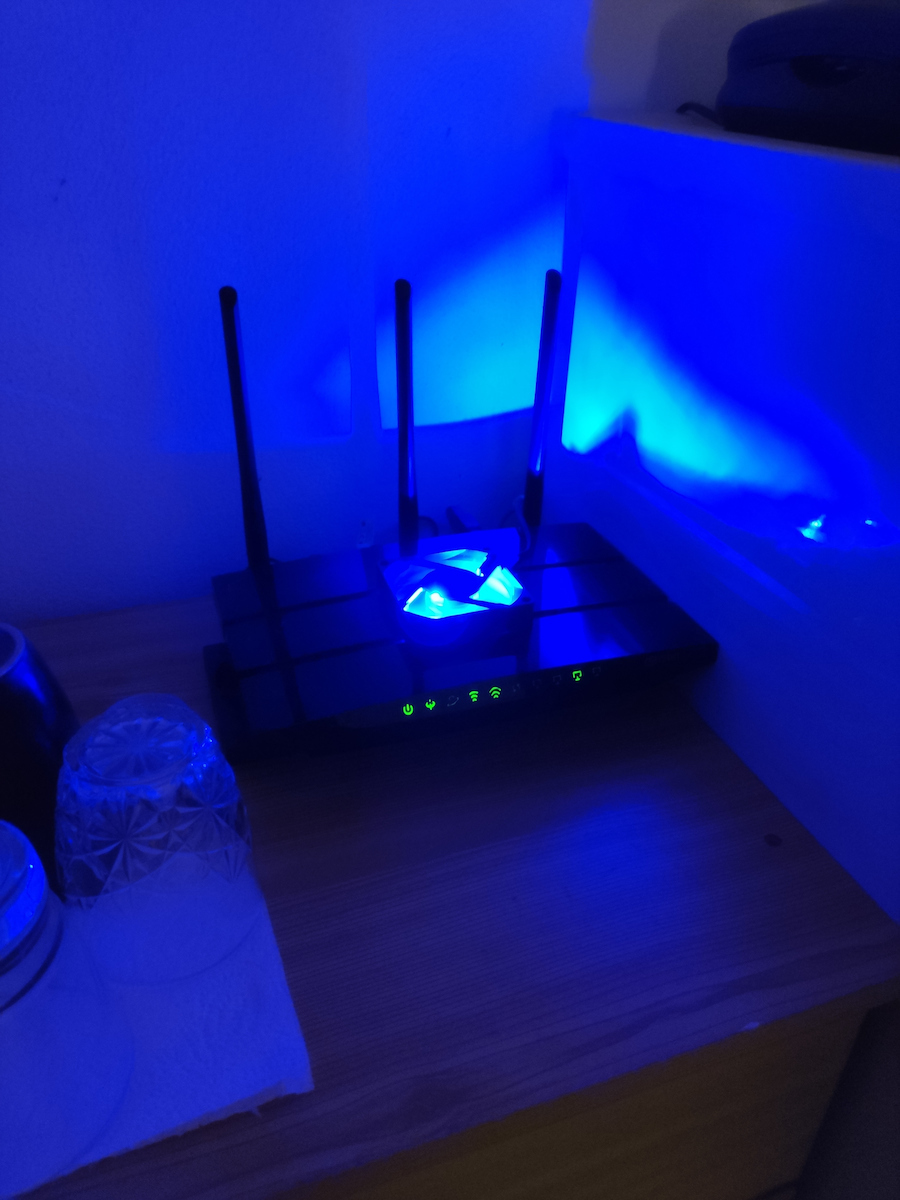
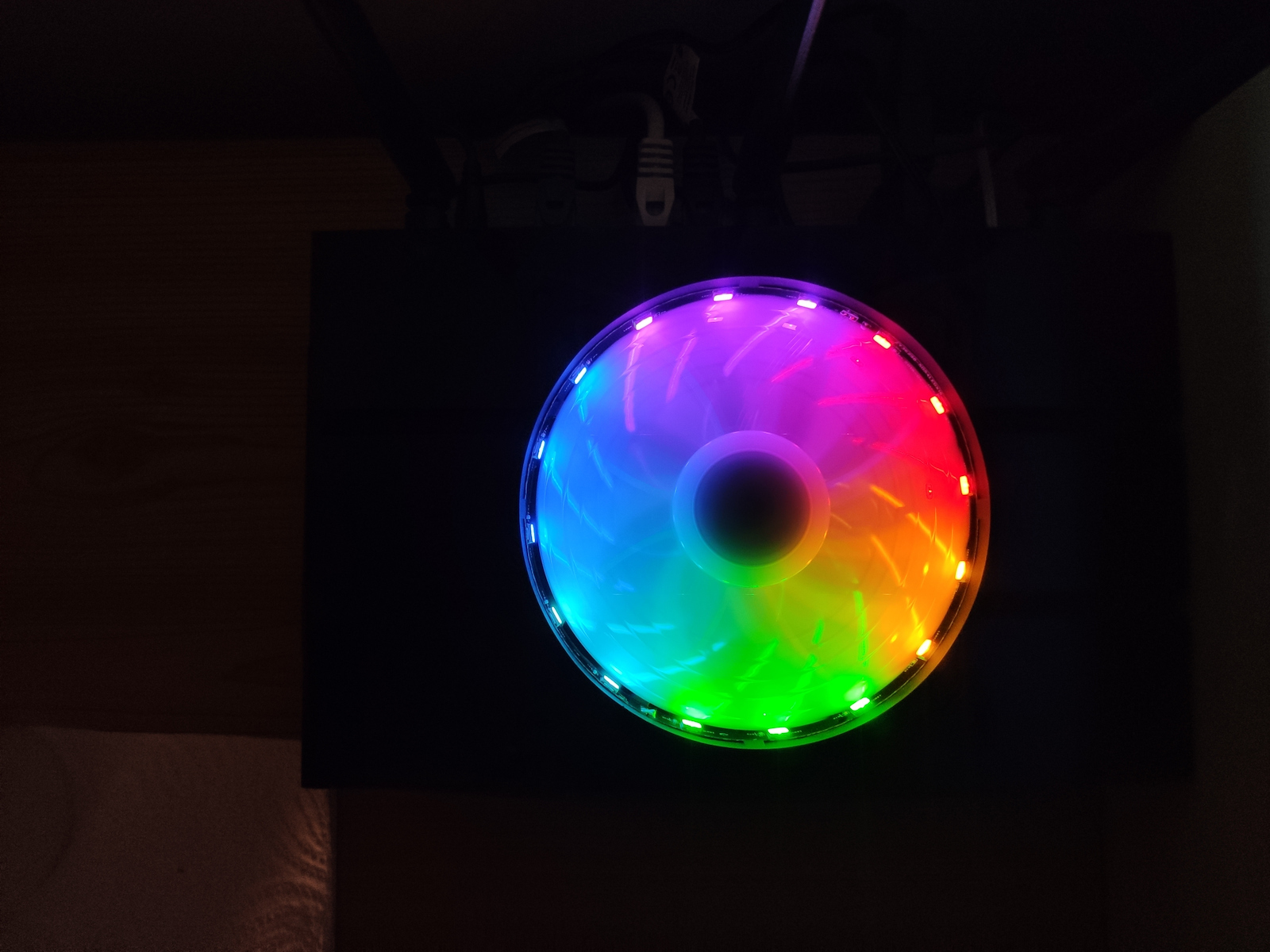
    I bought it in winter and when summer came, I was crying over my money. It overheats, causing it to freeze and make regular disconnections. As a result, I returned it within warranty and they gave me a new one, which also overheats. In the end, I put a laptop cooling pad! Other than that, it's great, easy menu, easy and understandable settings.

    Translated from Greek ·
    • Operational stability
    • Ease of installation
    • Speed
    • Value for money
    Did you find this review helpful?
  • Kos_Kost3766
    2
    6 out of 14 members found this review helpful
    This review is about the network version: v3

    The router synchronizes very slowly compared to the provider (NOVA - ZTE), it has disconnections and instabilities in speed. I do not recommend it

    Translated from Greek ·
    • Ease of installation
    • Speed
    • Operational stability
    • Value for money
    Did you find this review helpful?
  • knickaros
    1
    3 out of 10 members found this review helpful
    This review is about the network version: v3

    In cosmote vdsl 100 it synchronizes at 80mbps while the speedport at 95. It was returned to its box and took up space in the warehouse. I have grandstream for the landline, asus for the router, and I only wanted it for modem in bridge mode.

    Translated from Greek ·
    • Ease of installation
    • Operational stability
    • Speed
    • Value for money
    Did you find this review helpful?
  • konstantinos_gk59
    5
    3 out of 3 members found this review helpful

    As a previous buyer has commented, it is the best value for money for upgrading the provider's entry modem and easily meets the needs of a household with multiple devices simultaneously, without compromising performance! Additionally, the easy set up and user-friendly menu are positive aspects. Attention! Not suitable for smart homes.

    Translated from Greek ·
    • Operational stability
    • Ease of installation
    • Speed
    • Value for money
    Did you find this review helpful?
  • tai_man_chris
    3
    2 out of 3 members found this review helpful
    This review is about the network version: v3

    A decent router, at least for something better than the useless ones provided by ISPs! Don't bother with gaming because it's not stable at all, bad QoS, bufferbloat, etc. Otherwise, as I said, just a simple router for basic home use!

    Translated from Greek ·
    • Ease of installation
    • Operational Stability
    • Speed
    • Value for money
    Did you find this review helpful?
  • alexis13
    5
    1 out of 2 members found this review helpful

    Verified purchase

    This review is about the network version: v3

    Very good modem, fast and capable for long range, which withstands without restart in the incredibly hot summers of Athens! I am referring to the 50 Mbps line

    Translated from Greek ·
    • Operational stability
    • Ease of installation
    • Speed
    • Value for money
    Did you find this review helpful?
  • xtreme82
    3
    1 out of 3 members found this review helpful

    Verified purchase

    This review is about the network version: v3

    Bad help, version V2 and V3 like this does not have MAC filter, additionally in NOVA DSL there are errors (pkts) that did not exist previously with an old TPLINK

    Translated from Greek ·
    • Ease of installation
    • Operational Stability
    • Speed
    • Value for money
    Did you find this review helpful?
  • Stefanos Karakasis
    5
    2 out of 2 members found this review helpful

    Verified purchase

    I have it for a few months, so far it is very stable (no internet drops, speed, etc.), slightly faster speed than the company's router.

    Translated from Greek ·
    • Operational stability
    • Ease of installation
    • Speed
    • Value for money
    Did you find this review helpful?
  • soa008
    5
    10 out of 10 members found this review helpful

    Verified purchase

    This review is about the network version: v3

    I changed my provider's ZTE and overall I am satisfied.
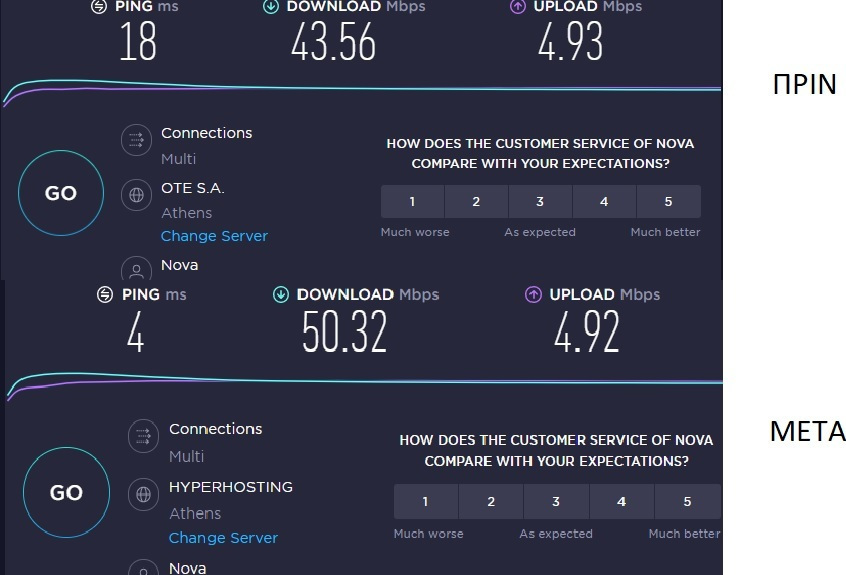
    Initially, there is a significant difference in signal. Now, I have 45-49Mbps in all areas of my house and less than 10 Ping. With the ZTE, I had 10-15Mbps in remote areas. This alone makes a big difference. The connection remains stable without fluctuations.
    Easy installation (although you need to know a couple of things), it has enough settings for QoS that make it even more efficient. I have a TV, 3 mobile phones, a computer, a TV box, and 4 other household devices (switches and sockets). I haven't experienced any lag even with 4k content and simultaneous downloading of large files from mobile devices (proper bandwidth management).
    It's worth the money and improves the areas where providers' routers struggle. Don't expect a drastic difference in maximum speed; personally, I had 48-49Mbps (next to the router), which didn't change.
    P.S. The 5GHz makes a difference.
    P.P.S. It has mesh technology, making it futureproof

    Translated from Greek ·
    • Operational stability
    • Ease of installation
    • Speed
    • Value for money
    Did you find this review helpful?
  • john_milojohn
    5
    2 out of 3 members found this review helpful
    This review is about the network version: v3

    No relation to what the provider gives you, Stabilize my line and increase my speed, as much as possible with the line I have. It has several options in its menu, such as stabilizing the line by reducing the speed a bit, giving priority options for connected devices, and various others. My line is a problematic Vodafone 24 and it is currently working fine without disconnections. I am waiting for the upgrade to VDSL 50 that I have requested to test it there.

    Translated from Greek ·
    • Operational stability
    • Speed
    • Value for money
    • Ease of installation
    Did you find this review helpful?
  • Teo X
    5
    0 out of 1 members found this review helpful

    Verified purchase

    This review is about the network version: v3

    Fantastic modem/router for the money! Easy interface for settings changes and VERY GOOD RANGE! The downside is that it does not support VOIP, so if you have such a line, it is not suitable for you.

    Translated from Greek ·
    • Operational stability
    • Ease of installation
    • Speed
    • Value for money
    Did you find this review helpful?
  • Antonis Kar
    4
    5 out of 5 members found this review helpful
    This review is about the network version: v3

    I have had it in my possession for a month and I can say that it is worth the 60 euros I paid.
    It had many settings and understandable, it is far better than the provider in signal coverage and line stability without errors (even zero).
    In general, it handles correctly many wireless devices in my case about 10 and 3 with a cable.
    My line is NOVA 50 and it synchronizes 50 down.
    (Bit Swap and SRA) I turned them off because it synchronized 30 instead of 50, I don't know why I didn't do more tests.

    In general, I have a fan underneath to cool it (it's my own complex, I don't think it's necessary)

    (Negatives)
    It takes a long time to synchronize the line in case I restart it (it can take up to 10 minutes)
    The provider's took 5.
    And put a Greek one inside, it's not difficult guys.

    Translated from Greek ·
    • Operational stability
    • Speed
    • Value for money
    • Ease of installation
    Did you find this review helpful?
  • Razaziel
    2
    1 out of 15 members found this review helpful
    This review is about the network version: v3

    I have a 200-line and this one goes up to 100, so I reached 105 and it has a much greater delay (more ms) than the speedport plus of Cosmote.

    Translated from Greek ·
    • Ease of installation
    • Operational Stability
    • Speed
    • Value for money
    Did you find this review helpful?
  • gb7
    1
    1 out of 2 members found this review helpful

    Good overall. However, it is not good at all that it is advertised as having gigabit ethernet ports, but this only applies to one (WAN). The rest are 10/100.

    Update: It has many disconnections on WiFi. Maybe it's because of the many devices on the same network. I have about 25 wireless and 3-4 wired devices.

    Translated from Greek ·
    • Ease of installation
    • Speed
    • Value for money
    • Operational Stability
    Did you find this review helpful?
  • nismo_nismosx
    4
    4 out of 5 members found this review helpful
    This review is about the network version: v3

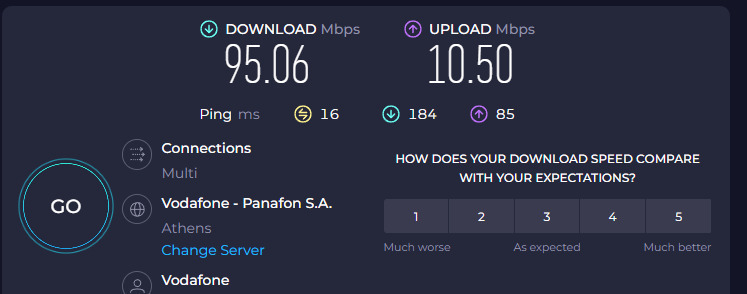
    I replaced the piece of junk Technicolor TG788vn v2 with a Forthnet 100Mbps VDSL connection. My measurements on Ookla went from 92 download to 100, and from 8 upload to 10. However, what I noticed was that the ping went from 12 to 10. This means that in Warzone, my latency dropped from 10-15ms and now I'm consistently at 66-74ms instead of 80-90ms. With a fiber connection, it will definitely go even lower. It's a joy on WiFi. All of this without any settings, just with the NAT boost.

    Translated from Greek ·
    • Operational stability
    • Ease of installation
    • Speed
    • Value for money
    Did you find this review helpful?
  • efthimis95kati
    5
    3 out of 3 members found this review helpful
    This review is about the network version: v1

    The best thing.....uninterrupted operation.....I use it with a Vodafone 50 number and a Grandstream HT801 for SIP telephony....no comparison to those of the ZTE companies. H300s = big mess, etc.....buy it with closed eyes.....it lasts for so many years....

    Translated from Greek ·
    • Operational stability
    • Ease of installation
    • Speed
    • Value for money
    Did you find this review helpful?
  • Steve_A
    1
    1 out of 21 members found this review helpful

    I did not expect this from TP-LINK. It is supposed to have a good reputation in this field, but I have been disappointed both by the VR400 and the 3 RE 200 that I had at different times. Everything was going great for the first 8 months, but after a firmware update, its performance simply dropped. The 5G connection was not stable and constantly lost synchronization. In the 2.4 GHz band, the connection would occasionally drop as well. The worst part is that it never received another update and remained in this state. It's a shame, I will never choose TP-Link again for anything. I switched to another router from a different company a month ago and I am glad I did.

    Translated from Greek ·
    • Ease of installation
    • Operational Stability
    • Speed
    • Value for money
    Did you find this review helpful?
  • AWFUL
    Low range, unstable network, terrible reboot time. Seriously, spend a little more and go for another model.

    Translated from Greek ·
    0
  • Very bad wifi. Constant disconnections and very high latency which appeared suddenly and I had to restart it. I should have realized we were talking about a bad device since the first one I got was defective. It was replaced with a Cudy and it's like night and day.

    Translated from Greek ·
    0
  • It burned out in the first hour of operation on the rac server just to act as a bridge to the main router, even though it was connected to an APC UPS worth 300 euros and to a power strip with an APC voltage stabilizer worth 60 euros, purchased two months ago.

    Translated from Greek ·
    1
  • I had the V2. I replaced it with the V3.
    On a 100 Mbps VDSL line with Nova (formerly Forthnet), it flies.
    It locks in a little above the nominal speed of the line and generally delivers the full speed.
    Unlike others, I did not notice any overheating.
    Overall, I am completely satisfied.

    Translated from Greek ·
    5
  • See all

Description & Specifications

Ideal for online gaming, HD streaming, and large file downloads. With DSL, EWAN, and USB port, the Archer VR400 is fully compatible with VDSL2/ ADSL2+/ ADSL2/ ADSL standards, as well as 3G / 4G Internet services (via USB adapter).

Ultra-fast WiFi up to 1.2Gbps

Unlocks the full potential of your internet connection, providing combined dual band WiFi speeds up to 1.2Gbps, including 300Mbps on the 2.4 GHz band and 867Mbps on the 5GHz band, eliminating lag and buffering from your online experience.

VDSL Broadband

The latest VDSL2 technology enables the Archer VR400 to deliver impressive VDSL broadband speeds of up to 100Mbps, which is almost five times faster than ADSL2+. The integrated DSL port supports all standard DSL connections, including VDSL2, ADSL2+, ADSL2, and ADSL.

Eliminate Wi-Fi Dead Spots

OneMesh™ enhances signal strength by maintaining a single Wi-Fi network that covers every corner of your home. No more searching for a stronger signal for a faster connection.

Seamless Wi-Fi connections with a single network name

OneMesh™ intelligently connects mobile devices to your router or extenders, whichever provides the best connection. The OneMesh™ router and extenders share a single Wi-Fi name, so you stay connected to your network in every room.

Connection Flexibility

With multiple inputs, the Archer VR400 offers you a variety of options for connecting to the Internet. Alternatively, the EWAN port allows the Archer VR400 to accept connections from cable TV and fiber modems via Ethernet cable. Additionally, the USB port supports 3G / 4G dongle connections.

Wide range and amazing stability

Three high-performance external antennas help the Archer VR400 create an extended home network. Advanced Beamforming technology automatically detects wireless devices and high-performance wireless connections.

Amazing fast wired performance

To help your wired devices achieve maximum performance, the router's Gigabit Ethernet ports operate 10× faster than standard Ethernet. The Full Gigabit ports provide fast, reliable wired connections to computers, TVs, and gaming consoles.

Easy installation and use

Complete the installation of the Archer VR400 within minutes, thanks to its intuitive web interface and powerful Tether app. The Tether app also allows you to manage your network settings from any Android or iOS device, including parental control settings and media sharing.

The package includes

  • AC1200 Wireless MU-MIMO VDSL / ADSL Modem Router Archer VR400
  • External splitter
  • RJ11 DSL cable
  • RJ45 Ethernet cable
  • Power adapter
  • Quick installation guide

Manufacturer

Network Specifications

Type
ADSL/VDSL Modem Router
DSL technology
VDSL2
Maximum Wireless Speed
1200 Mbps
Maximum LAN Speed
1000 Mbps
Portable Hotspot
No
Wi-Fi Generation
Wi‑Fi 5
Network Standards
IEEE 802.11a, IEEE 802.11 b/g/n, IEEE 802.11ac, IEEE 802.3ab, IEEE 802.3/3u
Wi-Fi Frequency
Dual Band (2.4 & 5GHz)

Connectivity

Wireless network
Yes
Ethernet LAN connections
4
USB 2.0 connections
1
ISDN Connection
No
SIM slot
No

Security

Firewall
NAT
Encryption Protocols
WEP, WPA-Personal, WPA2-Personal, WPS
MAC Address Filtering
Yes

Extras

Virtual Private Network (VPN)
Yes
VoIP
No
Mesh
No

Important information

Specifications are collected from official manufacturer websites. Please verify the specifications before proceeding with your final purchase. If you notice any problem you can report it here.

Reviews (213)

  1. 129
  2. 32
  3. 18
  4. 12
  5. 22
Review this product
  • Ease of installation
  • Speed
  • Operational stability
  • Value for money

Reviews photos

Reviews photos
Reviews photos
Reviews photos
Reviews photos
Reviews photos
Reviews photos

Reviews by our members

zagna
5
19 out of 22 members found this review helpful

Verified purchase

Finally, proper Internet! How is it possible for Forthnet to sabotage the fast internet it provides with these rotten routers.
Continuous disconnections on WIFI as well as selective browsing were finally solved with the TPLink Router.

The 5G is indeed very weak after 1 wall or 5-8 meters of open space. I believe it would need 3 more antennas for reinforcement.
At 5 meters, it connected with 850mbps with the S10+!!!

The interface is very simple and user-friendly. I connected VDSL2 with a 50 Mbps line through the "other" profile by simply enabling VLAN and setting VLAN ID to 835.
Overall, apart from the WIFI issues I had, I also noticed faster response in all browsing as well as on the smart TVs I have connected.
Very satisfied.

Translated from Greek ·
  • Operational stability
  • Ease of installation
  • Speed
  • Value for money
Did you find this review helpful?

PapaJohnGr
2
18 out of 30 members found this review helpful

Verified purchase

Well, to cut it short, just don't spend your money on this.

ALSO, if you have OTE as your provider, you should know that the router does not support VOIP, meaning you can't directly connect your phone to the router. So be careful not to fall for it!

I'll start by saying that the reason I bought this MODEM was mainly because of the instability, frequent disconnections, and low range of the rotten MODEM from forthnet (technicolor). At first, I was thinking of getting a ROUTER since I needed the distance-range factor, but due to the frequent disconnection issue, I chose to go for a MODEM. When I first got it and connected it, the speed was the same as the previous modem, but the range was much larger to the point that when the technicolor could barely catch 1 line, the tp-link could catch up to 3. Also, the disconnections started to decrease, so I thought everything was fine. But what happened next?

I noticed high ping, some pages took a long time to load, some files and torrents had very low speed, etc. I started testing various things and noticed that depending on the number of people on the line, even if they weren't using up the bandwidth, my modem would lower the speed, resulting in increased ping and decreased speed. However, certain applications like Steam, LoL, etc. didn't have this "limiter". I noticed that each device had similar speeds, and the more devices connected, the more the speed dropped on the speedtest. No matter how I operated it, either as a MODEM or as a ROUTER, this "limiter" wouldn't change. And when I say limiter, I mean that with just one person connected, it would reach 10-11 mbps, which is the same as before the change. But when 4-5 people connected, the speed (via speedtest) would lock at 2-3, at most 5 mbps. No matter what firmware I tried or even the upgrade I did from the tp-link website, I constantly had an invisible limiter corresponding to the devices connected at any given moment. I tried to see if there was any option through the IP (192.168.1.1), where there is indeed an option called QoS, but it seemed to be virtual. Bottom line, the MODEM was left aside, and I went back to the rotten technicolor. And just to preempt you, no, it wasn't a temperature issue; it had the same problem even in cold weather.

However, I don't see anyone talking about this, even though I asked other people who had tp-link and they told me the exact same thing, that they couldn't do anything to change it. In other words, 60€ wasted. If someone indeed has the same issue or has already solved it, please write it in the comments.

UPDATE 10/6/2020:
I also noticed that the Modem starts acting up after a few days, possibly due to temperature, and it needs a reset every other day or so. Overall, poor network management for such an expensive Modem. I would recommend the cheaper models from the company or better yet, a 20-30€ ROUTER for better range.

Translated from Greek ·
  • Ease of installation
  • Operational stability
  • Speed
  • Value for money
Did you find this review helpful?
  • This review is about the network version: v3

    AWFUL
    Low range, unstable network, terrible reboot time. Seriously, spend a little more and go for another model.

    Translated from Greek ·
    Did you find this review helpful?
  • Very bad wifi. Constant disconnections and very high latency which appeared suddenly and I had to restart it. I should have realized we were talking about a bad device since the first one I got was defective. It was replaced with a Cudy and it's like night and day.

    Translated from Greek ·
    Did you find this review helpful?
  • unicornsexshop_unicorn
    1
    1 out of 4 members found this review helpful

    Verified purchase

    This review is about the network version: v3

    It burned out in the first hour of operation on the rac server just to act as a bridge to the main router, even though it was connected to an APC UPS worth 300 euros and to a power strip with an APC voltage stabilizer worth 60 euros, purchased two months ago.

    Translated from Greek ·
    Did you find this review helpful?
  • George_Tsagkadopoulos
    5
    5 out of 5 members found this review helpful

    Verified purchase

    This review is about the network version: v3

    I had the V2. I replaced it with the V3.
    On a 100 Mbps VDSL line with Nova (formerly Forthnet), it flies.
    It locks in a little above the nominal speed of the line and generally delivers the full speed.
    Unlike others, I did not notice any overheating.
    Overall, I am completely satisfied.

    Translated from Greek ·
    Did you find this review helpful?
  • Thprekas
    1
    2 out of 11 members found this review helpful
    This review is about the network version: v3

    At first, my experience with Nova (provider) was fine, but unfortunately it would overheat and I had to restart it otherwise it wouldn't have internet. It should be functioning 24/7 and not shutting down to avoid overheating issues. Stay away

    Translated from Greek ·
    • Ease of installation
    • Speed
    • Operational stability
    • Value for money
    Did you find this review helpful?
  • Chris_Bleck
    3
    2 out of 2 members found this review helpful

    3 stars for version 2 as the lan ports are 3 10/100 and the lan/wan is 10/100/1000. In version 3, there are also 4 gigabit ethernet ports. Otherwise, it is a simple home router/modem better than the providers' potatoes.

    Also negative that it overheats excessively and disconnects once a day. Otherwise, it synchronizes the wifi perfectly (5 devices).

    If someone wants something else, I would recommend unify or a fritz.

    Translated from Greek ·
    • Ease of installation
    • Speed
    • Operational Stability
    • Value for money
    Did you find this review helpful?
  • warship
    3
    3 out of 3 members found this review helpful
    This review is about the network version: v3

    A good simple router for VDSL. Many functions and capabilities in the menu but too many problems with the WIFI. The only thing that works consistently is the mesh repeaters. Whatever device connects to the router (all devices work fine with the repeaters) has constant disconnections. To the point where I wanted to throw it away. Which I did after 6 months.
    In summary, a good router with many problems in the Wi-Fi connection

    Translated from Greek ·
    • Ease of installation
    • Speed
    • Operational Stability
    • Value for money
    Did you find this review helpful?
  • Andreas_ichi
    5
    5 out of 8 members found this review helpful

    I use it on Vodafone VDSL 30Mbps, I had constant disconnections with the Vodafone H300s modem, as soon as I installed the VR400 I never had a disconnection again. The only issue with the VR400 is that it requires proper settings, if you are a gamer you may experience ping spikes if you don't configure it correctly. I gained an extra 2mbps and the ping decreased significantly with the VR400, it's a very good modem.

    Translated from Greek ·
    • Operational stability
    • Ease of installation
    • Speed
    • Value for money
    Did you find this review helpful?
  • indio
    2
    1 out of 10 members found this review helpful

    The router was having trouble syncing with Nova. OK, we managed to do that. The main problem that made me throw it away is that the LAN ports "disappear" after a while. It's like the wired network doesn't exist, nothing pings. So, it's useless. The tp-link support couldn't do anything.

    Translated from Greek ·
    • Ease of installation
    • Speed
    • Operational stability
    • Value for money
    Did you find this review helpful?
  • Eva_Park
    3
    2 out of 8 members found this review helpful

    Knowing the company, I bought the modem/router. In Vodafone 100 (ethernet), it syncs slightly higher than the company's (ZTE). It gives me double the ping compared to the provider, while the speed fluctuates in WiFi, both in 2.4 and 5 GHz. The provider has 25 Mbps, while this one has 3.5 Mbps. It overheats, so it may disconnect. On the positive side, as an ethernet connection, it is stable with minimal errors compared to the provider

    Translated from Greek ·
    • Operational stability
    • Ease of installation
    • Speed
    • Value for money
    Did you find this review helpful?
  • kostis_kimis
    4
    0 out of 1 members found this review helpful
    This review is about the network version: v3

    Very good so far. Speed slightly higher than the provider's. On a 24-line it reaches 14.5. I am waiting for an upgrade to a 30-line Vodafone. I don't know if I can keep it or switch to the provider because the landline won't work otherwise. Unless I try it and see. Definitely a fair offer.

    Translated from Greek ·
    • Operational stability
    • Ease of installation
    • Speed
    • Value for money
    Did you find this review helpful?
  • CHaris_Panagiotidis4575
    3
    5 out of 11 members found this review helpful

    I bought it in winter and when summer came, I was crying over my money. It overheats, causing it to freeze and make regular disconnections. As a result, I returned it within warranty and they gave me a new one, which also overheats. In the end, I put a laptop cooling pad! Other than that, it's great, easy menu, easy and understandable settings.

    Translated from Greek ·
    • Operational stability
    • Ease of installation
    • Speed
    • Value for money
    Did you find this review helpful?
  • Kos_Kost3766
    2
    6 out of 14 members found this review helpful
    This review is about the network version: v3

    The router synchronizes very slowly compared to the provider (NOVA - ZTE), it has disconnections and instabilities in speed. I do not recommend it

    Translated from Greek ·
    • Ease of installation
    • Speed
    • Operational stability
    • Value for money
    Did you find this review helpful?
  • knickaros
    1
    3 out of 10 members found this review helpful
    This review is about the network version: v3

    In cosmote vdsl 100 it synchronizes at 80mbps while the speedport at 95. It was returned to its box and took up space in the warehouse. I have grandstream for the landline, asus for the router, and I only wanted it for modem in bridge mode.

    Translated from Greek ·
    • Ease of installation
    • Operational stability
    • Speed
    • Value for money
    Did you find this review helpful?
  • konstantinos_gk59
    5
    3 out of 3 members found this review helpful

    As a previous buyer has commented, it is the best value for money for upgrading the provider's entry modem and easily meets the needs of a household with multiple devices simultaneously, without compromising performance! Additionally, the easy set up and user-friendly menu are positive aspects. Attention! Not suitable for smart homes.

    Translated from Greek ·
    • Operational stability
    • Ease of installation
    • Speed
    • Value for money
    Did you find this review helpful?
  • tai_man_chris
    3
    2 out of 3 members found this review helpful
    This review is about the network version: v3

    A decent router, at least for something better than the useless ones provided by ISPs! Don't bother with gaming because it's not stable at all, bad QoS, bufferbloat, etc. Otherwise, as I said, just a simple router for basic home use!

    Translated from Greek ·
    • Ease of installation
    • Operational Stability
    • Speed
    • Value for money
    Did you find this review helpful?
  • alexis13
    5
    1 out of 2 members found this review helpful

    Verified purchase

    This review is about the network version: v3

    Very good modem, fast and capable for long range, which withstands without restart in the incredibly hot summers of Athens! I am referring to the 50 Mbps line

    Translated from Greek ·
    • Operational stability
    • Ease of installation
    • Speed
    • Value for money
    Did you find this review helpful?
  • xtreme82
    3
    1 out of 3 members found this review helpful

    Verified purchase

    This review is about the network version: v3

    Bad help, version V2 and V3 like this does not have MAC filter, additionally in NOVA DSL there are errors (pkts) that did not exist previously with an old TPLINK

    Translated from Greek ·
    • Ease of installation
    • Operational Stability
    • Speed
    • Value for money
    Did you find this review helpful?
  • Stefanos Karakasis
    5
    2 out of 2 members found this review helpful

    Verified purchase

    I have it for a few months, so far it is very stable (no internet drops, speed, etc.), slightly faster speed than the company's router.

    Translated from Greek ·
    • Operational stability
    • Ease of installation
    • Speed
    • Value for money
    Did you find this review helpful?
  • soa008
    5
    10 out of 10 members found this review helpful

    Verified purchase

    This review is about the network version: v3

    I changed my provider's ZTE and overall I am satisfied.
    Initially, there is a significant difference in signal. Now, I have 45-49Mbps in all areas of my house and less than 10 Ping. With the ZTE, I had 10-15Mbps in remote areas. This alone makes a big difference. The connection remains stable without fluctuations.
    Easy installation (although you need to know a couple of things), it has enough settings for QoS that make it even more efficient. I have a TV, 3 mobile phones, a computer, a TV box, and 4 other household devices (switches and sockets). I haven't experienced any lag even with 4k content and simultaneous downloading of large files from mobile devices (proper bandwidth management).
    It's worth the money and improves the areas where providers' routers struggle. Don't expect a drastic difference in maximum speed; personally, I had 48-49Mbps (next to the router), which didn't change.
    P.S. The 5GHz makes a difference.
    P.P.S. It has mesh technology, making it futureproof

    Translated from Greek ·
    • Operational stability
    • Ease of installation
    • Speed
    • Value for money
    Did you find this review helpful?
  • john_milojohn
    5
    2 out of 3 members found this review helpful
    This review is about the network version: v3

    No relation to what the provider gives you, Stabilize my line and increase my speed, as much as possible with the line I have. It has several options in its menu, such as stabilizing the line by reducing the speed a bit, giving priority options for connected devices, and various others. My line is a problematic Vodafone 24 and it is currently working fine without disconnections. I am waiting for the upgrade to VDSL 50 that I have requested to test it there.

    Translated from Greek ·
    • Operational stability
    • Speed
    • Value for money
    • Ease of installation
    Did you find this review helpful?
  • Teo X
    5
    0 out of 1 members found this review helpful

    Verified purchase

    This review is about the network version: v3

    Fantastic modem/router for the money! Easy interface for settings changes and VERY GOOD RANGE! The downside is that it does not support VOIP, so if you have such a line, it is not suitable for you.

    Translated from Greek ·
    • Operational stability
    • Ease of installation
    • Speed
    • Value for money
    Did you find this review helpful?
  • Antonis Kar
    4
    5 out of 5 members found this review helpful
    This review is about the network version: v3

    I have had it in my possession for a month and I can say that it is worth the 60 euros I paid.
    It had many settings and understandable, it is far better than the provider in signal coverage and line stability without errors (even zero).
    In general, it handles correctly many wireless devices in my case about 10 and 3 with a cable.
    My line is NOVA 50 and it synchronizes 50 down.
    (Bit Swap and SRA) I turned them off because it synchronized 30 instead of 50, I don't know why I didn't do more tests.

    In general, I have a fan underneath to cool it (it's my own complex, I don't think it's necessary)

    (Negatives)
    It takes a long time to synchronize the line in case I restart it (it can take up to 10 minutes)
    The provider's took 5.
    And put a Greek one inside, it's not difficult guys.

    Translated from Greek ·
    • Operational stability
    • Speed
    • Value for money
    • Ease of installation
    Did you find this review helpful?
  • Razaziel
    2
    1 out of 15 members found this review helpful
    This review is about the network version: v3

    I have a 200-line and this one goes up to 100, so I reached 105 and it has a much greater delay (more ms) than the speedport plus of Cosmote.

    Translated from Greek ·
    • Ease of installation
    • Operational Stability
    • Speed
    • Value for money
    Did you find this review helpful?
  • gb7
    1
    1 out of 2 members found this review helpful

    Good overall. However, it is not good at all that it is advertised as having gigabit ethernet ports, but this only applies to one (WAN). The rest are 10/100.

    Update: It has many disconnections on WiFi. Maybe it's because of the many devices on the same network. I have about 25 wireless and 3-4 wired devices.

    Translated from Greek ·
    • Ease of installation
    • Speed
    • Value for money
    • Operational Stability
    Did you find this review helpful?
  • nismo_nismosx
    4
    4 out of 5 members found this review helpful
    This review is about the network version: v3

    I replaced the piece of junk Technicolor TG788vn v2 with a Forthnet 100Mbps VDSL connection. My measurements on Ookla went from 92 download to 100, and from 8 upload to 10. However, what I noticed was that the ping went from 12 to 10. This means that in Warzone, my latency dropped from 10-15ms and now I'm consistently at 66-74ms instead of 80-90ms. With a fiber connection, it will definitely go even lower. It's a joy on WiFi. All of this without any settings, just with the NAT boost.

    Translated from Greek ·
    • Operational stability
    • Ease of installation
    • Speed
    • Value for money
    Did you find this review helpful?
  • efthimis95kati
    5
    3 out of 3 members found this review helpful
    This review is about the network version: v1

    The best thing.....uninterrupted operation.....I use it with a Vodafone 50 number and a Grandstream HT801 for SIP telephony....no comparison to those of the ZTE companies. H300s = big mess, etc.....buy it with closed eyes.....it lasts for so many years....

    Translated from Greek ·
    • Operational stability
    • Ease of installation
    • Speed
    • Value for money
    Did you find this review helpful?
  • Steve_A
    1
    1 out of 21 members found this review helpful

    I did not expect this from TP-LINK. It is supposed to have a good reputation in this field, but I have been disappointed both by the VR400 and the 3 RE 200 that I had at different times. Everything was going great for the first 8 months, but after a firmware update, its performance simply dropped. The 5G connection was not stable and constantly lost synchronization. In the 2.4 GHz band, the connection would occasionally drop as well. The worst part is that it never received another update and remained in this state. It's a shame, I will never choose TP-Link again for anything. I switched to another router from a different company a month ago and I am glad I did.

    Translated from Greek ·
    • Ease of installation
    • Operational Stability
    • Speed
    • Value for money
    Did you find this review helpful?
  • AWFUL
    Low range, unstable network, terrible reboot time. Seriously, spend a little more and go for another model.

    Translated from Greek ·
    0
  • Very bad wifi. Constant disconnections and very high latency which appeared suddenly and I had to restart it. I should have realized we were talking about a bad device since the first one I got was defective. It was replaced with a Cudy and it's like night and day.

    Translated from Greek ·
    0
  • It burned out in the first hour of operation on the rac server just to act as a bridge to the main router, even though it was connected to an APC UPS worth 300 euros and to a power strip with an APC voltage stabilizer worth 60 euros, purchased two months ago.

    Translated from Greek ·
    1
  • I had the V2. I replaced it with the V3.
    On a 100 Mbps VDSL line with Nova (formerly Forthnet), it flies.
    It locks in a little above the nominal speed of the line and generally delivers the full speed.
    Unlike others, I did not notice any overheating.
    Overall, I am completely satisfied.

    Translated from Greek ·
    5
  • See all
59,89 €
14,00 €   shipping cost