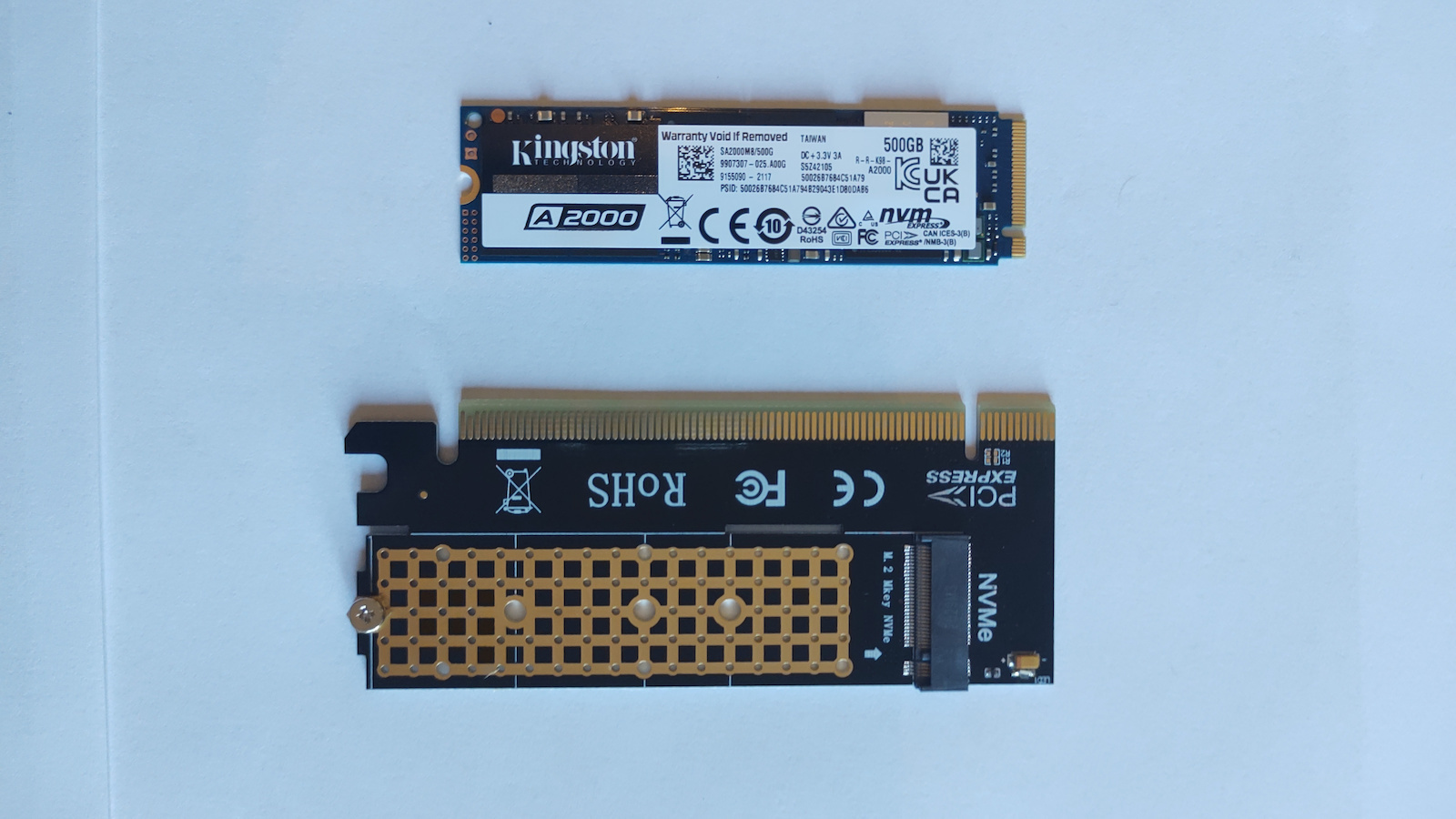
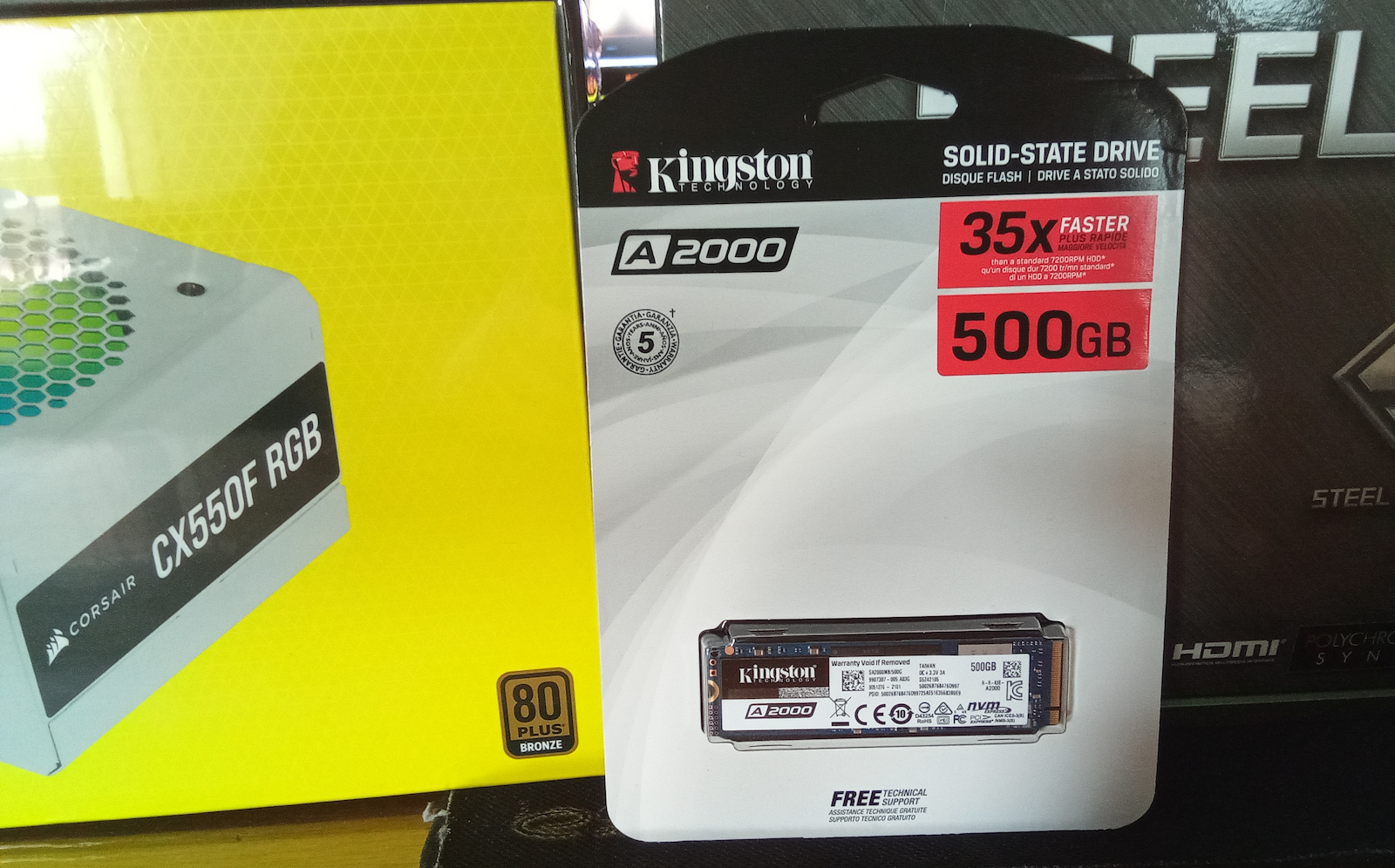
Two M.2 NVME Kingston A2000 SSDs were purchased today, October 12, 2020. One with a capacity of 500GB for an HP laptop (i5 8265U / 16GB) as additional storage, upgrading from an SK Hynix 250GB SSD that was previously installed and had high temperatures. The other one is a 250GB Kingston A2000 SSD for a desktop PC (i7 6700k / 16GB) with an M.2 slot on the motherboard, replacing an 840Pro SATA SSD. The Kingston SSDs are compact, high-speed drives that do not require annoying cables (POWER and SATA).
I chose the Kingston A2000 SSDs for both systems based on their features, such as their M.2 compatible speed, 3D TLC technology, high TBW (150TBW for the 250GB and 350TBW for the 500GB), 5-year warranty, encryption capability, and of course, their affordable price. Both Kingston SSDs use DDR4 Cache with Silicon Motion controller and 96-layer 3D TLC Micron memory. They have an M.2 PCIe Gen 3.0 x 4 Lanes interface and support TCG Opal, AES 256-bit, and eDrive encryption.
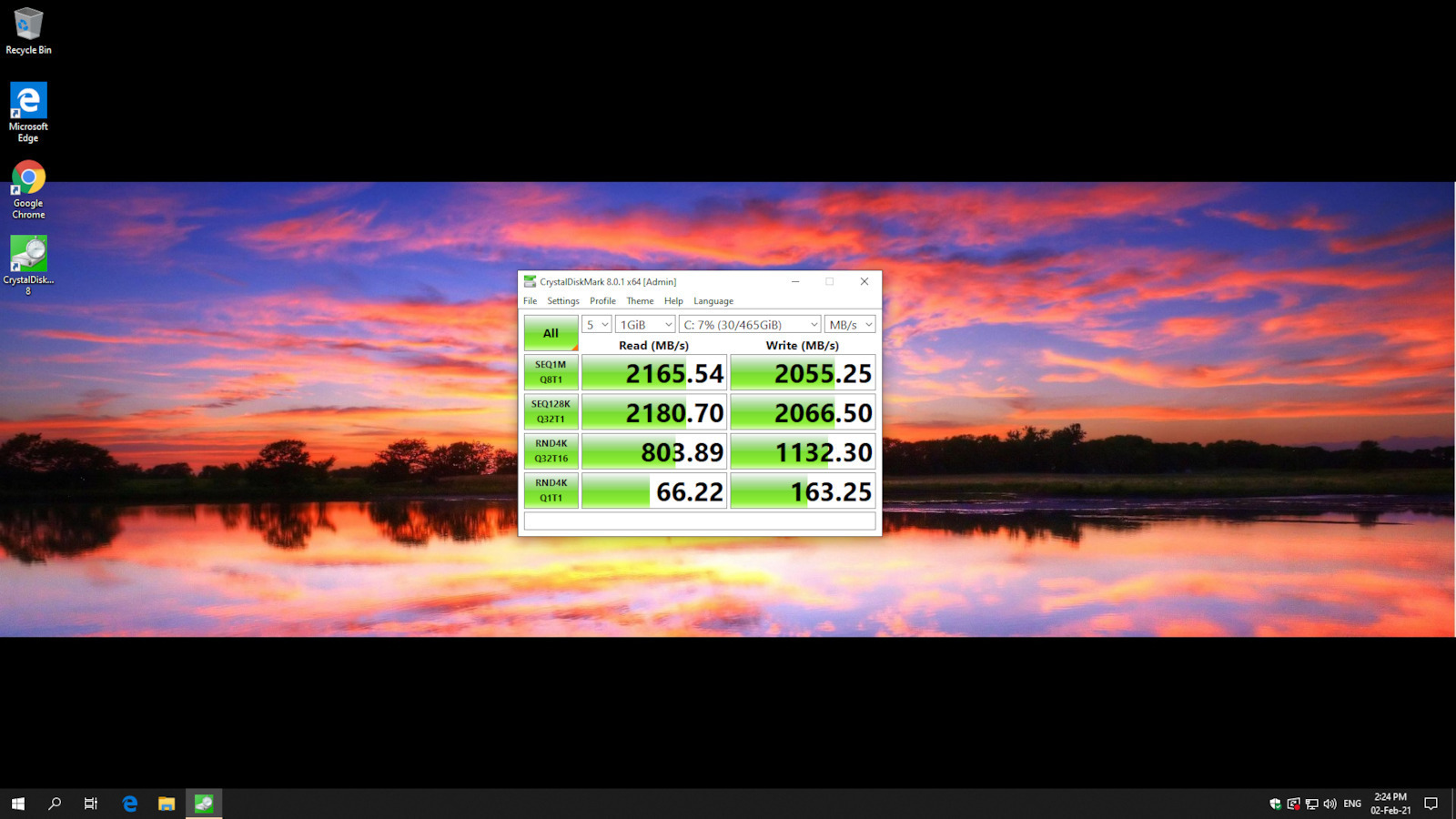
According to the manufacturer's specifications, the 250GB SSD has a read speed of 2000 MB/s and a write speed of 1100 MB/s on the desktop PC with a Gigabyte B150M motherboard, i7 6700k, and 16GB RAM. It took 2 minutes and 38 seconds to format Windows 10, as timed, until the restart. In a CrystalDiskMark test, it achieved speeds even higher than the manufacturer's specifications, thanks to its compatibility with PCIe Gen 3.0 x 4 Lanes.
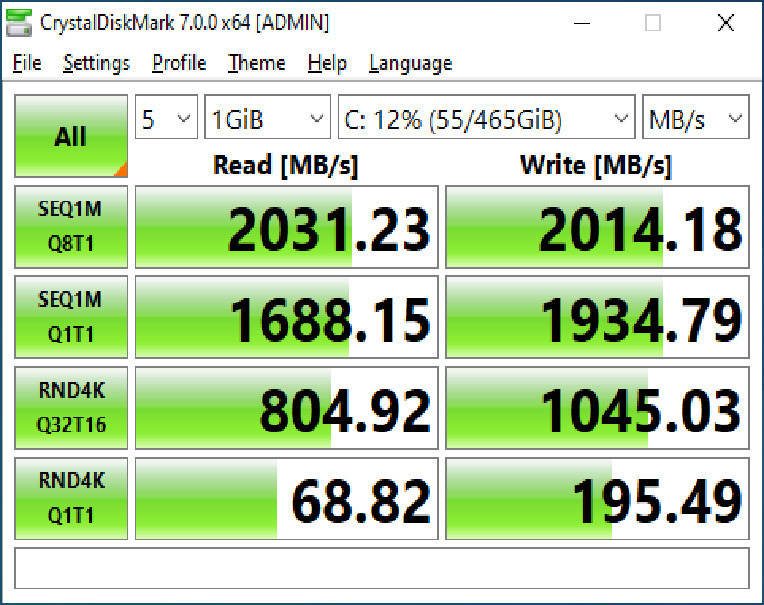
The 500GB SSD, according to the manufacturer, has a read speed of 2200 MB/s and a write speed of 2000 MB/s on the HP laptop with an i5 8265U processor and 16GB RAM. It took 2 minutes and 57 seconds to format Windows 10, as timed, until the restart. In a CrystalDiskMark test, it reached read and write speeds of 1690 MB/s and 1594 MB/s respectively, slightly lower than the manufacturer's specifications due to the laptop's PCIe Gen 3.0 x 2 Lanes interface, which limits the speed.
Compared to the previous SATA SSD (840Pro 256GB), the A2000 NVME SSD significantly improved the responsiveness of both the desktop PC and the laptop. The A2000 is much faster and operates at lower temperatures than the SK Hynix M.2 SSD. Although there may be minor differences in the operating system and game loading times, the experience of using an M.2 NVME SSD compared to a good SATA SSD is noticeably better. However, for video editing, modeling, or tasks that require high read/write speeds and low response time, the M.2 NVME SSD is clearly the way to go.
(* I mention small differences previously because NVME drives are very fast and current programs, applications, and operating systems have been programmed for lower data access speeds (like SATA) even though the SATA interface is 6GBps and the M.2 interface is 32GBps. In the future, all programs and operating systems may fully utilize M.2 NVME drives, just like the new multi-core processors from AMD and Intel that have recently been released and are only utilized by new and heavy games and video/autoCAD editing. Until 3 years ago, a good dual-core or quad-core processor could handle everything comfortably.)
- I would go for the Samsung 970 Evo Plus, which I consider to be top in terms of speed (3500 MB/s) and reliability. However, the Kingston A2000 is even cheaper than a SATA SSD and performs decently as an M.2 drive. In comparison to the 970 Evo, it has very small differences that are not noticeable in everyday use unless you are a very demanding user. The two drives are very close in performance but have a significant price difference. Additionally, a few years ago, TLC drives were cheaper and had a low TBW. I had the Samsung 840 Pro since 2013, which was MLC like the more expensive SSD drives that had high endurance for erase/write cycles. However, now (1-2 years ago), 3D TLC technology allows for greater endurance with more layers compared to the old TLC SSDs, reaching the level of the old MLC drives. As a result, SSD prices have dropped, and TBW endurance has increased, whereas in the past, you had to pay almost triple the price for the same capacity and lower speeds compared to now, where M.2 drives and 3D TLC technology are widespread.
- In terms of temperatures, they are slightly higher (37~48) compared to the SATA SSD I had, but this is perfectly normal since M.2 drives are mounted on the motherboard, while SATA SSDs are screwed onto the case, which acts as a passive heatsink. However, this is not a problem because the manufacturer states that it can withstand temperatures up to 70°C.
- The Kingston software (Kingston Manager) that you download from the internet checks for firmware updates and monitors the health of the drive.
- Another positive point is that a product key is provided in the package to download and activate Acronis True Image HD, which is used for disk cloning from the old drive to the new one. However, I performed a clean format for better performance of the operating system.
- For any modern computer with an M.2 slot on the motherboard, an NVME drive is recommended. The differences compared to the old HDDs we had in the past are enormous, and you also have a clean setup in your computer without cables.
I hope I didn't bore you.
Update October 26, 2020: It was tested as a cache and project video source in Premiere Pro for 1080@60fps and 4k@25fps files, and it loads the files very quickly.
Update November 2, 2020, I tried the activation key that activates Acronis to clone your main disk to the new SSD without formatting. It works on all disks, but the key only applies to one computer. I tried it on a family laptop to clone an HDD to the Samsung 840 Pro. Simply download it from the Kingston website, create an account, enter the Kingston code, and select Acronis to clone the system disk with the connected SSD using a USB 3.0 enclosure. After a restart, the cloning process is done and the SSD is ready. I removed the old HDD and installed the SSD, and Windows 10 worked immediately without any issues. This saved me from formatting and the time it would take to reinstall programs, settings, and passwords.
Update March 19, 2022, the 250GB SSD on my desktop has dropped to 1% health and is now at 99% with a low TBW of 1.62TB. We will see how much longer it will last. I have also uploaded a screenshot.
Satisfied with the purchase, the A2000 is a value for money NVME drive and is the best in its price range. Both systems have improved in responsiveness. I will reevaluate it after some time.
Αγοράστηκαν σήμερα 12 Οκτωβρίου 2020 δυο δίσκοι M.2 NVME Kingston A2000 ένας των 500GB στα 57Ε για να μπει σε HP λάπτοπ (i5 8265U / 16GB) ως επιπλέον χώρος αναβάθμιση από έναν SK Hynix 250GB που είχε από την μάνα του και ανέβαζε υψηλές θερμοκρασίες ο SK Hynix και άλλος ένας Kingston A2000 των 250GB στα 36E για να μπει σε σταθερό Η/Υ (i7 6700k / 16GB ) που διαθέτει η μητρική M.2 υποδοχή και προηγουμένως είχε έναν 840Pro SATA SSD. Μικρός δίσκος πάνω στην μητρική ταχύτατος χωρίς ενοχλητικά καλώδια (POWER και SATA) και ταχύτατος.
- Με κριτήριο τα χαρακτηριστικά του Kingston A2000 (ταχύτητα που ταιριάζει για M.2, 3D TLC, μεγάλο TBW (150TBW ο 250άρης και 350TBW ο 500άρης), 5ετής εγγύηση, δυνατότητα για κρυπρογράφηση και φυσικά την χαμηλή τιμής του τον επέλεξα και για τα δυο συστήματα). Και οι δυο δίσκοι της Kingston χρησιμοποιούν DDR4 Cache με Silicon Motion ελεκτή με 3D TLC Micron μνήμη 96 Layers με διεπαφή M.2 PCIe Gen 3.0 x 4 Lanes και TCG Opal, AES 256-bit, eDrive κρυπτογράφηση αν θέλετε.
- Μερικά από τα χαρακτηριστικά του 250GB που αναφέρει ο κατασκευαστής είναι Read, Write (2000 MB/s , 1100 MB /s ) στον σταθερό Η/Υ σε μητρική Gigabyte B150M με i7 6700k και 16GB RAM έκανε το format των Windows 10 σε χρονομετρημένα 2 λεπτά και 38 δεύτερόλεπτα ως το Restart και σε τεστ με το CrystalDiskMark όπως δείχνει η εικόνα πέρασε ακόμα και την ταχύτητα που ορίζει ο κατασκευαστής (αλλά και ο δίσκος και η μητρική υποστηρίζουν το PCIe Gen 3.0 x 4 Lanes) και οι ταχύτητες είναι αληθινές.
- Μερικά από τα χαρακτηριστικά του 500GB που αναφέρει ο κατασκευαστής είναι Read, Write (2200 MB/s , 2000 MB /s ) στον HP λαπτοπ με i5 8265U και 16GB RAM έκανε το format των Windows 10 σε χρονομετρημένα 2 λεπτά και 57 δεύτερόλεπτα ως το Restart και σε τεστ με το CrystalDiskMark όπως δείχνει η εικόνα έφτασε σε Read, Write (1690 MB/s , 1594 MB /s ) λιγότερο από αυτό που ορίζει ο κατασκευαστής (αλλά ο δίσκος υποστηρίζει το πρότυπο διπεαφής PCIe Gen 3.0 x 4 ενώ η μητρική του λαπτοπ υποστηρίζει το PCIe Gen 3.0 x 2 Lanes όποτε η ταχύτητες πάνε με το πρόττυπο PCIe Gen 3.0 x 2 της μητρικής φτάνει στη μέγιστη υποστηριζόμενη ταχύτητα που μπορεί να δεχθεί η μητρική αν τον έβαζα το δίσκο σε άλλο Desktop ή λαπτοπ με διαπαφή M2 PCIe Gen 3.0 x 4 θα απόδιδε στο μέγιστο.
- Ο σταθερός είχε έναν απλό SATA SSD (840Pro 256GB τεχνολογίας MLC που έτρεχε και τρέχει ως τώρα με 500MB/s περίπου) με το που έβαλα τον Α2000 που είναι NVME κατάλαβα αισθητά την διαφορά της απόκρισης του Η/Υ σε κάθε εντολή / πρόγραμμα, όπως και στο λαπτοπ ο Α2000 είναι πολύ πιο γρήγορος και με λιγότερες θερμοκρασίες σε σχέση με τον μαμίσιο SK Hynix Μ2 δίσκο που φόραγε. Βέβαια στο λειτουργικό σύστημα και στο loading των παιχνιδιών έχει μικρές διαφορές * στην εμπειρία χρήσης ο M.2 NVME με έναν καλό SATA SSD αλλά αν το χρησιμοποιείτε video editing / modeling ή σε εργασιές που θέλουν μεγάλο read/write και μικρό χρόνο απόκρισης ξεκάθαρα ο M.2 NVME είναι μονόδρομος.
(* αναφέρω μικρές διαφορές προηγουμένως γιατί οι NVME είναι ταχύτατοι δίσκοι και τα τωρινά απλά προγράμματα, εφαρμογές και λειτουργικά έχουν προγραμματιστεί σε πιο μικρές ταχύτητες προσπέλασης δεδομένων (τύπου SATA) και ας είναι η διεπαφή SATA ως 6GBps και η διεπαφή M.2 ως 32GBps μπορεί στο μέλλον όλα προγράμματα και το λειτουργικό να αξιοποιούν στο έπακρο τους M.2 NVME δίσκους όπως και τους νέους πολύ-πύρηνους επεξεργαστές της AMD και της Intel που έχουν βγει τώρα τελευταία και αξιοποιούνται μόνο από τα νέα και βαριά games και το video/autoCAD editng μιας και μέχρι πριν 3 χρόνια ένας καλός δι-πύρηνος ως τετρα-πύρηνος επεξεργαστής έκανε τα πάντα με άνεση. )
- Θα πήγαινα στον Samsung 970 Evo Plus που τον θεωρώ κορυφή από ταχύτητες (3500 MB/s) και αξιοπιστία αλλά ο Kingston A2000 είναι φθηνότερος ακόμα και από έναν SATA SSD, αποδίδει αξιοπρεπέστατα σαν M.2 που σε σχέση με 970 Evo έχει πολύ μικρές διαφορές που δεν φαίνονται με το μάτι σε καθημερινή χρήση εκτός αν είστε τόσο πολύ απιτητικός χρήστης είναι πολύ κοντά οι δυο δίσκοι και έχουν μεγάλη διαφορά στην τιμή, επίσης πριν μερικά χρόνια οι TLC δίσκοι ήταν φθηνότεροι και είχαν χαμηλό TBW και ο Samsung 840 Pro τον είχα από το 2013 ήταν MLC όπως οι ακριβότεροι SSD δίσκοι που είχαν μεγάλη αντοχή στο σβήσε/γράψε, αλλά τώρα (πριν 1, 2 χρόνια) η τεχνολογία 3D TLC επιτρέπει με περισσότερα layers μεγαλύτερη αντοχή στο σβήσε/γράψε σε σχέση με τους παλιούς TLC SSD που φτάνει τους παλιούς MLC, οπότε έχουν πέσει οι τιμές των SSD και έχει ανέβει η αντοχή σε TBW που παλιότερα έδινες σχεδόν τα τριπλάσια χρήματα για να έχεις την ίδια χωρητικότητα και με μικρότερες ταχύτητες σε σχέση με τώρα που έχουν γίνει διαδεμένοι οι Μ.2 δίσκοι και η τεχνολογία 3D TLC.
- Από θερμοκρασίες είναι λίγο ανεβασμένες (37~48) σε σχέση με τον SATA SSD που είχα αλλά είναι απολύτως λογικό μιας και οι M.2 δίσκοι είναι πάνω στην μητρική ενώ ο SATA SSD βιδώνεται πάνω στο κουτί που λειτουργεί σαν παθητική ψύκτρα, αλλά αυτό δεν είναι πορόβλημα γιατί ο κατασκευαστης αναφέρει ότι αντέχει μέχρι 70 οC.
- Το λογισμικό της Kingston το (Kingston Manager) που κατεβάζεις από το διαδίκτυο και ελέγχει τυχόν firmware updates και την υγεία του δίσκου
- Άλλο ένα θετικό σημείο είναι ότι μέσα στην συσκευασία παρέχετε κλειδάριθμος για να κατεβάσετε και να ενεργοποιήσετε το Acronis True Image HD που είναι για να αντιγράψετε τα δεδομένα (disk cloning) από τον παλιό δίσκο στον καινούργιο αλλά εγώ έκανα clean format για καλύτερη απόδοση του λεοιτουργικού συστήματος.
- Κάθε σύγχρονος Η/Υ που η μητρική έχει M.2 υποδοχή συνιστάται δίσκος NVME οι διαφορές με τους παλιούς HDD που είχαμε στα παλιά χρόνια είναι τεράστιες και έχετε και ένα καθαρό setup στον Η/Υ χωρίς καλώδια
Ελπίζω να μην σας κούρασα.
Update 26 Οκτωβρίου 2020 δοκιμάστηκε ως cache και project video source στο premiere pro σε αρχεία 1080@60 fps και 4k@25fps και είναι φορτώνει πολύ γρήγορα τα αρχεία.
Update 02 Νοεμβρίου 2020 δοκίμασα τον κλειδάριθμο που ενεργοποιεί το Acronnis για να κοινοποιήσετε τον κύριο δίσκο σας στον νεο ssd χωρίς format παίζει σε όλους τους δίσκους αλλά ισχύει ο κλειδάριθμος για μόνο σε ένα Η/Υ το δοκίμασα σε laptop της οικογένειας για να κάνω clone έναν HDD στον Samsung 840 Pro απλά το κατεβάζετε από την σελίδα της Kingston κάνετε account περνάτε τον κωδικό της Kingston και επιλέγετε από το Acronis να κάνει clone το δίσκο του συστήματος με τον ssd που έχω συνδέσει με θήκη USB 3.0 κάνει ένα restart και κάνει το cloning και έτοιμος ο ssd, αφαιρώ τον παλιό hdd και τοποθετώ τον ssd και τα windows 10 έπαιξαν αμέσως χωρίς κανένα πρόβλημα και έτσι γλύτωσα το format και το χρόνο που θα έκανα να ξαναπερνάω προγράμματα,ρυθμίσεις, accounts-κωδικους.
Update 19 Μαρτίου 2022 ο 250άρης στο σταθερό έπεσε 1% υγεία και είναι 99% τώρα με μικρό TBW 1,62TB και λίγες ώρες να δούμε πόσο θα αντέξει.Εχω ανεβάσει και screenshot.
Ευχαριστημένος με την αγορά o Α2000 είναι ένας value for money NVME δίσκος και στην κατηγορία τιμής του είναι ο καλύτερος και τα δυο συστήματα απόκτησαν άλλη απόκριση. Θα το ξανα-αξιολογήσω μετά από καιρό.