With high clock speeds and groundbreaking new architecture, you will be able to take your gaming to new levels, while secondary applications run seamlessly in the background.
- Maximum clock speed up to 5.8 GHz
- 24 cores
- 32 Threads
Shipping costs and delivery speed are calculated based on the delivery location.


Key features:
Top specs

The Intel Core i9-13900K processor is aimed at advanced users and professionals who have high-performance demands in the field of computing power. This processor offers exceptional performance and processing power for demanding tasks such as gaming, video editing, 3D design, professional photography, and other applications that require high performance in processing and computation. It is a suitable choice for those who need the best possible hardware for their tasks and are prepared to invest in a very powerful processor.
It features a high number of cores and threads, high levels of cache memory, and supports technologies such as Intel Hyper-Threading, Intel Turbo Boost, and Intel Thermal Velocity Boost for even better performance in demanding tasks.
It is suitable for overclocking enthusiasts, as it has an unlocked multiplier, allowing users to increase the clock frequency for even higher performance. It features integrated Intel UHD 770 graphics, which offer notable performance for casual gaming and multimedia.
With high clock speeds and groundbreaking new architecture, you will be able to take your gaming to new levels, while secondary applications run seamlessly in the background.

Get the best of both worlds with reliable performance for popular game titles and productivity and content creation with AI support.
The new processor architecture is also compatible with the latest platform innovations, offering you improved performance across your entire computer.
Support for PCIe Gen 5 and DDR5 for high-performance components such as memory and graphics.
Thunderbolt 4 and Intel Killer Wi-Fi 6/6E (Gig+) provide fast transfer speeds and connections with peripherals.
13th Gen Intel Core processors advance the hybrid performance architecture with up to eight Performance-cores (P-core) and up to 16 Efficient-cores (E-core), combined with workloads intelligently routed by Intel Thread Director 2.
Designed for gamers seeking maximum performance to play the latest games, while also having the capabilities to handle other workloads. The new 13th generation computers based on Intel Core processors make it all possible.
The 13th generation Intel Core processor family offers faster P cores and more E cores with support for DDR4/DDR5 and PCIe 4.0/5.0. This provides a platform that can maximize multitasking and customization options.
The 13th generation Intel Core processors provide an extremely flexible architecture and industry-leading tools for ultimate performance customization.
Equipped with the latest technologies, the Intel® Core™ 13th generation processors accelerate system performance. Up to 16 lanes of PCIe 5.02 double the input/output performance for accelerated processing power. Benefit from the latest DDR5 support for fast speeds up to 5600 MT/s,3 high bandwidth, and improved productivity, as well as continued DDR4 support up to 3200 MT/s. Comprehensive support for advanced tuning and overclocking - including Intel® Extreme Tuning Utility, Intel® Extreme Memory Profile, and Intel® Dynamic Memory Boost - provides smart overclocking performance on demand, so both new and experienced overclockers can get more out of their unlocked processors. And backward compatibility with Intel's 600 and 700 series chipsets offers you the flexibility to upgrade without compromising on performance or features.
Specifications are collected from official manufacturer websites. Please verify the specifications before proceeding with your final purchase. If you notice any problem you can report it here.

I had a malfunction, I don't know what was happening. It crashed and showed bluescreens over time. The 2-year warranty had expired by the time I figured out what was going on. I changed the processor and the PC has been running like a rocket for months now. The money for the 13th gen i9 was wasted
Είχα malfunction δεν ξέρω τί γινόταν. Crashαρε και έβγαζε bluescreens με την πάροδο του χρόνου. Είχαν περάσει τα 2 χρόνια εγγύησης μέχρι να βρω τί γίνεται. Άλλαξα επεξεργαστή και το pc πάει σφαίρα εδώ και μήνες. Τζάμπα τα λεφτά για τον i9 13ης
DON'T MAKE THE MISTAKE! DON'T BE FOOLED BY THE GOOD REVIEWS!
I installed the 13900 two years ago as soon as it came out, on an Asus Prime Z790 with a Corsair triple fan liquid cooler. The temperature spikes to 100 degrees as soon as you open any game, and you experience crashes every 10-20 minutes in half of the games that have requirements because of this. The "get good cooling" advice is a fairy tale. I spent 300 euros on cooling and it didn't help at all.
Additionally, THEY ARE INCREDIBLY DEFECTIVE! In tests I conducted, I found 2 defective cores, which the Intel diagnostic tool didn't even detect. Now, after 2 years of patience, BSODs and status_Access_violation errors have started appearing in Chrome.
I hadn't gone through the RMA process because after researching, in half of the cases the new processor takes 2 months to arrive (and obviously, I'm one of those who can't stand 2 months without a PC), and in the other half of the cases, they either deny the problem that the diagnostic tool doesn't detect, or they don't have stock to send you.
I never expected to be put through so much trouble. The worst part is, from what I read, that the 14900 has the same problems, which is newer.
So I am forced to change the motherboard and switch to AMD. DO YOURSELF A FAVOR AND DON'T BUY Intel AT THIS TIME.
EDIT: After a lot of searching, I managed to stabilize the system by doing the following:
1) Update the BIOS to the latest version.
2) Choose performance instead of extreme in Intel settings.
3) Disable P-core3, P-core4, E-core3, E-core4, which I found defective in my system.
4) Disable MultiCore Enhancement.
5) Disable Intel Turbo Boost Max Technology 3.0, which is what causes the cores to overheat.
6) Set short duration turbo power = 253.
7) Set long duration turbo power = 253.
At this moment, it is stable at 70, with brief spikes to 90-95. Under Intel Turbo Boost Max Technology 3.0, there is another Boost setting that if you disable, the temperature drops to 50-53. Obviously, performance is lost, but you gain stability.
ΜΗΝ ΚΑΝΕΤΕ ΤΟ ΛΑΘΟΣ! ΜΗΝ ΠΑΡΑΣΥΡΘΕΙΤΕ ΑΠΟ ΤΙΣ ΚΑΛΕΣ ΚΡΙΤΙΚΕΣ!
Έβαλα τον 13900 πριν 2 χρόνια με το που βγήκε, πάνω σε μια asus prime z790 και με corsair υδρόψυξη 3πλού ανεμιστήρα. Η θερμοκρασία καρφώνει 100 βαθμούς με το που ανοίγεις κάθε game και έχεις crash κάθε 10-20 λεπτά στα μισά games που έχουν απαιτήσεις λόγω αυτού. Το "βάλε καλή ψύξη" είναι παραμύθι. Έβαλα 300 ευρώ ψύξη και δεν βοήθησε στο ελάχιστο.
Επιπλέον, ΕΙΝΑΙ ΑΠΙΣΤΕΥΤΑ ΕΛΑΤΤΩΜΑΤΙΚΟΙ! Σε τεστ που έκανα βρήκα 2 πυρήνες ελαττωματικούς, τους οποίους το πρόγραμμα της intel diagnostic tool δεν ανίσχνευσε καν. Τώρα μετά από 2 χρόνια υπομονής, άρχισαν BSOD και status_Access_violation σε chrome.
Δεν είχα μπει στη διαδικασία RMA γιατί μετά από έρευνα, στις μισές περιπτώσεις ο νέος επεξεργαστής έρχεται από 2 μήνες (και προφανώς είμαι απο αυτούς που δεν αντέχουν 2 μήνες χωρίς pc), και γιατί στις άλλες μισές περιπτώσεις είτε αρνούνται το πρόβλημα που δεν το εντοπίζει το diagnostic tool, είτε δεν έχουν απόθεμα να σου στείλουν.
Δεν περίμενα ποτέ να ταλαιπωρηθώ τόσο πολύ. Το χειρότερο είναι από ότι διαβάζω, ότι τα ίδια προβλήματα έχει και ο 14900 που ναι νεότερος.
Οπότε αναγκαστικά αλλαγή μητρική και φεύγω για AMD. ΚΑΝΤΕ ΚΑΛΟ ΣΤΟΝ ΕΑΥΤΟ ΣΑΣ ΚΑΙ ΑΥΤΗ ΤΗΝ ΠΕΡΙΟΔΟ ΜΗΝ ΑΓΟΡΑΣΕΤΕ intel
EDIT : Μετά από πάρα πολύ ψάξιμο, κατάφερα να κάνω σταθερό το σύστημα κάνοντας τα παρακάτω:
1) Update bios στη νεότερη έκδοση
2) Διαλέξτε performace και όχι extreme στα intel settings
3) Disable τους P-core3, p-core4, e-core3, e-core4 , τους οποίους βρήκα ελαττωματικούς στο δικό μου σύστημα.
4) Disable MultiCore Enhancement.
5) Disable Intel Turbo Boost Max Technology 3.0 το οποίο είναι αυτό που κάνει τους πυρήνες να κάνουν Overheat
6) Set short duration turbo power = 253
7) Set long duration turbo power = 253
Αυτή τη στιγμή είναι σταθερός στους 70 κάνοντας στιγμιαία spikes στους 90-95, Κάτω από Intel Turbo Boost Max Technology 3.0 έχει άλλη μια ρύθμιση Boost την οποία αν απενεργοποιήσετε πέφτει η θερμοκρασία στους 50-53. Προφανώς χάνεται απόδοση αλλά κερδίζεις σταθερότητα.
The worst. 15 years with Intel, for the first time a product has troubled me this much. If I were Intel, I would have closed the shop yesterday.
Ότι χειρότερο . 15 χρόνια intel , πρώτη φορά με ταλαιπωρισε προϊών τόσο πολύ . Στην θέση της intel θα έκλεινα το μαγαζί χτες .
All i9 12th, 13th, and 14th generation processors are excellent in terms of performance, but they also require compatible components to perform properly. The most important ones are the motherboard, RAM, and of course, the cooling system.
If it is not properly supported, buying this processor is not worth it.
Regarding cooling, there is no air cooling solution that can prevent thermal throttling, so a 360mm AIO is definitely necessary, and not just any, but one of the good ones.
For the motherboard, it definitely needs top-notch VRM, but almost all Z690/Z790 motherboards are fine.
For RAM, the correct choice now is DDR5, and a speed like 6400 is guaranteed to run and perform well.
Ολοι οι i9 12ης, 13ης και 14ης γενιας ειναι αψογοι απο επιδοσεις, αλλα χρειαζονται και αναλογα τα υπολοιπα κομματια για να αποδοσουν σωστα. Τα πιο σημαντικα ειναι η μητρικη, η ραμ και φυσικα η ψυξη.
Αν δεν πλαισιωθει σωστα, δεν αξιζει η αγορα αυτου του επεξεργαστη.
Στο θεμα της ψυξης, δεν υπαρχει καποια αεροψυξη που να μπορει να τον κρατησει απο το thermal throttle, οποτε χρειαζεται οπωσδηποτε 360mm ΑΙΟ και οχι οποια και οποια, αλλα μια απο τις καλες.
Απο μητρικη, εχει φυσικα αναγκη απο κορυφαια VRM, αλλα ολες σχεδον οι Z690/z790 ειναι μια χαρα.
Απο ραμ, πλεον η σωστη επιλογη ειναι ddr5 και μια ταχυτητα οπως 6400 ειναι σιγουρο οτι θα τρεξει και θα αποδιδει καλα.
Switching from the i9 9900k to the new generation of processors, and although it is quite expensive, I believe it is worth the money and more, as its current capabilities combined with its potential make it a PC for the next 5+ years. Its power, combined with the 36mb cache, is ideal for multitasking without any lag. Of course, it has not been tested with demanding design programs, etc. that are available on the market, as that is not my area of expertise. It was installed on a Gigabyte z970 motherboard and cooled with the Sharkoon s90 liquid cooling system. Despite many complaints about it, the temperatures are around 34-36 degrees Celsius at idle, but it is used in a case with excellent airflow (Corsair 7000d airflow). Also, under increased load (usage in Microsoft Flight Simulator) with 5 other peripheral programs running alongside it and Google Chrome with 6 open tabs, the temperatures reached up to 70 degrees with very little load. Therefore, it is an excellent choice in my opinion, but you will need good cooling (at least a 36mm cooler) and a case with good airflow, along with high-quality thermal paste
Αλλαγή απο i9 9900k, πηγαίνοντας σε νέα γενιά επεξεργαστών, και παρόλο που είναι αρκετά τσουχτερός στην τιμή, θεωρώ οτι αξίζει και με το παραπάνω τα λεφτά του καθώς οι τωρινές του δυνατότητες σε συνδυασμό με το potential του, θεωρώ οτι τον κάνει pc για τα επόμενα 5+ χρόνια.. Η ισχύς του σε συνδυασμό με τα 36mb cache, προσφέρεται για multitasking χωρίς πραγματικά να κολλάει πουθενά.Βέβαια, δεν έχει δουλευτεί με απαιτητικά προγράμματα σχεδιασμού κτλ που κυκλοφορούν στην αγορά, καθώς αυτό δεν είναι το αντικείμενο μου.Κουμπώθηκε επάνω σε z970 μητρική της gigabyte και ψύχεται με την υδρόψυξη της Sharkoon s90. Οι θερμοκρασίες παρόλο που πολλοί παραπονιούνται γιαυτό, idle είναι περί τους 34-36 βαθμούς ωστόσο χρησιμοποιείται σε κουτί με εξαιρετικό airflow (Corsair 7000d airflow). Επίσης, σε αυξημένο load (χρήση σε microsoft flight simulator) με άλλα 5 περιφεριακά προγράμματα υποστηρικτικά του flight simulator να τρέχουν μαζί & google chrome με 6 καρτέλες ανοικτές, οι θερμοκρασίες του πήγαν μέχρι 70, με πολύ μικρό load. Συνεπώς, εξαιρετική επιλογή κατ'εμέ, ωστόσο θα πρέπει να πάτε σε καλή ψύξη (τουλάχιστον 36αρι ψυγείο) αλλά κι ένα κουτί με καλό airflow σε συνδυασμό με καλής ποιότητας θερμοαγώγιμη πάστα
Really fantastic performance especially for programming and game development, it's just what you need! I don't even need a graphics card while working on complex 3D games, and they run smoothly at around 30FPS with the Engine/Editor. It's truly the ideal CPU for developers working on Windows.
The programming I'm referring to is quite demanding on the CPU, so I mention it as a reference.
As for less demanding tasks like browsing + Photoshop, no problem at all! Everything runs flawlessly!
I recommend it along with fast M2 SSDs and fast CL30 RAM (32GB+) for top results.
As long as there's no need for demanding games, its integrated graphics card is perfect!!
(for example, LOL/Valorant@240fps, GTA 5/BF 5@70FPS -- more at https://youtu.be/56Jj_R7ytdw)
Πραγματικά φανταστικές επιδόσεις ειδικά για προγραμματισμό και game development είναι ό,τι πρέπει!
Δε χρειάζομαι καν κάρτα γραφικών όσο δουλεύω σε πολύπλοκά 3D παιχνίδια, και τρέχουν άνετα με ~30FPS μαζί με Engine/Editor. Είναι πραγματικά ιδανικό CPU για developers που δουλεύουν σε windows.
Ο προγραμματισμός που λέω είναι αρκετά απαιτητικός από CPU γι'αυτο το αναφέρω σα reference.
Όσο για λιγότερο απαιτητικά πράματα τύπου browsing + photoshop, ΑΝΕΤΑ! Εννοείται όλα σφαίρα!
Τον προτείνω μαζί με γρήγορο M2 SSDs και γρήγορη CL30 RAM (32GB+) για τοπ αποτελέσματα.
Όσο δεν υπάρχει ανάγκη για απαιτητικά παιχνίδια, η ενσωματωμένη κάρτα γραφικών του είναι τέλεια!!
(πχ LOL/Valorant@240fps, GTA 5/BF 5@70FPS -- περισότερα στο https://youtu.be/56Jj_R7ytdw)
I switched from the 7700k to this one. Initially, I wanted to get the 13700k, but then I thought, it doesn't matter, we only live once. No matter how much I pushed it, it didn't understand anything. Of course, the leap from the 7700k is huge
Πέρασα απο 7700k σε αυτόν ήθελα αρχικά να πάρω τον 13700k αλλα σκέφτηκα δεν βαριέσαι μια ζωή την έχουμε. ¨Όσο και να τον ζόρισα δεν κατάλαβάινει τίποτα βέβαια το άλμα απο τον 7700k είναι τεράστιο
Together with the Corsair H170, the temperatures are perfectly normal, 35-40 idle and 65-70 full load. It hasn't crashed anywhere, and I haven't needed to overclock or underclock. Everything is good. 1500w Corsair HXi power supply
Μαζί με corsair h170 οι θερμοκρασίες του είναι απόλυτα φυσιολογικές 35-40idle και 65-70 full load.
Δεν έχει κολλήσει πουθενά δεν εχω χρειαστεί oc η uc όλα καλά.
τροφοδοτικό 1500w corsair hxi
Very good, powerful performance. Worth buying
πολύ καλά,powerful performance。worth buying 。


Primarily, throughout my entire career with computers, I have used Intel. My experience comes from a leap to the 10th generation. Generally, this is a monster processor. It draws quite a bit of power and requires pretty good cooling (at least a 360mm radiator for liquid cooling). To be honest, compared to the more popular/affordable processors, I noticed quite a difference and much fewer stutters in all my games (and I don't mean just battle royales).
Positives
- Very good performance for today's applications
- Fairly decent price; I remember in the past monster processors costing up to 900 euros!
- Quite future-proof
- Handles both 4th and 5th generation memory
- Handles both 4th and 5th generation graphics cards
Negatives
- I never saw the E-cores they advertise running, but they generally say it's the motherboards' fault, etc.
- In a machine that doesn't target being quite powerful, it will be wasted
- Requires precise cooling and definitely a good power supply; for example, don't go below 850
- I can't say that the jump from the 12th to the 13th generation is satisfactory; I would have liked double the success because I am power hungry, and I admit it
Here we are comparing titans of processors, so I will speak with a more straightforward critique. Generally, this is a monster of a processor. It is perfect for processing and demanding tasks. Yes, it can do gaming, but I wouldn't recommend it if that's your only goal. Expect high temperatures when it gets to work, but don't worry if you have proper cooling, even if you only have one liquid cooler installed and nothing else in your case. I think the price compared to what I remember from some X versions in the past is more friendly to go for the top of the line. It reaches maximum speed effortlessly, but don’t let that scare you because that’s what you want, believe me! Therefore, if you want to say, "I found what I like for my monster," look here. An alternative option, but I don't trust the architecture of the assembly of the processors, is the AMD Ryzen 9 7950X3D, but what can I say, the poor thing goes to waste because neither the software can utilize the 144MB cache nor the 32 cores, and it is also 150 euros more expensive. If you have read that a revolution is coming, feel free to go to AMD from me; otherwise, settle here, and for 5 years, you’ll be just fine. Please, though, pair it with a good power supply!!!!!!!!!!
EDIT IMPORTANT: So you don't pull your hair out. If you have Windows 10, ignore this; all is well. For Windows 11, I had issues with DirectX errors in COD MW2. Well, I solved it this way: I downloaded Intel Extreme Tuning and lowered the Performance Core Ratio to 54x. If that doesn't help, put the game in the following --d3d11. There are issues with DirectX 12......
EDIT2: Very, very important. Make sure to update the motherboard BIOS to the latest version. Due to overvoltage, which Intel acknowledged as a mistake, problems arose in the 13th-14th generation processors. I was also a victim, resulting in many games crashing. After the update, I didn't see any crashes except in some Ubisoft games, which according to other news, might have only been caused by the Windows 24H2 update. Anyway, to have peace of mind, for boxed Intel CPUs, DHL picked up the old one from me, and I received a brand new one in a completely different cardboard box (while Intel kept the old box I liked for its design) back home; I didn't need to move at all as long as you have the serial number and batch number of the CPU to provide in the ticket request. You will need to create an Intel support account to change the processor.
Κατά κύριο λόγο και όλη μου την καριέρα στους υπολογιστές χρησιμοποιώ Ιntel. Η εμπειρία μου προέρχεται από άλμα της 10ης γενιάς. Γενικά, πρόκειται για ένα επεξεργαστή τέρας. Τραβάει αρκετό ρεύμα και χρειάζεται αρκετά καλή ψύξη (τουλάχιστον 360mm ψυγείο για υδρόψυξη). Να πώ την αλήθεια σε σχέση με τους πιο δημοφιλής/προσιτούς επεξεργαστές είδα αρκετή διαφορά και πολύ λιγότερα κολλήματα σε όλα μου τα παιχνίδια (και δεν εννοώ μόνο τα battle royale).
Θετικά
- Πολύ καλή απόδοση για τις σημερινές εφαρμογές
- Καλούτσικη τιμή, θυμάμαι παλιά τα τέρατα επεξεργαστές να είχαν και 900 ευρώ!
- Αρκετά future proof
- Διαχειρίζεται μνήμες και 4ης και 5ης γενιάς
- Διαχειρίζεται κάρτες γραφικών και 4ης και 5ης γενιάς
Αρνητικά
- Δεν είδα ποτέ τα Ε-πυρήνες που διαφημίζουν να τρέχουν, αλλά λένε γενικά ότι φταίνε οι μητρικές κλπ
- Σε μηχάνημα που δεν στοχεύει το αρκετά δυνατό θα πάει χαμένος
- Θέλει ακριβή ψύξη και σίγουρα αρκετά καλό τροφοδοτικό πχ κάτω από 850 μην πέσετε
- Δεν μπορώ να πω ότι το άλμα από 12η σε 13η γενιά είναι ικανοποιητικό θα ήθελα διπλάσια επιτυχία γιατί είμαι power hungry και το ομολογώ
Εδώ συγκρίνουμε τιτάνες επεξεργαστών, επομένως θα μιλήσω με πιο ευθύς κριτική. Γενικά πρόκειται για τέρας επεξεργαστή. Είναι ότι πρέπει για επεξεργασία και απαιτητικές διαδικασίες. Ναι μπορεί να κάνει gaming αλλά δεν το συνιστώ αν πάτε μόνο και μόνο γι αυτό. Να περιμένετε θερμοκρασίες υψηλές όταν πιάνει δουλειά αλλά μην φοβάστε αν έχετε σωστή ψύξη ακόμα και αν έχετε κουμπώσει μια και μόνο υδρόψηξη και τίποτα άλλο μέσα στο κουτί σας. Νομίζω η τιμή σε σχέση με ότι θυμάμαι παλιά κάτι Χ εκδόσεις είναι πιο φιλική για να πας στα Τοπ της σειράς. Πιάνει μέγιστη ταχύτητα για πλάκα αλλά κι αυτό να μην σας φοβίζει γιατί αυτό θέλετε πιστέψτε με! Επομένως, αν θέλετε να πείτε βρήκα αυτό που γουστάρω για το τέρας μου εδώ κοιτάξτε. Εναλλακτική, επιλογή αλλά δεν εμπιστεύομαι την αρχιτεκτονική της assembly των επεξεργαστών είναι η AMD Ryzen 9 7950X3D αλλά τι να πω ο καημένος πάει χαμένος γιατί ούτε τα λογισμικά μπορούν να αξιοποιήσουν την 144ΜΒ cache, ούτε τους 32 πυρήνες και είναι και 150 ευρώ ακριβότερος. Αν έχετε διαβάσει ότι έρχεται η επανάσταση πάτε ελεύθερα από εμένα στον ΑΜD αλλιώς αρκεστείτε εδώ και για 5 χρόνια είστε κομπλεδούρα. Παρακαλώ, όμως συνοδέψτε τον με καλό τροφοδοτικό!!!!!!!!!!
EDIT ΣΗΜΑΝΤΙΚΌ: Για να μην τραβάτε τα μαλάκια σας. Αν έχετε windows 10 αγνοήστε το αυτό όλα καλά. Για windows 11, είχα θέματα με error directX στο COD MW2. Λοιπόν, το έλυσα με τον εξής τρόπο, κατέβασα το Intel Extreme Tuning και έριξα το Perfomance Core Ratio στο 54χ. Αν δεν βοηθήσει κι αυτό βάλτε το παιχνίδι το εξής --d3d11. Έχει θεματάκια το directx12......
EDIT2: Πολύ πολύ σημαντικό. Κάντε update bios μητρικής οπωσδήποτε στα πιο τελευταίο. Λόγο overvoltage, το οποίο αποδέχτηκε σαν λάθος η Intel, δημιουργήθηκαν προβλήματα στους επεξεργαστές 13-14ης γενίας. Ήμουν και εγώ θύμα με αποτέλεσμα να τρώνε crash πολλά παιχνίδια. Μετά το update δεν είδα κάποια κρασαρίσματα παρά μόνο σε κάτι ubisoft παιχνίδια τα οποία σύμφωνα με άλλα νέα παίζει να φτέγανε μόνο το update Windows 24H2. Τέλος πάντων για να έχετε ήσυχο το κεφάλι σας, για τα boxed intel cpu ήρθε σε μένα η DHL παρέλαβε τον παλιό και μου ήρθε ολοκαινούριος σε άλλο κούτι χάρτινο τελειώς (ενώ μου κράτησε η Intel το παλιό κουτί που μου άρεσε σαν σχεδιασμός) ξανά πίσω σπίτι δεν χρειάστηκε να κουνηθώ καθόλου αρκεί να έχετε τα serial number και batch number της CPU για να τα δώσετε στο ticket request. Θα χρειαστεί να φτιάξετε intel support account για να κάνετε αλλαγή του επεξεργαστή.
In combination with the asrock z790 pro rs DDR5, kingston ddr5 64gb 6000mhz (2x32gb) and the cryorig ultimate cooler with noctua chromemax 140mm fans (3x) patented on the 3rd, the case fans are also noctua industrial 140mm. The processor temperature reaches 73 degrees in gaming, without me touching anything in the bios (yet).
Update. After contacting asrock, they suggested updating the bios + some settings that they said would bring the processor temperature up to 80 degrees for safety reasons. However, I haven't done them yet because the processor hasn't increased in temperature. I'm keeping them for the summer though.
Σε συνδυασμό με την asrock z790 pro rs DDR5, kingston ddr5 64gb 6000mhz (2x32gb) και με ψύκτρα cryorig ultimate με coolers της noctua chromemax 140mm (3x) με πατέντα το 3ο, Τα coolers του κουτιού επίσης noctua intustrial 140mm η θερμοκρασία του επεξεργαστή αγγίζει τους 73 βαθμούς σε gaming, χωρίς να έχω πειράξει τίποτα στο bios (ακόμα).
Ενημέρωση. Κατόπιν επικοινωνίας με την asrock μου πρότείναν ενημέρωση του bios + κάποιες ρυθμίσεις οι οποίες μου είπαν πως φτάνουν την θερμοκρασία του επεξεργαστή εως τους 80 βαθμούς, για λόγους ασφαλείας. Προς το παρόν όμως δεν τις έκανα γιατί ο επεξεργαστής δεν ανέβασε θερμοκρασίες. Τις κρατάω όμως για το καλοκαίρι.

Verified purchase
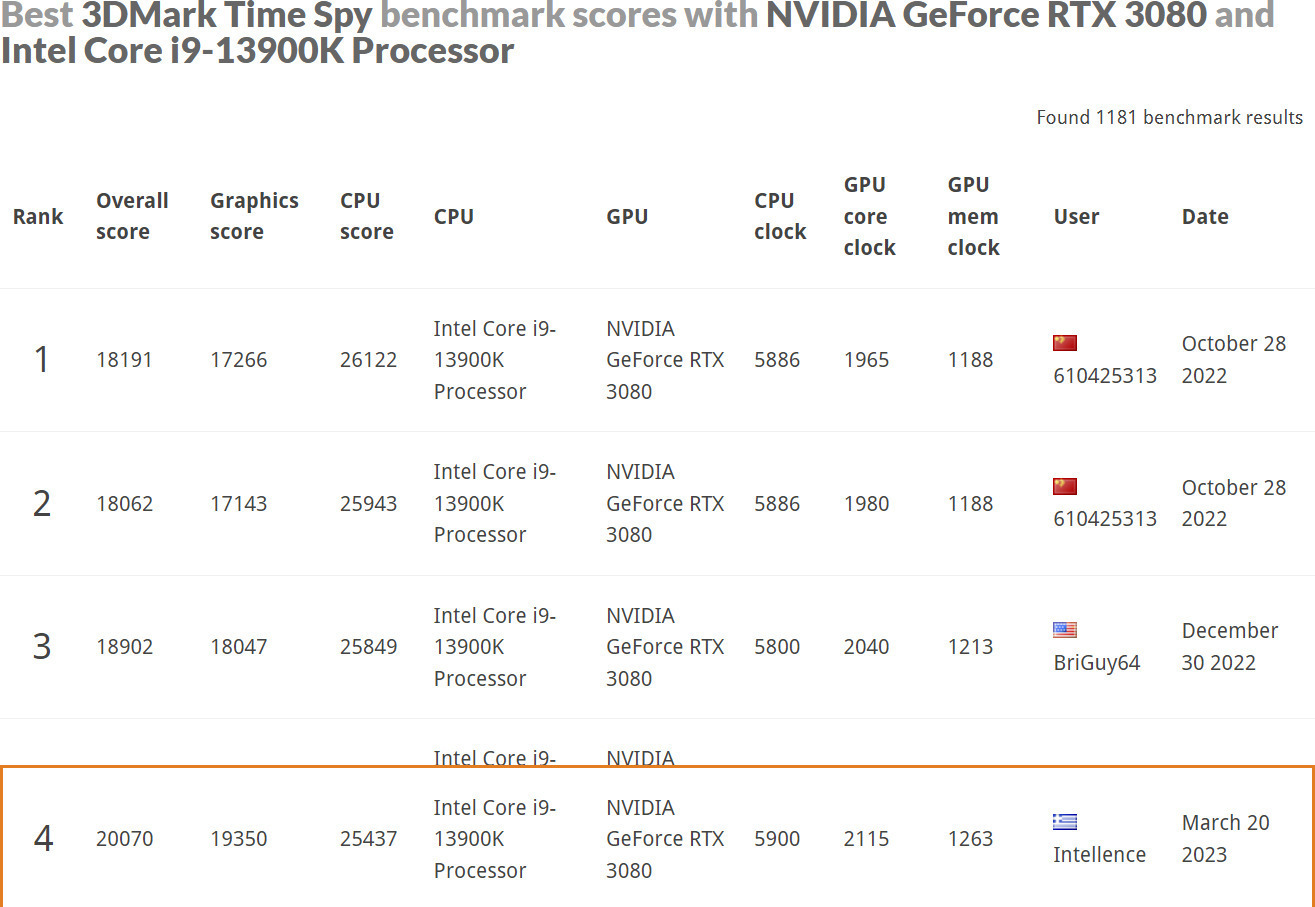
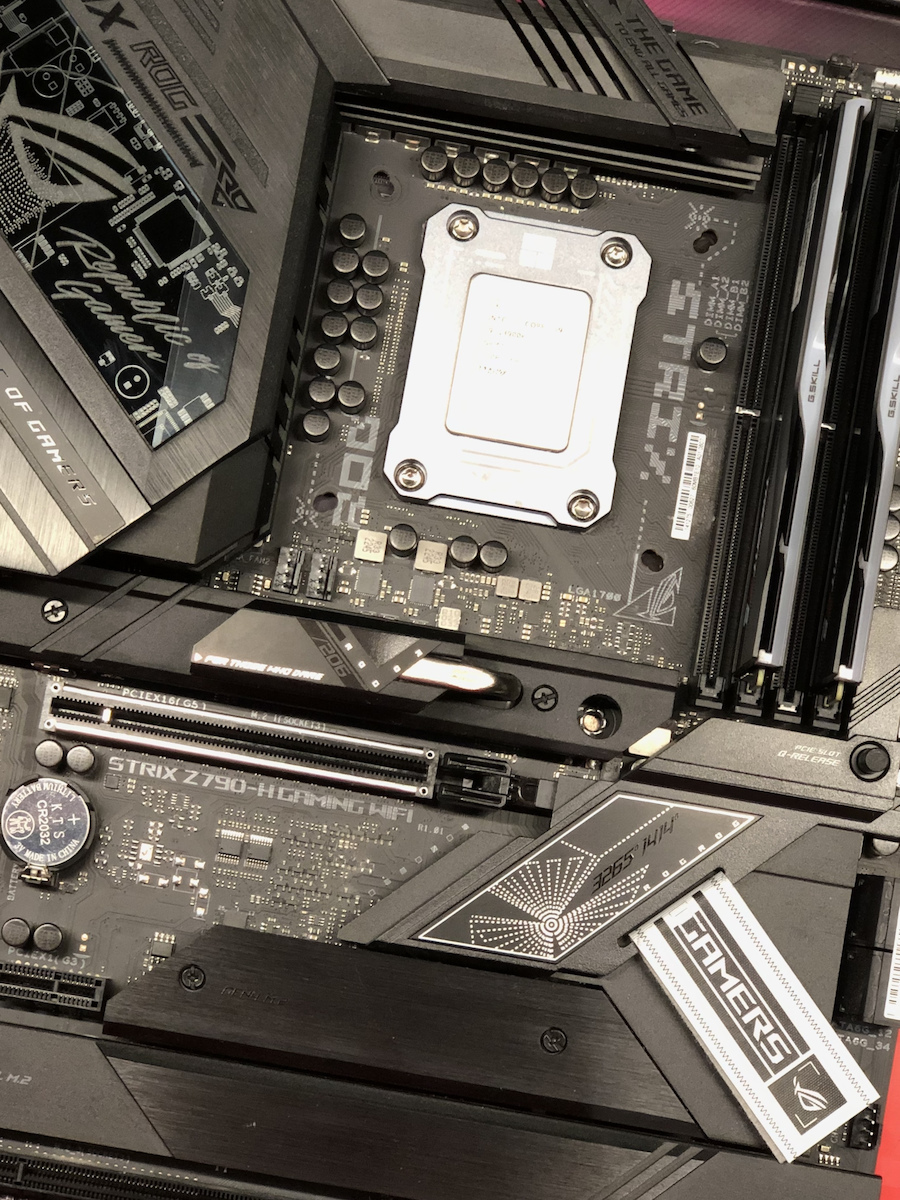
The processor was used for my personal PC, which I decided to use as an AIO, meaning for both my work (CAD, Vray Render & Video Editing in Premiere PRO) and gaming. In combination with an ASUS RoG Strix Z790-H and G.Skill DDR5 at 7200/34, it worked wonders! Of course, such a product also has high power supply requirements (I used an RM1000x) and for cooling, the EK Nucleus 360. By setting the limit to 92C from the BIOS, I managed to achieve very satisfactory results from the 13900k, which you can see here: https://tinyurl.com/Intellence4th
Of course, regardless of the benchmarks that simply show the limits of the processor in this specific setup, during work, the OC goes "for a walk" and leaves everything on Auto, where ASUS takes over and keeps everything stable with a limit of 70C so far in a 6-hour render in VRAY via CPU. In games, I haven't seen anything above 68C yet, even though I'm still using a 3080. The PC is running with a 4k monitor and a 3k (3400x1440) with the results I mentioned above.
I saw a huge difference from the previous (1090k on Z590) especially in Premiere, with the integration of the UHD770 as a previewer working smoothly on 4k RED videos, while with the predecessor, it showed some "struggles". Also, with the performance cores & efficiency cores, in idle states and simple everyday tasks, it keeps power consumption low (35-75W), making actual power savings, while also keeping the computer completely silent.
Ο επεξεργαστής χρησιμοποιήθηκε για το προσωπικό μου PC το οποίο αποφάσισα να χρησιμοποιώ ως AIO, δηλαδή και για την εργασία μου (CAD, Vray Render & Video Editing in Premiere PRO) καθώς και για Gaming. Σε συνδυασμό με μια ASUS RoG Strix Z790-H και DDR5 της G.Skill στα 7200/34 έκανε θαύματα! Φυσικά ένα τέτοιο προϊόν έχει και υψηλές απαιτήσεις σε επίπεδο τροφοδοσίας (χρησιμοποίησα ένα RM1000x) και για ψύξη της EK Nucleus 360. Δινοντας όριο τους 92C από bios, κατάφερα να βγάλω αποτέλεσμα ικανοποιητικότατο απο τον 13900k το οπόιο μπορείτε να δείτε εδώ: https://tinyurl.com/Intellence4th
Φυσικά, άσχετα με τα benchmarks που απλά δείχνουν τα όρια του επεξεργαστή στο συγκεκριμένο setup, κατα την διάρκεια των εργασιών, το OC πάει "περίπατο" και αφήνει τα πάντα Auto, όπου αναλαμβάνει η ASUS και κρατάει τα πάντα σταθερά με όριo τους 70C μέχρι τώρα σε 6ωρο render σε VRAY μεσω CPU. Σε games, δεν έχω δει ακόμα πάνω από 68Cαν και τον δουλεύω ακόμα με μια 3080. Το PC δουλευει με μια 4k οθόνη και μια 3κ (3400x1440) με τα αποτελέσματα που έδωσα παραπάνω.
Τεράστια διαφορά από τον προηγούμενο (1090k σε Z590) ειδα πάνω στο Premiere με την ενσωμάτωση του UHD770 ως previewer να δουλεύει χαλαρα σε 4k RED video, ενώ στον προκάτοχο, εδειχνε ένα "ζόρισμα". Επίσης, με τα performance cores & efficiency cores, σε idle καταστασεις και απλές καθημερινές εργασίες, κρατάει χαμηλά τις καταναλώσεις ρεύματος (35-75W) κάνοντας και πραγματική οικονομία ρεύματος, αλλά και κρατώντας τον υπολογιστή πλήρως αθόρυβο.
I assembled this little thing by myself. I added a cooling system with 3 140mm fans and it reaches 100c. I also applied a thermal paste that cost 20 euros for 3 grams. The temperatures are very high if you want to use it for computationally intensive tasks that can last for days. And it's winter now. Anyway, to keep the temperatures low, someone needs to go to the bios and set a power limit. I set the power limit to 250 watts. And that's how the temperature drops to 80c in stress tests. We'll see in the summer.
Αυτο το πραγματακι το συναρμολογησα μονος μου. Του εβαλα μια ψυξη με 3 140αρηδες ανεμιστηρες και φτανει τους 100c. Του εβαλα και μια thermal paste 20 ευρω τα 3 γραμμαρια. Οι θερμοκρασιες ειναι πολυ υψηλες αν το θελεις για computationally intensive tasks που μπορει να κρατανε μερες. Και αυτη την περιοδο ειναι και χειμωνας. Τελοσπαντων, αυτο το πραγμα για να εχει χαμηλες θερμοκρασιες πρεπει καποιος να παει στο bios και να βαλει power limit. Εγω του εβαλα power limit στα 250 Watt. Και ετσι μονο η θερμοκρασια πεφτει στα 80c σε stress test. Το καλοκαιρι βλεπουμε.
I have installed it on an Asus ROG MAXIMUS Z790 Hero, it works flawlessly like all Intel products, it requires a good cooler. I use it for WEB Development & Graphics, Animations
Τον έχω εγκαταστήσει σε μία Asus ROG MAXIMUS Z790 Hero, δουλεύει άψογα όπως όλα τα προϊόντα Intel θέλει καλή ψύκτρα
το χρησιμοποιώ για WEB Development & Graphics, Animations
Truly a beast in performance and consumption! I am writing this message for those who do not have much knowledge (like me) so that I can save you from the countless hours I spent searching.
Out of the box, the CPU, even with very good cooling, will have high temperatures even in simple games, around 80-95°C. In this case, you will need to adjust the power limit to the standards set by Intel: power limit1 = 125 watts and power limit2 = 253 watts, as motherboards usually allow the processor to draw unlimited power (see Asus pwr limit 2 4000 watts!!). I should note that you can play with the power limit, slightly increasing or decreasing it, or leave it exactly as it was from the beginning, especially if you have custom water cooling or if you don't care that the processor will reach 100°C in many tasks (thermal throttling).
* [Link to overclocking video](https://www.youtube.com/watch?v=ecdrKZ0GVr8) (explains the movements, how and why, and what each changed setting does)
* [Link to efficiency video](https://www.youtube.com/watch?v=H4Bm0Wr6OEQ&t=280s) by DER8AUER (plays with efficiency and shows performance with low power limits)
One last thing that I consider a good move and an easy solution for energy efficiency and thermals is turning off turbo boost
Πραγματικα τερας και σε επιδοσεις και σε καταναλωση! Γραφω αυτο το μηνυμα για οσους δεν εχουν πολλες γνωσεις (οπως και γω ) ετσι ωστε να σας σωσω απο τις αμετρητες ωρες που εφαγα στο ψαξιμο.
Out of the box το cpu ακομα και με πολυ καλη ιδροψυξηση θα εχει υψηλες θερμοκρασιες ακομα και σε απλα παιχνιδια τυπου 80-95c σε αυτη την περιπτωση θα χρειαστει να ρυθμισετε το powerlimit στa στανταρς που εχει ορίσει η ιντελ power limit1= 125watt και power limit2= 253watt καθως οι μητρικες συνηθως απο μαμα τους αφηνουν τον επεξεργαστή να τραβαει unlimited power (βλεπε asus pwr limit 2 4000watt !! ) εδω να σημειωσω οτι με το μπορεις να παιξεις με το power limit λιγο πανω λιγο κατω ακομα και το αφησεις ετσι ακριβως οπως ηταν εξ αρχης αυτο στην περιπτωση που εχεις custom water cooling ή δεν σε νοιαζει οτι ο επεξεργαστής σε πολλα task θα φτασει στα 100c (thermal throttling)
* https://www.youtube.com/watch?v=ecdrKZ0GVr8 <overclocking (εξηγει τις κινησεις του πως και γιατι και τι κανει το καθε setting που αλλαζει )
* https://www.youtube.com/watch?v=H4Bm0Wr6OEQ&t=280s <efficiency DER8AUER (παιζει με το efficiency και δειχνει τις επιδοσεις με χαμηλα power limits)
κατι τελευταίο που θεωρω οτι ειναι μια καλη κινηση και ευκολη λυση για το θεμα energy efficiency και thermals
turbo boost = off
THE BEST....ONLY INTEL....!!!!!!!!
ΟΤΙ ΚΑΛΥΤΕΡΟ....ΜΟΝΟ INTEL....!!!!!!!!
Verified purchase
It's worth it when you know why you want it and how the consumer knows how to use it
!! αξίζει όταν ξέρεις γιατί τον θες και να ξέρεις πώς να τον χρησιμοποιήσει ο καταναλωτής
Verified purchase
Verified purchase
Verified purchase
Verified purchase
Verified purchase
Verified purchase
Verified purchase
Verified purchase
Verified purchase
Verified purchase
Verified purchase
Verified purchase
Verified purchase
I had a malfunction, I don't know what was happening. It crashed and showed bluescreens over time. The 2-year warranty had expired by the time I figured out what was going on. I changed the processor and the PC has been running like a rocket for months now. The money for the 13th gen i9 was wasted
Είχα malfunction δεν ξέρω τί γινόταν. Crashαρε και έβγαζε bluescreens με την πάροδο του χρόνου. Είχαν περάσει τα 2 χρόνια εγγύησης μέχρι να βρω τί γίνεται. Άλλαξα επεξεργαστή και το pc πάει σφαίρα εδώ και μήνες. Τζάμπα τα λεφτά για τον i9 13ης
DON'T MAKE THE MISTAKE! DON'T BE FOOLED BY THE GOOD REVIEWS!
I installed the 13900 two years ago as soon as it came out, on an Asus Prime Z790 with a Corsair triple fan liquid cooler. The temperature spikes to 100 degrees as soon as you open any game, and you experience crashes every 10-20 minutes in half of the games that have requirements because of this. The "get good cooling" advice is a fairy tale. I spent 300 euros on cooling and it didn't help at all.
Additionally, THEY ARE INCREDIBLY DEFECTIVE! In tests I conducted, I found 2 defective cores, which the Intel diagnostic tool didn't even detect. Now, after 2 years of patience, BSODs and status_Access_violation errors have started appearing in Chrome.
I hadn't gone through the RMA process because after researching, in half of the cases the new processor takes 2 months to arrive (and obviously, I'm one of those who can't stand 2 months without a PC), and in the other half of the cases, they either deny the problem that the diagnostic tool doesn't detect, or they don't have stock to send you.
I never expected to be put through so much trouble. The worst part is, from what I read, that the 14900 has the same problems, which is newer.
So I am forced to change the motherboard and switch to AMD. DO YOURSELF A FAVOR AND DON'T BUY Intel AT THIS TIME.
EDIT: After a lot of searching, I managed to stabilize the system by doing the following:
1) Update the BIOS to the latest version.
2) Choose performance instead of extreme in Intel settings.
3) Disable P-core3, P-core4, E-core3, E-core4, which I found defective in my system.
4) Disable MultiCore Enhancement.
5) Disable Intel Turbo Boost Max Technology 3.0, which is what causes the cores to overheat.
6) Set short duration turbo power = 253.
7) Set long duration turbo power = 253.
At this moment, it is stable at 70, with brief spikes to 90-95. Under Intel Turbo Boost Max Technology 3.0, there is another Boost setting that if you disable, the temperature drops to 50-53. Obviously, performance is lost, but you gain stability.
ΜΗΝ ΚΑΝΕΤΕ ΤΟ ΛΑΘΟΣ! ΜΗΝ ΠΑΡΑΣΥΡΘΕΙΤΕ ΑΠΟ ΤΙΣ ΚΑΛΕΣ ΚΡΙΤΙΚΕΣ!
Έβαλα τον 13900 πριν 2 χρόνια με το που βγήκε, πάνω σε μια asus prime z790 και με corsair υδρόψυξη 3πλού ανεμιστήρα. Η θερμοκρασία καρφώνει 100 βαθμούς με το που ανοίγεις κάθε game και έχεις crash κάθε 10-20 λεπτά στα μισά games που έχουν απαιτήσεις λόγω αυτού. Το "βάλε καλή ψύξη" είναι παραμύθι. Έβαλα 300 ευρώ ψύξη και δεν βοήθησε στο ελάχιστο.
Επιπλέον, ΕΙΝΑΙ ΑΠΙΣΤΕΥΤΑ ΕΛΑΤΤΩΜΑΤΙΚΟΙ! Σε τεστ που έκανα βρήκα 2 πυρήνες ελαττωματικούς, τους οποίους το πρόγραμμα της intel diagnostic tool δεν ανίσχνευσε καν. Τώρα μετά από 2 χρόνια υπομονής, άρχισαν BSOD και status_Access_violation σε chrome.
Δεν είχα μπει στη διαδικασία RMA γιατί μετά από έρευνα, στις μισές περιπτώσεις ο νέος επεξεργαστής έρχεται από 2 μήνες (και προφανώς είμαι απο αυτούς που δεν αντέχουν 2 μήνες χωρίς pc), και γιατί στις άλλες μισές περιπτώσεις είτε αρνούνται το πρόβλημα που δεν το εντοπίζει το diagnostic tool, είτε δεν έχουν απόθεμα να σου στείλουν.
Δεν περίμενα ποτέ να ταλαιπωρηθώ τόσο πολύ. Το χειρότερο είναι από ότι διαβάζω, ότι τα ίδια προβλήματα έχει και ο 14900 που ναι νεότερος.
Οπότε αναγκαστικά αλλαγή μητρική και φεύγω για AMD. ΚΑΝΤΕ ΚΑΛΟ ΣΤΟΝ ΕΑΥΤΟ ΣΑΣ ΚΑΙ ΑΥΤΗ ΤΗΝ ΠΕΡΙΟΔΟ ΜΗΝ ΑΓΟΡΑΣΕΤΕ intel
EDIT : Μετά από πάρα πολύ ψάξιμο, κατάφερα να κάνω σταθερό το σύστημα κάνοντας τα παρακάτω:
1) Update bios στη νεότερη έκδοση
2) Διαλέξτε performace και όχι extreme στα intel settings
3) Disable τους P-core3, p-core4, e-core3, e-core4 , τους οποίους βρήκα ελαττωματικούς στο δικό μου σύστημα.
4) Disable MultiCore Enhancement.
5) Disable Intel Turbo Boost Max Technology 3.0 το οποίο είναι αυτό που κάνει τους πυρήνες να κάνουν Overheat
6) Set short duration turbo power = 253
7) Set long duration turbo power = 253
Αυτή τη στιγμή είναι σταθερός στους 70 κάνοντας στιγμιαία spikes στους 90-95, Κάτω από Intel Turbo Boost Max Technology 3.0 έχει άλλη μια ρύθμιση Boost την οποία αν απενεργοποιήσετε πέφτει η θερμοκρασία στους 50-53. Προφανώς χάνεται απόδοση αλλά κερδίζεις σταθερότητα.
The worst. 15 years with Intel, for the first time a product has troubled me this much. If I were Intel, I would have closed the shop yesterday.
Ότι χειρότερο . 15 χρόνια intel , πρώτη φορά με ταλαιπωρισε προϊών τόσο πολύ . Στην θέση της intel θα έκλεινα το μαγαζί χτες .
All i9 12th, 13th, and 14th generation processors are excellent in terms of performance, but they also require compatible components to perform properly. The most important ones are the motherboard, RAM, and of course, the cooling system.
If it is not properly supported, buying this processor is not worth it.
Regarding cooling, there is no air cooling solution that can prevent thermal throttling, so a 360mm AIO is definitely necessary, and not just any, but one of the good ones.
For the motherboard, it definitely needs top-notch VRM, but almost all Z690/Z790 motherboards are fine.
For RAM, the correct choice now is DDR5, and a speed like 6400 is guaranteed to run and perform well.
Ολοι οι i9 12ης, 13ης και 14ης γενιας ειναι αψογοι απο επιδοσεις, αλλα χρειαζονται και αναλογα τα υπολοιπα κομματια για να αποδοσουν σωστα. Τα πιο σημαντικα ειναι η μητρικη, η ραμ και φυσικα η ψυξη.
Αν δεν πλαισιωθει σωστα, δεν αξιζει η αγορα αυτου του επεξεργαστη.
Στο θεμα της ψυξης, δεν υπαρχει καποια αεροψυξη που να μπορει να τον κρατησει απο το thermal throttle, οποτε χρειαζεται οπωσδηποτε 360mm ΑΙΟ και οχι οποια και οποια, αλλα μια απο τις καλες.
Απο μητρικη, εχει φυσικα αναγκη απο κορυφαια VRM, αλλα ολες σχεδον οι Z690/z790 ειναι μια χαρα.
Απο ραμ, πλεον η σωστη επιλογη ειναι ddr5 και μια ταχυτητα οπως 6400 ειναι σιγουρο οτι θα τρεξει και θα αποδιδει καλα.
Switching from the i9 9900k to the new generation of processors, and although it is quite expensive, I believe it is worth the money and more, as its current capabilities combined with its potential make it a PC for the next 5+ years. Its power, combined with the 36mb cache, is ideal for multitasking without any lag. Of course, it has not been tested with demanding design programs, etc. that are available on the market, as that is not my area of expertise. It was installed on a Gigabyte z970 motherboard and cooled with the Sharkoon s90 liquid cooling system. Despite many complaints about it, the temperatures are around 34-36 degrees Celsius at idle, but it is used in a case with excellent airflow (Corsair 7000d airflow). Also, under increased load (usage in Microsoft Flight Simulator) with 5 other peripheral programs running alongside it and Google Chrome with 6 open tabs, the temperatures reached up to 70 degrees with very little load. Therefore, it is an excellent choice in my opinion, but you will need good cooling (at least a 36mm cooler) and a case with good airflow, along with high-quality thermal paste
Αλλαγή απο i9 9900k, πηγαίνοντας σε νέα γενιά επεξεργαστών, και παρόλο που είναι αρκετά τσουχτερός στην τιμή, θεωρώ οτι αξίζει και με το παραπάνω τα λεφτά του καθώς οι τωρινές του δυνατότητες σε συνδυασμό με το potential του, θεωρώ οτι τον κάνει pc για τα επόμενα 5+ χρόνια.. Η ισχύς του σε συνδυασμό με τα 36mb cache, προσφέρεται για multitasking χωρίς πραγματικά να κολλάει πουθενά.Βέβαια, δεν έχει δουλευτεί με απαιτητικά προγράμματα σχεδιασμού κτλ που κυκλοφορούν στην αγορά, καθώς αυτό δεν είναι το αντικείμενο μου.Κουμπώθηκε επάνω σε z970 μητρική της gigabyte και ψύχεται με την υδρόψυξη της Sharkoon s90. Οι θερμοκρασίες παρόλο που πολλοί παραπονιούνται γιαυτό, idle είναι περί τους 34-36 βαθμούς ωστόσο χρησιμοποιείται σε κουτί με εξαιρετικό airflow (Corsair 7000d airflow). Επίσης, σε αυξημένο load (χρήση σε microsoft flight simulator) με άλλα 5 περιφεριακά προγράμματα υποστηρικτικά του flight simulator να τρέχουν μαζί & google chrome με 6 καρτέλες ανοικτές, οι θερμοκρασίες του πήγαν μέχρι 70, με πολύ μικρό load. Συνεπώς, εξαιρετική επιλογή κατ'εμέ, ωστόσο θα πρέπει να πάτε σε καλή ψύξη (τουλάχιστον 36αρι ψυγείο) αλλά κι ένα κουτί με καλό airflow σε συνδυασμό με καλής ποιότητας θερμοαγώγιμη πάστα
The Intel Core i9-13900K processor is aimed at advanced users and professionals who have high-performance demands in the field of computing power. This processor offers exceptional performance and processing power for demanding tasks such as gaming, video editing, 3D design, professional photography, and other applications that require high performance in processing and computation. It is a suitable choice for those who need the best possible hardware for their tasks and are prepared to invest in a very powerful processor.
It features a high number of cores and threads, high levels of cache memory, and supports technologies such as Intel Hyper-Threading, Intel Turbo Boost, and Intel Thermal Velocity Boost for even better performance in demanding tasks.
It is suitable for overclocking enthusiasts, as it has an unlocked multiplier, allowing users to increase the clock frequency for even higher performance. It features integrated Intel UHD 770 graphics, which offer notable performance for casual gaming and multimedia.
With high clock speeds and groundbreaking new architecture, you will be able to take your gaming to new levels, while secondary applications run seamlessly in the background.
Get the best of both worlds with reliable performance for popular game titles and productivity and content creation with AI support.
The new processor architecture is also compatible with the latest platform innovations, offering you improved performance across your entire computer.
Support for PCIe Gen 5 and DDR5 for high-performance components such as memory and graphics.
Thunderbolt 4 and Intel Killer Wi-Fi 6/6E (Gig+) provide fast transfer speeds and connections with peripherals.
13th Gen Intel Core processors advance the hybrid performance architecture with up to eight Performance-cores (P-core) and up to 16 Efficient-cores (E-core), combined with workloads intelligently routed by Intel Thread Director 2.
Designed for gamers seeking maximum performance to play the latest games, while also having the capabilities to handle other workloads. The new 13th generation computers based on Intel Core processors make it all possible.
The 13th generation Intel Core processor family offers faster P cores and more E cores with support for DDR4/DDR5 and PCIe 4.0/5.0. This provides a platform that can maximize multitasking and customization options.
The 13th generation Intel Core processors provide an extremely flexible architecture and industry-leading tools for ultimate performance customization.
Equipped with the latest technologies, the Intel® Core™ 13th generation processors accelerate system performance. Up to 16 lanes of PCIe 5.02 double the input/output performance for accelerated processing power. Benefit from the latest DDR5 support for fast speeds up to 5600 MT/s,3 high bandwidth, and improved productivity, as well as continued DDR4 support up to 3200 MT/s. Comprehensive support for advanced tuning and overclocking - including Intel® Extreme Tuning Utility, Intel® Extreme Memory Profile, and Intel® Dynamic Memory Boost - provides smart overclocking performance on demand, so both new and experienced overclockers can get more out of their unlocked processors. And backward compatibility with Intel's 600 and 700 series chipsets offers you the flexibility to upgrade without compromising on performance or features.
Specifications are collected from official manufacturer websites. Please verify the specifications before proceeding with your final purchase. If you notice any problem you can report it here.
I had a malfunction, I don't know what was happening. It crashed and showed bluescreens over time. The 2-year warranty had expired by the time I figured out what was going on. I changed the processor and the PC has been running like a rocket for months now. The money for the 13th gen i9 was wasted
Είχα malfunction δεν ξέρω τί γινόταν. Crashαρε και έβγαζε bluescreens με την πάροδο του χρόνου. Είχαν περάσει τα 2 χρόνια εγγύησης μέχρι να βρω τί γίνεται. Άλλαξα επεξεργαστή και το pc πάει σφαίρα εδώ και μήνες. Τζάμπα τα λεφτά για τον i9 13ης
DON'T MAKE THE MISTAKE! DON'T BE FOOLED BY THE GOOD REVIEWS!
I installed the 13900 two years ago as soon as it came out, on an Asus Prime Z790 with a Corsair triple fan liquid cooler. The temperature spikes to 100 degrees as soon as you open any game, and you experience crashes every 10-20 minutes in half of the games that have requirements because of this. The "get good cooling" advice is a fairy tale. I spent 300 euros on cooling and it didn't help at all.
Additionally, THEY ARE INCREDIBLY DEFECTIVE! In tests I conducted, I found 2 defective cores, which the Intel diagnostic tool didn't even detect. Now, after 2 years of patience, BSODs and status_Access_violation errors have started appearing in Chrome.
I hadn't gone through the RMA process because after researching, in half of the cases the new processor takes 2 months to arrive (and obviously, I'm one of those who can't stand 2 months without a PC), and in the other half of the cases, they either deny the problem that the diagnostic tool doesn't detect, or they don't have stock to send you.
I never expected to be put through so much trouble. The worst part is, from what I read, that the 14900 has the same problems, which is newer.
So I am forced to change the motherboard and switch to AMD. DO YOURSELF A FAVOR AND DON'T BUY Intel AT THIS TIME.
EDIT: After a lot of searching, I managed to stabilize the system by doing the following:
1) Update the BIOS to the latest version.
2) Choose performance instead of extreme in Intel settings.
3) Disable P-core3, P-core4, E-core3, E-core4, which I found defective in my system.
4) Disable MultiCore Enhancement.
5) Disable Intel Turbo Boost Max Technology 3.0, which is what causes the cores to overheat.
6) Set short duration turbo power = 253.
7) Set long duration turbo power = 253.
At this moment, it is stable at 70, with brief spikes to 90-95. Under Intel Turbo Boost Max Technology 3.0, there is another Boost setting that if you disable, the temperature drops to 50-53. Obviously, performance is lost, but you gain stability.
ΜΗΝ ΚΑΝΕΤΕ ΤΟ ΛΑΘΟΣ! ΜΗΝ ΠΑΡΑΣΥΡΘΕΙΤΕ ΑΠΟ ΤΙΣ ΚΑΛΕΣ ΚΡΙΤΙΚΕΣ!
Έβαλα τον 13900 πριν 2 χρόνια με το που βγήκε, πάνω σε μια asus prime z790 και με corsair υδρόψυξη 3πλού ανεμιστήρα. Η θερμοκρασία καρφώνει 100 βαθμούς με το που ανοίγεις κάθε game και έχεις crash κάθε 10-20 λεπτά στα μισά games που έχουν απαιτήσεις λόγω αυτού. Το "βάλε καλή ψύξη" είναι παραμύθι. Έβαλα 300 ευρώ ψύξη και δεν βοήθησε στο ελάχιστο.
Επιπλέον, ΕΙΝΑΙ ΑΠΙΣΤΕΥΤΑ ΕΛΑΤΤΩΜΑΤΙΚΟΙ! Σε τεστ που έκανα βρήκα 2 πυρήνες ελαττωματικούς, τους οποίους το πρόγραμμα της intel diagnostic tool δεν ανίσχνευσε καν. Τώρα μετά από 2 χρόνια υπομονής, άρχισαν BSOD και status_Access_violation σε chrome.
Δεν είχα μπει στη διαδικασία RMA γιατί μετά από έρευνα, στις μισές περιπτώσεις ο νέος επεξεργαστής έρχεται από 2 μήνες (και προφανώς είμαι απο αυτούς που δεν αντέχουν 2 μήνες χωρίς pc), και γιατί στις άλλες μισές περιπτώσεις είτε αρνούνται το πρόβλημα που δεν το εντοπίζει το diagnostic tool, είτε δεν έχουν απόθεμα να σου στείλουν.
Δεν περίμενα ποτέ να ταλαιπωρηθώ τόσο πολύ. Το χειρότερο είναι από ότι διαβάζω, ότι τα ίδια προβλήματα έχει και ο 14900 που ναι νεότερος.
Οπότε αναγκαστικά αλλαγή μητρική και φεύγω για AMD. ΚΑΝΤΕ ΚΑΛΟ ΣΤΟΝ ΕΑΥΤΟ ΣΑΣ ΚΑΙ ΑΥΤΗ ΤΗΝ ΠΕΡΙΟΔΟ ΜΗΝ ΑΓΟΡΑΣΕΤΕ intel
EDIT : Μετά από πάρα πολύ ψάξιμο, κατάφερα να κάνω σταθερό το σύστημα κάνοντας τα παρακάτω:
1) Update bios στη νεότερη έκδοση
2) Διαλέξτε performace και όχι extreme στα intel settings
3) Disable τους P-core3, p-core4, e-core3, e-core4 , τους οποίους βρήκα ελαττωματικούς στο δικό μου σύστημα.
4) Disable MultiCore Enhancement.
5) Disable Intel Turbo Boost Max Technology 3.0 το οποίο είναι αυτό που κάνει τους πυρήνες να κάνουν Overheat
6) Set short duration turbo power = 253
7) Set long duration turbo power = 253
Αυτή τη στιγμή είναι σταθερός στους 70 κάνοντας στιγμιαία spikes στους 90-95, Κάτω από Intel Turbo Boost Max Technology 3.0 έχει άλλη μια ρύθμιση Boost την οποία αν απενεργοποιήσετε πέφτει η θερμοκρασία στους 50-53. Προφανώς χάνεται απόδοση αλλά κερδίζεις σταθερότητα.
The worst. 15 years with Intel, for the first time a product has troubled me this much. If I were Intel, I would have closed the shop yesterday.
Ότι χειρότερο . 15 χρόνια intel , πρώτη φορά με ταλαιπωρισε προϊών τόσο πολύ . Στην θέση της intel θα έκλεινα το μαγαζί χτες .
All i9 12th, 13th, and 14th generation processors are excellent in terms of performance, but they also require compatible components to perform properly. The most important ones are the motherboard, RAM, and of course, the cooling system.
If it is not properly supported, buying this processor is not worth it.
Regarding cooling, there is no air cooling solution that can prevent thermal throttling, so a 360mm AIO is definitely necessary, and not just any, but one of the good ones.
For the motherboard, it definitely needs top-notch VRM, but almost all Z690/Z790 motherboards are fine.
For RAM, the correct choice now is DDR5, and a speed like 6400 is guaranteed to run and perform well.
Ολοι οι i9 12ης, 13ης και 14ης γενιας ειναι αψογοι απο επιδοσεις, αλλα χρειαζονται και αναλογα τα υπολοιπα κομματια για να αποδοσουν σωστα. Τα πιο σημαντικα ειναι η μητρικη, η ραμ και φυσικα η ψυξη.
Αν δεν πλαισιωθει σωστα, δεν αξιζει η αγορα αυτου του επεξεργαστη.
Στο θεμα της ψυξης, δεν υπαρχει καποια αεροψυξη που να μπορει να τον κρατησει απο το thermal throttle, οποτε χρειαζεται οπωσδηποτε 360mm ΑΙΟ και οχι οποια και οποια, αλλα μια απο τις καλες.
Απο μητρικη, εχει φυσικα αναγκη απο κορυφαια VRM, αλλα ολες σχεδον οι Z690/z790 ειναι μια χαρα.
Απο ραμ, πλεον η σωστη επιλογη ειναι ddr5 και μια ταχυτητα οπως 6400 ειναι σιγουρο οτι θα τρεξει και θα αποδιδει καλα.
Switching from the i9 9900k to the new generation of processors, and although it is quite expensive, I believe it is worth the money and more, as its current capabilities combined with its potential make it a PC for the next 5+ years. Its power, combined with the 36mb cache, is ideal for multitasking without any lag. Of course, it has not been tested with demanding design programs, etc. that are available on the market, as that is not my area of expertise. It was installed on a Gigabyte z970 motherboard and cooled with the Sharkoon s90 liquid cooling system. Despite many complaints about it, the temperatures are around 34-36 degrees Celsius at idle, but it is used in a case with excellent airflow (Corsair 7000d airflow). Also, under increased load (usage in Microsoft Flight Simulator) with 5 other peripheral programs running alongside it and Google Chrome with 6 open tabs, the temperatures reached up to 70 degrees with very little load. Therefore, it is an excellent choice in my opinion, but you will need good cooling (at least a 36mm cooler) and a case with good airflow, along with high-quality thermal paste
Αλλαγή απο i9 9900k, πηγαίνοντας σε νέα γενιά επεξεργαστών, και παρόλο που είναι αρκετά τσουχτερός στην τιμή, θεωρώ οτι αξίζει και με το παραπάνω τα λεφτά του καθώς οι τωρινές του δυνατότητες σε συνδυασμό με το potential του, θεωρώ οτι τον κάνει pc για τα επόμενα 5+ χρόνια.. Η ισχύς του σε συνδυασμό με τα 36mb cache, προσφέρεται για multitasking χωρίς πραγματικά να κολλάει πουθενά.Βέβαια, δεν έχει δουλευτεί με απαιτητικά προγράμματα σχεδιασμού κτλ που κυκλοφορούν στην αγορά, καθώς αυτό δεν είναι το αντικείμενο μου.Κουμπώθηκε επάνω σε z970 μητρική της gigabyte και ψύχεται με την υδρόψυξη της Sharkoon s90. Οι θερμοκρασίες παρόλο που πολλοί παραπονιούνται γιαυτό, idle είναι περί τους 34-36 βαθμούς ωστόσο χρησιμοποιείται σε κουτί με εξαιρετικό airflow (Corsair 7000d airflow). Επίσης, σε αυξημένο load (χρήση σε microsoft flight simulator) με άλλα 5 περιφεριακά προγράμματα υποστηρικτικά του flight simulator να τρέχουν μαζί & google chrome με 6 καρτέλες ανοικτές, οι θερμοκρασίες του πήγαν μέχρι 70, με πολύ μικρό load. Συνεπώς, εξαιρετική επιλογή κατ'εμέ, ωστόσο θα πρέπει να πάτε σε καλή ψύξη (τουλάχιστον 36αρι ψυγείο) αλλά κι ένα κουτί με καλό airflow σε συνδυασμό με καλής ποιότητας θερμοαγώγιμη πάστα
Really fantastic performance especially for programming and game development, it's just what you need! I don't even need a graphics card while working on complex 3D games, and they run smoothly at around 30FPS with the Engine/Editor. It's truly the ideal CPU for developers working on Windows.
The programming I'm referring to is quite demanding on the CPU, so I mention it as a reference.
As for less demanding tasks like browsing + Photoshop, no problem at all! Everything runs flawlessly!
I recommend it along with fast M2 SSDs and fast CL30 RAM (32GB+) for top results.
As long as there's no need for demanding games, its integrated graphics card is perfect!!
(for example, LOL/Valorant@240fps, GTA 5/BF 5@70FPS -- more at https://youtu.be/56Jj_R7ytdw)
Πραγματικά φανταστικές επιδόσεις ειδικά για προγραμματισμό και game development είναι ό,τι πρέπει!
Δε χρειάζομαι καν κάρτα γραφικών όσο δουλεύω σε πολύπλοκά 3D παιχνίδια, και τρέχουν άνετα με ~30FPS μαζί με Engine/Editor. Είναι πραγματικά ιδανικό CPU για developers που δουλεύουν σε windows.
Ο προγραμματισμός που λέω είναι αρκετά απαιτητικός από CPU γι'αυτο το αναφέρω σα reference.
Όσο για λιγότερο απαιτητικά πράματα τύπου browsing + photoshop, ΑΝΕΤΑ! Εννοείται όλα σφαίρα!
Τον προτείνω μαζί με γρήγορο M2 SSDs και γρήγορη CL30 RAM (32GB+) για τοπ αποτελέσματα.
Όσο δεν υπάρχει ανάγκη για απαιτητικά παιχνίδια, η ενσωματωμένη κάρτα γραφικών του είναι τέλεια!!
(πχ LOL/Valorant@240fps, GTA 5/BF 5@70FPS -- περισότερα στο https://youtu.be/56Jj_R7ytdw)
I switched from the 7700k to this one. Initially, I wanted to get the 13700k, but then I thought, it doesn't matter, we only live once. No matter how much I pushed it, it didn't understand anything. Of course, the leap from the 7700k is huge
Πέρασα απο 7700k σε αυτόν ήθελα αρχικά να πάρω τον 13700k αλλα σκέφτηκα δεν βαριέσαι μια ζωή την έχουμε. ¨Όσο και να τον ζόρισα δεν κατάλαβάινει τίποτα βέβαια το άλμα απο τον 7700k είναι τεράστιο
Together with the Corsair H170, the temperatures are perfectly normal, 35-40 idle and 65-70 full load. It hasn't crashed anywhere, and I haven't needed to overclock or underclock. Everything is good. 1500w Corsair HXi power supply
Μαζί με corsair h170 οι θερμοκρασίες του είναι απόλυτα φυσιολογικές 35-40idle και 65-70 full load.
Δεν έχει κολλήσει πουθενά δεν εχω χρειαστεί oc η uc όλα καλά.
τροφοδοτικό 1500w corsair hxi
Very good, powerful performance. Worth buying
πολύ καλά,powerful performance。worth buying 。
Primarily, throughout my entire career with computers, I have used Intel. My experience comes from a leap to the 10th generation. Generally, this is a monster processor. It draws quite a bit of power and requires pretty good cooling (at least a 360mm radiator for liquid cooling). To be honest, compared to the more popular/affordable processors, I noticed quite a difference and much fewer stutters in all my games (and I don't mean just battle royales).
Positives
- Very good performance for today's applications
- Fairly decent price; I remember in the past monster processors costing up to 900 euros!
- Quite future-proof
- Handles both 4th and 5th generation memory
- Handles both 4th and 5th generation graphics cards
Negatives
- I never saw the E-cores they advertise running, but they generally say it's the motherboards' fault, etc.
- In a machine that doesn't target being quite powerful, it will be wasted
- Requires precise cooling and definitely a good power supply; for example, don't go below 850
- I can't say that the jump from the 12th to the 13th generation is satisfactory; I would have liked double the success because I am power hungry, and I admit it
Here we are comparing titans of processors, so I will speak with a more straightforward critique. Generally, this is a monster of a processor. It is perfect for processing and demanding tasks. Yes, it can do gaming, but I wouldn't recommend it if that's your only goal. Expect high temperatures when it gets to work, but don't worry if you have proper cooling, even if you only have one liquid cooler installed and nothing else in your case. I think the price compared to what I remember from some X versions in the past is more friendly to go for the top of the line. It reaches maximum speed effortlessly, but don’t let that scare you because that’s what you want, believe me! Therefore, if you want to say, "I found what I like for my monster," look here. An alternative option, but I don't trust the architecture of the assembly of the processors, is the AMD Ryzen 9 7950X3D, but what can I say, the poor thing goes to waste because neither the software can utilize the 144MB cache nor the 32 cores, and it is also 150 euros more expensive. If you have read that a revolution is coming, feel free to go to AMD from me; otherwise, settle here, and for 5 years, you’ll be just fine. Please, though, pair it with a good power supply!!!!!!!!!!
EDIT IMPORTANT: So you don't pull your hair out. If you have Windows 10, ignore this; all is well. For Windows 11, I had issues with DirectX errors in COD MW2. Well, I solved it this way: I downloaded Intel Extreme Tuning and lowered the Performance Core Ratio to 54x. If that doesn't help, put the game in the following --d3d11. There are issues with DirectX 12......
EDIT2: Very, very important. Make sure to update the motherboard BIOS to the latest version. Due to overvoltage, which Intel acknowledged as a mistake, problems arose in the 13th-14th generation processors. I was also a victim, resulting in many games crashing. After the update, I didn't see any crashes except in some Ubisoft games, which according to other news, might have only been caused by the Windows 24H2 update. Anyway, to have peace of mind, for boxed Intel CPUs, DHL picked up the old one from me, and I received a brand new one in a completely different cardboard box (while Intel kept the old box I liked for its design) back home; I didn't need to move at all as long as you have the serial number and batch number of the CPU to provide in the ticket request. You will need to create an Intel support account to change the processor.
Κατά κύριο λόγο και όλη μου την καριέρα στους υπολογιστές χρησιμοποιώ Ιntel. Η εμπειρία μου προέρχεται από άλμα της 10ης γενιάς. Γενικά, πρόκειται για ένα επεξεργαστή τέρας. Τραβάει αρκετό ρεύμα και χρειάζεται αρκετά καλή ψύξη (τουλάχιστον 360mm ψυγείο για υδρόψυξη). Να πώ την αλήθεια σε σχέση με τους πιο δημοφιλής/προσιτούς επεξεργαστές είδα αρκετή διαφορά και πολύ λιγότερα κολλήματα σε όλα μου τα παιχνίδια (και δεν εννοώ μόνο τα battle royale).
Θετικά
- Πολύ καλή απόδοση για τις σημερινές εφαρμογές
- Καλούτσικη τιμή, θυμάμαι παλιά τα τέρατα επεξεργαστές να είχαν και 900 ευρώ!
- Αρκετά future proof
- Διαχειρίζεται μνήμες και 4ης και 5ης γενιάς
- Διαχειρίζεται κάρτες γραφικών και 4ης και 5ης γενιάς
Αρνητικά
- Δεν είδα ποτέ τα Ε-πυρήνες που διαφημίζουν να τρέχουν, αλλά λένε γενικά ότι φταίνε οι μητρικές κλπ
- Σε μηχάνημα που δεν στοχεύει το αρκετά δυνατό θα πάει χαμένος
- Θέλει ακριβή ψύξη και σίγουρα αρκετά καλό τροφοδοτικό πχ κάτω από 850 μην πέσετε
- Δεν μπορώ να πω ότι το άλμα από 12η σε 13η γενιά είναι ικανοποιητικό θα ήθελα διπλάσια επιτυχία γιατί είμαι power hungry και το ομολογώ
Εδώ συγκρίνουμε τιτάνες επεξεργαστών, επομένως θα μιλήσω με πιο ευθύς κριτική. Γενικά πρόκειται για τέρας επεξεργαστή. Είναι ότι πρέπει για επεξεργασία και απαιτητικές διαδικασίες. Ναι μπορεί να κάνει gaming αλλά δεν το συνιστώ αν πάτε μόνο και μόνο γι αυτό. Να περιμένετε θερμοκρασίες υψηλές όταν πιάνει δουλειά αλλά μην φοβάστε αν έχετε σωστή ψύξη ακόμα και αν έχετε κουμπώσει μια και μόνο υδρόψηξη και τίποτα άλλο μέσα στο κουτί σας. Νομίζω η τιμή σε σχέση με ότι θυμάμαι παλιά κάτι Χ εκδόσεις είναι πιο φιλική για να πας στα Τοπ της σειράς. Πιάνει μέγιστη ταχύτητα για πλάκα αλλά κι αυτό να μην σας φοβίζει γιατί αυτό θέλετε πιστέψτε με! Επομένως, αν θέλετε να πείτε βρήκα αυτό που γουστάρω για το τέρας μου εδώ κοιτάξτε. Εναλλακτική, επιλογή αλλά δεν εμπιστεύομαι την αρχιτεκτονική της assembly των επεξεργαστών είναι η AMD Ryzen 9 7950X3D αλλά τι να πω ο καημένος πάει χαμένος γιατί ούτε τα λογισμικά μπορούν να αξιοποιήσουν την 144ΜΒ cache, ούτε τους 32 πυρήνες και είναι και 150 ευρώ ακριβότερος. Αν έχετε διαβάσει ότι έρχεται η επανάσταση πάτε ελεύθερα από εμένα στον ΑΜD αλλιώς αρκεστείτε εδώ και για 5 χρόνια είστε κομπλεδούρα. Παρακαλώ, όμως συνοδέψτε τον με καλό τροφοδοτικό!!!!!!!!!!
EDIT ΣΗΜΑΝΤΙΚΌ: Για να μην τραβάτε τα μαλάκια σας. Αν έχετε windows 10 αγνοήστε το αυτό όλα καλά. Για windows 11, είχα θέματα με error directX στο COD MW2. Λοιπόν, το έλυσα με τον εξής τρόπο, κατέβασα το Intel Extreme Tuning και έριξα το Perfomance Core Ratio στο 54χ. Αν δεν βοηθήσει κι αυτό βάλτε το παιχνίδι το εξής --d3d11. Έχει θεματάκια το directx12......
EDIT2: Πολύ πολύ σημαντικό. Κάντε update bios μητρικής οπωσδήποτε στα πιο τελευταίο. Λόγο overvoltage, το οποίο αποδέχτηκε σαν λάθος η Intel, δημιουργήθηκαν προβλήματα στους επεξεργαστές 13-14ης γενίας. Ήμουν και εγώ θύμα με αποτέλεσμα να τρώνε crash πολλά παιχνίδια. Μετά το update δεν είδα κάποια κρασαρίσματα παρά μόνο σε κάτι ubisoft παιχνίδια τα οποία σύμφωνα με άλλα νέα παίζει να φτέγανε μόνο το update Windows 24H2. Τέλος πάντων για να έχετε ήσυχο το κεφάλι σας, για τα boxed intel cpu ήρθε σε μένα η DHL παρέλαβε τον παλιό και μου ήρθε ολοκαινούριος σε άλλο κούτι χάρτινο τελειώς (ενώ μου κράτησε η Intel το παλιό κουτί που μου άρεσε σαν σχεδιασμός) ξανά πίσω σπίτι δεν χρειάστηκε να κουνηθώ καθόλου αρκεί να έχετε τα serial number και batch number της CPU για να τα δώσετε στο ticket request. Θα χρειαστεί να φτιάξετε intel support account για να κάνετε αλλαγή του επεξεργαστή.
In combination with the asrock z790 pro rs DDR5, kingston ddr5 64gb 6000mhz (2x32gb) and the cryorig ultimate cooler with noctua chromemax 140mm fans (3x) patented on the 3rd, the case fans are also noctua industrial 140mm. The processor temperature reaches 73 degrees in gaming, without me touching anything in the bios (yet).
Update. After contacting asrock, they suggested updating the bios + some settings that they said would bring the processor temperature up to 80 degrees for safety reasons. However, I haven't done them yet because the processor hasn't increased in temperature. I'm keeping them for the summer though.
Σε συνδυασμό με την asrock z790 pro rs DDR5, kingston ddr5 64gb 6000mhz (2x32gb) και με ψύκτρα cryorig ultimate με coolers της noctua chromemax 140mm (3x) με πατέντα το 3ο, Τα coolers του κουτιού επίσης noctua intustrial 140mm η θερμοκρασία του επεξεργαστή αγγίζει τους 73 βαθμούς σε gaming, χωρίς να έχω πειράξει τίποτα στο bios (ακόμα).
Ενημέρωση. Κατόπιν επικοινωνίας με την asrock μου πρότείναν ενημέρωση του bios + κάποιες ρυθμίσεις οι οποίες μου είπαν πως φτάνουν την θερμοκρασία του επεξεργαστή εως τους 80 βαθμούς, για λόγους ασφαλείας. Προς το παρόν όμως δεν τις έκανα γιατί ο επεξεργαστής δεν ανέβασε θερμοκρασίες. Τις κρατάω όμως για το καλοκαίρι.
Verified purchase
The processor was used for my personal PC, which I decided to use as an AIO, meaning for both my work (CAD, Vray Render & Video Editing in Premiere PRO) and gaming. In combination with an ASUS RoG Strix Z790-H and G.Skill DDR5 at 7200/34, it worked wonders! Of course, such a product also has high power supply requirements (I used an RM1000x) and for cooling, the EK Nucleus 360. By setting the limit to 92C from the BIOS, I managed to achieve very satisfactory results from the 13900k, which you can see here: https://tinyurl.com/Intellence4th
Of course, regardless of the benchmarks that simply show the limits of the processor in this specific setup, during work, the OC goes "for a walk" and leaves everything on Auto, where ASUS takes over and keeps everything stable with a limit of 70C so far in a 6-hour render in VRAY via CPU. In games, I haven't seen anything above 68C yet, even though I'm still using a 3080. The PC is running with a 4k monitor and a 3k (3400x1440) with the results I mentioned above.
I saw a huge difference from the previous (1090k on Z590) especially in Premiere, with the integration of the UHD770 as a previewer working smoothly on 4k RED videos, while with the predecessor, it showed some "struggles". Also, with the performance cores & efficiency cores, in idle states and simple everyday tasks, it keeps power consumption low (35-75W), making actual power savings, while also keeping the computer completely silent.
Ο επεξεργαστής χρησιμοποιήθηκε για το προσωπικό μου PC το οποίο αποφάσισα να χρησιμοποιώ ως AIO, δηλαδή και για την εργασία μου (CAD, Vray Render & Video Editing in Premiere PRO) καθώς και για Gaming. Σε συνδυασμό με μια ASUS RoG Strix Z790-H και DDR5 της G.Skill στα 7200/34 έκανε θαύματα! Φυσικά ένα τέτοιο προϊόν έχει και υψηλές απαιτήσεις σε επίπεδο τροφοδοσίας (χρησιμοποίησα ένα RM1000x) και για ψύξη της EK Nucleus 360. Δινοντας όριο τους 92C από bios, κατάφερα να βγάλω αποτέλεσμα ικανοποιητικότατο απο τον 13900k το οπόιο μπορείτε να δείτε εδώ: https://tinyurl.com/Intellence4th
Φυσικά, άσχετα με τα benchmarks που απλά δείχνουν τα όρια του επεξεργαστή στο συγκεκριμένο setup, κατα την διάρκεια των εργασιών, το OC πάει "περίπατο" και αφήνει τα πάντα Auto, όπου αναλαμβάνει η ASUS και κρατάει τα πάντα σταθερά με όριo τους 70C μέχρι τώρα σε 6ωρο render σε VRAY μεσω CPU. Σε games, δεν έχω δει ακόμα πάνω από 68Cαν και τον δουλεύω ακόμα με μια 3080. Το PC δουλευει με μια 4k οθόνη και μια 3κ (3400x1440) με τα αποτελέσματα που έδωσα παραπάνω.
Τεράστια διαφορά από τον προηγούμενο (1090k σε Z590) ειδα πάνω στο Premiere με την ενσωμάτωση του UHD770 ως previewer να δουλεύει χαλαρα σε 4k RED video, ενώ στον προκάτοχο, εδειχνε ένα "ζόρισμα". Επίσης, με τα performance cores & efficiency cores, σε idle καταστασεις και απλές καθημερινές εργασίες, κρατάει χαμηλά τις καταναλώσεις ρεύματος (35-75W) κάνοντας και πραγματική οικονομία ρεύματος, αλλά και κρατώντας τον υπολογιστή πλήρως αθόρυβο.
I assembled this little thing by myself. I added a cooling system with 3 140mm fans and it reaches 100c. I also applied a thermal paste that cost 20 euros for 3 grams. The temperatures are very high if you want to use it for computationally intensive tasks that can last for days. And it's winter now. Anyway, to keep the temperatures low, someone needs to go to the bios and set a power limit. I set the power limit to 250 watts. And that's how the temperature drops to 80c in stress tests. We'll see in the summer.
Αυτο το πραγματακι το συναρμολογησα μονος μου. Του εβαλα μια ψυξη με 3 140αρηδες ανεμιστηρες και φτανει τους 100c. Του εβαλα και μια thermal paste 20 ευρω τα 3 γραμμαρια. Οι θερμοκρασιες ειναι πολυ υψηλες αν το θελεις για computationally intensive tasks που μπορει να κρατανε μερες. Και αυτη την περιοδο ειναι και χειμωνας. Τελοσπαντων, αυτο το πραγμα για να εχει χαμηλες θερμοκρασιες πρεπει καποιος να παει στο bios και να βαλει power limit. Εγω του εβαλα power limit στα 250 Watt. Και ετσι μονο η θερμοκρασια πεφτει στα 80c σε stress test. Το καλοκαιρι βλεπουμε.
I have installed it on an Asus ROG MAXIMUS Z790 Hero, it works flawlessly like all Intel products, it requires a good cooler. I use it for WEB Development & Graphics, Animations
Τον έχω εγκαταστήσει σε μία Asus ROG MAXIMUS Z790 Hero, δουλεύει άψογα όπως όλα τα προϊόντα Intel θέλει καλή ψύκτρα
το χρησιμοποιώ για WEB Development & Graphics, Animations
Truly a beast in performance and consumption! I am writing this message for those who do not have much knowledge (like me) so that I can save you from the countless hours I spent searching.
Out of the box, the CPU, even with very good cooling, will have high temperatures even in simple games, around 80-95°C. In this case, you will need to adjust the power limit to the standards set by Intel: power limit1 = 125 watts and power limit2 = 253 watts, as motherboards usually allow the processor to draw unlimited power (see Asus pwr limit 2 4000 watts!!). I should note that you can play with the power limit, slightly increasing or decreasing it, or leave it exactly as it was from the beginning, especially if you have custom water cooling or if you don't care that the processor will reach 100°C in many tasks (thermal throttling).
* [Link to overclocking video](https://www.youtube.com/watch?v=ecdrKZ0GVr8) (explains the movements, how and why, and what each changed setting does)
* [Link to efficiency video](https://www.youtube.com/watch?v=H4Bm0Wr6OEQ&t=280s) by DER8AUER (plays with efficiency and shows performance with low power limits)
One last thing that I consider a good move and an easy solution for energy efficiency and thermals is turning off turbo boost
Πραγματικα τερας και σε επιδοσεις και σε καταναλωση! Γραφω αυτο το μηνυμα για οσους δεν εχουν πολλες γνωσεις (οπως και γω ) ετσι ωστε να σας σωσω απο τις αμετρητες ωρες που εφαγα στο ψαξιμο.
Out of the box το cpu ακομα και με πολυ καλη ιδροψυξηση θα εχει υψηλες θερμοκρασιες ακομα και σε απλα παιχνιδια τυπου 80-95c σε αυτη την περιπτωση θα χρειαστει να ρυθμισετε το powerlimit στa στανταρς που εχει ορίσει η ιντελ power limit1= 125watt και power limit2= 253watt καθως οι μητρικες συνηθως απο μαμα τους αφηνουν τον επεξεργαστή να τραβαει unlimited power (βλεπε asus pwr limit 2 4000watt !! ) εδω να σημειωσω οτι με το μπορεις να παιξεις με το power limit λιγο πανω λιγο κατω ακομα και το αφησεις ετσι ακριβως οπως ηταν εξ αρχης αυτο στην περιπτωση που εχεις custom water cooling ή δεν σε νοιαζει οτι ο επεξεργαστής σε πολλα task θα φτασει στα 100c (thermal throttling)
* https://www.youtube.com/watch?v=ecdrKZ0GVr8 <overclocking (εξηγει τις κινησεις του πως και γιατι και τι κανει το καθε setting που αλλαζει )
* https://www.youtube.com/watch?v=H4Bm0Wr6OEQ&t=280s <efficiency DER8AUER (παιζει με το efficiency και δειχνει τις επιδοσεις με χαμηλα power limits)
κατι τελευταίο που θεωρω οτι ειναι μια καλη κινηση και ευκολη λυση για το θεμα energy efficiency και thermals
turbo boost = off
THE BEST....ONLY INTEL....!!!!!!!!
ΟΤΙ ΚΑΛΥΤΕΡΟ....ΜΟΝΟ INTEL....!!!!!!!!
Verified purchase
It's worth it when you know why you want it and how the consumer knows how to use it
!! αξίζει όταν ξέρεις γιατί τον θες και να ξέρεις πώς να τον χρησιμοποιήσει ο καταναλωτής
Verified purchase
Verified purchase
Verified purchase
Verified purchase
Verified purchase
Verified purchase
Verified purchase
Verified purchase
Verified purchase
Verified purchase
Verified purchase
Verified purchase
Verified purchase
I had a malfunction, I don't know what was happening. It crashed and showed bluescreens over time. The 2-year warranty had expired by the time I figured out what was going on. I changed the processor and the PC has been running like a rocket for months now. The money for the 13th gen i9 was wasted
Είχα malfunction δεν ξέρω τί γινόταν. Crashαρε και έβγαζε bluescreens με την πάροδο του χρόνου. Είχαν περάσει τα 2 χρόνια εγγύησης μέχρι να βρω τί γίνεται. Άλλαξα επεξεργαστή και το pc πάει σφαίρα εδώ και μήνες. Τζάμπα τα λεφτά για τον i9 13ης
DON'T MAKE THE MISTAKE! DON'T BE FOOLED BY THE GOOD REVIEWS!
I installed the 13900 two years ago as soon as it came out, on an Asus Prime Z790 with a Corsair triple fan liquid cooler. The temperature spikes to 100 degrees as soon as you open any game, and you experience crashes every 10-20 minutes in half of the games that have requirements because of this. The "get good cooling" advice is a fairy tale. I spent 300 euros on cooling and it didn't help at all.
Additionally, THEY ARE INCREDIBLY DEFECTIVE! In tests I conducted, I found 2 defective cores, which the Intel diagnostic tool didn't even detect. Now, after 2 years of patience, BSODs and status_Access_violation errors have started appearing in Chrome.
I hadn't gone through the RMA process because after researching, in half of the cases the new processor takes 2 months to arrive (and obviously, I'm one of those who can't stand 2 months without a PC), and in the other half of the cases, they either deny the problem that the diagnostic tool doesn't detect, or they don't have stock to send you.
I never expected to be put through so much trouble. The worst part is, from what I read, that the 14900 has the same problems, which is newer.
So I am forced to change the motherboard and switch to AMD. DO YOURSELF A FAVOR AND DON'T BUY Intel AT THIS TIME.
EDIT: After a lot of searching, I managed to stabilize the system by doing the following:
1) Update the BIOS to the latest version.
2) Choose performance instead of extreme in Intel settings.
3) Disable P-core3, P-core4, E-core3, E-core4, which I found defective in my system.
4) Disable MultiCore Enhancement.
5) Disable Intel Turbo Boost Max Technology 3.0, which is what causes the cores to overheat.
6) Set short duration turbo power = 253.
7) Set long duration turbo power = 253.
At this moment, it is stable at 70, with brief spikes to 90-95. Under Intel Turbo Boost Max Technology 3.0, there is another Boost setting that if you disable, the temperature drops to 50-53. Obviously, performance is lost, but you gain stability.
ΜΗΝ ΚΑΝΕΤΕ ΤΟ ΛΑΘΟΣ! ΜΗΝ ΠΑΡΑΣΥΡΘΕΙΤΕ ΑΠΟ ΤΙΣ ΚΑΛΕΣ ΚΡΙΤΙΚΕΣ!
Έβαλα τον 13900 πριν 2 χρόνια με το που βγήκε, πάνω σε μια asus prime z790 και με corsair υδρόψυξη 3πλού ανεμιστήρα. Η θερμοκρασία καρφώνει 100 βαθμούς με το που ανοίγεις κάθε game και έχεις crash κάθε 10-20 λεπτά στα μισά games που έχουν απαιτήσεις λόγω αυτού. Το "βάλε καλή ψύξη" είναι παραμύθι. Έβαλα 300 ευρώ ψύξη και δεν βοήθησε στο ελάχιστο.
Επιπλέον, ΕΙΝΑΙ ΑΠΙΣΤΕΥΤΑ ΕΛΑΤΤΩΜΑΤΙΚΟΙ! Σε τεστ που έκανα βρήκα 2 πυρήνες ελαττωματικούς, τους οποίους το πρόγραμμα της intel diagnostic tool δεν ανίσχνευσε καν. Τώρα μετά από 2 χρόνια υπομονής, άρχισαν BSOD και status_Access_violation σε chrome.
Δεν είχα μπει στη διαδικασία RMA γιατί μετά από έρευνα, στις μισές περιπτώσεις ο νέος επεξεργαστής έρχεται από 2 μήνες (και προφανώς είμαι απο αυτούς που δεν αντέχουν 2 μήνες χωρίς pc), και γιατί στις άλλες μισές περιπτώσεις είτε αρνούνται το πρόβλημα που δεν το εντοπίζει το diagnostic tool, είτε δεν έχουν απόθεμα να σου στείλουν.
Δεν περίμενα ποτέ να ταλαιπωρηθώ τόσο πολύ. Το χειρότερο είναι από ότι διαβάζω, ότι τα ίδια προβλήματα έχει και ο 14900 που ναι νεότερος.
Οπότε αναγκαστικά αλλαγή μητρική και φεύγω για AMD. ΚΑΝΤΕ ΚΑΛΟ ΣΤΟΝ ΕΑΥΤΟ ΣΑΣ ΚΑΙ ΑΥΤΗ ΤΗΝ ΠΕΡΙΟΔΟ ΜΗΝ ΑΓΟΡΑΣΕΤΕ intel
EDIT : Μετά από πάρα πολύ ψάξιμο, κατάφερα να κάνω σταθερό το σύστημα κάνοντας τα παρακάτω:
1) Update bios στη νεότερη έκδοση
2) Διαλέξτε performace και όχι extreme στα intel settings
3) Disable τους P-core3, p-core4, e-core3, e-core4 , τους οποίους βρήκα ελαττωματικούς στο δικό μου σύστημα.
4) Disable MultiCore Enhancement.
5) Disable Intel Turbo Boost Max Technology 3.0 το οποίο είναι αυτό που κάνει τους πυρήνες να κάνουν Overheat
6) Set short duration turbo power = 253
7) Set long duration turbo power = 253
Αυτή τη στιγμή είναι σταθερός στους 70 κάνοντας στιγμιαία spikes στους 90-95, Κάτω από Intel Turbo Boost Max Technology 3.0 έχει άλλη μια ρύθμιση Boost την οποία αν απενεργοποιήσετε πέφτει η θερμοκρασία στους 50-53. Προφανώς χάνεται απόδοση αλλά κερδίζεις σταθερότητα.
The worst. 15 years with Intel, for the first time a product has troubled me this much. If I were Intel, I would have closed the shop yesterday.
Ότι χειρότερο . 15 χρόνια intel , πρώτη φορά με ταλαιπωρισε προϊών τόσο πολύ . Στην θέση της intel θα έκλεινα το μαγαζί χτες .
All i9 12th, 13th, and 14th generation processors are excellent in terms of performance, but they also require compatible components to perform properly. The most important ones are the motherboard, RAM, and of course, the cooling system.
If it is not properly supported, buying this processor is not worth it.
Regarding cooling, there is no air cooling solution that can prevent thermal throttling, so a 360mm AIO is definitely necessary, and not just any, but one of the good ones.
For the motherboard, it definitely needs top-notch VRM, but almost all Z690/Z790 motherboards are fine.
For RAM, the correct choice now is DDR5, and a speed like 6400 is guaranteed to run and perform well.
Ολοι οι i9 12ης, 13ης και 14ης γενιας ειναι αψογοι απο επιδοσεις, αλλα χρειαζονται και αναλογα τα υπολοιπα κομματια για να αποδοσουν σωστα. Τα πιο σημαντικα ειναι η μητρικη, η ραμ και φυσικα η ψυξη.
Αν δεν πλαισιωθει σωστα, δεν αξιζει η αγορα αυτου του επεξεργαστη.
Στο θεμα της ψυξης, δεν υπαρχει καποια αεροψυξη που να μπορει να τον κρατησει απο το thermal throttle, οποτε χρειαζεται οπωσδηποτε 360mm ΑΙΟ και οχι οποια και οποια, αλλα μια απο τις καλες.
Απο μητρικη, εχει φυσικα αναγκη απο κορυφαια VRM, αλλα ολες σχεδον οι Z690/z790 ειναι μια χαρα.
Απο ραμ, πλεον η σωστη επιλογη ειναι ddr5 και μια ταχυτητα οπως 6400 ειναι σιγουρο οτι θα τρεξει και θα αποδιδει καλα.
Switching from the i9 9900k to the new generation of processors, and although it is quite expensive, I believe it is worth the money and more, as its current capabilities combined with its potential make it a PC for the next 5+ years. Its power, combined with the 36mb cache, is ideal for multitasking without any lag. Of course, it has not been tested with demanding design programs, etc. that are available on the market, as that is not my area of expertise. It was installed on a Gigabyte z970 motherboard and cooled with the Sharkoon s90 liquid cooling system. Despite many complaints about it, the temperatures are around 34-36 degrees Celsius at idle, but it is used in a case with excellent airflow (Corsair 7000d airflow). Also, under increased load (usage in Microsoft Flight Simulator) with 5 other peripheral programs running alongside it and Google Chrome with 6 open tabs, the temperatures reached up to 70 degrees with very little load. Therefore, it is an excellent choice in my opinion, but you will need good cooling (at least a 36mm cooler) and a case with good airflow, along with high-quality thermal paste
Αλλαγή απο i9 9900k, πηγαίνοντας σε νέα γενιά επεξεργαστών, και παρόλο που είναι αρκετά τσουχτερός στην τιμή, θεωρώ οτι αξίζει και με το παραπάνω τα λεφτά του καθώς οι τωρινές του δυνατότητες σε συνδυασμό με το potential του, θεωρώ οτι τον κάνει pc για τα επόμενα 5+ χρόνια.. Η ισχύς του σε συνδυασμό με τα 36mb cache, προσφέρεται για multitasking χωρίς πραγματικά να κολλάει πουθενά.Βέβαια, δεν έχει δουλευτεί με απαιτητικά προγράμματα σχεδιασμού κτλ που κυκλοφορούν στην αγορά, καθώς αυτό δεν είναι το αντικείμενο μου.Κουμπώθηκε επάνω σε z970 μητρική της gigabyte και ψύχεται με την υδρόψυξη της Sharkoon s90. Οι θερμοκρασίες παρόλο που πολλοί παραπονιούνται γιαυτό, idle είναι περί τους 34-36 βαθμούς ωστόσο χρησιμοποιείται σε κουτί με εξαιρετικό airflow (Corsair 7000d airflow). Επίσης, σε αυξημένο load (χρήση σε microsoft flight simulator) με άλλα 5 περιφεριακά προγράμματα υποστηρικτικά του flight simulator να τρέχουν μαζί & google chrome με 6 καρτέλες ανοικτές, οι θερμοκρασίες του πήγαν μέχρι 70, με πολύ μικρό load. Συνεπώς, εξαιρετική επιλογή κατ'εμέ, ωστόσο θα πρέπει να πάτε σε καλή ψύξη (τουλάχιστον 36αρι ψυγείο) αλλά κι ένα κουτί με καλό airflow σε συνδυασμό με καλής ποιότητας θερμοαγώγιμη πάστα