AIO CPU Liquid Cooling

Deepcool LM240 Water Cooling AIO CPU with 2 120mm Fans and RGB Lighting White

Key features:

  • Cooling tube length: 410 mm
  • Pump RPM: 2500-3400 RPM
  • Fan RPM: 400-2400 RPM
  • Airflow: 132.46 CFM
  • Weight: 1404 g
See full description
  • See all

Description

Description

Manufacturer: DeepCool

Product code: R-LM240-WHDMMC-1

Cooling type: Liquid cooling

Intel compatibility: LGA 1150, LGA 1151, LGA 1155, LGA 1156, LGA 1200, LGA 1700, LGA 1851

AMD compatibility: AM4, AM5

Waterblock: Copper

Cooling tube length: 410 mm

Pump RPM: 2500-3400 RPM

Pump voltage: DC 12 V

Fan size: 120 x 120 x 25 mm x 2 pcs.

RGB: Addressable

Bearing type: Hydraulic bearing

Fan RPM: 400-2400 RPM

Connection: 3 pin ADD-RGB 5V (V-D-NC-G), 4 pin PWM, 9-pin USB 2.0

Airflow: 132.46 CFM

Noise level (Max): 36.07 dBA

Air pressure: 3.27 mmAq

Dimensions: 90 x 80 x 63 mm, 282 x 120 x 27 mm

Color: White

Weight: 1404 g

Other information: New 6th generation pump, Compact 2.4" IPS display with MP4 video playback support for a more dynamic experience, Equipped with hydraulic type bearing, FL12 SE fans provide steady airflow and reliable cooling for long-term use.

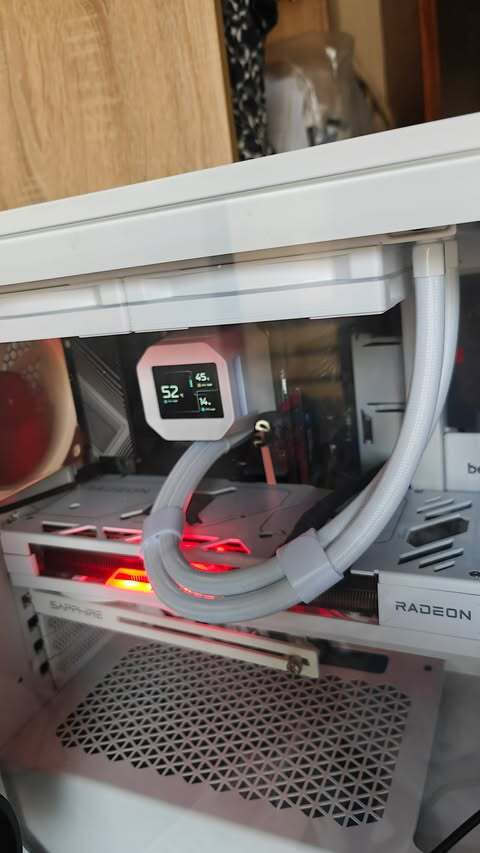
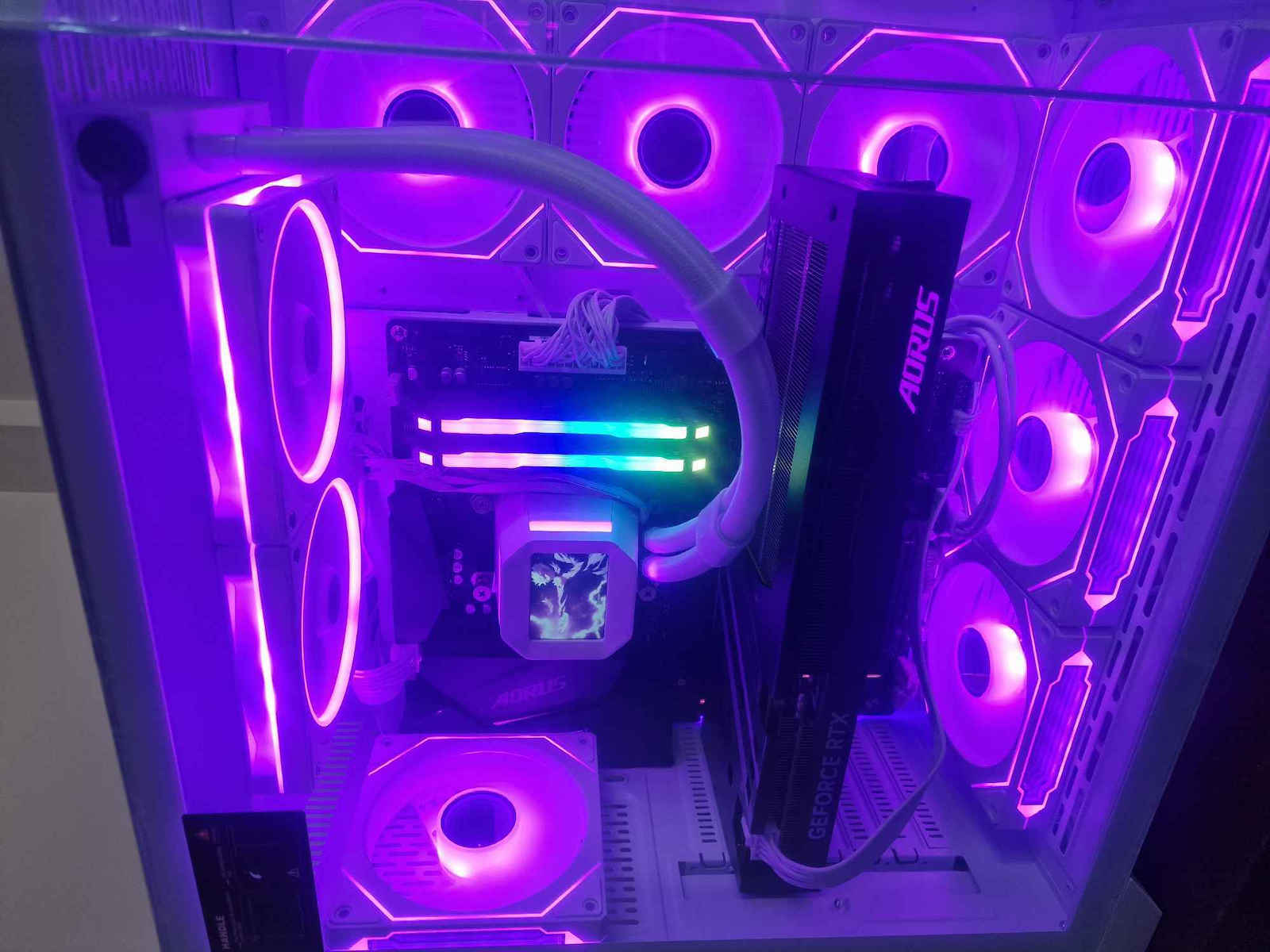
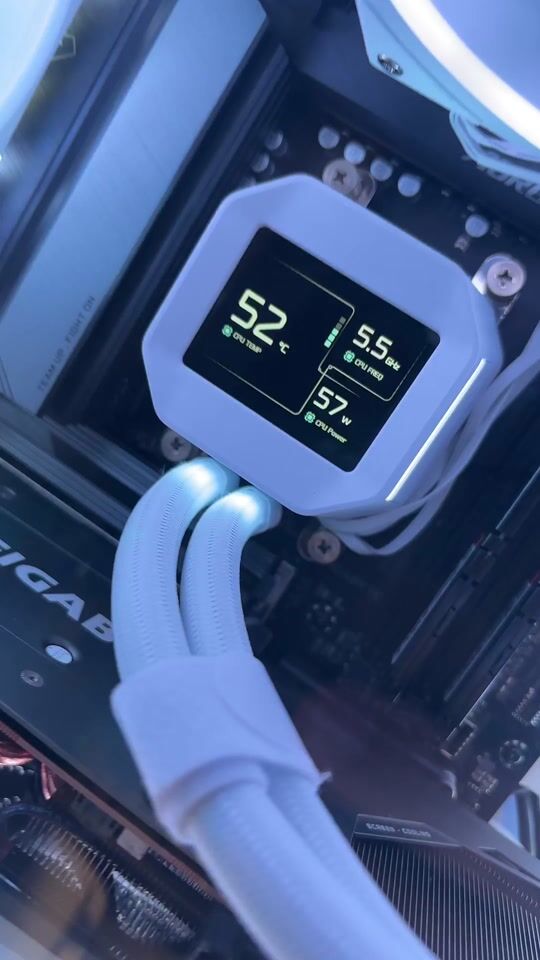
Clean Focus with 2.4" LCD Screen

See more from every angle with the 2.4-inch IPS screen.

The 320 x 240 resolution ensures crisp graphics, while the improved color accuracy and screen stability provide consistent clarity. The soft perimeter lighting adds structured contrast to the minimalist design.

DeepCreative: THE CONTROL CENTER

Gain full control of the LM cooler with the DeepCreative software.

Monitor key system information in real time, customize the screen appearance, or switch to Zen Mode for a distraction-free experience when performance matters most.

The screen brightness and display orientation can also be adjusted to match your system’s layout.

6th Generation Water Pump with PWM Control

The LM240 WH features DeepCool's newly developed 6th generation pump, designed for greater thermal performance and silent operation on today’s high-end processors.

A 3-phase, 6-slot, 4-pole motor with FOC control powers the pump, operating from 2,500 to 3,400 RPM with precision and stability.

Efficiency in Motion

Equipped with long-life hydraulic bearings, the included FL12 SE fans provide stable airflow and reliable cooling during extended use. The distinct lighting effects offer vivid colors at every edge, working in harmony with your system's lighting setup.

  • Fan Speed: 400 ~ 2400 RPM ±10%

  • Airflow: 66.23 CFM

  • Static Pressure: 3.27 mmAq

  • Fan Noise: Less than or equal to 36.07 dB(A)

Manufacturer

See full description

Specifications

Specifications

Main Specifications

Socket
1200, 1700, 1851, AM4, AM5
Radiator Size
Dual Fan
Fan Dimension
120 mm
Colour
White
Tube Length
410 mm
Radiator Material
Aluminum
Lighting
RGB
Pump Display
Yes

Technical Specifications

Fan Speed (max)
2400 rpm
Fan Noise Level (Full Load)
36.07 dB
Air Flow
66.23 cfm
Air Pressure
3.27 mmH₂O: millimeters of water
Bearing Type
Hydraulic

Important information

Specifications are collected from official manufacturer websites. Please verify the specifications before proceeding with your final purchase. If you notice any problem you can report it here.

See all specifications

Reviews (13)

Reviews

  1. 9
  2. 2
  3. 3 stars
    0
  4. 2
  5. 1 star
    0
Review this product

Reviews by our members

  • tzitzibp

    Verified purchase

    Excellent AIO for the money it costs. Installed on a 9600X AM5,
    30-minute stress test, 63°C max with ambient temperature 27°C

    Translated from Greek ·
    Did you find this review helpful?
  • First impressions on 7800x3d are very good, it has reached 61 degrees max, I have no complaints, I haven't installed the RGBs that come with the fans, very beautiful and at a good price

    Translated from Greek ·
    Did you find this review helpful?
  • Pharos
    2
    0 out of 4 members found this review helpful

    Verified purchase

    Good build quality, but when I install the drivers for the screen to work, the PC freezes after a while; I need to uninstall the drivers

    Translated from Greek ·
    Did you find this review helpful?
  • giannis.koufalitakis
    4
    3 out of 3 members found this review helpful

    Verified purchase

    This review is about the colour: Black

    I still don't have a complete picture but it seems decent. I deducted one star because with my previous CoolerMaster Master Liquid 240 Lite water cooler I had idle temperatures around 30°C, while with the DeepCool I'm around 35°C. However, these extra degrees are offset by the wonderful IPS screen that can display images, gifs, videos, or system information. The two-in-one cable for the fans is convenient. Time will show its durability and capabilities.

    Update: I suspect that the higher temperatures I see for the processor might be coming from the power supply, which in my case is located high up and right behind the motherboard and processor, so the power supply's temperature might be affecting the processor's temperature, even though the previous water cooler was in the same case! If this scenario is not the case (which would mean the CoolerMaster was superior in cooling), then maybe it's coming from the IPS screen of the water cooler.

    Translated from Greek ·
    Did you find this review helpful?
  • demisk

    Verified purchase

  • Verified purchase

    This review is about the colour: Black

    after about 2 months it started making an annoying noise

    Translated from Greek ·
    Did you find this review helpful?
  • Verified purchase

    This review is about the colour: Black

  • Verified purchase

  • Verified purchase

    This review is about the colour: Black

  • Verified purchase

    This review is about the colour: Black

  • Verified purchase

    This review is about the colour: Black

  • Verified purchase

    This review is about the colour: Black

  • Verified purchase

  • Excellent AIO for the money it costs. Installed on a 9600X AM5,
    30-minute stress test, 63°C max with ambient temperature 27°C

    Translated from Greek ·
    0
  • First impressions on 7800x3d are very good, it has reached 61 degrees max, I have no complaints, I haven't installed the RGBs that come with the fans, very beautiful and at a good price

    Translated from Greek ·
    0
  • Good build quality, but when I install the drivers for the screen to work, the PC freezes after a while; I need to uninstall the drivers

    Translated from Greek ·
    0
  • I still don't have a complete picture but it seems decent. I deducted one star because with my previous CoolerMaster Master Liquid 240 Lite water cooler I had idle temperatures around 30°C, while with the DeepCool I'm around 35°C. However, these extra degrees are offset by the wonderful IPS screen that can display images, gifs, videos, or system information. The two-in-one cable for the fans is convenient. Time will show its durability and capabilities.

    Update: I suspect that the higher temperatures I see for the processor might be coming from the power supply, which in my case is located high up and right behind the motherboard and processor, so the power supply's temperature might be affecting the processor's temperature, even though the previous water cooler was in the same case! If this scenario is not the case (which would mean the CoolerMaster was superior in cooling), then maybe it's coming from the IPS screen of the water cooler.

    Translated from Greek ·
    3
  • 0
  • See all

Description & Specifications

Manufacturer: DeepCool

Product code: R-LM240-WHDMMC-1

Cooling type: Liquid cooling

Intel compatibility: LGA 1150, LGA 1151, LGA 1155, LGA 1156, LGA 1200, LGA 1700, LGA 1851

AMD compatibility: AM4, AM5

Waterblock: Copper

Cooling tube length: 410 mm

Pump RPM: 2500-3400 RPM

Pump voltage: DC 12 V

Fan size: 120 x 120 x 25 mm x 2 pcs.

RGB: Addressable

Bearing type: Hydraulic bearing

Fan RPM: 400-2400 RPM

Connection: 3 pin ADD-RGB 5V (V-D-NC-G), 4 pin PWM, 9-pin USB 2.0

Airflow: 132.46 CFM

Noise level (Max): 36.07 dBA

Air pressure: 3.27 mmAq

Dimensions: 90 x 80 x 63 mm, 282 x 120 x 27 mm

Color: White

Weight: 1404 g

Other information: New 6th generation pump, Compact 2.4" IPS display with MP4 video playback support for a more dynamic experience, Equipped with hydraulic type bearing, FL12 SE fans provide steady airflow and reliable cooling for long-term use.

Clean Focus with 2.4" LCD Screen

See more from every angle with the 2.4-inch IPS screen.

The 320 x 240 resolution ensures crisp graphics, while the improved color accuracy and screen stability provide consistent clarity. The soft perimeter lighting adds structured contrast to the minimalist design.

DeepCreative: THE CONTROL CENTER

Gain full control of the LM cooler with the DeepCreative software.

Monitor key system information in real time, customize the screen appearance, or switch to Zen Mode for a distraction-free experience when performance matters most.

The screen brightness and display orientation can also be adjusted to match your system’s layout.

6th Generation Water Pump with PWM Control

The LM240 WH features DeepCool's newly developed 6th generation pump, designed for greater thermal performance and silent operation on today’s high-end processors.

A 3-phase, 6-slot, 4-pole motor with FOC control powers the pump, operating from 2,500 to 3,400 RPM with precision and stability.

Efficiency in Motion

Equipped with long-life hydraulic bearings, the included FL12 SE fans provide stable airflow and reliable cooling during extended use. The distinct lighting effects offer vivid colors at every edge, working in harmony with your system's lighting setup.

  • Fan Speed: 400 ~ 2400 RPM ±10%

  • Airflow: 66.23 CFM

  • Static Pressure: 3.27 mmAq

  • Fan Noise: Less than or equal to 36.07 dB(A)

Manufacturer

Main Specifications

Socket
1200, 1700, 1851, AM4, AM5
Radiator Size
Dual Fan
Fan Dimension
120 mm
Colour
White
Tube Length
410 mm
Radiator Material
Aluminum
Lighting
RGB
Pump Display
Yes

Technical Specifications

Fan Speed (max)
2400 rpm
Fan Noise Level (Full Load)
36.07 dB
Air Flow
66.23 cfm
Air Pressure
3.27 mmH₂O: millimeters of water
Bearing Type
Hydraulic

Important information

Specifications are collected from official manufacturer websites. Please verify the specifications before proceeding with your final purchase. If you notice any problem you can report it here.

Reviews (13)

  1. 9
  2. 2
  3. 3 stars
    0
  4. 2
  5. 1 star
    0
Review this product

Reviews by our members

  • tzitzibp

    Verified purchase

    Excellent AIO for the money it costs. Installed on a 9600X AM5,
    30-minute stress test, 63°C max with ambient temperature 27°C

    Translated from Greek ·
    Did you find this review helpful?
  • First impressions on 7800x3d are very good, it has reached 61 degrees max, I have no complaints, I haven't installed the RGBs that come with the fans, very beautiful and at a good price

    Translated from Greek ·
    Did you find this review helpful?
  • Pharos
    2
    0 out of 4 members found this review helpful

    Verified purchase

    Good build quality, but when I install the drivers for the screen to work, the PC freezes after a while; I need to uninstall the drivers

    Translated from Greek ·
    Did you find this review helpful?
  • giannis.koufalitakis
    4
    3 out of 3 members found this review helpful

    Verified purchase

    This review is about the colour: Black

    I still don't have a complete picture but it seems decent. I deducted one star because with my previous CoolerMaster Master Liquid 240 Lite water cooler I had idle temperatures around 30°C, while with the DeepCool I'm around 35°C. However, these extra degrees are offset by the wonderful IPS screen that can display images, gifs, videos, or system information. The two-in-one cable for the fans is convenient. Time will show its durability and capabilities.

    Update: I suspect that the higher temperatures I see for the processor might be coming from the power supply, which in my case is located high up and right behind the motherboard and processor, so the power supply's temperature might be affecting the processor's temperature, even though the previous water cooler was in the same case! If this scenario is not the case (which would mean the CoolerMaster was superior in cooling), then maybe it's coming from the IPS screen of the water cooler.

    Translated from Greek ·
    Did you find this review helpful?
  • demisk

    Verified purchase

  • Verified purchase

    This review is about the colour: Black

    after about 2 months it started making an annoying noise

    Translated from Greek ·
    Did you find this review helpful?
  • Verified purchase

    This review is about the colour: Black

  • Verified purchase

  • Verified purchase

    This review is about the colour: Black

  • Verified purchase

    This review is about the colour: Black

  • Verified purchase

    This review is about the colour: Black

  • Verified purchase

    This review is about the colour: Black

  • Verified purchase

  • Excellent AIO for the money it costs. Installed on a 9600X AM5,
    30-minute stress test, 63°C max with ambient temperature 27°C

    Translated from Greek ·
    0
  • First impressions on 7800x3d are very good, it has reached 61 degrees max, I have no complaints, I haven't installed the RGBs that come with the fans, very beautiful and at a good price

    Translated from Greek ·
    0
  • Good build quality, but when I install the drivers for the screen to work, the PC freezes after a while; I need to uninstall the drivers

    Translated from Greek ·
    0
  • I still don't have a complete picture but it seems decent. I deducted one star because with my previous CoolerMaster Master Liquid 240 Lite water cooler I had idle temperatures around 30°C, while with the DeepCool I'm around 35°C. However, these extra degrees are offset by the wonderful IPS screen that can display images, gifs, videos, or system information. The two-in-one cable for the fans is convenient. Time will show its durability and capabilities.

    Update: I suspect that the higher temperatures I see for the processor might be coming from the power supply, which in my case is located high up and right behind the motherboard and processor, so the power supply's temperature might be affecting the processor's temperature, even though the previous water cooler was in the same case! If this scenario is not the case (which would mean the CoolerMaster was superior in cooling), then maybe it's coming from the IPS screen of the water cooler.

    Translated from Greek ·
    3
  • 0
  • See all
75,53 €
14,00 €   shipping cost